

2026’da İncelenen En İyi 10 Yapılacaklar Listesi Uygulaması

En İyi Yapılacaklar Listesi Uygulamaları Kısa Listesi


Proje çalışmaları hızla ilerler; zamanınızdan beklentiler de öyle. Birden fazla görevi, teslim tarihini ve güncellemeyi yönetirken ayrıntıların izini kaybetmek kolaydır.
Yapılacaklar listesi uygulamaları ne yapılması gerektiğini, sorumlunun kim olduğunu ve sırada ne bulunduğunu net bir şekilde görmenizi sağlayabilir. Ancak iş akışınıza uygun bir uygulama bulmak her zaman kolay değildir.
Bu makalede, proje yöneticileri için iyi çalışan ve kişisel olarak test ettiğim yapılacaklar listesi uygulamalarını öne çıkaracağım. Odak noktam; gerçek ekip çalışmasını, görevlerin netliğini ve günlük işlerin takibini destekleyen araçlar.
Why Trust Our Software Recommendations
Our team has been testing and reviewing software since 2012. As project managers ourselves, we know how difficult—and important—it is to choose the right software.
For this guide, we evaluated tools using hands-on testing and independent research, scoring tools using our selection criteria. We also draw on insights from industry thought leaders and practicing project management experts.
Our reviews reflect our human editorial judgment, not a sales pitch.
Expert reviewers:
Yapılacaklar Listesi Uygulamaları Karşılaştırma Tablosu
Aşağıdaki tablo, en iyi yapılacaklar listesi uygulaması seçimlerim için fiyatlandırma ayrıntılarını karşılaştırır.
| Tool | Best For | Trial Info | Price | ||
|---|---|---|---|---|---|
| 1 | Best for customizable task organization | Free plan + 14-day trial available | From $9/user/month (billed annually) | Website | |
| 2 | Best for team project collaboration | Free plan + 14-day free trial available | From $10/user/month (billed annually) | Website | |
| 3 | Best for free project planning | Free plan + 14-day trial available | From $2.49/user/month | Website | |
| 4 | Best for Microsoft integrations | Free-forever plan available | Free to use | Website | |
| 5 | Best for comprehensive note-taking | Free plan + 7-day free trial available | From $10/user/month | Website | |
| 6 | Best for personal productivity | Free plan available | From $49.99/year (billed annually) | Website | |
| 7 | Best for visual project tracking | Free plan + 14-day free trial available | From $15/user/month (billed annually) | Website | |
| 8 | Best for simple task management | Free plan + free demo available | From $4.99/user/month (billed annually) | Website | |
| 9 | Best for AI scheduling assistance | Free trial available | From $19/user/month (billed annually) | Website | |
| 10 | Best for stylish task organization | 15-day free trial (Mac only) | From $9.99 | Website |

En İyi Yapılacaklar Listesi Uygulaması İncelemeleri
Aşağıda kısa listeme giren en iyi yapılacaklar listesi uygulamalarının ayrıntılı özetlerini bulabilirsiniz. İncelemelerim, size en uygun olanı bulmanıza yardımcı olmak için her aracın temel özelliklerine, artılarına & eksilerine, entegrasyonlarına ve ideal kullanım alanlarına ayrıntılı bir bakış sunar.

Best for customizable task organization
monday.com is a project management platform with robust task management capabilities. It offers a flexible, visual interface that helps you organize tasks, track progress, and manage priorities, making it suitable for both personal and team to-do list management.
Why I Picked monday.com: I picked monday.com for its ability to combine task organization and collaboration in one platform. You can create personalized workflows, assign tasks, and manage deadlines while keeping everything visible through its visual boards. Its automation options also reduce repetitive work, helping you focus on what matters most. Additionally, monday.com supports team collaboration, making it a great fit for individuals and groups alike.
Standout Features and Integrations
Features include customizable dashboards for a visual overview, Gantt and Kanban views for tracking tasks, automation tools to reduce manual work, and integrated document management.
Integrations include Slack, Gmail, Microsoft Teams, GitLab, Mailchimp, Excel, Outlook, DocuSign, Google Drive, and Trello.
Pros and Cons
Pros:
- Wide range of integrations
- Strong team collaboration tools
- Flexible task organization options
Cons:
- Limited offline accessibility
- Advanced features require learning
New Product Updates from monday AI Workspace
monday AI Workspace Adds Human Approval Routing
monday AI Workspace adds a human-in-the-loop approval block to AI Workflows, sending approval requests and routing workflow paths based on responses. For more information, visit monday AI Workspace's official site.

Nifty
Best for team project collaboration

Nifty streamlines project management and enhances team collaboration. It excels in team project collaboration with its robust tools designed to unify project communication, management, and workflow in one platform.
Why I Picked Nifty:
I selected Nifty for its comprehensive approach to project management, which integrates multiple facets of teamwork into a cohesive environment. It fosters a collaborative atmosphere by providing teams with the tools they need to stay in sync and move projects forward collectively.
Standout features and integrations:
Features include project milestones, task assignment and tracking, document collaboration, and built-in direct messaging.
Integrations include Google Docs, Google Sheets, Google Calendar, Slack, Zoom, Dropbox, GitHub, Trello, Asana, and ClickUp.
Pros and Cons
Pros:
- Integration with popular third-party tools
- Direct messaging for team communication
- All-in-one project management solution
Cons:
- Annual billing may not be flexible for all organizations
- Minimum seat requirement may be prohibitive for smaller teams

Best for free project planning

Freedcamp is a project management application that facilitates team collaboration and organization. It is recognized as the best for free project planning, offering a robust set of tools without cost.
Why I Picked Freedcamp:
I selected Freedcamp for the list as it uniquely combines cost-effectiveness with a comprehensive feature set, making project management accessible to everyone. It provides users with the ability to manage an unlimited number of projects and tasks, crucial for detailed planning, all at no expense.
Standout features and integrations:
Features include task lists, subtasks, Gantt charts, calendar views, and issue tracking, which are essential for managing projects efficiently. The tool also supports file storage and sharing, time tracking, and invoicing.
Integrations include Google Drive, Dropbox, OneDrive, Zapier.
Pros and Cons
Pros:
- Good integration with popular cloud storage services
- Affordable premium plans
- Free version available with essential features
Cons:
- Basic user interface compared to more modern tools
- Limited features on the free plan

Best for Microsoft integrations

Microsoft To Do is a task management application that simplifies task organization. It is best for Microsoft integrations due to its seamless connectivity with Microsoft's suite of products.
Why I Picked Microsoft To Do:
I selected Microsoft To Do for its exceptional integration within the Microsoft ecosystem, which is a standout feature for users who rely on Microsoft applications for personal and professional use. It leverages the existing Microsoft infrastructure to enhance task management and productivity.
Standout features and integrations:
Features include a smart daily planner called My Day, list sharing, subtasks, due dates, and reminders.
Integrations include Microsoft Outlook, Microsoft 365, OneNote, OneDrive, Microsoft Planner, Microsoft Teams, Cortana, Microsoft Power Automate, SharePoint, and Microsoft Launcher.
Pros and Cons
Pros:
- Cross-platform availability
- Direct integration with Outlook and other Microsoft services
- No cost for use with a Microsoft account
Cons:
- Basic task prioritization features
- More limited in features than comprehensive project management tools

Evernote
Best for comprehensive note-taking

Evernote serves as an all-encompassing platform for note-taking and organizing information. It allows users to capture, organize, and share notes from anywhere, enhancing productivity and information retention.
Why I Picked Evernote:
I selected Evernote for the list as it is widely recognized for its comprehensive note-taking capabilities that surpass many other apps in this category. Its distinction lies in the depth and breadth of features that facilitate not just note-taking but also complex information management. It excels at creating a structured and searchable repository for all kinds of notes and documents, which is invaluable for users who require an extensive and detailed archive of their work.
Standout features and integrations:
Features include the ability to capture a variety of content types (text, images, and PDFs), a powerful search engine that can even recognize handwritten notes, document scanning and web clipping for consolidating information from multiple sources.
Integrations include Google Drive, Outlook, Slack, Salesforce, and Microsoft Teams.
Pros and Cons
Pros:
- Offline access to notes on mobile devices
- Integration with popular productivity apps
- Robust note-taking and organizational tools
Cons:
- May be more complex than simpler note-taking apps
- Premium plans can be costly for some users

TickTick
Best for personal productivity

TickTick is a versatile task management app. It's best for personal productivity due to its array of features tailored to individual needs.
Why I Picked TickTick:
I selected TickTick for its intuitive design and functionality that supports personal task management, distinguishing it from other productivity tools. It offers a tailored experience that can be customized to fit the unique habits and preferences of any user, enhancing their efficiency and organization.
Standout features and integrations:
Features include task organization, built-in Pomodoro Timer, habit tracking, and calendar views.
Integrations include Google Calendar, Outlook, and third-party apps through Zapier.
Pros and Cons
Pros:
- Cross-platform synchronization
- Built-in focus timer and habit tracker
- Customizable task management features
Cons:
- No monthly billing option
- Limited customization compared to other tools

Best for visual project tracking

Taskworld is a tool that facilitates team collaboration and project management. It is best for visual project tracking due to its comprehensive visualization capabilities.
Why I Picked Taskworld:
I selected Taskworld for its exceptional visual project tracking features, which set it apart from other to-do list apps. The clarity and detail in its visual representation of tasks enable teams to quickly grasp project status and workflow. It provides valuable visual aids like Kanban boards, timeline views, and shared calendars, which are crucial for managing complex projects and deadlines.
Standout features and integrations:
Features include task management with checklists, project timelines, file management, and direct messaging. These tools are crucial for maintaining project organization and ensuring effective team communication.
Integrations include Google Calendar, Google Drive, Dropbox, Box, Outlook, Slack, and Zapier.
Pros and Cons
Pros:
- Effective task feedback system
- Integrated analytics and reporting tools
- Visual project tracking with interactive timelines
Cons:
- May have a steeper learning curve for new users due to its extensive features
- Higher price point compared to basic task management tools

Any.do
Best for simple task management
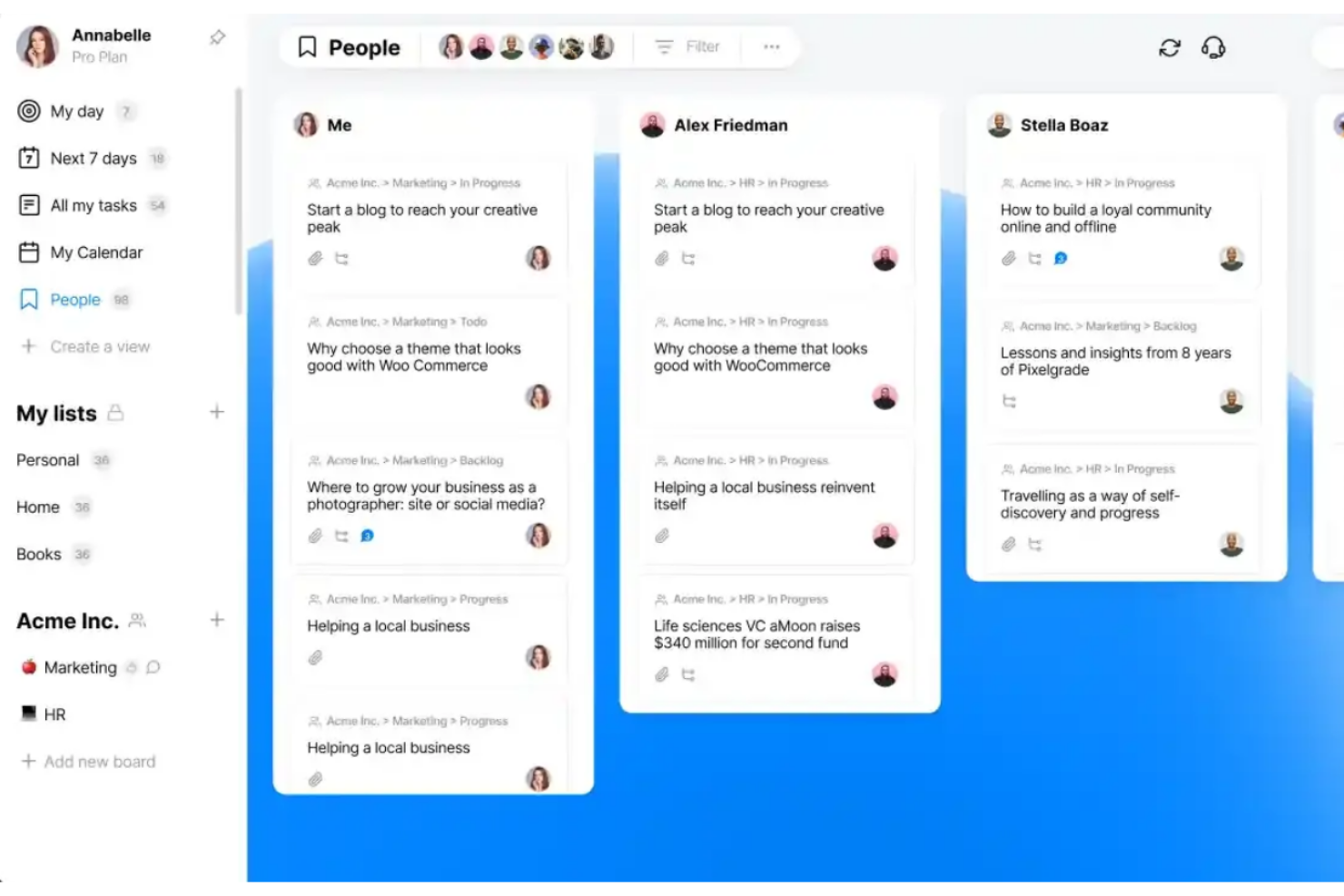
Any.do is a task management app designed to help you organize daily tasks. It stands out as the best for simple task management due to its intuitive interface and straightforward functionality.
Why I Picked Any.do:
I chose Any.do for this list because of its simplicity and effectiveness in managing daily tasks. What makes it different from other task management apps is its focus on ease of use and minimalistic design, which allows for quick task entry and management without a steep learning curve. It provides all the essential features without overwhelming the user, making it ideal for those who want to stay organized with minimal effort.
Standout features and integrations:
Features include to-do lists, daily planners, calendars, reminders, and the ability to share lists and assign tasks.
Integrations include Slack, Microsoft Teams, Zoom, Google Meet, WhatsApp, Gmail, Google Calendar, Zapier, Jira, Trello, monday.com, ClickUp, Asana, and Todoist.
Pros and Cons
Pros:
- Variety of integrations with other apps
- Cross-platform synchronization
- Intuitive and user-friendly interface
Cons:
- May not be suitable for complex project management needs
- Premium features require an annual subscription

Motion
Best for AI scheduling assistance
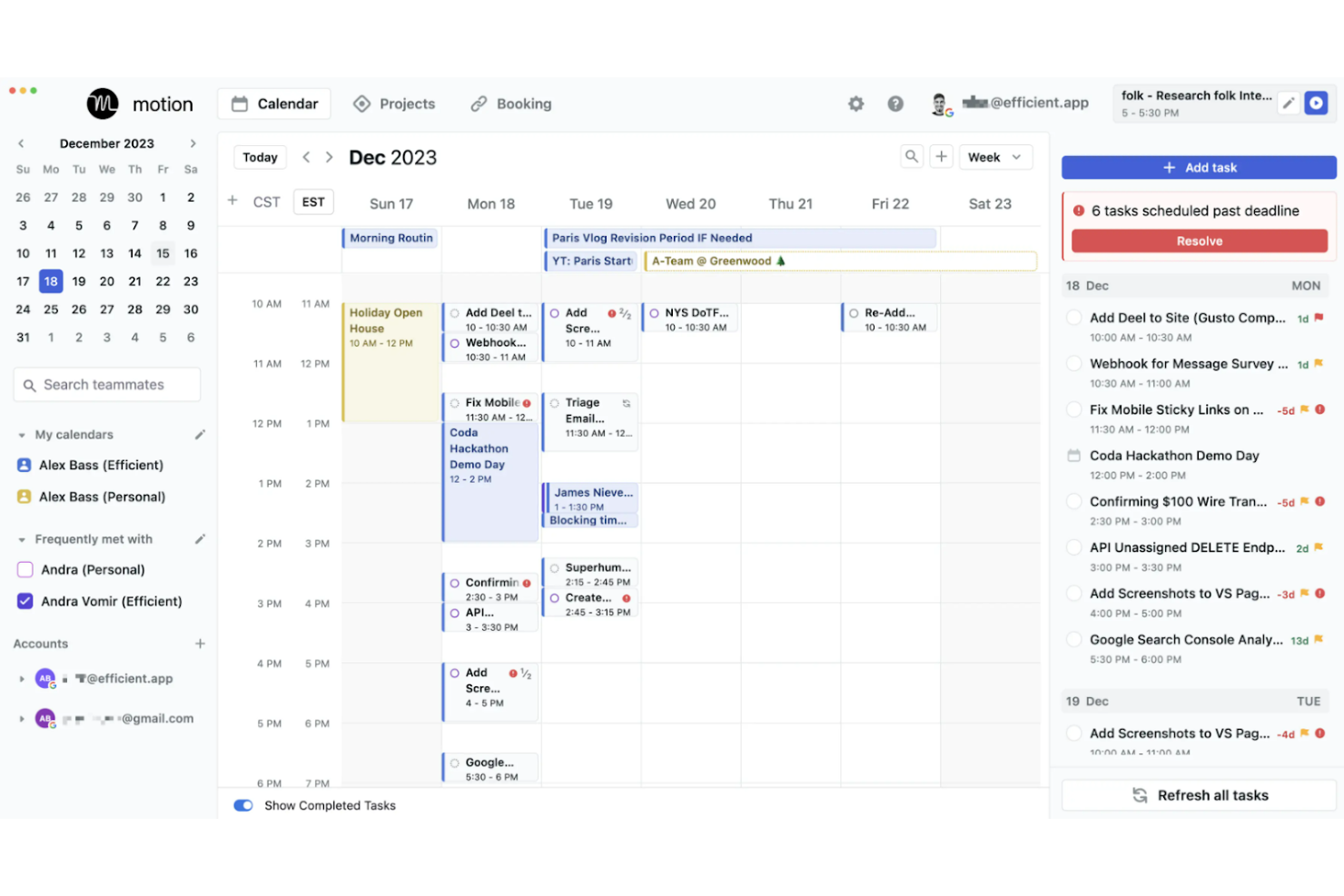
Motion is a tool that combines task management with intelligent scheduling. It is best for AI scheduling assistance because it employs artificial intelligence to optimize users' schedules, aiming to significantly enhance productivity.
Why I Picked Motion:
I selected Motion for its innovative integration of AI into scheduling and task management, which differentiates it from other to-do list apps. Its standout feature is the AI's ability to automate scheduling decisions, which can be a game-changer for users overwhelmed by managing their time. It has a capability to prioritize and allocate time for tasks intelligently, which can be particularly beneficial for users with complex schedules.
Standout features & integrations:
Features include AI-powered scheduling that automatically prioritizes and allocates time for tasks, a unified platform for managing tasks and projects, and a smart meeting scheduler designed to cluster meetings and reduce interruptions.
Motion integrations include Google Calendar, Microsoft Outlook, Zoom, Slack, Trello, Asana, Jira, Salesforce, Dropbox, and Evernote.
Pros and Cons
Pros:
- Analytics to monitor and improve time management
- Integration with major calendars and productivity tools
- AI-driven automatic scheduling and rescheduling
Cons:
- May have a learning curve to fully utilize AI features
- Requires an annual commitment
- High price point compared to basic scheduling tools


Things is a task manager that elegantly combines functionality with style. It's recognized as the best for stylish task organization due to its visually appealing interface that enhances the user's experience.
Why I Picked Things:
I selected Things for its exceptional balance of design and functionality, distinguishing it from other to-do list apps. Its aesthetic appeal is matched by its comprehensive features, making task management not just practical but also enjoyable. I determined Things to be 'Best for stylish task organization' because it excels at providing an engaging user experience without compromising on the powerful task management capabilities users need.
Standout features and integrations:
Features include task creation with natural language input, project organization with headings and checklists, and calendar integration for a comprehensive overview of your schedule. The app also supports Siri for voice commands, allowing for quick task additions and reminders.
Integrations include Calendar and Reminders on macOS and iOS.
Pros and Cons
Pros:
- Effective integration with Apple’s ecosystem
- Efficient organization of tasks into projects
- Elegant user interface
Cons:
- No native integrations with non-Apple platforms
- Limited to Apple devices
Diğer Yapılacaklar Listesi Uygulamaları
Kısa listeme girmeyen ancak yine de göz atmaya değer bazı ek yapılacaklar listesi uygulaması seçenekleri şunlardır:
- Remember The Milk
For intuitive task reminders
- Basecamp
For remote team collaboration
- Wrike
For scalable project management
- Zoho Projects
For comprehensive project planning
- ProofHub
For streamlined team communication
- MeisterTask
For intuitive task boards
- Zenkit
Good for flexible data viewing
- ClickUp
For scalable project management
- Airtable
For database-driven organizing
- Quire
Good for nested task lists


How I Evaluate To Do List Apps
I evaluate every tool on two levels: the baseline features—like task assignment and cross-device sync—every solid option must have, and the differentiators that set the best apart.
Core Functionality (Table Stakes For This List)
When I'm selecting tools for my list, I rank each one on a scale from 0 (does not offer the functionality) to 5 (excels in this area) for each core functionality listed below. Then, I calculate the tool's total score into a percentage. Each tool needs to achieve a minimum total score of 65% to be considered for inclusion.
- Task Creation & Management: I look at how quickly you can go from idea to organized task—whether the tool supports subtasks, attachments, notes, and recurring items for things like weekly sprint prep checklists.
- Due Dates & Reminders: Each tool should let you set deadlines and trigger timely alerts, so a deliverable like a client review deck doesn't silently slip past its due date.
- Prioritization & Organization: I evaluate how you can sort and group tasks—priority flags, tags, folders, or project-based grouping—to separate urgent blockers from backlog items.
- Task Status Tracking: Clear progress visibility matters, so I check whether the tool goes beyond a simple checkbox to offer statuses like "in progress" or "blocked" across a shared task list.
- Collaboration & Assignment: For project teams, I look at how easily you can assign a task to a teammate, leave a comment with context, and keep everyone working from a single shared list.
- Multi-Platform Sync: Real-time sync across web, mobile, and desktop is key—I check that a task added from your phone during a commute shows up instantly when you open your laptop.
Once I have a list of tools that meet the criteria, I consider what sets each platform apart.
Differentiating Factors (What Sets Vendors Apart)
Here's how I compare and contrast different vendors:
Standout Features
Multiple view options—list, board, calendar, timeline—make a real difference when you're managing tasks across project phases. I look for tools that let you switch views without losing context. Templates and automations are worth evaluating closely. A tool that lets you clone a recurring sprint checklist or auto-assign onboarding tasks removes repetitive setup from every cycle. Natural language input is another feature I consider, where typing "finalize report by Friday" creates a task with the correct due date automatically.
Beyond Features
Integration depth matters—I check whether a tool connects natively with platforms like Jira, Slack, and Google Calendar so tasks stay in sync with your broader project workflow. Pricing and scalability are also worth evaluating, especially how a free tier compares to paid team plans as your project group grows. I also consider onboarding ease, since a tool your team won't adopt is a tool that won't work. Low-friction setup with guided walkthroughs helps distributed teams get productive fast without a dedicated training cycle.
Yapılacaklar Listesi Uygulamaları Nasıl Seçilir?
Uzun özellik listeleri ve karmaşık fiyatlandırma yapılarına kendinizi kaptırmanız kolaydır. Benzersiz yazılım seçim süreciniz üzerinde çalışırken odağınızı korumanıza yardımcı olmak için aklınızda bulundurmanız gereken faktörlerin bir kontrol listesini aşağıda bulabilirsiniz:
| Faktör | Dikkat Edilmesi Gerekenler |
| Kullanım Kolaylığı | Ek eğitim gerektirmeden ekibinizin görevleri hızla atamaya ve tamamlamaya başlamasına yardımcı olan sade bir arayüz arayın. |
| Ölçeklenebilirlik | Ekibiniz veya iş yükünüz büyüdükçe uygulamanın daha fazla kullanıcıyı, projeyi ve görevi kaldırabildiğinden emin olun. |
| Entegrasyonlar | Slack, Google Workspace veya proje yönetimi araçları gibi mevcut sistemlerinize bağlanan bir araç seçin. |
| Özelleştirilebilirlik | Aracın görünümlerini, alanlarını veya görev etiketlerini ekibinizin iş akışına ve tercihlerine uyacak şekilde ayarlayıp ayarlayamayacağını kontrol edin. |
| Bütçe | Özellikle birden fazla kullanıcı lisansına veya özelliğe ihtiyacınız olacaksa uygulamanın fiyatına göre yeterli değer sunup sunmadığını kontrol edin. |
| Güvenlik Önlemleri | Verilerinizi korumak için aracın şifreleme, erişim denetimleri ve düzenli yedeklemeler kullandığını doğrulayın. |
| İş Birliği Araçları | İletişimi işle bağlantılı tutmak için görev yorumları, bahsetmeler ve dosya ekleri gibi özellikleri arayın. |
| Mobil Erişim | Siz veya ekibiniz hareket hâlindeyken çalışıyorsa mobil uygulamanın güvenilir ve kullanımı kolay olduğundan emin olun. |
Yapılacaklar Listesi Uygulamalarındaki Trendler
Araştırmam sırasında farklı yapılacaklar listesi uygulaması sağlayıcılarından sayısız ürün güncellemesi, basın bülteni ve sürüm günlüğü topladım. Dikkatle takip ettiğim yeni ortaya çıkan trendlerden bazıları şunlar:
- Yapay Zekâ Görev Önerileri: Bazı araçlar artık yapay zekâyı kullanarak geçmiş kullanıcı davranışlarına göre teslim tarihleri, öncelikler veya atamalar öneriyor. Bu, manuel planlama ihtiyacını azaltmaya ve günlük karar alma süreçlerini iyileştirmeye yardımcı olur.
- Odaklanma ve Zaman Bloklama Modları: Yerleşik odaklanma sayaçları, günlük planlayıcılar ve zaman bloklama özellikleri daha yaygın hâle geliyor. Bunlar, kullanıcıların görevlerini daha düzenli ve daha az dikkat dağınıklığıyla tamamlamasına yardımcı olur.
- Görev İlişkilerini Haritalama: Daha yeni uygulamalar, görsel ana hatlar veya iç içe biçimler kullanarak görevlerin birbirleriyle nasıl ilişkili olduğunu gösterme yöntemleri sunuyor. Bu, bağımlılıkları yönetmeyi ve işlerin birbiriyle nasıl bağlantılı olduğunu anlamayı kolaylaştırır.
- Yinelenen Görevlerde Esneklik: Yinelenen görev ayarları daha akıllı hâle geliyor. Katı tekrarlama seçenekleri yerine kullanıcılar artık gerçek iş akışlarına uyan daha özel ve kullanışlı yinelenme kuralları oluşturabiliyor.
- Doğal Dil Girişi: Birçok araç artık “Raporu gelecek cuma saat 14.00'te gönder” gibi görevleri günlük dille yazmanıza ve bunları otomatik olarak planlanmış bir göreve dönüştürmenize olanak tanıyor. Bu, giriş işlemini hızlandırır ve kullanıcıların odaklanmasını sağlar.
Yapılacaklar Listesi Uygulamaları Nedir?
Yapılacaklar listesi uygulamaları, görev yönetimi için tasarlanmış; bireyler ve ekipler tarafından günlük görevlerini ve projelerini düzenlemek ve önceliklendirmek amacıyla kullanılan dijital araçlardır. Bu uygulamalar, iş yüklerini yöneten profesyonellerden çalışma oturumlarını planlayan öğrencilere kadar çeşitli görevleri takip etmesi gereken herkes için vazgeçilmezdir.
Yapılacaklar listesi uygulamalarının bileşenleri arasında görev girişleri, son tarihler, bildirimler ve çoğu zaman kullanıcıların düzenli kalmasına yardımcı olan kategorilendirme özellikleri bulunur. Ayrıca görev yönetimini platformlar arasında kolaylaştırmak için diğer verimlilik yazılımı araçlarıyla da entegre olabilirler.
Yapılacaklar Listesi Uygulamalarının Özellikleri
Yapılacaklar listesi uygulamalarını seçerken aşağıdaki temel özelliklere dikkat edin:
- Görev oluşturma ve düzenleme: Gün boyunca öncelikleriniz değiştikçe görevleri hızlıca eklemenize, güncellemenize veya silmenize olanak tanır.
- Son tarihler ve hatırlatıcılar: Görevlerin son tarihinden önce uyarılar göndererek programa uymanıza yardımcı olur.
- Görev atama: Görevleri belirli ekip üyelerine devretmenize ve sorumluluğu takip etmenize olanak tanır.
- Proje veya liste düzenleme: Daha iyi görünürlük için görevleri projeye, kategoriye veya listeye göre gruplandırmanızı sağlar.
- Yinelenen görevler: Günlük, haftalık veya özel bir programa göre tekrarlanan görevlerin oluşturulmasını otomatikleştirir.
- Öncelik düzeyleri: En önemli işlere odaklanabilmeniz için görevleri önem derecesine göre işaretlemenizi sağlar.
- Notlar veya açıklamalar: Görevin tamamlanmasını destekleyen bağlamı veya ayrıntıları eklemek için alan sunar.
- Ekler ve dosya desteği: Kolay erişim için ilgili dosyaları doğrudan göreve yüklemenize olanak tanır.
- İlerleme takibi: Görevlerin tamamlanmaya ne kadar yaklaştığını izlemek için görsel veya sayısal bir yöntem sunar.
- Arama ve filtreleme seçenekleri: Anahtar kelimelere, etiketlere veya diğer ölçütlere göre görevleri hızlıca bulmanıza yardımcı olur.
Yapılacaklar Listesi Uygulamalarının Faydaları
Yapılacaklar listesi uygulamalarını kullanmak ekibiniz ve işletmeniz için çeşitli faydalar sağlayabilir. İşte yararlanabileceğiniz birkaç fayda:
- Daha iyi görev görünürlüğü: Herkes neyin, ne zamana kadar ve kimin tarafından yapılması gerektiğini görebilir.
- Daha az kaçırılan teslim tarihi: Son tarihler ve hatırlatıcılar, görevlerin gözden kaçmasını önlemeye yardımcı olur.
- Gelişmiş hesap verebilirlik: Görev atamaları, kimin neden sorumlu olduğunu netleştirir.
- Daha hızlı planlama: Görevleri hızlıca girip düzenleyebilmek, planları en baştan başlamak zorunda kalmadan ayarlamanızı sağlar.
- Daha kolay ilerleme takibi: İşlerin onay işaretleri, durumlar veya ilerleme çubuklarıyla nasıl ilerlediğini görebilirsiniz.
- Daha az bağlam değiştirme: Notlar ve ekler, görevle ilgili her şeyi tek bir yerde tutar.
- Daha akıllı önceliklendirme: Öncelik ayarları, ekibinizin önce etkisi yüksek görevlere odaklanmasına yardımcı olur.
Yapılacaklar Listesi Uygulamalarının Maliyetleri ve Fiyatlandırması
Yapılacaklar listesi uygulamalarını seçmek, mevcut çeşitli fiyatlandırma modellerini ve planları anlamayı gerektirir. Maliyetler özelliklere, ekip büyüklüğüne, eklentilere ve daha fazlasına göre değişir. Aşağıdaki tabloda yaygın planlar, bunların ortalama fiyatları ve yapılacaklar listesi uygulaması çözümlerinde genellikle bulunan özellikler özetlenmiştir:
Yapılacaklar Listesi Uygulamaları İçin Plan Karşılaştırma Tablosu
| Plan Türü | Ortalama Fiyat | Yaygın Özellikler |
| Ücretsiz Uygulama | $0 | Temel görev yönetimi, basit entegrasyonlar, sınırlı iş birliği özellikleri |
| Temel | $1-3 aylık | Geliştirilmiş görev yönetimi, ek entegrasyonlar, bazı iş birliği araçları, temel destek |
| Premium | $4-6 aylık | Gelişmiş görev yönetimi, tam entegrasyonlar, kapsamlı iş birliği araçları, öncelikli destek |
| Kurumsal | $7+ aylık | Özel görev yönetimi çözümleri, kurumsal düzeyde entegrasyonlar, özel destek ve eğitim |
Yapılacaklar Listesi Uygulamaları Hakkında Sıkça Sorulan Sorular
Yapılacaklar listesi uygulamaları hakkında aldığım sıkça sorulan sorulardan bazıları burada yer alıyor.
Bu uygulamalar birden fazla cihaz arasında gerçek zamanlı olarak senkronize olur mu?
Evet, birçok yapılacaklar listesi uygulaması birden fazla cihaz arasında senkronizasyon özellikleri sunar. Todoist, Microsoft To Do ve Any.do gibi uygulamalar gerçek zamanlı olarak senkronize olacak şekilde tasarlanmıştır. Bu sayede görevlerinizi bir cihazda güncelleyebilir ve uygulamanın yüklü olduğu diğer tüm cihazlarda değişiklikleri görebilirsiniz.
\u0026nbsp;
Ücretsiz yapılacaklar listesi uygulamaları var mı?
Bazı ücretsiz yapılacaklar listesi uygulamaları hiçbir ücret ödemeden kapsamlı özellikler sunar. Microsoft To Do, Google Tasks ve Apple Reminders tamamen ücretsizdir. Any.do (bkz. \u003ca href=\u0022https://thedigitalprojectmanager.com/tools/anydo-pricing/\u0022\u003eAny.do fiyatlandırması burada\u003c/a\u003e) ve \u003ca href=\u0022https://thedigitalprojectmanager.com/tools/todoist-pricing/\u0022\u003eTodoist ücretsiz sürümler sunar\u003c/a\u003e gibi diğer uygulamalar, temel işlevleri ücretsiz olarak sunar ve ek özellikler için premium sürüme yükseltme seçeneği sağlar.
Yapılacaklar listesi uygulamaları üretkenliği artırmaya nasıl yardımcı olur?
Yapılacaklar listesi uygulamaları, kullanıcıların görevleri düzenlemesine, öncelikleri ve son tarihleri belirlemesine ve ilerlemeyi takip etmesine olanak tanıyarak üretkenliği artırmaya yardımcı olur. Hatırlatıcılar, yinelenen görevler ve kategorilendirme gibi özellikler kullanıcıların odaklanmasına ve ilerlemeyi sürdürmesine yardımcı olur. Listeleri paylaşma ve başkalarıyla iş birliği yapma olanağı da özellikle ekip ortamlarında üretkenliği artırır.
Yapılacaklar listesi uygulamaları iş birliği özellikleri sunuyor mu?
Birçok yapılacaklar listesi uygulaması, birden fazla kullanıcının ortak görevler ve projeler üzerinde çalışmasına olanak tanıyan iş birliği özellikleriyle birlikte gelir. Asana, Todoist ve Trello gibi uygulamalar kullanıcıların görevleri başkalarına atamasına, ekip projeleri oluşturmasına, yorumlar aracılığıyla iletişim kurmasına ve birbirlerinin ilerlemesini takip etmesine olanak tanır.
Yapılacaklar listesi uygulamalarını diğer araçlar ve hizmetlerle entegre edebilir miyim?
Evet, çoğu yapılacaklar listesi uygulaması çeşitli diğer araç ve hizmetlerle entegre edilebilir. Örneğin Todoist; Gmail, Google Calendar ve Slack dahil yüzlerce uygulamayla entegre olur. Trello, Dropbox, Evernote ve daha fazlası gibi hizmetlerle entegrasyona olanak tanıyan Power-Ups özelliklerini sunar. Bu entegrasyonlar iş akışlarını kolaylaştırmaya, görevleri ve bilgileri merkezileştirmeye yardımcı olur. Yapılacaklar listesi uygulamalarını seçmek, mevcut çeşitli fiyatlandırma modellerinin ve planların anlaşılmasını gerektirir. Maliyetler özelliklere, ekip büyüklüğüne, eklentilere ve daha fazlasına göre değişir. Aşağıdaki tabloda yaygın planlar, ortalama fiyatları ve yapılacaklar listesi uygulaması çözümlerinde genellikle bulunan özellikler özetlenmiştir:
Yapılacaklar listesi uygulamalarında hangi güvenlik önlemleri bulunur?
Yapılacaklar listesi uygulamaları genellikle kullanıcı verilerini korumak için çeşitli güvenlik önlemleri kullanır. Bunlar arasında veri şifreleme, güvenli veri aktarım protokolleri ve düzenli güvenlik denetimleri bulunur. Bazı uygulamalar ek bir güvenlik katmanı olarak iki faktörlü kimlik doğrulama (2FA) da sunar. Verilerinizin yeterince korunduğundan emin olmak için bir uygulamayı kullanmadan önce uygulamanın güvenlik politikalarını incelemeniz önemlidir.
Yapılacaklar listesi uygulamaları ne ölçüde özelleştirilebilir?
Özelleştirilebilirlik, farklı yapılacaklar listesi uygulamaları arasında değişiklik gösterir. Todoist ve Trello gibi uygulamalar yüksek düzeyde özelleştirme sunarak kullanıcıların özel etiketler, filtreler ve iş akışları oluşturmasına olanak tanır. Diğer uygulamalar temalar, renk kodlama ve bildirim ayarlarını değiştirme olanağı sunabilir. Özelleştirme düzeyi, uygulamanın bireysel bir kullanıcının veya ekibin iş akışına ne kadar iyi uyduğunu önemli ölçüde etkileyebilir.