



GQueues Vs. Todoist: Comparison and Expert Reviews for 2026



A packed task list can quickly turn into a mess when priorities, deadlines, and team updates live in different places. Finding a system that keeps everything clear and manageable can make a noticeable difference in how smoothly your day runs.
Trying to pick between GQueues and Todoist? You want task management software that helps you stay on top of projects, keeps your team organized, and doesn’t waste your time with confusing features. GQueues and Todoist both promise simpler ways to manage your lists, but how do they actually compare on what matters most to you?
In this article, you’ll get a side-by-side review of each tool’s pros, cons, pricing, use cases, security, and everyday usability. I’ll help you figure out which software is the better fit for the way you like to work.
GQueues vs. Todoist: An Overview
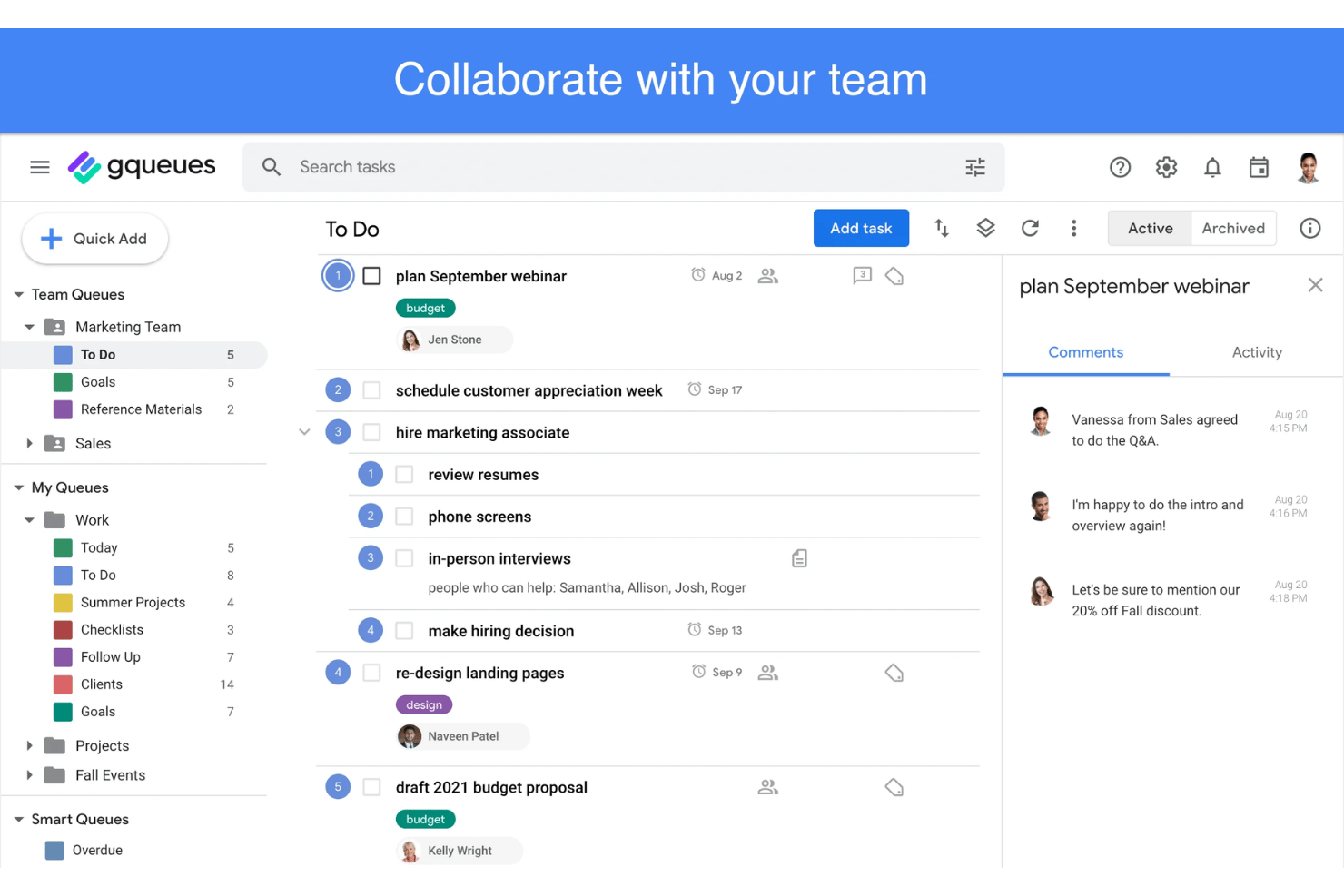
GQueues
Todoist


Why Trust Our Software Recommendations
Our team has been testing and reviewing software since 2012. As project managers ourselves, we know how difficult—and important—it is to choose the right software.
For this guide, we evaluated tools using hands-on testing and independent research, scoring tools using our selection criteria. We also draw on insights from industry thought leaders and practicing project management experts.
Our reviews reflect our human editorial judgment, not a sales pitch.
Expert reviewers:
GQueues vs. Todoist Pricing Comparison
| GQueues | Todoist | |
|---|---|---|
| Free Trial | 14-day free trial | Free plan available |
| Pricing | From $3/user/month (billed annually) | From $5/user/month (billed annually) |
GQueues Vs. Todoist Pricing & Hidden Costs
Both tools run three tiers, but they slice them differently. GQueues divides plans by who is using the product: a free Lite version, a paid solo plan, and a paid team plan that carries the collaboration and admin side. Billing is annual only and priced per license, with volume discounts once you pass a handful of seats and a reduced rate for nonprofits. Todoist divides plans by how heavily you use it: a free Beginner tier, a paid Pro tier for individuals who outgrow its caps, and a paid Business tier that brings in team workspaces and admin roles, billed monthly or yearly. The practical difference is when you start paying. GQueues expects a paid plan early, since mobile access and the Google integrations sit behind one, while Todoist’s free tier can run indefinitely and instead caps projects, uploads, filters, and history until you upgrade.
To choose the right tool, map out what features you truly need both now and as your processes evolve. List out integration requirements and check whether collaboration, automation, or admin capabilities are included at the base price, or whether you’ll need to upgrade quickly as your team grows. Confirming user caps, storage limits, and any add-ons your workflow depends on helps you spot costs before you commit.
GQueues vs. Todoist Feature Comparison
| GQueues | Todoist | |
|---|---|---|
| API | ||
| Calendar Management | ||
| Collaboration Support | ||
| Dashboards | ||
| Data Export | ||
| Data Import | ||
| External Integrations | ||
| File Sharing | ||
| Gantt Charts | ||
| Kanban Boards | ||
| Multi-User | ||
| Notifications | ||
| Project Management | ||
| Task Scheduling/Tracking | ||
| Time Management |
GQueues Vs. Todoist Integrations
| Integration | GQueues | Todoist |
|---|---|---|
| Google Calendar | ✅ | ✅ |
| Gmail | ✅ | ✅ |
| Google Drive | ✅ | ❌ |
| Slack | ❌ | ✅ |
| Microsoft Teams | ❌ | ✅ |
| Outlook | ❌ | ✅ |
| Dropbox | ❌ | ❌ |
| API | ✅ | ✅ |
| Zapier | ❌ | ✅ |
GQueues is strongest for teams working in Google Workspace, while Todoist offers a broader integration ecosystem that includes Slack, Microsoft Teams, Outlook, and Zapier. GQueues now also provides a public API, giving teams more flexibility to build custom connections when a native integration is not available.
GQueues Vs. Todoist Security, Compliance & Reliability
| Factor | GQueues | Todoist |
|---|---|---|
| Data Encryption | Encrypted in transit over HTTPS and at rest in Google Cloud, with file attachments left in your own Drive. | TLS 1.2 and 1.3 in transit, encrypted at rest on AWS, with redundant automatic backups. |
| Account Security | Google sign-in only, so no password is ever stored and your Google account controls access. | Email and password or Google login, plus optional two-factor authentication with recovery codes. |
| Regulatory Compliance | GDPR compliant, with SOC 2 still on the roadmap rather than in place. | GDPR compliant and SOC 2 Type II certified, with data hosted on AWS. |
| Uptime Reliability | Runs on Google App Engine, with data mirrored across US data centers and automatic failover. | Publishes a live public status page so incidents and recovery are easy to follow. |
Both tools cover the basics, but the compliance picture is not even: Todoist is SOC 2 Type II certified while GQueues has SOC 2 on its roadmap, and only Todoist offers two-factor authentication of its own. GQueues answers that by never storing a password and leaving your files in your own Drive, which suits Workspace teams that already treat Google as the security boundary. If a procurement questionnaire is coming, Todoist is the easier one to get signed off.
GQueues Vs. Todoist Ease of Use
| Factor | GQueues | Todoist |
|---|---|---|
| User Interface | Clean, Google-inspired layout that feels familiar to anyone using Google apps. | Minimalist design and natural language quick add keep capture fast and clear. |
| Onboarding | Google sign-in, one-click integrations, and an importable template gallery make initial setup straightforward. | Super quick onboarding, in-app tips, and ready-made templates get you started right away. |
| Learning Curve | Feels intuitive for Google users, but can take an extra step for non-Google users. | Extremely low learning curve; most users are up and running in minutes. |
| Mobile Experience | Android and iOS apps add widgets, voice capture, and a share sheet, though mobile needs a paid plan. | Mobile app is quick and cleanly designed, and edits made offline sync once you reconnect. |
| Customer Support | Responsive help over chat, plus a detailed help center and a video library. | Prompt support and lots of community-driven knowledge for quick answers. |
Todoist is the fastest tool to master thanks to its simple design, while GQueues feels instantly comfortable for anyone working with Google Workspace. In my opinion, Todoist is best when you want frictionless productivity, while GQueues shines if tightly linking tasks to your Google apps is what matters to you.
GQueues vs Todoist: Pros & Cons
GQueues
- Syncs tasks and due dates directly to Google Calendar
- Lets users assign and collaborate on shared lists
- Offers built-in email task creation from Gmail
- Lacks built-in time tracking or workload management tools
- Doesn’t offer Gantt chart or timeline views
- Loses integration depth for teams outside the Google ecosystem
Todoist
- Todoist offers cross-platform support with reliable syncing, ensuring your tasks are accessible everywhere.
- Its user-friendly interface simplifies task management with features like natural language input and productivity reports.
- The tool provides strong collaboration capabilities, making it easy to share projects and communicate with your team.
- Some advanced features are limited to paid tiers, which might not suit users looking for extensive free options.
- Users may find Todoist lacks some of the advanced features that competitors provide.
- The app could be seen as offering limited customization for power users seeking more tailored task management solutions.
Best Use Cases for GQueues and Todoist
GQueues
- Small Businesses Lightweight interface, easy team sharing, and Google integration make it cost-effective and practical for smaller operations.
- Education Teams Task organization and discounted pricing for schools and universities let educators manage assignments in line with academic calendars.
- Nonprofits Discounted plans and privacy controls help nonprofits manage distributed teams and projects without complex software overhead.
- Google-Centric Departments Marketing, HR, or admin teams using Google Workspace benefit from direct integrations and easy list management.
- Remote-First Startups Simple task tracking, mobile apps, and web access support distributed teams who prioritize usability.
- Freelancers Solopreneurs gain intuitive task management and calendar syncing without excess features they won’t use.
Todoist
- Freelancers Todoist’s simple interface helps you keep track of multiple projects without getting overwhelmed.
- Small Businesses The tool’s collaboration features let your team share tasks and stay aligned easily.
- Remote Teams With cross-platform access, your distributed team can manage tasks from anywhere.
- Marketing Departments Todoist’s task-sharing capabilities ensure your team stays on top of campaigns.
- Project Coordinators Natural language input simplifies adding and organizing tasks, saving you time.
- Education Professionals Teachers can organize classes and assignments effortlessly with Todoist’s intuitive task lists.
Who Should Use GQueues, And Who Should Use Todoist?
GQueues is hands-down the best fit for teams and professionals who live and breathe Google Workspace, especially if you need easy task management tightly woven into that ecosystem. It lands best with micro to mid-sized organizations, especially professional services firms, schools, and nonprofits. If your work is deadline-driven, collaborative, and requires seamless integration with Gmail and Google Calendar, GQueues is the obvious choice. Teams standardized on Microsoft 365 should skip it, because the Google connections carrying most of its value simply don’t apply. Todoist, on the other hand, is a contender for anyone looking for a simple, flexible to-do list app that plays nicely with a broader range of platforms. If you value fast setup, a free tier to test on, and integrations with tools like Slack, Outlook, and Microsoft Teams, you’ll probably love working in Todoist.
Differences Between GQueues and Todoist
| GQueues | Todoist | |
|---|---|---|
| Automation | Light on automation beyond recurring tasks and Google actions, and a public API. | Zapier, Make, and IFTTT, plus custom filters and an open API. |
| Google Integration | Deep and native, with a Gmail add-on and real-time two-way Google Calendar sync. | Calendar events flow in from Google and tasks can sync back, but Gmail access runs through a browser extension. |
| Unique Features | Smart Queues, snooze, a command palette, publishing a queue to the web, and Google Tasks import. | Natural language input, saved filters, a template gallery, and productivity tracking (Karma). |
| User Interface | Google-style layout tailored for Workspace users. | Clean, minimalist UI designed for fast, cross-platform task entry. |
| Read GQueues ReviewOpens new window | Read Todoist ReviewOpens new window |
Similarities Between GQueues and Todoist
| Collaboration | Each allows you to share tasks, assign work, comment on individual items, and manage shared project spaces for groups or teams. |
|---|---|
| Integration Options | Both connect natively to Google Calendar and Gmail, so tasks and mail stay linked whichever one you pick. |
| Mobile Access | Each provides well-reviewed Android and iOS apps with notifications and full task management, so your lists travel with you. |
| Reminders & Due Dates | Both let you set reminders, recurring deadlines, and notifications to keep tasks on track and never miss a deadline. |
| Task Organization | Both use lists or projects, tags or labels, and subtasks to structure work your own way, with sorting, filtering, and a board view in each. |
| Read GQueues ReviewOpens new window Read Todoist ReviewOpens new window | |