

2026 İçin İncelenen En İyi 10 Proje Görev Yönetimi Yazılımı

10 En İyi Proje Görev Yönetimi Yazılımları Listesi


Projelerinizdeki görevleri daha etkili bir şekilde düzenlemek, önceliklendirmek ve takip etmek istiyorsunuz; ancak hangi aracın sizin için en iyisi olacağını belirlemeniz gerekiyor. Sonuçta, piyasada çok sayıda farklı proje görev yönetimi çözümü bulunduğundan, hangisinin sizin için doğru olduğunu bulmak zor olabilir. Yardımcı olabilirim!
Bu yazıda, piyasadaki en iyi proje görev yönetimi yazılımlarına ilişkin seçimlerim de dahil olmak üzere, çeşitli projelerde düzinelerce farklı görev yönetimi aracını kullanarak edindiğim kişisel deneyimleri paylaşarak seçiminizi kolaylaştıracağım.
Why Trust Our Software Recommendations
Our team has been testing and reviewing software since 2012. As project managers ourselves, we know how difficult—and important—it is to choose the right software.
For this guide, we evaluated tools using hands-on testing and independent research, scoring tools using our selection criteria. We also draw on insights from industry thought leaders and practicing project management experts.
Our reviews reflect our human editorial judgment, not a sales pitch.
Expert reviewers:
Proje Görev Yönetimi Yazılımları Karşılaştırma Tablosu
Genel bakışlarda az önce ele aldığımız araçları karşılaştırmak için kullanabileceğiniz tablo burada:
| Tool | Best For | Trial Info | Price | ||
|---|---|---|---|---|---|
| 1 | Best all-in-one work management solution for agencies | 14-day free trial | From $10/user/month (billed annually) | Website | |
| 2 | Project task management software with built-in project management templates | Free plan + 14-day trial + demo available | From $10/user/month (billed annually) | Website | |
| 3 | Best for visual tracking with Kanban and Gantt | Free plan + 14-day trial available | From $9/user/month (billed annually) | Website | |
| 4 | Best with deep Google Workspace integration | 14-day free trial | From $3/user/month (billed annually) | Website | |
| 5 | Best for no-code workflows at enterprise scale | Not available | Pricing upon request | Website | |
| 6 | Best for breaking down complex tasks | Free plan + 30-day free trial available | From $7.65/user/month (billed annually) | Website | |
| 7 | Best for managing connected projects within a portfolio | 14-day free trial | From $10/user/month (billed annually) | Website | |
| 8 | Best for seamless collaboration and visualization for effective project management | Free plan + 14-day trial available | From $8/user/month (billed annually) | Website | |
| 9 | Project task management software for prioritizing tasks | Free demo available | Pricing upon request | Website | |
| 10 | Best for brainstorming, ideation, and task management in one | Free plan + 14-day free trial available | From €17.50/user/month | Website |


En İyi Proje Görev Yönetimi Yazılımları İncelemeleri
Her bir araç ve sundukları özelliklerle ilgili tüm ayrıntılar burada.

Best all-in-one work management solution for agencies

Productive is an all-in-one work management tool that caters to the needs of agencies. It provides tools to plan and manage projects, break down and assign tasks, track employee time, manage invoicing and billing, and more. When you plan your team's projects, you can assign tasks to specific team members, set deadlines, and then track the task's progress as your team moves forward.
Because it has built-in resource management, you can also assign tasks based on employee capacity and skills. Team members track their time right in the system, giving you clear gauges of how long certain tasks take, thereby assigning work more effectively. The time tracking tool also connects with the billing capabilities, and lets employees track both their billable and non-billable working hours.
This software integrates with several other popular work tools, including Dropbox, Exact, Jira, Outlook, Microsoft Calendar, Slack, QuickBooks, and Xero. A Zapier integration is also available, which can unlock more integrations with a paid account.
New Product Updates from Productive
Productive Adds Email and Calendar Integrations for Agents
Productive adds Gmail, Outlook, Google Calendar, and Outlook Calendar connectors for its AI agents. These integrations let agents manage emails and create calendar events directly within Productive. For more information, visit Productive’s official site.

Wrike
Project task management software with built-in project management templates

Wrike is a work management platform with dashboards, workflows, and request forms you can use to complete tasks and projects. It has Gantt charts and Kanban boards you can use to visually assess your team’s progress and help you determine if you can meet a deadline or if you need more time from your client. Wrike has a file-sharing functionality that allows project members to collaborate to beat project due dates.
Large projects take time, and they are easier to manage if you break them down into phases. If you need project task management software with built-in and customizable templates, then Wrike should be on top of your list. Wrike lets you create multiple phases for a project and further break down phases into tasks to make them easier to complete. You can also assign milestones or due dates for each phase, so assignees know exactly how much time they have to complete a task.
Wrike integrates with other time management and work management tools like Microsoft OneDrive, MS Excel, MS Project, Microsoft Office 365, Dropbox, etc.
Wrike has a free version and a free trial for paid plans.
New Product Updates from Wrike

Wrike Redesigns Workspace Search With New Filters
Wrike introduces a redesigned Workspace Search interface with recent search shortcuts, item type and location filters, and parent-task context. These updates help users find relevant work items and navigate search results efficiently. For more information, visit Wrike’s official site.

Best for visual tracking with Kanban and Gantt
monday AI Workspace is a work management platform that combines AI-powered task tracking, multiple project views, workflow automation, and cross-team collaboration tools in a single configurable workspace.
Who Is monday AI Workspace Best For?
It's a strong fit for mid-sized to enterprise teams that manage multiple concurrent projects across departments and need one shared workspace to keep everyone aligned.
Why I Picked monday AI Workspace
monday AI Workspace earns its spot as one of the best on my shortlist because of how its visual project tracking actually works in practice. I can switch a board from Kanban to Gantt view in seconds, which means my team can shift between sprint-style task flow and timeline planning without rebuilding anything. The dependency tracking in Gantt view also flags scheduling conflicts before they become a problem, which I find valuable when managing overlapping workstreams.
monday AI Workspace Key Features
- AI-powered dashboards: Users can build and customize real-time dashboards that pull data from any board for detailed project tracking.
- Automated workflow builder: Teams can create rule-based automations to reduce manual updates and repetitive admin work across projects.
- Portfolio management: Roll up multiple projects into portfolios with cross-project reporting and strategic goal tracking for leadership.
- Native time tracking: Log hours directly on tasks, track billable and non-billable work, and generate detailed timesheet reports.
monday AI Workspace Integrations
monday AI Workspace offers hundreds of native integrations through its built-in integrations and marketplace, including Slack, Google Workspace, Microsoft 365, Jira, Dropbox, Zoom, HubSpot, Salesforce, GitHub, and Outlook. It also supports Zapier and provides an API for custom integrations.
Pros and Cons
Pros:
- Portfolio-level dashboards across multiple projects
- AI-generated task summaries and status updates
- Switchable Kanban and Gantt project views
Cons:
- Reporting depth requires higher-tier subscriptions
- Automations are capped on lower-tier plans
New Product Updates from monday AI Workspace
monday AI Workspace Adds Human Approval Routing
monday AI Workspace adds a human-in-the-loop approval block to AI Workflows, sending approval requests and routing workflow paths based on responses. For more information, visit monday AI Workspace's official site.

GQueues
Best with deep Google Workspace integration
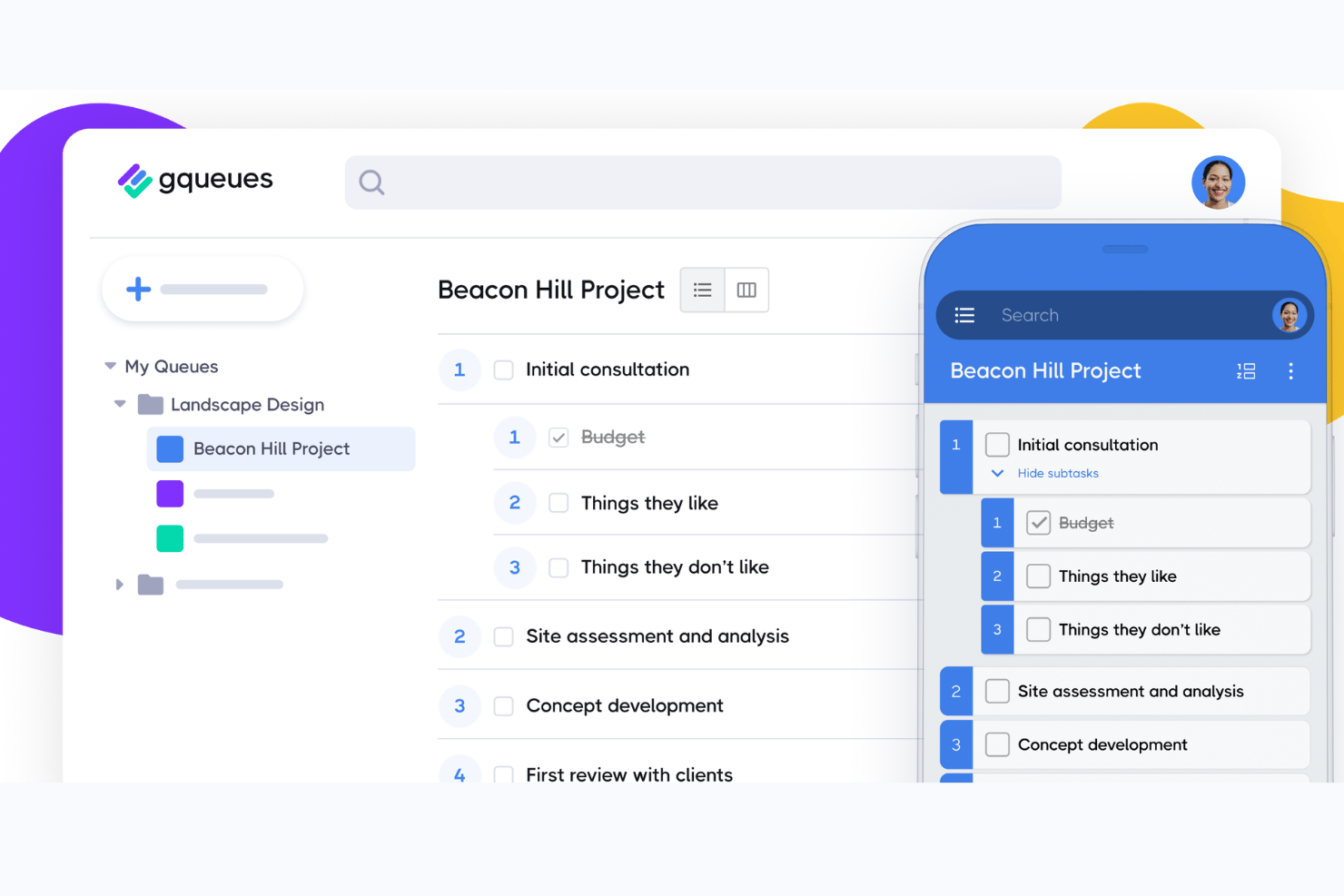
GQueues is a task management tool built natively for Google Workspace, combining task creation, assignments, subtasks, Kanban boards, and two-way syncing across Google Calendar, Gmail, and Drive.
Who Is GQueues Best For?
GQueues fits small-to-mid-sized teams that run their work entirely inside Google Workspace and want task management without leaving that ecosystem.
Why I Picked GQueues
I've included GQueues in my top picks because its Google Workspace integration goes deeper than any other task manager I've used. Creating a task directly from a Gmail thread, having it appear instantly in Google Calendar, and attaching a Drive file without leaving the task view is something I rely on daily. The 2-way Calendar sync is particularly useful: tasks with due dates become real calendar events, not just app-side reminders.
GQueues Key Features
- Smart Queues: Save custom task filters for instant access to prioritized, tagged, or scheduled work.
- Unlimited subtasks: Create detailed task breakdowns with unlimited nested subtasks for complex workflows.
- Shared queues: Collaborate with your team on shared task lists, each with its own set of permissions.
- Mobile apps: Access and manage all your tasks on both Android and iOS devices with full feature support.
GQueues Integrations
GQueues offers native integrations with Google Calendar, Gmail, Google Drive, Google Contacts, Google Chrome, and Google Workspace Marketplace.
Pros and Cons
Pros:
- Reliable recurring task scheduling built in
- Tasks created directly from Gmail threads
- Deep two-way Google Calendar sync
Cons:
- Reporting features are minimal and basic
- No Gantt or timeline view available

Best for no-code workflows at enterprise scale
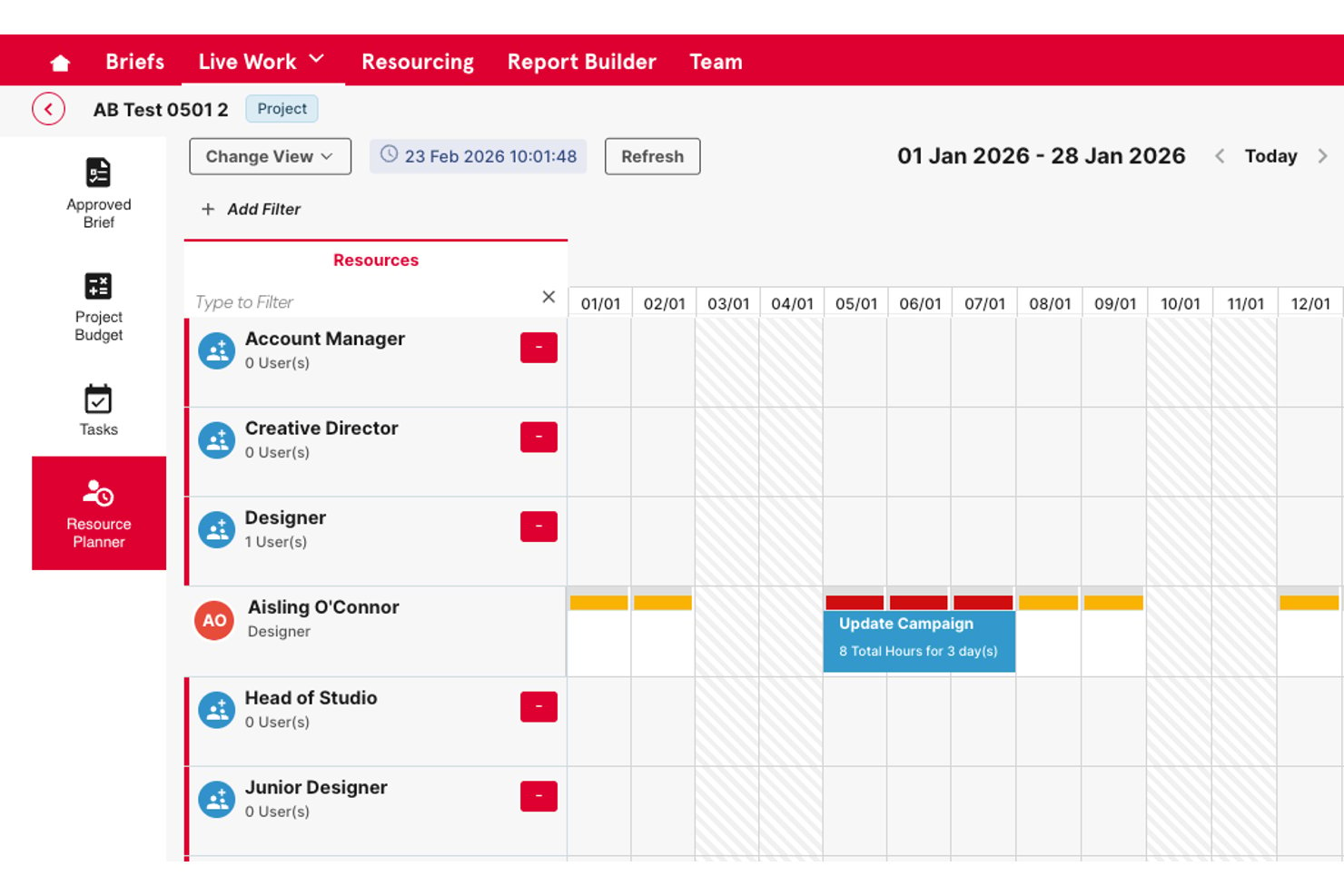
Screendragon is an enterprise work management platform that combines no-code workflow building, task and project tracking, resource planning, approval automation, and operational reporting in a single configurable system.
Who Is Screendragon Best For?
Screendragon is a strong fit for enterprise marketing and creative operations teams that manage high-volume, multi-stakeholder workflows at scale.
Why I Picked Screendragon
I picked Screendragon as one of the best because its no-code workflow builder lets enterprise teams design complex, multi-step approval and review processes without writing a single line of code. I particularly like how dynamic forms connect directly to automated workflow sequences, replacing the scattered email chains that typically slow creative and marketing operations down. The AI Hub takes it further, letting my team deploy AI agents directly inside live workflows to handle routing, compliance checks, and approvals at scale.
Screendragon Key Features
- Resource and workload planning: Lets you allocate resources, track capacity, and balance team workloads across projects.
- Portfolio management dashboards: Provides executive-level visibility with cross-project rollups and KPI tracking.
- Custom intake forms: Converts work requests into structured tasks using configurable forms tailored to each workflow.
- Advanced permissions and audit trails: Supports granular, role-based access controls and maintains detailed records of every change.
Screendragon Integrations
Screendragon offers native integrations with Google Drive, Box, OneDrive, Egnyte, Adobe Creative Cloud, Jira, Trello, Salesforce, Microsoft Dynamics 365, and Microsoft 365. An API is available for custom integrations.
Pros and Cons
Pros:
- Built-in approval routing with automated review stages
- Role-based permissions across large teams
- No-code workflow builder handles complex processes
Cons:
- Steeper setup process than lighter task tools
- Reporting customization requires initial configuration

Quire
Best for breaking down complex tasks

Quire is a project task management software that helps teams plan, organize, and track work in a structured way. It supports nested task lists, kanban boards, and timeline views to manage projects from start to finish.
One reason I picked Quire is its nested task structure, which lets you break down complex projects into smaller, manageable pieces. You can create tasks and subtasks in a tree format, making it easy to see the hierarchy and relationships between different parts of your project.
Another feature that stands out is the dynamic timeline view, which provides a visual representation of your project's schedule. You can see how tasks overlap, identify potential bottlenecks, and adjust deadlines as needed. This is especially useful for teams that need to coordinate multiple tasks and ensure everything stays on track.
Some of Quire's integrations include Google Calendar, Gmail, Slack, Outlook, Zoho Flow, GitHub, Apple Calendar Sync, Box, Dropbox, Google Drive, and Microsoft Teams.
New Product Updates from Quire
Quire Adds Custom Field Locking and Comment Reaction API Support
Quire adds custom field locking and API support for reading and setting emoji reactions on comments. These updates give teams more control over field data and expand comment interaction options for developers. For more information, visit Quire’s official site.
 .

Celoxis
Best for managing connected projects within a portfolio
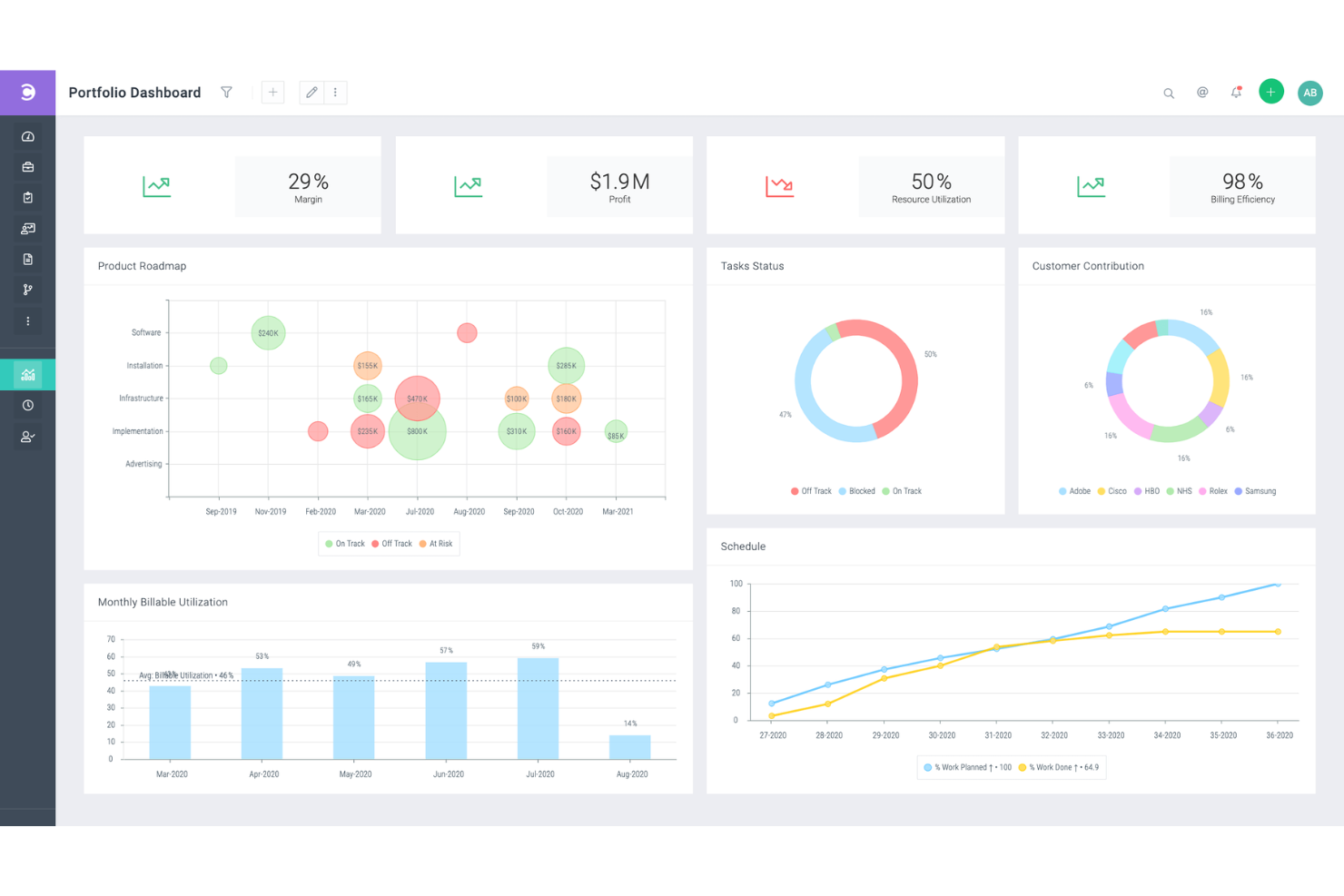
Celoxis is a project portfolio management (PPM) software with project, resource, time, expense, and workflow management features. It's capable of handling complex, inter-connected projects, and is well-suited to the needs of enterprise and professional services businesses.
The Gantt chart tool helps you plan a high-level overview of each of your projects. It includes features like color coding, recurring tasks, and inter-project task dependencies. Not only can you connect tasks across different projects, you can also assign multiple resources to the same task. All of these tools allow you to clarify your multi-project or multi-product strategy and keep your plans well-documented.
In addition to project management, the software offers resource management tools. Work can be assigned to specific team members based on capacity and other factors. You can also manage project expenses in the platform, and track the time spent on various tasks and projects. This helps you keep your budget up-to-date and accurate, and avoid overspending before it happens.
Several pre-built integrations are included, for tools like Google Drive, Microsoft Excel, Microsoft Project, Jira, Slack, Salesforce, Google Calendar, Outlook, Evernote, and QuickBooks Online. You can also access additional integrations with a paid Zapier account.
Paid plans for Celoxis start from $25 per user, per month. A 30-day free trial is also available.

Miro
Best for seamless collaboration and visualization for effective project management

Miro is an online whiteboard platform tailored for collaborative and visual work in project management. It's a tool where teams, whether co-located or remote, can bring their ideas to life in a shared, interactive space. This project task management software caters to a variety of team types and sizes, from tech developers to marketers and small businesses.
The platform's flexibility allows everyone to express ideas, allowing users to incorporate various data forms, including images, videos, and text, into their project boards. This adaptability aids in creating detailed and informative visual elements for projects. Additionally, Miro's planner feature offers a visual representation of tasks by different categories, such as sprints or status, while the dependencies app provides insights into task interdependencies, assisting teams in navigating and managing project complexities.
Integrations include Asana, monday.com, Notion, Webex, Figma, Jira, Azure DevOps, Confluence, Trello, Slack, Microsoft Teams, Google Workspace, Zoom, and 100+ others. You can access thousands of additional tools using a Zapier integration. This may require an additional expense.
New Product Updates from Miro
Miro Adds Japan Data Residency for Enterprise Customers
Miro has introduced Japan data residency for enterprise customers, offering in-region storage for production data, backups, and metadata, plus in-region compute infrastructure. For more information, visit Miro's official site.

Project task management software for prioritizing tasks

Profit.co is an OKR (Objectives and Key Results) software to help you measure and achieve company goals. Profit.co helps you plan your to-do-list to focus on urgent task assignments throughout the day. You can use Profit.co to track tasks easily by sorting tasks and projects according to their progress or level of importance, ensuring that you prioritize projects with approaching due dates. Profit.co also lets you create workspaces where you communicate and collaborate with team members in private to protect confidential or sensitive projects.
As much as we want to treat all tasks equally, some tasks are critical and require immediate attention, making Profit.co an ideal project task management for prioritizing tasks. When you create a task using Profit.co, it lets you set a priority level, so assignees know that you need a specific task completed quickly. The software also lets you assign a date and time when a project task is due, so team members know when to complete their task and estimate if they require extensions.
Profit.co works well with other project task management tools like Microsoft Planner, Asana, G Suite, BambooHR, and others.
Profit.co has a free plan for up to 5 users, while the pricing for plaid plans starts at $7/user/month. They also offer a free 30-day trial.
MeisterTask
Best for brainstorming, ideation, and task management in one
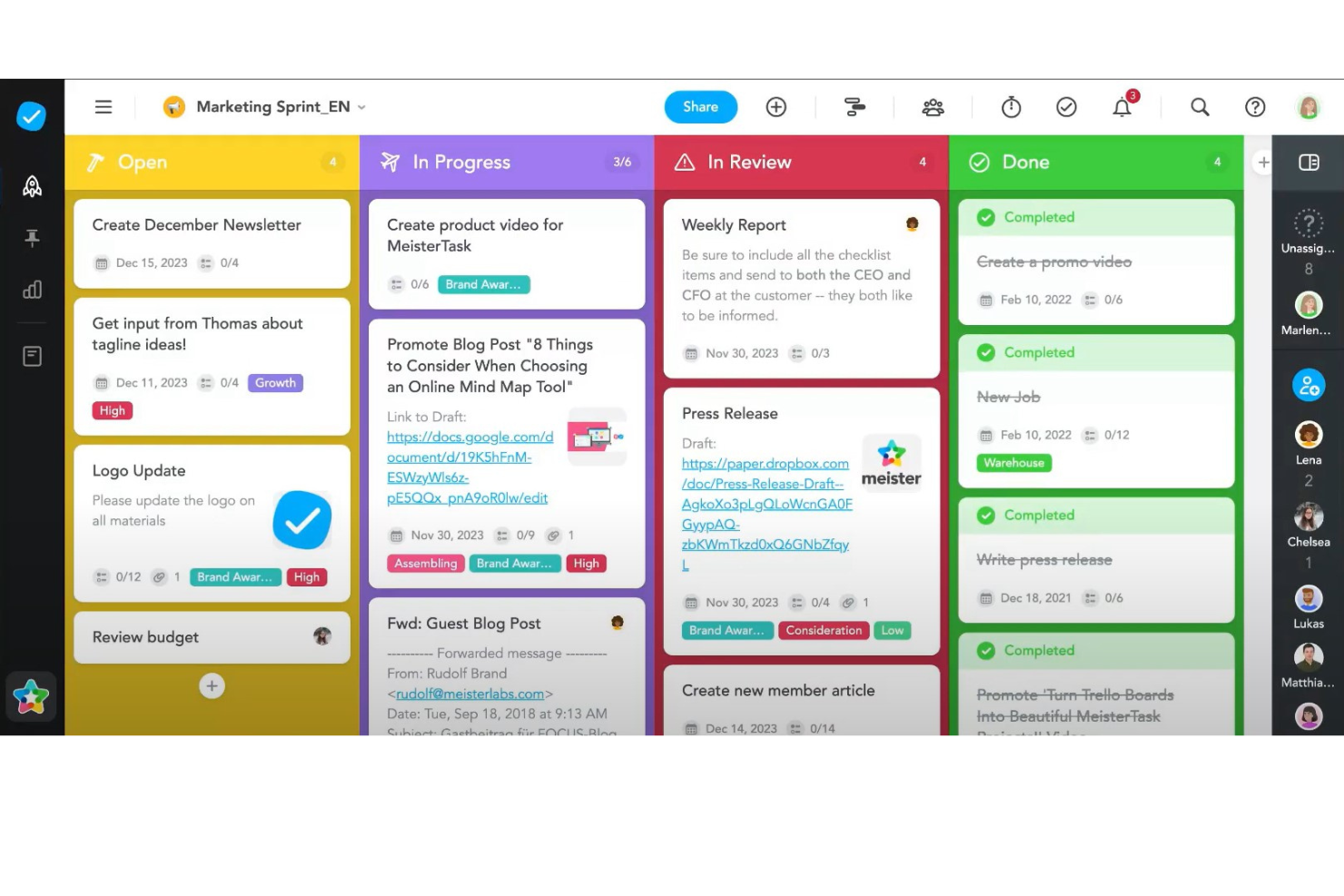
MeisterTask is a project task management software that excels in providing a streamlined, intuitive platform for teams to manage their tasks and projects efficiently. It adopts a visual approach to task management through the use of Kanban boards, making it easy for users to organize tasks, monitor progress, and adapt workflows in real-time. The software is designed to cater to a variety of project types and sizes, offering customizable boards that can be tailored to match specific project needs. Features such as task automation, due date reminders, and time tracking are integrated into the platform, simplifying the management process and enabling teams to focus on the work that matters most.
Beyond its core task management capabilities, MeisterTask stands out for its emphasis on collaboration and integration. The software facilitates seamless team communication with features like file sharing, commenting, and task assignments, ensuring that all team members are on the same page. Additionally, MeisterTask offers robust integration options with popular tools such as Slack, Google Drive, and MindMeister, the latter providing a unique bridge between mind mapping and task management. This integration enables a fluid transition from brainstorming and planning stages to actionable tasks, enhancing the overall productivity and creativity of teams.
Integrations include Slack, Dropbox, Github, Google Drive, Microsoft Teams, Outlook, Trello, Asana, MindMeister, and hundreds more through a paid plan with Zapier.
MeisterTask costs from $14.50/month (billed annually) and offers a fre trial.
Diğer Proje Görev Yönetimi Yazılımları
En iyi listeye giremeyen birkaç seçenek daha burada.
- Backlog
For Agile workflows and bug tracking
- Workzone
For managing multiple projects and clients
- ActiveCollab
For its focus on simplicity
- Teamwork.com
Project task management software with a portfolio of projects and their status
- Bonsai Agency Software
For integrated project, client, and financial management
- Birdview
For resource allocation and portfolio management
- FunctionFox
Project task management software with time tracking feature
- Ravetree
For managing projects, resources, and requests in one place
- Stackfield
For GDPR-compliant teams
- Height
Efficient task and project management for remote teams.
- Mosaic
Project task management software that lets you outline project tasks
- ClickUp
Project task management software that lets you break down big projects into subtasks
- Smartsheet
Project task management software that lets you automate tasks
- Hive
For teams looking for a user-friendly interface
- Accelo
For project, task, and resource management
- ProWorkflow
For resource management tools
- Kantata
Project task management software with team collaboration tools
- PathPro
For product development teams
- Adobe Workfront
Web-based work and project management software for enterprises
- Forecast
Project task management software with resource management features


How I Evaluate Project Task Management Software
I split my evaluation into two layers: baseline capabilities a tool must have to qualify—like task dependencies and Gantt views—and differentiators like workload management and portfolio reporting.
Core Functionality (Table Stakes For This List)
When I'm selecting tools for my list, I rank each one on a scale from 0 (does not offer the functionality) to 5 (excels in this area) for each core functionality listed below. Then, I calculate the tool's total score into a percentage. Each tool needs to achieve a minimum total score of 75% to be considered for inclusion.
- Task Creation & Assignment: I check whether you can create tasks with assignees, due dates, priorities, and custom fields—the basics for running a sprint or managing a product launch.
- Multiple Project Views: Switching between Kanban boards, Gantt charts, calendars, and lists matters because different stakeholders digest progress differently.
- Task Dependencies & Subtasks: I evaluate how well a tool handles finish-to-start dependencies and nested subtasks, like mapping a phased release where QA can't start until dev signs off.
- Collaboration & Comments: Threaded comments, @mentions, and file attachments on tasks are what I look for—teams shouldn't need to chase updates across Slack and email.
- Progress Tracking & Reporting: Dashboards and status reports should show task completion, milestone health, and workload distribution without requiring manual spreadsheet exports.
- Workflow Automation & Integrations: I look at whether a tool connects to your existing stack (Slack, Google Workspace, GitHub) and lets you automate recurring steps like status changes or assignee routing.
Once I have a list of tools that meet the criteria, I consider what sets each platform apart.
Differentiating Factors (What Sets Vendors Apart)
Here's how I compare and contrast different vendors:
Standout Features
Resource and workload management is a big differentiator—I look for tools that show each team member's capacity across projects so you can rebalance assignments before deadlines slip. Portfolio management matters when you're overseeing multiple projects at once, because rolling up status and progress into one dashboard beats compiling manual updates for leadership. I also evaluate whether a tool offers AI features that can draft task summaries or generate status reports, saving time on administrative overhead.
Beyond Features
Integration depth matters a lot—I check whether a tool connects natively to dev platforms like GitHub or Jira, since project managers in tech often need task updates to sync with engineering workflows. Pricing transparency is another factor I weigh carefully, particularly whether core task management features are available on lower tiers or locked behind enterprise plans. I also consider how well a tool scales, from a five-person team to a 200-person department, without requiring a full migration later.
Proje Görev Yönetimi Yazılımı Nasıl Seçilir?
Uzun özellik listeleri ve karmaşık fiyatlandırma yapıları arasında kaybolmak kolaydır. Size özgü yazılım seçim süreciniz üzerinde çalışırken odaklanmanızı sağlamak için göz önünde bulundurmanız gereken faktörlerin kontrol listesi aşağıda yer alıyor:
| Faktör | Nelere Dikkat Edilmeli? |
| Ölçeklenebilirlik | Ekibinizle birlikte büyüyebilen yazılımları arayın. Gerektiğinde daha fazla kullanıcı ve projeyi destekleyebilen bir araç seçin. |
| Entegrasyonlar | Yazılımın ekibinizin hâlihazırda kullandığı Slack, Google Workspace veya CRM platformları gibi araçlarla entegre olduğundan emin olun. |
| Özelleştirilebilirlik | İş akışlarınızı, panolarınızı ve görev alanlarınızı ekibinizin süreçlerine uyacak şekilde düzenlemenize olanak tanıyan bir araç seçin. |
| Kullanım Kolaylığı | Ekibinizin kapsamlı bir eğitim almadan hızlıca benimseyebilmesi için basit ve sezgisel bir arayüze sahip bir araç tercih edin. |
| Bütçe | Başlangıç maliyetlerinin yanı sıra ihtiyaç duyabileceğiniz eklentileri de göz önünde bulundurun. Aracı tam olarak taahhütte bulunmadan değerlendirmek için ücretsiz denemeleri kontrol edin. |
| Güvenlik Önlemleri | Bilgilerinizi güvende tutmak için şifreleme ve düzenli yedeklemeler gibi güçlü veri koruma özelliklerine sahip yazılımları seçin. |
| İş Birliği Araçları | Sorunsuz ekip iletişimi için yazılımın görev yorumları, dosya paylaşımı ve bildirimler gibi özellikler sunduğundan emin olun. |
| Mobil Erişilebilirlik | Ekibiniz uzaktan çalışıyor veya seyahat ediyorsa, hareket hâlindeyken görevlerinizi yönetmenize yardımcı olacak bir mobil uygulamaya sahip çözümleri arayın. |
2025'te Proje Görev Yönetimi Yazılımı Trendleri
Araştırmam sırasında farklı proje görev yönetimi yazılımı sağlayıcılarından sayısız ürün güncellemesi, basın bülteni ve sürüm günlüğü derledim. Genel olarak öne çıkan önemli bir tema mı? Artan otomasyon. Birçok platform, manuel çabayı azaltmak ve genel üretkenliği artırmak üzere tasarlanmış yeni özelliklerle güçlü görev otomasyonu yazılımı çözümlerine dönüşüyor. Takip ettiğim gelişmekte olan trendlerden bazıları şunlar:
- Yapay Zekâ Destekli Görev Önceliklendirme: Yapay zekâ artık kullanıcıların görevleri teslim tarihleri, iş yükü ve bağımlılıklara göre önceliklendirmesine yardımcı olabiliyor. Bu trend, ekipleri her gün en önemli işlere odaklanmaları için yönlendirerek karar verme yorgunluğunu azaltmayı ve üretkenliği artırmayı amaçlıyor.
- Proje Sonuçları İçin Tahmine Dayalı Analiz: Tahmine dayalı özellikler, zaman çizelgelerini öngörmek, olası gecikmeleri belirlemek ve riskleri değerlendirmek için geçmiş proje verilerini analiz eder. Bu içgörüler, ekiplerin yalnızca manuel planlamaya bağlı kalmadan beklentileri yönetmesine ve planlama doğruluğunu artırmasına yardımcı olabilir.
- Ekip İyi Oluşu İçin Duygu Tanıma: Bazı araçlar, sohbet veya görev yorumları üzerinden ekip moralini ölçmek için duygu analizi yöntemlerini deniyor. Bu trend, yöneticilerin tükenmişlik risklerini belirlemesine yardımcı olur ve özellikle uzaktan ve hibrit çalışma ortamlarında önem taşıyan ekip iyi oluşunu geliştirmeye yönelik içgörüler sağlar.
- Görev Tamamlamanın Oyunlaştırılması: Rozetler, puanlar ve liderlik tabloları gibi oyunlaştırma özellikleri ekipleri motive etmek amacıyla giderek daha fazla kullanılıyor. Bu unsurların eklenmesi görev yönetimini daha ilgi çekici hâle getirir ve özellikle iş birliğinin yoğun olduğu ortamlarda üretkenliği artırabilir.
- Gerçek Zamanlı Kaynak Yönetimi Görselleştirmesi: Sağlayıcılar, gerçek zamanlı kaynak uygunluğunu, iş yükünü ve olası çakışmaları gösteren görselleştirme araçlarını geliştiriyor. Bu trend, yöneticilerin hızlı ayarlamalar yapmasına ve görevleri ekipler ile projeler arasında dengeleyerek verimliliği artırmasına yardımcı olur. Daha fazla ekip hibrit veya tamamen uzaktan çalışma düzenlerini benimsedikçe, bulut iş birliği araçları dağıtık iş akışlarını yönetmek, gerçek zamanlı güncellemeleri mümkün kılmak ve farklı konumlardaki herkesin uyum içinde çalışmasını sağlamak için vazgeçilmez hâle geliyor.
Proje Görev Yönetimi Yazılımı Nedir?
Proje görev yönetimi yazılımı, bir projedeki farklı görevleri düzenlemenize ve takip etmenize yardımcı olan bir araçtır. Görev listesi oluşturmanıza, görevleri kişilere atamanıza, teslim tarihleri belirlemenize ve her görevin ilerlemesini izlemenize olanak tanır. Bu tür bir yazılım, her şeyi tek bir yerde tutmak için oldukça faydalı olabilir; böylece farklı platformlardaki bilgileri bir arada yönetmek veya yapılması gerekenleri takip etmek zorunda kalmazsınız.
Proje görev yönetimi yazılımı kullanmanın temel faydası, projeleri yönetmeyi çok daha basit ve anlaşılır hâle getirmesidir. Yapılması gerekenleri, kimin hangi iş üzerinde çalıştığını ve görevlerin ne zaman tamamlanması gerektiğini bir bakışta görmenize yardımcı olur. Bu, ekipler için oldukça faydalı olabilir; çünkü herkes ne yapması gerektiğini bilir ve daha etkili bir şekilde iş birliği yapabilir. Ayrıca hiçbir şeyin unutulmamasını veya geride bırakılmamasını sağlamak ve projelerin takvime uygun ilerlemesine yardımcı olmak için de harikadır.
Proje Görev Yönetimi Yazılımının Özellikleri
Proje görev yönetimi yazılımı seçerken aşağıdaki temel özelliklere dikkat edin:
- Görev atama: Görevleri belirli ekip üyelerine atayarak her görev için net bir sahiplik ve sorumluluk sağlar.
- Teslim tarihi takibi: Projelerin takvime uygun ilerlemesini sağlamak ve kaçırılan teslim tarihlerini önlemek için son tarihleri takip eder.
- Bağımlılık yönetimi: Darboğazları belirlemek ve iş akışlarını daha etkili bir şekilde yönetmek için görev bağımlılıklarını ayarlar.
- İlerleme takibi: Ekibinizin güncel kalabilmesi ve gerektiğinde öncelikleri ayarlayabilmesi için görev ilerlemesini gerçek zamanlı olarak izler.
- Zaman takibi: Üretkenliği analiz etmek ve kaynakları daha etkili bir şekilde tahsis etmek için görevlerde harcanan zamanı takip eder.
- İş birliği araçları: Doğrudan görevler içinde yorumlar, bahsetmeler ve dosya paylaşımı aracılığıyla ekip iletişimini mümkün kılar.
- Özelleştirilebilir panolar: Herkesin ilgili bilgilere kolayca erişebilmesi için panoları farklı rollere göre kişiselleştirir.
- Raporlama ve analiz: Veriye dayalı kararlar alınabilmesi için görev tamamlama, ekip üretkenliği ve proje ilerlemesi hakkında raporlar oluşturur.
- Takvim entegrasyonu: Planlamayı ve hatırlatıcıları kolaylaştırmak için görevleri ve teslim tarihlerini harici takvimlerle senkronize eder.
- Bildirimler ve uyarılar: Herkesin uyum içinde çalışmasını sağlamak için görev güncellemeleri ve yaklaşan teslim tarihleri hakkında zamanında bildirimler gönderir.
Proje Görev Yönetimi Yazılımının Faydaları
Proje görev yönetimi yazılımını uygulamak hem ekibiniz hem de genel olarak işletmeniz için çeşitli faydalar sağlayabilir. Yararlanmayı bekleyebileceğiniz birkaç fayda şunlardır:
- Geliştirilmiş organizasyon: Tüm görevleri, dosyaları ve tartışmaları tek bir yerde tutmak, ekibinizin düzenli kalmasını ve ihtiyaç duyduklarını bulmasını önemli ölçüde kolaylaştırır.
- Gelişmiş hesap verebilirlik: Net görev atamaları ve ilerleme takibi, herkesin kimin neden sorumlu olduğunu bilmesini sağlayarak kafa karışıklığını azaltır.
- Daha iyi zaman yönetimi: Son tarih takibi ve zaman takibi gibi özellikler, programları daha etkili bir şekilde yönetmenize ve kaçırılan son tarihlerin önüne geçmenize yardımcı olur.
- Artan üretkenlik: Görevleri önceliklendirilmiş ve görünür tutarak ekip, dikkatini dağıtmadan önemli işlere odaklanabilir.
- Daha bilinçli kararlar: Raporlama ve analizler, üretkenlik ve proje ilerlemesi hakkında içgörüler sunarak veriye dayalı kararlar almanıza yardımcı olur.
- Daha fazla esneklik: Özelleştirilebilir panolar ve görünümler, her ekip üyesinin görevlerini kendisi için en uygun şekilde görmesini sağlar.
- Geliştirilmiş iş birliği: Yerleşik iş birliği araçları, ekip üyelerinin doğrudan görevler içinde iletişim kurmasını kolaylaştırarak tüm tartışmaların ilgili ve erişilebilir kalmasını sağlar.
Proje Görev Yönetimi Yazılımı Maliyetleri ve Fiyatlandırması
Proje görev yönetimi yazılımı seçmek, mevcut çeşitli fiyatlandırma modellerini ve planları anlamayı gerektirir. Maliyetler özelliklere, ekip büyüklüğüne, eklentilere ve daha fazlasına göre değişir. Aşağıdaki tablo, proje görev yönetimi yazılımı çözümlerinde yaygın olarak sunulan planları, bunların ortalama fiyatlarını ve tipik özelliklerini özetlemektedir:
Proje Görev Yönetimi Yazılımı İçin Plan Karşılaştırma Tablosu
| Plan Türü | Ortalama Fiyat | Yaygın Özellikler |
| Ücretsiz Plan | $0 | Temel görev yönetimi, sınırlı sayıda proje, temel raporlama ve temel iş birliği araçları. |
| Kişisel Plan | $5-$15/kullanıcı/ay | Görev atamaları, son tarih takibi, temel entegrasyonlar, özelleştirilebilir panolar ve öncelikli destek. |
| İşletme Planı | $15-$25/kullanıcı/ay | Gelişmiş raporlama, otomasyon seçenekleri, zaman takibi, ekip iş birliği araçları ve özel iş akışları. |
| Kurumsal Plan | $25-$50/kullanıcı/ay | Gelişmiş güvenlik, özel entegrasyonlar, özel destek, gelişmiş analizler ve sınırsız proje. |
Proje Görev Yönetimi Yazılımı SSS
Proje görev yönetimi yazılımı hakkında sık sorulan bazı soruların yanıtları: