

2026 İçin En İyi 10 Kurumsal İş Yönetimi Yazılımı

10 Kurumsal İş Yönetimi Yazılımı Kısa Listesi


Kurumsal düzeydeki projeleri yönetmek, çoğu zaman verimlilik ve netlik pahasına sayısız görevi, paydaşı ve önceliği aynı anda yönetmeyi gerektirir. Kurumsal iş yönetimi yazılımı; iş akışlarını kolaylaştırmanıza, iş birliğini geliştirmenize ve karmaşık projeler genelinde kontrolü korumanıza olanak tanıyarak bir çözüm sunar. Ancak piyasada bu kadar çok seçenek varken doğru aracı seçmek bunaltıcı olabilir.
Bu yazıda, büyük ekipler ve projelerle düzinelerce farklı iş yönetimi aracı kullanarak edindiğim kişisel deneyimleri paylaşacak ve en iyi kurumsal iş yönetimi yazılımlarını seçerek kararınızı kolaylaştırmanıza yardımcı olacağım.
Why Trust Our Software Recommendations
Our team has been testing and reviewing software since 2012. As project managers ourselves, we know how difficult—and important—it is to choose the right software.
For this guide, we evaluated tools using hands-on testing and independent research, scoring tools using our selection criteria. We also draw on insights from industry thought leaders and practicing project management experts.
Our reviews reflect our human editorial judgment, not a sales pitch.
Expert reviewers:
Kurumsal İş Yönetimi Yazılımı Karşılaştırma Tablosu
Genel bakış bölümlerinde az önce ele aldığımız araçları karşılaştırmak için kullanabileceğiniz bir tabloyu burada bulabilirsiniz.
| Tool | Starting Price | Website | |
|---|---|---|---|
| Best enterprise work management software for its reliable security features to protect your data | 4.3 out of 5 | $10/user/month Free plan + 14-day trial + demo available | Book Demo |
| Best for publicly listed companies | 4.6 out of 5 | $9/user/month Free plan + 14-day trial available | Book Demo |
| Best for its user-friendly interface with on-premise licensing | 4.5 out of 5 | $10/user/month 14-day free trial | Website |
| Best for nested task hierarchies across teams | 4.7 out of 5 | $7.65/user/month Free plan + 30-day free trial available | Website |
| Best for AI-powered enterprise work management | 4.6 out of 5 | Pricing upon request Not available | Book Demo |
| Best for full lifecycle service delivery | 4.2 out of 5 | Pricing upon request Not available | Website |
| Best for scaling businesses that can’t afford an enterprise-tier plan | 4.7 out of 5 | $9/user/month Free plan available | Website |
| Best enterprise work management software with 99.99% uptime | 4.5 out of 5 | $5/user/month Free plan + free trial available | Website |
| Best for pre-built reports | 4.7 out of 5 | $8/user/month 14-day free trial + demo available | Website |
| Best for its seamless integration with Adobe products | 4.3 out of 5 | Pricing upon request Not available | Website |
En İyi 10 Kurumsal İş Yönetimi Yazılımına Genel Bakış
Yukarıda açıkladığım değerlendirme kriterleri doğrultusunda her araç hakkında kısa bir açıklamayı burada bulabilirsiniz.

Wrike
Best enterprise work management software for its reliable security features to protect your data

User interface: Wrike has a minimalistic multi-pane UI with a simple navigation menu on the tool's left side. Their hierarchy is similar to other tools on this list, starting with a workspace, spaces, folders, projects, tasks, and subtasks. Although the number of available views is limited compared to other enterprise project management software, it is functional and easy to learn.
Time in the market: The company was founded in 2006. They released their enterprise platform in 2013 after a $10 million investment by Bain Company. After a couple more successful investment rounds, Citrix Systems declared its interest in the company. Wrike was acquired in March 2021 for $2.25 billion.
Security features: Wrike complies with SOC 2 Type II, ISO 27001, 27018, GDPR, and CCPA. Additionally, they guarantee an uptime of 99.9%, allow you to create role-based access, use SSO, and keep your keys to their AES-256 bit encryption using Wrike Lock.
Integrations: Wrike offers 400+ pre-built native integrations, including Microsoft Office, integrations with the most popular file management software from Microsoft, Google, and Dropbox, along with sales and marketing software from Salesforce and Marketo.
New Product Updates from Wrike

Wrike Redesigns Workspace Search With New Filters
Wrike introduces a redesigned Workspace Search interface with recent search shortcuts, item type and location filters, and parent-task context. These updates help users find relevant work items and navigate search results efficiently. For more information, visit Wrike’s official site.
 .
Best for publicly listed companies
monday AI Workspace is a Work OS platform that unifies portfolio management, cross-functional project tracking, resource planning, and AI-powered workflow automation across enterprise teams and business units.
Who Is monday AI Workspace Best For?
It's a strong fit for enterprise PMO teams and operations leaders at large, compliance-conscious organizations managing work across multiple departments and business units.
Why I Picked monday AI Workspace
I've included monday AI Workspace in my top picks because its Enterprise governance stack is built for the scrutiny public companies face. I particularly like the AI-powered risk insights, which automatically scan every project board daily and surface portfolio-level risks before they escalate. Add BYOK encryption, SOC 2 Type II, ISO 27001, and HIPAA compliance to that, and it's a platform I trust to hold up under a formal audit.
monday AI Workspace Key Features
- Portfolio hierarchy and dashboards: Organize projects in nested portfolios and build executive dashboards pulling live data across teams.
- Resource management module: Allocate and balance workloads, track utilization, and view real-time capacity across distributed teams.
- Configurable workflow automations: Create no-code automation rules to connect work across departments and enforce process discipline.
- Enterprise compliance controls: Set granular permissions, leverage SSO/SAML, and maintain audit trails for SOC 2, ISO 27001, and GDPR compliance.
monday AI Workspace Integrations
monday AI Workspace offers hundreds of native integrations and marketplace apps, including Slack, Salesforce, HubSpot, Google Workspace, Microsoft 365, Jira, GitHub, Zendesk, Adobe Creative Cloud, and Zoom. It supports Zapier and provides an API for custom integrations.
Pros and Cons
Pros:
- Granular permissions meet enterprise audit requirements
- Native OKR tracking links projects to strategy
- AI-powered risk insights surface portfolio issues early
Cons:
- Portfolio hierarchy can feel rigid at scale
- Reporting customization requires significant setup time
New Product Updates from monday AI Workspace
monday AI Workspace Adds Human Approval Routing
monday AI Workspace adds a human-in-the-loop approval block to AI Workflows, sending approval requests and routing workflow paths based on responses. For more information, visit monday AI Workspace's official site.
 .

Celoxis
Best for its user-friendly interface with on-premise licensing
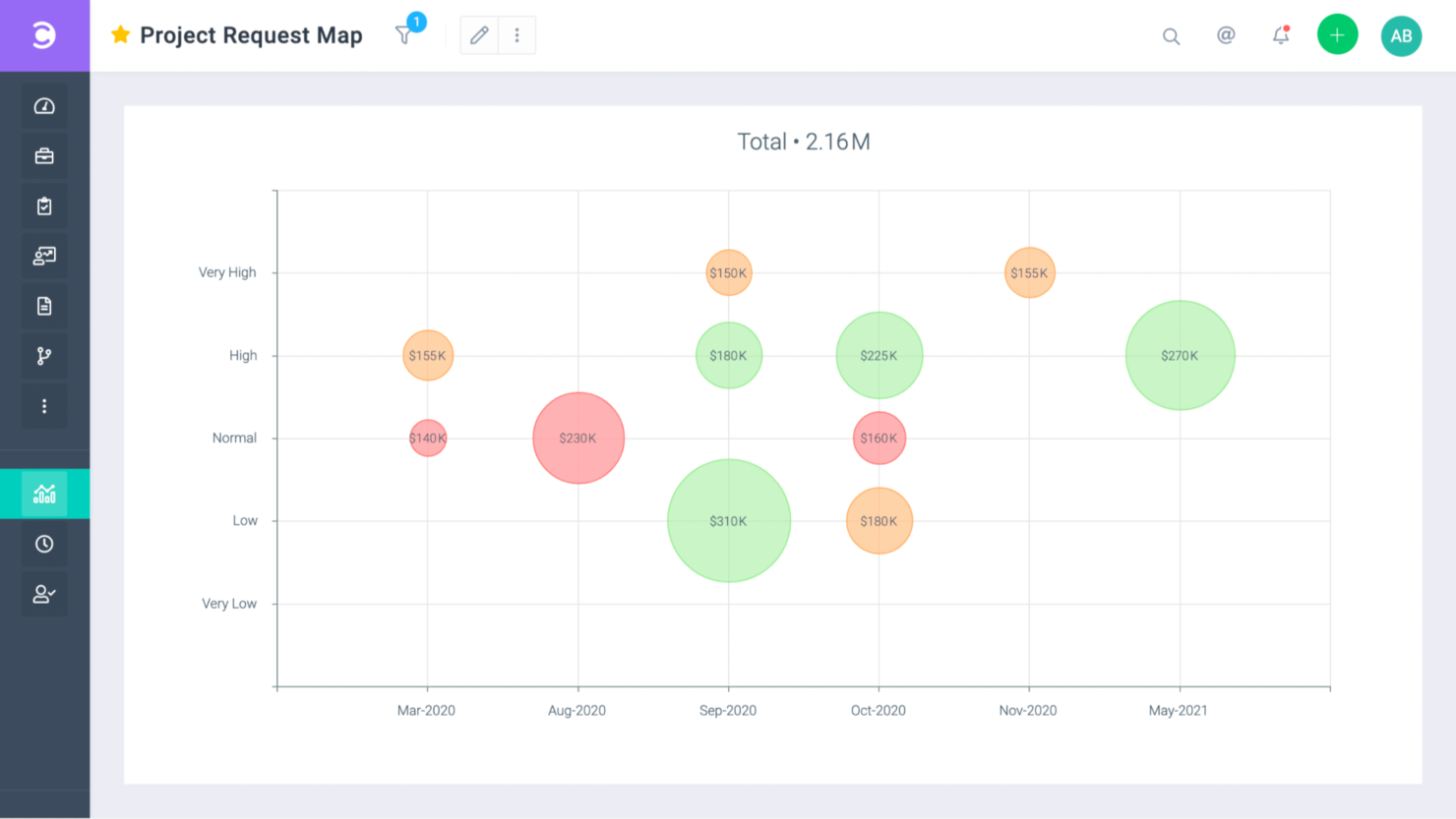
User interface: Full of color and RAG indicators to help you identify what needs to be prioritized, Celoxis is a user-friendly tool. They have comprehensive documentation that will enhance the experience of an already easy-to-learn tool.
Time in the market: Celoxis started in 2001. Headquarters: Pune, India.
Security features: SSL 256-bit encryption, SAML v2 for SSO, and 99.9% uptime.
Integrations: Celoxis has out-of-the-box integrations with Excel, Microsoft Project, Google Drive, Salesforce, Outlook, and hundreds of other tools like Slack and Trello.
Celoxis is available for $25/user/month

Quire
Best for nested task hierarchies across teams
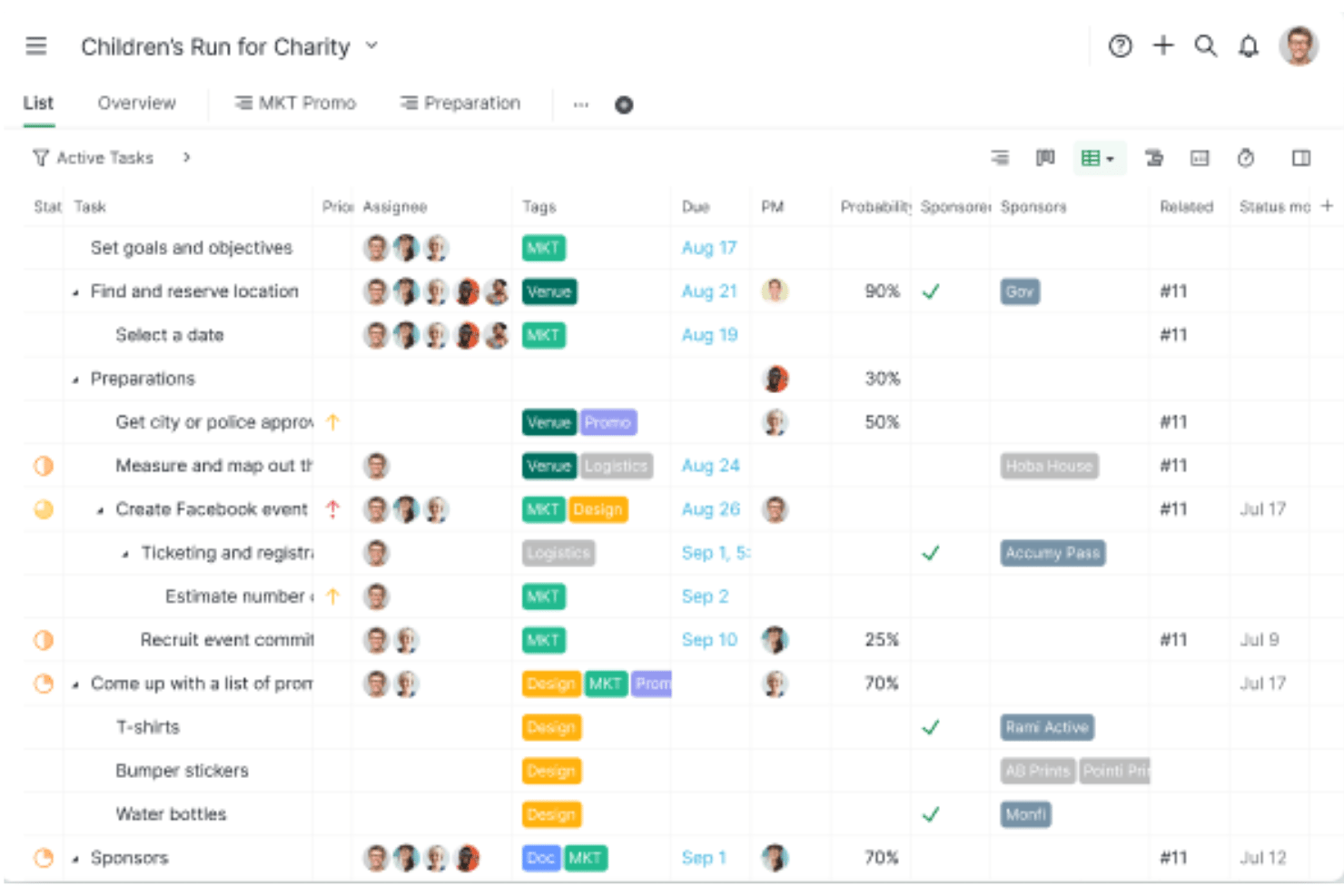
Quire is a project and work management platform built around unlimited nested task hierarchies, multiple synchronized work views, and cross-project visibility through Smart Folders.
Who Is Quire Best For?
Quire suits small to mid-sized teams that need to break down complex projects into deeply nested task structures across multiple workstreams.
Why I Picked Quire
I've included Quire in my top picks because its unlimited nested task hierarchy is genuinely unlike most work management tools I've tested. When a project spans multiple teams and workstreams, I can break work down across as many levels as needed, then use Smart Folders to pull tasks from separate projects into one aggregated view without duplicating data. I also like that all five work views, including Timeline with task dependencies and the Kanban board, stay in sync on the same underlying data.
Quire Key Features
- Approval workflows: Set named approvers on tasks with timestamps and audit trails to keep sign-off processes traceable across teams.
- SAML 2.0 single sign-on: Connect Quire to identity providers like Okta, Azure AD, and JumpCloud for centralized access control on the Enterprise plan.
- Power BI integration: Pull Quire project and task data directly into Microsoft Power BI to build custom executive dashboards and visual reports.
- Custom fields: Add configurable data fields to projects—up to unlimited on Enterprise—to capture the metadata your team actually tracks.
Quire Integrations
Quire offers native integrations with Google Drive, Microsoft Teams, Slack, GitHub, Google Calendar, and Power BI. It also provides REST API access, webhooks, MCP Server, and Zapier connectivity.
Pros and Cons
Pros:
- Smart Folders enable cross-project task aggregation
- Synchronized views reduce duplicate data management
- Unlimited nested task hierarchy for complex projects
Cons:
- Lacks dedicated portfolio financial management features
- No resource capacity planning or workload balancing
New Product Updates from Quire
Quire Adds Custom Field Locking and Comment Reaction API Support
Quire adds custom field locking and API support for reading and setting emoji reactions on comments. These updates give teams more control over field data and expand comment interaction options for developers. For more information, visit Quire’s official site.
 .

Best for AI-powered enterprise work management

Screendragon is built for marketing teams, creative agencies, and global brands that need better control over complex projects. With AI resource forecasting, the platform helps teams plan workloads and staffing needs more accurately, while its no-code interface makes it easier to manage workflows without extra technical setup. Screendragon also connects with your existing tools, so your team can coordinate work more smoothly and stay aligned across projects.
Why I Picked Screendragon
I picked Screendragon for its AI resource forecasting, which helps teams plan workloads and staffing needs more accurately across large projects. This makes it easier to avoid overloading teams and spot capacity gaps early. On top of that, its no-code setup supports custom workflows and approval tracking, so teams can adapt processes without heavy technical work. Together, these features help enterprises manage resources and coordination more effectively.
Screendragon Key Features
In addition to AI resource forecasting, Screendragon offers:
- Customizable Dashboards: Tailor the interface to display the most relevant project information, making it easier to track progress and performance.
- Role-Based Access: Ensure that each team member has appropriate access to project data, improving security and focus.
- Custom Routing: Direct tasks and approvals through personalized paths to optimize workflow efficiency and reduce bottlenecks.
Screendragon Integrations
Integrations include Microsoft Power BI, Slack, Microsoft Teams, HubSpot, Okta, Aprimo, SugarCRM, Adobe, Jira, and Google Drive.
Pros and Cons
Pros:
- Flexible customization lets teams tailor workflows and project structures
- Automation features streamline processes and improve efficiency
- Project and resource management features help centralize work details
Cons:
- Reporting and manual report creation can feel limited or complex
- The admin console and settings may be confusing for new users

Kantata
Best for full lifecycle service delivery

User interface: Kantata delivers a modern, intuitive experience built for enterprise-scale service delivery. From centralized dashboards to customizable views like task lists and Gantt charts, you can track work across the entire lifecycle of projects in one place. The platform supports collaboration with commenting, document sharing, and activity feeds, helping your teams stay aligned and productive even across complex portfolios.
Time in the market: Originally launched as Mavenlink in 2008, Kantata has over a decade of experience serving professional services organizations. Its merger with Kimble Applications in 2021 strengthened its ability to deliver full lifecycle service management, combining project delivery, resource planning, and financial oversight in one enterprise platform.
Security features: Kantata is enterprise-ready with compliance standards including SSAE 18 (SOC1 Type II), AICPA SOC2 Type II, and GDPR. It employs data encryption (TLS and AES), intrusion detection systems, secure VPN connections with two-factor authentication, and regular patching to safeguard sensitive client and project data—critical for large organizations handling high-value engagements.
Integrations: Kantata offers many integrations, including Slack, Expensify, Sage Intacct, Xero, NetSuite ERP, Google Workspace, Microsoft Dynamics 365, Jira Software, Salesforce Sales Cloud, SAP Concur, QuickBooks Online, and HubSpot CRM.
New Product Updates from Kantata

Kantata Adds Access Group Change History
Kantata adds Access Groups History, letting account administrators track changes to group details, membership, and permissions in Recent History. The update also makes these events available through the Subscribed Events API for broader monitoring. For more information, visit Kantata’s official site.
 .
Best for scaling businesses that can’t afford an enterprise-tier plan

User interface: Toggl Plan is a friendly-looking tool with lots of colors that is perfect for timelines and roadmaps. Online reviews give this tool a top rating for its visual attractiveness and how easy that makes it to find your way around your work.
Time in the market: The company was founded in 2006. With 3 distinctive products, they decided to split them into different companies only to bring them back together years later when they realized they were stronger that way. Pretty much like the Backstreet Boys. Headquarters: Tallinn, Estonia.
Security features: The business tier, their top tier, offers SSO, AES256 encryption and SHA2 signatures and is GDPR compliant. No uptime guarantee.
Integrations: Toggl Plan makes its API available to developers for specific integrations. The app currently integrates with Slack, a couple of calendar apps, and has a browser extension that can connect with Asana, JIRA, Podio, Gitlab and Github.
Trello
Best enterprise work management software with 99.99% uptime

User interface: As one of the main players in the space, Trello offers a beautiful visual experience through its customizable boards. It is very easy to get started with the tool, set up and start sharing projects to collaborate with your team. User reviews on this product mention there’s no need for onboarding because of how intuitive it is.
Time in the market: Trello was first introduced to the market under the codename Trellis in 2011. Following a spin-off from Fog Creek, Trello Inc was born in 2014. Later that year, it raised over $10 million from investors. Finally, Atlassian acquired Trello in January 2017 for $425 million. Headquarters: New York City, NY.
Security features: The enterprise tier lets you set granular permissions and access to power-ups. Also, SAML SSO for your logins, 99.99% uptime, SOC 2, 3 and ISO 27000 certifications, and GDPR compliance.
Integrations: Trello offers you unlimited integrations in their enterprise plan. These integrations include popular apps like Slack, Weebly, Evernote, Miro, and over 200 others. Additionally, there’s a power-up store where you can shop for extensions that will make your product even easier to use.
Pricing is available upon request.

Workzone
Best for pre-built reports
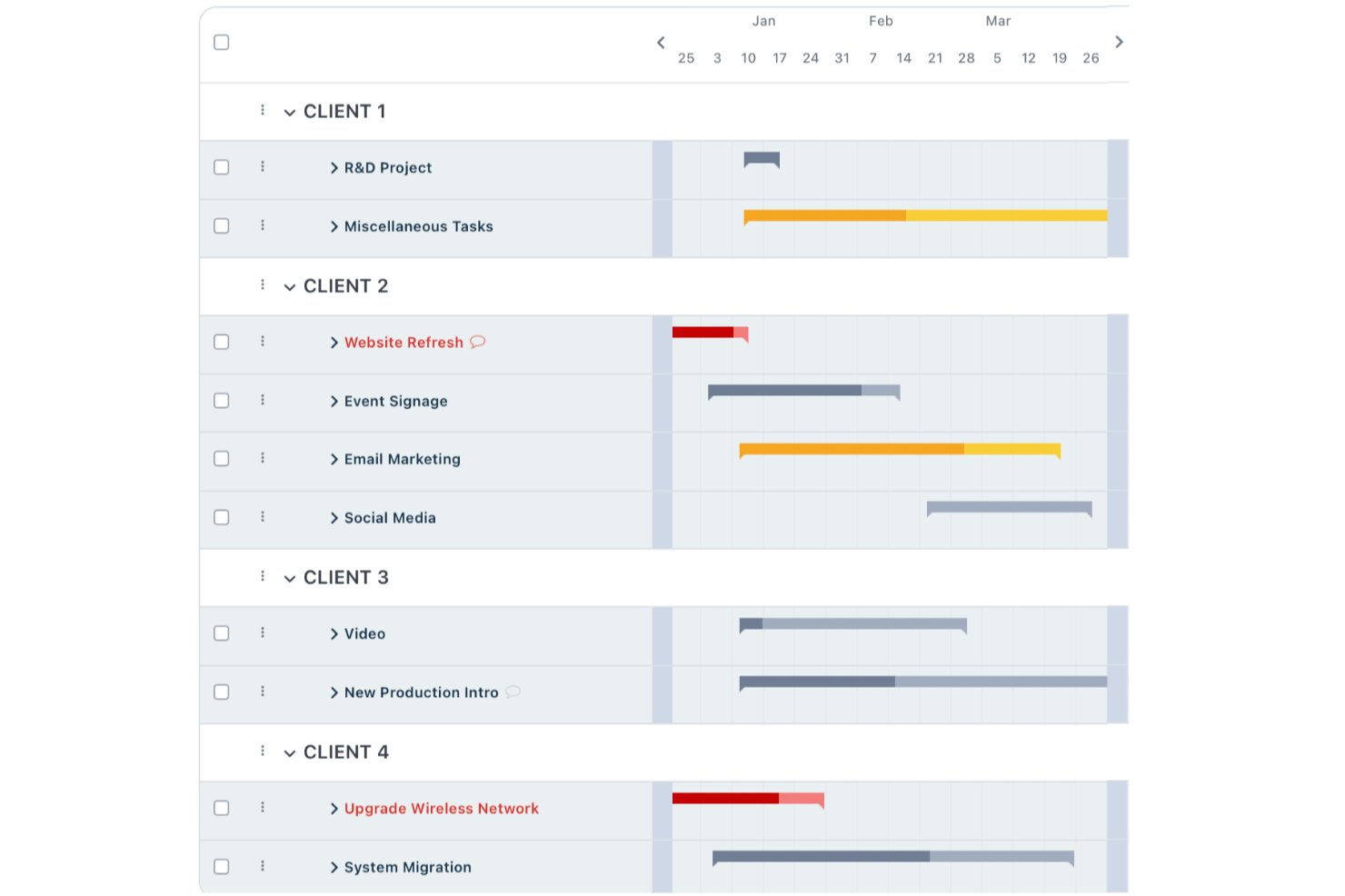
For enterprise teams seeking a reliable work management solution, Workzone offers a blend of intuitive project oversight and collaboration tools tailored to industries like marketing, operations, and IT. Its streamlined features cater to organizations managing time-sensitive projects, providing a centralized platform for project visibility and stakeholder communication. By addressing the complexities of project management with simplicity, Workzone helps your team maintain control and efficiency without the burden of tool overload.
Why I Picked Workzone
I picked Workzone for its unique ability to balance simplicity with powerful features that are crucial for enterprise work management. Its real-time project visibility ensures that your team always knows the status of tasks and deadlines, reducing the risk of project delays. Additionally, Workzone’s collaboration tools enable feedback and communication among team members, making it easier to manage projects with multiple stakeholders. These features align well with the needs of enterprises that require a reliable yet straightforward project management solution.
Workzone Key Features
In addition to its real-time visibility and collaboration tools, I also found other valuable features:
- Customizable Templates: Workzone offers over 1,000 templates to help your team quickly launch and manage projects tailored to your specific workflow.
- Pre-Built Reports: These reports provide insights into workload management, budget tracking, and resource allocation, helping your team make informed decisions.
- Centralized Communication: This feature ensures that all project-related communications are organized in one place, reducing the need for multiple tools.
- Strong Customer Support: Workzone provides unlimited training and support to ensure your team can effectively use the platform and address any issues promptly.
Workzone Integrations
Integrations include Slack, Microsoft Teams, Google Drive, Salesforce, Dropbox, Box, OneDrive, Outlook, SharePoint, and JIRA.
Pros and Cons
Pros:
- Structured request and workload management
- Built-in document proofing and approvals
- Strong project visibility and tracking
Cons:
- Mobile experience weaker than desktop
- Smaller integration ecosystem than competitors
New Product Updates from Workzone

Workzone Enterprise Adds Multi-Stage Approval Workflows
Workzone Enterprise now includes Approval Workflows, enabling multi-stage document approvals to standardize complex processes and reduce manual effort. For more information, visit Workzone's official site.
 .

Best for its seamless integration with Adobe products

User interface: Adobe Workfront recently underwent a UI redesign. Now, it is a minimalistic, clean, and customizable interface that has user navigation at its center. I find this new version easy to navigate, plus it mixes features that I love from other tools. For example, the top of the screen shows a folder pathway similar to that of Dropbox or Sharepoint. To navigate through it, you just need to click on the destination folder you wish to visit.
Time in the market: Workfront was founded in 2001. After raising over $95 million from venture capital, Adobe Inc acquired them in November 2020 for $1.5 billion. The tool has been upgraded since then to work seamlessly with the Adobe Creative Cloud and Adobe Experience suite.
Security features: Adobe has an entire PDF addressing security. Here are the highlights.
- Documents and assets have AES-256 bit encryption + HTTPS TLS for transmission.
- 99.9% guaranteed uptime.
- Limit data visibility through user-based role permissions.
- 10+ standards compliance, including HIPAA, GDPR, SOC2, and GLBA.
Integrations: Adobe Workfront has integrations with tools like Slack, Jira software, Salesforce, Dropbox, Google Drive, Microsoft Teams, and more. Additionally, it integrates with Adobe Creative Suite and Experience Manager to let your team work without leaving their design tools. Their Rest API allows developers to connect other tools and uses Adobe’s Application Security Stack to minimize security mistakes while coding.
Pricing is available upon request.
Diğer Kurumsal İş Yönetimi Yazılımı Seçenekleri
En iyi listesine giremeyen ancak değerlendirmenizde fayda bulunan birkaç seçeneği burada bulabilirsiniz.
- Kissflow Workflow
For boosting efficiency and streamlining workflows
- Planview AdaptiveWork
Roadmap views and dashboards to support your enterprise strategy
- ProjectManager
Alternative to Microsoft Project with 99.999% uptime
- Ravetree
For project, resource, and client management in one
- Pneumatic Workflow
For streamlining workflows
- Stackfield
For EU data sovereignty
- Miro
For visual collaboration in real-time and GDPR compliance
- ClickUp
For ensuring data protection through automated penetration tests
- Smartsheet
Project management software you can use as an upgrade to Excel.
- Hive
Enterprise work management software for its ease of use


How I Evaluate Enterprise Work Management Software
When a PMO needs to manage dozens of programs across business units, I look for two things: baseline capabilities that qualify a tool and differentiators that separate the best from the rest.
Core Functionality (Table Stakes For This List)
When I'm selecting tools for my list, I rank each one on a scale from 0 (does not offer the functionality) to 5 (excels in this area) for each core functionality listed below. Then, I calculate the tool's total score into a percentage. Each tool needs to achieve a minimum total score of 65% to be considered for inclusion.
- Portfolio & Program Management: I look for a true hierarchy—portfolios containing programs containing projects—with roll-up views that let a PMO director see status, spend, and risk across dozens of initiatives at once.
- Enterprise Resource Management: Capacity planning and workload balancing matter here, especially when you're allocating the same engineers across five concurrent programs and need to spot overallocation early.
- Cross-Functional Work Orchestration: I evaluate the range of work views (Gantt, Kanban, timeline, table) and whether workflows support cross-project dependencies that reflect how product, engineering, and design actually collaborate.
- Governance & Security Controls: SSO, SAML, role-based permissions, and audit logs are what I check first, along with certifications like SOC 2, ISO 27001, and GDPR compliance.
- Reporting & Analytics: The platform should offer customizable dashboards and executive-ready reports—things like portfolio health scorecards or budget burn-down charts that leadership can consume without a walkthrough.
- Integrations & Extensibility: I evaluate API depth and prebuilt connectors to the systems enterprise teams already rely on, such as Salesforce, SAP, ServiceNow, Jira, and Microsoft 365.
Once I have a list of tools that meet the criteria, I consider what sets each platform apart.
Differentiating Factors (What Sets Vendors Apart)
Here's how I compare and contrast different vendors:
Standout Features
I look for AI-driven automation that handles recurring PMO tasks like status rollups and risk flagging without manual effort. Strategic goal alignment is another differentiator—I want to see OKR or objective-tracking modules that connect individual workstreams to enterprise priorities. Scenario planning tools also stand out, especially when a portfolio manager needs to model what happens if a key initiative gets delayed or a team is reassigned mid-quarter.
Beyond Features
Licensing flexibility matters when your org has thousands of stakeholders but only hundreds of active project managers. I check whether vendors offer tiered user types so you're not paying full-seat prices for executives who only view dashboards. Implementation support is equally important—rolling out a platform across a 5,000-person org requires dedicated success managers and certified partners, not just a help center. I also evaluate vendor viability through analyst recognition, product roadmap transparency, and community strength.
Kurumsal İş Yönetimi Çözümü Nasıl Seçilir?
Uzun özellik listeleri ve karmaşık fiyatlandırma yapılarına takılıp kalmak kolaydır. Kendinize özgü yazılım seçim sürecinizde ilerlerken odağınızı korumanıza yardımcı olmak için göz önünde bulundurmanız gereken faktörleri aşağıda bir kontrol listesi hâlinde bulabilirsiniz:
| Faktör | Dikkat Edilmesi Gerekenler |
|---|---|
| Ölçeklenebilirlik | Çözümün ek kullanıcıları ve verileri performans sorunları olmadan yöneterek ekibinizle birlikte büyüyebildiğinden emin olun. |
| Entegrasyonlar | İş akışlarını kolaylaştırmak için mevcut CRM, ERP ve iletişim platformları gibi araçlarla entegre olup olmadığını kontrol edin. |
| Özelleştirilebilirlik | Ekibinizin iş akışlarını ve gösterge tablolarını belirli iş ihtiyaçlarına uyacak şekilde düzenlemesine olanak tanıyan seçenekleri arayın. |
| Kullanım Kolaylığı | Öğrenme süresini azaltan ve üretkenliği artıran kullanıcı dostu bir arayüz seçin. |
| Bütçe | Başlangıç maliyetleri, abonelik ücretleri ve olası gizli ücretler dâhil olmak üzere toplam sahip olma maliyetini değerlendirin. |
| Güvenlik Önlemleri | Verilerinizi korumak için şifreleme ve çok faktörlü kimlik doğrulama gibi güçlü güvenlik önlemlerine sahip çözümleri önceliklendirin. |
Açıkçası, sindirmesi gereken çok fazla bilgi var ve doğru kararı verme konusunda da büyük bir baskı hissedebilirsiniz. Bu nedenle, sizin ve kuruluşunuzun özel ihtiyaçlarına uygun proje yönetimi araçlarını kısa listeye almanıza yardımcı olması için proje yönetimi yazılımı danışmanlığı hizmetimizi kullanmanızı öneririm.
Kurumsal iş yönetimi yazılımı nedir?
Kurumsal iş yönetimi yazılımı, büyük kuruluşların iş süreçlerini ve projelerini yönetmek ve koordine etmek için kullandığı bir araçtır. Proje yönetimi, kaynak tahsisi, iş birliği ve raporlama gibi çeşitli işlevleri tek bir platformda bir araya getirir. Bu yazılım; büyük ölçekli operasyonlardaki görevlerin, kaynakların ve iletişim ihtiyaçlarının karmaşıklığını ve ölçeğini yönetmek üzere tasarlanmıştır.
Kurumsal iş yönetimi araçlarının (ve diğer kurumsal proje yönetimi yazılımlarının) faydaları arasında iş akışlarında iyileştirilmiş verimlilik, departmanlar arası geliştirilmiş iş birliği ve daha iyi kaynak yönetimi bulunur.
Bu araçlar, çeşitli iş faaliyetleri üzerinde merkezi kontrol sağlayarak izleme ve analiz için birleşik bir görünüm sunar. Yazılım, veriye dayalı karar almayı kolaylaştırır, değişen kurumsal ihtiyaçlara uyum sağlar ve proje durumu ile performansında şeffaflığı artırır. Bu da daha bilinçli stratejilere ve kurumsal ölçekteki proje ve operasyonların daha verimli şekilde yürütülmesine katkıda bulunur.
Özel kullanım durumunuza bağlı olarak kurumsal kaynak yönetimi yazılımını veya kurumsal iş akışı yazılımını da değerlendirebilirsiniz.
Kurumsal İş Yönetimi Karşılaştırmasının Temel Özellikleri
Bu bölümde, yazılımın sahip olması gereken genel özelliklerden bahsetmek istiyorum.
- Görev yönetimi: Görevlerinizi yönetmenize, görev ilerlemesini izlemenize, görev atamanıza ve daha fazlasını yapmanıza olanak tanıyan temel bir özellik. Görevleri görüntüleyen görünümler görev listelerini, Gantt grafiklerini, kanban panolarını ve tablo görünümlerini içerebilir.
- Varlık yönetimi: Projenizle ilgili dosyaları depolayabileceğiniz yazılım içindeki bir alan. Bu depo, uygulama içinde kendi başına bir modül olarak veya proje klasörünüzdeki bir görünüm olarak yer alabilir. Varlık yönetimi, pazarlama kampanyaları veya web sitesi geliştirme projeleri üzerinde çalışan dijital ajanslar için özellikle yararlıdır.
- Belge yönetimi: Bu özellik, projenizdeki belgelerin listesini veya ızgara görünümünü görmenizi sağlar. Belgeler genellikle belirli görevlere eklenir ve çok fazla projeniz olduğunda karmaşanın ortasında kaybolabilir. Belge yönetimi, belgeleri merkezileştirerek bu sorunu çözer.
- Portföy yönetimi: Kuruluş genelindeki proje ilerlemesini ve proje ekiplerini izleyebileceğiniz yazılım içindeki bir özellik. Projelerinize, bunların kurumsal hedeflerle nasıl ilişkili olduğuna ve projeler arasındaki bağımlılıklara kuş bakışı bir görünüm sunar.
- Kaynak yönetimi: Kaynak yönetimi, birden fazla projedeki proje ekiplerinizin, bunlarla ilişkili görev listelerinin ve iş yükünün anlık görüntüsünü sunabilir. Bu özellik, yeni işe alımları planlamanıza, mevcut çalışanları projelere atamanıza ve insan kaynaklarıyla ilgili diğer kararları almanıza olanak tanır.
- İş akışı otomasyonu: Son olarak, iş akışı otomasyonu tekrarlayan görevleri otomatikleştirmenizi sağlar. Bu, görevlerinizdeki tetikleyicilere bağlı olarak davranış kuralları tanımlayabileceğiniz yazılım bölümüdür.
Kurumsal İş Yönetimi Hakkında SSS
Kurumsal iş yönetimi yazılımıyla ilgili sık sorulan bazı soruların yanıtlarını burada bulabilirsiniz:
Ekibiniz için en iyi kurumsal iş yönetimi aracına nasıl karar verirsiniz?
Doğru kurumsal iş yönetimi aracını seçmek için proje karmaşıklığı, ekip büyüklüğü ve iş birliği gereksinimleri gibi ekibinizin özel ihtiyaçlarını göz önünde bulundurun. Ekibinizin kullandığı mevcut araçlar ve sistemlerle entegrasyon özelliklerini değerlendirin. Ayrıca öğrenme süresini ve satıcının sunduğu desteği de dikkate alın. Hangisinin iş akışınıza en iyi şekilde uyduğunu görmek için birkaç seçeneği denemeniz gerekir.
Kurumsal iş yönetimi yazılımı mevcut sistemlerle entegre olabilir mi?
Evet, çoğu kurumsal iş yönetimi yazılımı CRM, ERP veya iletişim araçları gibi mevcut sistemlerle entegre olabilir. Bu durum özellikle görev güncellemelerini tetiklemek, sistemler arasında veri paylaşmak ve platformlar arası iş akışlarını otomatikleştirmek için entegrasyonlara dayanan kurumsal görev yönetimi yazılımı için geçerlidir; Scoro gibi sorunsuz bağlantıya önem veren platformlar buna örnektir.
Kurumsal iş yönetimi araçlarını kullanırken hangi ölçümleri izlemelisiniz?
İzlenmesi gereken temel ölçümler arasında proje tamamlama oranları, kaynak tahsisi, zaman takibi ve bütçeye uyum yer alır. Bu ölçümler, projelerin ne kadar verimli yönetildiğini ve nerelerde iyileştirmeler gerektiğini anlamanıza yardımcı olur. Bu ölçümleri düzenli olarak gözden geçirmek, bilinçli kararlar almanıza ve genel ekip performansını iyileştirmenize yardımcı olabilir.
Kurumsal iş yönetimi araçları veri güvenliğini nasıl ele alır?
Kurumsal iş yönetimi araçları, şifreleme, düzenli güncellemeler ve GDPR veya HIPAA gibi sektör standartlarına uyum yoluyla veri güvenliğini sağlar. Özellikle hassas bilgilerle çalışıyorsanız, seçtiğiniz aracın güçlü güvenlik önlemlerine sahip olduğundan emin olmanız çok önemlidir. Satıcının güvenlik politikalarını ve uygulamalarını her zaman inceleyin.
Kurumsal iş yönetimi çözümleri belirli ihtiyaçlara uyacak şekilde özelleştirilebilir mi?
Birçok kurumsal iş yönetimi çözümü, belirli kurumsal ihtiyaçlara uyacak özelleştirme seçenekleri sunar. Bunlar özel iş akışlarını, panoları ve raporlama özelliklerini içerebilir. Özelleştirme, aracı süreçlerinize daha uygun hâle getirmenize ve verimliliği artırmanıza olanak tanır.
Bir kurumsal iş yönetimi aracının ROI'sini nasıl ölçersiniz?
ROI'yi ölçmek için aracı uygulama ve sürdürme maliyetlerini; artan üretkenlik, azalan proje gecikmeleri ve iyileştirilmiş kaynak yönetimi gibi faydalarla karşılaştırın. Hem nicel ölçümleri hem de ekip üyelerinin nitel geri bildirimlerini dikkate alın. Düzenli değerlendirmeler, aracın kuruluşunuza değer sağlamaya devam etmesine yardımcı olabilir.