2026’da Denediğim En İyi 10 İş Akışı Uygulaması



En iyi iş akışı uygulamaları; görevleri, onayları ve süreçleri tek bir platformda birleştirerek tekrarlayan onayları otomatikleştirir, talepleri yönlendirir ve gecikmeleri ve kaybolan öğeleri önlemek için ilerlemeyi takip eder.
Küresel markalar için karmaşık dijital projeleri yönetme konusunda 20 yılı aşkın deneyimim sayesinde, parçalı iş akışlarının en iyi planlanmış girişimleri bile nasıl sekteye uğratabildiğine tanık oldum. Hem yazılım incelemecisi hem de proje yöneticisi olarak yüzlerce proje yönetimi aracını değerlendirdim ve darboğazları ortadan kaldıran, iş birliğini kolaylaştıran ve her görev için hesap verebilirliği sağlayan iş akışı sistemlerini hayata geçirdim.
Bu makalede, her büyüklükteki ekibin talep yönlendirme, ilerleme takibi ve süreç tutarlılığı ihtiyaçlarını karşılayan güvenilir iş akışı uygulaması çözümlerini belirledim. Bu seçilmiş liste, hem küçük ekipler hem de büyük kuruluşlar için pratik etkililiği, kullanım kolaylığını ve ölçeklenebilirliği vurgular.
Why Trust Our Software Recommendations
Our team has been testing and reviewing software since 2012. As project managers ourselves, we know how difficult—and important—it is to choose the right software.
For this guide, we evaluated tools using hands-on testing and independent research, scoring tools using our selection criteria. We also draw on insights from industry thought leaders and practicing project management experts.
Our reviews reflect our human editorial judgment, not a sales pitch.
Expert reviewers:
İş Akışı Uygulamaları Karşılaştırma Tablosu
Bu karşılaştırma tablosu, en iyi iş akışı uygulaması seçimlerimin fiyatlandırma ayrıntılarını özetler:
| Tool | Starting Price | Website | |
|---|---|---|---|
| Best for no-code automation | 4.7 out of 5 | $19.50/month Free plan available | Website |
| Best for automating manual processes | 4.6 out of 5 | $9/user/month Free plan + 14-day trial available | Book Demo |
| Best for creating custom dashboards | 4.3 out of 5 | $10/user/month Free plan + 14-day trial + demo available | Book Demo |
| Best for creative workflow automation at scale | 4.6 out of 5 | Pricing upon request Not available | Book Demo |
| Best for collaborative workflow diagrams | 4.5 out of 5 | $9/month Free plan + 7-day free trial available | Website |
| Best for customizable workflow templates | 4.8 out of 5 | $8/user/month Free plan + 14-day trial available | Book Demo |
| Best for AI-driven workflow automation | 4.9 out of 5 | Pricing upon request Free trial available + free demo | Website |
| Best for no-code workflows and SOPs | 4.7 out of 5 | Pricing upon request 14-day free trial; free demo available | Website |
| Best for product teams | 4.6 out of 5 | $10/user/month Free plan + 14-day free trial available | Website |
| Best for building workflow apps | 4.6 out of 5 | $24/user/month 30-day free trial + free demo available | Website |
En İyi İş Akışı Uygulaması İncelemeleri
Her iş akışı uygulamasının en uygun kullanım alanını ve öne çıkan özelliklerini göstermek için her araç hakkında kısa bir açıklama aşağıda yer almaktadır.

Best for no-code automation

For teams and businesses seeking to simplify their complex processes, Jotform Workflows offers an intuitive, no-code solution that can transform how you manage tasks. Designed for industries ranging from healthcare to education, this tool is perfect for professionals who need a reliable way to automate approvals, collect e-signatures, and manage payments—all while maintaining a seamless flow of information. Jotform Workflows tackles the challenge of cumbersome manual processes, providing a customizable platform that enhances productivity and user engagement.
Why I Picked Jotform Workflows
I picked Jotform Workflows for its no-code automation capabilities, allowing you to create and manage workflows without any programming skills. One standout feature is the drag-and-drop builder, which simplifies the process of designing workflows, making it accessible to users of all technical backgrounds. In addition, the platform offers over 200 customizable templates, enabling you to quickly set up workflows tailored to your specific needs. These features not only save time but also address the common challenge of managing complex processes efficiently.
Jotform Workflows Key Features
In addition to its user-friendly builder and templates, Jotform Workflows offers several other features that enhance its utility for workflow management:
- Conditional Logic: This feature allows you to create dynamic workflows that adapt based on user inputs, ensuring that each step of the process is relevant and efficient.
- Real-Time Tracking: Keep an eye on your workflow's progress with real-time updates, allowing you to make timely decisions and adjustments.
- Parallel Processing: Manage multiple tasks simultaneously, reducing bottlenecks and speeding up the overall process.
- Custom Branding: Customize the look and feel of your workflows to align with your brand, providing a cohesive experience for users.
Jotform Workflows Integrations
Integrations include Google Drive, Slack, Dropbox, PayPal, Stripe, Salesforce, Zoom, Microsoft Teams, Box, and Asana.
Pros and Cons
Pros:
- Strong integrations and payments
- Large template library available
- No-code workflow automation
Cons:
- Limited reporting depth
- Advanced features cost more
New Product Updates from Jotform Workflows
Jotform Workflows Adds Wait Element for Timed Automation
Jotform Workflows introduces a Wait element for pausing and resuming workflows based on dates and times. This helps teams automate time-sensitive actions without manual follow-ups. For more information, visit Jotform’s official site.
 .

Best for automating manual processes
monday AI Workspace is a no-code work management platform that combines visual workflow building, AI-powered automation, multi-view project tracking, and intake forms into a single workspace for cross-functional teams.
Who Is monday AI Workspace Best For?
It's a strong fit for operations and process managers at mid-size to enterprise companies running repeatable, multi-team workflows that need automation at scale.
Why I Picked monday AI Workspace
monday AI Workspace earns its spot on my shortlist because no other tool I've tested turns a plain-English description into a fully structured, automated workspace as fast. I love the AI Workflow Builder, which orchestrates multi-step automation across boards without writing a single rule manually. The AI Agent Workforce takes it further, handling repetitive execution like status updates and task routing at scale across projects.
monday AI Workspace Key Features
- Portfolio dashboards: Create real-time views that roll up progress, KPIs, and timelines across multiple active projects.
- Custom intake forms: Build request forms that convert submissions into structured tasks and trigger tailored workflows.
- Time tracking columns: Capture and analyze billable hours or effort estimates directly within each project task.
- Guest/client access: Allow external stakeholders to view project boards, submit requests, and approve deliverables with tailored permissions.
monday AI Workspace Integrations
monday AI Workspace offers hundreds of native integrations through its built-in integrations and marketplace, including Slack, Salesforce, HubSpot, Google Workspace, Microsoft 365, Jira, GitHub, Zoom, Zendesk, Dropbox, and Trello. It also supports Zapier and provides an API for custom integrations.
Pros and Cons
Pros:
- Multiple views including Gantt and workload
- Highly customizable no-code board structure
- AI automates multi-step workflows without coding
Cons:
- Reporting lacks depth for complex PMO needs
- Automation runs are capped on lower plans
New Product Updates from monday AI Workspace
monday AI Workspace Adds Human Approval Routing
monday AI Workspace adds a human-in-the-loop approval block to AI Workflows, sending approval requests and routing workflow paths based on responses. For more information, visit monday AI Workspace's official site.
 .

Wrike
Best for creating custom dashboards

Wrike is a flexible project management tool that allows you to create custom dashboards and workflows to suit your specific needs. Beyond internal team organization, its built-in proofing tools also streamline communication with clients. Danilo Coviello, Founder of Espresso Translations, emphasized how much this improved his workflow: “This reduced our back and forwards by more than four rounds, to less than two. Email chains were in the past.”
Why I picked Wrike: It has solutions for teams throughout the organization and it offers customizable templates for various project needs, including event management, content creation, and go-to-market initiatives.
Creating projects and breaking them down into smaller tasks is easy. As the tool updates everything in real-time, you can see potential roadblocks as they occur. You can view these projects in Gantt charts and Kanban boards.
Wrike Standout Features & Integrations
Features include personalized app experience via AI Work Intelligence, shareable dashboards, interactive workflow views, user and team workload management functionality, account-wide work schedules, and more.
Integrations include Slack, salesforce, Adobe Creative Cloud, Microsoft Teams, Miro, Tableau, Zoom, Google Drive, and Box. Additionally, they have a well-documented API that can help your IT team build custom integrations with your current tools.
New Product Updates from Wrike

Wrike Redesigns Workspace Search With New Filters
Wrike introduces a redesigned Workspace Search interface with recent search shortcuts, item type and location filters, and parent-task context. These updates help users find relevant work items and navigate search results efficiently. For more information, visit Wrike’s official site.
 .

Best for creative workflow automation at scale

Screendragon is an enterprise work management platform that combines no-code workflow automation, dynamic intake forms, creative approvals, resource planning, and budget tracking in a single system built for marketing and agency teams.
Who Is Screendragon Best For?
Screendragon is a strong fit for mid-to-large marketing teams and creative agencies managing high volumes of multi-step projects across distributed stakeholders.
Why I Picked Screendragon
Screendragon earns its spot on my shortlist because of how deeply its no-code workflow builder handles creative process complexity at volume. I love that dynamic intake forms connect directly to automated step sequences, so a single brief submission can kick off a fully routed approval chain without manual handoffs. The AI Hub layer, which lets teams embed governed AI agents inside live workflows, is something I haven't seen at this depth in comparable tools.
Screendragon Key Features
- Resource planning module: Lets you allocate, monitor, and balance workloads across multiple projects in one view.
- Creative proofing tools: Enables in-app markup, version comparison, and threaded feedback directly on creative assets.
- Custom dashboards: Allows you to build visual, real-time dashboards with project rollups and KPI widgets.
- Role-based permissions: Offers granular access controls, down to individual fields and workflow stages, for governance and security.
Screendragon Integrations
Screendragon offers native integrations with Salesforce, SAP, Microsoft 365, Dynamics 365, NetSuite, PeopleSoft, Adobe, Jira, Trello, Box, and Google Drive. It also provides an API for custom integrations.
Pros and Cons
Pros:
- Resource and capacity planning are built-in
- Intake forms auto-route work without manual assignment
- Granular workflow branching supports complex creative processes
Cons:
- Reporting customization is limited for PMO visibility
- Initial setup requires significant time and configuration

Best for collaborative workflow diagrams
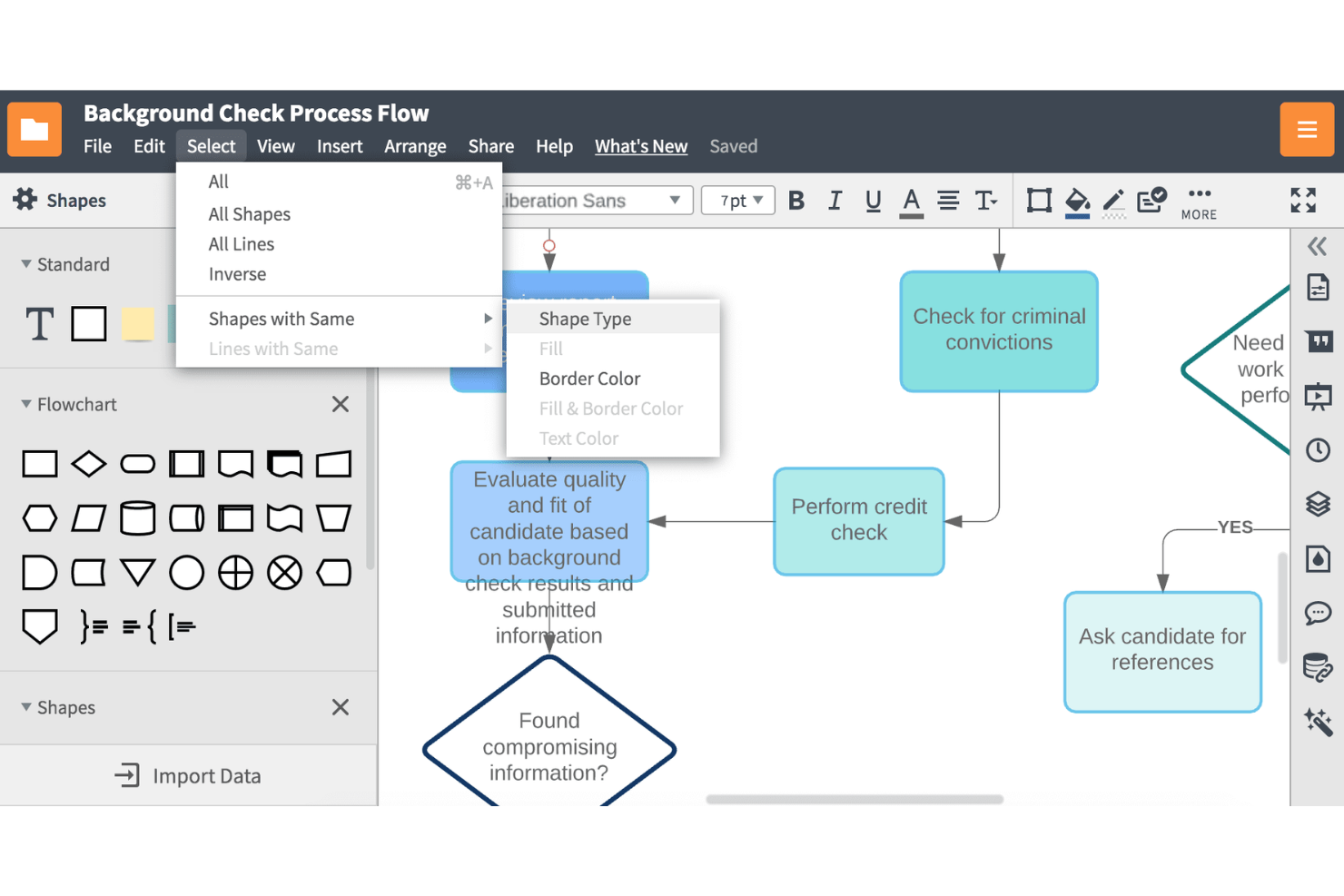
Lucidchart Enterprise is a comprehensive solution for visual collaboration, specifically designed for enterprise teams. It merges diagramming capabilities with a virtual whiteboard, facilitating both real-time and asynchronous collaboration.
Why I Picked Lucidchart: Lucidchart stands out for its robust security measures, including domain restrictions, document permissions, and publishing restrictions, ensuring a secure environment for collaborative diagramming. The Enterprise plan is what you need to unlock team spaces, a virtual whiteboard, and a collaborative AI for things like brainstorming new ideas.
Lucidchart works as a workflow app partially due to its robust features that cater to secure, collaborative diagramming. In the realm of project management tools, it stands out due to its focus on visual communication and collaboration. Its ability to create flowcharts, network diagrams, org charts, and other visual documentation makes it a unique tool in the digital project management space. It allows teams to visualize complex processes and systems, which can be instrumental in understanding and managing digital projects.
Lucidchart Standout Features & Integrations
Features include diagramming tools, templates, flowcharts, process maps, network diagrams, a library of shapes and lines, real-time collaboration, co-editing, in-editor chat, commenting, single sign-on (SSO), data loss prevention (DLP), user access and permissions, and team spaces.
Integrations include Slack, Salesforce, GitHub, and LinkedIn Sales Navigator, and fits within a suite of additional Lucid Software products for collaboration and ideation (Lucidspark) and cloud visualization (Lucidscale).

Miro
Best for customizable workflow templates
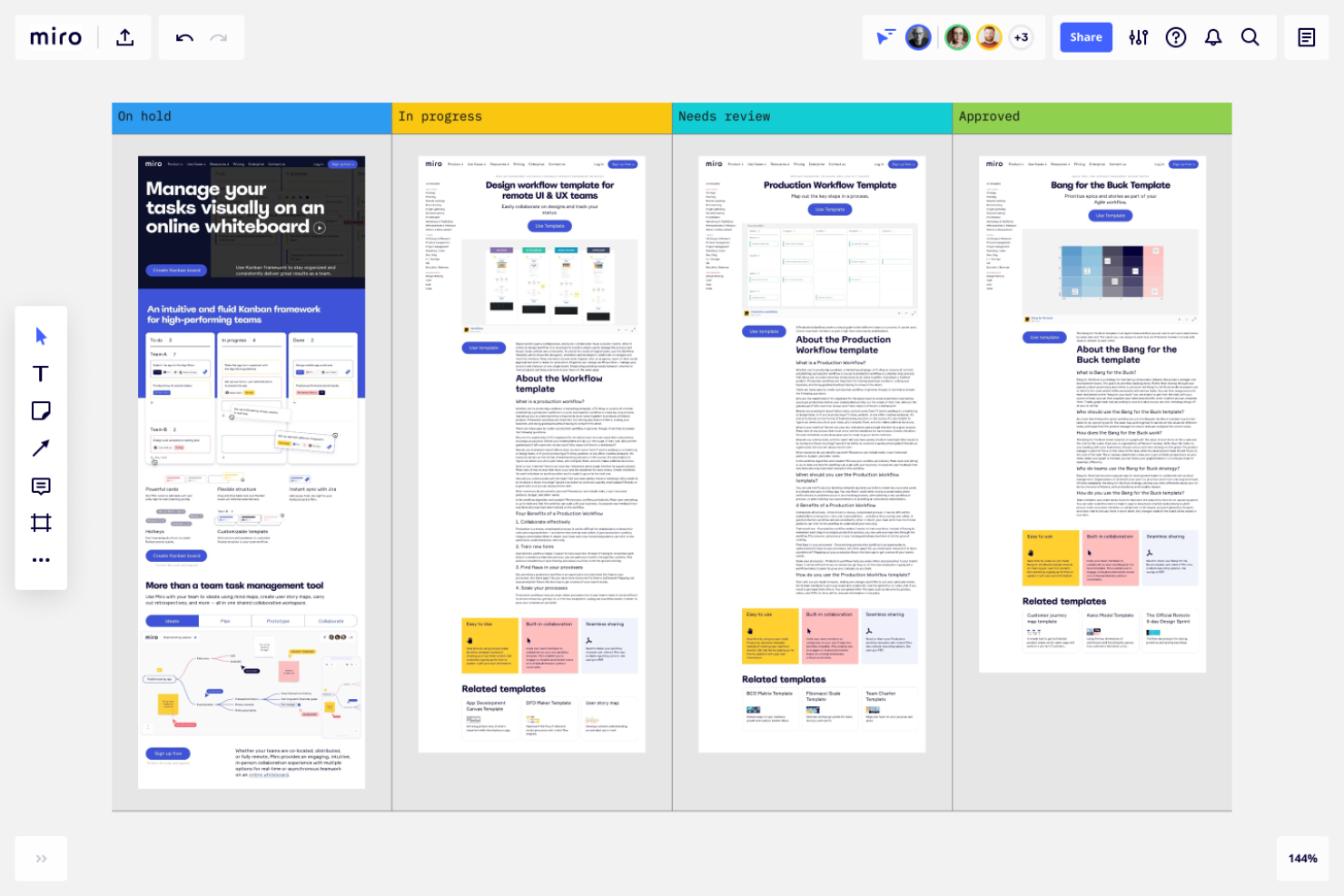
Miro is a versatile online collaboration tool designed to facilitate project management, diagramming, process mapping, and content visualization.
Why I Picked Miro: I like that Miro has an infinite canvas, which allows users to create comprehensive and interconnected workflows without spatial constraints. This is particularly useful for visualizing complex processes and ensuring that every step is clearly defined and easily accessible.
Another reason Miro stands out is its set of pre-built templates and customizable boards. Whether you are managing a project, conducting a sprint planning session, or tracking progress with a Kanban board, Miro offers a wide variety of templates that can be tailored to fit specific needs with a simple drag-and-drop interface.
The platform also has features for task assignment, deadline tracking, and progress monitoring. Miro's visual task boards and timelines help in organizing tasks efficiently and tracking the progress of individual and collective efforts.
Miro Standout Features & Integrations
Features include agile workflows, remote team collaboration, Kanban boards, mind mapping, brainstorming tools, digital sticky notes, presentation mode, flowcharts, diagramming, customizable templates, project management tools, feedback loops, sketching tools, video chat integration, screen sharing, and user story mapping.
Integrations include Asana, Microsoft Teams, Google Drive, Box, Airtable, Notion, Azure, Webex, Jira, Slack, Monday.com, Confluence, Zoom, and Figma.
New Product Updates from Miro
Miro Adds Japan Data Residency for Enterprise Customers
Miro has introduced Japan data residency for enterprise customers, offering in-region storage for production data, backups, and metadata, plus in-region compute infrastructure. For more information, visit Miro's official site.
 .

TrailHQ
Best for AI-driven workflow automation

Nanonets is an AI-driven platform that automates document processing and workflow management, benefiting industries such as finance, healthcare, and logistics.
Why I Picked Nanonets: I like its ability to automate complex business processes through a no-code platform, which reduces the need for manual intervention. This is achieved by leveraging artificial intelligence (AI) to automate tasks such as document processing, invoice handling, and data extraction. The integration of AI not only accelerates these processes but also enhances accuracy and efficiency, which are critical for businesses aiming to improve productivity.
The inclusion of human-in-the-loop AI workflows is another beneficial aspect, allowing businesses to incorporate human oversight into automated processes where necessary, which can help maintain a high level of accuracy and compliance.
The platform also adheres to stringent data protection standards such as GDPR, SOC 2, and HIPAA, ensuring that sensitive business data is handled with care. This focus on security makes Nanonets a reliable choice for organizations that prioritize data privacy.
Nanonets Standout Features & Integrations
Features include insights extraction from unstructured data, data extraction from various documents like invoices, bills of lading, purchase orders, and ID cards, and tailored solutions for industries such as finance, manufacturing, and insurance.
Integrations include Quickbooks, Salesforce, Google Sheets, Dropbox, and Zapier.

Best for no-code workflows and SOPs

Process Street is a simple checklist, workflow, and SOP software that lets you create and roll out workflows for all your business processes.
Why I picked Process Street: You can build them around any task you repeat, from vacation requests to onboarding. You start by defining your process within the tool. You can start from scratch or use one of the existing templates and then customize it to your needs. This library is useful to use existing process management best practices for common tasks without worrying about documenting your own.
Once you’ve created workflows, tasks are automatically routed to the relevant people. When they complete their task, it gets sent to the next person. And you can roll out each workflow you create as many times as you need without any further edits.
Process Street Standout Features & Integrations
Features include conditional logic, multi-tier approvals, dynamic due dates, scheduled workflows, and restored workflow revisions.
Integrations to thousands of apps are available through Zapier, including Gmail, Asana, Pipefy, Google Drive, Jira, Slack, Salesforce, and DropBox.
Nifty
Best for product teams

Imagine a tool that brings together your team's projects, tasks, and communications into one organized space—this is where Nifty becomes your indispensable ally. Designed for professionals across industries such as marketing, IT, and legal, Nifty helps you navigate the complexities of project management with ease. By providing features like task management, real-time communication, and workflow automation, Nifty addresses the need for a cohesive platform that enhances productivity and collaboration.
Why I Picked Nifty
I picked Nifty for its ability to cater specifically to product teams, offering features like Gantt charts and automated sprint reporting that are crucial for managing complex workflows. With its centralized product portfolio, Nifty allows your team to consolidate workflows and manage feature planning seamlessly. I appreciate how Nifty's structure supports backlog management and sprints, breaking down product development into manageable tasks. Additionally, its custom project embeds and rich-text document creation ensure that your team can make informed decisions and maintain alignment on feature requirements.
Nifty Key Features
In addition to its strengths for product teams, Nifty offers a suite of features that enhance workflow management for various teams.
- Roadmaps: Visualize project timelines and align your team's goals with clear, interactive roadmaps that keep everyone informed.
- Discussions: Facilitate real-time collaboration and feedback with team members through integrated discussion threads within projects.
- Docs & Files: Create and manage project documentation effortlessly, with the ability to integrate Google Docs for seamless collaboration.
- Forms: Build and customize forms to capture essential data and automate task creation within your workflow.
Nifty Integrations
Integrations include Harvest, Webex, Zoom, Slack, GitHub, Microsoft Suite, Google Drive, Miro, Typeform, and Google Calendar.
Pros and Cons
Pros:
- Built-in team chat facilitates real-time communication.
- Seamless Google Docs integration enhances document collaboration.
- Nifty's intuitive interface simplifies project management for teams.
Cons:
- Occasional technical issues can disrupt user experience.
- Limited native integrations compared to competitors like ClickUp.
Kintone
Best for building workflow apps

Kintone is a workplace platform that lets teams build and share custom workflows. Each team can use the tool to create the apps they need, whether a CRM, an expense report, or a content calendar.
The tool offers over 1,000 templates you can use to deploy the apps you need. You can also customize these to ensure they meet your specific workflow needs. Meanwhile, the No-Code interface means it is easy for anyone on your team to create the tools they need.
The tool also has plenty of integrations you can use to manage external data within your app. For example, you can add Dropbox files to the app or record information collected in emails.
Kintone starts at $24 per user per month for a minimum of five users. There is also a $15 per month plan for education, government, and nonprofits.
Diğer İş Akışı Uygulamaları
En iyi listeye giremeyen birkaç iş akışı uygulaması daha aşağıda yer almaktadır. Bu araçlar, doğru işletme için yine de iyi seçenekler olabilir.
- Camunda Platform
For managing projects and teams
- beSlick
For documenting business processes
- Kissflow Workflow
For ease of use
- Next Matter
For cross-functional workflows
- Content Workflow
For content production workflows
- Ravetree
Request workflow management
- Pneumatic Workflow
Workflow-centric platform
- Height
For task management workflows
- Admation
For creative and marketing teams
- ReptonPOD
For multi-phase projects
- Creatio AI CRM
For customer-related workflows
- ClickUp
For comprehensive project management
- Quire
For task breakdown workflows
- Creatio AI Studio
For no-code workflow automation
- Connecteam
For tracking frontline employee workflows
- Smartsheet
With multiple views and integrations
- Hive
For working with external partners
- GoodDay
For multi-methodology project management
- Qntrl
For card-based workflow automation
- TaskRay
For client-facing workflows
- Asana
Task management with repeatable checklists
- Avaza
Project management with chat, resource scheduling, and time tracking features
- Planview AdaptiveWork
Tool for collaborative work management
- Celoxis
Enterprise-class project management tools
- ProcessMaker
No-Code process automation platform
- Backlog
Project management for code teams
- Nintex
Workflow and process automation tool
- Pipefy
No-Code tool for automating business workflows
- ProWorkflow
Workflow management tool with quoting and invoicing
- Formstack
Powerful automation with forms, docs, and e-sign features


How I Evaluate Workflow Apps
I look at workflow apps across two layers: baseline capabilities like visual builders and intake-to-approval routing, and the differentiators—AI, reporting, workload visibility—that set tools apart.
Core Functionality (Table Stakes For This List)
When I'm selecting tools for my list, I rank each one on a scale from 0 (does not offer the functionality) to 5 (excels in this area) for each core functionality listed below. Then, I calculate the tool's total score into a percentage. Each tool needs to achieve a minimum total score of 75% to be considered for inclusion.
- Visual Workflow Builder: I look for drag-and-drop or no-code editors where you can map out stages, statuses, and transitions—like designing a content production pipeline from brief to publish.
- Task Automation Rules: Each tool gets evaluated on its if/then logic depth—things like auto-assigning a QA reviewer when a task moves to "Ready for Review" or notifying a stakeholder at approval gates.
- Multiple Project Views: I check whether teams can toggle between Kanban, Gantt, calendar, and timeline views so a PMO lead and a designer can track the same sprint in the format that works for them.
- Intake Forms & Request Routing: A good workflow app lets you build request forms that auto-route submissions into the right project and assign them based on type—like separating bug reports from feature requests at intake.
- Dependencies & Approval Gates: I evaluate how each tool handles sequential task logic and sign-off steps, such as blocking a deployment task until both design review and stakeholder approval are complete.
- Integrations & API Access: The tool's connectivity matters—native links to Slack, Jira, Google Drive, and similar platforms, plus API and webhook support for custom workflows that span multiple systems.
Once I have a list of tools that meet the criteria, I consider what sets each platform apart.
Differentiating Factors (What Sets Vendors Apart)
Here's how I compare and contrast different vendors:
Standout Features
Resource and workload views matter when you're balancing capacity across multiple projects—I look for tools that show who's overloaded before a sprint starts, not after. Custom dashboards are equally important for PMO leads who need cross-project rollups and KPI tracking without building reports from scratch. I also evaluate AI workflow assistance, like suggesting automations based on existing task patterns or drafting status summaries for leadership updates.
Beyond Features
I evaluate whether a tool scales from a 10-person agency to a 500-person product org with layered permissions and workspace hierarchies. Pricing transparency is another factor I weigh, especially how vendors gate features like automations or advanced views behind higher tiers. Security and compliance come into play for teams handling sensitive data, so I check for SOC 2 certification, SSO support, and audit logging.
İş Akışı Uygulaması Nasıl Seçilir?
Uzun özellik listeleri ve karmaşık fiyatlandırmalar karşısında bunalmak kolaydır. Yazılım seçim süreciniz boyunca odaklanmanıza yardımcı olmak için aklınızda bulundurmanız gereken temel faktörlerin bir kontrol listesi aşağıda yer almaktadır:
| Faktör | Dikkat Edilmesi Gerekenler |
| Ölçeklenebilirlik | Uygulamanın ekibinizle birlikte büyüyebildiğinden emin olun. Kullanıcı sınırlarını, iş akışı karmaşıklığını ve otomasyonu kontrol edin. Şirketiniz büyüdükçe uygulama, öğrenme eğrisini belirgin şekilde dikleştirmeden eklenen süreçleri desteklemelidir. |
| Entegrasyonlar | İş akışı uygulamanız CRM, proje yönetimi, e-posta ve depolama gibi araçlara bağlanmalıdır. Manuel geçici çözümlerden kaçınmak için yerel entegrasyonları ve API kullanılabilirliğini doğrulayın. |
| Özelleştirilebilirlik | Kodlama gerektirmeden iş akışlarını, alanları ve otomasyon kurallarını ihtiyaçlarınıza göre uyarlayabilen bir uygulama seçin. |
| Kullanım Kolaylığı | İşe alıştırma sürecinin hızlı olması için sezgisel bir arayüz, sürükle ve bırak araçları ve minimum eğitim gereksinimi sunan uygulamaları tercih edin. |
| Bütçe | Fiyatlandırma kademelerini ve kullanıcı ücretleri, otomasyon sınırları veya entegrasyon eklentileri gibi ek maliyetleri karşılaştırın. Değerin ihtiyaçlarınızla örtüştüğünden emin olun. |
| Güvenlik Önlemleri | Şifreleme, erişim kontrolleri ve GDPR veya SOC 2 gibi standartlara uyumluluğu sağlayın. |
| İş Birliği Özellikleri | Ekiplerin uyum içinde çalışmasını sağlamak için gerçek zamanlı güncellemeler, bildirimler ve role dayalı izinler arayın. |
| Mobil Erişilebilirlik | Mobil uyumlu bir uygulama, hareket hâlindeyken sorunsuz görev yönetimi sağlar. |
Bu ihtiyaçlarınız için fazla karmaşık görünüyorsa iş akışı orkestrasyon araçlarını veya iş süreci yönetimi yazılımlarını değerlendirin. Her ikisi de sistemler ve ekipler arasındaki süreçleri otomatikleştirmeye ve koordine etmeye yardımcı olur.
İş Akışı Uygulamalarındaki Trendler
Araştırmamda, farklı iş akışı uygulaması sağlayıcılarından sayısız ürün güncellemesi, basın bülteni ve sürüm günlüğü derledim. Gözlemlediğim yeni trendlerden bazıları şunlar:
- Yapay Zekâ Destekli Süreç Optimizasyonu: Daha fazla uygulama, iş akışlarını analiz etmek ve iyileştirmeler önermek için yapay zekâ kullanıyor. Bazı akıllı süreç otomasyonu araçları, darboğazları otomatik olarak tespit ediyor ve manuel müdahale olmadan verimsizlikleri azaltmak için öncelikleri dinamik biçimde ayarlıyor.
- Kodsuz Kural Oluşturucular: İş akışı uygulamaları artık onaylar, bildirimler ve dallanan yollar için sürükleyip bırakmalı kural oluşturucular sunuyor. Böylece ekipler, kodlama veya bilişim teknolojileri desteği olmadan iş akışlarını özelleştirebiliyor.
- Entegre Analiz Panoları: Yerleşik panolar, ayrı raporlama araçlarına ihtiyaç duymadan gerçek zamanlı kararlar almayı sağlamak için döngü sürelerini, tamamlanma oranlarını ve iş yükü dağılımını izliyor.
- Platformlar Arası Görev Senkronizasyonu: Proje yönetimi, iletişim ve dokümantasyon araçları arasındaki çift yönlü senkronizasyon, görevlerin platformlar arasında tutarlı kalmasını sağlıyor.
- Yapay Zekâ Destekli Belge İşleme: Yapay zekâ artık belgeleri otomatik olarak sınıflandırıyor, verileri çıkarıyor ve özetliyor. Bu da faturalar, sözleşmeler ve formlar için manuel veri girişini azaltıyor.
İş Akışı Uygulaması Nedir?
İş akışı uygulaması, görevleri, onayları ve süreçleri tek bir merkezi platformda otomatikleştiren, düzenleyen ve izleyen bir araçtır.
Bu, ekiplerin tekrarlanabilir iş akışları oluşturmasına ve yönetmesine, sorumluluklar atamasına, son teslim tarihlerini uygulamasına ve ilerlemeyi izlemesine yardımcı olan bir süreç otomasyonu aracıdır. Proje yöneticileri, operasyon ekipleri ve işletmeler tarafından kullanılan iş akışı uygulamaları, iş birliğini kolaylaştırır ve hem rutin hem de karmaşık süreçlerde tutarlılık sağlar.
İş Akışı Uygulamalarının Özellikleri
İş akışı uygulamalarını seçerken aşağıdaki temel özelliklere dikkat edin:
- Süreç otomasyonu: Bu özellik, belirli tetikleyicilere göre otomatik olarak gerçekleşen görev dizileri oluşturmanıza yardımcı olur. Rutin süreçlerin kendi kendine çalışmasını sağlayarak zaman kazanabilir ve manuel, tekrarlayan işleri azaltabilirsiniz.
- Görev yönetimi: İş akışları içindeki görevleri atayabilir, izleyebilir ve önceliklendirebilirsiniz. Bu, herkesin neyin ne zamana kadar yapılması gerektiğini net biçimde bilmesini sağlar ve hiçbir işin gözden kaçmamasına yardımcı olur.
- İş birliği araçları: Paylaşılan çalışma alanları ve tartışmalar gibi özellikler, ekip üyelerinin bağlantıda kalmasını sağlar. Daha az uğraşla iletişim kurabilir, dosya paylaşabilir ve herkesin aynı bilgiye sahip olmasını sağlayabilirsiniz.
- Özelleştirilebilir iş akışları: İş akışlarını kendine özgü iş süreçlerinize uyacak şekilde düzenleyebilirsiniz. Uygulamanın gerçekte çalışma biçiminize uyması için adımları değiştirebilir, koşullu mantık ekleyebilir veya onay gereksinimlerini ayarlayabilirsiniz.
- Bildirimler ve hatırlatıcılar: Bir görev ilgilenmenizi gerektirdiğinde veya son teslim tarihi yaklaştığında zamanında uyarılar alın. Bu, sizin ve ekibinizin tepkisel davranmak yerine proaktif kalmasına yardımcı olur.
- Entegrasyon olanakları: Her şeyin bağlantılı kalmasını ve aynı verinin tekrar tekrar girilmesini önlemek için iş akışı uygulamanızı e-posta uygulamaları, takvimler veya belge depolama araçları gibi diğer işletme araçlarına bağlayın.
- Denetim izleri: Her işlem ve güncelleme kaydedilir; böylece geçmişe ilişkin açık bir kaydınız olur. Bu, hesap verebilirliği artırır ve uyumluluk kontrollerini çok daha kolay hâle getirir.
- Raporlama ve analiz: Görsel panolar ve ayrıntılı raporlar, işlerin nerede ilerlediğini veya tıkandığını gösterir. Bunlar sayesinde darboğazları tespit edebilir ve süreçlerinizi sürekli olarak iyileştirebilirsiniz.
Yaygın İş Akışı Uygulamalarının Yapay Zekâ Özellikleri
Yukarıda listelenen standart iş akışı uygulaması özelliklerinin ötesinde, özel yapay zekâ iş akışı otomasyonu yazılımları şu özellikleri de sunar:
- Akıllı süreç otomasyonu: Yapay zekâ, iş akışlarınızdaki tekrarlanan kalıpları belirler ve otomasyonlar önererek çok az manuel kurulumla daha fazla görevi kolaylaştırmanıza yardımcı olur.
- Tahmine dayalı analiz: Yapay zekâ, geçmiş iş akışı verilerini analiz ederek gelecekteki darboğazları veya gecikmeleri öngörür. Bu sayede sorunları önceden fark edebilir ve görevleri proaktif olarak yeniden yönlendirebilirsiniz.
- Akıllı yönlendirme: Yapay zekâ, belirli bir görevi kimin üstlenmeye uygun veya müsait olduğunu değerlendirir ve sorumlulukları buna göre atar. İş yüklerini dengeli tutar ve en başarılı çalışanlarınızın tükenmesini önlersiniz.
- Otomatik belge işleme: Yapay zekâ sayesinde iş akışı uygulamaları dosya ve formlardaki bilgileri çıkarabilir, verileri otomatik olarak girebilir ve tutarsızlıkları işaretleyebilir. Artık evrakları tek tek incelemeniz veya yazım hatalarının sizi yavaşlatması gerekmez.
- Doğal dil işleme: Yapay zekâ, uygulamayla basit ve günlük bir dil kullanarak etkileşim kurmanıza olanak tanır; örneğin “satış ekibi için yeni bir onay oluştur.” Bu, teknoloji becerileri ne olursa olsun iş akışınıza katılan herkes için kullanım engelini azaltır.
- Anormallik tespiti: Yapay zekâ, iş akışı verilerinizi olağandışı etkinlikler veya hatalar açısından izler. Bir şeyler yolunda gitmiyorsa (örneğin bir süreç normalden çok daha uzun sürüyorsa) sorunu düzeltmeniz için erkenden uyarılırsınız.
İş Akışı Uygulamalarının Faydaları
İş akışı uygulamalarını kullanıma almak ekibiniz ve işletmeniz için çeşitli faydalar sağlayabilir. Öne çıkan avantajlardan bazıları şunlardır:
- Görevlerin daha hızlı tamamlanması: Tekrarlanan işleri otomatikleştirir ve bildirimler ile zamanlanmış eylemler sayesinde görevlerin ilerlemesini sağlar.
- Daha az hata: Yapılandırılmış iş akışlarını, önceden belirlenmiş kuralları ve otomatik veri doğrulamayı zorunlu kılarak hataları azaltır.
- Daha iyi ekip koordinasyonu: Paylaşılan görev listeleri, durum güncellemeleri ve iş birliği araçlarıyla herkesin aynı bilgiye sahip olmasını sağlar.
- Süreç görünürlüğünün artması: Ekiplerin darboğazları, bekleyen onayları ve görev ilerlemesini bir bakışta görebilmesi için gerçek zamanlı takip olanağı sunar.
- Uyumluluğun daha kolay izlenmesi: Eylemleri, onayları ve değişiklikleri kaydederek yasal gereklilikleri karşılamayı ve iş akışlarını denetlemeyi kolaylaştırır.
- Daha verimli onaylar: Görevleri onay vermesi gereken doğru kişilere yönlendirerek gecikmeleri ve manuel takip işlemlerini azaltır.
- Daha akıllı karar alma: İş akışı verilerini toplar ve ekiplerin eğilimleri analiz ederek süreçleri iyileştirmesine yardımcı olan raporlar oluşturur.
İş Akışı Uygulamalarının Maliyetleri ve Fiyatlandırması
İş akışı uygulamalarını seçmek, mevcut çeşitli fiyatlandırma modellerinin ve planların anlaşılmasını gerektirir. Maliyetler özelliklere, ekip büyüklüğüne ve eklentilere göre değişir. Aşağıdaki tabloda iş akışı uygulamalarında bulunan yaygın planlar, ortalama fiyatlar ve tipik özellikler gösterilmektedir:
İş Akışı Uygulamaları için Plan Karşılaştırma Tablosu
| Plan Türü | Ortalama Fiyat | Yaygın Özellikler |
| Ücretsiz Plan | $0 | Temel görev otomasyonu, sınırlı kullanıcı sayısı, temel entegrasyonlar ve minimum depolama alanı. |
| Kişisel Plan | $5-$15/kullanıcı/ay | Gelişmiş görev otomasyonu, özel iş akışları, öncelikli destek ve mobil erişim. |
| İşletme Planı | $20-$40/kullanıcı/ay | Ekip iş birliği araçları, ayrıntılı raporlama, API erişimi ve artırılmış otomasyon sınırları. |
| Kurumsal Plan | $50+/kullanıcı/ay | Gelişmiş güvenlik denetimleri, özel hesap yöneticisi, özel entegrasyonlar ve sınırsız iş akışları. |
İş Akışı Uygulaması Hakkında Sıkça Sorulan Sorular
İşte iş akışı uygulamaları hakkında sıkça sorulan soruların bazı yanıtları:
İş akışı uygulaması ile proje yönetimi aracı arasındaki fark nedir?
İş akışı uygulaması, onaylar veya işe başlatma gibi tekrarlanabilir süreçleri otomatikleştirmenize ve yönetmenize yardımcı olur. Proje yönetimi araçları; görevleri planlamaya, sorumlulukları atamaya ve belirli projelerdeki ilerlemeyi izlemeye odaklanır. Birçok proje yöneticisi her ikisini de kullanır: İş akışı uygulamaları öngörülebilir adımları kolaylaştırırken proje yönetimi araçları karmaşık projeleri ve son teslim tarihlerini kontrol altında tutar.
İş akışı uygulamaları süreçlerimize uyacak şekilde özelleştirilebilir mi?
Evet, çoğu iş akışı uygulaması, ekibinizin kendine özgü adımlarını, formlarını ve tetikleyicilerini eşleştirebilmeniz için özelleştirme seçenekleri sunar. Genellikle iş akışlarını değiştirebilir, alan ekleyebilir veya kaldırabilir, özel onaylar belirleyebilir ve belirli otomasyonlar oluşturabilirsiniz. Bu sayede yeni yazılımı sıfırdan başlamadan mevcut süreçlerinizle uyumlu hâle getirebilirsiniz.
Ekibimin iş akışlarını yeni bir uygulamaya nasıl taşıyabilirim?
Genellikle mevcut süreçlerinizi haritalandırarak başlar, ardından birçok iş akışı uygulamasının sunduğu içe aktarma araçlarını veya şablonları kullanırsınız. Çoğu platform, proje yöneticilerinin adımları, izinleri ve bildirimleri yeniden oluşturmasına yardımcı olmak için işe alıştırma desteği sunar. Yeni kurulumu önce küçük bir ekiple test etmek, sorunsuz bir geçiş sağlamaya yardımcı olabilir.
İş akışı uygulamaları hassas bilgileri işlemek için güvenli midir?
Evet, saygın iş akışı uygulamaları şifreleme kullanır ve kullanıcı erişimini yönetmek için çeşitli yöntemler sunar. Düzenli güvenlik güncellemelerine, uyumluluk sertifikalarına (SOC 2 veya GDPR gibi) ve denetim kayıtlarına sahip uygulamaları tercih edin. Hassas veriler için güvenlik belgeleri açık ve izin ayarları kapsamlı olan bir uygulama seçin
İş akışı uygulamaları kullanıcı izinlerini ve erişim denetimini nasıl yönetir?
Çoğu iş akışı uygulaması, her iş akışı adımını kimin görüntüleyebileceğini, düzenleyebileceğini veya onaylayabileceğini tanımlamanıza olanak tanır. Ekip üyeleri veya departmanlar için roller atayabilir, hassas bilgilere erişimi sınırlandırabilir ve ekipler değiştikçe kullanıcıları hızlıca ekleyebilir veya kaldırabilirsiniz. Bu, proje yöneticilerinin süreçleri verimli ve güvenli tutmasına yardımcı olur.
İş akışı uygulamaları mobil erişim sunar mı?
Evet, birçok iş akışı uygulamasının mobil uygulamaları veya duyarlı web siteleri vardır; böylece onayları yönetebilir, ilerlemeyi izleyebilir ve görevleri doğrudan telefonunuzdan güncelleyebilirsiniz. Bu özellik, özellikle hareket hâlinde çalışması gereken uzaktan veya farklı konumlara dağılmış ekipleri yönetiyorsanız faydalıdır.