

2026 İçin İncelenen En İyi 10 Süreç İş Akışı Yazılımı

10 En İyi Süreç İş Akışı Yazılımları Kısa Listesi


Süreç iş akışı yazılımı, can sıkıcı ve tekrarlayan görevleri otomatikleştirmenize, kaliteyi artırmak ve işlerin gözden kaçmasını önlemek için süreçlerinizi standartlaştırmanıza olanak tanır. Ancak ihtiyaçlarınıza uygun aracı bulmak zor olabilir.
Bir proje yöneticisi olarak yaptığım dikkatli araştırmalar ve bu tür bir aracı kullanma deneyimim sayesinde, piyasadaki en iyi süreç iş akışı yazılımlarını belirledim ve bu süreci kolaylaştırmaya yardımcı olmak için ideal kullanım alanlarını açıkladım.
Why Trust Our Software Recommendations
Our team has been testing and reviewing software since 2012. As project managers ourselves, we know how difficult—and important—it is to choose the right software.
For this guide, we evaluated tools using hands-on testing and independent research, scoring tools using our selection criteria. We also draw on insights from industry thought leaders and practicing project management experts.
Our reviews reflect our human editorial judgment, not a sales pitch.
Expert reviewers:
Süreç İş Akışı Yazılımları Karşılaştırma Tablosu
Bu karşılaştırma tablosu, en iyi süreç iş akışı yazılımı seçimlerim için fiyatlandırma ayrıntılarını özetlemektedir:
| Tool | Starting Price | Website | |
|---|---|---|---|
| Best for secure client-facing process portals | 4.4 out of 5 | $5,000/year Free trial + free demo available | Book Demo |
| Best for building dynamic workflows | 4.3 out of 5 | $10/user/month Free plan + 14-day trial + demo available | Book Demo |
| Best for omnichannel creative workflows with AI | 4.6 out of 5 | Pricing upon request Not available | Book Demo |
| Best for automation presets | 4.6 out of 5 | $9/user/month Free plan + 14-day trial available | Book Demo |
| Best for intelligent workflow diagramming | 4.5 out of 5 | $9/month Free plan + 7-day free trial available | Website |
| Best for enterprise workflow automation | 4.5 out of 5 | $19/user/month 15-day free trial | Website |
| Best with 1,000+ prebuilt app connectors | — | Pricing upon request 30-day free trial available | Website |
| Best for complex workflow collaboration | 4.8 out of 5 | $8/user/month Free plan + 14-day trial available | Book Demo |
| Best for AI-driven process automation | 4.9 out of 5 | Pricing upon request Free trial available + free demo | Website |
| Best for form-based workflows | 4.7 out of 5 | Pricing upon request 14-day free trial; free demo available | Website |
En İyi Süreç İş Akışı Yazılımları İncelemeleri
Her bir aracın en iyi kullanım alanını ve öne çıkan özelliklerini göstermek için her süreç aracının kısa bir açıklamasını burada bulabilirsiniz.

Moxo
Best for secure client-facing process portals

Moxo is a workflow automation and client collaboration platform that combines a visual process builder, role-based task routing, AI agents, and branded portals for running structured workflows with both internal teams and external stakeholders.
Who Is Moxo Best For?
Moxo is a strong fit for professional services, financial services, and operations teams that run structured, multi-party processes involving external clients or partners.
Why I Picked Moxo
I picked Moxo as one of the best because of how it handles external participants in a workflow without sacrificing security. When I run a client onboarding flow, each participant sees only their assigned action and the context to complete it, with granular role-based access controls keeping sensitive data contained. On top of that, Moxo is SOC 2 Type II certified, GDPR compliant, and supports on-premises or private cloud deployment, which matters when clients in finance or healthcare ask about data residency before signing anything.
Moxo Key Features
- Visual flow builder: Design multi-step workflows with conditional branching, parallel paths, loops, and triggers using a drag-and-drop builder.
- SLA timers and escalations: Set deadlines on individual steps and automatically escalate overdue tasks without manual follow-up.
- Human action routing: Assign approvals, eSignatures, file requests, and form submissions to specific participants at defined points in a flow.
- 7+ year audit trail: Log every action, decision, and document submission with timestamped records for compliance review.
Moxo Integrations
Moxo offers data sync connectors with Salesforce, HubSpot, Microsoft Dynamics, Zoho, Xero, and Redtail, plus documented integrations with Jira, Slack, DocuSign, Stripe, Google Drive, Dropbox, Box, OneDrive, QuickBooks, and Zendesk, among others. It also connects with Zapier and provides a REST API and webhooks for custom integrations.
Pros and Cons
Pros:
- White-label portals with custom domain support
- SOC 2 Type II and GDPR compliant
- Built-in eSignatures, forms, and file requests
Cons:
- Flow builder setup can feel overcomplicated
- Mobile app lags behind desktop experience

Wrike
Best for building dynamic workflows
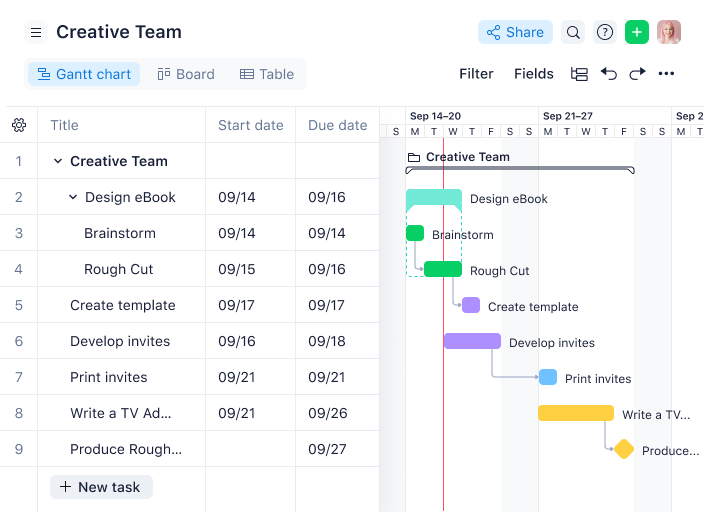
Wrike earns its spot on my shortlist because it’s the first tool I reach for when teams need to build and adapt workflows on the fly. I recommend Wrike when you’re outgrowing static task lists and need to automate handoffs, approvals, and dependencies as your process evolves.
What I appreciate most is how Wrike lets me design custom workflow stages, set up rule-based automations, and visualize bottlenecks in real time. When I’ve worked with teams juggling multiple projects and shifting priorities, Wrike’s dynamic workflow builder has made it easy to keep everyone aligned and accountable.
Wrike’s Best For
- Operations, marketing, and PMO teams designing custom, automated workflows
- Organizations that need granular control over approvals, dependencies, and process visibility
Wrike’s Not Great For
- Teams that want a lightweight, quick-start project management tool
- Small groups with informal processes or minimal need for workflow automation
What Sets Wrike Apart
What I notice about Wrike is how it treats workflow design as a first-class part of project management, not just an add-on. Unlike ClickUp, which tries to be a catch-all for every work style, Wrike expects teams to define clear stages, rules, and ownership for every process.
It’s built for teams that want to map out exactly how work moves from start to finish, with automation and approvals baked in. Wrike assumes you’re ready to invest in process clarity and cross-team coordination, rather than just tracking tasks.
Tradeoffs with Wrike
Wrike optimizes for structure and process rigor, which means you’ll spend more time upfront configuring workflows. The trade-off is that it can feel heavy or restrictive if your team prefers informal or rapidly changing processes.
New Product Updates from Wrike

Wrike Redesigns Workspace Search With New Filters
Wrike introduces a redesigned Workspace Search interface with recent search shortcuts, item type and location filters, and parent-task context. These updates help users find relevant work items and navigate search results efficiently. For more information, visit Wrike’s official site.
 .

Best for omnichannel creative workflows with AI
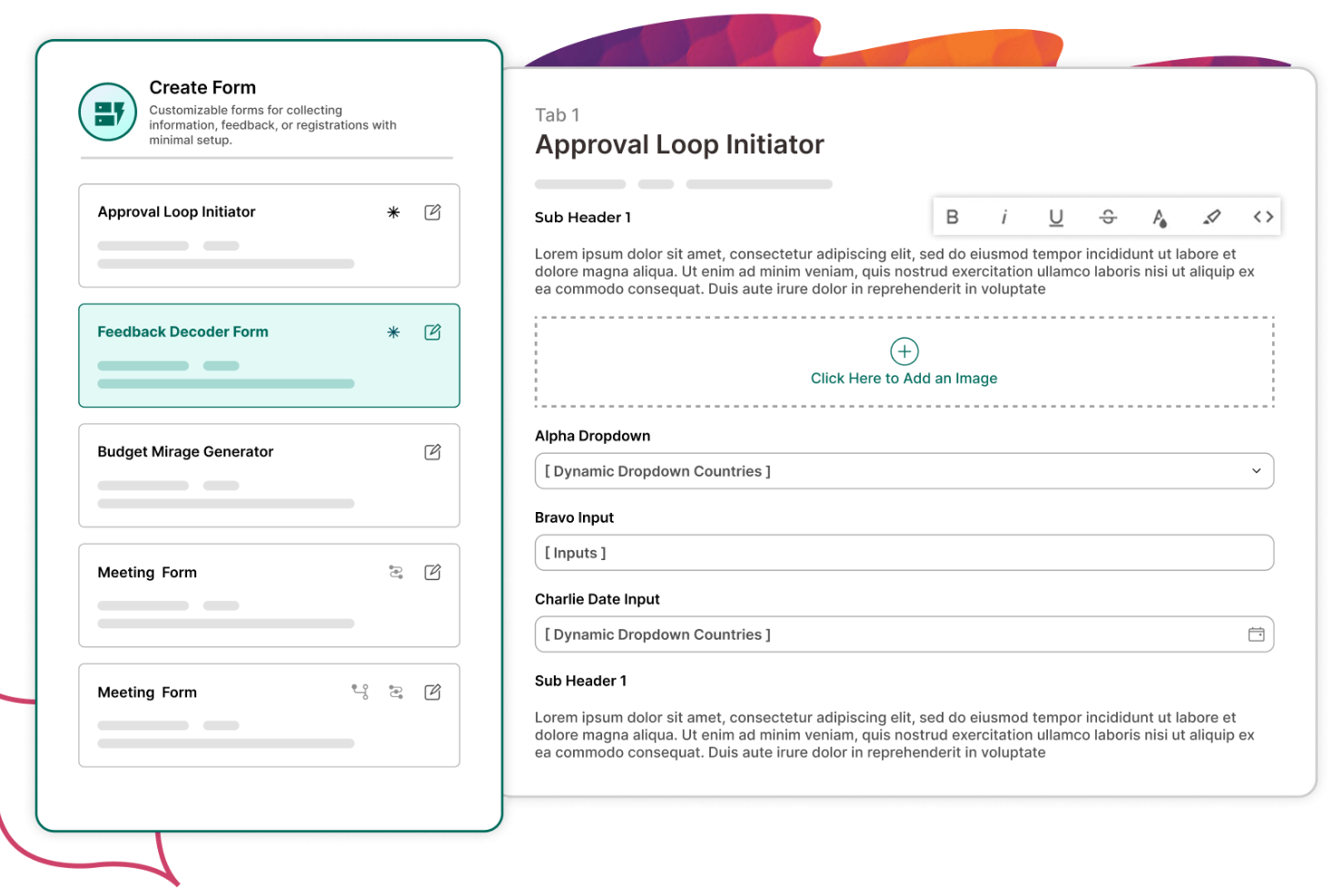
Screendragon stands out to me for teams managing complex, omnichannel creative workflows that need AI-driven support. I recommend it when you’re juggling campaigns across multiple channels and need to automate repetitive creative processes without losing oversight.
What I appreciate most is how Screendragon’s AI-powered workflow automation helps route tasks, manage approvals, and optimize resource allocation for creative teams. When I’ve tested its workflow builder, I’ve found it especially strong at handling multi-step, multi-team processes where creative assets move between departments and stakeholders.
Screendragon’s Best For
- Creative, marketing, and agency teams managing omnichannel campaigns with complex approval chains
- Organizations that want AI-driven workflow automation for high-volume creative production
Screendragon’s Not Great For
- Small teams with simple, linear processes or minimal creative collaboration
- Teams that don’t need advanced workflow automation or multi-channel asset management
What Sets Screendragon Apart
Screendragon approaches workflow management with a creative-first mindset, building its platform around the needs of marketing and agency teams running omnichannel campaigns. Unlike tools like Asana or Jira, which focus on general project tracking or engineering workflows, Screendragon expects teams to orchestrate complex creative processes with multiple stakeholders, assets, and approval layers. Its design assumes you want to automate and optimize creative production at scale, not just track tasks.
Tradeoffs with Screendragon
Screendragon optimizes for handling high-volume, multi-channel creative workflows, but that focus means it can feel heavy or overbuilt for teams with straightforward processes. The practical consequence is that you might spend more time configuring workflows than actually managing simple projects.

Best for automation presets
monday AI Workspace is an AI-native work management platform that combines visual workflow building, no-code automation, conditional branching logic, and autonomous AI agents to orchestrate multi-step processes across teams.
Who Is monday AI Workspace Best For?
It's a strong fit for PMO directors and operations managers at mid-to-large organizations who need to standardize and automate processes across multiple teams and departments.
Why I Picked monday AI Workspace
monday AI Workspace earns its spot on my shortlist because its automation preset library covers the kinds of scenarios teams actually run into. I can deploy presets for approval routing, deadline escalation, and capacity-based task assignment without writing a single rule from scratch. On top of that, monday agents execute those workflows autonomously, reassigning work, summarizing status updates, and escalating risks without waiting for a human trigger.
monday AI Workspace Key Features
- Visual workflow builder: Create and modify multi-step workflows using a drag-and-drop interface with custom steps.
- Process template library: Access and deploy hundreds of prebuilt workflow templates for common project scenarios.
- Advanced workflow analytics: Monitor cycle times, bottlenecks, and status with real-time dashboards and detailed reports.
- Native resource management: Allocate team capacity and track workload within the same workspace as project processes.
monday AI Workspace Integrations
monday AI Workspace offers hundreds of native integrations through its built-in integrations and marketplace, including Slack, Salesforce, HubSpot, Jira, Google Workspace, Microsoft 365, Trello, Zendesk, GitHub, Dropbox, and connects with Zapier. An API is available for custom integrations.
Pros and Cons
Pros:
- No-code conditional branching across complex workflows
- AI agents handle multi-step workflow execution autonomously
- Large library of ready-to-use automation presets
Cons:
- Dashboards require setup for workflow analytics
- Automation limits cap out on lower-tier plans
New Product Updates from monday AI Workspace
monday AI Workspace Adds Human Approval Routing
monday AI Workspace adds a human-in-the-loop approval block to AI Workflows, sending approval requests and routing workflow paths based on responses. For more information, visit monday AI Workspace's official site.
 .

Best for intelligent workflow diagramming
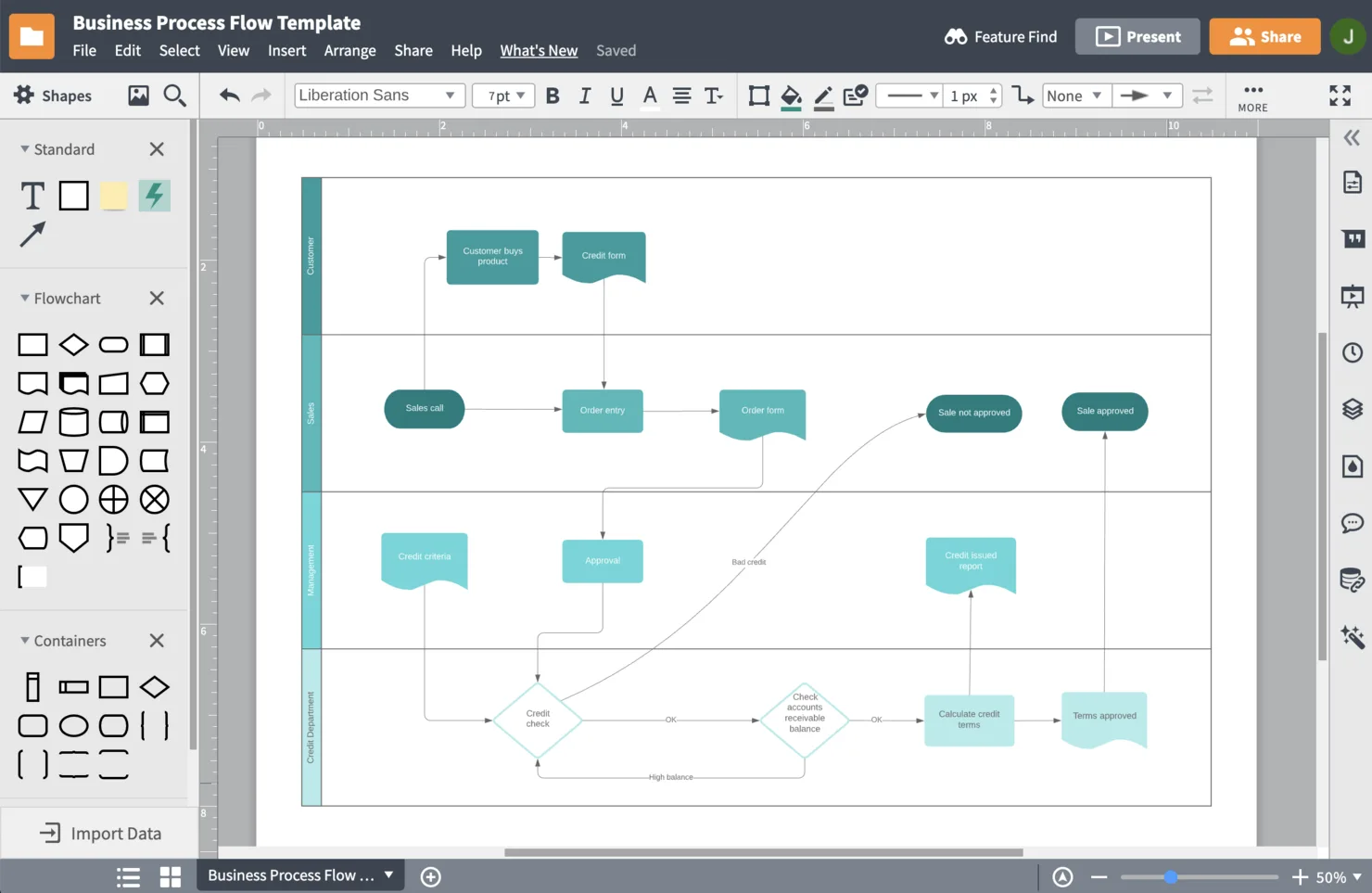
Lucidchart earns its spot here because it’s the first tool I reach for when I need to map out complex workflows visually and intelligently. I recommend it when teams want to move beyond static diagrams and actually build living, data-connected process maps.
What I appreciate most is how Lucidchart lets me layer conditional logic and real-time data into diagrams, so workflows aren’t just pictures—they’re interactive and dynamic. When I’ve needed to show how processes adapt to different scenarios or connect to live systems, Lucidchart’s intelligent shapes and automation features have made that possible.
Lucidchart’s Best For
- Teams that need to design, visualize, and automate complex process workflows
- Organizations that want interactive diagrams connected to live data and logic
Lucidchart’s Not Great For
- Teams looking for a full-featured project management or task tracking platform
- Users who only need basic flowcharts without automation or data integration
What Sets Lucidchart Apart
Lucidchart approaches workflow design as a visual, interactive process rather than a static documentation exercise. Unlike tools like Visio that focus on drawing diagrams, Lucidchart expects teams to build living process maps that connect to real data and adapt as workflows change.
It’s not trying to be a project management hub like Asana or Jira. Instead, it assumes teams want to experiment, iterate, and automate processes visually—making the diagram itself the source of truth for how work flows.
Tradeoffs with Lucidchart
Lucidchart optimizes for visual process mapping and intelligent diagramming, but that means you won’t get built-in task management or execution features. The practical consequence is you’ll need to pair it with other tools to actually run and track work.

Qntrl
Best for enterprise workflow automation

Qntrl makes my shortlist because it’s built for organizations that need to automate and orchestrate complex, multi-step workflows at scale. I recommend Qntrl when teams outgrow basic task management and need granular control over process flows, permissions, and compliance.
What stands out for me is Qntrl’s ability to design custom workflow blueprints and enforce business rules at every stage. I especially appreciate how its audit trails and role-based access help enterprise teams maintain accountability and transparency across departments.
Qntrl’s Best For
- Enterprise teams that need to automate and control complex, multi-step workflows
- Organizations with strict compliance, audit, and process governance requirements
Qntrl’s Not Great For
- Small teams that just need basic task or project tracking
- Groups looking for fast setup or lightweight, visual workflow tools
What Sets Qntrl Apart
Qntrl stands out to me for how deeply it’s built around process enforcement and granular control, almost like a workflow engine rather than a typical project management tool. Unlike something like monday.com, which prioritizes flexibility and visual boards, Qntrl expects teams to define every step, rule, and approval up front.
It’s designed for organizations that want to lock down how work moves between people and departments, with a strong focus on compliance and auditability. I see it as a fit for teams that treat process as non-negotiable, not just a guideline.
Tradeoffs with Qntrl
Qntrl optimizes for strict process control and governance, but that means you sacrifice speed and flexibility. If your workflows change often or you need to experiment, the overhead of maintaining detailed blueprints can slow you down.

Celigo earns a spot on my list because it’s the only workflow platform I’ve used that comes with over 1,000 prebuilt app connectors out of the box. I recommend it when teams need to automate processes across dozens of cloud apps without building custom integrations from scratch.
What stands out for me is how quickly I can map complex, multi-step workflows between systems like NetSuite, Salesforce, and Shopify. I appreciate how Celigo’s library lets my team connect new tools in minutes, which is a huge advantage when business processes span multiple platforms.
Celigo’s Best For
- IT and operations teams automating workflows across dozens of cloud apps
- Businesses that need prebuilt connectors for rapid integration between major SaaS platforms
Celigo’s Not Great For
- Small teams with simple, single-app workflows
- Users who want a visual, drag-and-drop workflow builder without technical setup
What Sets Celigo Apart
Celigo approaches workflow automation as an integration-first problem, not just a process management challenge. Unlike tools like Zapier that focus on simple, event-driven automations, Celigo expects teams to orchestrate complex, multi-app workflows using its vast library of prebuilt connectors. It’s designed for organizations that treat integration as a core part of their operations, not an afterthought.
Instead of offering a lightweight, visual workflow builder like monday.com, Celigo assumes you want to connect and automate business-critical systems at scale, often with IT or technical oversight.
Tradeoffs with Celigo
Celigo optimizes for deep integration and automation across many apps, but that means setup and maintenance can get technical and require IT involvement. The practical consequence is that non-technical teams may find it harder to build or adjust workflows without support.
Pros and Cons
Pros:
- Extensive template library for common business processes
- Real-time monitoring dashboard for integration health
- Granular role-based access controls for security
Cons:
- Limited offline support for workflow management
- Initial setup can be complex for new users
New Product Updates from Celigo
Celigo Expands Storage, Data Imports, and Connection Management
Celigo adds a standalone storage connector, optimized Azure Synapse imports, NetSuite OAuth 2.0, flexible file templates, and expanded MCP access controls. These updates help teams manage files, process data, and secure integrations. For more information, visit Celigo’s official site.
 .

Miro
Best for complex workflow collaboration
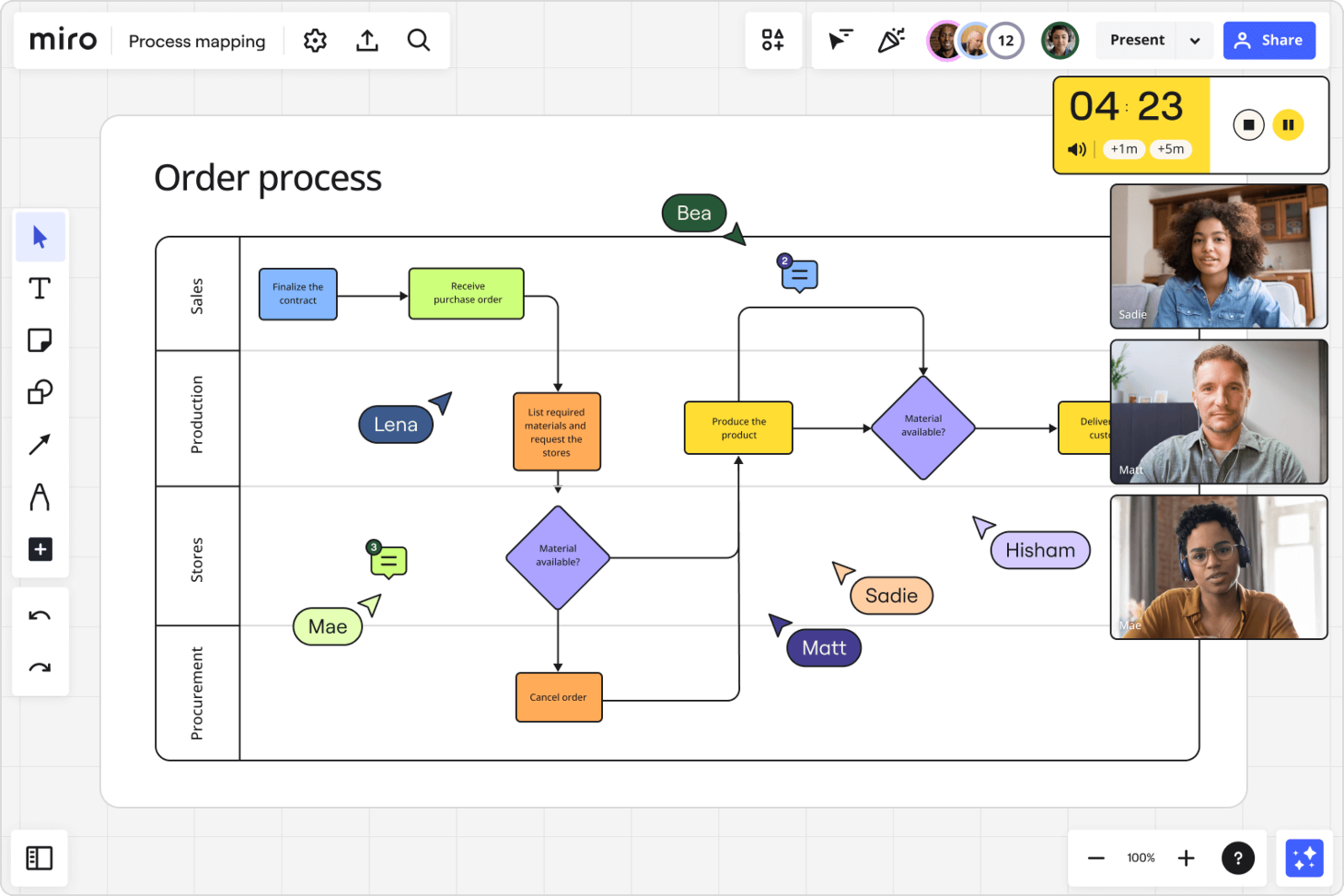
Miro earns its spot here because it’s the only platform I’ve used that truly supports mapping and iterating on complex workflows with distributed teams. I recommend it when you need to visualize interconnected processes, dependencies, and feedback loops in a way that’s interactive and easy to update as things change.
What I appreciate most is how Miro’s infinite canvas, advanced diagramming, and real-time collaboration let my team co-create process maps and swimlanes without losing context. When we’re working through multi-team handoffs or designing new workflows, Miro’s visual tools make it easy to spot gaps and align everyone quickly.
Miro’s Best For
- Product, design, and process teams mapping complex, multi-step workflows
- Distributed teams who need to co-create and iterate on visual process diagrams
Miro’s Not Great For
- Teams that need strict task management or workflow automation features
- Organizations looking for detailed reporting or structured project tracking
What Sets Miro Apart
Miro approaches process workflow from a visual-first perspective, treating every workflow as something to be mapped, explored, and iterated on collaboratively. Unlike tools like Jira, which expect you to define structured tasks and statuses, Miro assumes your team needs to see the big picture and move pieces around as ideas evolve.
It’s designed for teams who want to co-create and refine processes in real time, not just follow a set path. I find it’s especially different from platforms like monday.com, which focus on structured boards and lists—Miro expects you to start with a blank canvas and build your workflow visually from scratch.
Tradeoffs with Miro
Miro optimizes for open-ended collaboration and visual mapping, but that means you sacrifice built-in process enforcement and structured tracking. As a result, it’s easy for workflows to become messy or lack accountability if your team needs more guardrails.
New Product Updates from Miro
Miro Adds Japan Data Residency for Enterprise Customers
Miro has introduced Japan data residency for enterprise customers, offering in-region storage for production data, backups, and metadata, plus in-region compute infrastructure. For more information, visit Miro's official site.
 .

TrailHQ
Best for AI-driven process automation
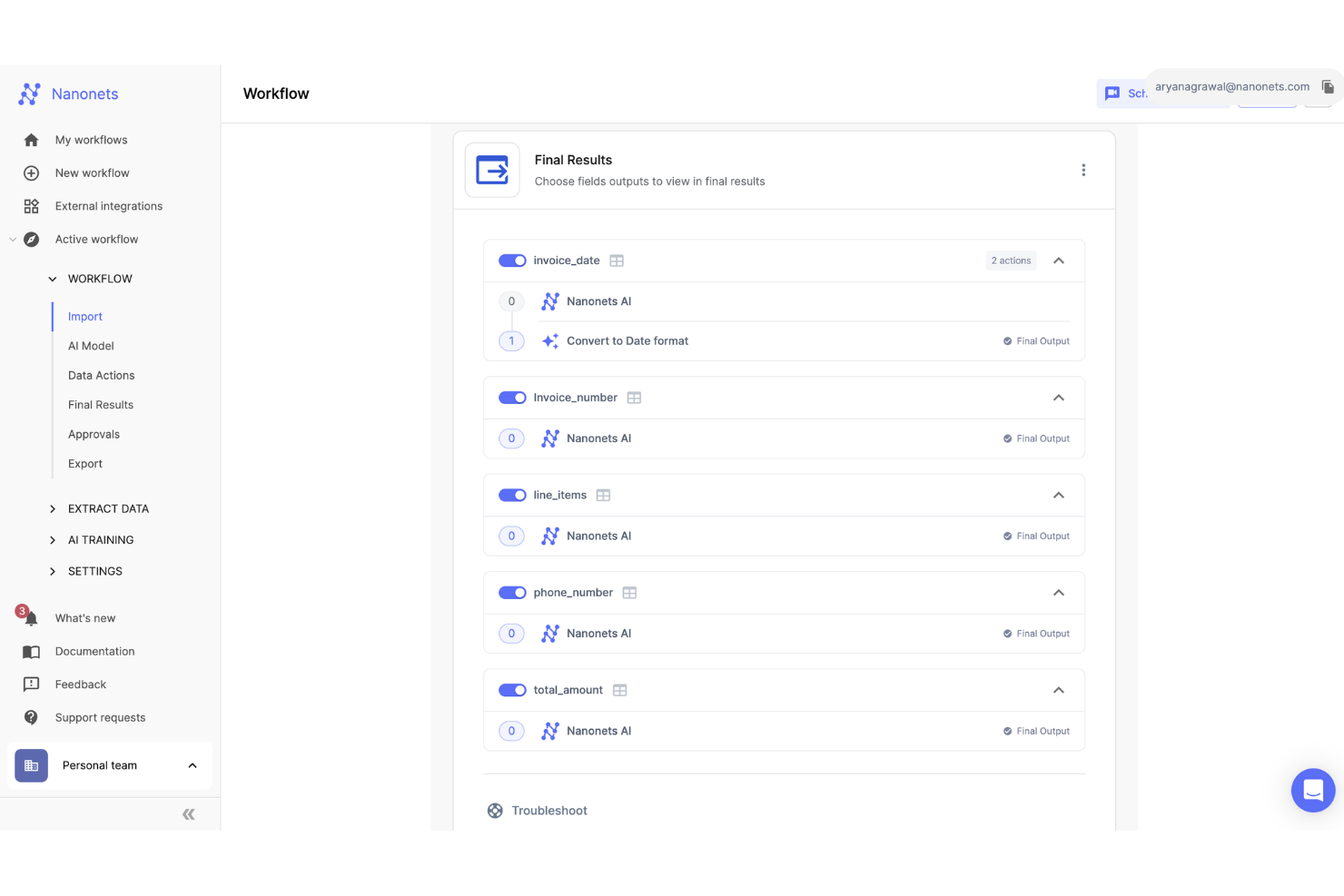
Nanonets earns a spot on my list because it’s one of the few workflow platforms that truly leans into AI-driven process automation. I recommend it when teams are drowning in repetitive document handling or need to automate complex, multi-step workflows that involve extracting and routing data.
What I appreciate most is how Nanonets uses machine learning to read, classify, and move information between systems without manual intervention. When I’ve tested its document processing and workflow triggers, it’s been especially strong at reducing bottlenecks in finance, HR, and operations teams.
Nanonets’s Best For
- Operations, finance, and HR teams automating document-heavy workflows with AI
- Organizations that need to extract, classify, and route data across multiple systems
Nanonets’s Not Great For
- Teams looking for traditional, manual workflow management without automation
- Users who need highly visual, board-based project tracking or collaboration
What Sets Nanonets Apart
Nanonets approaches workflow automation by putting AI at the center, rather than layering automation onto traditional task management. Unlike tools like Zapier that focus on connecting apps with simple triggers, Nanonets expects teams to automate complex, document-driven processes where machine learning can handle data extraction and decision-making.
It’s designed for teams that want to move away from manual data entry and repetitive validation, letting AI handle the heavy lifting so people can focus on exceptions and oversight.
Tradeoffs with Nanonets
Nanonets optimizes for deep automation and AI-driven workflows, but that means it’s less suited for teams who need hands-on, granular control over every workflow step. The practical consequence is that if your processes aren’t document-heavy or don’t benefit from AI, you might find the platform more complex than necessary.

Best for form-based workflows
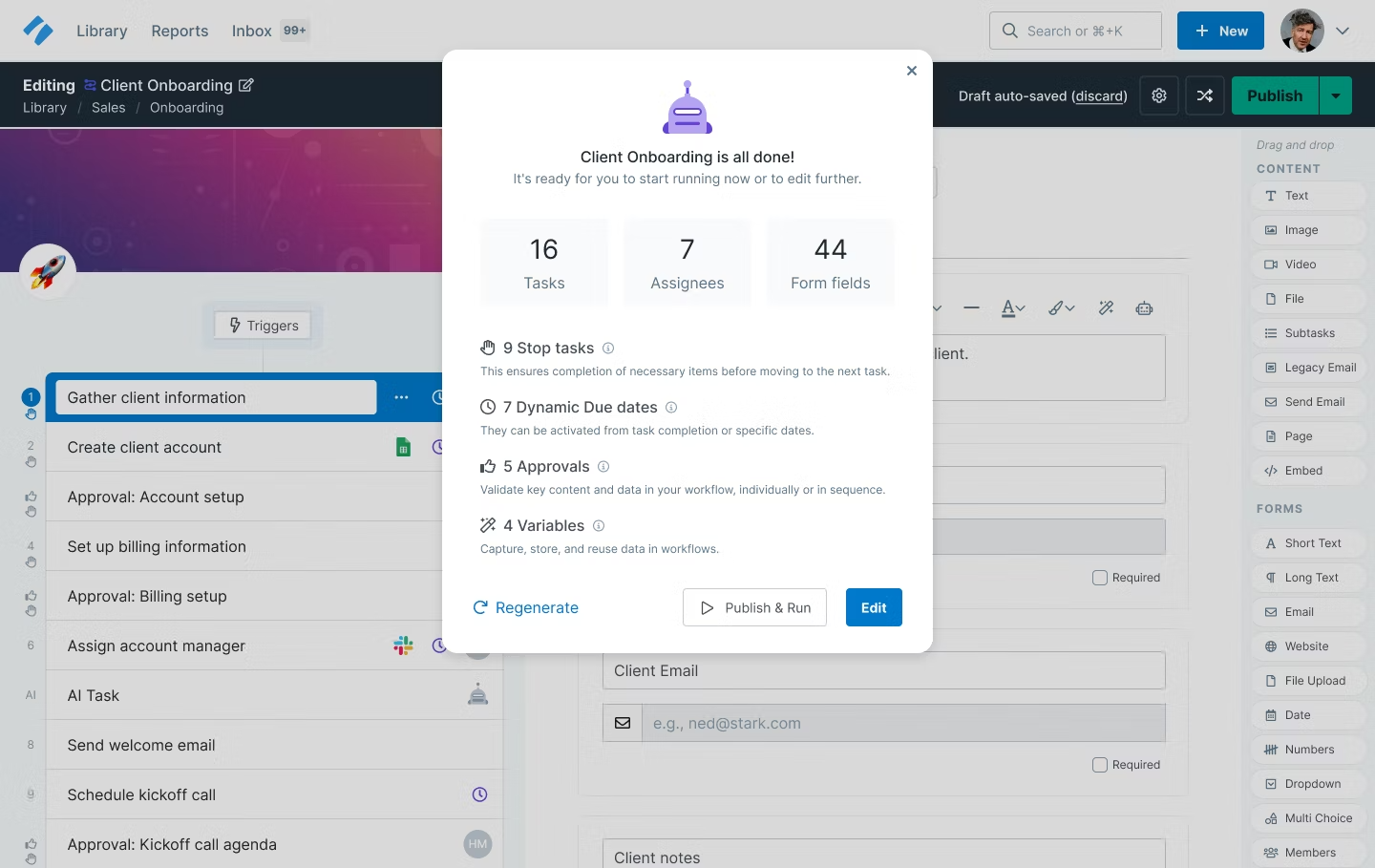
Process Street makes my shortlist because it’s the only workflow tool I’ve used that truly centers everything around forms and structured data capture. I recommend it when teams need to standardize recurring processes—especially those that rely on collecting, validating, and routing information through forms.
What I appreciate most is how you can build dynamic workflows with conditional logic, required fields, and approvals all tied to form submissions. When I’ve set up onboarding or compliance processes, Process Street’s form-driven approach has made it easy to ensure nothing gets missed and every step is documented.
Process Street’s Best For
- Teams that need to standardize and automate form-driven workflows like onboarding, compliance, or approvals
- Operations, HR, and compliance teams who rely on structured data capture and process documentation
Process Street’s Not Great For
- Product or engineering teams that need agile boards, sprints, or backlog management
- Teams looking for highly visual project tracking or loosely structured, ad hoc workflows
What Sets Process Street Apart
Process Street stands out to me because it treats every workflow as a repeatable, form-driven process rather than a series of tasks on a board. Unlike tools like Asana or Trello, which focus on visual task management, Process Street expects teams to build structured checklists with embedded forms, approvals, and logic. This approach is ideal when you need to capture data at every step and enforce process consistency.
Tradeoffs with Process Street
Process Street optimizes for standardization and data capture, but that means it’s less suited for teams who want flexible, visual project tracking. If your work is highly dynamic or you need to manage shifting priorities, the rigid checklist model can feel limiting.
Diğer Süreç İş Akışı Yazılımları
En iyi listesine giremeyen ancak daha fazla araç araştırmak istiyorsanız değerlendirmenizde fayda olan birkaç seçenek daha burada.
- Kintone
For workflow templates
- Trello
For process-oriented Kanban boards
- Camunda Platform
For creating custom workflows
- Kissflow Workflow
For drag-and-drop workflows
- Content Workflow
For content production workflows
- Pneumatic Workflow
For continuous workflow improvements
- SAP Process Automation
For repetitive tasks
- Boomi Flow
For embedding in SaaS applications
- Process Maker
For syncing processes across platforms
- Height
For cross-functional teams
- InRule
For the decision management lifecycle
- ClickUp
Robust free plan
- Monitask
For remote employee monitoring
- Creatio AI Studio
For no-code workflow management
- Asana
Drag and drop workflow builder, plus rules for quick automations


İlgili Süreç İş Akışı Yazılımları
Burada aradığınızı hâlâ bulamadıysanız, test edip değerlendirdiğimiz şu diğer ilgili araçlara göz atın:
- Proje Yönetimi Yazılımı
- Akıllı Süreç Otomasyonu Yazılımı
- Kaynak Yönetimi Yazılımı
- İş Akışı Otomasyonu Yazılımı
- Zaman Takibi Yazılımı
- Görev Yönetimi Yazılımı
- Proje Planlama Yazılımı
How I Evaluate Process Workflow Software
I split my evaluation into two layers: the must-haves every viable tool needs—like approval routing and conditional branching—and the differentiators that separate strong options from weak ones.
Core Functionality (Table Stakes For This List)
When I'm selecting tools for my list, I rank each one on a scale from 0 (does not offer the functionality) to 5 (excels in this area) for each core functionality listed below. Then, I calculate the tool's total score into a percentage. Each tool needs to achieve a minimum total score of 65% to be considered for inclusion.
- Visual Workflow Builder: I evaluate whether I can map out a multi-step process—like an employee onboarding sequence or a change request pipeline—using drag-and-drop design rather than code.
- Process Automation Engine: Each tool should let me set triggers and actions that move work forward automatically, such as assigning a review task when a deliverable status changes.
- Conditional Logic & Branching: I check whether workflows can branch based on real inputs, like routing a budget approval to a director when a request exceeds a set threshold.
- Approval & Task Management: Structured approval chains matter here—I look for sequential and parallel approvals, task dependencies, and escalation paths tied to workflow steps.
- Process Templates & Reusability: Teams reuse the same processes constantly, so I evaluate each tool's template library and its ability to clone, version, and share custom workflow templates.
- Workflow Analytics & Monitoring: Dashboards should surface cycle times, bottlenecks, and SLA adherence so a PMO lead can spot where a sprint retrospective workflow keeps stalling.
Once I have a list of tools that meet this criteria, I consider what sets each platform apart.
Differentiating Factors (What Sets Vendors Apart)
Here's how I compare and contrast different vendors:
Standout Features
Cross-project dependency mapping is a big one for me—PMO teams managing program-level work need workflows that coordinate handoffs across multiple projects, not just within one. I also look for AI workflow assistants that can suggest step sequences or flag risks based on historical execution data. No-code form builders round things out by letting teams spin up intake requests—like a new project proposal—that feed directly into a workflow trigger without developer involvement.
Beyond Features
Integration depth matters a lot here—a workflow tool that can't connect to your Jira backlog or Slack channels creates more manual work than it eliminates. I also evaluate pricing structures, specifically whether vendors offer light-user seats for stakeholders who only need to approve or comment. Security certifications like SOC 2 and ISO 27001 are worth checking too, especially when workflows handle sensitive project data or span multiple departments with different access requirements.
Süreç İş Akışı Yazılımı Nasıl Seçilir?
Süreç iş akışı yazılımı için kısa liste oluştururken, deneme sürümlerini kullanırken ve seçim yaparken şunları göz önünde bulundurun:
- Hangi sorunu çözmeye çalışıyorsunuz: Hangi süreç iş akışı özelliği eksikliğini gidermeye çalıştığınızı belirleyerek başlayın; böylece süreç iş akışı yazılımında ihtiyaç duyduğunuz özellikleri ve işlevleri netleştirebilirsiniz. Örneğin süreçlerinizi belgelemek istiyorsanız bu soru sizi bunun yerine süreç dokümantasyonu yazılımı yönlendirecektir.
- Kimlerin kullanması gerekecek: Maliyeti ve gereksinimleri değerlendirmek için yazılımı kimlerin kullanacağını ve kaç lisansa ihtiyaç duyacağınızı göz önünde bulundurun. Bu netleştiğinde, herkes için kullanım kolaylığına mı yoksa süreç iş akışı yazılımını yoğun kullananlar için hıza mı öncelik verdiğinizi değerlendirmeye değer.
- Hangi diğer araçlarla birlikte çalışması gerekiyor: Hangi araçları değiştirdiğinizi, hangi araçların kullanılmaya devam edeceğini ve muhasebe, CRM veya İK yazılımı gibi hangi araçlarla entegrasyon kurmanız gerektiğini netleştirin. Araçların birbiriyle entegre olması gerekip gerekmediğine veya birden fazla aracı tek bir birleştirilmiş süreç iş akışı aracıyla değiştirip değiştiremeyeceğinize karar verin.
- Hangi sonuçlar önemli: Yazılımın başarılı sayılabilmesi için sunması gereken sonucu, hangi yetkinliği kazanmak istediğinizi, neyi iyileştirmek istediğinizi ve başarıyı nasıl ölçeceğinizi göz önünde bulundurun. Örneğin bir sonuç, performans hakkında daha fazla görünürlük elde etme becerisi olabilir. Elde etmek istediğiniz sonuçları düşünmüyorsanız süreç iş akışı özelliklerini saatlerce karşılaştırabilirsiniz; ancak bu durumda değerli zamanınızın büyük bir kısmını boşa harcıyorsunuz.
- Kuruluşunuz içinde nasıl çalışacağı: Yazılım seçimini iş akışlarınız ve teslimat metodolojinizle birlikte değerlendirin. Nelerin iyi çalıştığını ve ele alınması gereken sorunlara yol açan alanları inceleyin. Her işletmenin farklı olduğunu unutmayın—bir aracın popüler olması, kuruluşunuzda işe yarayacağı anlamına gelmez.
Süreç İş Akışı Yazılımındaki Eğilimler
Süreç iş akışı yazılımının geleceğini şekillendireceğine inandığım beş eğilim şunlardır. Her biri, bu araçların proje yöneticilerinin değişen ihtiyaçlarını karşılamak üzere nasıl uyarlandığının benzersiz bir yönüne işaret eder.
Süreç İş Akışı Yazılımında Gelişen Eğilimler
- AI ve makine öğreniminin entegrasyonu: Karar vermeye ve karmaşık süreçleri otomatikleştirmeye yardımcı olan AI ve makine öğrenimi algoritmalarının entegrasyonunda belirgin bir artış var. Öngörücü analiz, akıllı otomasyon ve AI destekli optimizasyon sunan araçlar öne çıkıyor.
- Veri güvenliği ve uyumluluğa odaklanma: İşletmeler giderek daha hassas bilgileri işledikçe iş akışı yazılımında veri güvenliği ve uyumluluğa verilen önem de artıyor. Uçtan uca şifreleme, role dayalı erişim denetimi ve küresel veri koruma düzenlemelerine (GDPR gibi) uyumluluk gibi özellikler standart hâle geliyor.
- IoT cihazlarının entegrasyonu: Nesnelerin İnterneti (IoT) cihazlarının iş akışı yazılımıyla entegrasyonu giderek yaygınlaşıyor. Bu eğilim, fiziksel görevleri otomatikleştirmede, veri toplamada ve sensör girdilerine dayalı iş akışlarını tetiklemede IoT'nin genişleyen rolüne işaret ediyor.
- Sürdürülebilirlik ve çevre dostu özellikler: İş akışı yazılımına sürdürülebilirliği ve çevre dostu iş uygulamalarını destekleyen özelliklerin eklenmesi yükselen bir eğilimdir. Buna kâğıt kullanımını azaltmaya, kaynak tahsisini optimize etmeye ve çevresel etkiyi izlemeye yardımcı olan araçlar dahildir. Bu eğilim, işletmelerin çevreye karşı sorumlu bir şekilde faaliyet göstermesi gerektiğine dair farkındalığın arttığını yansıtır.
Süreç İş Akışı Yazılımı Nedir?
Süreç iş akışı yazılımı, sürükle ve bırak ortamında bağlayıcılar, kurallar ve otomasyonlar kullanarak görev dizisi belirlemenize ve iş akışı oluşturmanıza yardımcı olan bir araçtır. Bu sistemler kurumsal verimliliği artırmada, manuel hataları ortadan kaldırmada, gecikmeleri azaltmada ve genel üretkenliği iyileştirmede önemli bir rol oynar.
Genellikle süreç iş akışı yazılımı, iş akışının tamamını görsel olarak sunar; böylece süreçleri haritalandırabilir, analiz edebilir ve optimize edebilirsiniz. Görevlerin sırasını tanımlayabilir, bağımlılıkları ayarlayabilir ve görevlerin tamamlanmasına ilişkin kurallar belirleyebilirsiniz. Otomasyon özellikleri ayrıca görevleri uygun kişi veya ekiplere otomatik olarak yönlendirmenize, ilerlemeyi izlemenize ve önemli kilometre taşları için bildirimleri veya uyarıları tetiklemenize olanak tanır.
Ancak birden fazla sistem ve ekip arasındaki karmaşık, birbirine bağımlı iş akışlarını otomatikleştirmek ve koordine etmek istiyorsanız bunun yerine iş akışı orkestrasyon araçlarını aramalısınız.
Süreç İş Akışı Yazılımının Özellikleri
Kuruluşunuz için süreç iş akışı yazılımı seçerken göz önünde bulundurmanız gereken en önemli özellikler şunlardır.
- Kullanıcı dostu arayüz: Anlaşılır ve sezgisel bir tasarım, teknoloji bilgisi düzeyleri ne olursa olsun tüm ekip üyelerinin yazılımı benimsemesini ve kullanmasını kolaylaştırır. Bu, yeni bir sisteme geçişi sorunsuz hâle getirir ve kullanıcıların kısa sürede yetkinleşmesini sağlar; böylece verimlilik artar ve eğitim süresi azalır.
- Özelleştirme ve esneklik: Özelleştirme, süreçlerinizi önceden tanımlanmış bir yapıya uydurmak yerine yazılımın şirketinizin iş akışlarına uyum sağlamasını mümkün kılar. Bu, operasyonlarınızı daha verimli hâle getirmenize yardımcı olur.
- Entegrasyon özellikleri: Entegrasyon, veri silolarını önler, farklı departmanlar arasındaki iletişimi geliştirir ve bilgilerin kuruluş genelinde sorunsuz bir şekilde akmasını sağlamanıza yardımcı olur.
- Ölçeklenebilirlik: İşletmeniz büyüdükçe süreç iş akışı yazılımınız da onunla birlikte büyümelidir. Ölçeklenebilirlik, yazılımın performans kaybı yaşamadan daha fazla görevi, kullanıcıyı ve veriyi işleyebilmesini sağlar. İş süreçleri yönetim sistemleri, iş akışlarını ölçeklendirmek ve optimize etmek için esnek bir çerçeve sunarak bunu destekler.
- Gerçek zamanlı analiz ve raporlama: Gerçek zamanlı verilere erişim ve anlamlı raporlar oluşturabilme, bilinçli kararlar almak için hayati önem taşır. Bu özellik, süreçleri yakından izlemenize, darboğazları belirlemenize ve genel verimliliği artırmanıza olanak tanır.
- Bulut tabanlı teknoloji: Bulut tabanlı bir çözüm esneklik, erişilebilirlik ve güvenlik sunar. Kullanıcılar sisteme her zaman ve her yerden erişebilir, uzaktan çalışan ekipler bağlantıda kalabilir ve veriler tesis dışında güvenli bir şekilde depolanıp yedeklenebilir.
- Otomatik bildirimler ve uyarılar: Ekip üyelerini görevler, son tarihler ve iş akışındaki değişiklikler hakkında bilgilendirmek önemlidir. Otomatik bildirimler hiçbir şeyin gözden kaçmamasını sağlamanıza, sorumluluk bilincini geliştirmenize ve görevlerin zamanında tamamlanmasına yardımcı olur.
- Role dayalı erişim denetimi: Bu özellik, kullanıcıların görevlerini yerine getirmek için yalnızca ihtiyaç duydukları bilgileri görmesini sağlamanıza olanak tanır; böylece güvenlik artırılır ve veri ihlallerine karşı korunursunuz.
- Süreç haritalama, modelleme ve görselleştirme: Bu özellik, gereksiz tekrarları belirlemenize, operasyonları kolaylaştırmanıza ve tüm adımların gerekli ve verimli olmasını sağlamanıza yardımcı olur. İş süreçleri modelleme, değişiklikleri uygulamadan önce iş akışlarını simüle etmenize, analiz etmenize ve optimize etmenize olanak tanır
- Mobil uyumluluk: Mobil uyumluluk, kullanıcıların sistemi akıllı telefonları veya tabletleri üzerinden kullanabilmesini sağlar; böylece insanlar ofisten uzaktayken bile işletme ilerlemeye devam eder.
Süreç İş Akışı Yazılımının Faydaları
Süreç iş akışı yazılımını işletme operasyonlarınıza entegre etmenin sağladığı beş avantaj şunlardır:
- Artan verimlilik: Süreç otomasyonu araçlarını kullanmak, rutin görevleri otomatikleştirerek manuel çabayı azaltır ve süreçleri hızlandırır. Ekip üyeleri, tekrarlayan görevlerle uğraşmak yerine daha stratejik faaliyetlere odaklanabilir; bu da genel verimliliği artırır.
- Gelişmiş iş birliği: Bilgi paylaşımı ve ilerleme takibi için merkezi bir platform sunan yazılım, daha iyi ekip çalışmasını kolaylaştırır ve herkesin aynı anlayışta olmasını sağlar. Bu da projenin daha sorunsuz yürütülmesine katkıda bulunur.
- Geliştirilmiş şeffaflık ve sorumluluk: İlerlemeyi gerçek zamanlı olarak izleyebilir, darboğazları hızlıca belirleyebilir ve ekip üyelerini görevlerinden sorumlu tutabilirsiniz. Bu, daha düzenli ve sorumluluk sahibi bir iş gücünün oluşmasına katkıda bulunur.
- Hataların azaltılması: Yazılım, iş akışlarını otomatikleştirerek görevlerin tutarlı ve doğru bir şekilde tamamlanmasını sağlar. Maliyetli gecikmelere veya işlerin yeniden yapılmasına yol açabilecek hata ve insan kaynaklı yanlışlık riskini azaltır.
- Ölçeklenebilirlik: Kuruluşunuz büyüdükçe süreç iş akışı yazılımı, performanstan ödün vermeden ek kullanıcıları, süreçleri ve karmaşıklığı destekleyebilir; böylece operasyonel altyapınız işletmenizle birlikte ölçeklenir.
Süreç İş Akışı Yazılımı Maliyetleri ve Fiyatlandırması
Aşağıda yaygın plan türleri, ortalama fiyatları ve tipik özellikleri açıklanmaktadır:
Süreç İş Akışı Yazılımı İçin Plan Karşılaştırma Tablosu
| Plan Türü | Ortalama Fiyat | Yaygın Özellikler |
|---|---|---|
| Ücretsiz | $0 | Temel süreç otomasyonu, sınırlı entegrasyonlar, topluluk desteği |
| Temel | $10-15/kullanıcı/ay | Gelişmiş otomasyon özellikleri, ek entegrasyonlar, e-posta desteği |
| Profesyonel | $20-30/kullanıcı/ay | Tam otomasyon paketi, gelişmiş entegrasyonlar, öncelikli destek |
| Kurumsal | Özel fiyatlandırma | Özelleştirilmiş otomasyon çözümleri, kurumsal düzeyde güvenlik, özel hesap yöneticisi |
Planlar genellikle, yeni başlayan küçük ekipler veya bireyler için tasarlanmış ücretsiz sürümlerden, karmaşık iş akışı gereksinimleri olan daha büyük kuruluşlar için gelişmiş özellikler sunan kurumsal düzeydeki çözümlere kadar çeşitlilik gösterir. Genel olarak, daha büyük bir yatırıma karar vermeden önce aracı değerlendirmek için ücretsiz veya temel bir planla başlamak iyi bir fikirdir.
Bir plan seçerken operasyonlarınızın ölçeğini, iş akışlarınızın karmaşıklığını ve özellikle şirketiniz büyüyüp değiştikçe ihtiyaç duyacağınızı öngördüğünüz destek düzeyini göz önünde bulundurun.
Fiyatlandırma planınızı yükseltmek isteyebileceğiniz yaygın aşamalar şunlardır:
- Ekip boyutunun artması: Kullanıcı veya ekip üyesi sayısı önemli ölçüde arttığında mevcut planınız yeni kullanıcıları etkili bir şekilde karşılayamayabilir. Yükseltme, gerekli kullanıcı lisanslarını sağlayabilir.
- Projelerin karmaşıklığı: Projeler daha karmaşık hâle geldiğinde ve gelişmiş özellikler gerektirdiğinde, daha yüksek bir fiyatlandırma kademesi bu karmaşıklıkları verimli bir şekilde yönetmek için gerekli araçları sunabilir.
- Entegrasyon ihtiyaçları: Süreç iş akışı yazılımınızı diğer araç ve sistemlerle entegre etmeniz gerektiğinde, daha yüksek kademeler genellikle daha kapsamlı entegrasyon olanakları sunar.
- Gelişmiş raporlama ve analiz: Verilere dayalı kararlar almak için daha gelişmiş raporlama ve analiz özelliklerine ihtiyacınız varsa, daha yüksek fiyatlandırma kademeleri genellikle bu olanakları sunar.
- Müşteri desteği ve eğitim: Yazılıma olan bağımlılığınız arttıkça premium müşteri desteğine ve eğitime ihtiyaç duyabilirsiniz. Daha yüksek bir kademeye yükseltme genellikle daha iyi destek seçeneklerini, özel hesap yöneticilerini ve daha fazla eğitimi içerir.
Süreç İş Akışı Yazılımı Hakkında Sık Sorulan Sorular
Başkalarının bu konu hakkında sorduğu yaygın soruların yanıtlarını bulun.
Süreç iş akışı nedir?
Süreç iş akışı, bir süreci tamamlamak için izlenmesi gereken bir dizi adımdır. Bu iş akışı, gerçekleştirilecek faaliyetlerin ve eylemlerin sırasını içerir ve bilgi akışını belirleyen önceden tanımlanmış kurallar tarafından yönlendirilir.
Ayrıntılı süreç iş akışları, bir faaliyetten kimin sorumlu olduğu ve belirli görevleri gerçekleştirmek için hangi araçlara ihtiyaç duyulduğu hakkında da bilgi içerir.
İş akışı süreçlerine örnekler nelerdir?
Bir proje içinde iş akışları olarak haritalandırabileceğimiz birçok süreç vardır. Örneğin:
- Sorun yönetimi: Ekibinizin bir projenin geliştirilmesi sırasında sorunlara nasıl yanıt verdiği, oluşturulması gereken önemli bir süreçtir. Ekibiniz, eskalasyonların ve çalışmaların nasıl gerçekleştirileceğine ilişkin tanımlanmış bir dizi adımı izlemelidir.
- İşe alıştırma iş akışı: Bu iş akışı, yeni bir ekip üyesini ekibe dâhil etmek için gereken görevleri ana hatlarıyla belirtir. Kapsamda yeni bir ekip üyesi gerektiren bir değişiklik olduğunda veya projenin ortasında bir kaynağı değiştirmeniz gerektiğinde faydalı olabilir.
- Yeni müşteri gereksinimi: Müşterinizin yeni bir isteği olduğunda veya kontrol toplantısı sırasında gizlice yeni bir talep eklemeye çalıştığında hangi süreci izliyorsunuz?