

2026’da En İyi 10 Onay İş Akışı Yazılımı Çözümü

10 En İyi Onay İş Akışı Yazılımları Kısa Listesi


En iyi onay iş akışı yazılımları, ekibinizin varlıkları, belgeleri ve kararları gönderme, inceleme ve onaylama süreçlerini kolaylaştırarak hiçbir şeyin belirsizlik içinde takılıp kalmamasını sağlar. Bu araçlar, karmaşık e-posta zincirlerinin ve belirsiz onay süreçlerinin yerini yapılandırılmış iş akışlarına, otomatik hatırlatıcılara ve net sorumluluklara bırakır.
Kamu, sağlık, perakende ve ulaşım sektörlerinde dijital projelere liderlik ederek edindiğim 10 yıllık deneyimi, 30'dan fazla onay iş akışı aracını test etmek için kullandım. Hangilerinin gereksiz yazışmaları gerçekten azalttığını ve karar alma süreçlerini hızlandırdığını ele alacağım. Yavaş onayların maliyetli gecikmelere neden olduğu ekiplerle çalıştım ve doğru aracın bunu nasıl önleyebileceğini gördüm.
Bu rehberde, uygulamalı testlere dayanarak en iyi onay iş akışı yazılımlarını inceleyeceğim. Her birinin onayları nasıl resmileştirmeye, projelerin ilerlemesini sağlamaya ve onayla ilgili darboğazları ortadan kaldırmaya yardımcı olduğunu vurguladım.
Why Trust Our Software Recommendations
Our team has been testing and reviewing software since 2012. As project managers ourselves, we know how difficult—and important—it is to choose the right software.
For this guide, we evaluated tools using hands-on testing and independent research, scoring tools using our selection criteria. We also draw on insights from industry thought leaders and practicing project management experts.
Our reviews reflect our human editorial judgment, not a sales pitch.
Expert reviewers:
Karşılaştırma Tablosu: Proje Yöneticileri için Onay İş Akışı Yazılımları
En iyi onay iş akışı yazılımı seçimlerimin fiyatlarını ve teknik özelliklerini karşılaştırın.
| Tool | Starting Price | Website | |
|---|---|---|---|
| Best for workflows within client portals | 4.4 out of 5 | $5,000/year Free trial + free demo available | Book Demo |
| Best for multi-stage creative approvals | 4.7 out of 5 | $169/month Free plan + 14-day free trial | Website |
| Best for AEC client sign-offs and e-signatures | 4.2 out of 5 | €5.50/active project/month 14-day free trial | Website |
| Best for approval forms and boards | 4.6 out of 5 | $9/user/month Free plan + 14-day trial available | Book Demo |
| Best for no-code workflows | 4.6 out of 5 | Pricing upon request Not available | Book Demo |
| Best with bi-directional CRM data sync | 4.5 out of 5 | $399/month Free demo available | Website |
| Best for approval automations | 4.3 out of 5 | $10/user/month Free plan + 14-day trial + demo available | Book Demo |
| Best for creative asset approvals | 4.6 out of 5 | $900/month Free plan + demo available | Book Demo |
| Best for its drag-and-drop builder | 4.7 out of 5 | Pricing upon request 14-day free trial; free demo available | Website |
| Best for marketing operations | 4.5 out of 5 | $567/month Free demo available | Website |
En İyi Onay İş Akışı Yazılımları İncelemeleri
Aşağıda en iyi onay iş akışı yazılımı seçimlerimi bulacaksınız. Ekran görüntüleri, öne çıkan özellikler, entegrasyonlar ve bazı artıları ile eksileri de dahil olmak üzere her birinin ayrıntılı bir özetini sundum.

Moxo
Best for workflows within client portals

Moxo is a workflow automation platform designed for project managers and client-facing teams who need to coordinate approvals, manage documents, and track tasks securely within a branded digital portal.
Who Is Moxo Best For?
Moxo is a strong fit for service-based businesses and project managers who handle client-facing workflows across industries like financial services, legal, and consulting.
Why I Picked Moxo
I picked Moxo as one of the best because of how it handles approvals within a client-facing portal rather than keeping everything locked inside internal tools. What I like most is that external stakeholders—clients, partners, vendors—can enter a workflow, see exactly what action they need to take, and complete it without needing a login tutorial or a back-and-forth email chain. I also use Moxo's conditional branching to route approval steps dynamically based on form inputs or prior decisions, which means a client submitting incomplete documentation automatically triggers a review-revise-resubmit loop instead of stalling the whole process. Additionally, every action is captured in a detailed audit trail tied to specific steps, so I always have a timestamped record of who approved what and when.
Moxo Key Features
- Role-based routing: Automatically assigns workflow steps to the right participants based on permissions and logic rules, without manual handoffs.
- SLA timers and escalations: Triggers automatic escalations when deadlines are missed, keeping approval steps from going stale.
- Parallel workflow paths: Runs multiple workflow branches simultaneously, so teams aren't blocked waiting on unrelated approvals.
- Embeddable SDK: Extends Moxo's workflow functionality directly into your existing applications via iOS, Android, and JavaScript SDKs.
Moxo Integrations
Integrations include Salesforce, HubSpot, Box, Stripe, Formstack, Jotform, and Zoom.
Pros and Cons
Pros:
- Workflow templates let you repeat processes
- Multi-party approvals in the same portal
- Branded portals for client workflows
Cons:
- Initial setup and customization require significant time
- Workflow builder may require complex logic training

Best for multi-stage creative approvals
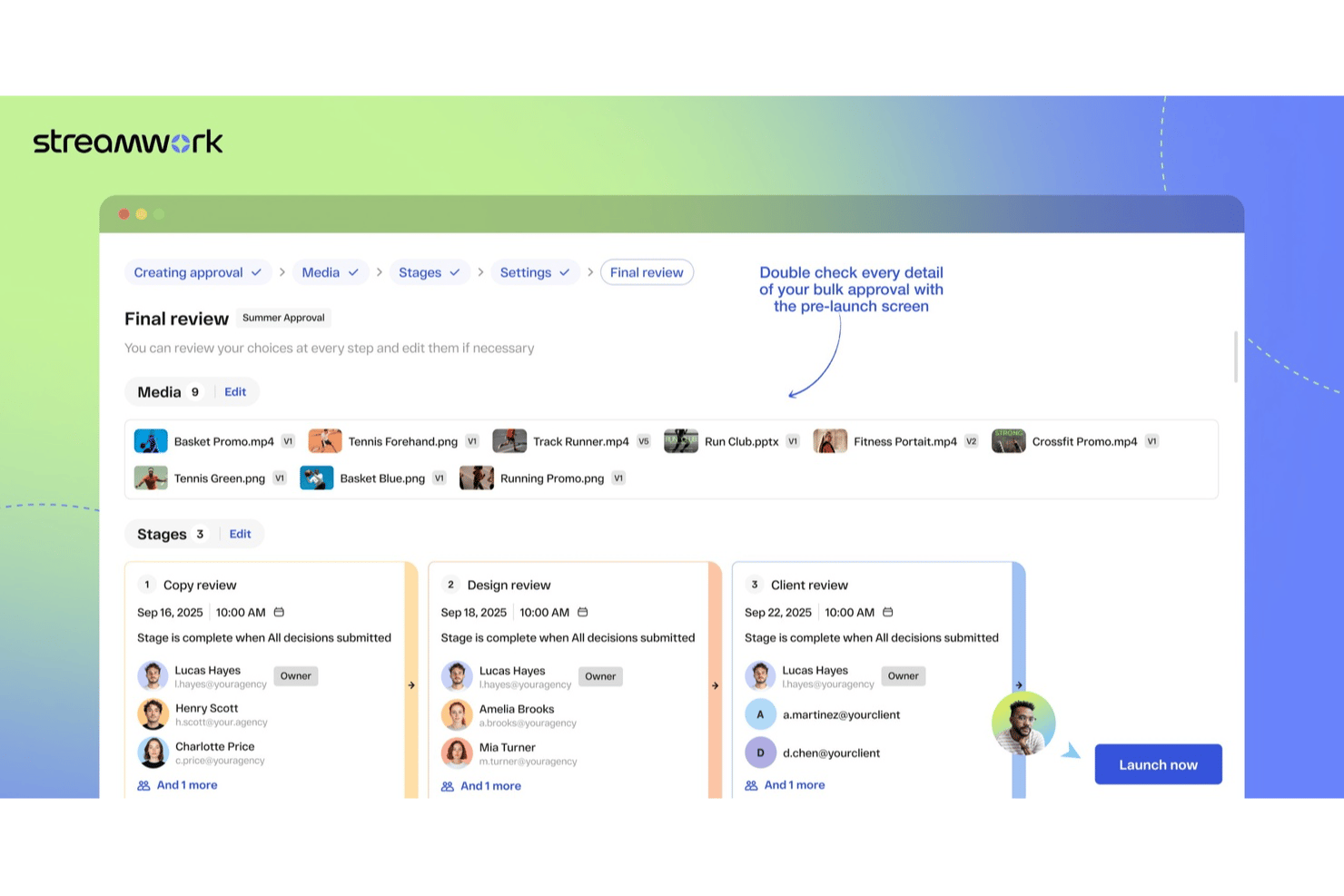
StreamWork is built for creative teams and project managers who need to coordinate complex approval workflows, centralize feedback, and keep projects moving with clear, trackable sign-offs at every stage.
Who Is StreamWork Best For?
StreamWork is a strong fit for creative and marketing teams that manage high volumes of visual content requiring structured, multi-stakeholder review and sign-off.
Why I Picked StreamWork
StreamWork earns its spot on my shortlist because of how well it handles multi-stage creative approvals without turning the process into a bottleneck. I like that you can map out distinct approval stages, assign specific reviewers to each one, and set deadlines per stage—so a campaign asset can move from a copywriter to a creative director to a legal reviewer in sequence, automatically. The approval routing updates in real time, so I can see exactly where a piece of content is stuck without chasing anyone down. On top of that, the version control ties directly into the approval history, so I always know who signed off on which version and when.
StreamWork Key Features
- Batch approvals with reusable templates: Run high-volume campaigns using pre-built approval templates that repeat across similar creative cycles without rebuilding workflows from scratch.
- Frame-accurate commenting: Leave time-stamped, pinpoint feedback directly on video frames, images, and documents so reviewers can annotate exactly what needs to change.
- Comment-to-task conversion: Turn any piece of feedback into an assignable task directly within the platform, keeping action items tied to the specific asset they reference.
- Reviewer access without logins: Share review links with external stakeholders or clients who can view and comment without creating an account or going through any setup.
- Automated deadline reminders: Each approval stage has its own deadline, and reviewers get automatic reminders.
- Decision audit trail: Every approval decision is recorded with the reviewer, version, and timestamp.
StreamWork Integrations
Integrations include Asana and monday.com (two-way: a proof can be uploaded from a task or board item, and approval status syncs back automatically), Slack, Dropbox, Box, Google Drive, OneDrive, Figma, and native plugins for Adobe Premiere Pro, Photoshop, and InDesign.
Pros and Cons
Pros:
- Built-in feedback tools on images, videos, and more
- Version control and asset stacking across reviews
- Custom multi-stage approval routes
Cons:
- Customization requires a learning curve

Ziggu
Best for AEC client sign-offs and e-signatures

Ziggu is a client-facing approval workflow platform built for project-based businesses, offering milestone-triggered sign-offs, e-signatures, a branded client portal, and a built-in audit trail.
Who Is Ziggu Best For?
Ziggu is a strong fit for architecture, engineering, and construction project managers who need a branded client portal for digital sign-offs and e-signatures.
Why I Picked Ziggu
Ziggu earns its spot on my shortlist because it's the only tool here built specifically for client-facing sign-offs in architecture, engineering, and construction projects. I like that clients can review proposals, select options, and apply a legally recorded e-signature to PDFs directly inside a branded portal, without needing a paid account. Every decision logs a timestamped audit trail automatically, so when a contractor disputes a change order, the record is already there.
Ziggu Key Features
- Milestone-based workflow templates: Reusable project templates let you attach decisions, tasks, and document releases to each milestone, triggering actions automatically when a phase activates.
- Multi-party proposal uploads: Suppliers and partners can upload competing proposals directly into a decision request, letting clients compare and select from within the portal.
- Document viewer analytics: Track which clients have viewed shared documents, giving you visibility into engagement before a sign-off deadline.
- Per-project pricing with unlimited users: Billing scales by active projects, not seats, so you can invite any number of clients, contractors, or stakeholders without added cost.
Ziggu Integrations
Ziggu offers 13+ documented integrations, including Microsoft SharePoint, Google Drive, Dropbox, Power BI, Salesforce, HubSpot, and Microsoft Dynamics 365. Its public REST API supports custom integrations, but it doesn't offer webhooks or native connectors for Asana, Jira, Monday.com, or ClickUp.
Pros and Cons
Pros:
- Built-in audit trail and e-signature capture
- Unlimited external stakeholders included per project
- Dedicated client portals for digital sign-offs
Cons:
- Lacks native integrations with mainstream PM tools
- No conditional or parallel approval logic

Best for approval forms and boards
monday.com gives project managers in tech and digital teams a flexible platform to build, automate, and track approval workflows, making it easier to manage sign-offs, document reviews, and stakeholder feedback in one place.
Who Is monday.com Best For?
monday.com is a good fit for cross-functional teams in mid-size to enterprise tech companies that need a visual, customizable way to manage approvals across multiple projects and departments.
Why I Picked monday.com
monday.com earns its spot as one of the best on my shortlist because of how well its approval forms and boards work together as a single, connected system. I like that you can build a no-code intake form with conditional logic—so submitters only see the questions relevant to their request—and have responses land directly on a board where reviewers can act on them. From there, automations handle the routing: when a status column changes to "Pending Approval," the right reviewer is notified. I've found the Project Requests and Approvals template especially useful as a starting point, since it comes pre-wired with embedded forms, status tracking, and deadline reminders out of the box.
monday.com Key Features
- Approval status columns: Track where each request stands using customizable status labels like "In Review," "Approved," or "Rejected" directly on your board.
- Workload view: See reviewer capacity across your team to avoid bottlenecks when multiple approval requests are assigned simultaneously.
- Guest access: Invite external stakeholders—like clients or vendors—to review and approve items without giving them full account access.
- Audit log: View a timestamped record of every status change, comment, and update made to an approval item for accountability and compliance tracking.
monday.com Integrations
Integrations include Salesforce, QuickBooks, HubSpot, Zendesk, Active Directory, GitHub, GitLab, Slack, Gmail, and Microsoft Teams.
Pros and Cons
Pros:
- Highly customizable workflows
- Extensive integration options
- Built-in task tracking and reporting
Cons:
- Limited offline functionality
- Initial setup can be complex
New Product Updates from monday AI Workspace
monday AI Workspace Adds Human Approval Routing
monday AI Workspace adds a human-in-the-loop approval block to AI Workflows, sending approval requests and routing workflow paths based on responses. For more information, visit monday AI Workspace's official site.
 .

Best for no-code workflows
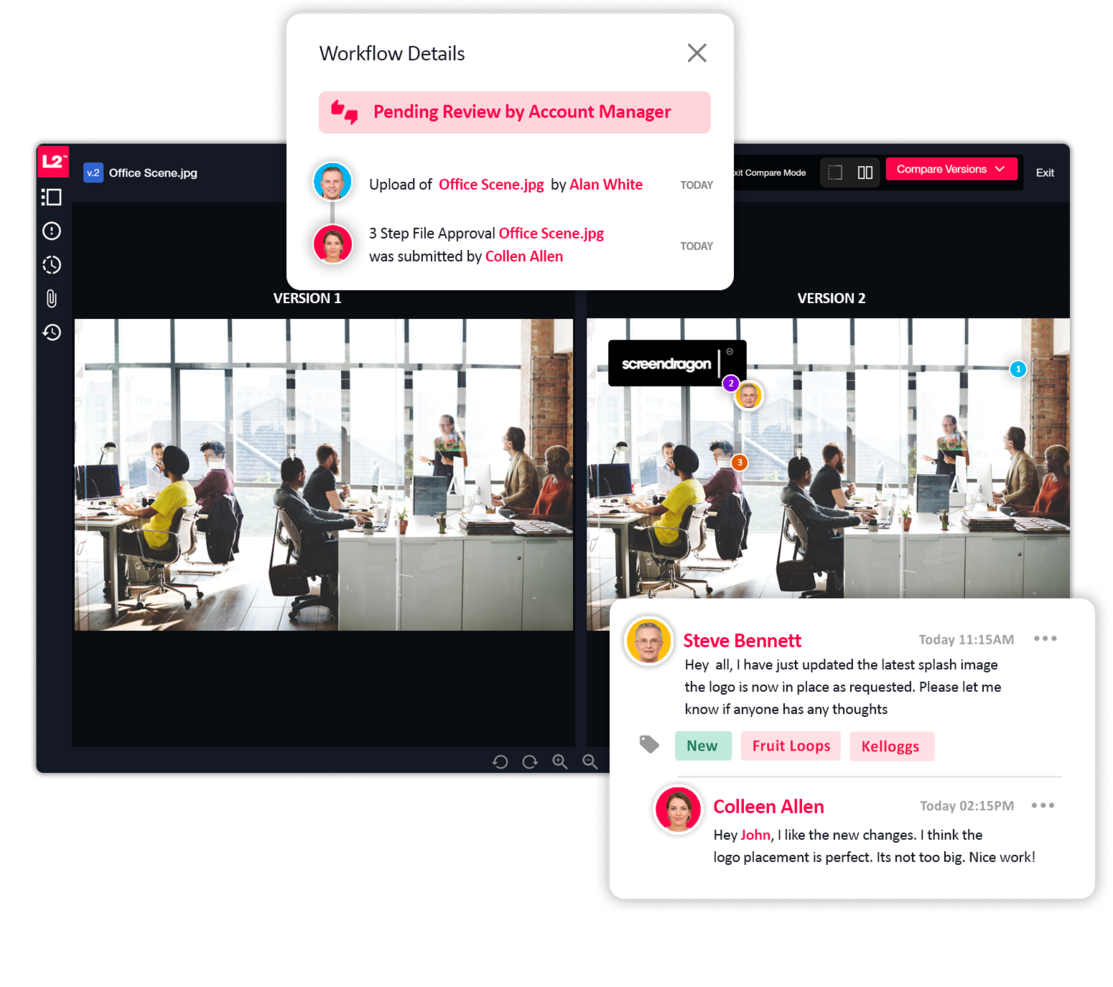
If you want to speed up and smooth out your approval processes, Screendragon is perfect for marketing and creative operations. The no-code platform is ideal for enterprise teams that are managing complex workflows, and it also offers built-in automation and project management tools so you can keep everything in one place. Screendragon's proofing and version control features can also help you improve productivity and decision-making on your projects.
Who is Screendragon Best For?
Screendragon supports project and creative operations teams at mid-sized to enterprise organizations that need no-code workflows for planning and approval processes. It fits companies with distributed contributors that require flexible, visual tools to design and manage structured work without development resources.
Why I Picked Screendragon
I picked Screendragon for its no-code workflow capabilities, which cater to the needs of marketing and creative teams that want to manage approval processes but lack coding expertise. The platform's visual workflow builder lets you easily create complex approval workflows and includes AI-driven automation tools that help you eliminate bottlenecks.
Screendragon also offers real-time insights into resource utilization, which helps you keep track of who's working on what and manage project approvals more effectively. The platform helps you focus more on creativity and strategic tasks, rather than getting bogged down by administrative hurdles.
Screendragon Key Features
Screendragon offers several other features that make it useful as an approval workflow software tool.
- Dynamic Custom Forms: This feature lets you create tailored forms that capture the specific data needed for approvals, so you can gather all necessary information efficiently.
- Advanced Permission Controls: You can set detailed permission levels to control access to sensitive information and tasks and make sure only authorized team members can approve or modify critical workflows.
- Real-time Insights and Reporting: With built-in analytics, you can see real-time data on workflow performance and approval timelines, which lets you make informed decisions quickly.
- Deadline Enforcement: Screendragon automatically enforces deadlines and sends notifications to keep your team on track. This minimizes the risk of missed approvals and helps you complete work on time.
Screendragon Integrations
Integrations include Microsoft Power BI, Slack, Microsoft Teams, Jira, Google Drive, Salesforce, HubSpot, Okta, Aprimo, and SugarCRM.
Pros and Cons
Pros:
- High adaptability to industry-specific workflow needs
- Comprehensive reporting provides visibility into progress
- Integrated feedback tools improve collaboration
Cons:
- Complexity may overwhelm small teams or orgs
- Setup and onboarding process can be time-consuming

altaFlow
Best with bi-directional CRM data sync
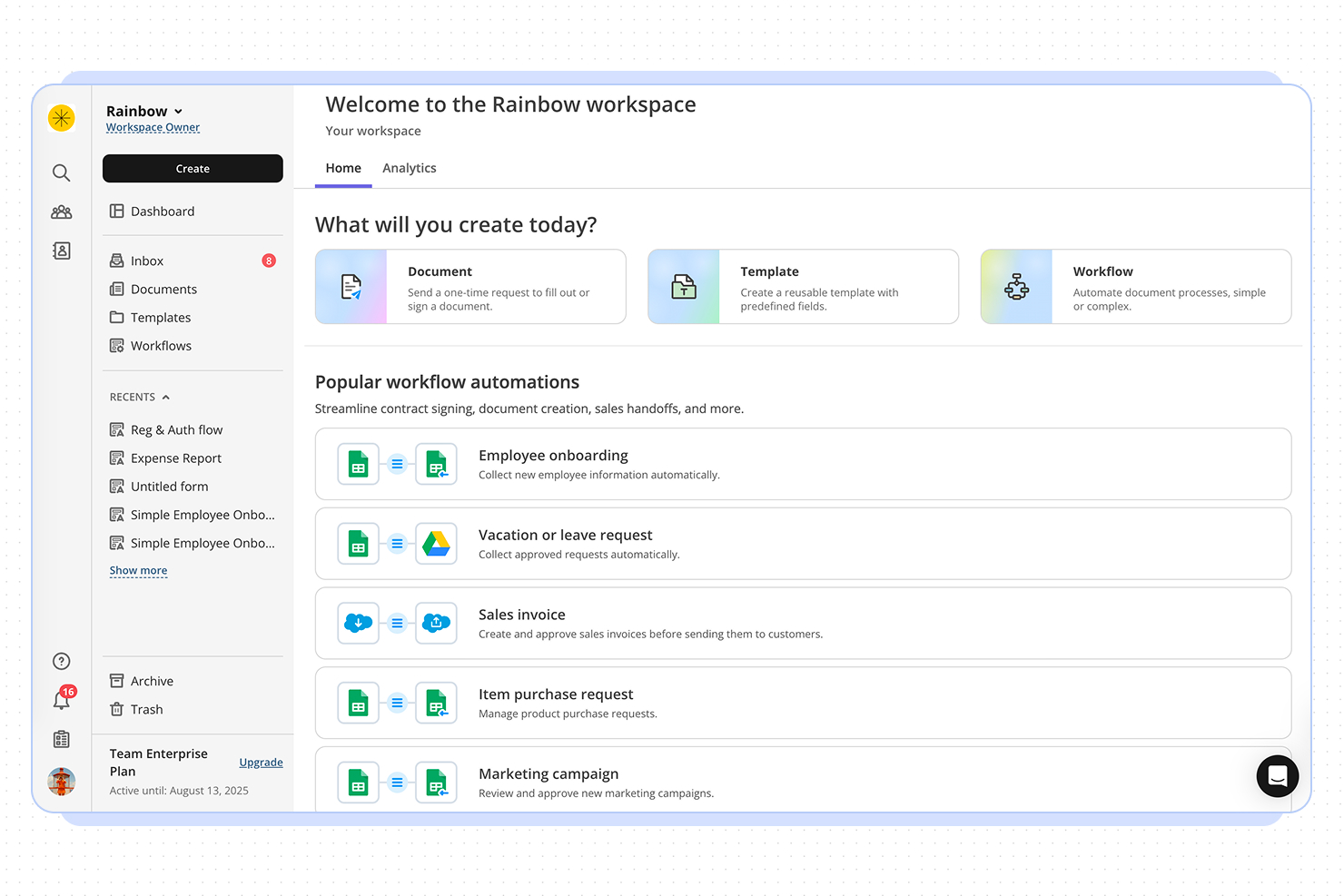
altaFlow is a workflow automation platform that helps project managers and teams streamline complex approval processes, automate document routing, and ensure compliance across multiple business systems.
Who Is altaFlow Best For?
altaFlow is a strong fit for mid-sized to enterprise teams that run approval-heavy processes across sales, operations, and finance functions.
Why I Picked altaFlow
altaFlow earns its spot on my shortlist because of how it handles the gap between document workflows and CRM data. Most approval tools treat the CRM as a destination—you finish a workflow, then someone manually updates the record. With altaFlow, the sync runs both ways: it pulls live Salesforce data into contracts and approval packets on generation, then writes signed document data, status updates, and timestamps back to the CRM automatically once a workflow completes. I also like the no-code conditional routing, which lets you set approval paths based on deal size, department, or risk level without touching a developer.
altaFlow Key Features
- Automated document routing: Route documents to the right approvers based on predefined rules, roles, or workflow triggers.
- Audit trail logging: Track every action taken on a document, including views, edits, approvals, and rejections, with timestamps.
- E-signature collection: Collect legally binding signatures directly within approval workflows without switching to a separate tool.
- Role-based access controls: Restrict document visibility and editing permissions based on team member roles or approval stage.
altaFlow Integrations
Integrations include Salesforce, NetSuite, SharePoint, Google Drive, OneDrive, Slack, Microsoft Teams, HubSpot, Microsoft Dynamics 365, and Box.
Pros and Cons
Pros:
- SOC 2, HIPAA, and GDPR compliance
- No-code workflow builder for approvals
- Supports multi-level and parallel approvals
Cons:
- API access only on premium plans
- Fewer prebuilt templates than some competitors

Wrike
Best for approval automations
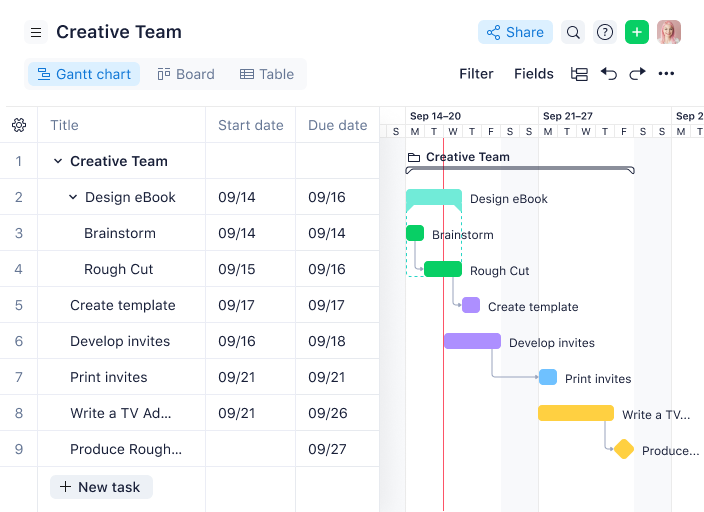
Wrike gives project managers in tech and digital teams a centralized platform to automate approvals, manage project workflows, and keep cross-functional work moving without bottlenecks.
Who Is Wrike Best For?
Wrike is a strong fit for mid-size to enterprise tech teams that need structured project delivery with built-in approval and review processes.
Why I Picked Wrike
Wrike earns its spot on my shortlist because of how deeply approval automation is built into its project workflows—not bolted on as an afterthought. I like that you can embed approvals directly into task and project workflows, so when a deliverable hits a specific status, the right approver is automatically notified without anyone having to chase them down. Wrike's dynamic request forms also do a lot of heavy lifting here—they use conditional logic to collect exactly the information approvers need upfront, which cuts down on back-and-forth before a sign-off even begins. The pending approvals dashboard gives my team a single view of everything waiting on a decision, so nothing quietly stalls mid-project.
Wrike Key Features
- Online proofing: Review and mark up images, videos, and documents directly within tasks, without downloading files or switching tools.
- Gantt chart view: Visualize project timelines, map task dependencies, and adjust schedules by dragging and dropping tasks on an interactive timeline.
- Custom workflow statuses: Define task stages that match your team's actual process, so work moves through clearly labeled steps from kickoff to completion.
- Resource bookings: Reserve team members for specific projects, estimate hours needed, and check availability before assigning work.
Wrike Integrations
Integrations include Salesforce, Microsoft Teams, Google Drive, Adobe Creative Cloud, Zoom, Tableau, Power BI, QuickBooks, Miro, and Google Sheets.
Pros and Cons
Pros:
- Attach files and track reviews in one task
- Automatic audit trail of decisions
- Define conditional approvals for specific scenarios
Cons:
- Extra setup of approval rules for non-standard cases
- May be overkill for simple sign-offs
New Product Updates from Wrike

Wrike Redesigns Workspace Search With New Filters
Wrike introduces a redesigned Workspace Search interface with recent search shortcuts, item type and location filters, and parent-task context. These updates help users find relevant work items and navigate search results efficiently. For more information, visit Wrike’s official site.
 .

Air
Best for creative asset approvals

Air is a digital asset management platform designed for project managers and creative teams who need to organize, collaborate on, and approve visual content with faster review cycles and less friction.
Who Is Air Best For?
Air is a strong fit for creative and marketing teams that manage high volumes of visual assets and need a structured review and approval process built into their content workflow.
Why I Picked Air
Air earns its spot on my shortlist because of how tightly it connects the approval process to the assets themselves. I like that version stacking groups every iteration of a file together, so when my team is reviewing a campaign visual, the approved version is always obvious and there's no risk of someone pulling an outdated file. Visual annotation lets reviewers pin comments directly on images or video timelines, which keeps feedback specific and eliminates the back-and-forth of trying to describe what needs changing. Kanban-style project management with custom fields lets me assign owners and track approval stages, so nothing stalls without a clear owner to follow up with.
Air Key Features
- Approval status tracking: Mark assets as approved, needs changes, or in review, with a full log of who approved what and when.
- Role-based access controls: Set view, comment, download, or edit permissions per user to keep in-progress work protected from the wrong eyes.
- Automatic metadata tagging: Air generates tags, smart summaries, and custom fields the moment an asset is uploaded, keeping your library organized without manual input.
- Share links for external stakeholders: Send a single link to give clients or partners access to approved assets without requiring an Air account.
Air Integrations
Integrations include Adobe Creative Cloud, Google Drive, Dropbox, Slack, Canva, Figma, Box, OneDrive, Microsoft Teams, and Asana.
Pros and Cons
Pros:
- Facial recognition automates photo tagging
- AI-powered search enables instant retrieval
- Centralized workflows streamline team approvals
Cons:
- Limited customization compared to other tools
- Users report inconsistent technical reliability
New Product Updates from Air
Air Introduces Workspace Agent Automations
Air adds scheduled automations, reusable skills, and run history tracking to its workspace agent. These features help teams automate recurring tasks and manage workflows without manual intervention. For more information, visit Air’s official site.
 .

Best for its drag-and-drop builder

Process Street gives project managers in tech and digital teams a way to build, automate, and track approval workflows so they can manage complex processes, assign tasks, and ensure every step is completed with full visibility.
Who Is Process Street Best For?
Process Street is a good fit for operations and project teams at small to mid-sized companies that need to standardize and manage recurring approval processes without heavy technical setup.
Why I Picked Process Street
I picked Process Street as one of the best because I love how its drag-and-drop workflow builder lets my team design multi-step approval processes without writing a single line of code. My team can drag tasks into sequence, add conditional logic so the workflow branches based on specific inputs, and drop in stop tasks that block progress until a required approval is completed. That means a design review or budget sign-off can't get skipped—the workflow enforces the requirement. I also like that we can update a workflow mid-flight without disrupting runs already in progress; my team relies on this when approval requirements shift partway through a project.
Process Street Key Features
- Role-based task assignments: Assign specific approval steps to individuals or groups based on their role within the workflow.
- Audit trail logging: Every action, approval, and comment is automatically recorded with a timestamp for full process accountability.
- Form fields within tasks: Collect structured data directly inside a task, such as approval notes, file uploads, or sign-off confirmations.
- Workflow run dashboard: Monitor all active workflow runs in one view, with status indicators showing where each approval process currently stands.
Process Street Integrations
Integrations include Salesforce, Slack, Microsoft Teams, Google Sheets, Jira, Docusign, HubSpot, Mailchimp, Stripe, and BambooHR.
Pros and Cons
Pros:
- Automation features save time on repetitive tasks
- Facilitates compliance via audit-ready documentation
- Wide range of templates for various processes
Cons:
- Lacks advanced workflow customization
- Limited tools for sequential task management

Best for marketing operations

IntelligenceBank is a workflow automation and digital asset management platform for marketing teams and project managers who centralize approvals, manage compliance, and streamline content collaboration across campaigns and projects.
Who Is IntelligenceBank Best For?
IntelligenceBank is a strong fit for marketing operations teams in mid-size to enterprise organizations that manage high volumes of content, assets, and multi-stakeholder approvals.
Why I Picked IntelligenceBank
I included IntelligenceBank on my shortlist because it connects approval workflows directly to compliance—something marketing operations teams genuinely need. I like how custom approval workflows sit inside the same platform as AI-powered compliance reviews, so when a piece of content moves through legal or brand sign-off, risk flags surface automatically rather than after the fact. The marketing work management module also lets my team run creative briefs, allocate tasks, and manage multi-stage approvals from Kanban boards and marketing calendars, keeping the full production cycle visible in one place. That end-to-end visibility—from brief to approved asset—is what makes IntelligenceBank a particularly good fit for marketing operations teams managing high volumes of content across multiple stakeholders.
IntelligenceBank Key Features
- Online proofing and annotation: Review and mark up creative assets directly in the platform, with threaded comments tied to specific areas of an image, video, or document.
- Version control: Track every iteration of an asset with a full version history, so approvers always review the latest file and can compare against previous versions.
- Role-based access controls: Set granular permissions by user role to control who can view, edit, upload, or approve assets at each stage of the workflow.
- Digital asset management: Store, search, and share all creative assets in a centralized library with AI-powered tagging and facial recognition for fast retrieval.
IntelligenceBank Integrations
Integrations include Adobe After Effects, Adobe InDesign, Figma, Salesforce Marketing Cloud, Microsoft Teams, Shopify, Contentful, Google Docs, and Asana.
Pros and Cons
Pros:
- Centralized brand portal with asset usage and permissions
- Create tasks directly from intake forms
- Version control across assets and approvals
Cons:
- Search and folder structure can be overwhelming
- Implementation requires significant internal resources
Diğer Onay İş Akışı Yazılımları
İşte en iyi listede yer almayan, ancak yukarıda aradığınızı bulamadıysanız göz atmaya değer birkaç araç daha.
- Filestage
For unlimited reviewers
- Adobe Workfront
For approval audit trails
- Birdview
For agencies and professional services
- Kissflow Workflow
For custom approval workflows
- Ravetree
For CRM and project approvals
- Pneumatic Workflow
For streamlining approvals
- Tallyfy
For experienced workflow builders
- Admation
For routine approvals
- Gain
For collaborative approval workflows
- Oppolis Cloud
For Adobe Creative Cloud integration
- ReptonPOD
For tracking document approvals
- Miro
For visual collaboration & innovation
- Jotform
For dynamic form approval
- ClickUp
For project management workflows
- Quire
For structured task approvals
- Jotform Workflows
For no-code workflow creation
- Ziflow
For creative teams
- Smartsheet
For external approvers
- Celoxis
For pre-built workflow apps
- Hive
For internal approvals
- GoodDay
For advanced task visualization
- Hub Planner by Milient
For resource-based approval tracking
- Formstack
For customizable online forms
- InRule
For no-code AI-powered automations
- Process Plan
For AI workflow analysis


How I Evaluate Approval Workflow Software
I evaluate approval workflow tools in two layers: core must-haves that get a vendor on the list, and differentiators that reveal the best fit for teams managing multi-stage project sign-offs.
Core Functionality (Table Stakes For This List)
When I'm selecting tools for my list, I rank each one on a scale from 0 (does not offer the functionality) to 5 (excels in this area) for each core functionality listed below. Then, I calculate the tool's total score into a percentage. Each tool needs to achieve a minimum total score of 65% to be considered for inclusion.
- Customizable Approval Workflows: I evaluate whether you can build multi-step chains with conditional logic, like routing a creative brief through design review before legal sign-off.
- Automated Request Routing: Each tool should route requests to the right approver based on rules or triggers, not require someone to manually assign every change order or SOW.
- Status Tracking & Notifications: I look for real-time dashboards and configurable reminders that show exactly which approvals are pending, approved, or rejected across active projects.
- Audit Trail & Version History: A clear, timestamped record of every approval action matters, especially when you need to trace who approved a scope change and which version they reviewed.
- Project Management Integration: I check for native or API-based connections with tools like Jira, Asana, or Smartsheet so approvals stay linked to the deliverables they belong to.
- Approver Collaboration Tools: Reviewers should be able to comment, request changes, annotate files, or delegate approvals within the workflow rather than switching to email or chat.
Once I have a list of tools that meet the criteria, I consider what sets each platform apart.
Differentiating Factors (What Sets Vendors Apart)
Here's how I compare and contrast different vendors:
Standout Features
Mobile approval capabilities matter when stakeholders travel or work across time zones. I look for native apps that let approvers review and act on requests without holding up a project timeline. Proofing and annotation tools are a big differentiator for creative teams who need to mark up designs or video files directly inside the approval flow. I also evaluate whether a platform offers white-label client portals, which agencies and consultancies rely on to collect external sign-offs without forcing clients into a new account.
Beyond Features
I evaluate each vendor's integration ecosystem closely, checking for native connectors with the PM tools, document storage, and communication platforms your team already uses daily. Pricing structure is another key factor. Some tools charge per approver seat, which gets expensive fast when you loop in occasional reviewers like external clients or executives. I also look at security and compliance posture, especially SOC 2 and SSO support, since approval workflows often touch sensitive deliverables like contracts, budgets, and legal documents.
Onay İş Akışı Yazılımı Nasıl Seçilir?
Uzun özellik listeleri ve karmaşık fiyatlandırma yapılarına kendinizi kaptırmanız kolaydır. Benzersiz yazılım seçim sürecinizde ilerlerken odağınızı korumanıza yardımcı olmak için aklınızda bulundurmanız gereken faktörlerin bir kontrol listesi aşağıda yer alıyor:
| Faktör | Dikkat Edilmesi Gerekenler |
|---|---|
| Ölçeklenebilirlik | Kullanıcı, süreç veya istek sayısı artsa da yazılımın ekibinizin büyümesini destekleyebildiğinden emin olun. Esnek lisanslama veya kademeli fiyatlandırma modelleri sunan çözümleri tercih edin. |
| Entegrasyonlar | Yazılımın CRM'ler, ERP'ler veya belge depolama sistemleri gibi mevcut araçlarınıza bağlanıp bağlanmadığını kontrol edin. Entegrasyonlar iş akışlarınızı kolaylaştırabilir ve ekibinizin zaman kazanmasını sağlayabilir. |
| Özelleştirilebilirlik | Özel onay aşamaları veya bildirimler ayarlamak gibi onay süreçlerini ekibinizin benzersiz ihtiyaçlarına uyacak şekilde düzenleyebildiğinizden emin olun. |
| Kullanım Kolaylığı | Ekibinizin kapsamlı bir eğitime ihtiyaç duymaması gerekir. Hızlı bir şekilde başlamak için sezgisel arayüzler ve anlaşılır iş akışları sunan çözümleri tercih edin. |
| Bütçe | Abonelik ücretleri, eğitim ve olası eklentiler dâhil olmak üzere yazılımın toplam maliyetini değerlendirin. Mali kısıtlamalarınızla uyumlu olup olmadığını kontrol edin. |
| Güvenlik Önlemleri | Yazılımın rol tabanlı izinler ve GDPR veya SOC 2 gibi düzenlemelere uyumluluk gibi özellikler aracılığıyla kuruluşunuzun güvenlik standartlarını karşıladığını doğrulayın. |
| Mobil Erişilebilirlik | Ekibinizin istekleri hareket hâlindeyken onaylayabilmesi için yazılımın mobil uyumlu bir arayüz veya uygulama sunup sunmadığını kontrol edin. |
| Raporlama Özellikleri | Daha iyi kararlar almak için darboğazları, onay sürelerini ve süreç verimliliğini izlemeye yarayan güçlü analiz araçlarını tercih edin. |
Onay İş Akışı Yazılımlarındaki Trendler
Araştırmam sırasında farklı onay iş akışı yazılımı sağlayıcılarının sayısız ürün güncellemesini, basın bültenini ve sürüm günlüğünü inceledim. Takip ettiğim yeni trendlerden bazıları şunlar:
- Yapay Zekâ Destekli Öneriler: Araçlar artık onaylayacak kişileri önermek veya olağandışı istekleri işaretlemek için yapay zekâ sunuyor. Bu, ekiplerin zamandan tasarruf etmesine ve sorunları daha hızlı fark etmesine yardımcı oluyor. Örneğin yapay zekâ, normal harcama düzenlerinin dışına çıkan masraf onaylarını işaretleyebilir.
- Denetim İzleri için Blok Zinciri: Bazı sağlayıcılar, değiştirilemez onay kayıtları sağlamak için blok zincirini kullanmaya başlıyor. Bu trend, güvenli ve doğrulanabilir denetim izlerinin zorunlu olduğu finans veya sağlık hizmetleri gibi katı uyumluluk gereksinimlerine sahip sektörler için özellikle yararlıdır.
- Kodsuz İş Akışı Tasarımı: Artık daha fazla platform, kullanıcıların kod yazmadan iş akışları oluşturmasına ve değiştirmesine olanak tanıyor. Bu, teknik bilgisi olmayan kullanıcıların önündeki engelleri azaltıyor ve ekiplerin BT desteği olmadan iş akışlarını ihtiyaçlarına göre uyarlamasını kolaylaştırıyor.
- Bağlama Dayalı Dinamik Onaylar: Aciliyet veya bütçe eşikleri gibi koşullara göre ayarlanan onay yolları giderek popülerleşiyor. Örneğin düşük bütçeli bir istek yalnızca bir onay gerektirebilirken yüksek bütçeli bir istek otomatik olarak birden fazla seviyeden geçirilebilir.
- Yerleşik Analizler: Platformlar onay süreleri, darboğazlar ve kullanıcı etkinliği hakkında gerçek zamanlı veriler sunuyor. Ekipler bu verileri gecikmeleri belirlemek ve süreçleri daha verimli hâle getirmek için kullanabilir. Örneğin bir gösterge paneli, belirli bir onay adımının istekleri sürekli olarak yavaşlattığını gösterebilir.
Onay İş Akışı Yazılımı Nedir?
Onay iş akışı yazılımı, belgeleri veya görevleri gönderme, inceleme ve onaylama sürecini otomatikleştiren ve izleyen bir araçtır. Proje yöneticileri, pazarlama ekipleri, hukuk ekipleri ve operasyon yöneticileri tarafından onay gecikmelerini ortadan kaldırmak, hataları azaltmak ve denetim izi oluşturmak için kullanılır.
Bu araçlar ekiplerin istekleri doğru kişilere yönlendirmesine, son tarihler belirlemesine ve işlerin sorunsuz ilerlemesini sağlamasına yardımcı olur.
Onay İş Akışı Yazılımının Özellikleri
Onay iş akışı yazılımı seçerken şu temel özelliklere dikkat edin:
- Özelleştirilebilir iş akışları: Ekibinizin gerçek hayattaki süreçleriyle uyumlu benzersiz onay yolları tasarlayabilirsiniz; böylece tarzınızı katı bir yazılım yapısına uydurmak zorunda kalmazsınız.
- Role dayalı erişim denetimi: Belirli izinler atayarak istekleri kimlerin görüntüleyebileceğini, düzenleyebileceğini veya onaylayabileceğini sınırlayabilirsiniz. Bu, hataları azaltır ve hassas bilgileri güvende tutar.
- Otomatik bildirimler: Eylem gerektiğinde doğru kişileri anında uyararak gidip gelen e-postaları ve “Bunu hiç görmedim!” anlarını azaltabilirsiniz.
- Denetim kaydı ve izleme: Her adımın, yorumun ve onayın net bir kaydına erişebilir; kararları izlemeyi ve uyumluluk gerekliliklerini karşılamayı kolaylaştırabilirsiniz.
- Mobil uyumluluk: İstekleri telefonunuzdan veya tabletinizden gönderebilir, inceleyebilir ya da onaylayabilirsiniz; gerektiğinde her yerden hızlıca harekete geçebilirsiniz.
- Mevcut araçlarla entegrasyon: Süreçlerinizi sorunsuz ve bilgilerinizi güncel tutmak için e-posta, CRM veya belge yönetim sistemleri gibi uygulamalara bağlanabilmeniz gerekir.
- Şablon kitaplığı: Yaygın onay senaryolarına göre uyarlanmış hazır şablonları kullanarak yeni iş akışlarını hızlıca oluşturmanıza yardımcı olur.
- Son tarih yönetimi: Onaylar için teslim tarihleri ve hatırlatıcılar belirleyebilir; böylece çalışmaların sonsuza kadar uzamasını önleyebilir ve projelerin ilerlemesini sağlayabilirsiniz.
Onay İş Akışı Yazılımında Aranacak Yapay Zekâ Özellikleri
Yukarıda listelenen standart yazılım özelliklerinin yanı sıra birçok onay iş akışı çözümü şu yapay zekâ özelliklerini sunar:
- Akıllı yönlendirme: Bu yapay zekâ özelliği, istek ayrıntılarını analiz edebilir ve manuel iş yükünüzü azaltıp gecikmeleri önlemek için istekleri otomatik olarak doğru onaylayana atayabilir.
- Tahmine dayalı analiz: Olası darboğazlar veya gecikmeler meydana gelmeden önce bunlar hakkında içgörüler edinebilir, sorunları proaktif biçimde ele alabilir ve işlerin ilerlemesini sağlayabilirsiniz.
- Akıllı öneriler: Bu yapay zekâ aracı, geçmiş davranışlara dayanarak sonraki adımları veya onaylayan kişileri önerebilir; böylece iş akışınızı daha verimli hâle getirir ve karar verme yorgunluğunu azaltır.
- Otomatik belge işleme: Ekli belgelerden önemli bilgileri çıkarmak için yapay zekâdan yararlanabilir; böylece verileri manuel olarak girmeniz gerekmez.
- Anomali tespiti: Bu yapay zekâ aracı, hataları veya olası uyumluluk sorunlarını erkenden fark etmenize yardımcı olmak için olağandışı kalıpları ya da aykırı istekleri işaretleyebilir.
- Doğal dil işleme: İstekleri günlük dildeki komutları kullanarak gönderebilir ve inceleyebilirsiniz; bu da sistemi daha kolay ve hızlı kullanmanızı sağlar.
- Duygu analizi: Bu yapay zekâ özelliği, olası endişeleri veya anlaşmazlıkları belirlemek ve bunları proaktif biçimde ele almanızı sağlamak için onay sürecindeki yorumları ve geri bildirimleri analiz edebilir.
Onay İş Akışı Yazılımının Faydaları
Onay iş akışı yazılımını uygulamak ekibiniz ve işletmeniz için çeşitli faydalar sağlar. Yararlanmayı bekleyebileceğiniz bazı faydalar şunlardır:
- Daha hızlı onaylar: Tekrarlayan adımları otomatikleştirir ve süreçlerin hızlı ilerlemesini sağlamak için gerçek zamanlı uyarılar gönderir.
- Geliştirilmiş doğruluk: Tüm isteklerin önceden tanımlanmış aynı adımları ve kuralları izlemesini sağlayarak hataları azaltır.
- Daha iyi şeffaflık: Her eylemi ayrıntılı denetim günlükleriyle izler; böylece kimin neyi ve ne zaman onayladığını her zaman bilirsiniz.
- Artan uyumluluk: Kuralları uygulayarak ve net onay izleri oluşturarak ekibinizin şirket politikalarına bağlı kalmasına yardımcı olur.
- Geliştirilmiş iş birliği: İstekleri incelemek ve onaylamak için ortak bir platform sağlayarak ekiplerin birlikte çalışmasını kolaylaştırır.
- Maliyet tasarrufu: Manuel işleri ve gecikmeleri azaltarak zamandan tasarruf sağlar ve operasyonel maliyetleri düşürür.
- Ölçeklenebilirlik: Gerektiğinde daha fazla kullanıcıyı, isteği veya süreci yöneterek büyüyen işletmenize uyum sağlar.
Onay İş Akışı Yazılımının Maliyetleri & Fiyatlandırması
Onay iş akışı yazılımını seçmek, mevcut çeşitli fiyatlandırma modellerini ve planları anlamayı gerektirir. Maliyetler özelliklere, ekip büyüklüğüne, eklentilere ve diğer unsurlara göre değişir. Aşağıdaki tablo, onay iş akışı yazılımı çözümlerindeki yaygın planları, ortalama fiyatlarını ve genellikle sunulan özellikleri özetlemektedir:
Onay İş Akışı Yazılımı İçin Plan Karşılaştırma Tablosu
| Plan Türü | Ortalama Fiyat | Yaygın Özellikler |
|---|---|---|
| Ücretsiz Plan | $0 | Temel iş akışı otomasyonu, sınırlı kullanıcı sayısı, e-posta bildirimleri ve basit raporlama. |
| Kişisel Plan | $5-$25/kullanıcı/ay | Özelleştirilebilir iş akışları, role dayalı izinler, mobil erişim ve temel entegrasyonlar. |
| İşletme Planı | $30-$70/kullanıcı/ay | Gelişmiş iş akışı özelleştirme, denetim kayıtları, koşullu mantık ve analiz araçları. |
| Kurumsal Plan | $100-$200/kullanıcı/ay | Dinamik iş akışları, kurumsal düzeyde güvenlik, API erişimi ve özel destek. |
Onay İş Akışı Yazılımı Hakkında Sıkça Sorulan Sorular
Bu konu hakkında diğer kişilerin sorduğu yaygın soruların yanıtlarını bulun.
Onaylar proje yürütümünü nasıl etkiler?
Onaylar proje hızını, hesap verebilirliği ve kaliteyi doğrudan etkiler. Hızlı ve şeffaf onaylar gecikmeleri önlemenize ve görevlerin ilerlemesini sağlamanıza yardımcı olur.
Brian Tracey, tanınmış Kanadalı-Amerikalı kişisel gelişim yazarı, bir keresinde \u003cstrong\u003e\u003cem\u003e“Planlamaya harcadığınız her dakika, yürütme aşamasında size on dakika kazandırır”.\u003c/em\u003e\u003c/strong\u003e demiştir. Bu sözün proje yönetimindeki onay iş akışları bağlamında doğru olduğuna inanıyorum.
Onay iş akışlarınızı doğru şekilde planlamak ve kurmak için zaman ayırmanız, projenizin yürütülmesi sırasında yılda düzinelerce, hatta yüzlerce saat tasarruf etmenizi sağlar. Onay iş akışı yazılımı kullanmak, her kararın izlenmesini ve hiçbir adımın atlanmamasını sağlayarak projeleri zamanında teslim etmenize yardımcı olur.
Onay iş akışlarını kurarken hangi yaygın hatalardan kaçınmalıyım?
İlk olarak, işleri yavaşlatan aşırı karmaşık onay zincirleri oluşturmaktan kaçının. Gereken her adım için bir onay süreci oluşturun ve herkesin rolünü bildiğinden emin olun. Sorumlulukların belirsiz olması gecikmelere yol açar.
Dikkat edilmesi gereken bir diğer konu, otomatik hatırlatıcıları atlamaktır; çünkü bu durum son teslim tarihlerinin kaçırılmasına neden olabilir. Son olarak, sürecinizi düzenli olarak gözden geçirmemek darboğazların devam etmesine yol açabilir.
Başlamaya hazır olduğunuzda, kullanıma sunmadan önce sorunları tespit etmek için iş akışınızı küçük bir grupla test etmeniz en iyisidir.
Onay iş akışı araçları denetim kayıtları ve uyumluluk konusunda nasıl yardımcı olur?
Onay iş akışı araçları her eylemi, kararı ve yorumu otomatik olarak kaydederek anlaşılır bir denetim kaydı oluşturur. Bu kayıt, ek evrak işlerine gerek kalmadan şirket politikalarına veya düzenlemelere uyduğunuzu göstermenize yardımcı olur.
Herhangi bir onayı kimin, neyi ve ne zaman verdiğini kanıtlamanız gerekirse bu geçmişe kolayca erişebilirsiniz. Bu özellik, düzenlemelere tabi sektörler veya müşteri denetimleri için idealdir.
Onay iş akışlarını uzaktan veya hibrit ekipler için nasıl optimize edebilirim?
Uzaktan veya hibrit ekipler için optimize etmek üzere:
\u003cul\u003e
\t\u003cli\u003eHerkesin her yerden erişebilmesi için bulut tabanlı onay yazılımı kullanın.\u003c/li\u003e
\t\u003cli\u003eGörevleri görünür ve kontrol altında tutmak için otomatik bildirimler ayarlayın.\u003c/li\u003e
\t\u003cli\u003eHer adımdaki son teslim tarihleri ve sorumluluklar konusunda net olun.\u003c/li\u003e
\t\u003cli\u003eOnayları günlük rutinlerin bir parçası hâline getirmek için Slack veya Teams gibi sohbet ya da proje araçlarıyla entegrasyonları kullanın.\u003c/li\u003e
\u003c/ul\u003e
Onay iş akışı yazılımı mevcut proje yönetimi araçlarımla entegre olabilir mi?
Evet, çoğu onay iş akışı platformu Asana veya ClickUp gibi popüler proje yönetimi araçlarıyla entegrasyonlar sunar. Entegrasyonlar, görev ilerlemesinden onayları tetiklemenize, durum güncellemelerini tek bir panoda görmenize ve manuel işi azaltmanıza olanak tanır. Yeni bir sistem seçmeden önce mevcut araçlarınızla uyumluluğu mutlaka kontrol edin.
Araçlarla İlgili Liste: