
24 Best Process Workflow Software Reviewed For 2026

10 Best Process Workflow Software Shortlist
Here’s my list of the best process workflow software that I’ll cover in this article.


Process workflow software lets you automate those annoying, repetitive tasks and standardize your processes to improve quality and prevent things from slipping through the cracks. However, finding the right tool for your needs can be tricky.
Via careful research and my experience using this type of tool as a project manager, I have determined the best process workflow software on the market and outlined ideal use cases to help simplify this process.
Why You Can Trust Us
The 10 Best Process Workflow Software Comparison Chart
Here is a convenient table where you can see all the tools I’ll cover in one quick glance.
| Tool | Best For | Trial Info | Price | ||
|---|---|---|---|---|---|
| 1 | Best for omnichannel creative workflows with AI | Free demo available | Pricing upon request | Website | |
| 2 | Best for building dynamic workflows | Free plan + free demo + 14-day free trial available | From $10/user/month (billed annually) | Website | |
| 3 | Best for automation presets | Free plan available | From $9/user/month (billed annually) | Website | |
| 4 | Best for intelligent workflow diagramming | Free plan available | From $9/user/month (billed annually) | Website | |
| 5 | Best for remote employee monitoring | Free 10-day trial + free demo available | From $6.49/user/month (billed annually) | Website | |
| 6 | Best for enterprise workflow automation | 15-day free trial | From $19/user/month (billed annually) | Website | |
| 7 | Best for complex workflow collaboration | Free plan available | From $8/user/month | Website | |
| 8 | Best for AI-driven process automation | Free trial available + free demo | Pricing upon request | Website | |
| 9 | Best for form-based workflows | Free 14-day trial + free demo available | Pricing upon request | Website | |
| 10 | Best for workflow templates | 30-day free trial + free demo available | From $24/user/month (billed annually) | Website |


-

Insightful
Visit WebsiteThis is an aggregated rating for this tool including ratings from Crozdesk users and ratings from other sites.4.8 -
Accelo
Visit WebsiteThis is an aggregated rating for this tool including ratings from Crozdesk users and ratings from other sites.4.4 -
Forecast
Visit WebsiteThis is an aggregated rating for this tool including ratings from Crozdesk users and ratings from other sites.4.6




Best Process Workflow Software Reviews
Here’s a brief description of each process tool to showcase each tool’s best use case, and noteworthy features.

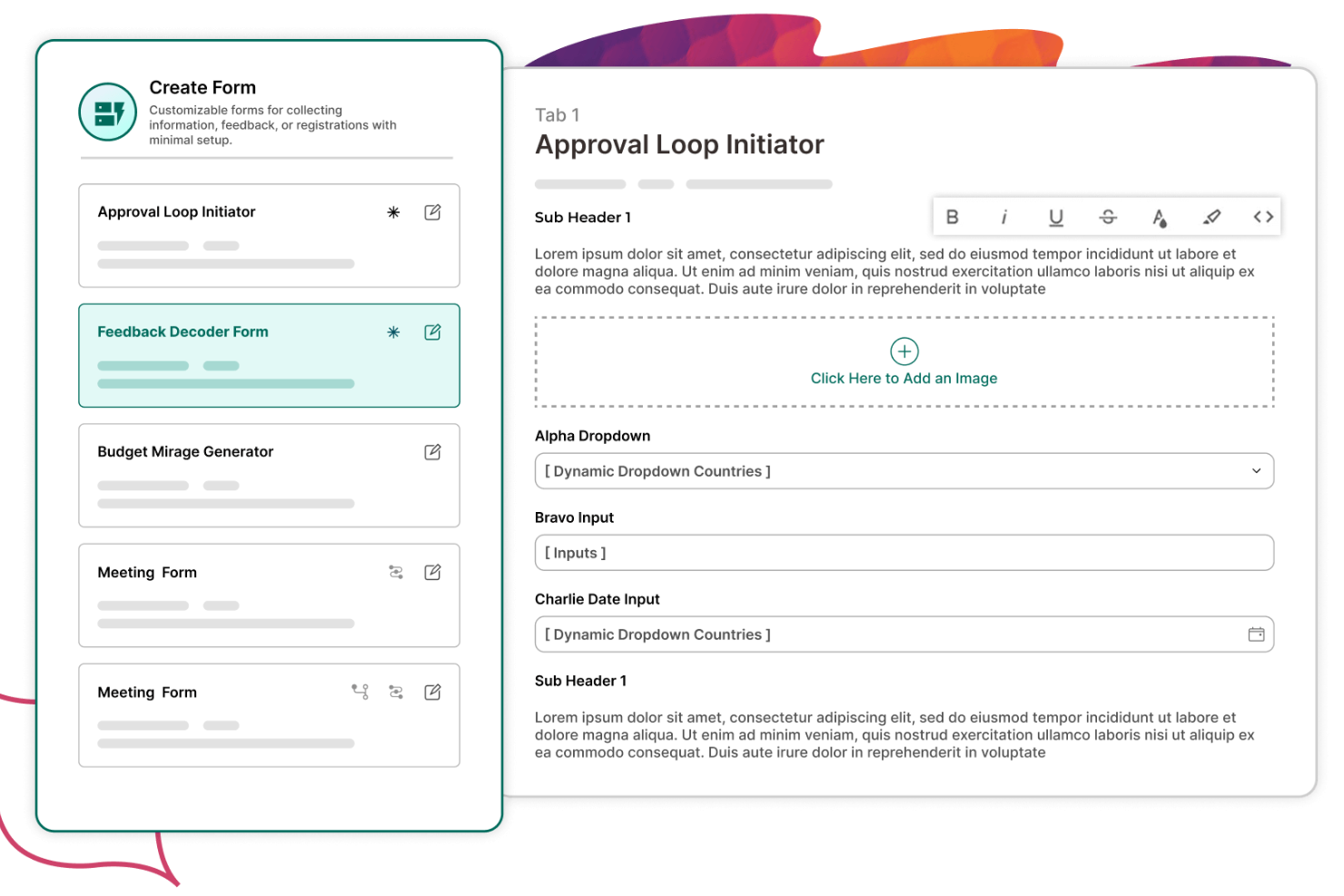
Screendragon is a platform built specifically for handling process workflows and workflow automation in creative, marketing, and agency settings. It enables you to design and run custom workflows that match how your team works.
I picked Screendragon because it offers a no-code workflow engine that lets you map out decision gates, triggers, and conditional routing without needing developers. The workflow builder supports triggers such as sending emails at certain steps (e.g. before or after deadlines) and dynamically assigning permissions based on form inputs, giving your team flexibility in how tasks flow.
Beyond that, Screendragon supports governance and compliance rules baked into workflows: you can build in audit trails, version control, and permissioned access so decisions and data visibility are tied directly to the workflow logic. This makes it a good pick when your workflows must enforce rules, approvals, and accountability.
Integrations include Microsoft Power BI, Slack, Microsoft Teams, HubSpot, Okta, Aprimo, Adobe, Ziflow, Brandfolder, Jira Software, Google Drive, Egnyte, Box, Salesforce, Microsoft Dynamics 365, SAP, and Trello.

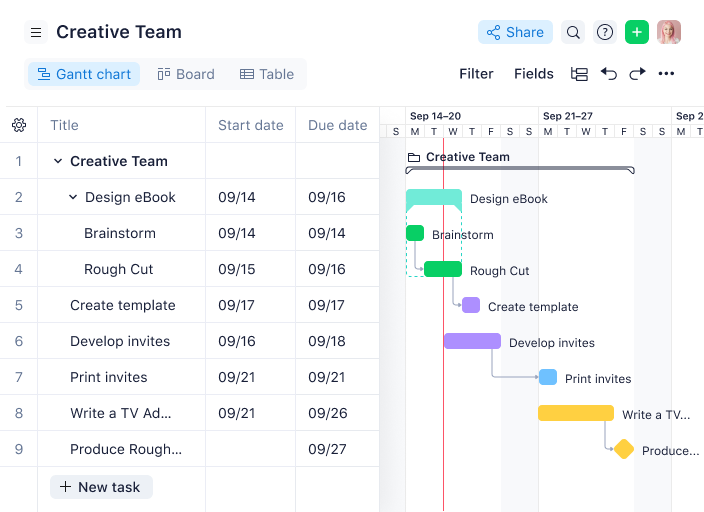
Wrike is a project management software that you can use to create your process workflows. Unlike other apps in this list which have integrated diagramming tools, you might have to look within their 400+ integration library for a tool that helps you diagram. If not, time to dust off your kindergarten lessons and draw on paper.
Once you have your process though, you can start building it in Wrike. Account admins can create and edit workflows from the account settings page (see screenshot). After you save changes, the new workflow will be available to your team in their workspace.
Wrike released custom workflows mid-2021, which means you can now build a workflow for any team or business process.
Wrike offers 400+ pre-built native integrations, including integrations with the most popular file management software from Microsoft, Google, and Dropbox, along with sales and marketing software from Salesforce and Marketo.
New Product Updates from Wrike

Streamlining Workspaces with New Updates
Wrike announces custom space templates, AI Agents in Wrike Labs, and a new Guage widget to improve project management. For more information, visit Wrike's official site.

monday.com is a work OS that can handle many parts of your project and business operations, process workflows included! Their extensive automation options make it possible for you to create a digital workflow that everyone will benefit from.
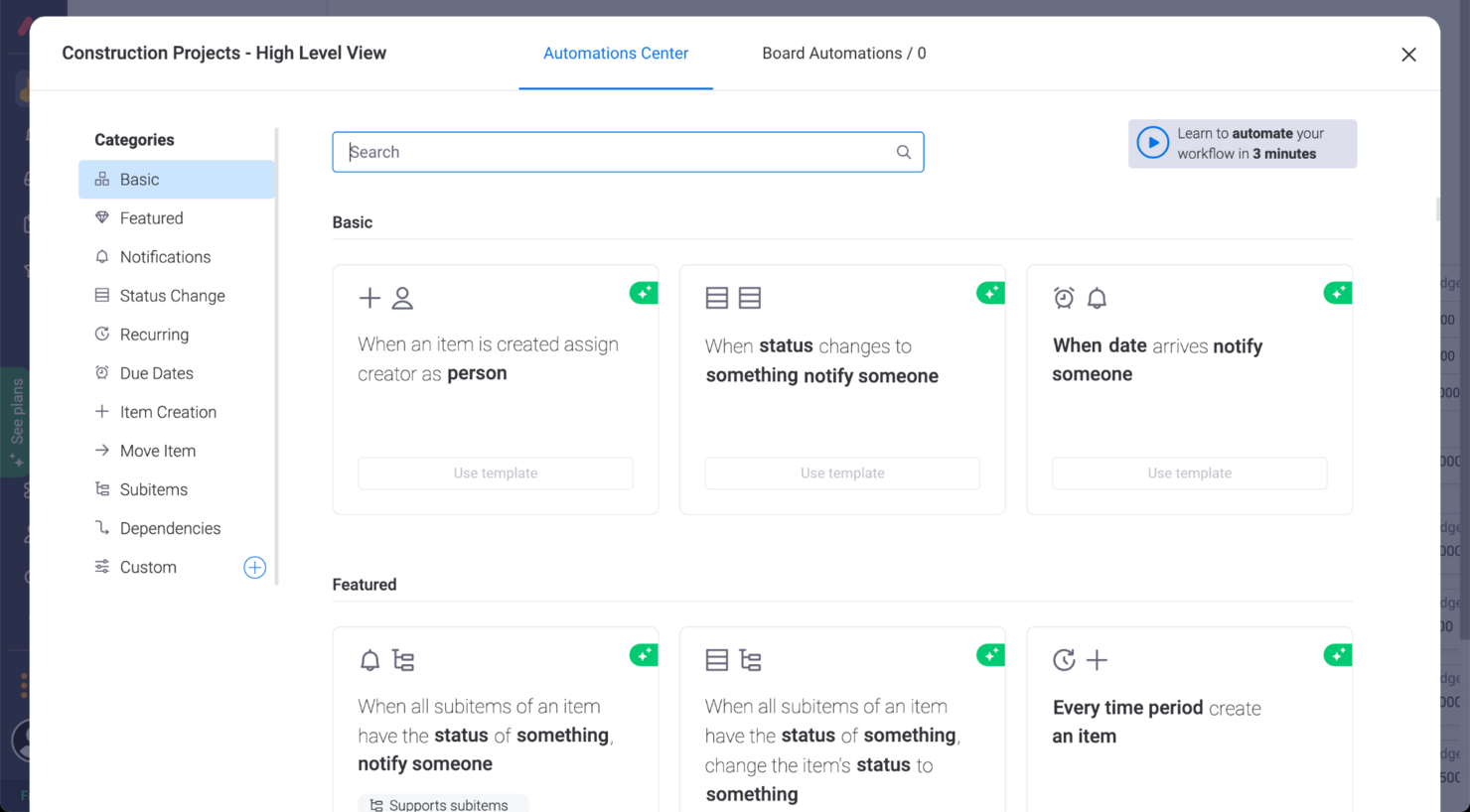
Since your first step is to map your process, you can use Canvas by monday.com to do it. Then, head over to monday.com once you have a defined workflow you want your people to follow. Open the automations by clicking on the ‘automate’ button on the top right menu of any view.
Among the many things you can automate are email notifications, status changes, assigning tasks to people, moving tasks to a different phase, and more. Important: you can always turn on and off your automations with the toggle of a switch in the board automations view.
monday.com’s integrations include project management apps like Slack, GoogleSheets, Google Drive, Gmail, Google Calendar, Jira, GitHub, Trello, Dropbox, Typeform, and many more, accessible through a paid plan with Zapier.
monday.com is free for up to 2 users. Paid plans cost from $8/user/month and come with a 14-day free trial.
New Product Updates from monday.com

monday.com Adds Microsoft Teams Messaging In Workflows
monday.com introduces Microsoft Teams messaging within workflows. This update allows users to send messages to specific individuals directly from workflows, improving collaboration and communication. For more information, visit monday.com’s official site.

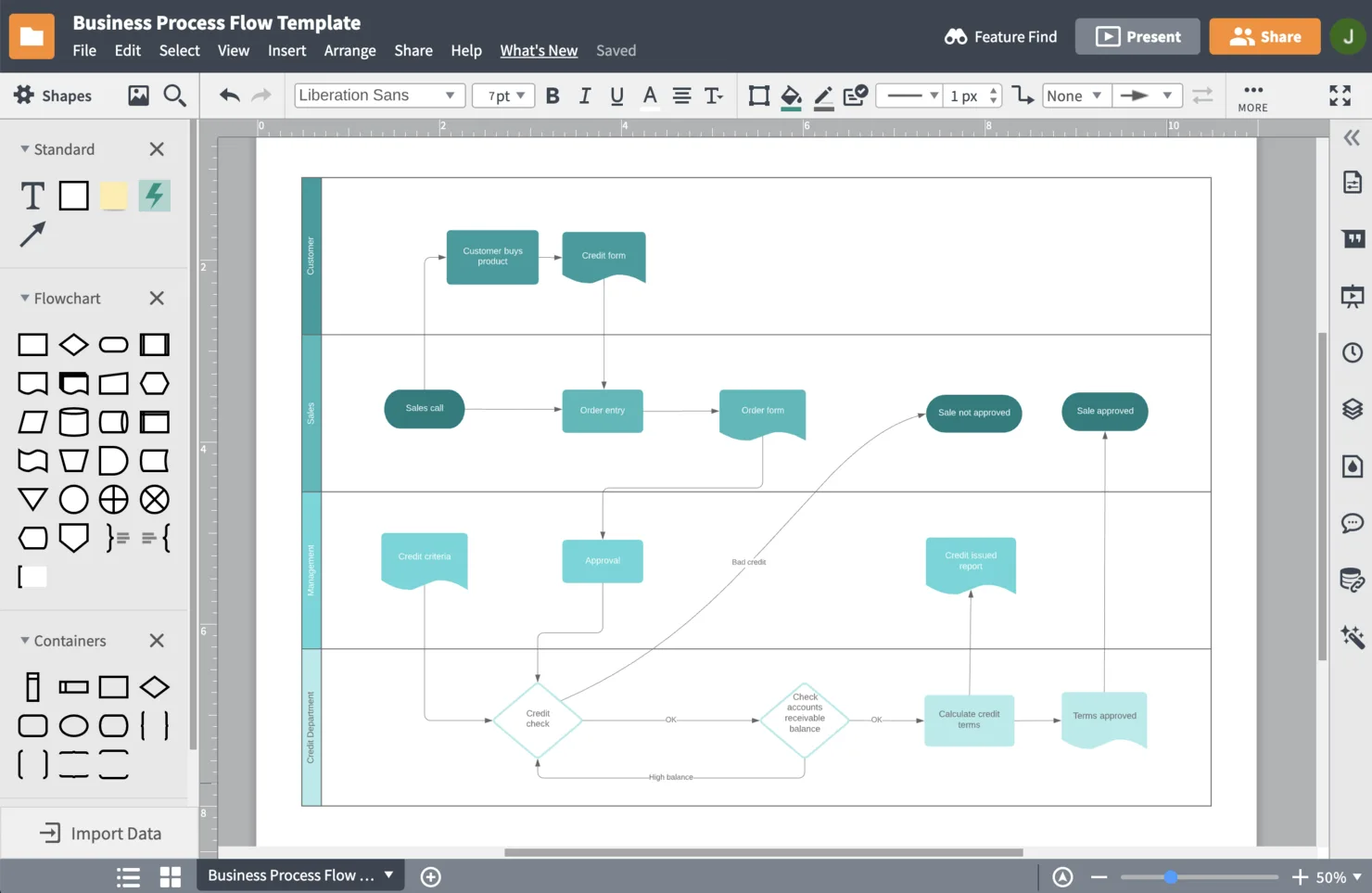
Lucidchart is a cloud-based workflow diagramming solution. This centralized platform helps you quickly create flows of your business processes, then share them with colleagues. Lucidchart’s key features include feedback management, graphs, data import, and customizable templates.
You can also use the software to build organizational charts and upload employee data, identifying the requirements of various team members. Critical documents can be managed by configuring user access and providing view-only licenses.
Lucidchart integrates with popular applications such as Slack, Salesforce, GitHub, and LinkedIn Sales Navigator. It is just one part of Lucid’s Visual Collaboration Suite, which also features Lucidspark, a virtual whiteboard for ideation and project planning, and Lucidscale, an application for cloud architecture visualization.
Lucidchart costs from $7.95/month per user. A limited free version is also available.

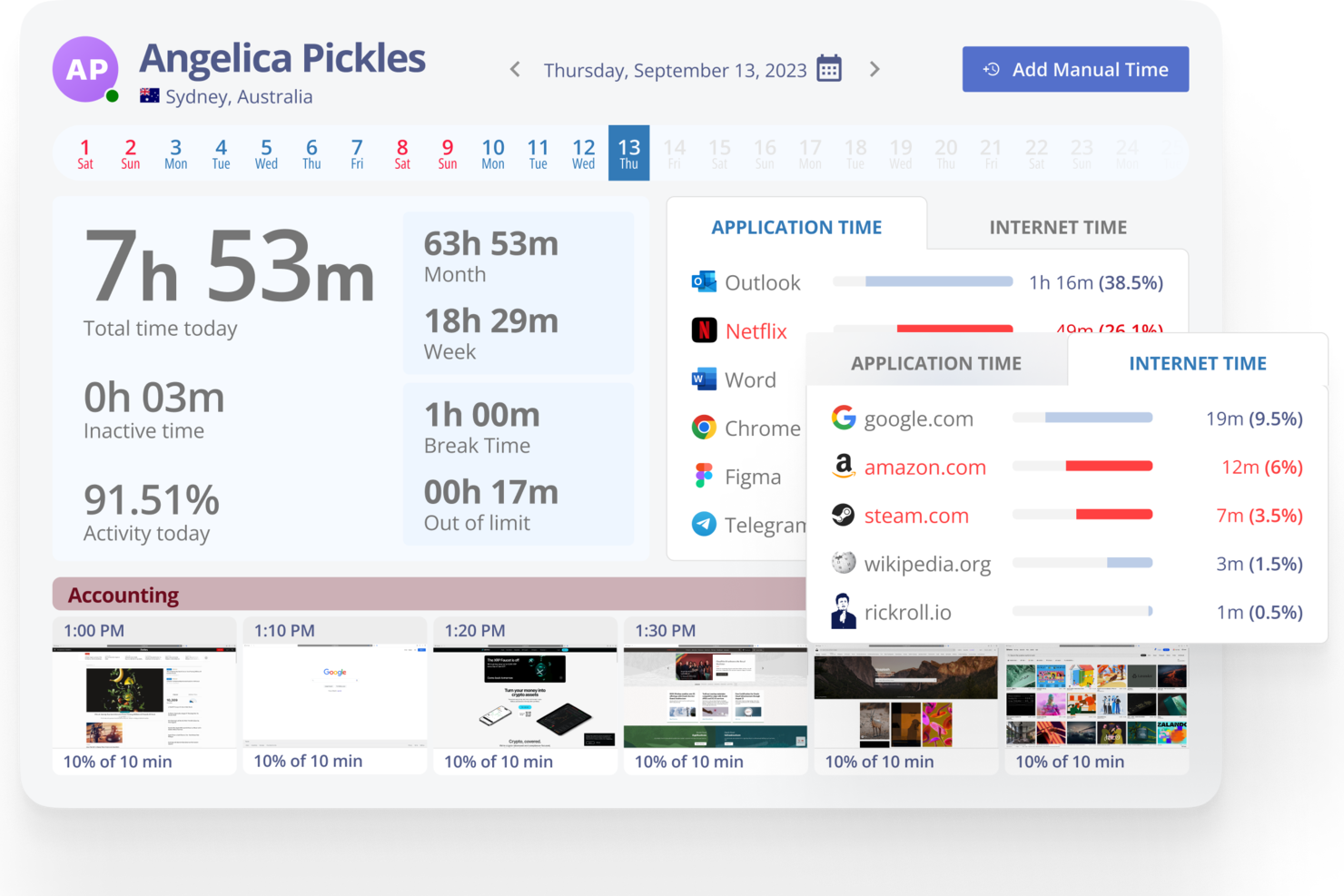
Monitask is a practical tool for teams looking to improve workflow management. It’s used by remote teams, agencies, software developers, and e-commerce businesses to address common issues like productivity tracking and time management. With features designed for professionals such as freelancers, accountants, and healthcare workers, Monitask supports day-to-day operations and clearer project oversight, helping teams run work more efficiently.
Why I Picked Monitask
I picked Monitask for its focus on time tracking and productivity monitoring as core workflow management tools. Its time tracking feature shows how much time is spent on specific tasks, which supports accountability and more informed resource planning. The employee productivity monitoring tool offers visibility into work patterns, making it easier to identify areas for improvement and manage team performance. Together, these features make Monitask useful for workflow management across a range of industries.
Monitask Key Features
In addition to its standout time tracking and productivity monitoring, some other features of Monitask include:
- Online Timesheets: This feature allows your team to log and review work hours, enhancing transparency and accountability.
- Clock-in/out Boards: Provides a visual representation of employee work hours, aiding in attendance management.
- Remote Employee Monitoring: Enables you to keep track of remote team activities, ensuring productivity irrespective of location.
- Workforce Analytics: Offers detailed reports and insights into workforce performance, helping you make informed decisions.
Monitask Integrations
Integrations are not currently listed by Monitask.
Pros and Cons
Pros:
- Useful for remote team oversight
- Detailed time tracking reports
- Clear productivity performance data
Cons:
- Lacks rewards or incentives
- No built-in recognition tools


Qntrl is a workflow orchestration tool that enables organizations to manage and automate their business processes across various departments. It provides a platform for creating custom workflows, automating tasks, and facilitating collaboration among team members. It is designed to support a range of business functions, from procurement and HR to IT and marketing, making it a great tool for enterprise-level businesses that want one tool to manage workflows for multiple departments.
Qntrl provides a centralized platform for managing various business processes. It especially offers visibility and control over workflows, allowing department heads to oversee all aspects of their operations. The tool enables users to map out processes and collaborate in a workflow-centric manner. It also provides reports and dashboards for monitoring workflow performance and making data-driven decisions.
Features include centralized requests, real-time status updates, workflow-centric collaboration, process extensibility, and enterprise security features, such as role-based access control and audit trails.
Integrations include Zoho Sprints, Zoho CRM, Pipedrive, MySQL, Google Sheets, Gmail, and Google Calendar, as well as several integrations facilitated by Zapier, such as Paths, Webhooks, and Schedule.

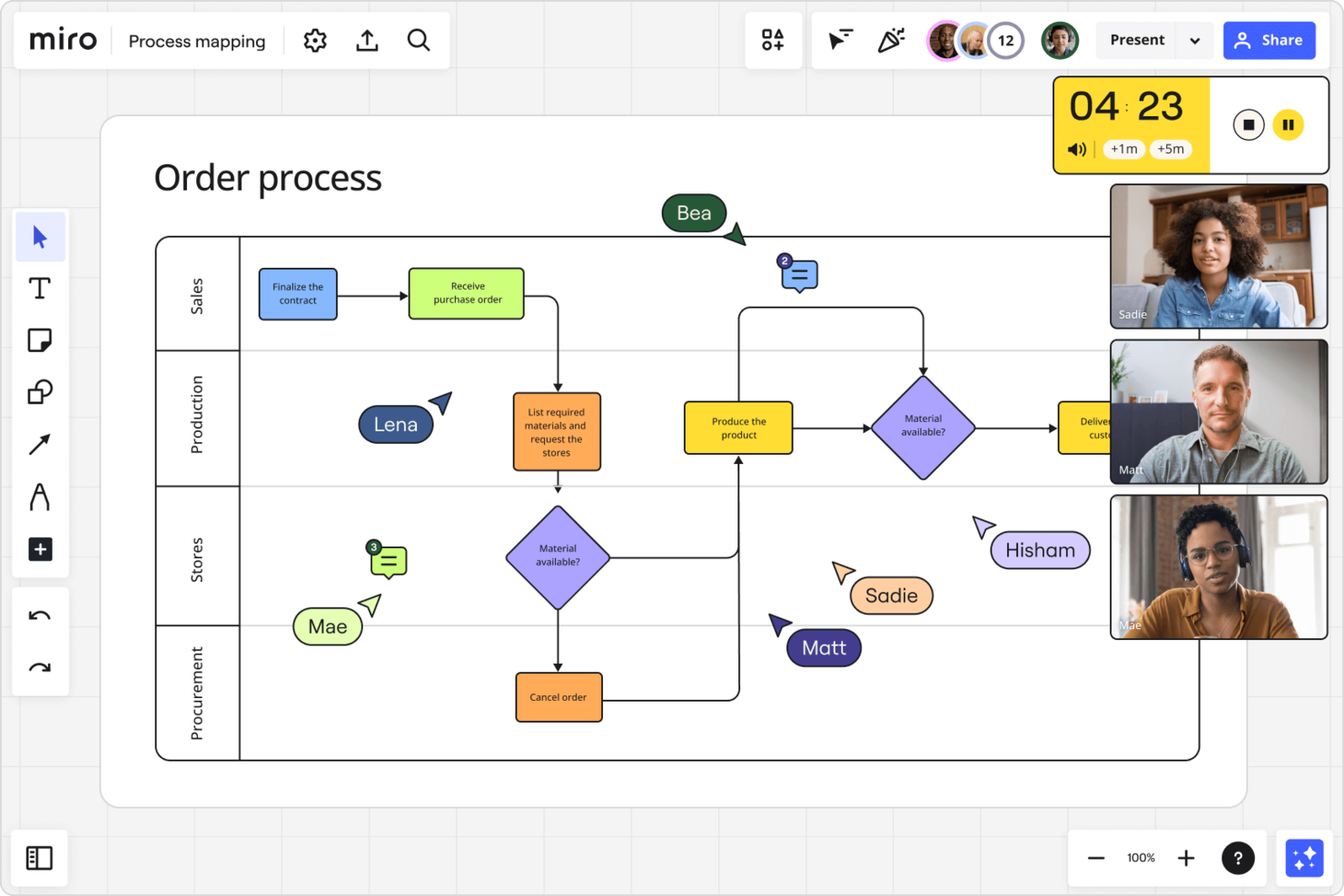
Miro offers a digital whiteboard platform designed for team collaboration and the visualization of complex workflows. It features an infinite canvas, allowing for the unrestricted mapping of workflows and brainstorming. Users can zoom and navigate freely, catering to detailed planning and broad overviews alike. Overall, Miro's approach to project planning and collaboration emphasizes clarity and inclusivity, making it suitable for teams aiming to streamline their workflow visualization and collaboration efforts.
Miro's collaboration tools are the key to its functionality. Real-time adjustments with voting and sticky notes, alongside the ability to leave asynchronous video explanations via TalkTrack, support inclusive and comprehensive team input. Additionally, Miro provides flexibility in idea expression, supporting uploads from various formats and incorporating diverse elements like numerical data, images, and videos into the planning process. Miro also includes a huge library of pre-made templates for everything from user story maps to SWOT analyses. They're a great starting point if you're not sure how to structure your board.
Features include mind mapping, task tracking, user story mapping, PI planning, online workshops, brainwriting, quick diagramming tools, timebox sessions, digital sticky notes, video conferencing, webinars, asset sharing, data visualization, Miro Assist AI, a capacity planner and a dependencies app, customizable templates, and employee photos.
Integrations include Google Drive, Microsoft Excel, Slack, Trello, Google Workspace, DropBox Business, Notion, Confluence, Monday.com, Asana, Zoom, Survey Monkey, Adobe Creative Cloud, and GitHub.
New Product Updates from Miro

Miro Enhances AI Workflows and Tables for Task Planning
Miro enhances AI workflows and Tables with AI-generated planning boards and web-aware automation. These updates help teams organize tasks faster and analyze external content within workflows. For more information, visit Miro’s official site.

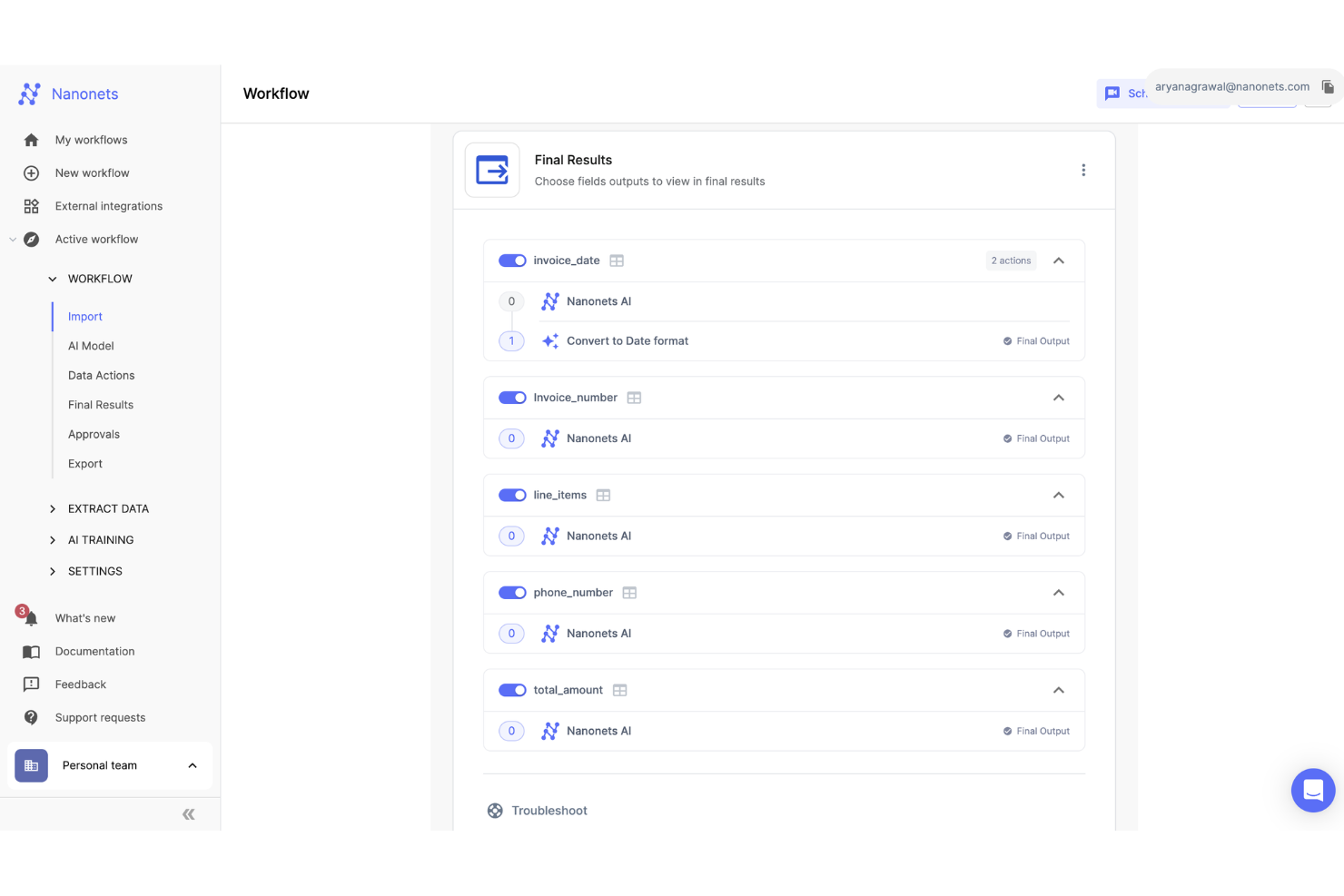
Nanonets is an AI-driven platform designed to automate document processing and workflow management, serving industries such as finance, healthcare, and logistics. Utilizing advanced Optical Character Recognition (OCR) and deep learning, Nanonets automates workflows to help reduce manual effort.
Through AI, Nanonets automates intricate business processes like document and data management, enhancing productivity and operational efficiency. You can create custom workflows in natural language, streamlining interactions with various applications, including Google Sheets and QuickBooks. The software supports custom large language models (LLMs) blocks and features human-in-the-loop AI workflows for necessary manual oversight.
Additionally, the no-code platform empowers you to automate complex workflows without requiring coding skills, broadening accessibility across various business functions.
Integrations include Quickbooks, Salesforce, Google Sheets, Dropbox, and Zapier.

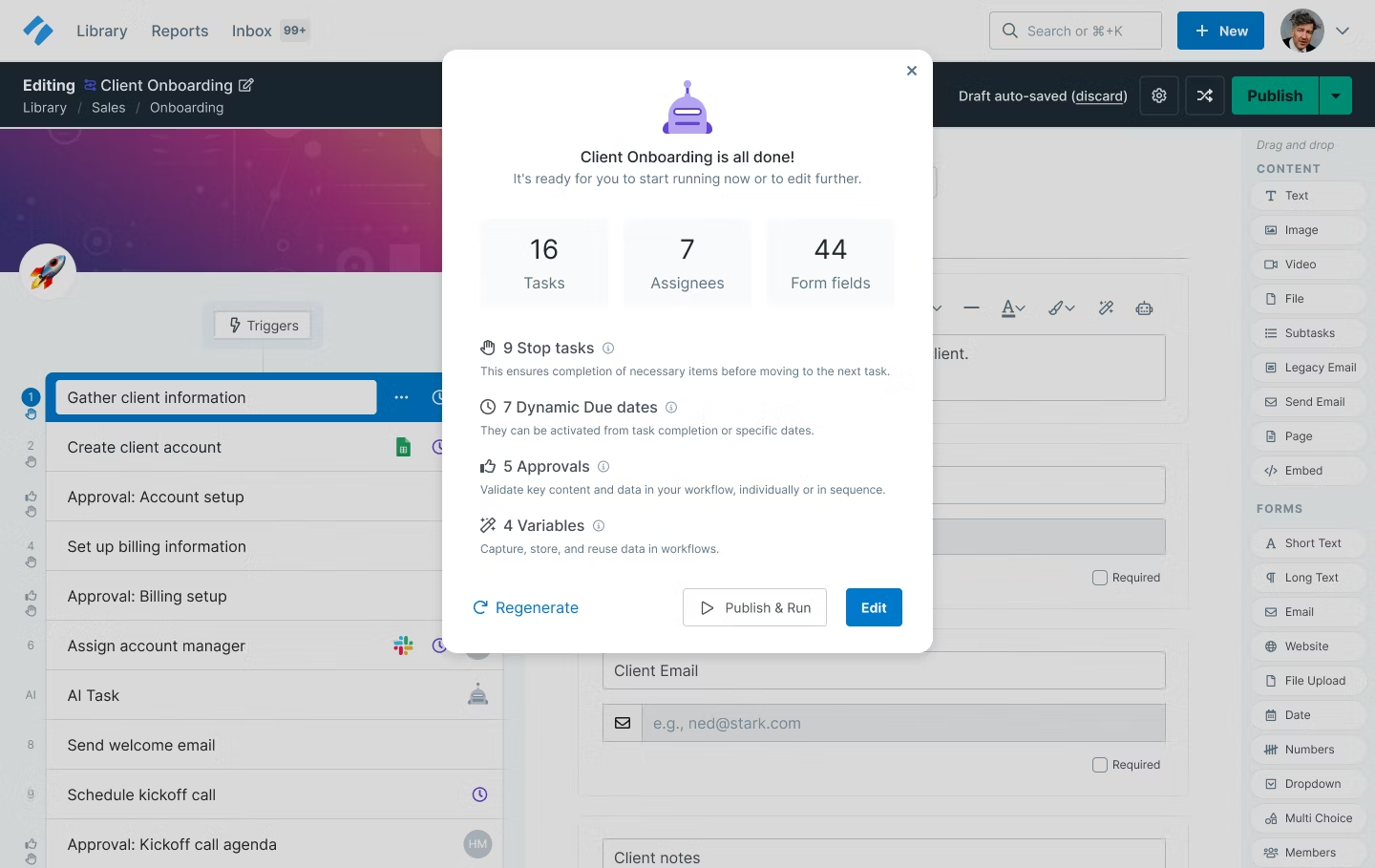
Process Street is a workflow management platform where you can build your process workflows in a collaborative environment. Simply invite the users that you want to build a process with and set permissions on who can see, run, edit, or build any workflow
The builder is mainly form-based from what I’m able to see. After you define your workflow stages, each stage can be edited as a “landing page” where the user might see some text, a video, table, or relevant information to their stage. These forms can be interactive by including things like drop-down menus with tailored option selection messages.
Finally, once the user completes the information you requested, they can send it to the next stage where someone else can pick up the work.
Process Street integrates with thousands of apps through Zapier, as well as Google Workspace, Jira, Salesforce, Bamboo HR, and more.
Process Street is free for one workflow. Paid plans start at $25/user/month and have a 14-day free trial.

Kintone lets you organize your processes and tasks into intuitive workflows. With automated reminders, approvals, and task handoffs, you can spend less time managing your work and more time focusing on what really matters.
Although it might take you a bit to know how to use this platform, once you do, you will build workflows in minutes. A shortcut you can take is to open and study one of their 100+ templates. These have been developed to help you get started with your business workflow and cover diverse industries and functional departments.
Kintone has 30+ integrations with third-party apps, including Box, Gmail, Formstack, Salesforce, Hubspot, Mailchimp, Microsoft Flow, and more. Connect with additional apps using their Zapier connector.
Kintone’s price is $24/user/month (5 user minimum) and offers a full-access 30-day trial.
Other Process Workflow Software
Here are a few more that didn’t make the top list but worth your consideration if you are looking to research more tools.
- Trello
For process-oriented Kanban boards
- Camunda Platform
For creating custom workflows
- Kissflow Workflow
For drag-and-drop workflows
- GatherContent
For content production workflows
- SAP Process Automation
For repetitive tasks
- Boomi Flow
For embedding in SaaS applications
- Process Maker
For syncing processes across platforms
- Height
For cross-functional teams
- InRule
For the decision management lifecycle
- Pneumatic Workflow
For continuous workflow improvements
- ClickUp
Robust free plan
- Creatio Studio
For no-code workflow management
- Asana
Drag and drop workflow builder, plus rules for quick automations
- Moxo
Client-centric custom workflows to align your business processes.


Related Process Workflow Software
If you still haven't found what you're looking for here, check out these other related tools that we've tested and evaluated:
- Project Management Software
- Intelligent Process Automation Software
- Resource Management Software
- Workflow Automation Software
- Time Tracking Software
- Task Management Software
- Project Scheduling Software
Selection Criteria For Process Workflow Software
Here's my comprehensive criteria framework to evaluate these solutions. Each of these criteria addresses specific buyer needs so your chosen solution can effectively automate and streamline business processes, and is weighted to reflect its importance to my overall evaluation.
Core Process Workflow Software Functionality: 25% of total weighted score
- Automating repetitive tasks to save time and reduce errors
- Facilitating collaboration across teams and departments
- Providing clear visualization of workflows through charts and diagrams
- Integrating seamlessly with other business tools and platforms
- Offering customizable templates to suit various business processes
Additional Standout Features: 25% of total weighted score
- Advanced analytics and reporting capabilities for deeper insights into process efficiency
- AI-driven suggestions for workflow optimization
- Mobile accessibility for managing workflows on the go
Usability: 10% of total weighted score
- An intuitive, easy-to-navigate interface
- A balance of rich functionality that doesn't overwhelm users
Onboarding: 10% of total weighted score
- Availability of comprehensive training materials, such as videos and guides
- Pre-built templates and interactive product tours to ease the learning curve
- Support channels like chatbots and webinars to assist new users
Customer Support: 10% of total weighted score
- Multiple support channels, including live chat, email, and phone
- Quick response times and effective problem resolution
- Access to a community forum or user group for peer support
Value For Money: 10% of total weighted score
- Flexible pricing plans that cater to businesses of different sizes
- A clear breakdown of features at each pricing tier to ensure you only pay for what you need
- Free trials or demos to test functionality before committing
Customer Reviews: 10% of total weighted score
- High ratings in reliability and customer satisfaction
- Positive remarks on ease of use and customer support responsiveness
- Testimonials highlighting significant improvements in workflow efficiency
How To Choose Process Workflow Software
As you're shortlisting, trialing, and selecting process workflow software, consider the following:
- What problem are you trying to solve: Start by identifying the process workflow feature gap you're trying to fill to clarify which features and functionality you need in process workflow software. If, for example, you wanted to document your processes, this question would point you in the direction of process documentation software instead.
- Who will need to use it: To evaluate cost and requirements, consider who'll be using the software and how many licenses you'll need. When that's clear, it's worth considering if you're prioritizing ease of use for all, or speed for your process workflow software power users.
- What other tools it needs to work with: Clarify what tools you're replacing, what tools are staying, and the tools you'll need to integrate with, such as accounting, CRM, or HR software. Decide if the tools will need to integrate together or whether you can replace multiple tools with one consolidated process workflow tool.
- What outcomes are important: Consider the result that the software needs to deliver to be considered a success, what capability you want to gain, what you want to improve, and how you will be measuring success. For example, an outcome could be the ability to get greater visibility into performance. You could compare process workflow features until you’re blue in the face but if you aren’t thinking about the outcomes you want to drive, you're wasting a lot of valuable time.
- How it would work within your organization: Consider the software selection alongside your workflows and delivery methodology. Evaluate what's working well, and the areas that are causing issues that need to be addressed. Remember every business is different—don’t assume that because a tool is popular that it'll work in your organization.
Trends In Process Workflow Software
Here are five trends that I believe will shape the future of process workflow software. Each points to a unique aspect of how these tools are adapting to meet the changing needs of project managers.
Evolving Trends in Process Workflow Software
- Integration of AI and machine learning: There's a noticeable uptrend in integrating AI and machine learning algorithms that help with decision-making and automating complex processes. Tools that offer predictive analytics, intelligent automation, and AI-driven optimization stand out.
- Focus on data security and compliance: As businesses handle increasingly sensitive information, there is an increased emphasis on data security and compliance within workflow software. Features like end-to-end encryption, role-based access control, and compliance with global data protection regulations (such as GDPR) are becoming standard.
- Integration of IoT devices: The integration of Internet of Things (IoT) devices with workflow software is becoming more prevalent. This trend points to the expanding role of IoT in automating physical tasks, collecting data, and triggering workflows based on sensor inputs.
- Sustainability and eco-friendly features: An emerging trend is the inclusion of features in workflow software that support sustainability and eco-friendly business practices. This includes tools that help reduce paper usage, optimize resource allocation, and track environmental impact. This trend reflects the growing awareness of the need for businesses to operate in an environmentally responsible manner.
What Is Process Workflow Software?
Process workflow software is a tool that helps you set a sequence of tasks and create a workflow using connectors, rules, and automations in a drag-and-drop environment. These systems are instrumental in improving organizational efficiency and eliminating manual errors, reducing delays, and improving overall productivity.
Typically, process workflow software provides a visual representation of the entire workflow so you can map out, analyze, and optimize processes. You can define the sequence of tasks, set up dependencies, and establish rules for task completion. Automation features also allow you to automatically route tasks to the appropriate individuals or teams, track progress, and trigger notifications or alerts for key milestones.
However, if you are looking to automate and coordinate complex, interdependent workflows across multiple systems and teams, you should look for workflow orchestration tools instead.
Features of Process Workflow Software
Here are the most important features to consider when selecting process workflow software for your organization.
- User-friendly interface: A straightforward and intuitive design makes it easy for all team members to adopt and use the software, regardless of their tech savviness. This makes the transition to a new system smooth and allows users to quickly become proficient, which improves productivity and reduces training time.
- Customization and flexibility: Customization ensures that the software can adapt to your company's workflows, rather than forcing your processes to fit within a predefined structure. This helps you make operations more efficient.
- Integration capabilities: Integration prevents data silos, improves communication between different departments, and helps you make sure information flows smoothly across the entire organization.
- Scalability: As your business grows, your process workflow software should grow with it. Scalability ensures the software can handle more tasks, users, and data without losing performance. Business process management systems support this by providing a flexible framework for scaling and optimizing workflows.
- Real-time analytics and reporting: Access to real-time data and the ability to generate insightful reports is vital for making informed decisions. This feature allows you to monitor processes closely, identify bottlenecks, and improve overall efficiency.
- Cloud-based technology: A cloud-based solution offers flexibility, accessibility, and security. Users can access the system from anywhere at any time, remote teams can stay connected, and data is securely stored and backed up off-site.
- Automated notifications and alerts: Keeping team members informed about tasks, deadlines, and changes within the workflow is key. Automated notifications help you make sure nothing falls through the cracks, improve accountability, and get tasks completed on time.
- Role-based access control: This allows you to make sure users only see what they need to perform their tasks, which improves security and protects you against data breaches.
- Process mapping, modeling, and visualization: This feature helps you identify redundancies, streamline operations, and make sure all steps are necessary and efficient. Business process modeling allows you to simulate, analyze, and optimize workflows before implementing changes
- Mobile compatibility: Mobile compatibility allows users to use the system via their smartphones or tablets, which keeps the business moving forward even when people are away from the office.
Benefits of Process Workflow Software
Here are five advantages that come with integrating process workflow software into your business operations:
- Increased efficiency: Using process automation tools to automate routine tasks reduces manual effort and speeds up processes. Team members can focus on more strategic activities rather than getting bogged down by repetitive tasks, which improves overall productivity.
- Enhanced collaboration: By providing a centralized platform for sharing information and tracking progress, the software facilitates better teamwork and helps make sure everyone is on the same page. This also leads to smoother project execution.
- Improved transparency and accountability: You can monitor progress in real-time, identify bottlenecks quickly, and hold team members accountable for their tasks. This contributes to a more organized and responsible workforce.
- Error reduction: By automating workflows, the software ensures that tasks are completed consistently and accurately. It reduces the risk of mistakes and human error that can lead to costly delays or rework.
- Scalability: As your organization expands, process workflow software can accommodate additional users, processes, and complexity without sacrificing performance, so your operational infrastructure scales with your business.
Costs & Pricing for Process Workflow Software
Below is a breakdown of the common plan types, their average prices, and their typical features:
Plan Comparison Table for Process Workflow Software
| Plan Type | Average Price | Common Features |
|---|---|---|
| Free | $0 | Basic process automation, limited integrations, community support |
| Basic | $10-15/user/month | Enhanced automation capabilities, additional integrations, email support |
| Professional | $20-30/user/month | Full automation suite, advanced integrations, priority support |
| Enterprise | Custom pricing | Customized automation solutions, enterprise-grade security, dedicated account manager |
Plans typically range from free versions designed for small teams or individuals just starting out to enterprise-level solutions that provide advanced features for larger organizations with complex workflow requirements. In general, it's a good idea to start with a free or basic plan to get a sense of the tool before committing to a larger investment.
When choosing a plan, consider the scale of your operations, the complexity of your workflows, and the level of support you anticipate needing, especially as your company grows and changes.
Common stages where you may want to upgrade your pricing plan include:
- Increased team size: When the number of users or team members grows significantly, your existing plan might not accommodate the new users effectively. Upgrading can provide the necessary user seats.
- Complexity of projects: As projects become more complex and require advanced features, a higher pricing tier might offer the necessary tools to handle these complexities efficiently.
- Integration needs: When you need to integrate your process workflow software with other tools and systems, higher tiers often provide more extensive integration capabilities.
- Enhanced reporting and analytics: If you need more advanced reporting and analytics features to make data-driven decisions, higher pricing tiers typically offer these capabilities.
- Customer support and training: As your reliance on the software grows, you might need premium customer support and training. Upgrading to a higher tier often includes better support options, dedicated account managers, and more training.
Process Workflow Software Frequently Asked Questions
Find answers to common questions other people ask about this topic.
What is a process workflow?
A process workflow is a series of steps that have to be followed to complete a process. This workflow includes the sequence of activities and actions to be taken and is guided by pre-defined rules that dictate the flow of information.
Detailed process workflows will also include information on who is responsible for an activity and the tools that are needed to perform certain tasks.
What are examples of workflow processes?
There are many processes within a project that we can map as workflows. For example:
- Issue management: How your team responds to issues during the development of a project is an important process to have in place. Your team should follow a defined set of steps on how escalations and work are performed.
- Onboarding workflow: This outlines the tasks required to bring a new team member on board. This can be useful whenever there is a change in scope that demands a new team member, or when you have to replace a resource halfway through the project.
- New client requirement: What process do you follow when your client has a new request or tries to sneak one in during the checkpoint meeting?
What’s Next:
If you're in the process of researching process workflow software, connect with a SoftwareSelect advisor for free recommendations.
You fill out a form and have a quick chat where they get into the specifics of your needs. Then you'll get a shortlist of software to review. They'll even support you through the entire buying process, including price negotiations.