
27 Best Free Gantt Chart Software Reviewed For 2026

20 Best Free Gantt Chart Software Shortlist
Here's my pick of the 20 best software from the 28 tools reviewed.


Free Gantt chart software is a valuable asset for any team or organization looking to manage projects effectively. With the right tool, you can streamline project planning, track progress visually, and stay on top of deadlines. Without it, you might find yourself struggling to understand dependencies, missing deadlines, or lacking visibility into project progress.
Using my experience with project management software, I tested and compared several of the top free Gantt chart tools available. I decided to include software that is free, has a free version, or offers a free trial. This way, you can have a mixed bag of tools that can help you in different ways.
The following list has my findings, information related to my evaluation process, FAQs, and guidance on how to choose this type of software.
Why You Can Trust Us
Free Gantt Chart Software Comparison Chart
Here is a table with every tool and a summary of the highlights we just discussed in the overviews.
| Tool | Best For | Trial Info | Price | ||
|---|---|---|---|---|---|
| 1 | Best for creative teams | Free plan + free demo available | From $7/user/month (billed annually) | Website | |
| 2 | Best for dynamic timeline visualization | 30-day free trial + free plan available | From $7.65/member/month (billed annually) | Website | |
| 3 | Best for customization options | Free plan + free demo available + 15-day free trial | From $4/user/month (billed annually) | Website | |
| 4 | Best for customizable auto-scheduling | Free plan + free demo available | From $4/user/month (billed annually) | Website | |
| 5 | Best for visually appealing Gantt charts | Free trial + free plan available | From $8/member/month | Website | |
| 6 | Best for intuitive Gantt charts | 7-day free trial available | From $120/year | Website | |
| 7 | Best for its extensive template library | Free plan + free demo + free trial available | From $3/seat/month (billed annually) | Website | |
| 8 | Best for MS Project users | Free plan available | Free open source software | Website | |
| 9 | Best for PowerPoint Gantt charts | Free plan available | From $9/month (billed annually) | Website | |
| 10 | Best for customizable timeline management | Free plan available | From $4/user/month (billed annually) | Website | |
| 11 | Best for Linux or Mac users | 14-day free trial available | From $7.25/user/month (billed annually, 25 user minimum) | Website | |
| 12 | Best for unlimited project collaboration | Free forever plan available | From $3.99/user/month (billed annually) | Website | |
| 13 | Best for small and medium-sized teams | Not available | Free web-based Gantt charts | Website | |
| 14 | Best for DIY community support | Free open source software | Website | ||
| 15 | Best for individuals or freelancers | 14-day free trial | From $9.95/user/month (1 project for free) | Website | |
| 16 | Best for Jira users | Free plan available | From $18/user/month | Website | |
| 17 | Best for collaborating with teams | 30-day free trial | From $8.50/user/month | Website | |
| 18 | Best for automatic task dependency updates | 14-day free trial + free demo available | From $7/user/month (billed annually) | Website | |
| 19 | Best for agency work management | 14-day free trial available | From $10/user/month (billed annually) | Website | |
| 20 | Best with automated workflows included | Free trial + free demo available | From $9/member/month (billed annually) | Website |


-

Insightful
Visit WebsiteThis is an aggregated rating for this tool including ratings from Crozdesk users and ratings from other sites.4.8 -
Accelo
Visit WebsiteThis is an aggregated rating for this tool including ratings from Crozdesk users and ratings from other sites.4.4 -
Forecast
Visit WebsiteThis is an aggregated rating for this tool including ratings from Crozdesk users and ratings from other sites.4.6




Best Free Gantt Chart Software Reviews
Here’s a brief description of each of the free Gantt chart software on my list showing what it does best, plus screenshots to showcase some of the features.

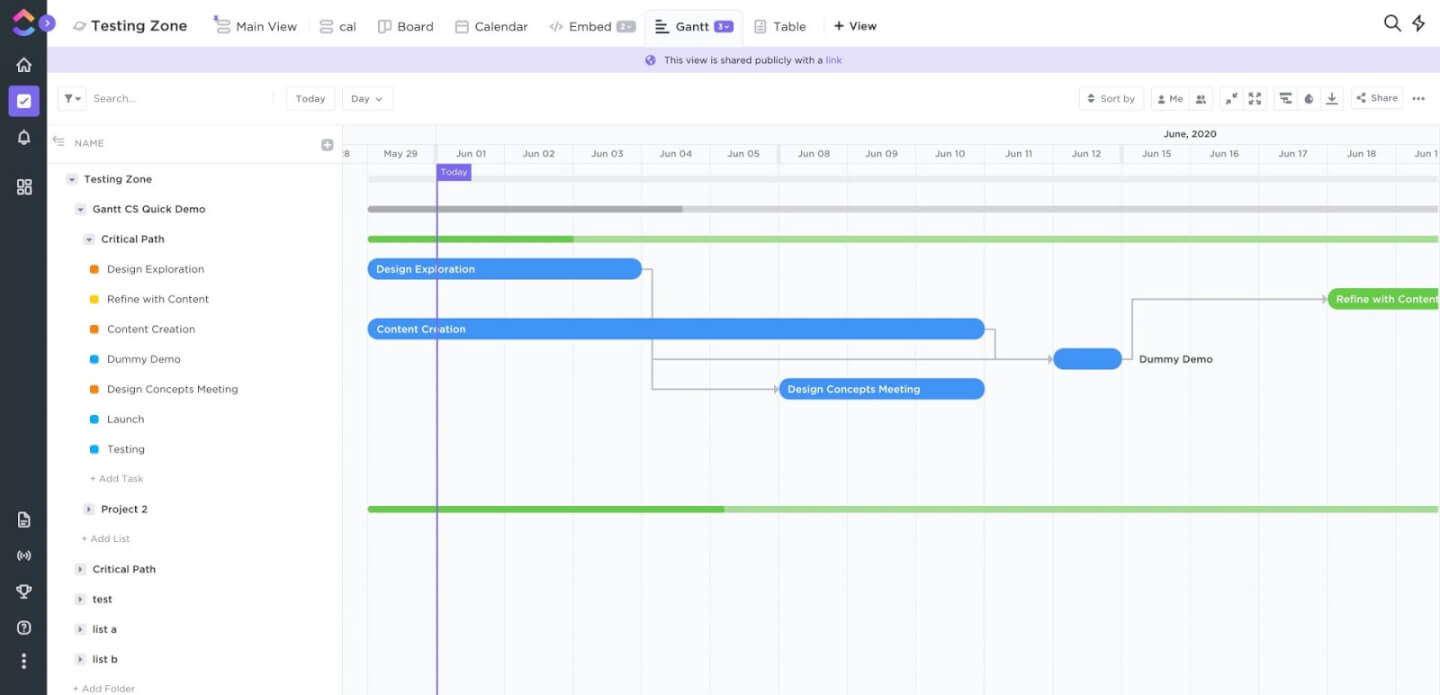
ClickUp gives project managers and teams a flexible way to plan, visualize, and manage projects with free Gantt charts, helping coordinate tasks, track dependencies, and adapt to shifting priorities across industries.
Who Is ClickUp Best For?
ClickUp is a great fit for teams of all sizes that need a flexible, all-in-one project management tool with visual planning built in.
Why I Picked ClickUp
ClickUp earns its spot on my shortlist because it gives creative teams a free Gantt chart view that fits how creative projects run—with visual timelines, task dependencies, and milestone tracking all in one place. I like how you can layer multiple assignees onto a single task, which maps well to how creative work gets done across designers, writers, and producers. The free Whiteboard feature also lets teams sketch out campaign flows or content plans before converting them into a structured Gantt timeline.
ClickUp Key Features
- Time tracking: Log time directly on tasks without leaving the project view, keeping timelines accurate across the team.
- Custom fields: Add fields like priority, budget, or status to tasks so your Gantt view surfaces the data your team needs.
- Recurring tasks: Set tasks to repeat on a schedule, which keeps ongoing deliverables visible on the timeline.
- Goals: Link tasks and milestones directly to measurable targets so progress on the Gantt chart ties back to project objectives.
ClickUp Integrations
Integrations include Slack, GitHub, HubSpot, Google Drive, OneDrive, Dropbox, Outlook, Google Calendar, Figma, and Zoom.
What's Free?
ClickUp offers a free-forever plan with unlimited tasks and members. Some advanced features, like Gantt charts and certain integrations, have usage limits or are only available on paid plans.
Pros and Cons
Pros:
- Ability to attach tasks to emails
- Task creation is super flexible/customizable
- Easily tag or assign comments within tasks
Cons:
- Frequent app updates may require ongoing support/training
- Emails send the entire chat history, not streamlined data
- Starting a new project has a bit of a learning curve
New Product Updates from ClickUp

ClickUp Enhances Task Management and Introduces AI Notetaker
ClickUp introduces an AI Notetaker for meetings and improves task type management in views. These updates help teams capture meeting insights automatically and organize work more efficiently. For more information, visit ClickUp’s official site.


Quire gives project managers and teams a visual way to organize tasks, manage dependencies, and track progress with interactive Gantt charts, helping coordinate work and timelines in fast-moving digital projects.
Who Is Quire Best For?
Quire suits small to mid-sized teams in tech and digital that need a free, visual project planning tool without enterprise complexity.
Why I Picked Quire
Quire earns its spot on my shortlist because of how well its Timeline view handles dynamic, shifting project schedules. I like that you can drag and reschedule tasks directly on the Gantt chart, and dependencies update automatically—so when one task slips, the connected tasks adjust without manual rework. My team also uses the nested task structure to break down complex deliverables into subtasks that all appear on the timeline, giving a clear picture of how granular work maps to broader milestones. That level of visual clarity is rare in free tools.
Quire Key Features
- Multiple project views: Switch between list, board, and timeline views to manage work in the format that suits your team's workflow.
- Real-time collaboration: Team members can comment, assign tasks, and update statuses simultaneously without version conflicts.
- Recurring tasks: Set tasks to repeat on a schedule so routine work gets added to the timeline automatically.
- Role-based permissions: Control who can view, edit, or manage projects with customizable access levels across team members.
Quire Integrations
Integrations include Google Drive, Dropbox, Box, Microsoft OneDrive, Gmail, Outlook, Google Calendar, Microsoft Teams, Slack, and GitHub.
What's Free?
Quire offers a free-forever plan for up to 10 users per organization. The free plan includes unlimited tasks and projects but limits you to 3 integrations and 5 GB of storage.
Pros and Cons
Pros:
- Ability to create nested tasks and subtasks, allowing for detailed project breakdowns
- Multiple project views, including lists, boards, and timelines
- Easy to collaborate with team members
Cons:
- Potential for notification overload, especially when working with large teams
- The mobile version lacks some features available on the desktop
New Product Updates from Quire
Quire Enhances Chat Editing and Text Formatting
Quire introduces updates to its chat functionality to improve collaboration and message formatting. These enhancements make it easier for teams to edit messages and structure text within conversations. For more information, visit Quire’s official site.
 .
.
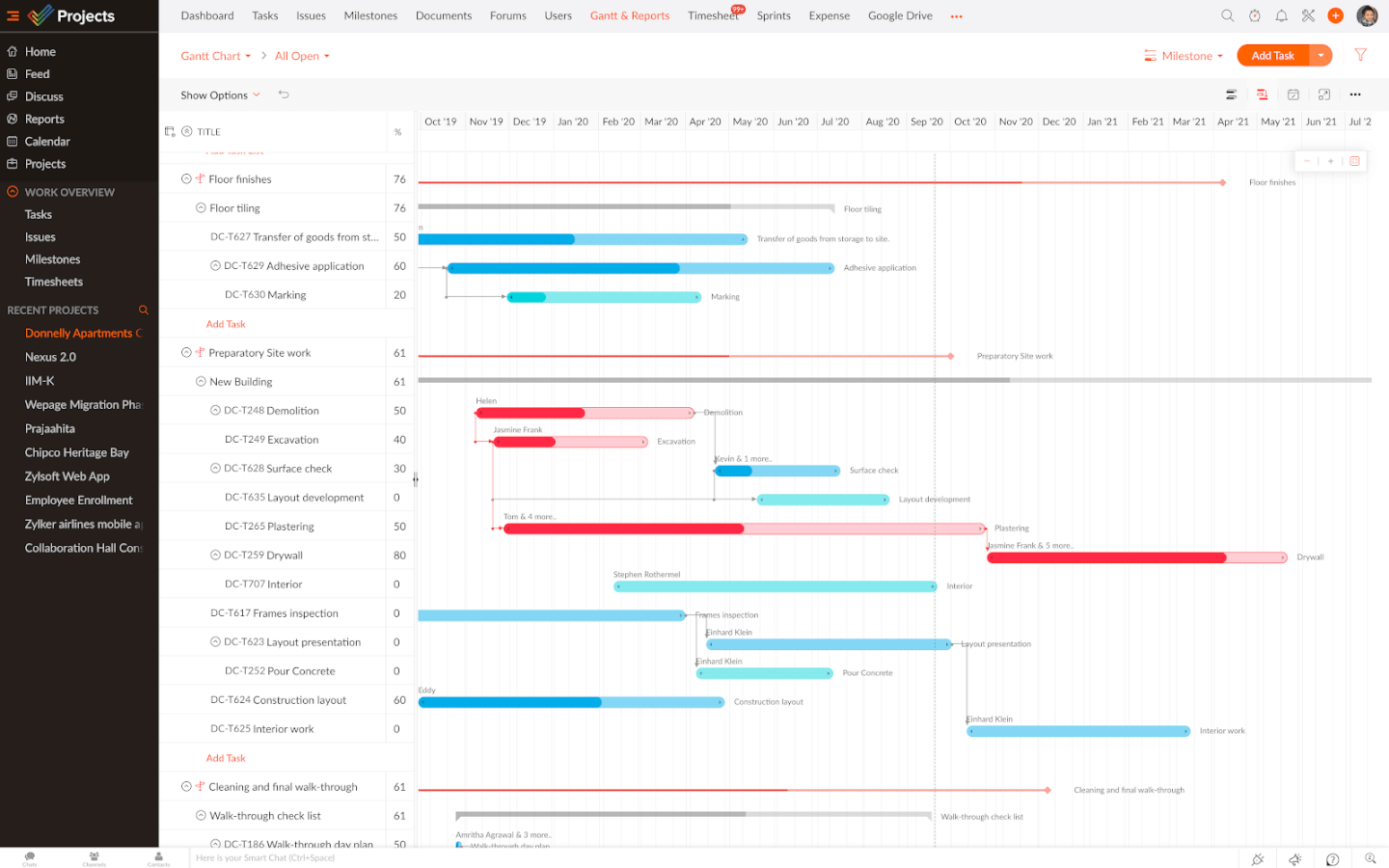
Zoho Projects gives project managers and teams in tech, marketing, and consulting a flexible way to plan, visualize, and track work with interactive Gantt charts and built-in collaboration tools.
Who Is Zoho Projects Best For?
Zoho Projects is a great fit for small to mid-sized teams that need a customizable project management tool with visual planning built in.
Why I Picked Zoho Projects
Zoho Projects earns its spot on my shortlist because of how far it lets you push customization without needing a developer. I particularly like the custom layouts feature, which lets you build project and task templates that match exactly how your team works—not just a generic structure you have to work around. Also, custom fields let you capture data that's specific to your workflow, whether that's a client name, a priority tier, or a URL. I also use custom statuses to reflect the actual stages my team moves through, so the Gantt chart reflects real progress rather than a default set of labels that don't fit.
Zoho Projects Key Features
- Gantt chart with task dependencies: Visualize your project timeline and set finish-to-start or start-to-start dependencies between tasks directly on the Gantt chart.
- Project baseline: Capture a snapshot of your planned schedule and compare it against actual progress to spot deviations early.
- Blueprint workflow automation: Design step-by-step task workflows that assign the right people, update fields, and trigger alerts as work moves through each stage.
- Resource management: View each team member's workload and reassign tasks when someone is over- or under-allocated.
Zoho Projects Integrations
Integrations include Zoho CRM, Zoho Desk, Zoho Analytics, Zoho Books, Google Calendar, Microsoft Teams, Slack, Dropbox, GitHub, and Jira.
What's Free?
Zoho Projects offers a free-forever plan for up to 5 users, limited to 3 projects and 5 GB of storage. Some advanced features and integrations require paid plans.
Pros and Cons
Pros:
- An intuitive, interactive calendar view
- Easy to set and track milestones
- Great CRM integrations
Cons:
- Sharing charts requires Zoho Analytics integration
- User interface takes some time getting used to


GoodDay gives project managers and teams a flexible platform for building, visualizing, and managing project timelines with interactive Gantt charts, to coordinate tasks and dependencies in fast-moving digital environments.
Who Is GoodDay Best For?
GoodDay is a good fit for small to mid-sized teams that need a flexible, all-in-one project management tool with strong visual planning capabilities.
Why I Picked GoodDay
GoodDay earns its spot on my shortlist because of how much control it gives you over auto-scheduling behavior directly inside the Gantt view. I like that you can switch between three scheduling modes—project planning, project updating, and manual—depending on how much automation you want during a project. When I'm in planning mode, GoodDay automatically sets task durations and cascades date changes across all dependent items, which reduces manual rework when timelines shift. The Planning Assistant adds another layer by validating dates and dependencies in real time, flagging conflicts and suggesting fixes before they become problems.
GoodDay Key Features
- Multiple project views: Switch between Gantt, board, table, timeline, and calendar views to visualize work in the format that fits your workflow.
- Task dependencies: Link tasks with finish-to-start and other dependency types to map out the critical path across your project.
- Custom fields: Add fields like dropdowns, numbers, and dates to tasks to capture the project data your team actually tracks.
- Workload management: View team capacity across tasks and timelines to spot over-allocation before it affects delivery.
GoodDay Integrations
Integrations include Google Workspace, Gmail, Slack, Google Drive, Google Calendar, Dropbox, Box.com, GitHub, GitLab, and Asana.
What's Free?
GoodDay offers a free-forever plan for up to 15 users. The free plan includes unlimited tasks and projects but limits access to some advanced features and integrations.
Pros and Cons
Pros:
- Wide range of integrations available
- Supports Agile, helpful for dynamic workflows
- Strong visualization options, Gantt and Kanban
Cons:
- Advanced features may require training
- Limited offline functionality

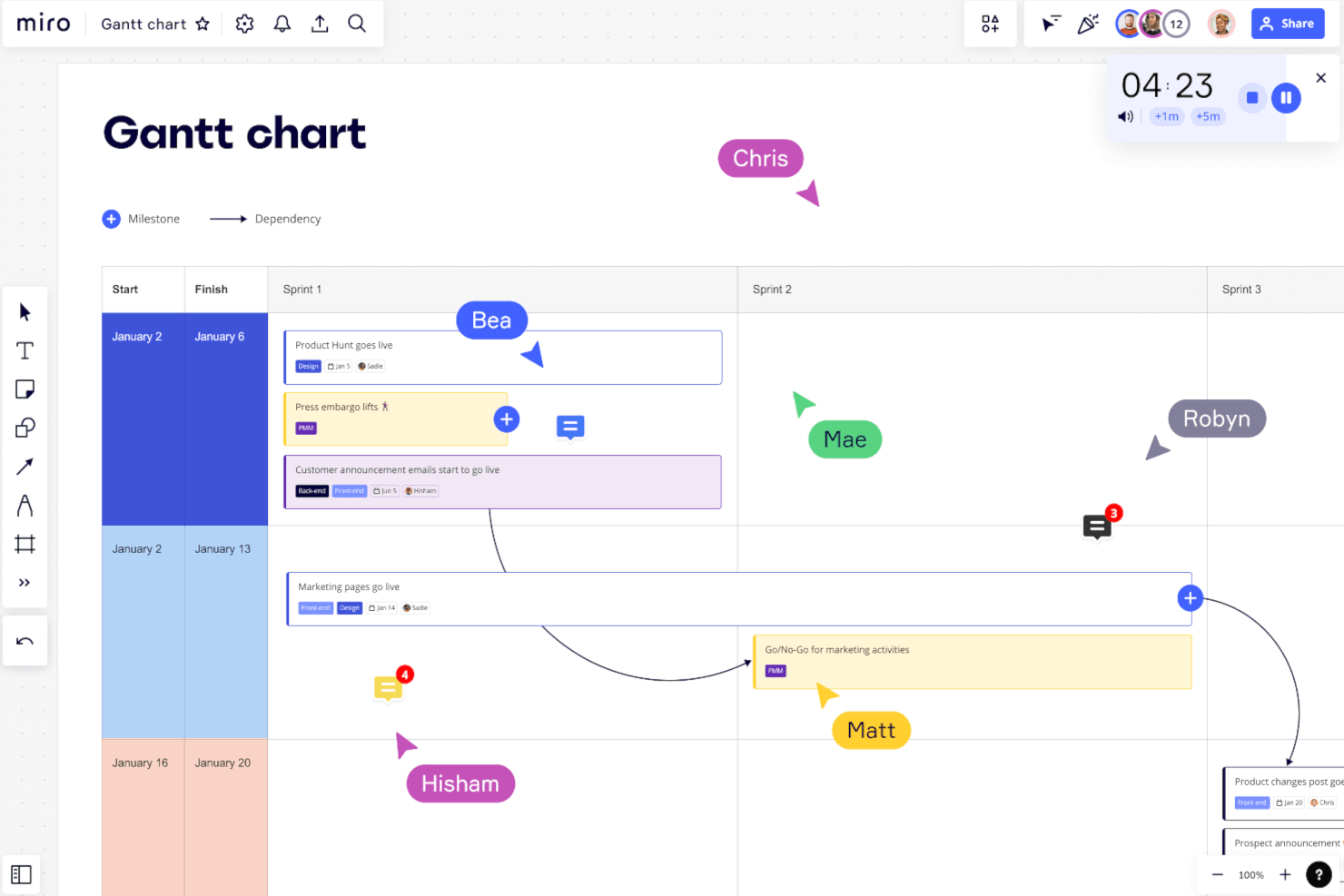
Miro gives project managers, product teams, and creative professionals a flexible online workspace to map out Gantt charts, timelines, and project plans visually, making it easier to coordinate tasks and deadlines across distributed teams.
Who Is Miro Best For?
Miro is a strong fit for cross-functional teams in tech and design who need a visual, collaborative space to plan and present project timelines.
Why I Picked Miro
Miro earns its spot on my shortlist because it turns Gantt charts into genuinely visual, presentation-ready artifacts—not just functional schedules. I love that you can pull from over 30 Gantt chart templates, each fully customizable with color coding, icons, and rich visual styling that makes timelines easy to read at a glance. When I'm presenting a project plan to stakeholders, I can use Miro's Talktrack feature to record a video walkthrough of the board, so the chart does the communicating even when I'm not in the room. The infinite canvas also means I can place the Gantt chart alongside related context—sprint plans, dependency maps, or stakeholder notes—all in one board.
Miro Key Features
- Dependency mapping: Draw visual connections between tasks directly on the board to show how project milestones relate to one another.
- Real-time collaboration: Multiple team members can edit, comment, and react on the same board simultaneously during planning sessions.
- Smart drawing: Freehand shapes are automatically recognized and converted into clean, formatted diagram elements on the canvas.
- Voting and prioritization widgets: Run structured voting sessions on tasks or timeline items directly within the board to align teams on priorities.
Miro Integrations
Integrations include Microsoft Teams, Google Workspace, Jira, Confluence, ServiceNow, GitHub Copilot, OpenAI Codex, Replit, Gemini CLI, and Claude Code.
What's Free?
Miro offers a free-forever plan that includes up to 3 editable boards and unlimited team members. Some advanced features and integrations are only available on paid plans.
Pros and Cons
Pros:
- Real-time collaboration
- Hundreds of available templates
- user-friendly interface
Cons:
- No task management view
- Building charts is more time consuming than other platforms
New Product Updates from Miro

Miro Enhances AI Workflows and Tables for Task Planning
Miro enhances AI workflows and Tables with AI-generated planning boards and web-aware automation. These updates help teams organize tasks faster and analyze external content within workflows. For more information, visit Miro’s official site.

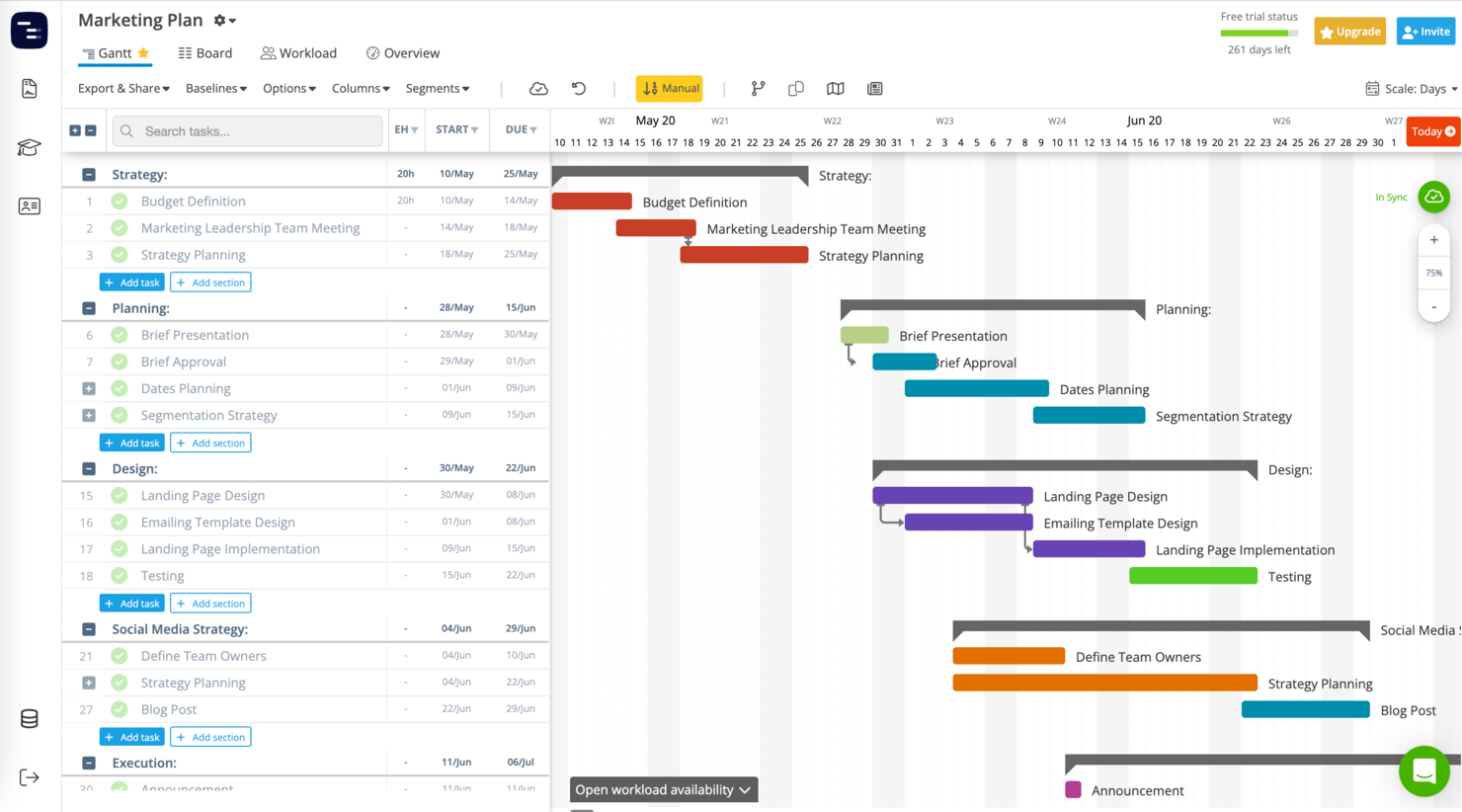
Instagantt is a project management tool designed for teams and professionals who need clear, visual Gantt charts to plan, schedule, and track project timelines without complexity.
Who Is Instagantt Best For?
Instagantt is a good fit for small to mid-sized teams who need a dedicated Gantt chart tool without the overhead of a full project management platform.
Why I Picked Instagantt
Instagantt earns its spot on my shortlist because it's one of the few tools built exclusively around Gantt charts, which means every feature is designed to make timeline planning faster and clearer. I love the drag-and-drop scheduling—you can grab any task bar and shift dates directly on the timeline, and dependent tasks cascade automatically. The AI Assistant is also a genuine time-saver; I've used it to generate a full project schedule from a brief description, which cuts out a lot of the manual setup. The minimap feature gives you a compressed overview of the entire timeline, so you can navigate long projects without losing your place.
Instagantt Key Features
- Workload view: See each team member's assigned tasks and capacity across the timeline to spot over-allocation at a glance.
- Milestones: Mark key project deadlines or deliverables as milestones directly on the Gantt chart.
- Baselines: Save a snapshot of your original project plan and compare it against actual progress as the project evolves.
- Custom columns: Add fields like priority, cost, or status to your task list to capture project data beyond the default settings.
Instagantt Integrations
Integrations include Asana, and CSV/Excel import.
What's Free?
Instagantt offers a free-forever plan for one user and up to three Asana projects. Some advanced features and unlimited projects require a paid plan.
Pros and Cons
Pros:
- Two-way syncing with Asana
- Project groups and portfolio management included
- Simple, straightforward pricing model
Cons:
- May not be well-suited to those not using Asana
- No free-forever plan


FigJam gives project managers and cross-functional teams a flexible online whiteboard for mapping out Gantt charts, timelines, and project plans together in real time.
Who Is FigJam Best For?
FigJam is a great fit for product and design teams that already work in Figma and want a visual space for collaborative planning.
Why I Picked FigJam
FigJam earns its spot on my shortlist because of how much ground its template library covers for project planning. I picked it specifically for the Gantt chart and project timeline templates, which give teams a ready-made visual structure they can jump into and customize without building anything from scratch. I also like that FigJam's AI can generate custom timeline visuals from a simple prompt, so if the existing templates don't fit, you're not stuck. The community library extends this further with 1,000+ templates built by other users, providing a suitable starting point for most projects.
FigJam Key Features
- Real-time multiplayer editing: Multiple team members can edit the same board simultaneously, with live cursors showing who's working where.
- Sticky notes and comments: Add contextual notes and threaded comments directly onto your Gantt chart or timeline to capture decisions and feedback in place.
- Sections and frames: Organize your board into labeled sections to separate project phases, workstreams, or sprint cycles visually.
- FigJam widgets: Embed interactive widgets like voting, polls, and timers directly into your planning board to run structured team sessions.
FigJam Integrations
Integrations include Asana and Jira.
What's Free?
FigJam offers a free-forever Starter plan that includes unlimited drafts, access to UI kits and templates, and up to 500 AI credits per month. Some advanced features and unlimited team files require a paid plan.
Pros and Cons
Pros:
- Supports unlimited collaborators
- Includes a mobile app
- They offer a free plan
Cons:
- Doesn't have an offline version
- Could use more integrations with project management tools


ProjectLibre is an open-source project management tool designed for teams and professionals who need advanced Gantt chart features to plan, track, and manage complex projects without the cost of commercial software.
Who Is ProjectLibre Best For?
ProjectLibre suits project managers and independent professionals who need a capable, desktop-based planning tool without a subscription cost.
Why I Picked ProjectLibre
I picked ProjectLibre as one of the best because it's the only free, open-source tool that opens .mpp files—the native Microsoft Project format. So teams with years of MS Project plans don't have to rebuild them. The interface mirrors MS Project, so the transition doesn't require retraining. Beyond file compatibility, ProjectLibre includes critical path analysis via its network diagram view, which lets you identify scheduling bottlenecks the same way you would in MS Project.
ProjectLibre Key Features
- Work breakdown structure (WBS): Break projects into a hierarchical task structure to organize deliverables and sub-tasks across phases.
- Earned value management: Track project performance by combining cost and schedule data to spot budget or timeline variances early.
- Baseline and performance tracking: Set a project baseline and compare actual progress against your original plan at any point in the project.
- Resource histogram: View resource allocation across tasks in a histogram format to spot over-allocation before it becomes a scheduling problem.
ProjectLibre Integrations
ProjectLibre integrates with Microsoft Project and Excel.
What's Free?
ProjectLibre offers a free-forever desktop version with no user or project limits. All core project management features are included; cloud-based collaboration and advanced support are not included.
Pros and Cons
Pros:
- Easy to shift the whole timeline back and forth if due dates change
- Streamlined, no-fluff interface
- Usable in 27 languages
Cons:
- No client portal
- Desktop version is free, cloud is paid (at this time)
- Cloud version currently in beta

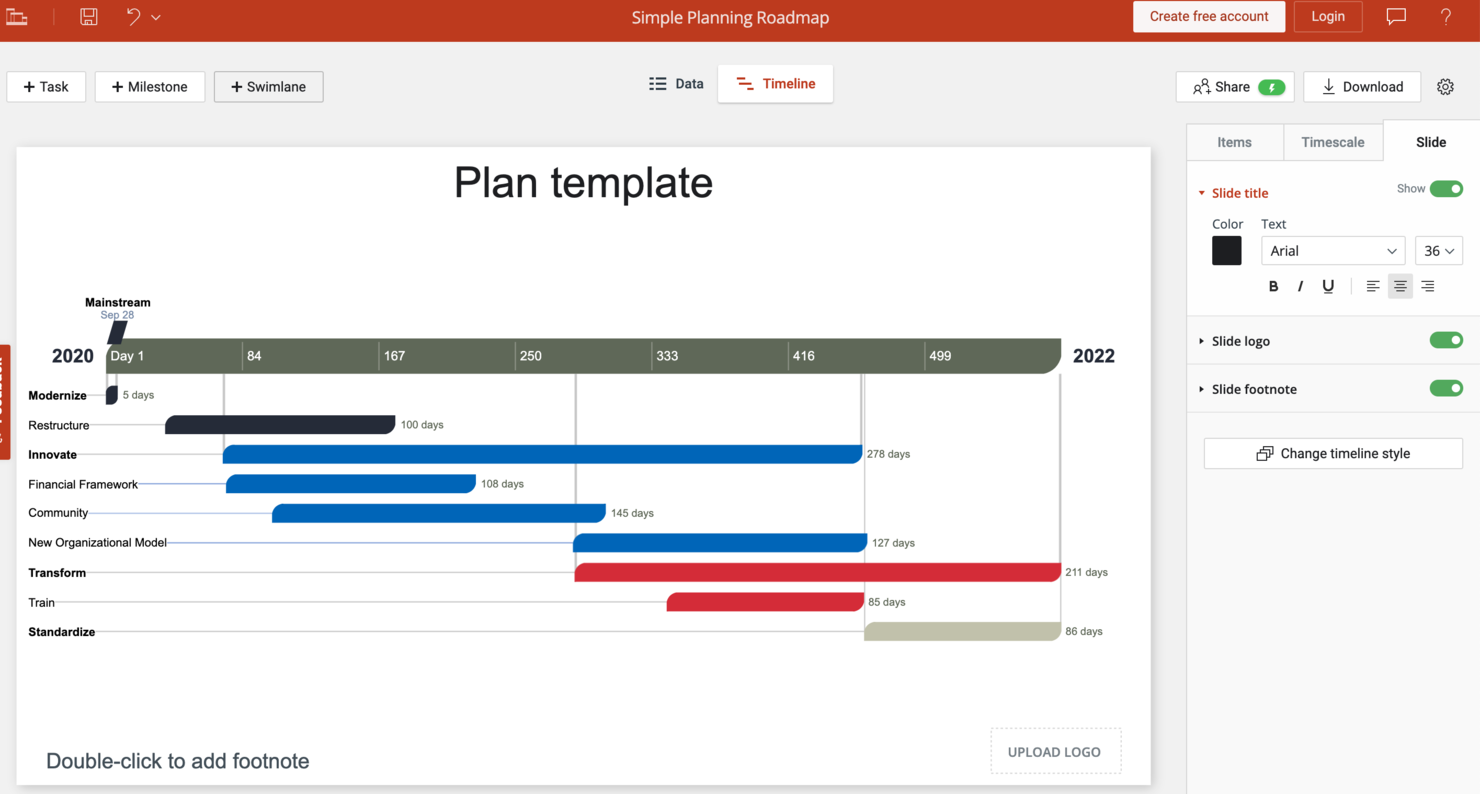
Office Timeline is a Gantt chart software add-in for PowerPoint that helps project managers, consultants, and business professionals create visual project timelines for client presentations and executive reporting.
Who Is Office Timeline Best For?
Office Timeline is a strong fit for consultants, project managers, and business analysts who regularly present project plans and timelines in PowerPoint or Google Slides.
Why I Picked Office Timeline
Office Timeline earns its spot on my shortlist because it's the only Gantt chart tool that lives directly inside PowerPoint as an add-in, which means I'm building and presenting from the same file without any export gymnastics. I particularly like the built-in timeline wizard, which walks you through picking a theme, entering task data, and generating a slide-ready Gantt chart in a few clicks. The drag-and-drop visual editor also lets you reposition tasks and milestones when project dates change, so I'm not rebuilding the whole chart from scratch every time a deadline slips. The free plan supports up to 10 milestones and tasks per slide, which covers a lot of ground for exec-level status updates and client-facing project reviews.
Office Timeline Key Features
- Data import from Excel and Project: Pull task data directly from Microsoft Excel or Microsoft Project files to populate your Gantt chart without manual re-entry.
- Swimlane view: Organize tasks by team, department, or workstream using horizontal swimlanes within your PowerPoint slide.
- Date range and zoom controls: Adjust the visible time range of your chart to focus on specific phases or zoom out for a full project overview.
- Style and color customization: Apply custom colors, fonts, and shapes to tasks and milestones to match your brand or presentation theme.
Office Timeline Integrations
Integrations include PowerPoint, Jira, Microsoft Project, Excel, Smartsheet, Google Docs, and Google Sheets.
What's Free?
Office Timeline offers a free-forever plan that lets you create Gantt charts and timelines directly in PowerPoint. The free plan limits you to 10 milestones and tasks per slide and restricts access to some advanced templates and features.
Pros and Cons
Pros:
- Imports data from PM tools
- Exporting to multiple formats
- Free builder
Cons:
- No monthly plans available
- No free version of PPT plugin

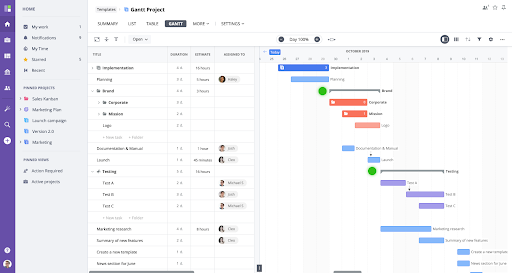
GoodDay is a project management platform designed for teams who need flexible Gantt chart tools to plan, track, and visualize project timelines, making it a solid choice for tech companies, agencies, and startups managing complex workflows.
Who Is GoodDay Best For?
GoodDay is a good fit for small to mid-sized teams in product, engineering, or operations who need a flexible, multi-view project management tool without a steep learning curve.
Why I Picked GoodDay
GoodDay earns its spot on my shortlist because of how much control it gives you over the Gantt chart itself. I like that you can customize displayed columns, apply custom color coding based on any system or custom field, and save those setups as reusable view presets—so my team doesn't have to reconfigure the chart whenever we switch projects. The planning assistant is genuinely useful: it automatically validates dates and dependencies, flags conflicts, and suggests fixes before they become real scheduling problems. The project baseline and snapshot feature lets me compare the current plan to its original state, which makes progress reporting to stakeholders more concrete.
GoodDay Key Features
- Custom statuses and workflows: Create your own task statuses and configure workflows to match how your team actually moves work through a project.
- Workload view: See all task assignments alongside start and end dates on a timeline to spot over-allocation across team members.
- Project milestones and deadlines: Set and track key project dates, deliverables, and deadlines as distinct events within your project plan.
- Time tracking and estimates: Log time directly on tasks using a built-in timer, and use the auto-estimates feature to generate time projections without manual input.
GoodDay Integrations
Integrations include G Suite, Gmail, Slack, Google Docs, Google Drive, Google Calendar, Dropbox, Box.com, Github, and Gitlab.
What's Free?
GoodDay offers a free-forever plan for up to 15 users. The free plan includes unlimited projects and tasks, but some advanced features and integrations are only available on paid plans.
Pros and Cons
Pros:
- Support included in free plan
- Over 100 templates to choose from
- Freemium plan allows for unlimited projects and tasks
Cons:
- Public sharing locked to paid plans
- Limited customization with free plan

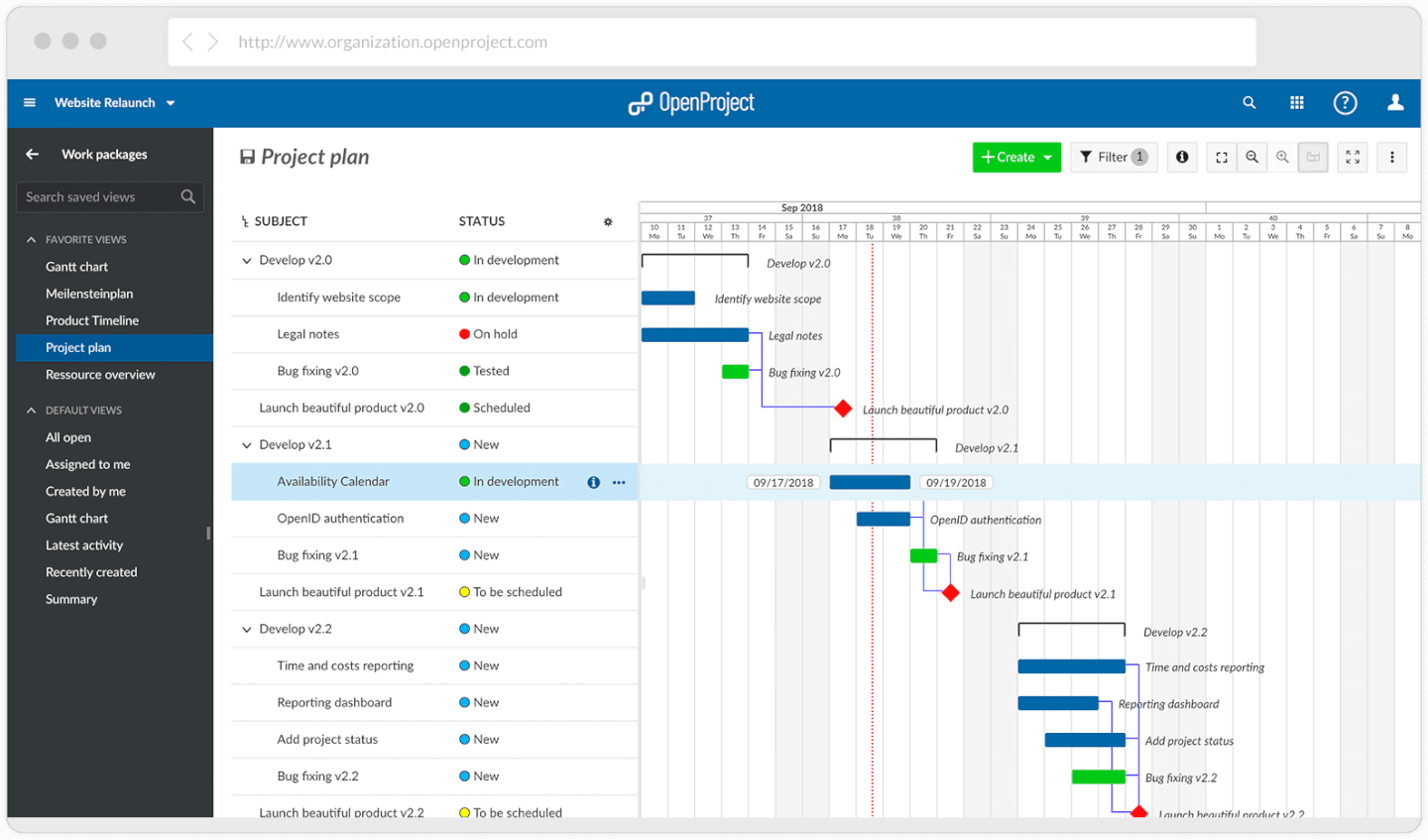
OpenProject is an open-source project management platform that gives teams in IT, engineering, and research powerful Gantt chart tools for planning, tracking, and collaborating on complex projects.
Who Is OpenProject Best For?
OpenProject is a great fit for technical teams and open-source advocates who need a self-hosted project management solution with no vendor lock-in.
Why I Picked OpenProject
I picked OpenProject as one of the best because it's among the few free Gantt chart tools that runs natively on Linux. The Community Edition installs on major Linux distributions—Ubuntu, Debian, CentOS, and SUSE—via DEB/RPM packages, Docker, or Kubernetes, so it fits teams that already manage their own infrastructure. I also like that the Gantt chart module supports both automatic and manual scheduling modes, allowing my team to switch between letting OpenProject calculate dates based on dependencies or locking them in manually when the plan is fixed. The baseline comparison feature lets me display changes to work packages over time, which is useful when I need to show stakeholders how the schedule has shifted since the original plan.
OpenProject Key Features
- Work package types: Define and assign different work package types—phases, milestones, tasks, bugs—directly within the Gantt chart to keep your project structure organized.
- Multi-project timelines: View and manage work packages across multiple projects and subprojects in a single Gantt chart, with grouping and filtering options to control what's displayed.
- Date alerts: Set notifications that trigger when a work package's start or finish date is approaching, so nothing slips through the cracks.
- Time tracking: Log hours directly against work packages and generate custom time reports broken down by project or task.
OpenProject Integrations
Integrations include Nextcloud, OneDrive, SharePoint, GitHub, GitLab, Excel, Slack, Thunderbird, Timesheet, and Toggl.
What's Free?
OpenProject offers a free-forever Community Edition that you can self-host with unlimited users. This version includes core project management features but does not support premium features like advanced integrations or professional support.
Pros and Cons
Pros:
- Highly configurable for the needs of different departments
- No limit on the number of projects or team members
- Great level of organization with sub-projects and sub-tasks
Cons:
- No resource availability percentage
- Technical knowledge is required to install
- No mobile app available at this time


Plaky is a project management platform for teams that need a free, visual way to organize tasks, track timelines with Gantt charts, and collaborate on projects of any size.
Who Is Plaky Best For?
Plaky is a strong fit for small to mid-sized teams that need a free project management tool with no limits on users or projects.
Why I Picked Plaky
Plaky earns its spot on my shortlist because it removes the usual free-plan restrictions that force growing teams to upgrade before they're ready. I like that you can add unlimited users, create unlimited projects, and still access Gantt chart views without hitting a paywall. That means my team can onboard a new contractor or spin up a new project board without worrying about seat limits or feature gates. The item card system also lets us attach files, leave comments, and set dependencies directly on tasks, keeping collaboration tied to the actual work.
Plaky Key Features
- Multiple project views: Switch between board, table, and Gantt views to visualize work in the format that suits your team.
- Custom fields: Add fields like dropdowns, numbers, dates, and checkboxes to item cards to capture the exact data your project needs.
- Project templates: Start new projects faster using pre-built templates for common workflows like sprint planning and product launches.
- Notification center: Get real-time alerts on task updates, mentions, and status changes to stay on top of project activity.
Plaky Integrations
Integrations include Clockify and Pumble.
What's Free?
Plaky offers a free-forever plan with unlimited users and unlimited projects. Some advanced features and integrations are only available on paid plans.
Pros and Cons
Pros:
- Colorful and intuitive interface
- Free plan available
- Ready-made templates
Cons:
- Limits to storage capacity for files
- Limited integrations


Agantty gives project managers and teams a free, visual way to organize projects and tasks using Gantt charts, making it easy to manage timelines, assign responsibilities, and track progress without the complexity or cost of many other tools.
Who Is Agantty Best For?
Agantty is a good fit for small and medium-sized teams that need a straightforward, no-cost Gantt chart tool to manage multiple projects without a steep learning curve.
Why I Picked Agantty
I've included Agantty in my top picks because it's one of the few free Gantt chart tools that removes the ceiling on team size and project volume. There's no cap on the number of projects, tasks, or team members you can add—which matters when you're managing multiple workstreams across a growing team. I also like the rights management system, which lets you set both global and project-level permissions so each team member only sees and edits what they should. The multiselect feature lets you grab a group of tasks and shift them all at once on the timeline, saving time when plans change mid-sprint.
Agantty Key Features
- Task grouping: Organize tasks into groups within the Gantt chart to keep related work together and easier to find.
- Dashboard to-do view: Review all your personal and team tasks in a single dashboard, with filters to sort by assignee or timeframe.
- PDF export: Export task lists for selected timeframes and team members as a PDF for sharing or reporting outside the tool.
- Drag-and-drop scheduling: Move tasks, team members, and projects directly on the Gantt chart timeline without opening edit menus.
Agantty Integrations
No native integrations are listed.
What's Free?
Agantty offers a free-forever plan with unlimited projects, tasks, and team members. There are no restrictions on core features, but integrations and advanced support options are not included.
Pros and Cons
Pros:
- Easy to share and distribute charts
- Easy to view the chart by team member, calendar date, etc.
- Super clear delineated responsibilities and milestone dates
Cons:
- No autosave for the Notes feature
- Better for long-term goals, not daily/weekly tasks
- Lacks a native mobile app


dotProject is an open-source project management tool for teams and organizations that need a free way to create, manage, and visualize project timelines with Gantt charts.
Who Is dotProject Best For?
dotProject is a good fit for small teams and technically inclined project managers who are comfortable self-hosting software and troubleshooting with community support.
Why I Picked dotProject
dotProject earns its spot on my shortlist because it's one of the few genuinely free, open-source project management tools that includes a built-in Gantt chart module—no subscription, no freemium limits. I picked it for teams comfortable with a DIY setup, since there's no company behind it: support comes entirely from GitHub issues and community volunteers. The task dependency system lets you map out sequential and parallel task relationships that feed directly into the Gantt view—so when you plan a multi-phase project, those dependencies show up visually. The forum module is also a nice touch for teams that want project-specific discussion threads without pulling in a separate tool.
dotProject Key Features
- Multi-project management: Track multiple projects simultaneously from a single dashboard, with per-project task lists, milestones, and assigned team members.
- Time logging: Log actual hours spent on individual tasks directly within the tool, giving you a record of effort against planned estimates.
- Role-based access control: Assign user roles and permissions at the project level to control who can view, edit, or manage specific projects and tasks.
- Resource workload reporting: View planned workload across team members to identify over- or under-allocation before it becomes a scheduling problem.
dotProject Integrations
No native integrations are listed.
What's Free?
dotProject is completely free and open-source with no user limits or feature restrictions. You can download, install, and use the full software without any time limits or paid upgrades.
Pros and Cons
Pros:
- Many add-on modules for additional functionality
- Easy movement of a task from one project to another
- Granular task management and details available
Cons:
- No default export or print functionality for Gantt charts
- No rich-text (bold, italics, etc.)


Tom’s Planner is a web-based Gantt chart tool designed for solo professionals and small teams who want a simple way to plan, visualize, and share project timelines without the complexity of traditional project management software.
Who Is Tom's Planner Best For?
Tom's Planner suits freelancers and independent professionals who need a lightweight, no-fuss tool for building and sharing project schedules.
Why I Picked Tom's Planner
I picked Tom's Planner as one of the best because it's purpose-built for Gantt chart creation—nothing more, nothing less. That focus makes it a natural fit for individuals and freelancers who don't need a full project management suite. I like the AI Assist, which generates a structured Gantt chart from a short project description, including phases, activities, and auto-scheduled timelines. For a solo professional spinning up a new client project, that speeds the process from blank page to a shareable plan. The drag-and-drop time blocks also make adjusting tasks on the fly straightforward without rebuilding your whole chart.
Tom's Planner Key Features
- Task dependencies: Link tasks together so that when one shifts, dependent items update automatically to reflect the change.
- Progress tracking: Monitor task status using percentages, traffic light indicators, icons, or color-coded time blocks.
- Zoom-level controls: Switch your chart view from yearly down to 5-minute intervals with a single click to inspect any level of detail.
- 200+ Gantt chart templates: Choose from a library of pre-built templates across industries like construction, IT, and event planning to skip the blank-page setup.
Tom's Planner Integrations
No native integrations are listed.
What's Free?
Tom’s Planner offers a free plan.
Pros and Cons
Pros:
- Track status with percentages, traffic lights, icons, or colored time blocks
- Has chart templates for construction, web design, business, and events
- Very quick and simple to build a basic chart
Cons:
- Only 1 user can edit a document at a time
- Lack of 3rd-party integrations available

Visor is a Gantt chart maker that helps users create free Gantt charts that connect to your other SaaS apps like Jira. With Visor, users can visualize their project timelines, plan resources, track progress, and manage dependencies.
Why I picked Visor: This platform offers a user-friendly interface and two-way sync to SaaS apps like Jira, HubSpot, and Salesforce. This means that your Gantt charts stay accurate without manual work. You can make views for each of your team members without having to set up individual accounts for everyone. You can also drag and drop tasks to adjust timelines quickly.
The real-time collaboration and resource management features help keep teams on the same page. Additionally, Visor offers automatic rescheduling of tasks when changes are made, which is a huge time-saver. Visor is specifically designed to integrate with Jira, which is a plus for users who are already using this platform.
Visor Standout Features and Integrations
Standout features like two-way integrations allow you to synchronize Gantt charts with tools such as Jira, Asana, and Salesforce, ensuring real-time updates and seamless collaboration. Another valuable feature is unlimited view-only licenses, enabling you to share Gantt charts with stakeholders without incurring additional costs and promoting transparency and accessibility.
Integrations include Jira, HubSpot, Salesforce, Google Sheets, and Excel.
Pros and Cons
Pros:
- Additional views (timeline and table)
- Access to help center, community, and email support with free plan
- Unlimited view-only accounts with free plan
Cons:
- Live support locked to paid plans
- Audit trails locked to paid plans

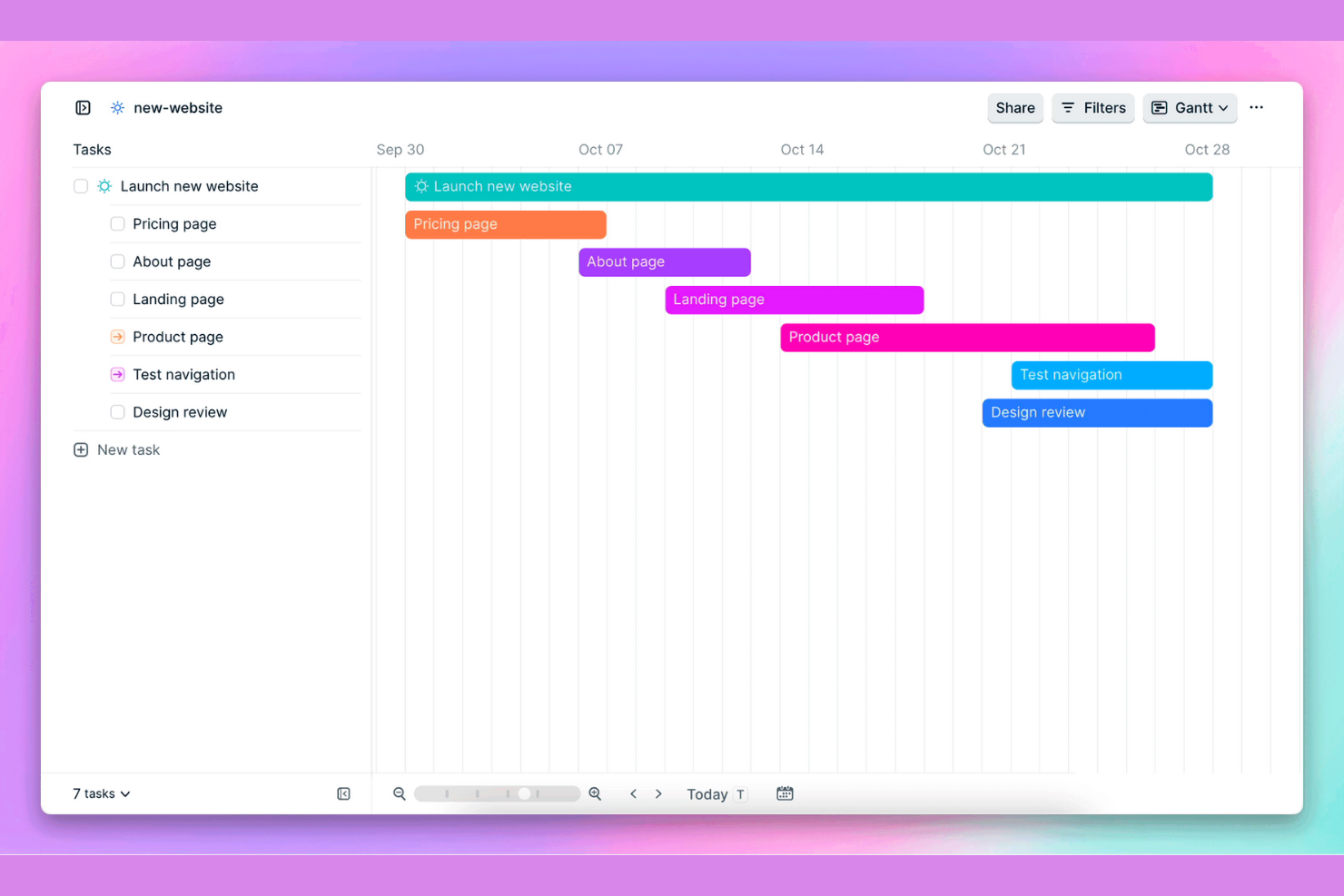
Height is a project management tool that simplifies project planning and scheduling with its user-friendly interface and cross-functional design and features. It allows teams to collaborate efficiently, visualize timelines, and track progress effortlessly, making it an ideal tool for project management.
Why I picked Height: Height stands out as an excellent free Gantt chart software due to its exceptional cross-functional support, fostering seamless collaboration across diverse teams. With its intuitive interface and cloud-based accessibility, it enables real-time updates and communication between team members, regardless of their locations or roles. This inclusive approach ensures that everyone involved in a project, from managers and designers to developers and marketers, can easily contribute, view progress, and adjust tasks, fostering a cohesive and synchronized effort towards successful project completion.
Height Standout Features and Integrations
Features include the ability to create dependencies between tasks, custom task fields, task templates, and the ability to set project milestones. Additionally, the drag-and-drop functionality is incredibly user-friendly, helping you create a workload from scratch in a short amount of time.
Integrations include Figma, Notion, Sentry, Zendesk, Slack, Discord, Fivetran, GitHub and GitLab. It also offers a REST API, enabling custom integrations with other tools.
What's Free: unlimited users and tasks,
Pros and Cons
Pros:
- User-friendly interface
- Cross-functional collaboration features
- Smart rescheduling
Cons:
- Security log + attribute activity logs locked to Enterprise plan
- Limited task features on free plan

GanttPRO is an online project management tool that utilizes Gantt charts to help users plan, manage, and visualize their projects. It supports various industries and provides templates for different project types.
Why I picked GanttPRO: This platform offers a user-friendly interface, which simplifies the creation and management of Gantt charts. Unlike other tools that can be complex, GanttPRO offers drag-and-drop functionality, making it easy to organize tasks, set dependencies, and adjust timelines. Furthermore, the software's auto-scheduling feature automatically recalculates task relations and dependencies without teams needing to worry about updating deadlines and workflows manually.
Additionally, GanttPRO offers robust collaboration features that enhance team productivity and communication. Users can share project plans, assign tasks, attach files, and leave comments directly on tasks, ensuring everyone is on the same page. Real-time updates and notifications also keep the team informed of any changes.
GanttPRO Standout Features and Integrations
Features include workload management, board views, task relations, time management and logs, progress tracking, resource management, client updates, and free templates.
Integrations include Slack, Google Drive, Jira Cloud, OneDrive, Microsoft Project, Microsoft Teams, and Excel. It also offers an open API to connect to existing business tools.
GanttPRO Plans & Pricing
A free trial is available with paid plans starting from $7.99/user/month.
Pros and Cons
Pros:
- Free customizable templates
- Collaborative tools for team alignment
- User-friendly, drag-and-drop interface
Cons:
- No free forever plan, just a free trial
- Limitations to more advanced reporting


Productive is a complete work management system for agencies. It combines project, resource, document, and budget management for enhanced efficiency.
Why I picked Productive: If you're looking for a single platform to manage various aspects of your work processes, this might be a good fit. Designed specifically for the needs of agencies, this software is robust yet flexible. You can keep track of your projects, budgets, resource utilization, and more in the same system.
Gantt charts, boards, lists, tables, calendars, and other views can all be used to visualize your project data. Employees can also track their time (billable and non-billable), and you can use time tracking data to inform your resource planning in the future.
Productive Standout Features & Integrations
Features include multiple views (list, calendar, board, timeline, and table), resource planning, project budgeting, document management, time tracking, billing, and reporting tools.
Integrations include Dropbox, Exact, Google Workplace, Jira, Harvest Economic, Outlook, Microsoft Calendar, Slack, QuickBooks, and Xero. A Zapier integration is also available, which can unlock more integrations with a paid account.
Productive Plans & Pricing
A 14-day free trial lets you take the software for a test drive before purchasing. Paid plans start from $11 per user, per month.
Pros and Cons
Pros:
- Client guest accounts are free
- All-in-one solution for work management
- Allocate resources based on skills and availability
Cons:
- Some integrations are limited on lower-tier plans
- No free-forever plan available

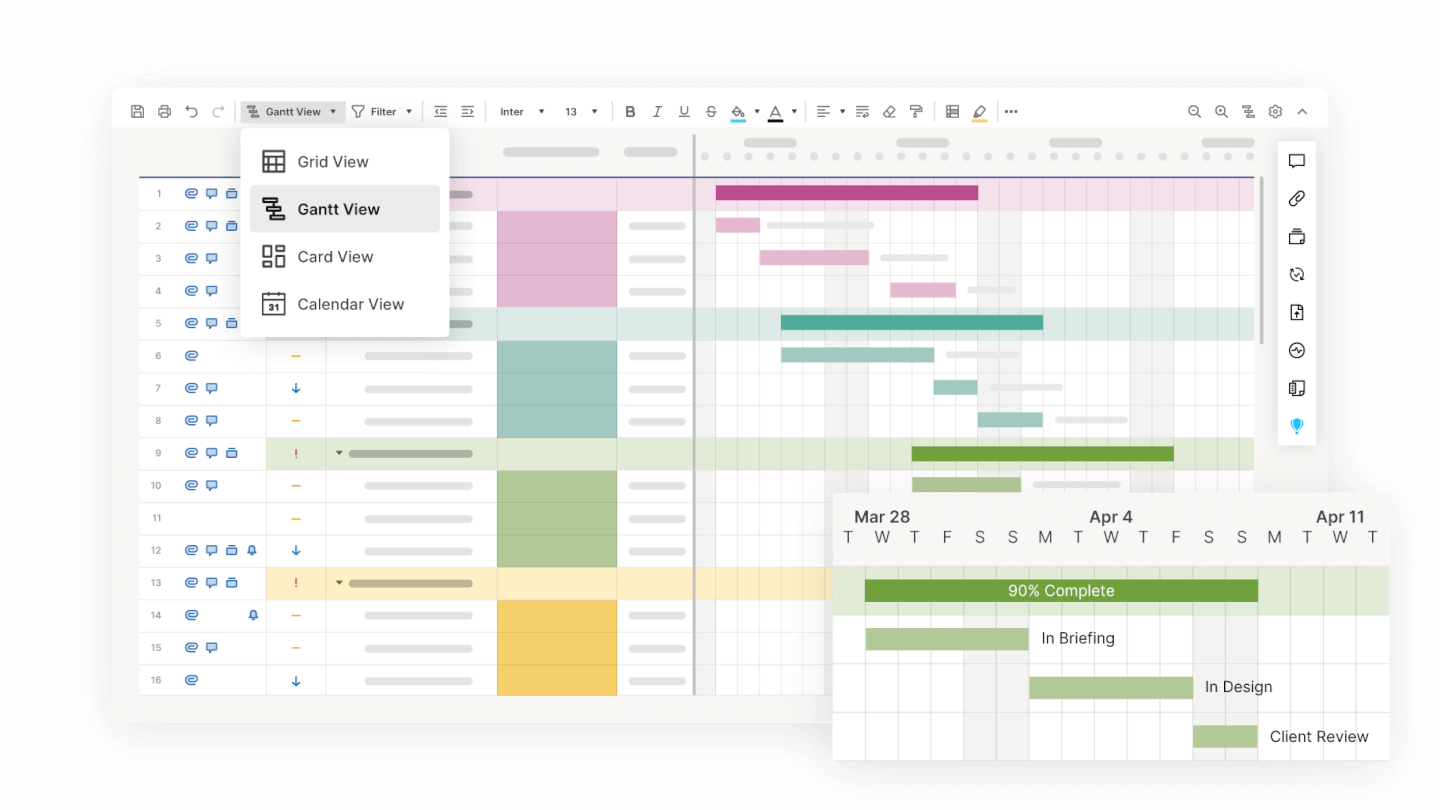
Smartsheet offers a robust work management platform with a freemium version that includes its Gantt chart feature among other project management tools.
Why I picked Smartsheet: Gantt charts are one among the many views included in this project management software. You can also organize your work with grid, card, or calendar views. The simple drag-and-drop interface makes building your Gantt chart straightforward and simple. Also included in the free plan are automation tools, attachment storage, and reporting dashboards.
Smartsheet Standout Features and Integrations
Features include multiple project views, attachment storage, no-code automated workflows, content collaboration, chat, digital asset management, resource management, portfolio management, secure request management, and reporting dashboards.
Integrations include Google Workspace, Microsoft Office 365, Box, DocuSign, Slack, Microsoft Teams, Skype for Business, Gmail, Outlook, and many other apps. Some integrations require Business or Enterprise plans.
Smartsheet Plans & Pricing
Free-forever plan for one user and 2 editors. Paid plans starting from $7 per user, per month, with a 30-day free trial.
Pros and Cons
Pros:
- Automations included in free plan
- Community support and help center
- Reporting dashboards included in free plan
Cons:
- Limited storage and automations in free plan
- Free plan limited to 1 user, 2 editors
Other Free Gantt Chart Software
Need more options for Gantt tools? Here’s a few more fuller-featured, paid Gantt software options:
- Celoxis
For dynamic project planning
- Lucidspark
For visual collaboration
- Bonsai Agency Software
For agencies
- RationalPlan
For fast onboarding
- Workzone
For interactive Gantt charts
- Paymo
For its clear progress bars in the Gantt view
- TeamGantt
For planned VS actual reporting
- GanttProject
For robust export options


Related Project Management Software Reviews
If you still haven't found what you're looking for here, check out these other related tools that we've tested and evaluated:
- Project Management Software
- Resource Management Software
- Gantt Chart Maker
- Productivity Tools
- Project Tracking Software
- Project Scheduling Software
- Office Timeline Alternatives
Selection Criteria for the Best Free Gantt Chart Software
When selecting the best free Gantt chart software, it's essential to focus on software functionality and specific use cases that align with software buyers' needs. Through extensive personal research and hands-on testing, I've developed a set of criteria to evaluate these tools comprehensively. Here, I have outlined my criteria in detail, including weightings to reflect their importance to my overall selection process.
Core Gantt Chart Software Functionality (25% of total weighting score): To be considered for inclusion on my list of the best software for Gantt charts, the solution had to support the ability to fulfill common use cases:
- Task scheduling and management to ensure projects stay on track.
- Resource allocation to avoid over or underutilization of team members.
- Dependency tracking to visualize how tasks are interconnected.
- Progress tracking to monitor milestones and project evolution.
- Collaboration tools for team members to communicate and update task statuses.
Additional Standout Features (25% of total weighting score): Beyond basic functionalities, standout features can significantly enhance an online Gantt chart creator's value, offering innovative ways to visualize projects, manage risks, or integrate with other software. This criterion looks for unique and advanced features that set a tool apart from its competitors, providing users with additional capabilities that can improve project outcomes. These might include:
- Innovative visualization tools, like interactive timelines or 3D Gantt charts, enhance understanding and engagement.
- Integrated risk management features to identify and mitigate potential project delays or budget overruns.
- Scalability options, such as the ability to manage multiple projects simultaneously or features that cater to both small teams and large enterprises.
- Advanced reporting capabilities that provide insightful analytics and customizable reports.
- Integration with other tools and platforms facilitates a seamless workflow across different software ecosystems.
Usability (10% of total weighting score): Usability is key to ensuring that project teams can quickly adopt and effectively use chart software. This criterion assesses how well the free charting software balances powerful features with a user-friendly interface, particularly emphasizing:
- Intuitive design that balances complexity with ease of use, making it accessible to both novice and experienced project managers.
- Responsive design that ensures functionality across various devices and screen sizes.
- Efficient navigation that allows users to find and utilize features quickly.
- Visual clarity in the presentation of data and information enhances decision-making processes.
Onboarding (10% of total weighting score): Effective onboarding is crucial for users to quickly become proficient with the new project Gantt tools. This criterion evaluates the availability and quality of resources that help users understand and leverage the software's full capabilities from the start, such as:
- Comprehensive training materials, such as video tutorials and step-by-step guides, that facilitate a smooth learning curve.
- Ready-to-use templates that help users quickly start new projects.
- Interactive product tours and onboarding checklists that guide users through the online Gantt chart software’s features.
- Access to customer support channels, including live chat and community forums, for immediate assistance.
Customer Support (10% of total weighting score): Strong customer support enhances the user experience by providing timely and helpful assistance when issues arise. This criterion examines the support system's responsiveness, availability, and effectiveness, ensuring users have access to the help they need when they need it. Consequently, I look for:
- A variety of support channels, including email, phone, and live chat, ensure users can reach out in the way that suits them best.
- A responsive support team that provides timely and helpful solutions to issues.
- An extensive knowledge base or FAQ section for self-service troubleshooting.
- Regular updates and clear communication from the developer about new features and fixes.
Value For Money (10% of total weighting score): Value for money considers whether the free version of a Gantt chart tool online offers a comprehensive set of features that meet basic project management needs without immediately necessitating a paid upgrade. This criterion looks at how well the project planning chart tool serves users' needs while offering clear pathways to more advanced features as projects or teams grow. This can involve:
- A transparent pricing model that clearly outlines what is included in the free version versus paid upgrades.
- The presence of essential features in the free version meets the basic Gantt chart needs of project management without forcing immediate upgrades.
- The ability for the free version to scale with project or team growth, offering a seamless transition to more advanced features when necessary.
Customer Reviews (10% of total weighting score): Customer reviews offer invaluable insights into a project schedule chart tool's performance, usability, and impact on project management processes. This criterion evaluates overall user satisfaction, looking for:
- Consistently high ratings across multiple review platforms indicate widespread user satisfaction.
- Positive feedback on ease of use and intuitive design, suggesting that the Gantt board tool meets the needs of its target audience.
- Constructive criticism and how frequently the development team responds to and addresses user feedback, demonstrating a commitment to continuous improvement.
- Testimonials highlighting specific use cases where the tool has significantly impacted project management efficiency and outcomes.
By applying these criteria, I aim to identify and recommend free project planning Gantt chart software that not only meets the fundamental requirements of project management but also offers additional value through innovative features, usable interfaces, and scalable solutions.
How To Choose Free Gantt Chart Software
With so many different free Gantt chart software solutions available, it can be challenging to make decisions on what free Gantt chart software is going to be the best fit for your needs.
As you're shortlisting, trialing, and selecting free Gantt chart software, consider the following:
- What problem are you trying to solve - Start by identifying the Gantt chart software feature gap you're trying to fill to clarify the features and functionality the free Gantt chart software needs to provide.
- Who will need to use it - To evaluate cost and requirements, consider who'll be using the software and how many licenses you'll need. You'll need to evaluate if it'll just be the project management professionals, or the whole organization that will require access. When that's clear, it's worth considering if you're prioritizing ease of use for all, or speed for your free Gantt chart software power users.
- What other tools does it need to work with - Clarify what tools you're replacing, what tools are staying, and the tools you'll need to integrate with, such as accounting, CRM or HR software. You'll need to decide if the tools will need to integrate together, or alternatively, if you can replace multiple tools with one consolidated free Gantt chart tool.
- What outcomes are important - Consider the result that the software needs to deliver to be considered a success. Consider what capability you want to gain, or what you want to improve, and how you will be measuring success. For example, an outcome could be the ability to get greater visibility into performance. You could compare free Gantt chart software features until you’re blue in the face, but if you aren’t thinking about the outcomes you want to drive, you could be wasting a lot of valuable time.
- How it would work within your organization - Consider the software selection alongside your workflows and delivery methodology. Evaluate what's working well and the areas that are causing issues that need to be addressed. Remember, every business is different — don’t assume that because a tool is popular that it'll work in your organization. Additionally, look for software that offers a great feature set in their free version that can scale in functionality as your needs grow.
Trends In Free Gantt Chart Software
Gantt chart software will continue to evolve rapidly, reflecting both the changing needs of project management professionals and the technological advancements in the field. As teams seek more efficient ways to plan, track, and manage their projects, developers of planner Gantt chart tools have responded by introducing innovative features and improvements to add new functionalities and refine existing ones. Here, I have identified several trends that I believe highlight significant developments in online Gantt chart free software and underscore shifts in user preferences and emerging challenges in project management.
- Advanced Visualization Features: There's a clear trend towards more sophisticated visualization tools within Gantt chart software. This includes dynamic timelines, customizable views, and interactive elements that allow users to drill down into tasks for more detailed information. Such features cater to the need for deeper insights and more flexible project tracking.
- AI and Automation: The incorporation of artificial intelligence and automation features is rapidly evolving. AI-driven analytics for project forecasting, automated task scheduling based on dependencies and resource availability, and intelligent notifications are examples of how website Gantt chart software is becoming more proactive and predictive. This trend addresses the challenge of managing complex projects with numerous variables.
- Predictive Project Management: Another trend is the development of predictive project management features within project timeline Gantt chart tools, leveraging big data and machine learning to forecast project outcomes, identify risks early, and suggest optimal paths for project execution. This trend caters to the need for advanced decision-support tools that can anticipate challenges and guide project planning and adjustments.
- Increased Focus on Mental Health and Wellbeing: Recognizing the importance of mental health, some free Gantt chart software now includes features designed to promote wellbeing among team members. This includes workload balancing to prevent burnout, features that encourage regular breaks and downtime, and analytics that help managers monitor team stress levels. These features underscore a holistic approach to project management that values the health and wellbeing of the workforce as key to project success.
- Decentralized Project Management: Reflecting the broader trend towards decentralization, there's a move towards supporting decentralized project management practices within project schedule online tools. This includes features that empower team members with more autonomy over their tasks, decentralized decision-making tools, and support for agile and hybrid project management methodologies. This trend is driven by the recognition that flexible and adaptive project management approaches can lead to more innovative and responsive project outcomes.
As free Gantt chart software continues to develop, it's clear that the focus is on delivering comprehensive solutions that not only facilitate traditional project management tasks, but also address the broader context within which projects operate, including the well-being of teams, the agility of processes, and the sustainability of outcomes.
What Is Free Gantt Chart Software?
Free Gantt chart software is a project planning tool that lets you create timelines, track dependencies, and manage tasks at no cost. It helps in visually organizing project components, understanding task dependencies, and keeping track of deadlines.
These tools are used by project managers, freelancers, and small teams to visualize work and stay on schedule. They solve challenges like unclear task progress, missed deadlines, and poor visibility across teams—especially when budgets are tight.
Features of Free Gantt Chart Software
Gantt chart software has become an indispensable tool for project managers and teams aiming to enhance their project planning and execution capabilities. By visually representing project schedules, tasks, and dependencies, Gantt charts facilitate a clear understanding of project timelines and resource allocations. When selecting free Gantt chart software, it's essential to understand the features that significantly contribute to the software's effectiveness in managing projects. Here, I highlight such features.
- Drag-and-Drop Functionality: This feature allows users to easily adjust task durations and dependencies directly on the chart. It simplifies the process of updating project schedules, making it quick and intuitive to modify tasks as project requirements change.
- Task Dependencies and Milestones: The ability to define and visualize how tasks are interlinked and identify key milestones is crucial. It ensures that project managers can effectively plan the order of operations and highlight critical checkpoints in the project lifecycle.
- Resource Management: Effective resource allocation and management are facilitated by features that allow for the assignment of tasks to team members and the tracking of their workload. This helps prevent overallocation and ensures that tasks are assigned to available resources.
- Real-Time Collaboration: Enables team members to update tasks, leave comments, and share files in real-time. This fosters a collaborative environment where information is readily updated and accessible to all stakeholders, keeping everyone on the same page.
- Customizable Views: The ability to switch between different views (e.g., Gantt chart, calendar, list) allows teams to analyze project information in the format that best suits their needs. Customizable views ensure that various aspects of the project are easily understandable and accessible.
- Progress Tracking: Features that allow for the tracking of task progress against deadlines are essential. They help teams to stay on schedule, identify any delays early, and adjust plans accordingly to meet project deadlines.
- Automated Notifications: Automated alerts about upcoming deadlines or changes in task status keep team members informed and help ensure that critical tasks do not fall through the cracks.
- Integration Capabilities: The ability to integrate with other tools (e.g., document storage, communication platforms) streamlines workflows and ensures that the Gantt chart software fits seamlessly into the team's existing work environment.
- Reporting Tools: With built-in reporting tools, teams can generate insights into project performance, including task completion rates and resource utilization. This aids in decision-making and project adjustments.
- Mobile Accessibility: Access to the Gantt chart software through mobile devices ensures that team members can view and update project information on the go, enhancing flexibility and responsiveness.
- Export and Import Capabilities: Efficient Gantt chart software should support export and import functionalities, allowing users to easily share project data across different platforms and formats (e.g., PDF, Excel, CSV). This is important for creating backups, generating reports for stakeholders, or migrating data between tools without losing information.
- Time Tracking and Budget Management: Integrated time tracking and budget management features allow project managers to monitor the actual time spent on tasks and compare it with estimates. This enables teams to keep track of whether the project is staying within financial constraints.
- Baseline Comparisons: The ability to set project baselines and compare them against actual progress is a valuable feature in Gantt chart software. Baseline comparisons help project managers identify variances between the planned schedule and the current state of the project, allowing for more informed decisions when adjustments are needed to stay on track.
While many free plans offer comprehensive features, paid versions of Gantt chart software often include advanced features that further enhance project management capabilities. These can include more sophisticated resource management options, enhanced security features for data protection, unlimited projects and tasks, more extensive integration options with other business systems, and advanced reporting and analytics capabilities are common. These premium features offer deeper insights into project performance and facilitate more complex project management needs, making them a worthwhile investment for larger teams or more intricate projects.
Otherwise, selecting free Gantt chart software with these features can have a significant positive impact on a team's ability to plan, track, and manage projects effectively. The best tool for Gantt charts should not only provide a visual representation of the project timeline, but also enhance communication, collaboration, and decision-making processes within the team.
Benefits of Free Gantt Chart Software
Free Gantt chart software offers a versatile and cost-effective solution for users and organizations looking to enhance their project management capabilities. By providing a visual representation of project timelines, tasks, and dependencies, this type of software streamlines planning, execution, and collaboration processes. Here are five of the primary benefits of incorporating free Gantt chart software into your organizational toolkit:
- Cost Efficiency: Significantly reduces project management costs. By offering essential functionalities without a price tag, free Gantt chart software enables businesses, especially startups and small enterprises, to leverage advanced project planning tools without incurring additional expenses.
- Enhanced Planning and Scheduling: Improves project planning accuracy and efficiency. The visual nature of Gantt project management diagrams simplifies the process of scheduling tasks, setting deadlines, and allocating resources, making it easier to plan projects with precision and avoid overlaps or scheduling conflicts.
- Improved Collaboration: Facilitates better teamwork and communication. With features that support real-time updates and information sharing, team members can stay informed about project developments, contribute effectively, and work collaboratively towards common goals, regardless of their physical location.
- Increased Transparency: Offers greater visibility into project timelines and responsibilities. Stakeholders can easily see the status of tasks, who is responsible for them, and how individual tasks fit into the broader project timeline, fostering a culture of accountability and transparency.
- Risk Management: Helps in identifying and mitigating project risks early. The ability to visualize project timelines and dependencies allows for the early detection of potential delays or resource constraints, enabling proactive adjustments that can reduce project risks and avoid costly setbacks.
Though they do not offer the benefit of being free, paid versions of Gantt chart software often extend beyond the basic features offered by free versions, providing additional benefits that can be crucial for larger organizations or more complex projects. These can include enhanced customization options, advanced analytics and reporting capabilities, more robust collaboration tools, and superior support and security features. These premium benefits usually justify the investment, especially when project complexity or organizational size demands more sophisticated project management solutions.
On the other hand, integrating free Gantt chart software into your project management practices can significantly enhance productivity, communication, and project outcomes—all for free.
Costs & Pricing for Gantt Chart Software
If you're looking for a free software, you definitely know how important pricing is to the selection process. Gantt chart software typically offers a range of plans to accommodate different needs, from individual users managing small projects to large organizations requiring advanced features and integrations. However, Gantt chart software pricing plans tend to fall into general categories, including free plans.
Free plans are a great starting point, especially for individuals or startups. However, it is still a good idea to be aware of the pricing plans—and associated features—that are available to you. This will help ensure that you are choosing the best Gantt chart plan for your needs and budget, even if that means using a paid plan.
Below, you'll find a summary of the typical plan options, including a free version:
Plan Comparison Table for Gantt Chart Software
| Plan Type | Average Price | Common Features |
|---|---|---|
| Free | $0 | Basic Gantt chart capabilities, limited projects, limited users, basic support |
| Basic/Individual | $10 - $15 per user/month | Enhanced Gantt chart features, more projects, single user, email support |
| Team | $20 - $30 per user/month | Advanced Gantt chart features, unlimited projects, multi-user collaboration, priority support |
| Professional | $30 - $50 per user/month | Full feature access, advanced integrations, custom reports, premium support, additional security |
| Enterprise | Custom pricing | Customizable features, unlimited users, personal account manager, enterprise-grade security, SLAs |
When selecting a Gantt chart software plan, it is important to consider the scale of your projects and the level of collaboration required among your team members. These plans are typically designed to scale with your project management requirements, offering varying levels of functionality, user access, and support.
Common stages where your company may want to upgrade its pricing plan include:
- Increased Project Volume: When the number of projects being managed simultaneously exceeds the capacity of the free version, necessitating more advanced features and higher limits.
- Team Expansion: As the team grows, the free tier's user limits may become restrictive, requiring an upgrade to accommodate more team members and collaboration tools.
- Need for Advanced Features: When the company requires advanced features such as custom reporting, integrations with other tools, resource management, and more detailed analytics, which are typically available in paid plans.
- Client Demands: When clients request more detailed project tracking and reporting capabilities that exceed the free version's offerings, prompting an upgrade to meet client expectations and improve service quality.
- Performance and Support: As the company grows, the demand for better performance, reliability, and access to premium customer support increases, often leading to a need for a higher-tier subscription.
Overall, whether you ultimately choose a free or paid plan, it is important to carefully balance the features offered with the price point to ensure that your tool will meet your Gantt chart needs without exceeding your budget.
Free Gantt Chart Software Frequently Asked Questions
Find answers to common questions other people ask about this topic.
Does Google have a free Gantt chart?
Yes. If you consider Google sheets as a way to build project schedules, then it’s a definite yes. However, building your Gantt chart from scratch can be complicated, but as a member of the DPM community you can have access to templates.
How do I create a Gantt chart in Excel for free?
Building a Gantt chart in Excel is relatively easy, especially when you use the available templates. Here’s how:
- Create a new document
- Search for “project management,” “timeline,” or “Gantt chart”
- Select your favorite template and edit cells to match your needs
You might opt for color coding or other methods to distinguish your Gantt chart project timeline. You can include a status bar to help track progress and get real-time updates on where tasks stand. Using Excel rules, you can even set up some baseline automation for your workflow.
Are there any free Gantt chart tools available for Mac?
Yes, there are several free Gantt chart tools available for Mac users. Popular options include ClickUp, TeamGantt (free tier), and ProjectLibre. These tools offer basic project planning features with timeline visualization compatible with macOS.
What are Gantt charts used for?
Gantt charts are a flexible solution for agile project management, but can also be used for other purposes. Here are 4 use cases for Gantt charts:
- Project planning
- Personnel planning
- Resource planning
- Timeline planning
What goes in a Gantt chart?
There are a lot of different factors you might include in your Gantt chart. Remember, they’re meant to be customizable and to fit the needs of your team’s context. Here are 7 elements you might include in your Gantt chart:
- Project start date and end date
- Project tasks list
- Task start dates and due dates
- Task dependencies
- Task status (on track, at risk, or delayed)
- Project milestones
- Critical path (the tasks that take the longest time to complete)
Which free Gantt chart tools offer mobile accessibility features?
You might find yourself scrambling to coordinate tasks across team members, struggling to understand dependencies, missing deadlines, or lacking visibility into project progress and have identified gantt chart software as a possible solution.
Free Gantt chart software is a valuable asset for any team or organization looking to manage projects effectively. With the right tool, you can streamline project planning, track progress visually, and stay on top of deadlines. But finding the right Gantt chart solution can be a challenge, especially with so many free options offering varying features and limitations.
Using my experience with project management software, I tested and compared several of the top free Gantt chart tools available. I decided to include software that is free, has a free version, or offers a free trial. This way, you can have a mixed bag of tools that can help you in different ways.
Mobile accessibility is an essential feature for project managers and teams who need to stay updated on the go. Whether you’re working on a project Gantt chart or any other type of project management diagram, having mobile access ensures you can monitor progress, adjust tasks, and collaborate with your team from anywhere. Here are some free Gantt chart tools that offer mobile accessibility:
- Trello with Gantt Chart Add-Ons – While Trello itself is a task management tool, it offers Gantt chart capabilities through add-ons like BigPicture or Planyway. These tools provide mobile access, allowing you to create and view Gantt charts on the go, but they do have their own pricing plans, even though Trello is free.
- ClickUp – ClickUp’s Gantt chart feature is part of its comprehensive project management suite. It offers a Gantt view for mobile devices, making it easy to track project schedules and task dependencies from your phone or tablet.
- Wrike – Wrike’s Gantt chart scheduling tools are accessible through its mobile app, which provides a responsive and intuitive experience for managing tasks, deadlines, and project timelines on both iOS and Android.
- TeamGantt – TeamGantt offers a dedicated mobile app that allows users to create and edit basic Gantt charts, update tasks, and collaborate with team members, making it a convenient free Gantt chart tool online. That said, TeamGantt’s more advanced features may require a subscription.
- Asana with Instagantt Integration – Asana integrates with Instagantt to offer a project management Gantt chart software solution that is mobile-friendly. This integration allows users to access and update Gantt charts directly from their mobile devices.
Other Project Management Software Reviews
Looking for additional software to help with project planning and task management? Here are some other reviews I’ve written:
What's Next?
If you're in the process of researching free gantt chart software, connect with a SoftwareSelect advisor for free recommendations.
You fill out a form and have a quick chat where they get into the specifics of your needs. Then you'll get a shortlist of software to review. They'll even support you through the entire buying process, including price negotiations.