
21 Best Time Tracking and Billing Software Reviewed in 2026

10 Best Time Tracking and Billing Software Shortlist
Here's my pick of the 10 best software from the 22 tools reviewed.


Managing projects means balancing deadlines, budgets, and team coordination—all while keeping work on track. The right time tracking and billing software can simplify that process and give your team better control.
In my experience, time tracking tools make it easier to see where your team’s hours go and ensure clients are billed accurately, so you can focus more on the work that matters and less on administrative tasks. After testing and reviewing several options, I’ve put together an unbiased list of the best time tracking and billing software available today.
In this article, you’ll find my top picks, each selected for its standout features and ability to solve real-world challenges. Let’s take a closer look at what makes these tools worth considering for your team.
Why You Can Trust Us
Best Time Tracking and Billing Software Summary
This comparison chart summarizes pricing details for my top time tracking and billing software selections to help you find the best one for your budget and business needs.
| Tool | Best For | Trial Info | Price | ||
|---|---|---|---|---|---|
| 1 | Best for structured time tracking | Free plan + free trial available | From $6/user/month (billed annually) | Website | |
| 2 | Best for automatic, AI-powered time tracking | Free 14-day trial + free demo available | From $9/user/month (billed annually) | Website | |
| 3 | Best for QuickBooks integration | Free trial + free demo available | From $20/month + $8/user/month (billed annually) | Website | |
| 4 | Best for freelancers and consultants | 14-day free trial + free plan + free demo available | From $2.49/user/month (billed annually) | Website | |
| 5 | Best for Asana integration | Free plan available | From $8.50/user/month (billed annually) | Website | |
| 6 | Best for real-time cost and time-burn insights | Free 14-day trial + free plan + free demo available | From $5/user/month (billed annually) | Website | |
| 7 | Best for unlimited project tracking | Free 14-day trial + free plan + free demo available | From $4/user/month (billed annually) | Website | |
| 8 | Best for scalable workspace controls | Free 7-day trial + free plan + free demo available | From $5.49/user/month (billed annually) | Website | |
| 9 | Best for matter-based billing and trust accounting | Free 30-day trial | From $38/user/month (billed annually) | Website | |
| 10 | Best for small team collaboration | Free plan + free 30-day trial available | From $9/seat/month (billed annually) | Website |
-

Accelo
Visit WebsiteThis is an aggregated rating for this tool including ratings from Crozdesk users and ratings from other sites.4.4 -
Forecast
Visit WebsiteThis is an aggregated rating for this tool including ratings from Crozdesk users and ratings from other sites.4.6 -
Wrike
Visit WebsiteThis is an aggregated rating for this tool including ratings from Crozdesk users and ratings from other sites.4.2





Best Time Tracking and Billing Software Review
Below are my detailed summaries of the best time tracking and billing software that made it onto my shortlist. My reviews offer a detailed look at the key features, pros and cons, integrations, and ideal use cases of each tool to help you find the best one for you.


actiTIME is a versatile web-based time tracking and management tool, helping you oversee team capacity and project costs. Whether you're managing architectural projects, consulting services, or e-commerce operations, this tool helps you log hours against specific tasks, manage leave requests, and generate detailed billing reports for clients. With actiTIME, your team can focus on delivering quality work while ensuring that billing is precise and hassle-free.
Why I Picked actiTIME
I picked actiTIME because it excels in providing a structured approach to time tracking and billing, important for businesses aiming to optimize their financial management. The software's time tracking feature allows your team to log hours directly against projects, ensuring transparency and accountability. Additionally, its invoicing capabilities automatically generate invoices based on tracked time and predefined rates, reducing manual errors and saving time. These features are particularly beneficial if you're looking to maintain accurate billing records without the need for complex manual calculations.
actiTIME Key Features
In addition to its core strengths, I also found actiTIME offers several other valuable features for your team:
- Project Tracking: Monitor project progress in real-time to adhere to deadlines and budgets.
- Leave Management: Manage employee leave requests and approvals within the platform.
- Custom Workflows: Tailor workflows to match your specific business processes, improving productivity.
- Budget Tracking: Keep track of project budgets to avoid overspending and ensure financial efficiency.
actiTIME Integrations
Integrations include QuickBooks and Zapier. An API is available for custom integrations.
Pros and Cons
Pros:
- Offline mobile time tracking
- Automates billing workflow
- Highly customizable reporting widgets
Cons:
- Limited native integration options
- Lacks advanced project templates
New Product Updates from actiTIME

actiTIME's Enhanced Custom Field Imports and Timesheet Settings
actiTIME enhances project setup and daily tracking with new custom fields import and refined timesheet & calendar settings. These updates help you keep all your task data in sync and view your workday the way you want. For more information, visit actiTIME's official site.
 .
.

Timely is a time tracking and billing software that caters to professionals who need accurate tracking without manual input. It automates time tracking, making it a strong fit for freelancers and teams who want to focus on work rather than logging hours.
Why I picked Timely: Timely's automatic tracking feature captures time spent on various tasks without requiring manual entries, which helps reduce the chance of error. You can review and approve tracked hours before billing. The visual timeline allows you to see how your time is distributed across projects, helping you manage your workload. Timely also offers project budgeting tools, so you can keep track of project costs and stay within budget.
Standout Features and Integrations:
Features include memory tracking, which logs all your work activities and creates a detailed timeline. The project dashboard gives you a quick overview of project progress and time allocation. You can also set notifications to remind you of tasks and deadlines.
Integrations include Slack, Google Calendar, Asana, Trello, Jira, Zapier, Xero, and more.
Pros and Cons
Pros:
- Memory-based timeline feature
- Strong privacy controls
- Automatic time tracking
Cons:
- Limited control over data organization
- Task-planning features not included


QuickBooks Time is a time tracking and billing software designed for businesses that already use QuickBooks for accounting. It helps teams track time, manage payroll, and coordinate scheduling efficiently.
Why I picked QuickBooks Time: It integrates with QuickBooks, making it an excellent choice for businesses already using QuickBooks for their accounting needs. You can transfer time tracking data to QuickBooks for accurate payroll processing. With the scheduling features, you can assign shifts and notify team members to keep everyone on the same page. GPS tracking supports employee monitoring, as it allows you to verify employee locations, which is useful for businesses with mobile workforces.
Standout Features and Integrations:
Features include customizable alerts that remind your team to clock in and out, which can help reduce the number of missed punches. The platform offers detailed timesheet reports that provide insights into team productivity. Its mobile app allows employees to track time while on the go.
Integrations include Sage Intacct, Namely, Xero, and more.
Pros and Cons
Pros:
- Offers strong crew-management features
- Includes field-service-friendly tools
- Built for QuickBooks integration
Cons:
- Overtime calculations can be inconsistent for complex teams
- Limited to QuickBooks users


TimeCamp is a time tracking and billing software designed for freelancers and small businesses. It helps track billable hours, manage projects, and generate invoices.
Why I picked TimeCamp: Freelancers may benefit from its ability to automatically track time spent on tasks, which supports accurate billing for every minute worked. You can categorize time entries by project and client to organize your workload. The invoicing feature allows you to create professional invoices directly from tracked hours. TimeCamp also offers productivity tracking, giving insights into how well you manage your time.
Standout Features and Integrations:
Features include idle time detection, which pauses tracking when no activity is detected. You can set goals for projects to help you stay focused and productive. The reporting feature provides detailed insights into time usage, aiding in better time management and planning.
Integrations include Trello, Asana, Slack, monday.com, Jira, QuickBooks, Xero, GitHub, Google Calendar, and more.
Pros and Cons
Pros:
- Built-in productivity scoring
- Idle time detection
- Color-coded timesheets
Cons:
- Access controls are limited for complex team hierarchies
- Automatic tracking rules require frequent tuning

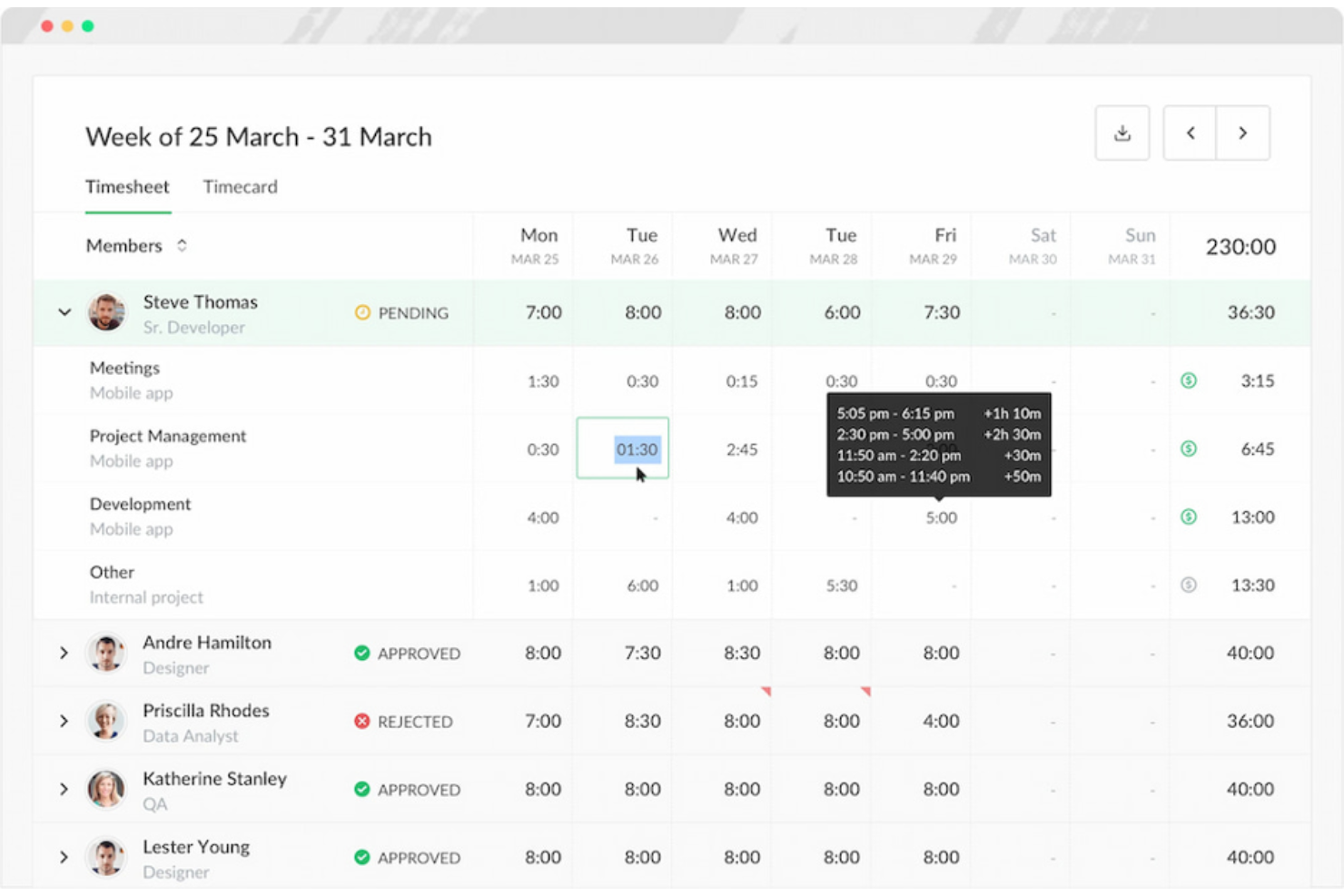
Everhour is a time tracking and billing software tailored for teams that use project management tools, such as Asana. It allows for precise time tracking, budgeting, and invoicing, helping teams manage their projects.
Why I picked Everhour: It integrates directly with Asana, allowing you to track time without leaving your project management environment. This can help you maintain focus and improve your workflows. You can set project budgets and monitor progress in real time to keep projects on track. Everhour also offers detailed reporting, which can help you analyze project performance and make informed decisions.
Standout Features and Integrations:
Features include the ability to create custom reports that provide insights into team productivity and project costs. You can also manage team availability and workload to optimize resource allocation. The invoicing feature allows you to generate invoices directly from tracked time.
Integrations include Asana, Trello, Basecamp, Jira, ClickUp, GitHub, GitLab, Xero, QuickBooks, and more.
Pros and Cons
Pros:
- Budget-tracking tools that update in real time
- Embedded inline timers inside project tasks
- Deep native integration with Asana
Cons:
- Limited advanced reporting for teams that need customized layouts
- Limited functionality without a connected project management platform


TMetric is a time tracking and billing software tailored for businesses that need to keep a close eye on budgets. It helps track time, monitor project costs, and manage billing.
Why I picked TMetric: It offers detailed budget tracking features that allow you to monitor project expenses in real time. You can set budget limits for projects and receive alerts when you approach them, helping you stay within financial constraints. The software also provides detailed time tracking. TMetric's reporting capabilities give insights into project profitability, which can help you manage financial performance.
Standout Features and Integrations:
Features include task management tools that help you organize and prioritize work. The software offers a team dashboard where you can view and manage team activities. You can also track time across different devices, giving you flexibility in how you log hours.
Integrations include Asana, Trello, Jira, GitHub, GitLab, QuickBooks, Salesforce, Google Calendar, and more.
Pros and Cons
Pros:
- Straightforward API for custom integrations
- Strong team-capacity indicators
- Fast start/stop controls for switching tasks
Cons:
- Limited notification system
- Basic time-off management


My Hours is a time tracking and billing software suitable for teams that need to manage multiple projects. It allows users to track time, manage tasks, and handle client billing.
Why I picked My Hours: My Hours is a good fit for teams balancing multiple projects, offering features such as project time tracking and task tracking that cater to extensive workloads. You can create detailed reports to analyze project profitability. The software's task management capabilities can help you keep organized and stay on top of deadlines. It also offers customizable billing options, allowing you to tailor invoices to each client.
Standout Features and Integrations:
Features include project profitability analysis, which helps you prioritize projects based on labor rates and expenses. Expense tracking allows you to attach files and generate reports for invoicing. The payroll management system can be used to track attendance and time off, supporting accurate payroll processing.
Integrations include QuickBooks, Zapier, Google Calendar, Microsoft Teams, Asana, Jira, Xero, and more.
Pros and Cons
Pros:
- Flexible rate structure
- Actionable profitability and efficiency insights
- Task-grouping organization system
Cons:
- Mobile performance is inconsistent
- Limited support for compliance-oriented tracking

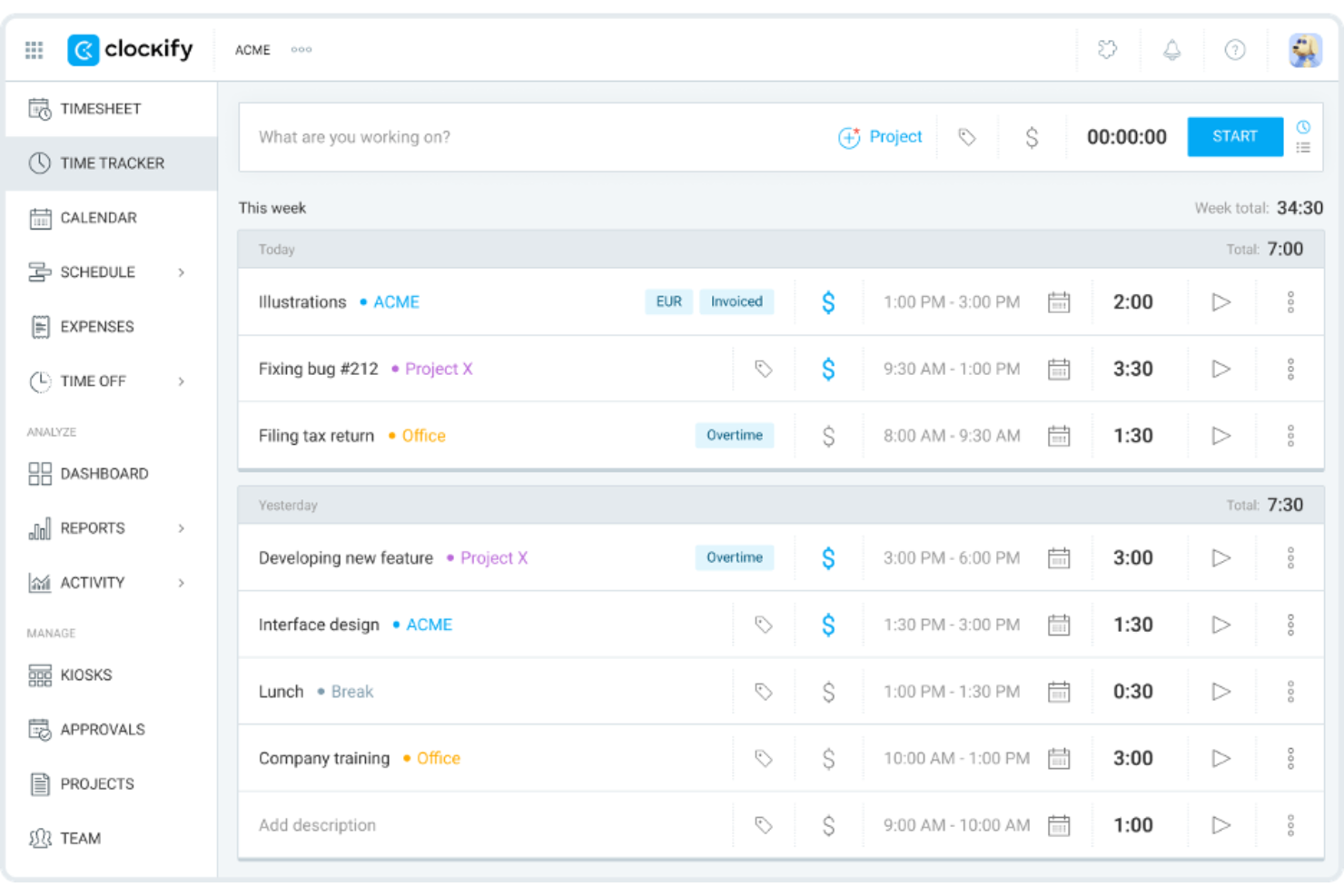
Clockify is a time tracking and billing software that caters to businesses of all sizes. It helps teams track work hours, manage projects, and generate reports for client billing.
Why I picked Clockify: This tool is a good fit for teams of any size because it offers unlimited user access, making it scalable for growing businesses. You can track hours across projects without worrying about user limits. Clockify provides detailed reporting features that help you analyze productivity and project costs. It also has an intuitive interface, so your team can start tracking time on it immediately without needing additional training.
Standout Features and Integrations:
Features include customizable time entries, allowing you to adjust and categorize time as needed. The dashboard provides a visual overview of team time, team activities, and project progress. You can also set hourly rates for different team members.
Integrations include Asana, Trello, Jira, QuickBooks, Zapier, Google Calendar, Microsoft Outlook, monday.com, and more.
Pros and Cons
Pros:
- Scalable and flexible controls for growing teams
- Bulk time-entry editing for fast cleanup
- Extensive free plan with generous features
Cons:
- Limited time-entry support for large volumes of data
- Limited invoice customization

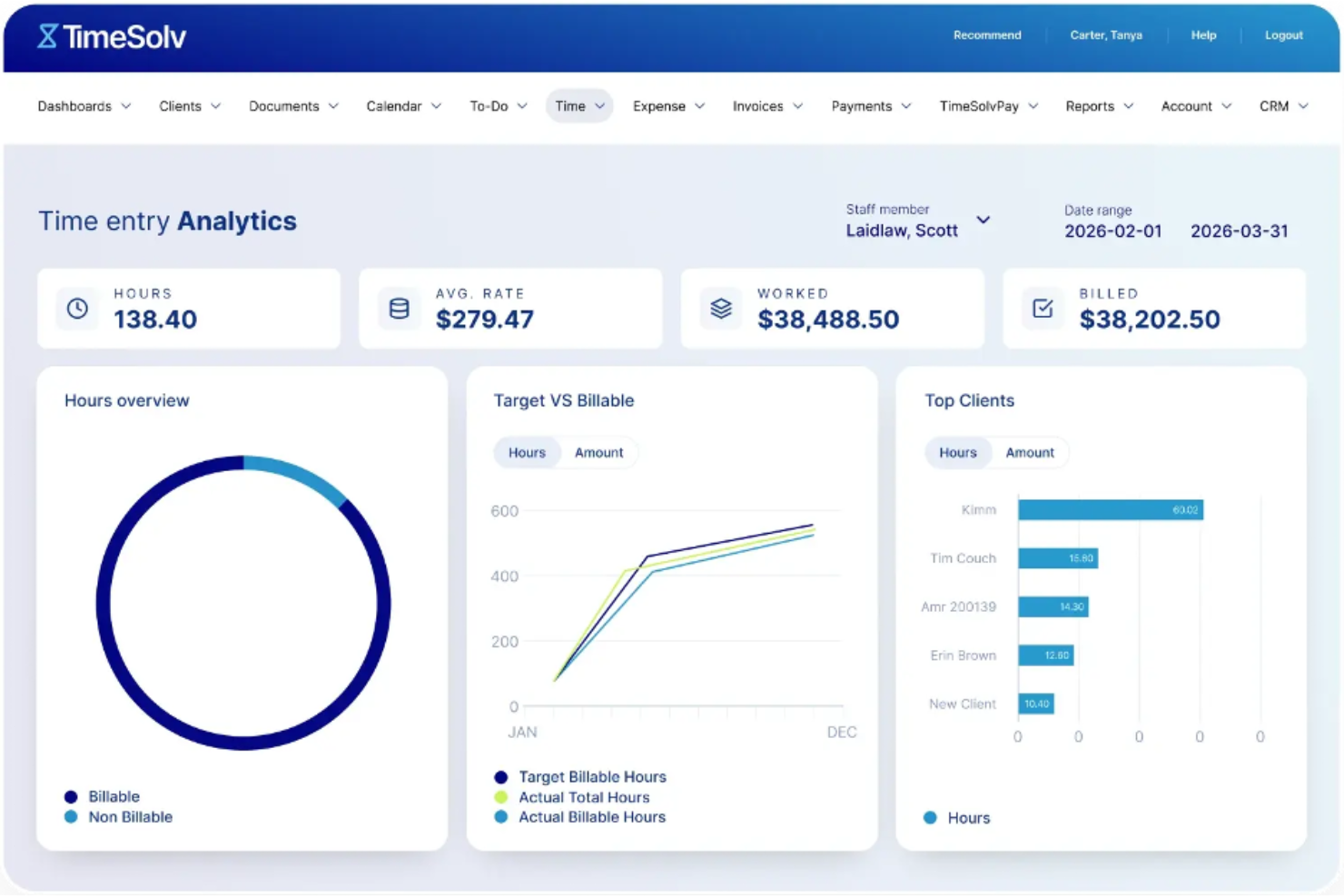
TimeSolv is a time tracking and billing software tailored for attorneys and law firms. It handles billing, invoicing, and time tracking while helping firms stay compliant with legal industry standards.
Why I picked TimeSolv: Attorneys may benefit from its specialized legal billing features, including LEDES billing. The software offers detailed invoicing options so you can customize bills according to client needs. You can track both billable and non-billable hours to maintain accurate client billing. TimeSolv also provides deep trust accounting features.
Standout Features and Integrations:
Features include project management tools that help you organize tasks and deadlines. The software offers detailed reporting options, providing insights into your practice's financial health. You can also manage expenses and attach receipts directly to invoices.
Integrations include QuickBooks, Xero, LawPay, NetDocuments, Dropbox, Microsoft Outlook, LexShare, and more.
Pros and Cons
Pros:
- Advanced trust accounting features
- Client portal included for invoices and payments
- Strong automation support for administrative tasks
Cons:
- Requires training for advanced features
- Limited project management capabilities

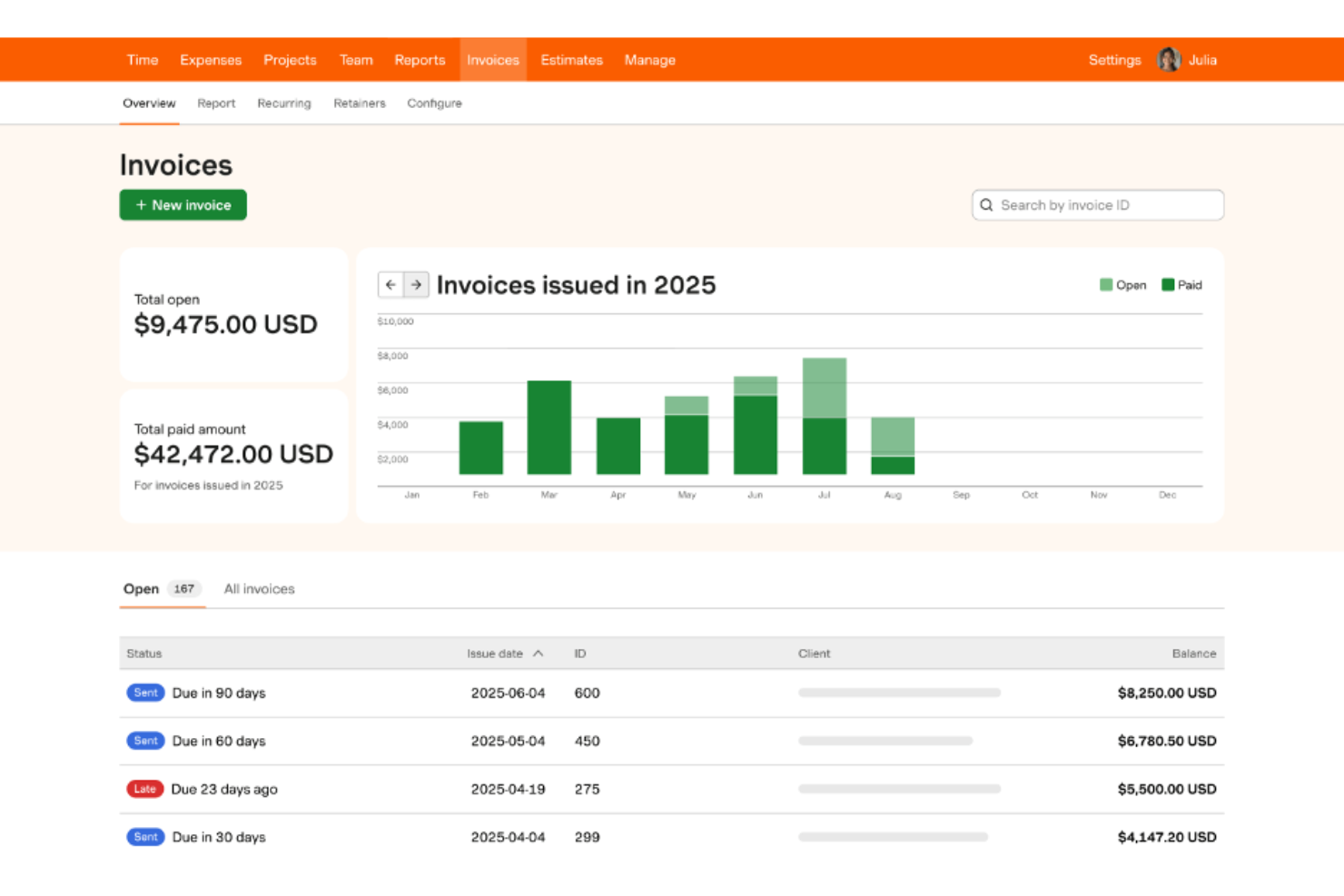
Harvest is a time tracking and billing software designed for small teams. It helps manage time, track project progress, and handle invoicing.
Why I picked Harvest: Harvest is particularly suitable for small team collaboration because it offers straightforward time tracking and invoicing features. You can capture time spent on projects and convert this data into invoices with just a few clicks. Harvest's reporting tools provide insights into how your team members spend their time, which is important for teams looking to optimize their resources. The ability to set budgets and track project costs adds another layer of control and oversight.
Standout Features and Integrations:
Features include the ability to track time from any device, generate visual reports for project analysis, and create and send invoices directly from tracked time. The platform also includes expense tracking so you can keep a close eye on project costs.
Integrations include Asana, Trello, Slack, QuickBooks, Xero, Basecamp, GitHub, Stripe, PayPal, and more.
Pros and Cons
Pros:
- Mobile time tracking app availability
- Intuitive visual reporting system
- Tightly integrated invoicing workflow
Cons:
- High pricing for teams seeking basic tracking features
- Lacks native desktop apps
Other Time Tracking and Billing Software
Here are some additional time tracking and billing software options that didn’t make it onto my shortlist but are still worth checking out:
- Toggl Track
For simple user interface
- Bill4time
For custom rate models
- TimeTracker by eBillity
For court-compliant timekeeping
- Insightful
For real-time activity analysis
- Paymo
For a unified workspace for distributed teams
- Avaza
For client-facing team collaboration
- FunctionFox
For creative teams
- Scoro
For an integrated CRM syste
- ClickTime
For custom dashboards
- Hubstaff
For GPS tracking and activity metrics
- Zoho Invoice
For multi-currency support
- Xero
For project accounting


Time Tracking and Billing Software Selection Criteria
When selecting the best time tracking and billing software to include in this list, I considered common buyer needs and pain points, such as accurate time logging and efficient invoicing. I also used the following framework to keep my evaluation structured and fair:
Core Functionality (25% of total score)
To be considered for inclusion in this list, each solution had to fulfill these common use cases:
- Track billable hours
- Generate invoices
- Monitor project progress
- Set hourly rates
- Manage expenses
Additional Standout Features (25% of total score)
To help further narrow down the competition, I also looked for unique features, such as:
- Automatic time tracking
- GPS location tracking
- Customizable reporting
- Project budgeting tools
- Offline functionality
Usability (10% of total score)
To get a sense of the usability of each system, I considered the following:
- User-friendly interface
- Easy navigation
- Minimal learning curve
- Responsive design
- Customizable dashboard
Onboarding (10% of total score)
To evaluate the onboarding experience for each platform, I considered the following:
- Availability of training videos
- Interactive product tours
- Access to templates
- Supportive chatbots
- Educational webinars
Customer Support (10% of total score)
To assess each software provider's customer support services, I considered the following:
- 24/7 support availability
- Live chat options
- Email support
- Phone support
- Knowledge base access
Value for Money (10% of total score)
To evaluate the value for money of each platform, I considered the following:
- Competitive pricing
- The feature set included
- Flexible pricing plans
- Cost transparency
- Free trial availability
Customer Reviews (10% of total score)
To get a sense of overall customer satisfaction, I considered the following when reading customer reviews:
- Overall satisfaction ratings
- Feedback on functionality
- Comments on ease of use
- Support responsiveness
- Value perception
How To Choose Time Tracking and Billing Software
It's easy to get bogged down in long feature lists and complex pricing structures. To help you stay focused as you work through your unique software selection process, here's a checklist of factors to keep in mind:
| Factor | What To Consider |
| Scalability | Will the software grow with your business? Consider the number of users it supports and if it can handle increased data as your team expands. Look for tools that offer flexible pricing models for scaling. |
| Integrations | Does the tool integrate with your existing systems? Check for compatibility with project management, accounting, and communication tools to support smooth workflow integration. |
| Customizability | Can you tailor the software to fit your specific needs? Look for options to customize reports, dashboards, and billing templates to match your business processes. |
| Ease of use | Is the interface intuitive? Test the software to see if it's easy for your team to navigate and use without extensive training. Complicated systems can slow down adoption and productivity. |
| Implementation and onboarding | How quickly can you get started? Evaluate the resources provided for onboarding, such as tutorials and support, to support a smooth transition without disrupting your operations. |
| Cost | Does the pricing fit your budget? Compare pricing plans and check for hidden fees. Consider long-term costs and whether the features provided justify the price. |
| Security safeguards | How secure is your data? Look for encryption standards, data backup options, and compliance with data protection regulations to protect sensitive information. |
| Support availability | Is help available when you need it? Confirm the availability of customer support options, such as live chat, phone, and email support, especially during your working hours. |
What Is Time Tracking and Billing Software?
Time tracking and billing software is a tool that helps businesses monitor work hours and generate invoices. Professionals such as freelancers, consultants, and small business owners use these tools to improve billing accuracy and manage projects efficiently. Time tracking, invoicing, and reporting features support accurate billing and project management. These tools ultimately save time and reduce administrative workload.
Features
When selecting time tracking and billing software, keep an eye out for the following key features:
- Time tracking: Automatically record the hours spent on tasks, helping maintain accurate billing and time management.
- Invoicing: Generate invoices directly from tracked time, simplifying the billing process and reducing manual errors.
- Budget tracking: Monitor project expenses and receive alerts when approaching budget limits, helping you manage finances.
- Reporting: Provide insights into time usage and project costs, aiding in decision-making and productivity analysis.
- Expense management: Track project-related expenses to support accurate billing and financial oversight.
- Customizable templates: Tailor invoices and time reports to match your business needs, increasing professionalism and clarity.
- Mobile access: Enable time tracking and invoicing on the go, supporting flexibility and convenience for remote work.
- Integrations: Connect with other tools, such as project management and accounting software, improving workflows and data sharing.
- Alerts and notifications: Remind users of tasks and deadlines, helping keep projects on track and reducing missed billing opportunities.
- Security safeguards: Protect sensitive data with encryption and compliance with data protection regulations for peace of mind.
Benefits
Implementing time tracking and billing software provides several benefits for your team and your business. Here are a few you can look forward to:
- Improved accuracy: Automatically tracking hours reduces manual errors and validates the accuracy of billable time.
- Time savings: Generating invoices directly from tracked time cuts down on administrative tasks, freeing up more time for productive work.
- Better financial oversight: Budget tracking and expense management help you keep a close eye on project costs, preventing overruns.
- Increased productivity: Reporting features provide insights into how time is spent, allowing you to identify areas for improvement.
- Greater flexibility: Mobile access allows you to track time and expenses from anywhere, supporting remote and mobile work.
- Professionalism: Customizable templates for invoices and reports help maintain a professional image with clients.
- Data security: Security safeguards protect sensitive information, giving you peace of mind about data privacy.
Costs and Pricing
Selecting time tracking and billing software requires an understanding of the various pricing models and plans available. Costs vary based on features, team size, add-ons, and more. The table below summarizes common plans, their average prices, and typical features included in time tracking and billing software solutions:
Plan Comparison Table for Time Tracking and Billing Software
| Plan Type | Average Price | Common Features |
| Free Plan | $0 | Basic time tracking, limited projects, and simple reporting. |
| Personal Plan | $4-$15/user/month | Time tracking, invoicing, project management, and basic reporting. |
| Business Plan | $7-$30/user/month | Advanced reporting, integrations, budget tracking, and expense management. |
| Enterprise Plan | $12-$70/user/month | Customizable features, dedicated support, security safeguards, and compliance tools. |
Time Tracking and Billing Software FAQs
Here are some answers to common questions about time tracking and billing software:
How does time tracking software support data accuracy?
Time tracking software supports data accuracy by automatically logging hours as you work, reducing manual input errors. Some tools offer features such as idle detection and reminders to clock in and out, which help maintain accurate records. Additionally, you can review and edit entries to correct any discrepancies before finalizing reports or invoices
Can time tracking software integrate with my existing tools?
Yes, many time tracking software solutions can integrate with popular project management, accounting, and communication tools. Check the software’s integration capabilities to maintain compatibility with your current systems. Integrations can improve workflows by syncing data across platforms, reducing duplicate entries, and improving overall efficiency.
Is my data secure with time tracking software?
Yes, most reputable time tracking software providers implement security measures to protect your data. Look for software that offers encryption, regular data backups, and compliance with data protection regulations. It’s essential to choose a provider with a strong reputation for security and confirm that your information will remain safe.
How do I choose the right time tracking software for my business?
To choose the right software, start by identifying your team’s specific needs and workflows. Consider factors such as integrations, ease of use, and scalability. Test a few options with free trials to see which one fits best. Pay attention to user reviews and customer support availability to support a smooth experience.
What's Next:
If you're in the process of researching time tracking and billing software, connect with a SoftwareSelect advisor for free recommendations.
You fill out a form and have a quick chat where they get into the specifics of your needs. Then you'll get a shortlist of software to review. They'll even support you through the entire buying process, including price negotiations.