

16 Best Clockify Alternatives in 2026

Best Clockify Alternatives Shortlist


A strong Clockify alternative offers reliable time tracking, flexible reporting, and integrations that fit your team’s workflow. If you’re searching for the best Clockify alternatives, you’re likely looking for tools that handle changing project needs, support accurate billing, or provide features Clockify doesn’t cover.
With so many options, it’s tough to know which platform will actually help you manage time, projects, and teams without adding friction.
This list breaks down the top alternatives for 2026, so you can compare features, see what sets each tool apart, and choose the right fit for your team’s real-world challenges.
What is Clockify?
Clockify is a cloud-based time tracking tool that helps teams and individuals log work hours, track project progress, and generate detailed reports. It supports manual and automatic time entry, project and task organization, and integrates with popular project management and productivity platforms.
Project managers, freelancers, and businesses use Clockify to monitor productivity, manage billable hours, and optimize visibility across distributed teams.
Best Clockify Alternatives Summary
This comparison chart summarizes pricing details for my top Clockify alternative selections to help you find the best one for your budget and business needs.
| Tool | Best For | Trial Info | Price | ||
|---|---|---|---|---|---|
| 1 | Best for payroll integration | Free trial + free demo available | From $20/month + $8/user/month (billed annually) | Website | |
| 2 | Best for facial recognition clock-ins | 14-day free trial + free plan + free demo available | From $4.49/user/month (billed annually) | Website | |
| 3 | Best for automatic activity tracking | 14-day free trial + free plan + free demo available | From $3.99/user/month (billed annually) | Website | |
| 4 | Best for GPS-enabled mobile teams | 14-day free trial + free demo available | From $36/month + $8.10/user/month | Website | |
| 5 | From $9/user/month (billed annually) | Free plan + free demo + 30-day free trial available | From $9/user/month (billed annually) | Website | |
| 6 | Best for client billing management | 14-day free trial + free plan + free demo available | From $8/user/month (billed annually) | Website | |
| 7 | Best for expense and invoice tracking | Free plan available | From $9/seat/month | Website | |
| 8 | Best for legal and accounting professionals | 14-day free trial + free demo available | From $11.20/user/month (billed annually) | Website | |
| 9 | Best for global compliance features | Free demo available | Pricing upon request | Website | |
| 10 | Best for lightweight desktop use | Free plan + 14-day free trial available | From $9/month (billed annually) | Website |
Why You Can Trust Us
We’ve been testing and reviewing project management software since 2012. As project managers ourselves, we know how critical and difficult it is to make the right decision when selecting software.
We invest in deep research to help our audience make better software purchasing decisions. We’ve tested more than 2,000 tools for different project management use cases and written over 1,000 comprehensive software reviews. Learn how we stay transparent & our software review methodology.
-

Accelo
Visit WebsiteThis is an aggregated rating for this tool including ratings from Crozdesk users and ratings from other sites.4.4 -
Wrike
Visit WebsiteThis is an aggregated rating for this tool including ratings from Crozdesk users and ratings from other sites.4.3 -
Forecast
Visit WebsiteThis is an aggregated rating for this tool including ratings from Crozdesk users and ratings from other sites.4.6




Best Clockify Alternatives Reviews
Below are my detailed summaries of the Clockify alternatives that made it onto my shortlist. My reviews offer a detailed look at the features, best use cases, and integrations of each tool to help you find the best one for you.

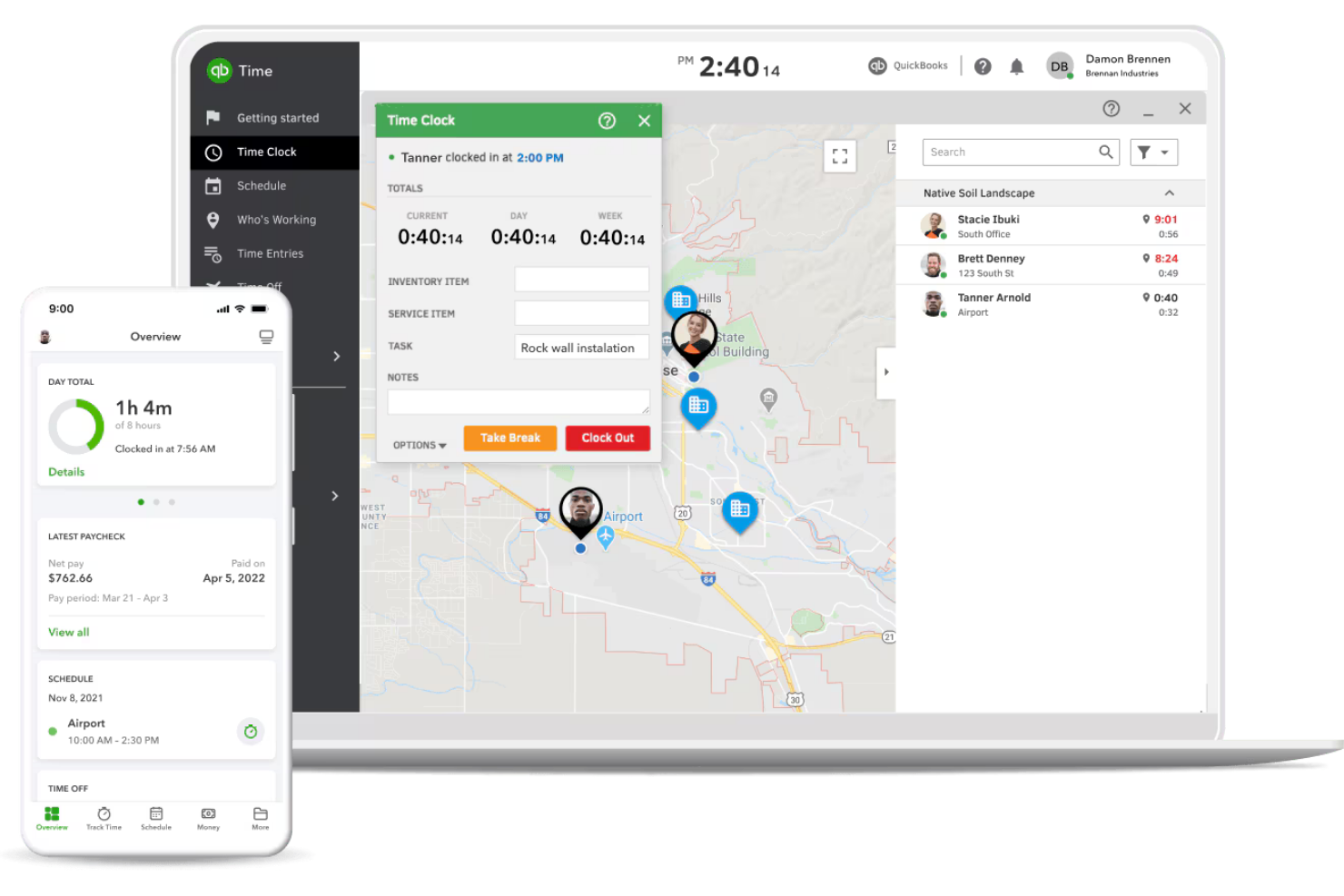
For teams that need time tracking tightly connected to payroll, QuickBooks Time offers a direct link between employee hours and payroll processing. This tool is especially useful for businesses with hourly workers, field teams, or anyone already using QuickBooks for accounting. Unlike Clockify, QuickBooks Time stands out by automating timesheet syncing with payroll, reducing manual entry and payroll errors.
Why QuickBooks Time Is a Good Clockify Alternative
If payroll integration is your top priority, QuickBooks Time is built specifically to connect time tracking with payroll processing. I picked QuickBooks Time because it automatically syncs employee hours with QuickBooks Payroll, which helps reduce manual data entry and payroll mistakes. The platform also supports GPS tracking and mobile time clocks, making it a strong fit for businesses with field teams or remote workers. For anyone who needs to turn timesheets into paychecks without extra steps, QuickBooks Time offers a direct solution that Clockify doesn’t match.
QuickBooks Time Key Features
Some other features in QuickBooks Time that may be useful for your team include:
- Job and Shift Scheduling: Assign jobs and shifts to employees and view schedules in a calendar format.
- Geofencing: Set location-based reminders for employees to clock in or out when they enter or leave a job site.
- Time Off Management: Track and approve employee time off requests directly within the platform.
- Real-Time Reporting: Generate up-to-date reports on hours worked, project time allocation, and labor costs.
QuickBooks Time Integrations
Integrations include QuickBooks Online, Gusto, ADP, Square, Clover, Xero, Sage, Salesforce, and Buildertrend.
Pros and Cons
Pros:
- Great for field service teams
- Painless payroll data export
- Strong GPS and geofencing tools
Cons:
- Occasional data sync glitches
- Intrusive location alerts

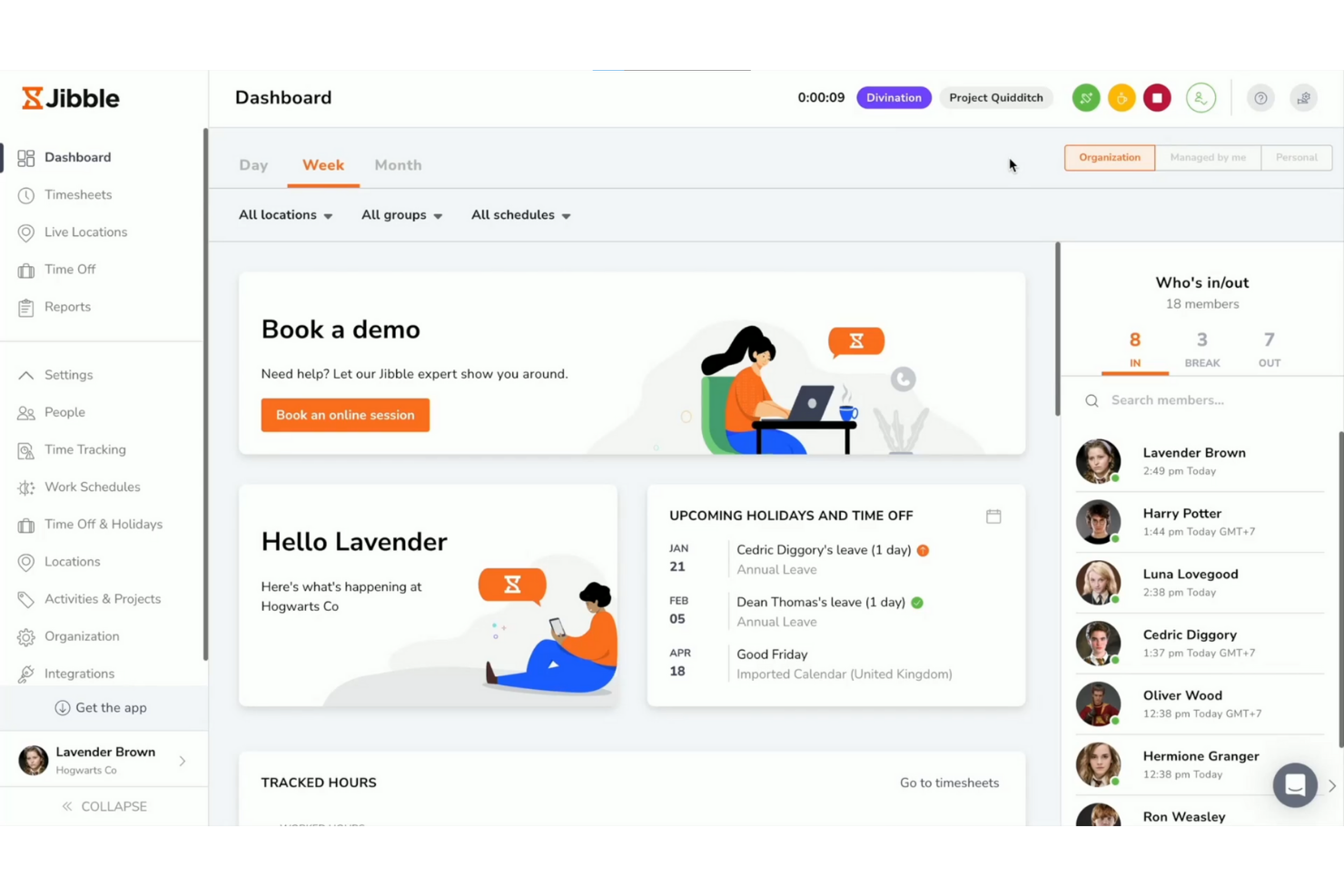
Teams that need secure, reliable attendance tracking may want to consider Jibble. This tool is designed for businesses that require facial recognition clock-ins, making it especially useful for shift-based workplaces, retail, and field teams. Jibble helps reduce buddy punching and time theft by verifying each clock-in with biometric data.
Why Jibble Is a Good Clockify Alternative
Unlike most time tracking tools, Jibble puts facial recognition at the center of its clock-in process. This approach helps prevent buddy punching and ensures that only authorized team members can log their hours. I appreciate that Jibble supports both mobile and kiosk-based facial recognition, making it flexible for different work environments. If you need a solution that prioritizes secure, verifiable attendance, Jibble offers features that go beyond what Clockify provides.
Jibble Key Features
Some other features in Jibble that may interest you include:
- Geolocation Tracking: Track where team members clock in and out using GPS data.
- Automated Timesheets: Generate timesheets automatically based on clock-in and clock-out data.
- Overtime Calculation: Calculate overtime hours according to your organization’s rules.
- Leave Management: Manage and track employee leave requests within the platform.
Jibble Integrations
Integrations include Microsoft Teams, Slack, QuickBooks Online, Xero, Deel, ADP, Asana, Trello, and Google Sheets.
Pros and Cons
Pros:
- Tablet-friendly kiosk mode
- Great for physical job sites
- Excellent GPS location tracking
Cons:
- Complex admin permission settings
- Mobile app drains battery life

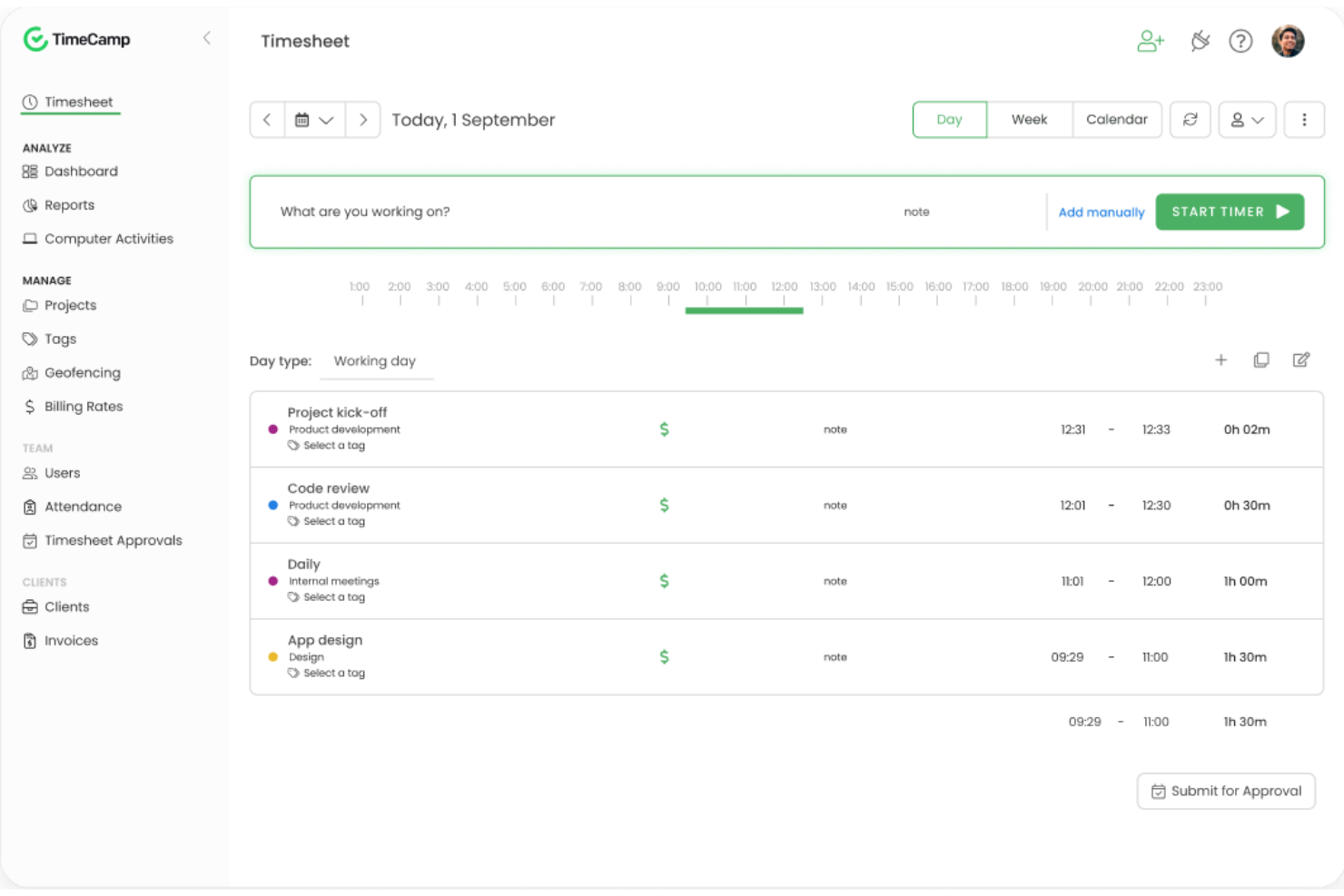
TimeCamp takes a different approach to time tracking by focusing on automatic activity monitoring. This tool is especially useful for teams and freelancers who want to capture work hours without manual input or timers. If you need detailed breakdowns of computer activity and app usage for accurate project billing or productivity analysis, TimeCamp offers features you won’t find in most standard time tracking tools.
Why TimeCamp Is a Good Clockify Alternative
Unlike most time tracking tools, TimeCamp automatically records computer activity and app usage in the background. I picked TimeCamp because it eliminates the need for manual timers, letting you capture every minute spent on projects without extra effort. The tool also categorizes activities by project or client, so you get a clear, detailed breakdown of where time goes. If you want a hands-off approach to tracking work hours, TimeCamp offers automation that sets it apart from Clockify.
TimeCamp Key Features
Some other features in TimeCamp that may be useful for your team include:
- Timesheet Approvals: Managers can review and approve submitted timesheets before payroll processing.
- Billable and Non-Billable Time Tracking: Mark tracked hours as billable or non-billable for more accurate client invoicing.
- Project Budgeting: Set project budgets and monitor tracked time against those limits.
- Attendance Tracking: Record employee start and end times to support attendance and leave management.
TimeCamp Integrations
Integrations include Trello, Asana, Monday.com, Jira, Zendesk, QuickBooks, Xero, Salesforce, Azure DevOps, and ClickUp.
Pros and Cons
Pros:
- Good client billing features
- Strong profitability reporting
- Tracks app and website usage
Cons:
- Auto-tracker makes mistakes
- Interface feels overwhelming

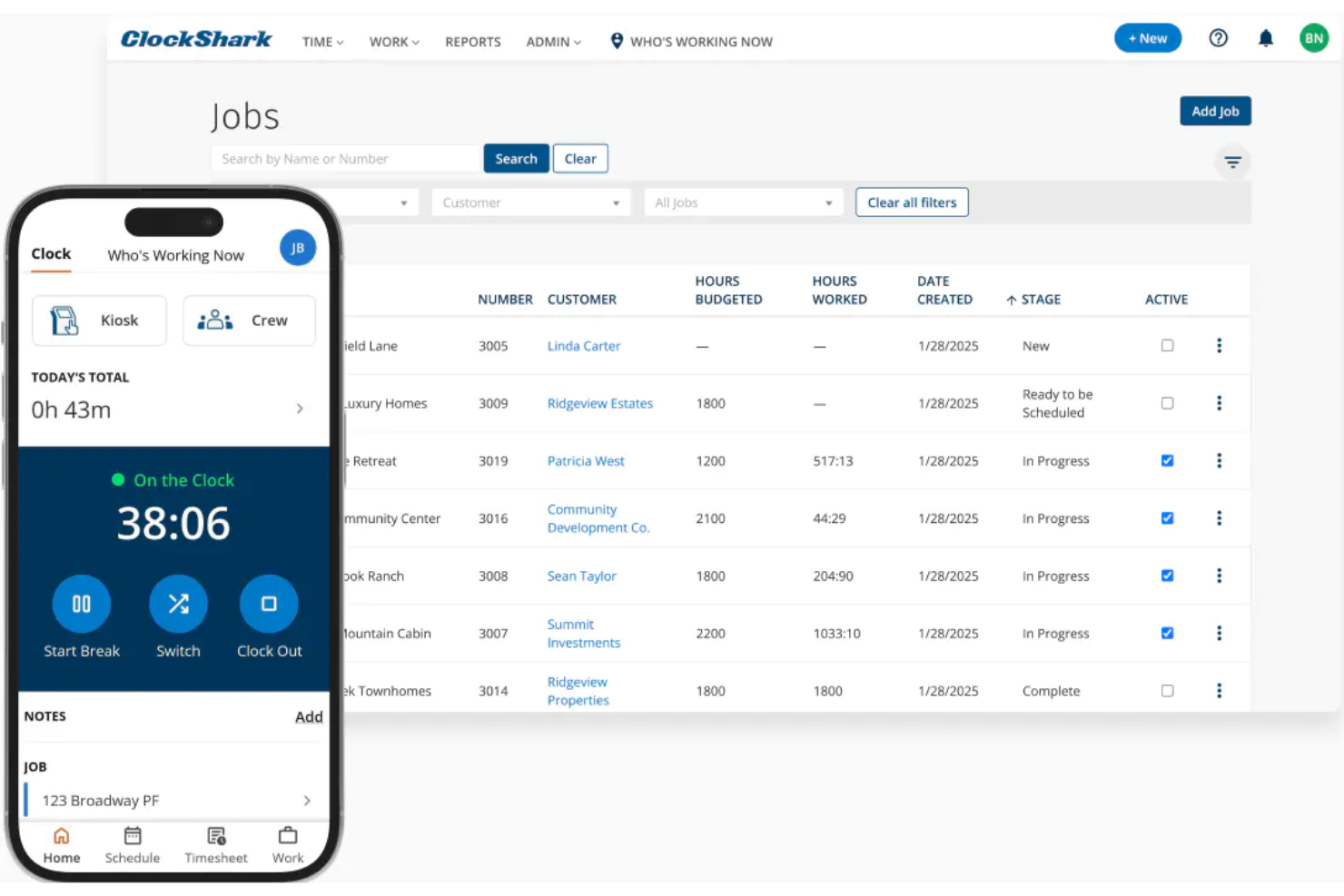
For teams that work in the field or move between job sites, ClockShark offers GPS-enabled time tracking designed for mobile crews. It’s a strong fit for construction, trades, and service businesses that need to verify worker locations and job attendance in real time. Unlike Clockify, ClockShark’s GPS features help you monitor mobile teams and reduce time theft on the go.
Why ClockShark Is a Good Clockify Alternative
If your team spends most of its time on the move, ClockShark’s GPS-enabled tracking stands out as a practical solution. I picked ClockShark because it lets you see where employees clock in and out, and even view their routes throughout the day. The geofencing feature helps ensure workers are on-site when logging hours, which is something Clockify doesn’t offer natively. For businesses that need location-based accountability, ClockShark’s mobile-first approach addresses challenges that come with managing distributed field teams.
ClockShark Key Features
Some other features in ClockShark that may be useful for your business include:
- Drag-and-Drop Scheduling: Assign shifts and jobs to employees with a simple drag-and-drop interface.
- Job and Task Codes: Track time against specific jobs or tasks for more detailed reporting.
- PTO and Sick Leave Management: Manage paid time off requests and approvals directly within the platform.
- Payroll Export Tools: Export timesheet data in formats compatible with popular payroll systems.
ClockShark Integrations
Integrations include QuickBooks, Sage 100, Xero, Jobber, Zapier, Procore, ADP, and TSheets.
Pros and Cons
Pros:
- Built-in team messaging
- Excellent mobile app for crews
- Drag-and-drop field scheduling
Cons:
- Lacks advanced invoicing features
- Weak desktop browser experience

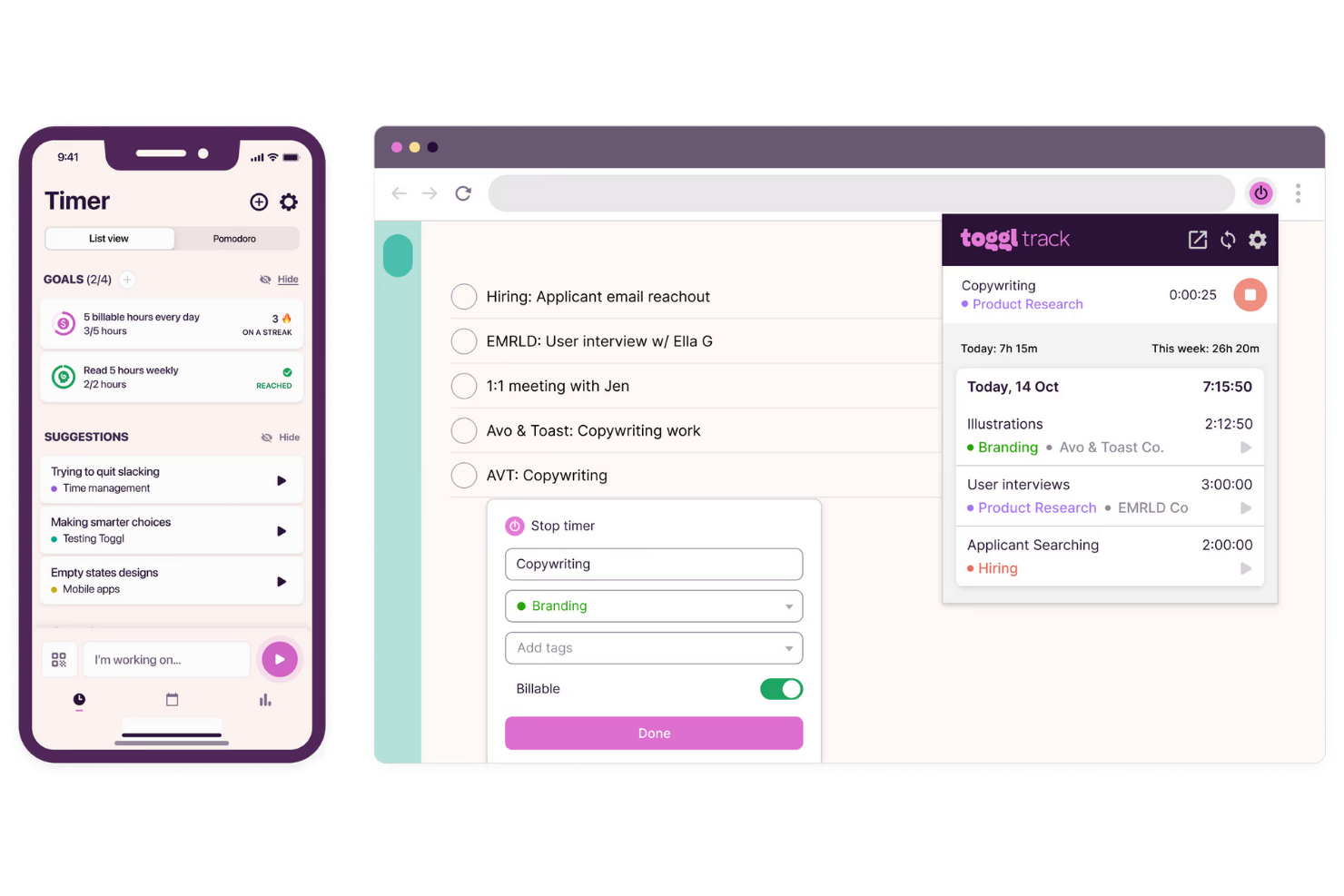
Toggl Track stands out for teams and professionals who need clear, visual insights into how time is spent across projects. Its dashboard-driven approach helps you quickly spot trends, gaps, and opportunities in your workflow. If you want to turn time tracking data into actionable reports without extra effort, Toggl Track is built for you.
Why Toggl Track Is a Good Clockify Alternative
Toggl Track is a strong choice if you want more visual clarity in your time tracking. Its reporting dashboards let you break down tracked hours by project, client, or team member, making it easy to spot patterns and outliers. I appreciate how you can customize reports with filters and export them for deeper analysis or sharing. If you need to turn raw time data into clear, actionable visuals, Toggl Track delivers where Clockify’s reporting can feel limited.
Toggl Track Key Features
Some other features in Toggl Track that may interest you include:
- Billable Rates: Set custom billable rates for different projects or team members to support accurate client invoicing.
- Project and Task Management: Organize tracked time by project and task, making it easier to allocate resources and monitor progress.
- Mobile and Desktop Apps: Track time from anywhere using dedicated apps for iOS, Android, Windows, and Mac.
- Reminders and Pomodoro Timer: Use built-in reminders and a Pomodoro timer to help your team stay on track throughout the workday.
Toggl Track Integrations
Integrations include Asana, Jira, Monday.com, Trello, Google Calendar, Outlook Calendar, Salesforce, GitHub, GitLab, and Slack.
Pros and Cons
Pros:
- Very generous free tier
- Great browser extension sync
- Seamless idle time detection
Cons:
- Limited project management
- Lacks employee scheduling

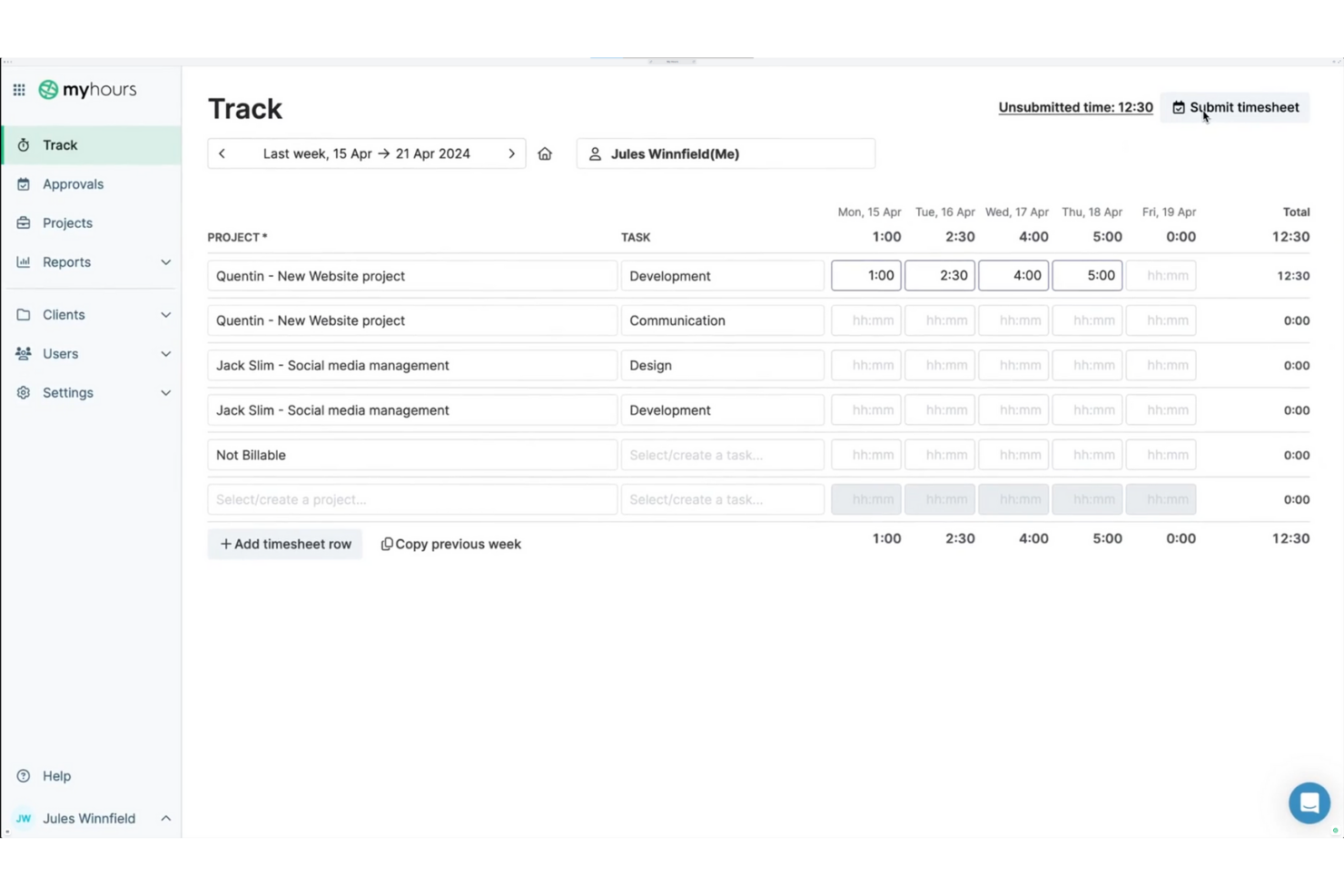
If you’re looking for a time tracking tool that puts client billing front and center, My Hours is worth a closer look. It’s designed for freelancers, agencies, and service-based teams who need to manage billable hours, project budgets, and invoicing in one place. My Hours stands out from Clockify by offering more advanced billing features and flexible client management options.
Why My Hours Is a Good Clockify Alternative
For teams and freelancers who need more control over client billing, My Hours offers features that go beyond basic time tracking. You can assign billable rates to specific projects or clients, generate detailed invoices directly from tracked hours, and track project budgets in real time. I like that My Hours lets you manage multiple clients and billing scenarios without extra manual work. If you want a time tracking tool that’s built for client billing management, My Hours is a strong alternative to Clockify.
My Hours Key Features
Some other features in My Hours that may be useful for your workflow include:
- Task Organization: Break down projects into tasks and sub-tasks for more granular tracking.
- Team Management: Assign roles and permissions to team members for better oversight.
- Customizable Reports: Generate and export detailed reports based on projects, clients, or team members.
- Mobile App: Track time and manage projects on the go with the dedicated mobile app.
My Hours Integrations
Integrations include QuickBooks Online, Xero, Jira, Asana, Monday.com, ClickUp, Basecamp, Microsoft Teams, and FreshBooks.
Pros and Cons
Pros:
- Clean and simple interface
- Easy invoice generation
- Detailed project budget tracking
Cons:
- Lacks offline time tracking
- No automatic time capture

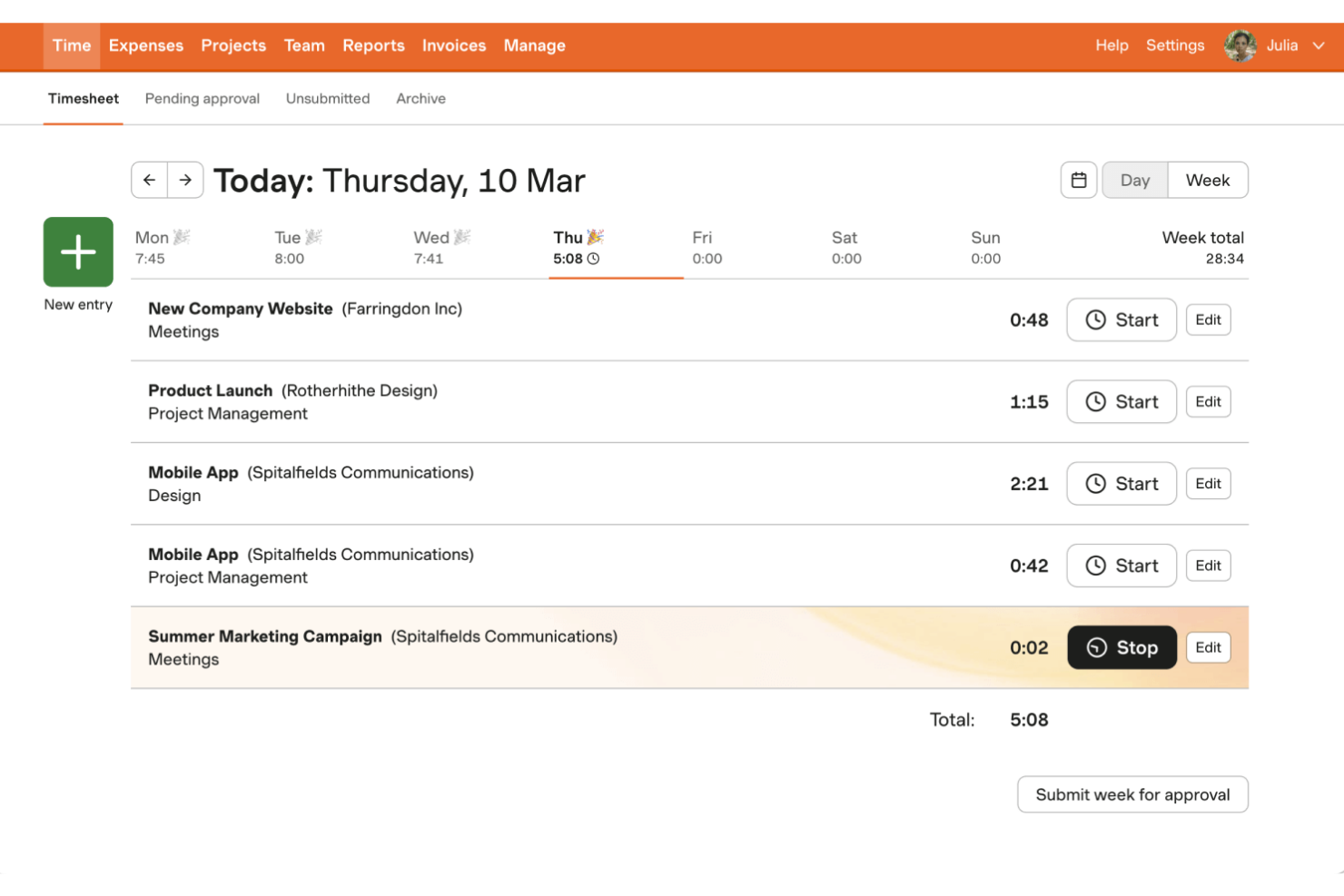
If you need a time tracking tool that also handles expenses and invoicing, Harvest is worth a close look. It’s designed for agencies, consultancies, and project-based teams that want to track billable hours and turn them into invoices without switching platforms. Unlike Clockify, Harvest combines time tracking with built-in expense logging and client invoicing, making it easier to manage the full billing cycle in one place.
Why Harvest Is a Good Clockify Alternative
For teams that need more than just time tracking, Harvest stands out by combining expense and invoice tracking in one platform. I picked Harvest because it lets you log expenses alongside tracked hours and then generate invoices directly from your timesheets and expense records. The tool also supports attaching receipts to expenses, which helps keep client billing transparent and organized. If you want to manage the full billing process without juggling multiple tools, Harvest offers a level of financial tracking that Clockify doesn’t provide.
Harvest Key Features
Some other features in Harvest that may be helpful for your team include:
- Project Budget Tracking: Set and monitor project budgets to keep spending in check.
- Team Capacity Planning: View team member availability and allocate hours across projects.
- Automated Reminders: Send automatic reminders to team members to submit timesheets.
- Visual Reporting Dashboards: Access visual dashboards that break down time and cost data by project, client, or team.
Harvest Integrations
Integrations include Asana, Trello, Slack, Zendesk, QuickBooks Online, Xero, Basecamp, Stripe, PayPal, and Google Calendar.
Pros and Cons
Pros:
- Built-in payment gateway links
- Great third-party app syncs
- Strong expense receipt tracking
Cons:
- No offline desktop mode
- Limited custom report building
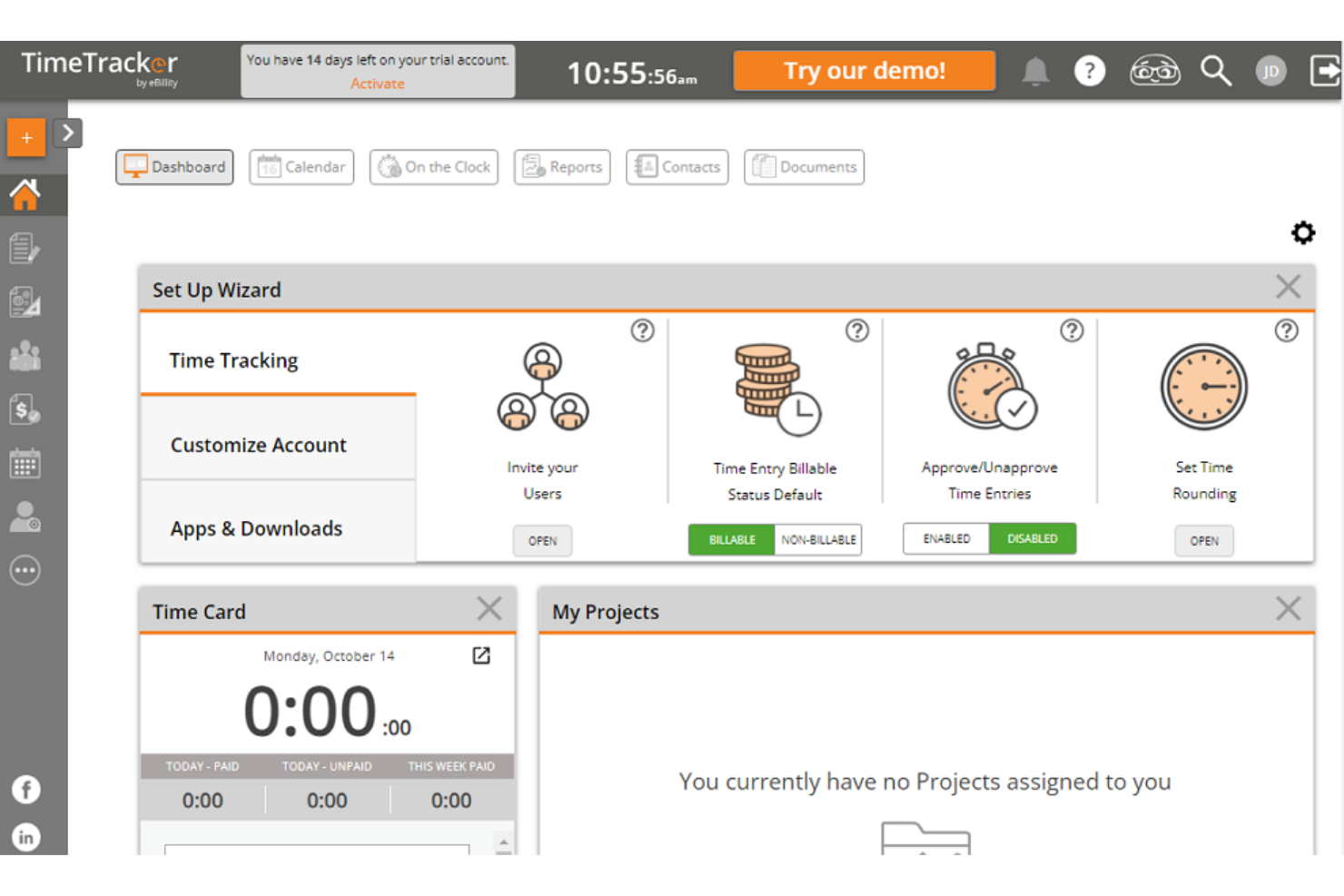
If you’re looking for a time tracking tool built for legal and accounting work, eBillity is worth a closer look. This platform caters to professionals who need detailed, billable time tracking, expense management, and compliance features tailored to client-based billing. eBillity stands out for its legal-specific tools like ABA task codes and trust accounting support, which you won’t find in most general time tracking solutions.
Why eBillity Is a Good Clockify Alternative
For legal and accounting professionals, eBillity offers specialized features that go beyond what general time tracking tools provide. I picked eBillity because it supports ABA task codes, trust accounting, and detailed client billing—capabilities that are essential for compliance and accurate invoicing in these fields. The platform also includes expense tracking and conflict checking, which help firms manage billable hours and client matters more precisely. If your work requires industry-specific compliance and billing tools, eBillity is a strong alternative to Clockify.
eBillity Key Features
Some other features in eBillity that may interest you include:
- Mobile Time Tracking: Track billable hours and expenses from your phone or tablet.
- Automated Reminders: Set up reminders for time entry and approvals to keep records accurate.
- Customizable Invoicing: Create and send invoices with your own branding and billing preferences.
- Payroll Integration: Sync tracked time directly with payroll systems for faster processing.
eBillity Integrations
Integrations include QuickBooks, Xero, Sage Intacct, Clio, Gusto, ADP, Salesforce, and Microsoft 365.
Pros and Cons
Pros:
- Excellent client billing portals
- Flexible timesheet approvals
- Strong expense tracking tools
Cons:
- Pricey for smaller businesses
- Clunky mobile application
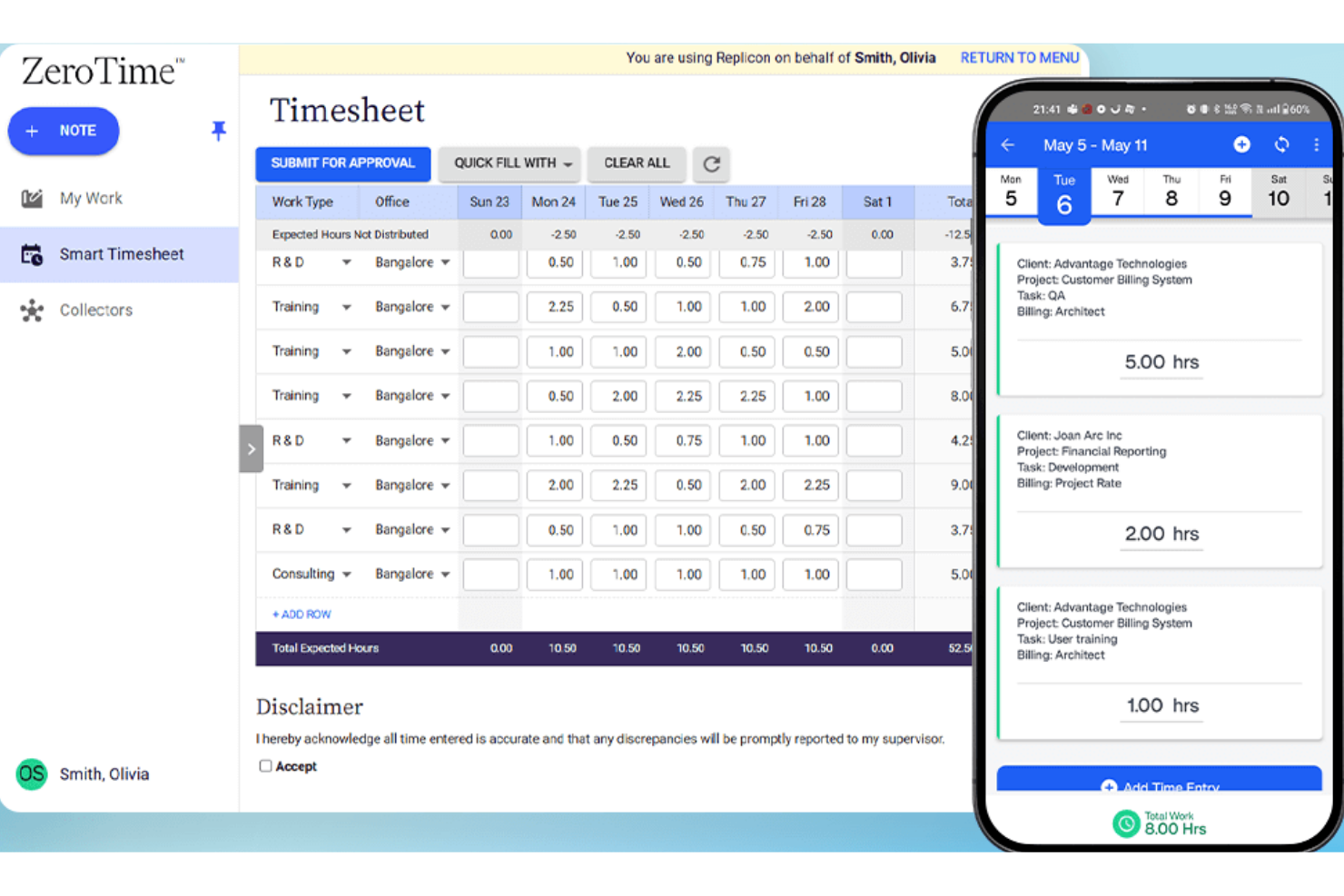
If your team operates across multiple countries or regions, Replicon is a time tracking software built to help you manage time tracking with global compliance in mind. It’s especially useful for multinational organizations and HR teams that need to navigate complex labor laws, overtime rules, and local regulations. Unlike Clockify, Replicon offers advanced compliance features that help you automate policy enforcement and reduce the risk of errors in international workforce management.
Why Replicon Is a Good Clockify Alternative
When compliance with international labor laws is a top priority for your time management, Replicon offers time tracking features that go beyond what Clockify provides. I picked Replicon because it automatically applies local overtime rules, break requirements, and holiday calendars based on each employee’s location to ensure accurate time reporting.The platform also includes audit trails and compliance reports, which help HR teams document adherence to regional regulations. For organizations managing a global workforce, Replicon’s compliance automation can help reduce manual work and the risk of costly errors.
Replicon Key Features
Some other features in Replicon that may be useful for your team include:
- AI-Powered Timesheet Validation: Automatically checks timesheets for errors or missing data before submission.
- Resource Management Module: Assigns resources to projects and tracks their allocation in real time.
- Mobile Time Tracking App: Lets users log hours, submit timesheets, and manage approvals from mobile devices.
- Customizable Approval Workflows: Allows you to set up multi-level approval processes for timesheets and expenses.
Replicon Integrations
Integrations include an open API, Salesforce, ServiceNow, Workday, Oracle NetSuite, SAP, Microsoft Dynamics, Jira, Sage Intacct, and ADP.
Pros and Cons
Pros:
- Highly scalable cloud platform
- Highly scalable cloud platform
- AI-powered timesheet approvals
Cons:
- Completely unsuited for small businesses
- Interface feels overly corporate

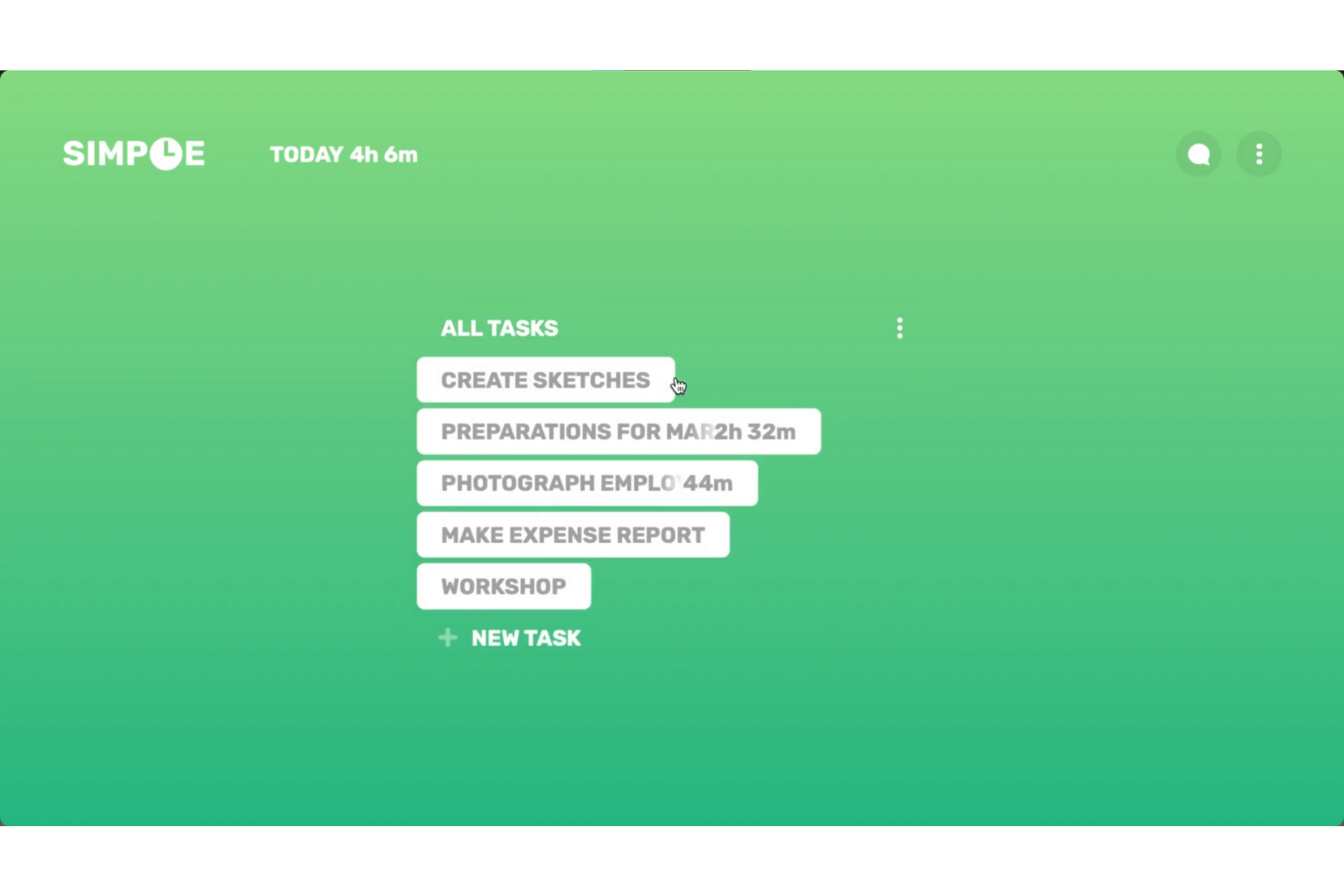
If you’re looking for a straightforward way to track time on your desktop, Simple Time Tracker is worth a look. This tool is designed for freelancers, solo professionals, and small teams who want a lightweight, no-frills solution without the complexity of larger platforms like Clockify. Simple Time Tracker stands out for its minimal interface and focus on quick, distraction-free time logging right from your desktop.
Why Simple Time Tracker Is a Good Clockify Alternative
For anyone who wants a lightweight desktop solution, Simple Time Tracker offers a focused alternative to Clockify’s broader feature set. You can start and stop timers with a single click and quickly switch between tasks without navigating through extra menus. I like that the tool keeps everything on your desktop, so you don’t have to rely on a web browser or cloud account to track your time. If you value simplicity and want to avoid unnecessary features, Simple Time Tracker is a strong pick.
Simple Time Tracker Key Features
Some other features in Simple Time Tracker that may interest you include:
- CSV Export: Export your tracked time data to CSV files for reporting or analysis.
- Tagging: Assign tags to time entries to organize and categorize your work.
- Manual Time Entry: Add or edit time entries manually for greater flexibility.
- Idle Detection: Automatically detect and flag periods of inactivity during tracking.
Simple Time Tracker Integrations
Native integrations are not currently listed by Simple Time Tracker.
Pros and Cons
Pros:
- Fast widget-based tracking
- Absolute user data privacy
- No user account required
Cons:
- Very basic reporting features
- Lacks any invoicing or billing
Other Clockify Alternatives
Here are some additional Clockify alternative options that didn’t make it onto my shortlist, but are still worth checking out:
- Apploye
For remote employee monitoring
- Scoro
For integrated project management
- TrackingTime
For team collaboration features
- Everhour
For seamless project management integrations and budgeting
- Connecteam
With mobile workforce management
- Timely
For AI-powered time logging


Clockify Alternatives Selection Criteria
When selecting the best Clockify alternatives to include in this list, I considered common buyer needs and pain points related to time tracking tool products, like tracking employee hours accurately and managing mobile or distributed teams. I also used the following framework to keep my evaluation structured and fair:
Core Functionality (25% of total score)To be considered for inclusion in this list, each solution had to fulfill these common use cases:
- Track employee work hours
- Support manual and automated time entry
- Generate timesheet reports
- Export data for payroll
- Monitor project or task time allocation
Additional Standout Features (25% of total score)To help further narrow down the competition, I also looked for unique features, such as:
- GPS location tracking for mobile teams
- Geofencing for on-site verification
- AI-powered automatic time capture
- Built-in scheduling tools
- PTO and leave management
Usability (10% of total score)To get a sense of the usability of each system, I considered the following:
- User-friendly interface and overall ease of use
- Easy navigation between features
- Clear dashboard and reporting visuals
- Mobile app experience quality
- Minimal steps to complete core tasks
Onboarding (10% of total score)To evaluate the onboarding experience for each platform, I considered the following:
- Availability of training videos and tutorials
- Access to onboarding templates or checklists
- Interactive product tours or walkthroughs
- In-app chatbots for onboarding support
- Live or recorded webinars for new users
Customer Support (10% of total score)To assess each software provider’s customer support services, I considered the following:
- Availability of live chat or phone support
- Response time to support requests
- Quality of help center documentation
- Access to community forums or user groups
- Proactive support during onboarding
Value For Money (10% of total score)To evaluate the value for money of each platform, I considered the following:
- Transparent and competitive pricing across paid plans
- Flexible plans for different team sizes
- Features included in base pricing
- Free trial or demo availability
- No hidden fees or surprise charges
Customer Reviews (10% of total score)To get a sense of overall customer satisfaction, I considered the following when reading customer reviews:
- Consistency of positive feedback
- Frequency of reported technical issues
- Quality of support experiences
- Satisfaction with feature set
- Willingness to recommend to others
Why Look For a Clockify Alternative?
While Clockify is a good choice of time tracking tool, there are a number of reasons why some users seek out alternative solutions. You might be looking for a Clockify alternative because…
- You need GPS tracking for mobile or field teams
- You want built-in scheduling or shift planning features
- You require more advanced payroll or invoicing integrations
- You need geofencing to verify on-site attendance
- You want more granular PTO and leave management controls
If any of these sound like you, you’ve come to the right place. My list contains several time tracking tool options that are better suited for teams facing these challenges with Clockify and looking for alternative solutions.
Clockify Key Features
Here are some of the key features of Clockify, to help you contrast and compare what alternative solutions offer:
- Time tracking with manual and automatic entry options
- Project and task tracking for detailed work breakdowns
- Timesheet approvals and audit trails
- Reporting and analytics dashboards
- Billable hours tracking and rate management
- Team management with user roles and permissions
- Calendar view for visualizing tracked time
- Mobile apps for iOS and Android
- Integrations with popular project management and productivity tools
- Export options for payroll and invoicing