

10 Best Process Optimization Software in 2026

Best Process Optimization Software Shortlist


Process optimization software helps you analyze, automate, and refine your business processes so your team can work smarter, not just harder. If you’re searching for the best process optimization software, you need solutions that adapt to changing team needs, connect scattered data, and drive real improvement—without adding complexity.
In this guide, you’ll find top tools that can help manage shifting priorities, get clarity across workflows, and give you the insights you need to deliver results in 2026.
Why Trust Our Software Recommendations
Our team has been testing and reviewing software since 2012. As project managers ourselves, we know how difficult—and important—it is to choose the right software.
For this guide, we evaluated tools using hands-on testing and independent research, scoring tools using our selection criteria. We also draw on insights from industry thought leaders and practicing project management experts.
Our reviews reflect our human editorial judgment, not a sales pitch.
Expert reviewers:
Process Optimization Software Comparison Table
This comparison table summarizes pricing details for my top process optimization software selections:
| Tool | Best For | Trial Info | Price | ||
|---|---|---|---|---|---|
| 1 | Best for customizable workflow templates | Free plan | Pricing upon request | Website | |
| 2 | Best for checklist-driven operations | Free demo available | Pricing upon request | Website | |
| 3 | Best for real-time process analytics | Free demo | Pricing upon request | Website | |
| 4 | Best for automated document generation | 30-day free trial | Pricing upon request | Website | |
| 5 | Best for Microsoft ecosystem integration | 30-day free trial + free plan | From $15/user/month (billed annually) | Website | |
| 6 | Best for low-code workflow automation | Free plan + free demo available | Pricing upon request | Website | |
| 7 | Best for intuitive drag-and-drop workflows | Free demo | Pricing upon request | Website | |
| 8 | Best for no-code process building | 7-day free trial + free demo | From £1,722/month | Website | |
| 9 | Best for advanced process discovery | 60-day standard trial + free demo | Pricing upon request | Website | |
| 10 | Best for finding automation opportunities | Free plan + free demo | From $13/user/month (billed annually) | Website |
Best Process Optimization Software Reviews
Below are my detailed summaries of the best process optimization software that made it onto my shortlist. My reviews offer a detailed look at the features, capabilities, and integrations of each platform to help you find the best one for you.

Pipefy
Best for customizable workflow templates
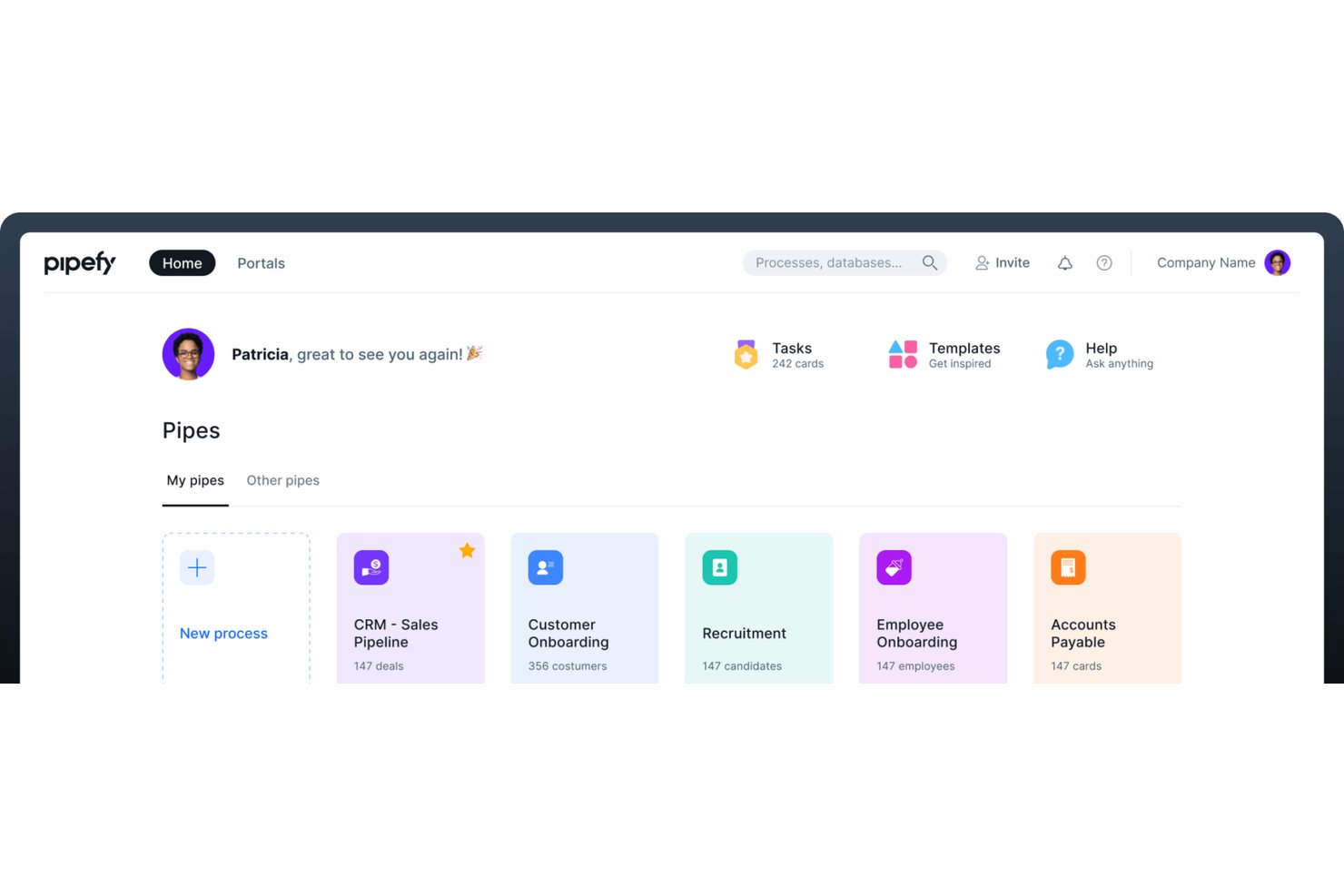
Pipefy is a no-code business process automation platform that lets teams design, automate, and monitor workflows across HR, procurement, finance, and operations using visual pipes, conditional logic, AI agents, and real-time KPI dashboards.
Who Is Pipefy Best For?
Pipefy is a strong fit for mid-market operations and business process teams that need to build and automate department-level workflows without relying on IT or engineering resources.
Why I Picked Pipefy
I've included Pipefy in my top picks because its workflow templates are genuinely built for specific business processes, not just blank canvases. Each template comes pre-configured with phases, form fields, and automation rules for processes like purchase requests, employee onboarding, and claims management. I can adjust phase logic, add conditional fields, and modify automation triggers directly inside the pipe builder, which keeps each template tightly aligned to how the actual process runs in practice.
Pipefy Key Features
- AI-powered automation studios: Automate routing, approvals, and actions with specialized AI models for processes like SRM and claims.
- Centralized request tracker: Manage all incoming process requests from one portal for total visibility.
- Role-based permissions: Control who can view, edit, or approve different workflow phases and process data.
- Real-time analytics dashboards: Monitor cycle times, bottlenecks, and workload distribution with customizable reports.
Pipefy Integrations
Pipefy offers native integrations with Salesforce, HubSpot, RD Station, Google Sheets, Slack, Shopify, Zendesk, Zenefits, and more. It also connects with Zapier and provides an API for custom integrations.
Pros and Cons
Pros:
- Dynamic forms and conditional process logic
- Extensive template library for common workflows
- Built-in AI agents for process optimization
Cons:
- Limited support for advanced BPMN modeling
- No process simulation or what-if analysis

Best for checklist-driven operations
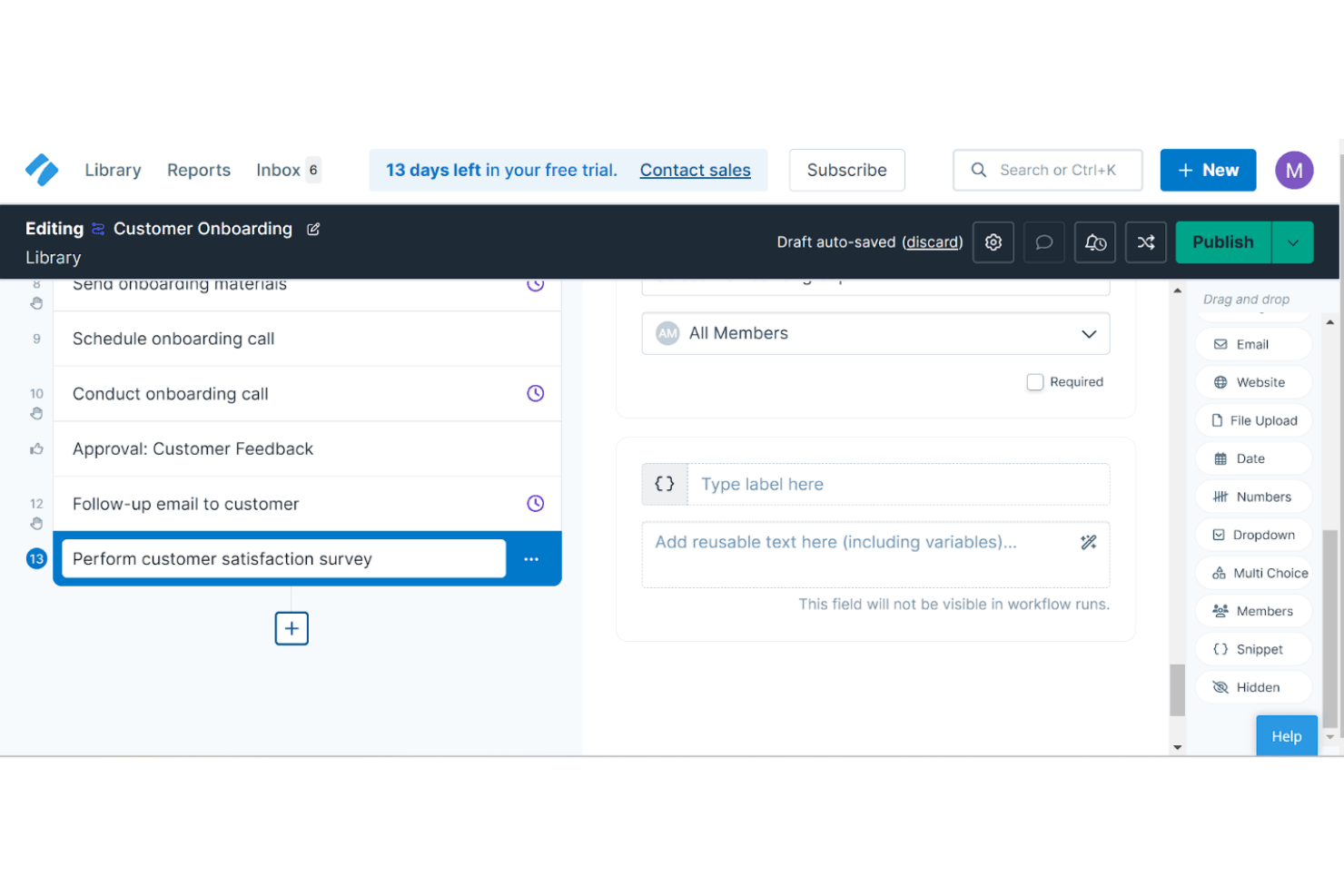
Process Street is a workflow and SOP management platform built around no-code process building, conditional logic automation, and an AI compliance agent that monitors and enforces process execution.
Who Is Process Street Best For?
Process Street suits operations managers in compliance-heavy industries like healthcare, financial services, and real estate who need structured, audit-ready process execution.
Why I Picked Process Street
Process Street earns its spot on my shortlist because of how it handles checklist-driven operations at scale. I like that every process, from new-hire onboarding to compliance audits, runs as a structured, enforced checklist with conditional logic that automatically skips or reveals steps based on prior answers. The Cora AI agent then monitors each run in real time, flagging skipped steps and overdue tasks without me having to chase anyone down.
Process Street Key Features
- Workflow analytics dashboard: Track process completion rates, overdue tasks, and user activity across all workflows.
- Public API access: Connect Process Street with custom systems to trigger or update workflows programmatically.
- Role-based access controls: Assign granular permissions so different users can view, edit, or run specific workflows.
- Document approval flows: Route SOPs or procedures through multi-step review and sign-off processes before publishing.
Process Street Integrations
Process Street offers native integrations with Slack, Microsoft Teams, Power Automate, and Make, and connects with Zapier. An API is available for custom integrations.
Pros and Cons
Pros:
- Approval workflows support audit trails
- Conditional logic customizes workflow steps
- Automated checklists enforce process compliance
Cons:
- Checklists lack visual flowchart design
- No process simulation or what-if modeling
Celonis
Best for real-time process analytics
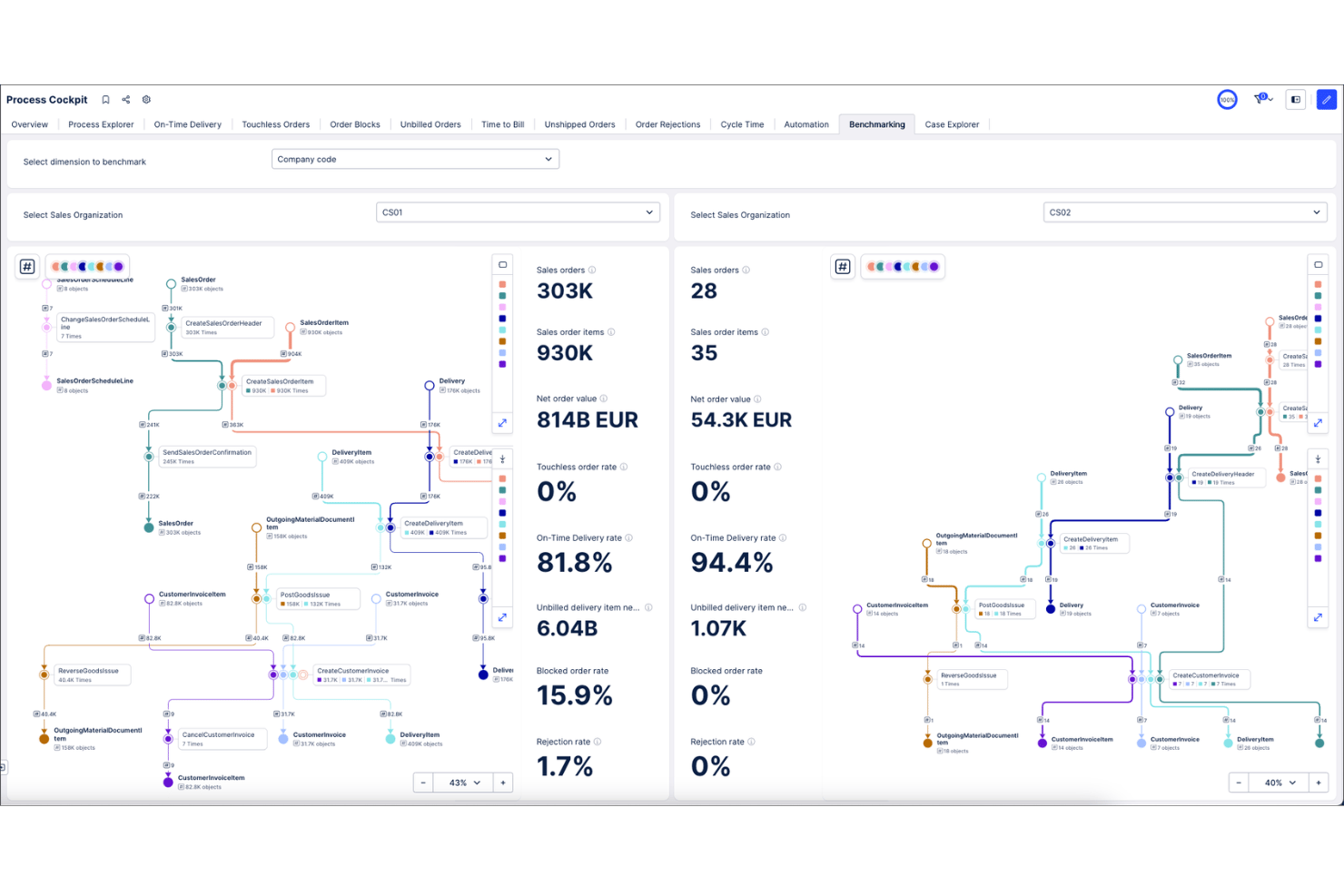
Celonis is a process intelligence platform that applies process mining, AI-driven analytics, and workflow automation to map, analyze, and optimize end-to-end business operations using live data from enterprise systems.
Who Is Celonis Best For?
Celonis is a strong fit for large enterprises running complex ERP environments, particularly those with dedicated operations or continuous improvement teams managing high-volume transactional processes.
Why I Picked Celonis
Celonis earns its spot on my shortlist because of how it handles real-time process analytics at scale. I particularly like the Insights Explorer and AI Co-pilots, which automatically surface patterns and flag exactly which variables are hurting a target KPI. In practice, that means I can pinpoint a bottleneck in an order-to-cash cycle without manually sifting through system logs or waiting on a scheduled report.
Celonis Key Features
- Object-centric process modeling: Supports multidimensional process mapping across interconnected business objects and systems.
- AI-powered process designer: Lets you visually design and manage enterprise process maps with AI-driven recommendations.
- Process adherence manager: Automatically overlays designed processes with real execution to identify deviations and compliance risks.
- Extensive connector catalog: Offers over 200 pre-built connectors for ERP, CRM, ITSM, and collaboration platforms.
Celonis Integrations
Celonis offers over 200 native integrations, including Jira, Coupa, Ironclad, Amazon S3, Google Sheets, and Confluence. An API is available for custom integrations.
Pros and Cons
Pros:
- Automatic root cause and pattern detection
- Real-time monitoring of process performance metrics
- Industry-leading process mining and analytics capabilities
Cons:
- Limited native support for business process modeling
- Implementation often requires significant IT resources

Nintex
Best for automated document generation
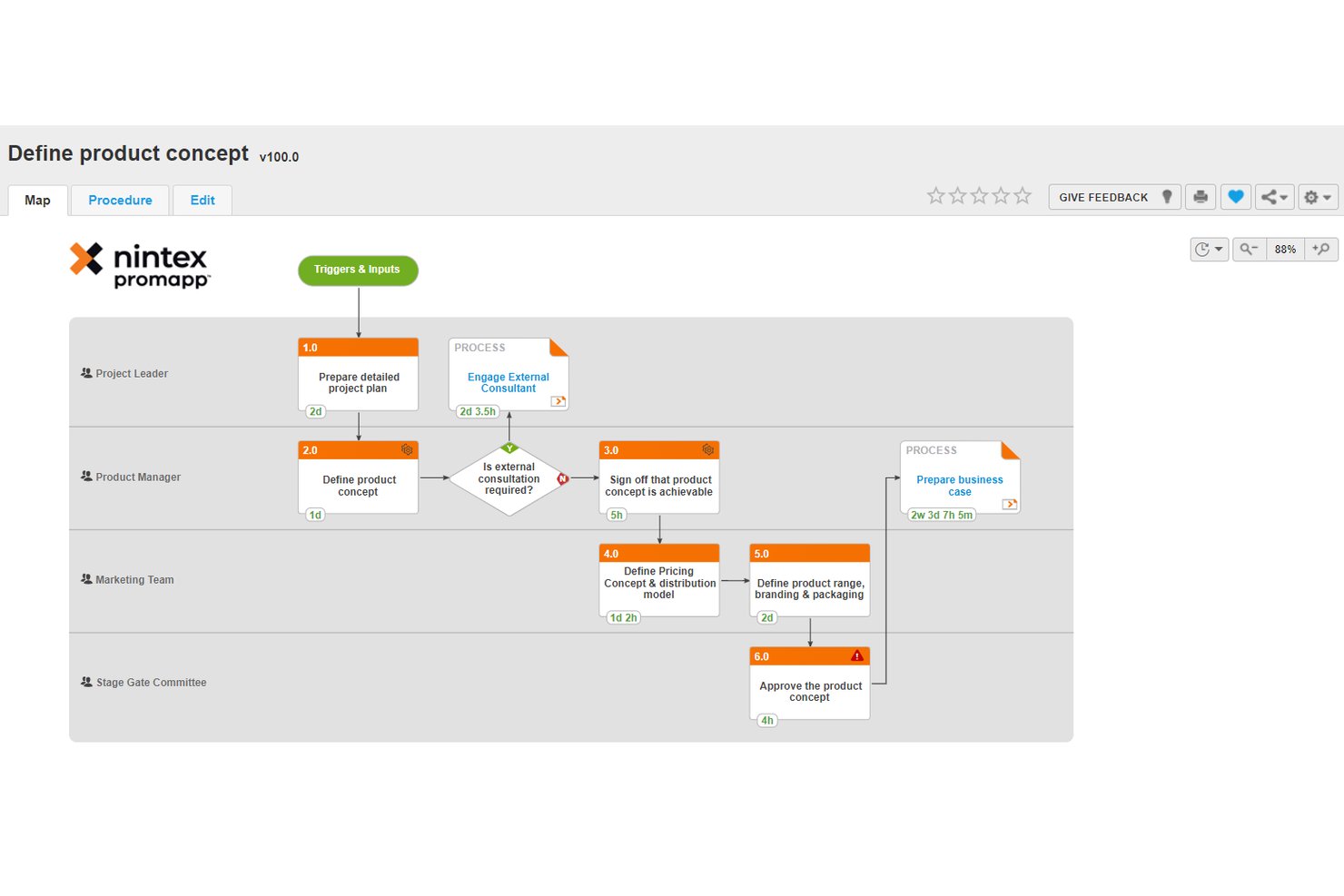
Nintex is a no-code process optimization platform that combines process mapping, workflow automation, document generation, robotic process automation, and eSignature into a single, unified environment.
Who Is Nintex Best For?
Nintex is a strong fit for enterprise and mid-market operations teams that need to document, automate, and govern complex business processes across departments.
Why I Picked Nintex
I picked Nintex as one of the best because its DocGen capability sits directly inside the workflow engine, not as a bolt-on feature. I can trigger contract or proposal generation automatically at a specific workflow step, pulling live data from connected systems to populate templates. That means my team isn't manually assembling documents after a process milestone, because the document is produced as part of the process execution itself.
Nintex Key Features
- Process mapping with Promapp: Map and document business processes with version controls and collaborative editing.
- Robotic process automation: Automate repetitive tasks and system handoffs using bots across applications.
- Workflow designer: Build rule-based workflows with drag-and-drop controls to orchestrate tasks and approvals.
- eSignature integration: Add digital signature steps directly into automated workflows and document cycles.
Nintex Integrations
Nintex offers native integrations across the Microsoft ecosystem, including Microsoft 365, SharePoint, and Azure, plus Salesforce and Docusign. An API is available for custom integrations.
Pros and Cons
Pros:
- Automated document creation from live data
- Built-in process mapping with versioning
- No-code workflow builder for business users
Cons:
- Bulk editing options are restrictive
- Limited process mining capabilities

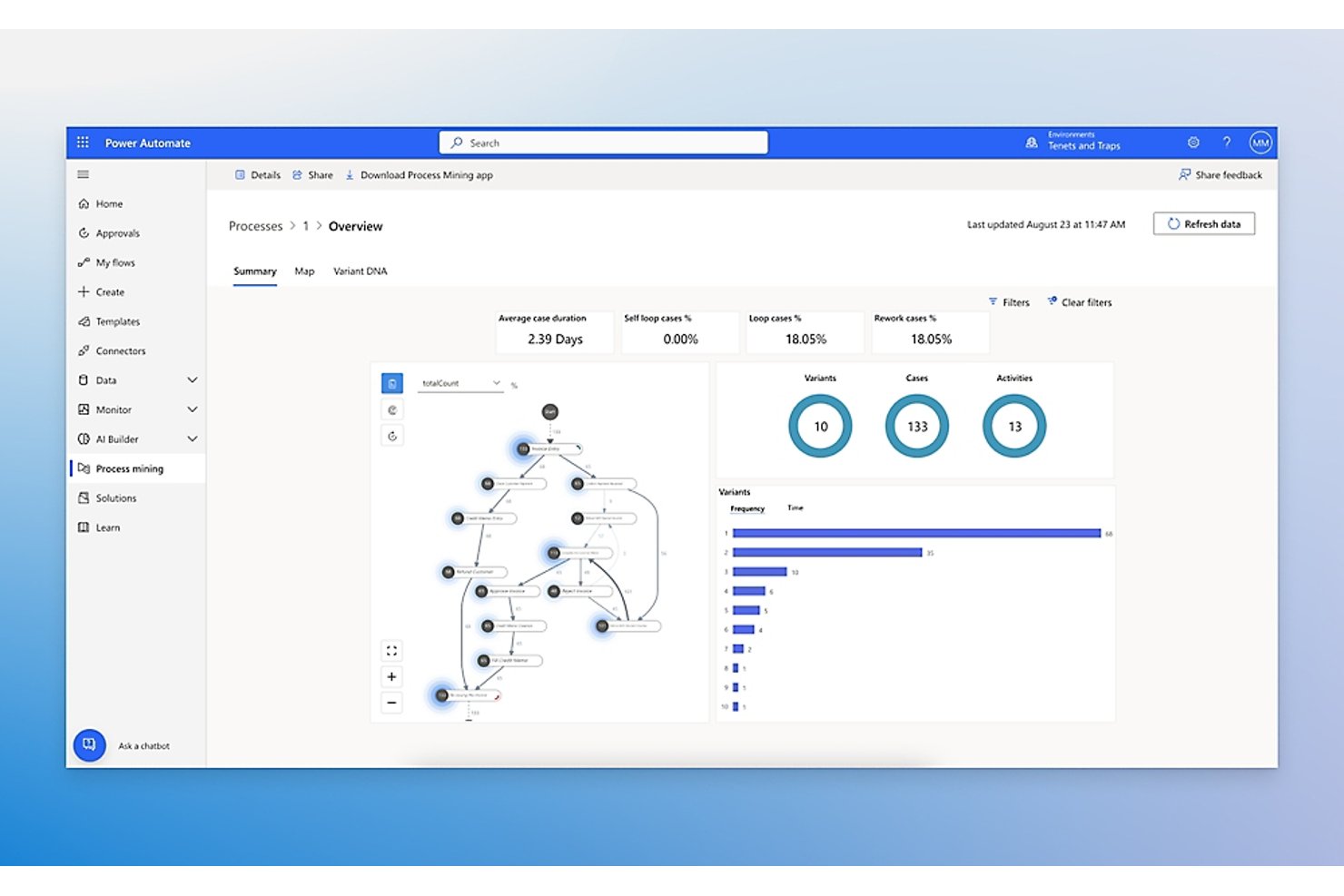
Microsoft Power Automate is a cloud-based automation platform that combines digital process automation, robotic process automation (RPA), and AI-driven process mining to discover, automate, and monitor business workflows.
Who Is Microsoft Power Automate Best For?
It's a strong fit for mid-size to enterprise organizations already standardized on Microsoft 365, Dynamics 365, or Azure who want to automate processes without leaving that ecosystem.
Why I Picked Microsoft Power Automate
Microsoft Power Automate earns its spot on my shortlist because of how tightly it fits into a Microsoft-first stack. I particularly like the approval flow builder, which routes sign-offs through Outlook or Teams without any custom development work. The process mining capability pulls event logs directly from Dynamics 365 or SharePoint and generates visualized process maps showing cycle times and bottleneck steps. I've used it to pinpoint exactly where handoffs slow down before rebuilding the flow entirely.
Microsoft Power Automate Key Features
- AI-powered task mining: Identifies patterns and manual steps from user activity data to suggest opportunities for automation.
- Hosted RPA bots: Runs unattended robotic process automations on Microsoft-managed virtual machines for scale and reliability.
- Centralized governance dashboard: Gives admins controls over flow approvals, data loss prevention, and environment management.
- 1,400+ prebuilt connectors: Lets users automate tasks across popular SaaS, legacy, and on-premises applications without custom code.
Microsoft Power Automate Integrations
Microsoft Power Automate has native integrations across the Microsoft ecosystem, including Microsoft 365 and Azure. It also offers 1,400+ certified connectors to tools like SAP, Salesforce, ServiceNow, Oracle, Docusign, and Jira, with an API available for custom integrations.
Pros and Cons
Pros:
- Enterprise governance with Managed Environments
- Automated approvals through Microsoft Teams and Outlook
- Built-in process and task mining tools
Cons:
- No native process simulation or what-if analysis
- Lacks true BPMN process modeling capability

Appian
Best for low-code workflow automation
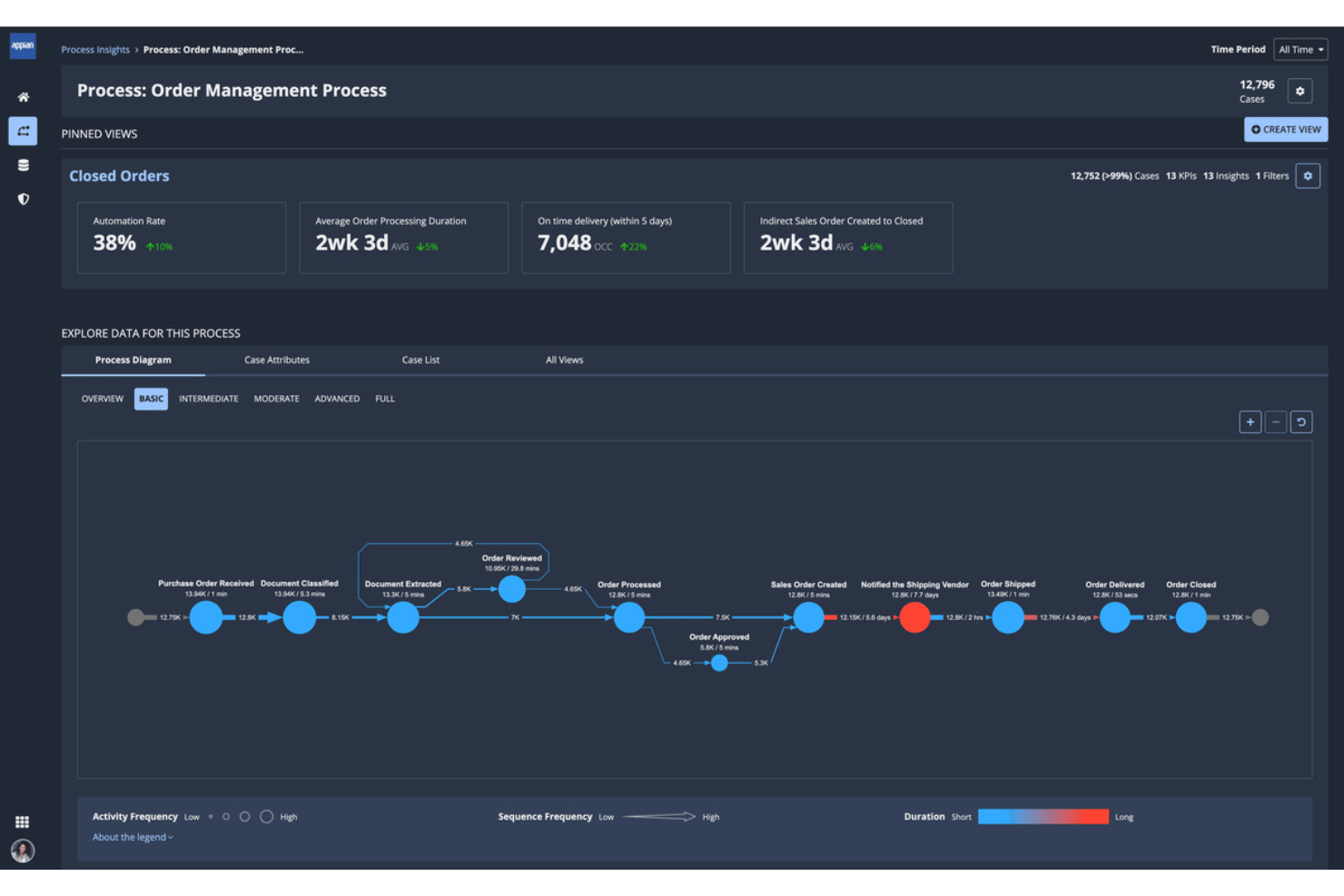
Appian is a low-code process automation platform that combines BPM, process mining, RPA, and AI-driven workflow orchestration to design, execute, and monitor end-to-end business processes.
Who Is Appian Best For?
Appian is a strong fit for large enterprises in regulated industries like finance, healthcare, and government that need governed, auditable process automation at scale.
Why I Picked Appian
I picked Appian as one of the best because its low-code process designer lets my team build and modify BPMN-based workflows without waiting on developers. What really sets it apart is Process HQ, which layers process mining on top of live execution data to surface bottlenecks automatically. I can see exactly where approvals are stalling across hundreds of running process instances, with AI-generated recommendations on what to fix first.
Appian Key Features
- Data Fabric: Connects and unifies data from multiple sources for use in process models without data migration.
- Robotic process automation: Lets you run bots to automate repetitive tasks across legacy and modern systems.
- Case Management Studio: Provides tools for building structured and unstructured case management solutions.
- AI Copilot for developers: Uses generative AI to help design, build, and modify process logic within the platform.
Appian Integrations
Appian offers native integrations with Twilio, Snowflake, Apache Kafka, and SQL Server. It provides cloud integrations across AWS, Azure, and Google Cloud, and includes an API for custom integrations.
Pros and Cons
Pros:
- Supports enterprise-grade security and compliance
- Built-in AI for process recommendations
- Workflow automation requires little custom code
Cons:
- Limited options for advanced UI customization
- Reports of slower app deployment speeds
Kissflow
Best for intuitive drag-and-drop workflows
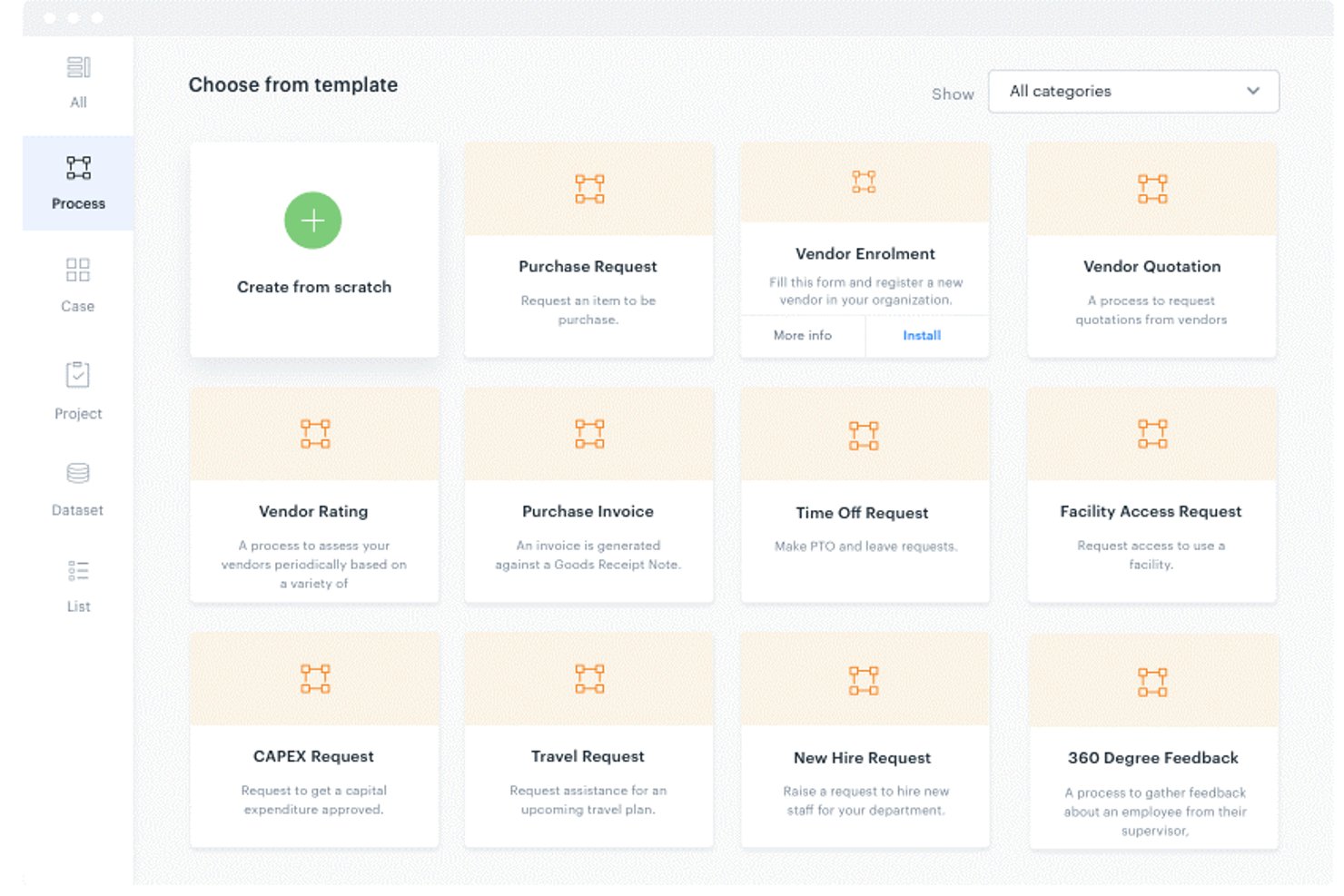
Kissflow is a low-code BPM platform that lets business users visually design, automate, and monitor end-to-end workflows using a drag-and-drop process designer, conditional logic, and AI-assisted process modeling.
Who Is Kissflow Best For?
Kissflow is a strong fit for mid-market and enterprise operations teams where business users—not developers—need to own and manage process workflows independently.
Why I Picked Kissflow
Kissflow earns its spot on my shortlist because the drag-and-drop Process Designer genuinely removes the barrier between having a process idea and running it in production. I can map parallel approval branches, set per-step time limits, and configure auto-escalation paths all from the same visual canvas, without touching a line of code. The AI-assisted workflow generation is also worth noting: I can describe a process in plain language and get a working draft in under two minutes.
Kissflow Key Features
- Form builder: Create forms with conditional logic, field validation, and calculated fields for structured data collection.
- Native integrations: Connect with ERP, CRM, HRMS, and 8,000+ apps via Zapier or API to sync process data.
- Role-based access control: Set granular permissions and manage security with SSO and audit trails.
- Live analytics dashboards: Track cycle times, bottlenecks, and SLA compliance with real-time reporting.
Kissflow Integrations
Kissflow offers native integrations with Google Workspace, Microsoft 365, SAP, Salesforce, and Slack. It connects with Zapier and provides an API for custom integrations.
Pros and Cons
Pros:
- Built-in SLA tracking for task cycles
- AI-powered flow mapping detects process issues
- Process designer allows rapid workflow changes
Cons:
- Advanced reporting options are limited
- No support for process simulation modeling

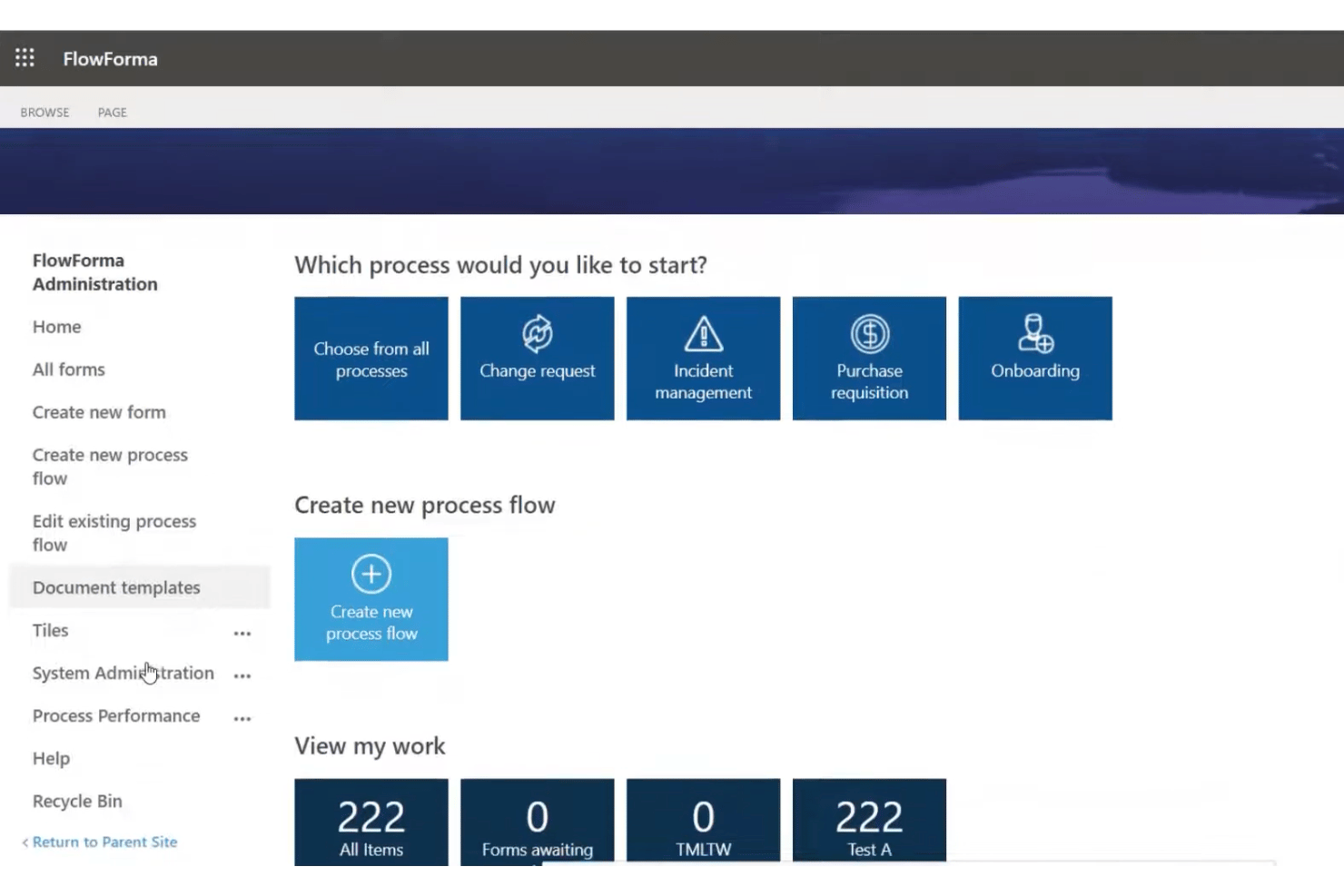
FlowForma is a no-code process automation platform built natively inside Microsoft 365 that lets business users design, automate, and manage end-to-end workflows using forms, approvals, document generation, and AI-assisted process building.
Who Is FlowForma Best For?
FlowForma is a strong fit for mid-size to enterprise organizations already running on Microsoft 365 that want business users, not developers, to own process automation.
Why I Picked FlowForma
I picked FlowForma as one of the best because the no-code process building experience is genuinely distinct from most automation platforms. FlowForma Copilot lets me describe a process in plain language and then generates the workflow, forms, and approval routing automatically. I also like the AI Agents feature, which reads uploaded documents, extracts structured data, and feeds it directly into a live process, cutting out manual data entry steps.
FlowForma Key Features
- Drag-and-drop workflow builder: Design custom workflows visually without writing any code.
- Document generation: Automatically create Word or PDF documents from process data and templates.
- Governance and permissions: Control access with role-based permissions and maintain a complete audit trail for compliance.
- Mobile app: Allow users to complete forms, approvals, and process tasks from mobile devices.
FlowForma Integrations
FlowForma offers native integrations across the Microsoft ecosystem, including Microsoft 365, SharePoint, Teams, Outlook, Power Automate, and Azure SQL, and provides an API for custom integrations.
Pros and Cons
Pros:
- Role-based workflow permissions and governance
- Automated document generation from workflow data
- Built natively on Microsoft 365 architecture
Cons:
- Lacks process simulation and what-if analysis
- No BPMN 2.0 or process mapping
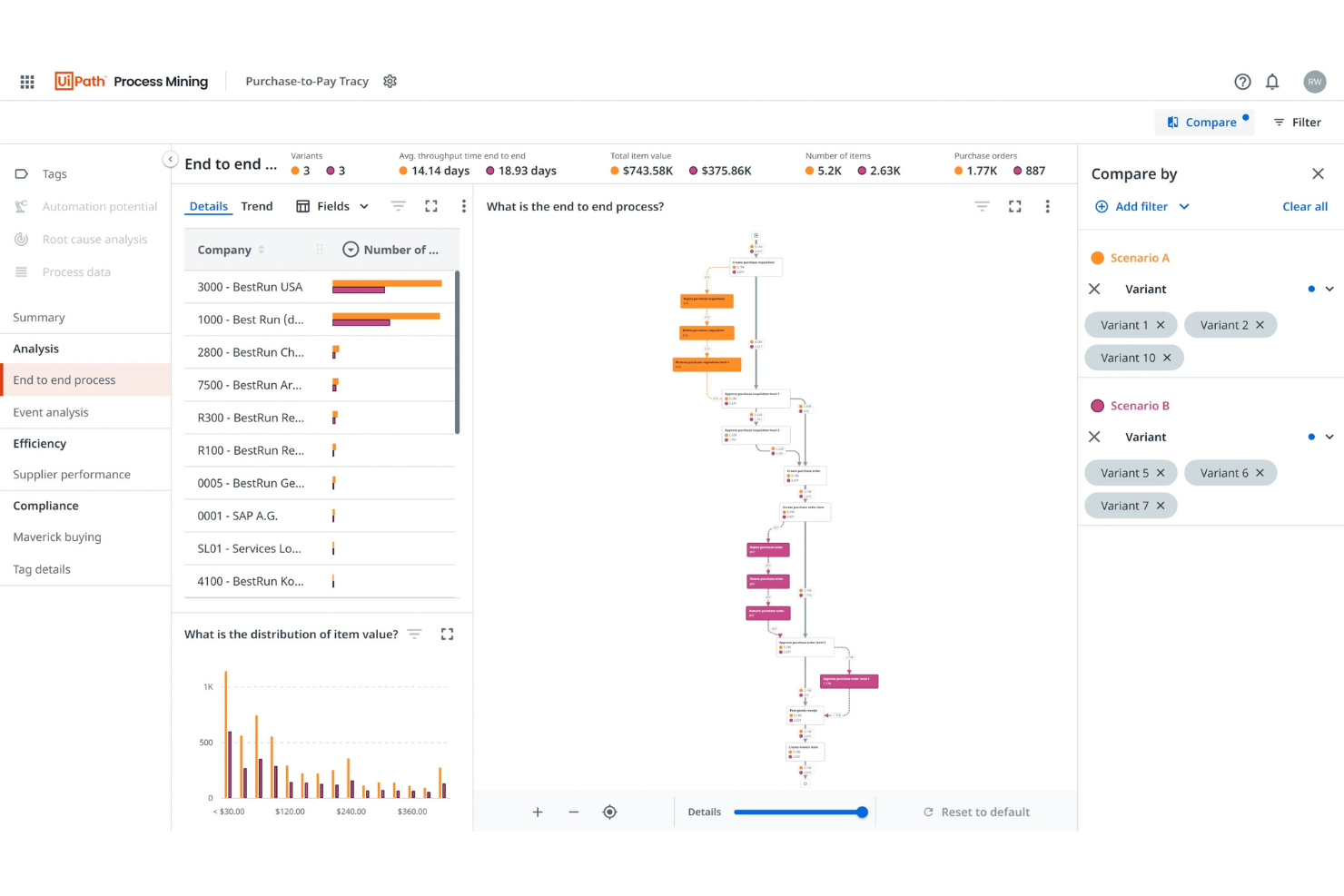
UiPath Process Mining is a process intelligence platform that uses data from enterprise systems to automatically discover, visualize, and monitor end-to-end business processes, surfacing bottlenecks, deviations, and automation opportunities through interactive dashboards.
Who Is UiPath Process Mining Best For?
It's a strong fit for mid-to-large enterprises running complex, multi-system operations who need data-driven visibility into how their processes actually run.
Why I Picked UiPath Process Mining
UiPath Process Mining earns its spot on my shortlist because of how it handles process discovery at scale. What I find genuinely impressive is the TRACY algorithm, UiPath's proprietary approach to model-based mining that cuts through noisy event log data to produce clean, readable process graphs without manual cleanup. I also like the conformance checking feature, which continuously flags where real-world execution deviates from the intended process model, giving my team a live view of where things are actually breaking down.
UiPath Process Mining Key Features
- Automatic process discovery: Generates visual maps of real business processes using event log data from core enterprise systems.
- Customizable dashboarding: Lets you build and adjust interactive dashboards around any business process metric or KPI.
- 50+ enterprise system connectors: Connects natively to platforms like SAP, Salesforce, Oracle, ServiceNow, and Microsoft Dynamics.
- Role-based access control: Restricts data visibility and editing permissions based on user roles within your organization.
UiPath Process Mining Integrations
UiPath Process Mining offers native integrations with SAP, Salesforce, and ServiceNow, connects with other UiPath products like Task Mining and Automation Hub, and provides an API for custom integrations.
Pros and Cons
Pros:
- Direct integration with UiPath automation suite
- Real-time process conformance monitoring
- Advanced process discovery with TRACY algorithm
Cons:
- Simulation features only in enterprise tier
- Implementation cycle can be several months

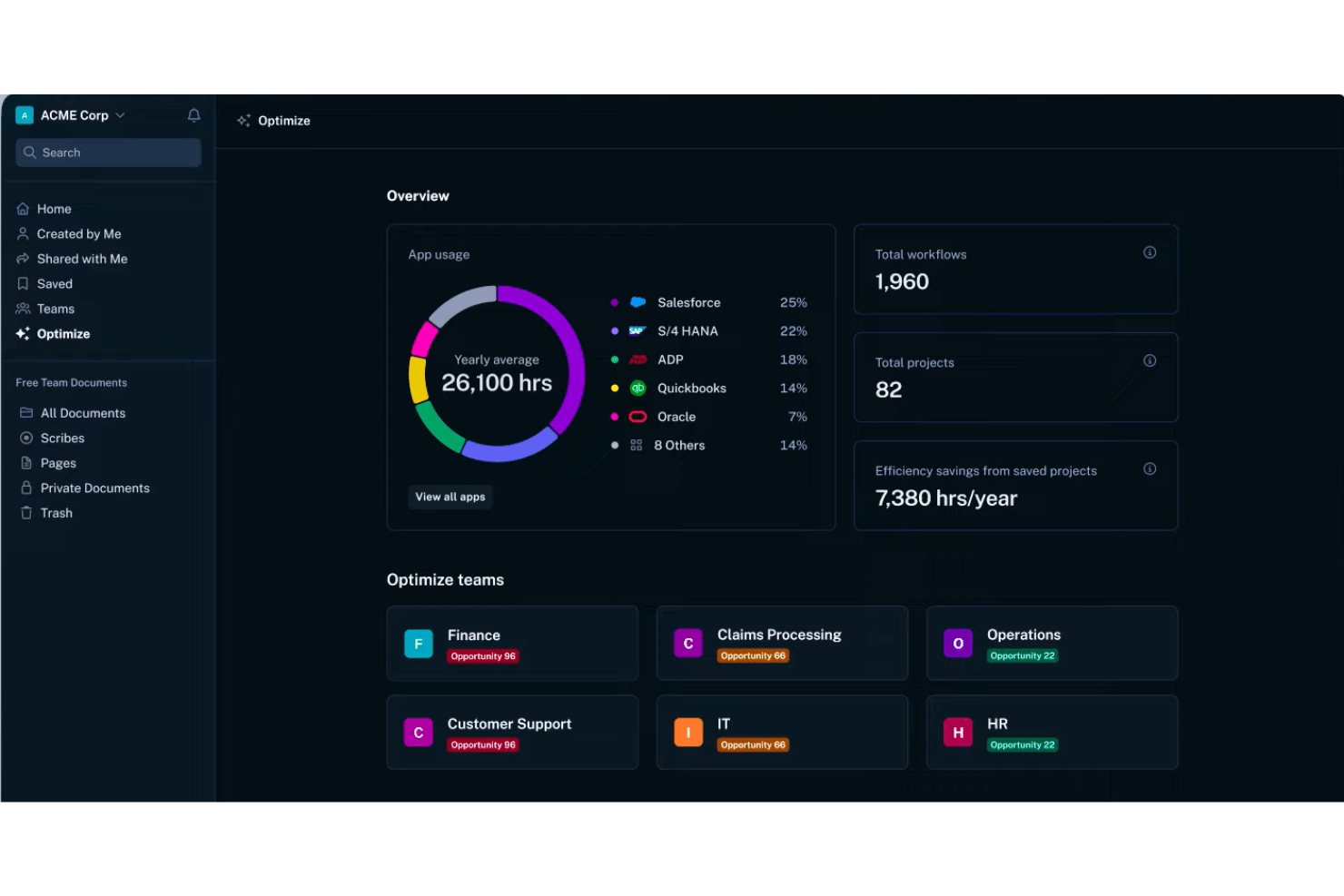
Scribe Optimize is an AI-powered workflow discovery tool that automatically captures team workflows, generates process maps, and identifies automation opportunities and inefficiencies across enterprise software environments.
Who Is Scribe Optimize Best For?
Scribe Optimize is a strong fit for enterprise operations and continuous improvement teams leading AI adoption or digital transformation initiatives.
Why I Picked Scribe Optimize
I've included Scribe Optimize in my top picks because it surfaces automation opportunities from real workflow data, not from interviews or manual mapping sessions. I like that its AI agents identify which workflows are the strongest automation candidates based on actual frequency and time cost. It also generates ROI projections before any automation work begins, so the business case is grounded in real numbers rather than estimates.
Scribe Optimize Key Features
- Workflow capture across approved apps: Automatically records user actions in software tools to build a workflow dataset.
- Always-up-to-date process maps: Instantly generates visual process maps from real-time workflow activity.
- AI Q&A agents: Lets users ask direct questions about workflows, inefficiencies, and inconsistencies.
- Integration with enterprise platforms: Connects with Confluence, Slack, Microsoft Copilot, and custom enterprise APIs for data sharing and workflow visibility.
Scribe Optimize Integrations
Scribe Optimize offers native integrations with Confluence, Slack, and Microsoft Copilot. An API is available for custom integrations, and it connects with enterprise search platforms.
Pros and Cons
Pros:
- ROI projections for recommended automation candidates
- Auto-generated process maps from live user activity
- AI surfaces hidden workflow bottlenecks fast
Cons:
- Lacks traditional BPMN process modeling features
- Cannot execute automations or workflow changes
Other Process Optimization Software
Here are some additional process optimization software options that didn’t make it onto my shortlist, but are still worth checking out:
- Quickbase
For flexible data-driven automation
- Miro
For visual process mapping
- QPR ProcessAnalyzer
For operational context in AI workflows
- Pega
For end-to-end workflow adaptability
- Qntrl
For departmental process automation
- Bizagi
For enterprise orchestration with AI
- IBM Process Mining
For AI-driven workflow insights
- SAP Signavio
For collaborative enterprise transformation
- iGrafx
For integrated process intelligence


How I Evaluate Process Optimization Software
I split my evaluation into two layers: the baseline requirements a tool must meet and the differentiators—like process mining and simulation—that set one platform apart from another.
Core Functionality (Table Stakes for This List)
When I'm selecting tools for my list, I rank each one on a scale from 0 (does not offer the functionality) to 5 (excels in this area) for each core functionality listed below. Then, I calculate the tool's total score into a percentage. Each tool needs to achieve a minimum total score of 65% to be considered for inclusion.
- Process Mapping & Modeling: I evaluate whether the tool supports BPMN or swim lane notation so teams can document workflows like order-to-cash or incident resolution clearly.
- Workflow Automation: Each tool should let you automate task handoffs and approvals with conditional logic, not just basic linear sequences.
- Process Analytics & KPIs: I look for dashboards that track cycle time, throughput, and status breakdowns so you can spot trends without exporting data manually.
- Bottleneck Detection: The platform should surface delays and deviations automatically, like flagging approval steps that consistently stall a sprint release process.
- Process Simulation: I check whether you can model proposed changes and compare projected outcomes before rolling them out across teams or departments.
- Integration With Work Systems: Tools need to connect with project management, ERP, or collaboration platforms your team already uses to pull in real operational data.
Once I have a list of tools that meet the criteria, I consider what sets each platform apart.
Differentiating Factors (What Sets Vendors Apart)
Here's how I compare and contrast different vendors:
Standout Features
Process mining is a major differentiator—I look for tools that ingest event logs from systems like SAP or ServiceNow and reconstruct actual process flows, not just the ones teams documented. Digital twin simulation matters when you need to forecast how a change to your release process will affect cycle time before rolling it out. I also evaluate whether AI-powered recommendations suggest specific next-best actions based on historical patterns, rather than just flagging issues.
Beyond Features
Integration ecosystem matters—I check whether a platform offers pre-built connectors for the systems generating your event data, like SAP or Salesforce, rather than relying solely on custom API work. Time-to-value is another key factor. Vendors with pre-built templates for common flows like procure-to-pay can get your team from data connection to first insight in weeks, not months. I also evaluate compliance posture, especially audit trails and data masking for event logs that may expose sensitive information.
How to Choose Process Optimization Software
It’s easy to get bogged down in long feature lists and complex pricing structures. To help you stay focused as you work through your unique software selection process, here’s a checklist of factors to keep in mind:
| Factor | What to Consider |
|---|---|
| Scalability | Will the software support growing event data, users, and expanded processes without slowing performance or hitting platform limits? |
| Integrations | Does the tool connect to your project, ERP, or collaboration systems? Check for native connectors vs. manual or custom API work. |
| Customizability | Can you tailor process templates, rules, or dashboards to reflect your team’s unique workflows and language? |
| Ease of use | Will business users and analysts pick up the tool quickly? Look for visual editors, in-app tips, and clear documentation. |
| Implementation and onboarding | How much time and internal expertise does setup demand? Ask for average implementation timelines and whether vendor training is included. |
| Cost | What’s the true cost at your usage tier? Watch for additional charges for integrations, data volume, or premium support. |
| Security safeguards | Does the vendor offer audit trails, data masking, and certified data protection for sensitive process logs and user actions? |
| Support availability | Is support included, 24/7, or limited to business hours? Consider your organization’s timezone, self-service resources, and escalation options. |
What Is Process Optimization Software?
Process optimization software is a platform that helps you visualize, analyze, and improve business or project workflows by automating tasks, detecting inefficiencies, and tracking process performance. These tools are designed for teams who need to map workflows, measure cycle times, and test process changes to drive continuous improvement across departments.
Features
When selecting process optimization software, keep an eye out for the following key features:
- Process mapping and modeling: Enables users to visually document and structure workflows using standardized notation such as BPMN or flowcharts for clear communication across teams.
- Workflow automation: Lets you transform manual tasks, approvals, and handoffs into automated rules-based sequences, reducing errors and boosting consistency.
- Analytics and KPI tracking: Provides dashboards and reports that track process metrics like cycle time, throughput, and bottlenecks so you can measure the impact of changes.
- Bottleneck and inefficiency detection: Surfaces slowdowns, delays, or deviations in your processes, helping teams quickly identify areas for improvement.
- Simulation or what-if analysis: Offers a sandbox to model, test, and compare proposed process changes before rolling them out in live environments.
- Integration capabilities: Connects with project management, ERP, and collaboration platforms to pull real-time data and keep processes updated.
- Version control and audit trails: Tracks process updates and user actions over time, supporting compliance and accountability.
- User access controls: Lets administrators set permissions, ensuring team members only access the data and workflows relevant to their roles.
- Templates and accelerators: Provides pre-built process templates and industry-specific accelerators to speed up deployment and standardization.
- Mobile and cloud access: Allows users to design, monitor, and improve processes from any location for distributed or hybrid teams.
Benefits
Implementing process optimization software provides several benefits for your team and your business. Here are a few you can look forward to:
- Improved workflow visibility: Visual process mapping and analytics make it easy to identify inefficiencies and monitor performance across teams.
- Faster process execution: Workflow automation eliminates manual handoffs and repetitive steps, speeding up project or business cycles.
- Data-driven decision-making: Real-time dashboards and simulation tools empower teams to make informed changes based on measurable KPIs.
- Reduced operational costs: By detecting bottlenecks and simplifying tasks, teams can optimize resource allocation and cut unnecessary expenses.
- Enhanced accountability: Version control, audit trails, and access controls ensure compliance and clarity over who made process changes and why.
- Greater adaptability: Simulation and modeling features let you test process improvements with minimal risk before full deployment.
- Stronger system integration: Connections with project management and ERP tools centralize your workflow data for easier management and analysis.
Costs & Pricing
Selecting process optimization software requires an understanding of the various pricing models and plans available. Costs vary based on features, team size, add-ons, and more. The table below summarizes common plans, their average prices, and typical features included in process optimization software solutions:
Plan Comparison Table for Process Optimization Software
| Plan Type | Average Price | Common Features |
|---|---|---|
| Free Plan | $0 | Limited process mapping, basic analytics, community support, and restricted user seats. |
| Personal Plan | $10–$30/user/month | Process modeling, automation for small projects, reporting, email support, and basic integrations. |
| Business Plan | $25–$60/user/month | Multi-user access, workflow automation, dashboard analytics, pre-built templates, and enhanced security. |
| Enterprise Plan | $60–$150/user/month | Advanced process mining, enterprise integrations, AI recommendations, role-based controls, and priority support. |
Process Optimization Software FAQs
Here are some answers to common questions about process optimization software:
How does process optimization software differ from standard workflow tools?
Process optimization software goes beyond basic workflow automation by offering deep data analysis, process mining, and scenario simulation to identify bottlenecks in complex processes. Instead of just automating tasks, it measures end-to-end workflows to boost overall process efficiency, improve product quality, and drive long-term profitability.
Can process optimization software integrate with my existing tools?
Yes, most solutions offer integrations with project management, ERP, and collaboration platforms, often including pre-built connectors for major systems like SAP, Salesforce, and ServiceNow. These integrations can trigger real-time notifications across departments and improve process control.
Is process optimization software suitable for small teams or just large enterprises?
Process optimization software can benefit both small teams and large enterprises, though advanced analytics and automation tools tend to deliver the most value at scale or with intricate workflows. By evaluating your current process against established key performance indicators, organizations of any size can eliminate unneeded downtime, raise customer satisfaction, and advance their sustainability goals.
How long does implementation typically take?
Implementation timelines vary by vendor and deployment scope, but many solutions offer pre-built templates and onboarding support to drive measurable improvements in operational efficiency within weeks, not months.
What data security measures are usually included?
Leading platforms provide audit trails, encryption, role-based access, and data masking to safeguard sensitive workflow and event log data in line with security standards.
Does this software support process improvement frameworks like Lean or Six Sigma?
Yes, many tools include features aligned with continuous improvement methodologies, making it easier to document, measure, and optimize processes under Lean, Six Sigma, or similar frameworks while keeping key stakeholders aligned on performance goals.