

10 Best Pharma Project Management Software Reviewed in 2026

Best Pharma Project Management Software Shortlist


Managing pharmaceutical projects can be a complex task with tight deadlines, regulatory hurdles, and shifting priorities. You need tools that can help you manage compliance, collaborate in a secure environment, and assess risk while keeping your team aligned. That's where pharma project management software comes in. It helps you tackle these challenges by providing features tailored to your unique needs.
In my experience testing and reviewing software, I've found solutions that can make a difference. In this article, I'll share my top picks for project management software in the pharma industry. You can expect an unbiased, well-researched review, focusing on what each tool offers and how it can benefit your team.
Why Trust Our Software Recommendations
Our team has been testing and reviewing software since 2012. As project managers ourselves, we know how difficult—and important—it is to choose the right software.
For this guide, we evaluated tools using hands-on testing and independent research, scoring tools using our selection criteria. We also draw on insights from industry thought leaders and practicing project management experts.
Our reviews reflect our human editorial judgment, not a sales pitch.
Expert reviewers:
Pharma Project Management Software Comparison Table
This comparison table summarizes pricing details for my top pharma project management software selections:
| Tool | Best For | Trial Info | Price | ||
|---|---|---|---|---|---|
| 1 | Best for built-in portfolio and program oversight | 14-day free trial + free demo available | From $10/user/month (billed annually) | Website | |
| 2 | Best for resource management | 30-day free trial + free demo available | From €22.5/month (billed annually) | Website | |
| 3 | Best for document sharing | 14-day free trial + free demo available | From $8/user/month (billed annually) | Website | |
| 4 | Best for small teams | 14-day free trial | From $24.90/user/month (billed annually) | Website | |
| 5 | Best for cross-team collaboration | Free trial available | From $60/user/month | Website | |
| 6 | Best for custom workflows | Free demo available | Free demo available | Website | |
| 7 | Best for budget management | Free demo available | Pricing upon request | Website | |
| 8 | Best for strategic planning | Free demo available | Free demo available | Website | |
| 9 | Best for compliance tracking | Free demo available | Free demo available | Website | |
| 10 | Best for large enterprises | Free demo available | Pricing upon request | Website |
Best Pharma Project Management Software Review
Below are my detailed summaries of the best pharma project management software that made it onto my shortlist. My reviews offer a detailed look at the key features, pros & cons, integrations, and ideal use cases of each tool to help you find the best one for you.

Celoxis
Best for built-in portfolio and program oversight
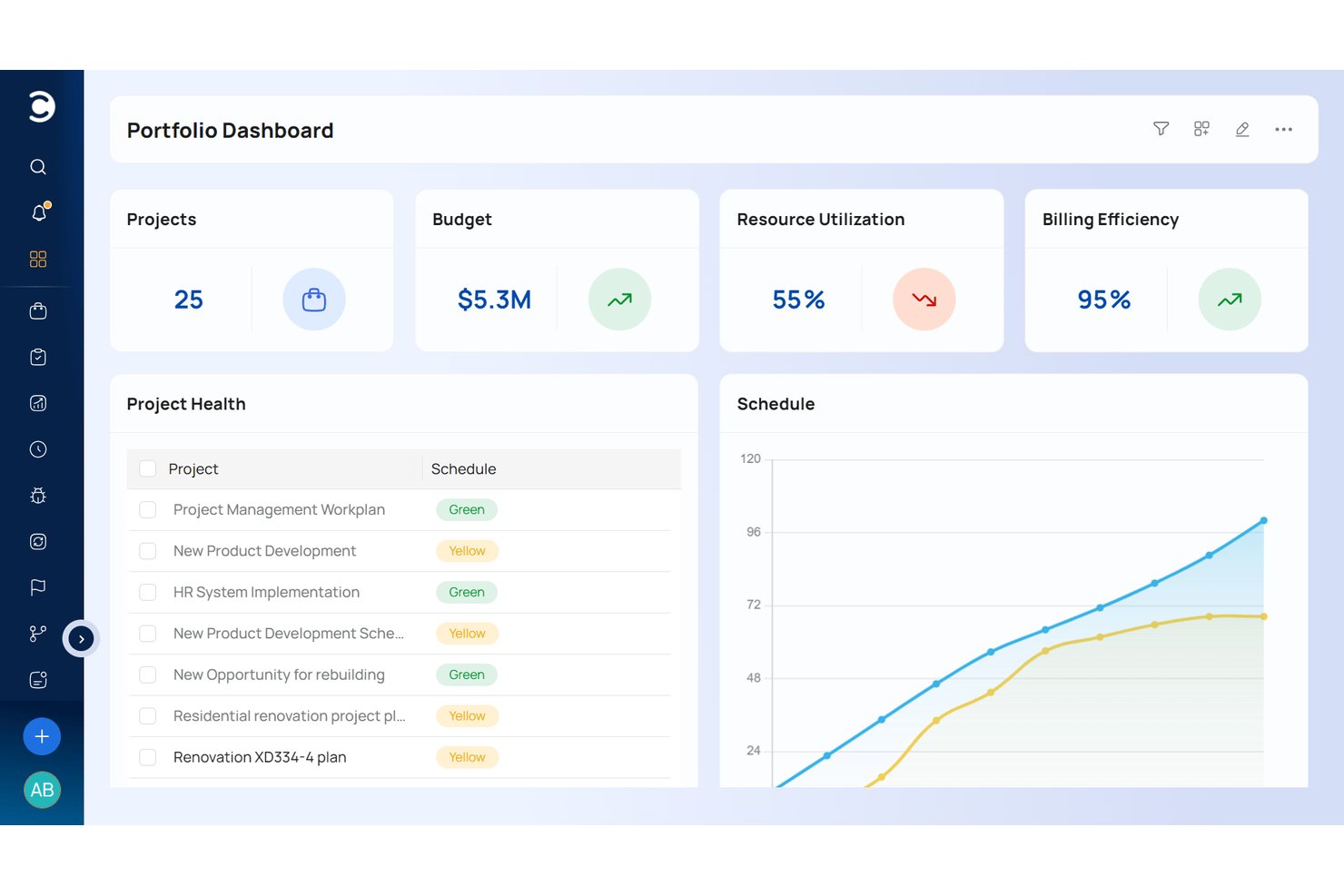
Celoxis is a project and portfolio management platform that combines Gantt-based project planning, resource capacity management, financial tracking, risk management, and multi-project portfolio oversight in a single system.
Who Is Celoxis Best For?
Celoxis is a strong fit for mid-to-large pharma and biotech PMOs managing multiple concurrent drug development programs across cross-functional teams.
Why I Picked Celoxis
Celoxis earns its spot on my shortlist because its portfolio oversight capabilities go deeper than most tools at this price point. I like that what-if scenario planning lets my team model resource and budget tradeoffs across multiple drug development programs before committing to a course of action. The role-based data isolation workspaces also stand out: R&D, clinical, and commercial teams can work inside the same platform without exposing cross-department data, which matters a lot in regulated pipeline environments.
Celoxis Key Features
- AI-powered timeline forecasting: Predicts project completion and resource bottlenecks using historical and live project data.
- Built-in risk register: Tracks risks by category, severity, and response plans, providing audit-ready logs.
- Custom workflow automation: Allows teams to configure project intake, approval, and issue management steps for pharma SOP alignment.
- Advanced dashboard reporting: Offers real-time visualizations of trial milestones, budget adherence, and project health across the portfolio.
Celoxis Integrations
Celoxis offers native integrations with Jira, Salesforce, Slack, Microsoft Teams, Google Drive, Box, Dropbox, Excel, QuickBooks, and Zapier. An API is available for custom integrations.
Pros and Cons
Pros:
- What-if scenario planning aids resource allocation decisions
- Built-in risk registers support mitigation tracking
- Cross-project visibility for enterprise portfolios
Cons:
- Report customization requires significant configuration time
- No pharma-specific GxP compliance validation support

Epicflow
Best for resource management

Epicflow earns its spot here for how well it manages complex resource allocation on pharma projects. I see pharma PMOs regularly choose it when they’re juggling multiple project streams and need a true picture of workload and bottlenecks. The real value, from my experience, is its dynamic resource loading and automatic forecasting as priorities shift.
What I appreciate is how Epicflow gives you instant insight into resource constraints and the impact of changes on delivery timelines.
Epicflow’s Best For
- Pharma PMOs managing multiple project streams and resources
- Teams that need dynamic resource allocation and scenario planning
Epicflow’s Not Great For
- Small teams with straightforward project requirements
- Groups needing built-in document management or regulatory tracking
What sets Epicflow apart
Epicflow treats resource planning as a central part of project management, not an afterthought. Instead of assuming you want to map timelines or tasks first, it starts by mapping people, skills, and roles across all projects. Compared to tools like Jira, which expect you to fit work into predefined boards and sprints, Epicflow works best when you have overlapping projects and must prioritize who does what, and when, across many teams.
Tradeoffs with Epicflow
Epicflow optimizes for enterprise-level resource coordination, but that focus means project documentation and compliance features are limited. If you need built-in regulatory workflows, you'll likely need another tool.
Pros and Cons
Pros:
- Secure data access with Dataguard
- Predictive analytics for forecasting
- AI-driven resource allocation
Cons:
- Some users find the interface complex
- Not ideal for small teams
- Limited customization options

Workzone
Best for document sharing

Workzone earns a spot here because of how deliberately it simplifies document-heavy project environments. I like that you can organize, version, and track controlled documents in dedicated folders, which suits pharma teams juggling regulatory files. The granular permissions and approval workflows work well when you need controlled collaboration and airtight audit trails.
Workzone’s Best For
- Pharma teams managing controlled documents with review cycles
- Projects requiring audit trails and structured folder access
Workzone’s Not Great For
- Teams focused mostly on portfolio, resource, or Gantt planning
- Organizations needing heavy automation or custom workflow logic
What sets Workzone apart
Workzone is built for teams who need structured, collaborative document control above all else. Unlike ClickUp, which pushes task flexibility, Workzone expects you to organize files in project-specific folders and run documents through formal review and approval. In practice, I find this works best in regulated settings, where document status, history, and controlled access beat out speed or visual planning.
Tradeoffs with Workzone
Workzone optimizes for document management, but you lose flexible project visualization and advanced workflow automation, so teams focused on dynamic planning or custom workflows will feel limited.
Pros and Cons
Pros:
- Customizable to-do lists
- Clear project dashboard
- Secure file sharing
Cons:
- Some find the interface outdated
- Not suitable for very large teams
- Basic reporting capabilities
New Product Updates from Workzone

Workzone Enterprise Adds Multi-Stage Approval Workflows
Workzone Enterprise now includes Approval Workflows, enabling multi-stage document approvals to standardize complex processes and reduce manual effort. For more information, visit Workzone's official site.
 .
.
Nimble
Best for small teams

Nimble has earned a spot on my list because it’s intentionally designed around the realities of working in smaller teams, especially within pharma. I usually recommend Nimble for project leads who need to implement controlled workflows and quick iterative planning without overwhelming their resources.
What I like is how it supports visual Kanban, real-time dashboards, and easy backlog management. In practice, teams use these features to keep regulatory deliverables and shifting priorities transparent and under control.
Nimble’s Best For
- Small pharma teams handling regulated project workflows
- Organizations needing visual Kanban and backlog tracking
Nimble’s Not Great For
- Large enterprises with strict, multi-layered governance
- Teams requiring complex automation or portfolio management
What sets Nimble apart
Nimble takes a visual-first approach with Kanban boards and backlog views that keep work visible without overwhelming smaller teams. It’s much more lightweight than a tool like Jira, so you aren’t locked into complex templates or heavy process. I see Nimble working well when you want to move quickly and visibly, but still maintain enough structure for regulated pharma workflows.
Tradeoffs with Nimble
Nimble optimizes for light structure and visibility, but as a result, you lose options for advanced automation or program-level coordination. Larger organizations or multi-team environments often find its feature set limiting.
Pros and Cons
Pros:
- Minimal training required
- Easy collaboration tools
- Simple interface for quick setup
Cons:
- May lack scalability for growth
- Basic reporting options
- Limited advanced features

Best for cross-team collaboration

Planview Vantage makes my list for pharma teams who can't afford cross-team disconnects. I see organizations with R&D, regulatory, and clinical teams relying on it when project interdependencies get too complex for simpler project trackers.
What I appreciate is how you can tag, link, and align deliverables across business units, while live status views keep everyone moving together. It’s set up for the reality of pharma work, where tight coordination and documentation are vital.
Planview Vantage’s Best For
- Pharma orgs juggling R&D, regulatory, and clinical project handoffs
- Programs where cross-team coordination drives outcomes
Planview Vantage’s Not Great For
- Small pharma teams with simple project needs
- Teams that want rapid setup and minimal configuration
What Sets Planview Vantage Apart
Planview Vantage structures multi-team projects around shared timelines and deliverables rather than putting everyone in siloed workstreams. Unlike tools like ClickUp, which let you quickly spin up isolated project boards, Vantage expects you to link work across departments. In practice, this works best for pharma programs where deliverables move between regulatory, clinical, and research teams.
Tradeoffs with Planview Vantage
Planview Vantage optimizes for program coordination, so you give up simple setup and quick-start templates. This adds initial overhead and can slow new teams who need to get running right away.
Pros and Cons
Pros:
- Strong resource management
- Detailed reporting options
- Customizable dashboards
Cons:
- Limited mobile app functionality
- Steep learning curve
- Complex initial setup

cplace
Best for custom workflows

cplace makes sense here because of how flexibly you can design workflows that fit pharma’s strict processes. I’ve seen teams set up end-to-end project plans that map directly to clinical trial phases or compliance gating, with tailored approvals and checkpoints.
What I appreciate is the modular approach to building and adapting workflows—especially when requirements shift or stakeholders need custom tracking.
cplace’s Best For
- Pharma teams needing custom workflows for clinical or regulatory projects
- Organizations with complex, evolving approval and compliance requirements
cplace’s Not Great For
- Small teams wanting a quick, out-of-the-box setup
- Groups uncomfortable with configuring modular workflow tools
What sets cplace apart
cplace is built with a modular approach that lets you create workflows to fit unique project or compliance needs, instead of locking you into a fixed way of doing things like you might see in Jira. I see pharma teams use it when they need precise alignment with regulatory processes or want to mirror the phases of clinical development. It works best when off-the-shelf templates in tools like monday.com just don’t cut it.
Tradeoffs with cplace
cplace optimizes for custom workflow design, but that flexibility means setup takes more time and specialized input up front. If you want to get started right away, you might feel slowed down.
Pros and Cons
Pros:
- Modular architecture for adaptability
- Flexible project methodologies
- Highly customizable workflows
Cons:
- Limited mobile functionality
- Requires training for full use
- Complex setup process


CMap lands on my shortlist because its budgeting controls go far beyond what I see in other project management tools. I recommend it if you’re often working on pharma client projects where precise financial oversight is a constant negotiation. What I appreciate most is how the forecasting, real-time margin tracking, and granular cost allocations make budget management almost continuous—teams tend to catch overspend early.
CMap’s Best For
- Pharma agencies needing tight client project budget controls
- Teams managing ongoing project forecasting and profit tracking
CMap’s Not Great For
- Teams wanting simple task management only
- Groups without financial or costing responsibilities
What sets CMap apart
CMap approaches project management with the mindset that financial visibility is the starting point, not an afterthought. You’re setting up budgets, forecasts, and margin tracking as part of building the project plan, which is surprisingly rare among most tools I’ve used. Compared to something like monday.com, which centers on tasks and timelines, CMap asks you to treat cost control as the core workflow.
Tradeoffs with CMap
CMap optimizes for financial rigor, but this focus means you trade off lighter, more flexible scheduling and collaboration tools. If your team prioritizes project conversations and visual task boards, it can feel rigid.
Pros and Cons
Pros:
- Focused on financial control
- Optimizes resource spending
- Strong budget management features
Cons:
- Complex initial setup
- Requires financial knowledge
- Limited scalability for large projects


Cora Edge lands on my shortlist for the way it connects strategic planning to delivery in pharma projects. When I see organizations that struggle to align portfolio decisions with daily project execution, this setup makes a difference. You get scenario planning, goal alignment, and real-time impact tracking in one place. I like how the tool bridges high-level strategy and on-the-ground pharma operations.
Cora Edge’s Best For
- Pharma PMOs running large, complex project portfolios
- Organizations aligning project delivery tightly with strategic goals
Cora Edge’s Not Great For
- Teams seeking basic project tracking with minimal setup
- Small pharma firms focused on standalone tasks or simple lists
What sets Cora Edge apart
Cora Edge approaches pharma project management as part of a broader, ongoing strategic process rather than just a series of disconnected tasks. When I compare it to tools like ClickUp, I notice Cora Edge guides you to link daily execution directly to bigger-picture strategies and portfolio goals. In practice, this suits organizations where priorities frequently shift and teams need to see exactly how their work impacts business direction.
Tradeoffs with Cora Edge
Cora Edge optimizes for strategic alignment, but you sacrifice simplicity and fast onboarding. If you just want quick project tracking, the learning curve gets in the way.
Pros and Cons
Pros:
- Supports strategic decision-making
- Efficient resource management
- Intuitive project dashboards
Cons:
- Limited flexibility for small teams
- Requires extensive training
- Complex implementation process


DDi makes my list for how specifically it addresses pharma compliance tracking at the project level. What you get is automated audit trails, activity logs, and risk assessments mapped directly to regulatory milestones. I like that the system flags non-compliance early, so you can focus on shifting regulatory requirements, not chasing paper. This is especially useful when documentation and traceability matter for FDA or EMA oversight.
DDi’s Best For
- Pharma teams needing built-in compliance audit trails
- Project managers with frequent regulatory review requirements
DDi’s Not Great For
- Teams wanting basic, lightweight task tracking
- Projects outside regulated pharma or life sciences spaces
What sets DDi apart
DDi stands out because it bakes compliance tracking directly into how work gets managed, rather than making documentation an afterthought. Unlike tools like Asana or ClickUp that add compliance as just another checklist, DDi orients project workflows around regulatory milestones and detailed audit trails by default. In practice, this keeps timelines tightly linked to evolving pharma standards and gives project managers clarity during audits.
Tradeoffs with DDi
DDi optimizes for traceability and oversight, but you lose the flexibility and speed that teams get with more generic project management tools. If your work isn't shaped by strict regulation, the interface can feel heavy.
Pros and Cons
Pros:
- Transparent audit trail
- Real-time monitoring
- Strong compliance management
Cons:
- Some users find it overwhelming
- Limited flexibility for small projects
- Complex setup process

Planisware
Best for large enterprises

Planisware Orchestra sits on my list because it’s designed for orchestrating complex, cross-portfolio pharma projects at scale. I've watched large R&D and regulatory teams use its built-in scenario planning, advanced Gantt, and portfolio resource management to coordinate everything from molecule discovery to post-market clinical studies.
What I appreciate is how purpose-built its pharma templates are, especially for standardizing protocols and audit-ready documentation across international programs. This works best when you need granular oversight across many ongoing projects and compliance-heavy environments.
Planisware Orchestra’s Best For
- Large pharma organizations with complex, multi-project portfolios
- Teams needing advanced resource management and regulatory tracking
Planisware Orchestra’s Not Great For
- Small research teams or early-stage biotech startups
- Groups looking for quick setup or lightweight project tracking
What sets Planisware Orchestra apart
Planisware Orchestra is built for running high-volume pharma portfolios with layers of oversight that tools like monday.com or Asana don’t attempt. Instead of being flexible by default, it expects standardized processes, milestone tracking, and regulatory detail across every project. In practice, this matches large pharma or CROs that rely on tight protocol adherence and comprehensive reporting for audits or stakeholder reviews.
Tradeoffs with Planisware Orchestra
Planisware Orchestra optimizes for structured control and process, which means smaller teams or less formal pipelines can spend more time navigating configuration and dense interfaces than moving projects forward.
Pros and Cons
Pros:
- Detailed reporting capabilities
- Strong strategic planning tools
- Comprehensive portfolio management
Cons:
- Limited flexibility for small teams
- High learning curve
- Complex implementation process
Other Pharma Project Management Software
Here are some additional pharma project management software options that didn’t make it onto my shortlist, but are still worth checking out:
- Aurora-ProPlan
For scheduling optimization


How I Evaluate Pharma Project Management Software
I split my evaluation into baseline requirements—like GxP compliance and clinical trial planning—and differentiators that separate a capable tool from the right one for your pipeline.
Core Functionality (Table Stakes For This List)
When I'm selecting tools for my list, I rank each one on a scale from 0 (does not offer the functionality) to 5 (excels in this area) for each core functionality listed below. Then, I calculate the tool's total score into a percentage. Each tool needs to achieve a minimum total score of 55% to be considered for inclusion.
- Clinical Trial Planning Tools: I check whether the platform offers Gantt charts and milestone tracking built around trial phases, not just generic project timelines bolted onto a pharma label.
- GxP & 21 CFR Part 11 Support: Audit trails, electronic signatures, and validated environments matter here—I evaluate whether the tool can hold up during an inspection.
- Regulatory Submission Tracking: Managing FDA or EMA timelines inside the same workspace where your team plans studies is key, so I look for dedicated regulatory deliverable workflows.
- Pipeline & Portfolio Management: Drug development involves multiple concurrent compounds at different stages. I evaluate whether a tool gives portfolio-level visibility with budgeting and resource forecasting.
- Cross-Functional Collaboration: Pharma projects span sponsors, CROs, and internal teams. I look for role-based permissions and secure external sharing that keep the right people in the loop.
- Pharma Document Control: Version-controlled SOPs, approval workflows, and full traceability are what I evaluate here—loose file storage doesn't cut it in a regulated environment.
Once I have a list of tools that meet this criteria, I consider what sets each platform apart.
Differentiating Factors (What Sets Vendors Apart)
Here's how I compare and contrast different vendors:
Standout Features
AI-driven timeline forecasting is a major differentiator. Tools that can model enrollment delays or predict the probability of success across compounds give PMO leads a real planning advantage. I also evaluate real-time trial dashboards that surface enrollment rates, milestone adherence, and budget burn without manual reporting. Study startup automation matters too, especially for teams running multi-site trials where site selection and feasibility bottlenecks can push timelines by months.
Beyond Features
Life sciences ecosystem integrations are a top consideration. A tool that connects to your CTMS, eTMF, or EDC system keeps trial data flowing without manual re-entry. I also evaluate validation support closely—vendors that provide IQ/OQ/PQ documentation and guide you through change control save months of qualification effort. Deployment flexibility rounds out the picture. Multinational sponsors often need regional data residency options, so I check whether the platform offers cloud, private cloud, or on-premise hosting to meet local data sovereignty requirements.
How to Choose Pharma Project Management Software
It’s easy to get bogged down in long feature lists and complex pricing structures. To help you stay focused as you work through your unique software selection process, here’s a checklist of factors to keep in mind:
| Factor | What to Consider |
|---|---|
| Scalability | Consider if the software can grow with your team. Will it handle more projects and users as you expand? Look for solutions that adapt to changing needs. |
| Integrations | Check if the tool connects with your existing systems like CRM, ERP, or email platforms. Seamless data flow can save time and reduce errors. |
| Customizability | Evaluate how easily you can tailor the software to fit your workflows. Can you adjust fields, dashboards, and reports to match your processes? |
| Ease of use | Ensure the interface is intuitive for your team. A steep learning curve can delay adoption. Look for tools with simple navigation and clear instructions. |
| Implementation and onboarding | Assess the time and resources needed to get started. Does the vendor offer training or support during onboarding? Quick setup can lead to faster ROI. |
| Cost | Compare pricing plans carefully. Consider hidden fees or long-term contracts. Ensure the tool fits your budget without sacrificing essential features. |
| Security safeguards | Verify the software meets your security standards. Look for data encryption, user access controls, and compliance with regulations like GDPR or HIPAA. |
| Compliance requirements | Determine if the tool supports industry-specific regulations. This is vital in pharma, where non-compliance can lead to fines or halted projects. |
What Is Pharma Project Management Software?
Pharma project management software is a tool designed to help manage projects in the pharmaceutical industry. It’s used by project managers, researchers, and regulatory teams to improve efficiency and ensure compliance. Task scheduling, resource allocation, and compliance tracking features help with managing timelines, optimizing resources, and adhering to regulations.
These tools provide overall value by enhancing project coordination and reducing risks in drug development and research.
Features of Pharma Project Management Software
When selecting pharma project management software, keep an eye out for the following key features:
- Task scheduling: Helps you organize and prioritize tasks, ensuring that projects stay on track and deadlines are met.
- Resource allocation: Allows you to assign resources efficiently, optimizing team productivity and reducing waste.
- Compliance tracking: Monitors adherence to industry regulations, minimizing the risk of non-compliance and associated penalties.
- Reporting and analytics: Provides insights into project progress and performance, aiding in informed decision-making.
- Custom workflow creation: Lets you tailor workflows to match specific project needs, enhancing flexibility and efficiency.
- Budget management: Assists in tracking and controlling project costs, helping you stay within budget and avoid financial surprises.
- Real-time collaboration: Enables team communication and collaboration in real time, improving coordination and information sharing.
- Security safeguards: Protects sensitive data with encryption and access controls, ensuring compliance with privacy regulations.
- Integration capabilities: Connects with other tools and systems, facilitating seamless data flow and reducing manual entry.
- Automated reporting: Generates reports automatically, saving time and providing up-to-date information for stakeholders.
Benefits of Pharma Project Management Software
Implementing pharma project management software provides several benefits for your team and your business. Here are a few you can look forward to:
- Improved compliance: Compliance tracking features help ensure your projects meet industry regulations, reducing the risk of fines and delays.
- Enhanced collaboration: Real-time collaboration tools allow your team to communicate effectively, keeping everyone on the same page and reducing miscommunication.
- Efficient resource use: Resource allocation capabilities help you optimize the use of your team's time and skills, increasing productivity.
- Better decision-making: Reporting and analytics provide insights into project progress, enabling you to make informed decisions quickly.
- Cost control: Budget management features assist in monitoring expenses, helping you stay within budget and avoid financial surprises.
- Time savings: Automated reporting reduces manual effort, providing timely updates to stakeholders without extra work.
- Data security: Security safeguards protect sensitive information, ensuring compliance with privacy regulations and building trust with stakeholders.
Costs and Pricing of Pharma Project Management Software
Selecting pharma project management software requires an understanding of the various pricing models and plans available. Costs vary based on features, team size, add-ons, and more. The table below summarizes common plans, their average prices, and typical features included in pharma project management software solutions:
Plan Comparison Table for Pharma Project Management Software
| Plan Type | Average Price | Common Features |
|---|---|---|
| Free Plan | $0 | Basic task management, limited project templates, and standard reporting. |
| Personal Plan | $10-$25/user/month | Advanced task management, resource allocation, and basic collaboration tools. |
| Business Plan | $30-$60/user/month | Full project scheduling, compliance tracking, enhanced reporting, and integration capabilities. |
| Enterprise Plan | $70-$120/user/month | Custom workflows, detailed analytics, premium support, and advanced security safeguards. |
Pharma Project Management Software FAQs
Here are some answers to common questions about pharma project management software:
How many factors should you consider when choosing project management software?
You should consider factors that align with your team’s needs and existing tools. Look at ease of use, customization options, and integration capabilities. These factors help ensure the software fits smoothly into your processes and supports your team’s goals.
What is the role of project management in pharma?
Project management in pharma helps tackle the complexities of pharmaceutical processes. It involves detailed planning, risk management, and cross-departmental collaboration. These practices enhance project outcomes and speed up the process of bringing drugs to market.
What is PMO in the pharmaceutical industry?
A Project Management Office (PMO) acts as a guide for strategic initiatives and maintains work standards. It’s more than just managing projects; it helps ensure that projects align with business goals and are completed efficiently.
What is PMP in the pharmaceutical industry?
The Preventive Maintenance Program (PMP) is a structured approach to maintaining pharmaceutical equipment. It optimizes performance and prolongs the life of equipment, which is crucial for maintaining consistent production quality.
How does pharma project management software improve compliance?
Pharma project management software improves compliance by tracking regulatory requirements and ensuring all project activities adhere to industry standards. It offers features like compliance tracking and audit trails, which help avoid penalties and ensure smooth operations.
What should you look for in a pharma project management software vendor?
Look for vendors that offer robust customer support, clear pricing models, and a track record of reliability. Consider their ability to integrate with your existing systems and their commitment to data security. These factors ensure a smooth implementation and ongoing support.