

10 Best CRM Software for Professional Services in 2026

Best CRM Software for Professional Services Shortlist


Modern customer relationship management software for professional services helps your team manage client relationships, projects, and communications in one place, giving you full visibility and control over every engagement. If you’re searching for the best CRM software for professional services, you’re likely dealing with complex projects, evolving client needs, and cross-functional collaboration headaches. The right CRM will bring your customer data, project details, and sales pipelines together so nothing slips through the cracks.
In this guide, I’ll walk you through the top platforms I think are purpose-built for your industry and show you what makes each option a standout for professional services teams in 2026.
Why Trust Our Software Recommendations
Our team has been testing and reviewing software since 2012. As project managers ourselves, we know how difficult—and important—it is to choose the right software.
For this guide, we evaluated tools using hands-on testing and independent research, scoring tools using our selection criteria. We also draw on insights from industry thought leaders and practicing project management experts.
Our reviews reflect our human editorial judgment, not a sales pitch.
Expert reviewers:
Best CRM Software for Professional Services Summary
This comparison chart summarizes pricing details for my top CRM software for professional services selections to help you find the best one for your budget and business needs.
| Tool | Best For | Trial Info | Price | ||
|---|---|---|---|---|---|
| 1 | Best for marketing and sales team collaboration | Free plan available | From $7/user/month | Website | |
| 2 | Best for project delivery linked to sales | 14-day free trial | From $29/user/month (billed annually) | Website | |
| 3 | Best for managing agency operations end-to-end | 14-day free trial + free demo available | From $10/user/month (billed annually) | Website | |
| 4 | Best for tracking project time and expenses | Free demo available | From $20/user/month | Website | |
| 5 | Best for workflow automation in client work | Free demo available | Pricing upon request | Website | |
| 6 | Best for task assignment and time tracking | Free plan + 14-day free trial + free demo available | From $9.99/user/month (billed annually) | Website | |
| 7 | Best for visualizing deal progression stages | 14-day free trial | Pricing upon request | Website | |
| 8 | Best for customizing data dashboards and reporting | 30-day free trial | From $25/user/month | Website | |
| 9 | Best for flexible workflow customization | 14-day free trial + free demo available | From $18/seat/month (billed annually) | Website | |
| 10 | Best for integrating with Salesforce ecosystems | Free demo available | Pricing upon request | Website |


Best CRM Software for Professional Services Reviews
Below are my detailed summaries of the best CRM software for professional services that made it onto my shortlist. My reviews offer a detailed look at the features, best use cases, and integrations of each platform to help you find the best one for you.
Best for marketing and sales team collaboration
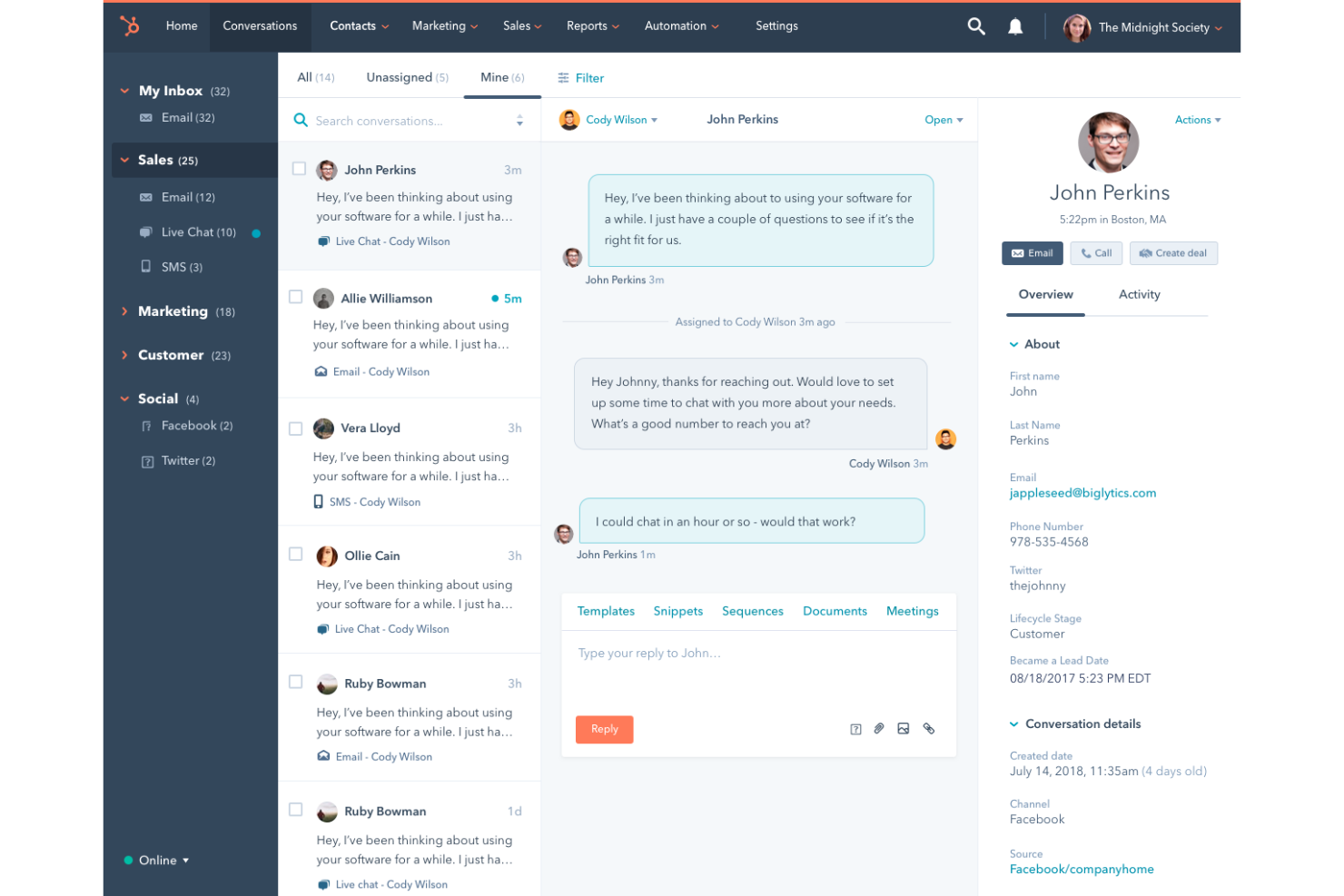
HubSpot CRM is a cloud-based CRM platform that covers contact management, deal tracking, email outreach, meeting scheduling, and sales pipeline management across connected marketing, sales, and service hubs.
Who Is HubSpot CRM Best For?
HubSpot CRM is a natural fit for growing professional services firms where marketing and sales teams need to work from shared contact and pipeline data.
Why I Picked HubSpot CRM
HubSpot CRM earns its spot on my shortlist because the shared contact timeline gives marketing and sales a single view of every touchpoint, from initial lead generation campaign click to closed deal. I particularly like how lead scoring lets marketing define qualification criteria that sales can see before picking up a call. The built-in meeting scheduler and email sequences mean both teams operate from the same tool without duplicating work.
HubSpot CRM Key Features
- Deal pipeline management: Build and customize sales pipelines with drag-and-drop deal stages that reflect your firm's actual sales process.
- Sales forecasting: Project revenue by pipeline stage, deal amount, and close date from a dedicated forecasting dashboard.
- Custom reporting dashboards: Build reports across contacts, deals, and activities using a drag-and-drop report builder.
- Quote generation: Create and send branded quotes directly from a deal record without leaving the CRM.
HubSpot CRM Integrations
HubSpot's App Marketplace is home to over 1,000 integrations, including tools like Salesforce, Slack, Gmail, Google Calendar, Jira, Mailchimp, Calendly, Zendesk, WordPress, and QuickBooks. Zapier is also available for connecting HubSpot to additional apps, and an API is offered for custom integrations.
Pros and Cons
Pros:
- Website visitor tracking identifies anonymous prospects
- Built-in marketing automation alongside sales tools
- Shared data across marketing, sales, and service
Cons:
- Key features locked behind higher-priced tiers
- Workflow automation restricts complex multi-step processes

Best for project delivery linked to sales

Insightly is a CRM platform that combines pipeline management, contact tracking, and built-in project delivery tools so teams can convert closed deals into tracked projects without leaving the platform.
Who Is Insightly Best For?
Insightly suits consulting firms and agencies where account managers oversee both deal-closing and client delivery from the same system.
Why I Picked Insightly
I picked Insightly as one of the best because it's the only CRM I've used where a won opportunity converts into a live project in one click. The project inherits the original contact records, notes, and custom field data captured during the sales cycle. I also like that project pipelines use the same stage-based structure as sales pipelines, so delivery teams work in a familiar environment without a separate tool or handoff process.
Insightly Key Features
- Activity sets: Triggers predefined sequences of tasks and events when a deal or project moves to a new stage.
- Relationship linking: Maps connections between contacts, organizations, and opportunities to show how accounts are related.
- Lead routing: Automatically assigns incoming leads to a specific team member based on defined rules.
- Built-in reporting: Generates dashboards across sales pipeline, project status, and team activity in one view.
Insightly Integrations
Insightly offers dozens of native integrations, including DocuSign, QuickBooks, PandaDoc, Xero, MailChimp, Slack, Zoom, Evernote, and Unbounce, plus Google and Microsoft integrations. Over 1,000 additional integrations are available through Insightly's AppConnect add-on. Insightly also provides an API for custom integrations, and it connects with Zapier.
Pros and Cons
Pros:
- Customizable pipelines for both sales and delivery
- Relationship linking maps contacts across organizations
- Converts won deals into tracked projects instantly
Cons:
- Slowdowns occur when handling larger datasets
- Reporting and automation are gated behind higher tiers

Best for managing agency operations end-to-end

Productive is an agency management platform that covers project management, resource planning, sales CRM, time tracking, budgeting, invoicing, and financial forecasting in a single connected workspace.
Who Is Productive Best For?
Productive is a strong fit for digital, creative, and marketing agencies that need to manage client work, billable hours, and profitability from a single platform.
Why I Picked Productive
I picked Productive as one of the best because it's one of the few tools where a won deal converts directly into a live project, with budget, contacts, and client context already in place. I like that real-time profitability tracking sits at the center of everything: as my team logs time, cost, and margin data updates instantly, so I'm not waiting on monthly reports. The scenario builder also lets me compare pricing and resourcing models before committing to a proposal, which I find especially useful for protecting margins on fixed-fee work.
Productive Key Features
- Resource planning: Schedule team members by availability, skills, and seniority across current and upcoming projects with a visual capacity overview.
- Gantt chart view: Map project timelines, task dependencies, and milestones in a drag-and-drop Gantt interface that updates as work progresses.
- Automated invoice drafting: Generate invoice drafts directly from logged time and approved budgets without manual data entry.
- Revenue recognition: Track recognized versus deferred revenue across active projects and client contracts from within the same platform.
Productive Integrations
Productive offers native integrations with Jira, HubSpot, Xero, QuickBooks, Sage, Google Calendar, Gmail, Microsoft Outlook, Slack, and BambooHR, along with several other accounting and HR connectors. It also connects with Zapier and provides an open API with webhook support for custom integrations.
Pros and Cons
Pros:
- Unifies CRM, time tracking, and invoicing
- Real-time profitability tracking per project
- Deals convert directly into active projects
Cons:
- Interface can feel sluggish at times
- Reporting formulas lack advanced flexibility
New Product Updates from Productive
Productive Adds Voice Dictation, Slack Connector, Proposals, and Overtime
Productive adds voice dictation, a Slack Connector, proposal controls, and overtime tracking. These updates support faster AI interactions, client proposals, and time management. For more information, visit Productive’s official site.

BigTime
Best for tracking project time and expenses

BigTime is a professional services automation (PSA) platform that covers time and expense tracking, project and portfolio management, resource scheduling, scoping and quoting, invoicing, and AI-assisted reporting for your consulting business.
Who Is BigTime Best For?
BigTime is a strong fit for mid-sized professional services firms in consulting, accounting, engineering, and IT services that bill clients by the hour.
Why I Picked BigTime
BigTime earns its spot on my shortlist because of how tightly it connects time and expense tracking to actual billing and project financials. I picked it because the budget vs. actuals view updates in real time, so I can catch a project going over budget before the invoice goes out, not after. I also like the Expense Agent, which captures, categorizes, and routes receipts for approval without manual entry. That kind of detail matters when you're billing clients and need every expense accounted for accurately.
BigTime Key Features
- Resource scheduling: Assign staff to projects by role or department, with conflict detection and utilization tracking across your team.
- Scoping and quoting: Build project quotes using real cost and margin data, with controls for pricing, discounts, and scope.
- Invoicing workflow: Customize invoices per client, sync with QuickBooks or Sage Intacct, and automate billing to reduce errors.
- AI assistant: Query project margins, capacity, and bottlenecks in real time using BigTime's built-in AI reporting tool.
BigTime Integrations
BigTime offers native integrations with QuickBooks, Sage Intacct, Xero, NetSuite, Salesforce, HubSpot, Microsoft Dynamics CRM, Jira, BambooHR, and Zendesk. It also connects with identity providers like Okta and Microsoft Entra ID, and includes a REST API and BigTime DataHub for custom integrations and advanced reporting through tools like Power BI and Tableau.
Pros and Cons
Pros:
- Built-in vendor spend capture per project
- Ties time entries directly to invoices
- Real-time budget vs. actuals project tracking
Cons:
- Mobile app can be clunky on Android
- Only supports two levels of task depth

Accelo
Best for workflow automation in client work
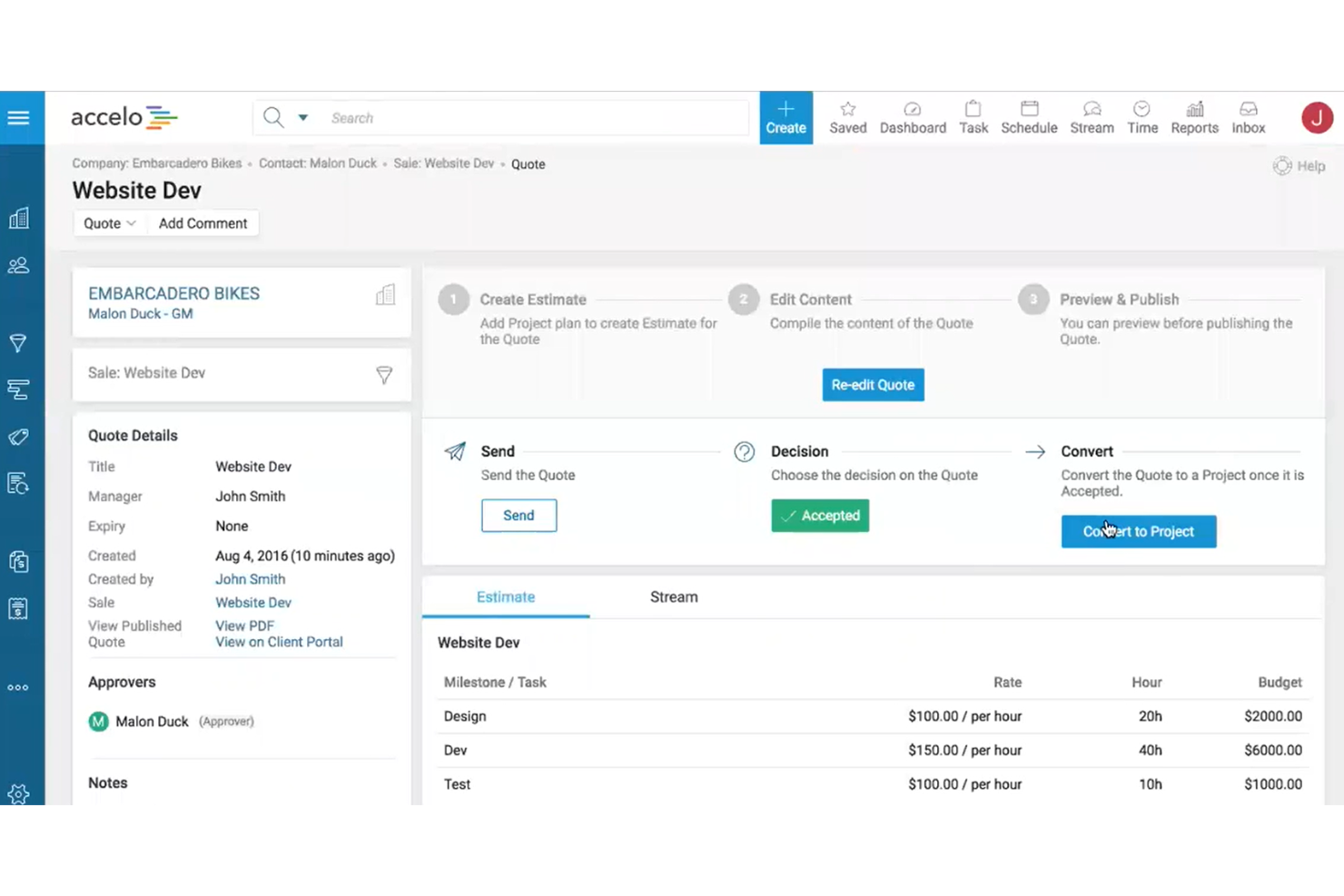
Accelo is an AI-powered professional services automation (PSA) platform that connects pipeline management, project delivery, resource scheduling, and financial tracking in a single system.
Who Is Accelo Best For?
Accelo is a strong fit for small to mid-sized professional services firms in consulting, IT services, and marketing agencies that manage recurring client work.
Why I Picked Accelo
I've included Accelo in my top picks because of how it handles the handoff between sales and delivery. When a deal closes in the CRM, Accelo automatically generates a project from that opportunity, populating tasks, timelines, and budget from a template. I also like its trigger-based workflow automation, which moves work through stages, sends client updates, and reassigns tasks without manual intervention. That keeps recurring client work running without anyone having to chase it.
Accelo Key Features
- Retainer management: Track retainer budgets, hours, and renewal cycles against active client contracts.
- AI-assisted resource scheduling: Match staff to projects by skill, availability, and workload using AI recommendations.
- Scope creep management: Flag and manage out-of-scope work to protect project budgets and margins.
- Custom reporting dashboards: Build reports on utilization, profitability, and financial performance across your project portfolio.
Accelo Integrations
Accelo offers 30+ native integrations, including Salesforce, HubSpot, QuickBooks, Xero, Sage Intacct, Jira, Google Workspace, Microsoft 365, Slack, and Expensify. It also connects with Zapier and provides a REST API for custom integrations.
Pros and Cons
Pros:
- Real-time budget vs. actuals per project
- Retainer tracking with built-in renewals
- Automatic email capture per client record
Cons:
- Mobile app lacks full desktop functionality
- Reports are difficult to customize deeply
New Product Updates from Accelo
Accelo Adds Quote Designer and Pipeline Management
Accelo adds Quote Designer, enhanced pipeline views, and quote tracking with version history. This helps teams create proposals and manage opportunities from scoped work. For more information, visit Accelo’s official site.

Best for task assignment and time tracking
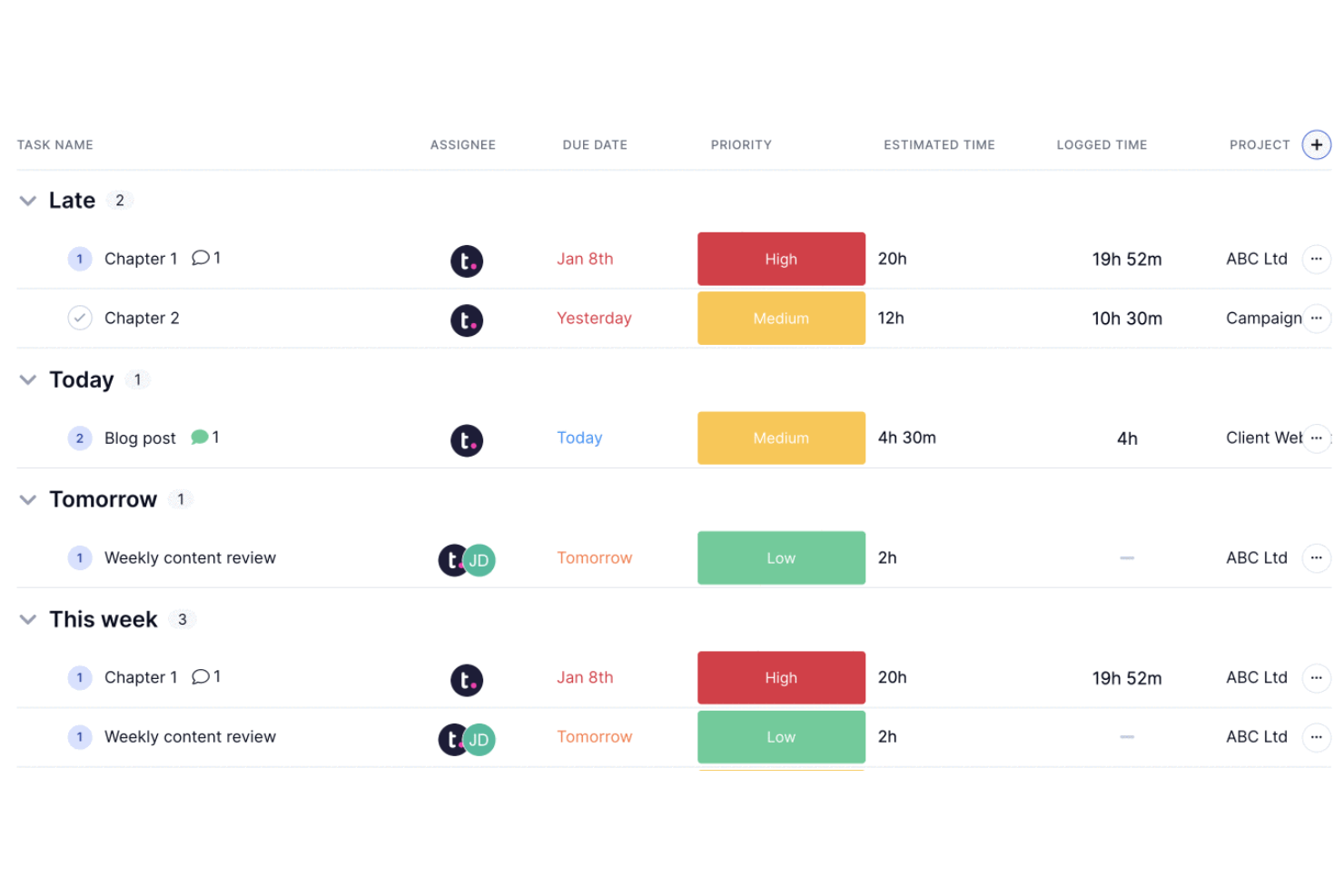
Teamwork.com is a project management and CRM platform built specifically for client-facing professional services teams, combining client management, task tracking, time logging, and resource planning in one place.
Who Is Teamwork.com Best For?
Teamwork.com is a strong fit for agencies and consultancies that manage multiple client projects simultaneously and need tight control over task ownership and billable hours.
Why I Picked Teamwork.com
Teamwork.com is one of my top picks because I love how granular task assignment gets. I can assign tasks and subtasks to specific team members, set dependencies, and attach time estimates directly to each item, so there's no ambiguity about who owns what or how long it should take. The native time tracking lets my team log hours with timers, mark time as billable, and generate timesheets, which feeds directly into budget tracking and invoicing. That end-to-end flow from task assignment to billable time to client invoice is something I haven't found as tightly connected in many other tools in this space.
Teamwork.com Key Features
- Client portal: Give clients a branded view of project progress, files, and messages without exposing internal team activity.
- Workload management: View team capacity across all active projects and reassign tasks when someone is over-allocated.
- Milestone tracking: Set project milestones that tie to task lists, keeping delivery schedules visible at a high level.
- Project templates: Build reusable templates for recurring client engagements to standardize your team's delivery process.
Teamwork.com Integrations
Teamwork.com offers 150+ integrations, including native connections with Slack, Salesforce, HubSpot, Microsoft Teams, QuickBooks, Xero, Harvest, Google Calendar, Dropbox, and SharePoint. It also connects with Zapier and has an API for custom integrations.
Pros and Cons
Pros:
- Billable hours linked to project budgets
- Client-specific permissions for external visibility
- Built-in time tracking per task
Cons:
- Advanced CRM tools require integration
- No dedicated sales pipeline view

Best for visualizing deal progression stages

Pipedrive is a sales-focused CRM built around a visual pipeline interface, with deal tracking, contact management, activity scheduling, and AI-powered sales assistance baked in.
Who Is Pipedrive Best For?
Pipedrive is a strong fit for small to mid-sized businesses with dedicated sales reps who need clear visibility into where every deal stands at any given moment.
Why I Picked Pipedrive
Pipedrive earns its spot on my shortlist because no other CRM makes deal stage visibility this central to the product experience. The kanban-style pipeline board is the default view, so every rep can see exactly where each deal sits and drag it forward when a stage is complete. I also like the forecast view, which filters deals by expected close date so my team stays honest about what's actually closeable this month versus next.
Pipedrive Key Features
- AI sales assistant: Surfaces suggestions and warns you when a deal has gone quiet or a follow-up is overdue.
- Activity scheduling: Logs and tracks calls, meetings, and emails directly against each contact or deal record.
- Smart contact data: Auto-enriches contact profiles by pulling publicly available data based on an email address.
- Workflow automation: Triggers actions like task creation or status updates when a deal moves or a field changes.
Pipedrive Integrations
Pipedrive's Marketplace offers 500+ integrations, including QuickBooks, Trello, Asana, and Slack, along with Google Meet, Microsoft Teams, Xero, DocuSign, Mailchimp, and PandaDoc. It's available on Zapier and has an open API for custom integrations.
Pros and Cons
Pros:
- Activity reminders prevent missed follow-ups
- Custom fields for service-specific data
- Drag-and-drop pipeline for tracking deals
Cons:
- No native project delivery tracking
- Limited built-in reporting depth
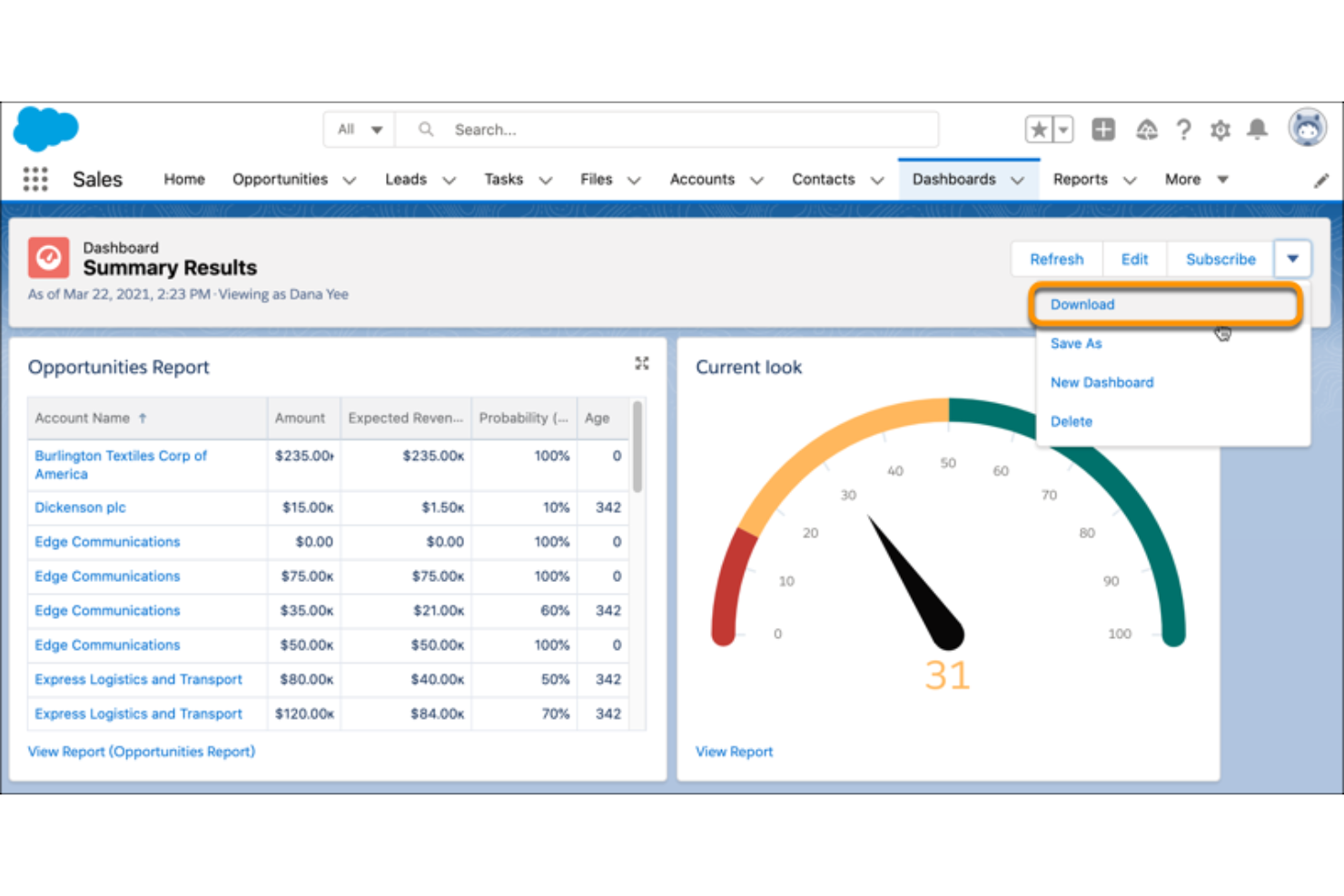
Salesforce Sales Cloud is a CRM platform built around deep pipeline visibility, with tools for contact and account management, opportunity tracking, AI-driven forecasting, and highly configurable reporting.
Who Is Salesforce Sales Cloud Best For?
Salesforce Sales Cloud is a strong fit for mid-to-large professional services firms with dedicated sales ops teams who need deep reporting customization.
Why I Picked Salesforce Sales Cloud
I picked Salesforce Sales Cloud as one of the best because no other CRM gives you the same depth of control over how data is visualized and reported. I love the drag-and-drop report builder, which lets me slice pipeline data by rep, region, stage, or custom field without needing a developer. The dashboard layer goes further with CRM Analytics, where I can build live, drillable charts that surface deal velocity and win-rate trends in real time.
Salesforce Sales Cloud Key Features
- Einstein lead scoring: AI assigns a score to each lead based on historical conversion patterns, helping prioritize outreach.
- Opportunity management: Track every deal through custom stages, with fields for amount, close date, and linked contacts.
- Sales engagement: Build automated outreach cadences with email, call, and LinkedIn steps directly from a contact record.
- Territory management: Define and assign account territories by geography, industry, or custom rules across your sales team.
Salesforce Sales Cloud Integrations
Salesforce Sales Cloud offers thousands of marketplace integrations through its AppExchange, including tools like Slack, Google Workspace, QuickBooks, Jira, DocuSign, Mailchimp, HubSpot, LinkedIn Sales Navigator, Zoom, and Microsoft 365. It's also available on Zapier and provides an API for custom integrations.
Pros and Cons
Pros:
- Handles complex, multi-stage sales processes well
- Flow Builder supports no-code workflow automation
- Reports and dashboards are deeply customizable
Cons:
- Add-on costs accumulate across the platform
- Admin-level setup often requires certified expertise

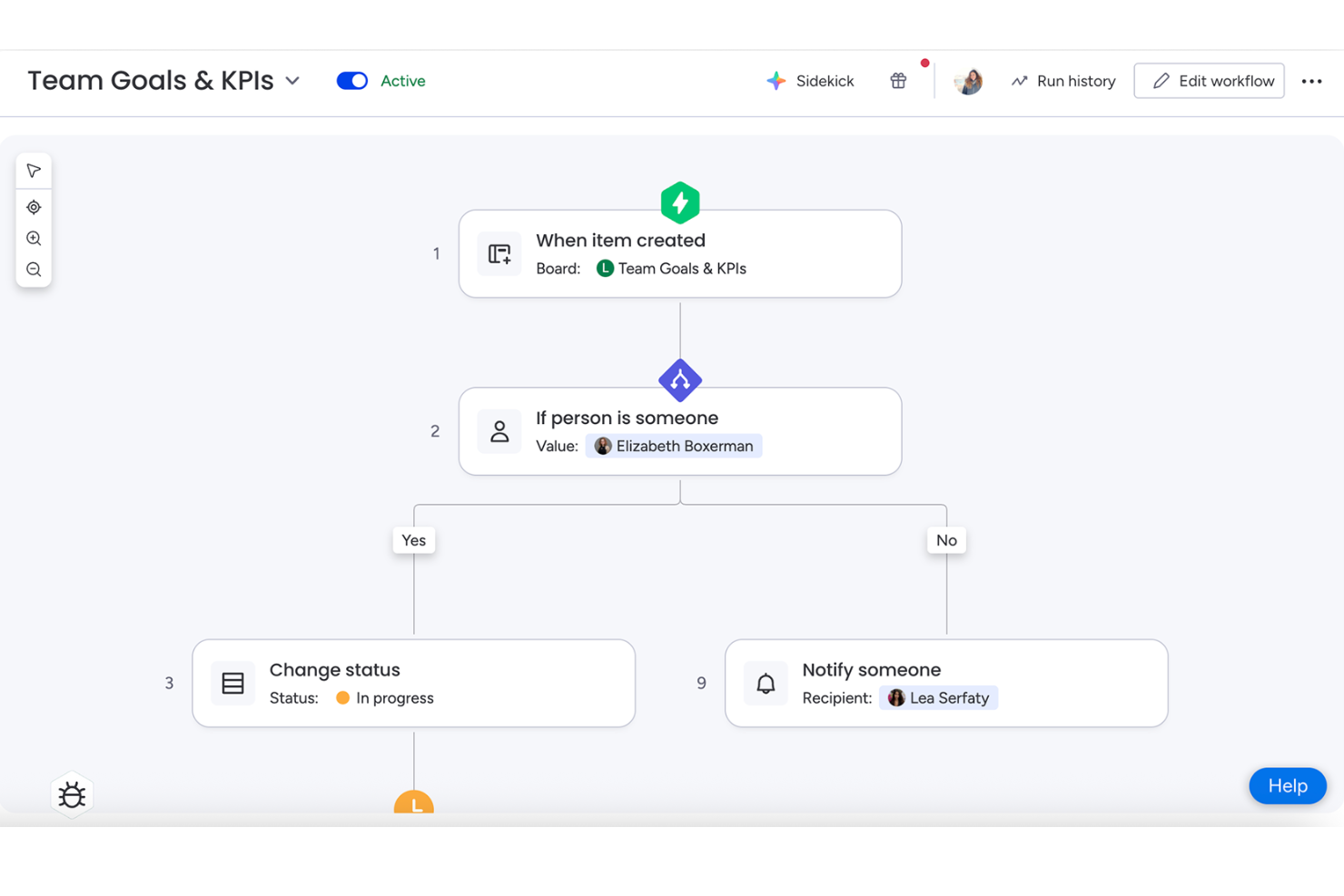
monday CRM is a sales-focused CRM platform that centralizes lead management, pipeline tracking, contact data, and automated workflows across the full revenue cycle, from prospecting to post-sale.
Who Is monday CRM Best For?
monday CRM is a strong fit for small to mid-sized service teams that need to build and adjust their sales process without relying on a developer.
Why I Picked monday CRM
monday CRM earns its spot on my shortlist because the workflow builder gives you real control over how your pipeline runs. I can rename deal stages, add custom column types to capture service-specific data, and build no-code automation recipes that trigger actions like reassigning a contact or flagging a stalled deal. In practice, my team's board reflects how we actually sell, not a rigid default structure.
monday CRM Key Features
- Email sync: Connect Gmail or Outlook to log emails directly against contacts and deals.
- Lead capture forms: Generate web forms that feed submissions straight into your CRM board.
- Sales forecasting dashboard: View projected revenue by deal stage across your active pipeline.
- Activity log: Track every call, meeting, and note against a contact in a single timeline.
monday CRM Integrations
monday CRM offers 850+ integrations and apps through its built-in integrations and marketplace, including Salesforce, QuickBooks, and HubSpot, as well as Slack, Gmail, Google Calendar, Outlook, and Microsoft Teams. It connects with Zapier, and provides APIs and SDKs for building custom integrations.
Pros and Cons
Pros:
- No-code automations reduce repetitive admin tasks
- Won deals convert directly into projects
- Drag-and-drop boards adapt to any workflow
Cons:
- Built-in email composer feels clunky
- Minimum seat requirement raises entry cost

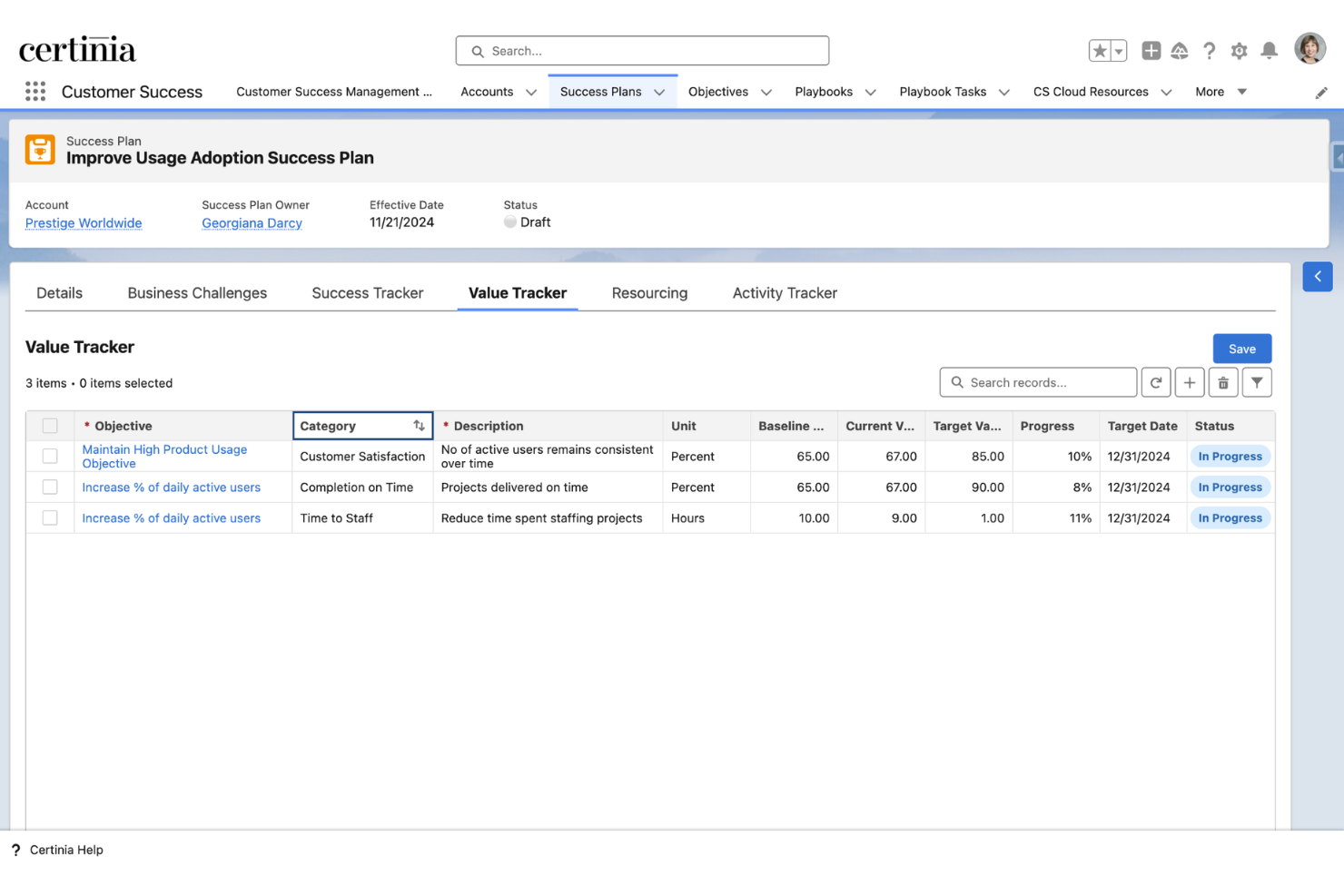
Certinia PS Cloud is a professional services automation (PSA) platform built natively on Salesforce, covering services estimation, resource management, project delivery, billing, and financial management in a single connected system.
Who Is Certinia PS Cloud Best For?
Certinia PS Cloud is a natural fit for mid-to-enterprise professional services organizations already running their CRM on Salesforce.
Why I Picked Certinia PS Cloud
I've included Certinia PS Cloud in my top picks because it's the only PSA built natively on Salesforce, which means your CRM data and services delivery data live in the same system with no sync required. I like how opportunity data from Salesforce flows directly into service estimates and staffing, so there's no handoff gap between what was sold and what gets delivered. The Veda AI layer also generates estimates from historical project data, which I find genuinely useful for tightening bid accuracy.
Certinia PS Cloud Key Features
- Resource management: Search and assign staff to projects by skills, certifications, availability, and role across your entire services organization.
- Milestone and time-based billing: Generate invoices tied directly to project milestones, time logged, or fixed-fee schedules without manual reconciliation.
- Revenue recognition: Automate revenue recognition against contract terms and delivery schedules in compliance with ASC 606 and IFRS 15.
- Customer success workspace: Track renewals, health scores, and engagement history for each account from within the same platform as project delivery.
Certinia PS Cloud Integrations
Built natively on Salesforce, Certinia PS Cloud integrates with other on-platform apps and provides a secure API model for off-platform systems. Its integrations page lists 25 partner integrations, including Jira, DocuSign, SAP Concur, Avalara, Expensify, Microsoft Outlook, Conga, MuleSoft, Celigo, and Plaid. Certinia provides open, standards-based RESTful and SOAP APIs for custom integrations.
Pros and Cons
Pros:
- Real-time scheduling, billing, and forecasting are unified
- Org-wide visibility into consultant time allocation
- Built-in reporting for project tracking and reconciliation
Cons:
- Customizations require dedicated Salesforce admin expertise
- Page loading times can feel slow
Other CRM Software For Professional Services
Here are some additional CRM software for professional services options that didn’t make it onto my shortlist, but are still worth checking out:
- Zoho CRM
For multichannel client communications
- Kantata
For resource and capacity planning
- Copper
For Google Workspace integration
- Scoro
For quote-to-project conversion with billing
- BQE Core
For billing and invoicing automation
- Deltek Vantagepoint
For project profitability insights
- Bitrix24
For internal communication and collaboration
- Flowlu
For built-in knowledge base management
- Workamajig
For creative agency resource planning
- Microsoft Dynamics 365 Sales
For advanced sales forecasting tools


How I Evaluate CRM Software for Professional Services
I look at these platforms across two layers: the baseline capabilities a tool must have—like converting won deals into projects without re-entry—and the differentiators that set top picks apart.
Core Functionality (Table Stakes For This List)
When I'm selecting tools for my list, I rank each one on a scale from 0 (does not offer the functionality) to 5 (excels in this area) for each core functionality listed below. Then, I calculate the tool's total score into a percentage. Each tool needs to achieve a minimum total score of 65% to be considered for inclusion.
- Client Lifecycle Management: I check whether a platform tracks accounts from first inquiry through repeat engagements, including custom lifecycle stages and engagement history per client.
- Pipeline & Deal Tracking: Services deals aren't one-size-fits-all, so I look for customizable pipelines with weighted probabilities and fields that reflect T&M, retainer, or fixed-fee models.
- Project Conversion: A won deal should flow into a project without anyone re-entering scope, timelines, or budgets—I evaluate how cleanly that handoff happens inside the tool.
- Resource & Engagement Visibility: I look at whether you can see who's assigned where, what capacity looks like across your team, and how that ties back to specific client accounts or deals.
- Time & Billing Integration: Whether native or through a tight connector, I evaluate how the tool links tracked hours and expenses to client records for invoicing and profitability tracking.
- Services Revenue Forecasting: I look for forecasting that goes beyond raw pipeline totals to factor in active project stages, committed retainers, and backlog alongside weighted opportunities.
Once I have a list of tools that meet this criteria, I consider what sets each platform apart.
Differentiating Factors (What Sets Vendors Apart)
Here's how I compare and contrast different vendors:
Standout Features
Resource and capacity forecasting is a big differentiator. I look for tools that use weighted pipeline data to project staffing needs and utilization gaps before deals close. Engagement and proposal management matters just as much, especially when a platform lets you generate SOWs with built-in pricing models like T&M or retainer and push them for e-signature without leaving the CRM. I also evaluate revenue and billing intelligence, checking whether the tool tracks realization rates and lifetime client value across mixed billing arrangements.
Beyond Features
Industry and vertical fit is the first thing I consider. A CRM built for IT consulting firms handles engagements differently than one designed for architecture or accounting practices, and pre-built data models save weeks of configuration. Integration depth matters just as much—I check whether a platform syncs with accounting tools like QuickBooks or Xero and PSA systems so billable hours actually flow into invoicing. I also evaluate total cost of ownership, looking at whether core services features require premium-tier upgrades or expensive add-ons to unlock.
How to Choose CRM Software For Professional Services
It’s easy to get bogged down in long feature lists and complex pricing structures. To help you stay focused as you work through your unique software selection process, here’s a checklist of factors to keep in mind:
| Factor | What to Consider |
|---|---|
| Scalability | Will the platform support your firm as you add new clients, expand into new regions, or open new offices? |
| Integrations | Does the software offer built-in connections to your core accounting, PSA, and time-tracking tools? |
| Customizability | Can you configure stages, fields, and workflows to match how your teams deliver client services? |
| Ease of use | Will project managers, consultants, and partners actually use the system day-to-day, or will it create friction? |
| Implementation and onboarding | What resources are required to get up and running? Is vendor-led onboarding included or do you need outside help? |
| Cost | Is pricing clear as you add users, modules, or integrations? Watch out for hidden costs as you scale. |
| Security safeguards | Does the platform offer granular permissions, strong encryption, and logs for auditing client and project data? |
| Compliance requirements | Does the solution support GDPR, SOC 2, or other standards required for handling sensitive professional services data? |
What Is CRM Software For Professional Services?
CRM software for professional services is a platform designed to manage client relationships, sales pipelines, project delivery, and billing processes tailored to firms offering project-based or consultative services. These solutions centralize client data, track deals and engagements, and connect operational delivery with financial workflows, making it easier for firms to manage the full client lifecycle and improve collaboration across teams.
Features of CRM Software for Professional Services
When selecting CRM software for professional services, keep an eye out for the following key features:
- Contact and account management: Store, organize, and update comprehensive client details, tracking every interaction, engagement, and relationship history in one place.
- Customizable sales pipelines: Configure deal stages and probability weightings tailored to your sales process, so you can monitor project opportunities and forecast revenue accurately.
- Deal-to-project conversion: Instantly turn closed deals into projects or engagements, maintaining all relevant client, scope, and assignment data without manual re-entry.
- Resource and capacity planning: Allocate team members to client work based on skills and availability, ensuring balanced workloads and effective project delivery.
- Time and expense tracking: Log billable hours and related expenses directly within the CRM, linking them to client projects for accurate invoicing and profitability analysis.
- Billing and invoicing integration: Generate invoices, manage retainers, and track payments from within the platform or by syncing with your existing accounting systems.
- Document management: Store, share, and collaborate on contracts, proposals, and statements of work securely inside the CRM, with audit trails for compliance.
- Role-based permissions: Control access to sensitive data by user role or team, safeguarding client confidentiality and supporting industry compliance needs.
- Client communication tracking: Log emails, calls, and meetings with automated sync features, so your entire team has visibility into client conversations at every stage.
- Reporting and analytics dashboards: Visualize pipeline health, revenue trends, resource utilization, and client engagement, helping leaders make informed business decisions.
Benefits of CRM Software for Professional Services
Implementing CRM software for professional services provides several benefits for your team and your business. Here are a few you can look forward to:
- End-to-end client visibility: Get a complete view of every client relationship by tying contact info, proposals, projects, and past work together in one system.
- Faster deal-to-project workflow: Instantly convert closed deals into active projects, eliminating manual data entry and reducing delays in project kickoffs.
- Resource and revenue forecasting: Use real-time pipeline and capacity data to project staffing needs, manage workloads, and forecast firm revenue with greater accuracy.
- Improved billing accuracy: Track billable hours, expenses, and retainers directly against client work, resulting in precise and timely invoicing.
- Centralized communication history: Keep everyone on the same page by logging client emails, calls, documents, and meetings for better collaboration and continuity.
- Stronger data security: Protect sensitive client and project information with role-based access and audit trails that support compliance for regulated industries.
- Better decision-making: Leverage built-in analytics and reporting to spot trends, measure project profitability, and guide both sales and operational strategy.
Costs and Pricing of CRM Software for Professional Services
Selecting CRM software for professional services requires an understanding of the various pricing models and plans available. Costs vary based on features, team size, add-ons, and more. The table below summarizes common plans, their average prices, and typical features included in CRM software for professional services solutions:
Plan Comparison Table for CRM Software for Professional Services
| Plan Type | Average Price | Common Features |
|---|---|---|
| Free Plan | $0 | Basic contact management, limited pipelines, and simple reporting. |
| Personal Plan | $10-$25/user/month | Contact management, customizable pipelines, basic project conversion, and single user support. |
| Business Plan | $30-$55/user/month | Multi-user support, project and resource management, time tracking, billing integration, and advanced reporting. |
| Enterprise Plan | $60-$120/user/month | Advanced permissions, multi-entity support, compliance tools, API access, premium integrations, and onboarding help. |
CRM Software for Professional Services FAQs
Here are some answers to common questions about CRM software for professional services:
What makes CRM software for professional services different from generic CRM tools?
CRM software for professional services connects sales, project delivery, and billing in a single system, giving teams a client lifecycle view and supporting specialized workflows like proposals, project conversion, and resource planning.
Can CRM software for professional services integrate with accounting or PSA tools?
Yes, most platforms offer native or certified integrations with accounting, time tracking, and professional services automation tools so you can sync financial data, track billable hours, and streamline invoicing.
How easy is it to implement CRM software for professional services?
Implementation time depends on your current systems and process complexity. Platforms with templated industry configurations and services-focused onboarding options generally reduce setup time and make rollout smoother for non-technical teams.
How does CRM software help with project and resource planning?
CRM software pulls opportunity and project data into resource planning modules, helping you forecast team workloads, match skills to upcoming projects, and spot potential overbooking or capacity gaps before they impact delivery.
Is it possible to customize workflows and data fields for my specific service offering?
Yes, leading platforms let you tailor deal stages, project types, and data fields to match your firm’s delivery model, whether you focus on hourly billing, retainers, fixed-fee projects, or a mix of engagement types.
What types of firms benefit most from CRM software for professional services?
Consulting firms, creative agencies, IT services providers, legal practices, and other project-based businesses see the most value, especially those who need to bridge client acquisition, delivery, and billing in one solution.