

10 Best HubSpot CRM Alternatives for Agencies in 2026

HubSpot CRM Alternatives Shortlist


The best HubSpot CRM alternatives give you a flexible client database, easy integrations, and tools that fit your team’s workflow. If you’re searching for the best CRM, you’re likely looking for stronger lead generation, better control over your sales funnel, and features like email marketing automation that support both sales and marketing teams. Many platforms offer a broader ecosystem of integrations, improved ease of use, and options like a free CRM to get started without high upfront costs. With so many options available, this guide helps you compare top HubSpot alternatives for 2026 so you can choose the right fit for your business needs.
What Is HubSpot CRM?
HubSpot CRM is a cloud-based CRM software platform that helps teams organize contacts, track deals, and manage sales pipelines. It’s designed to optimize workflows with tools for reporting, automation, and managing email campaigns from a central system. Known for its ease of use and scalability, HubSpot is often seen as an affordable CRM option that supports sales, marketing, and support teams. It helps businesses centralize data, improve communication, and automate routine tasks as they grow.
HubSpot CRM Alternatives Comparison Table
This comparison chart summarizes pricing details for my top HubSpot CRM alternative selections.
| Tool | Best For | Trial Info | Price | ||
|---|---|---|---|---|---|
| 1 | Best for all-in-one small business CRM | Free plan + free demo available | From $13.79/user/month (billed annually) | Website | |
| 2 | Best for CRM with marketing automation | 14-day free trial + free demo available | From $15/month (billed annually) | Website | |
| 3 | Best for advanced CRM customization | 30-day free trial | From $25/user/month | Website | |
| 4 | Best for AI-powered sales CRM | 21-day free trial + free demo available | From $9/user/month (billed annually) | Website | |
| 5 | Best for CRM with project management | Free plan available | From $7/user/month (billed annually) | Website | |
| 6 | Best for visual sales pipeline management | 14-day free trial available | From $14/user/month (billed annually) | Website | |
| 7 | Best for CRM with project workflows | 14-day free trial | From $29/user/month (billed annually) | Website | |
| 8 | Best for flexible CRM workflows | 14-day free trial + free demo available | From $18/seat/month (billed annually) | Website | |
| 9 | Best for automated CRM data entry | 30-day free trial + free demo available | From $29/user/month (billed annually) | Website | |
| 10 | Best for Google Workspace CRM integration | Free trial available | From $59/user/month (billed annually) | Website |
Why Trust Our Software Recommendations
Our team has been testing and reviewing software since 2012. As project managers ourselves, we know how difficult—and important—it is to choose the right software.
For this guide, we evaluated tools using hands-on testing and independent research, scoring tools using our selection criteria. We also draw on insights from industry thought leaders and practicing project management experts.
Our reviews reflect our human editorial judgment, not a sales pitch.
Expert reviewers:
HubSpot CRM Alternatives Reviews
Below are my detailed summaries of the best HubSpot CRM alternatives that made it onto my shortlist. My reviews offer a detailed look at the features, integrations, and pricing of each platform to help you find the best one for you.

Best for all-in-one small business CRM
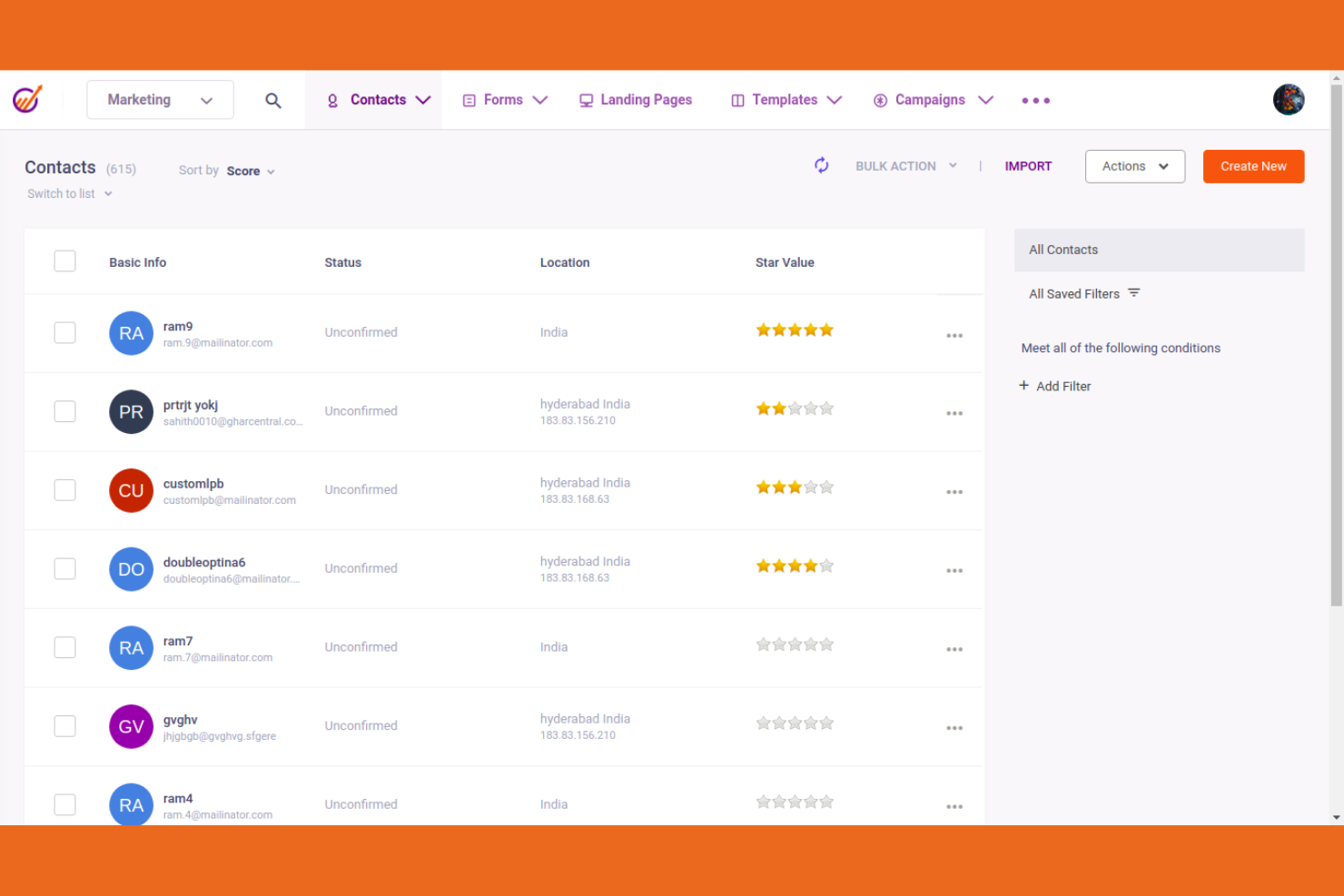
EngageBay brings CRM, marketing, and helpdesk tools together in one platform for small businesses and startups. I think you'll find it especially useful if you want to manage contacts, automate campaigns, and support customers without juggling multiple systems.
Who Is EngageBay Best For?
EngageBay is a good fit for small teams and startups that want unified CRM, marketing, and helpdesk tools in one platform.
Why EngageBay Is a Good HubSpot CRM Alternative
I picked EngageBay because it keeps marketing, sales, and helpdesk in one place, which means my team isn't switching between tools to manage the full customer lifecycle. I like the 360-degree contact view, which surfaces every interaction a lead has had across email, chat, and support tickets before I even pick up the phone. The built-in helpdesk also lets my team handle support tickets without leaving the CRM, so customer context stays connected to the contact record. For small teams that need to do a lot with a lean stack, that kind of consolidation is genuinely useful.
EngageBay Key Features
- Multiple deal pipelines: Lets you create separate pipelines by product, geography, or any custom parameter to track deals independently.
- Sales gamification: Publishes leaderboards and tracks rep performance with goal-setting and feedback tools to keep teams motivated.
- Proposal analytics: Track real-time data on proposal visits, downloads, and click-through rates so you can see how prospects engage with your proposals.
- Custom reporting: Generates reports with custom criteria to monitor sales rep activity and measure performance against goals.
EngageBay Integrations
EngageBay offers 30+ native integrations, including Gmail, Outlook, Mailgun, Xero, QuickBooks, Stripe, Shopify, Zapier, Twilio, and SendGrid. An API is available for custom integrations.
Pros and Cons
Pros:
- Email and SMS marketing automation available
- Built-in lead scoring for sales prioritization
- Combines CRM, marketing, and helpdesk in one
Cons:
- Knowledge base articles can be outdated
- Workflow automation can be slow at times

Best for CRM with marketing automation
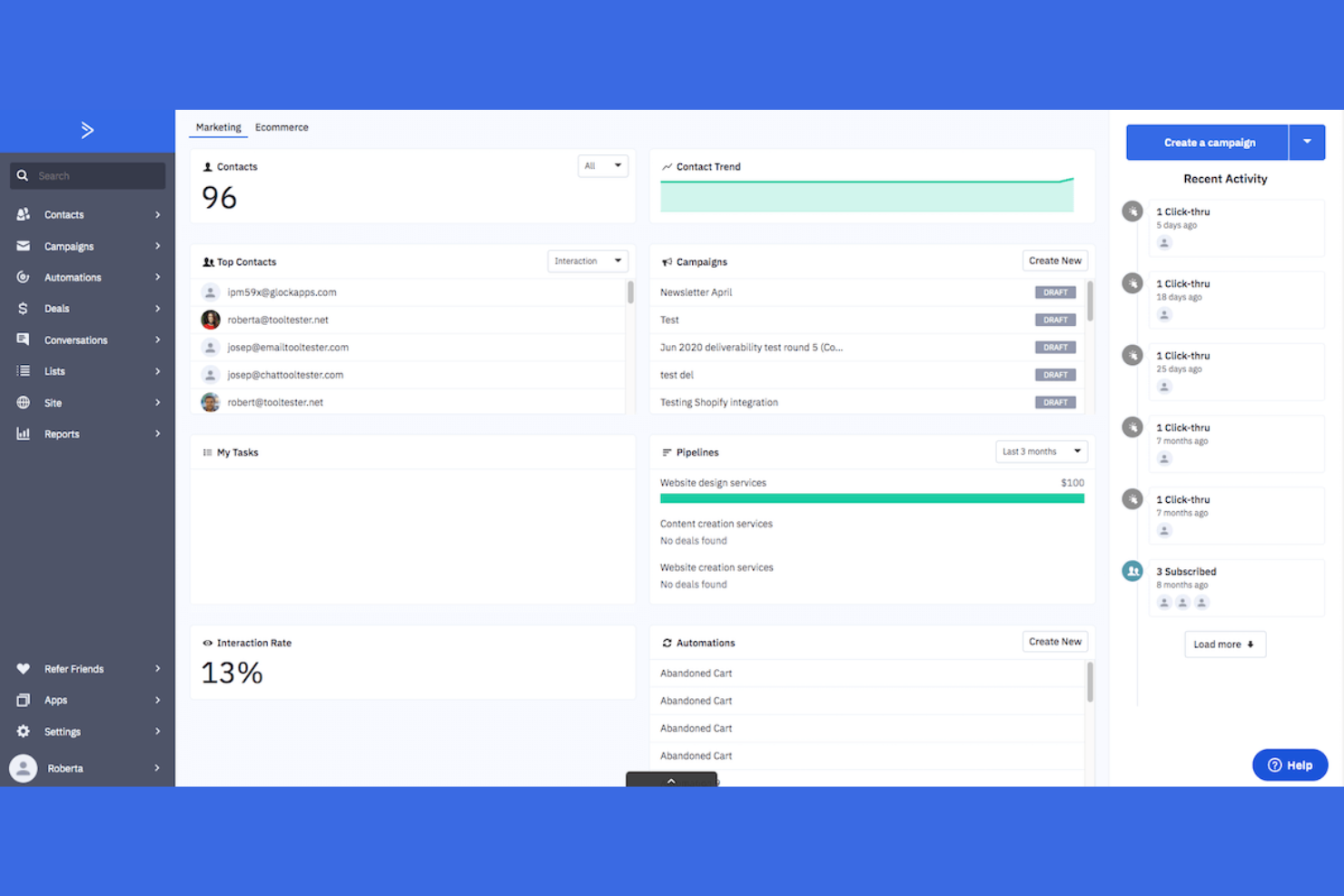
ActiveCampaign is a sales CRM and marketing automation platform built for small businesses and sales teams who want to manage contacts, automate follow-ups, and track deals in one place. I think you'll find it especially useful if you need to connect email marketing with your client database and sales pipeline.
Who Is ActiveCampaign Best For?
ActiveCampaign is a good fit for small businesses and sales teams that want to combine CRM, sales automation, and email marketing in one platform.
Why ActiveCampaign Is a Good HubSpot CRM Alternative
I picked ActiveCampaign because the sales and marketing automation live in the same platform, so there's no gap between nurturing a lead and moving them through a pipeline. I like how lead scoring automatically surfaces the contacts most likely to convert, which means my team focuses on the right deals at the right time. The 1:1 email feature lets us send personalized outreach directly from the CRM, and track opens, replies, and clicks without leaving the platform. Sales routing also automatically assigns deals to the right rep based on custom rules, which keeps our pipeline moving without manual sorting.
ActiveCampaign Key Features
- Contact segmentation: Groups contacts by behavior, deal stage, or custom field data for targeted outreach.
- Sales reporting: Tracks pipeline performance and rep activity through custom dashboards.
- Shared notes: Lets team members add and view notes on deals and contacts for better collaboration.
- Notification emails: Send instant alerts when key deal changes occur, keeping reps informed in real time.
ActiveCampaign Integrations
ActiveCampaign offers 900+ native integrations, including Salesforce, Shopify, WooCommerce, Facebook, Google Analytics, Calendly, Stripe, Unbounce, Eventbrite, and Slack. It connects with Zapier and provides an API for custom integrations.
Pros and Cons
Pros:
- Native integrations with ecommerce platforms
- Advanced contact segmentation for targeted outreach
- Combines CRM and marketing automation workflows
Cons:
- Email template editor can feel restrictive
- Workflow builder can feel overwhelming

Best for advanced CRM customization
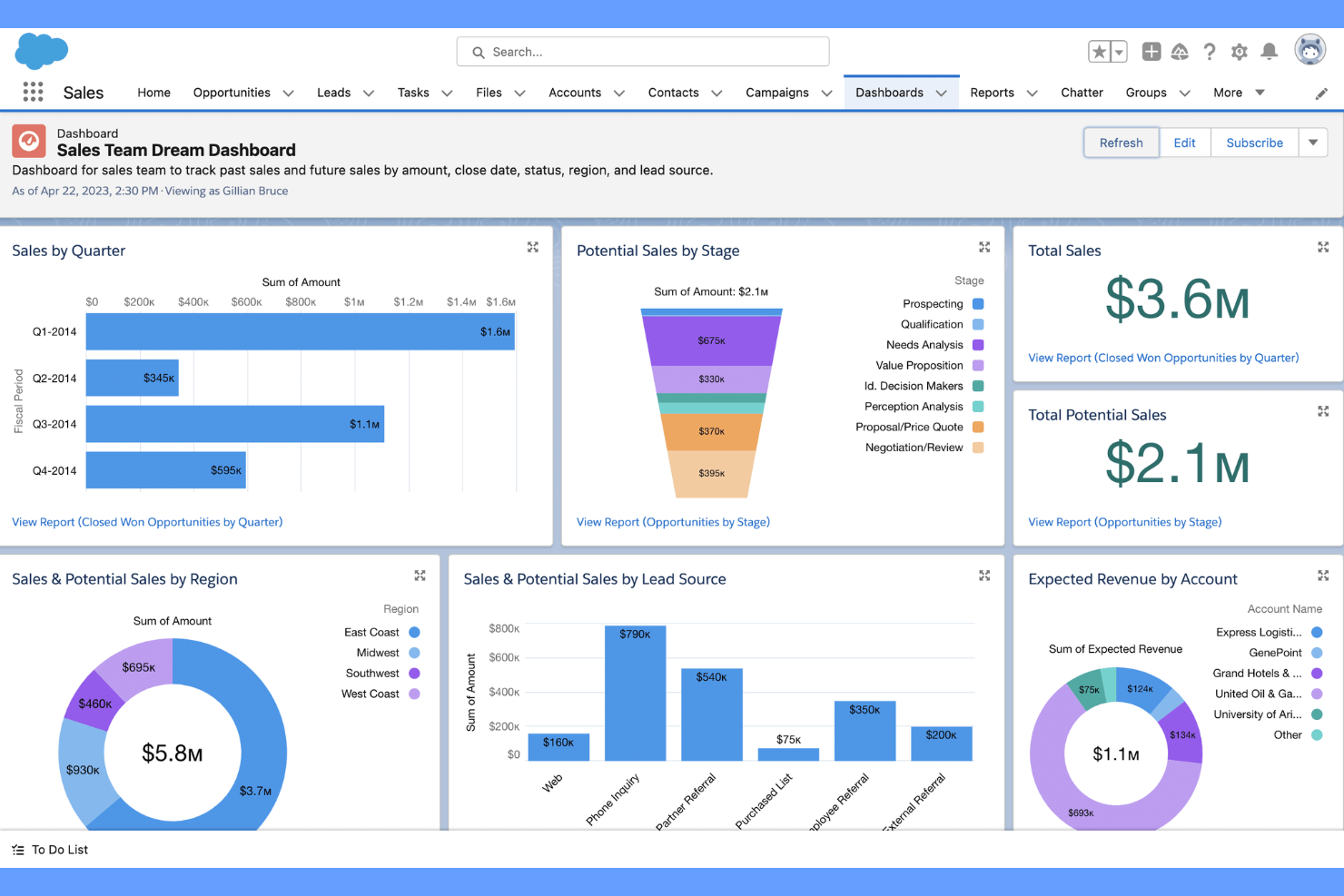
Salesforce is a cloud-based CRM platform built for teams that need deep customization and advanced automation in their client database. It’s a strong fit for growing businesses or enterprises that want to tailor workflows, manage complex sales processes, and connect data across departments.
Who Is Salesforce Best For?
Salesforce suits midsize to enterprise companies that need a customizable CRM to support complex sales, service, or marketing operations.
Why Salesforce Is a Good HubSpot CRM Alternative
I picked Salesforce because its customization depth is hard to match when you need a client database that fits your exact workflow. I like how Flow Builder lets me automate multi-step sales processes without writing code, which saves my team from manually updating records across accounts. I also appreciate Einstein Analytics, which deals with insights and forecasting data directly in the pipeline view. For teams that have outgrown HubSpot's structure, Salesforce gives you the flexibility to build something that actually mirrors how your business operates.
Salesforce Key Features
- Contact management: Store and organize detailed client records, including activity history, communications, and account relationships.
- Opportunity tracking: Monitor deals through customizable pipeline stages with real-time status updates.
- AppExchange marketplace: Access thousands of pre-built apps and integrations to extend CRM functionality.
- Reports and dashboards: Build custom reports and visual dashboards to track sales performance and client data.
Salesforce Integrations
Salesforce offers hundreds of native integrations through its AppExchange marketplace, including Google Workspace, Slack, Mailchimp, and more. An API is available for custom integrations.
Pros and Cons
Pros:
- Deep reporting and analytics capabilities
- Advanced automation for lead and deal management
- Highly customizable workflows for complex sales cycles
Cons:
- Customization often needs developer involvement
- Setup and configuration require significant time

Freshsales is a CRM platform designed for sales teams who want built-in phone, email, and AI-powered insights in one place. I think it’s a strong choice for businesses that need to manage leads, automate outreach, and track deals without juggling multiple tools.
Who Is Freshsales Best For?
Freshsales is a good fit for small to midsize sales teams that want built-in communication tools and AI-driven deal insights.
Why Freshsales Is a Good HubSpot CRM Alternative
I picked Freshsales because it bundles a built-in phone dialer and email directly into the CRM, which means my team doesn't need a separate telephony tool to make and log calls. Freddy AI, Freshsales' built-in AI layer, surfaces lead intent scores and deal recommendations in real time. I like that reps can see which leads are most likely to convert without leaving the platform. For teams switching from HubSpot who want communication and AI insights in one place, Freshsales keeps that all under one roof.
Freshsales Key Features
- Sales sequences: Automate multi-step outreach by setting up a series of scheduled emails and follow-up tasks for each contact.
- Auto-profile enrichment: Freshsales automatically pulls publicly available data to fill in contact and company records.
- Multiple sales pipelines: Set up separate pipelines for different products, regions, or sales motions within the same account.
- Win-loss analysis: Track why deals are won or lost over time to identify patterns across your sales team.
Freshsales Integrations
Freshsales offers native integrations with Google Workspace, Microsoft 365, Mailchimp, QuickBooks, Xero, DocuSign, Slack, Zapier, and provides an API for custom integrations.
Pros and Cons
Pros:
- Auto-profile enrichment for contact records
- Freddy AI suggests next actions for deals
- Built-in phone and email for sales outreach
Cons:
- Limited marketing automation compared to HubSpot
- Workflow automation setup can be confusing

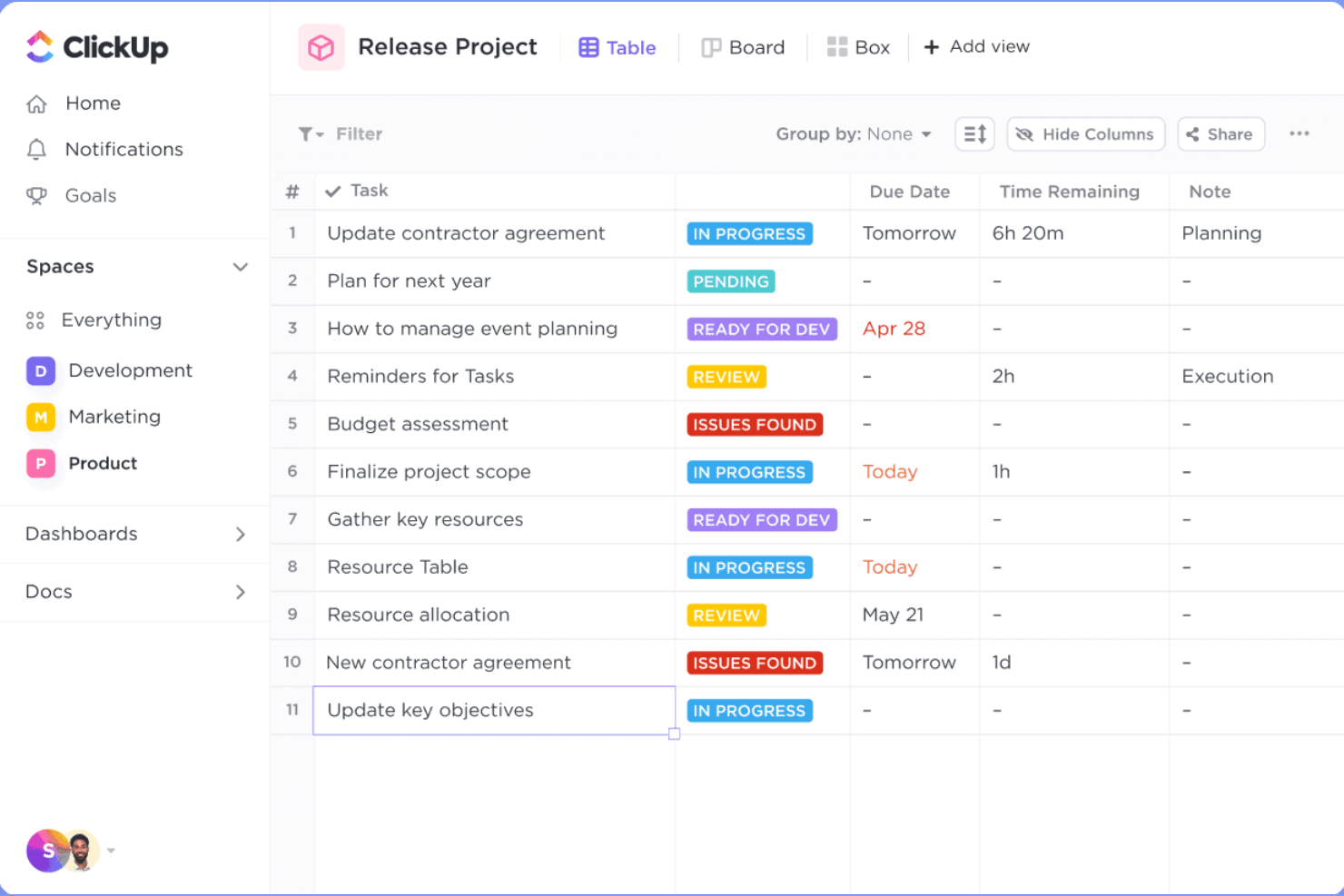
ClickUp brings project management and CRM together in a single platform, making it a strong fit for teams who want to manage client relationships alongside tasks and workflows. I think you'll appreciate its flexibility if you need to customize pipelines, automate processes, and centralize client data.
Who Is ClickUp Best For?
ClickUp is a good fit for cross-functional teams at startups and growing businesses that want to manage client work and CRM in one place.
Why ClickUp Is a Good HubSpot CRM Alternative
I picked ClickUp because it lets my team handle client relationships and project delivery without switching between tools. I like that you can build a fully custom CRM using ClickUp's custom fields, list views, and relationship linking, so client records connect directly to active tasks and deliverables. In practice, that means my team can track a deal in a pipeline view and immediately assign onboarding tasks to the same client record. ClickUp's Automations also let us trigger task creation, status updates, and notifications based on CRM activity, which keeps client workflows moving without manual follow-up.
ClickUp Key Features
- AI Notetaker: Automatically transcribes meetings and generates summaries and action items linked to tasks.
- Workload view: Visualizes team capacity across tasks and projects to help balance assignments.
- Clips: Records screen and voice directly in ClickUp to share async feedback without scheduling a meeting.
- Dashboards: Builds visual overviews of project health, team progress, and key metrics using live task data.
ClickUp Integrations
ClickUp offers 50+ native integrations, including Slack, GitHub, GitLab, HubSpot, Everhour, Toggl, Google Drive, OneDrive, Outlook, Google Calendar, and Zoom. It also connects with Zapier and provides an API for custom integrations.
Pros and Cons
Pros:
- Built-in AI for meeting notes and summaries
- Automations for client workflow triggers
- Combines CRM and project management in one
Cons:
- Limited lead scoring and segmentation tools
- CRM features require manual setup

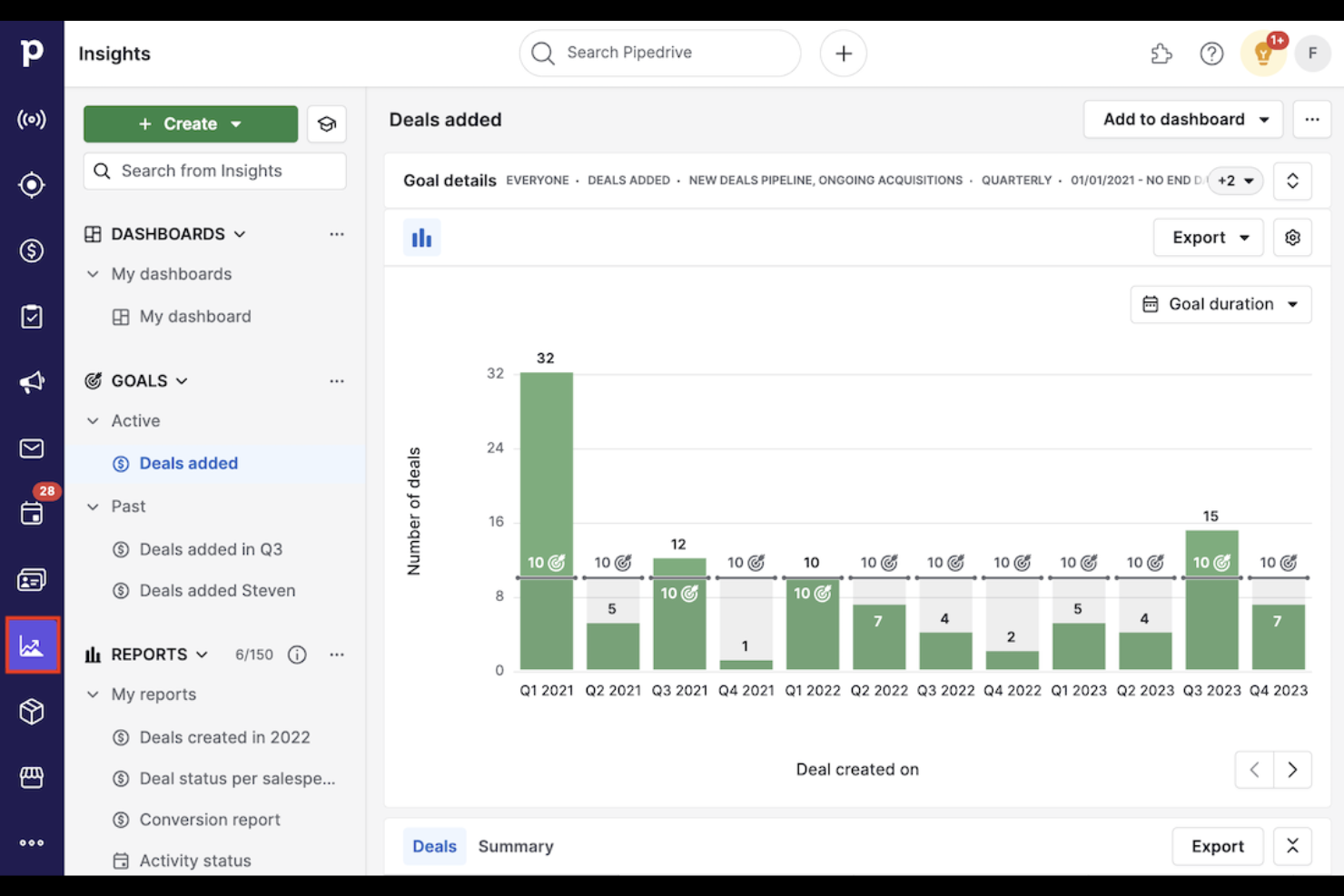
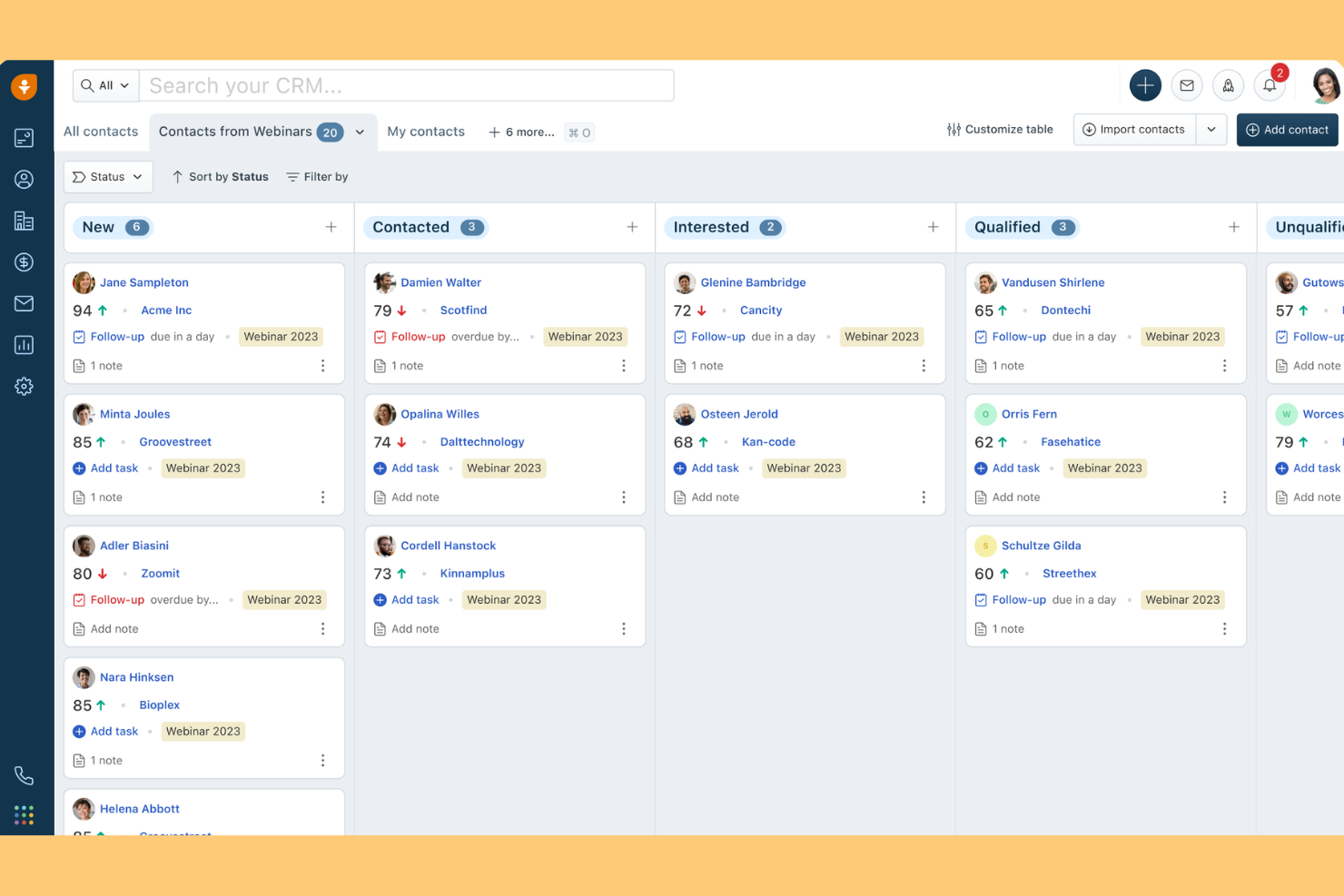
Pipedrive is a sales-focused CRM built for teams that want a visual, drag-and-drop pipeline to manage deals and activities. I think it’s a strong fit for small businesses and sales-driven organizations that need clear deal tracking and actionable insights.
Who Is Pipedrive Best For?
Pipedrive is a good fit for small to midsize sales teams that want a visual, activity-driven approach to managing deals.
Why Pipedrive Is a Good HubSpot CRM Alternative
I picked Pipedrive because its visual pipeline gives sales teams an immediate, at-a-glance view of every deal and where it stands. I like how the drag-and-drop board lets my team move deals through stages without digging through menus or updating multiple fields. Pipedrive's activity-based selling model also keeps reps focused on the next action tied to each deal, which reduces deals slipping through the cracks. For teams that find HubSpot's interface too layered, Pipedrive's focused layout is a real advantage.
Pipedrive Key Features
- Smart Docs: Create, send, and track shareable documents and e-signature-ready contracts directly from a deal record.
- LeadBooster add-on: Capture and qualify leads using a chatbot, live chat, prospector, and web forms built into the CRM.
- AI sales assistant: Get personalized deal recommendations and performance tips based on your pipeline activity.
- Campaigns add-on: Build and send segmented email marketing campaigns with drag-and-drop templates and real-time analytics.
Pipedrive Integrations
Pipedrive offers 500+ marketplace integrations, including native integrations with Slack, QuickBooks, Trello, Zoom, Gmail, Microsoft Teams, PandaDoc, Leadfeeder, JustCall, and Outfunnel. It connects with Zapier and provides an API for custom integrations.
Pros and Cons
Pros:
- Built-in sales forecasting and reporting tools
- Activity reminders keep sales reps on task
- Visual pipeline makes deal tracking simple
Cons:
- Limited email templates without add-ons
- No built-in marketing automation tools

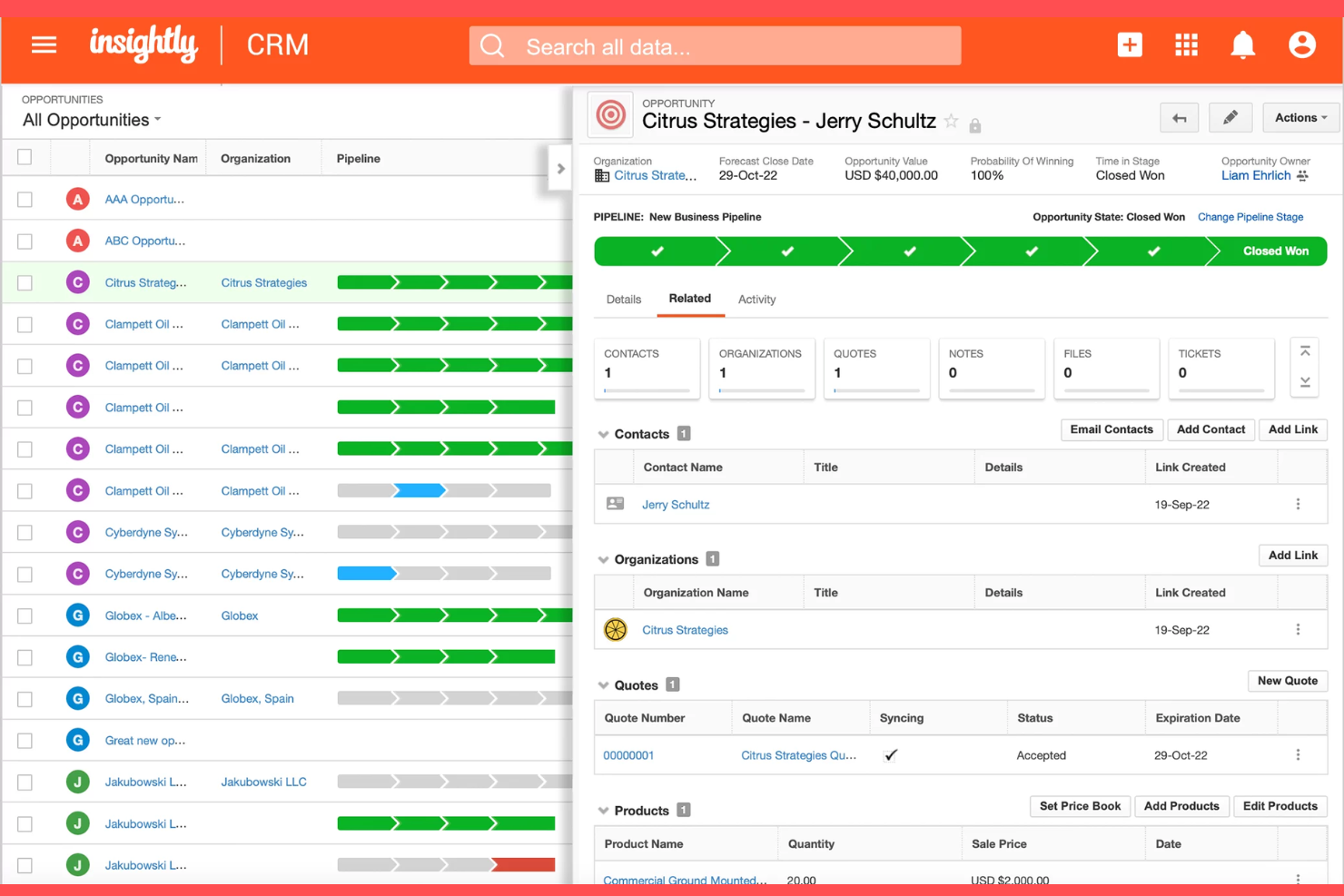
Insightly is a CRM platform that combines sales, project management, and workflow automation in one system. I think you'll find it especially useful if your team needs to manage client relationships and projects together without switching tools.
Who Is Insightly Best For?
Insightly is a good fit for growing businesses that want to manage both client relationships and project delivery in one platform.
Why Insightly Is a Good HubSpot CRM Alternative
I picked Insightly because it's one of the few CRMs that converts a won deal directly into a project without any manual handoff. I like how the project management layer lets my team assign tasks, set milestones, and track deliverables inside the same platform where we manage contacts and pipelines. In practice, that means my team can move a client from prospect to active project without losing any context or switching tools. For growing businesses managing both sales and delivery, that continuity is hard to find elsewhere.
Insightly Key Features
- Validation rules and permissions: Set field-level validation rules and role-based access controls to keep your CRM data accurate and consistent.
- Products, price books, and quotes: Build product catalogs, configure pricing, and generate branded PDF quotes directly from opportunity records.
- AI Copilot: Use prompt-based AI to summarize records, surface key information, and automate repetitive data tasks inside the CRM.
- Shareable performance dashboards: Build and share up to 100 custom dashboards on the Professional plan to track KPIs across teams in real time.
Insightly Integrations
Insightly offers hundreds of native integrations through AppConnect, including Microsoft, DocuSign, Shopify, Unbounce, PandaDoc, Netsuite, QuickBooks, and Google, with an API available for custom integrations.
Pros and Cons
Pros:
- AppConnect for advanced workflow automation
- Custom objects for industry-specific data
- Built-in project management for post-sale work
Cons:
- Limited pipeline customization options
- No built-in live chat or chatbot

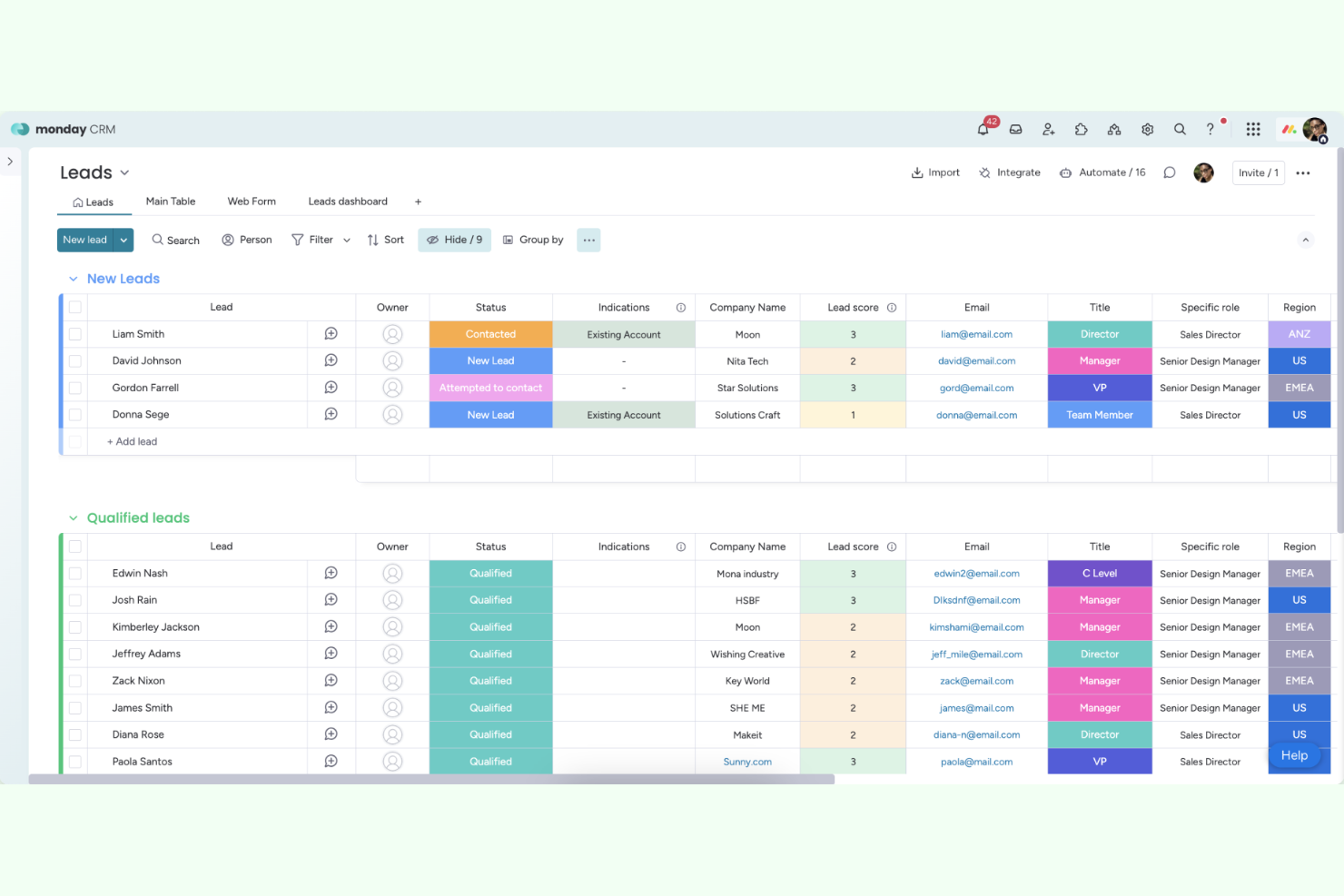
monday CRM is a flexible CRM platform built on monday.com’s work OS, designed for teams who want to customize sales workflows and manage client data in one place. I think it’s a strong fit for businesses that need a visual, adaptable system to track leads, deals, and customer relationships.
Who Is monday CRM Best For?
monday CRM is a good fit for small to midsize teams that want to tailor sales processes and client data management to their unique workflows.
Why monday CRM Is a Good HubSpot CRM Alternative
I picked monday CRM because it's built on the same Work OS my team already uses for project management, which means sales and delivery workflows live on the same platform. The no-code customization is what sets it apart—I can drag and drop deal stages, add custom fields, and build automations without touching a single line of code. I also like the AI Notetaker, which listens in on calls and drafts follow-up emails automatically. For teams that want a CRM that bends to their process rather than forcing them to adapt, monday CRM is a genuinely flexible option.
monday CRM Key Features
- AI sales agents: Autonomous agents that source, qualify, and book meetings directly from your CRM around the clock.
- Email sequences: Build and send personalized, triggered email sequences to contacts across every stage of the sales cycle.
- Real-time dashboards: Monitor rep performance and team targets with customizable dashboards that update live.
- Built-in marketing campaigns: Create, launch, and track email marketing campaigns directly inside monday CRM without switching tools.
monday CRM Integrations
monday CRM offers native integrations with Salesforce, HubSpot, Slack, Google Workspace, Zoom, Xero, QuickBooks, and connects with Zapier. An API is available for custom integrations.
Pros and Cons
Pros:
- Built-in email and activity tracking
- AI Notetaker for call summaries and follow-ups
- No-code automation for sales workflows
Cons:
- Email tracking sometimes misses activities
- Limited advanced marketing automation features

Best for automated CRM data entry
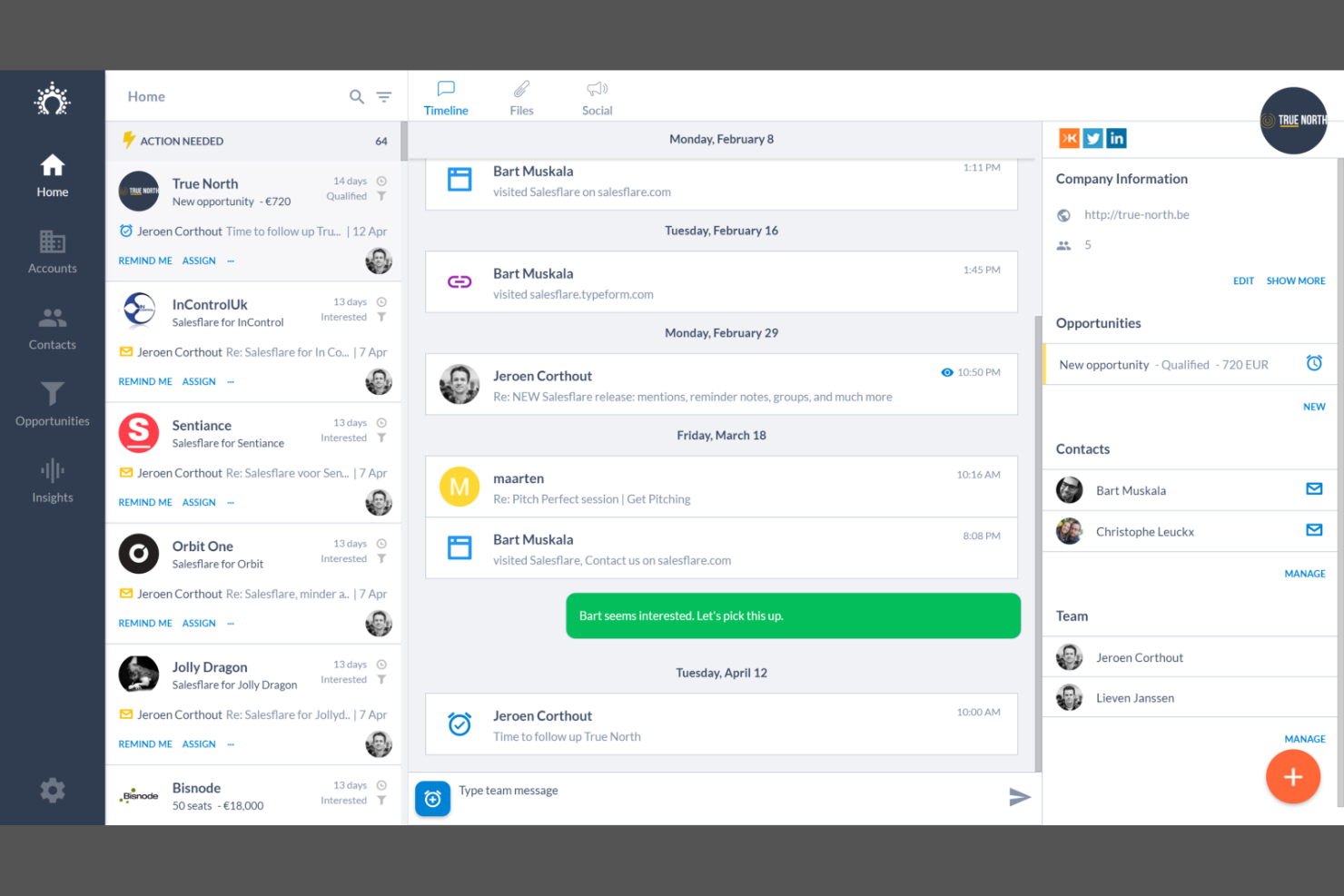
Salesflare is a CRM built for small B2B businesses that want to automate data entry and keep client information up to date with minimal manual effort. I think it’s a strong choice for sales teams who need a client database that pulls in emails, meetings, and contact details automatically.
Who Is Salesflare Best For?
Salesflare is a good fit for small B2B sales teams that want automated CRM data capture.
Why Salesflare Is a Good HubSpot CRM Alternative
I picked Salesflare because it eliminates the manual data entry that makes most CRMs feel like a second job. When I connect it to my email and calendar, it automatically logs every interaction, enriches contact records, and surfaces follow-up reminders without me touching a thing. I also like the relationship intelligence feature, which shows who on my team already knows a contact—useful when you're coordinating outreach across a small sales team. For B2B teams that want a client database that stays current on its own, Salesflare is a genuinely practical choice.
Salesflare Key Features
- Email signature sync: Automatically pulls contact details from email signatures into your CRM records.
- Lead finder: Search for and add new B2B leads directly inside Salesflare without a separate prospecting tool.
- Saved segments: Save filtered lists of contacts or accounts to return to and work from repeatedly.
- Email and web tracking: Tracks when contacts open emails, click links, and visit your website.
Salesflare Integrations
Salesflare offers native integrations with Google Workspace, Slack, Mailchimp, Trello, and connects with Zapier. An API is available for custom integrations.
Pros and Cons
Pros:
- Relationship insights across your sales team
- AI-powered meeting and call summaries
- Automated contact and activity data capture
Cons:
- No built-in phone dialer
- Limited marketing automation compared to HubSpot
Copper
Best for Google Workspace CRM integration
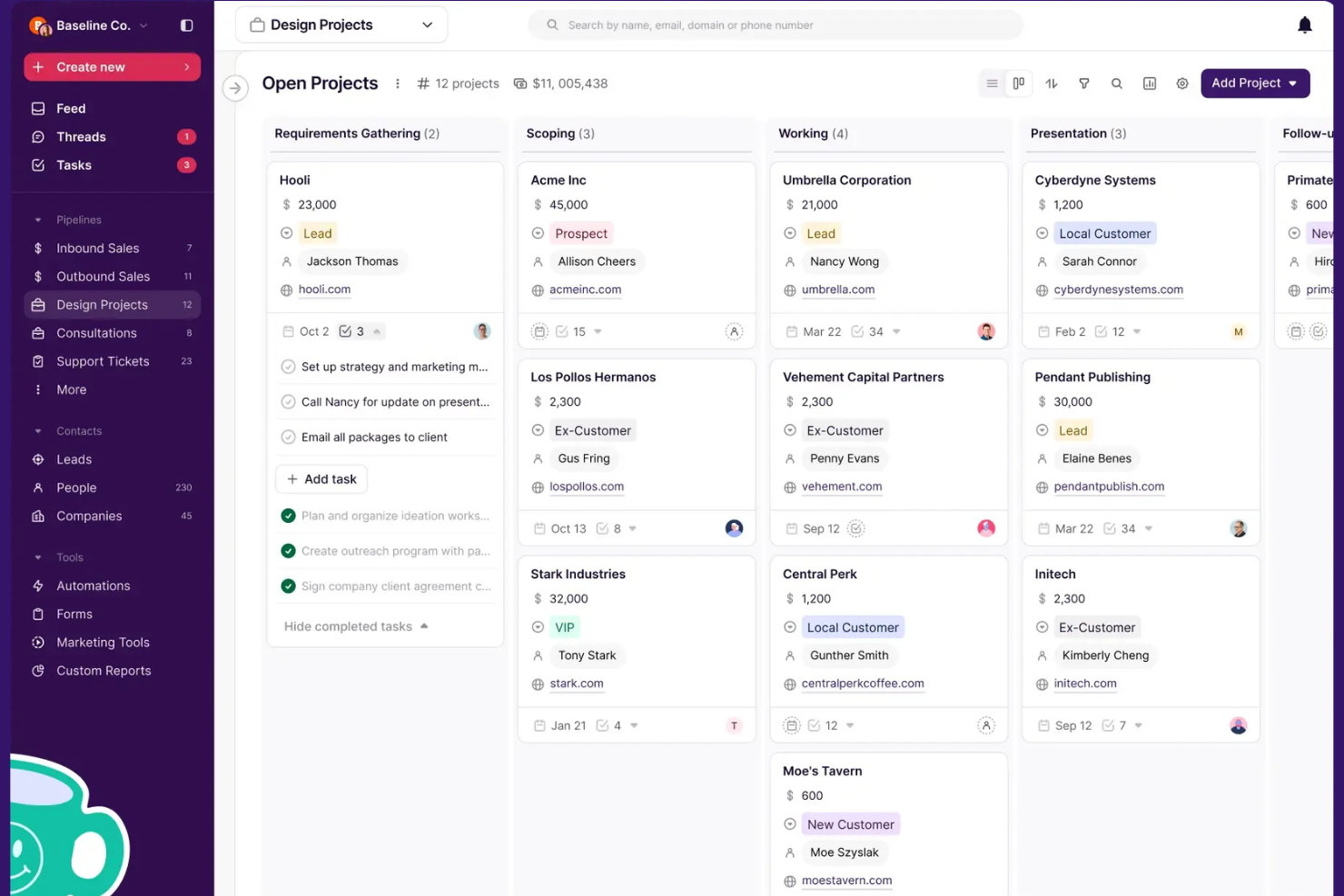
Copper is a CRM designed for teams who work in Google Workspace and want a client database that feels like a natural extension of Gmail and Google Calendar. I think it’s a strong fit for businesses that want to manage contacts, deals, and communications without leaving their Google apps.
Who Is Copper Best For?
Copper is a good fit for small to midsize businesses that rely heavily on Google Workspace for daily operations.
Why Copper Is a Good HubSpot CRM Alternative
I picked Copper because it's the only CRM built specifically for Google Workspace, and that distinction matters when your team lives in Gmail. Contact records auto-populate from Gmail data, so there's no manual entry when a new lead emails you. I also like that you can manage deals, tasks, and follow-ups directly inside Gmail through Copper's Chrome extension, without opening a separate app. For teams already committed to Google Workspace, that level of native integration is something HubSpot simply doesn't offer.
Copper Key Features
- AI contact enrichment: Automatically fills in contact profiles with phone numbers, email addresses, and social media details when a new contact is added.
- Business card scanner: Snap a photo of a business card on mobile and Copper creates a new contact record instantly.
- Custom reporting dashboards: Build and modify sales dashboards with custom KPIs, filters, and charts, including win rate, loss reason, and lead conversion reports.
- Two-way Google Contacts sync: Changes made in Copper automatically reflect in Google Contacts, and vice versa, keeping records consistent across both platforms.
Copper Integrations
Copper offers native integrations with Google Workspace, Slack, Mailchimp, QuickBooks, Xero, and connects with Zapier. An API is available for custom integrations.
Pros and Cons
Pros:
- AI-powered meeting and call summaries
- Automatic contact and activity capture
- Deep Gmail and Google Calendar integration
Cons:
- Mobile app lacks full CRM functionality
- Lacks advanced project management features
Other HubSpot CRM Alternatives
Here are some additional HubSpot CRM alternatives that didn’t make it onto my shortlist, but are still worth checking out:
- Attio
For collaborative CRM data management
- Zoho CRM
For multichannel customer engagement
- Nimble
For social relationship management
- Keap
For small business automation
- SAP CRM
For enterprise analytics and integration
- Ontraport
For service business automation
- Zendesk Sell
For sales and support alignment
- Microsoft Dynamics 365
For enterprise Microsoft CRM
- Capsule CRM
For simple SMB CRM
- Agile CRM
For CRM with telephony features
- Brevo
For CRM with email and SMS marketing
- Bitrix24
For all-in-one CRM and collaboration
- Close
For inside sales teams
- NetHunt CRM
For Gmail-based CRM
- Nutshell
For sales automation and reporting
- Odoo
For modular CRM solutions


How I Evaluate HubSpot CRM Alternatives
I split my evaluation into baseline criteria—does it connect a won deal to a live project?—and differentiators that separate the best options from the rest.
Core Functionality (Table Stakes For This List)
When I'm selecting tools for my list, I rank each one on a scale from 0 (does not offer the functionality) to 5 (excels in this area) for each core functionality listed below. Then, I calculate the tool's total score into a percentage. Each tool needs to achieve a minimum total score of 65% to be considered for inclusion.
- Contact & Deal Management: I look for customizable deal stages and contact records, like the ability to run separate pipelines for new business vs. client renewals.
- Project-CRM Integration: The handoff from closed deal to active project matters most—I check whether tasks, milestones, and budgets link back to the deal record.
- Sales Pipeline Automation: Automation should cover stage transitions and task creation, like auto-assigning a kickoff task when a deal moves to "closed-won."
- Email & Communication Tracking: I evaluate whether emails and meeting notes log to both the contact and the project, so delivery teams have full client context.
- Reporting & Dashboards: Customizable dashboards that blend pipeline data with project metrics give leadership a single view of revenue and delivery health.
- Third-Party Integrations: I check for native connections to tools like Asana, Jira, QuickBooks, and Slack, plus open API access for building custom workflows.
Once I have a list of tools that meet this criteria, I consider what sets each platform apart.
Differentiating Factors (What Sets Vendors Apart)
Here's how I compare and contrast different vendors:
Standout Features
Time tracking tied to CRM records is a big differentiator. I look for tools that let delivery teams log billable hours against specific contacts and projects, so profitability per client is visible without exporting to a spreadsheet. Client portals also stand out—when a platform lets you share project updates or collect approvals through a branded portal linked to the deal record, it cuts down on status-update emails. I also evaluate built-in proposal builders that feed directly into project creation once a deal closes.
Beyond Features
Pricing transparency matters here. Many teams leave HubSpot because costs spike as they add users or unlock features like automation, so I check whether essential capabilities are gated behind higher tiers. I also evaluate how quickly a team can migrate—tools with built-in HubSpot import wizards or pre-configured services templates shorten that transition. Scalability is another factor I consider, especially for agencies running multiple client accounts or business units that need role-based permissions to keep delivery teams and sales teams in their own lanes.
Why Look For a HubSpot CRM Alternative?
While HubSpot CRM is a good choice for client database, there are a number of reasons why some users seek out alternative solutions. You might be looking for a hubspot crm alternatives because…
- You need more advanced project management features
- You want deeper customization for industry-specific workflows
- You require more flexible pricing or lower-cost plans
- You need native integrations with niche business tools
- You want more control over data hosting or privacy
- You need better support for complex sales processes
If any of these sound like you, you’ve come to the right place. My list contains several client database options that are better suited for teams facing these challenges with HubSpot CRM and looking for alternative solutions.
HubSpot CRM Key Features
Here are some of the key features of HubSpot CRM, to help you contrast and compare what alternative solutions offer:
- Contact management: Store, organize, and segment all your client and lead information in one centralized database, making it easy to track every interaction and update records as relationships evolve.
- Pipeline management: Visualize and manage your sales process with customizable pipelines, allowing you to move deals through stages, assign owners, and forecast revenue.
- Email tracking and templates: Track when contacts open your emails and use pre-built or custom templates to speed up outreach and maintain consistency across your team.
- Task and activity tracking: Create, assign, and monitor tasks, calls, meetings, and notes linked to specific contacts or deals, so nothing falls through the cracks.
- Reporting dashboards: Build and share real-time dashboards that display sales, activity, and productivity metrics, helping you monitor performance and spot trends.
- Live chat and chatbot: Engage website visitors in real time with live chat or automate responses and lead capture using built-in chatbots.
- Marketing automation: Set up automated workflows for email nurturing, lead scoring, and follow-up tasks to streamline your marketing and sales processes.
- Document management: Store, share, and track sales documents within the CRM, so your team always has access to the latest collateral and can see when prospects engage with files.
- Integration marketplace: Connect HubSpot CRM to hundreds of other business tools, including email, calendar, accounting, and customer support platforms, to centralize your workflows.
- Mobile app: Access your CRM data, manage tasks, and communicate with clients on the go using HubSpot’s mobile app for iOS and Android.