

10 Best AI Note-Taking Apps Reviewed in 2026

10 Best AI Note-Taking Apps Shortlist


Managing projects can quickly become messy when you're tracking tasks, meetings, and ideas simultaneously. That’s where AI note-taking apps come in; they handle the tedious work like transcribing calls, sorting information, and surfacing what’s most important so you don’t have to.
I’ve spent time testing these tools myself, and some really do make work smoother. Below, you’ll find my top picks based on real use, including which ones stand out for smart features and team-friendly workflows
Why Trust Our Software Recommendations
Our team has been testing and reviewing software since 2012. As project managers ourselves, we know how difficult—and important—it is to choose the right software.
For this guide, we evaluated tools using hands-on testing and independent research, scoring tools using our selection criteria. We also draw on insights from industry thought leaders and practicing project management experts.
Our reviews reflect our human editorial judgment, not a sales pitch.
Expert reviewers:
AI Note-Taking Apps Comparison Table
This comparison table summarizes pricing details for my top AI note-taking apps selections.
| Tool | Best For | Trial Info | Price | ||
|---|---|---|---|---|---|
| 1 | Best for AI-assisted organization | Free plan available | From $10/user/month (billed annually) | Website | |
| 2 | Best for turning meeting notes into tasks | Free plan available | From $7/user/month (billed annually) | Website | |
| 3 | Best for linking notes with AI | Free plan available | From $4/user/month (billed annually) | Website | |
| 4 | Best for collaboration with AI | 30-day free trial available | From $6/user/month (billed annually) | Website | |
| 5 | Best for eco-friendly AI note-taking | Free plan available | From $14/user/month | Website | |
| 6 | Best for AI-powered voice analysis | Free plan + free demo available | From $10/user/month (billed annually) | Website | |
| 7 | Best for transcribing meetings | Free plan available | From $8.33/user/month (billed annually) | Website | |
| 8 | Best for AI-driven memory recall | Free plan available | From $12/user/month | Website | |
| 9 | Best for automating meeting notes | Free plan + free demo available | From €39/user/month (billed annually) | Website | |
| 10 | Best for generating meeting summaries | Free plan available | From $10/user/month (billed annually) | Website |

Best AI Note-Taking App Reviews
Below are my detailed summaries of the best AI note-taking apps that made it onto my shortlist. My reviews offer a detailed look at the key features, pros & cons, integrations, and ideal use cases of each tool to help you find the best one for you.

Notion
Best for AI-assisted organization

Notion is a workspace that combines note-taking, task management, and collaboration, catering to both individuals and teams. It offers AI-driven features that help users organize information and streamline workflows efficiently.
Why I picked Notion: Notion's AI capabilities assist in organizing information through smart suggestions and automated content categorization. Its flexibility allows you to create custom databases and templates tailored to your needs. The tool's ability to integrate tasks, notes, and projects in one place can increase productivity.
Standout Features & Integrations:
Features include the ability to create custom templates for different project types, which is designed to limit repetitive tasks. You can embed various types of media, from videos to code snippets, enriching your workspace. Notion's drag-and-drop interface makes it easy to rearrange content and adapt to changing project needs.
Integrations include Slack, Google Drive, Trello, Asana, Figma, GitHub, Typeform, Zapier, Jira, and Microsoft Teams.
Pros and Cons
Pros:
- Supports embedding various media types
- Drag-and-drop interface simplifies organization
- Customizable templates for diverse projects
Cons:
- Limited offline capabilities
- Free plan does not offer full scope of the tool

ClickUp
Best for turning meeting notes into tasks
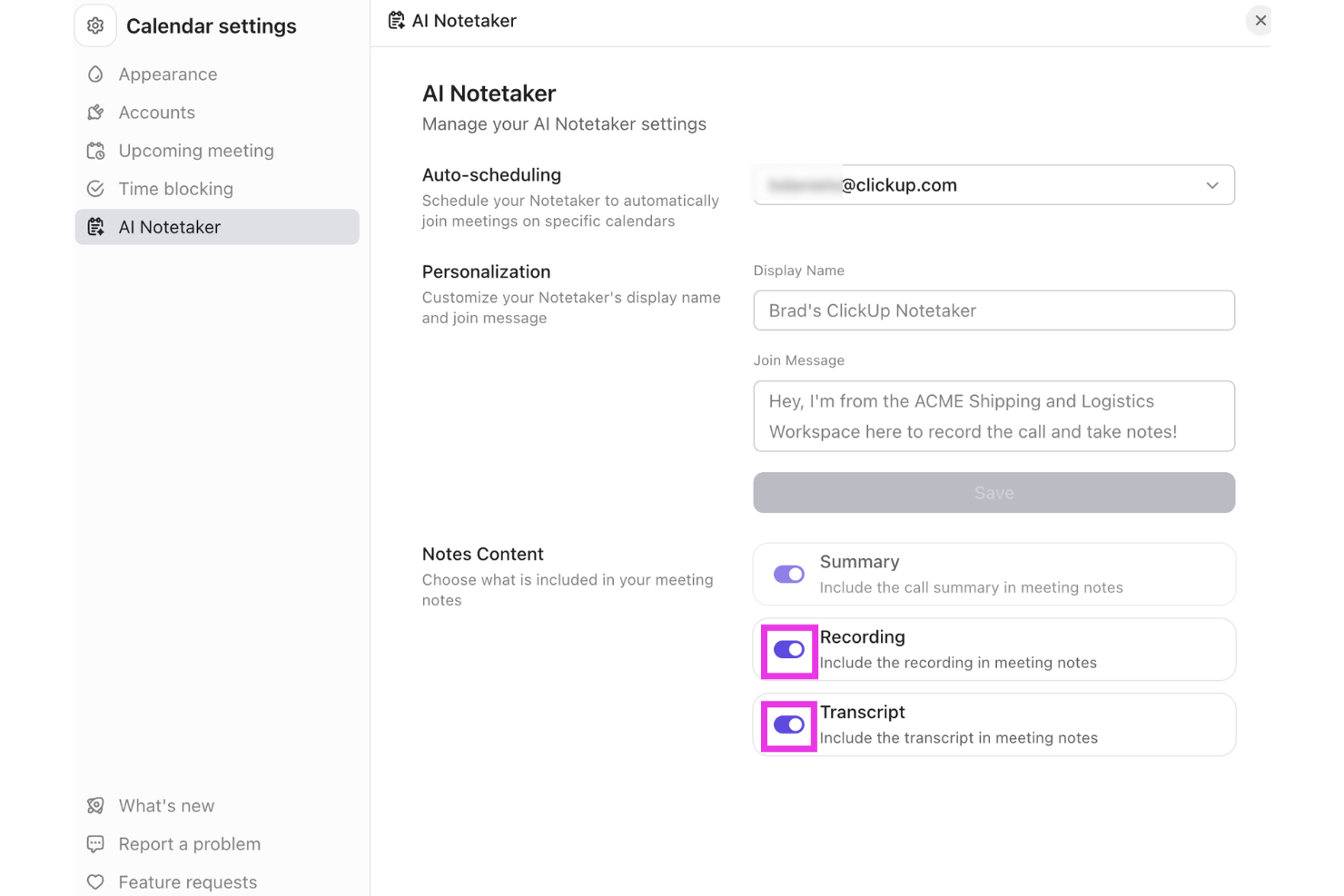
ClickUp offers a versatile platform that integrates AI capabilities to support note-taking and team collaboration. Professionals across project management, software development, and vendor management can use its tools to organize information and manage workflows in one place. With the AI Meeting Notetaker and support for turning meeting notes into tasks, ClickUp helps teams capture discussions and connect them directly to actionable work.
Why I Picked ClickUp
I picked ClickUp for turning meeting notes into tasks, using its AI Meeting Notetaker to capture conversations and organize key points from discussions. The tool records meetings, generates summaries, and converts action items into tasks that can be tracked within ClickUp. It also connects notes with projects, documents, and workflows, helping teams manage follow-ups without switching between multiple tools.
ClickUp Key Features
In addition to turning meeting notes into tasks, ClickUp offers:
- Project Tracking: Offers real-time visibility into project status, helping teams stay on top of their tasks and deadlines.
- Document Creation: Enables seamless document drafting and editing within the platform, ensuring all your notes are easily accessible.
- Time Management: Provides tools to track time spent on tasks, aiding in better resource allocation and productivity analysis.
- Integration Support: Connects with over 50 applications, allowing you to manage projects across different platforms without switching tools.
ClickUp Integrations
Integrations include Slack, Google Drive, Dropbox, Microsoft Teams, Zoom, GitHub, Jira, Salesforce, and other third-party tools.
Pros and Cons
Pros:
- All-in-one platform combining tasks, docs, goals, and collaboration tools
- Flexible customization for workflows, dashboards, and task organization
- Centralized workspace organizing tasks, projects, and clients in one platform
Cons:
- Interface complexity can overwhelm non-technical users or first-time users
- Mobile app and form features reported as limited by some users
New Product Updates from ClickUp
ClickUp Adds Meetings Hub, Super Agent Templates, and ZoomInfo Integration
ClickUp adds a searchable Meetings Hub, new ways to clone and template Super Agents, and a ZoomInfo integration through the App Center. These updates improve meeting retrieval, agent reuse, and access to sales intelligence. For more information, visit ClickUp’s official site.

Obsidian
Best for linking notes with AI

Obsidian is a note-taking app designed for users who need to organize complex information and connections between notes. It caters mainly to individuals and teams looking for a way to visualize their thoughts and ideas through interconnected notes and AI-assisted linking.
Why I picked Obsidian: The app's standout feature is its ability to link notes using AI, making it easier for you to create a web of related ideas. Obsidian uses AI to suggest connections between your notes, which can increase your ability to discover relationships. Its AI capabilities also help in categorizing and organizing your notes automatically.
Standout Features & Integrations:
Features include a graph view that visually represents the links between your notes, aiding in better comprehension. You can also customize your workspace with plugins to suit your needs. Additionally, Obsidian offers markdown support, which allows you to format notes with ease.
Integrations include Markdown, Git, Dropbox, Google Drive, Evernote, OneDrive, Todoist, Trello, and Notion.
Pros and Cons
Pros:
- Supports markdown for easy formatting
- Customizable with community plugins
- Visual graph view for note connections
Cons:
- Requires manual setup for full functionality
- Mobile app interface is less feature-rich than desktop version
Best for collaboration with AI

Microsoft OneNote is a digital note-taking app that caters to individuals and teams looking for a collaborative workspace. With AI-enhanced features, it helps users organize notes, share ideas, and collaborate efficiently across projects.
Why I picked Microsoft OneNote: The tool's AI capabilities make it ideal for collaboration by enabling real-time sharing and editing of notes. It integrates with other Microsoft products, which increases productivity for teams using the Microsoft ecosystem. AI-driven features like handwriting recognition and search make it easy to find and organize information.
Standout Features & Integrations:
Features include the ability to clip web content directly into your notes, making research more efficient. You can organize your notes with sections and pages, providing a structured approach to note-taking. Additionally, the drawing tools allow you to sketch ideas or annotate documents directly within OneNote.
Integrations include Microsoft Word, Microsoft Excel, Microsoft Outlook, Microsoft Teams, OneDrive, SharePoint, PowerPoint, Skype, Yammer, and Planner.
Pros and Cons
Pros:
- Integrates with Microsoft products
- Handwriting recognition for easy note search
- Real-time collaboration with team members
Cons:
- Requires a Microsoft account for full features
- Mobile versions offer fewer features than desktop versions

Granola
Best for eco-friendly AI note-taking

Granola is an AI-powered notepad aimed at professionals who frequently attend meetings and need efficient note-taking solutions. It focuses on transcribing audio directly from your device, eliminating the need for additional meeting bots and enhancing the note-taking experience with AI-driven features.
Why I picked Granola: Granola's eco-friendly approach is reflected in its ability to transcribe audio directly from your computer, reducing the reliance on external servers. Its AI capabilities assist in creating detailed meeting notes quickly, which is ideal for back-to-back meetings. Users can customize templates to fit various meeting types, ensuring that the tool adapts to specific needs.
Standout Features & Integrations:
Features include customizable templates that let you tailor notes to different meeting formats. The AI support for post-meeting tasks helps you manage follow-ups. Additionally, Granola enables easy sharing of notes across platforms, making collaboration straightforward.
Integrations include Zoom, Slack, Microsoft Teams, Google Meet, Skype, Webex, Asana, Trello, Notion, and Evernote.
Pros and Cons
Pros:
- AI support for managing post-meeting tasks
- Customizable templates for different meetings
- Direct transcription from your device
Cons:
- No audio or video playback available
- Limited to Mac and iPhone users

Best for AI-powered voice analysis

Fireflies is an AI-driven meeting assistant that transcribes and analyzes conversations for teams and professionals. It helps capture meeting notes and insights, leveraging AI to improve understanding and collaboration.
Why I picked Fireflies: Fireflies provides AI-powered voice analysis by transcribing meetings in real-time and highlighting key topics. Its AI capabilities allow you to search and review past conversations quickly, ensuring no detail is missed. The tool's ability to analyze sentiment and track speaker participation adds depth to its transcription functionality.
Standout Features & Integrations:
Features include the ability to create action items directly from meeting notes, which helps with follow-up tasks. You can also set up reminders for important deadlines based on meeting discussions. Fireflies offers a searchable archive of all your meetings, making it easy to revisit past conversations.
Integrations include Slack, Google Meet, Zoom, Microsoft Teams, Salesforce, Asana, Trello, Dropbox, Evernote, and Zapier.
Pros and Cons
Pros:
- Searchable archive of past meetings
- Sentiment analysis for conversation insights
- Real-time transcription of meetings
Cons:
- Action items can feel overly literal
- Some users need repeated “training” for voice accuracy


Otter is a transcription service tailored for professionals who need to capture meetings and conversations accurately. It offers AI-driven transcription capabilities, making it a popular choice among teams and individuals who rely on detailed meeting notes.
Why I picked Otter: Otter excels in transcribing meetings by using advanced AI algorithms to convert speech into text in real time. It can distinguish between different speakers and provides time-stamped notes, ensuring you capture every detail. Its voice recognition technology is considered quite accurate, which minimizes the need for manual edits.
Standout Features & Integrations:
Features include live transcription during meetings, which allows you to follow along in real time. You can also highlight important parts of the conversation for easy reference later. Additionally, Otter offers keyword searching to quickly locate specific information within your transcripts.
Integrations include Zoom, Microsoft Teams, Google Meet, Dropbox, Google Calendar, Microsoft Outlook, Google Drive, Slack, and Evernote.
Pros and Cons
Pros:
- Easy keyword searching in transcripts
- Real-time transcription capabilities
- Accurate speaker identification
Cons:
- Limited functionality in noisy environments
- Transcript can include errors, garbled output, and missed wording


Mem is an AI-powered note-taking application tailored for professionals and teams who need efficient information retrieval and organization. It uses AI to enhance memory recall, allowing users to access and manage their notes.
Why I picked Mem: Mem's AI-driven features focus on knowledge management and memory recall, helping you find notes quickly with contextual search capabilities. The tool learns from your usage patterns to suggest relevant content and connections. Its AI organizes notes automatically, reducing manual effort. This makes it ideal for those who need to recall information quickly and accurately without sorting through a pile of documents.
Standout Features & Integrations:
Features include a timeline view that organizes notes chronologically for easy access. You can also create tasks and reminders, ensuring you never miss important deadlines. Mem's tagging system helps categorize and retrieve notes efficiently, intuitively create a collection of notes through hashtags, or pull in links to previous mems by hitting “@” and searching for relevant notes. Instead of a hierarchical folder system, mem enables you to create a fluid map of relevant documentation, easily retrievable without leaving the note you are currently working on.
Integrations include Slack, Google Calendar, Notion, Zapier, Trello, Asana, Microsoft Teams, Google Drive, Dropbox, and Evernote.
Pros and Cons
Pros:
- Automatic note organization
- AI suggests relevant content and connections
- Contextual search for quick information retrieval
Cons:
- Note structure and features take some time to fully understand
- Free plan limits usage per month


Jamie is an AI note-taking tool designed for meeting productivity by automatically generating detailed notes, transcripts, and action items. It caters to professionals and teams who need to focus on discussions without the distraction of manual note-taking.
Why I picked Jamie: Jamie excels in automating meeting notes, allowing your team to capture essential details without interruption. Its AI capabilities include speaker recognition and support for several languages, ensuring accurate transcription. The tool's focus on privacy and security, with GDPR compliance and data encryption, adds value for enterprise users.
Standout Features & Integrations:
Features include speaker recognition, which helps distinguish between different participants for clarity. Jamie supports over 99 languages, making it accessible for diverse teams. It also offers admin controls and single sign-on options for enterprise use.
Integrations include Notion, Google Docs, Microsoft Teams, Slack, Zoom, Google Meet, Salesforce, Asana, Trello, and monday.com.
Pros and Cons
Pros:
- Automates action items from meetings
- Integrated AI assistant for follow-ups
- Works online and in-person meetings
Cons:
- No live transcription during meetings
- Desktop-only app, no full mobile support


Supernormal is an AI-powered tool designed for professionals who need to enhance meeting productivity. It automates note-taking and task management, allowing users to focus on discussions while the AI handles documentation and summarization.
Why I picked Supernormal: Supernormal's standout feature is its ability to generate meeting summaries using its AI assistant, Norma. This assistant joins meetings and produces concise summaries, helping your team keep track of key points and actionable steps. The platform supports multiple languages and offers customizable display names for a personalized experience.
Standout Features & Integrations:
Features include customizable display names, which help personalize your meeting experience. The platform supports over 60 languages, ensuring accessibility for diverse teams. Additionally, users can easily share meeting notes and track tasks through its intuitive interface.
Integrations include Salesforce, Slack, HubSpot, Asana, Zoom, Microsoft Teams, Google Meet, Notion, and the Radiant app for M1 Macs.
Pros and Cons
Pros:
- Strong integrations with productivity workflows & CRM
- Supports over 60 languages
- AI assistant joins and summarizes meetings
Cons:
- May require setup for optimal use
- Free plan lacks key advanced features
Other AI Note-Taking Apps
Here are some additional AI note-taking apps that didn’t make it onto my shortlist, but are still worth checking out:
- Wave.co
For AI-enhanced audio notes
- Fellow
For team feedback and notes
- Avoma
For collaborative meeting insights
- Krisp
For noise cancellation in calls
- Equal Time
For meeting time management


How I Evaluate AI Note Taking Apps
Any tool on this list needs to do more than just record and transcribe—it has to use AI to turn messy project conversations into usable outputs like action items, owner assignments, and decision logs that actually flow into your PM workflow. I split my evaluation into two layers: the core functionality a tool must have to qualify, and the differentiating factors that separate a good option from the right one for your team.
Core Functionality (Table Stakes For This List)
When I'm selecting tools for my list, I rank each one on a scale from 0 (does not offer the functionality) to 5 (excels in this area) for each core functionality listed below. Then, I calculate the tool's total score into a percentage. Each tool needs to achieve a minimum total score of 65% to be considered for inclusion.
- AI-Powered Transcription: I evaluate how well each tool converts spoken dialogue into accurate, speaker-labeled text—especially during fast-paced standups or multi-speaker sprint reviews.
- AI Meeting Summarization: Each tool needs to generate structured recaps that capture key points, not just condense text. I look for summaries I could share directly with stakeholders.
- Action Item Extraction: I check whether the AI reliably pulls tasks, owners, and deadlines from conversations—like catching "Sarah will update the risk register by Friday."
- Meeting Platform Integration: The tool should connect natively with Zoom, Microsoft Teams, and Google Meet so it joins calls automatically without manual recording or uploads.
- Project Tool Integrations: I look at how well notes and tasks flow into tools like Jira, Asana, ClickUp, or Monday so extracted action items don't sit in a silo.
- AI Search & Query: Teams build up months of meeting history. I evaluate whether the AI lets you ask questions across past transcripts to find a specific decision or commitment.
Once I have a list of tools that meet this criteria, I consider what sets each platform apart.
Differentiating Factors (What Sets Vendors Apart)
Here's how I compare and contrast different vendors:
Standout Features
Multi-meeting intelligence is a big differentiator—I look for tools that can connect themes, blockers, and decisions across an entire sprint cycle rather than treating each call in isolation. Custom AI prompts also matter because PMs can build reusable templates that pull out risks or dependencies every time. I check whether a tool can auto-generate status reports from recent meetings, saving you from manually compiling weekly updates for leadership.
Beyond Features
Security and compliance weigh heavily in my evaluation because these tools record sensitive stakeholder and client conversations. I check for SOC 2 Type II certification, GDPR readiness, and clear data retention policies. Pricing structure also matters—I look at whether per-seat costs and recording minute caps scale reasonably for PMs who run five or more meetings a day. For distributed teams, transcription accuracy on technical PM vocabulary and multi-language support can make or break adoption across regions.
How to Choose an AI Note-Taking App
It’s easy to get bogged down in long feature lists and complex pricing structures. To help you stay focused as you work through your unique software selection process, here’s a checklist of factors to keep in mind:
| Factor | What to Consider |
| Scalability | How well can the app grow with your team? Consider if it supports adding users or expanding features without significant cost increases. |
| Integrations | Does the app connect with your current tools? Check for compatibility with platforms like Slack, Google Workspace, or Microsoft Office. |
| Customizability | Can you tailor the app to your workflow? Look for options to adjust templates, dashboards, or note organization to fit your needs. |
| Ease of Use | Is the app intuitive for everyone on your team? Evaluate the learning curve and see if non-tech team members can use it without frustration. |
| Implementation and Onboarding | How quickly can you start using the app? Assess the availability of setup guides, training resources, and support during the onboarding phase. |
| Cost | Does the app fit your budget? Compare pricing plans, and check for hidden fees or the need for additional purchases to access full functionality. |
| Security Safeguards | Are your notes secure? Ensure the app offers encryption, regular updates, and compliance with data protection standards like GDPR. |
What Are AI Note-Taking Apps?
AI note-taking apps are digital tools that use artificial intelligence to enhance the capturing and organizing of notes. These tools are generally used by professionals like project managers, students, and business executives who need efficient and accurate documentation.
Features like real-time transcription, automatic organization, and context-based search help with improving productivity and reducing manual effort. Overall, these tools save time and enhance the accuracy and accessibility of information.
Features
When selecting AI note-taking apps, keep an eye out for the following key features:
- Real-time transcription: Converts spoken words from meetings, phone calls, or audio files into text instantly, allowing you to stay focused on conversations instead of typing.
- Automatic organization: AI categorizes and sorts notes intelligently, saving you time managing meeting records or brainstorming sessions.
- Context-based search: Lets you use AI to find notes by topic, keyword, or context. Ideal for quickly revisiting past meeting details.
- Speaker recognition: Identifies and separates speakers clearly, improving transcript accuracy during group discussions and client calls.
- Meeting summaries: Creates AI summaries of each session so you can review key points and action items without replaying the full audio.
- Keyword tagging: Highlights critical terms and decisions automatically, helping you scan and organize content faster.
- Integration support: Connects with popular platforms like Slack, Google Workspace, and Microsoft Office, supporting collaboration for both free version and paid plans.
- Sentiment analysis: Uses AI to detect tone and sentiment within discussions, helping you gauge engagement and alignment during meetings.
- Customizable templates: Provides ready-made templates for different meeting types, whether for a quick check-in or for a detailed project review.
- Voice-to-text conversion: Converts voice notes or audio recordings into accurate written text. Perfect for all-in-one meeting note taker apps across devices.
Benefits
Implementing AI note-taking apps provides several benefits for your team and your business. Here are a few you can look forward to:
- Time savings: Real-time transcription and automatic organization reduce the time spent on manual note-taking and sorting.
- Improved accuracy: AI-driven features like speaker recognition and context-based search enhance the precision of your notes and make retrieval easier.
- Enhanced collaboration: Integration support allows for easy sharing and collaboration with team members across different platforms.
- Deeper insights: Sentiment analysis and meeting summaries provide valuable insights into conversations, helping you make informed decisions.
- Increased accessibility: Voice-to-text conversion and keyword tagging make your notes easily accessible and navigable from any device.
- Customization options: Customizable templates let you tailor the note-taking experience to fit various meeting types and workflows.
- Better organization: AI features automatically categorize and tag notes, keeping your information well-organized and easy to find.
Costs and Pricing
Selecting AI note-taking apps requires an understanding of the various pricing models and plans available. Costs vary based on features, team size, add-ons, and more. The table below summarizes common plans, their average prices, and typical features included in AI note-taking apps solutions:
Plan Comparison Table for AI Note-Taking Apps
| Plan Type | Average Price | Common Features |
| Free Plan | $0 | Basic note-taking, limited storage, and basic search functionality. |
| Personal Plan | $5-$15/user/month | Advanced search, customizable templates, and integrations with popular apps. |
| Business Plan | $20-$35/user/month | Team collaboration tools, real-time transcription, and enhanced security features. |
| Enterprise Plan | $50-$75/user/month | Custom integrations, dedicated support, and analytics and reporting. |
AI Note-Taking Apps FAQs
Here are some answers to common questions about AI note-taking apps:
Can AI note-taking apps integrate with my existing tools?
Most AI note-taking apps work smoothly with tools like Google Workspace, Slack, and Microsoft Office. Many also connect with popular video conferencing and productivity apps, letting you share AI meeting notes or voice notes without extra steps. If a direct connection isn’t available, platforms like Zapier can help link your favorite tools or automate tasks across them. Before choosing an app, check which integrations support your specific workflow.
Are AI note-taking apps secure for sensitive information?
Security is a priority for most AI meeting assistants and productivity apps. They typically use encryption, two-factor authentication, and GDPR compliance to protect your data. If you handle confidential meeting transcripts or audio recordings, look for tools that offer access controls and regular security updates. Reviewing an app’s privacy policy before storing sensitive information is always a good idea.
How can AI note-taking apps improve team collaboration?
AI note-taking apps help teams stay aligned by automatically generating meeting summaries, transcripts, and action items. Whether you’re using ChatGPT-powered features, Fireflies.ai, or Otter.ai, these tools make it easy for everyone to review discussions and next steps. Some even support AI chat for quick brainstorming or follow-ups after meetings. Choose a solution that fits your team’s preferred communication channels and workflow to keep collaboration productive and clear.