Os 10 Melhores Softwares Gratuitos de Gestão de Projetos Analisados para 2026

10 Melhor seleção de software gratuito de gestão de projetos


O software gratuito de gestão de projetos dá às equipas acesso a ferramentas essenciais de planeamento, acompanhamento e colaboração — sem o custo inicial. Quer esteja a gerir tarefas para uma pequena empresa, uma startup, uma organização sem fins lucrativos ou uma equipa interna, estas ferramentas podem ajudá-lo a manter-se organizado, cumprir prazos e melhorar a comunicação da equipa sem ultrapassar o seu orçamento.
Para o ajudar a encontrar a opção certa, testei e analisei dezenas de plataformas gratuitas de gestão de projetos, avaliando a sua facilidade de utilização, limitações de funcionalidades, escalabilidade e integrações. Este guia abrange os melhores softwares gratuitos de gestão de projetos disponíveis em 2026, para que possa encontrar uma ferramenta que suporte o seu fluxo de trabalho e cresça com a sua equipa.
Why Trust Our Software Recommendations
Our team has been testing and reviewing software since 2012. As project managers ourselves, we know how difficult—and important—it is to choose the right software.
For this guide, we evaluated tools using hands-on testing and independent research, scoring tools using our selection criteria. We also draw on insights from industry thought leaders and practicing project management experts.
Our reviews reflect our human editorial judgment, not a sales pitch.
Expert reviewers:
Tabela comparativa de software gratuito de gestão de projetos
Esta tabela comparativa resume os detalhes de preços das minhas principais escolhas de software gratuito de gestão de projetos:
| Tool | Best For | Trial Info | Price | ||
|---|---|---|---|---|---|
| 1 | Best for customizable workflows | Free plan + 14-day free trial + free demo available | From $9/user/month (billed annually) | Website | |
| 2 | Best free project management for customizable views | Free plan + 14-day trial + demo available | From $10/user/month (billed annually) | Website | |
| 3 | Best for custom workflows | 30-day free trial | From $35/user/month (billed annually) | Website | |
| 4 | Best for native time tracking tools | Free plan + 14-day trial + demo available | From $5/user/month | Website | |
| 5 | Best for scalability & flexibility | Free plan + 15-day trial + demo available | From $4/user/month (billed annually) | Website | |
| 6 | Best for unlimited free projects | Free plan + 14-day trial available | From $2.49/user/month | Website | |
| 7 | Best for freelancers who track time and bill clients | 14-day free trial + free plan + free demo available | From $39.97/month (billed annually) | Website | |
| 8 | Best for agile project management | Free plan + 7-day free trial available | From $8.48/user/month | Website | |
| 9 | Best for combining essential tools | Free plan + 30-day free trial (45-day Unlimited trial) + free demo available | From $25/month | Website | |
| 10 | Best for task management capabilities | Free plan + 30-day free trial + free demo available | From $14/user/month | Website |


Avaliações dos melhores softwares gratuitos de gestão de projetos
Encontre abaixo as nossas comparações de software de gestão de projetos, juntamente com capturas de ecrã que mostram o aspeto de cada ferramenta. Desça mais para encontrar mais opções e perguntas frequentes.

Best for customizable workflows
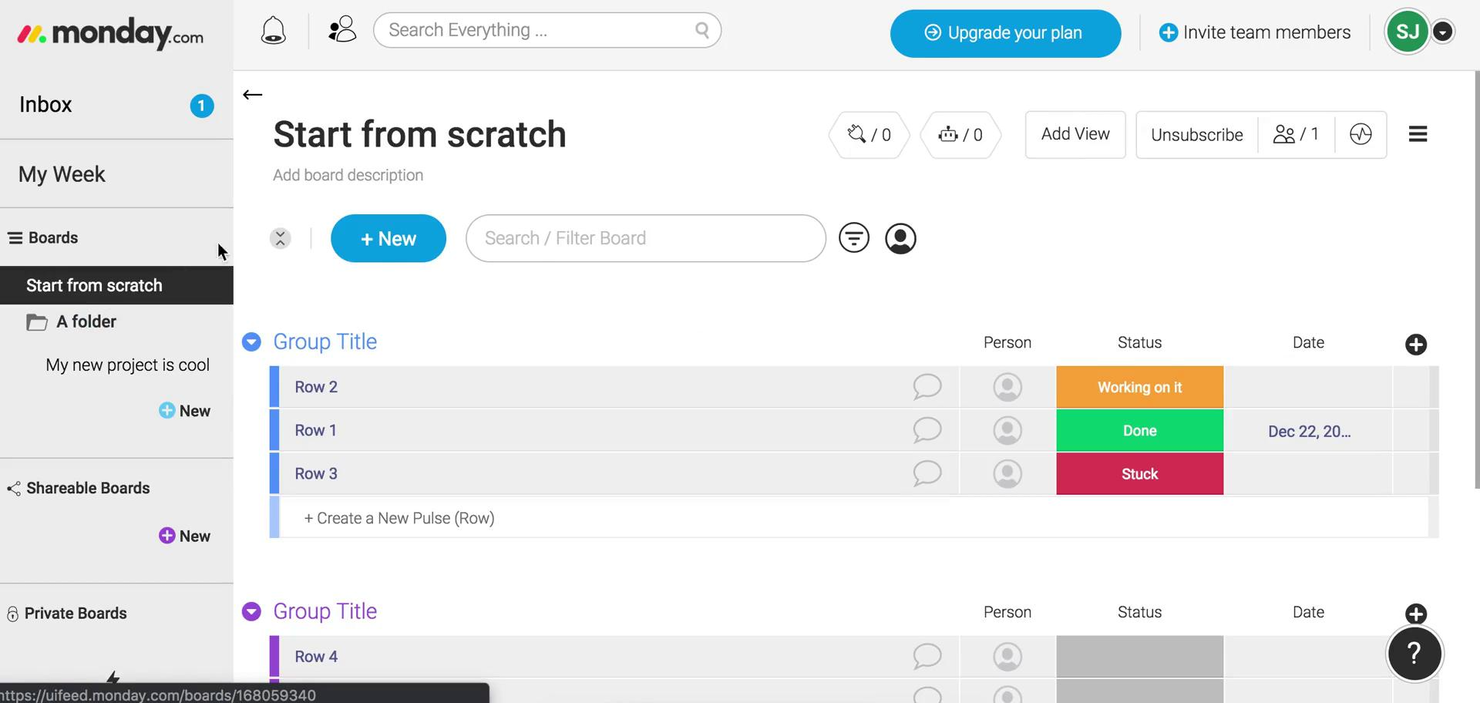
monday.com gives teams in tech, marketing, and operations a flexible platform to organize projects, manage tasks, and collaborate in real time, allowing workflows to adapt as needs change.
Who Is monday.com Best For?
monday.com is a strong fit for small to mid-sized teams that need a visual, adaptable way to manage projects without heavy setup or technical overhead.
Why I Picked monday.com
monday.com earns its spot on my shortlist because of how far its workflow customization goes. I like that you can build boards from scratch or start from one of hundreds of templates, then layer in custom columns, status labels, and conditional logic to match exactly how your team tracks work. The no-code automation builder is where it clicks—you can set up rules like "when status changes to In Review, notify the assignee and move the item to the QA board" without writing a single line of code. I also use the multiple view options (Gantt, Kanban, calendar, timeline) to switch context depending on whether I'm planning a sprint or reporting to stakeholders.
monday.com Key Features
- Workload view: See each team member's assigned tasks and capacity in a single visual dashboard to spot over-allocation at a glance.
- Task dependencies: Link related tasks so that when one item is delayed, dependent tasks automatically shift to reflect the updated timeline.
- Guest access: Invite external collaborators like clients or contractors to specific boards without giving them access to your full workspace.
- Dashboard reporting: Aggregate data from multiple boards into a single high-level dashboard to track progress across projects simultaneously.
monday.com Integrations
Integrations include Slack, Gmail, Google Calendar, Outlook, Microsoft Teams, Salesforce, QuickBooks, HubSpot, Zendesk, and GitHub.
What's Free?
monday.com offers a free-forever plan for up to 2 users. This plan includes 3 boards, 1,000 items, and limited access to integrations and automation.
Pros and Cons
Pros:
- Integrations include Slack Google Drive
- Customizable workflows using numerous columns
- Multiple views support varied management
Cons:
- Free plan limits users features
- Advanced features restricted to higher-tier
New Product Updates from monday AI Workspace
monday AI Workspace Adds Human Approval Routing
monday AI Workspace adds a human-in-the-loop approval block to AI Workflows, sending approval requests and routing workflow paths based on responses. For more information, visit monday AI Workspace's official site.

Wrike
Best free project management for customizable views
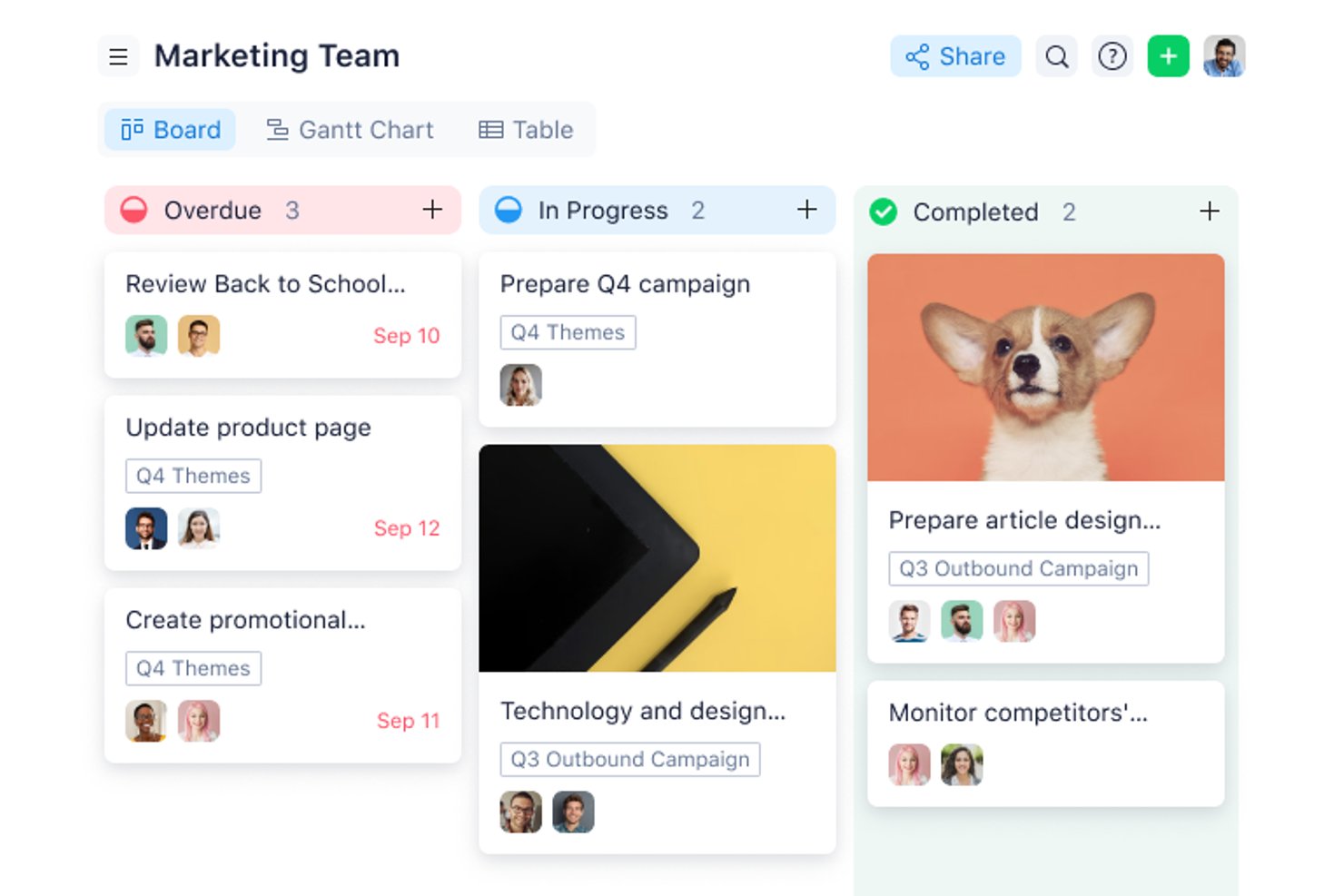
Wrike gives project managers and teams in tech, marketing, and professional services a flexible workspace to organize tasks, manage deadlines, and collaborate on projects—all without upfront costs.
Who Is Wrike Best For?
Wrike suits growing teams and mid-size organizations seeking a structured yet adaptable project management tool across marketing, product, and IT.
Why I Picked Wrike
I chose Wrike for its view flexibility, available right out of the box even on the free plan. You can toggle between list, board (Kanban), and table views depending on how your team thinks about work—so a developer tracking sprint tasks and a marketer managing a campaign calendar aren't forced into the same layout. The Gantt chart view is available on paid plans, giving teams a clear upgrade path as their needs grow. The cross-tagging feature is particularly useful: you can add a single task to multiple folders or projects so it appears in the right view for each team without duplication.
Scott Crosby, a Technical Project Manager, highlighted how Wrike delivers in real-world scenarios: “Wrike's strength is its visual project timelines and dependency tracking. When we were rolling out our client portal system, Wrike made it easy to see how backend development delays would impact frontend testing phases. The Gantt charts were intuitive enough that even our non-technical team members could understand project bottlenecks.”
Wrike Key Features
- Custom work views: Toggle between List, Board (Kanban), and Table views to organize work in different ways.
- Task and subtask management: Create tasks, break them into subtasks, and cross-tag them across multiple folders or projects without duplicating entries.
- Use case project templates: Start projects using prebuilt structures rather than building every workflow from scratch.
- AI Essentials: Use AI tools for content drafting and editing, comment summaries, and onboarding assistance.
Wrike Integrations
The Free plan includes cloud storage integrations and access to Wrike’s open REST API. Additional native integrations become available on paid tiers, including productivity apps on Team, Salesforce and Adobe Creative Cloud on Business, and QuickBooks, Power BI, and Tableau on Pinnacle. Wrike Integrate is available as an add-on for connecting systems without a native connector, such as NetSuite.
What's Free?
Wrike offers a free-forever plan with unlimited users and 2 GB of storage per account. It includes task and subtask management, folder hierarchy, custom work views such as Table and Kanban, cloud storage integrations, and open API access. Gantt charts, dashboards, custom fields, and request forms require a paid plan.
Pros and Cons
Pros:
- Wrike's task integration enhances visibility and organization
- The mobile app allows quick task management and real-time updates
- Effective for content creation and collaboration among remote teams
Cons:
- Users may face a learning curve
- Gantt charts require a paid plan
New Product Updates from Wrike
Wrike Expands Gantt Planning, Approvals, and AI Work Intake
Wrike adds cross-project Gantt dependencies, flexible approval routing, and AI work intake through Wrike MCP. These updates give teams more control over planning, decision-making, and incoming work. For more information, visit Wrike’s official site.

Best for custom workflows
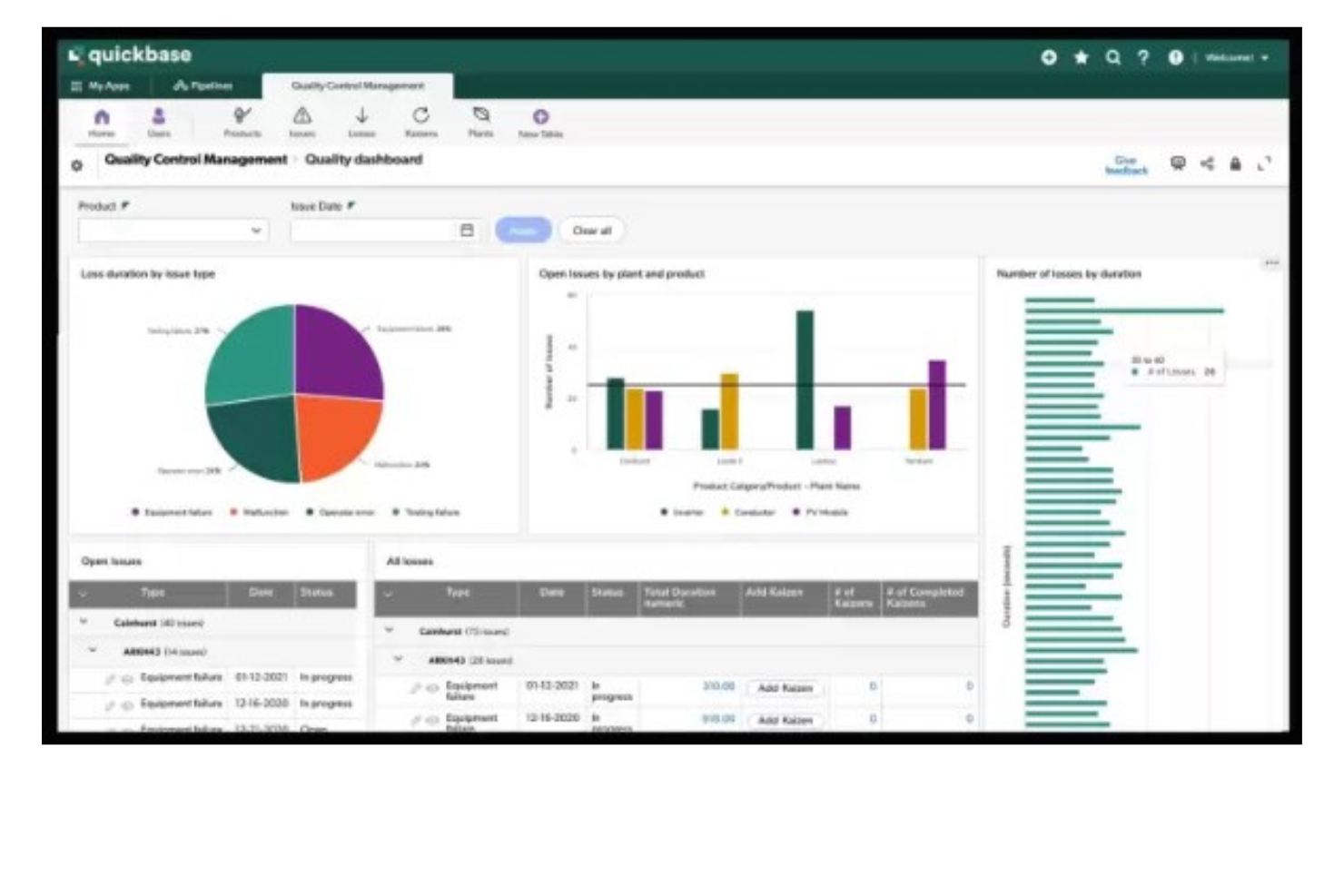
Quickbase gives teams in industries like construction, manufacturing, and IT a way to build custom project management apps that fit their unique workflows, helping them organize tasks, automate processes, and collaborate without relying on rigid, one-size-fits-all tools.
Who Is Quickbase Best For?
Quickbase is a strong fit for mid-size to large teams in operations-heavy industries like construction, manufacturing, and logistics who need project management tools tailored to their specific processes.
Why I Picked Quickbase
I've included Quickbase in my top picks because its no-code app builder lets teams design project management workflows from scratch rather than adapting to a fixed structure. I like that you can configure custom stage gates and approval routing directly in the workflow builder—so when a construction team needs a permit sign-off before moving to the next phase, that logic is built right into the app. Quickbase's Pipelines feature also lets you automate task handoffs between teams using drag-and-drop logic, so my team doesn't have to chase status updates across departments. The budget vs. actuals tracking with real-time alerts is another feature I find genuinely useful for keeping multi-phase projects from quietly going over budget.
Sergio Oliveira, Director of Development at DesignRush, shared his experience: “Quickbase enabled us to quickly consolidate our project data, even on the free plan. It allows us to track tasks, write reports, and ensure accountability without worrying about managing different spreadsheets.”
Quickbase Key Features
- Dynamic reports and dashboards: Build real-time reports with filters, groupings, and charts to track project status across multiple apps.
- Role-based permissions: Control who can view, edit, or manage data at the field, table, or app level.
- Mobile app access: Access and update project data from iOS and Android devices while working in the field.
- Gantt chart views: Visualize project timelines, task dependencies, and milestones in a drag-and-drop Gantt interface.
Quickbase Integrations
Integrations include Salesforce, SAP, Oracle, Microsoft Teams, SharePoint, Google Drive, and an API is available for custom integrations.
What's Free?
Quickbase offers a free trial, but there is no free-forever plan. The trial allows you to test the platform’s features, but user limits and integration access are restricted during the trial period.
Pros and Cons
Pros:
- Highly scalable for both small and large teams
- Integrates with a range of external tools
- Low-code customizable workflows
Cons:
- Limited ready-made templates
- Not ideal for those who want a quick-start solution
Hive
Best for native time tracking tools
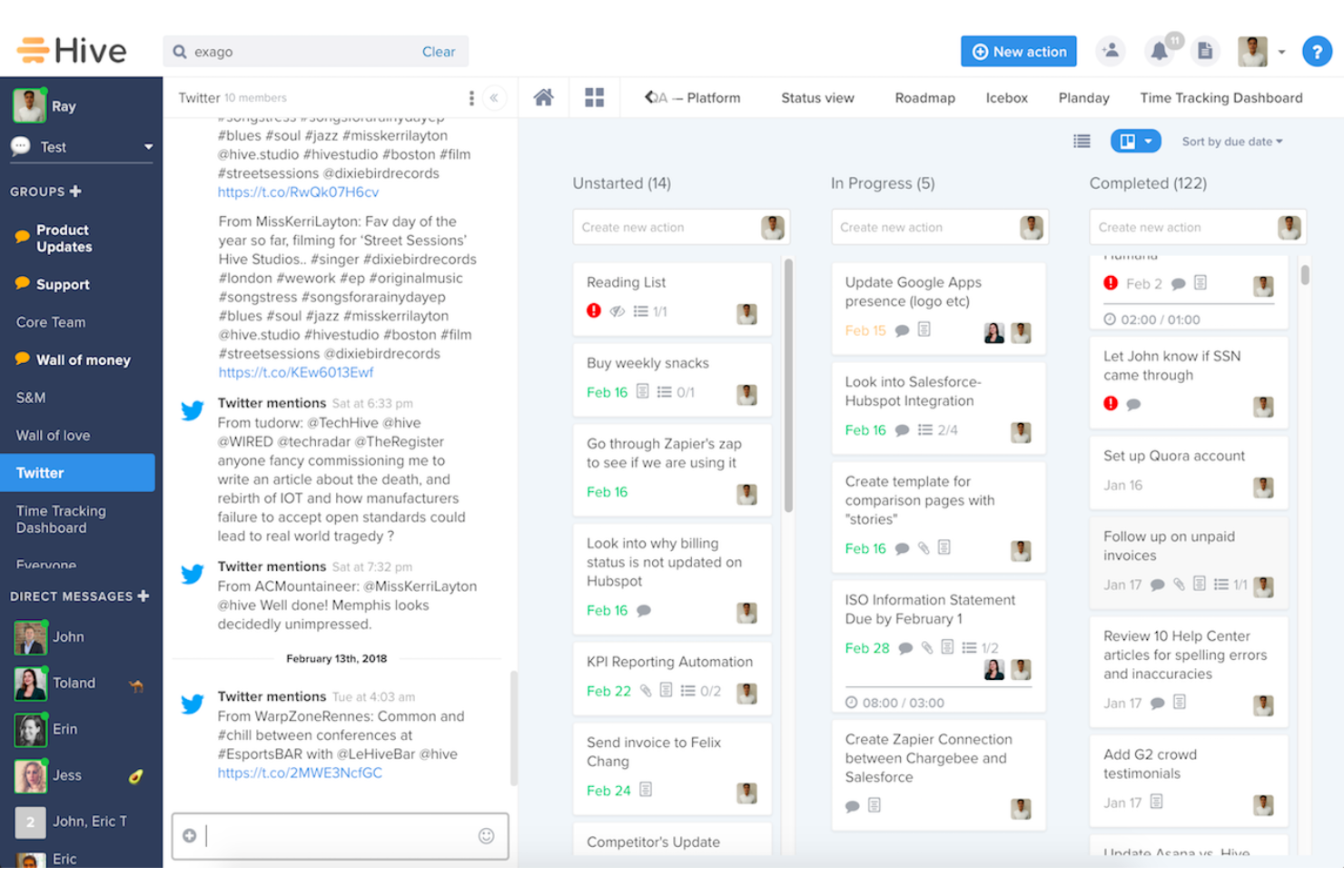
Hive helps small teams and freelancers manage projects without paying for a full project management suite. It combines task tracking, multiple project views, team messaging, native email, collaborative notes, and proofing tools in one workspace, making it easier to stay organized and keep work moving.
Hive is Best for
Hive works well for small cross-functional teams that need project management, communication, and file review tools without juggling multiple platforms.
Why I Picked Hive
I picked Hive because its native time tracking tools let your team log time directly from action cards without switching to a separate app. You can start timers, enter manual time, and compare tracked hours against estimated time to better understand workload and project costs. I also like that logged time feeds into team timesheets, giving managers a clearer view of individual and team bandwidth. This makes Hive a strong fit for teams that want free project management software with built-in time tracking instead of relying on disconnected add-ons.
Hive Key Features
- Multiple project views: Switch between Gantt, Kanban, calendar, table, and list views without recreating project data.
- Action cards: Keep subtasks, assignees, due dates, attachments, and comments together in one task card.
- Team messaging: Connect direct messages and group chats to specific projects or action cards.
- Collaborative notes: Create shared notes in real time and link them to projects or action cards for added context.
Hive Integrations
Integrations include Google Drive, Gmail, Box, Freshdesk, ActiveCampaign, Harvest, Marketo, Pipedrive, Jira, and Salesforce.
Pros and Cons
Pros:
- Native chat and notes reduce tool switching for teams
- Multiple views support Kanban, calendar, table, and list workflows
- Built-in timers connect task work to team timesheets
Cons:
- Advanced dashboards and automations require paid add-ons
- Time tracking is not included in the Free plan

Best for scalability & flexibility
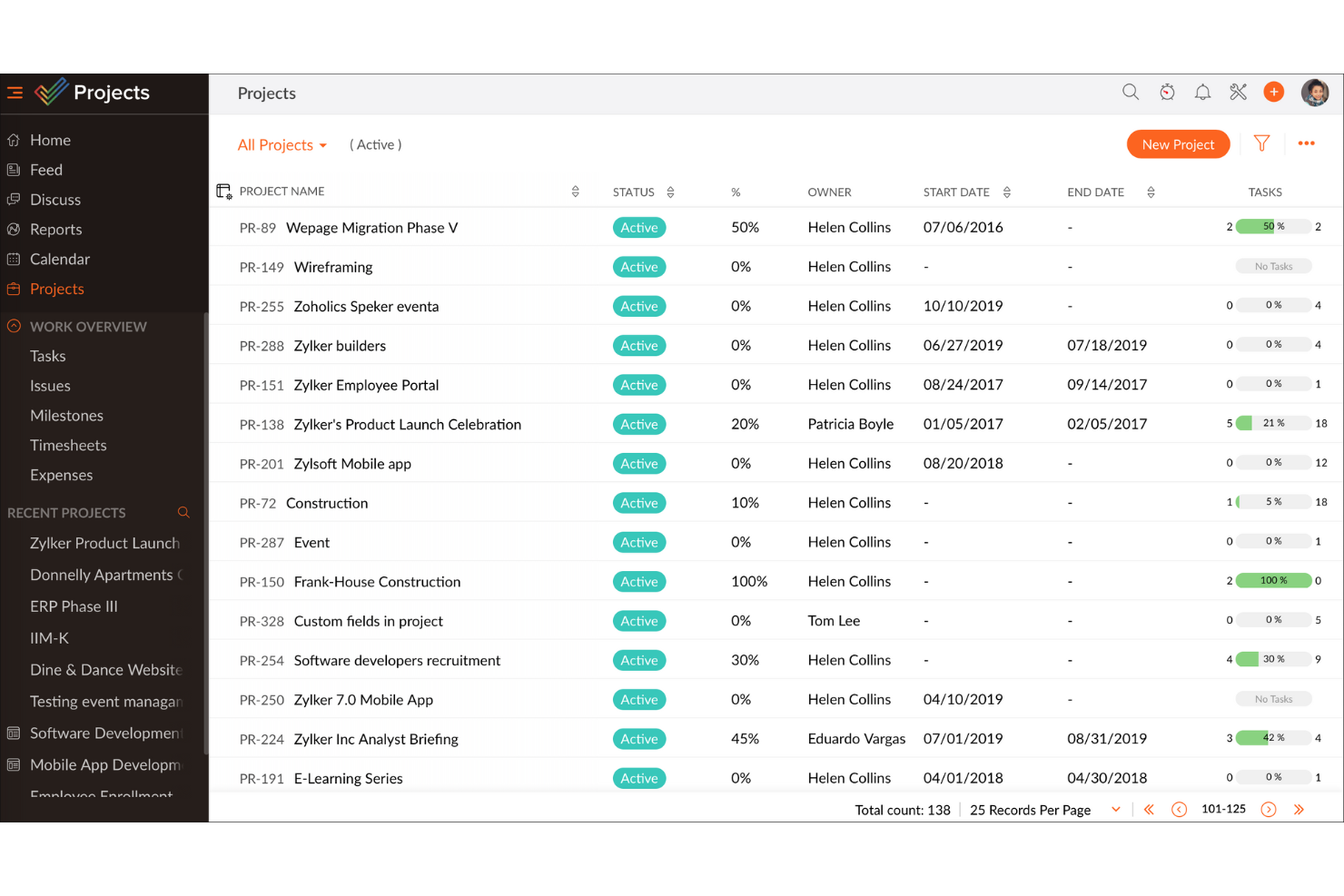
Zoho Projects gives teams in tech, marketing, and service-based businesses a flexible way to organize tasks, track progress, and collaborate on projects without upfront costs, making it a practical choice for those seeking a free project management platform that can grow with them.
Who Is Zoho Projects Best For?
Zoho Projects is a strong fit for small to mid-sized teams that need a free starting point but expect their project management needs to grow over time.
Why I Picked Zoho Projects
Zoho Projects earns its spot on my shortlist because it's one of the few free project management tools that genuinely scales with your team without forcing you to rebuild your workflow every time you grow. I like that the free plan gives you real task management capabilities—milestones, task lists, subtasks, and Gantt charts—so you're not stuck with a stripped-down experience just because you haven't paid yet. When your team is ready to move up, the Blueprint feature lets you design automated task workflows that trigger status changes, field updates, and team alerts, which is something I've found makes a real difference when managing multiple concurrent projects. The custom layouts and custom fields also mean you can shape the tool around how your team actually works, rather than adapting your process to fit the software.
Michael Alexander, Managing Director at Tangible Digital, explained: “The flexibility of Zoho Projects is what makes it stand apart, as it has enabled us to tailor task views and reporting hierarchy based on our operational requirements."
Zoho Projects Key Features
- Issue tracking: Log bugs and issues directly within a project, assign them to team members, and monitor resolution progress in one place.
- Resource management: View each team member's workload and reassign tasks when someone is over- or under-allocated.
- Project baseline: Capture a snapshot of your project plan at any point and compare it against actual progress to spot schedule drift early.
- Timesheet management: Log time manually or via task timers, with admin controls to approve or reject entries for payroll and client billing.
Zoho Projects Integrations
Integrations include Zoho CRM, Zoho Desk, Zoho Analytics, Zoho Books, Google Calendar, Microsoft Teams, Dropbox, Github, Slack, and Zendesk.
What's Free?
Zoho Projects offers a free-forever plan for up to 5 users and 3 projects, with 5 GB of storage and limited workflow actions. Integrations are limited to Google apps and Office 365 on the free plan.
Pros and Cons
Pros:
- Easily integrates with other Zoho apps and third-party tools, improving workflow continuity.
- Provides precise tracking of time spent on tasks, aiding productivity analysis.
- Offers detailed task breakdowns and organization, enhancing clarity.
Cons:
- Customization options are not as extensive as some competitors, which may hinder tailored solution.
- The mobile app lacks some functionalities available on the desktop version, affecting on-the-go management.
New Product Updates from Zoho Projects
Zoho Projects Adds CodeX Scripts for Custom Modules
Zoho Projects now supports CodeX Scripts for custom modules, enabling conditional logic and rules for creating, updating, and deleting records. For more information, visit Zoho Projects' official site.
 .

Best for unlimited free projects
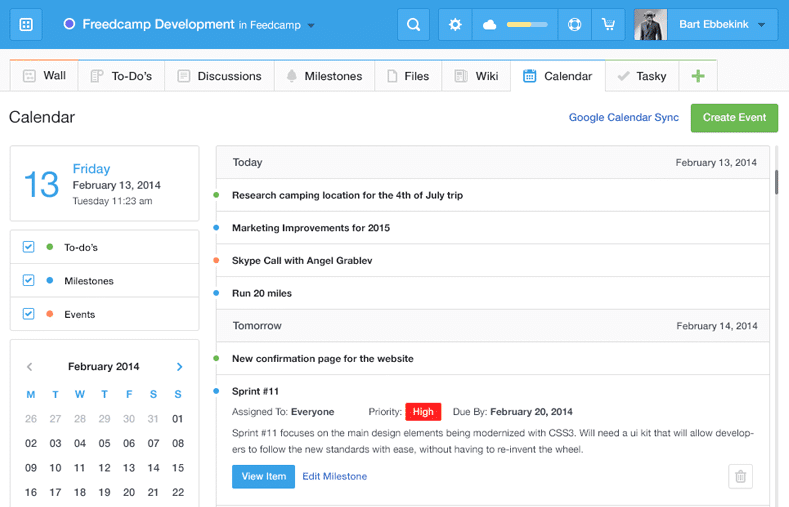
Freedcamp gives startups, agencies, and small businesses a flexible project management platform with task lists, kanban boards, and collaboration tools that help teams organize work and manage multiple projects without hitting usage limits.
Who Is Freedcamp Best For?
Freedcamp is a great fit for small teams and freelancers who need to manage multiple projects simultaneously without paying for a premium plan.
Why I Picked Freedcamp
Freedcamp earns its spot on my shortlist because it's one of the few tools that genuinely doesn't cap the number of projects or users on its free plan. I like that my team can run as many concurrent projects as needed without hitting a paywall—something most free tiers quietly restrict. The Task Board is a feature I use regularly; it pulls tasks from every active project into a single view, which makes it easy to spot bottlenecks across workstreams without jumping between projects. I also rely on the milestones feature to group related tasks under a target date, which keeps larger initiatives from drifting.
Freedcamp Key Features
- Time tracking: Log hours directly against tasks and projects from within the platform.
- File storage: Attach and organize files at the task or project level, keeping assets easy to find.
- Discussion boards: Create threaded conversations tied to specific projects to keep team communication organized.
- Password manager: Store and share project-related login credentials securely across your team.
Freedcamp Integrations
Integrations include Google Calendar, Google Drive, Dropbox, and more.
What's Free?
Freedcamp offers a free-forever plan with unlimited projects, tasks, storage, and users. The main restriction is a 10MB maximum file upload size per file.
Pros and Cons
Pros:
- Affordable pricing for additional features and users.
- Offers collaborative tools like discussions and calendars.
- Extensive free plan supports unlimited projects and users.
Cons:
- May not meet the needs of enterprises requiring high customization.
- Mobile app is less polished than the desktop version.

Best for freelancers who track time and bill clients
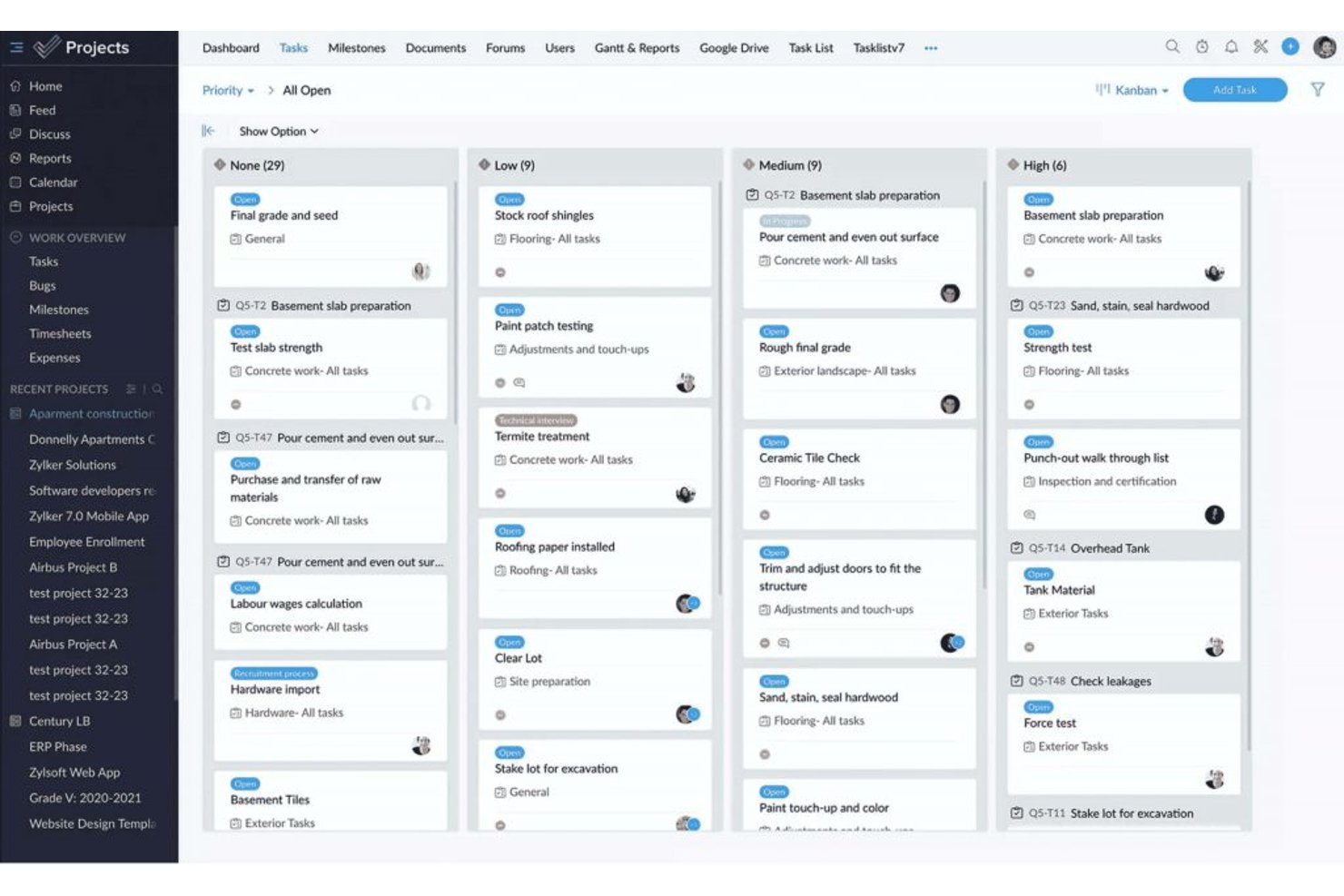
ProProfs Project is project management software with task tracking, List, Kanban, Gantt, and Calendar views, collaboration, automations, time tracking, invoicing, and AI reports available on its free plan.
Who Is ProProfs Project Best For?
ProProfs Project is best for freelancers who track time and bill clients, especially those managing a small number of client projects.
Why I Picked ProProfs Project
I picked ProProfs Project, “Best for freelancers who track time and bill clients,” for its free plan’s built-in timers, timesheets, estimates, and invoicing. I can log billable hours against client work and turn them into invoices without separate billing software. The free plan also includes List, Kanban, Gantt, and Calendar views, with up to three users.
ProProfs Project Key Features
- Task dependencies and baselines: Set task relationships and compare schedules against a baseline.
- Workflow customization: Create custom stages, fields, statuses, and priorities.
- Automations: Set rules for task assignments, status changes, and notifications.
- AI reports: Generate reports with project progress and risk insights.
ProProfs Project Integrations
Native integrations include Google Drive, Dropbox, Box, and more. Zapier is also supported.
What’s Free?
ProProfs Project offers a free plan for up to three users, alongside a 14-day free trial. The free plan doesn’t include API access or webhooks.
Pros and Cons
Pros:
- Free plan includes Gantt and calendar views
- Timesheets and invoices keep billing together
- Built-in timers simplify billable hour tracking
Cons:
- Open-task limit remains unclear
- Three seats constrain client collaboration

Jira
Best for agile project management

Jira gives software teams and digital project managers a flexible platform to organize tasks, track progress, and manage complex workflows, making it a popular choice for teams looking for a free project management solution with agile capabilities.
Who Is Jira Best For?
Jira is a strong fit for software development and product teams that work in agile or scrum environments and need structured issue tracking alongside sprint planning.
Why I Picked Jira
Jira earns its spot as one of the best on my shortlist because it's one of the few free project management tools built specifically around agile delivery. I use scrum boards and sprint planning to break work into focused two-week cycles, which keeps my team moving without losing sight of the backlog. I also rely on Jira's dependency mapping to coordinate releases across product, engineering, and design—especially when one team's work is blocking another's. The burndown charts and cycle time reports give me real data on team performance, not just a status update.
Jira Key Features
- Customizable workflows: Build and modify issue workflows to match how your team actually moves work from start to finish.
- Roadmaps: Visualize work across multiple sprints and teams on a timeline to track progress against delivery goals.
- Automation rules: Set trigger-based automation to handle repetitive tasks like assigning issues or updating statuses.
- Reporting dashboard: Access built-in reports including velocity charts and cumulative flow diagrams to monitor team output.
Jira Integrations
Integrations include Confluence, Trello, Bitbucket, Slack, Microsoft Teams, Google Workspace, Zoom, Tempo Timesheets, Zephyr, and Loom.
What's Free?
Jira offers a free-forever plan for up to 10 users. The free plan includes basic project management features but limits storage to 2 GB and does not include advanced admin controls or premium support.
Pros and Cons
Pros:
- Excellent issue management capabilities for bug tracking and problem-solving.
- Supports Agile methodologies, ideal for software development teams.
- Highly customizable and scalable to fit different project needs and team sizes.
Cons:
- Occasional slow performance with large projects
- May be too feature-rich for teams managing simple projects

Basecamp
Best for combining essential tools
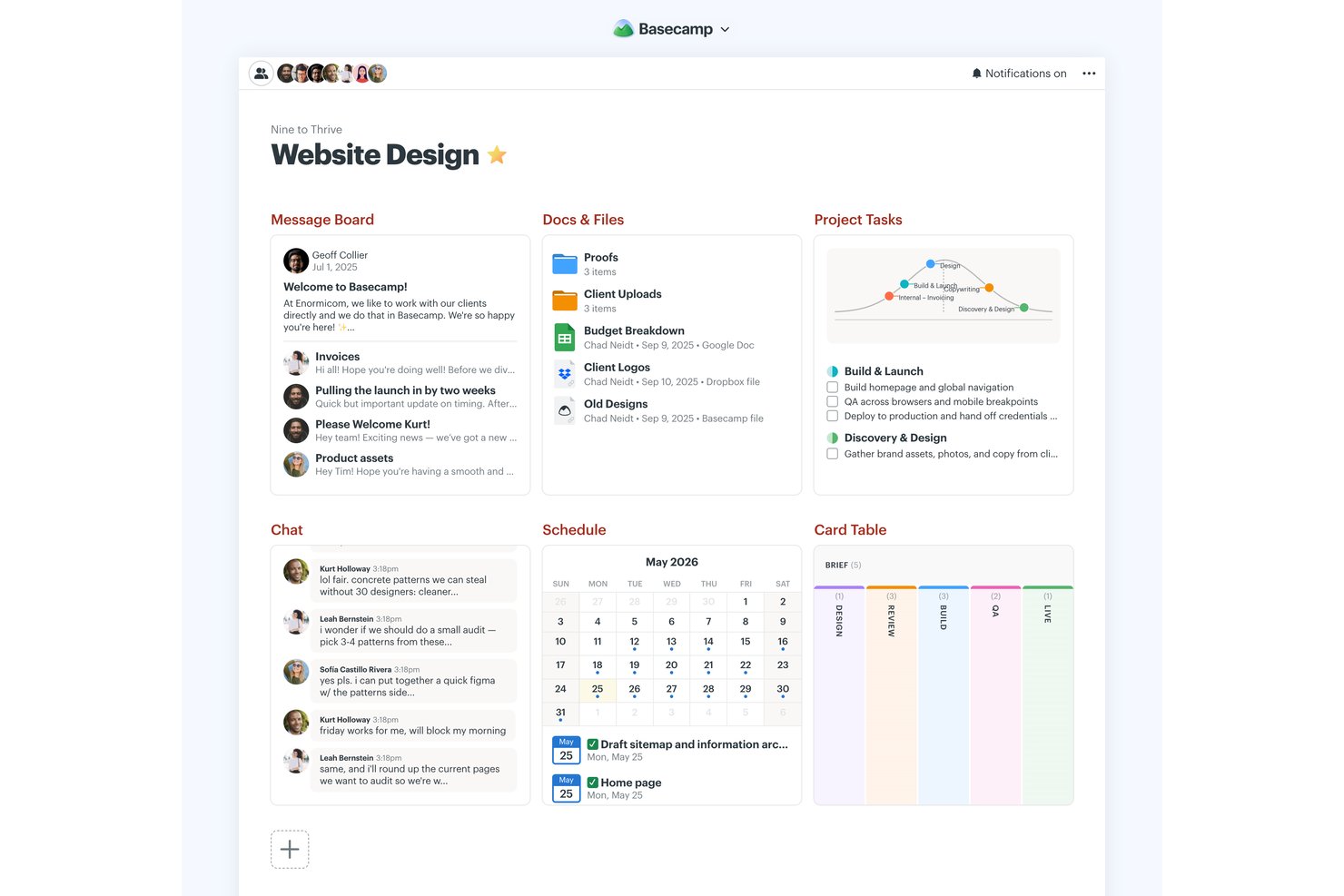
Basecamp is a project management platform with a permanent free plan for one project and five users, combining to-do lists, Kanban-style Card Tables, messaging, scheduling, file storage, reports, and Hill Charts.
Who Is Basecamp Best For?
Basecamp suits small business owners and team leads coordinating straightforward projects who need shared visibility without Gantt charts or dependency planning.
Why I Picked Basecamp
I picked Basecamp for “Best for combining essential tools” because its free project brings to-dos, Card Tables, Campfire chat, and scheduling together. I use Hill Charts to show whether launch tasks are still being figured out or have moved into execution, then check Reports for overdue assignments. The permanent free plan is limited to one active project, five users, and 1 GB of storage.
Basecamp Key Features
- Message boards: Post project updates and keep replies attached to each discussion.
- Pings: Send direct messages to teammates.
- My Assignments: View your tasks sorted by due date, including overdue items.
- Docs & Files: Organize documents and uploads with folders, previews, and version tracking.
Basecamp Integrations
Basecamp has built-in connections for Google Docs, Figma, Dropbox, Google, Outlook, Apple, and HEY calendars, plus Zoom and Microsoft Teams meeting links. It also offers an API and ChatGPT and Claude connectors, and is available on Zapier.
What's Free?
Basecamp’s free plan is free forever and includes one project, up to five users, and 1 GB of storage. It combines core project tools, but the project and user limits can restrict larger teams.
Pros and Cons
Pros:
- Automatic check-ins reduce status-meeting overhead
- Hill Charts show discovery versus execution
- Permanent free plan includes core collaboration tools
Cons:
- No dependencies or Gantt charts
- Five users and one project restrict scale
Podio
Best for task management capabilities

Podio is a customizable project management platform designed for teams and small businesses who want to organize projects, manage tasks, and collaborate in one place without upfront costs.
Who Is Podio Best For?
Podio is a strong fit for small to mid-sized teams that need a flexible, low-cost way to manage projects and workflows across departments.
Why I Picked Podio
Podio earns its spot on my shortlist because its task management goes well beyond basic to-do lists. I like that tasks in Podio connect directly to the apps and workflows you've built, so when a project item changes status, related tasks can trigger automatically through auto-tasks. You can set reminders, create recurring tasks, and attach files and comments directly to each task, which keeps conversations and context in one place instead of scattered across email threads. The free plan includes these task management features, making it a genuinely useful starting point for small teams.
Podio Key Features
- Customizable workspaces: Build project workspaces with custom fields, categories, and layouts tailored to your team's specific workflow.
- In-app chat: Send direct messages or group chats within Podio without leaving the platform.
- File sharing: Attach and share files directly on items, tasks, and workspaces to keep project assets organized.
- App marketplace: Access pre-built workflow apps created by the Podio community to extend your workspace without building from scratch.
Podio Integrations
Integrations include Google Drive, Dropbox, Box, Microsoft Exchange, Evernote, Zendesk, FreshBooks, ShareFile, GoToMeeting, and Microsoft OneDrive.
What's Free?
Podio offers a free-forever plan for up to five users. The free plan includes basic task management and workspace features but does not support user management or advanced workflow automation.
Pros and Cons
Pros:
- Offers a variety of apps to extend functionality
- Supports workflow automation
- Allows creation of tailored workspaces for different teams
Cons:
- Limited advanced reporting features
- Most workflow features are limited to higher-tier plans
Outros softwares gratuitos de gestão de projetos
Eis algumas ferramentas adicionais que não entraram na minha lista final, mas que continuam a ser boas opções a considerar caso não tenha encontrado uma opção adequada acima.
- ClickUp
For growing teams
- GoodDay
For task visualization
- Teamwork.com
For Kanban boards
- Airtable
For its free plan with unlimited bases
- Miro
For pre-built templates
- Bitrix24
For teams replacing multiple tools with one
- Notion
For docs, wikis, and tasks in one workspace
- Project.co
For client-facing project communication
- FigJam
For freeform visual planning and brainstorming
- Plaky
For teams that need unlimited free users


Avaliações relacionadas de software de gestão de projetos
Se ainda não encontrou o que procura aqui, consulte estas outras ferramentas relacionadas que testámos e avaliámos:
- Software de gestão de projetos
- Software gratuito de acompanhamento de clientes
- Software de gestão de projetos de relações públicas
- Software de gestão de recursos
- Software de automatização de fluxos de trabalho
- Software de controlo de tempo
- Software de gestão de tarefas
- Ferramentas de colaboração
- Software de gestão de projetos para Windows
- Alternativas ao Paymo
- Alternativas ao Redmine
How I Evaluate Free Project Management Software
First, I define what counts as free. A permanent plan must support ongoing projects; a time-limited trial alone doesn’t qualify, even if free plans have user or feature limits. From there, I split my evaluation into three parts: core functionality, which carries the most weight, like assigning tasks and tracking deadlines; standout features, like workflow automations; and what a tool offers beyond its feature set, like how its free plan scales as a team grows.
Core Functionality (Table Stakes For This List)
In addition to my free plan requirements, I use a scoring system to select tools for my list. I score each one on a scale from 0 (does not offer the functionality) to 5 (excels in this area) for each core functionality listed below, based on what's available on the free plan. I then convert the total into a percentage to help assess each tool's overall fit, with extra weight on any functionalities I've deemed essential.
- Task Management (Essential): I look for free-tier task assignment, due dates, and status updates that help a small team track work from intake through completion.
- Project Views: Check whether free plans include functional ways to view work, such as lists and boards, or a calendar for deadline planning.
- Team Collaboration: I assess whether teammates can join projects, receive assignments, and discuss task details without leaving the workspace.
- Files and Comments: Check whether free users can attach relevant project files and leave task comments, such as feedback on a design handoff.
- Progress Tracking: I look for status summaries or simple progress indicators that help you see what’s moving and where work is stuck.
Once I have a list of tools that meet the criteria, I consider what sets each platform apart.
Differentiating Factors (What Sets Vendors Apart)
Here's how I compare and contrast different vendors:
Standout Features
I look for free-tier automation recipes that handle repetitive admin, like auto-assigning tasks when a status changes. Templates matter too, especially for teams without formal PM training who need a ready-made starting point for common workflows. I also check whether guest or client access is included free, since agencies and freelancers regularly need external stakeholders reviewing work without burning a paid seat.
Beyond Features
I check whether free plans include native integrations with tools like Slack or Google Workspace, since missing connections force manual copy-paste that eats into any time you saved. Data portability matters too—I look for CSV or PDF export so you're not locked in if you outgrow the tool. Finally, I evaluate each vendor's upgrade path, because a free plan that artificially cripples usability pushes you into paid tiers before you're ready.
Como escolher software gratuito de gestão de projetos
Ao criar uma seleção, experimentar e escolher software gratuito de gestão de projetos, considere os seguintes aspetos:
- Que problema está a tentar resolver? Comece por identificar a lacuna na funcionalidade de gestão de projetos que está a tentar preencher, para esclarecer as funcionalidades e capacidades que o software gratuito de gestão de projetos precisa de disponibilizar.
- Quem vai precisar de o utilizar? Considere quem irá utilizar o software e de quantas licenças irá precisar. Avalie se será apenas para os seus gestores de projetos ou se toda a organização necessitará de acesso. Quando isso estiver claro, vale a pena considerar se está a dar prioridade à facilidade de utilização para todos ou à rapidez para os utilizadores avançados.
- Com que outras ferramentas precisa de funcionar? Esclareça que ferramentas está a substituir, que ferramentas irão permanecer e com que ferramentas terá de integrar, como software de contabilidade, CRM ou RH. Verifique se pode substituir várias ferramentas por uma única ferramenta gratuita e consolidada de gestão de projetos.
- Que resultados são importantes? Considere o resultado que o software precisa de proporcionar para ser considerado um sucesso, que capacidade pretende adquirir, o que quer melhorar e como irá medir o sucesso. Por exemplo, um resultado pode ser a capacidade de obter maior visibilidade sobre o desempenho.
- Como funcionaria na sua organização? Considere a seleção do software em conjunto com os seus fluxos de trabalho e a sua metodologia de execução. Avalie o que está a funcionar bem e as áreas que estão a causar problemas. Cada empresa é diferente — não parta do princípio de que, por uma ferramenta ser popular, irá funcionar na sua organização. Procure software gratuito que ofereça um excelente conjunto de funcionalidades e que possa aumentar as suas capacidades à medida que as suas necessidades crescem.
Tendências no software gratuito de gestão de projetos
Eis várias tendências importantes que continuarão a moldar as ferramentas gratuitas de gestão de projetos.
- Funcionalidades de IA e aprendizagem automática: Algumas das melhores aplicações gratuitas de gestão de projetos começaram a incorporar análises baseadas em IA, gestão preditiva de tarefas e avaliação automatizada de riscos. Estas funcionalidades avançadas oferecem informações e automatização que anteriormente só estavam disponíveis em ferramentas premium.
- Realidade virtual (VR) e realidade aumentada (AR) para a visualização de projetos: Algumas ferramentas pioneiras gratuitas de planeamento de projetos estão a experimentar VR e AR para oferecer experiências imersivas de planeamento e visualização de projetos. Esta utilização inovadora da tecnologia permite que os membros da equipa interajam com os planos e os projetos de forma mais interativa e intuitiva.
- Adoção generalizada de plataformas baseadas na nuvem: Está a verificar-se uma mudança significativa para soluções de gestão de projetos baseadas na nuvem (ou seja, software gratuito de gestão de projetos online), o que significa melhor acessibilidade, escalabilidade e colaboração. Esta tendência responde à crescente necessidade de capacidades de trabalho remoto, uma vez que os membros da equipa podem aceder à ferramenta de gestão de projetos e aos dados do projeto a partir de qualquer lugar e a qualquer momento.
- Medidas de segurança reforçadas: À medida que as ferramentas gratuitas de gestão de projetos se tornam mais integradas nas operações diárias das empresas, tem aumentado a importância atribuída à segurança e à proteção de dados. Funcionalidades como a encriptação de ponta a ponta, a autenticação de dois fatores e os controlos de acesso avançados estão a tornar-se padrão para responder às preocupações relacionadas com violações de dados e acesso não autorizado.
O que é o software gratuito de gestão de projetos?
O software gratuito de gestão de projetos é uma ferramenta sem custos que ajuda indivíduos e equipas a planear, acompanhar e gerir tarefas, prazos e colaboração.
Frequentemente disponíveis como aplicações Web, para computador ou dispositivos móveis, estas ferramentas incluem funcionalidades como atribuição de tarefas, agendamento e acompanhamento do progresso. São ideais para startups, freelancers ou equipas pequenas que precisam de se manter organizadas e cumprir os prazos — sem o custo de ferramentas premium. O software gratuito de gestão de projetos é frequentemente de código aberto ou uma ferramenta paga que segue um modelo freemium.
Funcionalidades do software gratuito de gestão de projetos
Ao selecionar software gratuito de gestão de projetos, esteja atento às seguintes funcionalidades principais:
- Sugestões automatizadas de tarefas: A IA pode analisar o seu fluxo de trabalho e sugerir novas tarefas, prazos ou prioridades com base no histórico do projeto e nos hábitos da equipa.
- Agendamento inteligente: As ferramentas de IA podem recomendar prazos ideais, atribuir recursos e ajustar automaticamente os calendários quando surgem conflitos ou atrasos.
- Análise preditiva: Obtenha informações sobre potenciais riscos, atrasos nos projetos ou excedentes orçamentais antes de estes acontecerem, para poder agir antecipadamente.
- Processamento de linguagem natural: Crie rapidamente tarefas, defina lembretes ou pesquise informações utilizando linguagem simples — basta escrever ou dizer o que pretende.
- Relatórios baseados em IA: Gere automaticamente relatórios de progresso, resumos de desempenho ou atualizações do projeto, poupando tempo no acompanhamento manual.
- Notificações inteligentes: Receba alertas personalizados sobre tarefas que requerem a sua atenção, próximos prazos ou alterações que afetam o seu trabalho.
- Gestão inteligente de documentos: A IA pode ajudar a categorizar, etiquetar e encontrar documentos mais rapidamente, para que a sua equipa passe menos tempo à procura e mais tempo a trabalhar.
- Notas de reunião automatizadas: Algumas ferramentas utilizam IA para transcrever reuniões, resumir os pontos principais e atribuir ações, facilitando a coordenação de toda a equipa.
Funcionalidades de IA no software gratuito de gestão de projetos
Muitas opções de software gratuito de gestão de projetos começam a incluir funcionalidades com tecnologia de IA para ajudar as equipas a trabalhar de forma mais inteligente e eficiente. Eis algumas capacidades de IA a procurar:
- Sugestões automatizadas de tarefas: A IA pode analisar o seu fluxo de trabalho e sugerir novas tarefas, prazos ou prioridades com base no histórico do projeto e nos hábitos da equipa.
- Agendamento inteligente: As ferramentas de IA podem recomendar prazos ideais, atribuir recursos e ajustar automaticamente os calendários quando surgem conflitos ou atrasos.
- Análise preditiva: Obtenha informações sobre potenciais riscos, atrasos no projeto ou derrapagens orçamentais antes de acontecerem, para poder agir atempadamente.
- Processamento de linguagem natural: Crie rapidamente tarefas, defina lembretes ou pesquise informações utilizando linguagem simples — basta escrever ou dizer o que pretende.
- Relatórios com tecnologia de IA: Gere automaticamente relatórios de progresso, resumos de desempenho ou atualizações do projeto, poupando tempo no acompanhamento manual.
- Notificações inteligentes: Receba alertas personalizados sobre tarefas que requerem a sua atenção, próximos prazos ou alterações que têm impacto no seu trabalho.
- Gestão inteligente de documentos: A IA pode ajudar a categorizar, etiquetar e encontrar documentos mais rapidamente, para que a sua equipa passe menos tempo a pesquisar e mais tempo a trabalhar.
- Notas de reuniões automatizadas: Algumas ferramentas utilizam IA para transcrever reuniões, resumir os pontos principais e atribuir ações, facilitando a manutenção do alinhamento entre todos.
Benefícios do software gratuito de gestão de projetos
Eis cinco benefícios principais que o software gratuito de gestão de projetos oferece aos utilizadores e às organizações:
- Eficiência de custos: Reduz drasticamente os custos operacionais. Ao eliminar a necessidade de um investimento financeiro em software, as empresas podem afetar os seus orçamentos a outras áreas onde são mais urgentemente necessários, melhorando a gestão global dos recursos e a flexibilidade financeira.
- Melhoria da colaboração: Facilita um melhor trabalho em equipa e uma melhor comunicação. O software gratuito de gestão de projetos disponibiliza uma plataforma onde os membros da equipa podem colaborar em tempo real, partilhar documentos e atualizar-se mutuamente sobre o progresso, melhorando assim os fluxos de trabalho e a produtividade.
- Organização otimizada: Mantém as tarefas e os prazos claramente estruturados. Os utilizadores beneficiam de funcionalidades como listas de tarefas, calendários e quadros Kanban, que ajudam a organizar os projetos de forma mais eficaz e garantem que todos os membros da equipa conhecem as suas responsabilidades e prazos.
- Acessibilidade: Oferece flexibilidade e conveniência. A maioria das ferramentas gratuitas de gestão de projetos está disponível online e na nuvem, pelo que os membros da equipa podem aceder às informações do projeto a partir de qualquer lugar, a qualquer momento, utilizando qualquer dispositivo com ligação à Internet. Isto facilita o trabalho remoto ou em mobilidade.
- Mitigação de riscos: Ajuda a identificar e resolver potenciais riscos do projeto numa fase inicial. A possibilidade de acompanhar o progresso e gerar relatórios ajuda a detetar estrangulamentos ou atrasos antes de se tornarem problemas críticos, permitindo efetuar ajustes e tomar decisões atempadamente para manter os projetos no bom caminho.
Custos e preços do software de gestão de projetos
Embora os planos gratuitos sejam um excelente ponto de partida, especialmente para equipas pequenas, empresas em fase de arranque e organizações sem fins lucrativos, continua a ser boa ideia conhecer os planos pagos — e as funcionalidades associadas — disponíveis no mercado.
Apresentamos abaixo uma descrição das opções de planos habituais, dos preços médios e das funcionalidades normalmente incluídas em cada plano, para ajudar a orientar o seu processo de decisão.
Tabela de comparação de planos de software de gestão de projetos
| Tipo de plano | Preço médio | Funcionalidades comuns |
|---|---|---|
| Gratuito | $0 | Gestão de tarefas e projetos, ferramentas básicas de colaboração, armazenamento limitado |
| Básico | $5-10 por utilizador/mês | Gestão de tarefas otimizada, controlo do tempo, armazenamento adicional, relatórios básicos |
| Padrão | $10-25 por utilizador/mês | Planeamento e agendamento completos de projetos, funcionalidades avançadas de colaboração, integrações com outras ferramentas, opções de segurança otimizadas |
| Premium | $25-50 por utilizador/mês | Gestão de recursos, relatórios e análises avançados, painéis personalizáveis, suporte prioritário |
| Empresarial | Preços personalizados | Projetos e utilizadores ilimitados, suporte e formação dedicados, segurança e conformidade avançadas, funcionalidades e integrações personalizáveis |
Pode encontrar aqui mais software de gestão de projetos para organizações sem fins lucrativos.
Perguntas frequentes sobre software gratuito de gestão de projetos
Encontre respostas comuns às perguntas que outras pessoas fazem sobre este tema.
Que funcionalidades são normalmente limitadas no software gratuito de gestão de projetos?
A maioria dos softwares gratuitos de gestão de projetos limita as funcionalidades avançadas para incentivar as atualizações para planos pagos. Normalmente, encontrará restrições em funcionalidades como gráficos de Gantt, controlo de tempo, relatórios avançados ou gestão de orçamentos integrada. Os limites de utilizadores são comuns, pelo que apenas alguns membros da equipa podem colaborar gratuitamente. Também poderá ter menos armazenamento de ficheiros, menos modelos de projetos e opções básicas de integração, em vez de aplicações premium (como Slack, Salesforce ou ferramentas de CRM). Se precisar de funcionalidades como automatização, permissões baseadas em funções ou painéis detalhados, é provável que estas estejam disponíveis apenas mediante pagamento. Consulte sempre os detalhes do plano gratuito antes de integrar a sua equipa, para garantir que este abrange os seus fluxos de trabalho essenciais.
As ferramentas gratuitas de gestão de projetos são seguras para dados de clientes ou dados sensíveis?
A maioria das ferramentas gratuitas de gestão de projetos oferece um nível básico de segurança, como encriptação SSL, proteção por palavra-passe e atualizações regulares do software. No entanto, estas ferramentas podem não disponibilizar funcionalidades de segurança avançadas, como autenticação de dois fatores, registos de auditoria, armazenamento encriptado de ficheiros ou certificações de conformidade como SOC 2 ou HIPAA. Para a maioria dos projetos internos gerais, as ferramentas gratuitas costumam ser suficientes, mas, se estiver a tratar dados confidenciais de clientes, contratos ou informações regulamentadas, deverá verificar a política de privacidade e as práticas de segurança da ferramenta. Também pode contactar o suporte para perguntar sobre a privacidade dos dados e atualizar para planos pagos se precisar de proteções mais robustas.
Existe algum software gratuito da Microsoft para gestão de projetos?
Sim, a Microsoft disponibiliza algumas opções gratuitas e simples para a gestão básica de projetos. O Microsoft Planner está incluído nas contas gratuitas do Microsoft 365 e permite organizar tarefas, criar quadros simples e colaborar com equipas pequenas. O Microsoft To Do também está disponível para o acompanhamento individual de tarefas. Se fizer parte de uma organização que já utiliza o ecossistema da Microsoft, estas ferramentas podem ajudar a gerir fluxos de trabalho simples. Para funcionalidades mais avançadas, como vistas de cronograma, relatórios avançados ou gestão de recursos, precisará do Microsoft Project, que requer uma subscrição paga separada.
A Google tem algum software gratuito de gestão de projetos?
Não, a Google não disponibiliza uma ferramenta de gestão de projetos criada especificamente para esse fim, como o Trello ou o Monday.com, mas pode criar sistemas básicos utilizando aplicações do Google Workspace. Por exemplo, pode utilizar o Google Sheets para criar acompanhamentos de projetos, o Google Docs para notas de reuniões e o Calendar para lembretes de prazos. Também pode configurar pastas partilhadas no Google Drive e atribuir tarefas aos membros da equipa. Embora esta abordagem exija mais configuração, funciona bem se pretender uma opção gratuita e flexível e a sua equipa já utilizar ferramentas Google. Existem também modelos, complementos e integrações de terceiros com o Google para gestão de projetos, caso precise de mais estrutura.
Quais são algumas opções gratuitas de software de código aberto para gestão de projetos?
Existem várias ferramentas fiáveis de gestão de projetos de código aberto que pode explorar. A Taiga é popular entre equipas ágeis, disponibilizando quadros, sprints e acompanhamento de problemas. O OpenProject inclui gráficos de Gantt, dependências entre tarefas e controlo de tempo, sendo adequado para fluxos de trabalho mais tradicionais ou híbridos. O ProjectLibre funciona como uma alternativa gratuita ao Microsoft Project, especialmente para planeamento e calendarização. Com software de código aberto, pode personalizar o código e, se o alojar no seu próprio servidor, manter controlo total sobre os seus dados. No entanto, conte com a necessidade de investir mais tempo na configuração, manutenção e resolução ocasional de problemas, uma vez que o suporte técnico poderá ser mais limitado.
Devo utilizar software gratuito de gestão de projetos ágeis?
Sim, se estiver a começar ou a gerir projetos ágeis mais pequenos, ferramentas gratuitas como o plano gratuito do Jira, a Taiga ou o ClickUp conseguem tratar dos aspetos básicos, como sprints, listas de pendências, histórias de utilizador e quadros Kanban. Estas ferramentas incluem frequentemente funcionalidades suficientes para equipas Scrum ou Kanban leves e permitem experimentar fluxos de trabalho ágeis antes de assumir um compromisso financeiro. À medida que os seus projetos se tornam mais complexos, poderá atingir limites relativamente ao número de utilizadores, às análises ou às funcionalidades de integração. Nessa altura, poderá decidir se pretende atualizar o plano ou mudar de ferramenta. Muitas equipas realizam reuniões diárias, reuniões de retrospetiva e planeamento de sprints regularmente nas versões gratuitas.
Como posso migrar de um software gratuito para um software pago de gestão de projetos?
A transição de um plano gratuito para um plano pago é normalmente simples, exigindo apenas alguns cliques no painel da conta ou na secção de faturação. A maioria dos fornecedores mantém intactos os seus dados, projetos, anexos e permissões de utilizador existentes, desbloqueando imediatamente funcionalidades premium, como relatórios avançados, integrações ou mais armazenamento. Antes de atualizar, é aconselhável exportar uma cópia de segurança dos dados importantes dos projetos, analisar as novas funcionalidades que irá obter e verificar se existem alterações às funções dos utilizadores ou aos ciclos de faturação. Se estiver a mudar completamente de plataforma, procure ferramentas que suportem a importação e exportação de dados ou que disponibilizem um guia de migração para facilitar a transição.