

10 Melhores Opções de Software de Planeamento de Capacidade para 2026

14 Lista restrita do melhor software de planeamento da capacidade


O melhor software de planeamento da capacidade fornece informações claras sobre a disponibilidade da equipa, evita a sobrecarga de trabalho e prevê futuras necessidades de recursos para ajudar a cumprir prazos e evitar o esgotamento da equipa.
Com mais de 20 anos de experiência em gestão de projetos, compreendo como folhas de cálculo desconexas e atribuições de tarefas pouco claras podem provocar conflitos de calendário, estrangulamentos ocultos e cargas de trabalho desequilibradas. O software adequado ajuda a acompanhar a disponibilidade dos recursos, equilibrar as cargas de trabalho entre projetos e antecipar a procura antes de atingir os limites de capacidade.
Depois de analisar e testar mais de 20 ferramentas de planeamento da capacidade desde 2012 como avaliador de software, identifiquei as soluções mais eficazes para o ajudar a planear com confiança, atribuir trabalho com precisão e manter os projetos no caminho certo.
Porque pode confiar nas nossas recomendações de software
A nossa equipa testa e analisa software desde 2012. Como gestores de projetos, sabemos o quão difícil — e importante — é escolher o software certo.
Para este guia, avaliámos as ferramentas através de testes práticos e pesquisa independente, pontuando-as de acordo com os nossos critérios de seleção. Recorremos também a contributos de líderes de opinião do setor e de especialistas em gestão de projetos no ativo.
As nossas análises refletem o juízo da nossa equipa editorial, e não um discurso de vendas.
Revisores especialistas:
Tabela de comparação de software de planeamento da capacidade
Eis uma tabela onde pode comparar todas as ferramentas que acabámos de abordar nas análises gerais.
Score legend (out of 5)
- Excellent 4.5–5
- Good 4–4.4
- Average 3–3.9
- Below average 2–2.9
- Poor 1–1.9
| Tool | Starting Price | Website | |||||||
|---|---|---|---|---|---|---|---|---|---|
| Best for agile capacity planning | 3.7 out of 5 | 4 | 4 | 4 | 4 | 4 | 2 | $17/user/month 14-day free trial + free demo available | Book Demo |
| Best for intuitive scheduling and live forecasting | 3.7 out of 5 | 4 | 4 | 3 | 4 | 4 | 3 | $7/user/month Free trial available | Book Demo |
| Best for resource planning with financial insights | 3.7 out of 5 | 3 | 4 | 4 | 4 | 4 | 3 | $10/user/month 14-day free trial + demo available | Book Demo |
| Best for forecasting & planning | 3.8 out of 5 | 4 | 4 | 4 | 4 | 4 | 3 | $7/user/month 30-day free trial available | Book Demo |
| Best real-time capacity planning and forecasting | 4.3 out of 5 | 4 | 5 | 4 | 5 | 4 | 4 | Pricing upon request 60-day free trial + demo available | Website |
| Best with adaptive project scheduling | 3.2 out of 5 | 3 | 3 | 3 | 3 | 4 | 3 | Pricing upon request Free demo available | Book Demo |
| Best for AI-powered resource allocation | 3.5 out of 5 | 3 | 3 | 3 | 4 | 4 | 4 | Pricing upon request Free demo available | Book Demo |
| Best for financial planning | 3.3 out of 5 | 4 | 4 | 3 | 4 | 3 | 2 | $9/user/month Free plan available; 30-day free trial; Free demo available | Book Demo |
| Best for customization | 3.5 out of 5 | 3 | 4 | 4 | 4 | 4 | 2 | $9/user/month Free plan + 14-day trial available | Book Demo |
| Best for linking team plans to client delivery | 3.5 out of 5 | 4 | 3 | 4 | 4 | 4 | 2 | $49/user/month 14-day free trial + free demo available | Website |
| Best for AI resource capacity planning | 3.5 out of 5 | 2 | 4 | 4 | 4 | 3 | 4 | €25/user/month 30-day free trial | Website |
| Best for staffing synced to project dates | 3.7 out of 5 | 4 | 4 | 4 | 3 | 4 | 3 | Pricing upon request Free demo available | Website |
| Best for cost and performance analysis | 3.2 out of 5 | 3 | 3 | 4 | 4 | 3 | 2 | $10/user/month 14-day free trial + free demo available | Website |
| Best for visual capacity planning & forecasting | 3.5 out of 5 | 4 | 4 | 3 | 4 | 4 | 2 | $5/user/month Free trial available | Website |


Avaliações do melhor software de planeamento da capacidade
Eis uma breve descrição de cada aplicação de planeamento da capacidade, destacando o melhor caso de utilização de cada ferramenta, algumas funcionalidades relevantes e capturas de ecrã que oferecem uma visão geral da interface do utilizador.

Scoro
Best for agile capacity planning
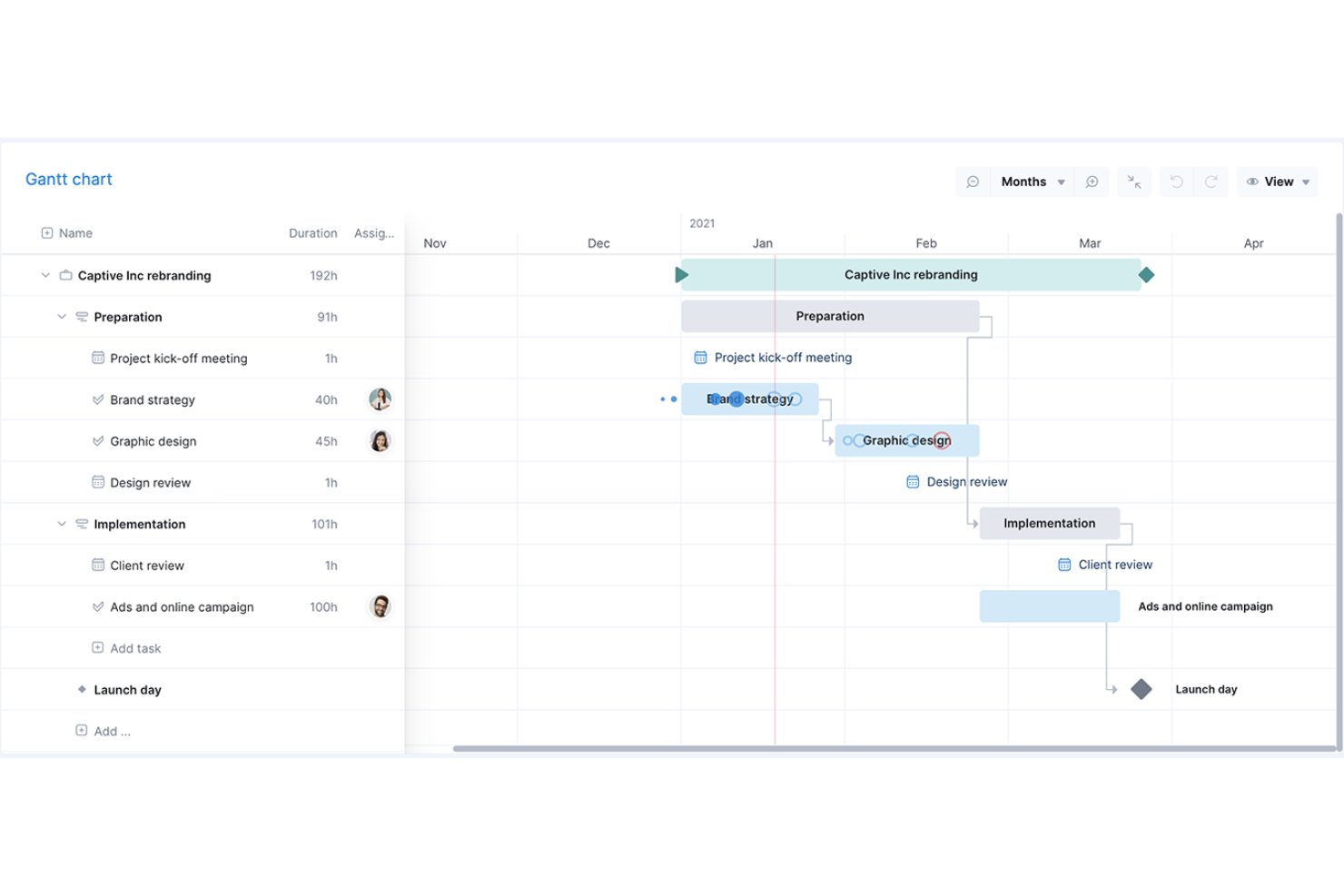
Scoro is an all-in-one work management platform that offers capacity planning solutions designed to help businesses manage their resources and workload effectively.
The tool includes an agile Gantt chart feature that provides real-time updates for capacity planning. You can view live overviews of your team's workload and schedule tasks accordingly. When dependencies are created between tasks, Scoro automatically updates timelines and workloads, helping you avoid manual entry and overbooking scenarios.
One standout feature is that Scoro goes beyond capacity planning and integrates multiple business functions within a single platform. These include project management, sales and pipeline management, CRM, quoting and billing, reporting, and customizable dashboards.
Scoro integrates with Dropbox, PayPal, Expensify, Stripe, Google Calendar, Jira, Slack, Xero, QuickBooks, Sage Intacct, Microsoft Exchange, Asana, and more.
Pricing starts from $19.9/user/month with a free trial available.
Pros and Cons
Pros:
- Live team workload overviews
- Combines CRM, quoting, and billing with planning
- Gantt timelines adjust workloads when dependencies change
Cons:
- Resource views less granular than dedicated planners
- Broad feature set makes onboarding lengthy
New Product Updates from Scoro

Scoro Adds Time Mobile App and ELI Improvements
Scoro adds the Scoro Time mobile app for iOS/Android to track time anywhere and expands ELI with attachments, smarter filtering, and trigger-based actions. For more information, visit Scoro's official site.

Best for intuitive scheduling and live forecasting

Float.com caters to professional services firms and creative teams looking to optimize how they plan and allocate resources. By focusing on effective people management and offering features like finance and estimation for revenue forecasting, Float helps you improve project management and operational efficiency. Whether you're in a large global agency or a small consultancy, Float's capabilities in resource scheduling, time tracking, and reporting can support your growth and improve project delivery rates.
Why I Picked Float.com
I picked Float because it excels in intuitive scheduling and live forecasting, making it an excellent choice for capacity planning. With features like real-time capacity tracking and over-capacity alerts, you can ensure balanced workloads and avoid burnout. The platform also allows for customized availability settings and efficient leave management, which are crucial for maintaining team productivity. Additionally, Float's integration capabilities with other tools enhance workflow efficiency, making it a valuable asset for professional services firms and creative teams.
Float.com Key Features
In addition to its intuitive scheduling and live forecasting, Float offers several other features that enhance capacity planning for your team:
- Customizable Team Setups: You can standardize roles and filter employees based on skills and location, allowing for more precise resource allocation and management.
- Time Off Management: Float allows you to manage time off with customizable policies, ensuring that team availability is accurately reflected in your planning.
- Integrations with Popular Tools: By integrating with tools like Google Calendar, Slack, and Jira, Float enhances workflow efficiency and keeps your data accurate and up-to-date.
- Real-time Collaboration: This feature enables team members to work together seamlessly, ensuring everyone stays informed about project changes and updates.
Float.com Integrations
Integrations include Asana, Basecamp, ClickUp, Jira, Google Calendar, Aprimo, Hubspot, Karbon, Slack, and Trello.
Pros and Cons
Pros:
- Integration with popular tools enhances workflow efficiency.
- Real-time updates keep all team members informed.
- Visual timelines improve scheduling clarity for teams.
Cons:
- Integration challenges with certain niche tools exist.
- Limited customization options may not suit all needs.
New Product Updates from Float.com

Float Adds Rate Cards and Multi-Currency Billing
Float introduced centralized rate cards to standardize bill rates across projects and added multi-currency support to bill clients consistently across regions. For more information, visit Float's official site.

Best for resource planning with financial insights
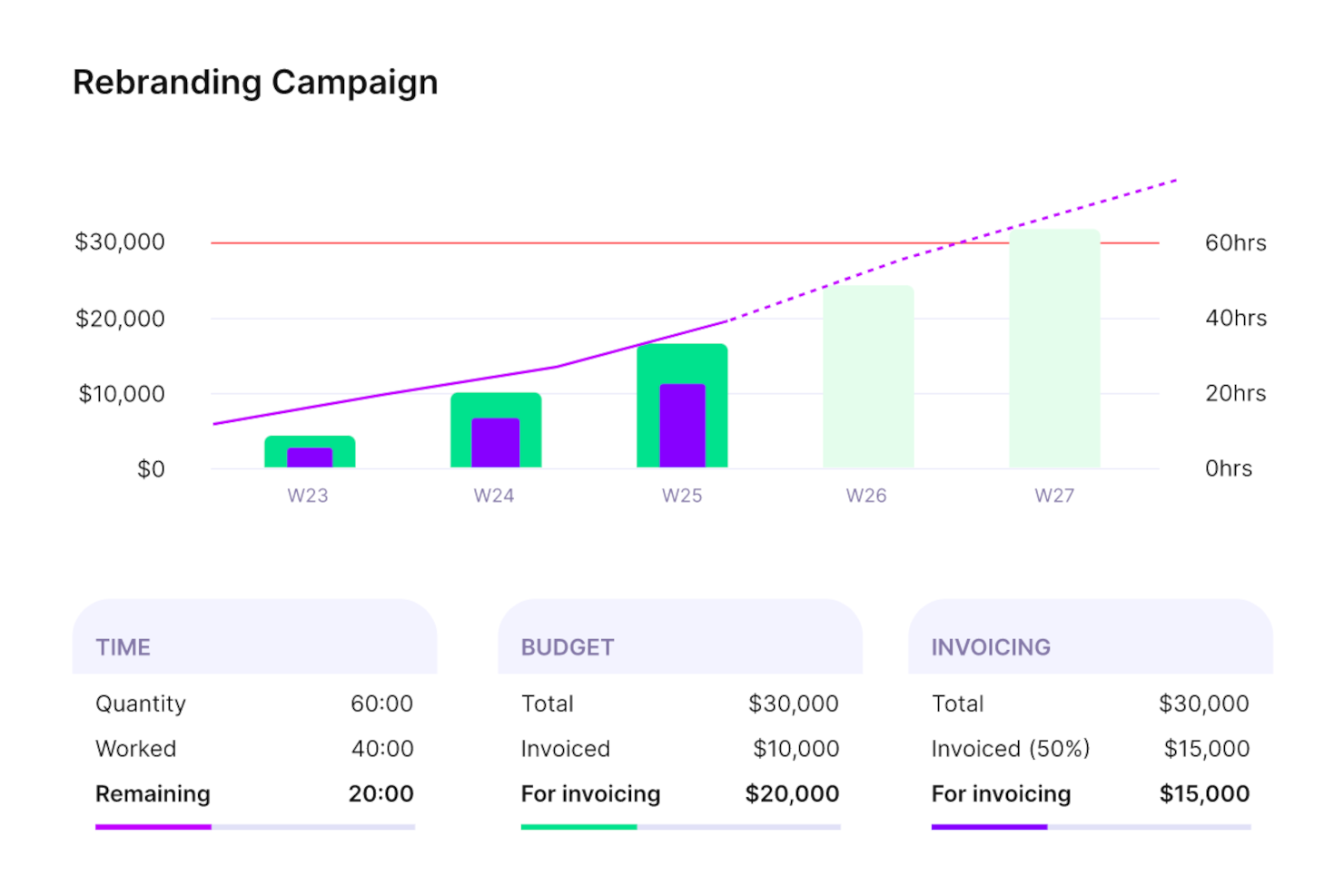
Productive is a complete workforce management software designed primarily for agencies and other service-based industries. The software's resource planning module helps make the most of every team member's time and keep workload capacities in check. Users can access visual representations of team members’ workload and availability, and use this information to assign tasks and distribute work. Employees can also be grouped by skill sets and departments to enable better resource allocation.
The software's time tracking tool is directly connected to its capacity planning functionality, because employees can log the time they're spending on various tasks and projects. This information feeds into the resource planning tools, supporting smarter scheduling through forecasting and predictive insights. Project managers can use previous project data to forecast future work requirements accurately, including estimated time ranges to complete a tasks and what-if scenarios.
Budgeting and financial planning are also included in the feature set. This can be tied to the capacity and workload planning tools, ensuring teams don't go over budget on projects. Other functionalities included in the software are project management, document management, billing, and reporting tools.
Teams can connect the software with their other SaaS tools like Dropbox, Jira, Outlook, Microsoft Calendar, Slack, QuickBooks, and Xero. A Zapier integration is also available for configuring additional integrations.
Pros and Cons
Pros:
- Budgets connect to resource plans
- Time tracking feeds directly into capacity forecasts
- Workload heatmaps show availability at a glance
Cons:
- Report builder takes time to configure
- Built around agency workflows, less suited to internal teams
New Product Updates from Productive
Productive Adds Email and Calendar Integrations for Agents
Productive adds Gmail, Outlook, Google Calendar, and Outlook Calendar connectors for its AI agents. These integrations let agents manage emails and create calendar events directly within Productive. For more information, visit Productive’s official site.

Runn
Best for forecasting & planning
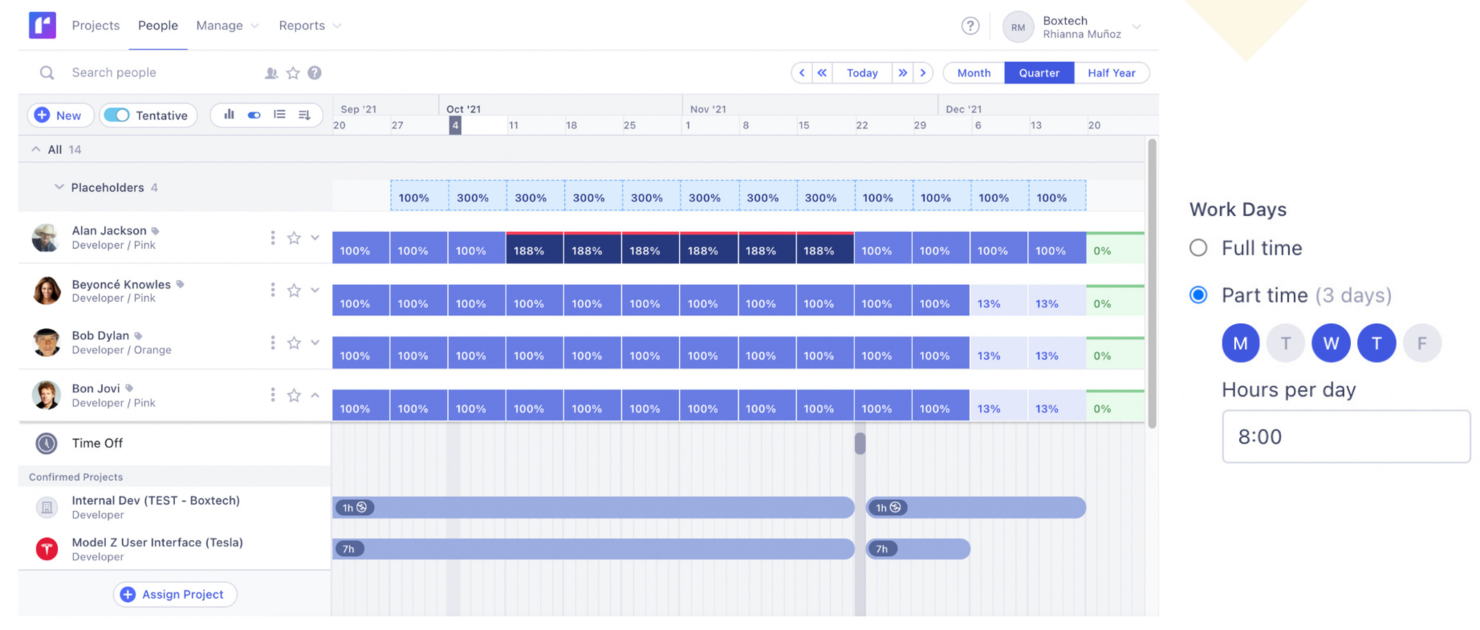
Runn is a resource and capacity management platform that helps project managers optimize their team’s workload according to their business needs.
With Runn, you can plan and forecast capacity so you can schedule your projects accordingly. The tool’s calendar enables you to access your resources in real-time and see the involvement of every team member. The software also helps you differentiate between billable and non-billable work, making it easier to price your services and raise invoices.
Runn’s highlight is its capacity forecasting feature. This feature helps you determine whether your team has the skills and resources to take on certain projects, and how new work would impact your team’s workload.
Runn integrates with multiple tools, including WorkflowMax, Harvest, Clockify, and more.
Runn costs from $10/user/month. You can access a free trial for 14 days. The solution also offers a free-forever plan for up to five users.
Pros and Cons
Pros:
- Separates billable and non-billable work
- Real-time resource calendar
- Forecasts how new work affects team capacity
Cons:
- Forecasts depend on accurate project estimates
- Integrations focus mainly on time-tracking tools

Saviom
Best real-time capacity planning and forecasting
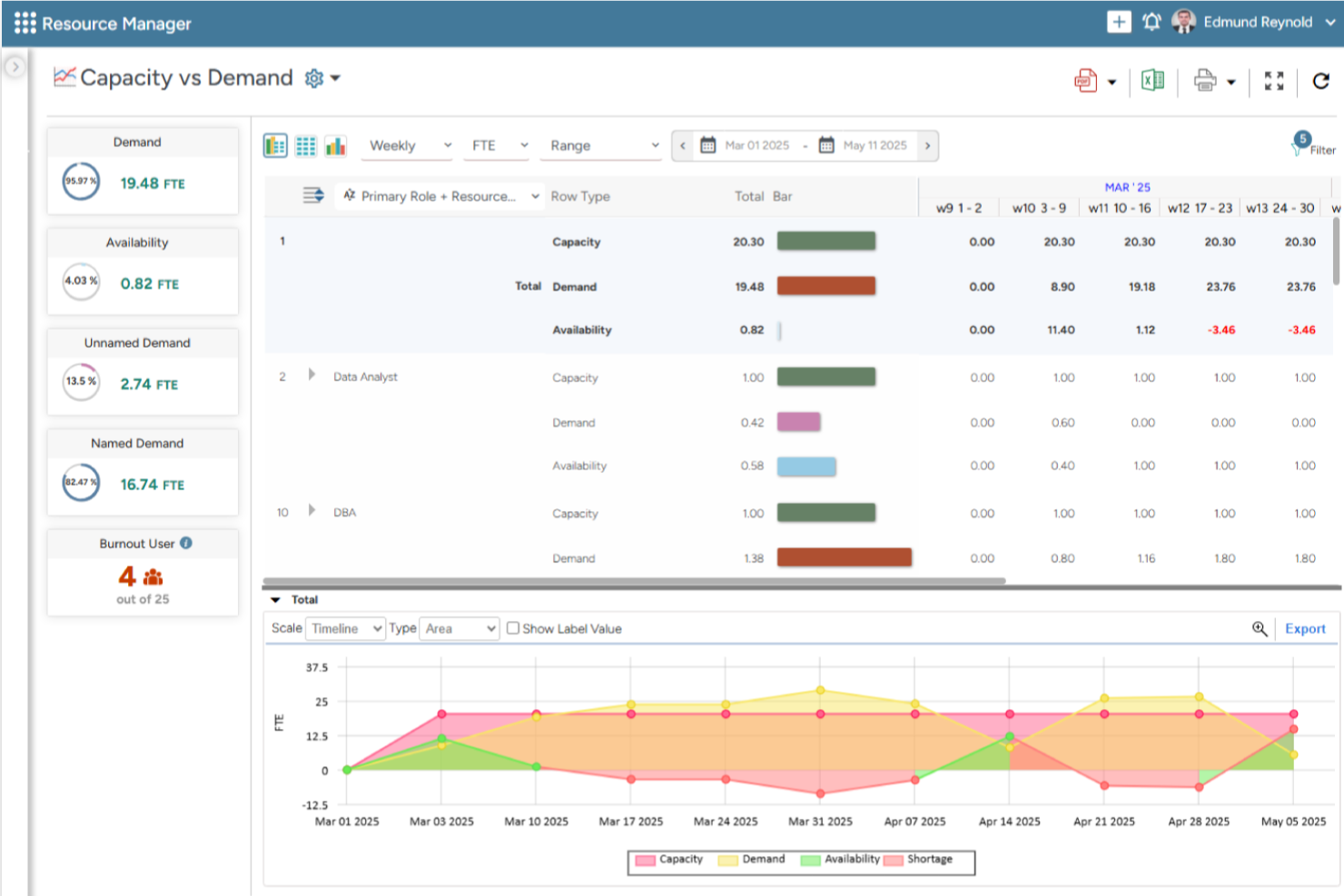
Saviom is a highly configurable and scalable resource capacity planning software built to address resourcing challenges across all industries. It helps align resource capacity to changing demands for current and future projects in the pipeline. You can allocate the right resources to every project at the right time and cost to boost operational efficiency and improve project delivery.
Some of the advanced features of Saviom include demand management, real-time optimization, pipeline management, bench management, real-time project financial forecasting, and BI-powered reports/dashboards.
What really stands out is the tool's new and improved all-in-one resource planner, which offers a comprehensive suite of advanced functionalities such as multi-dimensional analysis, embedded capacity planning, heat mapping, intelligent matchmaking, early warning, and KPI forecaster. All these features collectively help boost billable utilization of every resource, bridge skills gaps proactively, eliminate burnout, and minimize hiring/firing costs.
Saviom integrates with your everyday business applications such as Salesforce, MS Excel, SAP, and more.
Pros and Cons
Pros:
- Highly configurable for complex enterprise resourcing
- Early-warning alerts flag capacity risks
- Matches skills to demand automatically
Cons:
- Implementation usually needs vendor-led configuration
- Interface feels dated next to newer tools

Accelo
Best with adaptive project scheduling

Accelo is a project and resource management platform designed for service-based teams that need structured capacity planning. It brings together project scheduling, workload tracking, time management, and workflow automation in one system.
Who Is Accelo Best For?
Accelo is best suited for project managers and professional services teams that need visibility into team capacity, timelines, and client work across multiple projects.
Why I Picked Accelo
I picked Accelo for its adaptive scheduling tools and real-time workload visibility. The drag-and-drop Gantt chart allows teams to adjust timelines and reassign tasks quickly. When project scope or availability changes, the scheduling engine updates timelines to reflect new resource allocations, helping maintain accurate capacity plans.
Accelo Key Features
- Resource utilization dashboard: View team capacity and identify over- or under-allocation at a glance.
- Project scheduling tools: Adjust timelines using drag-and-drop Gantt charts.
- Time tracking: Log billable and non-billable hours directly within projects.
- Retainer management: Track recurring client work and allocate ongoing resources.
- Workflow automation: Automate approvals and task assignments using configurable rules.
Accelo Integrations
Accelo integrates with Google Workspace, Microsoft 365, Xero, QuickBooks Online, HubSpot, Salesforce, Mailchimp, Slack, and Zapier. An API is available for custom integrations.
Pros and Cons
Pros:
- Centralizes client, project, and resource data
- Automated project scheduling adapts to changes
- Real-time visibility into team workloads
Cons:
- Steep setup for advanced workflow features
- Minimum three-user subscription required
New Product Updates from Accelo

Accelo Rebuilds Mobile App for Project and Time Management
Accelo rebuilds its mobile app with task management, new work creation, and mobile timesheets for Forecast customers. This helps teams keep project and time data current while working away from a desktop. For more information, visit Accelo’s official site.

Best for AI-powered resource allocation
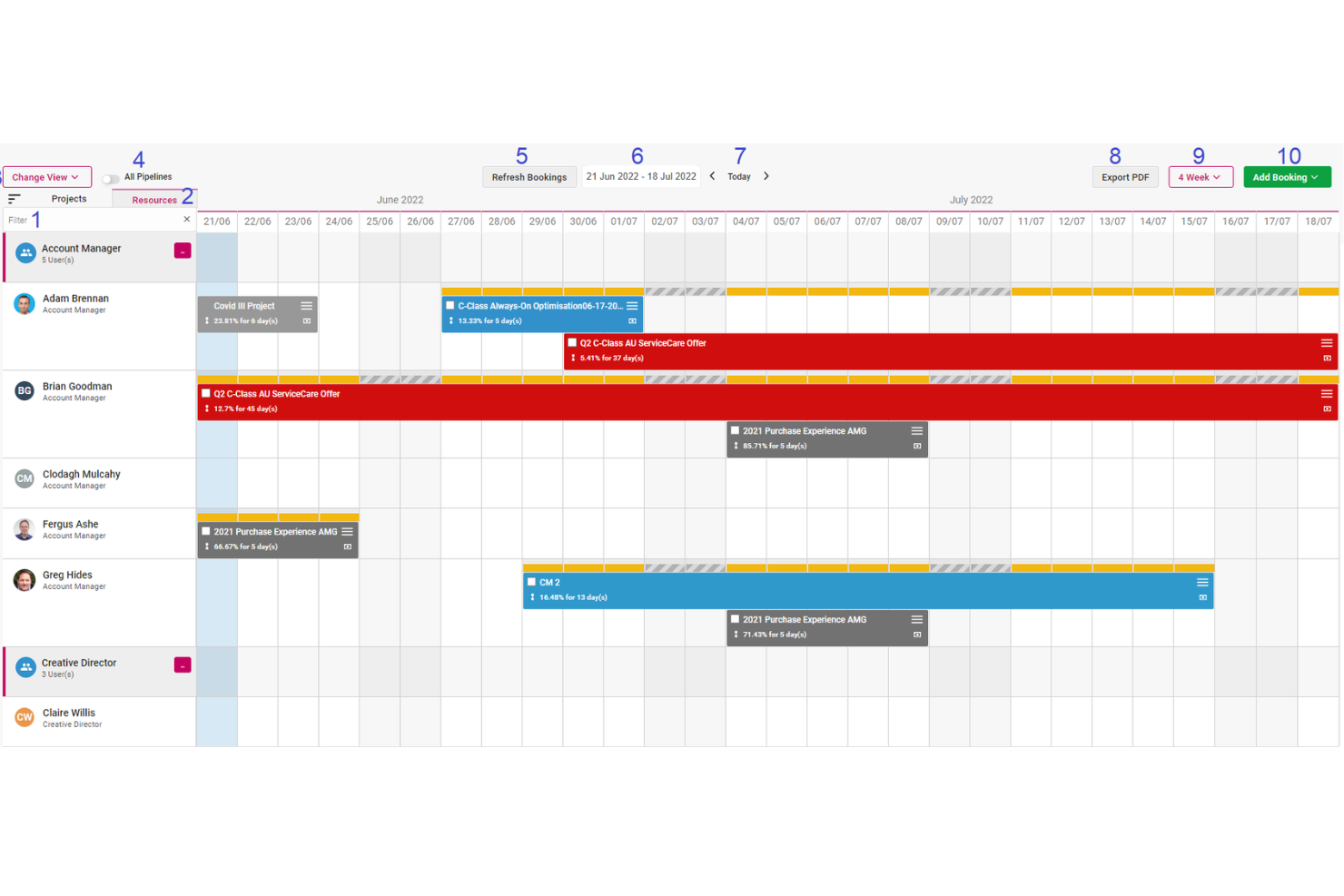
Screendragon is a work management platform designed to help marketing, agency, and professional services teams manage projects, resources, and budgets in one place. It centralizes project activities, reducing the need to switch between multiple tools.
One reason I chose Screendragon is its ability to provide a comprehensive view of resource allocation. You can see who is working on what and when, allowing for better workload distribution. This visibility helps in identifying potential bottlenecks and ensures that resources are utilized effectively. Additionally, the platform's capacity planning dashboards integrate new business pipeline data with confirmed project commitments, offering a forward-looking perspective on resourcing needs. This predictive capability allows your team to anticipate future demands and adjust resources accordingly, ensuring that upcoming projects are adequately staffed.
I also like that Screendragon has budget and estimate management, which allows you to create accurate project estimates based on resource staff plans and deliverables, automatically tracking scheduled versus actual project costs.
Integrations include MS Power BI, Slack, MS Teams, Zapier, Google Drive, Trello, Microsoft 365, Box, Jira, Microsoft OneDrive, and PeopleSoft.
Pros and Cons
Pros:
- Estimates built from resource staff plans
- Tracks scheduled vs. actual project costs
- Capacity dashboards combine pipeline and confirmed work
Cons:
- No free trial to test before buying
- Designed mainly for marketing and agency teams

Toggl
Best for financial planning
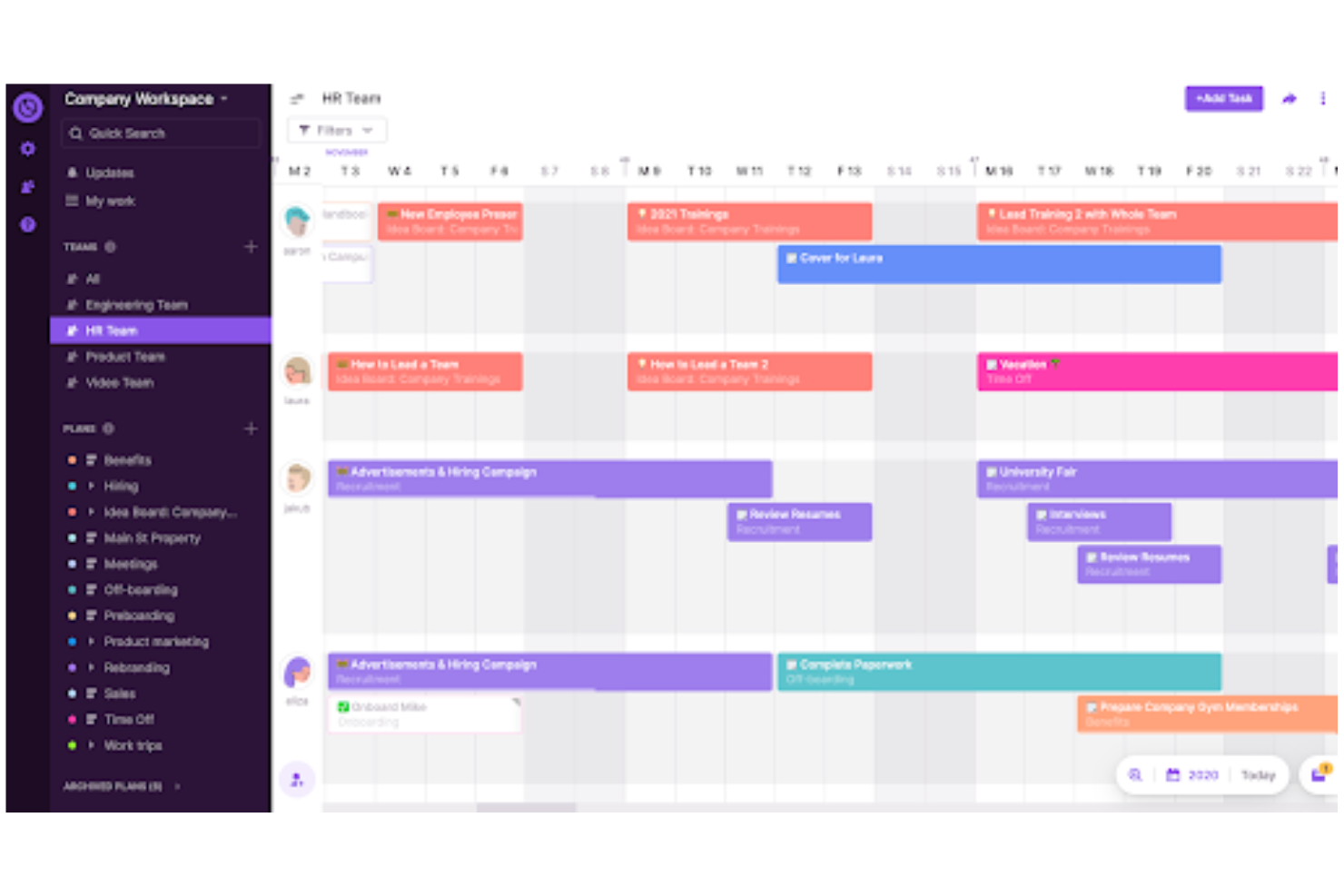
Toggl is a time tracking, project planning, and hiring software with features that let you track your teams capacity and quickly make decisions.
Why I picked Toggl: It’s a very complete tool that has features that let you track work and turn that information into budgets, billing, and invoicing. Toggl’s simple drag-and-drop timelines let you create effective work schedules, get visibility into your team's availability and workload, and easily follow up on tasks.
Additionally, you can use the tool on any platform you want, as they have a mobile app, desktop app, browser plugins, and online tool.
Toggl Standout Features & Integrations
Features include time tracking, reporting, project tracking, revenue tracking, and team scheduling.
Integrations are already at 100+ and include Asana, Jira, Notion, Salesforce, Slack, Trello, Airtable, Adobe Creative Suite, and Zapier.
Toggl Plans & Pricing
The free version is available for up to 5 users. There are three plans and pricing starts at $10/user/month.
Pros and Cons
Pros:
- Time data flows into budgets and invoicing
- Apps for mobile, desktop, and browser
- Drag-and-drop timelines for team scheduling
Cons:
- No skills-based resource matching
- Planning and tracking sit in separate Toggl products · No skills-based resource matching

Best for customization
monday AI Workspace is a work management platform that combines project planning, workload visualization, and AI-powered resource tracking to help teams manage capacity across projects and portfolios.
Who Is monday AI Workspace Best For?
It's a strong fit for mid-sized to enterprise teams managing multiple projects simultaneously and needing flexible, visual tools to track team workloads.
Why I Picked monday AI Workspace
monday AI Workspace earns its spot on my shortlist because no other tool in this space lets me shape capacity planning as precisely as my team's actual workflow demands. I love that I can combine custom columns, time estimate fields, and color-coded Workload views into a board layout that reflects exactly how my team tracks availability. The monday Vibe builder takes this further, letting me create purpose-built capacity planning apps without writing any code.
monday AI Workspace Key Features
- Workload view: Visualizes task allocations by team member, highlighting over and under-capacity with color coding.
- Portfolio management: Offers a centralized dashboard to oversee multiple projects and monitor progress in one place.
- AI capacity insights: Uses AI to surface capacity risks and draft workload summaries based on actual usage data.
- Automation builder: Automates routine tasks like notifications, status updates, and resource assignments across boards.
monday AI Workspace Integrations
monday AI Workspace offers hundreds of integrations through its built-in integrations and marketplace, including Slack, Salesforce, HubSpot, Google Workspace, Microsoft Teams, Jira, Dropbox, GitHub, Zendesk, and Asana. It also supports Zapier and provides an API for custom integrations.
Pros and Cons
Pros:
- Scales across multiple teams and portfolios
- AI-generated capacity summaries save planning time
- Highly customizable workload boards and views
Cons:
- Scenario planning requires manual workarounds
- Native capacity forecasting is less specialized
New Product Updates from monday AI Workspace
monday AI Workspace Adds Human Approval Routing
monday AI Workspace adds a human-in-the-loop approval block to AI Workflows, sending approval requests and routing workflow paths based on responses. For more information, visit monday AI Workspace's official site.

Rocketlane
Best for linking team plans to client delivery
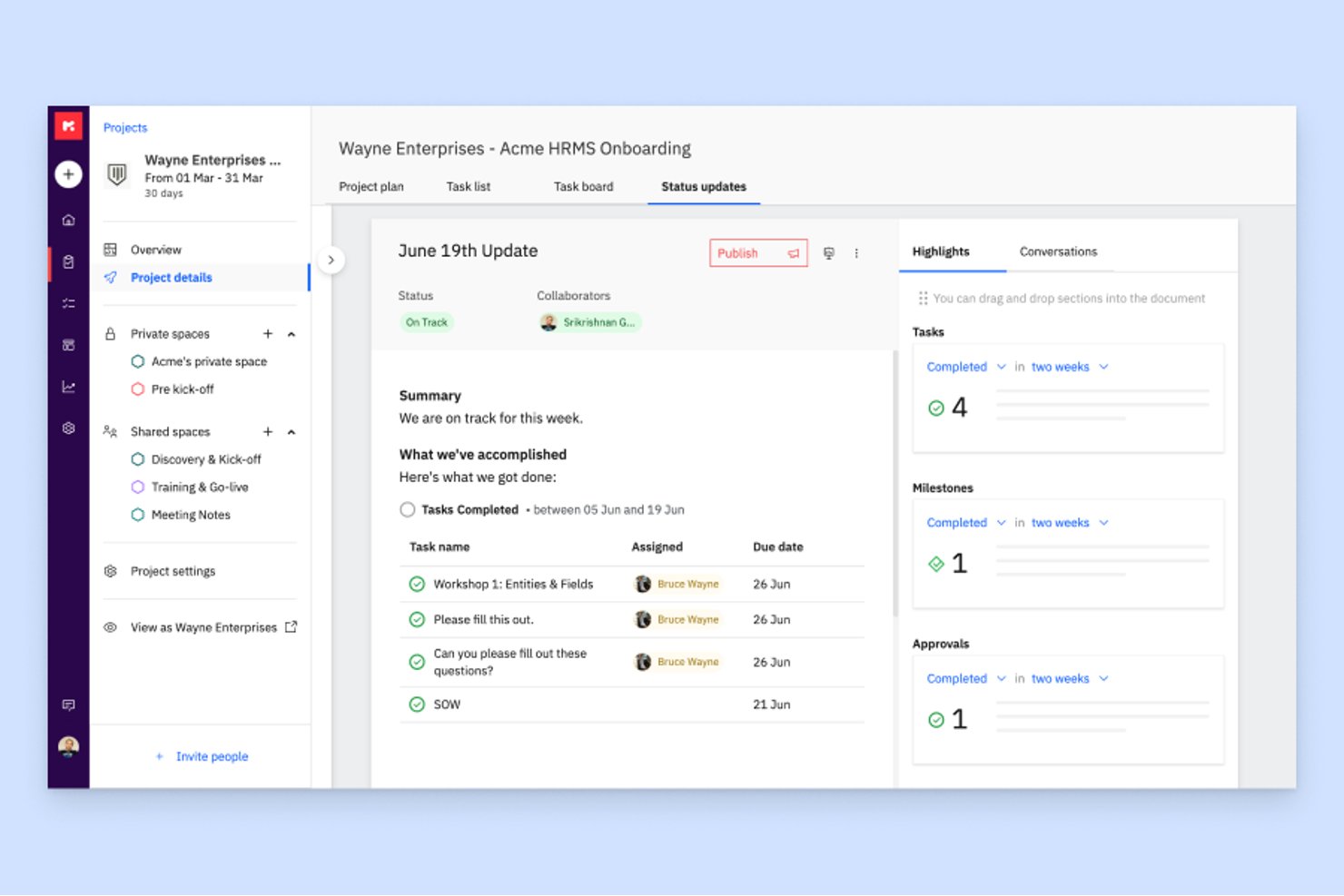
Rocketlane is a professional services automation platform that pairs capacity planning, resource allocation, and utilization reporting with project delivery, time tracking, and a customer portal.
Who Is Rocketlane Best For?
Rocketlane suits professional services directors and delivery leaders at client-facing firms who need staffing, utilization, and project margins tied to customer work.
Why I Picked Rocketlane
I picked Rocketlane because its capacity plan lives in the same system as client delivery. Capacity Planning compares role demand against supply in FTE, after time off and holidays, so I can see a surplus or gap before I commit to a client start date. Resource AI then lets me finalize Hard or Soft bookings while checking utilization and margin for each candidate.
Rocketlane Key Features
- Skills matrix: Filter team members by skill type and proficiency level across People, Projects, and Resource AI workflows.
- Time analytics reports: Compare planned billable utilization with tracked hours by role, status, or project, with drill-down to time entries.
- Rate cards and margin tracking: Apply bill and cost rates to see project profitability alongside staffing plans.
- Holiday calendars: Assign admin-managed holiday calendars to team members so weekly capacity reflects local days off.
Rocketlane Integrations
Rocketlane offers native integrations with Jira, Salesforce, HubSpot, Google Calendar, Outlook Calendar, and Slack, plus connections through Workato and Zapier. It also provides a REST API and webhooks for custom integrations.
Pros and Cons
Pros:
- Connects staffing plans with project margins
- Balances allocations against forecast utilization
- Compares FTE demand against adjusted capacity
Cons:
- Large project portfolios can load slowly
- Forecasts stop at one year

Epicflow
Best for AI resource capacity planning
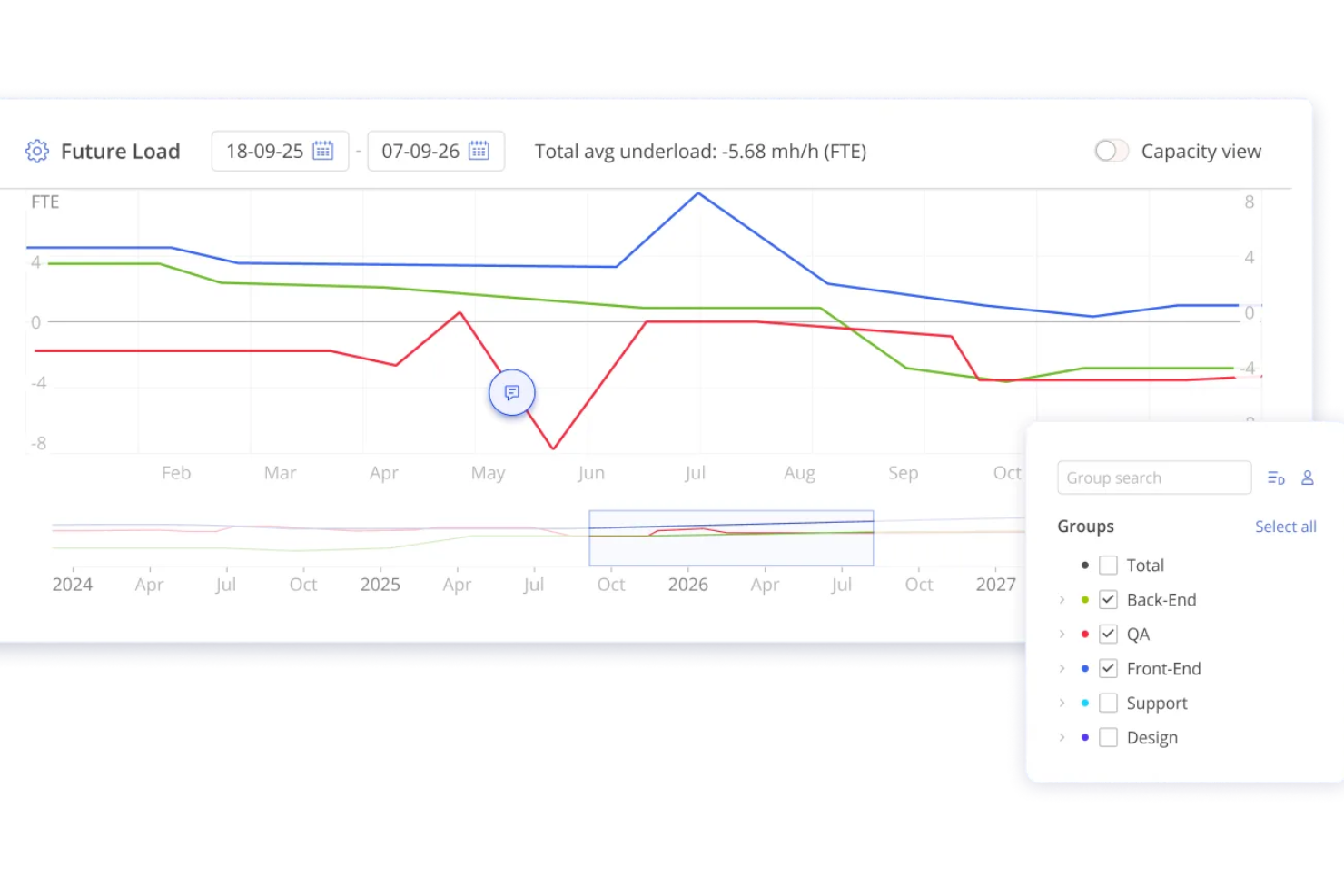
Epicflow is an AI-driven resource management tool tailored for those seeking to optimize capacity planning across multiple projects. It appeals to project managers and resource leaders who need to forecast resource demand and manage workloads without the hassle of bottlenecks.
Why I Picked Epicflow
I picked Epicflow for its advanced AI-powered approach to resource capacity planning. The platform uses predictive analytics to anticipate future workload demands, enabling teams to balance resources with far greater accuracy. Its ability to automatically surface capacity risks before they become bottlenecks makes it especially valuable for organizations managing multiple, overlapping projects. By combining AI forecasting with intelligent workload distribution, Epicflow helps ensure that teams stay optimally utilized without overloading critical resources.
Epicflow Key Features
In addition to its predictive capabilities, Epicflow offers several other features that enhance capacity planning for your team:
- Load Analysis: Provides a detailed overview of current and future workload distributions to prevent resource conflicts.
- Inactive Project Analysis: Identifies projects that may not require immediate attention, allowing for more focused resource allocation.
- Competence Management: Aligns tasks with team members' skills, ensuring that the right people are assigned to the right tasks.
- What-if Scenario Planning: Allows you to simulate various project scenarios to evaluate potential outcomes and make informed decisions.
Epicflow Integrations
Integrations include Jira, Oracle Primavera, MS Project, and API availability for custom integrations.
Pros and Cons
Pros:
- Scenario planning helps evaluate potential project outcomes.
- AI-driven predictions reduce resource allocation conflicts.
- Enhances multi-project management with clear task priorities.
Cons:
- Requires time to input detailed project data initially.
- Limited native integration options.

CMap
Best for staffing synced to project dates
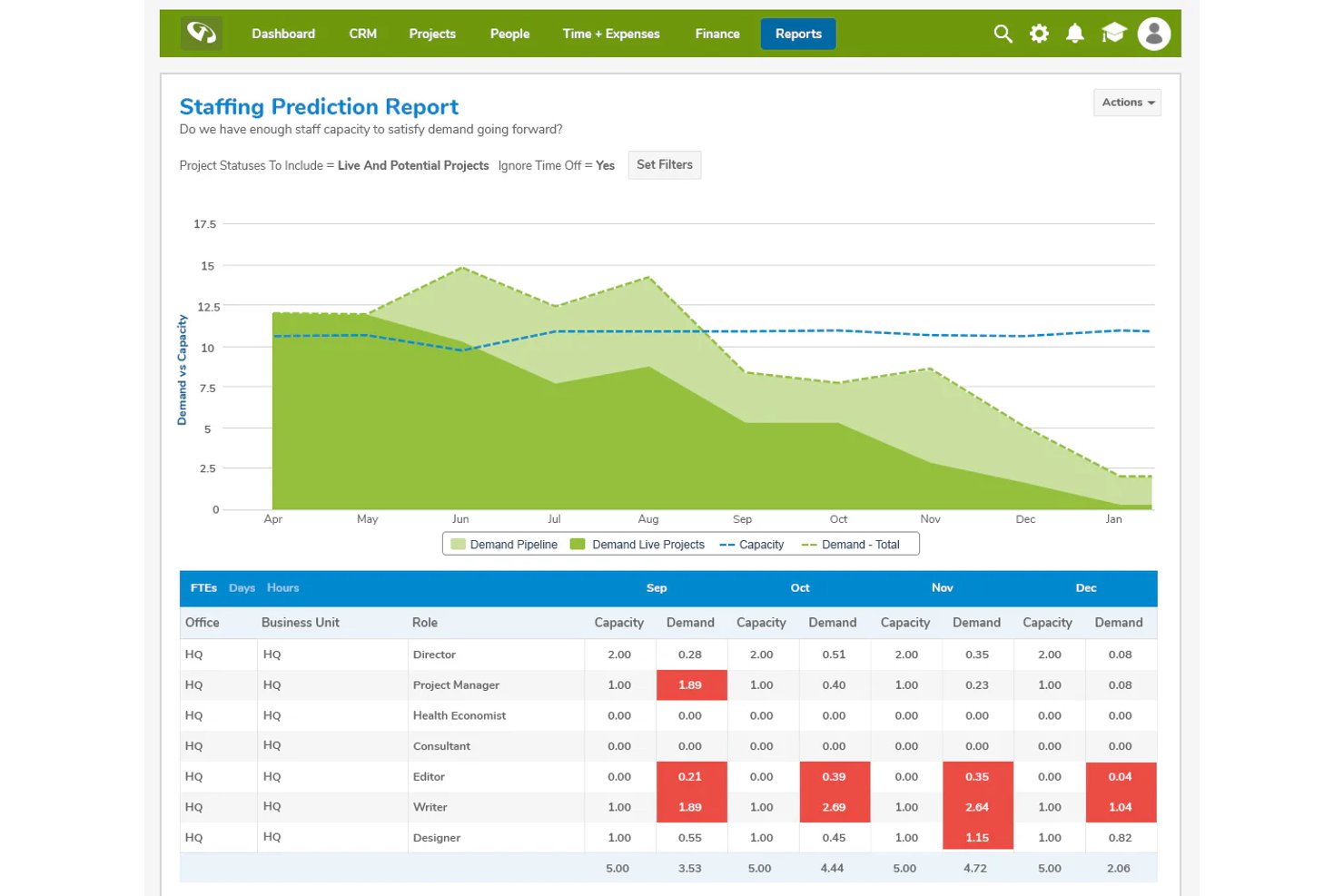
CMap is a professional-services operations platform that pairs drag-and-drop resourcing, utilization reporting, and an AI-powered Team Picker with CRM, job costing, timesheets, and pipeline-based staffing forecasts.
Who Is CMap Best For?
CMap suits resource managers and delivery leaders at professional-services firms, such as consulting, architecture, and engineering practices, who want staffing, job costing, and pipeline forecasts in one place.
Why I Picked CMap
CMap earns its spot on my shortlist because Project Automation keeps resourcing in sync when project dates change, so staffing plans don't go stale. I also rely on the Staffing Prediction Report, which combines live and pipeline projects to show demand against capacity. When I'm staffing a new win, the AI-powered Team Picker suggests people based on skills, availability, and cost.
CMap Key Features
- Skills matrix: Customizable skills and competencies matrices help you match people to project needs.
- Team workload view: A by-person Kanban board shows each person's workload, capacity, and where work is stuck.
- Utilization rates: View utilization by individual and role, including forecast utilization.
- Report Builder: Design custom reports and dashboards, with BI access through Power BI and Tableau.
CMap Integrations
CMap lists 30+ integrations, including HubSpot, Salesforce, Float, Personio, Rippling, Power BI, and NetSuite. Its REST API supports custom integrations.
Pros and Cons
Pros:
- Skills and availability guide team recommendations
- Live and pipeline demand inform capacity forecasts
- Project dates keep staffing plans current
Cons:
- No saved scenarios for comparing staffing options
- Report builder can complicate utilization analysis

Celoxis
Best for cost and performance analysis
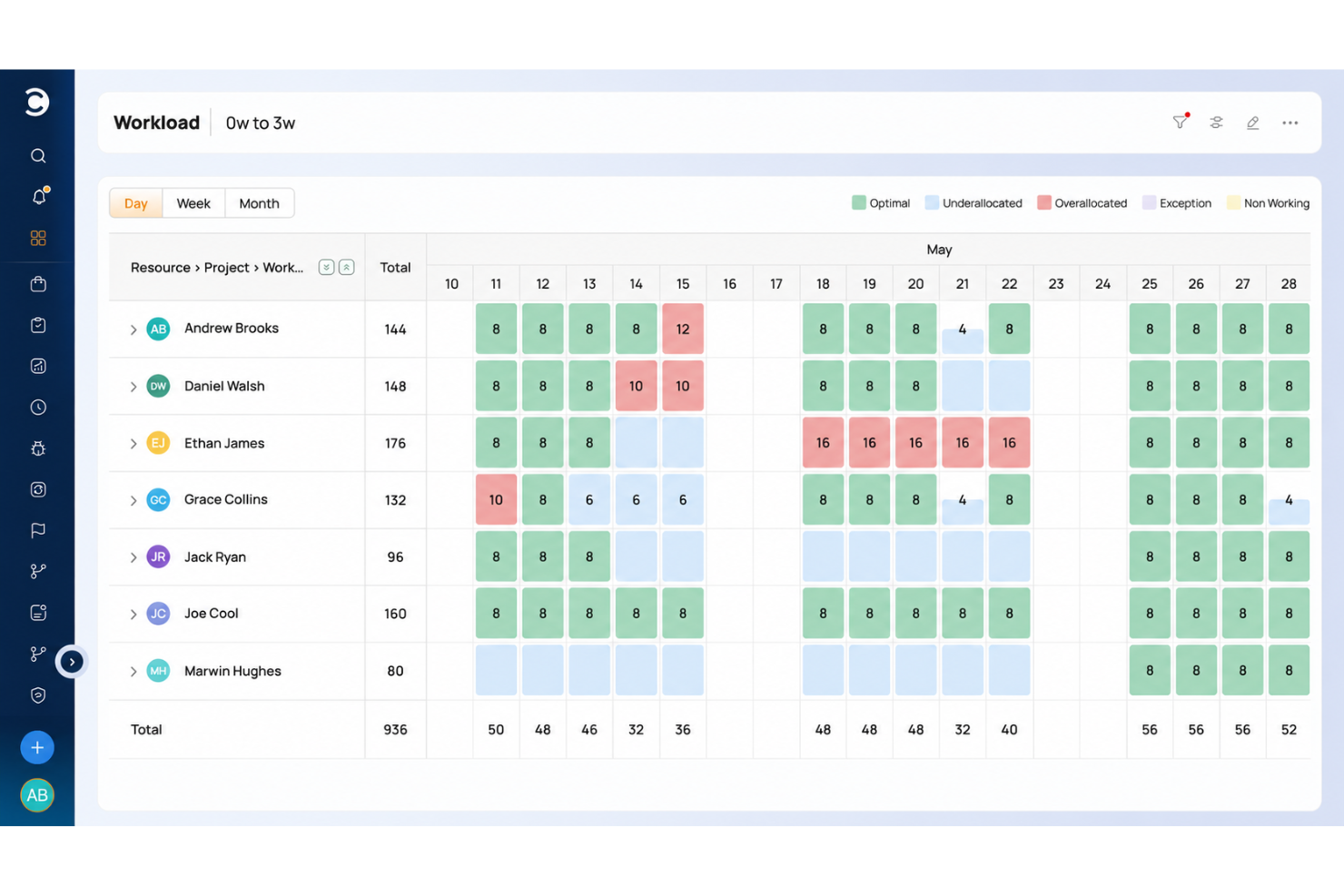
Celoxis serves as an exceptional capacity planning tool, offering organizations a comprehensive solution to effectively manage and optimize their resources. With its intuitive interface and powerful resource tracking features, Celoxis allows users to allocate personnel and other resources efficiently, preventing overallocation or underutilization.
Celoxis provides real-time visibility into resource availability, workloads, and project timelines, enabling teams to make informed decisions and ensure that the right resources are allocated to the right tasks. Additionally, Celoxis's customizable reports and dashboards provide valuable insights into resource allocation trends, helping organizations enhance productivity and achieve better project outcomes through data-driven capacity planning.
Celoxis stands out with its comprehensive and user-friendly Earned Value Management (EVM) module, surpassing the capabilities of many competitors. EVM is a potent method for analyzing project cost and performance, and Celoxis equips project managers with the tools to effortlessly implement and track essential EVM metrics like the Cost Performance Index (CPI) and Schedule Performance Index (SPI).
Celoxis seamlessly integrates EVM into other project management functions, empowering project managers to make informed, data-driven decisions based on real-time insights into project progress, cost-effectiveness, and scheduling precision. This invaluable feature is especially advantageous for organizations necessitating thorough financial analysis and performance monitoring within their projects.
Integrations include pre-built connections with Google Drive, Outlook, Microsoft Project, Excel, Salesforce and hundreds of other tools like JIRA, Slack & Trello.
Celoxis costs from $25/user/month and comes with a 30-day free trial.

Best for visual capacity planning & forecasting

Resource Guru is a capacity planning tool that lets you manage people, equipment, and meeting rooms in one place. Its unified resource pool helps you see availability at a glance, assign tasks efficiently, and keep workloads balanced across your team.
I picked Resource Guru because its project forecasting reports help you anticipate resource needs before scheduling conflicts happen. You can view upcoming workloads, spot potential overbooking, and make adjustments early—helping projects stay on track and teams work at a sustainable pace. Its heatmap view also gives you an instant, color-coded snapshot of team capacity, making it easy to spot bottlenecks and redistribute tasks before issues arise. I also like that it includes built-in time tracking, so you can compare planned hours against actual time spent and identify where resources are being over- or under-utilized.
Leave management to track absences and prevent scheduling surprises, resource utilization metrics to compare billable vs. non-billable time, team engagement tools that help reduce stress and improve productivity, management of both people and equipment in a single platform, and interactive heatmaps to visualize workloads and avoid overload.
Google Calendar, Microsoft Outlook Calendar, Apple Calendar, Calendly, Fantastical, Zapier, Slack, Salesforce, Microsoft Teams, Jira Software Cloud, Google Sheets, and Smartsheet.
Quando utilizar software de planeamento da capacidade
O software de planeamento da capacidade oferece uma visão em tempo real de quem está disponível, em que está a trabalhar e se a sua equipa consegue realmente assumir o que se segue. Se algum dos cenários abaixo lhe for familiar, provavelmente está na altura de adicionar uma ferramenta deste tipo à sua pilha tecnológica:
- A sua equipa continua a não cumprir os prazos apesar de ter pessoas "suficientes": Tem 10 pessoas no projeto, mas três estão sobrecarregadas com outro trabalho e ninguém sinalizou o problema. O software de planeamento da capacidade revela a sobrecarga de trabalho antes de esta comprometer a entrega, permitindo-lhe redistribuir o trabalho enquanto ainda há tempo para corrigir o rumo.
- Está a criar o plano de recursos em folhas de cálculo: Está a acompanhar a disponibilidade de uma equipa de 15 pessoas num ficheiro Excel partilhado que fica desatualizado à quinta-feira. Uma ferramenta dedicada mantém a disponibilidade, as ausências e as atribuições de projetos numa única vista atualizada, reduzindo o tempo de planeamento e eliminando o caos das diferentes versões.
- Está a tomar decisões de contratação com base na intuição: Não tem a certeza se deve contratar um prestador de serviços ou esperar até ao terceiro trimestre, porque não consegue ver a procura para além do próximo mês. O software de planeamento da capacidade modela o seu pipeline para que possa tomar decisões de afetação de recursos com dados concretos.
- Está a demorar demasiado tempo a formar equipas para novos projetos: Sempre que um projeto começa, passa uma semana a descobrir quem está disponível e em que percentagem. Com o software de planeamento da capacidade, pode ver a disponibilidade de relance e atribuir as pessoas certas em horas, não em dias.
- Está a gerir vários projetos com recursos partilhados: Os seus designers e programadores estão divididos entre quatro projetos ativos e ninguém tem uma visão clara da carga total. As ferramentas de planeamento da capacidade dão a todos visibilidade sobre a capacidade disponível da equipa partilhada, permitindo detetar conflitos antes que provoquem esgotamento.
Outro software de planeamento da capacidade
Eis mais algumas opções que não chegaram à lista principal, mas que vale a pena considerar.
- Beebole
For combined time tracking and utilization data
- Acuity PPM
For enterprise governance
- Kantata
For people-centric resourcing
- Zoho Projects
For balancing team bandwidth
- VOGSY
For work-in-progress management
- Wrike
Keep track of your project’s progress in real-time
- Miro
For visual collaboration & innovation
- Asana
For staffing within project portfolios
- Birdview
For professional services companies
- Smartsheet
Save time when planning a new project
- Planview
For staffing-aware portfolio choices
- Teamwork.com
For staffing plans from client quotes
- Bridgit Bench
For linking construction pipeline to staffing
- Meisterplan
For staffing tied to portfolio goals
- Parallax
For hiring from weighted deal pipeline


Avaliações de software de gestão de projetos relacionadas
Se ainda não encontrou aqui o que procura, consulte estas outras ferramentas relacionadas que testámos e avaliámos:
- Software de gestão de projetos
- Software de gestão de recursos
- Software de automatização de fluxos de trabalho
- Software de controlo do tempo
- Software de gestão de tarefas
- Software de planeamento de projetos
How I Evaluate Capacity Planning Software
I split every evaluation into two layers: the baseline a tool must clear—think real-time availability tracking and what-if modeling—and the differentiators that separate the best options.
Core Functionality (Table Stakes For This List)
When I'm selecting tools for my list, I rank each one on a scale from 0 (does not offer the functionality) to 5 (excels in this area) for each core functionality listed below. Then, I calculate the tool's total score into a percentage. Each tool needs to achieve a minimum total score of 65% to be considered for inclusion.
- Resource Availability Tracking: I check whether a tool surfaces real-time availability that accounts for PTO, holidays, and existing project commitments—not just a static headcount list.
- Capacity vs. Demand Forecasting: A good tool lets planners compare available hours against upcoming project demand, so I evaluate how far out the forecast extends and how granular the breakdowns are.
- Workload Allocation & Assignment: I look for flexible allocation methods—hours, percentages, or FTE—plus the ability to quickly reassign people when a sprint scope changes or a project timeline shifts.
- Skills & Role-Based Planning: Teams staffing cross-functional projects need to filter by skill set or role, so I evaluate how each tool tags, searches, and matches resources to project requirements.
- Scenario Planning & What-If Modeling: I look at whether planners can model hiring decisions or pipeline changes in a sandbox without touching live data, then compare scenarios side by side.
- Utilization Reporting & Analytics: Strong reporting breaks utilization down by billable vs. non-billable hours, team, and time period—I evaluate whether dashboards are customizable or limited to preset views.
Once I have a list of tools that meet the criteria, I consider what sets each platform apart.
Differentiating Factors (What Sets Vendors Apart)
Here's how I compare and contrast different vendors:
Standout Features
Financial forecasting is a major differentiator—I look for tools that connect rate cards and cost data to allocations so you can see margin impact before committing a senior developer to a low-budget project. Pipeline and CRM sync matters just as much, especially for services firms staffing against deals that haven't closed yet. Probability-weighted demand gives planners a realistic view of what's coming next quarter. I also evaluate automated over-allocation alerts and resource request approvals, which save resource managers from manually auditing schedules every week.
Beyond Features
Integrations matter a lot here—capacity planning tools need to pull task and project data from wherever your teams actually work, whether that's Jira, Asana, or Monday. Without that sync, planners end up manually reconciling two sources of truth. I also evaluate how pricing scales with headcount. Some vendors charge per resource managed, others per planner seat, and the difference adds up fast when you're running a 200-person resource pool. Licensing for view-only stakeholders is worth checking too, since leadership often just needs dashboard access.
Como escolher software de planeamento da capacidade
É fácil ficar atolado em longas listas de funcionalidades e estruturas de preços complexas. Para o ajudar a manter o foco enquanto percorre o seu processo único de seleção de software, apresentamos uma lista de verificação dos fatores a ter em conta:
| Fator | O que considerar |
| Escalabilidade | O software consegue gerir mais projetos e recursos à medida que a sua equipa cresce? Procure ferramentas que suportem um maior número de utilizadores ou volumes de dados superiores sem exigir uma grande atualização. |
| Integrações | A ferramenta liga-se facilmente às suas ferramentas de gestão de projetos, recursos humanos ou finanças? Evite ferramentas que exijam muitas soluções manuais ou a introdução duplicada de dados. |
| Personalização | Pode ajustar campos, fluxos de trabalho e relatórios para corresponderem à forma como a sua equipa trabalha? As ferramentas demasiado rígidas obrigam frequentemente a alterar o seu processo para o adaptar ao software. |
| Facilidade de utilização | A sua equipa irá aprender rapidamente a utilizar o software? Procure interfaces simples, agendamento através de arrastar e largar e painéis claros que não exijam horas de formação. |
| Implementação e integração inicial | Quanto tempo demorará a colocar o software em funcionamento? Verifique se são disponibilizados modelos, sessões de formação ou apoio à migração, para que não tenha de descobrir tudo sozinho. |
| Custo | O preço ajusta-se ao seu orçamento ao longo do tempo? Tenha em conta custos ocultos, como o suporte premium, funcionalidades adicionais ou preços por utilizador que podem aumentar rapidamente à medida que cresce. |
| Medidas de segurança | A ferramenta dispõe de medidas como acesso baseado em funções, encriptação e registos de auditoria? É necessário manter os dados sensíveis dos recursos seguros, especialmente se gerir prestadores de serviços ou parceiros externos. |
| Disponibilidade do suporte | Quando obterá ajuda se algo deixar de funcionar? Procure tempos de resposta rápidos, conversação em direto ou gestores de conta dedicados. |
Tendências do software de planeamento de capacidade para 2025
Na minha pesquisa, consultei inúmeras atualizações de produtos, comunicados de imprensa e registos de lançamentos de diferentes fornecedores de software de planeamento de capacidade. Eis algumas das tendências emergentes que estou a acompanhar:
- Análise preditiva para a previsão da procura: As ferramentas estão a incorporar algoritmos de aprendizagem automática para prever futuras necessidades de recursos e melhorar a precisão do planeamento de capacidade.
- Alocação de recursos orientada por IA: Algumas plataformas utilizam agora a gestão de recursos com IA para automatizar a alocação de recursos, reduzindo significativamente o esforço manual.
- Integração simples com sistemas ERP e ferramentas de gestão de projetos: A capacidade de integração com sistemas ERP e ferramentas de gestão de projetos está a crescer, permitindo a troca de dados em tempo real e uma melhor visibilidade de todos os recursos.
- Ferramentas de colaboração em tempo real: Alguns softwares de planeamento de capacidade estão a introduzir funcionalidades de colaboração em tempo real que permitem às equipas planear e ajustar dinamicamente as alocações de recursos.
- Análise do impacto ambiental: Muitas plataformas permitem agora aos utilizadores avaliar o impacto ambiental da utilização de recursos dos projetos.
O que é o software de planeamento de capacidade?
O software de planeamento de capacidade é uma ferramenta que ajuda as equipas a prever recursos, alocar cargas de trabalho e acompanhar a disponibilidade.
Proporciona visibilidade sobre a capacidade dos projetos, permitindo um melhor agendamento, cargas de trabalho equilibradas e entregas atempadas. Os gestores de projetos, gestores de recursos e líderes de equipa utilizam-no para otimizar a utilização dos recursos, evitar a sobrelotação e alinhar a afetação de pessoal com a procura dos projetos.
Funcionalidades do software de planeamento de capacidade
Ao selecionar um software de planeamento de capacidade, procure as seguintes funcionalidades principais:
- Previsão de recursos: Preveja as próximas necessidades de pessoal, equipamento ou espaço através da análise de tendências históricas e dos requisitos futuros dos projetos. Isto dá-lhe uma vantagem no planeamento antecipado e ajuda a evitar correrias de última hora.
- Gestão da procura: Acompanhe e gira os projetos ou cargas de trabalho recebidos, para poder corresponder a oferta à procura com maior precisão e evitar sobrecarregar as suas equipas ou sistemas.
- Modelação de cenários: Execute simulações de tipo “e se” para testar diferentes estratégias de capacidade antes de efetuar alterações reais. Isto permite-lhe simular potenciais resultados em segurança — encare-o como um ensaio sem riscos para a situação real.
- Integração de dados em tempo real: Utilize dados empresariais atuais — como vendas, produção ou inventário — para obter atualizações em direto sobre a sua situação de capacidade. A visibilidade em tempo real proporciona informações imediatamente acionáveis e menos estrangulamentos inesperados.
- Alertas e notificações automatizados: Configure lembretes ou avisos automáticos quando os recursos estiverem a diminuir ou quando se aproximar dos limites de capacidade. Estes avisos ajudam-no a manter o rumo sem verificações manuais constantes.
- Painéis e relatórios: Aceda a resumos visuais e fáceis de ler, bem como a análises detalhadas sobre a utilização dos recursos, a procura e a capacidade. Os painéis permitem-lhe identificar tendências, acompanhar o desempenho e partilhar atualizações claras com o resto da equipa.
- Ferramentas de colaboração: Permita que vários utilizadores trabalhem em conjunto no planeamento de recursos, quer pertençam à sua equipa quer a outro departamento. As funcionalidades integradas de comunicação e partilha simplificam o trabalho em equipa e a tomada de decisões.
- Otimização da capacidade: Obtenha sugestões acionáveis para realocar recursos ou ajustar cargas de trabalho, de modo a maximizar a eficiência, minimizar os períodos de inatividade e manter tudo a funcionar sem problemas.
Funcionalidades comuns de IA do software de planeamento de capacidade
Para além das funcionalidades padrão do software de planeamento de capacidade apresentadas acima, muitas soluções incorporam agora IA. O software de planeamento de capacidade com IA dá destaque a funcionalidades como:
- Análise preditiva: Utilize modelos baseados em IA para prever a procura futura, as necessidades de recursos ou os riscos com base nos padrões dos seus dados. Isto reforça significativamente a sua capacidade de tomar decisões inteligentes e proativas.
- Agendamento automatizado: Permita que a IA trate da complexa tarefa de atribuir recursos e criar horários, equilibrando prioridades e acomodando alterações de última hora com o mínimo de esforço da sua parte.
- Deteção de anomalias: Faça com que a IA analise os seus dados de capacidade e utilização em busca de padrões invulgares — pense nisto como um assistente sempre ativo que identifica problemas antes de estes se transformarem em grandes dificuldades.
- Recomendações inteligentes: Receba sugestões baseadas em IA para a alocação de recursos, os níveis de inventário ou os ajustes de prazos, ajudando-o a aperfeiçoar e melhorar continuamente o seu processo de planeamento.
- Interfaces de processamento de linguagem natural (NLP): Interaja com o seu software utilizando uma linguagem simples e conversacional — faça perguntas sobre a capacidade, obtenha informações rapidamente e faça ajustes sem ter de navegar por painéis de controlo.
Vantagens do software de planeamento de capacidade
A implementação de software de planeamento de capacidade pode proporcionar várias vantagens à sua equipa e à sua empresa, incluindo:
- Melhor alocação de recursos: Veja quem está disponível e atribua trabalho com base em dados de capacidade em tempo real, para evitar sobrecarregar a sua equipa.
- Melhoria das previsões dos projetos: Utilize ferramentas de previsão de recursos para antecipar necessidades futuras e planear os próximos projetos com confiança.
- Redução dos estrangulamentos: Identifique atempadamente os recursos sobrecarregados através de alertas automatizados e ajuste as cargas de trabalho antes de estas atrasarem o progresso.
- Maior visibilidade: Obtenha uma visão clara da capacidade em todos os projetos através de painéis de controlo que mostram a utilização e a disponibilidade de relance.
- Tomada de decisões mais rápida: Utilize relatórios em tempo real para ajustar rapidamente a afetação de pessoal ou os horários, sem esperar por atualizações manuais.
- Poupança de custos: Evite despesas de contratação ou de trabalho extraordinário de última hora, planeando a capacidade com precisão através de funcionalidades de previsão e acompanhamento.
- Maior satisfação da equipa: Equilibre as cargas de trabalho de forma justa com ferramentas de gestão da carga de trabalho que previnem o esgotamento e melhoram o moral geral.
Custos e preços do software de planeamento de capacidade
A seleção de software de planeamento de capacidade exige uma compreensão dos vários modelos e planos de preços disponíveis. Os custos variam consoante as funcionalidades, a dimensão da equipa, os complementos, entre outros fatores. A tabela abaixo resume os planos comuns, os respetivos preços médios e as funcionalidades normalmente incluídas nas soluções {keyword}:
Tabela de comparação de planos para software de planeamento de capacidade
| Tipo de plano | Preço médio | Funcionalidades comuns |
|---|---|---|
| Gratuito | $0 | Planeamento básico de recursos, projetos limitados, relatórios normalizados, apoio da comunidade |
| Básico | $10-20/utilizador/mês | Planeamento de recursos melhorado, projetos ilimitados, relatórios avançados, apoio por e-mail |
| Profissional | $20-40/utilizador/mês | Todas as funcionalidades do plano Básico, além de previsão de recursos, capacidades de integração, apoio prioritário |
| Empresarial | Personalizado | Todas as funcionalidades do plano Profissional, além de integrações personalizadas, gestor de conta dedicado, apoio 24/7, segurança avançada |
Perguntas frequentes sobre software de planeamento de capacidade
Eis algumas respostas a perguntas frequentes sobre software de planeamento de capacidade.
Quais são algumas boas práticas para o planeamento de capacidade?
Como implemento software de planeamento de capacidade nos meus fluxos de trabalho de projeto existentes?
Que erros comuns devo evitar ao utilizar software de planeamento de capacidade?
O Jira permite fazer o planeamento de capacidade?
O software de planeamento de capacidade integra-se com ferramentas como o Slack, o Jira ou o MS Project?
Qual é a precisão das previsões no software de planeamento de capacidade?
Como podem as ferramentas de planeamento de capacidade ajudar a prevenir o esgotamento?
Posso utilizar software de planeamento de capacidade para equipas remotas ou distribuídas?
Quais são os três tipos de planeamento de capacidade?
Quais são as três principais estratégias de planeamento de capacidade?
