

Project Plan Template: 8 Examples & Free Download


What Is a Project Plan?: A project plan is a roadmap outlining your project’s scope, objectives, timeline, and responsibilities to keep the team aligned and organized.
Benefits of a Project Plan: Project plans improve clarity, help track progress, manage resources, and prevent miscommunication by defining tasks, timelines, and responsibilities.
Key Elements of a Strong Project Plan: A strong project plan includes phases, detailed tasks, milestones, dependencies, and metrics, creating a clear roadmap for teams and stakeholders.
Why Use a Project Plan Template?: A project plan template offers a pre-built structure with tasks and dependencies, saving time and providing a reliable starting point for your project.
Best Practices for Using a Project Plan Template: Customize your template, include milestones, keep it accessible, and pair it with other documents like a communication plan and budget for best results.
So, you need a project plan—and chances are, you don’t have endless hours to start from scratch. With deadlines looming, stakeholders to align, and endless tasks to manage, the pressure’s real.
Instead of staring at a blank page, our expert-built project plan template will help you prioritize tasks, manage dependencies, anticipate risks, and keep everyone on the same page. And because it was created by project managers who understand the challenges of project planning, you can feel confident that you’ve got every base covered right from the start.
What Is A Project Plan?
Let's get back to basics for a moment. Why exactly do you need a project plan? A project plan outlines the scope, project objectives, goals, and schedules for a new project. It provides clear direction and expectations on what needs to be done, when it needs to be done by, and who is responsible for each project task.

Here's a quick, comedic summary:

Why Is A Project Plan Important?
A project plan is more than just a timeline—it’s the backbone of your entire project. Here’s why it matters and what it helps you accomplish:
- Clarify the process and activities that will lead to the project’s outputs and project deliverables
- Provide information to estimate properly and define outputs and project scope
- Enable you to visualize the entire project and see interdependencies between tasks
- Help with resource management and show who does what task when, helping forecast your resource requirements
- Provide milestones to track progress against (and timeframes and dates for client approvals)
- Enable you to baseline and track your project progress properly according to set metrics and KPIs
- Enable agreement on the all-important live date
To achieve this, it should include the following:
- Project phases
- Activities, tasks, and project deliverables
- Task start dates and end dates
- Task dependencies
- Milestones and baselines
- Project scope statement
- List of requirements
- Risk assessment
- Project budget, especially in the case of capital projects
- Metrics & KPIs
Now that you understand how important project plans are for project success, let’s look at how a well-designed template can simplify the process and help you get your project off to a strong start.
Project Plan Template
One of the simplest ways to learn how to create a project plan is to start by editing an existing one.
That’s why our team of project management experts has designed a comprehensive project plan template specifically for website projects—offering much more than a typical blank Gantt chart.
The project plan template is available in our resource hub for DPM Members, and it’s great because:
- It includes 140 line items—pre-filled, so you can really see how they work together
- It’s already detailed as a website redesign project plan
- It comes with access to 50+ other expert-curated project templates, samples, agendas, ebooks, checklists, and more.
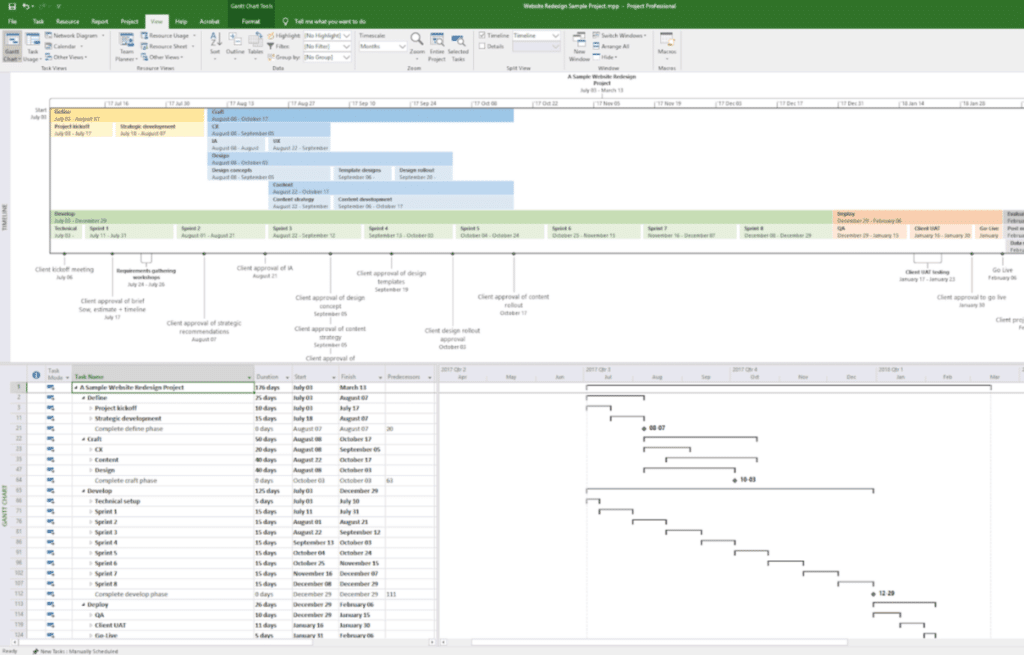
A note about formatting: Your final project plan could be presented as a roadmap or Gantt chart, created in tools like Smartsheet, Microsoft Project, or other project management software. Some project plan templates are also available as written documents that include a Gantt chart or roadmap for additional visualization.
How To Use The Project Plan Template
Follow these tips for getting the most out of our simple project plan template.
- Treat it like a Gantt chart: Our template is laid out as a Gantt chart, so all the usual best practices for Gantt charts apply. Define your critical path, map out your dependencies, and make sure you consider resource availability and utilization.
- Keep it accessible: The best project plan is one that is accessible for all team members and key stakeholders so they can keep track of progress, milestones, and whether there’s been any risks or delays. This streamlines reporting on project status, as well. This is even easier to do if you’re using our template in a tool like monday.com or Smartsheet.
- Edit what’s already there: Our template is already mostly filled in. Instead of deleting everything and starting from scratch, just edit what’s there. This will save you time, and if you’re new to creating project plans, you can be confident you’re on the right track.
- Pair it with other project docs: Alongside your project plan, it’s helpful to have a communication plan, work breakdown structure, and project budget document to help guide your team effectively. You might also want to explore additional project planning techniques to keep everything on track and aligned with your project’s unique needs.
8 Real-Life Project Plan Examples
By going through these examples, you'll see how projects of varying scales and complexities can greatly benefit from a well-organized project plan. We'll start with simpler ones and gradually move towards more complex scenarios.

Simple Project Plans
These are for smaller projects, involving a single team with a shorter timeline.
Example 1: Creating a Marketing Campaign for a Small Business
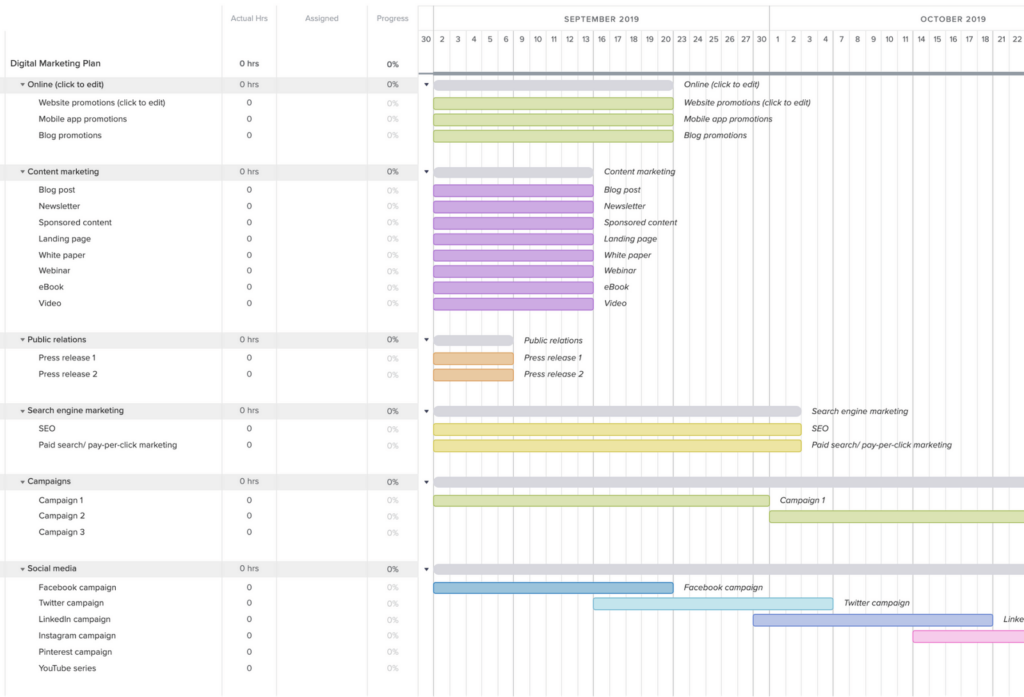
The objective of this small business project is to create a thorough marketing campaign that effectively promotes a small business. The project plan encompasses various sections, such as project objectives, target audience, marketing channels, timeline, and required resources.
Example 2: Organizing a Charity Event
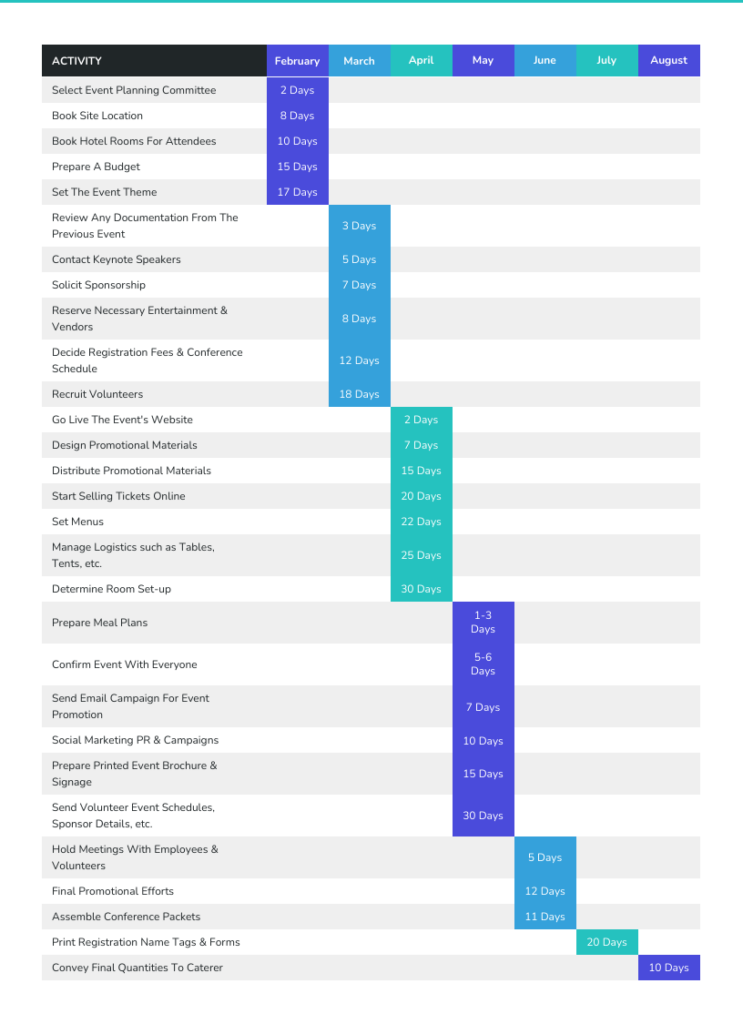
The goal of this project is to coordinate a charity event with the purpose of raising funds for a specific cause. The project plan entails organizing various aspects, such as event logistics, coordinating volunteers, setting fundraising targets, and determining communication strategies.
Example 3: Streamlining HR Activities

This project's purpose is to guide and streamline a company's HR activities for a given year, such as the recruitment and appraisal cycle. The project plan outlines the different activities, start and end dates, and resources needed to ensure a successful completion.
Moderately Complex Project Plans
Moderately complex projects typically involve multiple teams or stakeholders and span a longer timeline.
Example 4: Constructing a Residential Building
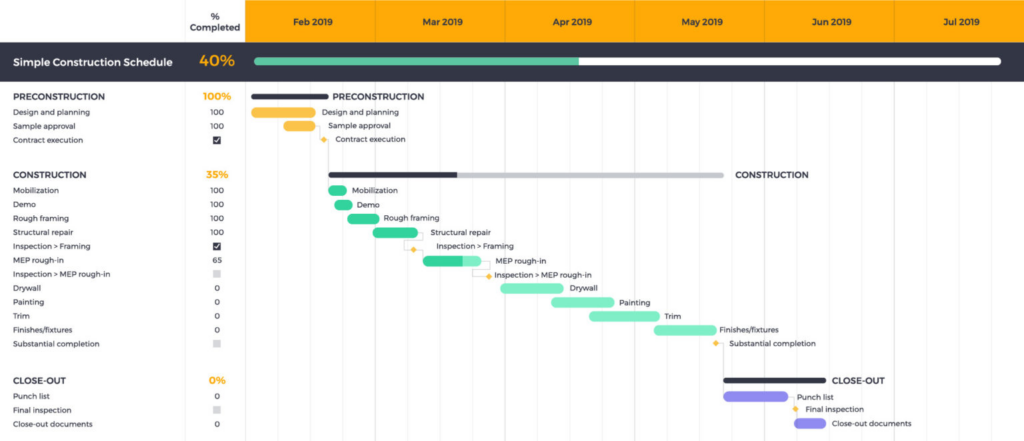
The goal of this project is to build a residential building, covering every step from the initial design all the way through completion. The project plan includes detailed sections on architectural design, the permitting process, construction timeline, budget considerations, procurement management planning, and quality control measures.
Example 5: Implementing a Company-wide Training Program

The objective of this project is to introduce a comprehensive training program for all company employees. The project plan comprises sections focused on analyzing training requirements, developing curriculum, selecting effective training delivery methods, and designing evaluation strategies.
Example 6: Launching a New Product Line
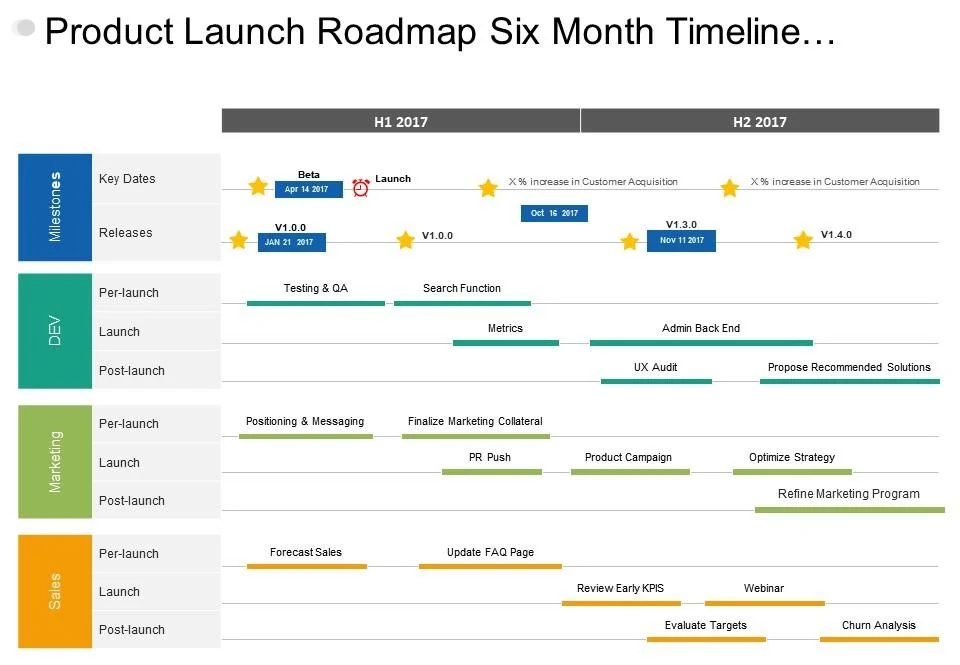
The goal of this project is to successfully introduce a new product line for the company. The project plan encompasses various essential components such as market research, product development, marketing and sales strategies, and a detailed timeline for the launch.
Complex Project Plans
Complex projects often require coordination and collaboration among multiple teams, stakeholders, and external partners. These projects can span several years and demand careful planning.
Example 7: Implementing an Enterprise Resource Planning (ERP) System

The objective of this project is to successfully integrate an enterprise resource planning (ERP) system into an organization. The project plan encompasses various crucial aspects, including business process mapping, customization of software, data migration, training and user adoption procedures, as well as post-implementation support.
Are you creating an enterprise plan like in this example? Check out this guide on how to create an enterprise project plan.
Example 8: Hosting a Global Sporting Event
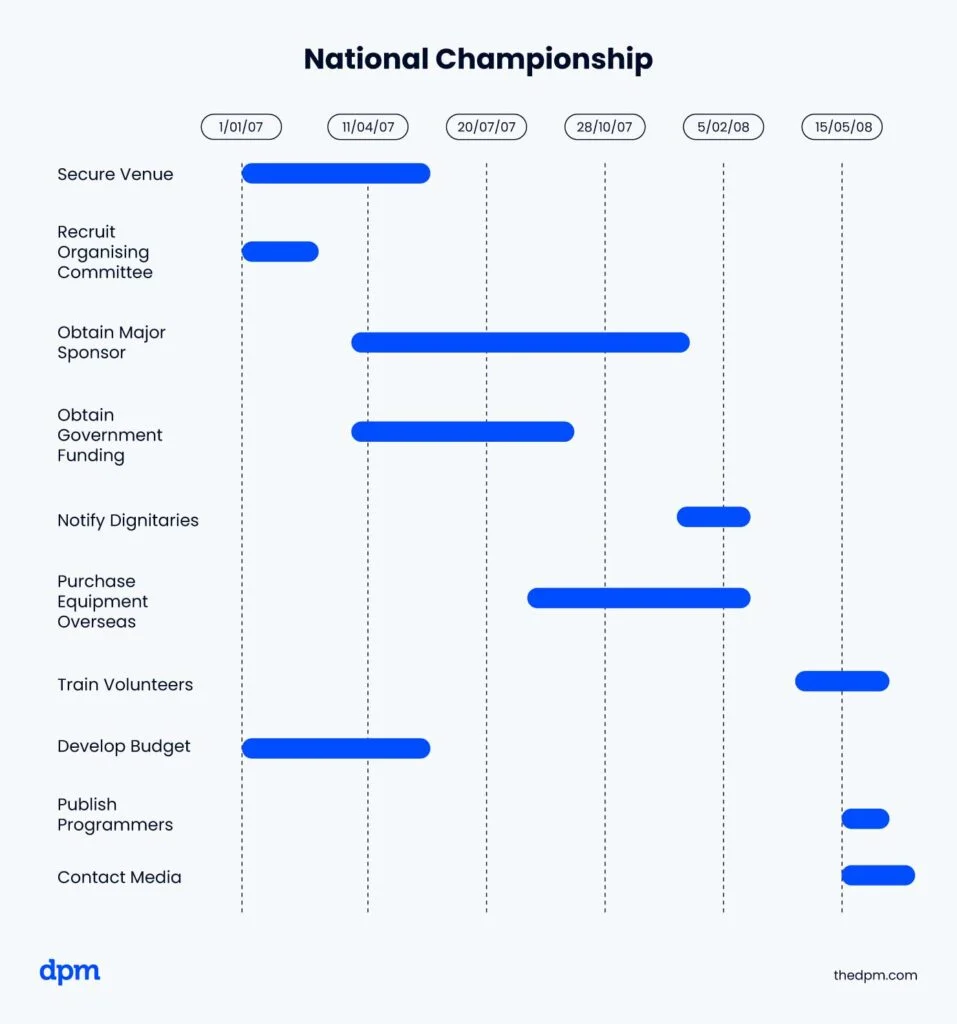
The goal of this project is to organize a major international sporting event, like the Olympics. The project plan encompasses various aspects such as selecting suitable venues, planning logistics, scheduling events, managing volunteers, and ensuring security arrangements.
Best Practices For Creating A Project Plan
The process of creating a project plan goes hand in hand with the project planning process. Each step of the way, add notes, findings, and further questions to your document.
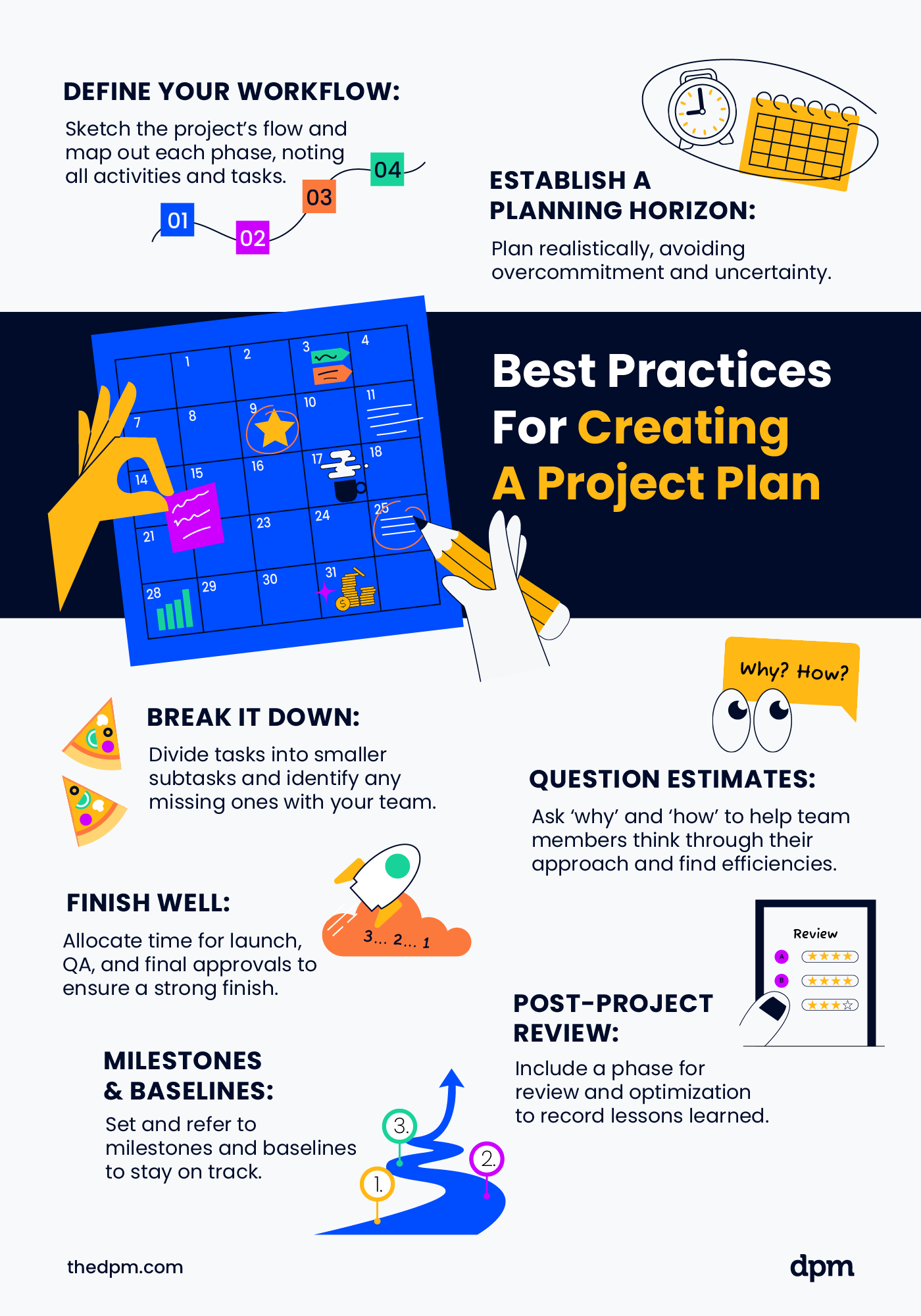
- Define your workflow: Sketch out the overall flow of your project and map out each project phase in your project’s life cycle. From there, note the activities and tasks to be completed in each stage.
- Establish a planning horizon: Determine how far into the future you can accurately plan ahead. Be realistic, don’t overcommit the project team, and don’t plan what you don’t know.
- Break it down: Break down your tasks and activities into smaller subtasks to make it easier for your team to estimate. With your team, identify any tasks that are missing.
- Question when questioning: As you’re gathering estimates, keep asking ‘why’ and ‘how’ to help team members think through the approach, and so you can identify efficiencies.
- Finish well: Plan a strong finish and leave enough time for things like launch, QA, and final approvals.
- Post-project review & optimization: Include a specific phase for this in your project plan. This also gives you time to record lessons learned and/or hold a retrospective.
- Milestones & baselines: Include milestones and baselines in your plan, and refer back to these throughout the project to make sure you’re on track.
Once your project plan has been completed, you’ll need to add all tasks, dates, and project milestones into your project management software or app.
Common Pitfalls of Project Plans
Make sure your project plan is rock-solid by avoiding the pitfalls below.
- Not leaving enough room for changes: Build contingencies into your plan for risks, changes, and delays. Our template makes it fairly easy to make changes, as long as you haven’t squeezed your timeline too much.
- Guessing instead of asking: Work with your team to determine estimates for tasks, start dates, due dates or end dates, and overall timelines. Don’t promise something the team can’t deliver.
- Not planning for it not going to plan: Give yourself and your team extra contingency time and put backup plans in place. Have a Plan A, Plan B, and maybe even a Plan C.
What’s Next?
Discover more project templates for important project documentation with a DPM Membership! You'll be able to access 95+ templates, samples, and examples, as well as mini courses and our Slack group, where you can join the discuss with 100's of other digital project managers.



