

De 10 beste programmene for AI-basert ressursstyring vurdert i 2026

Beste programvare for AI-ressursstyring


Med det brede utvalget av programvare for AI-ressursstyring som finnes, kan det være krevende å velge den perfekte løsningen. Du ser etter en måte å fordele og utnytte ressurser mer presist på, men utfordringen ligger i å finne verktøyet som passer behovene dine. Jeg forstår denne utfordringen, og jeg er her for å hjelpe deg gjennom den. Med utgangspunkt i min omfattende erfaring med digital prosjektstyring, der jeg har navigert bruken av en rekke verktøy for ressursstyring på tvers av ulike prosjekter og team, vil jeg gjøre valget enklere for deg.
Why Trust Our Software Recommendations
Our team has been testing and reviewing software since 2012. As project managers ourselves, we know how difficult—and important—it is to choose the right software.
For this guide, we evaluated tools using hands-on testing and independent research, scoring tools using our selection criteria. We also draw on insights from industry thought leaders and practicing project management experts.
Our reviews reflect our human editorial judgment, not a sales pitch.
Expert reviewers:
Sammenligningstabell for programvare for AI-ressursstyring
Denne sammenligningstabellen oppsummerer prisdetaljer for mine beste utvalgte programmer for AI-ressursstyring:
| Tool | Best For | Trial Info | Price | ||
|---|---|---|---|---|---|
| 1 | Best for advanced resource planning | 14-day free trial | From $17/user/month | Website | |
| 2 | Best for real-time insights into project margins | 14-day free trial | From $10/user/month (billed annually) | Website | |
| 3 | Best for AI-driven resource optimization | 30-day free trial + free demo available | From €22.5/month (billed annually) | Website | |
| 4 | Best for resource planning with AI risk prediction | 14-day free trial | Pricing upon request | Website | |
| 5 | Best for AI-powered resource and capacity planning | Free demo available | Pricing upon request | Website | |
| 6 | Best for AI-driven multi-project visibility | Free plan available | From $9/user/month (billed annually) | Website | |
| 7 | Best for people-centric resourcing | Free demo available | Pricing upon request | Website | |
| 8 | Best for AI task automation | Free plan available | From $9/user/month (billed annually) | Website | |
| 9 | Best for mid-sized agencies and consultancies | Free demo available | Pricing upon request | Website | |
| 10 | Best for collaboration features | Free plan + 14-day free trial available | From $9.99/user/month (billed annually) | Website |


Anmeldelser av den beste programvaren for AI-ressursstyring
Her er mine detaljerte vurderinger av hvert program på denne listen, inkludert hva de gjør bra, og de beste bruksområdene for hvert av dem.

Scoro
Best for advanced resource planning

Scoro is an AI-powered resource management platform that brings together project planning, resource allocation, time tracking, and workload forecasting in one system.
Who Is Scoro Best For?
Scoro is a strong fit for professional services firms—like agencies, consultancies, and IT service providers—that need to manage complex project portfolios and resource schedules in one place.
Why I Picked Scoro
Scoro earns its spot on my shortlist because of how far its resource planning goes beyond basic scheduling. I particularly like the Bookings feature, which lets my team tentatively reserve people's time before a project even kicks off—Scoro auto-generates those bookings from the project quote and distributes hours across working days, so I'm not starting from scratch every time. The utilization heatmap in the Reports section is another feature I rely on heavily: it shows at a glance who's in the red and who has capacity, and I can drill down to see exactly what's driving someone's workload. Layered on top of all this is ELI, Scoro's built-in AI companion, which lets me ask natural language questions like "how many billable hours did the design team log last week?" and get an answer in seconds without building a custom report.
Scoro Key Features
- Gantt chart with task dependencies: Visualize project timelines and link dependent tasks so schedule changes automatically cascade across the plan.
- Quoted vs. actual budget tracking: Compare planned costs, labor, and profit margins against real-time actuals as a project progresses.
- Retainer management: Track recurring client work, monitor budget consumption per period, and roll over unused hours across billing cycles.
- AI-powered document auto-capture: Upload receipts or expense documents and ELI automatically extracts and prefills the data for review.
Scoro Integrations
Scoro offers native integrations with Google Calendar, Outlook, Xero, QuickBooks, Slack, Zapier, and has an API for custom integrations.
Pros and Cons
Pros:
- Enhanced collaboration and information sharing between departments
- Real-time insights into resource utilization and capacity
- Comprehensive feature set covering various business needs
Cons:
- Utilization reports limited to higher-tier plans
- User interface that may not be intuitive for all users
New Product Updates from Scoro

Scoro Adds Time Mobile App and ELI Improvements
Scoro adds the Scoro Time mobile app for iOS/Android to track time anywhere and expands ELI with attachments, smarter filtering, and trigger-based actions. For more information, visit Scoro's official site.

Best for real-time insights into project margins

Productive is an AI-driven professional services automation platform designed to help agencies and service-based businesses manage resources, projects, and financials in one place. It offers an integrated workspace where you can plan projects, allocate resources, track budgets, and monitor profitability in real time.
Why I Picked Productive: I chose Productive for this list because of its AI-powered profitability tracking and team scheduling capabilities. These tools provide real-time insights into project margins and resource utilization, helping you make informed decisions throughout a project’s lifecycle. I also liked how Productive’s forecasting tools can model growth scenarios and budget usage, allowing businesses to anticipate future needs and plan more effectively.
Standout Features & Integrations
Productive’s features include real-time profitability tracking for financial visibility, advanced team scheduling to optimize workload distribution, and budgeting tools that connect financial planning directly to project execution. These capabilities give teams a unified way to manage projects from kickoff to delivery while maintaining control over performance metrics.
Productive's integrations include Xero, Slack, QuickBooks, HubSpot, Google Calendar, Zapier, Exact, Visma, Fortnox, Twinfield, CPP, and Sage.
Pros and Cons
Pros:
- Integrated financial management
- Advanced resource allocation tools
- Real-time profitability tracking
Cons:
- Steeper onboarding for new users
- Limited customization options
New Product Updates from Productive
Productive Adds Voice Dictation, Slack Connector, Proposals, and Overtime
Productive adds voice dictation, a Slack Connector, proposal controls, and overtime tracking. These updates support faster AI interactions, client proposals, and time management. For more information, visit Productive’s official site.

Epicflow
Best for AI-driven resource optimization

Epicflow is an AI-powered resource management platform designed for project teams that need advanced workload balancing, predictive analytics, and scenario simulation.
Who Is Epicflow Best For?
Epicflow is a good fit for project managers and resource managers in mid-to-large organizations running multiple concurrent projects across engineering or product teams.
Why I Picked Epicflow
Epicflow earns its spot on my shortlist because of how it handles AI-driven resource optimization across complex, multi-project environments. I particularly like the Future Load Graph, which uses predictive analytics to forecast resource demand and flag overload, enabling my team to adjust allocations before a bottleneck forms. The What-If Analysis feature is useful: I can simulate project changes in a sandbox mode and see how adding a new project or shifting a deadline ripples across the entire portfolio. The Resource Allocation Advisor suggests the best-fit team members based on competencies, attributes, and availability rather than just headcount.
Epicflow Key Features
- Epica virtual assistant: An AI assistant built into the platform that sends proactive notifications, answers questions, and flags project changes in real time.
- Historical Load Graph: A workload analysis tool that visualizes how resource capacity, output, and demand have changed over time to inform future planning.
- Pipeline management: A real-time project portfolio view that recalculates task and project priorities automatically as changes occur across your environment.
- Timesheet: A built-in time tracking tool that compares actual team output against original estimates to surface performance gaps.
Epicflow Integrations
Epicflow offers native integrations with Jira, Microsoft Project, Oracle Primavera, and SAP, plus an API for custom integrations.
Pros and Cons
Pros:
- Mobile application available for on-the-go access
- Integration with popular project management tools
- AI-driven predictive analytics for resource management
Cons:
- May require negotiation with the seller for the final cost
- Pricing information is not transparently available

Wrike
Best for resource planning with AI risk prediction

Wrike is a comprehensive work and project management platform designed to help businesses of all sizes collaborate and track projects effectively.
Why I Picked Wrike:
Wrike's AI capabilities include intelligent resource allocation, which helps to balance team workloads and prevent burnout by providing full visibility into each team member's tasks and availability. The platform also offers AI-driven risk prediction, which uses historical data and real-time analytics to identify potential project risks and suggest mitigation strategies. Additionally, Wrike’s AI workflow automation can suggest rules based on repetitive activities, helping teams maintain consistent and efficient processes.
Standout features & integrations:
Wrike features include Custom workflows, time tracking, budget management, workload management, interactive Gantt charts, custom request forms, project templates, file sharing, proofing and approval tools, task prioritization, and real-time collaboration.
Wrike integrates with Google Drive, Dropbox, Microsoft OneDrive, Salesforce, HubSpot, Marketo, Slack, Microsoft Teams, Zoom, Google Calendar, Outlook, Jira, GitHub, Trello, Asana, Evernote, and Zendesk.
Pros and Cons
Pros:
- Scalable for teams of all sizes
- Users can create custom dashboards and reports
- Robust task management features
Cons:
- Mobile app does not offer all the features available on the desktop version
- Initial learning curve when setting up the platform
New Product Updates from Wrike
Wrike Adds Klaxoon MCP Integration
Wrike’s Klaxoon MCP integration is now generally available, enabling AI agents to navigate between Wrike tasks and attached whiteboards, read task context, and manage whiteboard attachments via API. For more information, visit Wrike's official site.

Best for AI-powered resource and capacity planning

Screendragon is an AI-driven resource management platform for project-based teams, offering workflow automation, capacity planning, and real-time analytics for complex organizations.
Who Is Screendragon Best For?
Screendragon is a strong fit for mid-to-large marketing, agency, and professional services teams managing high volumes of projects across multiple stakeholders.
Why I Picked Screendragon
Screendragon earns its spot on my shortlist because of how deeply its AI is embedded into the resource planning process—not bolted on as an afterthought. The Resourcing Agent is what I find most impressive: it automatically recommends and assigns team members to projects based on skills, availability, and current workload, all within your existing project workflows. I also like the Operational Agent, which gives ops managers and project leads real-time answers on capacity and performance without digging through spreadsheets. Pair that with built-in demand forecasting and one-click auto-assignment, and you have a genuinely intelligent planning layer that's hard to replicate with generic tools.
Screendragon Key Features
- Scoping/PM Agent: An AI agent that generates project timelines and budgets from a few prompts, built for producers and project managers.
- Live resource views: Toggle between task-based, hour-based, or percentage-based capacity views with weekly and monthly snapshots to spot conflicts in real time.
- Integrated timesheets and project data: Links resourcing directly to live project plans and timesheet data for a unified view of team performance.
- Digital approval workflow management: Centralizes all data, decisions, and comments, with document markup, version comparison, and automated audit trails.
Screendragon Integrations
Screendragon offers native integrations with Microsoft 365, Google Workspace, Jira, Slack, Salesforce, and SAP. An API is available for custom integrations.
Pros and Cons
Pros:
- Can tailor the platform to your specific needs
- Good resource planning features
- Integrates various tools like project management and budget tracking
Cons:
- Time-consuming setup
- The platform's depth can lead to complexity
New Product Updates from Screendragon
Screendragon Unveils New AI Hub
Screendragon introduced AI Hub, a new capability that lets teams build and manage AI agents directly within workflows. The update helps marketing teams automate tasks, maintain governance controls, and scale AI-driven operations more efficiently. For more information, visit Screendragon's official site.

Best for AI-driven multi-project visibility
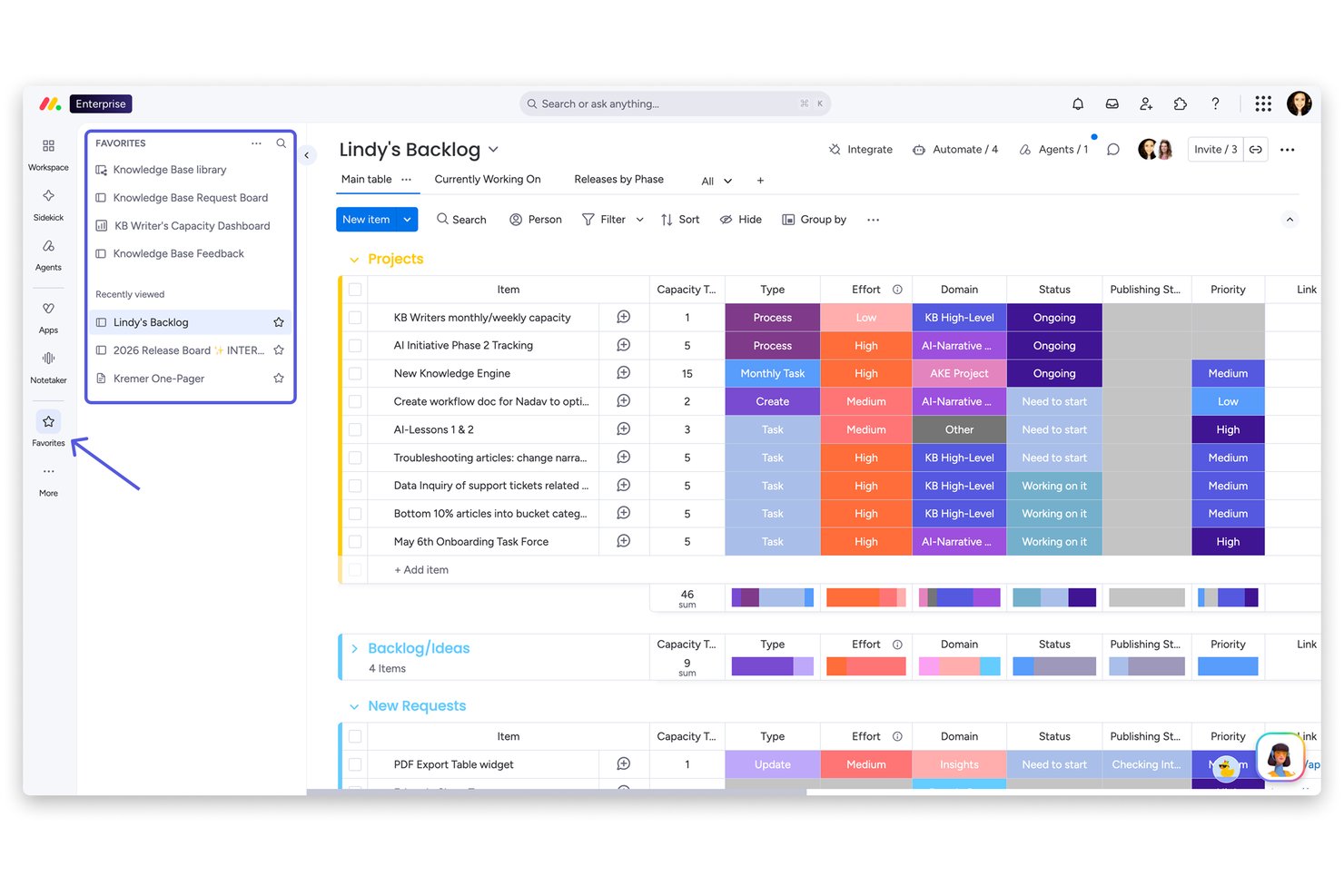
monday AI Workspace is a work management platform that combines AI-powered resource matching, workload balancing, and cross-portfolio visibility with native project planning and capacity management tools.
Who Is monday AI Workspace Best For?
PMO directors and agency operations managers at mid-to-large organizations who need AI-driven visibility and workload control across multiple active project portfolios.
Why I Picked monday AI Workspace
I picked monday AI Workspace because of how its AI surfaces resource conflicts across a live project portfolio before they become problems. The Portfolio-Level Resource Utilization Report gives me a real-time read on capacity across every active workstream, and the AI-powered Workload View flags individual over-allocation the moment it happens. I've found this particularly useful when running five or more concurrent projects, where bottlenecks rarely announce themselves in advance.
monday AI Workspace Key Features
- Resource directory: Maintain a searchable inventory of team members’ skills, availability, and roles for staffing decisions.
- Capacity manager: Visualize and plan resource allocation across multiple projects directly within the workspace.
- AI workflow builder: Automate project staffing routines and resource requests using AI-driven triggers and logic.
- Portfolio-level reporting: Track utilization and allocation trends by team, department, or project with real-time portfolio dashboards.
monday AI Workspace Integrations
monday AI Workspace offers hundreds of native integrations through its built-in integrations and marketplace, including Slack, Salesforce, HubSpot, Google Drive, Dropbox, Jira, Microsoft Teams, Outlook, and Zendesk. It also supports Zapier and provides an API for custom integrations.
Pros and Cons
Pros:
- Staffing workflows connect to native project execution
- Real-time capacity alerts flag overallocation instantly
- AI cross-portfolio workload visibility is built-in
Cons:
- Resource forecasting requires historical data
- AI features locked behind higher-tier plans
New Product Updates from monday AI Workspace
monday AI Workspace Adds Human Approval Routing
monday AI Workspace adds a human-in-the-loop approval block to AI Workflows, sending approval requests and routing workflow paths based on responses. For more information, visit monday AI Workspace's official site.

Kantata
Best for people-centric resourcing

Kantata is an AI-powered resource management platform for professional services teams that combines resource forecasting, capacity planning, project portfolio management, and skills-based allocation.
Who Is Kantata Best For?
Kantata is a strong fit for mid-to-large professional services firms—such as consulting, marketing, and IT services companies—that need to manage complex resource allocation across multiple projects.
Why I Picked Kantata
Kantata earns its spot on my shortlist because of how deliberately it's built around people, not just projects. The AI-powered resource optimization feature evaluates far more staffing permutations than a resource manager could manually—detecting skill gaps, resourcing conflicts, and underutilized capacity before they become problems. I particularly like the skills-based matching, which lets my team identify the right person for a role based on actual expertise, not just availability. Kantata Pulse collects real-time employee sentiment alongside operational data, so I can see how my team is doing mid-project—not just whether the budget is on track.
Kantata Key Features
- Generative AI project assistant: Drafts status reports, project case studies, lessons learned documents, and executive updates directly from project data.
- Predictive insights: Uses AI trend analysis to compare performance across periods, assess prior forecasts, and flag when targets for open periods need adjustment.
- Kantata Connect: An integration and workflow automation platform that connects your existing systems, enforces business rules, and automates repetitive operational tasks.
- Time and expense tracking: Lets team members log time and expenses within the platform, with built-in automation to support accurate period closes.
Kantata Integrations
Kantata offers native integrations with Salesforce, Jira, Slack, HubSpot, QuickBooks, Xero, Microsoft 365, Google Workspace, NetSuite, and Sage Intacct. An API is available for custom integrations.
Pros and Cons
Pros:
- Resource, project, and financial forecasting
- Robust tracking for various metrics
- Gantt charts for project planning
Cons:
- Setup can be complex and may require assistance
- May take time to maximize the platform's features
New Product Updates from Kantata

Kantata Adds Access Group Change History
Kantata adds Access Groups History, letting account administrators track changes to group details, membership, and permissions in Recent History. The update also makes these events available through the Subscribed Events API for broader monitoring. For more information, visit Kantata’s official site.
 .
.
ClickUp
Best for AI task automation

ClickUp is a project and resource management platform that combines AI-powered task automation, workload tracking, time management, and customizable dashboards for teams managing complex projects.
Who Is ClickUp Best For?
ClickUp is a strong fit for mid-sized to large tech and digital teams that need a centralized platform to manage projects, resources, and workloads across multiple departments.
Why I Picked ClickUp
ClickUp earns its spot on my shortlist because of how deeply AI is woven into its resource management workflows. I particularly like the Intelligent Task Assigning feature, which uses ClickUp Brain to automatically assign tasks based on each team member's expertise, availability, and current workload—so I'm not manually triaging who has capacity. The Self-Prioritizing Tasks feature is also something I rely on heavily; it continuously re-ranks work as priorities shift, which means my team stays focused on high-impact items without constant check-ins from me. Additionally, Auto-Tracking Progress monitors risks and milestones automatically, cutting out the status update cycle entirely.
ClickUp Key Features
- Workload view: Visualize each team member's assigned work and capacity across a customizable timeline.
- Timesheets: Review and approve logged hours for your entire team in a consolidated weekly view.
- Goals: Set high-level objectives and track progress automatically as linked tasks are completed.
- Automations: Set trigger-based rules to automatically update task statuses, assignees, and fields without manual input.
ClickUp Integrations
ClickUp offers 50+ native integrations, including Slack, GitHub, GitLab, HubSpot, Everhour, Toggl, Harvest, Google Drive, and more. It also connects with Zapier and provides an API for custom integrations.
Pros and Cons
Pros:
- Effective time tracking and reporting capabilities
- Robust AI features enhancing productivity
- Highly customizable to fit various team needs
Cons:
- Some users experience a learning curve due to its extensive features
- Mobile app may feel less intuitive compared to the desktop version
New Product Updates from ClickUp
ClickUp Adds Meetings Hub, Super Agent Templates, and ZoomInfo Integration
ClickUp adds a searchable Meetings Hub, new ways to clone and template Super Agents, and a ZoomInfo integration through the App Center. These updates improve meeting retrieval, agent reuse, and access to sales intelligence. For more information, visit ClickUp’s official site.

Forecast
Best for mid-sized agencies and consultancies

Forecast is an AI-powered project and resource management software designed to improve visibility, efficiency, and planning across projects. It combines scheduling, capacity management, and financial tracking in one workspace, giving teams real-time oversight of utilization, budgets, and timelines.
Why I Picked Forecast:
I picked Forecast because of its AI-driven risk prediction and workload tracking features. These tools give you proactive alerts about potential scheduling or budget issues before they escalate, which helps keep projects on track. I also liked how Forecast uses placeholders for demand planning, making it easier to balance workloads even when project scopes change. If you’re looking for a tool that flags risks early while optimizing resource allocation, Forecast is a strong option.
Standout features & integrations:
Forecast’s features include automated time tracking to reduce admin work, utilization reports to monitor workload across the company, and AI-assisted project scoping to prevent scope creep. Its risk prediction alerts can highlight budget and scheduling concerns in real time, while the dashboards give you up-to-date insights into project progress.
Integrations include Sage Intacct, HubSpot, Jira, Google Calendar, Calendly, LinkedIn, YouTube, Google Analytics, Facebook, Salesforce, and QuickBooks.
Pros and Cons
Pros:
- Comprehensive suite of features including financial tracking and AI-assisted timesheets
- Real-time workload and capacity management
- AI-driven predictive resource allocation
Cons:
- May require a learning curve to fully utilize AI features
- Minimum user requirement may not suit smaller teams
- Pricing information is not transparently available online

Teamwork.com
Best for collaboration features

Teamwork.com is a project management platform for resource management that brings together task planning, workload scheduling, time tracking, and team collaboration in one place.
Who Is Teamwork.com Best For?
Teamwork.com is a strong fit for client-facing teams—particularly agencies and professional services firms—that need to manage multiple projects and resources across accounts.
Why I Picked Teamwork.com
Teamwork.com earns its spot on my shortlist because of how well it handles collaboration across distributed project and client teams. I particularly like the Teams feature, which lets you group people into departmental teams, sub-teams, or cross-functional project groups—and then assign tasks directly to those groups rather than individuals. Teamwork Chat is built directly into the platform, so you can turn a message thread into a task without switching tools, which keeps conversations connected to actual work.
Teamwork.com Key Features
- Workload and capacity management: View your team's day-to-day capacity in real time, spot resourcing red flags, and reassign tasks to avoid bottlenecks before they affect delivery.
- Milestones: Set checkpoints within a project so your team and clients always know what's expected and by when, with progress visible at each stage.
- Resource forecasting and planning: Assign resources to future projects, plan hiring needs, and model capacity long before deals close—without disrupting active work.
- Skills and roles matching: Categorize team members by skill set and role so you can match the right people to the right tasks when allocating resources across projects.
Teamwork.com Integrations
Teamwork.com offers native integrations with Slack, Microsoft Teams, Google Drive, Dropbox, HubSpot, Xero, QuickBooks, Harvest, and Zapier. An API is available for custom integrations.
Pros and Cons
Pros:
- Customizable project templates for various use cases
- Wide range of integrations with other software
- Comprehensive set of collaboration tools
Cons:
- The free plan may be too limited for larger teams
- Annual billing may not be suitable for all budgets
- Minimum user requirement for paid plans
Annen programvare for AI-ressursstyring
Nedenfor finner du en liste over ytterligere programmer for AI-ressursstyring som jeg valgte ut, men som ikke kom med på topplisten. Det kan være verdt å ta en titt på dem.
- Adobe Workfront
For enterprise work management
- Bonsai Agency Software
For time and resource management
- ProjectManager
For real-time project tracking
- Parallax
For predictive operations intelligence
- OnePlan
For portfolio optimization
- Mosaic
For visual resource planning
- Allex
For automated workflow management
- elvex
For non-technical AI workflow building
- Resource Guru
For simple resource scheduling
- Celoxis
For custom workflow configuration
- Accelo
For client work automation
- GoodDay
For visual task-dependency management
- TaskRay
With Salesforce-native data security


How I Evaluate AI Resource Management Software
Every tool here needs to deliver real AI value—like predicting capacity shortfalls or flagging burnout risk before it impacts your sprint. I evaluate each option on two levels: the core functionality it needs to qualify and the differentiating factors that separate the strongest picks.
Core Functionality (Table Stakes For This List)
When I'm selecting tools for my list, I rank each one on a scale from 0 (does not offer the functionality) to 5 (excels in this area) for each core functionality listed below. Then, I calculate the tool's total score into a percentage. Each tool needs to achieve a minimum total score of 65% to be considered for inclusion.
- AI-Powered Resource Matching: I evaluate how well the tool recommends people for open project roles—whether it factors in skills, availability, and past project fit or just filters by calendar gaps.
- Predictive Capacity Forecasting: The tool should forecast demand and supply over future quarters, so PMO directors can spot hiring needs or bench risk before it stalls delivery.
- Intelligent Workload Balancing: I look for AI that flags overallocation and suggests reassignments, not just a heatmap that shows someone is at 150% and leaves you to figure it out.
- Skills & Availability Intelligence: A strong tool maintains a living skills inventory tied to real-time availability, so staffing a new project doesn't start with a round of Slack messages.
- Project Management Integration: I check for deep sync with tools like Jira, Asana, or Smartsheet—resource plans need to reflect what's actually happening in your delivery workflows.
- Scenario Planning & Optimization: I look at whether you can model what-if scenarios, like pulling a senior engineer from one project to staff another, and see the downstream impact on timelines and utilization.
Once I have a list of tools that meet this criteria, I consider what sets each platform apart.
Differentiating Factors (What Sets Vendors Apart)
Here's how I compare and contrast different vendors:
Standout Features
Generative staffing plans are a major differentiator. Some tools can draft a full resource plan from a project brief, which saves hours of manual matching when you're spinning up new engagements. I also look for financial impact modeling that ties allocation decisions to margin and revenue projections—so you can see what moving a consultant between projects actually costs. Natural language querying adds real value too, letting managers ask plain-language questions like "who's available with front-end skills next quarter?" and get instant, actionable answers.
Beyond Features
AI transparency matters a lot in this category. I check whether a tool explains why it recommended a specific person for a role—managers need that context to trust and act on suggestions. Integration depth is another key factor, especially two-way sync with tools like Jira or Workday, since resource plans fall apart when they're disconnected from actual project and HR data. I also evaluate time-to-value: whether a platform ships with prebuilt skill taxonomies and role libraries so teams aren't spending weeks on setup before seeing their first useful AI recommendation.
Slik velger du programvare for AI-ressursstyring
Når du går gjennom din egen unike prosess for valg av programvare, bør du ha følgende punkter i bakhodet:
- Skalerbarhet: Etter hvert som virksomheten vokser, øker også behovene dine for ressursstyring. Velg programvare som kan håndtere en økning i antall brukere, prosjekter og datamengder uten redusert ytelse. Et IT-selskap i vekst vil for eksempel trenge et system som kan håndtere den ekstra arbeidsmengden og de nye brukerne uten at det går på bekostning av hastighet eller effektivitet.
- Integrasjonsmuligheter: Programvaren bør enkelt kunne integreres med de eksisterende systemene dine for å unngå datasiloer. Et reklamebyrå kan for eksempel trenge programvare som kan kobles til CRM-systemet deres, slik at kundeinteraksjoner og prosjektstatus kan følges opp på ett sted.
- Tilpasning: Hver bransje har unike behov, så det er viktig å velge programvare som kan tilpasses de spesifikke kravene dine. Et byggefirma vil for eksempel ha nytte av programvare for ressursstyring i byggebransjen som kan tilpasse arbeidsflyter etter kompleksiteten og varigheten til byggeprosjektene deres.
- Brukervennlig grensesnitt: Programvaren bør være tilgjengelig for alle teammedlemmer, uavhengig av deres tekniske kompetanse. Et brukervennlig grensesnitt sikrer rask innføring og reduserer opplæringstiden. I helsesektoren betyr dette at både administrativt personale og helsepersonell kan administrere ressurser effektivt uten en bratt læringskurve.
- Avansert analyse: Se etter programvare som gir grundig innsikt i ressursfordeling og ressursutnyttelse. Denne funksjonen er avgjørende for prosjektledere i programvareutviklingsbransjen som må følge fremdriften i flere prosjekter og sørge for at ressursene brukes effektivt.
Trender innen programvare for AI-ressursstyring i 2024
Her er noen aktuelle og interessante trender jeg legger merke til innen teknologi for programvare for AI-ressursstyring.
- Integrasjon med fjernarbeidsmiljøer: Verktøy for AI-ressursstyring integreres i økende grad med plattformer for fjernarbeid. Denne trenden gjenspeiler det økende behovet for koordinering av eksterne team. Dette er viktig for å opprettholde produktiviteten i distribuerte team.
- Prediktiv analyse for ressursallokering: Prediktiv analyse blir stadig vanligere i programvare for AI-ressursstyring. Den forutser prosjektbehov og optimaliserer ressursfordelingen. Dette er avgjørende for proaktiv planlegging og redusert sløsing.
- Forbedret brukeropplevelse gjennom naturlig språkbehandling: Naturlig språkbehandling forbedrer brukerinteraksjonen med systemer for AI-ressursstyring. Brukere kan nå skrive inn kommandoer og motta data i et samtalebasert språk. Denne trenden er betydningsfull på grunn av potensialet for å gjøre kompleks programvare mer tilgjengelig.
- Sanntidsdata for smidig beslutningstaking: Analyse av sanntidsdata er et satsingsområde for programvare for AI-ressursstyring. Den gir umiddelbar innsikt for rask beslutningstaking. Dette er interessant på grunn av rollen teknologien spiller i støtten til smidige metoder.
- Bærekraftsfokusert ressursoptimalisering: Bærekraft er en økende bekymring innen AI-ressursstyring. Programvaren omfatter nå funksjoner som minimerer miljøpåvirkningen. Dette er viktig for virksomheter som ønsker å nå bærekraftsmålene sine.
Disse trendene viser en dynamisk utvikling innen programvare for AI-ressursstyring, med et sterkt fokus på tilpasningsevne og effektivitet.
Hva er programvare for AI-ressursstyring?
Programvare for AI-ressursstyring er en digital plattform som integrerer kunstig intelligens for å forbedre allokeringen og utnyttelsen av ressurser i prosjektstyring. Den brukes av prosjektledere, teamledere og organisasjoner til å automatisere og forbedre beslutningstakingen innen ressursplanlegging. Programvaren brukes til å koble prosjektoppgaver med tilgjengelige ressurser, forutse ressursbehov og foreslå optimale allokeringsstrategier for å nå prosjektfrister og -mål.
Funksjoner i programvare for AI-ressursstyring
Når du velger programvare for AI-ressursstyring, er det avgjørende å vurdere funksjonene som best støtter prosjektets behov. Her er de viktigste funksjonene du bør se etter:
- Prediktiv analyse: Denne funksjonen bruker historiske data til å forutsi fremtidige ressursbehov. Den er viktig fordi den hjelper med å planlegge og fordele ressurser proaktivt for å forhindre flaskehalser.
- Automatisert planlegging: AI-algoritmer kan automatisk tildele oppgaver basert på tilgjengelige ressurser og ferdighetssett, ofte gjennom en AI-planleggingsassistent som arbeider i bakgrunnen. Dette sikrer at de riktige personene arbeider med de riktige oppgavene til riktig tid.
- Synlighet i sanntid: Få umiddelbar innsikt i ressursutnyttelse og tilgjengelighet. Dette er avgjørende for å kunne ta informerte beslutninger og gjøre justeringer underveis.
- Kapasitetsplanlegging: Forstå kapasiteten til arbeidsstyrken din og planlegg for fremtidige prosjekter. Denne funksjonen er avgjørende for å sikre at du har de nødvendige ressursene for å møte kommende behov.
- Ferdighetssporing: Hold oversikt over teamets ferdigheter og kompetanse. Dette gjør det mulig å tildele oppgaver strategisk og bidrar til å identifisere kompetansegap med tanke på opplæring.
- Etterspørselsprognoser: Forutse prosjektbehov for å tilpasse ressursene deretter. Nøyaktige prognoser er avgjørende for å opprettholde en balanse mellom arbeidsmengde og ressurskapasitet.
- Intelligente anbefalinger: Motta forslag til den beste ressursfordelingen basert på AI-analyse. Dette hjelper med å ta datadrevne beslutninger som kan forbedre prosjektresultatene.
- Integrasjonsmuligheter: Koble til andre verktøy og systemer for å sentralisere data. Integrasjon er avgjørende for å opprettholde konsistens og nøyaktighet på tvers av prosjektstyringsøkosystemet.
- Tilpassbar rapportering: Opprett rapporter som er tilpasset spesifikke behov og mål. Tilpassede rapporter er viktige for å følge fremdriften og kommunisere effektivt med interessenter.
- Samarbeidsverktøy: Tilrettelegg for kommunikasjon og samarbeid mellom prosjektmedlemmer. Gode samarbeidsverktøy er nødvendige for å holde alle oppdatert og bevege seg fremover sammen.
- Varsler: Denne funksjonen innebærer at programvaren sender varsler eller oppdateringer til brukere, og brukes vanligvis til å holde teammedlemmer informert om oppgavestatus, oppdateringer eller andre viktige hendelser.
- Avhengigheter: I programvare, særlig prosjektstyringsverktøy, gjør denne funksjonen det mulig for brukere å definere forhold mellom oppgaver der én oppgave avhenger av at en annen er fullført.
- Tillatelser: Styrer brukertilgang og avgjør hva ulike brukere har lov til å se eller endre i programvaren.
- Oppgavehåndtering: Gjør det mulig å spore, organisere og administrere oppgaver, ofte med funksjoner for å tildele oppgaver, angi tidsfrister og overvåke fremdriften. Du kan også vurdere AI-programvare for oppgavehåndtering, som tilbyr utvidede AI-funksjoner på dette området.
Fordeler med AI-programvare for ressursstyring
AI-programvare for ressursstyring er et kraftig verktøy som kan forbedre effektiviteten og virkningsgraden av en organisasjons ressursfordeling betydelig. Her er fem primære fordeler som brukere og organisasjoner kan forvente:
- Forbedret prognosenøyaktighet: AI-programvare for ressursstyring kan forutsi ressursbehov med større presisjon. Ved å analysere historiske data og nåværende trender hjelper programvaren virksomheter med å forutse fremtidige behov, slik at de er bedre forberedt på det som kommer.
- Bedre beslutningstaking: Programvaren gir datadrevet innsikt. Brukere kan ta informerte beslutninger om ressursfordeling, ettersom AI-en analyserer store mengder data for å foreslå den beste fremgangsmåten.
- Økt effektivitet: AI-systemer automatiserer rutineoppgaver. Disse smarte verktøyene for prosessautomatisering frigjør tid slik at medarbeiderne kan fokusere på mer strategiske initiativer, noe som dermed øker teamets samlede produktivitet.
- Kostnadsreduksjon: Programvaren identifiserer områder med sløsing. Ved å optimalisere ressursutnyttelsen kan virksomheter redusere unødvendige utgifter, noe som fører til en mer effektiv og kostnadseffektiv drift.
- Ressursfordeling i sanntid: AI-programvare muliggjør dynamisk ressursstyring. Den gjør det mulig å foreta justeringer i sanntid og reagere raskt på endringer i etterspørsel eller kapasitet, noe som holder prosjektene på sporet og innenfor budsjettet.
AI-programvare for ressursstyring representerer et betydelig fremskritt for virksomheter som ønsker å maksimere ressursene sine. Ved å ta i bruk disse systemene kan organisasjoner forvente konkrete forbedringer i driften, noe som fører til bedre resultater og et sterkere konkurransefortrinn.
Kostnader og priser for AI-programvare for ressursstyring
Når det gjelder programvare for AI-ressursstyring, bør programvarekjøpere med liten eller ingen erfaring med å bruke programvaren være oppmerksomme på at disse verktøyene kommer med ulike abonnementsalternativer, som hver har sitt eget sett med funksjoner og prismodeller. Disse programvareløsningene er utviklet for å hjelpe virksomheter med å optimalisere ressursfordeling, prosjektstyring og den generelle driftseffektiviteten ved hjelp av kunstig intelligens. Prisene kan variere basert på antall brukere, funksjonenes kompleksitet og nivået på kundestøtten som tilbys. Nedenfor finner du en oppsummering av abonnementsalternativene og prisene deres:
| Abonnementstype | Gjennomsnittspris | Vanlige funksjoner |
| Gratis | $0 | Grunnleggende analyse, begrenset antall forespørsler, brukerstøtte fra fellesskapet |
| Grunnleggende | $10 - $50/måned | Utvidet analyse, API-tilgang, brukerstøtte via e-post |
| Profesjonell | $50 - $200/måned | Avansert analyse, tilgang for flere brukere, prioritert brukerstøtte |
| Bedrift | $200+/måned | Tilpassbare funksjoner, full API-tilgang, brukerstøtte døgnet rundt |
Når kjøpere velger en plan for programvare for AI-ressursstyring, bør de vurdere størrelsen på teamet og prosjektenes kompleksitet for å finne ut hvilken plan som gir best verdi for behovene deres. Det er også viktig å vurdere muligheten for skalering og nivået på kundestøtten som tilbys.
Vanlige spørsmål om AI-programvare for ressursstyring
Her er noen vanlige spørsmål jeg ønsket å besvare for deg.
Hvordan forbedrer AI-programvare for ressursstyring prosjektresultatene?
Ved å bruke AI kan programvare for ressursstyring forutsi prosjektbehov, identifisere potensielle flaskehalser og foreslå optimal ressursfordeling. Denne proaktive tilnærmingen kan føre til mer effektiv bruk av ressurser, reduserte kostnader og bedre prosjektplaner. I tillegg kan den beste AI-en for prosjektstyring tilpasse seg endrede prosjektforhold og gi anbefalinger i sanntid for å holde prosjekter på rett spor.
Kan AI-programvare for ressursstyring integreres med andre verktøy?
Ja, mange løsninger for AI-programvare for ressursstyring er utviklet for å integreres med eksisterende prosjektstyringsverktøy og virksomhetssystemer. Denne integrasjonen gjør det mulig å synkronisere data på tvers av plattformer, slik at alle interessenter har tilgang til den mest oppdaterte informasjonen.
Er AI-programvare for ressursstyring egnet for bedrifter av alle størrelser?
AI-programvare for ressursstyring er skalerbar og kan være nyttig for bedrifter av alle størrelser. Små bedrifter, frilansere og konsulenter kan dra nytte av AIs prediktive egenskaper for å konkurrere mer effektivt, mens større virksomheter kan håndtere kompleks ressursfordeling på tvers av flere prosjekter og team.
Hvilke typer ressurser kan AI-programvare for ressursstyring håndtere?
AI-programvare for ressursstyring kan håndtere et bredt spekter av ressurser, inkludert menneskelige ressurser, utstyr, lagerbeholdning og finansielle eiendeler. I IT-miljøer kan for eksempel spesialisert IT-programvare for ressursstyring integreres med AI-funksjoner for å overvåke digital infrastruktur, som servere, nettverk og programvarelisenser.
AI-basert ressursstyring kan også håndtere planlegging, kapasitetsplanlegging og fordeling av arbeidsmengde, slik at ressursene brukes effektivt.
Hvordan håndterer AI-programvare for ressursstyring datasikkerhet?
Anerkjente leverandører av AI-programvare for ressursstyring prioriterer datasikkerhet og overholdelse av regelverk som GDPR. De tilbyr vanligvis funksjoner som kryptering, tilgangskontroller og revisjonsspor for å beskytte sensitiv informasjon. Skybaserte plattformer gir ofte også fordeler som automatiserte sikkerhetskopier, geografisk redundans og skalerbar infrastruktur for å styrke databeskyttelsen ytterligere.
Hvordan måler jeg avkastningen på investeringen i AI-programvare for ressursstyring?
For å måle avkastningen på investeringen i AI-programvare for ressursstyring bør du vurdere måltall som reduksjon i sløsing med ressurser, forbedringer i leveringstider for prosjekter, kostnadsbesparelser fra optimalisert ressursfordeling og økt andel vellykkede prosjekter. Vurder også påvirkningen på teamets produktivitet og evnen til å ta datadrevne beslutninger.
Hvordan kan AI-basert ressursstyring brukes til menneskesentrert planlegging?
AI-basert ressursstyring kan forbedre menneskesentrert planlegging betydelig ved å fokusere på å optimalisere teamets trivsel, individuelle styrker og samarbeid. AI gjør det også mulig for ledere å ta datadrevne beslutninger som balanserer virksomhetens mål med de ansattes behov. Slik kan den beste AI-programvaren for virksomheter støtte en menneskesentrert tilnærming:
- Prediktiv analyse: AI kan analysere tidligere prosjektdata for å forutsi de ansattes arbeidsmengde og kapasitet, slik at teamene verken blir overbelastet eller underutnyttet. Dette bidrar til å opprettholde en sunn balanse mellom arbeid og fritid.
- Kompetansematching: AI-drevne systemer kan identifisere de spesifikke ferdighetene som kreves for et prosjekt, og koble dem med de best egnede teammedlemmene. Ved å utnytte maskinlæring og dataanalyse kan organisasjoner sørge for at ansatte tildeles roller som samsvarer med styrkene deres.
- Tilbakemeldinger i sanntid: AI-verktøy gir innsikt i teamets prestasjoner i sanntid, noe som muliggjør raske justeringer og kontinuerlig optimalisering av ressursene. Dette skaper et dynamisk miljø der tilbakemeldinger innarbeides raskt, og forbedrer den samlede tilfredsheten i teamet.
- Prognoser for arbeidsstyrken: AI-basert kapasitetsplanlegging kan forutsi fremtidige prosjektbehov og tilgjengelig arbeidskraft, slik at man kan planlegge proaktivt. Dette sikrer at de ansatte ikke bare er tilgjengelige når det er behov for dem, men også har tilstrekkelig tid til hvile og utvikling, med vekt på en menneskesentrert tilnærming.
Hvordan kan AI-programvare for ressursstyring forbedre den økonomiske ytelsen?
AI-programvare for ressursstyring kan forbedre den økonomiske ytelsen betydelig ved å optimalisere hvordan ressurser fordeles og håndteres på tvers av prosjekter. Ved å ta i bruk AI-programvare for styring kan bedrifter redusere kostnader, øke effektiviteten og forbedre beslutningsprosessene. Slik fungerer det:
- Optimalisert ressursfordeling: AI-algoritmer analyserer tidligere prosjektdata og beregner fremtidige behov for å sikre at de riktige ressursene fordeles til de riktige prosjektene, slik at bortkastet tid og kostnader minimeres.
- Kostnadsprognoser og budsjettstyring: AI-drevet programvare beregner prosjektkostnader mer nøyaktig, slik at organisasjoner kan unngå overforbruk ved å justere budsjettene i sanntid.
- Forbedret utnyttelsesgrad: Ved å analysere de ansattes ferdigheter og tilgjengelighet sørger AI for at ressursene utnyttes så effektivt som mulig, noe som reduserer nedetid og øker lønnsomheten.
- Risikoreduksjon: AI identifiserer potensielle risikoer som kan føre til kostnadsoverskridelser, slik at teamene kan justere strategiene proaktivt og opprettholde økonomisk stabilitet.
Hvordan kan AI-basert ressursstyring forbedre budsjettprosessene?
AI-basert ressursstyring kan forbedre budsjettprosessene betydelig ved å gi mer nøyaktige prognoser, optimalisere ressursfordelingen og identifisere muligheter for kostnadsbesparelser. Ved å utnytte AI-verktøy for planlegging kan bedrifter få en tydeligere forståelse av sine økonomiske behov og forbedre beslutningstakingen. Her er de viktigste måtene AI forbedrer budsjetteringen på:
- Datadrevne prognoser: AI analyserer historiske data for å forutsi fremtidige utgifter, noe som forbedrer nøyaktigheten i budsjettanslagene og reduserer risikoen for å budsjettere for mye eller for lite.
- Ressurssporing i sanntid: AI-verktøy, for eksempel en AI-app for tidsstyring, kan overvåke ressursbruken i sanntid. Dette gjør det mulig å justere budsjettene dynamisk og fordele ressursene mer effektivt basert på aktuelle behov.
- Kostnadsoptimalisering: AI identifiserer ineffektivitet og foreslår kostnadsbesparende tiltak, slik at bedrifter kan effektivisere prosessene og redusere unødvendige utgifter.
- Scenarioplanlegging: AI modellerer ulike budsjettscenarioer, slik at organisasjoner kan forberede seg på forskjellige utfall og justere budsjettene deretter.
- Automatisert rapportering: AI automatiserer genereringen av budsjettrapporter, sparer tid og gir en helhetlig oversikt over den økonomiske ytelsen.