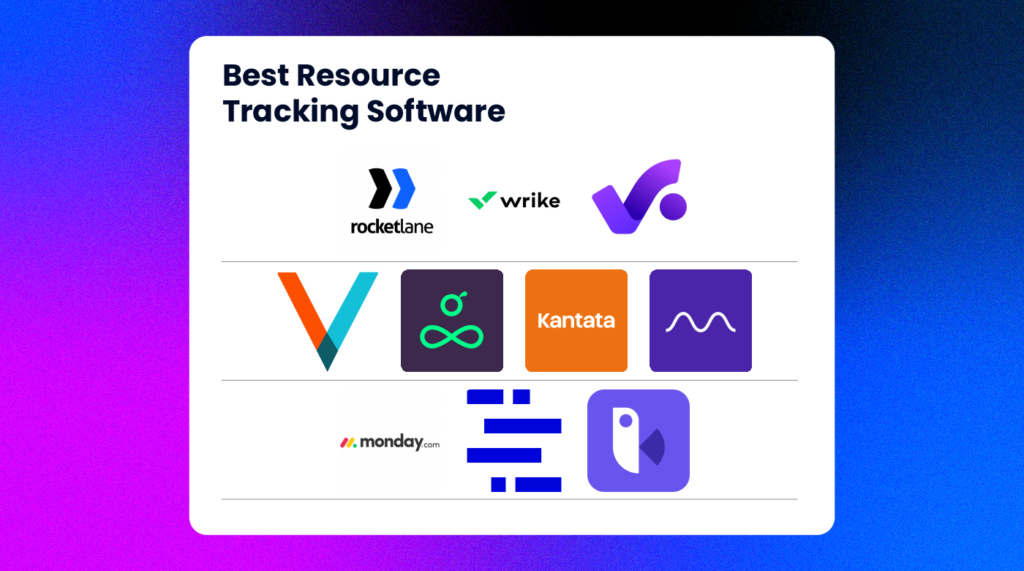
10 beste programmer for ressursoppfølging gjennomgått for 2026

Beste programvare for ressursoppfølging – kortliste


Den beste programvaren for ressursoppfølging gir deg sanntidsinnsikt i teamets tilgjengelighet, arbeidsmengde og kapasitet, slik at du kan tildele de riktige personene til de riktige oppgavene på riktig tidspunkt. Disse verktøyene hjelper deg med å unngå utbrenthet, redusere inaktiv tid og ta smartere bemanningsbeslutninger på tvers av prosjekter.
Med over 10 års erfaring med å lede digitale prosjekter og med å teste mer enn 40 verktøy for ressursplanlegging gjennom årene, har jeg hjulpet team innen offentlig sektor, helsevesen, detaljhandel og kollektivtransport med å finne bedre måter å balansere arbeidsmengder og beregne ressursbehov på. Jeg har sett hvordan dårlig oversikt kan føre til forsinkelser, og hvordan det riktige verktøyet kan gjenopprette kontrollen.
I denne veiledningen forteller jeg deg om de beste verktøyene jeg har testet. Hvert verktøy har en beskrivelse som skal gi deg et helhetlig inntrykk av hva det gjør, og hvilke fremtredende funksjoner det har. Jeg håper dette hjelper deg med å finne det som passer best til behovene dine.
Why Trust Our Software Recommendations
Our team has been testing and reviewing software since 2012. As project managers ourselves, we know how difficult—and important—it is to choose the right software.
For this guide, we evaluated tools using hands-on testing and independent research, scoring tools using our selection criteria. We also draw on insights from industry thought leaders and practicing project management experts.
Our reviews reflect our human editorial judgment, not a sales pitch.
Expert reviewers:
Sammenligningstabell for programvare for ressursoppfølging
Denne sammenligningstabellen oppsummerer prisopplysningene for mine beste utvalgte programmer for ressursoppfølging:
| Tool | Best For | Trial Info | Price | ||
|---|---|---|---|---|---|
| 1 | Best for agency resource management | 14-day free trial | From $10/user/month (billed annually) | Website | |
| 2 | Best for real-time team performance data | 14-day free trial | Pricing upon request | Website | |
| 3 | Best for comprehensive resource planning | 14-day free trial | From $17/user/month | Website | |
| 4 | Best for smart resource tracking and reporting | Free demo available | Pricing upon request | Website | |
| 5 | Best for optimizing resource utilization | Free trial available | From $16/user/month (billed annually) | Website | |
| 6 | Best for people-centric resourcing | Free demo available | Pricing upon request | Website | |
| 7 | Best for workload information | Free plan available | From $9/user/month (billed annually) | Website | |
| 8 | Best for onboarding project tracking | 14-day free trial + free demo available | From $19/user/month (billed annually) | Website | |
| 9 | Best for mid-sized agencies and consultancies | Free demo available | Pricing upon request | Website | |
| 10 | Best for time and resource forecasting | Free 7-day trial available | From $9/user/month (billed annually) | Website |


Oversikt over den beste programvaren for ressursoppfølging
\u003cspan style=\u0022font-weight: 400\u0022\u003eHer er en kort beskrivelse av hvert verktøy for ressursoppfølging, som viser erfaringen min med det og noen bemerkelsesverdige funksjoner. \u003c/span\u003e

Best for agency resource management

Productive is an all-in-one work management platform that caters to the needs of agencies. It covers resource planning and tracking in addition to project and task management, budgeting, and other key tools for keeping your agency running smoothly.
However, like any tool that covers too many things, it can lack specialization in certain features. Productive compensates for that with built-in flexibility on the platform. Talking to Fran Vizintin from Productive about the resource module, we learned that "With Productive, you can create custom fields, like skills, and assign them to resources for detailed planning."
Why I Picked Productive
The software's resourcing tools include visualizations of your team's workload and availability. You can group team members by skills, teams, or departments to facilitate resource allocation based on any of these factors. All of this helps you assign tasks effectively and distribute work evenly across your team.
Time tracking is built into the platform to help you monitor how employee time is being allocated across tasks and projects. This data can then be connected to your capacity management to help you forecast future needs.
Productive Key Features
Productive also offers a variety of other features that cater to different aspects of project and resource tracking.
- Resource Planning: You can efficiently manage resources with tools for time tracking and time off management.
- Project Management: This lets you use Gantt charts, documentation, and workload management to oversee projects effectively.
- Resource Placeholders: You can use placeholders to measure resource demand for upcoming projects, which helps you make decisions about hiring and workload distribution.
- Financial Management: With features like budgeting, invoicing, and revenue forecasting, you get comprehensive financial oversight so you can make sure your projects remain profitable.
Productive Integrations
Integrations include Jira, Outlook, Sage, Google Calendar, HubSpot, Slack, QuickBooks, and Xero.
Pros and Cons
Pros:
- Internal time logs and non-billable codes included
- Resource availability view helps scheduling across projects
- Live linking of time tracking to budget data
Cons:
- May be overkill for small teams
- Resourcing view lacks some advanced customization
New Product Updates from Productive
Productive Adds Voice Dictation, Slack Connector, Proposals, and Overtime
Productive adds voice dictation, a Slack Connector, proposal controls, and overtime tracking. These updates support faster AI interactions, client proposals, and time management. For more information, visit Productive’s official site.

Wrike
Best for real-time team performance data

Wrike is a cloud-based resource management platform that provides teams with the tools to collaborate on projects. It helps you stay organized, keep projects on track, and monitor progress from start to finish. You can assign tasks, set deadlines, manage workloads, and access real-time data about team performance.
Why I Picked Wrike
Wrike lets you measure performance over time by tracking time spent on tasks or money allocated for each project. This makes it easy to identify areas of improvement or waste to optimize processes and maximize productivity. Wrike also offers a variety of customization options that let you tailor the software to your exact needs. You can create custom fields for each project or task to make sure all relevant data is captured. Additionally, you can customize the look and feel of Wrike by choosing from a variety of themes and color schemes so that the platform reflects your brand identity.
Wrike's resource allocation feature gives you visibility into which resources are available for various tasks, so you can create realistic timelines with reasonable deadlines. It lets you analyze past projects, anticipate roadblocks related to resource saturation, and prepare teams for success. This insight helps you make accurate plans about personnel scheduling, tasking, workload realism, and project velocity.
Wrike Key Features
Wrike also offers a variety of other features that can help you and your team with resource tracking.
- Data-Rich Project Dashboards: This provides instant insights and visibility for all stakeholders so you can make sure everyone is on the same page.
- Simple Time Tracking: You can maximize productivity via timers and manual hour entries. This also makes it easier to manage project timelines.
- Personalized Kanban Boards: The customizable boards help you track plans and progress effectively and can adapt to your workflow needs.
- Adjustable Gantt Charts: This includes easy drag-and-drop functionality for adjusting priorities and managing dependencies so you can keep projects on track.
Wrike Integrations
Integrations include Microsoft, Google, Dropbox, Salesforce, and Marketo.
Pros and Cons
Pros:
- Granular role-based permissions let you control who sees what
- Multi-project planning to manage demand across portfolios
- Live workload charts help you see upcoming capacity
Cons:
- Smaller teams may find the resource module overkill
- Setup complexity may slow initial adoption
New Product Updates from Wrike
Wrike Adds Klaxoon MCP Integration
Wrike’s Klaxoon MCP integration is now generally available, enabling AI agents to navigate between Wrike tasks and attached whiteboards, read task context, and manage whiteboard attachments via API. For more information, visit Wrike's official site.

Scoro
Best for comprehensive resource planning

Scoro is an all-in-one business management software designed for agencies, consultancies, and other professional service businesses. It combines project management, sales and CRM, billing, and reporting in a single platform.
Why I Picked Scoro
Scoro's resource planning feature lets you allocate work based on your team's availability and skills. This helps in balancing workloads and avoiding overbooking or underutilization. With real-time visibility into who is working on what, you can make informed decisions to optimize your resources.
The capacity planning tool provides insights into your team's workload, helping you forecast future resource needs. By analyzing historical data, you can predict upcoming demands and adjust your plans accordingly. This proactive approach makes sure you have the right people available for each project.
Scoro Key Features
In addition to comprehensive resource planning, Scoro offers a variety of other features for project and resource management.
- Time Tracking: You can monitor both billable and non-billable hours with precision, which helps with accurate billing and profitability analysis.
- Task Management: You can easily assign tasks based on team members' skills and availability to make sure the right resources are allocated efficiently.
- Gantt Charts: This lets you visualize project timelines and task dependencies, so you can identify potential delays and reallocate resources as needed.
- Task Scheduling: The drag-and-drop scheduling feature lets you plan tasks based on team skills and availability so you can maintain alignment with project timelines.
Scoro Integrations
Integrations include Google Calendar, Microsoft Exchange, QuickBooks, Xero, Stripe, Jira, HubSpot, Salesforce, Dropbox, and Zapier.
Pros and Cons
Pros:
- Merge project, finance, and resource data for better forecasting
- Granular role-based permissions help control access
- Capacity planning provides visibility into team availability
Cons:
- Learning curve for customizing dashboards and reports
- Resource module may be too heavyweight for small teams
New Product Updates from Scoro

Scoro Adds Time Mobile App and ELI Improvements
Scoro adds the Scoro Time mobile app for iOS/Android to track time anywhere and expands ELI with attachments, smarter filtering, and trigger-based actions. For more information, visit Scoro's official site.

Best for smart resource tracking and reporting

For enterprise marketing teams and agencies seeking a resource tracking solution, Screendragon presents itself as a versatile choice. This no-code workflow management platform is tailored to streamline marketing and creative operations, providing tools that enhance productivity and decision-making. By automating workflows and offering real-time insights, Screendragon helps you tackle the intricacies of project management and resource planning, making it an attractive option for those aiming to optimize their marketing efforts.
Why I Picked Screendragon
I picked Screendragon for its unique ability to integrate automated workflows with real-time insights, which is crucial for effective resource tracking. The platform's visual workflow builder allows your team to customize processes without coding, ensuring that resource management aligns with your specific needs. Additionally, the dynamic custom forms feature supports tailored data collection, enabling precise tracking and management of resources. These functionalities address the complex challenges of resource allocation and utilization in marketing and creative environments.
Screendragon Key Features
In addition to the features already mentioned, Screendragon offers several other capabilities that enhance its utility as a resource tracking software:
- Digital Approval Management: Streamlines the approval process, ensuring that all necessary stakeholders can review and approve resources efficiently.
- Enterprise-Grade Security: Provides advanced security measures to protect sensitive resource data and maintain compliance with industry standards.
- Scalable Operations: Supports high workflow volumes, making it suitable for large-scale marketing teams needing reliable resource management.
- Integration with Collaboration Tools: Enhances team collaboration by connecting with tools you already use, facilitating seamless communication and data sharing.
Screendragon Integrations
Native integrations are not currently listed by Screendragon.
Pros and Cons
Pros:
- Enterprise-grade security and permissions
- Advanced approval and governance controls
- Customizable no-code workflow automation
Cons:
- Pricing not transparent publicly
- No native capacity scheduling focus
New Product Updates from Screendragon
Screendragon Unveils New AI Hub
Screendragon introduced AI Hub, a new capability that lets teams build and manage AI agents directly within workflows. The update helps marketing teams automate tasks, maintain governance controls, and scale AI-driven operations more efficiently. For more information, visit Screendragon's official site.

VOGSY
Best for optimizing resource utilization

VOGSY is designed to manage your projects, resources, and finances all in one place. It’s tailored for global project teams and makes it easier for you to handle projects across different countries and currencies.
Why I Picked VOGSY
I chose VOGSY for its strong resource management. You can track global resources, manage hours, set billability targets, and forecast utilization to reduce non-billable time. You can manage resources by aligning team members based on skills, availability, and cost rates, including intercompany rates in different currencies.
VOGSY's opportunity bookings let you forecast resource needs, so your team is always prepared for upcoming projects. Additionally, the mobile web app provides access to all functionalities on any device, which keeps your team productive from anywhere.
VOGSY Key Features
VOGSY also offers several other features that can help you better resource your projects.
- Time and Leave Tracking: VOGSY provides tools for timesheets and timers to simplify time tracking for both employees and contractors.
- Project Accounting: You can manage financial budgets, revenue recognition, and accounts receivable with detailed profit and loss reporting.
- Team Collaboration: This lets you assign employees to project teams, manage tasks, and facilitate real-time conversations linked to specific projects.
- Document Management: You can securely share project files using organized folders and use document templates for efficient document creation.
VOGSY Integrations
Integrations include QuickBooks, Deltek, Xero, Sage, Certinia, Oracle NetSuite, Exact, PHC-GO, Jira, and Trello.
Pros and Cons
Pros:
- Custom workflows, roles, and reporting dashboards
- Real-time visibility into billed vs planned hours
- Templates for repeatable projects reduce admin setup
Cons:
- Potential notification overload with many active projects
- Workflow customization has a steep learning curve
New Product Updates from VOGSY
VOGSY Adds Velocity Agent Verdicts for Quote Approvals
VOGSY adds Velocity agent verdicts for quote approval requests with risk levels, margin checks, discount analysis, and reasoning. This helps approvers assess quote risk before making a final decision. For more information, visit VOGSY’s official site.
 .
.
Kantata
Best for people-centric resourcing

Kantata is a resource tracking platform purpose-built for professional services teams that need visibility into how people are staffed across projects. Rather than focusing only on timelines or budgets, it places people at the center of resource management and helps orgs balance workloads, prevent burnout, and make sure every project gets the right mix of talent.
Why I Picked Kantata
What makes Kantata stand out is its ability to track both the big picture and the details of your workforce. Managers can quickly identify who is overbooked, who has availability, and where skill gaps exist. The software also includes scenario planning, so you can test different staffing models before committing and make the smartest decisions for your team and your clients.
For organizations that depend on highly skilled talent, Kantata’s role-matching features are especially valuable. They connect project demands with the unique strengths of your people, so designers, developers, consultants, or contractors are placed where they can contribute most effectively. This people-centric approach not only improves project outcomes but also creates opportunities for employee growth and retention.
Kantata Key Features
Kantata also offers a variety of other features for tracking resources and managing projects and teams.
- Real-Time Analysis and Reporting: This feature lets you access up-to-date data for identifying trends, comparing performance, and making timely decisions.
- Centralized Communication Interface: This allows for collaboration across departments via a unified platform for communication and asset sharing.
- Visual Project Planning Tools: This includes timelines and charts that improve project visibility and forecasting and provide deeper insights into project progress.
- Skills Inventory Management: You can track and manage the skills available within your team and make sure the right people are allocated to the right projects.
Kantata Integrations
Integrations include Salesforce, Jira, NetSuite, Xero, BambooHR, HubSpot, Slack, QuickBooks, and Sage.
Pros and Cons
Pros:
- Strong fit for mid-to-large teams with many projects and people
- Link employee hours to project budgets and margins
- Detailed financial data and time tracking in one system
Cons:
- Reporting customization may require advanced knowledge
- Performance issues when handling large data sets
New Product Updates from Kantata

Kantata Adds Access Group Change History
Kantata adds Access Groups History, letting account administrators track changes to group details, membership, and permissions in Recent History. The update also makes these events available through the Subscribed Events API for broader monitoring. For more information, visit Kantata’s official site.
 .
.
Best for workload information

monday.com is a project management platform designed to help teams of all sizes manage projects, tasks, and business operations. It offers a wide array of features that facilitate project planning, execution, and monitoring.
Why I Picked monday.com
I picked monday.com because it can help you manage project timelines and task assignments effectively. These features give you the tools to plan and monitor your team's workload and align tasks with project goals. This can help your team stay on track and meet deadlines. The collaboration tools boost visibility across different departments, which makes it easier for you to coordinate and communicate with your team members.
Another reason I chose monday.com is its customizable workflows, which let you tailor the platform to fit your specific needs. By having the flexibility to adjust workflows, you can create an environment that best supports your team's resource management needs.
monday.com Key Features
monday.com offers a range of other features for managing projects and tracking resources.
- Automations: You can set up custom automations to streamline repetitive tasks, which helps reduce manual workloads and increase efficiency.
- Gantt Charts: This feature lets you visualize project timelines, dependencies, and milestones, and keep projects on track.
- Kanban Boards: You can use Kanban boards to manage tasks visually and get a clear overview of project progress and team responsibilities.
- File Management: This lets you keep all relevant documents and files organized in one place to maintain easy access and collaboration across your team.
monday.com Integrations
Integrations include Slack, Gmail, Microsoft Teams, GitLab, Mailchimp, Outlook, Docusign, Google Drive, Trello, and Asana.
Pros and Cons
Pros:
- Flexibility in managing various projects and workflows
- Automation features reduce manual work and help productivity
- Visually appealing and user-friendly interface
Cons:
- Customization options can be overwhelming
- Setup can be time-consuming
New Product Updates from monday AI Workspace
monday AI Workspace Adds Human Approval Routing
monday AI Workspace adds a human-in-the-loop approval block to AI Workflows, sending approval requests and routing workflow paths based on responses. For more information, visit monday AI Workspace's official site.
Best for onboarding project tracking
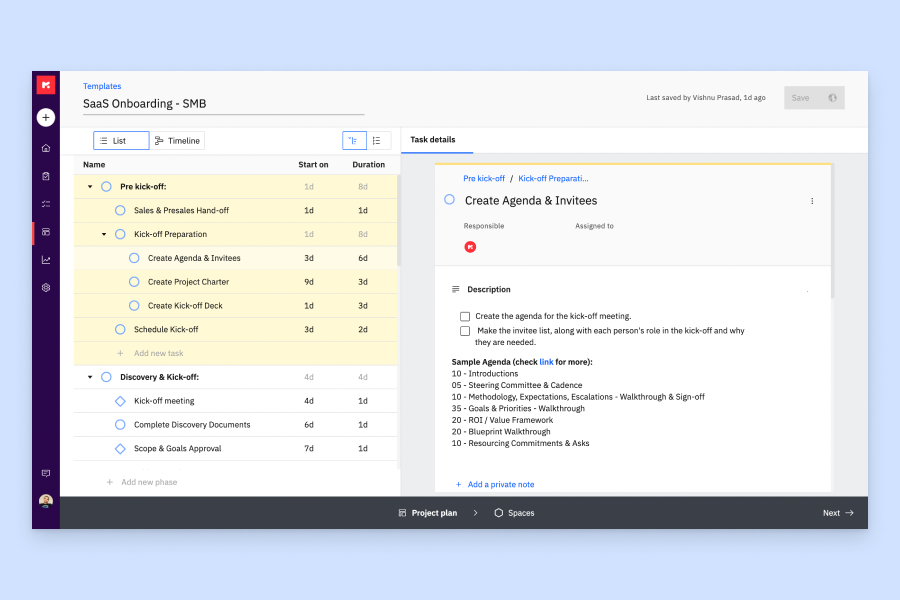
Rocketlane is a professional services automation platform that combines resource planning, capacity management, time tracking, project management, and client collaboration tools for implementation and onboarding teams.
Who Is Rocketlane Best For?
Rocketlane is a strong fit for SaaS companies with dedicated customer onboarding, implementation, or professional services teams managing client-facing projects.
Why I Picked Rocketlane
I picked Rocketlane as one of the best for onboarding project tracking because it's purpose-built for the onboarding motion in a way that generic project tools aren't. I like that its milestone pacing feature lets my team see exactly how each project is tracking against key delivery targets, so we can course-correct before the go-live date slips. Pair that with Nitro Signals, which monitors customer conversations to surface early delivery risks, and you get a level of proactive project visibility that's genuinely hard to find in a resource tracking tool.
Rocketlane Key Features
- Resource AI: Recommends team compositions for new projects based on skills, availability, and current workload across your team.
- Utilization tracking: Monitors real-time utilization rates across your team so you can spot over-allocated or under-used resources before it affects delivery.
- Timesheets and time tracking: Lets team members log hours directly against project tasks, with built-in approval workflows for managers.
- Capacity management: Displays team availability across active and upcoming projects so you can plan staffing without double-booking.
Rocketlane Integrations
Rocketlane offers native integrations with Slack, Salesforce, Jira, HubSpot, Google Calendar, and Outlook Calendar, and it connects with Zapier and Workato for additional app connectivity. An API is also available for building custom integrations and workflows.
Pros and Cons
Pros:
- Auto-allocates resources based on availability and effort
- Soft allocations help forecast availability early
- Tracks team utilization at a granular level
Cons:
- No direct Excel import for project plans
- Reporting filters lack advanced flexibility options
New Product Updates from Rocketlane

Rocketlane Introduces Governance and Workforce Agents
Rocketlane introduces Governance Agents and Workforce Agents to automate delivery processes and recurring tasks. These updates help teams enforce rules and streamline project execution. For more information, visit Rocketlane’s official site.
 .
.
Forecast
Best for mid-sized agencies and consultancies

Forecast is an AI-powered project and resource management platform that gives teams visibility into how their people, time, and budgets are being used. It’s designed to help organizations track capacity and workloads in real time while also planning ahead with predictive analytics.
Why I Picked Forecast
I picked Forecast for its unique ability to cater to mid-sized agencies and consultancies by combining AI-driven resource management with insightful project analytics. Forecast's automated resource forecasting and capacity planning features address your specific needs and help you balance workloads and optimize team utilization.
Integration capabilities with popular tools like Jira and HubSpot let you maintain existing workflows and improve project visibility. This software's focus on providing real-time insights into costs, revenue, and profitability helps mid-sized companies make informed, data-driven decisions and improve project outcomes.
Forecast Key Features
Forecast also offers several other features that can help you with resource tracking and project management.
- Task Dependencies: This lets you define and manage task sequences and make sure each project phase progresses smoothly and on schedule.
- Expense Management: You can maintain financial oversight by tracking project-related expenses, which helps with budgeting and financial planning.
- Gantt Charts: These provide a visual representation of project timelines, help predict capacity, and let you adjust resources accordingly.
- Invoicing: This simplifies billing processes by automating invoice generation and allowing for accurate and timely client billing.
Forecast Integrations
Integrations include Azure DevOps, BambooHR, GitHub, Google Calendar, HubSpot, Jira, QuickBooks, Salesforce, Slack, Trello, Xero, and Sage Intacct.
Pros and Cons
Pros:
- Ability to model resource availability over time
- Predictive risk alerts help address problems early
- Automated resource allocation adjusts to team workload
Cons:
- Occasional lag with large number of resources and projects
- Customizing resource rules may require technical setup
Best for time and resource forecasting

Bonsai is a comprehensive business software that offers a range of tools for resource tracking, project management, time tracking, and invoicing. It helps agencies, consultancies, and professional services streamline their workflows and consolidate essential business functions in one place.
Why I Picked Bonsai
I picked Bonsai for its ability to help you forecast time and resources. With features like real-time capacity monitoring and integrated scoping, Bonsai lets you make informed staffing decisions and optimize project outcomes.
The platform's ability to transform project scopes into bookings quickly provides the clarity you need to manage resources effectively. These functionalities help you balance team capacity and project demands, which makes Bonsai a valuable asset for service-oriented businesses.
Bonsai Key Features
Bonsai offers a range of other features tailored for resource tracking and management.
- Client Management Tools: You can manage your client interactions with CRM functionalities, proposals, and agreements that keep your client data organized and accessible.
- Task Management: This lets you break down projects into manageable tasks with clear deadlines and responsibilities, so your team stays on track.
- Budget Monitoring: You can keep a close eye on your project's financial health with tools that track expenses, invoicing, and overall budget allocation.
- Real-Time Insights: You get up-to-date data on team availability and project profitability, which helps you to make informed decisions quickly.
Bonsai Integrations
Integrations include Xero, Calendly, Zapier, QuickBooks, and HiBob.
Pros and Cons
Pros:
- Overbooking alerts prevent your team from being stretched thin
- Billing and resource hours linked for project cost insight
- Visual workload timeline helps you see availability
Cons:
- Limited customization of workspace layout
- Not suited for larger agencies (50+ team members)
Andre alternativer
Her er noen flere alternativer som ikke kom med på topplisten, men som er verdt å vurdere hvis du ønsker å utvide undersøkelsen din.
- Birdview
For resourcing based on skills
- Parallax
For resource analytics
- Silverbucket
For tracking employee time
- eResource Scheduler
For financials and real-time tracking
- Resource Guru
For project forecasting reports
- Smartsheet
For project portfolio management
- Celoxis
For project cost and performance analysis
- ClickTime
For customizable timesheets
- Accelo
For professional service businesses
- Float.com
For advanced scheduling
- GoodDay
For customizable workflows
- Saviom
For scalable enterprise resourcing
- Runn
For real-time resource planning
- Hub Planner by Milient
For large companies
- TaskRay
For Salesforce-native project management
- Dayshape
For resource timeline views
- Retain
For consolidated work views
- Paymo
For small teams managing task hours
- Zoho Projects
For tracking resources across departments
- Microsoft Project
For complex project resource planning


How I Evaluate Resource Tracking Software
I evaluate every tool across two layers: whether it can actually handle scheduling a 50-person team's allocations, then what sets it apart for resource managers who live in these platforms daily.
Core Functionality (Table Stakes For This List)
When I'm selecting tools for my list, I rank each one on a scale from 0 (does not offer the functionality) to 5 (excels in this area) for each core functionality listed below. Then, I calculate the tool's total score into a percentage. Each tool needs to achieve a minimum total score of 65% to be considered for inclusion.
- Resource Allocation & Scheduling: I look for visual scheduling interfaces where you can drag and drop assignments across a timeline, like reassigning a designer mid-sprint when priorities shift.
- Capacity & Utilization Tracking: Each tool should surface real-time workload data per person. I check whether I can spot an over-allocated developer at a glance without clicking into individual profiles.
- Time Tracking & Logging: I evaluate how the platform connects logged hours back to planned estimates, since that gap between scheduled and actual time is where most project budgets quietly break down.
- Resource Forecasting & Planning: Forward-looking capacity views matter here. I look for the ability to layer tentative project bookings over confirmed work so you can plan hiring or contractors months ahead.
- Skills & Availability Management: Resource profiles need to go beyond names and roles. I check whether the tool lets you filter by skill set, see PTO and part-time schedules, and store cost or bill rates per person.
- Reporting & Analytics: Dashboards should cover utilization rates, billable vs. non-billable breakdowns, and project burn. I evaluate whether reports are customizable enough to serve both a resource manager's daily needs and a PMO director's monthly reviews.
Once I have a list of tools that meet the criteria, I consider what sets each platform apart.
Differentiating Factors (What Sets Vendors Apart)
Here's how I compare and contrast different vendors:
Standout Features
Scenario planning is a big differentiator. I look for tools that let you model a potential project intake against your current team without touching live schedules. Financial tracking tied to allocations also matters—seeing projected margins shift as you reassign resources helps PMOs make staffing calls with real data. I also check whether PMs can submit resource requests directly in the platform, since that workflow replaces the email chains and spreadsheets that typically slow down staffing decisions.
Beyond Features
Integration depth is one of the first things I evaluate. A resource tracker that doesn't sync with your project management tool—whether that's Jira, Asana, or Smartsheet—creates double entry that kills adoption. Pricing structure also deserves close attention. Some platforms charge per resource managed while others charge per user seat, and the difference matters when you have 20 stakeholders who only need read-only access to capacity dashboards. I also consider scalability, since a tool that works for a 15-person agency may buckle when you're managing allocations across 200+ people.
Slik velger du programvare for ressursoppfølging
Det er lett å gå seg vill i lange funksjonslister og komplekse prismodeller. For å hjelpe deg med å holde fokus mens du går gjennom den unike prosessen din for valg av programvare, får du her en sjekkliste over faktorer du bør ha i tankene:
| Faktor | Hva du bør vurdere |
|---|---|
| Skalerbarhet | Se etter programvare som kan vokse med teamet ditt. Den bør kunne håndtere flere ressurser og prosjekter uten ytelsesproblemer, slik at den forblir levedyktig på lang sikt. |
| Integrasjoner | Forsikre deg om at programvaren kan integreres med verktøyene du allerede bruker, for eksempel systemer for prosjektstyring, CRM og økonomi, slik at arbeidsflyter og datadeling effektiviseres. |
| Tilpasningsmuligheter | Undersøk om programvaren tilbyr tilpassbare funksjoner som passer teamets spesifikke prosesser, for eksempel dashbord, rapporter og arbeidsflyter. |
| Brukervennlighet | Velg et verktøy med et intuitivt grensesnitt og kort opplæringskurve, slik at teamet raskt kan ta det i bruk uten omfattende opplæring. |
| Budsjett | Gå gjennom prisplanene for å sikre at de passer innenfor budsjettet ditt. Ta høyde for eventuelle tilleggskostnader for funksjoner eller brukere etter hvert som teamet vokser. |
| Sikkerhetstiltak | Kontroller at programvaren har sterke sikkerhetstiltak, som datakryptering og tilgangskontroller for brukere, for å beskytte sensitiv informasjon mot datainnbrudd og uautorisert tilgang. |
Trender innen programvare for ressurssporing
I researcharbeidet mitt har jeg hentet inn utallige produktoppdateringer, pressemeldinger og utgivelseslogger fra ulike leverandører av programvare for ressurssporing. Her er noen av trendene som vokser frem, og som jeg følger med på:
- KI-drevet innsikt: KI brukes stadig oftere til å levere prediktive analyser og innsikt, slik at team kan forutse ressursbehov og optimalisere tildelinger. Leverandører integrerer KI for ressursstyring for å forbedre beslutningstakingen ved å forutsi flaskehalser i prosjekter og foreslå løsninger.
- Samarbeid i sanntid: Verktøy fokuserer på å forbedre samarbeid i sanntid mellom teammedlemmer. Funksjoner som delte oversikter og direkteoppdateringer blir stadig mer standardiserte, slik at team kan synkronisere umiddelbart og ta raske beslutninger.
- Optimalisering av fjernarbeid: Ettersom fjernarbeid blir stadig vanligere, tilpasser programvaren seg ved å tilby funksjoner som støtter distribuerte team. Dette omfatter virtuell ressursstyring og verktøy for fjernovervåking, slik at team holder kontakten uavhengig av hvor de befinner seg.
- Sporing av bærekraft: Det blir stadig større fokus på å spore miljøpåvirkningen av ressursbruken. Enkelte leverandører integrerer funksjoner som gjør det mulig for virksomheter å overvåke og optimalisere ressurspraksisen sin for å nå bærekraftsmål.
- Forbedringer av brukeropplevelsen: Det legges stadig større vekt på å forbedre den overordnede brukeropplevelsen med ryddigere grensesnitt og mer intuitiv navigasjon. Leverandører investerer i brukeropplevelsesforskning for å gjøre verktøyene enklere å bruke og mer tilgjengelige for et bredere spekter av brukere.
Hva er programvare for ressurssporing?
Programvare for ressurssporing er et verktøy som hjelper deg med å overvåke utstyr, fysiske områder, teamtilgjengelighet, prosjektoppgaver og samlet kapasitet i sanntid. Den brukes av prosjekt- og ressursledere til å balansere arbeidsmengder, identifisere mangler og forbedre lønnsomheten ved å ta informerte beslutninger om bemanning.
Programvare for ressurssporing er avgjørende for å unngå overbooking, forutse behov og holde prosjekter på rett spor.
Funksjoner
Her er de viktigste funksjonene all god programvare for ressurssporing bør ha:
- Overvåking i sanntid: Du kan få direkteoppdateringer om ressurstildeling, bruk og tilgjengelighet for å oppdage problemer eller muligheter umiddelbart.
- Tilpassbare oversikter: Dette lar deg opprette personlige visuelle visninger for å spore ressursene som betyr mest, og få rask innsikt på et øyeblikk uten å måtte lete gjennom data.
- Automatiserte varsler: Du mottar umiddelbare varsler når ressurser brukes for mye, ikke utnyttes tilstrekkelig eller nærmer seg kritiske terskler, slik at du kan handle raskt og holde prosjekter på rett spor.
- Detaljert rapportering: Du kan generere omfattende rapporter som viser hvordan ressurser brukes over tid, og oppdage trender, begrunne budsjetter og planlegge for fremtiden.
- Rollebasert tilgangskontroll: Dette lar deg angi tillatelser slik at bare de riktige personene kan se eller endre bestemte ressurser. Det beskytter sensitiv informasjon og reduserer risikoen for utilsiktede endringer.
- Integrasjonsmuligheter: Du kan koble til andre verktøy, for eksempel plattformer for prosjektstyring eller regnskap, slik at data flyter sømløst uten manuell registrering.
- Tilgang fra mobile enheter: Dette lar deg få tilgang til og administrere ressursinformasjon fra telefonen eller nettbrettet, slik at det er enkelt å holde oversikt uansett hvor du befinner deg.
- Ressursprognoser: Du kan forutse fremtidige behov ved hjelp av prediktive verktøy og planlegge bemanning, lagerbeholdning eller finansiering før det blir hektisk.
- Revisjonsspor: Dette lar deg se detaljerte logger over endringer som er gjort i ressursdata, noe som gjør det enklere å spore ansvar og opprettholde etterprøvbarhet.
KI-funksjoner du bør se etter i programvare for ressurssporing
Programvare for ressurssporing omfatter ofte også KI-drevne funksjoner som hjelper deg med å jobbe smartere:
- Prediktiv analyse: Du kan bruke KI til å forutsi ressursbehov basert på historiske data, sesongtrender og prosjektplaner, samt planlegge proaktivt.
- Automatisert planlegging: Du kan la KI optimalisere ressursfordeling og planlegging, noe som reduserer konflikter og sørger for at ressursene er tilgjengelige når de trengs.
- Avviksdeteksjon: Dette hjelper deg med å identifisere uvanlige mønstre eller potensielle problemer, som overforbruk, flaskehalser eller underutnyttelse, før de påvirker prosjektene dine.
- Smarte anbefalinger: Du kan få KI-drevne forslag til omfordeling av ressurser, justering av tidsplaner eller forbedring av effektiviteten, tilpasset arbeidsflyten din.
- Naturlige språkspørringer: Dette lar deg samhandle med programvaren ved hjelp av et enkelt, samtalebasert språk for å generere rapporter eller finne informasjon raskt.
- Automatisert dataregistrering: Du kan redusere manuelt arbeid ved å la KI hente ut og registrere ressursdata fra e-poster, dokumenter eller andre integrerte plattformer.
- Kapasitetsplanlegging: Du kan bruke KI til å simulere ulike scenarier og anbefale de beste måtene å møte fremtidige behov på uten å overbelaste teamet eller budsjettet.
Vanlige spørsmål
Finn svar på vanlige spørsmål andre stiller om dette emnet.