

De 10 beste programvarene for ressursstyring for byråer i 2026

10 Kortliste over den beste programvaren for ressursstyring i byråer


Det er vanskelig å administrere ressursene i byrået uten programvare – du vil få problemer med å administrere ansatte og budsjetter effektivt, noe som fører til flere mislykkede prosjekter og lavere lønnsomhet. Det finnes utallige verktøy for ressursstyring i byråer, og det kan være krevende å velge riktig alternativ.
Jeg skal gjøre valget enklere ved å dele mine anbefalinger av den beste programvaren for ressursstyring i byråer, samt mine personlige erfaringer med å bruke dusinvis av ulike ressursstyringsverktøy hos forskjellige byråer.
Hva er programvare for ressursstyring i byråer?
Programvare for ressursstyring i byråer er et verktøy som hjelper byråer med å administrere interne ressurser effektivt. Dette omfatter organisering av bemanning, sporing av tid og budsjetter, oppfølging av prosjektfremdrift og tilrettelegging for bedre samarbeid i teamet.
I hovedsak er det en omfattende løsning som hjelper byråer med å optimalisere driften, fra ressursfordeling til prosjektleveranse, slik at alle aspekter ved byråets arbeid administreres og koordineres effektivt.
Why Trust Our Software Recommendations
Our team has been testing and reviewing software since 2012. As project managers ourselves, we know how difficult—and important—it is to choose the right software.
For this guide, we evaluated tools using hands-on testing and independent research, scoring tools using our selection criteria. We also draw on insights from industry thought leaders and practicing project management experts.
Our reviews reflect our human editorial judgment, not a sales pitch.
Expert reviewers:
Sammenligningstabell for ressursstyringsprogramvare for byråer
Denne sammenligningstabellen oppsummerer prisdetaljer for mine beste valg av ressursstyringsprogramvare for byråer:
| Tool | Best For | Trial Info | Price | ||
|---|---|---|---|---|---|
| 1 | Best for resourcing with financial visibility | 30-day free trial available | From $7/scheduled user/month | Website | |
| 2 | Best for resource planning and forecasting | 14-day free trial + free demo available | From $10/user/month (billed annually) | Website | |
| 3 | Best for real-time operations management | 14-day free trial + free demo available | From $17/user/month | Website | |
| 4 | Best for integrated sales and resource planning | Free demo available | Pricing upon request | Website | |
| 5 | Best for agency resource and capacity planning | Free demo available | Pricing upon request | Website | |
| 6 | Best for robust project management features | 14-day free trial | From $10/user/month (billed annually) | Website | |
| 7 | Best for simple capacity planning needs | Free plan available; 14-day free trial | From $9/user/month (billed annually) | Website | |
| 8 | Best for people-centric resourcing | Free demo available | Pricing upon request | Website | |
| 9 | Best for client-facing project collaboration | 14-day free trial + free demo available | From $19/user/month (billed annually) | Website | |
| 10 | Best for mid-sized agencies and consultancies | Free demo available | Pricing upon request | Website |


Oversikt over de 10 beste ressursstyringsprogrammene for byråer
Her er en kort beskrivelse av hvert ressursstyringsprogram for byråer, hva det egner seg best til, og bemerkelsesverdige funksjoner. Jeg har også inkludert skjermbilder for å gi deg et innblikk i brukergrensesnittet.

Best for resourcing with financial visibility

Float is a resource management platform for agencies that brings together project scheduling, team capacity planning, time tracking, and financial forecasting in one workspace.
Who Is Float Best For?
Float is a good fit for creative and digital agencies that need to manage team schedules and project budgets in one place.
Why I Picked Float
Float earns its spot on my shortlist because it ties resourcing decisions directly to financial outcomes in a way most scheduling tools don't. I use Float's budget tracking to compare planned costs against actuals in real time—so if a project is drifting over budget mid-delivery, I can see it before it becomes a problem. I also like the project cost estimation feature, which lets me model staffing scenarios using real bill rates and cost rates before a project kicks off, so margin is built into the plan from day one, not calculated after the fact.
Float Key Features
- Visual resource scheduling: Allocate work by hours or percentages on a drag-and-drop schedule, with live over-capacity warnings and utilization indicators.
- Time off management: Set custom leave policies, approval workflows, and auto-assigned regional holidays so availability is always accurate in the schedule.
- Pre-filled timesheets: Float auto-populates timesheets from scheduled allocations, with automated reminders and timesheet locking to protect data integrity.
- Utilization reporting: Track billable vs. non-billable hours across roles, teams, and projects to monitor how your team's time is actually being spent.
Float Integrations
Float offers native integrations with Slack, Google Calendar, Outlook, Microsoft Teams, Asana, Jira, Trello, and QuickBooks, and connects with Zapier. An API is available for custom integrations.
New Product Updates from Float.com

Float Adds Rate Cards and Multi-Currency Billing
Float introduced centralized rate cards to standardize bill rates across projects and added multi-currency support to bill clients consistently across regions. For more information, visit Float's official site.

Best for resource planning and forecasting

Productive is an agency resource management platform that brings together resource planning, forecasting, project tracking, budgeting, and time tracking in one system.
Who Is Productive Best For?
Productive is built for agencies and professional services teams that need to manage people, projects, and budgets in one place.
Why I Picked Productive
Productive earns its spot on my shortlist because of how tightly its resource planning and forecasting features connect to real financial outcomes. I like that the resource planner shows team availability, time off, and capacity in one view—so when I'm deciding whether to take on a new project, I can see exactly who has room and who's already stretched. The Scenario Builder lets me model different scheduling and pricing outcomes before committing to a plan. I can also track billable utilization by person, team, or month, and Productive flags budget overruns before they occur.
Productive Key Features
- Project templates: Duplicate tasks, subtasks, descriptions, and assignees from a saved template to spin up new projects.
- Budget phase management: Split large, long-term project budgets into separate phases to manage complex, multi-stage client work.
- Time approval workflows: Review submitted time entries, mark hours as billable or non-billable, and request changes before approving.
- Automated budget alerts: Set custom warnings to trigger when a project hits a defined percentage of its budget spend.
Productive Integrations
Productive offers native integrations with Slack, Xero, QuickBooks, Google Calendar, and HubSpot, and connects with Zapier. An API is available for custom integrations.
New Product Updates from Productive
Productive Adds Voice Dictation, Slack Connector, Proposals, and Overtime
Productive adds voice dictation, a Slack Connector, proposal controls, and overtime tracking. These updates support faster AI interactions, client proposals, and time management. For more information, visit Productive’s official site.

Scoro
Best for real-time operations management

Scoro is an agency resource management platform that brings together project planning, resource scheduling, time tracking, budgeting, and collaboration tools in one system.
Who Is Scoro Best For?
Scoro is a good fit for mid-sized agencies and professional services firms that need a single platform to manage projects, people, and finances together.
Why I Picked Scoro
I've included Scoro in my top picks because of how well it connects real-time data across every layer of agency operations. What I like most is the live dashboard and reporting setup—you can track budget burn, team utilization, and project profitability without pulling data from separate tools. The utilization heatmap is particularly useful: it shows you at a glance who's overbooked and who has capacity, so you can rebalance workloads before a deadline slips. I also find the "Quoted vs Actual" view genuinely useful for ops leaders who need to catch margin issues mid-project, not after the invoice goes out.
Scoro Key Features
- Gantt chart scheduling: Visualize project timelines and task dependencies with drag-and-drop Gantt charts that update as work progresses.
- Retainer management: Track recurring client work, budgets, and hours within dedicated retainer views to keep ongoing engagements on schedule.
- Invoicing automation: Auto-generate invoices directly from approved quotes, with built-in payment processing via Stripe integration.
- Customizable dashboards: Build role-specific dashboards that surface the project health metrics, tasks, and financial data most relevant to each team member.
Scoro Integrations
Scoro offers native integrations with Google Workspace, Microsoft 365, Xero, QuickBooks, Sage, Exact, and Azure. An API is available for custom integrations.
New Product Updates from Scoro

Scoro Adds Time Mobile App and ELI Improvements
Scoro adds the Scoro Time mobile app for iOS/Android to track time anywhere and expands ELI with attachments, smarter filtering, and trigger-based actions. For more information, visit Scoro's official site.

Accelo
Best for integrated sales and resource planning
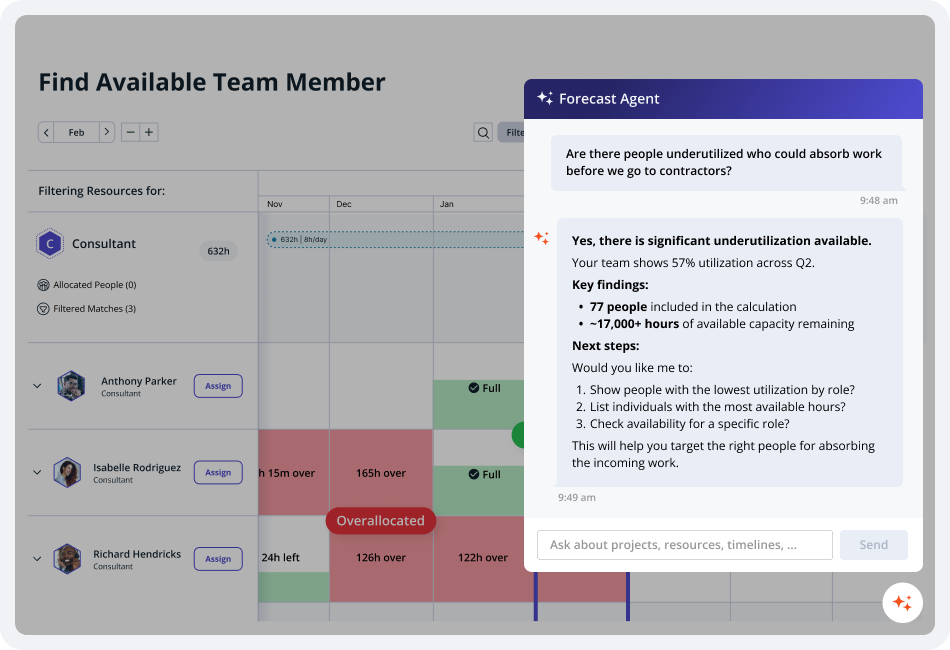
Built for agencies and professional services firms, Accelo is a PSA platform that covers the full client lifecycle—from pipeline and quoting through project delivery, resource scheduling, and billing.
Who Is Accelo Best For?
Accelo is a strong fit for mid-size digital agencies, IT consultancies, and professional services firms that need one platform to manage client work from sale through invoice.
Why I Picked Accelo
I picked Accelo for integrated sales and resource planning because it's one of the few platforms that connects your sales pipeline directly to capacity forecasting. It uses AI to model both tentative and confirmed work, forecast future demand, and help you align hiring, resources, and delivery before projects are won. This gives agency leaders a clear view of future capacity so they can decide whether to take on new work without relying on guesswork.
Accelo Key Features
- AI-assisted resource scheduling: Recommends the best-fit team members for tasks based on skills, availability, and workload.
- Sales-to-project automation: Converts won opportunities into projects, carrying over client, budget, and work details to reduce manual setup.
- Retainer management: Tracks recurring client engagements, logs change orders, and monitors retainer performance against agreed scope.
- Profitability dashboards: Displays real-time project, client, and team profitability to help monitor margins and financial performance.
Accelo Integrations
Accelo integrates with Google Workspace, Microsoft 365, Xero, QuickBooks Online, HubSpot, Salesforce, Mailchimp, Slack, and Zapier. An API is available for custom integrations.
Pros and Cons
Pros:
- Automated time capture logs billable hours
- Forecasts future resource demand
- Sales-to-delivery handoff is built in
Cons:
- Reporting customization is limited
- UI feels dated and loads slowly
New Product Updates from Accelo

Accelo Rebuilds Mobile App for Project and Time Management
Accelo rebuilds its mobile app with task management, new work creation, and mobile timesheets for Forecast customers. This helps teams keep project and time data current while working away from a desktop. For more information, visit Accelo’s official site.

Best for agency resource and capacity planning

Screendragon is an agency resource management platform for project-based teams that need workflow automation, resource scheduling, and capacity planning in one system.
Who Is Screendragon Best For?
Screendragon is a strong fit for mid-to-large agencies and in-house creative teams that need to manage complex, multi-project workloads across large teams.
Why I Picked Screendragon
I picked Screendragon as one of the best because of how well it handles capacity planning at scale. What I find genuinely useful is the ability to toggle between task-based, hour-based, and percentage-based resource views—so when I'm juggling multiple client projects, I can instantly see where my team is overloaded without digging through spreadsheets. I also like the one-click auto-assignment feature, which matches team members to projects based on skills and availability rather than gut instinct. It also includes built-in demand forecasting, which lets me model future workload and spot resourcing gaps before they become a problem.
Screendragon Key Features
- Flexible filters and role-based views: Drill down by department, skill set, region, or custom role to find the right people for any project.
- Integrated timesheets and project data: Link resourcing directly to live project plans and timesheet data for a unified view of team performance.
- Digital approval workflow management: Capture decisions, comments, and markups centrally, with version comparison and an automated audit trail.
- No-code visual workflow builder: Design custom workflows from scratch or use templates, with full control over process logic and automation rules.
Screendragon Integrations
Screendragon offers native integrations with Microsoft 365, Google Workspace, Slack, Jira, Salesforce, SAP, Oracle, and Adobe Creative Cloud. An API is available for custom integrations.
New Product Updates from Screendragon
Screendragon Unveils New AI Hub
Screendragon introduced AI Hub, a new capability that lets teams build and manage AI agents directly within workflows. The update helps marketing teams automate tasks, maintain governance controls, and scale AI-driven operations more efficiently. For more information, visit Screendragon's official site.

Wrike
Best for robust project management features

Wrike is a project and resource management platform for agencies that brings together task tracking, workload planning, time tracking, and team collaboration in one workspace.
Who Is Wrike Best For?
Wrike is a good fit for mid-size to large agencies that need a structured, scalable platform to manage complex projects across multiple teams.
Why I Picked Wrike
I included Wrike on my shortlist because it packs a lot of project management depth into a single platform. I particularly like the Gantt chart scheduling, which lets my team map out task dependencies across multiple concurrent client projects and immediately see how a timeline shift on one project ripples into another. I rely on the resource bookings feature—I can reserve a team member by role, estimate hours, and check their availability before committing them to a new project. Wrike's effort management lets me assign effort estimates at the task level, which makes workload forecasting across a full project portfolio much more accurate.
Wrike Key Features
- Custom project views: Switch between Board, Table, Gantt, Calendar, and Chart views to visualize project progress in the format that works best for your team.
- Scrum boards: Manage Agile workflows with backlog prioritization, sprint planning, and real-time collaboration on shared Scrum boards.
- External request forms: Collect and route incoming work requests from clients or non-Wrike users directly into your project workspace.
- User activity reports: Pull on-demand audit reports to track what each team member has created or changed across your account.
Wrike Integrations
Wrike offers hundreds of integrations through its built-in connectors and marketplace, including tools like Google Workspace, Microsoft 365, Salesforce, and Slack. It also supports Zapier and provides an API for custom integrations.
New Product Updates from Wrike
Wrike Adds Klaxoon MCP Integration
Wrike’s Klaxoon MCP integration is now generally available, enabling AI agents to navigate between Wrike tasks and attached whiteboards, read task context, and manage whiteboard attachments via API. For more information, visit Wrike's official site.

Best for simple capacity planning needs
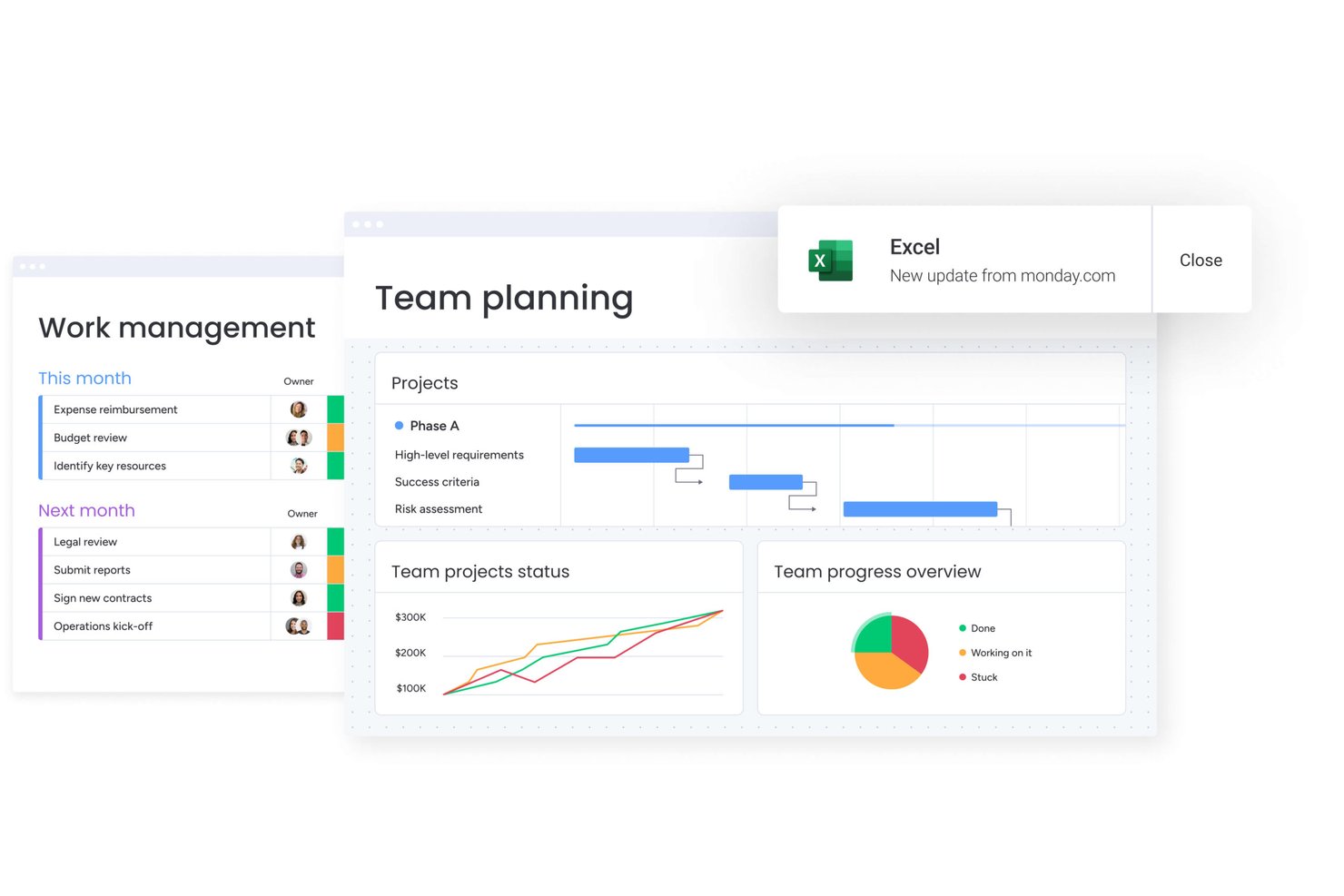
monday AI Workspace is a work management platform that combines project planning, resource scheduling, capacity tracking, and AI-powered workflow automation across teams and client projects.
Who Is monday AI Workspace Best For?
monday AI Workspace suits mid-sized agencies and operations teams that want an adaptable work OS without the complexity of a purpose-built resource management platform.
Why I Picked monday AI Workspace
I picked monday AI Workspace because its Capacity Manager aggregates workload data across multiple Resource Planners, giving my team a single view of who's overbooked and who has room. When I assign a new client project, I can filter the Resource Directory by role, skill set, or location to find the right person fast. Placeholder roles also let me flag staffing gaps before a project is even confirmed, which keeps pipeline planning from becoming reactive.
monday AI Workspace Key Features
- AI-powered workflow automation: Automates routine project updates, status changes, and assignments based on custom triggers and conditions.
- Customizable dashboard views: Offers visual widgets for timelines, Gantt charts, workloads, and project health, all configurable to agency preferences.
- Integrated time tracking column: Lets users log hours directly on tasks for better visibility across client project boards.
- Resource Directory: Stores searchable staff profiles including skills, roles, location, and availability in a central place.
monday AI Workspace Integrations
monday AI Workspace offers hundreds of native integrations through its built-in integrations and marketplace, including Slack, Google Workspace, Microsoft 365, Jira, Dropbox, Zoom, HubSpot, Salesforce, GitHub, and Outlook. It also supports Zapier and provides an API for custom integrations.
Pros and Cons
Pros:
- AI automates routine task assignment and updates
- Placeholder roles support pre-project staffing planning
- Visual capacity planning across multiple client projects
Cons:
- Reporting lacks agency-specific utilization KPIs natively
- Not purpose-built for billable rate tracking
New Product Updates from monday AI Workspace
monday AI Workspace Adds Human Approval Routing
monday AI Workspace adds a human-in-the-loop approval block to AI Workflows, sending approval requests and routing workflow paths based on responses. For more information, visit monday AI Workspace's official site.

Kantata
Best for people-centric resourcing

Kantata is an agency resource management platform designed for project-based businesses that need resource planning, project management, time tracking, and analytics in one system.
Who Is Kantata Best For?
Kantata is a good fit for professional services firms and agencies that need to manage complex, people-driven projects across multiple clients and workstreams.
Why I Picked Kantata
I picked Kantata as one of the best because of how deliberately it's built around people as the core unit of delivery. Where most resource management tools treat headcount as a scheduling variable, Kantata's resource management and forecasting module lets my team see availability by skill set, identify gaps before they become blockers, and shift people across projects in real time. That level of granularity matters when you're juggling multiple client engagements with overlapping timelines. I also like that Kantata's AI Expertise Engine learns from past project data to surface smarter staffing recommendations over time, so resourcing decisions get sharper the longer you use the platform.
Kantata Key Features
- Time and expense tracking: Log billable hours and expenses directly within projects, with built-in automation to keep records accurate and finance teams on schedule for period close.
- Financial management: Connect project delivery to invoicing, revenue recognition, and margin tracking in one place, with real-time visibility into costs and profitability.
- Kantata Pulse: Collect client and employee sentiment data alongside operational metrics to monitor project health and catch delivery risks before they escalate.
- Generative AI project assistant: Automatically draft status reports, executive updates, and project case studies by pulling from live project data.
Kantata Integrations
Kantata offers native integrations with Salesforce, Slack, Jira, HubSpot, QuickBooks, Xero, Microsoft 365, Google Workspace, Expensify, and NetSuite. An API is available for custom integrations.
New Product Updates from Kantata

Kantata Adds Access Group Change History
Kantata adds Access Groups History, letting account administrators track changes to group details, membership, and permissions in Recent History. The update also makes these events available through the Subscribed Events API for broader monitoring. For more information, visit Kantata’s official site.
 .
.
Best for client-facing project collaboration
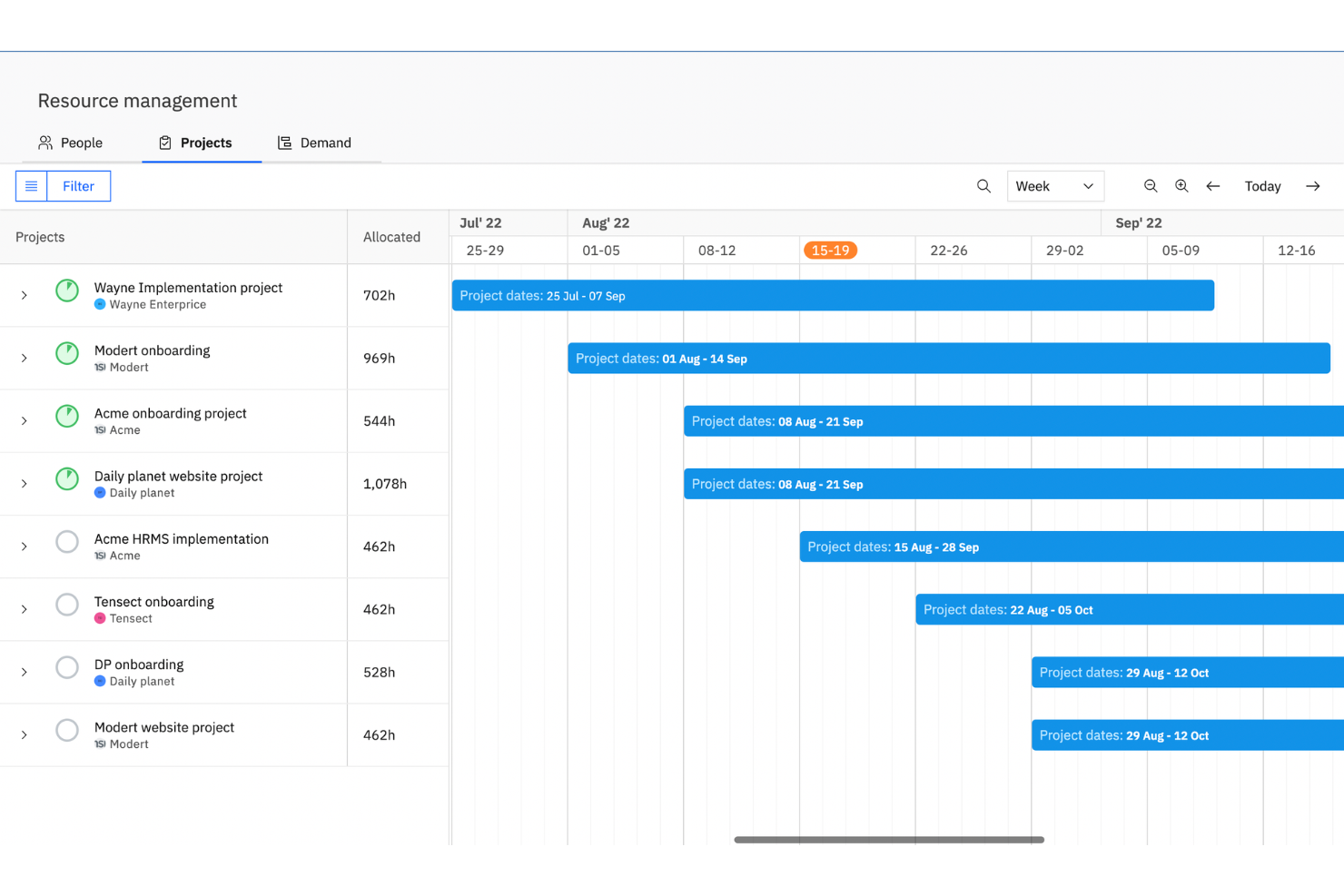
Rocketlane is a professional services automation platform that combines resource planning, capacity management, time tracking, client portals, and project delivery tools in a single workspace.
Who Is Rocketlane Best For?
Rocketlane is a strong fit for professional services and SaaS implementation teams that manage structured, client-facing project delivery at scale.
Why I Picked Rocketlane
I've included Rocketlane in my top picks because its branded client portal goes well beyond basic project sharing. Clients get a single hub where they can view project plans, access files, respond to tasks, and track progress without needing a Rocketlane login. I also like that the portal is fully white-labeled, so your team's branding stays front and center throughout the entire engagement, not just at kickoff. When you're managing multiple client projects simultaneously, that shared workspace cuts down on the back-and-forth email chains that slow delivery down.
Rocketlane Key Features
- Resource planning: Assign team members to projects based on availability, skills, and workload across your portfolio.
- Time tracking: Log hours directly within tasks and submit timesheets for manager approval without leaving the platform.
- Project templates: Build reusable project blueprints with pre-set tasks, timelines, and assignees to standardize delivery.
- Budget tracking: Monitor project spend against forecasts with margin tracking and rate card management built in.
Rocketlane Integrations
Rocketlane offers native integrations with Slack, Salesforce, HubSpot, Jira, Google Calendar, Outlook, and Zapier. An API is available for custom integrations.
Pros and Cons
Pros:
- Built-in timesheet tracking per project task
- Reusable project templates speed up onboarding
- Client portal gives customers direct project visibility
Cons:
- Switching between multiple projects feels slow
- Reporting filters lack advanced customization options
New Product Updates from Rocketlane

Rocketlane Introduces Governance and Workforce Agents
Rocketlane introduces Governance Agents and Workforce Agents to automate delivery processes and recurring tasks. These updates help teams enforce rules and streamline project execution. For more information, visit Rocketlane’s official site.
 .
.
Forecast
Best for mid-sized agencies and consultancies

You often juggle multiple projects, shifting deadlines and limited team bandwidth—and that’s where Forecast comes in for mid-sized agencies and consultancies. From scheduling who’s working on what to modelling upcoming demand, it gives you one place to align people, projects and margin forecasts. If you care about seeing into both resource capacity and profitability in the same tool, this could be a strong fit.
Why I Picked Forecast
I picked Forecast because it centers on AI-driven resource allocation and capacity planning, which is crucial when you’re running multiple client projects and need to match people to the right engagements. Its ability to model soft and hard allocations of your team helps you avoid overlaps or idle time, while its rate-cards and project baselines give you direct insight into cost versus revenue so you can keep profitability visible. For agencies or consultancies that must plan ahead yet adapt quickly, this combination of resource foresight plus financial awareness really speaks to your needs.
Forecast Key Features
Aside from that core focus on resource allocation and margin control, you’ll find several additional useful features for a resource-management context:
- Capacity planning & workload view: A visual dashboard showing your team’s availability, bookings and upcoming demand so you can see overloads or gaps.
- Time tracking & timesheets: Built-in time registration (manual or timer), including approvals, internal non-billable time and auto-transfer across retainer periods, so you capture utilization accurately.
- Gantt charts & project baselines: Timeline visuals and baseline planning let you map tasks, dependencies and project phases—handy for managing many simultaneous client projects.
- Financial tracking & budget vs actuals: Track project budgets, costs, revenue recognition, and client profitability—essential when resource usage drives margin.
Forecast Integrations
Integrations include Sage Intacct, HubSpot, Jira, Xero, QuickBooks, Microsoft Dynamics 365, Salesforce, Azure DevOps, GitHub, and Google Calendar.
Pros and Cons
Pros:
- Built-in time tracking tied to project-financials enhances billing accuracy.
- One platform that brings together resources, tasks and finances.
- Strong predictive scheduling helps avoid resource over-commitments.
Cons:
- For very small agencies the feature depth may feel overwhelming.
- Customization of workflows may require significant setup time.
Andre alternativer
Her er noen flere gode alternativer som ikke kom med på listen min over den beste ressursstyringsprogramvaren for byråer:
- ActiveCollab
For small teams
- awork
For AI-powered task scheduling
- Bonsai Agency Software
For utilization and profitability
- ProjectManager
For IT agencies
- Ganttic
For remote teams
- Parallax
For predictive resource intelligence
- Function Point
For design studios
- Mosaic
For visualizing team workload
- Ravetree
For custom project workflows
- eResource Scheduler
For cross-department resourcing


How I Evaluate Agency Resource Management Software
I split my evaluation into two layers: the baseline capabilities a tool needs to manage billable staff across client projects, and the differentiators that separate one platform from the next.
Core Functionality (Table Stakes For This List)
When I'm selecting tools for my list, I rank each one on a scale from 0 (does not offer the functionality) to 5 (excels in this area) for each core functionality listed below. Then, I calculate the tool's total score into a percentage. Each tool needs to achieve a minimum total score of 65% to be considered for inclusion.
- Resource Scheduling & Allocation: I evaluate whether you can drag-and-drop assignments across a visual timeline, split bookings between projects, and spot conflicts when two PMs book the same designer.
- Capacity & Utilization Tracking: Real-time visibility into who's at 40% utilization and who's booked at 120% matters here, especially across departments like creative, dev, and strategy.
- Skills & Availability Management: I check whether the tool lets you filter resources by skill tags, role, and PTO status so you can find an available senior copywriter without pinging five team leads.
- Time Tracking & Timesheets: The tool should connect logged hours back to project allocations, with billable and non-billable flags, so ops leads can compare planned vs. actual time per client.
- Forecasting & Pipeline Planning: I look for tentative booking support and pipeline views that help you plan staffing around pitched-but-not-won work, not just confirmed projects.
- Billing Rates & Budget Management: Each tool should let you set cost and bill rates per resource or role and track budget burn against those rates to surface project margin in real time.
Once I have a list of tools that meet the criteria, I consider what sets each platform apart.
Differentiating Factors (What Sets Vendors Apart)
Here's how I compare and contrast different vendors:
Standout Features
Scenario planning is a big differentiator—I want to model what happens to capacity if the team wins two pitched accounts next month before scrambling to hire. Freelancer and contractor management also matters, since most agencies blend full-time staff with external talent and need separate rate cards and availability windows for each. I also look for retainer tracking that handles recurring hour caps and rollover, which is how a lot of ongoing client work actually gets staffed.
Beyond Features
Integrations matter a lot here—I check whether a tool connects to the PM and finance apps your agency already runs, like Jira, Asana, QuickBooks, or Xero, since resource data loses value when it's siloed. Pricing structure is another factor I weigh, especially whether a vendor charges per managed resource or offers cheaper view-only seats for execs who just need dashboards. I also evaluate built-in reporting for agency KPIs like utilization rate, realization rate, and project margin, since rebuilding those in a spreadsheet defeats the purpose.
Vanlige spørsmål om ressursstyringsprogramvare for byråer
La oss se på noen av de vanligste spørsmålene om ressursstyringsprogramvare.
Hvorfor trenger byråer ressursstyringsprogramvare?
\u003cp data-start=\u0022159\u0022 data-end=\u0022854\u0022\u003eEn forståelse av hvordan ressurser som mennesker, penger og teknologi for tiden brukes og forventes å bli brukt i organisasjonen, gjør det mulig å forutse fremtidige muligheter nøyaktig. Når du får en ny kunde eller et nytt prosjekt, kan ressursstyringsprogramvare hjelpe deg med å forstå ressurskapasiteten din og arbeide innenfor prosjektbudsjettene og prosjektplanen. Dette sikrer at du leverer arbeidet på en måte som maksimerer lønnsomheten. Profesjonelle tjenestebedrifter er ofte avhengige av \u003ca href=\u0022https://thedigitalprojectmanager.com/tools/best-resource-management-software-for-professional-services/\u0022\u003espesialiserte ressursstyringsverktøy\u003c/a\u003e for å effektivisere fordelingen av arbeidskraft, overvåke prosjektøkonomien og opprettholde oversikt på tvers av flere oppdrag.\u003c/p\u003e
Hva er de viktigste funksjonene i ressursstyringsprogramvare for byråer?
De vanligste funksjonene i ressursfokuserte \u003ca href=\u0022https://thedigitalprojectmanager.com/tools/best-agency-management-system/\u0022\u003ebyråstyringssystemer\u003c/a\u003e omfatter:
\u003cul\u003e
\t\u003cli\u003eTidsregistrering og timelister\u003c/li\u003e
\t\u003cli\u003eOppretting av arbeidsflyter\u003c/li\u003e
\t\u003cli\u003eTilpassede dashbord\u003c/li\u003e
\t\u003cli\u003ePlanlegging med dra-og-slipp\u003c/li\u003e
\t\u003cli\u003eIntegrasjoner med andre verktøy for kommunikasjon, regnskap og prosjektstyring\u003c/li\u003e
\t\u003cli\u003eAutomatiserte godkjenninger\u003c/li\u003e
\t\u003cli\u003eTilpassede Kanban-tavler, Gantt-diagrammer og andre visuelle elementer\u003c/li\u003e
\t\u003cli\u003eMilepælsporing\u003c/li\u003e
\t\u003cli\u003eVarsler på viktige tidspunkter i prosjektets livssyklus\u003c/li\u003e
\u003c/ul\u003e
Hva er fordelene ved å bruke ressursstyring i byråer?
\u003cp class=\u0022p1\u0022\u003eI et byrå kan effektiv ressursplanlegging bidra til mange positive resultater:\u003c/p\u003e
\u003cul class=\u0022ul1\u0022\u003e
\t\u003cli class=\u0022li1\u0022\u003eReduserer risikoen for at teamet blir utbrent (og holder de ansatte fornøyde!)\u003c/li\u003e
\t\u003cli class=\u0022li1\u0022\u003eHolder oversikt over utgiftene for å sikre at du holder deg innenfor budsjettet\u003c/li\u003e
\t\u003cli class=\u0022li1\u0022\u003eBidrar til å håndtere ukontrollert utvidelse av prosjektomfanget og opprettholde lønnsomheten når endringer oppstår\u003c/li\u003e
\t\u003cli class=\u0022li1\u0022\u003eGjør teamet i stand til å ta på seg nye vekstmuligheter uten å ofre balansen mellom arbeid og fritid\u003c/li\u003e
\u003c/ul\u003e
Hvordan menneskeliggjør man prosjektbemanning for å styrke byråkulturen?
Ressursfordeling handler ikke bare om tallene. Da vi intervjuet Morgan Megannety til The Digital Project Manager-podkasten, fortalte hun oss:
\u003cem\u003e\u003cstrong\u003e«For meg er den mest interessante delen å forhindre at folk blir utbrente. Å koble ferdigheter til oppgaver. Å forstå hva folk … trenger å gjøre for å … holde seg engasjert i karrieren.»\u003c/strong\u003e\u003c/em\u003e
Hvordan velger jeg ressursstyringsprogramvare?
Du kan velge ressursstyringsprogramvare ved å stille deg selv visse spørsmål, for eksempel:
\u003cul\u003e
\t\u003cli\u003eTrenger jeg et dedikert program?\u003c/li\u003e
\t\u003cli\u003eØnsker jeg en skybasert løsning eller en lokal løsning?\u003c/li\u003e
\t\u003cli\u003eHar det integrasjonene jeg trenger for å få mest mulig ut av programvaren jeg bruker i dag?\u003c/li\u003e
\t\u003cli\u003eEr prisen verdt funksjonene jeg får?\u003c/li\u003e
\u003c/ul\u003e
Vi har alle svarene på disse spørsmålene i vår \u003ca href=\u0022https://thedigitalprojectmanager.com/project-management/how-to-choose-resource-management-software/\u0022\u003ekjøpsguide for ressursstyringsprogramvare\u003c/a\u003e.