De 10 beste gratis programvarene for prosjektstyring vurdert for 2026

10 Beste gratis programvare for prosjektstyring – kortliste


Gratis programvare for prosjektstyring gir team tilgang til viktige verktøy for planlegging, oppfølging og samarbeid – uten forhåndskostnaden. Enten du håndterer oppgaver for en liten bedrift, en oppstartsbedrift, en ideell organisasjon eller et internt team, kan disse verktøyene hjelpe deg med å holde orden, overholde tidsfrister og forbedre kommunikasjonen i teamet uten å sprenge budsjettet.
For å hjelpe deg med å finne det som passer best, testet og vurderte jeg en rekke gratis plattformer for prosjektstyring og evaluerte dem med hensyn til brukervennlighet, begrensninger i funksjonalitet, skalerbarhet og integrasjoner. Denne veiledningen dekker den beste gratis programvaren for prosjektstyring som er tilgjengelig i 2026, slik at du kan finne et verktøy som støtter arbeidsflyten din og skalerer med teamet ditt.
Why Trust Our Software Recommendations
Our team has been testing and reviewing software since 2012. As project managers ourselves, we know how difficult—and important—it is to choose the right software.
For this guide, we evaluated tools using hands-on testing and independent research, scoring tools using our selection criteria. We also draw on insights from industry thought leaders and practicing project management experts.
Our reviews reflect our human editorial judgment, not a sales pitch.
Expert reviewers:
Sammenligningstabell for gratis programvare for prosjektstyring
Denne sammenligningstabellen oppsummerer prisopplysningene for mine beste utvalg av gratis programvare for prosjektstyring:
| Tool | Best For | Trial Info | Price | ||
|---|---|---|---|---|---|
| 1 | Best for customizable workflows | Free plan available | From $9/user/month (billed annually) | Website | |
| 2 | Best free project management for customizable views | 14-day free trial | Pricing upon request | Website | |
| 3 | Best for custom workflows | 30-day free trial | From $35/user/month (billed annually) | Website | |
| 4 | Best for native time tracking tools | Free plan + 14-day free trial + free demo available | From $5/user/month (billed annually) | Website | |
| 5 | Best for scalability & flexibility | Free plan + 15-day free trial + free demo available | From $4/user/month (billed annually) | Website | |
| 6 | Best for growing teams | Free plan available | From $9/user/month (billed annually) | Website | |
| 7 | Best for unlimited free projects | Free plan available | From $1.49/user/month (billed annually) | Website | |
| 8 | Best for freelancers who track time and bill clients | 14-day free trial + free plan + free demo available | From $39.97/month (billed annually) | Website | |
| 9 | Best for agile project management | Free plan available | From $8.48/user/month | Website | |
| 10 | Best for combining essential tools | 30-day free trial + free demo available | From $25/month (billed annually) | Website |


Anmeldelser av den beste gratis programvaren for prosjektstyring
Finn våre sammenligninger av programvare for prosjektstyring nedenfor, sammen med skjermbilder som viser hvordan hvert verktøy ser ut. Bla lenger ned for å finne flere alternativer og svar på vanlige spørsmål.

Best for customizable workflows
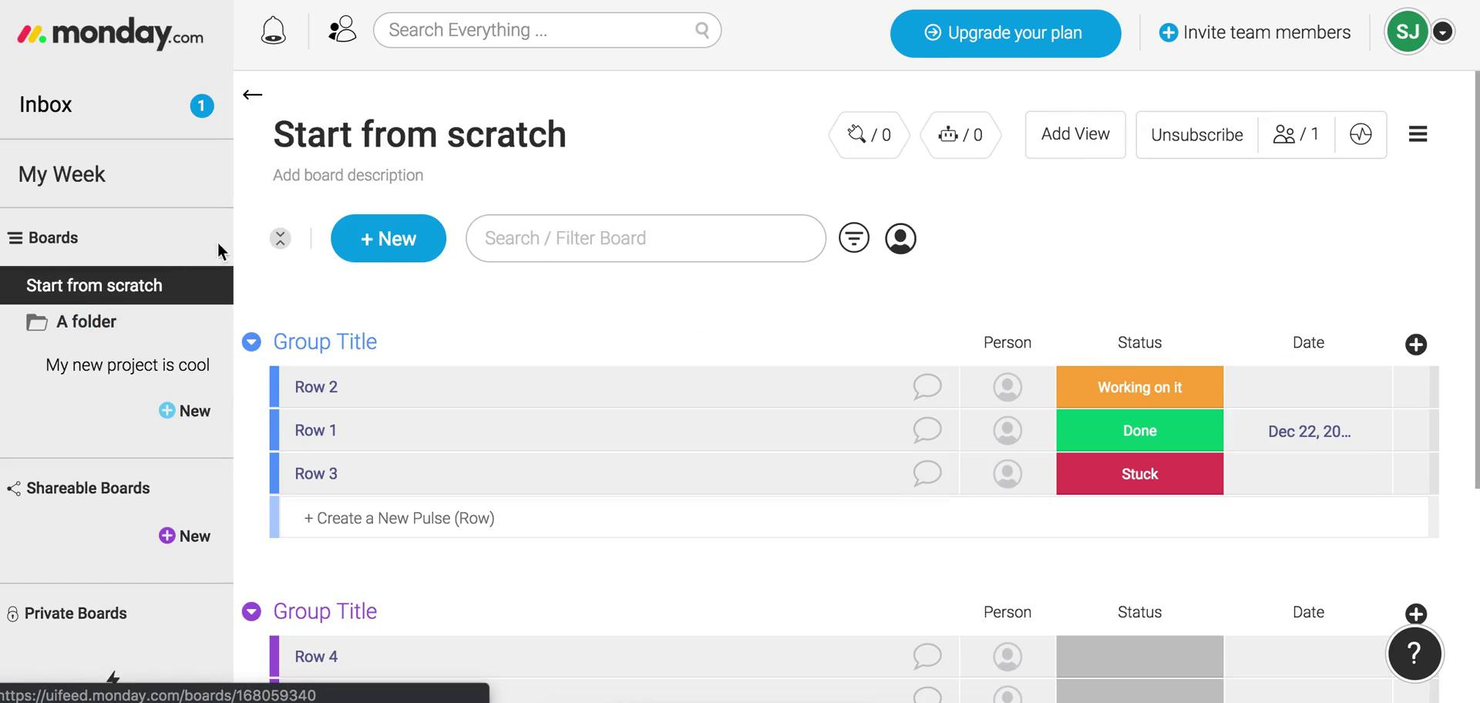
monday.com gives teams in tech, marketing, and operations a flexible platform to organize projects, manage tasks, and collaborate in real time, allowing workflows to adapt as needs change.
Who Is monday.com Best For?
monday.com is a strong fit for small to mid-sized teams that need a visual, adaptable way to manage projects without heavy setup or technical overhead.
Why I Picked monday.com
monday.com earns its spot on my shortlist because of how far its workflow customization goes. I like that you can build boards from scratch or start from one of hundreds of templates, then layer in custom columns, status labels, and conditional logic to match exactly how your team tracks work. The no-code automation builder is where it clicks—you can set up rules like "when status changes to In Review, notify the assignee and move the item to the QA board" without writing a single line of code. I also use the multiple view options (Gantt, Kanban, calendar, timeline) to switch context depending on whether I'm planning a sprint or reporting to stakeholders.
monday.com Key Features
- Workload view: See each team member's assigned tasks and capacity in a single visual dashboard to spot over-allocation at a glance.
- Task dependencies: Link related tasks so that when one item is delayed, dependent tasks automatically shift to reflect the updated timeline.
- Guest access: Invite external collaborators like clients or contractors to specific boards without giving them access to your full workspace.
- Dashboard reporting: Aggregate data from multiple boards into a single high-level dashboard to track progress across projects simultaneously.
monday.com Integrations
Integrations include Slack, Gmail, Google Calendar, Outlook, Microsoft Teams, Salesforce, QuickBooks, HubSpot, Zendesk, and GitHub.
What's Free?
monday.com offers a free-forever plan for up to 2 users. This plan includes 3 boards, 1,000 items, and limited access to integrations and automation.
Pros and Cons
Pros:
- Integrations include Slack Google Drive
- Customizable workflows using numerous columns
- Multiple views support varied management
Cons:
- Free plan limits users features
- Advanced features restricted to higher-tier
New Product Updates from monday AI Workspace
monday AI Workspace Adds Human Approval Routing
monday AI Workspace adds a human-in-the-loop approval block to AI Workflows, sending approval requests and routing workflow paths based on responses. For more information, visit monday AI Workspace's official site.

Wrike
Best free project management for customizable views
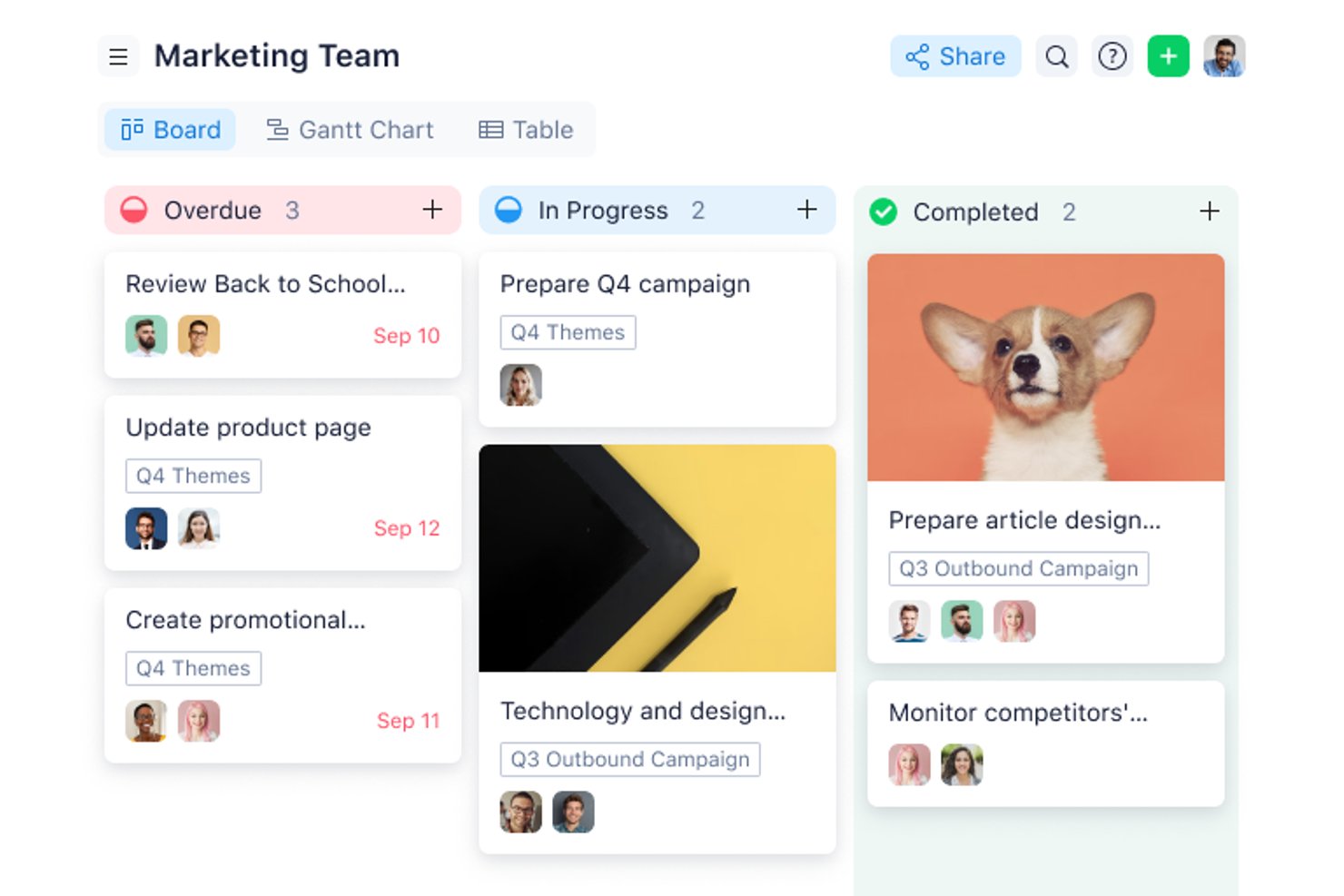
Wrike gives project managers and teams in tech, marketing, and professional services a flexible workspace to organize tasks, manage deadlines, and collaborate on projects—all without upfront costs.
Who Is Wrike Best For?
Wrike suits growing teams and mid-size organizations seeking a structured yet adaptable project management tool across marketing, product, and IT.
Why I Picked Wrike
I chose Wrike for its view flexibility, available right out of the box even on the free plan. You can toggle between list, board (Kanban), and table views depending on how your team thinks about work—so a developer tracking sprint tasks and a marketer managing a campaign calendar aren't forced into the same layout. The Gantt chart view is available on paid plans, giving teams a clear upgrade path as their needs grow. The cross-tagging feature is particularly useful: you can add a single task to multiple folders or projects so it appears in the right view for each team without duplication.
Scott Crosby, a Technical Project Manager, highlighted how Wrike delivers in real-world scenarios: “Wrike's strength is its visual project timelines and dependency tracking. When we were rolling out our client portal system, Wrike made it easy to see how backend development delays would impact frontend testing phases. The Gantt charts were intuitive enough that even our non-technical team members could understand project bottlenecks.”
Wrike Key Features
- Custom work views: Toggle between List, Board (Kanban), and Table views to organize work in different ways.
- Task and subtask management: Create tasks, break them into subtasks, and cross-tag them across multiple folders or projects without duplicating entries.
- Use case project templates: Start projects using prebuilt structures rather than building every workflow from scratch.
- AI Essentials: Use AI tools for content drafting and editing, comment summaries, and onboarding assistance.
Wrike Integrations
The Free plan includes cloud storage integrations and access to Wrike’s open REST API. Additional native integrations become available on paid tiers, including productivity apps on Team, Salesforce and Adobe Creative Cloud on Business, and QuickBooks, Power BI, and Tableau on Pinnacle. Wrike Integrate is available as an add-on for connecting systems without a native connector, such as NetSuite.
What's Free?
Wrike offers a free-forever plan with unlimited users and 2 GB of storage per account. It includes task and subtask management, folder hierarchy, custom work views such as Table and Kanban, cloud storage integrations, and open API access. Gantt charts, dashboards, custom fields, and request forms require a paid plan.
Pros and Cons
Pros:
- Wrike's task integration enhances visibility and organization
- The mobile app allows quick task management and real-time updates
- Effective for content creation and collaboration among remote teams
Cons:
- Users may face a learning curve
- Gantt charts require a paid plan
New Product Updates from Wrike
Wrike Adds Klaxoon MCP Integration
Wrike’s Klaxoon MCP integration is now generally available, enabling AI agents to navigate between Wrike tasks and attached whiteboards, read task context, and manage whiteboard attachments via API. For more information, visit Wrike's official site.

Best for custom workflows
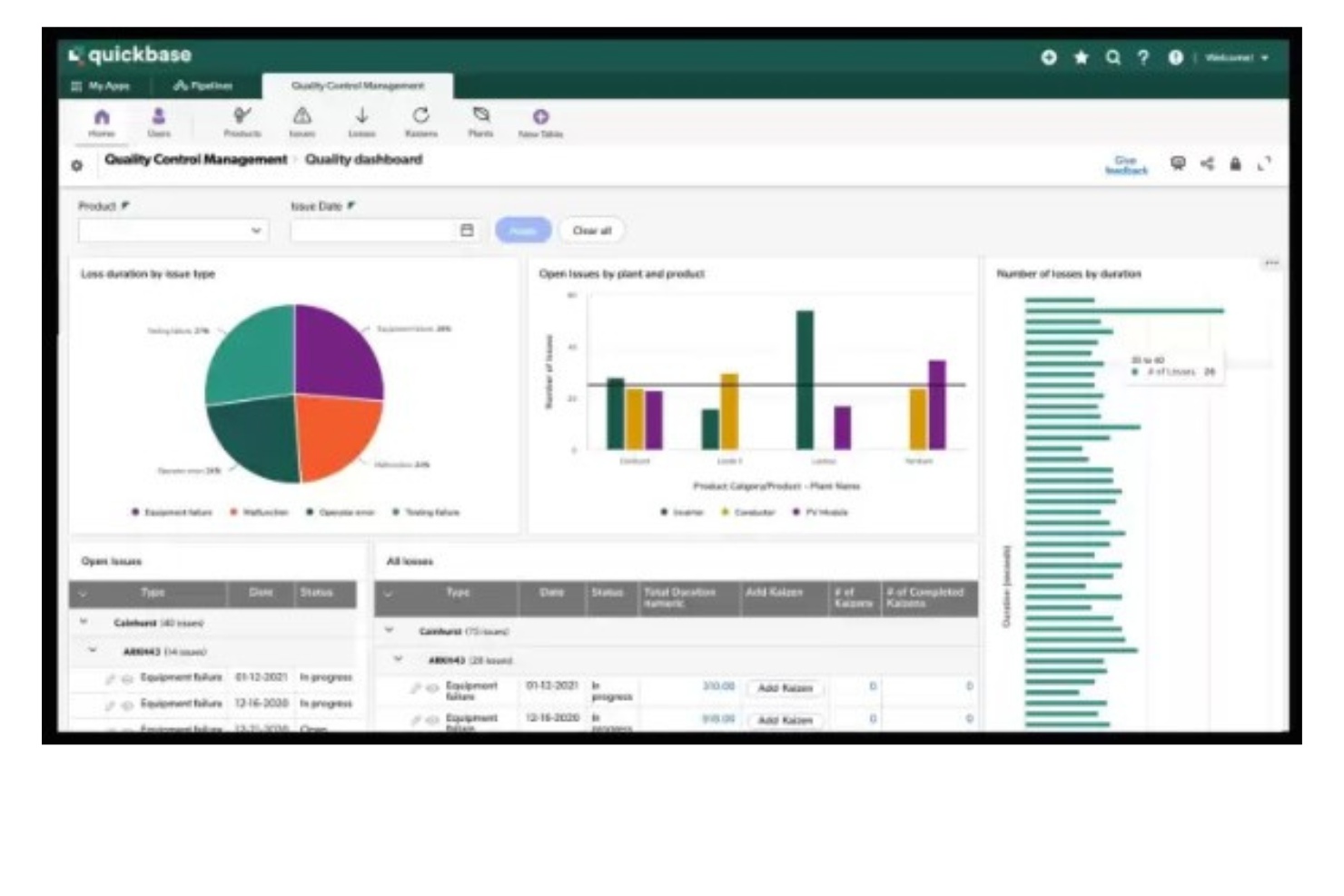
Quickbase gives teams in industries like construction, manufacturing, and IT a way to build custom project management apps that fit their unique workflows, helping them organize tasks, automate processes, and collaborate without relying on rigid, one-size-fits-all tools.
Who Is Quickbase Best For?
Quickbase is a strong fit for mid-size to large teams in operations-heavy industries like construction, manufacturing, and logistics who need project management tools tailored to their specific processes.
Why I Picked Quickbase
I've included Quickbase in my top picks because its no-code app builder lets teams design project management workflows from scratch rather than adapting to a fixed structure. I like that you can configure custom stage gates and approval routing directly in the workflow builder—so when a construction team needs a permit sign-off before moving to the next phase, that logic is built right into the app. Quickbase's Pipelines feature also lets you automate task handoffs between teams using drag-and-drop logic, so my team doesn't have to chase status updates across departments. The budget vs. actuals tracking with real-time alerts is another feature I find genuinely useful for keeping multi-phase projects from quietly going over budget.
Sergio Oliveira, Director of Development at DesignRush, shared his experience: “Quickbase enabled us to quickly consolidate our project data, even on the free plan. It allows us to track tasks, write reports, and ensure accountability without worrying about managing different spreadsheets.”
Quickbase Key Features
- Dynamic reports and dashboards: Build real-time reports with filters, groupings, and charts to track project status across multiple apps.
- Role-based permissions: Control who can view, edit, or manage data at the field, table, or app level.
- Mobile app access: Access and update project data from iOS and Android devices while working in the field.
- Gantt chart views: Visualize project timelines, task dependencies, and milestones in a drag-and-drop Gantt interface.
Quickbase Integrations
Integrations include Salesforce, SAP, Oracle, Microsoft Teams, SharePoint, Google Drive, and an API is available for custom integrations.
What's Free?
Quickbase offers a free trial, but there is no free-forever plan. The trial allows you to test the platform’s features, but user limits and integration access are restricted during the trial period.
Pros and Cons
Pros:
- Highly scalable for both small and large teams
- Integrates with a range of external tools
- Low-code customizable workflows
Cons:
- Limited ready-made templates
- Not ideal for those who want a quick-start solution
Hive
Best for native time tracking tools
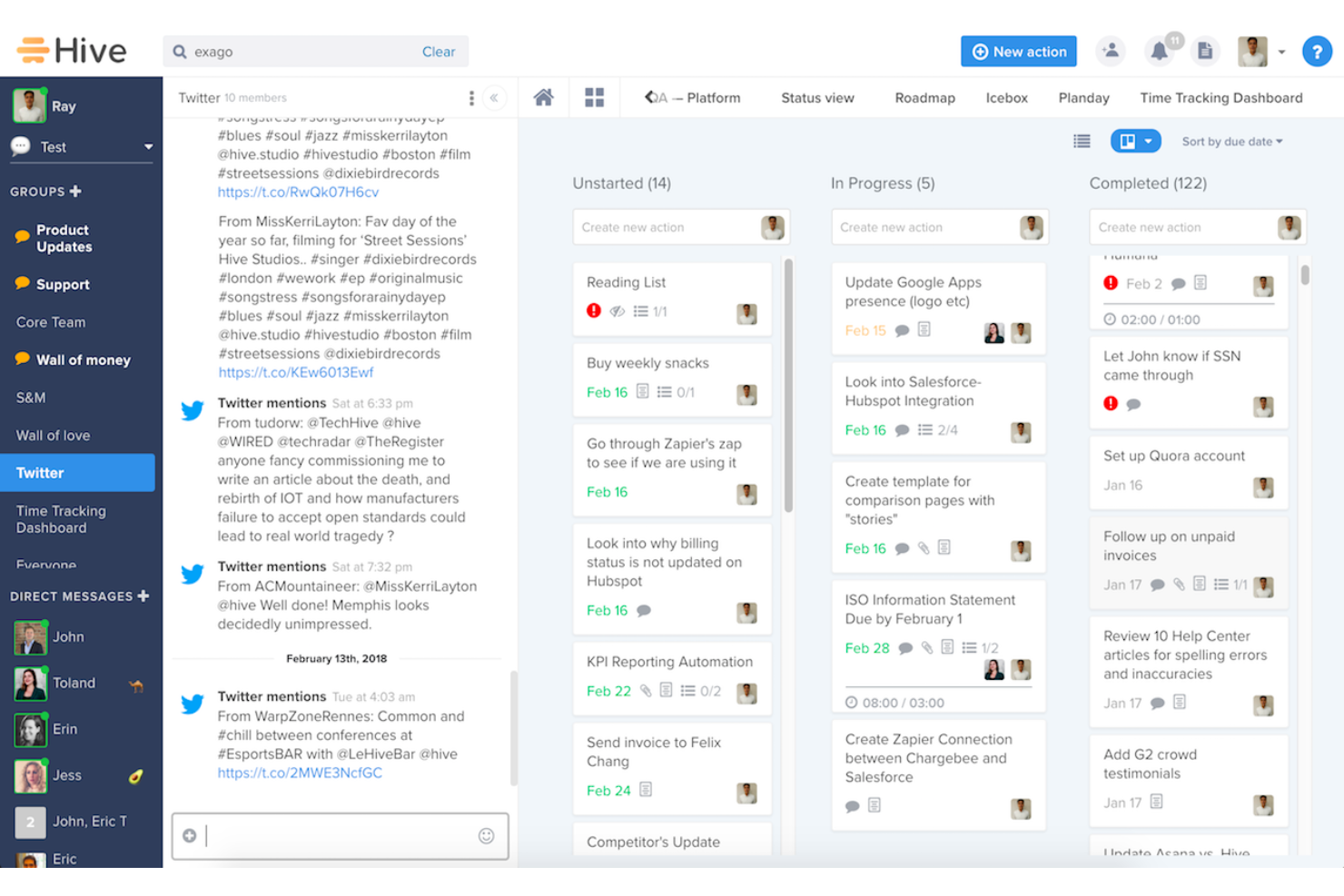
Hive helps small teams and freelancers manage projects without paying for a full project management suite. It combines task tracking, multiple project views, team messaging, native email, collaborative notes, and proofing tools in one workspace, making it easier to stay organized and keep work moving.
Hive is Best for
Hive works well for small cross-functional teams that need project management, communication, and file review tools without juggling multiple platforms.
Why I Picked Hive
I picked Hive because its native time tracking tools let your team log time directly from action cards without switching to a separate app. You can start timers, enter manual time, and compare tracked hours against estimated time to better understand workload and project costs. I also like that logged time feeds into team timesheets, giving managers a clearer view of individual and team bandwidth. This makes Hive a strong fit for teams that want free project management software with built-in time tracking instead of relying on disconnected add-ons.
Hive Key Features
- Multiple project views: Switch between Gantt, Kanban, calendar, table, and list views without recreating project data.
- Action cards: Keep subtasks, assignees, due dates, attachments, and comments together in one task card.
- Team messaging: Connect direct messages and group chats to specific projects or action cards.
- Collaborative notes: Create shared notes in real time and link them to projects or action cards for added context.
Hive Integrations
Integrations include Google Drive, Gmail, Box, Freshdesk, ActiveCampaign, Harvest, Marketo, Pipedrive, Jira, and Salesforce.
Pros and Cons
Pros:
- Native chat and notes reduce tool switching for teams
- Multiple views support Kanban, calendar, table, and list workflows
- Built-in timers connect task work to team timesheets
Cons:
- Advanced dashboards and automations require paid add-ons
- Time tracking is not included in the Free plan

Best for scalability & flexibility
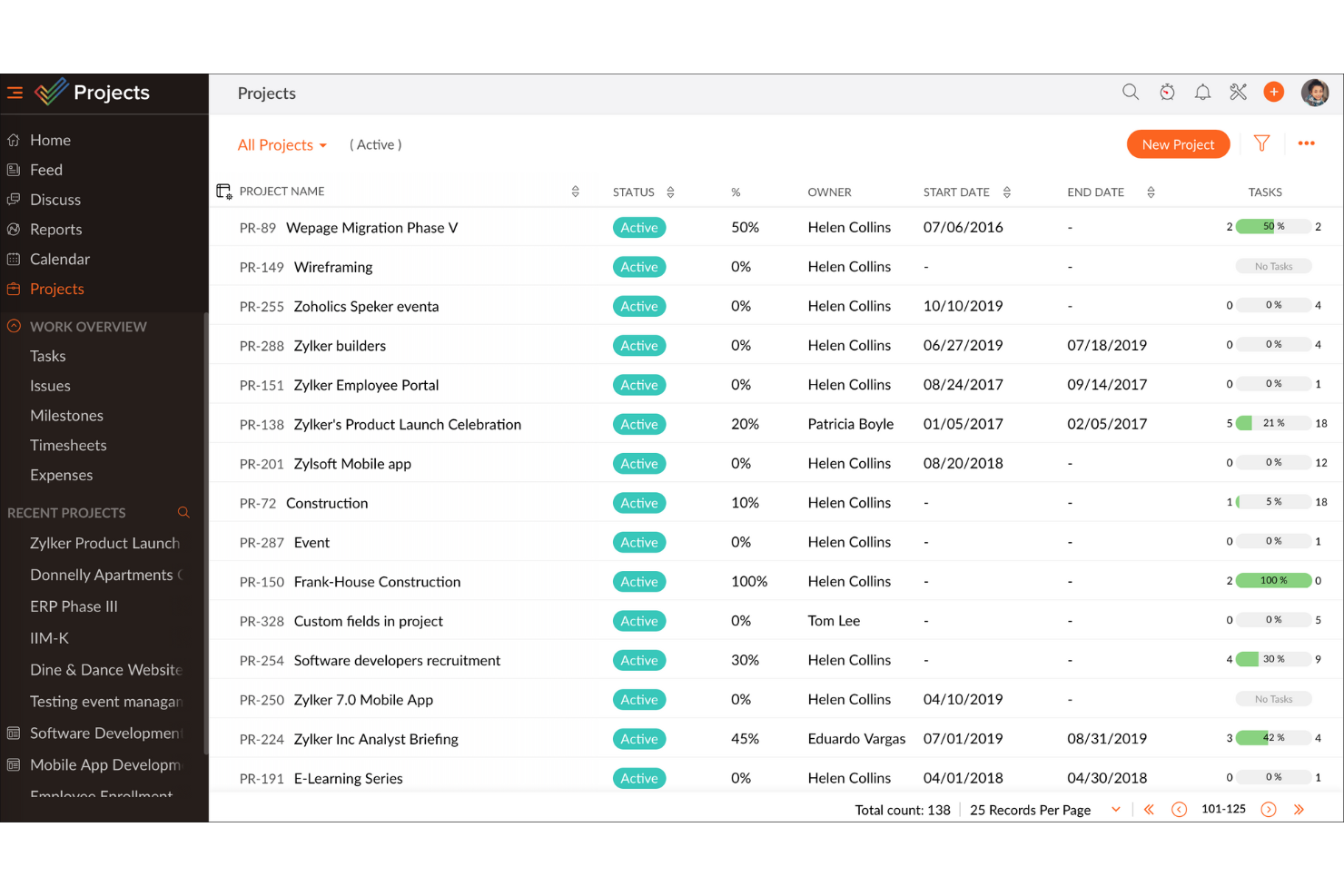
Zoho Projects gives teams in tech, marketing, and service-based businesses a flexible way to organize tasks, track progress, and collaborate on projects without upfront costs, making it a practical choice for those seeking a free project management platform that can grow with them.
Who Is Zoho Projects Best For?
Zoho Projects is a strong fit for small to mid-sized teams that need a free starting point but expect their project management needs to grow over time.
Why I Picked Zoho Projects
Zoho Projects earns its spot on my shortlist because it's one of the few free project management tools that genuinely scales with your team without forcing you to rebuild your workflow every time you grow. I like that the free plan gives you real task management capabilities—milestones, task lists, subtasks, and Gantt charts—so you're not stuck with a stripped-down experience just because you haven't paid yet. When your team is ready to move up, the Blueprint feature lets you design automated task workflows that trigger status changes, field updates, and team alerts, which is something I've found makes a real difference when managing multiple concurrent projects. The custom layouts and custom fields also mean you can shape the tool around how your team actually works, rather than adapting your process to fit the software.
Michael Alexander, Managing Director at Tangible Digital, explained: “The flexibility of Zoho Projects is what makes it stand apart, as it has enabled us to tailor task views and reporting hierarchy based on our operational requirements."
Zoho Projects Key Features
- Issue tracking: Log bugs and issues directly within a project, assign them to team members, and monitor resolution progress in one place.
- Resource management: View each team member's workload and reassign tasks when someone is over- or under-allocated.
- Project baseline: Capture a snapshot of your project plan at any point and compare it against actual progress to spot schedule drift early.
- Timesheet management: Log time manually or via task timers, with admin controls to approve or reject entries for payroll and client billing.
Zoho Projects Integrations
Integrations include Zoho CRM, Zoho Desk, Zoho Analytics, Zoho Books, Google Calendar, Microsoft Teams, Dropbox, Github, Slack, and Zendesk.
What's Free?
Zoho Projects offers a free-forever plan for up to 5 users and 3 projects, with 5 GB of storage and limited workflow actions. Integrations are limited to Google apps and Office 365 on the free plan.
Pros and Cons
Pros:
- Easily integrates with other Zoho apps and third-party tools, improving workflow continuity.
- Provides precise tracking of time spent on tasks, aiding productivity analysis.
- Offers detailed task breakdowns and organization, enhancing clarity.
Cons:
- Customization options are not as extensive as some competitors, which may hinder tailored solution.
- The mobile app lacks some functionalities available on the desktop version, affecting on-the-go management.
New Product Updates from Zoho Projects
Zoho Projects Adds CodeX Scripts for Custom Modules
Zoho Projects now supports CodeX Scripts for custom modules, enabling conditional logic and rules for creating, updating, and deleting records. For more information, visit Zoho Projects' official site.
 .
.
ClickUp
Best for growing teams

ClickUp is a platform that integrates project management, documentation, and communication seamlessly and is best for those in marketing, software development, human resources or similar departments. Its free version empowers you to manage tasks effortlessly, visualize projects with customizable Gantt charts, and collaborate with your team. ClickUp addresses workflow challenges, ensuring projects are delivered on time, making it an excellent choice for teams aiming to boost productivity.
Why I Picked ClickUp
I picked ClickUp because it offers an unparalleled combination of features in its free plan that cater perfectly to diverse project management needs. Its ability to handle unlimited tasks and team members, without any upfront costs or credit card requirements, makes it ideal for startups and small teams. The inclusion of built-in chat and document creation facilitates seamless collaboration, while over 1,000 integrations ensure that your existing tools work harmoniously. ClickUp's versatility and comprehensive feature set provide everything you need to keep your projects on track without financial constraints.
ClickUp Key Features
In addition to its ability to handle unlimited tasks and team members, ClickUp offers a variety of features designed to enhance your project management experience.
- Customizable Tasks: You can tailor tasks to fit specific project needs using over 35 ClickApps, allowing for adaptable and flexible task management.
- Visual Collaboration Tools: Utilize whiteboards and real-time editing features to foster creativity and ensure all team members are aligned on project goals.
- Real-Time Dashboards: Track project indicators and visualize progress with customizable dashboards that provide insights into your team's performance.
- Time Management Tools: Manage your team's time effectively with built-in time tracking and reporting features, helping to keep projects on schedule.
ClickUp Integrations
Integrations include Slack, Google Calendar, Microsoft Teams, Zoom, Salesforce, Trello, Asana, HubSpot, GitHub, and Figma.
Pros and Cons
Pros:
- Customizable setup allows teams to tailor the platform to needs.
- Offers extensive automation features for routine task streamlining.
- Centralizes project management and communication, reducing tool reliance.
Cons:
- Users have noted occasional glitches and overwhelming notifications.
- The mobile app functionality could be improved for better use.
New Product Updates from ClickUp
ClickUp Adds Meetings Hub, Super Agent Templates, and ZoomInfo Integration
ClickUp adds a searchable Meetings Hub, new ways to clone and template Super Agents, and a ZoomInfo integration through the App Center. These updates improve meeting retrieval, agent reuse, and access to sales intelligence. For more information, visit ClickUp’s official site.

Best for unlimited free projects
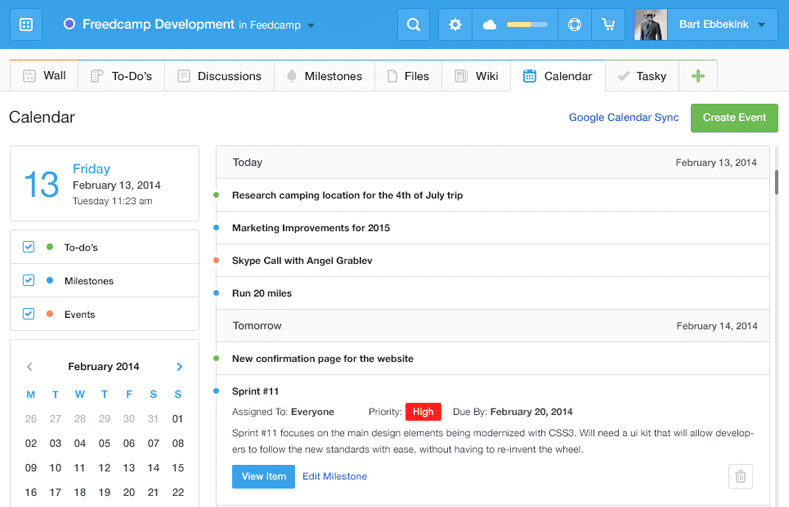
Freedcamp gives startups, agencies, and small businesses a flexible project management platform with task lists, kanban boards, and collaboration tools that help teams organize work and manage multiple projects without hitting usage limits.
Who Is Freedcamp Best For?
Freedcamp is a great fit for small teams and freelancers who need to manage multiple projects simultaneously without paying for a premium plan.
Why I Picked Freedcamp
Freedcamp earns its spot on my shortlist because it's one of the few tools that genuinely doesn't cap the number of projects or users on its free plan. I like that my team can run as many concurrent projects as needed without hitting a paywall—something most free tiers quietly restrict. The Task Board is a feature I use regularly; it pulls tasks from every active project into a single view, which makes it easy to spot bottlenecks across workstreams without jumping between projects. I also rely on the milestones feature to group related tasks under a target date, which keeps larger initiatives from drifting.
Freedcamp Key Features
- Time tracking: Log hours directly against tasks and projects from within the platform.
- File storage: Attach and organize files at the task or project level, keeping assets easy to find.
- Discussion boards: Create threaded conversations tied to specific projects to keep team communication organized.
- Password manager: Store and share project-related login credentials securely across your team.
Freedcamp Integrations
Integrations include Google Calendar, Google Drive, Dropbox, and more.
What's Free?
Freedcamp offers a free-forever plan with unlimited projects, tasks, storage, and users. The main restriction is a 10MB maximum file upload size per file.
Pros and Cons
Pros:
- Affordable pricing for additional features and users.
- Offers collaborative tools like discussions and calendars.
- Extensive free plan supports unlimited projects and users.
Cons:
- May not meet the needs of enterprises requiring high customization.
- Mobile app is less polished than the desktop version.

Best for freelancers who track time and bill clients
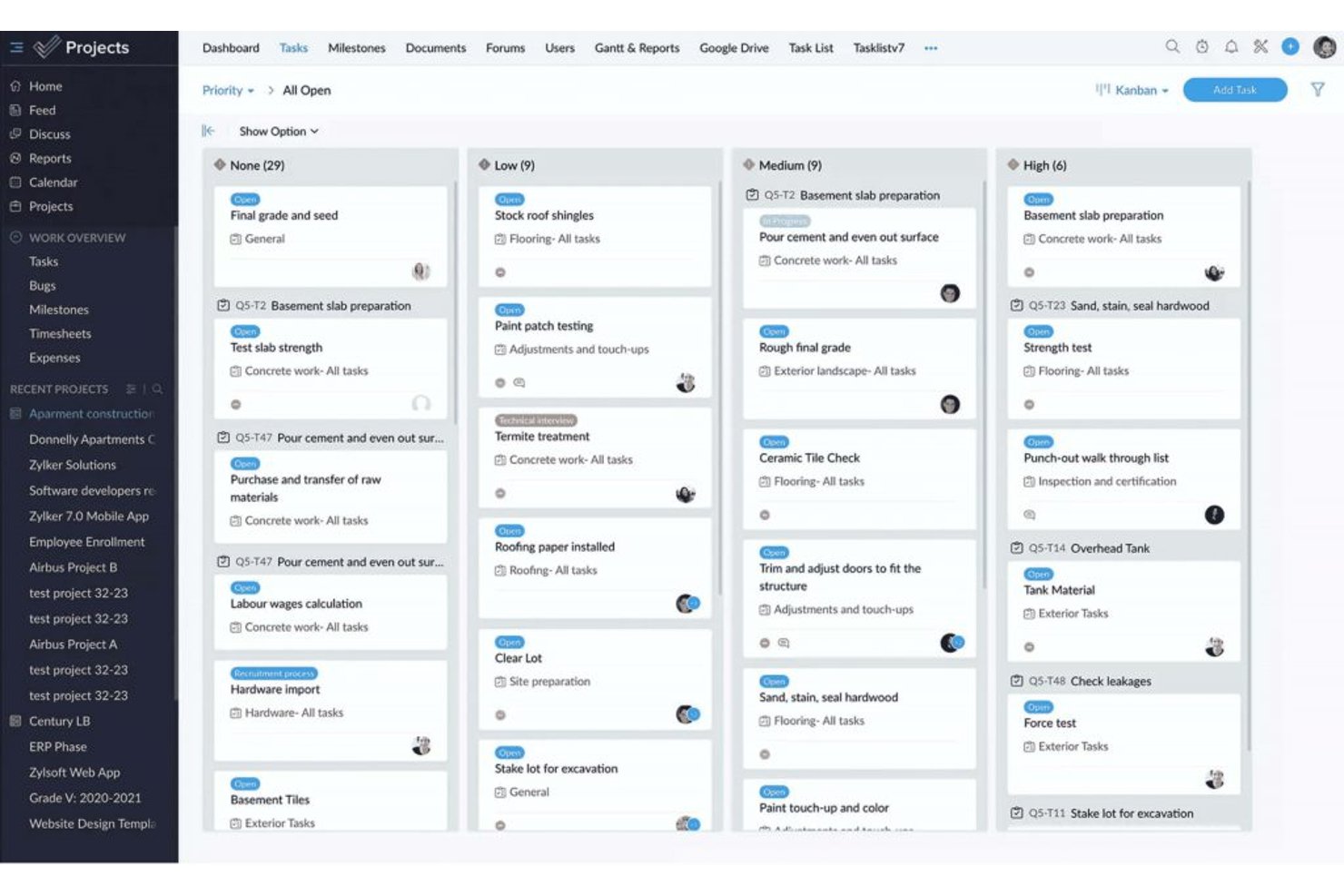
ProProfs Project is project management software with task tracking, List, Kanban, Gantt, and Calendar views, collaboration, automations, time tracking, invoicing, and AI reports available on its free plan.
Who Is ProProfs Project Best For?
ProProfs Project is best for freelancers who track time and bill clients, especially those managing a small number of client projects.
Why I Picked ProProfs Project
I picked ProProfs Project, “Best for freelancers who track time and bill clients,” for its free plan’s built-in timers, timesheets, estimates, and invoicing. I can log billable hours against client work and turn them into invoices without separate billing software. The free plan also includes List, Kanban, Gantt, and Calendar views, with up to three users.
ProProfs Project Key Features
- Task dependencies and baselines: Set task relationships and compare schedules against a baseline.
- Workflow customization: Create custom stages, fields, statuses, and priorities.
- Automations: Set rules for task assignments, status changes, and notifications.
- AI reports: Generate reports with project progress and risk insights.
ProProfs Project Integrations
Native integrations include Google Drive, Dropbox, Box, and more. Zapier is also supported.
What’s Free?
ProProfs Project offers a free plan for up to three users, alongside a 14-day free trial. The free plan doesn’t include API access or webhooks.
Pros and Cons
Pros:
- Free plan includes Gantt and calendar views
- Timesheets and invoices keep billing together
- Built-in timers simplify billable hour tracking
Cons:
- Open-task limit remains unclear
- Three seats constrain client collaboration
Jira
Best for agile project management

Jira gives software teams and digital project managers a flexible platform to organize tasks, track progress, and manage complex workflows, making it a popular choice for teams looking for a free project management solution with agile capabilities.
Who Is Jira Best For?
Jira is a strong fit for software development and product teams that work in agile or scrum environments and need structured issue tracking alongside sprint planning.
Why I Picked Jira
Jira earns its spot as one of the best on my shortlist because it's one of the few free project management tools built specifically around agile delivery. I use scrum boards and sprint planning to break work into focused two-week cycles, which keeps my team moving without losing sight of the backlog. I also rely on Jira's dependency mapping to coordinate releases across product, engineering, and design—especially when one team's work is blocking another's. The burndown charts and cycle time reports give me real data on team performance, not just a status update.
Jira Key Features
- Customizable workflows: Build and modify issue workflows to match how your team actually moves work from start to finish.
- Roadmaps: Visualize work across multiple sprints and teams on a timeline to track progress against delivery goals.
- Automation rules: Set trigger-based automation to handle repetitive tasks like assigning issues or updating statuses.
- Reporting dashboard: Access built-in reports including velocity charts and cumulative flow diagrams to monitor team output.
Jira Integrations
Integrations include Confluence, Trello, Bitbucket, Slack, Microsoft Teams, Google Workspace, Zoom, Tempo Timesheets, Zephyr, and Loom.
What's Free?
Jira offers a free-forever plan for up to 10 users. The free plan includes basic project management features but limits storage to 2 GB and does not include advanced admin controls or premium support.
Pros and Cons
Pros:
- Excellent issue management capabilities for bug tracking and problem-solving.
- Supports Agile methodologies, ideal for software development teams.
- Highly customizable and scalable to fit different project needs and team sizes.
Cons:
- Occasional slow performance with large projects
- May be too feature-rich for teams managing simple projects

Basecamp
Best for combining essential tools
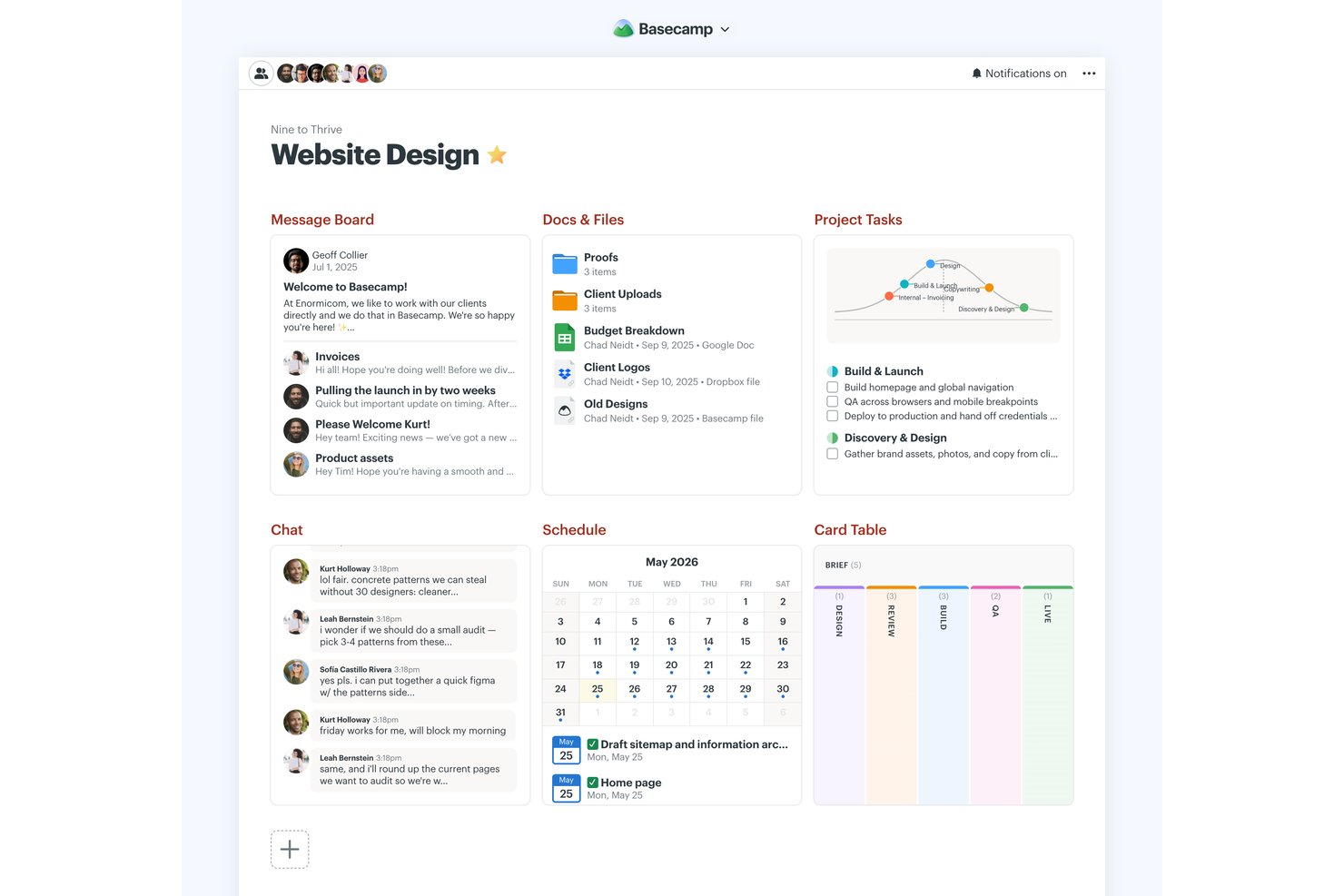
Basecamp is a project management platform with a permanent free plan for one project and five users, combining to-do lists, Kanban-style Card Tables, messaging, scheduling, file storage, reports, and Hill Charts.
Who Is Basecamp Best For?
Basecamp suits small business owners and team leads coordinating straightforward projects who need shared visibility without Gantt charts or dependency planning.
Why I Picked Basecamp
I picked Basecamp for “Best for combining essential tools” because its free project brings to-dos, Card Tables, Campfire chat, and scheduling together. I use Hill Charts to show whether launch tasks are still being figured out or have moved into execution, then check Reports for overdue assignments. The permanent free plan is limited to one active project, five users, and 1 GB of storage.
Basecamp Key Features
- Message boards: Post project updates and keep replies attached to each discussion.
- Pings: Send direct messages to teammates.
- My Assignments: View your tasks sorted by due date, including overdue items.
- Docs & Files: Organize documents and uploads with folders, previews, and version tracking.
Basecamp Integrations
Basecamp has built-in connections for Google Docs, Figma, Dropbox, Google, Outlook, Apple, and HEY calendars, plus Zoom and Microsoft Teams meeting links. It also offers an API and ChatGPT and Claude connectors, and is available on Zapier.
What's Free?
Basecamp’s free plan is free forever and includes one project, up to five users, and 1 GB of storage. It combines core project tools, but the project and user limits can restrict larger teams.
Pros and Cons
Pros:
- Automatic check-ins reduce status-meeting overhead
- Hill Charts show discovery versus execution
- Permanent free plan includes core collaboration tools
Cons:
- No dependencies or Gantt charts
- Five users and one project restrict scale
Annen gratis programvare for prosjektstyring
Her er noen flere verktøy som ikke kom med på den endelige listen min, men som fortsatt er gode alternativer du kan vurdere hvis du ikke fant noe som passet ovenfor.
- Podio
For task management capabilities
- GoodDay
For task visualization
- Teamwork.com
For Kanban boards
- Airtable
For its free plan with unlimited bases
- Miro
For pre-built templates
- Bitrix24
For teams replacing multiple tools with one
- Notion
For docs, wikis, and tasks in one workspace
- Project.co
For client-facing project communication
- FigJam
For freeform visual planning and brainstorming
- Plaky
For teams that need unlimited free users


Relaterte anmeldelser av programvare for prosjektstyring
Hvis du fortsatt ikke har funnet det du leter etter her, kan du se på disse andre relaterte verktøyene som vi har testet og evaluert:
- Programvare for prosjektstyring
- Gratis programvare for kundeoppfølging
- Programvare for prosjektstyring innen PR
- Programvare for ressursstyring
- Programvare for automatisering av arbeidsflyt
- Programvare for tidsregistrering
- Programvare for oppgavestyring
- Samarbeidsverktøy
- Programvare for prosjektstyring for Windows
- Alternativer til Paymo
- Alternativer til Redmine
How I Evaluate Free Project Management Software
I split my evaluation into two layers: a baseline every tool must clear—think real task tracking and free team access—and differentiators that separate the best options from the rest.
Core Functionality (Table Stakes For This List)
When I'm selecting tools for my list, I rank each one on a scale from 0 (does not offer the functionality) to 5 (excels in this area) for each core functionality listed below. Then, I calculate the tool's total score into a percentage. Each tool needs to achieve a minimum total score of 65% to be considered for inclusion.
- Task Management: I look for assignees, due dates, priorities, and statuses at a minimum—things like subtasks and dependencies for handling a multi-phase product launch matter too.
- Genuinely Free Plan: The tool needs to offer a permanent free tier, not just a trial. I check whether the free plan supports enough users and projects for a real small team.
- Multiple Project Views: I evaluate whether the free tier includes at least two views like Kanban boards and lists, since a startup sprint board needs a different layout than a nonprofit event calendar.
- Team Collaboration: Assigning tasks is baseline. I look for comments, @mentions, and shared workspaces so distributed teams can discuss blockers directly on the task itself.
- File Sharing & Attachments: Teams need to attach briefs, mockups, or specs to tasks. I check whether the free plan supports native uploads or only links to external storage.
- Project Tracking & Reporting: Dashboards or progress indicators help you answer "are we on track?" without building a manual spreadsheet. I evaluate what's available before hitting a paywall.
Once I have a list of tools that meet this criteria, I consider what sets each platform apart.
Differentiating Factors (What Sets Vendors Apart)
Here's how I compare and contrast different vendors:
Standout Features
Built-in time tracking is a big differentiator for freelancers logging billable hours directly against tasks. I also evaluate no-code automations—like auto-assigning a QA reviewer when a task moves to "ready for review"—because they save lean teams real admin time. Pre-built templates matter too. A startup running its first sprint shouldn't have to build a board from scratch when tools like Asana, monday.com, and ClickUp offer ready-made frameworks on free plans.
Beyond Features
Free plan limits vary widely, so I check user caps, project caps, and which features are gated behind a paywall. A five-person nonprofit team has very different needs than a solo freelancer, and the right tool depends on where those limits fall. I also consider upgrade paths—when your team outgrows the free tier, a steep jump to the next plan can force an unwanted migration. Integrations matter just as much. A free tool that connects to Slack, Google Workspace, or GitHub fits into your existing workflow instead of creating another silo.
Slik velger du gratis programvare for prosjektstyring
Når du lager en kortliste, prøver ut og velger gratis programvare for prosjektstyring, bør du vurdere følgende:
- Hvilket problem prøver du å løse? Begynn med å identifisere mangelen på funksjonalitet innen prosjektstyring som du prøver å dekke, slik at du får tydeliggjort hvilke funksjoner og hvilken funksjonalitet den kostnadsfrie prosjektstyringsprogramvaren må tilby.
- Hvem vil ha behov for å bruke det? Tenk over hvem som skal bruke programvaren, og hvor mange lisenser du trenger. Vurder om det bare er prosjektlederne dine, eller om hele organisasjonen trenger tilgang. Når dette er avklart, bør du vurdere om du prioriterer brukervennlighet for alle eller hastighet for de mest erfarne brukerne.
- Hvilke andre verktøy må det fungere sammen med? Avklar hvilke verktøy du erstatter, hvilke verktøy som skal beholdes, og hvilke verktøy du trenger å integrere med, for eksempel regnskaps-, CRM- eller HR-programvare. Finn ut om du kan erstatte flere verktøy med ett samlet, kostnadsfritt prosjektstyringsverktøy.
- Hvilke resultater er viktige? Tenk over hvilket resultat programvaren må levere for å kunne anses som vellykket, hvilken kapasitet du ønsker å oppnå, hva du vil forbedre, og hvordan du skal måle suksess. Et eksempel på et resultat kan være muligheten til å få bedre innsikt i ytelsen.
- Hvordan vil det fungere i organisasjonen din? Vurder valg av programvare sammen med arbeidsflytene og leveransemetodikken din. Evaluer hva som fungerer godt, og hvilke områder som skaper problemer. Alle virksomheter er forskjellige – ikke anta at et verktøy vil fungere i organisasjonen din bare fordi det er populært. Se etter kostnadsfri programvare som tilbyr et godt funksjonssett, og som kan skaleres funksjonelt etter hvert som behovene dine vokser.
Trender innen kostnadsfri prosjektstyringsprogramvare
Her er flere viktige trender som vil fortsette å forme kostnadsfrie prosjektstyringsverktøy.
- Funksjoner for kunstig intelligens og maskinlæring: Noen av de beste kostnadsfrie prosjektstyringsappene har begynt å innlemme KI-drevet analyse, prediktiv oppgavestyring og automatisert risikovurdering. Disse avanserte funksjonene gir innsikt og automatisering som tidligere bare var tilgjengelig i premiumverktøy.
- Virtuell virkelighet (VR) og utvidet virkelighet (AR) for prosjektvisualisering: Noen få banebrytende kostnadsfrie prosjektplanleggingsverktøy eksperimenterer med VR og AR for å tilby oppslukende opplevelser innen prosjektplanlegging og visualisering. Denne nye bruken av teknologi gjør det mulig for teammedlemmer å arbeide med prosjektplaner og design på en mer interaktiv og intuitiv måte.
- Bred utbredelse av skybaserte plattformer: Det skjer en betydelig dreining mot skybaserte prosjektstyringsløsninger (det vil si kostnadsfri prosjektstyringsprogramvare på nettet), noe som gir bedre tilgjengelighet, skalerbarhet og samarbeid. Denne trenden imøtekommer det økende behovet for funksjoner for fjernarbeid, ettersom teammedlemmer kan få tilgang til prosjektstyringsverktøyet og prosjektdataene fra hvor som helst og når som helst.
- Forbedrede sikkerhetstiltak: Etter hvert som kostnadsfrie prosjektstyringsverktøy blir mer integrert i den daglige driften av virksomheter, har fokuset på sikkerhet og databeskyttelse økt. Funksjoner som ende-til-ende-kryptering, tofaktorautentisering og avanserte tilgangskontroller blir stadig mer standard for å håndtere bekymringer rundt datainnbrudd og uautorisert tilgang.
Hva er kostnadsfri prosjektstyringsprogramvare?
Kostnadsfri prosjektstyringsprogramvare er et verktøy uten kostnad som hjelper enkeltpersoner og team med å planlegge, følge opp og administrere oppgaver, tidsfrister og samarbeid.
Disse verktøyene er ofte tilgjengelige som nett-, skrivebords- eller mobilapper, og har funksjoner som tildeling av oppgaver, planlegging og fremdriftsoppfølging. De er ideelle for oppstartsbedrifter, frilansere eller små team som trenger å holde orden og følge tidsplanen – uten kostnadene ved premiumverktøy. Kostnadsfri prosjektstyringsprogramvare er ofte åpen kildekode eller et betalt verktøy som følger en freemium-modell.
Funksjoner i kostnadsfri prosjektstyringsprogramvare
Når du velger kostnadsfri prosjektstyringsprogramvare, bør du se etter følgende viktige funksjoner:
- Automatiserte oppgaveforslag: KI kan analysere arbeidsflyten din og foreslå nye oppgaver, tidsfrister eller prioriteringer basert på prosjekthistorikk og teamets vaner.
- Smart planlegging: KI-verktøy kan anbefale optimale tidslinjer, tildele ressurser og justere tidsplaner automatisk når det oppstår konflikter eller forsinkelser.
- Prediktiv analyse: Få innsikt i potensielle risikoer, prosjektforsinkelser eller budsjettoverskridelser før de oppstår, slik at du kan iverksette tiltak tidlig.
- Naturlig språkbehandling: Opprett raskt oppgaver, angi påminnelser eller søk etter informasjon ved hjelp av et enkelt språk – bare skriv eller si hva du ønsker.
- KI-drevet rapportering: Generer automatisk fremdriftsrapporter, ytelsessammendrag eller prosjektoppdateringer, slik at du sparer tid på manuell oppfølging.
- Intelligente varsler: Motta personlig tilpassede varsler om oppgaver som krever oppmerksomheten din, kommende tidsfrister eller endringer som påvirker arbeidet ditt.
- Smart dokumenthåndtering: KI kan hjelpe med å kategorisere, merke og finne dokumenter raskere, slik at teamet bruker mindre tid på å lete og mer tid på å arbeide.
- Automatiserte møtenotater: Noen verktøy bruker KI til å transkribere møter, oppsummere hovedpunkter og tildele handlingspunkter, slik at det blir enklere å holde alle samkjørte.
AI-funksjoner i gratis prosjektstyringsprogramvare
Mange gratis alternativer for prosjektstyringsprogramvare begynner å inkludere AI-drevne funksjoner for å hjelpe team med å jobbe smartere og mer effektivt. Her er noen AI-funksjoner du bør se etter:
- Automatiserte oppgaveforslag: AI kan analysere arbeidsflyten din og foreslå nye oppgaver, tidsfrister eller prioriteringer basert på prosjektets historikk og teamets arbeidsvaner.
- Smart planlegging: AI-verktøy kan anbefale optimale tidslinjer, tildele ressurser og justere tidsplaner automatisk når det oppstår konflikter eller forsinkelser.
- Prediktiv analyse: Få innsikt i potensielle risikoer, prosjektforsinkelser eller budsjettoverskridelser før de oppstår, slik at du kan handle tidlig.
- Naturlig språkbehandling: Opprett raskt oppgaver, angi påminnelser eller søk etter informasjon ved hjelp av et enkelt språk – bare skriv eller si hva du ønsker.
- AI-drevet rapportering: Generer fremdriftsrapporter, resultatsammendrag eller prosjektoppdateringer automatisk, slik at du sparer tid på manuell oppfølging.
- Intelligente varsler: Motta tilpassede varsler om oppgaver som krever oppmerksomhet, kommende tidsfrister eller endringer som påvirker arbeidet ditt.
- Smart dokumenthåndtering: AI kan hjelpe med å kategorisere, merke og finne dokumenter raskere, slik at teamet bruker mindre tid på å lete og mer tid på å jobbe.
- Automatiserte møtenotater: Noen verktøy bruker AI til å transkribere møter, oppsummere viktige punkter og tildele oppfølgingsoppgaver, noe som gjør det enklere å holde alle samkjørte.
Fordeler med gratis prosjektstyringsprogramvare
Her er fem hovedfordeler som gratis prosjektstyringsprogramvare gir brukere og organisasjoner:
- Kostnadseffektivitet: Reduserer driftskostnadene betydelig. Ved å eliminere behovet for en økonomisk investering i programvare kan virksomheter bruke budsjettene sine på andre områder der behovet er større, noe som forbedrer den overordnede ressursstyringen og den økonomiske fleksibiliteten.
- Forbedret samarbeid: Legger til rette for bedre teamarbeid og kommunikasjon. Gratis prosjektstyringsprogramvare gir en plattform der teammedlemmer kan samarbeide i sanntid, dele dokumenter og holde hverandre oppdatert om fremdriften, noe som dermed forbedrer arbeidsflyter og produktivitet.
- Bedre organisering: Holder oppgaver og tidsfrister tydelig strukturert. Brukere drar nytte av funksjoner som oppgavelister, kalendere og Kanban-tavler, som hjelper dem med å organisere prosjekter mer effektivt og sørge for at alle teammedlemmer er klar over ansvarsområdene og tidslinjene sine.
- Tilgjengelighet: Gir fleksibilitet og bekvemmelighet. De fleste gratis prosjektstyringsverktøy er nettbaserte og skybaserte, slik at teammedlemmer kan få tilgang til prosjektinformasjon hvor som helst og når som helst, ved hjelp av en hvilken som helst enhet med internettilkobling. Dette gjør det enklere å jobbe eksternt eller på farten.
- Risikoreduksjon: Bidrar til å identifisere og håndtere potensielle prosjektrisikoer tidlig. Muligheten til å følge fremdriften og generere rapporter gjør det enklere å oppdage flaskehalser eller forsinkelser før de blir kritiske problemer, slik at man kan gjøre rettidige justeringer og ta beslutninger for å holde prosjektene på rett spor.
Kostnader & priser for prosjektstyringsprogramvare
Selv om gratisabonnementer er et godt utgangspunkt, særlig for små team, oppstartsbedrifter og ideelle organisasjoner, er det likevel lurt å være kjent med de betalte abonnementene – og tilhørende funksjonene – som finnes på markedet.
Nedenfor finner du en oversikt over de vanligste abonnementsalternativene, gjennomsnittlige priser og vanlige funksjoner som er inkludert i hvert abonnement, for å hjelpe deg med beslutningsprosessen.
Sammenligningstabell for abonnementer for prosjektstyringsprogramvare
| Abonnementstype | Gjennomsnittlig pris | Vanlige funksjoner |
|---|---|---|
| Gratis | $0 | Oppgave- og prosjektstyring, grunnleggende samarbeidsverktøy, begrenset lagringsplass |
| Grunnleggende | $5-10 per bruker/måned | Forbedret oppgavestyring, tidsregistrering, ekstra lagringsplass, grunnleggende rapportering |
| Standard | $10-25 per bruker/måned | Fullstendig prosjektplanlegging og tidsplanlegging, avanserte samarbeidsfunksjoner, integrasjoner med andre verktøy, forbedrede sikkerhetsalternativer |
| Premium | $25-50 per bruker/måned | Ressursstyring, avansert rapportering og analyse, tilpassbare oversikter, prioritert brukerstøtte |
| Bedrift | Tilpasset pris | Ubegrenset antall prosjekter og brukere, dedikert brukerstøtte og opplæring, avansert sikkerhet og samsvar, tilpassbare funksjoner og integrasjoner |
Du finner mer prosjektstyringsprogramvare for ideelle organisasjoner her.
Vanlige spørsmål om gratis programvare for prosjektstyring
Finn vanlige svar på spørsmål andre stiller om dette emnet.
Hvilke funksjoner er vanligvis begrenset i gratis programvare for prosjektstyring?
Det meste av gratis programvare for prosjektstyring begrenser avanserte funksjoner for å oppmuntre til oppgradering. Du vil vanligvis se begrensninger på ting som Gantt-diagrammer, tidsregistrering, avansert rapportering eller innebygd budsjettstyring. Brukerbegrensninger er vanlig, så bare en håndfull teammedlemmer kan samarbeide gratis. Du kan også få mindre fillagring, færre prosjektmaler og grunnleggende integrasjonsmuligheter i stedet for premiumapper (som Slack, Salesforce eller CRM-verktøy). Hvis du trenger funksjoner som automatisering, rollebaserte tillatelser eller detaljerte oversikter, må du regne med at disse ligger bak en betalingsmur. Gå alltid gjennom detaljene i gratisabonnementet før du tar teamet i bruk, slik at du er sikker på at det dekker de viktigste arbeidsflytene deres.
Er gratis verktøy for prosjektstyring sikre for kundeopplysninger eller sensitive data?
De fleste gratis verktøy for prosjektstyring tilbyr et grunnleggende sikkerhetsnivå, for eksempel SSL-kryptering, passordbeskyttelse og regelmessige programvareoppdateringer. Disse verktøyene tilbyr imidlertid kanskje ikke avanserte sikkerhetsfunksjoner som tofaktorautentisering, revisjonslogger, kryptert fillagring eller samsvarssertifiseringer som SOC 2 eller HIPAA. For de fleste generelle interne prosjekter er gratis verktøy vanligvis tilstrekkelige, men hvis du håndterer konfidensielle kundeopplysninger, kontrakter eller regulerte data, bør du kontrollere verktøyets personvernerklæring og sikkerhetsrutiner. Du kan også kontakte brukerstøtten for å spørre om personvern og oppgradere til et betalt abonnement hvis du trenger mer omfattende beskyttelse.
Finnes det gratis programvare for prosjektstyring fra Microsoft?
Ja, Microsoft tilbyr et par gratis og enkle alternativer for grunnleggende prosjektstyring. Microsoft Planner følger med gratis Microsoft 365-kontoer og lar deg organisere oppgaver, opprette enkle tavler og samarbeide med små team. Microsoft To Do er også tilgjengelig for individuell oppfølging av oppgaver. Hvis du allerede er del av en organisasjon som bruker Microsofts økosystem, kan disse verktøyene hjelpe deg med å håndtere enkle arbeidsflyter. For mer avanserte funksjoner som tidslinjevisninger, avansert rapportering eller ressursstyring trenger du Microsoft Project, som krever et separat betalt abonnement.
Har Google gratis programvare for prosjektstyring?
Nei, Google tilbyr ikke et spesialutviklet verktøy for prosjektstyring som Trello eller Monday.com, men du kan opprette grunnleggende systemer ved hjelp av apper i Google Workspace. Du kan for eksempel bruke Google Regneark til å lage prosjektoversikter, Google Dokumenter til møtenotater og Kalender til påminnelser om tidsfrister. Du kan også opprette delte mapper i Google Disk og tildele oppgaver til teammedlemmer. Selv om denne fremgangsmåten krever mer oppsett, fungerer den godt hvis du ønsker et gratis og fleksibelt alternativ og teamet allerede bruker Google-verktøy. Det finnes også tredjepartsmaler, tillegg og Google-integrasjoner for prosjektstyring hvis du trenger mer struktur.
Hvilke gratis alternativer for åpen kildekode innen prosjektstyring finnes?
Det finnes flere pålitelige verktøy for prosjektstyring med åpen kildekode som du kan utforske. Taiga er populært blant smidige team og tilbyr tavler, sprinter og feilsporing. OpenProject inkluderer Gantt-diagrammer, oppgaveavhengigheter og tidsregistrering, noe som gjør det egnet for mer tradisjonelle eller hybride arbeidsflyter. ProjectLibre fungerer som et gratis alternativ til Microsoft Project, særlig for planlegging og tidsplanlegging. Med programvare med åpen kildekode kan du tilpasse koden, og hvis du drifter den på din egen server, beholder du full kontroll over dataene dine. Du bør imidlertid regne med å bruke mer tid på oppsett, vedlikehold og sporadisk feilsøking, ettersom den tekniske støtten kan være mer begrenset.
Bør jeg bruke gratis smidig programvare for prosjektstyring?
Ja, hvis du er nybegynner eller håndterer mindre smidige prosjekter, kan gratisverktøy som Jiras gratisnivå, Taiga eller ClickUp håndtere det grunnleggende, for eksempel sprinter, oppgavekøer, brukerhistorier og Kanban-tavler. Disse verktøyene inkluderer ofte nok funksjonalitet for enkle Scrum- eller Kanban-team og lar deg prøve ut smidige arbeidsflyter før du binder deg økonomisk. Etter hvert som prosjektene blir mer komplekse, kan du møte begrensninger på antall brukere, analysefunksjoner eller integrasjoner. Da kan du velge om du vil oppgradere eller bytte verktøy. Mange team gjennomfører regelmessige daglige møter, retrospektiver og sprintplanlegging med gratisversjonene.
Hvordan kan jeg gå fra gratis til betalt programvare for prosjektstyring?
Det er vanligvis enkelt å gå fra et gratisabonnement til et betalt abonnement, og det krever bare noen få klikk fra kontoinstrumentbordet eller faktureringsdelen. De fleste leverandører beholder eksisterende data, prosjekter, vedlegg og brukertillatelser. Du låser bare opp premiumfunksjoner som avanserte rapporter, integrasjoner eller mer lagringsplass umiddelbart. Før du oppgraderer, er det lurt å eksportere en sikkerhetskopi av viktige prosjektdata, se gjennom hvilke nye funksjoner du får og kontrollere om det skjer endringer i brukerroller eller faktureringsperioder. Hvis du bytter plattform helt, bør du se etter verktøy som støtter import og eksport av data, eller som tilbyr en migreringsveiledning for å gjøre overgangen enklere.