

10 beste Slack-integrerte programvarer for prosjektstyring i 2026

Beste prosjektstyringsprogramvare som integreres med Slack – kortliste


Å holde teamet ditt samkjørt bør ikke bety at du må hoppe mellom utallige apper bare for å holde oversikt over prosjektene. Hvis Slack allerede er teamets kommunikasjonsknutepunkt, hvorfor ikke samle prosjektoppdateringer, oppgavehåndtering og samarbeid der? Den riktige prosjektstyringsprogramvaren kan gjøre Slack til mer enn bare et meldingsverktøy – den kan gjøre det til et sanntidskommandosenter for prosjektene dine. Men med så mange alternativer, hvordan finner du det som gjør hverdagen enklere?
Jeg har testet en rekke prosjektstyringsverktøy som integreres sømløst med Slack, slik at du kan tildele oppgaver, følge fremdriften og få viktige oppdateringer – uten å drukne i varsler eller miste fokus.
Hvorfor du kan stole på våre programvareanbefalinger
Teamet vårt har testet og anmeldt programvare siden 2012. Vi er selv prosjektledere, så vi vet hvor vanskelig og hvor viktig det er å velge riktig programvare.
I denne guiden har vi vurdert verktøyene gjennom praktisk testing og uavhengig research og gitt dem poeng ut fra våre utvelgelseskriterier. Vi bygger også på innsikt fra ledende eksperter i bransjen og erfarne prosjektledere.
Anmeldelsene våre bygger på vår egen redaksjonelle vurdering. De er ikke et salgsargument.
Ekspertanmeldere:
Sammenligningstabell for prosjektstyringsprogramvare som integreres med Slack
| Tool | Best For | Trial Info | Price | ||
|---|---|---|---|---|---|
| 1 | Best for agency project management | 14-day free trial + free demo available | From $10/user/month (billed annually) | Website | |
| 2 | Best for customizable project views | 14-day free trial | From $10/user/month (billed annually) | Website | |
| 3 | Best for advanced workflow automation | Free plan + 15-day free trial available | Pricing upon request | Website | |
| 4 | Best with API-driven enterprise integrations | Free demo available | Pricing upon request | Website | |
| 5 | Best for visual project management | Free plan + 14-day free trial available | From $8/user/month (billed annually) | Website | |
| 6 | Best for customizable workflows | Free plan available | From $7/user/month (billed annually) | Website | |
| 7 | Best for client work collaboration | Free plan available; 14-day free trial | From $9.99/user/month (billed annually) | Website | |
| 8 | Best for agile teams tracking work in Slack | Free plan available | From $8.48/user/month | Website | |
| 9 | Best for goal alignment | Free plan + free demo available | From $10.99/user/month (billed annually) | Website | |
| 10 | Best for Kanban method integration | Free plan + demo available | From $7.99/user/month (billed annually) | Website |


Anmeldelser av den beste prosjektstyringsprogramvaren som integreres med Slack
Her er min omfattende gjennomgang av prosjektstyringsverktøy som integreres sømløst med Slack. I denne gjennomgangen veileder jeg deg gjennom fordeler og ulemper, funksjoner og optimale bruksområder for hver programvare, slik at du kan finne den perfekte løsningen for teamets behov.

Best for agency project management
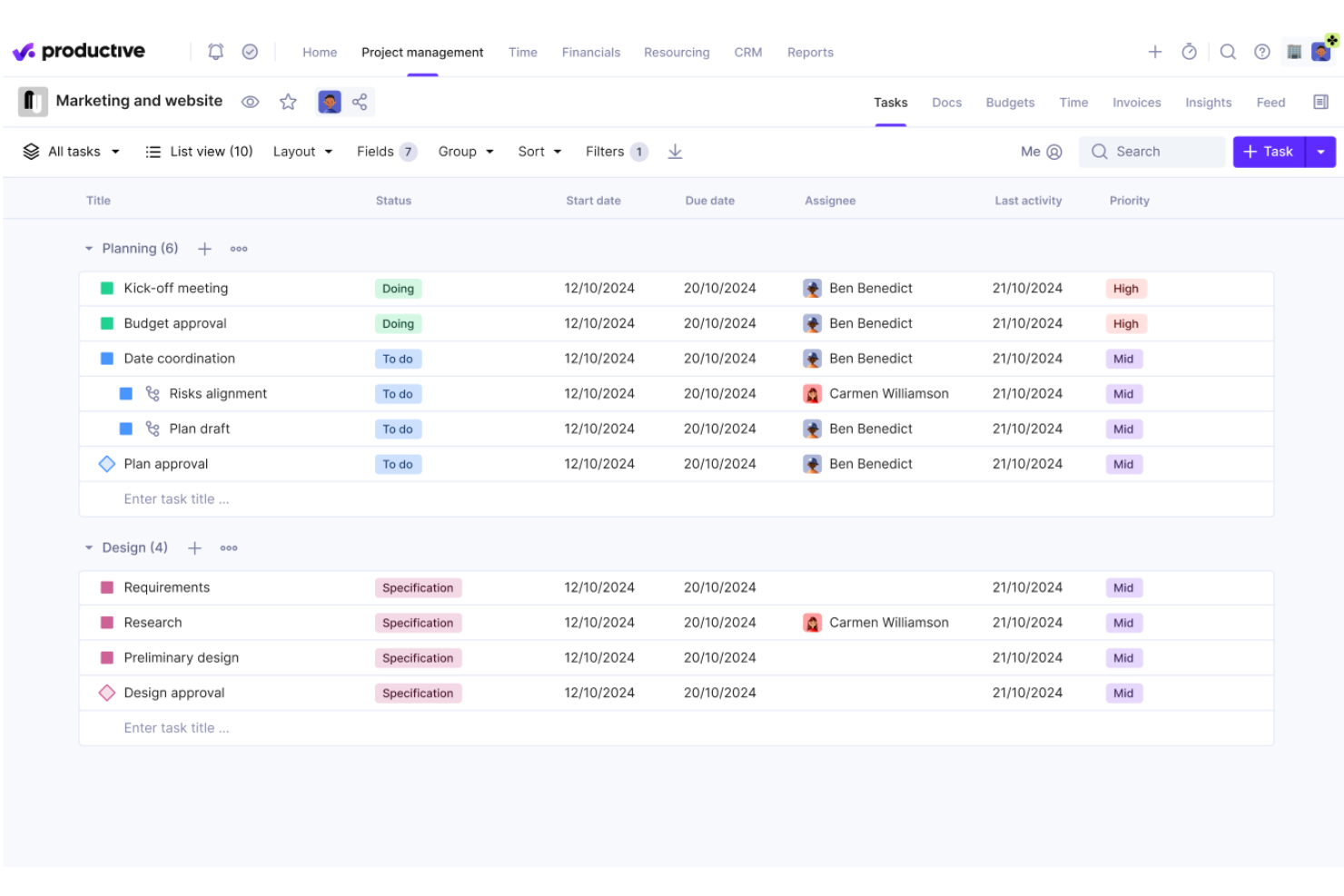
Productive is a project management platform built for agencies that combines project and task tracking, resource planning, time tracking, budgeting, and invoicing, with a native Slack integration for notifications and task management.
Who Is Productive Best For?
Productive is a strong fit for digital agencies and professional services firms that need to manage projects, people, and profitability in one place.
Why I Picked Productive
I've included Productive in my top picks because it's one of the few project management tools built specifically around how agencies operate. I love that budget tracking is tied directly to projects, so my team can see whether a client engagement is profitable in real time without toggling between tools. The resource planning view also lets me map team capacity against active projects, which is essential when managing multiple client workstreams at once.
Productive Key Features
- Slack integration: Create tasks directly from Slack messages and receive project notifications in designated Slack channels.
- Time tracking: Log billable and non-billable hours against specific tasks, projects, or clients from within the platform.
- Invoicing: Generate client invoices based on tracked time and project budgets without leaving the tool.
- Automations: Set up rules to auto-assign tasks, trigger status changes, or send updates based on project activity.
Pros and Cons
Pros:
- Comprehensive features for project management
- Deep native Slack integration
- Customizable features cater to specific agency needs
Cons:
- Initial setup can be time-consuming
- Lack of granular, customizable notifications.
New Product Updates from Productive
Productive Adds Voice Dictation, Slack Connector, Proposals, and Overtime
Productive adds voice dictation, a Slack Connector, proposal controls, and overtime tracking. These updates support faster AI interactions, client proposals, and time management. For more information, visit Productive’s official site.

Wrike
Best for customizable project views

Wrike is a project management platform that combines task tracking, workflow automation, resource management, and real-time reporting across Agile, Waterfall, and hybrid delivery models.
Who Is Wrike Best For?
Wrike is a strong fit for mid-size to enterprise teams that need a scalable project management platform with flexible workflows across multiple departments.
Why I Picked Wrike
I've included Wrike in my top picks because no other tool gives you this level of control over how your team sees and interacts with project data. Wrike offers Table, Board, Gantt chart, Files, Chart view, Calendar, Resources, Timelog, and Stream views—and you can save configurations for each. Views can be customized, filtered, and saved; they can be shared with your team, set as private or public, or designated as the default for a project. Dynamic filters let you display tasks, projects, and resources based on status, due date, priority, and custom fields, allowing each team member to work from a view that reflects their priorities.
Wrike Key Features
- Slack integration: Create Wrike tasks directly from Slack messages and receive task notifications in any Slack channel.
- No-code workflow automation: Build automated rules that trigger actions like status changes, assignments, and notifications based on task activity.
- Custom request forms: Design intake forms that auto-generate tasks or projects with pre-filled fields when submitted.
- Real-time dashboards: Build custom dashboards with widgets that surface task status, workloads, and project progress.
Pros and Cons
Pros:
- Robust reporting and analytics capabilities
- Effective time tracking and workload management
- Comprehensive project management features with high customization
Cons:
- Mobile app lacks some desktop features
- Learning curve for new users
New Product Updates from Wrike
Wrike Adds Klaxoon MCP Integration
Wrike’s Klaxoon MCP integration is now generally available, enabling AI agents to navigate between Wrike tasks and attached whiteboards, read task context, and manage whiteboard attachments via API. For more information, visit Wrike's official site.

Best for advanced workflow automation

Zoho Projects is a project management platform that combines task tracking, Gantt charts, time tracking, issue management, and workflow automation with a native Slack integration for real-time project notifications and task creation.
Who Is Zoho Projects Best For?
Zoho Projects is a strong fit for small to mid-sized teams already using the Zoho ecosystem who need structured project management with automation built in.
Why I Picked Zoho Projects
Zoho Projects earns its spot on my shortlist because its workflow automation extends beyond basic triggers. Blueprint, its visual workflow designer, lets you map out every stage of a task process, assign transition owners, enforce mandatory field updates before a status can move forward, and fire off automated email alerts at each handoff. Paired with business rules and custom functions, you can automate most of your team's project logic.
Zoho Projects Key Features
- Gantt charts: Visualize project timelines, set task dependencies, and adjust schedules with drag-and-drop rescheduling.
- Time tracking and timesheets: Log billable and non-billable hours directly against tasks, with timesheet approval workflows built in.
- Issue tracker: Create, assign, and prioritize bugs or issues with custom severity levels, status flows, and due dates.
- Slack notifications: Get real-time alerts in Slack for task assignments, comments, and milestone completions mapped to specific channels.
Pros and Cons
Pros:
- Comprehensive feature set including time tracking and billing
- Integration with other Zoho apps enhances functionality
- Customizable workflows and fields to fit various business needs
Cons:
- Mobile app functionality is not as robust as the desktop version
- Limited native third-party integrations outside the Zoho ecosystem
New Product Updates from Zoho Projects
Zoho Projects Adds CodeX Scripts for Custom Modules
Zoho Projects now supports CodeX Scripts for custom modules, enabling conditional logic and rules for creating, updating, and deleting records. For more information, visit Zoho Projects' official site.
 .
.
Best with API-driven enterprise integrations
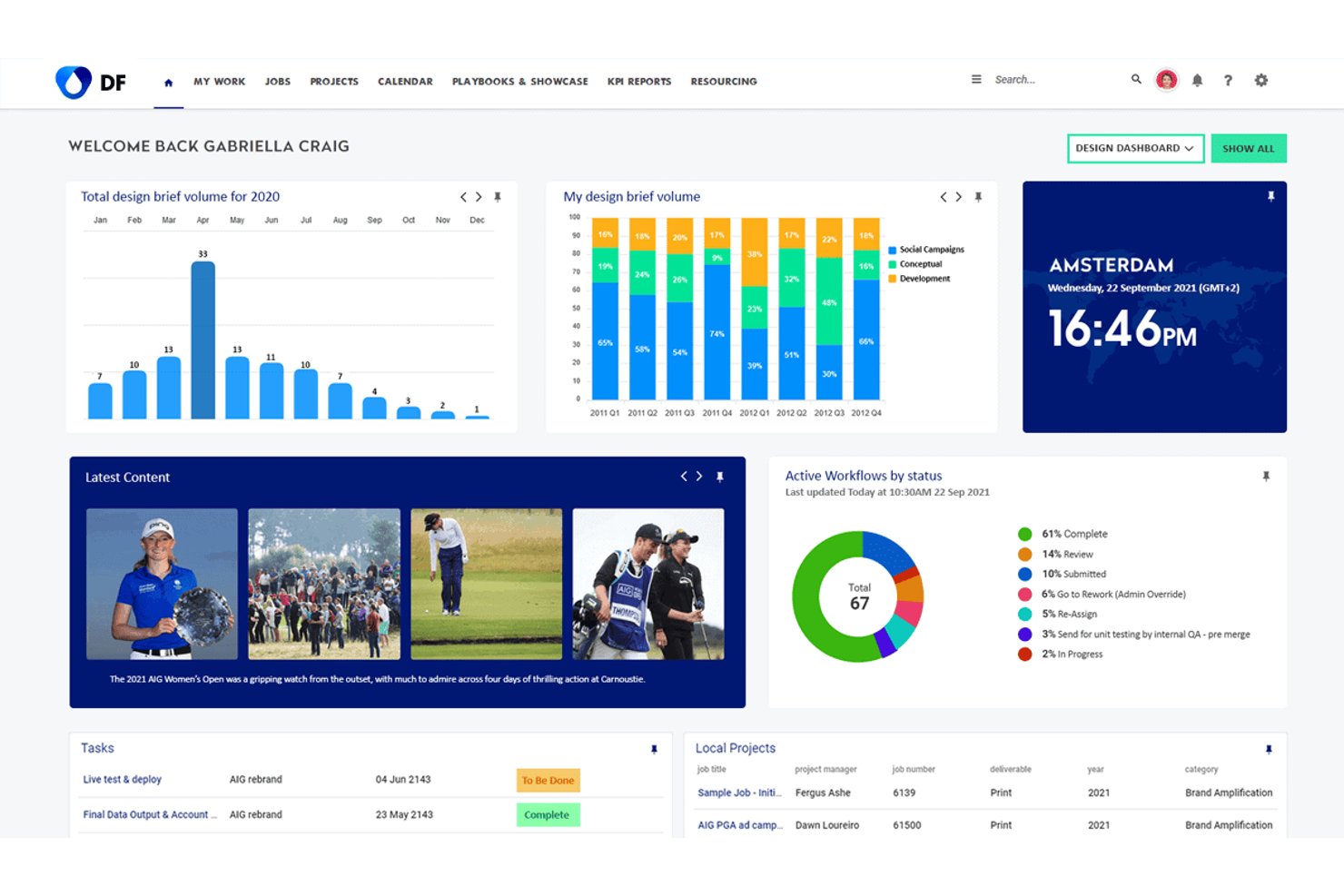
Screendragon is an enterprise workflow and project management platform built for marketing and creative teams, combining project planning, resource management, approval workflows, and visual proofing with a broad integration layer.
Who Is Screendragon Best For?
Screendragon is a strong fit for mid-market and enterprise marketing and creative operations teams managing high-volume, multi-stakeholder workflows across global organizations.
Why I Picked Screendragon
I picked Screendragon because its in-house Connection Manager genuinely sets it apart from typical project management tools. It handles dynamic routing, retry and failover logic, and data transformation across enterprise systems like SAP, Salesforce, and Microsoft Dynamics 365. Its Universal API Connector lets my team plug into any open API endpoint, and the native Slack webhook integration pushes configurable project and workflow events directly to chosen channels.
Screendragon Key Features
- No-code workflow builder: Design and launch custom project workflows using a visual editor and reusable templates.
- Dynamic forms engine: Capture project intake, briefs, and requests with configurable forms tied to workflow steps.
- Centralized proofing and approvals: Review, annotate, and approve files, including side-by-side version comparison, within a unified interface.
- Real-time reporting dashboards: Create personalized dashboards and custom automated reports for monitoring project milestones and resources.
Screendragon Integrations
Screendragon offers native integrations with Slack, SAP, Salesforce, Microsoft 365, and Adobe Creative Cloud. An API and Zapier integration are also available for custom workflows and additional connectivity.
Pros and Cons
Pros:
- Visual proofing and annotation built into platform
- Approval routing tied directly to workflow stages
- Configurable Slack webhook notifications by project
Cons:
- Limited Slack task creation compared to competitors
- Setup requires significant IT and admin involvement
New Product Updates from Screendragon
Screendragon Unveils New AI Hub
Screendragon introduced AI Hub, a new capability that lets teams build and manage AI agents directly within workflows. The update helps marketing teams automate tasks, maintain governance controls, and scale AI-driven operations more efficiently. For more information, visit Screendragon's official site.

Miro
Best for visual project management
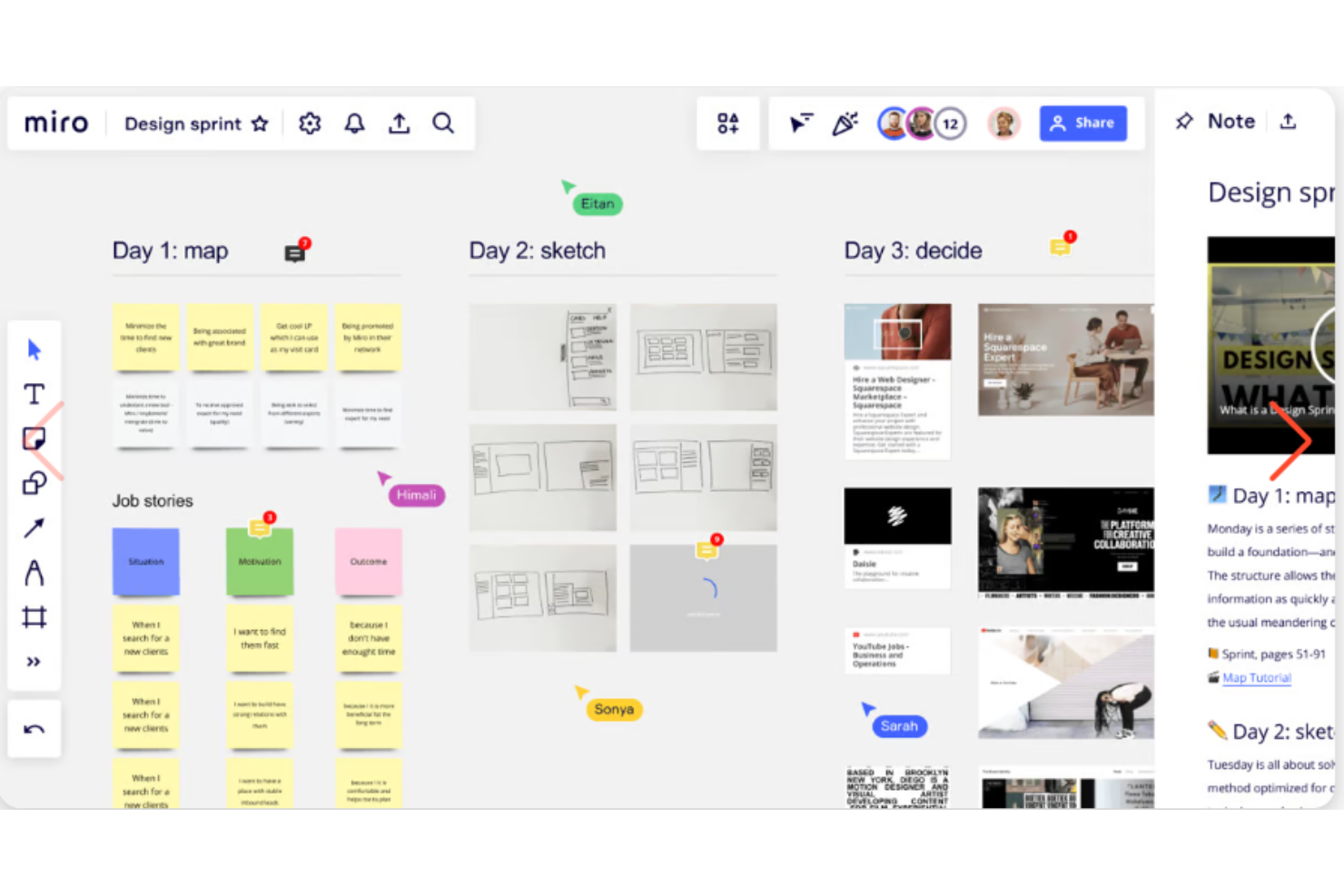
Miro is a visual collaboration and project management platform that combines an infinite canvas with Kanban boards, Gantt charts, timelines, and real-time team collaboration tools.
Who Is Miro Best For?
Miro is a strong fit for cross-functional product, design, and engineering teams that rely on visual thinking to plan and run projects.
Why I Picked Miro
Miro earns its spot on my shortlist because its infinite canvas approach to project management is genuinely unlike anything else I've used. I can map out a full product launch—sticky notes, flowcharts, Kanban board, and timeline—all in one shared space, which keeps my whole team oriented without switching tools. I also like how the Slack integration lets me share live board links and get notified when teammates comment or update tasks, so the canvas stays active between meetings.
Miro Key Features
- Miro AI: Generates diagrams, summarizes board content, and builds mind maps directly from a text prompt.
- Template library: 7,000+ pre-built templates covering Agile ceremonies, retrospectives, project planning, and brainstorming sessions.
- Voting and estimation tools: Built-in dot voting and planning poker features for running prioritization sessions and sprint planning.
- Dependency mapping: Draw visual dependency lines between tasks and milestones directly on the project board.
Pros and Cons
Pros:
- Provides customizable templates
- Excellent for brainstorming and ideation
- Offers real-time collaboration features for remote teams
Cons:
- Steep learning curve for some users
- Lacks advanced project management features
New Product Updates from Miro
Miro Adds Japan Data Residency for Enterprise Customers
Miro has introduced Japan data residency for enterprise customers, offering in-region storage for production data, backups, and metadata, plus in-region compute infrastructure. For more information, visit Miro's official site.

ClickUp
Best for customizable workflows

ClickUp is a project management platform that brings tasks, docs, whiteboards, sprints, dashboards, automations, and built-in AI together in a single workspace—with a native Slack integration that connects your project activity directly to your team's Slack channels.
Who Is ClickUp Best For?
ClickUp is a strong fit for mid-size to large tech and product teams that manage complex, multi-workstream projects and need a single platform to replace several tools.
Why I Picked ClickUp
ClickUp is one of my top picks because I love how far its workflow customization goes. Unlike most project management tools that give you a fixed set of statuses and views, ClickUp lets you define custom statuses for every Space or List independently—so a sprint-based engineering list and a content calendar can each have their own workflow logic. I rely on Automations to trigger Slack notifications for status changes or assignee updates, keeping the right people in the loop without manual follow-up.
ClickUp Key Features
- Multiple views: Switch between List, Board, Gantt, Calendar, and Timeline views within the same project without duplicating any work.
- Custom fields: Add dropdowns, numbers, dates, or formulas to any task to capture exactly the data your team tracks.
- ClickUp Docs: Create and link project documentation directly to tasks, so context lives alongside the work.
- Slack task creation: Turn any Slack message into a ClickUp task without leaving the conversation.
Pros and Cons
Pros:
- Multiple views of project data
- Collaborative features within the platform
- Customizable dashboards, labels, and statuses
Cons:
- Initial setup and configuration can be time consuming
- Extensive customization may come with a learning curve
New Product Updates from ClickUp
ClickUp Adds Meetings Hub, Super Agent Templates, and ZoomInfo Integration
ClickUp adds a searchable Meetings Hub, new ways to clone and template Super Agents, and a ZoomInfo integration through the App Center. These updates improve meeting retrieval, agent reuse, and access to sales intelligence. For more information, visit ClickUp’s official site.

Best for client work collaboration
Teamwork.com is a project management platform built around client work, offering task management, Gantt charts, workload planning, time tracking, budget management, and a native Slack integration for project notifications and task creation.
Who Is Teamwork.com Best For?
Teamwork.com is a strong fit for project managers and team leads at agencies or client-service firms who need to track deliverables, budgets, and client communication in one place.
Why I Picked Teamwork.com
I picked Teamwork.com as one of the best because it's purpose-built for client work, and that focus shows up directly in how its Slack integration works. I can create tasks from Slack messages and have those messages auto-populate the task description, which keeps client context intact without any copy-pasting. Channel-to-project mapping means my team's Slack channels stay tied to active client projects, with task and comment notifications flowing in automatically.
Teamwork.com Key Features
- Workload and capacity planning: View your team's workload across active projects and identify over- or under-allocated members before resourcing issues escalate.
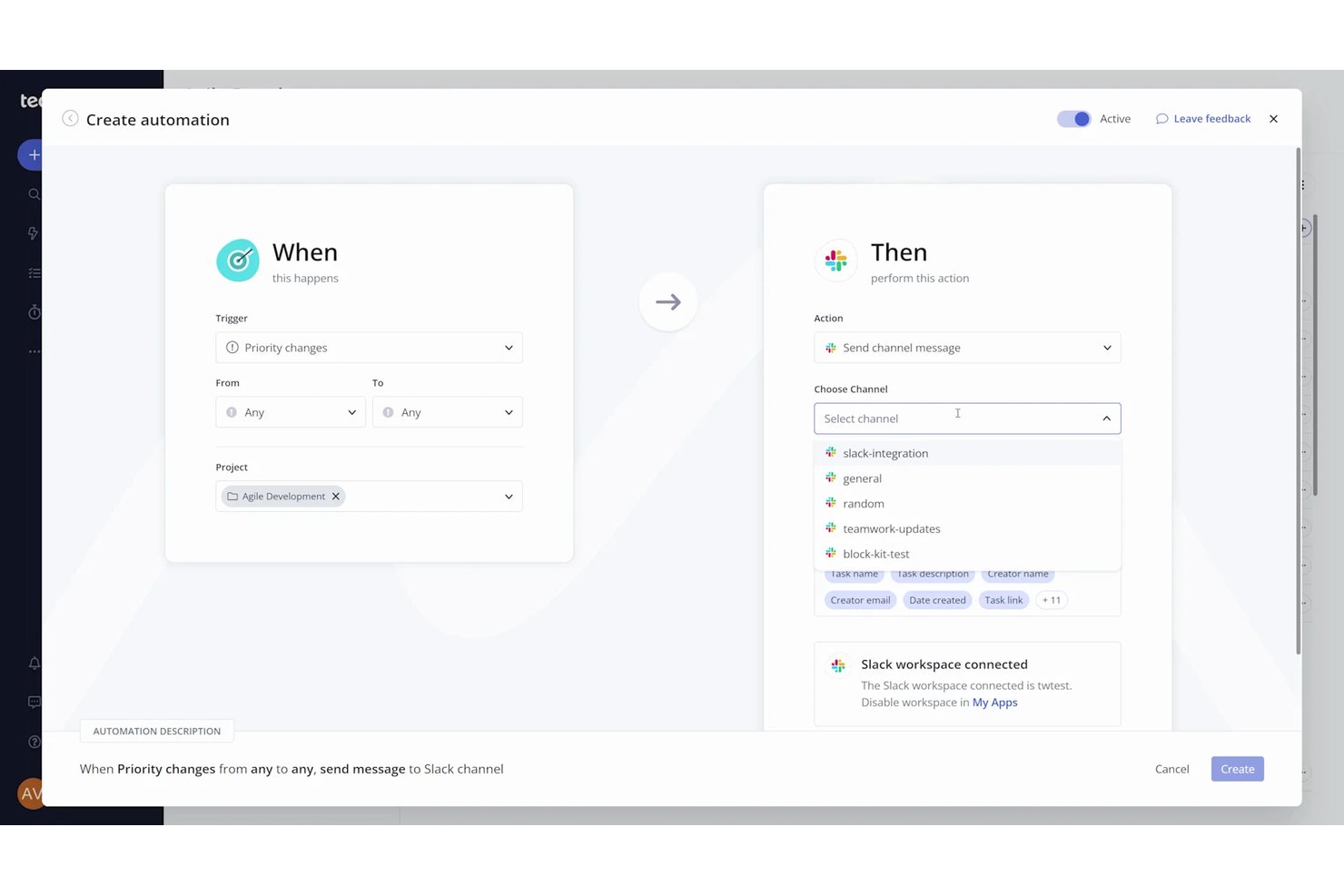
- Slack automations: Set task-triggered automations that post custom messages to a selected Slack channel using dynamic task fields.
- Client invoicing: Generate invoices directly from logged billable time and sync them with accounting tools like Xero and QuickBooks.
- Milestone tracking: Set project milestones to mark key checkpoints and give clients visibility into delivery progress.
Teamwork.com Integrations
Teamwork.com lists 150+ integrations, including native integrations with Slack, Microsoft Office, Harvest, and Xero File. It also supports API-based custom integrations and Zapier.
Pros and Cons
Pros:
- Time and budget tracking support client delivery
- Task ownership and deadlines remain visible
- Client updates stay tied to deliverables
Cons:
- Channel alerts can expose restricted project details
- Existing tasks need edits outside chat
Jira
Best for agile teams tracking work in Slack
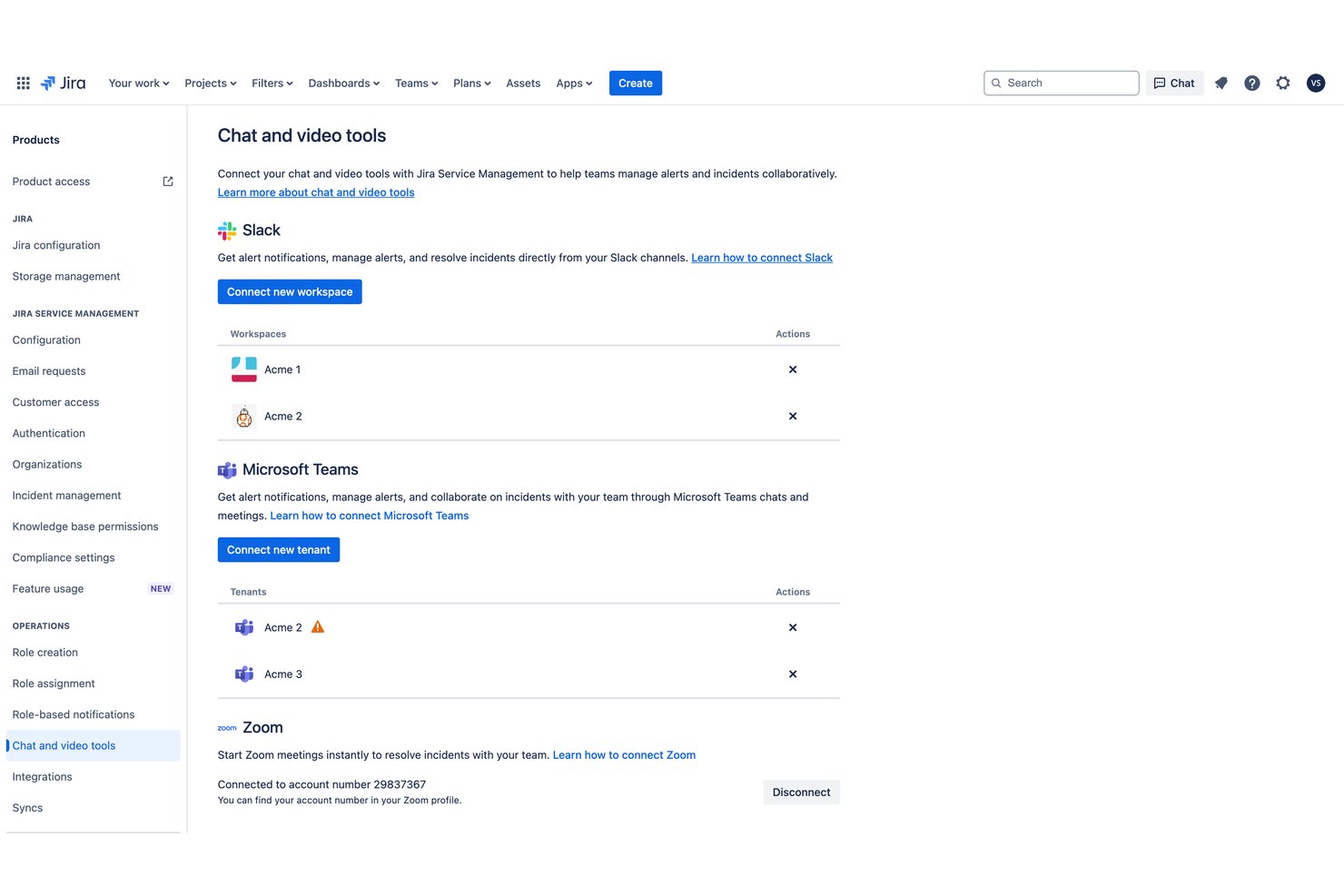
Jira is a project management platform by Atlassian built around agile workflows, offering sprint planning, backlog management, customizable boards, dependency tracking, and a deeply integrated Slack app for creating, updating, and tracking work without leaving Slack.
Who Is Jira Best For?
Jira is a strong fit for software development and technical project teams that run agile workflows and need sprint tracking, backlog management, and issue tracking in one place.
Why I Picked Jira
I picked Jira as one of the best because it's the go-to tool for agile sprint tracking, and its Slack integration goes well beyond simple notifications. I can create work items directly from a Slack message, sync thread replies as Jira comments, and transition issue statuses from notification cards without ever opening Jira. For teams running active sprints, that means a Slack conversation about a bug can become a tracked, assigned issue in seconds.
Jira Key Features
- Backlog management: Teams can organize, rank, and prioritize future work items in a dedicated backlog view before pulling them into sprints.
- Customizable workflows: Work items move through configurable stages that teams define to match their actual delivery process.
- Automation rules: No-code automation triggers actions across spaces and projects based on conditions teams set, reducing manual updates.
- Cross-team dependency tracking: Teams can link work items across projects to surface blockers and coordinate handoffs, available on Premium and above.
Jira Integrations
Jira offers over 3,000 Marketplace integrations, including Slack, Microsoft Teams, Zoom, Confluence, Trello, Bitbucket, GitHub, Azure DevOps, Jenkins, and GitLab. Its REST API supports custom integrations.
Pros and Cons
Pros:
- Thread replies stay attached to Jira work
- Boards clarify ownership, status, and blockers
- Slack conversations become assigned, trackable sprint work
Cons:
- Dense menus slow routine ticket updates
- Workflow configuration demands ongoing administrator attention
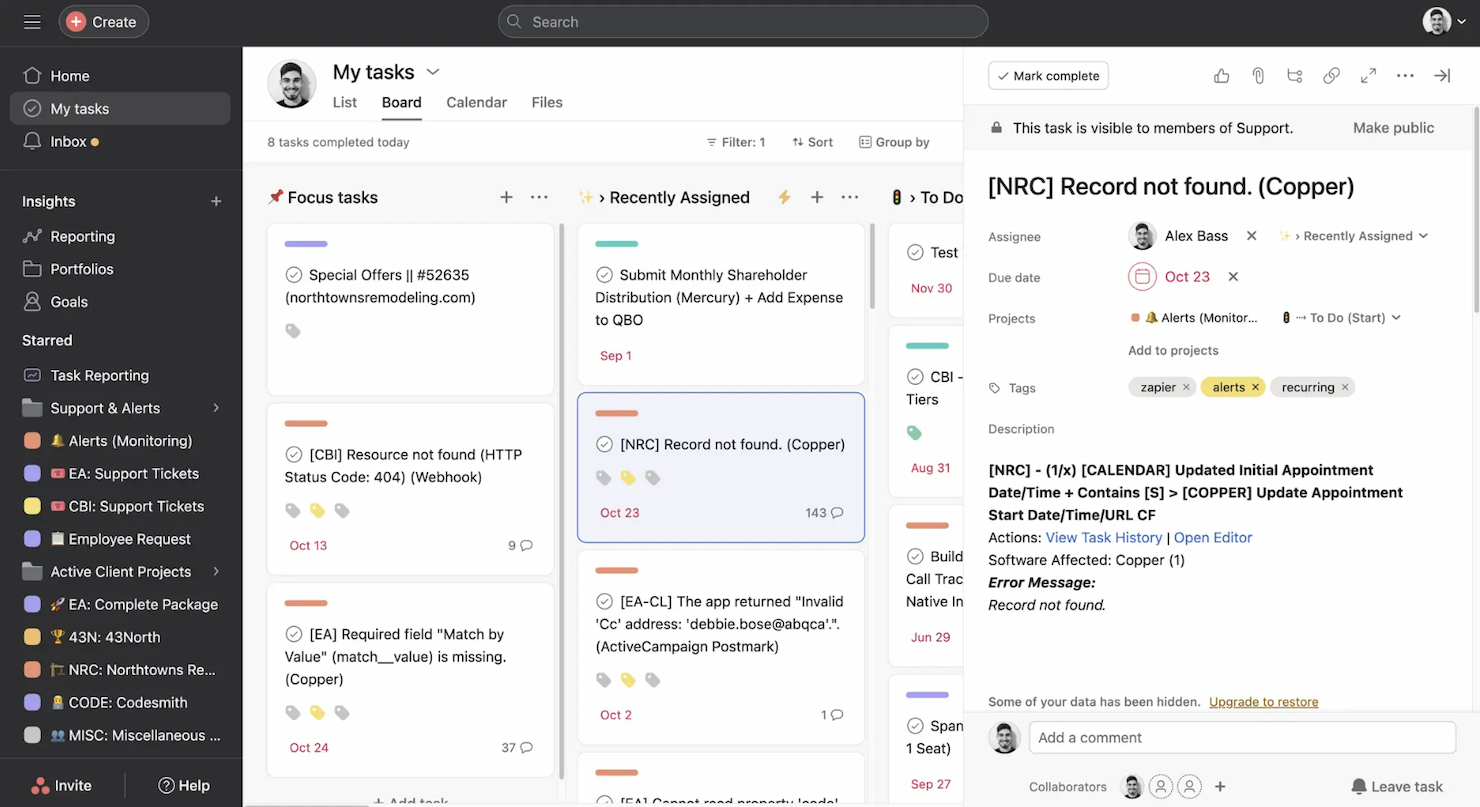
Asana is a versatile project management app that facilitates team collaboration and work management. It excels in goal alignment by linking tasks and projects to the organization's objectives, ensuring cohesive progress.
Why I picked Asana: Asana offers a comprehensive approach to project management and its unique emphasis on aligning tasks with strategic goals. This tool stands out due to its Work Graph® data model, which helps teams visualize their work in the context of the company's objectives. It provides tools like Goals and Portfolios that directly tie individual tasks to overarching business goals, fostering a sense of purpose and direction within teams.
Standout features & integrations:
Features include task management, project timelines, real-time chat, customizable dashboards, automated workflows, goal tracking, calendar integration, multiple project views (list, board, calendar, timeline), due date tracking, file attachments, team assignments, integration with multiple third-party applications, and robust reporting tools.
Integrations include Slack, Microsoft Teams, Google Calendar, Salesforce, Adobe Creative Cloud, Jira, GitHub, Zoom, Everhour, and TimeCamp.
Pros and Cons
Pros:
- Over 100 native integrations
- Direct linking of tasks to strategic goals
- Extensive project management tools
Cons:
- Limited custom reporting tools
- Free plan is limited to teams of 10

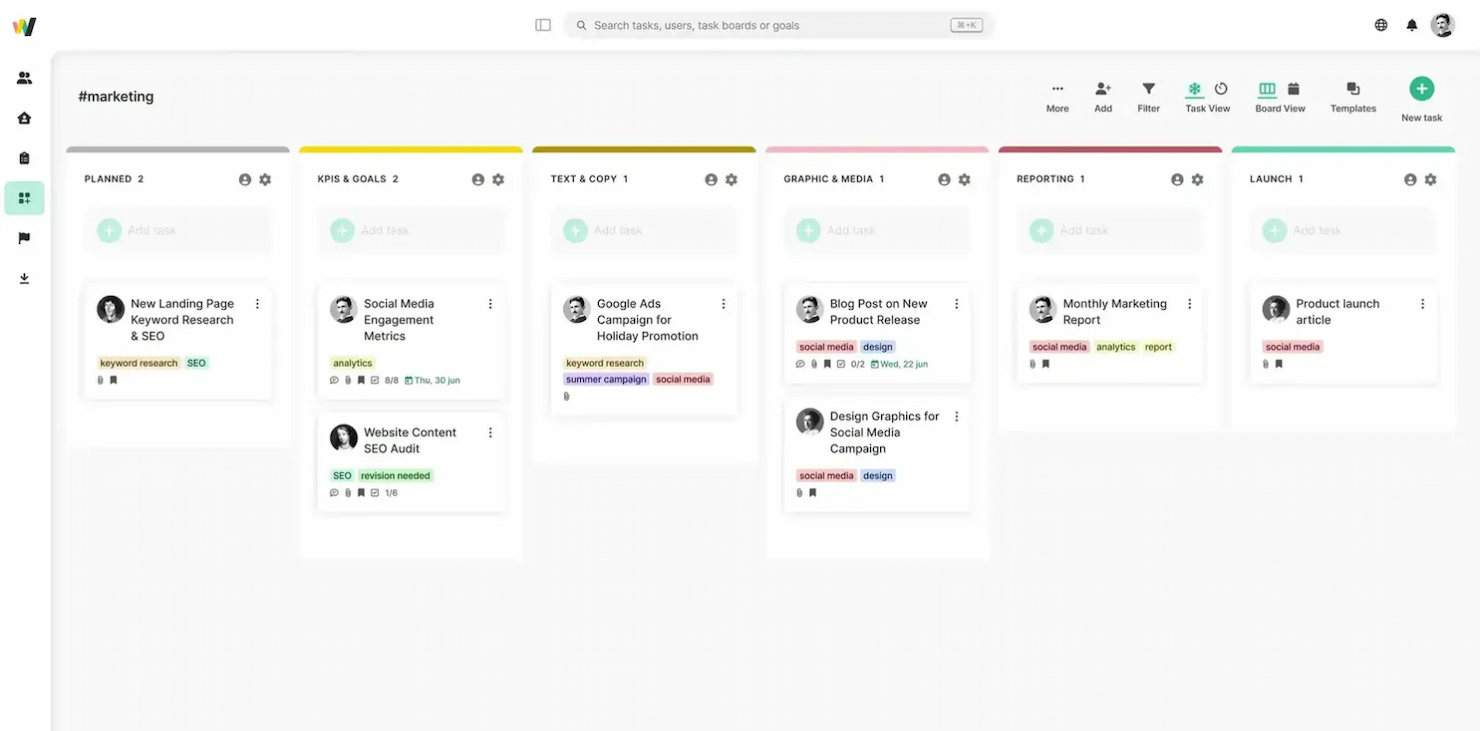
Workstreams is a task and workflow management tool built around Slack, offering Kanban boards, AI-assisted task creation, workflow automation, and time tracking directly within your Slack workspace.
Who Is Workstreams Best For?
Workstreams is a good fit for small to mid-sized teams that already run their day-to-day work inside Slack and want task management without switching tools.
Why I Picked Workstreams
Workstreams earns its spot on my shortlist because of how naturally its Kanban boards fit inside Slack. I can view a full board directly in a Slack channel, move cards between custom worksteps, and create tasks straight from messages—without ever opening a separate app. I also like the frozen task detection, which flags cards that haven't moved in a set period, keeping the board honest about where work is actually stalled.
Workstreams Key Features
- AI-assisted task creation: Automatically generates task descriptions and breaks tasks down into subtasks based on a brief prompt.
- Time allocation tracking: Assigns estimated time to individual tasks so you can monitor workload distribution across your team.
- Pre-built workflow library: Provides ready-made workflow templates you can deploy immediately or customize to match your team's process.
- Guest board access: Invites external collaborators to specific boards without requiring a full team seat.
Pros and Cons
Pros:
- Workflow automation
- Real-time collaboration
- Customizable Kanban boards
Cons:
- No mobile application for tasks on the go
- Minimum seat requirement
Annen prosjektstyringsprogramvare som integreres med Slack
Nedenfor finner du en liste over ytterligere prosjektstyringsprogramvare som ble kortlistet, men som fortsatt er verdifull og verdt å undersøke nærmere.
- Teamline
For Slack task management
- monday AI Workspace
For visual project tracking
- Airtable
For database-driven projects
- Jira Service Management
For agile software teams
- Workast
For Slack-first task capture and tracking
- Workzone
For structured project updates to Slack
- Linear
For developer-team Slack issue intake
- Shortcut
For software teams tracking work from Slack
- Trello
For visual task management
- monday work management
For coordinating projects across teams


Relaterte anmeldelser av prosjektstyringsprogramvare som integreres med Slack
Hvis du fortsatt ikke har funnet det du leter etter her, kan du ta en titt på disse andre relaterte verktøyene som vi har testet og evaluert:
- Prosjektstyringsprogramvare
- Ressursstyringsprogramvare
- Programvare for arbeidsflytautomatisering
- Programvare for tidsregistrering
- Programvare for oppgavehåndtering
- Samarbeidsverktøy
- Verktøy for å lage Gantt-diagrammer
- Produktivitetsverktøy
- Programvare for prosjektsporing
- Programvare for prosjektplanlegging
How I Evaluate Project Management Software That Integrates With Slack
I look at these tools across two layers: the baseline Slack integration and PM capabilities that get a tool in the door, and the differentiators that make one worth recommending over another.
Core Functionality (Table Stakes For This List)
When I'm selecting tools for my list, I rank each one on a scale from 0 (does not offer the functionality) to 5 (excels in this area) for each core functionality listed below. Then, I calculate the tool's total score into a percentage. Each tool needs to achieve a minimum total score of 65% to be considered for inclusion.
- Native Slack Integration: I check whether the tool has an official Slack app—not just a Zapier workaround—and whether it supports multi-workspace connections.
- Task Creation From Slack: I look for the ability to turn a Slack message into an assigned, due-dated task using slash commands or message shortcuts.
- Bi-Directional Notifications: Real-time, two-way sync matters here—replies in a Slack thread should update the task record, and status changes should post back to the channel.
- Project Planning & Tracking: I evaluate the depth of PM views available, from Kanban boards and task lists to timelines with dependencies and milestone tracking.
- Team Collaboration Features: Shared workspaces, threaded comments, file attachments, and @mentions that map to Slack identities all factor into how I score this area.
- Workflow Automation: I look at whether automation rules can use Slack events as triggers—for example, auto-creating a task when a message gets a specific emoji reaction.
Once I have a list of tools that meet this criteria, I consider what sets each platform apart.
Differentiating Factors (What Sets Vendors Apart)
Here's how I compare and contrast different vendors:
Standout Features
Custom Slack Workflows are a big differentiator—I look for tools that let teams trigger project actions through Slack's Workflow Builder, like submitting a bug report form that auto-creates a tracked task. Interactive link previews also matter. When someone pastes a task link in a channel, the best integrations let you update status or reassign directly from the preview card. I also check for built-in standup and approval bots that collect async updates and route sign-offs within Slack threads.
Beyond Features
Scalability is one of the first things I evaluate—a five-person startup and a 500-person org on Slack Enterprise Grid have very different needs around multi-workspace support and portfolio reporting. I also consider how well each tool connects to the broader tech stack, especially GitHub, Figma, and Google Workspace, since Slack-first teams rarely work in just two tools. Pricing structure matters too, particularly how vendors handle guest and collaborator seats for external stakeholders who need project visibility.
Slik velger du prosjektstyringsprogramvare som integreres med Slack
Mens du går gjennom din egen unike prosess for valg av programvare, bør du ha følgende punkter i tankene:
- Integrasjonskompatibilitet: Programvaren for prosjektstyring bør tilby en dyp integrasjon med Slack, slik at kommunikasjonen kan sentraliseres og Slack-meldinger kan gjøres om til oppgaver som kan følges opp.
- Effektive varsler: Se etter programvare som leverer varsler i Slack på en måte som fremmer rask handling og minimerer risikoen for å gå glipp av kritiske oppdateringer.
- Enkel koordinering: Integrasjonen bør effektivisere, ikke komplisere, teamets arbeidsprosesser. Den bør gjøre det enklere å koordinere oppgaver, sette forfallsdatoer og kommunisere med teamet direkte i Slack.
- Funksjoner for fildeling: Programvaren for prosjektstyring bør utnytte Slacks funksjoner for fildeling, slik at teammedlemmer kan dele og få tilgang til filer direkte i chatteplattformen. Dette er spesielt viktig for team som bruker ulike filbehandlingssystemer og trenger en helhetlig måte å dele dokumenter på.
- Rapportering og oversikt: Velg programvare som forbedrer rapporteringsprosessene gjennom Slack-integrasjon. Dette kan innebære at teammedlemmer får mulighet til å publisere oppdateringer i en Slack-kanal, noe som kan gi bedre oversikt og redusere behovet for lange e-posttråder.
Ved å fokusere på disse nøkkelområdene kan programvarekjøpere finne en løsning for prosjektstyring som ikke bare integreres med Slack, men som også oppfyller deres spesifikke behov og forbedrer teamets samlede effektivitet.
Trender innen programvare for prosjektstyring som integreres med Slack
Her er noen trender jeg har lagt merke til innen programvare for prosjektstyring, samt hva de kan bety for markedsføringsbransjens fremtid:
- Større vekt på verktøy for samarbeid i sanntid: Programvare for prosjektstyring inkluderer i stadig større grad funksjoner for samarbeid i sanntid. Utviklingen mot mer interaktive og integrerte kommunikasjonsverktøy hjelper prosjektteam med å holde seg samkjørte og reagere raskt på endringer, noe som forbedrer den samlede produktiviteten.
- Fremvekst av AI og automatisering: Integreringen av kunstig intelligens (AI) i verktøy for prosjektstyring utvikler seg raskt. Disse funksjonene sparer ikke bare tid, men øker også nøyaktigheten og kan forutse potensielle flaskehalser i prosjektet før de oppstår.
- Forbedret dataanalyse og rapportering: Prosjektledere er i økende grad avhengige av kraftige verktøy for datavisualisering og rapportering for å følge med på resultater, fordele ressurser effektivt og ta velinformerte beslutninger. De nyeste programvareversjonene er utstyrt med dashbord som gir omfattende innsikt i prosjektets status, teamets resultater og overholdelse av budsjettet, noe som er avgjørende for å håndtere store prosjekter effektivt.
- Fokus på brukeropplevelse og tilpasningsmuligheter: Etter hvert som brukerbasen for programvare til prosjektstyring blir mer mangfoldig, øker etterspørselen etter svært tilpasningsvennlige og brukervennlige grensesnitt. Denne fleksibiliteten gjør det mulig for team å konfigurere prosjektstyringsmiljøet nøyaktig slik de trenger det, noe som forbedrer brukshyppigheten og den samlede tilfredsheten.
- Mindre bruk av rigide, lineære tilnærminger til prosjektstyring: Tradisjonelle, lineære metoder for prosjektstyring blir mindre populære, samtidig som det skjer en dreining mot mer fleksible, smidige metoder. Denne endringen gjenspeiles i utviklingen av funksjoner som støtter iterative prosesser, for eksempel Kanban-tavler og Scrum-sprinter, som er direkte integrert i verktøy for prosjektstyring.
Disse trendene understreker en bredere utvikling mot mer integrerte, intelligente og brukerorienterte løsninger for prosjektstyring. Etter hvert som disse verktøyene utvikler seg, fortsetter de å løse komplekse utfordringer som prosjektledere står overfor, særlig de som leder distribuerte team og flere prosjekter samtidig.
Hva er programvare for prosjektstyring som integreres med Slack?
Programvare for prosjektstyring som integreres med Slack, kombinerer prosjektstyringsprogramvarens organisatoriske styrke med Slacks allsidige kommunikasjonsverktøy. Ved å investere i programvare for prosjektstyring som integreres med Slack kan teamet ditt motta umiddelbare oppdateringer om oppgaver og prosjektfremdrift i sanntid.
Funksjoner i programvare for prosjektstyring som integreres med Slack
Å velge den beste programvaren innebærer å forstå hvordan bestemte funksjoner bidrar til vellykket gjennomføring av prosjekter. Her peker jeg ut de viktigste funksjonene du bør se etter når du søker etter programvare for prosjektstyring som løser dine spesifikke behov:
- Sanntidsvarsler: Denne funksjonen sørger for at teammedlemmene holdes informert om de nyeste endringene, oppgavene og fristene direkte i Slack, noe som fremmer en kultur for rask respons.
- Oppgavehåndtering: Ved å håndtere oppgaver gjennom Slack kan teammedlemmene raskt tildele, følge opp og oppdatere statusen for oppgaver, slik at ingenting blir oversett.
- Fildeling og samarbeid: Dette gir enkel tilgang til prosjektfiler i Slack, slik at teammedlemmene kan samarbeide om dokumenter uten å bytte mellom applikasjoner.
- Tidsregistrering: Integrering av tidsregistrering i Slack bidrar til å opprettholde åpenhet og ansvarlighet, og gir bedre tidsstyring av prosjekter.
- Kalendersynkronisering: Muligheten til å synkronisere kalendere med Slack sørger for at alle teammedlemmene er klar over viktige datoer og frister, noe som bidrar til effektiv planlegging.
- Tilpassbare arbeidsflyter: Tilpassbare arbeidsflyter i Slack gjør det mulig for team å opprette et system som fungerer best for prosjektets spesifikke krav.
- Rapporteringsverktøy: Med rapporteringsverktøy integrert i Slack kan team raskt generere og dele rapporter for å vurdere fremdriften og ta datadrevne beslutninger.
- Integrasjon med andre verktøy: Denne funksjonen legger til rette for et mer helhetlig teknologisk økosystem, reduserer behovet for flere plattformer og effektiviserer prosjektstyringen.
- Automatiske påminnelser: Automatiske påminnelser som sendes gjennom Slack, hjelper teammedlemmene med å holde oversikt over ansvarsområdene sine.
- Brukertillatelser og sikkerhet: Ved å administrere brukertillatelser i Slack kan prosjektledere sørge for at sensitiv informasjon er beskyttet og bare tilgjengelig for autoriserte personer.
Disse funksjonene skaper et kraftfullt samspill mellom prosjektstyrings- og kommunikasjonsplattformer, noe som fører til mer effektiv gjennomføring av prosjekter.
Fordeler med prosjektstyringsprogramvare som integreres med Slack
Integrering av prosjektstyringsprogramvare med Slack skaper et kraftfullt samspill som kan øke produktiviteten og effektiviteten i ethvert team. For organisasjoner som vurderer en slik løsning, kan det å forstå de konkrete fordelene bidra til å ta en veloverveid beslutning. Her er noen viktige fordeler å ta hensyn til:
- Sentralisert kommunikasjon: Denne integrasjonen sentraliserer kommunikasjonen, noe som gjør det enklere for teammedlemmene å holde kontakten og være informert. Ved å ha prosjektdiskusjoner og oppdateringer i Slack kan team unngå fragmenteringen som ofte oppstår ved bruk av flere kommunikasjonsplattformer.
- Sanntidsvarsler: Slacks sanntidsvarslingssystem sørger for at alle er oppmerksomme på de nyeste endringene og kan reagere raskt på nye oppgaver eller ny informasjon.
- Økt produktivitet: Kombinasjonen av prosjektstyringsverktøy og Slacks kommunikasjonsfunksjoner kan føre til en betydelig produktivitetsøkning. Den effektiviserer arbeidsflytene ved at teammedlemmene kan kommunisere og håndtere oppgaver uten å bytte mellom ulike applikasjoner.
- Organisering av oppgaver: Integrasjonen med Slack bidrar til å sikre at alle oppgaver blir fulgt opp, og at teammedlemmene har en tydelig forståelse av ansvarsområdene og fristene sine.
- Forenklet fildeling: Slack gir enkel tilgang til filer og prosjektinformasjon. Integrasjonen gjør det mulig for brukere å dele, få tilgang til og samarbeide om filer som er lagret i ulike skytjenester, uten å forlate Slack-miljøet.
Som et resultat fremmer prosjektstyringsprogramvare som integreres med Slack bedre samarbeid og gir en strukturert tilnærming til prosjektstyring. Dette kan til syvende og sist bli en avgjørende faktor for virksomheter som ønsker å forbedre driftseffektiviteten og teamsamspillet.
Kostnader og priser for prosjektstyringsprogramvare som integreres med Slack
Priser og abonnementstyper for prosjektstyringsprogramvare varierer mye, avhengig av funksjonene og skalerbarheten du trenger. En forståelse av disse alternativene vil hjelpe deg med å ta en veloverveid beslutning som samsvarer med teamets behov og budsjettbegrensninger.
Nedenfor finner du en oversikt over vanlige prismodeller og hva de vanligvis omfatter.
Sammenligningstabell for abonnementer for prosjektstyringsprogramvare som integreres med Slack
| Plantype | Gjennomsnittspris | Vanlige funksjoner |
| Gratis | $0 | Grunnleggende oppgavehåndtering, begrensede integrasjoner og minimale brukerbegrensninger |
| Grunnleggende | $5 - $10/bruker/måned | Forbedret oppgavehåndtering, flere integrasjoner og noe automatisering |
| Standard | $10 - $25/bruker/måned | Fullstendige verktøy for prosjektplanlegging, avanserte integrasjoner, mer omfattende automatisering og rapporteringsfunksjoner |
| Premium | $25 - $50/bruker/måned | Alle standardfunksjoner samt ressursstyring, avansert analyse og prioritert brukerstøtte |
| Bedrift | Tilpasset pris | Alle premiumfunksjoner samt tilpassede integrasjoner, ubegrenset antall brukere og sikkerhet og brukerstøtte på bedriftsnivå |
Når du velger en plan, bør du ta hensyn til både nåværende og forventede behov for å sikre at programvaren kan skalere med virksomheten din. Sørg for å se etter planer som balanserer funksjonalitet og kostnadseffektivitet, slik at du får mest mulig verdi ut av investeringen.
Programvare for prosjektstyring som integreres med Slack – vanlige spørsmål
Er det mulig å opprette Jira-saker fra Slack?
Med Jiras integrasjon med Slack kan brukere opprette nye Jira-saker direkte fra Slack-meldinger. I tillegg kan brukere endre status på saker, legge til kommentarer og motta varsler om oppdateringer av saker i Slack. Denne integrasjonen bidrar til å opprettholde en smidig arbeidsflyt mellom sakssporing og teamkommunikasjon.
Tilbyr monday.com noen spesifikke Slack-integrasjoner?
monday.coms Slack-integrasjon gjør det mulig for brukere å motta oppdateringer, opprette nye elementer, endre statuser og dele tavler i Slack. Denne integrasjonen hjelper team med å samarbeide mer effektivt ved å hente oppdateringer i sanntid fra monday.com inn i Slack-arbeidsområdet, slik at alle er oppdatert.
Hvordan kan ClickUp brukes i Slack?
ClickUp integreres med Slack slik at brukere kan opprette oppgaver, knytte Slack-meldinger til oppgaver og motta tilpassbare varsler. Integrasjonen gjør det også mulig for brukere å endre oppgavestatus og -prioritet fra Slack, noe som gjør det enklere å administrere prosjektarbeidsflyter uten å forlate chattegrensesnittet.
Hvilke funksjoner tilbyr Wrikes integrasjon med Slack?
Wrikes integrasjon med Slack gjør det mulig for brukere å opprette Wrike-oppgaver fra Slack-meldinger, motta varsler om oppdateringer av oppgaver og importere Slack-samtaler til Wrike som kommentarer på oppgaver. Denne integrasjonen er utformet for å legge til rette for en mer helhetlig opplevelse av arbeidsstyring ved å koble sammen kommunikasjons- og oppgavestyringsplattformene.
Kan Smartsheet kobles til Slack for prosjektstyring?
Ja, Smartsheet kan kobles til Slack, slik at brukere kan motta varsler om endringer i ark, be om oppdateringer og dele ark i Slack. Denne integrasjonen hjelper team med å holde seg informert om prosjektfremdriften og samarbeide om Smartsheet-dokumenter uten å måtte bytte mellom applikasjoner.
Slik velger du prosjektstyringsprogramvare som integreres med Slack
Når du går gjennom din egen unike prosess for valg av programvare, bør du ha følgende punkter i tankene:
-
- Integrasjonskompatibilitet: Prosjektstyringsprogramvaren bør tilby en dyp integrasjon med Slack, slik at kommunikasjonen kan sentraliseres og Slack-meldinger kan gjøres om til oppgaver som kan følges opp.
-
- Effektive varsler: Se etter programvare som leverer varsler i Slack på en måte som fremmer rask handling og reduserer risikoen for at viktige oppdateringer overses.
-
- Enkel koordinering: Integrasjonen bør forenkle, ikke komplisere, teamets arbeidsprosesser. Den bør gjøre det enklere å koordinere oppgaver, angi forfallsdatoer og kommunisere med teamet direkte i Slack.
-
- Fildelingsfunksjoner: Prosjektstyringsprogramvaren bør utnytte Slacks funksjoner for fildeling, slik at teammedlemmer kan dele og få tilgang til filer direkte i chatteplattformen. Dette er særlig viktig for team som bruker ulike filbehandlingssystemer og trenger en helhetlig måte å dele dokumenter på.
-
- Rapportering og oversikt: Velg programvare som forbedrer rapporteringsprosessene gjennom Slack-integrasjon. Dette kan innebære at teammedlemmer kan legge ut oppdateringer i en Slack-kanal, noe som kan gi bedre oversikt og redusere behovet for lange e-posttråder.
Ved å fokusere på disse nøkkelområdene kan programvarekjøpere finne en prosjektstyringsløsning som ikke bare integreres med Slack, men som også oppfyller deres spesifikke behov og forbedrer teamets samlede effektivitet.