

Le 10 migliori soluzioni software gratuite per la gestione dei progetti di costruzione nel 2026

Il miglior software gratuito per la gestione dei progetti edilizi: selezione


Il software gratuito per la gestione dei progetti edilizi può aiutarti a gestire attività, tempistiche e team senza aggiungere un'altra spesa per il software. Fortunatamente, è proprio qui che il software gratuito per la gestione dei progetti edilizi può essere utile. Che tu gestisca una piccola impresa o stia crescendo rapidamente, questi strumenti possono fornire maggiore struttura senza aggiungere un'altra spesa.
In questo elenco ho esaminato i migliori strumenti gratuiti disponibili. Mi sono concentrato su ciò che funziona davvero per i team del settore edilizio: programmazione, comunicazione, condivisione dei file e facilità d'uso, per assicurarmi che tu possa trovare la soluzione più adatta alle esigenze specifiche del tuo team.
Perché fidarsi dei nostri consigli sui software
Il nostro team testa e recensisce software dal 2012. In quanto project manager noi stessi, sappiamo quanto sia difficile — e importante — scegliere il software giusto.
Per questa guida, abbiamo valutato gli strumenti attraverso test pratici e ricerche indipendenti, assegnando un punteggio agli strumenti in base ai nostri criteri di selezione. Ci basiamo inoltre sulle competenze di leader di pensiero del settore e di professionisti attivi nella gestione dei progetti.
Le nostre recensioni riflettono il nostro giudizio editoriale umano, non un discorso di vendita.
Revisori esperti:
Tabella di confronto dei migliori software gratuiti per la gestione dei progetti edilizi
Questa tabella di confronto riassume i dettagli sui prezzi delle mie migliori selezioni di software gratuiti per la gestione dei progetti edilizi:
| Tool | Best For | Trial Info | Price | ||
|---|---|---|---|---|---|
| 1 | Ideale per template di gestione edilizia | Prova gratuita di 14 giorni | Da $9/utente/mese (fatturati annualmente) | Website | |
| 2 | Ideale per i flussi di lavoro Agile | Prova gratuita di 14 giorni + piano gratuito disponibile | Da $10/utente/mese | Website | |
| 3 | Ideale per diagrammi di Gantt interattivi | Prova gratuita di 14 giorni | Da $7/utente/mese (fatturato annualmente) | Website | |
| 4 | Ideale per un'interfaccia utente intuitiva | Prova gratuita di 15 giorni + piano gratuito + demo gratuita disponibili | A partire da $4/utente/mese (fatturazione annuale) | Website | |
| 5 | Ideale per la suddivisione nidificata delle attività | Prova gratuita di 30 giorni + piano gratuito disponibile | Da $7.65/membro/mese (fatturato annualmente) | Website | |
| 6 | Ideale per creare ambienti di lavoro personalizzabili | Piano gratuito + demo gratuita disponibile | Da $7/utente/mese (fatturato annualmente) | Website | |
| 7 | Ideale per la collaborazione con clienti e stakeholder | Prova gratuita di 30 giorni + piano gratuito + demo gratuita disponibile | Da $9.99/utente/mese (fatturato annualmente) | Website | |
| 8 | Il migliore per strumenti di gestione della forza lavoro | Prova gratuita di 30 giorni + demo gratuita disponibile | A partire da $39/mese (fatturato annualmente) | Website | |
| 9 | Ideale per la gestione dei cantieri | Piano gratuito disponibile | A partire da $39/utente/mese (fatturato annualmente) | Website | |
| 10 | Ideale per il monitoraggio dei progetti in tempo reale | Prova gratuita di 30 giorni + demo gratuita disponibile | A partire da $15/user/month (con fatturazione annuale) | Website |


Recensioni dei migliori software gratuiti per la gestione dei progetti edilizi
Di seguito sono riportati i miei riepiloghi dettagliati dei migliori software gratuiti per la gestione dei progetti edilizi entrati nella mia selezione. Le mie recensioni offrono uno sguardo approfondito alle funzionalità principali, ai pro e contro, alle integrazioni e ai casi d’uso ideali di ogni strumento, per aiutarti a trovare quello più adatto a te. Sebbene alcuni di questi strumenti offrano una versione completamente gratuita, altri propongono un periodo di prova gratuito. Ho aggiunto una nota su ciò che è gratuito in ciascuna recensione.

Ideale per template di gestione edilizia
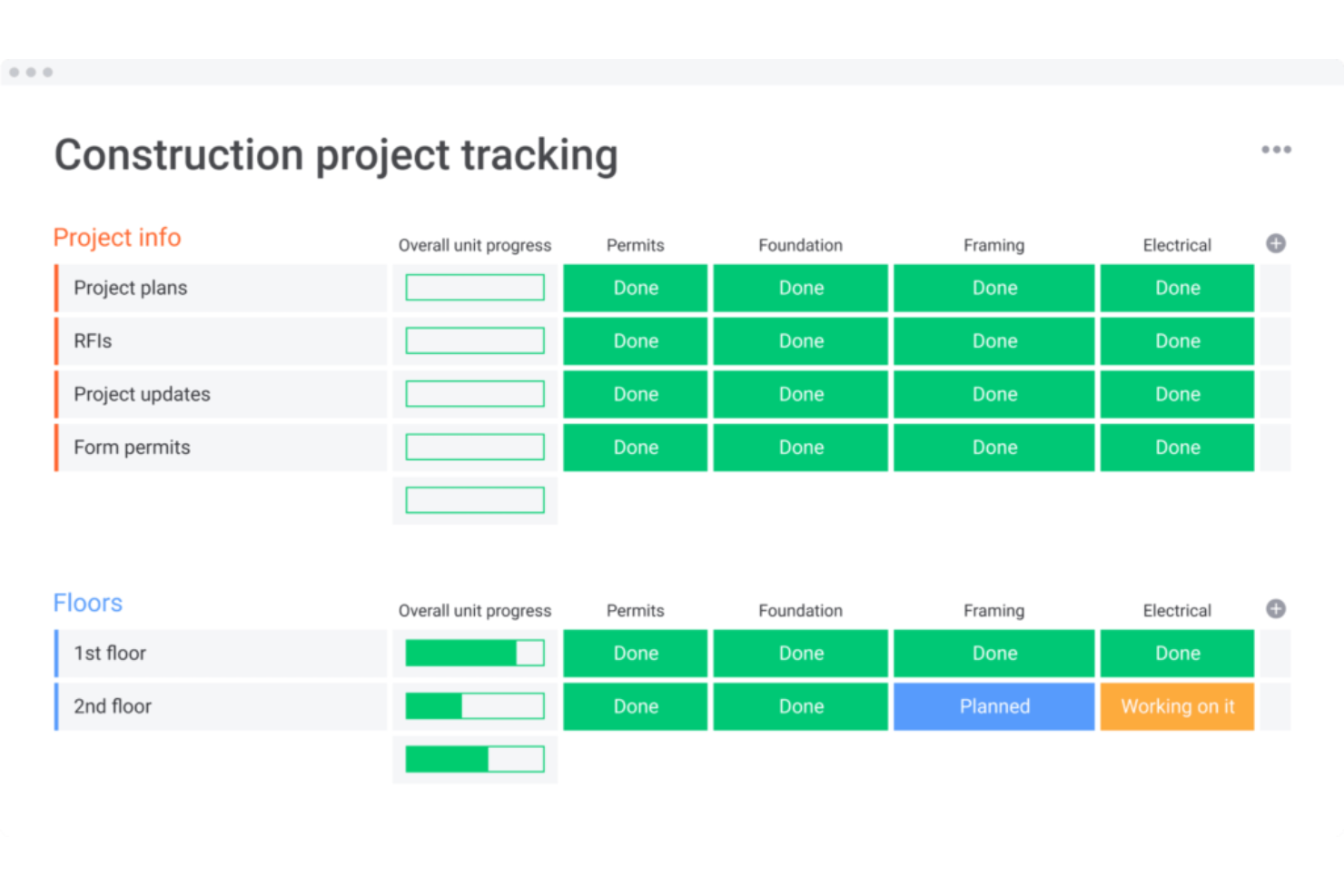
monday AI Workspace è una piattaforma di gestione progetti ad uso generale che porta pianificazione assistita dall’AI, monitoraggio delle attività, gestione dei documenti e collaborazione del team nei flussi di lavoro dell’edilizia attraverso board e template personalizzabili.
Per chi è ideale monday AI Workspace?
È ideale per piccoli team di costruzione e appaltatori generali indipendenti che desiderano una piattaforma flessibile e personalizzabile invece di uno strumento rigido e specifico per l’edilizia.
Perché ho scelto monday AI Workspace
Ho scelto monday AI Workspace perché la sua libreria di template per l’edilizia è una delle più pratiche che abbia visto per i general contractor che devono costruire flussi di lavoro da zero. I template coprono tutte le fasi, dai disegni pre-costruttivi e RFI alle sottomissioni, ordini d’acquisto e colonne di monitoraggio del budget, eliminando l’incertezza del foglio bianco. Mi piace che questi template siano disponibili sul piano gratuito e che ciascuno sia completamente personalizzabile in base al tipo di progetto, mestiere o parte interessata.
Funzionalità chiave di monday AI Workspace
- Pianificazione progetti con AI: Consente di pianificare le tempistiche e individuare i rischi grazie a raccomandazioni automatizzate per l’assegnazione dei compiti e le milestone.
- App mobile con modalità offline: Permette ai team in cantiere di accedere ai documenti, comunicare e aggiornare le attività anche senza connessione internet.
- Board diario giornaliero personalizzabili: Consente di monitorare l’avanzamento quotidiano in cantiere con caricamento foto e checklist adattabili al tuo flusso di lavoro.
- Colonne di monitoraggio budget: Permette di controllare i costi stimati versus quelli effettivi direttamente nelle board tramite colonne personalizzabili.
Integrazioni di monday AI Workspace
monday AI Workspace offre centinaia di integrazioni grazie alle integrazioni incorporate e a quelle presenti nel marketplace, tra cui Slack, Google Workspace, Microsoft 365, Salesforce, DocuSign, Dropbox, HubSpot, Jira, Trello e Zoom. Supporta anche Zapier e mette a disposizione un’API per integrazioni personalizzate.
Cosa è gratuito?
monday AI Workspace offre un piano gratuito per sempre limitato a 2 posti, con fino a 3 board, oltre 200 template e accesso alle app iOS e Android. Automazioni, integrazioni e report avanzati sono disponibili solo con i piani a pagamento, e il limite di 2 utenti lo rende poco pratico per team più grandi di un appaltatore singolo o di una squadra composta da due persone.
Pros and Cons
Pros:
- Ampia libreria di template specifici per l’edilizia
- Le board si adattano a qualsiasi flusso di lavoro edilizio
- L'AI assiste nella pianificazione e nelle dipendenze delle attività
Cons:
- Il limite di due utenti riduce l'utilizzo per team reali
- Non è progettato appositamente per i flussi di lavoro edili
New Product Updates from monday AI Workspace
monday AI Workspace Adds Human Approval Routing
monday AI Workspace adds a human-in-the-loop approval block to AI Workflows, sending approval requests and routing workflow paths based on responses. For more information, visit monday AI Workspace's official site.

Wrike
Ideale per i flussi di lavoro Agile
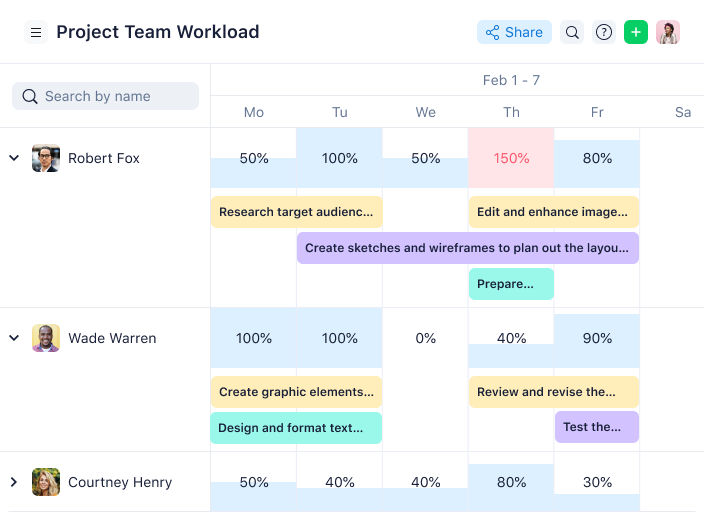
Wrike è una piattaforma di gestione dei progetti per team di costruzione che riunisce gestione delle attività, diagrammi di Gantt, condivisione di documenti e collaborazione in tempo reale in un unico spazio di lavoro.
Per chi è Wrike?
Wrike è ideale per team di costruzione di medie e grandi dimensioni che necessitano di una piattaforma flessibile per gestire più progetti e coordinarsi tra reparti.
Perché ho scelto Wrike
Ho scelto Wrike tra i migliori per la sua capacità di gestire i flussi di lavoro Agile nei progetti di costruzione dove ambito e priorità cambiano costantemente. Le bacheche Scrum di Wrike consentono al mio team di gestire i backlog, condurre sprint e monitorare l'avanzamento in tempo reale senza cambiare strumento. Mi piace anche la possibilità di passare dalle bacheche Kanban ai diagrammi di Gantt a seconda della fase di un progetto. Questa flessibilità permette al mio team di gestire sprint Agile durante la pianificazione e di passare a una visione a cronologia quando si coordina con subappaltatori o si monitorano le scadenze delle fasi.
Caratteristiche principali di Wrike
- Moduli di richiesta personalizzati: Crea moduli di raccolta dati dinamici che generano automaticamente le attività, assegnano responsabili e attivano flussi di lavoro quando viene avviato un nuovo progetto o una modifica.
- Prenotazioni delle risorse: Prenota tempo da membri specifici del team o da ruoli di lavoro e verifica la loro disponibilità prima di assegnarli a una fase del progetto.
- Editor di documenti Wrike: Allega file direttamente alle attività e modificabili sulla piattaforma senza scaricarli, mantenendo sottomissioni e documenti di progetto controllati nelle versioni.
- Report sulle attività degli utenti: Genera log di controllo su richiesta che mostrano esattamente chi ha modificato un'attività o un documento e quando, utile per la responsabilità tra i team dei subappaltatori.
Integrazioni Wrike
Wrike offre centinaia di integrazioni tramite il suo marketplace e connettori integrati, inclusi strumenti come Google Workspace, Microsoft 365, Salesforce, Slack, Box, Dropbox, GitHub, Jira e Adobe Creative Cloud. Supporta anche Zapier e offre un'API per integrazioni personalizzate.
Cosa è gratis?
Wrike offre un piano gratuito per sempre per piccoli team fino a 5 utenti. Il piano gratuito comprende la gestione basilare delle attività ma limita l'accesso a funzionalità avanzate, integrazioni e strumenti di reportistica.
Pros and Cons
Pros:
- Opzioni flessibili di workflow personalizzati
- Funzionalità integrate di revisione file
- Moduli di richiesta dinamici
Cons:
- Curva di apprendimento iniziale ripida
- Piani di fascia alta costosi
New Product Updates from Wrike

Wrike Adds Quick Search to Table View
Wrike adds Quick Search to Table View with full-table search across titles, descriptions, and fields, plus highlighted matches. This helps users find tasks faster in large tables. For more information, visit Wrike’s official site.

GanttPRO
Ideale per diagrammi di Gantt interattivi
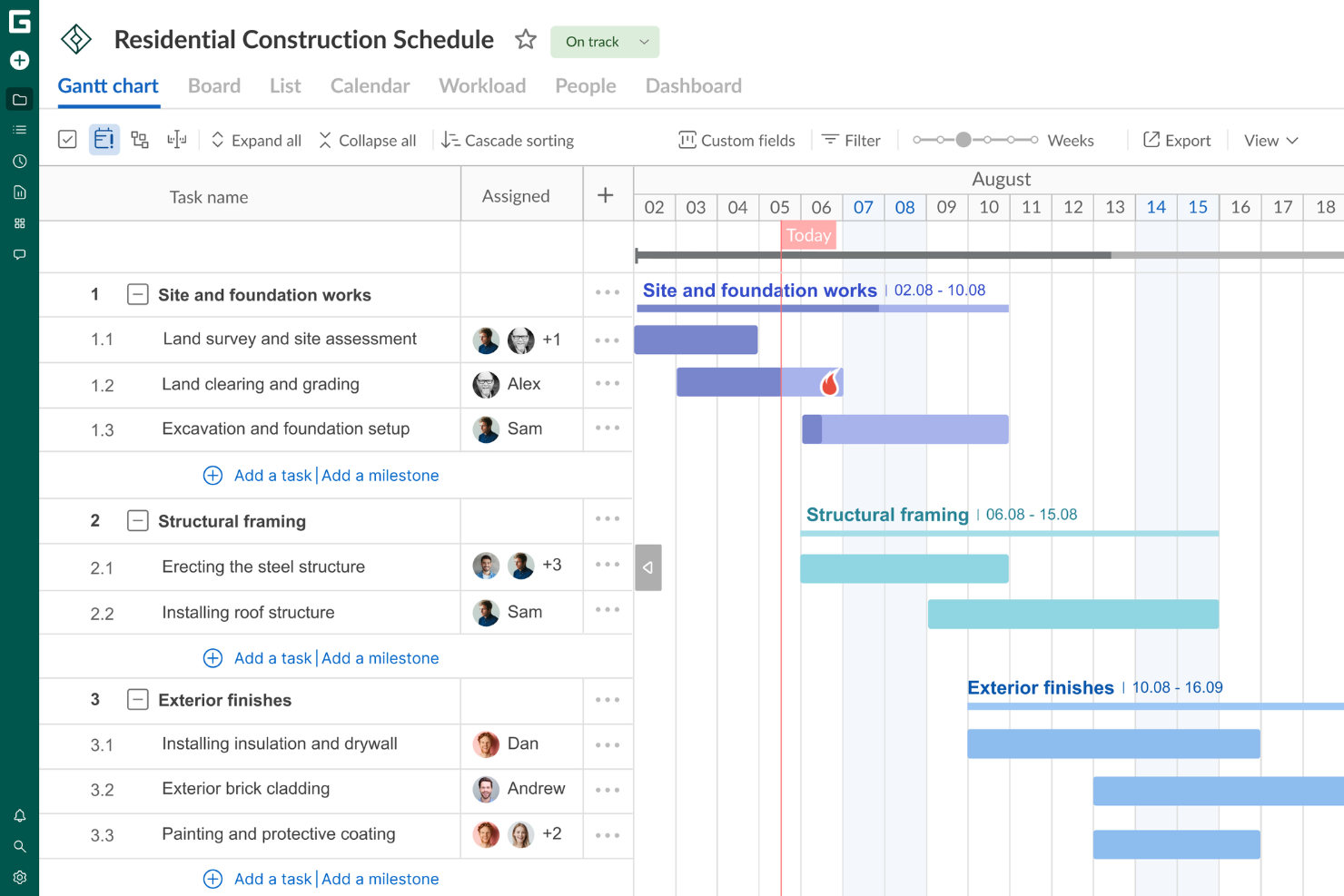
GanttPRO è una piattaforma di project management per l'edilizia che si concentra sulla pianificazione visiva dei progetti, sulla gestione dei compiti, sull'allocazione delle risorse e sulla collaborazione del team tramite diagrammi di Gantt interattivi.
Per chi è GanttPRO?
GanttPRO è adatto a project manager e team di costruzione che necessitano di un approccio visivo e basato su timeline per pianificare e monitorare il lavoro su più progetti.
Perché ho scelto GanttPRO
GanttPRO è nella mia lista dei preferiti perché i suoi diagrammi di Gantt interattivi gestiscono la pianificazione a più fasi richiesta dai progetti di costruzione. Mi piace che sia possibile impostare dipendenze tra le attività e lasciare che la funzione di pianificazione automatica ricalcoli le tempistiche automaticamente quando le date cambiano—cosa che accade costantemente nei cantieri. Utilizzo anche la funzione di percorso critico per vedere immediatamente quali attività potrebbero ritardare la data di completamento di un progetto se subissero slittamenti. Il confronto con la baseline mi permette di monitorare l'avanzamento reale rispetto al piano originale, che è esattamente ciò di cui si ha bisogno quando si rendicontano i progressi agli stakeholder durante la costruzione.
Caratteristiche principali di GanttPRO
- Vista a schede: Passa tra il diagramma di Gantt, la scheda in stile Kanban e la vista elenco per gestire le attività nel formato più adatto a ciascuna fase di un progetto di costruzione.
- Gestione del carico di lavoro: Visualizza il carico lavorativo di ciascun membro del team su più progetti e riassegna i compiti direttamente dalla vista carico di lavoro per evitare sovraccarichi.
- Registri delle ore: Registra le ore effettivamente dedicate alle attività e alle milestone, con commenti, così puoi confrontare il tempo di lavoro pianificato con quello effettivo.
- Vista portafoglio: Monitora contemporaneamente più progetti edili da un'unica vista per controllare l'avanzamento di tutti i flussi di lavoro attivi.
Integrazioni di GanttPRO
GanttPRO offre integrazioni native con Jira Cloud, Google Drive e Slack. È disponibile un'API per integrazioni personalizzate.
Cosa offre gratis?
GanttPRO offre una prova gratuita di 14 giorni con accesso a tutte le funzionalità. Alla fine del periodo di prova è necessario sottoscrivere un abbonamento a pagamento e non esiste un piano gratuito per sempre.
Pros and Cons
Pros:
- La vista a schede in stile Kanban offre una gestione flessibile delle attività.
- Le dipendenze tra le attività consentono una sequenza chiara del progetto.
- I diagrammi di Gantt interattivi migliorano la visualizzazione e la pianificazione del progetto.
Cons:
- Sebbene siano presenti strumenti di reportistica, mancano opzioni più avanzate per previsioni complesse.
- Integrazioni native limitate con altri strumenti software.

Ideale per un'interfaccia utente intuitiva
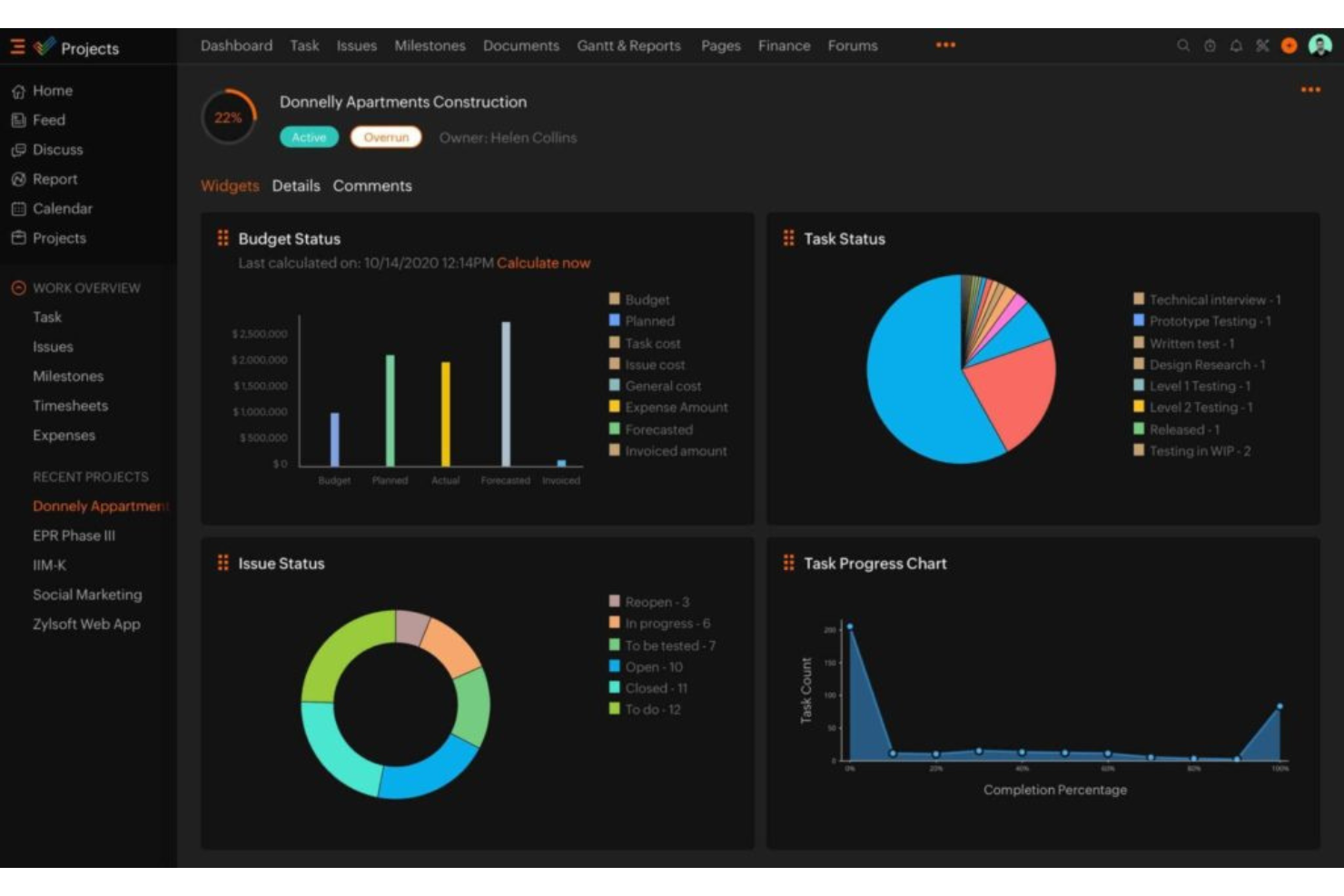
Zoho Projects è una piattaforma cloud per la gestione dei progetti di costruzione che copre la gestione delle attività, i diagrammi di Gantt, il monitoraggio del tempo, la condivisione dei documenti e la collaborazione del team.
Per chi è più indicato Zoho Projects?
Zoho Projects è adatto a team di costruzione di piccole e medie dimensioni che hanno bisogno di uno strumento di gestione progetti semplice, senza una curva di apprendimento ripida.
Perché ho scelto Zoho Projects
Zoho Projects è una delle mie scelte preferite perché apprezzo che le squadre di costruzione possono iniziare rapidamente con una configurazione minima, senza lunghe procedure di onboarding. L'interfaccia utilizza una navigazione pulita a pannello sinistro, che consente di accedere a traguardi, elenchi attività, Gantt e schede orarie con uno o due clic. Mi piace particolarmente la visualizzazione a Kanban, che permette ai responsabili di cantiere di trascinare le attività tra le colonne di stato man mano che il lavoro avanza. Anche la funzione Blueprint si distingue—permette di mappare visivamente il flusso di lavoro di un'attività, così ogni passaggio tra subappaltatori o mestieri segue un processo definito senza che nessuno debba inseguire aggiornamenti manualmente.
Caratteristiche principali di Zoho Projects
- Tracciamento dei problemi: Segnala bug o problemi in cantiere, assegnali ai membri del team e monitora la risoluzione all'interno della stessa piattaforma delle attività.
- Baseline di progetto: Imposta una baseline in qualsiasi momento di un progetto per confrontare il progresso pianificato rispetto a quello reale e identificare tempestivamente eventuali scostamenti dal programma.
- Gestione delle risorse: Visualizza il carico di lavoro di ogni membro del team prima di assegnare le attività e ridistribuisci il lavoro quando qualcuno è sovra- o sotto-allocato.
- Previsione del budget: Monitora in tempo reale i costi pianificati rispetto a quelli effettivi del progetto e prevedi la spesa totale in base alla percentuale di completamento attuale.
Integrazioni di Zoho Projects
Zoho Projects offre oltre 30 integrazioni native, tra cui Zoho CRM, Zoho Analytics, Zoho Desk, Zoho Invoice, Google Calendar, Google Drive, Microsoft Teams, Slack, Dropbox, GitHub e Zapier. È disponibile un'API per integrazioni personalizzate.
Cosa è gratis?
Zoho Projects offre un piano gratuito per sempre per un massimo di 3 utenti e 2 progetti. Il piano gratuito ha uno spazio di archiviazione limitato e non include funzionalità come i diagrammi di Gantt, la gestione delle risorse o la maggior parte delle integrazioni.
Pros and Cons
Pros:
- Piani tariffari molto convenienti
- Strumenti di monitoraggio del tempo integrati
- Integrazione fluida con l'ecosistema Zoho
Cons:
- Funzionalità del piano gratuito limitate
- Integrazioni limitate con app di terze parti
New Product Updates from Zoho Projects
Zoho Projects Adds CodeX Scripts for Custom Modules
Zoho Projects now supports CodeX Scripts for custom modules, enabling conditional logic and rules for creating, updating, and deleting records. For more information, visit Zoho Projects' official site.
 .
.
Quire
Ideale per la suddivisione nidificata delle attività
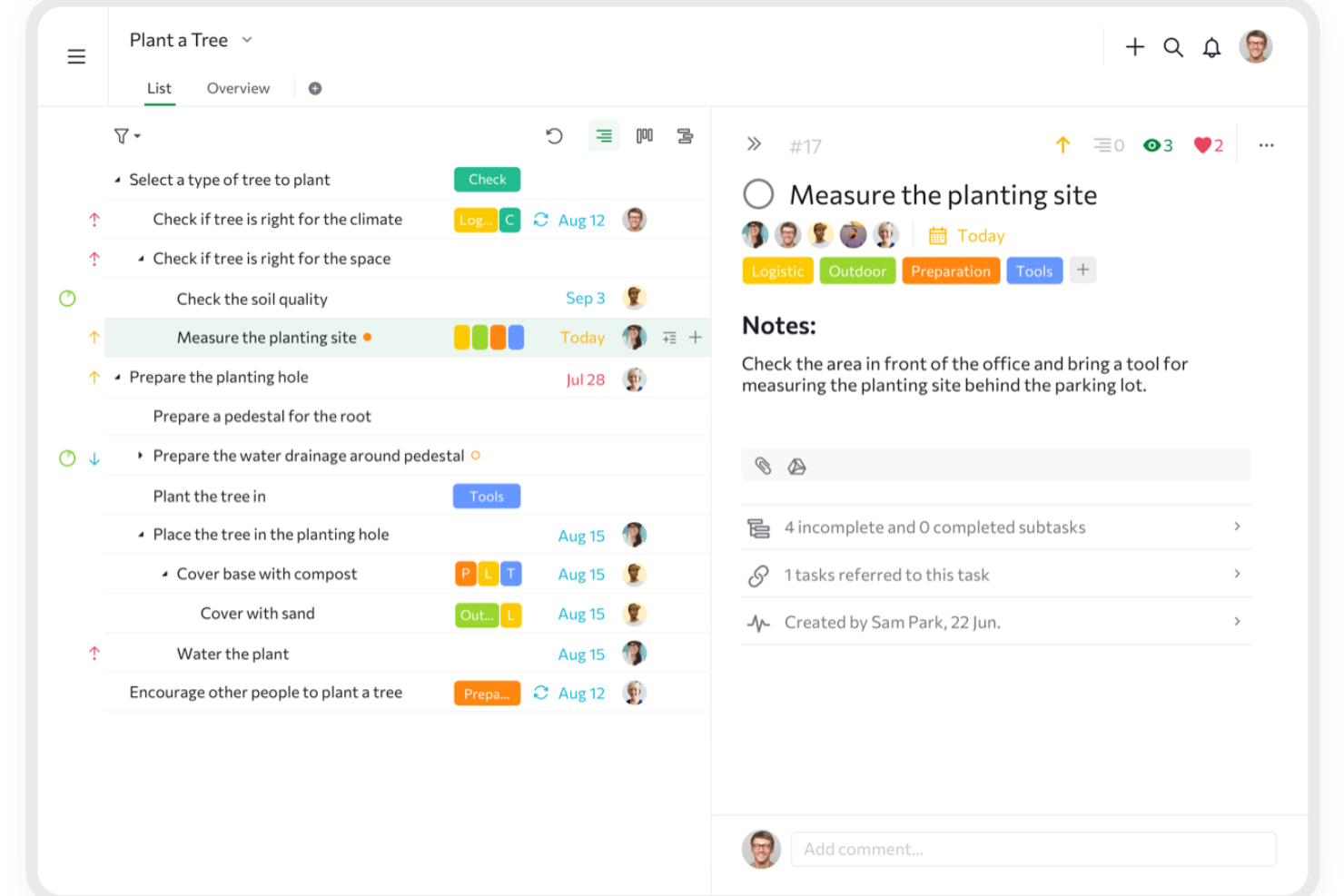
Quire è una piattaforma di gestione dei progetti per team edili che organizza i lavori con elenchi di attività nidificate, bacheche Kanban e viste cronologiche per monitorare il lavoro e la collaborazione.
Per chi è più adatto Quire?
Quire è indicato per piccoli e medi team di costruzione che hanno bisogno di suddividere progetti complessi in strutture di attività gerarchiche e gestibili.
Perché ho scelto Quire
Quire è una delle mie scelte preferite perché adoro come la sua lista di attività infinitamente nidificata gestisce la complessità stratificata dei progetti di costruzione. Su un vero cantiere, ciò significa che posso suddividere una fase come 'lavori di fondazione' in sottofasi, poi in singole attività e poi in passaggi di una checklist—tutto in un'unica visualizzazione. Utilizzo anche la funzione di zoom-in per approfondire un ramo specifico dell'albero delle attività senza perdere di vista la struttura generale del progetto. La mappatura delle dipendenze delle attività unisce tutto, permettendomi di segnalare quando una colata di cemento non può iniziare finché le ispezioni non sono state approvate.
Funzionalità principali di Quire
- Vista Gantt a cronologia: Pianifica le fasi del progetto e le scadenze su una linea temporale visiva che alterna tra formati elenco e bacheca.
- Pietre miliari del progetto: Segna i punti chiave lungo la cronologia di una costruzione per monitorare il completamento delle fasi e individuare possibili ritardi in anticipo.
- Campi personalizzati: Aggiungi ai compiti campi specifici del progetto, come nomi degli appaltatori, numeri di permessi o specifiche dei materiali.
- Ruoli e permessi: Assegna livelli di accesso personalizzati a membri del team, subappaltatori o clienti all'interno dello spazio di lavoro del progetto.
Integrazioni di Quire
Quire offre integrazioni native con Slack, Google Drive e GitHub e si collega con Zapier. È disponibile una API per integrazioni personalizzate.
Cosa è gratuito?
Quire offre un piano gratuito per sempre fino a 10 utenti per organizzazione. Il piano gratuito include attività e progetti illimitati ma limita l'accesso alle funzionalità avanzate e ad alcune integrazioni.
Pros and Cons
Pros:
- Strutture di attività infinitamente nidificate
- Viste flessibili (albero, bacheca, cronologia)
- Facile da imparare e da usare
Cons:
- Report e analisi basilari
- Nessuna chat di squadra nativa
New Product Updates from Quire

Quire Adds Task and Standalone Reminders
Quire adds task reminders and standalone reminders with shared notifications, recurring schedules, and automatic date tracking. These updates help teams stay ahead of deadlines and manage reminders that do not need a task. For more information, visit Quire’s official site.
 .
.
ClickUp
Ideale per creare ambienti di lavoro personalizzabili
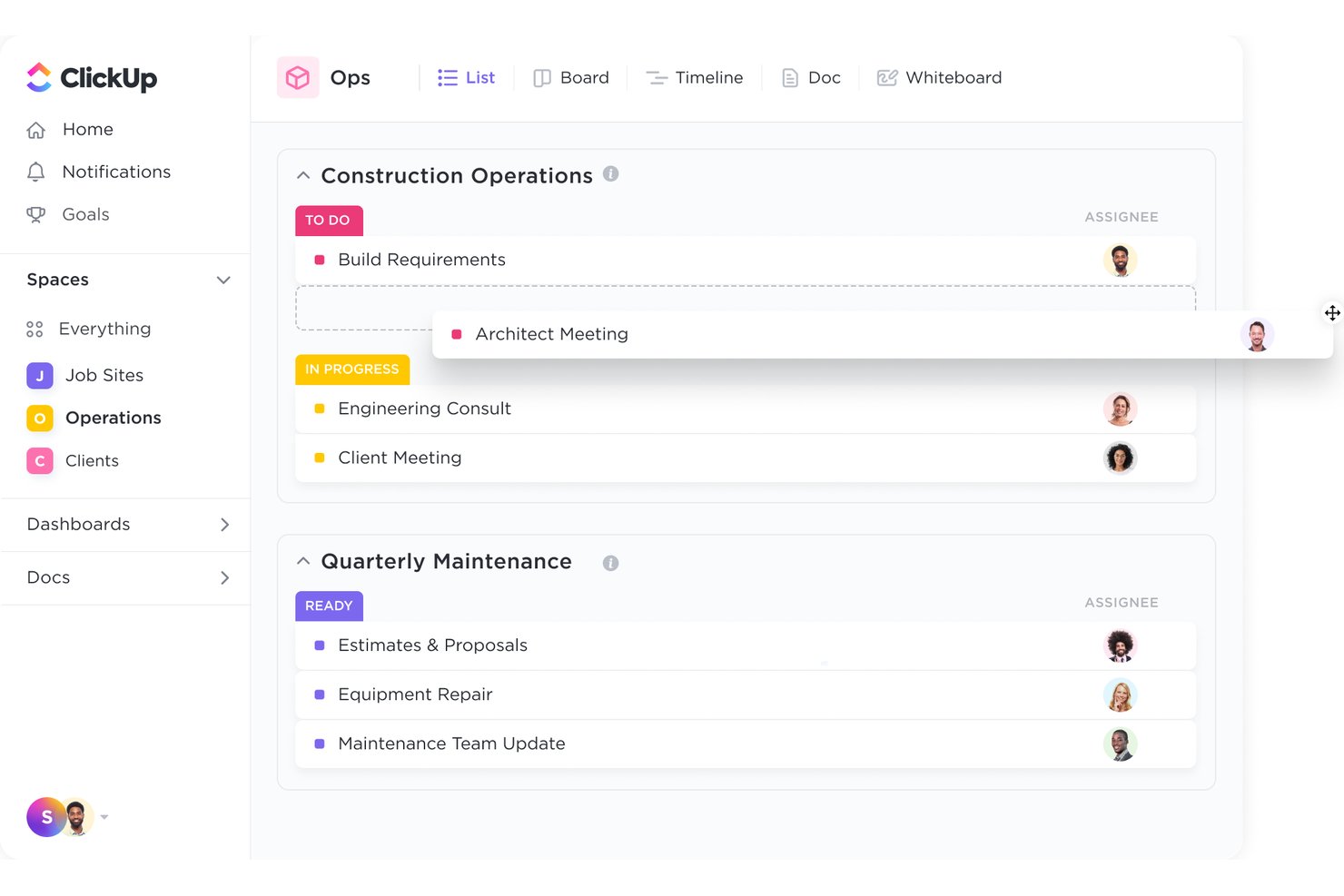
ClickUp è una piattaforma generica di gestione dei progetti che si adatta ai flussi di lavoro dell'edilizia grazie a viste attività personalizzabili, diagrammi di Gantt, documenti collaborativi, monitoraggio del tempo e strumenti integrati per la gestione di RFI, sottomissioni e coordinamento dei fornitori.
Per chi è ClickUp?
ClickUp è particolarmente adatto a piccole e medie imprese di costruzione e costruttori indipendenti che cercano una piattaforma flessibile e configurabile senza il costo di un software specializzato per l'edilizia.
Perché ho scelto ClickUp
ClickUp merita un posto nella mia lista perché nessun altro strumento gratuito permette di configurare l'ambiente di lavoro in base a come si sviluppa davvero un progetto edilizio. Creo stati personalizzati per ogni fase del progetto (Pre-Costruzione, Costruzione Attiva, Elenco Difetti, Chiusura) e utilizzo formule su campi personalizzati per calcolare le stime dei materiali direttamente nelle attività. Il modello preimpostato di gestione dei progetti edilizi fornisce al mio team una struttura pronta per RFI, pianificazione delle milestone e coordinamento dei subappaltatori già dal primo giorno.
Funzionalità Chiave di ClickUp
- Pianificazione con diagrammi di Gantt: Consente di pianificare e visualizzare le fasi del progetto con dipendenze e milestone.
- Moduli personalizzati per RFI e approvazioni: Permette al team di creare moduli di richiesta e flussi di approvazione su misura per le esigenze edilizie.
- Gestione centralizzata dei documenti: Archivia progetti, contratti e disegni con gestione a cartelle e condivisione dei file.
- App mobile: Fornisce aggiornamenti in tempo reale e assegnazione attività sia su dispositivi iOS che Android.
Integrazioni ClickUp
ClickUp offre integrazioni native con Google Drive, Slack, GitHub, Zoom, Microsoft Teams, Dropbox, OneDrive e Outlook. Si integra anche con Zapier e offre un'API per integrazioni personalizzate.
Cosa è gratuito?
ClickUp propone un piano gratuito per sempre che supporta utenti e attività illimitati, rendendolo accessibile ai piccoli team edilizi. Le principali limitazioni sono 100MB di spazio di archiviazione, utilizzo limitato del diagramma di Gantt e dei widget dashboard, mentre diverse funzionalità avanzate come reportistica sul monitoraggio del tempo e formule personalizzate dei campi sono riservate ai piani a pagamento.
Pros and Cons
Pros:
- Utenti illimitati nel piano gratuito per sempre
- Flussi di lavoro altamente configurabili per le fasi di costruzione
- Modelli di progetto edilizio predefiniti disponibili
Cons:
- Nessuno strumento di reportistica specifico per l'edilizia
- Accesso al diagramma di Gantt limitato nel piano gratuito
New Product Updates from ClickUp
ClickUp Adds Meetings Hub, Super Agent Templates, and ZoomInfo Integration
ClickUp adds a searchable Meetings Hub, new ways to clone and template Super Agents, and a ZoomInfo integration through the App Center. These updates improve meeting retrieval, agent reuse, and access to sales intelligence. For more information, visit ClickUp’s official site.

Ideale per la collaborazione con clienti e stakeholder
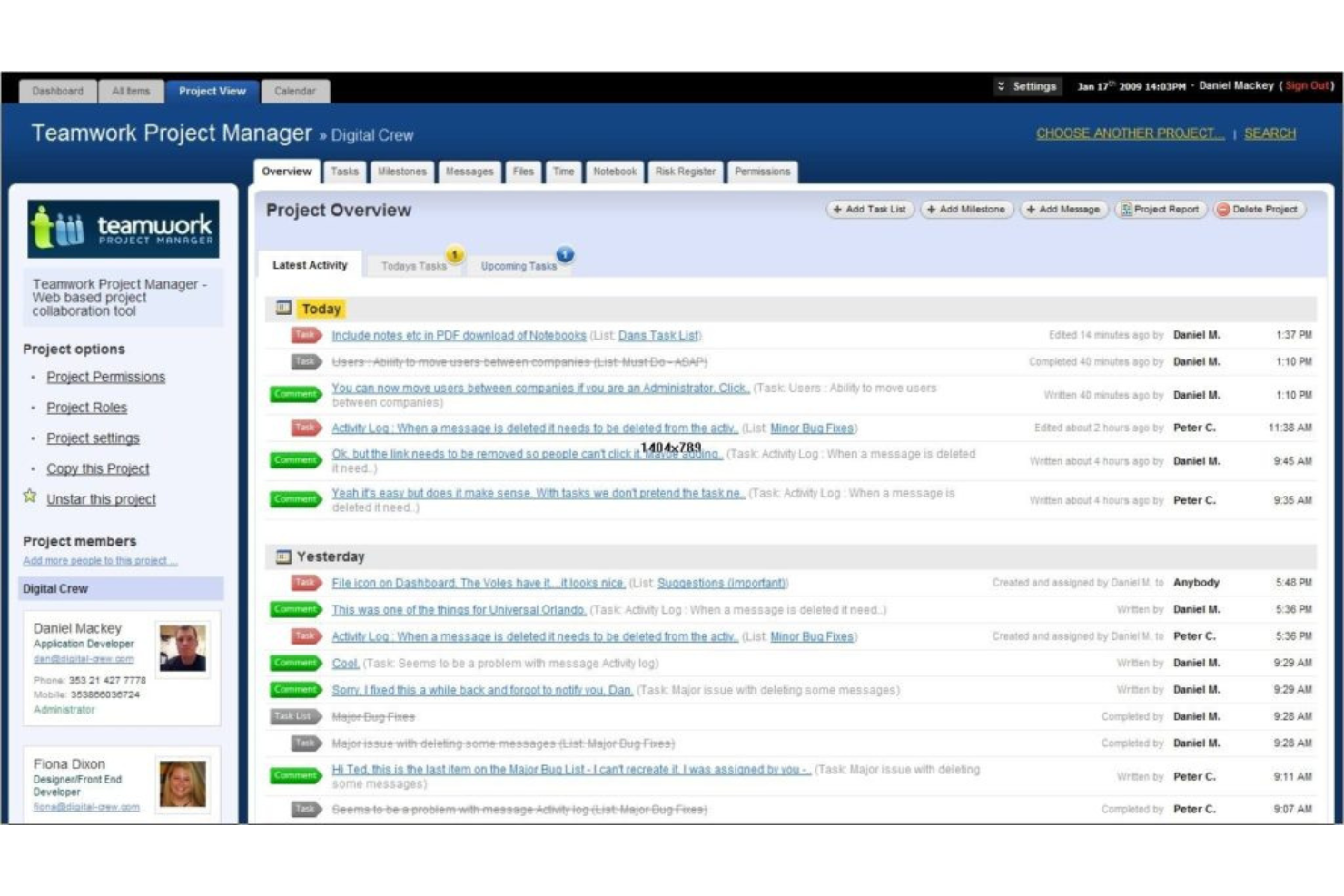
Teamwork.com è una piattaforma di project management pensata per i team edili che hanno bisogno di strumenti per il monitoraggio delle attività, diagrammi di Gantt, rilevazione delle ore, gestione documentale e funzioni di collaborazione integrate.
Per chi è Teamwork.com?
Teamwork.com è ideale per i project manager nel settore delle costruzioni che devono coordinare team interni, appaltatori esterni e clienti da un'unica piattaforma.
Perché ho scelto Teamwork.com
Ho inserito Teamwork.com nella mia lista perché gestisce molto bene la visibilità di clienti e stakeholder nei progetti di costruzione. La funzione Utenti Cliente permette di aggiungere un numero illimitato di clienti ai tuoi progetti senza costi aggiuntivi, con controlli dettagliati sulle autorizzazioni che determinano esattamente cosa possono vedere e fare. Trovo particolarmente utile la vista Clienti: raccoglie metriche trasversali ai progetti, come stato del budget, ore fatturabili e stato dei lavori, in un'unica dashboard, permettendoti di non dover mai correre a preparare un report prima di una call con il cliente. La funzione Proofs riduce anche i cicli di approvazione che rallentano la consegna delle lavorazioni, offrendo ai clienti una modalità strutturata per lasciare feedback e approvare i lavori.
Caratteristiche principali di Teamwork.com
- Diagrammi di Gantt: Visualizza le timeline di progetto, imposta dipendenze tra compiti e monitora le scadenze nelle diverse fasi di costruzione.
- Monitoraggio delle milestone: Definisci checkpoint all'interno di un progetto affinché il tuo team e i clienti sappiano sempre cosa aspettarsi e per quando.
- Gestione del budget: Crea budget specifici per ogni progetto, controlla in tempo reale ore e spese e ricevi avvisi quando i costi si avvicinano alle soglie impostate.
- Gestione carico di lavoro e capacità: Visualizza la capacità giornaliera del tuo team, individua conflitti di pianificazione e riassegna i compiti per mantenere la consegna nei tempi previsti.
Integrazioni di Teamwork.com
Teamwork.com offre integrazioni nativamente con Slack, Google Drive, Dropbox, Microsoft Teams, HubSpot, QuickBooks, Xero e Harvest. È inoltre compatibile con Zapier e fornisce una API per integrazioni personalizzate.
Cosa è gratis?
Teamwork.com propone un piano gratuito per sempre per un massimo di 5 utenti e 2 progetti. Il piano gratuito ha funzionalità limitate e non dà accesso a modelli avanzati di progetto, rilevazione delle ore e alcune integrazioni.
Pros and Cons
Pros:
- Clienti illimitati gratuiti
- Monitoraggio delle ore integrato
- Strumenti integrati per l'approvazione dei clienti
Cons:
- I piani a pagamento richiedono un numero minimo di utenti
- Curva di apprendimento per i nuovi utenti

Il migliore per strumenti di gestione della forza lavoro
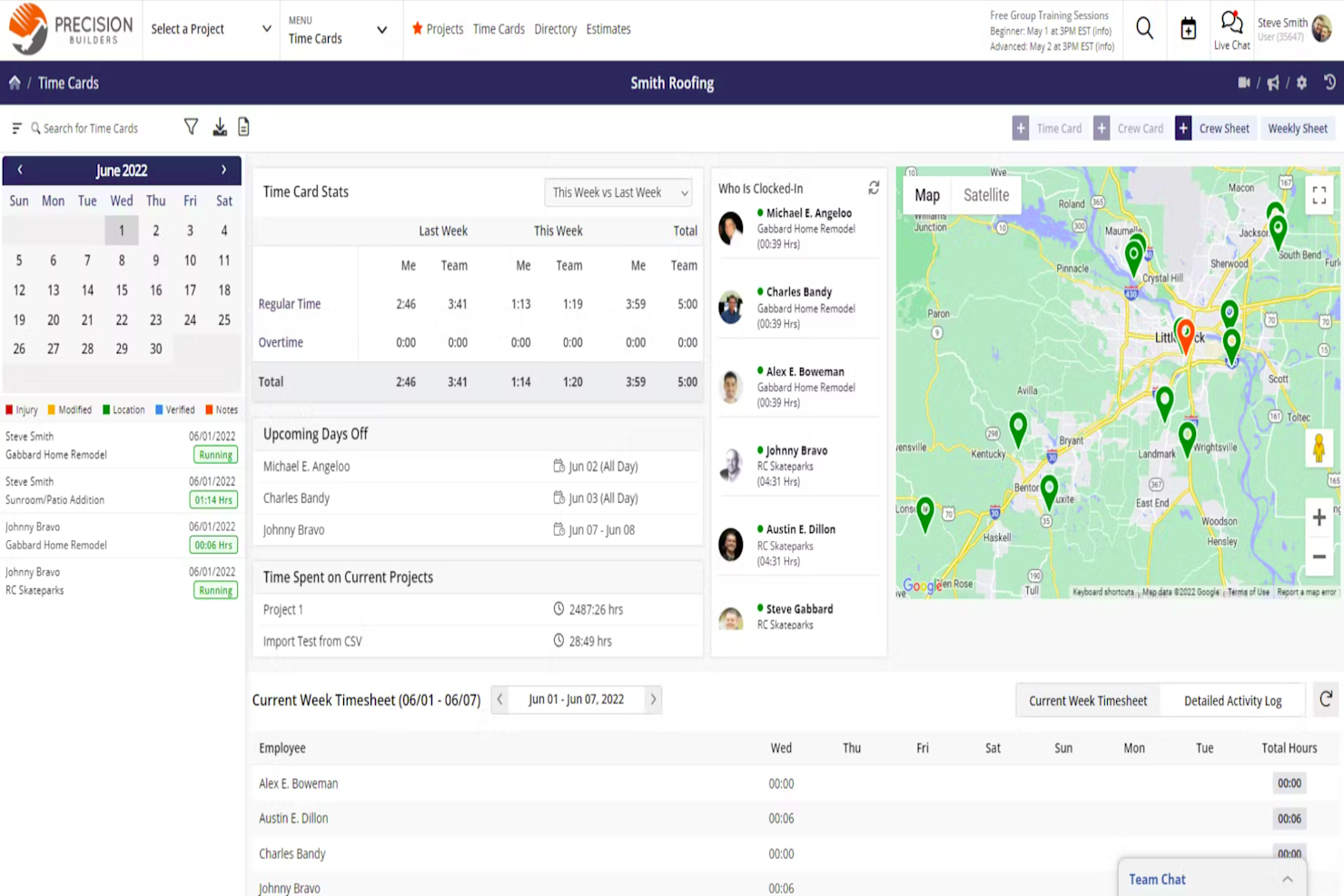
Contractor Foreman è una piattaforma di gestione dei progetti di costruzione che riunisce pianificazione dei progetti, gestione della forza lavoro, budgeting, controllo documentale e reportistica giornaliera in un unico sistema.
Per chi è più adatto Contractor Foreman?
Contractor Foreman è rivolto a imprese generali di piccole e medie dimensioni e appaltatori specializzati che necessitano di una piattaforma tutto-in-uno per gestire progetti, squadre e costi.
Perché ho scelto Contractor Foreman
Contractor Foreman si guadagna un posto nella mia shortlist grazie all'ampiezza delle sue funzioni di gestione del personale riunite in un'unica piattaforma. In particolare, apprezzo i cartellini orari con GPS integrato, che mi permettono di vedere esattamente dove si trovano i membri delle squadre quando timbrano entrata e uscita—e persino impostare regole di geofencing per impedire timbrature da posizioni esterne al cantiere. Lo strumento di pianificazione delle squadre drag-and-drop è un'altra funzione che uso regolarmente: posso assegnare intere squadre ai progetti in una volta sola e inviare direttamente i loro orari settimanali sui loro telefoni, eliminando i messaggi notturni del tipo 'dove vado domani?'. Il modulo integrato per le riunioni sulla sicurezza include oltre 800 argomenti pre-caricati in inglese e spagnolo, così i supervisori di cantiere possono tenere riunioni di sicurezza conformi senza necessità di un sistema separato.
Caratteristiche principali di Contractor Foreman
- Pianificazione Gantt (CPM): Crea e gestisci le tempistiche dei progetti usando un diagramma di Gantt con metodo del percorso critico e programmazione delle attività tramite drag-and-drop.
- Registri giornalieri: Registra l'attività in cantiere, le condizioni meteorologiche, le note delle squadre e gli aggiornamenti di avanzamento direttamente dal campo.
- Monitoraggio delle liste di controllo finale: Crea, assegna e segui gli elementi della lista di controllo finale con allegati fotografici per gestire le attività di chiusura del progetto.
- Portale clienti: Offri ai clienti un portale dedicato per visualizzare aggiornamenti del progetto, approvare preventivi e firmare documenti online.
Integrazioni di Contractor Foreman
Contractor Foreman offre integrazioni native con QuickBooks, Xero, CompanyCam e Gusto. È disponibile un'API per integrazioni personalizzate.
Cosa è gratuito?
Contractor Foreman offre una prova gratuita di 30 giorni con accesso a tutte le funzionalità e utenti illimitati durante il periodo di prova. Dopo la prova, per continuare ad utilizzare il servizio è necessario un abbonamento a pagamento.
Pros and Cons
Pros:
- Suite completa di strumenti per la gestione della costruzione
- Include monitoraggio GPS dell'orario delle squadre
- Argomenti per riunioni di sicurezza bilingue pre-caricati
Cons:
- Mancano le funzionalità offline su desktop
- Le funzioni avanzate costano molto di più

Ideale per la gestione dei cantieri
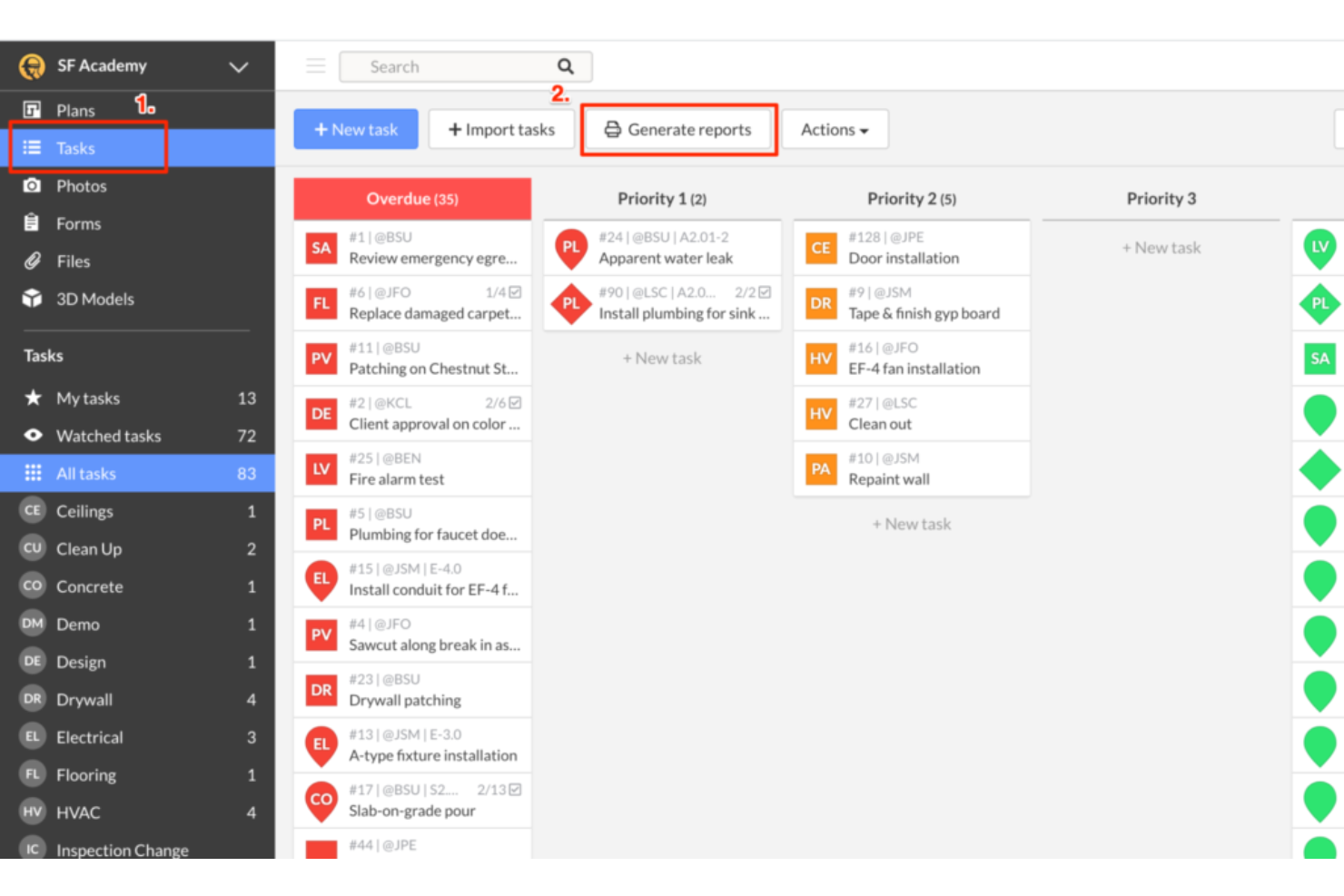
Fieldwire è una piattaforma di gestione dei progetti edili progettata per coordinare le attività, gestire i disegni tecnici e gestire i rapporti di cantiere direttamente dal luogo di lavoro.
Per chi è più indicato Fieldwire?
Fieldwire è particolarmente indicato per appaltatori generali, subappaltatori e squadre di campo che hanno bisogno di coordinare le attività e gestire i progetti direttamente in cantiere.
Perché ho scelto Fieldwire
Fieldwire si è guadagnato un posto nella mia selezione perché è uno dei pochi strumenti per l’edilizia costruiti specificamente pensando a ciò che succede sul cantiere, e non solo nell’ufficio di progetto. Mi piace che l’assegnazione delle attività sia legata direttamente alle posizioni sui disegni tecnici: così, quando la mia squadra segnala un problema, viene fissato esattamente sul punto della tavola, con foto, scadenze e assegnazione del mestiere correlate. La funzione punch list si basa sulla stessa logica: durante il sopralluogo posso annotare le criticità direttamente sulle tavole, assegnarle all’appaltatore responsabile e generare automaticamente un report PDF senza mai dover tornare alla scrivania. Le visualizzazioni Kanban, Gantt e calendario permettono inoltre a capicantiere e responsabili di coordinare i prossimi lavori tra le varie specializzazioni in tempo reale, mantenendo tutti allineati senza bisogno di strumenti di pianificazione esterni.
Funzionalità principali di Fieldwire
- Visualizzatore BIM: Visualizza, misura e naviga modelli 3D direttamente dal campo, con la possibilità di combinare più modelli di specialità in una vista federata unica.
- Gestione RFI: Crea, assegna e traccia RFI dal campo o dall’ufficio, con promemoria email automatici e un registro attività che traccia ogni modifica con data e ora.
- Field Intelligence™: Un layer di intelligenza artificiale che organizza automaticamente disegni tecnici e specifiche caricati, genera sottomissioni, converte problemi dei moduli in attività e rileva rischi di pianificazione o budget dai dati di progetto.
- Documentazione as built: Raccogli e registra le condizioni di cantiere rispetto ai progetti originali per mantenere una documentazione aggiornata e accurata delle lavorazioni ultimate.
Integrazioni di Fieldwire
Fieldwire offre integrazioni native con Box e Dropbox per la gestione dei file. È disponibile un’API per integrazioni personalizzate.
Cosa è gratuito?
Fieldwire offre un piano gratuito per sempre per un massimo di 5 utenti e 3 progetti. Il piano gratuito ha uno spazio di archiviazione file limitato e non include funzionalità avanzate come moduli personalizzati o accesso API.
Pros and Cons
Pros:
- Attività ancorate ai punti dei disegni tecnici
- Robusta modalità offline per mobile
- Generazione punch list semplificata
Cons:
- Nessuno strumento di gestione finanziaria integrato
- Integrazioni limitate con software di terze parti

Ideale per il monitoraggio dei progetti in tempo reale

ProjectManager è una piattaforma basata sul cloud per la gestione di progetti e portafogli, con pianificazione tramite diagrammi di Gantt, pannelli di controllo in tempo reale, gestione delle risorse, monitoraggio del budget e strumenti mobili per coordinare i team sul campo e in ufficio.
Per chi è più adatto ProjectManager?
ProjectManager è adatto ai responsabili di progetto e ai proprietari di imprese edili che supervisionano più cantieri e hanno bisogno di una visibilità in tempo reale su pianificazione e budget dell'intero portafoglio di progetti.
Perché ho scelto ProjectManager
Ho scelto ProjectManager come una delle soluzioni migliori perché i suoi pannelli di controllo in tempo reale si aggiornano automaticamente man mano che vengono registrate le attività, permettendomi di vedere i ritardi nella pianificazione e gli scostamenti di budget nel momento stesso in cui si verificano. Apprezzo particolarmente il filtro del percorso critico nel diagramma di Gantt, che mi permette di individuare immediatamente quali attività ritarderanno effettivamente la data di completamento di un progetto. Le squadre sul campo che registrano ore e aggiornamenti sulle attività dall'app mobile alimentano gli stessi dati in tempo reale che controllo dall'ufficio.
Funzionalità principali di ProjectManager
- Fogli presenze online: Le squadre possono registrare il tempo, monitorare le ore per attività e inviare i fogli presenze per l'approvazione del supervisore dai dispositivi mobili.
- Licenze ospite illimitate: Aggiungi clienti o subappaltatori come ospiti gratuiti con accesso in sola lettura per condividere in sicurezza pianificazioni e documenti di progetto.
- Strumenti per risorse e carichi di lavoro: Assegna tariffe della manodopera, imposta le festività e monitora i carichi di lavoro del team tra progetti sovrapposti.
- Report di progetto automatizzati: Genera report sullo stato, sul portafoglio e sui fogli presenze con un solo clic per documentare rapidamente i progressi.
Integrazioni di ProjectManager
ProjectManager offre integrazioni native con Microsoft Project, Microsoft Teams, OneDrive, Google Drive, Slack e QuickBooks Online. È disponibile un'API per le integrazioni personalizzate.
Cosa è gratuito?
ProjectManager offre una prova gratuita di 30 giorni che garantisce l'accesso completo alle funzionalità a pagamento, senza richiedere una carta di credito. Non è disponibile un piano gratuito permanente, quindi al termine della prova dovrai passare a un piano a pagamento a partire da $15/user/month.
Pros and Cons
Pros:
- I pannelli di controllo in tempo reale si aggiornano senza bisogno di aggiornamento manuale
- I diagrammi di Gantt includono il monitoraggio del percorso critico
- Accesso ospite illimitato per i subappaltatori
Cons:
- Nessuno strumento di gestione dei documenti specifico per l'edilizia
- Nessun piano gratuito al termine della prova
Altri software gratuiti per la gestione dei progetti edilizi
\u003cheader class=\u0022c-block__content-block c-block__header b-overflow__header c-listicle__header c-content-block c-content-block–layout-left\u0022\u003e
\u003cdiv class=\u0022c-block__description b-overflow__description c-listicle__description t-sink s-sink c-content-block__content\u0022\u003e
Ecco alcune ulteriori opzioni gratuite per la gestione dei progetti edilizi che non sono entrate nella mia selezione, ma che vale comunque la pena valutare:
\u003c/div\u003e
\u003c/header\u003e
\u003cdiv class=\u0022b-overflow__content c-listicle__content\u0022\u003e
\u003cdiv class=\u0022bawz-overflow\u0022\u003e
\u003col class=\u0022b-overflow__items c-listicle__items\u0022\u003e
\u003cli class=\u0022b-overflow__item c-listicle__item overflow-1033797\u0022 data-index=\u00220\u0022\u003e\u003c/li\u003e
\u003c/ol\u003e
\u003c/div\u003e
\u003c/div\u003e


Come valuto i software gratuiti per la gestione dei progetti edilizi
Valuto i software gratuiti per la gestione dei progetti edilizi in base a due aspetti: se il piano gratuito è pratico per il lavoro edilizio reale e se la piattaforma offre gli strumenti fondamentali necessari per coordinare i progetti tra l'ufficio e il cantiere.
Funzionalità fondamentali (requisiti minimi per questo elenco)
Quando seleziono gli strumenti per il mio elenco, assegno a ciascuno un punteggio su una scala da 0 (non offre la funzionalità) a 5 (eccelle in quest'area) per ogni funzionalità fondamentale elencata di seguito. Quindi calcolo il punteggio totale dello strumento come percentuale. Ogni strumento deve raggiungere un punteggio totale minimo del 65% per essere preso in considerazione.
- Disponibilità di un piano gratuito: verifico che il software offra un piano gratuito continuativo anziché soltanto una prova a tempo limitato. Considero anche i limiti relativi a utenti, progetti attivi, spazio di archiviazione e funzionalità per determinare quanto sia pratica la versione gratuita per le squadre di costruzione.
- Pianificazione dei progetti e gestione delle attività: cerco strumenti in grado di organizzare fasi di costruzione, attività, scadenze, dipendenze e traguardi, così che le squadre possano vedere cosa deve accadere dopo e dove eventuali ritardi potrebbero influire sulla programmazione.
- Gestione dei documenti e dei progetti: le squadre di costruzione devono poter accedere a disegni, RFI, permessi, foto e altri file di progetto. Valuto quanto bene ogni strumento archivia, organizza, condivide e aggiorna la documentazione del progetto.
- Collaborazione tra cantiere e ufficio: valuto l'accesso da dispositivi mobili, gli aggiornamenti del progetto, i commenti, le notifiche e gli accessi basati sui ruoli per determinare l'efficacia con cui le squadre sul campo, i project manager, i subappaltatori e gli altri soggetti interessati riescono a coordinarsi.
- Monitoraggio del budget e dei costi: cerco strumenti che aiutino le squadre a monitorare preventivi, budget, manodopera, spese, ordini di modifica o altri costi del progetto, tenendo conto delle funzionalità finanziarie effettivamente incluse nel piano gratuito.
- Monitoraggio dei progressi e report di cantiere: valuto gli strumenti in base a rapporti giornalieri, foto, aggiornamenti sullo stato, monitoraggio dei problemi, liste delle carenze e altre funzionalità che aiutano le squadre a documentare i progressi e a individuare i problemi in cantiere.
Una volta ottenuto un elenco di strumenti che soddisfano questi criteri, considero ciò che distingue ogni piattaforma.
Fattori distintivi (ciò che distingue i fornitori)
Ecco come confronto e metto in contrapposizione i diversi fornitori:
Funzionalità di spicco
La gestione delle liste delle carenze è un importante fattore distintivo: gli strumenti che consentono di contrassegnare le carenze con foto e assegnare le correzioni in base alla categoria professionale fanno risparmiare molto tempo durante la chiusura del progetto. Cerco anche portali per subappaltatori che offrano loro accesso a programmazioni e documenti senza consumare il numero di utenti disponibile. Anche i moduli per la sicurezza e la conformità sono importanti, soprattutto i modelli di ispezione predefiniti e i rapporti sugli incidenti che mantengono coerente la documentazione del cantiere tra le diverse squadre.
Oltre le funzionalità
Le funzionalità mobili e offline sono un fattore importante: le squadre impegnate in cantieri remoti devono poter registrare i dati senza copertura cellulare, quindi valuto se un'applicazione si sincronizza in modo affidabile quando la connessione viene ripristinata. Anche l'integrazione con strumenti di contabilità come QuickBooks o Xero è importante, poiché i responsabili dei progetti edilizi devono trasferire i costi dei lavori nei sistemi finanziari senza reinserimenti manuali. Considero inoltre se una piattaforma è stata progettata appositamente per il settore delle costruzioni o se è uno strumento generico di gestione dei progetti adattato al settore, poiché questo influisce sulla sua capacità di gestire i flussi di lavoro specifici delle diverse categorie professionali.
Come scegliere un software gratuito per la gestione dei progetti edilizi
Il miglior software gratuito per la gestione dei progetti edilizi dipende dalle dimensioni della tua squadra, dal numero di progetti attivi che gestisci e dai flussi di lavoro edilizi che il software deve supportare. I piani gratuiti possono avere limitazioni significative, quindi confronta ciò che puoi effettivamente utilizzare prima di scegliere una piattaforma.
| Fattore | Cosa considerare |
|---|---|
| Limitazioni del piano gratuito | Verifica il numero massimo di utenti, progetti e spazio di archiviazione inclusi. Assicurati che il livello gratuito possa supportare il tuo team attuale e i lavori in corso senza richiedere un passaggio a un piano superiore immediato. |
| Flussi di lavoro per l'edilizia | Cerca funzionalità in linea con il modo in cui gestisci i progetti, come pianificazione, rapporti giornalieri, disegni, RFI, liste di controllo, ordini di modifica e monitoraggio dei progressi. |
| Accesso dal cantiere | Considera cosa possono fare le squadre da uno smartphone o un tablet, tra cui visualizzare i progetti, aggiornare le attività, caricare foto e registrare i progressi in cantiere. Anche l'accesso offline può essere importante nei cantieri con connettività inaffidabile. |
| Pianificazione e dipendenze | Stabilisci se il piano gratuito supporta il livello di pianificazione di cui hai bisogno. Le date di base delle attività possono essere sufficienti per i lavori più piccoli, mentre i progetti più complessi possono richiedere dipendenze, traguardi o diagrammi di Gantt. |
| Gestione dei documenti | Verifica come vengono archiviati e condivisi disegni, permessi, foto, contratti e altri file di progetto, oltre agli eventuali limiti di archiviazione del piano gratuito. |
| Monitoraggio dei costi | Se devi monitorare i costi del progetto, verifica se il budget, la stima dei costi, il monitoraggio del tempo o la contabilità dei lavori sono inclusi gratuitamente o riservati ai piani a pagamento. |
| Collaborazione e autorizzazioni | Considera se puoi aggiungere subappaltatori, clienti o squadre sul campo e controllare cosa ciascuna persona può visualizzare o modificare senza superare il limite di utenti gratuiti. |
| Requisiti per il passaggio a un piano superiore | Individua quali funzionalità richiederebbero eventualmente un piano a pagamento e quanto costerebbe il passaggio. Questo può aiutarti a evitare di scegliere uno strumento gratuito che supererai rapidamente. |
Prima di scegliere uno strumento, confronta i limiti del piano gratuito con il modo in cui il tuo team gestisce effettivamente i progetti di costruzione. Un team più piccolo potrebbe aver bisogno soltanto del monitoraggio delle attività, della pianificazione e della condivisione dei documenti, mentre gli appaltatori che gestiscono più lavori potrebbero necessitare di una pianificazione più avanzata, del monitoraggio dei costi, dei rapporti dal cantiere e del coordinamento dei subappaltatori.
Che cos'è il software gratuito per la gestione dei progetti di costruzione?
Il software gratuito per la gestione dei progetti di costruzione aiuta gli appaltatori e i team edili a pianificare, coordinare e monitorare i progetti senza richiedere un abbonamento a pagamento. Questi strumenti offrono un piano gratuito continuativo, anche se in genere limitano il numero di utenti, progetti, spazio di archiviazione o funzionalità avanzate disponibili.
I team edili possono utilizzare un software gratuito per la gestione dei progetti per gestire attività e pianificazioni, condividere documenti di progetto, coordinarsi tra il cantiere e l'ufficio e monitorare i progressi dei lavori. Alcune piattaforme includono anche funzionalità specifiche per l'edilizia, come rapporti giornalieri, disegni, RFI, liste di controllo, stime dei costi o monitoraggio dei costi.
In che modo il software gratuito per la gestione dei progetti di costruzione è utile?
Il software gratuito per la gestione dei progetti di costruzione offre ai team più piccoli un luogo centrale per gestire le informazioni sui progetti, che altrimenti potrebbero essere distribuite tra fogli di calcolo, e-mail, documenti cartacei e strumenti di comunicazione separati. Può inoltre rappresentare un'alternativa più accessibile al software specializzato per la gestione dei progetti di costruzione per i team che non necessitano di funzionalità avanzate.
Ad esempio, la gestione delle attività e la pianificazione possono aiutare i responsabili di progetto a coordinare i lavori imminenti, mentre la condivisione dei documenti consente alle squadre sul campo di accedere ai progetti e ai file aggiornati. Gli strumenti mobili possono inoltre aiutare le squadre a registrare i progressi, caricare foto e comunicare aggiornamenti dal cantiere. I team che necessitano di un coordinamento sul campo più specializzato possono anche trarre vantaggio dal software per il monitoraggio del tempo nel settore edile per registrare le ore e collegare i dati sulla manodopera alle attività del progetto.
I piani gratuiti presentano generalmente delle limitazioni, quindi tendono a funzionare meglio per gli appaltatori più piccoli, i singoli responsabili di progetto o i team con requisiti di progetto relativamente semplici. Con l'aumentare del numero di progetti, utenti o flussi di lavoro per l'edilizia, funzionalità come la pianificazione avanzata, la contabilità dei lavori, la reportistica e la gestione dei subappaltatori potrebbero richiedere un piano a pagamento. I team che confrontano le opzioni possono anche esaminare una selezione più ampia di software gratuiti per la gestione dei progetti per vedere come gli strumenti generici si confrontano con le piattaforme dedicate all'edilizia.
Funzionalità del software gratuito per la gestione dei progetti di costruzione
Esaminiamo le funzionalità comunemente presenti nel software per la gestione dei progetti di costruzione e quali di queste sono solitamente incluse nei piani gratuiti rispetto a quelli a pagamento.
Funzionalità generalmente gratuite del software per la gestione dei progetti di costruzione
- Gestione delle attività: consente di assegnare attività, impostare scadenze e monitorare i progressi, così nulla sfugge al controllo.
- Condivisione dei documenti: consente di caricare e consultare permessi, disegni e planimetrie da un unico luogo.
- Pianificazione di base: aiuta ad assegnare date, organizzare le fasi del progetto e monitorare le attività di costruzione imminenti. Le dipendenze, gli strumenti per il percorso critico e la pianificazione avanzata con diagrammi di Gantt potrebbero richiedere un piano a pagamento.
- Messaggistica della squadra: offre modalità semplici per comunicare direttamente con la propria squadra nella piattaforma.
- Gestione limitata dei progetti: i piani gratuiti supportano in genere un numero limitato di progetti attivi, utenti o entrambi, anche se i limiti esatti variano a seconda della piattaforma.
- Accesso all'app mobile: offre alle squadre sul campo la possibilità di visualizzare attività o aggiornamenti dai propri telefoni o tablet.
- Registri delle attività: mostrano un elenco aggiornato delle modifiche o degli aggiornamenti, così tutti rimangono informati.
Funzionalità tipicamente a pagamento dei software di gestione dei progetti di costruzione
- Gestione di più progetti: consente di gestire più lavori contemporaneamente, con pianificazioni, attività e file separati.
- Monitoraggio del tempo e della manodopera: registra le ore della squadra per progetto, attività o cantiere e può aiutare le squadre a confrontare i costi della manodopera con i budget dei progetti.
- Monitoraggio del budget e dei costi: consente di stimare i costi di costruzione, monitorare le spese e confrontare i costi effettivi con il budget.
- Viste con diagrammi di Gantt: offre tempistiche visive per aiutare a pianificare le dipendenze e individuare tempestivamente i ritardi.
- Reportistica avanzata: crea report personalizzati sullo stato del progetto, sull'utilizzo del budget e sulla produttività della squadra.
- Autorizzazioni utente personalizzate: consentono di controllare ciò che i diversi utenti o ruoli possono vedere e fare.
- Portali per clienti o subappaltatori: offrono ai collaboratori esterni un accesso limitato alle informazioni pertinenti del progetto.
Vantaggi dei software gratuiti per la gestione dei progetti di costruzione
I software gratuiti per la gestione dei progetti di costruzione possono offrire agli appaltatori e alle squadre più piccole un modo più strutturato per gestire i lavori senza aggiungere un altro abbonamento software. A seconda delle funzionalità incluse nel piano gratuito, i principali vantaggi possono includere:
- Informazioni centralizzate sul progetto: mantieni attività, pianificazioni, disegni, foto e altre informazioni sul progetto in un unico luogo invece di distribuirle tra fogli di calcolo, e-mail e documenti cartacei.
- Migliore coordinamento tra cantiere e ufficio: consenti ai responsabili di progetto e alle squadre sul campo di accedere agli stessi aggiornamenti delle attività, alle pianificazioni, ai documenti e alle informazioni sullo stato del progetto.
- Pianificazione più chiara del progetto: organizza le fasi di costruzione, le scadenze e il lavoro assegnato, così le squadre possono vedere cosa sta accadendo ora e cosa deve accadere dopo.
- Monitoraggio più coerente dei progressi: utilizza aggiornamenti delle attività, registri delle attività, foto e report giornalieri per documentare il lavoro completato in cantiere e identificare i ritardi.
- Accesso più semplice ai documenti: archivia e condividi planimetrie, permessi, file di progetto e altra documentazione, così le squadre possono accedere alle informazioni aggiornate quando ne hanno bisogno.
- Costi software inferiori: gestisci i flussi di lavoro principali dei progetti di costruzione senza pagare anticipatamente il software, rendendo i piani gratuiti pratici per gli appaltatori e le squadre più piccole.
- Possibilità di valutare il prodotto prima di passare a un piano superiore: utilizza la versione gratuita per determinare se la piattaforma è adatta ai tuoi flussi di lavoro di costruzione prima di passare a un piano a pagamento con limiti più elevati o funzionalità più avanzate.
Costi e prezzi dei software gratuiti per la gestione dei progetti di costruzione
I software gratuiti per la gestione dei progetti di costruzione hanno un costo iniziale di $0, ma i piani gratuiti limitano in genere il numero di utenti, i progetti attivi, lo spazio di archiviazione o le funzionalità avanzate disponibili. Con la crescita della squadra o dei requisiti del progetto, potrebbe essere necessario passare a un piano a pagamento per funzionalità come la pianificazione avanzata, il monitoraggio dei costi, la reportistica, le integrazioni o utenti aggiuntivi.
La tabella seguente mostra i livelli di prezzo tipici e i tipi di funzionalità che potresti trovare a ciascun livello.
Tabella di confronto dei piani per i software di gestione dei progetti di costruzione
| Tipo di piano | Prezzo medio | Funzionalità comuni |
|---|---|---|
| Piano gratuito | $0 | Gestione delle attività, condivisione di documenti, pianificazione di base, messaggistica del team e un progetto. |
| Piano personale | $5–$15/utente/mese | Più progetti, accesso da dispositivi mobili, report di base, visualizzazione del calendario e integrazioni limitate. |
| Piano aziendale | $20–$40/utente/mese | Monitoraggio del tempo, strumenti per la gestione del budget, diagrammi di Gantt, report avanzati e autorizzazioni degli utenti. |
| Piano aziendale | $50–$100/utente/mese | Ruoli personalizzati, registri di controllo, portali per i clienti, sicurezza avanzata e assistenza dedicata. |
Domande frequenti sul software gratuito per la gestione dei progetti di costruzione
Ecco le risposte alle domande più comuni sul software gratuito per la gestione dei progetti di costruzione.