

I 10 migliori software per la gestione delle risorse ingegneristiche per il 2026

Elenco dei migliori software per la gestione delle risorse ingegneristiche


Scegliere il software giusto per la gestione delle risorse ingegneristiche può essere difficile, data la numerosa quantità di opzioni disponibili. L'obiettivo è semplificare i progetti ingegneristici, allocare le risorse in modo efficace e migliorare la produttività, ma individuare lo strumento migliore può essere complicato.
Tuttavia, non c'è motivo di preoccuparsi. Basandomi sulla mia vasta esperienza con diversi strumenti digitali per la gestione dei progetti, posso aiutarti a scegliere lo strumento più adatto alle tue esigenze. Ecco la mia selezione dei migliori software per la gestione delle risorse ingegneristiche.
Perché fidarsi dei nostri consigli sui software
Il nostro team testa e recensisce software dal 2012. In quanto project manager noi stessi, sappiamo quanto sia difficile — e importante — scegliere il software giusto.
Per questa guida, abbiamo valutato gli strumenti attraverso test pratici e ricerche indipendenti, assegnando un punteggio agli strumenti in base ai nostri criteri di selezione. Ci basiamo inoltre sulle competenze di leader di pensiero del settore e di professionisti attivi nella gestione dei progetti.
Le nostre recensioni riflettono il nostro giudizio editoriale umano, non un discorso di vendita.
Revisori esperti:
Tabella comparativa: software per la gestione delle risorse ingegneristiche
Abbiamo analizzato i prezzi e la disponibilità di prove gratuite e versioni demo, così puoi effettuare un confronto affiancato molto più semplice.
| Tool | Best For | Trial Info | Price | ||
|---|---|---|---|---|---|
| 1 | Ideale per prenotazioni avanzate delle risorse | Prova gratuita di 14 giorni + demo gratuita disponibile | Da $19,90/utente/mese (fatturazione annuale) | Website | |
| 2 | Ideale per assegnare lavoro non assegnato in base al ruolo | Prova gratuita disponibile | A partire da $7/postazione di risorsa/mese | Website | |
| 3 | Ideale per l'allocazione di risorse configurabile in base alle competenze | Demo gratuita disponibile | Prezzo su richiesta | Website | |
| 4 | Ideale per workflow di progetto focalizzati sul cliente | Demo gratuita disponibile | Prezzi su richiesta | Website | |
| 5 | Ideale per la pianificazione della capacità su più progetti | Piano gratuito disponibile | A partire da $6/utente/mese (con fatturazione annuale) | Website | |
| 6 | Ideale per la pianificazione progetti guidata dall'IA | Prova gratuita di 14 giorni + piano gratuito disponibile | Da $10/utente/mese (fatturato annualmente) | Website | |
| 7 | Ideale per la pianificazione di scenari finanziari del portafoglio | Prova gratuita di 30 giorni + demo gratuita disponibile | A partire da €22.5/mese (con fatturazione annuale) | Website | |
| 8 | Ideale per la gestione del personale tecnico basata sulle fasi | Demo gratuita disponibile | Prezzi su richiesta | Website | |
| 9 | Ideale per la gestione delle risorse nelle aziende basate sui progetti | Prova gratuita di 30 giorni | A partire da $9.50/utente/mese (con fatturazione annuale) | Website | |
| 10 | Ideale per assegnare il personale in base all'economia delle opportunità | Prova gratuita di 14 giorni + demo gratuita disponibile | A partire da $10/utente/mese | Website |


Recensioni dei migliori software per la gestione delle risorse ingegneristiche
Scopri valutazioni dettagliate e riepiloghi dei migliori software per la gestione delle risorse ingegneristiche disponibili oggi.

Scoro
Ideale per prenotazioni avanzate delle risorse
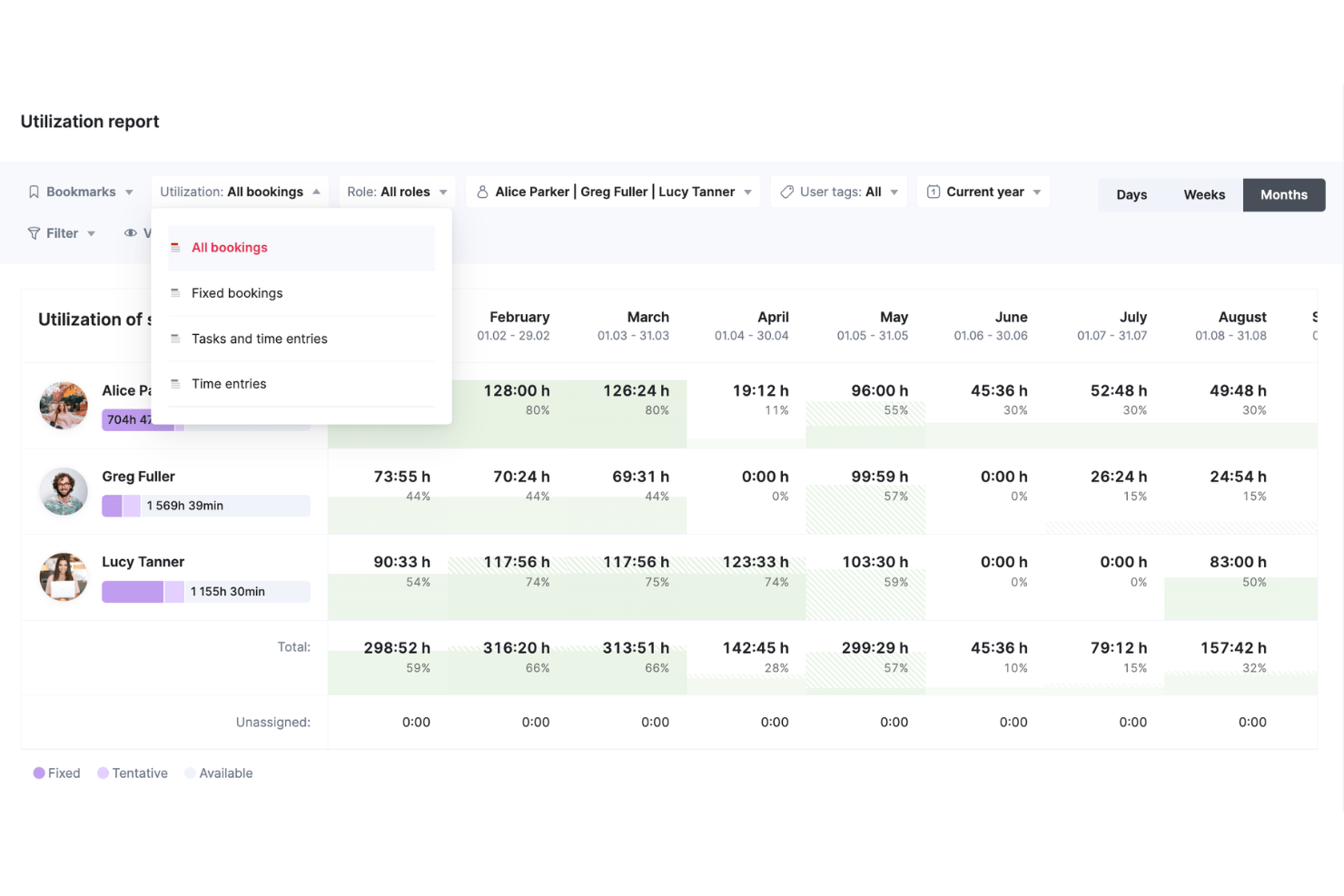
Scoro è una piattaforma di gestione del lavoro creata per i team di servizi professionali che combina pianificazione delle risorse, previsione della capacità, programmazione dei progetti, tracciamento del tempo e gestione finanziaria in un unico sistema.
Per chi è ideale Scoro?
Scoro è particolarmente adatto per le aziende di servizi professionali di medie dimensioni—società di consulenza, agenzie di ingegneria e fornitori di servizi IT—che hanno bisogno di gestire persone, progetti e budget in un unico posto.
Perché ho scelto Scoro
Ho incluso Scoro tra le mie scelte migliori perché il suo sistema di prenotazione delle risorse va ben oltre un semplice calendario di programmazione. Apprezzo particolarmente la funzione di prenotazione provvisoria, che mi permette di riservare capacità ingegneristica per progetti potenziali prima che vengano confermati—e quando il lavoro viene approvato, posso convertire facilmente quelle prenotazioni provvisorie in definitive senza dover ricostruire il piano. Ogni prenotazione è collegata direttamente al livello finanziario di Scoro, così posso vedere in tempo reale come una decisione sul personale influisce sui margini di progetto e sul consumo del budget—non solo sulla disponibilità in calendario.
Funzionalità principali di Scoro
- Heatmap di utilizzo: Visualizza dati sulla capacità dell'intero team codificati per colore per individuare rapidamente ingegneri sovraccarichi o sottoimpiegati.
- Assegnazione basata sulle competenze: Filtra e assegna risorse ai task in base a competenze o ruoli specifici, così che le persone giuste lavorino sui progetti giusti.
- Confronto tra ore registrate e stimate: Confronta le ore registrate con le stime pianificate a livello di attività e di progetto per individuare tempestivamente possibili sforamenti di ambito.
- Pianificazione su timeline drag-and-drop: Modifica compiti e scadenze dei progetti direttamente su una timeline visiva senza dover ricostruire da zero il piano.
Pros and Cons
Pros:
- Integra molteplici processi aziendali in un'unica piattaforma
- Offre strumenti avanzati di gestione progetti e finanze
- Dashboard in tempo reale personalizzabile
Cons:
- La complessità delle opzioni di personalizzazione
- L'app mobile offre meno funzionalità rispetto alla versione web
New Product Updates from Scoro

Scoro Adds Time Mobile App and ELI Improvements
Scoro adds the Scoro Time mobile app for iOS/Android to track time anywhere and expands ELI with attachments, smarter filtering, and trigger-based actions. For more information, visit Scoro's official site.

Runn
Ideale per assegnare lavoro non assegnato in base al ruolo
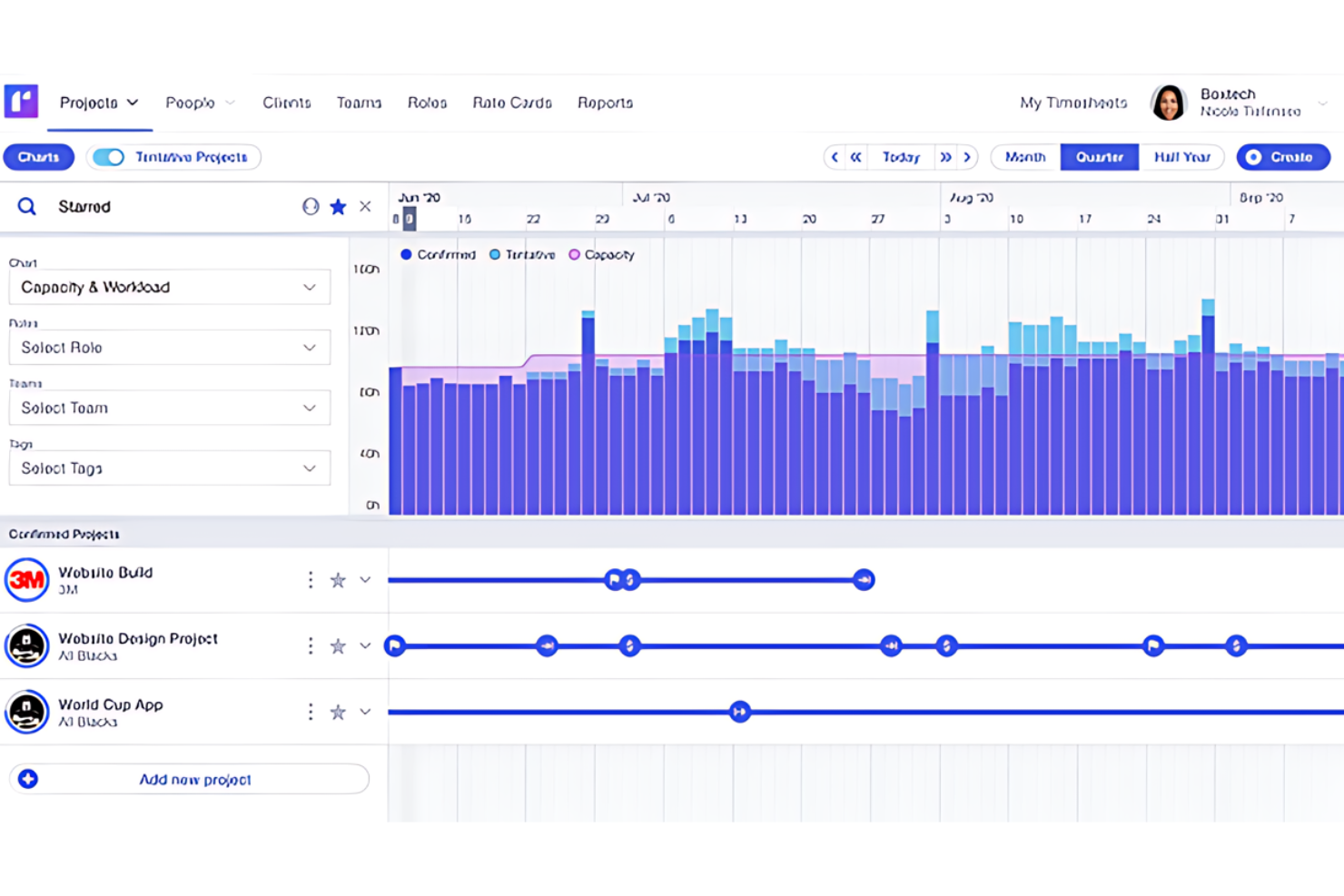
Runn è una piattaforma per la gestione delle risorse e la previsione dei progetti che combina la pianificazione della capacità, la programmazione del carico di lavoro, l'allocazione basata sulle competenze e il monitoraggio finanziario per le squadre che lavorano su progetti.
Per chi è più adatto Runn?
Runn è particolarmente adatto ai responsabili di progetto e ai responsabili delle risorse di aziende di servizi professionali, agenzie software e società di consulenza ingegneristica che gestiscono più progetti contemporaneamente.
Perché ho scelto Runn
I grafici e i diagrammi in tempo reale di Runn si aggiornano mentre modifichi le pianificazioni, quindi la mia squadra lavora sempre con dati aggiornati sulla capacità invece che con un'istantanea della settimana precedente. Apprezzo particolarmente la visualizzazione a mappa di calore, che mostra a colpo d'occhio la disponibilità e l'utilizzo di tutti, permettendomi di individuare eventuali lacune o ingegneri sovraccarichi senza dover esaminare i singoli programmi. Runn mi consente inoltre di filtrare le persone per ruolo, competenza e squadra quando effettuo le allocazioni, rendendo rapido trovare l'ingegnere giusto per un progetto quando cambiano i requisiti.
Funzionalità principali di Runn
- Fogli delle presenze: Registra le ore effettivamente lavorate e confrontale con le allocazioni pianificate nei vari progetti.
- Dati finanziari dei progetti: Monitora budget, costi e ricavi rispetto ai piani dei progetti man mano che cambiano le allocazioni.
- Allocazioni segnaposto: Assegna ruoli non nominativi ai progetti futuri per modellare la capacità prima di confermare le assunzioni.
- Gestione delle assenze: Registra ferie e festività nazionali affinché le pianificazioni riflettano la reale disponibilità della tua squadra.
Pros and Cons
Pros:
- Aggiornamenti in tempo reale sul monitoraggio delle risorse e dei progetti
- Funzionalità di previsione
- Interfaccia intuitiva per la pianificazione e le modifiche
Cons:
- Potrebbe essere complesso per le squadre piccole o per i progetti più semplici
- Opzioni di personalizzazione limitate per rapporti e cruscotti

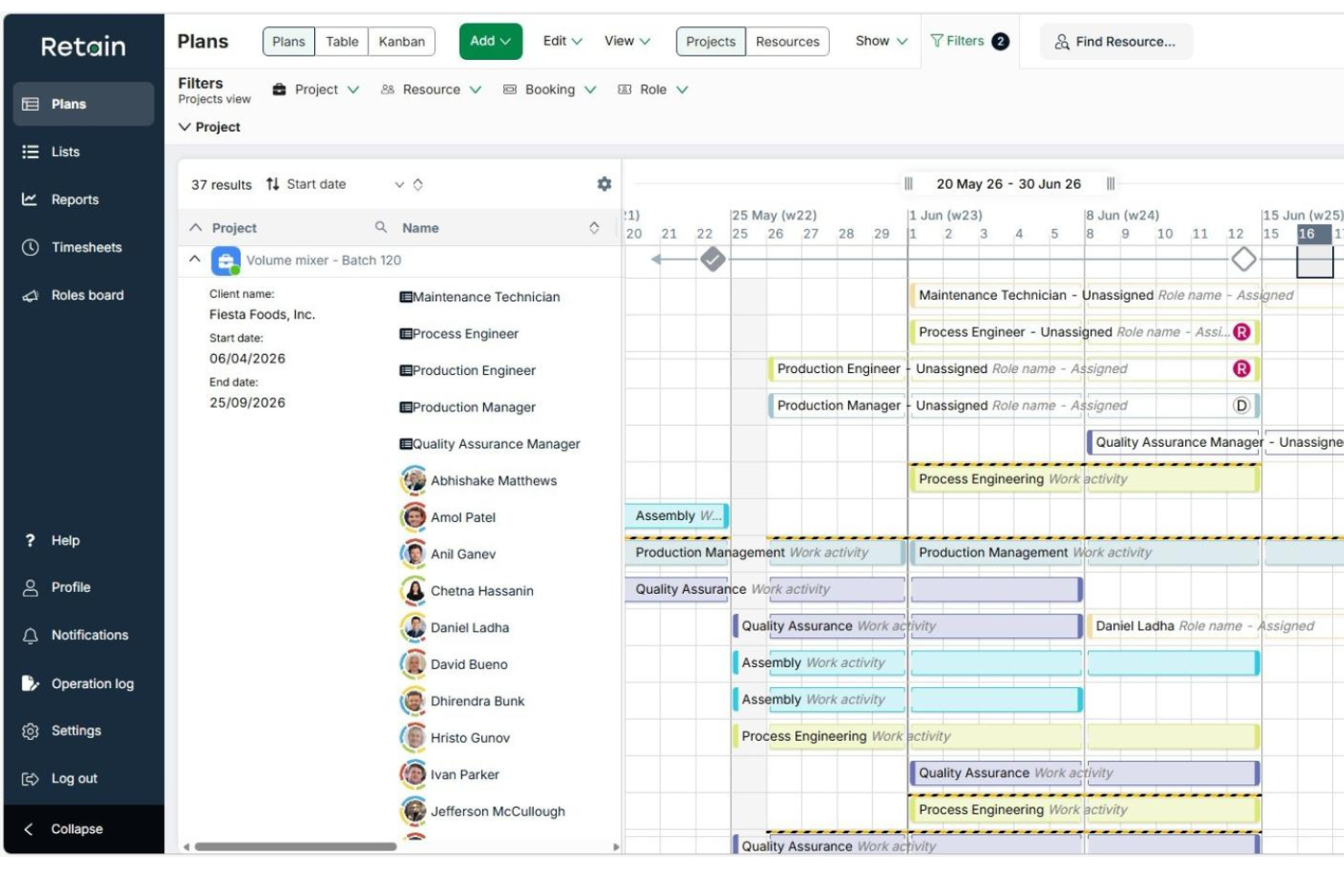
Retain è una piattaforma di pianificazione delle risorse e della capacità che consente alle organizzazioni di monitorare le competenze, gestire la disponibilità, prevedere l'utilizzo e assegnare le persone a progetti e reparti.
Per chi è ideale Retain?
Retain è particolarmente adatto a società di servizi professionali di medie e grandi dimensioni che devono gestire grandi organici qualificati su più progetti contemporaneamente.
Perché ho scelto Retain
Ho incluso Retain tra le mie migliori scelte perché il suo sistema di allocazione delle risorse basato sulle competenze è davvero configurabile in modi che la maggior parte degli strumenti non offre. Utilizza la tassonomia Skills+, alimentata da Lightcast, che fornisce accesso a oltre 30.000 competenze di settore mappabili direttamente sui membri del team. Da qui, l'abbinamento tramite AI per l'idoneità seleziona gli ingegneri più adatti a una prenotazione in base a questi profili di competenza e migliora nel tempo.
Funzionalità principali di Retain
- Pianificazione di scenari: Modella più allocazioni di risorse future affiancate al programma attivo prima di impegnarti con un piano.
- Compilazione automatica dei timesheet: I timesheet si popolano in base al lavoro prenotato, così gli ingegneri registrano il tempo senza dover ricominciare da zero ogni settimana.
- Dashboard di utilizzo: Visualizza i tassi di utilizzo in tempo reale dell'intero team, suddivisi per individuo, ruolo o reparto.
- Monitoraggio straordinari: Controlla le ore di straordinario e segnala problemi di capacità prima che impattino un progetto.
Integrazioni di Retain
Retain offre integrazioni tecnologicamente agnostiche che collegano i dati di pianificazione delle risorse tra sistemi HR, CRM e finanza. Le integrazioni includono BambooHR, Microsoft Dynamics 365, Oracle, Oracle NetSuite OpenAir, Salesforce, SAP, SugarCRM, Workday e Aderant.
Pros and Cons
Pros:
- Gestisce la pianificazione su più progetti per team numerosi
- Solide funzionalità di previsione della domanda e panoramica della capacità
- Tag delle competenze configurabili per l'abbinamento degli ingegneri
Cons:
- A volte le funzionalità di reportistica richiedono soluzioni alternative
- Nessun monitoraggio integrato delle ore per le attività

Accelo
Ideale per workflow di progetto focalizzati sul cliente
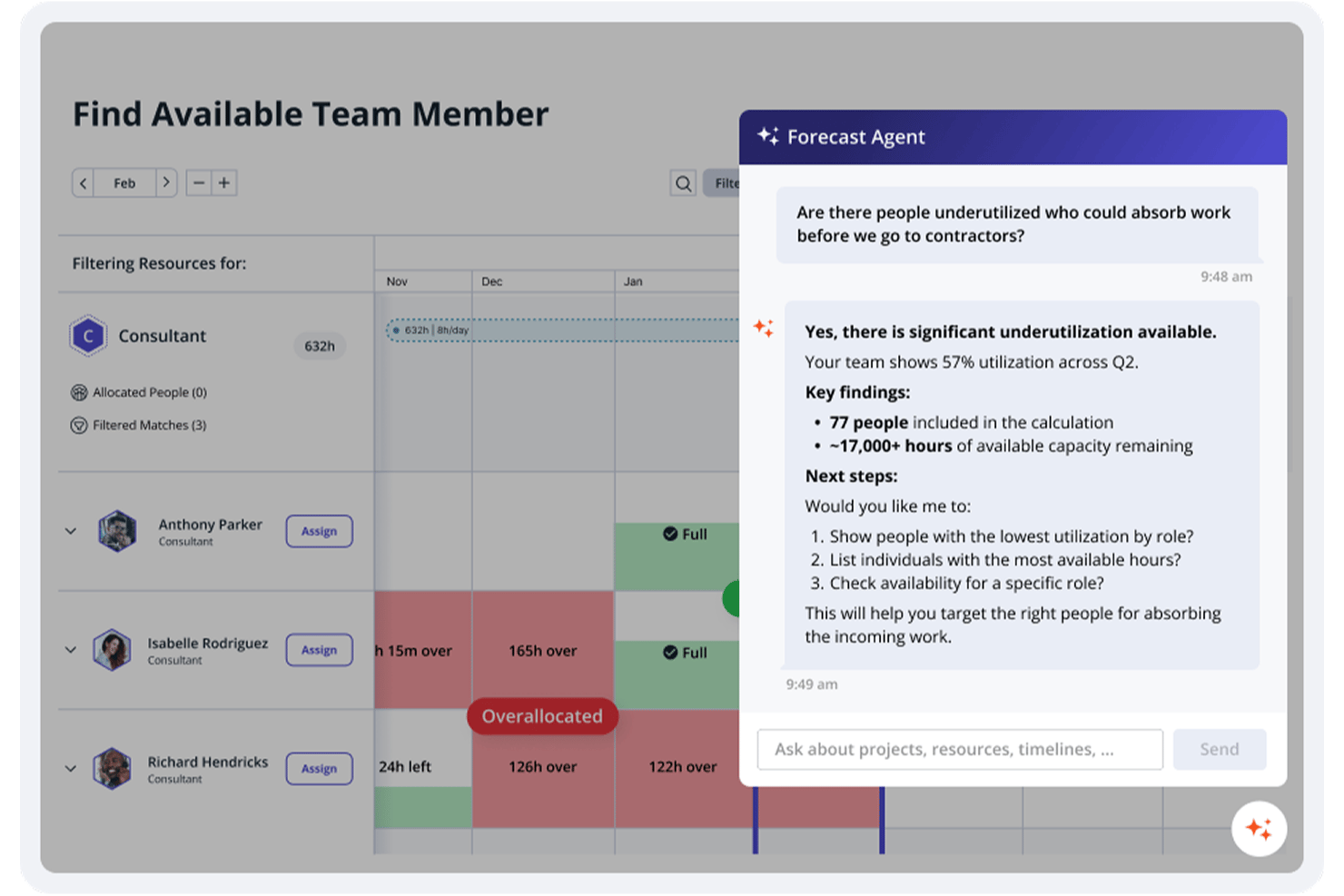
Accelo è una piattaforma PSA basata sull'intelligenza artificiale che unifica la gestione delle risorse, il monitoraggio dei progetti, il CRM, il rilevamento dei tempi e la fatturazione per i team di servizi professionali.
Per chi è più adatto Accelo?
Accelo è particolarmente indicato per aziende di ingegneria e servizi professionali di medie dimensioni che desiderano gestire risorse, progetti e fatturazione clienti in un'unica soluzione.
Perché ho scelto Accelo
Ho inserito Accelo tra le mie prime scelte perché adoro come collega ogni fase del lavoro con il cliente in un flusso unico: dal preventivo iniziale, passando per la consegna del progetto, fino alla fatturazione finale. Il mio team utilizza Accelo per monitorare in tempo reale il rispetto del budget rispetto all’ambito di progetto, così individuiamo eventuali lacune di fatturazione prima che diventino perdite. Il portale clienti è particolarmente utile: i clienti possono verificare lo stato del progetto e approvare i lavori direttamente, riducendo lo scambio di email e mantenendo la consegna nei tempi.
Funzionalità principali di Accelo
- Pianificazione delle risorse assistita dall’IA: Assegna progetti agli ingegneri in base a competenze, disponibilità e carico di lavoro attuale.
- Registrazione automatica delle ore lavorate: Registra in modo automatico ore fatturabili e non fatturabili mano a mano che il lavoro avanza, riducendo l’inserimento manuale dei tempi.
- Monitoraggio di milestone e dipendenze: Permette di mappare le fasi del progetto, impostare dipendenze tra attività e monitorare i progressi rispetto alle scadenze.
- Report sul tasso di utilizzo: Mostra i tassi di utilizzo di singoli e team così da individuare carenze di capacità prima che abbiano impatto sulle consegne.
Integrazioni di Accelo
Accelo offre oltre 30 integrazioni native, tra cui Jira, GitHub, GitLab, Azure DevOps, Slack, Google Workspace, Microsoft 365, Salesforce, QuickBooks e Xero. È inoltre compatibile con Zapier e fornisce un’API RESTful per integrazioni personalizzate.
Pros and Cons
Pros:
- Il passaggio dalle vendite al progetto preserva obiettivi e budget
- L’intelligenza artificiale segnala espansioni non autorizzate dell’ambito prima di sforare il budget
- La registrazione automatica del tempo riduce le ore fatturabili mancate
Cons:
- I filtri dei report risultano rigidi per esigenze personalizzate
- L’app mobile manca di alcune funzionalità fondamentali presenti su desktop
New Product Updates from Accelo

Accelo Rebuilds Mobile App for Project and Time Management
Accelo rebuilds its mobile app with task management, new work creation, and mobile timesheets for Forecast customers. This helps teams keep project and time data current while working away from a desktop. For more information, visit Accelo’s official site.

Teamhood
Ideale per la pianificazione della capacità su più progetti
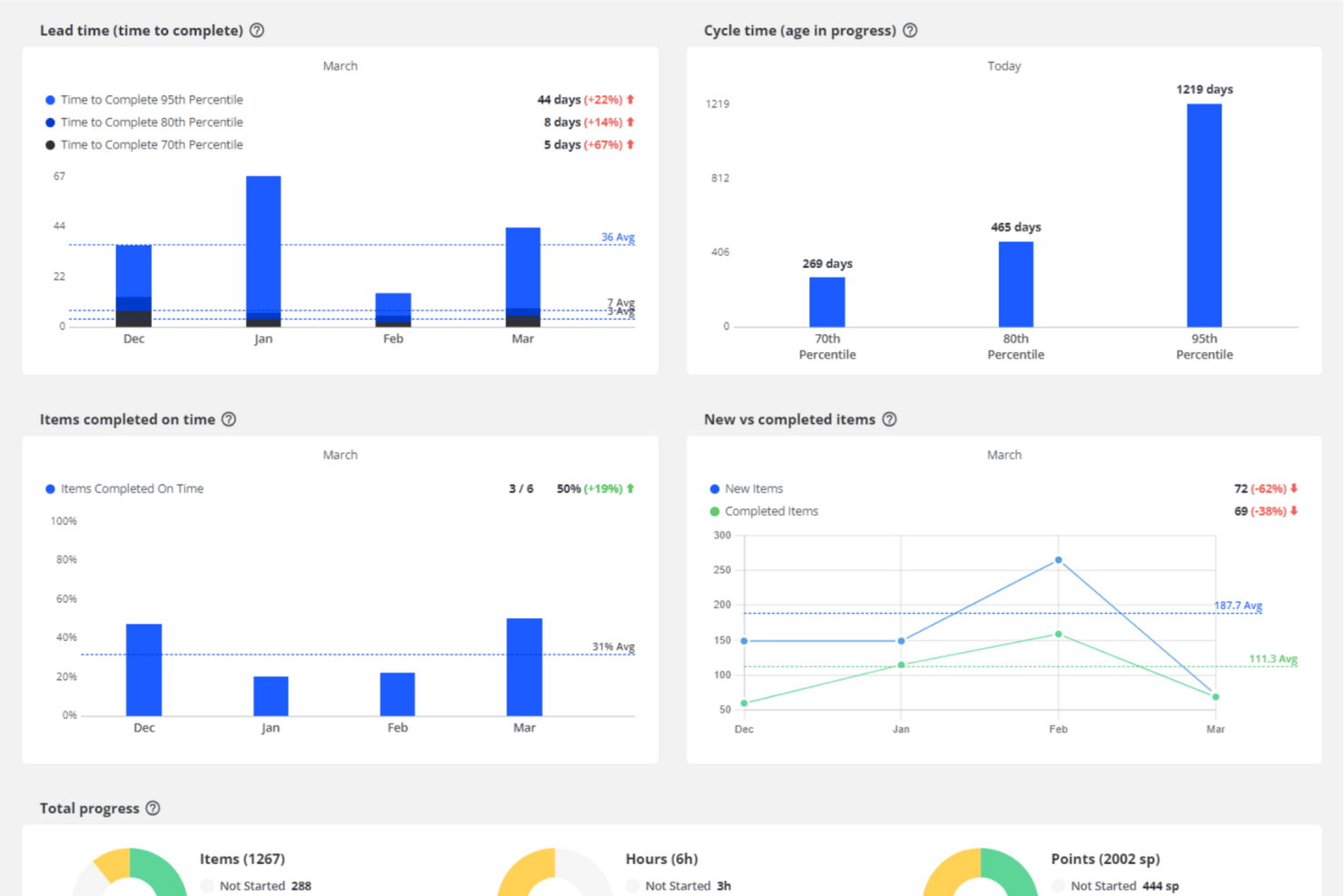
Teamhood è una piattaforma di gestione dei progetti incentrata sulla pianificazione della capacità e del carico di lavoro su più progetti, che combina viste Kanban, Gantt e pianificazione con monitoraggio delle assegnazioni, schede attività e visibilità tra progetti.
Per chi è più adatto Teamhood?
Teamhood è adatto ai responsabili di progetto e ai responsabili di squadra che devono bilanciare le stesse persone tra più progetti contemporaneamente.
Perché ho scelto Teamhood
Ho scelto Teamhood come una delle migliori soluzioni perché è progettato appositamente per lo scenario esatto che mette in difficoltà la maggior parte degli strumenti di gestione dei progetti: persone condivise tra più progetti simultanei. Il report Carico di lavoro mostra le ore assegnate a ciascuna persona rispetto alla capacità disponibile, così puoi vedere a colpo d'occhio chi è sovraccarico e quando è realisticamente possibile iniziare nuovi progetti. Le fasce di capacità aggregano poi i dati in una vista a livello di squadra, rendendo il bilanciamento tra progetti un'attività visibile e gestibile, anziché un esercizio su fogli di calcolo.
Funzionalità principali di Teamhood
- Gantt con ripianificazione automatica delle dipendenze: Imposta dipendenze tra le attività che spostano automaticamente le attività successive quando cambiano le date delle attività precedenti.
- Sincronizzazione bidirezionale con Azure DevOps: Collega Teamhood ad Azure DevOps per sincronizzare le attività in entrambe le direzioni: gli aggiornamenti di Teamhood vengono inviati immediatamente, mentre le modifiche di Azure DevOps vengono sincronizzate ogni ora.
- Confronti con la linea di base e formule: Salva una linea di base del piano e utilizza i campi formula per calcolare gli scostamenti tra valori pianificati ed effettivi nel corso del progetto.
- Rapporti su tempo e costi: Visualizza il tempo registrato per un intero progetto, specifici membri della squadra o l'intera azienda, con raggruppamento, filtri ed esportazione dei registri grezzi delle attività.
Integrazioni di Teamhood
Teamhood offre integrazioni native con Azure DevOps, Outlook Calendar, SharePoint/OneDrive, Google Calendar, Microsoft Teams e Slack. Fornisce inoltre un'API REST, webhook e Zapier per connettività personalizzata.
Pros and Cons
Pros:
- Monitora il carico di lavoro tra progetti simultanei
- Mostra la capacità residua per membro della squadra
- I recensori apprezzano le stime e i rapporti delle schede attività
Cons:
- Nessuna tassonomia ricercabile delle competenze ingegneristiche
- Nessuno scenario di assegnazione del personale affiancato né avvisi

Wrike
Ideale per la pianificazione progetti guidata dall'IA
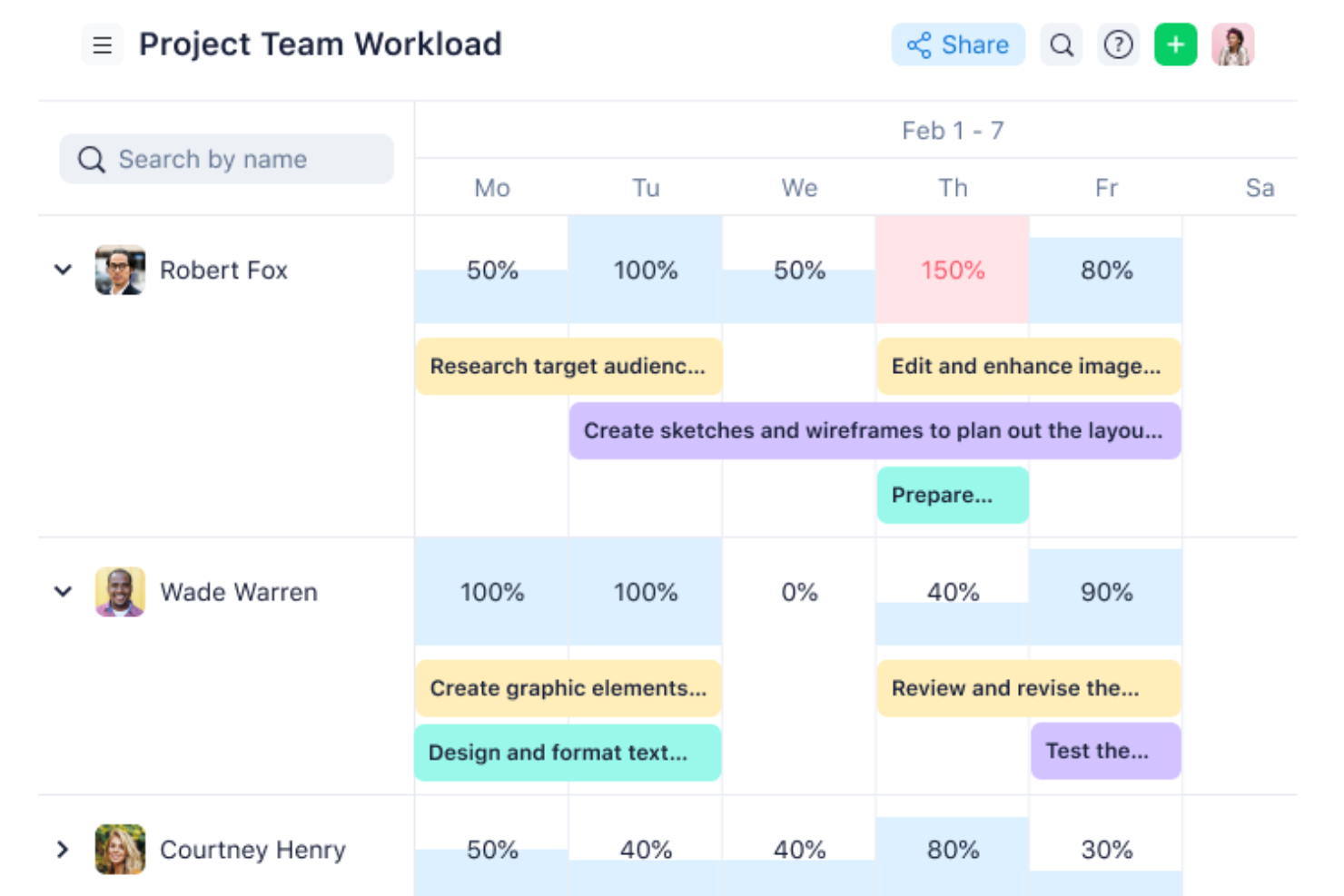
Wrike è una piattaforma di gestione progetti e risorse che combina pianificazione dei carichi di lavoro, monitoraggio della capacità, diagrammi di Gantt, bacheche Kanban e strumenti basati sull'intelligenza artificiale per aiutare i team di ingegneria a gestire risorse e consegne su progetti complessi e trasversali.
Per chi è Wrike?
Wrike è particolarmente adatto per team di ingegneria di medie e grandi dimensioni che necessitano di una visibilità centralizzata sull'allocazione delle risorse tra più progetti contemporanei.
Perché ho scelto Wrike
Ho incluso Wrike tra le mie scelte principali per l'efficacia con cui Wrike Copilot gestisce le parti della pianificazione dei progetti che solitamente richiedono molto tempo a un responsabile tecnico. Posso chiedere a Copilot di esaminare i progetti attivi per individuare rischi, evidenziare le attività prioritarie e identificare ciò che rischia di slittare—il tutto senza dover analizzare manualmente le liste di attività. Apprezzo anche la funzionalità di insight IA, che genera widget per dashboard utilizzando il linguaggio naturale e mette in evidenza tendenze e rischi dai propri dati di progetto. Per i team di ingegneria che gestiscono diversi flussi di lavoro, questo tipo di segnalazione automatica aiuta a mettere in risalto i problemi più rilevanti.
Funzionalità principali di Wrike
- Grafici dei carichi di lavoro: Visualizza le attività pianificate e lo sforzo di ciascun membro del team su una timeline, con riassegnazione tramite drag-and-drop integrata.
- Ruoli lavorativi: Assegna i compiti a specifici tipi di ruolo e pianifica la capacità futura in base alla domanda di ruoli sui progetti in arrivo.
- Timesheet: Registra ore fatturabili e non fatturabili direttamente sui compiti, con la possibilità di bloccare le registrazioni di tempo inviate.
- Report sull'utilizzo del team: Monitora quanto viene utilizzata la capacità del team e quale percentuale delle ore registrate è fatturabile.
Pros and Cons
Pros:
- Numerose integrazioni disponibili
- Dashboard altamente personalizzabili
- Gestione dei task robusta
Cons:
- Le funzionalità avanzate di pianificazione risorse sono disponibili solo nei piani di fascia alta
- La personalizzazione della piattaforma può essere complicata
New Product Updates from Wrike

Wrike Redesigns AI Agent Builder
Wrike redesigns its AI Agent Builder with a side-by-side setup, Scopes, sentence-style triggers and actions, and clearer filters. These changes make it easier to configure, test, and manage agent behavior. For more information, visit Wrike’s official site.

Epicflow
Ideale per la pianificazione di scenari finanziari del portafoglio
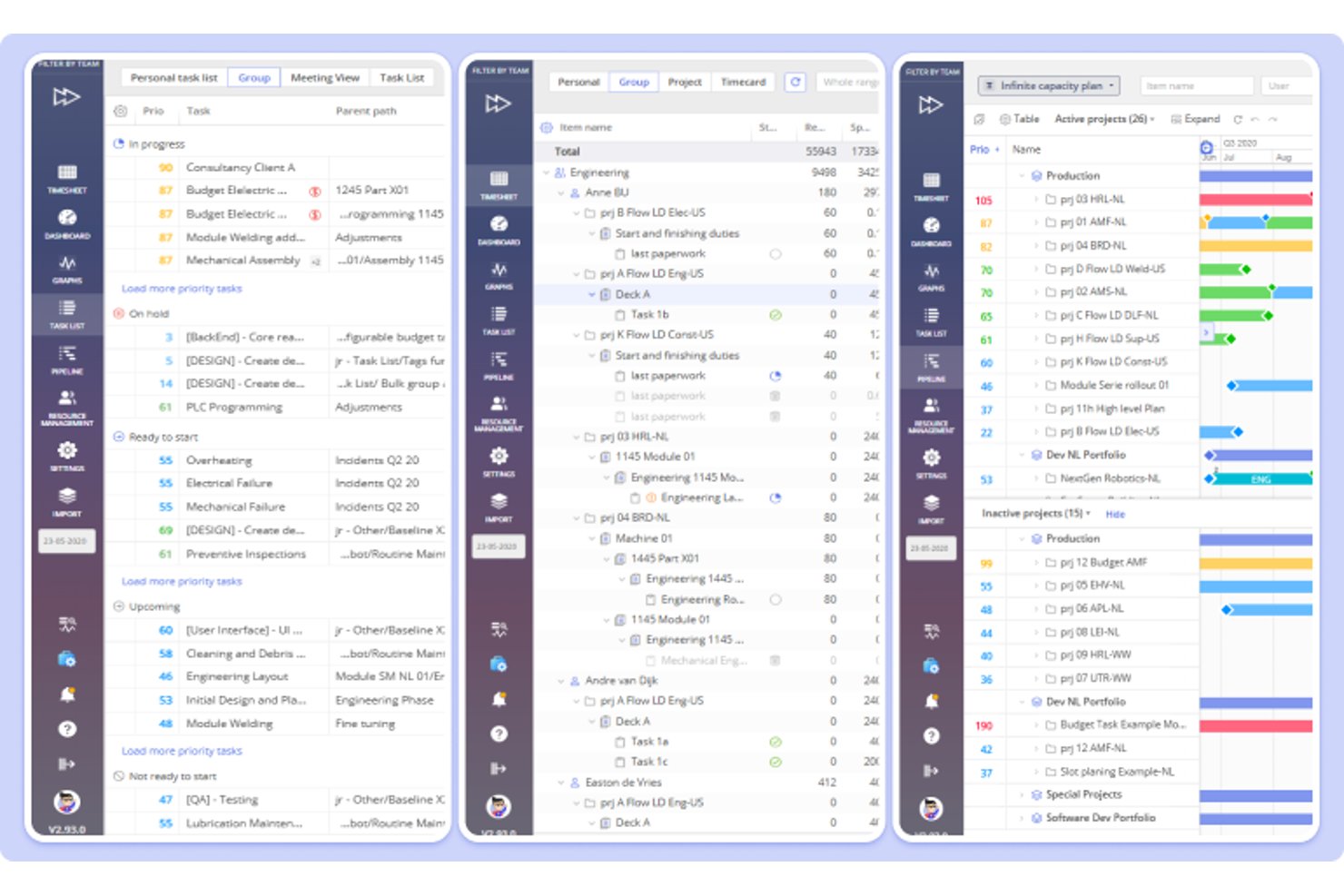
Epicflow è una piattaforma per la gestione del portafoglio di progetti e delle risorse che copre la pianificazione della capacità, l'allocazione delle risorse, l'analisi del carico di lavoro e la modellazione di scenari finanziari in ambienti con più progetti.
Per chi è più adatto Epicflow?
Epicflow è adatto ai direttori degli uffici di gestione progetti (PMO) e ai responsabili delle risorse di organizzazioni medie e grandi che gestiscono portafogli complessi con più progetti, in cui le previsioni della capacità e la modellazione di scenari finanziari guidano le decisioni di pianificazione.
Perché ho scelto Epicflow
Ho scelto Epicflow come una delle soluzioni migliori perché la sua funzione di analisi degli scenari consente di modellare i risultati finanziari di un intero portafoglio prima di prendere qualsiasi impegno. È possibile testare le modifiche ai valori dei contratti, ai termini relativi a bonus e penali e alle scadenze dei pagamenti utilizzando dati reali sulla capacità, quindi confrontare gli scenari salvati affiancandoli. Questa combinazione di modellazione del carico delle risorse e risultati degli scenari finanziari è ciò che rende Epicflow davvero utile ai direttori degli uffici di gestione progetti che devono difendere le decisioni sul portafoglio con previsioni di profitto e tempistiche degli incassi, non soltanto con diagrammi di Gantt.
Funzionalità principali di Epicflow
- Grafico del carico futuro: Prevede la domanda di risorse e il carico di lavoro nei progetti attivi e in pipeline, con ordinamento in base al sovraccarico medio, al sottocarico o al carico di punta.
- Grafico del carico storico: Mostra nel tempo la capacità dei gruppi di risorse, la produzione e il lavoro pronto per l'avvio, per orientare le stime di pianificazione future.
- Integrazione con Jira: Sincronizza in tempo reale ticket, progetti e aggiornamenti di Jira nella visualizzazione del portafoglio di Epicflow.
- Corrispondenza tra scheda attività e scheda utente: Memorizza competenze, attributi e requisiti delle attività su schede abbinate, per evidenziare gli indicatori di disponibilità e di adeguatezza delle competenze durante l'assegnazione.
Integrazioni di Epicflow
Epicflow dispone di integrazioni native con Jira, Microsoft Project e Oracle Primavera. Supporta inoltre integrazioni personalizzate basate su API con sistemi di gestione dei progetti, delle risorse e della pianificazione, oltre a connessioni con SAP e i sistemi HR.
Pros and Cons
Pros:
- Prevede i vincoli di capacità nei progetti attivi e in pipeline
- Supporta l'allocazione delle risorse tra più progetti
- Confronta gli scenari del portafoglio con le previsioni di profitto e delle tempistiche degli incassi
Cons:
- La precisione delle previsioni dipende dalla tempestività dei dati di progetto
- Il monitoraggio dell'utilizzo dipende dall'inserimento manuale giornaliero delle ore

Forecast
Ideale per la gestione del personale tecnico basata sulle fasi
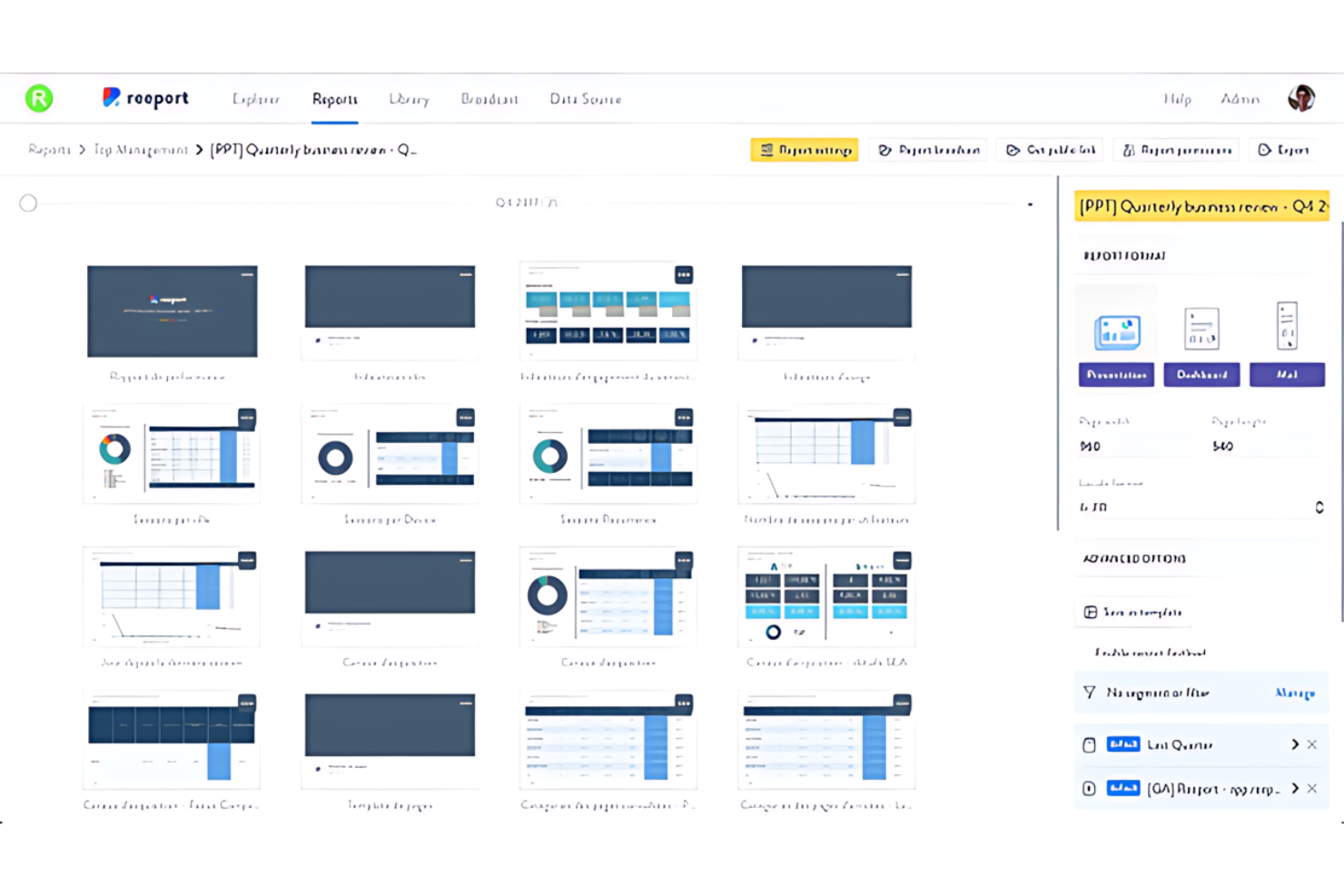
Forecast è un software di gestione delle risorse ingegneristiche che utilizza l'intelligenza artificiale per automatizzare e ottimizzare la pianificazione, l'esecuzione dei progetti e l'allocazione delle risorse.
Perché ho scelto Forecast:
Ho scelto Forecast perché la sua tecnologia basata sull'intelligenza artificiale rende più accurata la previsione delle tempistiche dei progetti, del consumo del budget e del fabbisogno di risorse umane rispetto ai metodi tradizionali. Questo software di pianificazione delle risorse si distingue dalle altre soluzioni di gestione dei progetti grazie al suo approccio proattivo nell'identificare i potenziali rischi e suggerire soluzioni. Forecast è ideale per ottenere informazioni sui progetti basate sull'intelligenza artificiale, poiché trasforma i dati grezzi in informazioni strategiche, consentendo ai team di servizi professionali di prendere decisioni più rapidamente.
Funzionalità e integrazioni principali:
Le funzionalità includono la pianificazione dei progetti, l'integrazione con la gestione finanziaria, il monitoraggio del budget in tempo reale e la previsione dei costi. Inoltre, la sua funzionalità di gestione delle risorse offre una panoramica della capacità e delle competenze del team.
Le integrazioni includono Google Workspace, Microsoft 365, Slack, Trello, Asana, Jira, GitHub, GitLab, Salesforce e Zendesk.
Pros and Cons
Pros:
- Ampie integrazioni native con gli strumenti più diffusi
- Integrazione della gestione dei progetti, delle risorse e delle finanze
- Analisi avanzate basate sull'intelligenza artificiale per la pianificazione e l'esecuzione dei progetti
Cons:
- Le funzionalità di intelligenza artificiale richiedono un periodo di apprendimento per essere sfruttate appieno
- I costi più elevati potrebbero non essere adatti alle aziende più piccole

Ideale per la gestione delle risorse nelle aziende basate sui progetti
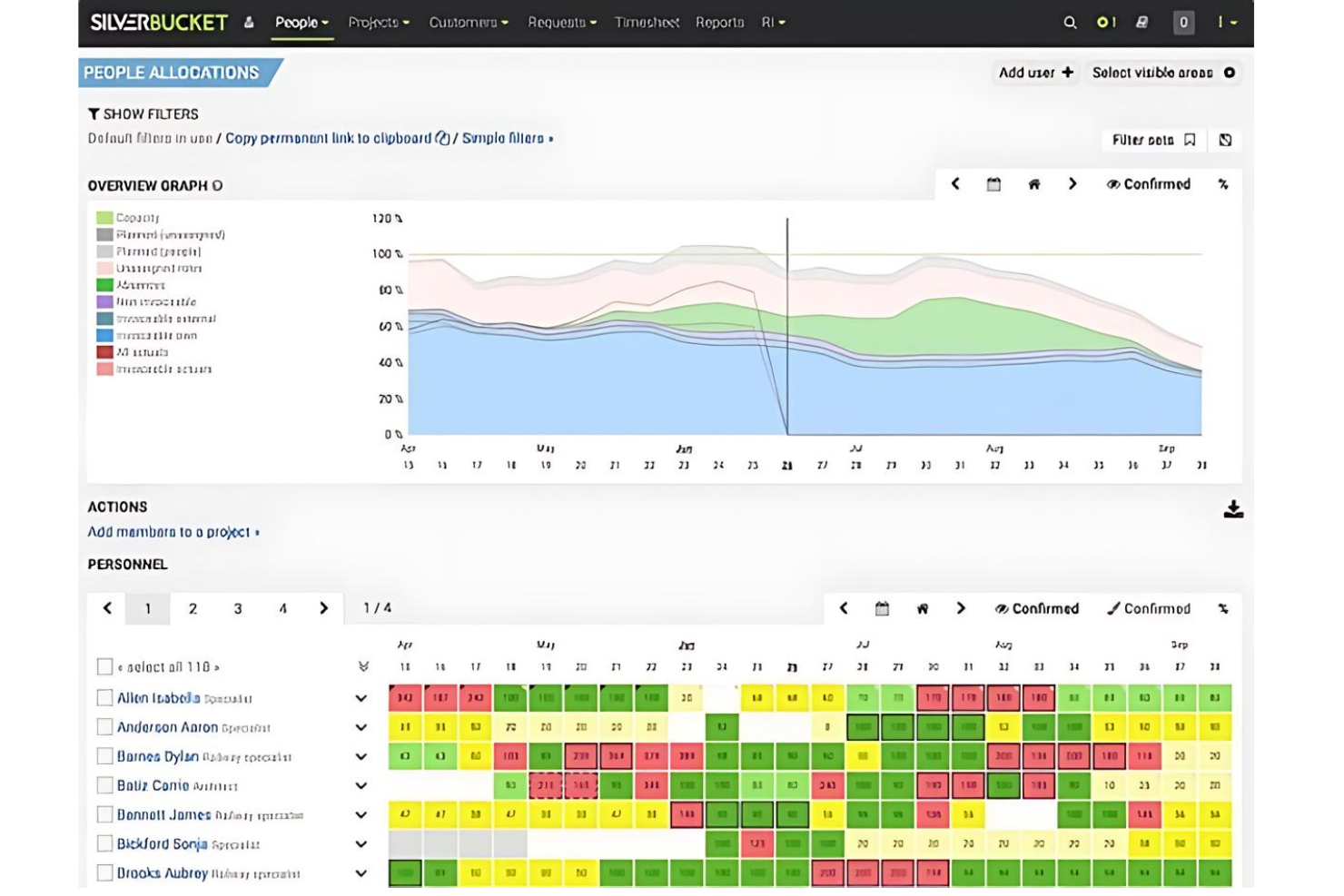
EG Silverbucket è uno strumento di pianificazione delle risorse per organizzazioni basate sui progetti, che comprende la previsione della capacità, l'allocazione basata sulle competenze, la pianificazione degli scenari, il monitoraggio dell'utilizzo e la gestione dei fogli presenze tra team e portafogli.
Per chi è più adatto EG Silverbucket?
EG Silverbucket è adatto ai responsabili delle risorse e ai responsabili di progetto di società di ingegneria e architettura che necessitano di una previsione chiara della capacità e di un'allocazione basata sulle competenze su più progetti.
Perché ho scelto EG Silverbucket
EG Silverbucket si è guadagnato un posto nella mia selezione perché è progettato specificamente per aziende basate sui progetti che devono visualizzare la capacità di un intero portafoglio, non solo di un singolo team. Apprezzo in particolare il flusso di lavoro per la pianificazione degli scenari: è possibile modellare i progetti non confermati con allocazioni provvisorie con mesi di anticipo, per poi convertirli in assegnazioni confermate non appena un progetto viene approvato. Se a questo si aggiunge il punteggio di corrispondenza dei candidati (0–100, calcolato considerando competenze, disponibilità e allocazioni esistenti), i responsabili delle risorse possono prendere decisioni sull'assegnazione del personale più rapide e meglio fondate.
Funzionalità principali di EG Silverbucket
- Filtraggio basato sulle competenze: Cerca e filtra le persone in base a categorie di competenze configurabili e livelli di padronanza durante l'assegnazione dei ruoli nei progetti.
- Integrazione dei fogli presenze: Registra le ore direttamente su progetti e attività, con voci che aggiornano automaticamente i dati effettivi delle allocazioni nel piano delle risorse.
- Report pianificato rispetto a effettivo: Confronta le ore, i costi e i ricavi preventivati con i dati effettivi, con possibilità di analisi dettagliata per team, fase del progetto o cliente.
- Monitoraggio delle tappe del portafoglio: Imposta e monitora le tappe fondamentali tra progetti e programmi, così gli stakeholder possono individuare le scadenze imminenti o a rischio.
Integrazioni di EG Silverbucket
Le integrazioni documentate includono Power BI ed Excel per report e dashboard. EG Silverbucket offre inoltre un'API REST e importazioni CSV/XLSX per collegare dati ERP, PSA, HR e di rilevamento del tempo.
Pros and Cons
Pros:
- Prevede le carenze di personale nei portafogli di progetti
- Abbina i candidati in base a competenze e disponibilità
- I recensori apprezzano la pianificazione delle risorse intuitiva
Cons:
- I flussi di lavoro per le richieste risultano difficili da gestire con volumi elevati
- I report sull'utilizzo offrono opzioni di filtraggio limitate

Productive
Ideale per assegnare il personale in base all'economia delle opportunità
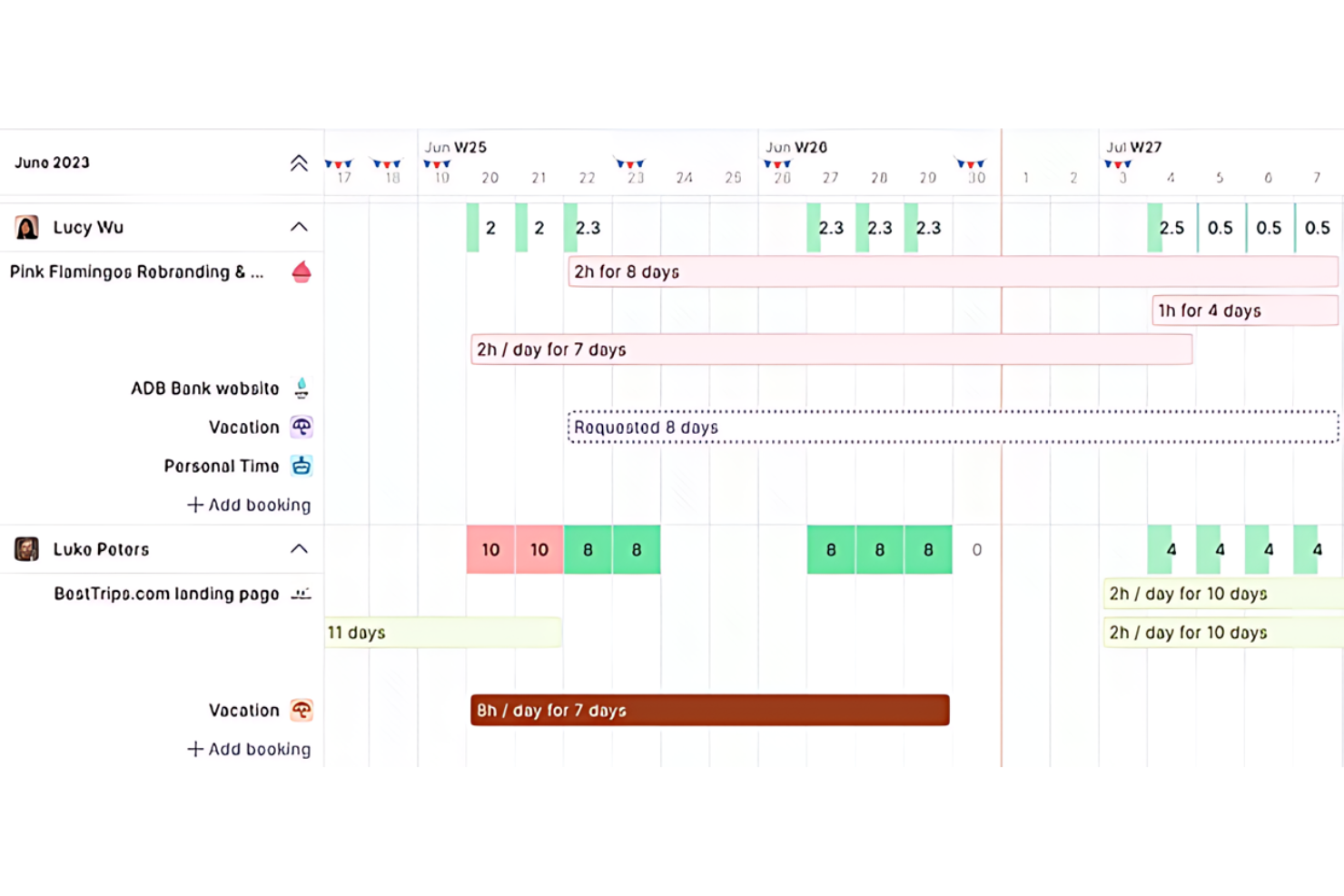
Productive è una piattaforma di automazione dei servizi professionali che riunisce in un unico luogo la pianificazione delle risorse, il monitoraggio della capacità, la gestione del budget dei progetti, il monitoraggio del tempo e la gestione delle opportunità.
Per chi è più adatto Productive?
Productive è particolarmente adatto ai team di servizi professionali—agenzie, società di consulenza e fornitori di servizi gestiti—che necessitano di collegare direttamente le decisioni sull'allocazione delle risorse alle pipeline delle opportunità e ai budget dei progetti.
Perché ho scelto Productive
Ho scelto Productive come uno dei migliori strumenti perché è l'unico che ho visto collegare direttamente le prenotazioni delle risorse alle pipeline delle opportunità e ai budget dei progetti, così le decisioni sull'assegnazione del personale si basano su ciò che un progetto può effettivamente permettersi. Quando un'opportunità attraversa la pipeline, è possibile creare immediatamente prenotazioni provvisorie, che vengono poi confermate una volta acquisito il lavoro. Il Generatore di scenari aggiunge un ulteriore livello consentendo di modellare diverse configurazioni del personale in relazione ai costi e alla redditività prima di prendere un impegno.
Funzionalità principali di Productive
- Pianificatore delle risorse: Visualizza e gestisci le prenotazioni relative a persone, progetti, budget e opportunità in un'unica interfaccia di pianificazione con diverse opzioni di layout.
- Report su capacità e disponibilità: Confronta la capacità, il tempo disponibile, le prenotazioni pianificate e il carico di lavoro delle attività utilizzando formule documentate per individuare le lacune nell'allocazione delle risorse.
- Monitoraggio degli obiettivi di utilizzo: Imposta obiettivi individuali di utilizzo come campi dei dipendenti e confrontali con le ore effettivamente fatturabili in un report dedicato.
- Approvazione delle registrazioni del tempo: Invia le registrazioni del tempo e i fogli presenze per la revisione e l'approvazione prima che confluiscano nella fatturazione o nella reportistica finanziaria.
Integrazioni di Productive
Productive offre integrazioni native con Jira, Google Calendar e Slack, oltre a un'API aperta e webhook per connessioni personalizzate. Supporta anche Zapier.
Pros and Cons
Pros:
- Le prenotazioni trasversali ai progetti collegano la capacità ai budget
- I report sull'utilizzo collegano le ore alla redditività
- Le prenotazioni provvisorie delle opportunità supportano la pianificazione della domanda
Cons:
- Nessun avviso predittivo per il sovraccarico o il burnout
- Le attività ricorrenti future potrebbero non comparire nella pianificazione del carico di lavoro
New Product Updates from Productive
Productive Adds Voice Dictation, Slack Connector, Proposals, and Overtime
Productive adds voice dictation, a Slack Connector, proposal controls, and overtime tracking. These updates support faster AI interactions, client proposals, and time management. For more information, visit Productive’s official site.
Recensioni di altri software per la gestione delle risorse ingegneristiche
Di seguito è riportato un elenco di altri software per la gestione delle risorse ingegneristiche che abbiamo selezionato, ma che non sono entrati nell’elenco principale.
- Celoxis
Ideale per valutare i compromessi tra capacità e margini di progetto
- Saviom
Ideale per la gestione del personale di ingegneria e la pianificazione dei margini
- Smartsheet
Ideale per la pianificazione delle risorse incentrata sulla conformità
- Kantata
Ideale per la gestione del personale legata all'economia del progetto
- Resource Guru
Ideale per coordinare ingegneri e attrezzature
- Microsoft Project
Ideale per piani di assunzione basati sui programmi dei progetti
- Monograph
Ideale per pianificare le assunzioni in base ai lead aperti
- Capacity Planner
Ideale per confrontare la capacità con i dati effettivi tramite collegamento a Jira


Recensioni correlate sui software per la gestione dei progetti
Se non hai ancora trovato quello che cerchi, dai un'occhiata a questi strumenti correlati per la gestione dei progetti che abbiamo testato e recensito.
- Software per la gestione dei progetti
- Software per la gestione delle risorse
- Software per l'automazione dei flussi di lavoro
- Software per la gestione delle attività
- Software per la gestione delle risorse di inventario
- Strumenti di collaborazione
- Creazione di diagrammi di Gantt
Come valuto i software per la gestione delle risorse ingegneristiche
Suddivido la mia valutazione in tre parti, dando il peso maggiore alle attività fondamentali: prevedere la capacità rispetto alla domanda e assegnare gli ingegneri in base alle competenze e alla disponibilità nei diversi progetti. Poi considero gli elementi distintivi, come i suggerimenti dell'IA per l'assegnazione del personale o gli avvisi sui periodi di inattività. Infine, valuto fattori che vanno oltre le funzionalità, tra cui onboarding, assistenza e adeguatezza dei prezzi.
Funzionalità fondamentali (requisiti di base per questo elenco)
Quando seleziono gli strumenti da inserire nel mio elenco, assegno a ciascuno un punteggio su una scala da 0 (non offre la funzionalità) a 5 (eccelle in quest'area) per ogni funzionalità fondamentale elencata di seguito. Poi converto il totale in una percentuale per contribuire a valutare l'idoneità complessiva di ciascuno strumento, attribuendo un peso maggiore alle funzionalità che ho ritenuto essenziali.
- Pianificazione della capacità (essenziale): Cerco previsioni che confrontino la capacità ingegneristica con la domanda dei progetti, così uno spostamento del lancio rivela tempestivamente una lacuna di personale.
- Allocazione delle risorse (essenziale): Verifico se le assegnazioni tengono conto di competenze, disponibilità e carico di lavoro, ad esempio segnalando uno specialista assegnato a progetti sovrapposti.
- Monitoraggio dell'utilizzo: Le visualizzazioni del tempo pianificato rispetto a quello effettivo mi aiutano a valutare se i team riescono a individuare un sovraccarico prolungato o una capacità inutilizzata prima del ciclo di pianificazione successivo.
- Mappatura di competenze e ruoli: Cerco profili di ruoli e competenze consultabili che supportino le attività di assegnazione del personale per cui è richiesta un'esperienza specifica, come l'ingegneria cloud.
- Pianificazione degli scenari: Valuto se i manager possono modellare un progetto posticipato o un'iniziativa aggiuntiva e confrontare l'effetto sul personale dei diversi team.
- Visibilità tra progetti: Una visualizzazione consolidata e filtrabile dovrebbe mostrare le assegnazioni nei progetti attivi, facilitando la valutazione dei conflitti e delle priorità concorrenti.
Una volta ottenuto un elenco di strumenti che soddisfano i criteri, considero ciò che distingue ciascuna piattaforma.
Fattori distintivi (ciò che differenzia i fornitori)
Ecco come confronto i diversi fornitori e ne evidenzio le differenze:
Funzionalità di spicco
Cerco suggerimenti basati sull'IA per l'assegnazione del personale, che associno gli ingegneri ai ruoli in base a competenze, disponibilità e prestazioni nei progetti precedenti: sono utili quando si sta formando il team per una nuova iniziativa e occorre trovare l'ingegnere cloud giusto tra decine di progetti attivi. Gli avvisi sui periodi di inattività sono altrettanto importanti; verifico se lo strumento segnala abbastanza presto gli ingegneri sottoutilizzati da consentirne la riassegnazione prima del ciclo di pianificazione dello sprint successivo. Valuto anche i segnali relativi alla pipeline e alla domanda, che acquisiscono i dati della pipeline commerciale o dei progetti e consentono di prevedere le esigenze di assunzione prima della conclusione dei contratti.
Oltre le funzionalità
Verifico se uno strumento si integra bidirezionalmente con Jira, GitHub o Azure DevOps, perché i dati sull'utilizzo che dipendono dall'inserimento manuale delle ore diventano rapidamente inaccurati. Valuto anche il supporto durante l'onboarding: l'assistenza nella migrazione da fogli di calcolo o strumenti legacy riduce di settimane i tempi di adozione, sia per i responsabili delle risorse sia per gli ingegneri. Anche la sicurezza è importante: la conformità a SOC 2 o ISO 27001 e i controlli degli accessi basati sui ruoli proteggono i dati sensibili relativi a progetti e personale.
Come scegliere il software per la gestione delle risorse ingegneristiche
Ricorda i seguenti punti mentre analizzi il tuo specifico processo di selezione del software.
- Scalabilità: I progetti di ingegneria possono variare notevolmente in termini di dimensioni e complessità, così come il software per la gestione delle risorse. Scegli una soluzione in grado di crescere insieme alla tua azienda e di gestire un numero crescente di progetti e risorse.
- Capacità di integrazione: Il software dovrebbe funzionare bene con gli strumenti già in uso. L'integrazione con sistemi esistenti come ERP, CRM o strumenti CAD garantisce che i dati fluiscano senza problemi tra le diverse aree dell'azienda.
- Dati in tempo reale: Avere accesso a informazioni aggiornate è importante per prendere decisioni consapevoli. Il software giusto offrirà informazioni in tempo reale sull'allocazione, la disponibilità e l'utilizzo delle risorse. Questo è particolarmente importante nell'ingegneria, dove le tempistiche dei progetti e le esigenze in termini di risorse possono cambiare rapidamente.
- Personalizzazione: Ogni azienda di ingegneria ha processi ed esigenze unici. Il software scelto dovrebbe essere personalizzabile per adattarsi ai flussi di lavoro e ai requisiti di reportistica specifici.
- Interfaccia intuitiva: Il software dovrebbe essere facile da usare per tutti i membri del team, indipendentemente dalle loro competenze tecniche. Un'interfaccia intuitiva garantisce che i membri del team possano imparare rapidamente a utilizzare il software, aspetto essenziale per mantenere la produttività.
Tendenze nel software per la gestione delle risorse in ambito ingegneristico
Ecco alcune tendenze che ho notato nella tecnologia dei software per la gestione delle risorse in ambito ingegneristico. Ho consultato aggiornamenti dei prodotti, comunicati stampa e registri delle versioni per individuare le informazioni più importanti.
- Integrazione dell'intelligenza artificiale e dell'apprendimento automatico: L'intelligenza artificiale e l'apprendimento automatico sono sempre più integrati nei software per la gestione delle risorse in ambito ingegneristico. Questa tendenza nella gestione delle risorse tramite IA trasforma le previsioni sui progetti, ottimizza l'allocazione delle risorse e persino prevede i rischi di progetto prima che diventino evidenti, aiutando i team a gestire carichi di lavoro complessi in modo più efficiente.
- Funzionalità avanzate per la collaborazione in tempo reale: Con la continua crescita del lavoro a distanza, aumenta la domanda di funzionalità che supportino la collaborazione in tempo reale tra sedi geograficamente distanti. I software per la gestione delle risorse in ambito ingegneristico e per la gestione delle risorse IT si concentrano sempre più sul miglioramento delle funzioni di chat, della condivisione dei documenti e degli aggiornamenti in tempo reale all'interno delle tempistiche dei progetti.
- Attenzione all'ottimizzazione per dispositivi mobili: Con una forza lavoro sempre più mobile, è in aumento lo sviluppo di soluzioni ottimizzate per dispositivi mobili che consentano di gestire le risorse in movimento. Questa tendenza risponde alla necessità di un'accessibilità costante, ad esempio quando si lavora alla gestione delle risorse per un progetto edilizio, senza compromettere le funzionalità disponibili nelle versioni desktop.
- Funzionalità per la sostenibilità e la riduzione dei costi: Si pone sempre maggiore enfasi sulle funzionalità che promuovono la sostenibilità e la gestione dei costi, rispondendo direttamente alla spinta globale verso pratiche aziendali più rispettose dell'ambiente. Queste includono funzionalità per un migliore monitoraggio dell'utilizzo delle risorse, la riduzione degli sprechi nei processi di progetto e strumenti per una gestione più efficiente del budget.
- Declino delle soluzioni a funzione singola: La tendenza si sta spostando dagli strumenti a funzione singola verso soluzioni più integrate. Con la crescente complessità della gestione digitale dei progetti, diminuisce la domanda di strumenti che offrano una sola funzionalità.
I progressi nei software per la gestione delle risorse in ambito ingegneristico stanno favorendo miglioramenti nell'efficienza dei progetti, nella collaborazione, nella sostenibilità e nell'integrazione degli strumenti.
Che cos'è il software per la gestione delle risorse in ambito ingegneristico?
Il software per la gestione delle risorse in ambito ingegneristico è progettato per aiutare i team di ingegneria e i responsabili di progetto ad allocare in modo efficiente il personale, le attrezzature e i materiali.
Ciò garantisce che i progetti vengano completati nei tempi e nel rispetto del budget, migliorando così la produttività complessiva e l'efficienza dei costi. Il software per la gestione delle risorse include funzionalità come la pianificazione, l'allocazione delle risorse e il monitoraggio dell'utilizzo. Offre visibilità sulla disponibilità delle risorse e sulle esigenze dei progetti, supportando un processo decisionale consapevole e un'esecuzione efficace dei progetti.
Inoltre, il software si integra spesso con altri strumenti di gestione dei progetti di ingegneria, consentendo di supervisionare i progetti. Nel settore del petrolio e del gas, dove i team lavorano in sedi remote e gestiscono infrastrutture estese e ad alto rischio, il software per la gestione delle risorse è essenziale per coordinare il personale, le attrezzature e la conformità normativa. Grazie agli aggiornamenti e alle analisi in tempo reale, aiuta i team ad anticipare i colli di bottiglia e ad adeguare i piani, garantendo flussi di lavoro più fluidi e un migliore utilizzo delle risorse.
Funzionalità del software per la gestione delle risorse in ambito ingegneristico
Quando scegli un software per la gestione delle risorse in ambito ingegneristico, considera le funzionalità che favoriranno il successo del progetto e un'allocazione efficiente delle risorse. Il software giusto può fare la differenza nei risultati del progetto, quindi cerca le seguenti funzionalità.
- Pianificazione delle risorse: Questa funzione consente di pianificare e assegnare le risorse a vari progetti.
- Monitoraggio del tempo: Un monitoraggio accurato è fondamentale per la fatturazione e per comprendere il tempo dedicato a specifiche attività.
- Monitoraggio delle competenze: Osservare le competenze e le capacità della forza lavoro consente di abbinarle meglio alle esigenze dei progetti.
- Pianificazione della capacità: Questa funzione aiuta a prevedere il fabbisogno di risorse in base ai progetti attuali e futuri.
- Integrazione con la gestione dei progetti: L'integrazione con gli strumenti di gestione dei progetti è necessaria per avere una visione completa dei progetti e delle risorse.
- Analisi in tempo reale: L'accesso ai dati e alle informazioni sull'utilizzo delle risorse in tempo reale migliora il processo decisionale.
- Gestione finanziaria: Questa funzione fornisce informazioni sugli aspetti economici della gestione delle risorse, come il monitoraggio dei costi e la definizione del budget.
- Strumenti di collaborazione: Una comunicazione efficace è fondamentale nei progetti di ingegneria e gli strumenti di collaborazione la facilitano.
- Report personalizzabili: La possibilità di generare report personalizzati aiuta a presentare dati rilevanti agli stakeholder.
- Interfaccia intuitiva: Un'interfaccia semplice riduce la curva di apprendimento e aumenta i tassi di adozione.
- Previsioni: Prevedere le tendenze o le richieste future sulla base dei dati attuali e storici.
- Cruscotti: Le interfacce che visualizzano gli indicatori chiave di prestazione e le metriche in una vista consolidata semplificano i processi.
- Automazione: Utilizzare la tecnologia per eseguire attività senza l'intervento umano velocizza i flussi di lavoro.
- Pianificazione delle risorse: Pianificare quando e come verranno utilizzate le risorse nel tempo rende i processi efficienti.
- Diagrammi di Gantt: Le rappresentazioni visive dei programmi dei progetti che mostrano le date di inizio e fine degli elementi aiutano nella pianificazione.
- Fogli presenze: I registri del tempo che ogni membro del team dedica alle varie attività aiutano nella gestione del tempo dei dipendenti.
- Notifiche: Gli avvisi che informano gli utenti su eventi importanti o aggiornamenti mantengono informati gli stakeholder.
- Gestione del portafoglio: Gestire progetti o investimenti per raggiungere obiettivi strategici aiuta l'organizzazione.
- Pianificazione dei progetti: Pianificare la sequenza delle attività e le relative tempistiche in un progetto aiuta a mantenere le attività in linea con i programmi.
- Modelli: Strutture o formati predefiniti che possono essere utilizzati come punto di partenza per nuovi documenti o progetti possono far risparmiare tempo.
- Fatturazione: Creare e inviare ai clienti fatture per i servizi forniti aiuta a gestire il flusso di cassa.
- Applicazioni mobili: I software progettati per dispositivi mobili come smartphone e tablet aiutano a completare le transazioni aziendali anche in movimento.
- Collaborazione tra team: Le funzioni che consentono ai membri del team di lavorare insieme in modo più efficace rendono i dipendenti più produttivi.
Vantaggi del software per la gestione delle risorse di ingegneria
Il software per la gestione delle risorse di ingegneria aiuta a migliorare l'allocazione delle risorse, il monitoraggio dei progetti e la produttività. Ecco cinque vantaggi chiave che queste soluzioni software offrono agli utenti e alle organizzazioni.
- Migliore allocazione delle risorse: Il software per la gestione delle risorse di ingegneria consente di monitorare e assegnare con precisione le risorse. Questo porta a un utilizzo più efficiente delle risorse e a una riduzione dei tempi di inattività.
- Maggiore visibilità e controllo: Gli utenti ottengono una panoramica di tutte le risorse e dei progetti, consentendo di prendere decisioni migliori e di esercitare un maggiore controllo sul processo di ingegneria. Questa visibilità aiuta a identificare i potenziali colli di bottiglia e ad affrontarli in modo proattivo.
- Migliore collaborazione e comunicazione: Il software di gestione dei progetti migliora la comunicazione tra i membri del team fornendo una piattaforma centralizzata per la condivisione delle informazioni. Questo garantisce che tutti siano sulla stessa lunghezza d'onda.
- Previsioni e pianificazione accurate: Il software fornisce dati dettagliati sull'utilizzo delle risorse e sulle tempistiche dei progetti. Questo aiuta le organizzazioni ad anticipare le esigenze e a prepararsi di conseguenza, evitando di dover cercare risorse all'ultimo momento.
- Aumento della produttività e dell'efficienza: Automatizzando molte delle attività di routine associate alla gestione delle risorse, il software consente ai team di concentrarsi sugli aspetti fondamentali dei loro progetti. Questo può portare a un aumento della produttività e dell'efficienza all'interno dell'organizzazione.
Adottare un software per la gestione delle risorse di ingegneria può aumentare la produttività e la redditività, rendendolo potenzialmente un buon investimento.
Costi e prezzi del software per la gestione delle risorse di ingegneria
Quando scegli un software per la gestione delle risorse ingegneristiche, valuta i piani disponibili e i relativi costi. Di seguito trovi una panoramica dettagliata delle opzioni di piano più comuni, dei prezzi medi e delle funzionalità principali, per aiutarti a trovare una soluzione adatta alle tue esigenze e al tuo budget.
Tabella comparativa dei piani per i software di gestione delle risorse ingegneristiche
| Tipo di piano | Prezzo medio | Funzionalità comuni |
| Gratuito | $0 | Accesso alle funzionalità di base, numero limitato di utenti, assistenza della community, pianificazione di base delle risorse |
| Base | $5 - $15/ utente/mese | Gestione di base delle risorse, alcune funzionalità di reportistica, assistenza via email, limiti al numero di utenti |
| Professionale | $20 - $50/ utente/mese | Pianificazione avanzata delle risorse, collaborazione in tempo reale, reportistica completa, assistenza prioritaria |
| Aziendale | Prezzo personalizzato | Creazione di funzionalità personalizzabili, utenti illimitati, assistenza dedicata, sicurezza avanzata, analisi approfondite |
Ogni piano è pensato per team di dimensioni e livelli di complessità dei progetti diversi. Scegli un piano che offra le funzionalità necessarie senza costi aggiuntivi.
Domande frequenti sui software di gestione delle risorse ingegneristiche
Ecco alcune delle domande frequenti che mi vengono poste sui software di gestione delle risorse ingegneristiche.
In che modo i software di gestione delle risorse ingegneristiche migliorano la realizzazione dei progetti?
I software di gestione delle risorse ingegneristiche semplificano la pianificazione e l’esecuzione dei progetti fornendo strumenti per l’allocazione delle risorse, la programmazione e la pianificazione della capacità. Garantiscono che le risorse giuste siano disponibili nei momenti giusti, riducendo i ritardi e aumentando l’efficienza nella realizzazione dei progetti.
I software di gestione delle risorse ingegneristiche possono integrarsi con altri sistemi aziendali?
Sì, la maggior parte dei moderni software di gestione delle risorse ingegneristiche può integrarsi con diversi sistemi aziendali, come ERP, CRM, software di contabilità e altri strumenti di gestione dei progetti. L’integrazione consente il flusso dei dati e migliora la visibilità su tutte le operazioni aziendali.
I software di gestione delle risorse ingegneristiche sono adatti alle piccole aziende?
Certamente. Sebbene siano utili per le grandi organizzazioni che gestiscono diversi progetti su larga scala, anche le piccole aziende e i consulenti indipendenti possono utilizzarli per ottimizzare l’impiego delle risorse, migliorare il monitoraggio dei progetti e ottimizzare la reportistica destinata ai clienti, diventando così più competitivi.
In che modo i software di gestione delle risorse ingegneristiche gestiscono i conflitti tra le risorse?
La maggior parte dei software include algoritmi di rilevamento dei conflitti che avvisano i responsabili quando le risorse sono assegnate a più attività nello stesso periodo o quando si verificano conflitti di programmazione. Ciò consente di apportare tempestivamente modifiche all’allocazione delle risorse e garantisce un’esecuzione fluida dei progetti.
Quali funzionalità di reportistica offrono i software di gestione delle risorse ingegneristiche?
In genere offrono diverse funzionalità di reportistica, dai report di base sull’utilizzo delle risorse e sullo stato dei progetti fino alle analisi finanziarie e delle prestazioni avanzate. I pannelli personalizzabili consentono ai responsabili di concentrarsi sulle metriche più importanti per i loro specifici progetti e obiettivi aziendali.
Come si calcola il ROI quando si implementa un software di gestione delle risorse ingegneristiche?
Il ROI può essere calcolato confrontando i costi risparmiati grazie a una gestione più efficiente delle risorse, alla riduzione dei tempi di inattività e alla semplificazione delle operazioni con il costo del software. Anche i miglioramenti nei tempi di realizzazione dei progetti e la riduzione degli sforamenti dei costi contribuiscono al ROI.