

Le 10 migliori opzioni di software per la pianificazione della capacità per il 2026

10 Elenco dei migliori software per la pianificazione della capacità


I migliori software per la pianificazione della capacità offrono una visione chiara della disponibilità del team, prevengono l'assegnazione eccessiva delle risorse e prevedono le future esigenze in termini di risorse, aiutandoti a rispettare le scadenze ed evitare il sovraccarico del team.
Con oltre 20 anni di esperienza nella gestione dei progetti, so che fogli di calcolo non collegati tra loro e assegnazioni poco chiare delle attività possono portare a conflitti di pianificazione, colli di bottiglia nascosti e carichi di lavoro squilibrati. Il software giusto ti aiuta a monitorare la disponibilità delle risorse, bilanciare i carichi di lavoro tra i progetti e anticipare la domanda prima di raggiungere i limiti di capacità.
Dopo aver esaminato e testato oltre 20 strumenti per la pianificazione della capacità dal 2012 in qualità di recensore di software, ho individuato le soluzioni più efficaci che ti aiutano a pianificare con sicurezza, allocare il lavoro con precisione e mantenere i progetti in linea.
Perché fidarsi dei nostri consigli sui software
Il nostro team testa e recensisce software dal 2012. In quanto project manager noi stessi, sappiamo quanto sia difficile — e importante — scegliere il software giusto.
Per questa guida, abbiamo valutato gli strumenti attraverso test pratici e ricerche indipendenti, assegnando un punteggio agli strumenti in base ai nostri criteri di selezione. Ci basiamo inoltre sulle competenze di leader di pensiero del settore e di professionisti attivi nella gestione dei progetti.
Le nostre recensioni riflettono il nostro giudizio editoriale umano, non un discorso di vendita.
Revisori esperti:
Tabella comparativa dei migliori software per la pianificazione della capacità
Ecco una tabella che ti permette di confrontare tutti gli strumenti appena illustrati nelle panoramiche.
| Tool | Best For | Trial Info | Price | ||
|---|---|---|---|---|---|
| 1 | Ideale per una pianificazione agile delle capacità | Prova gratuita di 14 giorni + demo gratuita disponibile | Da $19,90/utente/mese (fatturato annualmente) | Website | |
| 2 | Ideale per previsioni e pianificazione | 14 giorni di prova gratuita | Da $10/utente/mese | Website | |
| 3 | La migliore pianificazione e previsione della capacità in tempo reale | Prova di 30 giorni | Prezzo su richiesta | Website | |
| 4 | Ideale per la programmazione intuitiva e le previsioni in tempo reale | Prova gratuita di 30 giorni | Da $6/utente/mese | Website | |
| 5 | Ideale per la pianificazione delle risorse con insight finanziari | Prova gratuita di 14 giorni + demo gratuita disponibile | Da $10/mese (fatturato annualmente) | Website | |
| 6 | Ideale per la programmazione adattiva dei progetti | Demo gratuita disponibile | Prezzo su richiesta | Website | |
| 7 | Ideale per l'allocazione delle risorse potenziata dall'IA | Demo gratuita disponibile | Prezzi su richiesta | Website | |
| 8 | Ideale per la personalizzazione | 14 giorni di prova gratuita | Da $6/utente/mese | Website | |
| 9 | Ideale per analisi di costi e prestazioni | Prova gratuita + demo gratuita disponibili | A partire da $10/utente/mese (fatturazione annuale) | Website | |
| 10 | Ideale per la gestione delle risorse incentrata sulle persone | Non disponibile | Prezzi su richiesta | Website |


Recensioni dei migliori software per la pianificazione della capacità
Ecco una breve descrizione di ogni app per la pianificazione della capacità, per illustrare il caso d’uso migliore di ciascuno strumento, alcune funzionalità degne di nota e schermate che offrono un’istantanea dell’interfaccia utente.

Scoro
Ideale per una pianificazione agile delle capacità

Scoro è una piattaforma gestionale tutto-in-uno che offre soluzioni di capacity planning progettate per aiutare le aziende a gestire efficacemente risorse e carichi di lavoro.
Lo strumento include una funzionalità avanzata di diagramma di Gantt agile che fornisce aggiornamenti in tempo reale per la pianificazione della capacità. Puoi visualizzare panoramiche dal vivo del carico di lavoro del tuo team e programmare le attività di conseguenza. Quando vengono create dipendenze tra le attività, Scoro aggiorna automaticamente le tempistiche e i carichi di lavoro, aiutandoti a evitare inserimenti manuali e sovraccarichi.
Una caratteristica distintiva è che Scoro va oltre la capacità di pianificazione integrando molteplici funzioni aziendali in un'unica piattaforma. Queste includono la gestione dei progetti, la gestione delle vendite e dei pipeline, CRM, preventivazione e fatturazione, reportistica e dashboard personalizzabili.
Scoro si integra con Dropbox, PayPal, Expensify, Stripe, Google Calendar, Jira, Slack, Xero, QuickBooks, Sage Intacct, Microsoft Exchange, Asana e altri ancora.
I prezzi partono da $19.9/utente/mese con prova gratuita disponibile.
New Product Updates from Scoro

Scoro Adds Time Mobile App and ELI Improvements
Scoro adds the Scoro Time mobile app for iOS/Android to track time anywhere and expands ELI with attachments, smarter filtering, and trigger-based actions. For more information, visit Scoro's official site.

Runn
Ideale per previsioni e pianificazione

Runn è una piattaforma per la gestione delle risorse e della capacità che aiuta i project manager a ottimizzare il carico di lavoro del loro team in base alle esigenze aziendali.
Con Runn, puoi pianificare e prevedere la capacità per programmare i tuoi progetti di conseguenza. Il calendario dello strumento ti permette di accedere alle tue risorse in tempo reale e vedere il coinvolgimento di ogni membro del team. Il software ti aiuta anche a differenziare tra lavoro fatturabile e non fatturabile, rendendo più semplice determinare i prezzi dei tuoi servizi ed emettere fatture.
Il punto forte di Runn è la sua funzione di previsione della capacità. Questa funzione ti aiuta a determinare se il tuo team ha le competenze e le risorse per affrontare determinati progetti, e come il nuovo lavoro impatterebbe sul carico di lavoro del tuo team.
Runn si integra con diversi strumenti, tra cui WorkflowMax, Harvest, Clockify e altri ancora.
Runn ha un costo a partire da $10/utente/mese. Puoi accedere a una prova gratuita di 14 giorni. La soluzione offre anche un piano gratuito per sempre fino a cinque utenti.

Saviom
La migliore pianificazione e previsione della capacità in tempo reale

Saviom è un software di pianificazione della capacità delle risorse altamente configurabile e scalabile, progettato per affrontare le sfide relative alle risorse in tutti i settori. Aiuta ad allineare la capacità delle risorse alle mutevoli richieste dei progetti attuali e futuri in programma. Puoi allocare le risorse giuste per ogni progetto, al momento e al costo più opportuni, per aumentare l'efficienza operativa e migliorare la consegna dei progetti.
Alcune delle funzionalità avanzate di Saviom includono la gestione della domanda, l'ottimizzazione in tempo reale, la gestione del portafoglio progetti, la gestione delle risorse in attesa, la previsione finanziaria dei progetti in tempo reale e report/cruscotti alimentati da BI.
Ciò che davvero distingue questo strumento è il nuovo e migliorato pianificatore di risorse all-in-one, che offre una suite completa di funzionalità avanzate come analisi multidimensionale, pianificazione della capacità integrata, heat mapping, abbinamento intelligente, avvisi precoci e previsione degli indicatori di performance (KPI). Tutte queste funzionalità contribuiscono collettivamente ad aumentare l'utilizzo fatturabile di ogni risorsa, colmare proattivamente i gap di competenze, eliminare il burnout e ridurre al minimo i costi di assunzione/licenziamento.
Saviom si integra con le applicazioni aziendali quotidiane come Salesforce, MS Excel, SAP e altre.

Ideale per la programmazione intuitiva e le previsioni in tempo reale
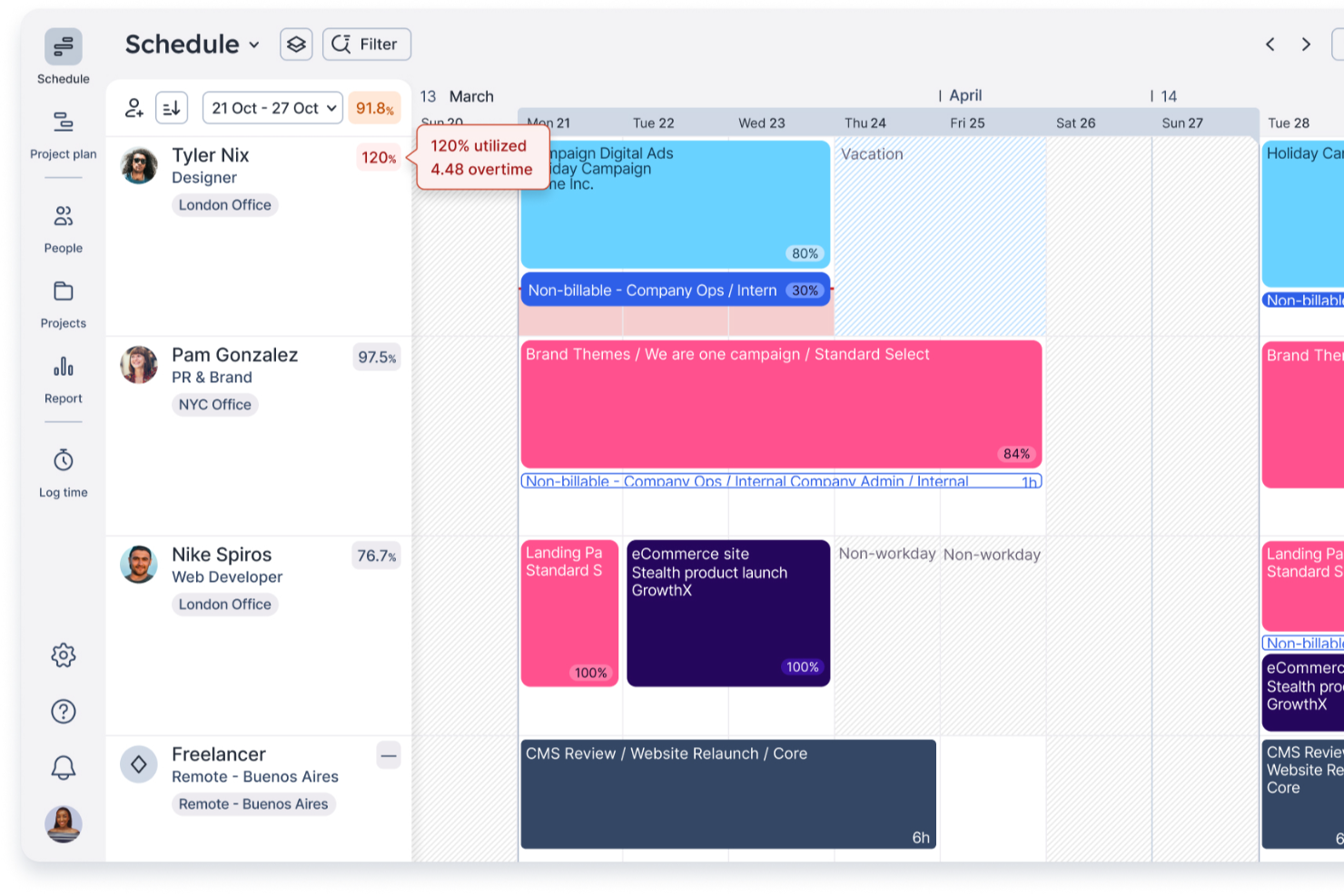
Float.com si rivolge a studi di servizi professionali e team creativi che desiderano ottimizzare la pianificazione e l'allocazione delle risorse. Concentrandosi su una gestione efficace delle persone e offrendo funzionalità come la gestione finanziaria e la stima per la previsione dei ricavi, Float ti aiuta a migliorare la gestione dei progetti e l'efficienza operativa. Che tu faccia parte di una grande agenzia globale o di una piccola consulenza, le capacità di Float nella programmazione delle risorse, nel monitoraggio del tempo e nella reportistica possono supportare la tua crescita e migliorare i tassi di consegna dei progetti.
Perché ho scelto Float.com
Ho scelto Float perché eccelle nella programmazione intuitiva e nelle previsioni in tempo reale, rendendolo una scelta eccellente per la pianificazione della capacità. Con funzionalità come il monitoraggio della capacità in tempo reale e avvisi di sovra-capacità, puoi garantire carichi di lavoro equilibrati ed evitare il burnout. La piattaforma consente inoltre impostazioni di disponibilità personalizzate e una gestione efficiente delle assenze, fondamentali per mantenere la produttività del team. Inoltre, le capacità di integrazione di Float con altri strumenti migliorano l'efficienza del flusso di lavoro, rendendolo una risorsa preziosa per studi di servizi professionali e team creativi.
Caratteristiche principali di Float.com
Oltre alla programmazione intuitiva e alle previsioni in tempo reale, Float offre diverse altre funzionalità che migliorano la pianificazione della capacità per il tuo team:
- Configurazioni di team personalizzabili: Puoi standardizzare i ruoli e filtrare i dipendenti in base a competenze e posizione geografica, consentendo un'allocazione e una gestione delle risorse più precise.
- Gestione delle assenze: Float ti permette di gestire le assenze tramite politiche personalizzabili, assicurando che la disponibilità del team sia accuratamente riflessa nella tua pianificazione.
- Integrazioni con strumenti popolari: Integrando strumenti come Google Calendar, Slack e Jira, Float migliora l'efficienza del flusso di lavoro e mantiene i dati accurati e aggiornati.
- Collaborazione in tempo reale: Questa funzione consente ai membri del team di lavorare insieme senza interruzioni, garantendo che tutti siano informati sui cambiamenti e sugli aggiornamenti dei progetti.
Integrazioni di Float.com
Le integrazioni includono Asana, Basecamp, ClickUp, Jira, Google Calendar, Aprimo, Hubspot, Karbon, Slack e Trello.
Pros and Cons
Pros:
- Le linee temporali visive migliorano la chiarezza della pianificazione per i team.
- Gli aggiornamenti in tempo reale tengono informati tutti i membri del team.
- L'integrazione con strumenti popolari migliora l'efficienza del flusso di lavoro.
Cons:
- Le opzioni di personalizzazione limitate potrebbero non soddisfare tutte le esigenze.
- Esistono difficoltà di integrazione con alcuni strumenti di nicchia.
New Product Updates from Float.com

Float Adds Rate Cards and Multi-Currency Billing
Float introduced centralized rate cards to standardize bill rates across projects and added multi-currency support to bill clients consistently across regions. For more information, visit Float's official site.

Ideale per la pianificazione delle risorse con insight finanziari

Productive è un software completo di gestione della forza lavoro progettato principalmente per agenzie e altre industrie basate sui servizi. Il modulo di pianificazione delle risorse del software aiuta a sfruttare al massimo il tempo di ogni membro del team e a mantenere sotto controllo le capacità di carico di lavoro. Gli utenti possono accedere a rappresentazioni visive del carico di lavoro e della disponibilità dei membri del team, e utilizzare queste informazioni per assegnare compiti e distribuire il lavoro. I dipendenti possono anche essere raggruppati per competenze e reparti per una migliore allocazione delle risorse.
Lo strumento di rilevazione delle ore lavorate del software è direttamente collegato alla funzionalità di pianificazione della capacità, poiché i dipendenti possono registrare il tempo impiegato nelle varie attività e progetti. Queste informazioni alimentano gli strumenti di pianificazione delle risorse, supportando una programmazione più intelligente tramite previsioni e approfondimenti predittivi. I project manager possono utilizzare i dati dei progetti precedenti per prevedere con precisione i requisiti di lavoro futuri, inclusi gli intervalli di tempo stimati per completare una attività e scenari ipotetici.
La pianificazione del budget e delle finanze fa anch'essa parte delle funzionalità. Questa può essere integrata agli strumenti di pianificazione della capacità e del carico di lavoro, garantendo che i team non superino il budget sui progetti. Altre funzionalità incluse nel software sono la gestione dei progetti, la gestione dei documenti, la fatturazione e gli strumenti di reportistica.
I team possono collegare il software ad altri strumenti SaaS come Dropbox, Jira, Outlook, Microsoft Calendar, Slack, QuickBooks e Xero. È disponibile anche un'integrazione con Zapier per configurare ulteriori integrazioni.
New Product Updates from Productive

Productive Adds Agent Triggers, Teams Integration, and Time Controls
Productive adds automated agent triggers, broader AI file support, Microsoft Teams integration, Resource Planner improvements, and new time entry controls. These updates expand automation while improving scheduling, collaboration, and time tracking. For more information, visit Productive’s official site.

Accelo
Ideale per la programmazione adattiva dei progetti
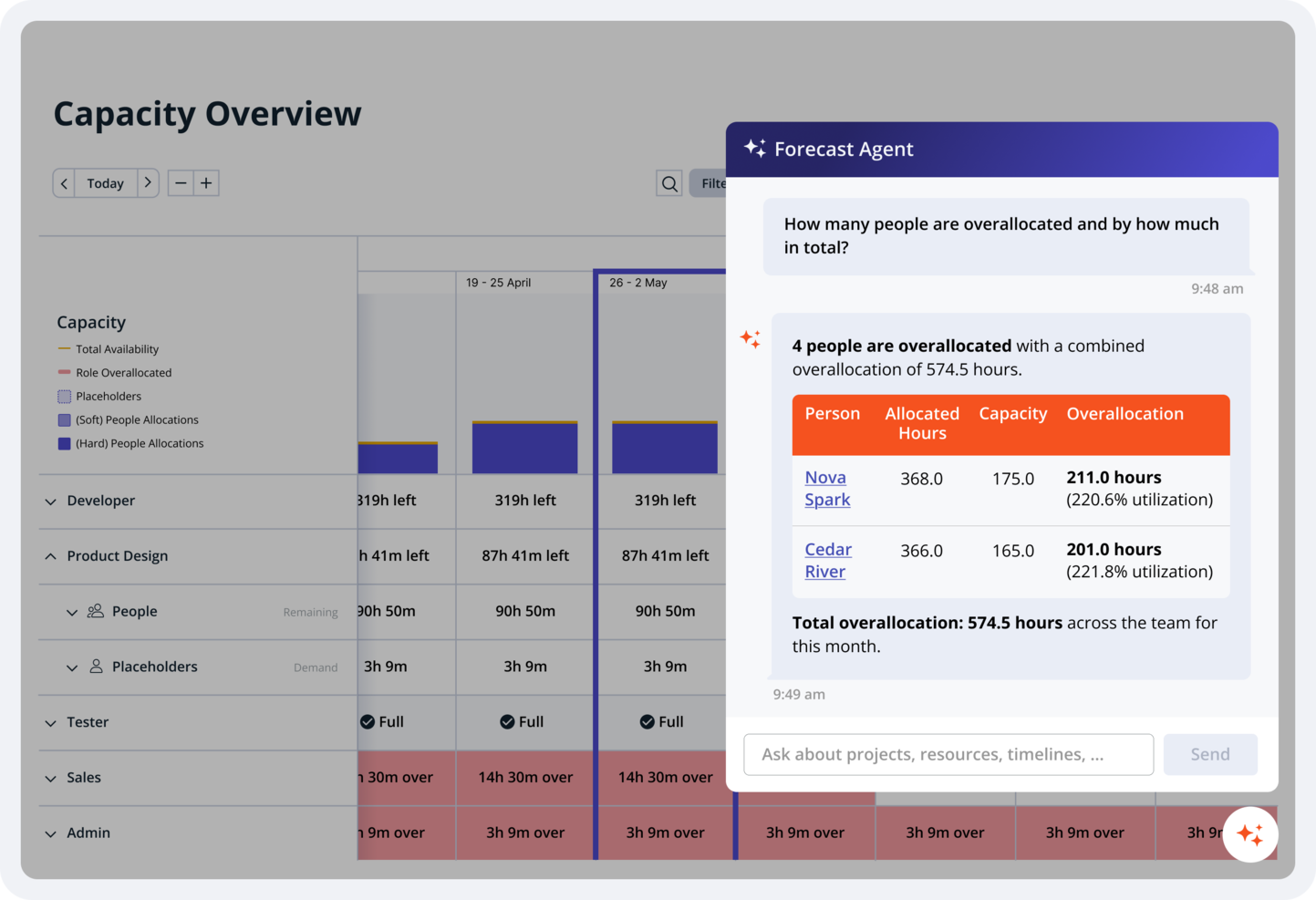
Accelo è una piattaforma di gestione progetti e risorse progettata per team di servizi che necessitano di una pianificazione strutturata della capacità. Riunisce in un unico sistema la programmazione dei progetti, il monitoraggio del carico di lavoro, la gestione del tempo e l'automazione dei flussi di lavoro.
Per chi è consigliato Accelo?
Accelo è ideale per project manager e team di servizi professionali che hanno bisogno di visibilità sulla capacità del team, le tempistiche e le attività dei clienti su più progetti.
Perché ho scelto Accelo
Ho scelto Accelo per i suoi strumenti di pianificazione adattivi e la visibilità in tempo reale del carico di lavoro. Il diagramma di Gantt drag-and-drop consente ai team di modificare rapidamente le tempistiche e riassegnare i compiti. Quando il perimetro del progetto o la disponibilità cambiano, il motore di pianificazione aggiorna le tempistiche per riflettere le nuove allocazioni di risorse, aiutando a mantenere piani di capacità accurati.
Caratteristiche principali di Accelo
- Dashboard di utilizzo delle risorse: Visualizza la capacità del team e identifica rapidamente sovra- o sottoutilizzazioni.
- Strumenti di programmazione dei progetti: Modifica le tempistiche con diagrammi di Gantt drag-and-drop.
- Monitoraggio del tempo: Registra ore fatturabili e non fatturabili direttamente nei progetti.
- Gestione dei contratti a canone: Monitora il lavoro ricorrente dei clienti e assegna risorse continuative.
- Automazione dei flussi di lavoro: Automatizza approvazioni e assegnazioni di compiti mediante regole configurabili.
Integrazioni di Accelo
Accelo si integra con Google Workspace, Microsoft 365, Xero, QuickBooks Online, HubSpot, Salesforce, Mailchimp, Slack e Zapier. È disponibile anche un'API per integrazioni personalizzate.
Pros and Cons
Pros:
- Visibilità in tempo reale sui carichi di lavoro del team
- La programmazione automatica dei progetti si adatta ai cambiamenti
- Centralizza dati di clienti, progetti e risorse
Cons:
- Abbonamento minimo richiesto per tre utenti
- Impostazione complessa per funzionalità di workflow avanzate

Ideale per l'allocazione delle risorse potenziata dall'IA

Screendragon è una piattaforma di gestione del lavoro progettata per aiutare team di marketing, agenzie e servizi professionali a gestire progetti, risorse e budget in un unico posto. Centralizza le attività di progetto, riducendo la necessità di passare da uno strumento all'altro.
Uno dei motivi per cui ho scelto Screendragon è la sua capacità di offrire una visione completa dell'allocazione delle risorse. Puoi vedere chi sta lavorando su cosa e quando, permettendo una migliore distribuzione del carico di lavoro. Questa visibilità aiuta a identificare potenziali colli di bottiglia e garantisce che le risorse siano impiegate in modo efficace. Inoltre, i dashboard di pianificazione delle capacità della piattaforma integrano i dati della pipeline di nuovi business con gli impegni di progetto confermati, offrendo una prospettiva proattiva sulle esigenze di risorse. Questa capacità predittiva consente al tuo team di anticipare la domanda futura e di adeguare le risorse di conseguenza, assicurando che i progetti in arrivo siano sufficientemente dotati di personale.
Apprezzo anche che Screendragon includa la gestione del budget e delle stime, che permette di creare stime di progetto accurate basate su piani di personale e deliverable, tracciando automaticamente i costi programmati rispetto a quelli effettivi di progetto.
Le integrazioni includono MS Power BI, Slack, MS Teams, Zapier, Google Drive, Trello, Microsoft 365, Box, Jira, Microsoft OneDrive e PeopleSoft.
New Product Updates from Screendragon
Screendragon Unveils New AI Hub
Screendragon introduced AI Hub, a new capability that lets teams build and manage AI agents directly within workflows. The update helps marketing teams automate tasks, maintain governance controls, and scale AI-driven operations more efficiently. For more information, visit Screendragon's official site.

Ideale per la personalizzazione
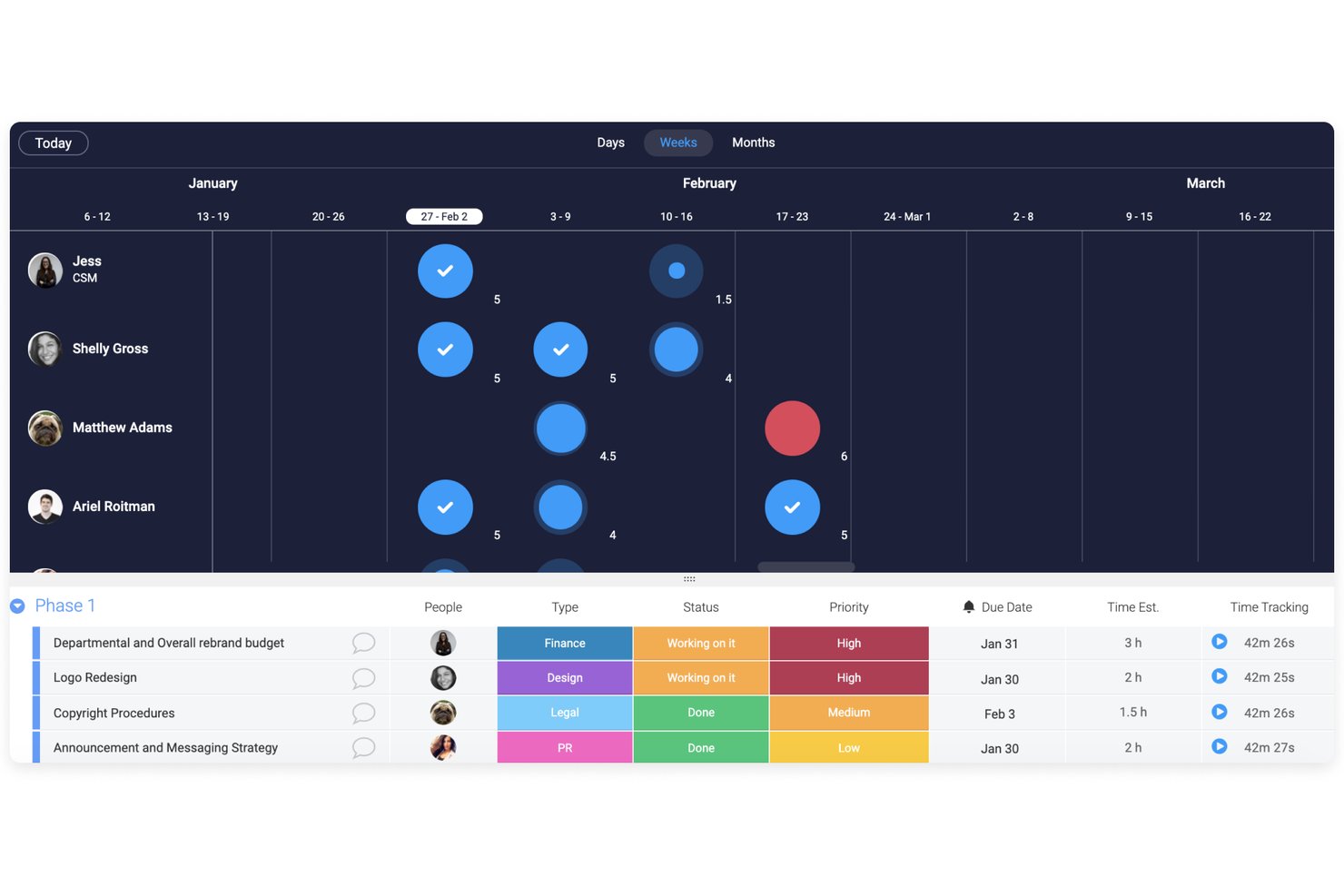
monday AI Workspace è una piattaforma di gestione del lavoro che combina pianificazione dei progetti, visualizzazione dei carichi di lavoro e monitoraggio delle risorse potenziato dall'IA per aiutare i team a gestire la capacità attraverso progetti e portafogli.
Per chi è più indicato monday AI Workspace?
È una scelta solida per team di medie e grandi dimensioni che gestiscono più progetti simultaneamente e necessitano di strumenti flessibili e visivi per monitorare il carico di lavoro del team.
Perché ho scelto monday AI Workspace
Ho inserito monday AI Workspace nella mia selezione perché nessun altro strumento in questo settore mi permette di modellare la pianificazione della capacità con la stessa precisione richiesta dal flusso di lavoro reale del mio team. Mi piace poter combinare colonne personalizzate, campi di stima temporale e viste Workload codificate a colori in un layout di board che riflette esattamente come il mio team tiene traccia della disponibilità. Il generatore monday Vibe porta questo aspetto ancora oltre, consentendomi di creare app di pianificazione della capacità su misura senza dover scrivere codice.
Caratteristiche principali di monday AI Workspace
- Vista del carico di lavoro: Visualizza l'assegnazione dei compiti per membro del team, evidenziando le situazioni di sovraccarico o bassa capacità tramite codici colore.
- Gestione del portafoglio: Offre una dashboard centralizzata per supervisionare più progetti e monitorare i progressi da un unico luogo.
- Analisi della capacità potenziate dall'IA: Utilizza l'intelligenza artificiale per evidenziare rischi di capacità e creare riepiloghi del carico di lavoro a partire dai dati di utilizzo reale.
- Automazione dei processi: Automatizza attività di routine come notifiche, aggiornamenti di stato e assegnazione delle risorse su tutte le board.
Integrazioni di monday AI Workspace
monday AI Workspace offre centinaia di integrazioni attraverso i suoi connettori integrati e il marketplace, tra cui Slack, Salesforce, HubSpot, Google Workspace, Microsoft Teams, Jira, Dropbox, GitHub, Zendesk e Asana. Supporta anche Zapier e fornisce un'API per integrazioni personalizzate.
Pros and Cons
Pros:
- Board e viste del carico di lavoro altamente personalizzabili
- I riepiloghi della capacità generati dall'IA fanno risparmiare tempo di pianificazione
- Scalabile su più team e portafogli
Cons:
- La previsione della capacità nativa è meno specializzata
- La pianificazione di scenari richiede soluzioni manuali
New Product Updates from monday AI Workspace
monday AI Workspace Adds Human Approval Routing
monday AI Workspace adds a human-in-the-loop approval block to AI Workflows, sending approval requests and routing workflow paths based on responses. For more information, visit monday AI Workspace's official site.

Celoxis
Ideale per analisi di costi e prestazioni
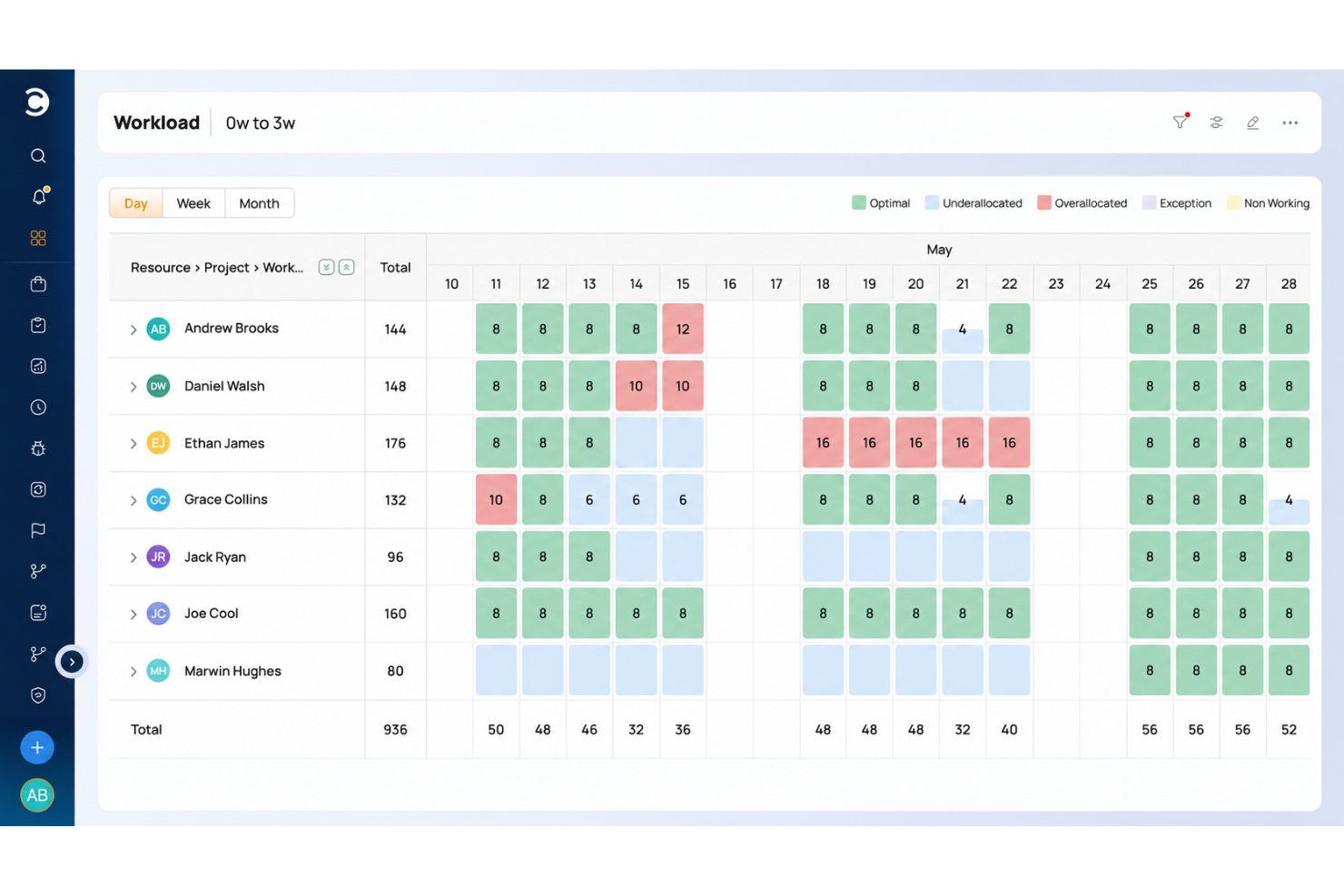
Celoxis si configura come uno strumento eccezionale per la pianificazione della capacità, offrendo alle organizzazioni una soluzione completa per gestire e ottimizzare efficacemente le proprie risorse. Grazie alla sua interfaccia intuitiva e alle potenti funzionalità di monitoraggio delle risorse, Celoxis consente agli utenti di allocare il personale e le altre risorse in modo efficiente, prevenendo sia il sovraccarico che la sotto-utilizzazione.
Celoxis offre una visibilità in tempo reale sulla disponibilità delle risorse, sui carichi di lavoro e sulle tempistiche dei progetti, consentendo ai team di prendere decisioni informate e garantire che le risorse giuste vengano assegnate ai compiti corretti. Inoltre, i report e le dashboard personalizzabili di Celoxis forniscono preziose informazioni sulle tendenze di allocazione delle risorse, aiutando le organizzazioni a migliorare la produttività e raggiungere risultati di progetto migliori attraverso una pianificazione della capacità basata sui dati.
Celoxis si distingue per il suo modulo completo e facile da usare di Earned Value Management (EVM), che supera le capacità di molti concorrenti. L'EVM è un metodo efficace per analizzare i costi e le prestazioni di un progetto, e Celoxis mette a disposizione dei project manager gli strumenti per implementare e monitorare facilmente metriche EVM fondamentali come il Cost Performance Index (CPI) e lo Schedule Performance Index (SPI).
Celoxis integra perfettamente l'EVM con le altre funzioni di project management, consentendo ai project manager di prendere decisioni consapevoli e guidate dai dati grazie a una visione in tempo reale sull'avanzamento dei progetti, la convenienza economica e la precisione delle scadenze. Questa funzionalità preziosa è particolarmente vantaggiosa per le organizzazioni che necessitano di un'analisi finanziaria approfondita e di un monitoraggio delle performance nei propri progetti.
Le integrazioni includono collegamenti predefiniti con Google Drive, Outlook, Microsoft Project, Excel, Salesforce e centinaia di altri strumenti come JIRA, Slack & Trello.
Celoxis ha un costo a partire da $25/utente/mese e offre una prova gratuita di 30 giorni.

Kantata
Ideale per la gestione delle risorse incentrata sulle persone
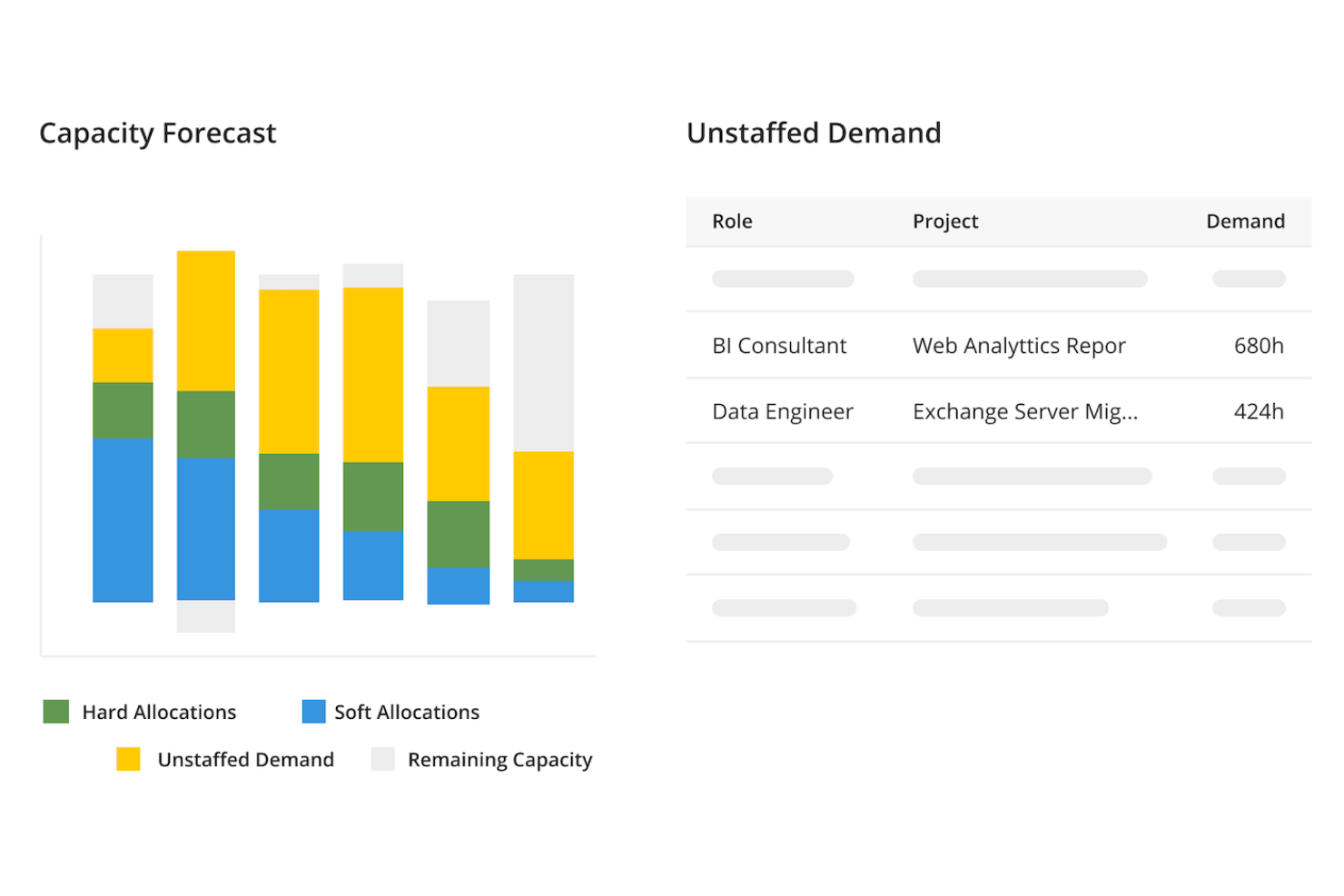
Kantata è una piattaforma di gestione del lavoro e delle risorse progettata per i team di servizi professionali. Aiuta ad abbinare le competenze e la disponibilità delle persone alla domanda dei progetti con chiarezza e precisione.
Con Kantata puoi prevedere le esigenze di risorse su tutto il tuo portafoglio. La visibilità in tempo reale mostra dove i carichi di lavoro sono sbilanciati. Avvisi automatici segnalano personale sovraccarico o sottoutilizzato. La pianificazione degli scenari consente di testare diversi modelli di staff prima di apportare modifiche.
La piattaforma mantiene inoltre un inventario dettagliato delle competenze del tuo team. Puoi allineare i talenti ai progetti in base a esperienza, requisiti di ruolo e criteri personalizzati. Questo garantisce che ogni consulente, designer o specialista sia collocato dove può apportare il maggior valore. Evidenzia inoltre eventuali lacune di competenze, per poter pianificare formazione e sviluppo.
Kantata va oltre la semplice pianificazione, concentrandosi sulle persone dietro al lavoro. Bilanciando i carichi e offrendo opportunità di crescita, aiuta a prevenire il burnout e a migliorare la fidelizzazione. Per le aziende di servizi professionali, questo approccio people-first assicura risultati migliori sia per il team che per i clienti.
Sono disponibili integrazioni con diversi altri strumenti di lavoro, tra cui Slack, Sage, QuickBooks, Expensify, BambooHR, NetSuite, Jira, Salesforce, Xero e Google Workspace.
New Product Updates from Kantata

Kantata Adds Access Group Change History
Kantata adds Access Groups History, letting account administrators track changes to group details, membership, and permissions in Recent History. The update also makes these events available through the Subscribed Events API for broader monitoring. For more information, visit Kantata’s official site.
 .
.Quando utilizzare un software per la pianificazione della capacità
Il software per la pianificazione della capacità offre una visione in tempo reale di chi è disponibile, delle attività su cui sta lavorando e della possibilità effettiva che il tuo team possa occuparsi delle prossime attività. Se una delle situazioni seguenti ti sembra familiare, probabilmente è arrivato il momento di aggiungerne uno al tuo insieme di strumenti:
- Il tuo team continua a non rispettare le scadenze nonostante disponga di un numero «sufficiente» di persone: Hai 10 persone sul progetto, ma tre sono sommerse da altro lavoro e nessuno lo ha segnalato. Il software per la pianificazione della capacità mette in evidenza l'assegnazione eccessiva delle risorse prima che comprometta la consegna, così puoi riassegnare il lavoro mentre c'è ancora tempo per correggere la rotta.
- Stai creando il piano delle risorse nei fogli di calcolo: Stai monitorando la disponibilità di un team di 15 persone in un file Excel condiviso che entro giovedì è già obsoleto. Uno strumento dedicato mantiene disponibilità, assenze e assegnazioni ai progetti in un'unica visualizzazione aggiornata, riducendo il tempo di pianificazione ed eliminando il caos delle diverse versioni.
- Gestisci le decisioni sulle assunzioni basandoti sulle sensazioni: Non sai se assumere un collaboratore esterno o aspettare il terzo trimestre, perché non riesci a vedere la domanda oltre il prossimo mese. Il software per la pianificazione della capacità modella la tua pipeline, consentendoti di prendere decisioni sull'allocazione delle risorse basate su dati concreti.
- Stai impiegando troppo tempo per assegnare il personale ai nuovi progetti: Ogni volta che inizia un progetto, trascorri una settimana per capire chi è disponibile e in quale percentuale. Con il software per la pianificazione della capacità puoi visualizzare la disponibilità a colpo d'occhio e assegnare le persone giuste in poche ore, non in giorni.
- Gestisci più progetti con risorse condivise: I tuoi designer e sviluppatori sono distribuiti su quattro progetti attivi e nessuno ha una visione chiara del carico complessivo. Gli strumenti per la pianificazione della capacità offrono a tutti visibilità sulla capacità disponibile del team condiviso, così i conflitti vengono individuati prima di causare sovraccarico.
Altri software per la pianificazione della capacità
Ecco alcune altre soluzioni che non sono rientrate nell’elenco principale, ma che meritano di essere prese in considerazione.
- Zoho Projects
Ideale per bilanciare il carico del team
- VOGSY
Ideale per la gestione del lavoro in corso
- Wrike
Monitora lo stato di avanzamento del tuo progetto in tempo reale
- Resource Guru
Ideale per la pianificazione visiva della capacità e la previsione
- Miro
Ideale per collaborazione e innovazione visiva
- Rocketlane
Ideale per la previsione delle risorse nei progetti con i clienti
- ClickUp
Pianifica il futuro con modelli adattabili
- Meisterplan
Ideale per l'allocazione delle risorse basata sui ruoli prima dell’assegnazione del personale
- awork
Ideale per l'assegnazione dei compiti tramite AI
- Bonsai Agency Software
Ideale per la gestione delle risorse e la previsione nelle agenzie
- Birdview
Ideale per aziende di servizi professionali
- ProjectManager
Valuta facilmente l'avanzamento dei progetti
- Parallax
Ideale per supporto onboarding personalizzato
- eResource Scheduler
Ideale per monitoraggio del tempo, pianificazione, finanza e report
- Acuity PPM
Ideale per la governance aziendale
- Mosaic
Il solo software di pianificazione della capacità progettato specificamente per aumentare i tassi di utilizzo
- Toggl
Ideale per la pianificazione finanziaria
- Smartsheet
Risparmia tempo nella pianificazione di un nuovo progetto
- ClickTime
Ideale per bilanciare i carichi di lavoro e allocare il personale in tempo reale
- Epicflow
Ideale per la pianificazione della capacità delle risorse tramite IA
- GoodDay
Ideale per la flessibilità nella visualizzazione dei dati
- Hub Planner by Milient
Ideale per la gestione visuale delle risorse
- Revcast
Ideale per previsioni sui ricavi guidate dall'IA


Recensioni correlate di software per la gestione dei progetti
Se non hai ancora trovato quello che cerchi, dai un'occhiata a questi altri strumenti correlati che abbiamo testato e valutato:
- Software di gestione dei progetti
- Software di gestione delle risorse
- Software di automazione dei flussi di lavoro
- Software per il monitoraggio del tempo
- Software di gestione delle attività
- Software per la pianificazione dei progetti
Come Valuto i Software di Capacity Planning
Divido ogni valutazione in due livelli: la base che uno strumento deve superare—come il monitoraggio della disponibilità in tempo reale e la simulazione what-if—e i fattori differenzianti che distinguono le opzioni migliori.
Funzionalità di Base (Requisiti Fondamentali per Questa Lista)
Quando seleziono gli strumenti per la mia lista, li valuto ciascuno su una scala da 0 (non offre la funzionalità) a 5 (eccelle in quest'area) per ogni funzionalità di base elencata di seguito. Poi, calcolo il punteggio totale dello strumento in percentuale. Ogni strumento deve raggiungere un punteggio totale minimo del 65% per essere considerato nell'inclusione.
- Monitoraggio della Disponibilità delle Risorse: Verifico se uno strumento visualizza la disponibilità in tempo reale tenendo conto di ferie, festività e impegni di progetto esistenti—non solo una lista statica di personale.
- Previsione della Capacità vs. Domanda: Un buon strumento consente ai pianificatori di confrontare le ore disponibili con la domanda prevista dei progetti in arrivo, quindi valuto quanto si spinge in avanti la previsione e quanto sono dettagliate le suddivisioni.
- Allocazione e Assegnazione del Carico di Lavoro: Cerco metodi di allocazione flessibili—ore, percentuali o FTE—oltre alla capacità di riassegnare rapidamente le persone quando il perimetro dello sprint cambia o una timeline di progetto si sposta.
- Pianificazione Basata su Competenze e Ruoli: I team che gestiscono progetti interfunzionali devono filtrare per competenze o ruolo, quindi valuto come ogni strumento contrassegna, ricerca e abbina le risorse ai requisiti di progetto.
- Pianificazione di Scenari e Simulazione What-If: Esamino se i pianificatori possono simulare decisioni di assunzione o cambiamenti di pipeline in un ambiente di test senza toccare i dati reali, confrontando poi gli scenari fianco a fianco.
- Report di Utilizzo e Analisi: Un reporting efficace scompone l'utilizzo tra ore fatturabili e non, per team e periodo di tempo—valuto se le dashboard sono personalizzabili o limitate a viste predefinite.
Una volta che ho una lista di strumenti che soddisfano i criteri, considero cosa distingue ogni piattaforma.
Fattori di Differenziazione (Cosa Distingue i Fornitori)
Ecco come confronto e metto a confronto i diversi fornitori:
Funzionalità Distintive
Le previsioni finanziarie sono un differenziatore importante—cerco strumenti che colleghino i listini prezzi e i dati di costo alle allocazioni così da poter vedere l’impatto sul margine prima di assegnare un senior developer a un progetto a basso budget. La sincronizzazione con pipeline e CRM è altrettanto importante, soprattutto per le società di servizi che pianificano risorse su opportunità ancora non concluse. Una domanda ponderata per probabilità offre ai pianificatori una visione realistica di cosa aspettarsi il prossimo trimestre. Valuto anche l’automazione degli alert di sovra-allocazione e delle approvazioni delle richieste di risorse, che fanno risparmiare ai manager il tempo di controllare manualmente i piani ogni settimana.
Oltre le Funzionalità
Le integrazioni qui sono fondamentali—gli strumenti di capacity planning devono recuperare dati di task e progetto da dove i team lavorano effettivamente, che sia Jira, Asana o Monday. Senza questa sincronizzazione, i pianificatori finiscono per riconciliare manualmente due fonti di verità. Valuto anche come la tariffazione si adatti al numero di utenti: alcuni fornitori addebitano per risorsa gestita, altri per licenza planner, e la differenza si accumula rapidamente quando si gestisce un pool di 200 persone. Anche la licenza per gli stakeholder solo in visualizzazione va valutata, dato che spesso la leadership ha bisogno solo dell’accesso in dashboard.
Come scegliere un software per la pianificazione della capacità
È facile perdersi in lunghi elenchi di funzionalità e strutture di prezzo complesse. Per aiutarti a rimanere concentrato mentre affronti il tuo processo unico di selezione del software, ecco una lista di fattori da tenere a mente:
| Fattore | Cosa considerare |
| Scalabilità | Il software è in grado di gestire più progetti e risorse man mano che il tuo team cresce? Cerca strumenti che supportino un numero maggiore di utenti o volumi di dati più elevati senza richiedere un aggiornamento importante. |
| Integrazioni | Lo strumento si collega senza problemi ai tuoi strumenti di gestione dei progetti, delle risorse umane o finanziari? Evita gli strumenti che richiedono molte soluzioni manuali o l'inserimento duplicato dei dati. |
| Personalizzazione | Puoi modificare campi, flussi di lavoro e report per adattarli al modo in cui lavora il tuo team? Gli strumenti eccessivamente rigidi spesso ti costringono a cambiare il processo per adattarlo al software. |
| Facilità d'uso | Il tuo team imparerà a usare rapidamente il software? Cerca interfacce semplici, pianificazione tramite trascinamento e rilascio e dashboard chiare che non richiedano ore di formazione. |
| Implementazione e onboarding | Quanto tempo ci vorrà per rendere operativo il software? Verifica se vengono offerti modelli, sessioni di formazione o assistenza per la migrazione, così non dovrai imparare tutto da solo. |
| Costo | Il prezzo rientra nel tuo budget nel tempo? Considera i costi nascosti, come l'assistenza premium, le funzionalità aggiuntive o il prezzo per utente, che possono aumentare rapidamente con la crescita. |
| Misure di sicurezza | Lo strumento dispone di misure di sicurezza come accesso basato sui ruoli, crittografia e registri di controllo? Devi mantenere al sicuro i dati sensibili sulle risorse, soprattutto se gestisci collaboratori o partner esterni. |
| Disponibilità dell'assistenza | Quando riceverai aiuto se qualcosa smette di funzionare? Cerca tempi di risposta rapidi, chat dal vivo o account manager dedicati. |
Tendenze dei software per la pianificazione della capacità nel 2025
Durante la mia ricerca, ho raccolto innumerevoli aggiornamenti dei prodotti, comunicati stampa e registri delle versioni di diversi fornitori di software per la pianificazione della capacità. Ecco alcune delle tendenze emergenti che sto tenendo d'occhio:
- Analisi predittiva per la previsione della domanda: gli strumenti integrano algoritmi di apprendimento automatico per prevedere i futuri requisiti di risorse e migliorare la precisione della pianificazione della capacità.
- Allocazione delle risorse basata sull'IA: alcune piattaforme utilizzano ora la gestione delle risorse tramite IA per automatizzare l'allocazione delle risorse, riducendo notevolmente il lavoro manuale.
- Integrazione fluida con ERP e strumenti di gestione dei progetti: cresce la possibilità di integrarsi con i sistemi ERP e gli strumenti di gestione dei progetti, consentendo lo scambio di dati in tempo reale e una migliore visibilità su tutte le risorse.
- Strumenti di collaborazione in tempo reale: alcuni software per la pianificazione della capacità stanno introducendo funzionalità di collaborazione in tempo reale che consentono ai team di pianificare e modificare dinamicamente le allocazioni delle risorse.
- Analisi dell'impatto ambientale: molte piattaforme consentono ora agli utenti di valutare l'impatto ambientale dell'utilizzo delle risorse dei progetti.
Che cos'è un software per la pianificazione della capacità?
Il software per la pianificazione della capacità è uno strumento che aiuta i team a prevedere le risorse, allocare i carichi di lavoro e monitorare la disponibilità.
Offre visibilità sulla capacità dei progetti, consentendo una migliore pianificazione, carichi di lavoro equilibrati e consegne puntuali. I responsabili di progetto, i responsabili delle risorse e i team leader lo utilizzano per ottimizzare l'impiego delle risorse, prevenire le sovrapposizioni e allineare il personale alla domanda dei progetti.
Funzionalità dei software per la pianificazione della capacità
Quando selezioni un software per la pianificazione della capacità, presta attenzione alle seguenti funzionalità chiave:
- Previsione delle risorse: Prevedi le esigenze future di personale, attrezzature o spazio analizzando le tendenze storiche e i requisiti dei progetti futuri. Questo ti offre un vantaggio nella pianificazione anticipata e ti aiuta a evitare corse dell’ultimo minuto.
- Gestione della domanda: Monitora e gestisci i progetti o i carichi di lavoro in arrivo, così puoi abbinare l’offerta alla domanda in modo più accurato ed evitare di sovraccaricare i tuoi team o sistemi.
- Modellazione degli scenari: Esegui simulazioni “ipotetiche” per testare diverse strategie di capacità prima di apportare modifiche reali. In questo modo puoi simulare in sicurezza i possibili risultati: consideralo come una prova senza rischi di ciò che accadrà nella realtà.
- Integrazione dei dati in tempo reale: Accedi ai dati aziendali aggiornati, come vendite, produzione o inventario, per ottenere informazioni in tempo reale sulla tua situazione di capacità. La visibilità in tempo reale ti offre informazioni immediatamente utilizzabili e riduce i colli di bottiglia imprevisti.
- Avvisi e notifiche automatizzati: Imposta promemoria o avvisi automatici quando le risorse stanno per esaurirsi o ti stai avvicinando ai limiti di capacità. Questi promemoria ti aiutano a rimanere sulla buona strada senza dover effettuare controlli manuali costanti.
- Dashboard e report: Accedi a riepiloghi visivi e di facile lettura e ad analisi dettagliate sull’utilizzo delle risorse, sulla domanda e sulla capacità. Le dashboard ti permettono di individuare le tendenze, monitorare le prestazioni e condividere aggiornamenti chiari con il resto del team.
- Strumenti di collaborazione: Consenti a più utenti di lavorare insieme alla pianificazione delle risorse, che facciano parte del tuo team o di un altro reparto. Le funzionalità integrate di comunicazione e condivisione semplificano il lavoro di squadra e il processo decisionale.
- Ottimizzazione della capacità: Ottieni suggerimenti pratici per riallocare le risorse o modificare i carichi di lavoro, massimizzare l’efficienza, ridurre al minimo i tempi di inattività e mantenere tutto operativo senza problemi.
Funzionalità comuni basate sull’IA nei software di pianificazione della capacità
Oltre alle funzionalità standard dei software di pianificazione della capacità elencate sopra, molte soluzioni integrano oggi l’IA. I software di pianificazione della capacità basati sull’IA pongono l’accento su funzionalità come:
- Analisi predittiva: Usa modelli basati sull’IA per prevedere la domanda futura, le esigenze di risorse o i rischi sulla base degli schemi presenti nei tuoi dati. Questo potenzia notevolmente la tua capacità di prendere decisioni intelligenti e proattive.
- Pianificazione automatizzata: Lascia che l’IA gestisca il complesso compito di assegnare le risorse e creare i programmi, bilanciando le priorità e gestendo al contempo le modifiche dell’ultimo minuto con il minimo impegno da parte tua.
- Rilevamento delle anomalie: Fai analizzare all’IA i dati sulla capacità e sull’utilizzo per individuare schemi insoliti: è come avere un assistente sempre attivo che rileva i problemi prima che si trasformino in grattacapi rilevanti.
- Raccomandazioni intelligenti: Ricevi suggerimenti basati sull’IA per l’allocazione delle risorse, i livelli di inventario o gli adeguamenti delle tempistiche, così da perfezionare e migliorare continuamente il processo di pianificazione.
- Interfacce di elaborazione del linguaggio naturale (NLP): Interagisci con il software usando un linguaggio semplice e colloquiale: poni domande sulla capacità, ottieni informazioni rapide e apporta modifiche senza dover consultare numerose dashboard.
Vantaggi dei software di pianificazione della capacità
L’implementazione di un software di pianificazione della capacità può offrire diversi vantaggi al tuo team e alla tua azienda, tra cui:
- Migliore allocazione delle risorse: Verifica chi è disponibile e assegna il lavoro sulla base dei dati sulla capacità in tempo reale, evitando di sovraccaricare il team.
- Migliore previsione dei progetti: Usa gli strumenti di previsione delle risorse per anticipare le esigenze future e pianificare con sicurezza i progetti in arrivo.
- Riduzione dei colli di bottiglia: Individua in anticipo le risorse sovraccariche con gli avvisi automatizzati e modifica i carichi di lavoro prima che rallentino i progressi.
- Maggiore visibilità: Ottieni una visione chiara della capacità in tutti i progetti grazie a dashboard che mostrano a colpo d’occhio il livello di utilizzo e la disponibilità.
- Processo decisionale più rapido: Usa i report in tempo reale per modificare rapidamente il personale o i programmi senza dover attendere aggiornamenti manuali.
- Risparmio sui costi: Evita assunzioni dell’ultimo minuto o costi per gli straordinari pianificando accuratamente la capacità con funzionalità di previsione e monitoraggio.
- Maggiore soddisfazione del team: Bilancia equamente i carichi di lavoro con strumenti di gestione che prevengono il burnout e migliorano il morale generale.
Costi e prezzi dei software di pianificazione della capacità
La scelta di un software di pianificazione della capacità richiede la comprensione dei diversi modelli e piani tariffari disponibili. I costi variano in base alle funzionalità, alle dimensioni del team, ai componenti aggiuntivi e ad altri fattori. La tabella seguente riepiloga i piani più comuni, i relativi prezzi medi e le funzionalità tipicamente incluse nelle soluzioni {keyword}:
Tabella comparativa dei piani per il software di pianificazione della capacità
| Tipo di piano | Prezzo medio | Funzionalità comuni |
|---|---|---|
| Gratuito | $0 | Pianificazione di base delle risorse, progetti limitati, report standard, supporto della community |
| Base | $10-20/utente/mese | Pianificazione avanzata delle risorse, progetti illimitati, report avanzati, supporto via e-mail |
| Professionale | $20-40/utente/mese | Tutte le funzionalità del piano Base, oltre a previsioni delle risorse, funzionalità di integrazione, supporto prioritario |
| Aziendale | Personalizzato | Tutte le funzionalità del piano Professionale, oltre a integrazioni personalizzate, responsabile dell'account dedicato, supporto 24/7, sicurezza avanzata |
Domande frequenti sul software per la pianificazione della capacità
Ecco alcune risposte alle domande più frequenti sul software per la pianificazione della capacità.
Quali sono alcune best practice per la pianificazione della capacità?
Come posso implementare il software per la pianificazione della capacità nei flussi di lavoro di progetto esistenti?
Quali errori comuni dovrei evitare quando utilizzo un software per la pianificazione della capacità?
Jira può gestire la pianificazione della capacità?
Il software per la pianificazione della capacità si integra con strumenti come Slack, Jira o MS Project?
Quanto sono accurate le previsioni del software per la pianificazione della capacità?
In che modo gli strumenti di pianificazione della capacità possono aiutare a prevenire il burnout?
Posso utilizzare un software per la pianificazione della capacità per team da remoto o distribuiti?
Quali sono i tre tipi di pianificazione della capacità?
Quali sono le tre strategie principali per la pianificazione della capacità?

Qual è il prossimo passo?
Se vuoi ricevere direttamente nella tua casella di posta elettronica consigli sulla pianificazione della capacità dai principali esperti del settore, iscriviti alla newsletter di Digital Project Manager.