

10 migliori software per il budget di progetto recensiti nel 2026

10 Elenco dei migliori software per il budget dei progetti


Il software per il budget dei progetti è pensato per offrirti una visione chiara e in tempo reale della situazione finanziaria del tuo progetto. Semplifica il monitoraggio e le previsioni finanziarie, aiutandoti a rispettare il budget. I principali vantaggi includono una maggiore precisione nella pianificazione finanziaria e una migliore gestione dei costi, ma trovare l'opzione giusta può essere difficile. Grazie alla mia lunga esperienza nella gestione digitale dei progetti, ho analizzato numerosi strumenti per la gestione del budget e sono pronto a condividere queste conoscenze con te.
Perché fidarsi dei nostri consigli sui software
Il nostro team testa e recensisce software dal 2012. In quanto project manager noi stessi, sappiamo quanto sia difficile — e importante — scegliere il software giusto.
Per questa guida, abbiamo valutato gli strumenti attraverso test pratici e ricerche indipendenti, assegnando un punteggio agli strumenti in base ai nostri criteri di selezione. Ci basiamo inoltre sulle competenze di leader di pensiero del settore e di professionisti attivi nella gestione dei progetti.
Le nostre recensioni riflettono il nostro giudizio editoriale umano, non un discorso di vendita.
Revisori esperti:
Riepilogo dei 10 migliori software per il budget dei progetti
| Tool | Best For | Trial Info | Price | ||
|---|---|---|---|---|---|
| 1 | Ideale per la gestione end-to-end di budget e lavoro | Prova gratuita di 14 giorni + demo gratuita disponibile | A partire da $19.90/utente/mese (fatturato annualmente) | Website | |
| 2 | Ideale per agenzie che gestiscono progetti complessi | Prova gratuita di 14 giorni + demo gratuita disponibile | A partire da $10/mese (fatturazione annuale) | Website | |
| 3 | Ideale per la gestione della parte finanziaria dei progetti | Prova gratuita di 14 giorni + piano gratuito disponibile | A partire da $10/utente/mese (fatturato annualmente) | Website | |
| 4 | Ideale per il controllo del valore acquisito | Prova gratuita di 15 giorni + piano gratuito + demo gratuita disponibile | Da $4/utente/mese (fatturazione annuale) | Website | |
| 5 | Ideale per il monitoraggio dei costi basato sul tempo e gli avvisi sul consumo del budget | Piano gratuito disponibile e prova gratuita di 30 giorni | A partire da €10/utente/mese | Website | |
| 6 | Ideale per la gestione robusta dei progetti | Prova gratuita di 30 giorni | Da $10/utente/mese (fatturazione annuale) | Website | |
| 7 | Ideale per la visibilità sui progetti di onboarding | Prova gratuita + demo gratuita disponibili | A partire da $19/utente/mese (fatturazione annuale) | Website | |
| 8 | Ideale per agenzie e società di consulenza di medie dimensioni | Demo gratuita disponibile | Prezzi su richiesta | Website | |
| 9 | Ideale per la gestione della performance finanziaria | Demo gratuita disponibile | Prezzo su richiesta | Website | |
| 10 | Ideale per il monitoraggio di budget e redditività | Prova gratuita di 7 giorni disponibile | Da $9/utente/mese (fatturazione annuale) | Website |


I migliori software per il budget dei progetti
Scegliere il software giusto per il budget dei progetti è fondamentale per le aziende che desiderano monitorare e gestire efficacemente le proprie risorse finanziarie. Dalle funzionalità come gli aggiornamenti del budget in tempo reale agli strumenti completi per l’analisi dei costi, ecco alcuni dei migliori software per il budget dei progetti:

Scoro
Ideale per la gestione end-to-end di budget e lavoro

Scoro è un software completo di gestione del lavoro progettato per soddisfare le esigenze specifiche delle aziende di servizi. È l'ideale per la gestione end-to-end del lavoro perché offre una piattaforma unificata che consolida i progetti, semplifica la creazione dei preventivi, automatizza la fatturazione e ottimizza l'utilizzo delle risorse.
Perché ho scelto Scoro:
Scoro si distingue come soluzione integrata unica per la gestione di tutti gli aspetti del lavoro all'interno di aziende orientate ai servizi. La sua capacità di unire molteplici funzioni in un unico sistema lo rende diverso dagli altri software per la gestione dei budget di progetto. Copre l'intero ciclo di vita del progetto, dalla fase iniziale di preventivazione alla fatturazione finale, assicurando che tutte le fasi del lavoro siano gestite in modo efficiente all'interno di una sola piattaforma.
Funzionalità principali e integrazioni:
Funzionalità includono gestione dei progetti, preventivazione e budget, vendite e CRM, pianificazione delle risorse, contratti a canone, monitoraggio del tempo, oltre a report e cruscotti. Queste funzionalità sono pensate per consegnare i progetti in modo efficiente, gestire i conti dei clienti, pianificare il lavoro per un utilizzo ottimale e fornire approfondimenti dettagliati su progressi e risultati.
Integrazioni comprendono Google Calendar, MS Exchange, Xero, QuickBooks, Sage Intacct, Exact Online, Expensify, Stripe, Jira e molte altre.
Pros and Cons
Pros:
- Piattaforma unificata per la gestione completa del lavoro
- Ottimi strumenti finanziari
- Funzionalità solide di pianificazione delle risorse
Cons:
- Le opzioni di personalizzazione possono risultare complesse
- L'app mobile è meno completa rispetto alla versione web
New Product Updates from Scoro

Scoro Adds Time Mobile App and ELI Improvements
Scoro adds the Scoro Time mobile app for iOS/Android to track time anywhere and expands ELI with attachments, smarter filtering, and trigger-based actions. For more information, visit Scoro's official site.

Ideale per agenzie che gestiscono progetti complessi

Productive è un sistema di gestione agenziale tutto-in-uno progettato per aiutare agenzie di vario tipo e dimensione a gestire le proprie operazioni e la redditività.
Perché ho scelto Productive:
Apprezzo le vaste capacità di gestione finanziaria di Productive. La piattaforma include funzionalità avanzate di budgeting e redditività, fatturazione, previsione e riconoscimento dei ricavi. Gli utenti possono creare modelli di budget dettagliati e automatizzare vari processi finanziari, garantendo una pianificazione finanziaria accurata ed efficiente. La possibilità di gestire ogni cliente come un singolo conto economico e centralizzare la comunicazione rende Productive particolarmente adatto alle agenzie.
Funzionalità principali & integrazioni:
Le funzionalità includono monitoraggio del tempo, diagrammi di Gantt, Sales CRM, gestione del carico di lavoro, ordini di acquisto, automazione, integrazione AI, impostazioni personalizzate dei permessi, reportistica dettagliata, fatturazione, riconoscimento dei ricavi e pianificazione delle risorse.
Le integrazioni includono Jira, Slack, QuickBooks, Xero, Zapier, Google Drive, Sage, BambooHR e HubSpot.
Pros and Cons
Pros:
- Interfaccia intuitiva
- Fornisce una panoramica completa delle risorse
- Possibilità di monitorare la redditività dei progetti
Cons:
- Potrebbe beneficiare di ulteriori integrazioni
- La configurazione iniziale può richiedere tempo
New Product Updates from Productive

Productive Adds Agent Triggers, Teams Integration, and Time Controls
Productive adds automated agent triggers, broader AI file support, Microsoft Teams integration, Resource Planner improvements, and new time entry controls. These updates expand automation while improving scheduling, collaboration, and time tracking. For more information, visit Productive’s official site.

Wrike
Ideale per la gestione della parte finanziaria dei progetti

Wrike è una piattaforma di gestione dei progetti pensata per le organizzazioni che necessitano di un maggiore controllo sui budget dei progetti e sul monitoraggio finanziario. Ti offre gli strumenti per monitorare i costi, gestire le risorse e mantenere i progetti in linea con il budget—senza doverti affidare a fogli di calcolo scollegati o a processi manuali.
Perché ho scelto Wrike: Wrike si è guadagnato un posto in questa lista grazie alle sue capacità di gestione del budget, che ti aiutano a gestire i costi di progetto dalla pianificazione all'esecuzione. Offre dashboard personalizzabili e strumenti di reportistica che forniscono una visione delle prestazioni finanziarie senza dover spulciare complicati fogli di calcolo. Ho anche apprezzato il modo in cui il Datahub di Wrike collega i dati finanziari provenienti da altre piattaforme, rendendo il monitoraggio del budget più affidabile e meno manuale.
Caratteristiche e integrazioni principali di Wrike
Caratteristiche includono dashboard di reportistica in tempo reale per il monitoraggio finanziario, moduli di richiesta personalizzabili per raccogliere subito i dettagli di budget, e viste di progetto come diagrammi di Gantt e bacheche Kanban per la gestione delle risorse. L'app mobile consente di gestire i budget ovunque ci si trovi e le impostazioni di sicurezza aziendale aiutano a proteggere dati finanziari sensibili.
Integrazioni includono oltre 400 connessioni native pronte all'uso, tra cui Microsoft, Google, Dropbox, Salesforce e Marketo.
Pros and Cons
Pros:
- Chat in-app per ridurre i costi di contesto nella collaborazione
- Singoli e team possono monitorare i carichi di lavoro
- Visualizzazione semplice delle prestazioni dei flussi di lavoro
Cons:
- Non adatto per piccole organizzazioni
- Limitato a 10 flussi di lavoro per spazio
New Product Updates from Wrike

Wrike Adds Quick Search to Table View
Wrike adds Quick Search to Table View with full-table search across titles, descriptions, and fields, plus highlighted matches. This helps users find tasks faster in large tables. For more information, visit Wrike’s official site.

Ideale per il controllo del valore acquisito
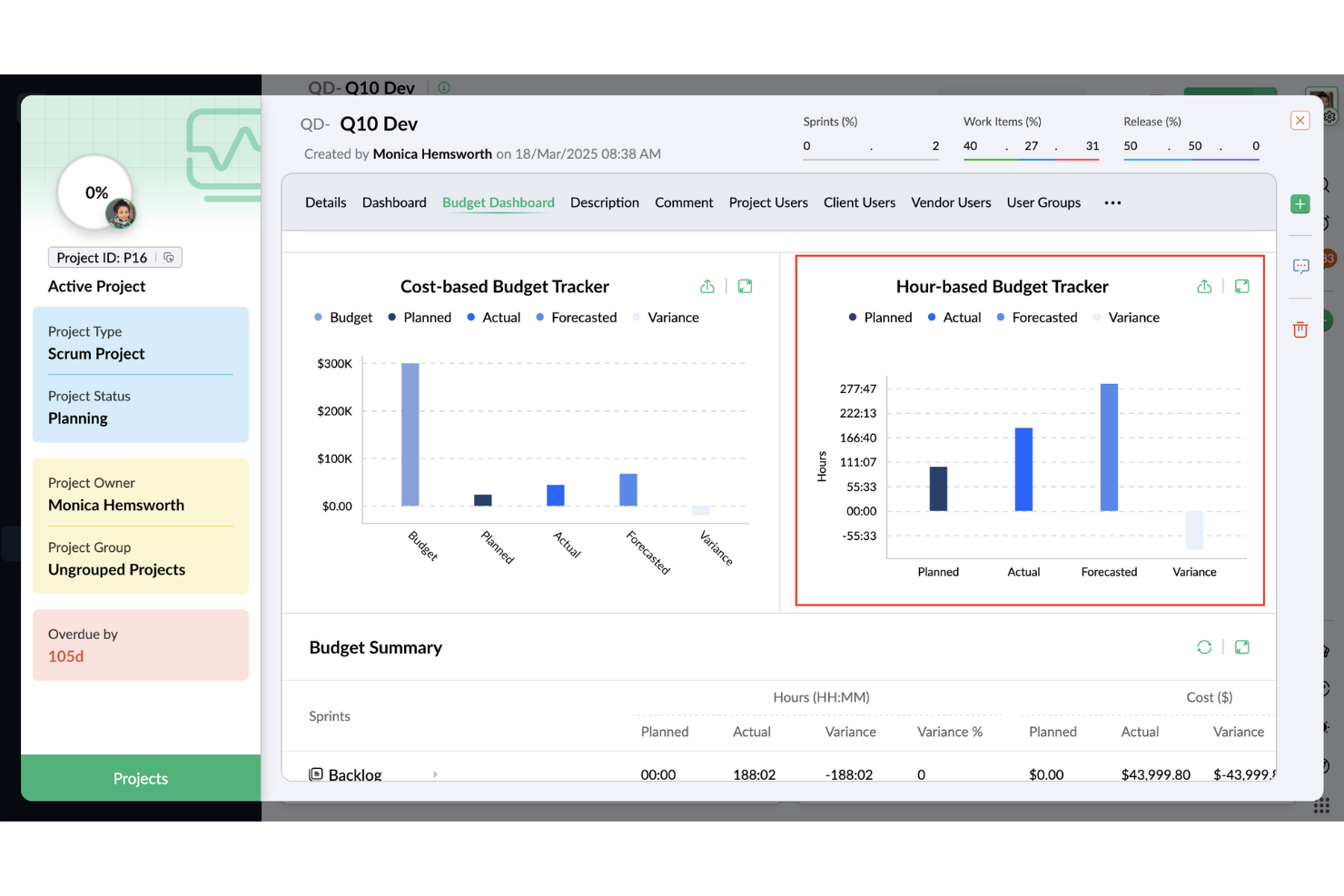
Zoho Projects è uno strumento versatile progettato per chi valuta una supervisione finanziaria strutturata all’interno dei propri progetti. Che tu stia gestendo una startup o guidando una grande organizzazione, Zoho Projects offre una piattaforma solida per monitorare e gestire budget, tempistiche e risorse. Affronta le complessità della gestione del budget, offrendo chiarezza e controllo per aiutarti a rimanere nei limiti previsti e raggiungere i tuoi obiettivi finanziari.
Zoho Projects è uno strumento versatile pensato per chi desidera un controllo finanziario strutturato nei progetti, incluso il controllo del valore acquisito. Che tu sia a capo di una startup o di una grande organizzazione, Zoho Projects mette a disposizione una piattaforma pratica per monitorare budget, scadenze e risorse. Aiuta i team a gestire le attività legate al budget con maggiore visibilità e controllo, così i progetti rimangono in linea con gli obiettivi finanziari.
Perché ho scelto Zoho Projects
Ho scelto Zoho Projects per la funzione di controllo del valore acquisito, che consente di confrontare i costi pianificati con l’avanzamento reale del progetto per valutarne l’andamento. In questo modo è più facile individuare tempestivamente eventuali problemi di budget e mantenere il controllo finanziario. Include anche strumenti di budgeting e monitoraggio delle spese per impostare limiti e seguire le uscite man mano che il progetto procede.
Funzionalità principali di Zoho Projects
Oltre al controllo del valore acquisito, Zoho Projects offre:
- Diagrammi di Gantt: Visualizza le tempistiche di progetto e le dipendenze per garantire uno svolgimento fluido.
- Monitoraggio del tempo: Registra le ore e traccia il tempo impiegato sulle attività per gestire al meglio le risorse.
- Automazione delle attività: Automatizza le attività ripetitive con workflow personalizzabili e trigger.
- Monitoraggio dei problemi: Individua e risolvi rapidamente le criticità di progetto per mantenere alta la qualità.
Integrazioni di Zoho Projects
Le integrazioni includono Zoho CRM, Zoho People, Zoho Desk, Zoho Invoice, Zoho Analytics, Google Calendar, Microsoft Teams, JIRA, Slack e Salesforce.
Pros and Cons
Pros:
- Fornisce funzionalità robuste per il monitoraggio del tempo e la fatturazione
- Piattaforma centralizzata che migliora la visibilità trasversale sui progetti
- Offre report dettagliati e analisi approfondite sui progetti
Cons:
- Le opzioni di personalizzazione sono meno flessibili rispetto ai concorrenti
- Rallentamenti nelle prestazioni con progetti di grandi dimensioni o complessi
New Product Updates from Zoho Projects
Zoho Projects Adds CodeX Scripts for Custom Modules
Zoho Projects now supports CodeX Scripts for custom modules, enabling conditional logic and rules for creating, updating, and deleting records. For more information, visit Zoho Projects' official site.
 .
.
Beebole
Ideale per il monitoraggio dei costi basato sul tempo e gli avvisi sul consumo del budget
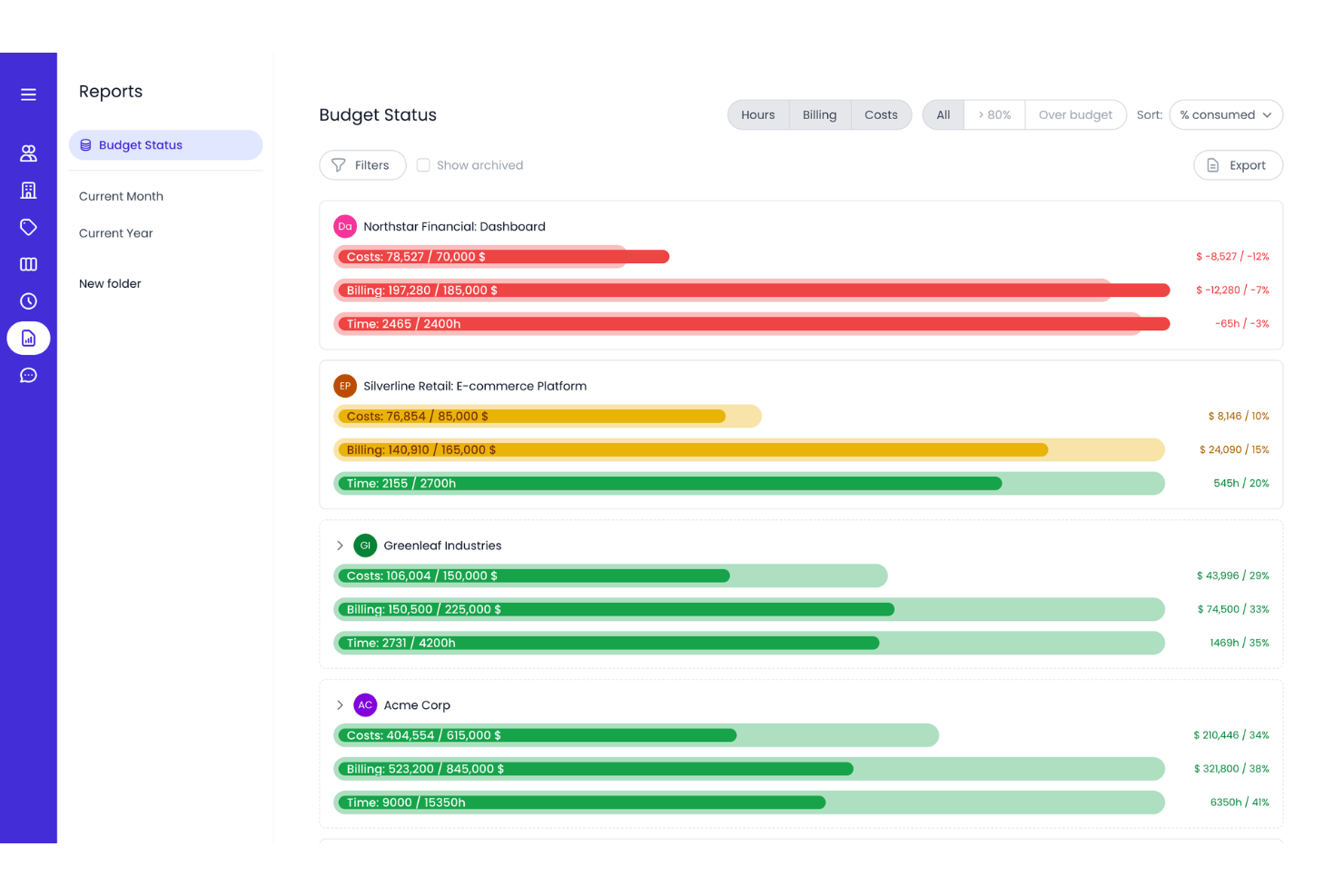
Beebole è un software per il monitoraggio del tempo dedicato ai progetti, progettato per pianificare il lavoro, monitorare il tempo e creare report avanzati. Combina la gestione dei fogli presenze, la pianificazione delle risorse, la gestione dei budget, il monitoraggio dei costi e i report sulla redditività per aiutare i team a comprendere come vengono utilizzati il tempo e le risorse nei vari progetti.
Per chi è più adatto Beebole?
Beebole è particolarmente adatto alle agenzie e ai team di servizi professionali che fatturano a ore e devono monitorare in tempo reale i costi dei progetti rispetto ai budget.
Perché ho scelto Beebole
Ho scelto Beebole come una delle soluzioni migliori perché converte automaticamente le ore registrate in costi effettivi, rendendo estremamente semplice monitorare il consumo del budget quando si gestiscono più progetti contemporaneamente. Apprezzo in particolare gli avvisi al raggiungimento dell'80% e del 100% del budget, che offrono un margine concreto per correggere la rotta prima che si verifichi uno sforamento. Le tariffe di fatturazione e dei costi configurabili a livello di progetto, attività o persona consentono di monitorare i margini effettivi, non solo le ore impiegate.
Funzionalità principali di Beebole
- Approvazioni dei fogli presenze a più livelli: I flussi di approvazione integrati consentono ai responsabili di esaminare e approvare le registrazioni del tempo inviate prima che vengano conteggiate nei budget dei progetti, con promemoria automatici per mantenere il processo in corso.
- Pianificazione delle risorse: Le viste per il personale e i diagrammi di Gantt aiutano i team a pianificare la capacità, mentre le ore pianificate possono precompilare i fogli presenze. Il report Pianificato vs. effettivo confronta quindi le ore pianificate con il tempo effettivamente lavorato.
- Report sulla redditività: I report combinano le tariffe di fatturazione e dei costi per mostrare i margini per progetto, persona, attività o tag, offrendo ai team visibilità sui costi e sulla redditività dei progetti.
- Generatore di report con IA: Il generatore di report con IA di Beebole consente di creare report personalizzati digitando domande in linguaggio naturale, senza dover creare manualmente i filtri.
Integrazioni di Beebole
Beebole offre integrazioni native con QuickBooks Online, Xero, Google Calendar, Outlook Calendar, BambooHR, monday.com, Google Sheets, Microsoft Excel, Asana e Linear per la reportistica finanziaria, la sincronizzazione del tempo e i dati dei progetti. Offre inoltre un'API e callback web per le integrazioni personalizzate.
Pros and Cons
Pros:
- Gli avvisi in tempo reale sul consumo del budget prevengono gli sforamenti
- Le tariffe configurabili offrono una visibilità reale sui margini
- I report basati sull'IA semplificano l'analisi finanziaria
Cons:
- I budget e il monitoraggio dei costi richiedono un componente aggiuntivo
- Nessuna modellazione degli scenari o gestione del budget con analisi ipotetiche

Ideale per la gestione robusta dei progetti

Microsoft Project è una soluzione completa per la gestione dei progetti pensata per aiutare i project manager a sviluppare piani, assegnare risorse alle attività, monitorare l’avanzamento, gestire i budget e analizzare i carichi di lavoro. È riconosciuto come il migliore per la gestione di progetti complessi grazie alle sue funzionalità estese che soddisfano un’ampia gamma di esigenze, dalla semplice gestione delle attività a quella di portafogli complessi.
Perché ho scelto Microsoft Project:
Microsoft Project offre un set potente di strumenti in grado di rispondere alle esigenze di progetti grandi e complessi. La sua capacità di scalare da attività basilari fino alla gestione avanzata dei portafogli lo distingue dagli altri software di project management. Ritengo che sia la scelta migliore per una gestione robusta dei progetti perché mette a disposizione tutti gli strumenti e le capacità necessari per gestire efficacemente progetti su larga scala, coprendo in modo approfondito ogni aspetto della gestione.
Funzionalità e integrazioni principali:
Le funzionalità includono pianificazione e programmazione dei progetti con strumenti di pianificazione familiari, diverse visualizzazioni come Griglia, Board e Timeline (diagramma di Gantt), oltre a capacità di reporting approfondite. Offre anche collaborazione e comunicazione tramite Microsoft Teams, funzionalità di co-authoring e strumenti di gestione delle risorse.
Le integrazioni includono Microsoft Teams, OneDrive for Business, SharePoint Online, Microsoft Power BI, Microsoft Dynamics 365, Microsoft Azure, Microsoft 365 Apps, Windows 365, Microsoft Exchange e Microsoft Outlook.
Pros and Cons
Pros:
- Funzionalità complete di project management
- Soluzioni scalabili per diverse dimensioni di progetto
- Integrazione con altri prodotti Microsoft
Cons:
- Può risultare complesso per progetti di piccole dimensioni
- Possibile curva di apprendimento per i nuovi utenti

Ideale per la visibilità sui progetti di onboarding
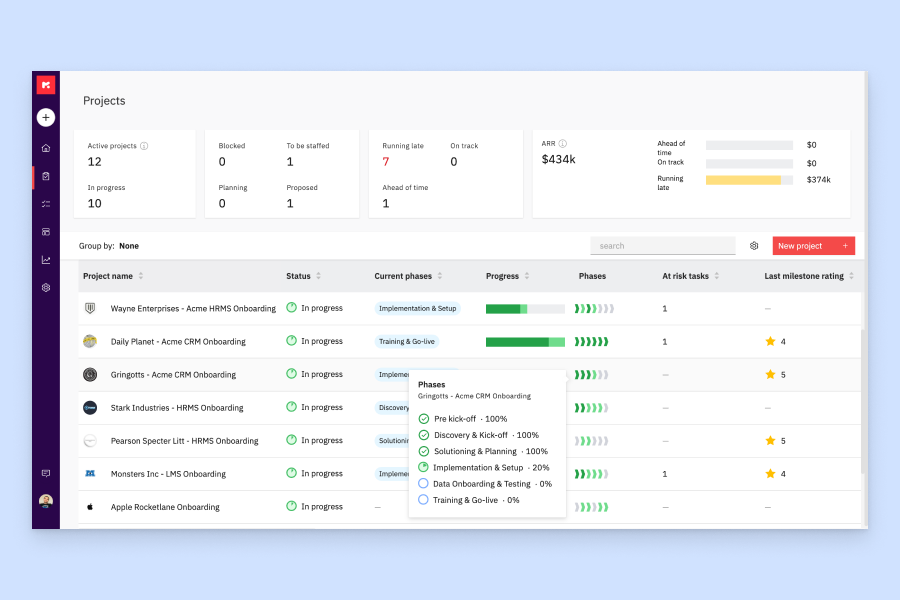
Rocketlane è una piattaforma di automazione per i servizi professionali con funzionalità integrate di budgeting di progetto, monitoraggio delle spese, riconoscimento dei ricavi e strumenti di visibilità dedicati ai clienti, progettata per i team che gestiscono progetti per clienti fatturabili.
Per chi è più adatto Rocketlane?
Rocketlane è particolarmente indicato per i team di servizi professionali e implementazione che gestiscono progetti ricorrenti di onboarding dei clienti con budget fatturabili e stakeholder esterni.
Perché ho scelto Rocketlane
Ho incluso Rocketlane tra le mie migliori scelte grazie alla sua eccellente gestione della visibilità dei progetti di onboarding, sia internamente che lato cliente. Il portale condiviso con i clienti offre loro una panoramica in tempo reale dell’avanzamento del progetto, delle attività aperte e delle milestone senza dover chiedere aggiornamenti di stato. Mi piace anche il fatto che i report in tempo reale di Rocketlane evidenzino colli di bottiglia, aspetti finanziari e rischi di consegna mentre si verificano, evitando che qualcosa venga trascurato fino alla fine del ciclo di fatturazione.
Funzionalità principali di Rocketlane
- Budgeting di progetto: Imposta ore e costi preventivati per ogni progetto e monitora i dati effettivi durante lo svolgimento del lavoro.
- Gestione delle spese: Registra e categorizza le spese di progetto direttamente all’interno del progetto stesso, mantenendo la visibilità della spesa insieme all’avanzamento delle attività.
- Riconoscimento dei ricavi: Automatizza le pianificazioni di riconoscimento dei ricavi in base alle milestone di progetto o ai periodi temporali, per una rendicontazione finanziaria accurata.
- Report preventivo vs. consuntivo: Confronta ore e costi pianificati con i dati reali in tempo reale per individuare variazioni di budget prima che diventino critiche.
Integrazioni di Rocketlane
Rocketlane offre integrazioni native con Slack, Salesforce, Jira, HubSpot, Google Calendar, Outlook Calendar e Snowflake. Si collega a Zapier e Workato per connettività con altre app. È disponibile un’API per integrazioni personalizzate.
Pros and Cons
Pros:
- Monitoraggio in tempo reale del budget rispetto al consuntivo
- Il portale clienti mostra scadenze e attività
- Tariffe di costo integrate nell'allocazione delle risorse
Cons:
- I report non offrono filtri avanzati
- Non è possibile assegnare ore di budget dinamiche
New Product Updates from Rocketlane

Rocketlane Introduces Governance and Workforce Agents
Rocketlane introduces Governance Agents and Workforce Agents to automate delivery processes and recurring tasks. These updates help teams enforce rules and streamline project execution. For more information, visit Rocketlane’s official site.
 .
.
Forecast
Ideale per agenzie e società di consulenza di medie dimensioni
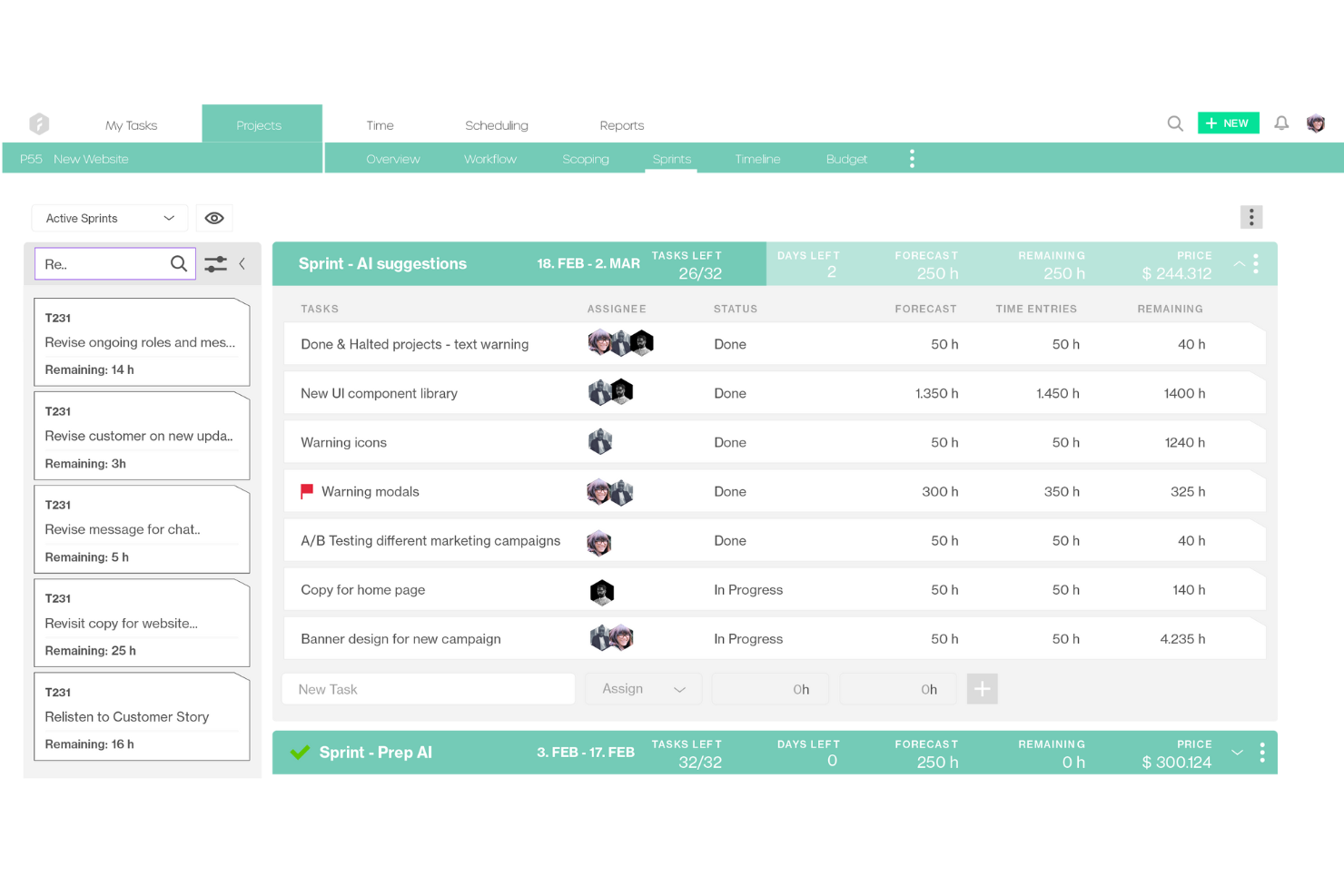
Forecast è uno strumento di gestione progetti e risorse basato sull'intelligenza artificiale, progettato per offrire un maggiore controllo sulla gestione finanziaria dei progetti. Combina budgeting, previsione finanziaria e pianificazione della capacità in un unico sistema, facilitando la previsione dei costi e l'allocazione efficiente delle risorse.
Perché ho scelto Forecast: Ho scelto Forecast per la sua capacità di collegare direttamente l'ambito del progetto alle previsioni di budget. L'assistenza dell'IA aiuta ad anticipare i rischi, monitorare i costi in tempo reale e mantenere i progetti allineati dal punto di vista finanziario. Ho apprezzato anche i report sull'utilizzo, che offrono visibilità su carico di lavoro e capacità dei team, così da prevenire le spese eccessive prima che si verifichino.
Caratteristiche e integrazioni distintive di Forecast:
Caratteristiche includono la registrazione automatica delle ore e la fatturazione, visibilità immediata sul carico di lavoro, definizione dell'ambito assistita dall'IA e avvisi predittivi sui rischi per intercettare eventuali sforamenti in anticipo. I suoi strumenti di reportistica offrono inoltre approfondimenti su redditività e allocazione delle risorse.
Integrazioni includono Sage Intacct, HubSpot, Jira, Google Calendar, Salesforce, QuickBooks, GitHub, GitLab, Pipedrive, Microsoft Teams, Slack e Trello.
Pros and Cons
Pros:
- L'assistenza IA migliora la pianificazione finanziaria
- Visibilità in tempo reale sulle risorse
- La fatturazione automatica semplifica la gestione delle bollette
Cons:
- La configurazione iniziale può essere complessa
- Prezzi non pubblicamente trasparenti

Prophix
Ideale per la gestione della performance finanziaria

Prophix è uno strumento completo per l'automazione dei processi finanziari e per fornire analisi approfondite. Si distingue per il suo approccio unificato alla gestione della performance finanziaria, offrendo strumenti essenziali per la pianificazione del budget, la programmazione, la previsione e la rendicontazione.
Perché ho scelto Prophix:
Prophix automatizza le attività finanziarie e fornisce informazioni utili all'azione, distinguendosi da altri strumenti finanziari. Considero Prophix ideale per la gestione della performance finanziaria grazie alla sua suite completa di funzionalità che rispondono alle esigenze complesse dei dipartimenti finanziari, aiutando a semplificarne le operazioni.
Funzionalità e integrazioni di rilievo:
Le funzionalità includono budget automatizzati, consolidamento finanziario, reportistica e analisi di scenario, elementi fondamentali per le organizzazioni che devono prendere decisioni informate in ambito finanziario.
Le integrazioni includono Sage, Microsoft Dynamics 365, Deltek, QAD e altri.
Pros and Cons
Pros:
- Processi finanziari automatizzati
- Strumenti completi di reportistica e analisi
- Capacità di consolidamento finanziario e analisi di scenario
Cons:
- Implementazione complessa
- Curva di apprendimento ripida a causa delle funzionalità dettagliate

Ideale per il monitoraggio di budget e redditività

Bonsai è una piattaforma di gestione aziendale pensata per agenzie, società di consulenza e altre attività nei servizi professionali. Aiuta i team a gestire attività e progetti, ottimizzare i flussi di lavoro, mantenere le relazioni con i clienti e monitorare la situazione finanziaria dei progetti.
Perché ho scelto Bonsai: Questa soluzione software si è guadagnata un posto nella mia lista grazie alla gestione integrata di attività, budget e tempi. Queste funzionalità aiutano le aziende a monitorare la redditività complessiva delle loro operazioni. Oltre a complete funzionalità di gestione dei progetti, offre strumenti per la redazione di proposte, la gestione dei contratti, la generazione delle fatture e l'elaborazione dei pagamenti dei clienti. I portali dedicati ai clienti consentono di mantenere efficienza nelle aziende orientate alla clientela e ridurre gli errori nella gestione dei budget.
Caratteristiche e integrazioni distintive di Bonsai
Le funzionalità includono impostazioni per valuta e tasse multiple, che supportano le agenzie che lavorano con clienti internazionali. Lo strumento di monitoraggio del tempo consente ai team di tenere sotto controllo ore fatturabili e non, nonché la distribuzione del carico di lavoro tra i membri. I report supportano anche il monitoraggio e la previsione finanziaria, aiutando gli utenti a mantenere la redditività.
Le integrazioni includono Gmail, Google Calendar, Zapier, Slack, QuickBooks Online, Calendly, ClickUp, Trello, Google Drive, Google Sheets, Xero, HubSpot e molte altre.
Pros and Cons
Pros:
- Portali per clienti disponibili
- Automazioni per semplificare le attività ripetitive
- Progettato specificamente per le agenzie
Cons:
- Scalabilità piuttosto limitata
- Alcune integrazioni sono disponibili solo nei piani tariffari superiori
Altri software per il budget dei progetti da prendere in considerazione
Le opzioni elencate sopra non sono gli unici software disponibili per il budget dei progetti. Di seguito sono riportati altri software selezionati, che vale comunque la pena approfondire.
- Workday Adaptive Planning
Ideale per la pianificazione aziendale
- Oracle NetSuite
Ideale per la gestione aziendale basata su cloud
- PlanGuru
Il migliore per la gestione del budget e le previsioni
- Ravetree
Ideale per la tracciabilità di tempo e spese
- SAP Business ByDesign
Ideale per l’ERP di medie imprese
- Salesforce Marketing Intelligence
Ideale per l'analisi del marketing
- Budget Maestro by Centage
Ideale per l'accuratezza del budget
- Smartsheet
Ideale per una visibilità del budget in tempo reale
- Accelo
Ideale per approfondimenti sulla redditività dei progetti
- GoodDay
Ideale per la pianificazione visiva dei progetti
- monday AI Workspace
Ideale per la personalizzazione dei flussi di lavoro


Recensioni correlate sui software per il budget dei progetti
Se non hai ancora trovato quello che cerchi, dai un'occhiata a questi altri strumenti correlati che abbiamo testato e valutato:
- Software di gestione dei progetti
- Software di gestione delle risorse
- Software di automazione dei flussi di lavoro
- Software per il monitoraggio del tempo
- Software di gestione delle attività
- Strumenti di collaborazione
- Creazione di diagrammi di Gantt
- Strumenti per la produttività
- Software per il monitoraggio dei progetti
- Software per la pianificazione dei progetti
Come Valuto il Software per il Budget dei Progetti
Divido la mia valutazione in due livelli: i requisiti di base che uno strumento deve soddisfare—creazione del budget, monitoraggio dei costi e report BvA—e i fattori distintivi come la previsione EAC e la fatturazione al cliente.
Funzionalità di Base (Requisiti Minimi per Questa Lista)
Quando seleziono gli strumenti per la mia lista, valuto ciascuno su una scala da 0 (non offre la funzionalità) a 5 (eccelle in quest'area) per ogni funzionalità di base indicata di seguito. Poi, calcolo il punteggio totale dello strumento in percentuale. Ogni strumento deve raggiungere un punteggio totale minimo del 65% per poter essere preso in considerazione.
- Creazione e Allocazione del Budget: Cerco strumenti che offrono budget per voce con categorie di costo, allocazioni per fase e modelli riutilizzabili—non semplicemente un unico campo di budget aggiunto a un progetto.
- Monitoraggio dei Costi e Consuntivi: Ogni strumento deve registrare manodopera, spese e costi dei fornitori associati a progetti specifici così da confrontare la spesa reale con il piano, senza dover indovinare dalle tabelle Excel.
- Report Budget vs. Consuntivo: Valuto se la piattaforma offre dashboard delle variazioni in tempo reale con capacità di approfondimento, poiché esportazioni settimanali obsolete vanificano lo scopo del monitoraggio dei consuntivi.
- Previsione e EAC: Gli strumenti dovrebbero calcolare la velocità di consumo, la stima a completamento e le eventuali eccedenze previste—utile quando un progetto è al 40% di avanzamento e bisogna segnalare rischi alla dirigenza.
- Integrazione Costo Tempo & Risorse: Verifico se i timesheet vengono integrati nel consumo di budget utilizzando le tariffe fatturabili e costi basati sul ruolo, collegando chi lavora a quanto costa effettivamente.
- Avvisi e Approvazioni Finanziarie: Qui sono importanti avvisi configurabili sulle soglie e flussi di lavoro per l'approvazione—specialmente per i team che gestiscono ordini di variazione o richieste di spesa su più progetti.
Una volta che ho una lista di strumenti che soddisfano questi criteri, considero cosa rende unica ciascuna piattaforma.
Fattori Distintivi (Cosa Distingue i Fornitori)
Ecco come confronto e contrappongo i diversi fornitori:
Funzionalità Distintive
La pianificazione di scenari è un aspetto fondamentale per me—quando un cliente richiede una variazione dell'ambito a metà progetto, voglio poter simulare l'impatto sul budget prima di approvarla. Le analisi di redditività vanno oltre, mostrando i margini a livello di progetto o cliente, non solo se sei rimasto sotto budget. Valuto inoltre l'integrazione della fatturazione al cliente, poiché gli strumenti che collegano direttamente i budget alla fatturazione eliminano la riconciliazione manuale tra la tua piattaforma PM e il sistema contabile.
Oltre le Funzionalità
Qui le integrazioni contano molto. I dati di budget si trovano accanto al tuo sistema contabile, quindi verifico le connessioni native a piattaforme come QuickBooks, Xero o NetSuite—le importazioni manuali di file CSV tra strumento PM e libro mastro diventano subito noiose. L'aderenza al settore è un altro fattore che considero. Un project manager edile ha bisogno di codici di costo e flussi di lavoro per ordini di variazione, mentre un'agenzia preferisce il monitoraggio dei retainer e dell'utilizzo delle risorse. Anche la struttura dei prezzi ha un suo peso, perché i modelli a costo per utente possono far lievitare le spese quando hai solo bisogno che gli stakeholder visualizzino i report di budget.
Come scegliere il software per il budget dei progetti
Durante il tuo processo di selezione del software, specifico per le tue esigenze, tieni a mente i seguenti punti:
- Identificare le esigenze: Prima di selezionare un software per la gestione del budget dei progetti, è fondamentale identificare le esigenze specifiche della propria organizzazione. Considera le dimensioni dei tuoi progetti, la complessità dei tuoi budget e il livello di dettaglio richiesto per il monitoraggio e la reportistica.
- Facilità d'uso: Il software dovrebbe essere intuitivo per garantire che tutti i membri del team possano utilizzarlo efficacemente senza una formazione approfondita. Un'interfaccia intuitiva può ridurre significativamente la curva di apprendimento e migliorare l'efficienza della gestione del budget.
- Capacità di integrazione: La possibilità di integrarsi con altri strumenti e sistemi è essenziale per un flusso di lavoro coerente. Cerca un software in grado di connettersi ai tuoi sistemi contabili, CRM o soluzioni ERP esistenti.
- Scalabilità: Scegli un software in grado di crescere insieme alla tua azienda. Dovrebbe poter gestire un numero crescente di progetti e utenti senza problemi di prestazioni.
- Assistenza e formazione: Assicurati che il fornitore del software offra risorse adeguate per l'assistenza e la formazione. Questo è importante per risolvere rapidamente eventuali problemi e ottenere il massimo dal tuo investimento.
Tendenze dei software per la gestione del budget dei progetti nel 2026
Ecco alcune delle principali tendenze nei software per la gestione del budget dei progetti che sto osservando nel 2026:
- Integrazione con l'analisi dei dati in tempo reale: I software per la gestione del budget dei progetti si integrano ora con l'analisi dei dati in tempo reale. Ciò consente di ottenere informazioni immediate sulla spesa e sull'allocazione delle risorse. È importante per prendere decisioni rapide e consapevoli.
- Enfasi sulle interfacce intuitive: Le interfacce intuitive stanno diventando una priorità. Semplificano l'esperienza dell'utente e riducono la curva di apprendimento. Questa tendenza è fondamentale per favorire un'adozione più ampia tra utenti con diversi livelli di competenza.
- Funzionalità di collaborazione avanzate: Le funzionalità di collaborazione vengono potenziate nei software per la gestione del budget dei progetti. Ora i team possono lavorare insieme in modo più efficace sulle attività di budgeting. Questo è importante per mantenere trasparenza e responsabilità.
- Budgeting previsionale con l'IA: L'intelligenza artificiale viene sempre più utilizzata per il budgeting previsionale, con strumenti di budgeting basati sull'IA che analizzano i dati passati per prevedere le future tendenze di spesa e contribuire a prevenire gli sforamenti di budget.
- Accessibilità da dispositivi mobili: L'accessibilità da dispositivi mobili è una tendenza in crescita. I software per la gestione del budget dei progetti sono ora disponibili su smartphone e tablet. Questo è importante per accedere e apportare aggiornamenti anche in mobilità.
Che cos'è un software per la gestione del budget dei progetti?
Un software per la gestione del budget dei progetti è uno strumento digitale progettato per supportare la pianificazione, il monitoraggio e la gestione degli aspetti finanziari dei progetti. Viene utilizzato dai project manager, dai team finanziari e dagli stakeholder per mantenere il controllo sui costi dei progetti e garantire il raggiungimento degli obiettivi finanziari. Questo software è essenziale per gli utenti che devono creare previsioni di budget accurate, monitorare le spese e gestire le finanze dei progetti per evitare spese eccessive e massimizzare le risorse finanziarie.
Funzionalità dei software per la gestione del budget dei progetti
Quando si seleziona un software per la gestione del budget dei progetti, è fondamentale considerare le funzionalità che supporteranno una gestione finanziaria efficace per tutto il ciclo di vita di un progetto. Il giusto insieme di strumenti può fare una differenza significativa nel mantenere il controllo sui costi, prevedere le spese e garantire la salute finanziaria di un progetto.
Ecco le funzionalità più importanti da cercare:
- Monitoraggio del budget in tempo reale: Questa funzionalità consente di avere una visibilità immediata sulle prestazioni finanziarie. È importante perché permette ai responsabili di progetto di prendere rapidamente decisioni informate, evitando gli sforamenti del budget.
- Strumenti di previsione: Questi strumenti prevedono le spese e i ricavi futuri. Sono essenziali per pianificare e prepararsi alle prossime esigenze finanziarie o per identificare potenziali deficit.
- Gestione delle spese: Questa funzionalità semplifica la registrazione e il monitoraggio delle spese di progetto. È fondamentale per mantenere registri finanziari accurati e garantire che tutti i costi siano contabilizzati.
- Monitoraggio dei costi al completamento: Questa funzionalità fornisce una stima del costo totale necessario per completare il progetto. È fondamentale per valutare se il progetto resterà entro il budget fino alla sua conclusione.
- Integrazione del monitoraggio del tempo: Questa funzionalità collega il tempo dedicato alle attività di progetto alle considerazioni di budget. È importante perché aiuta a comprendere i costi della manodopera e il loro impatto sul budget complessivo.
- Report personalizzabili: La possibilità di creare report personalizzati è fondamentale per analizzare diversi aspetti del budget di progetto. Consente di comprendere più a fondo i dati finanziari e supporta il processo decisionale strategico.
- Supporto multivaluta: Per i progetti globali, questa funzionalità è essenziale poiché gestisce valute e tassi di cambio diversi. Garantisce una gestione finanziaria accurata oltre i confini internazionali.
- Controllo degli accessi basato sui ruoli: Questa funzionalità limita l'accesso al budget in base ai ruoli degli utenti. È importante per mantenere l'integrità dei dati e garantire che le informazioni finanziarie sensibili siano accessibili solo al personale autorizzato.
- Capacità di integrazione: La possibilità di integrarsi con altri strumenti di gestione dei progetti è fondamentale per ottenere una visione completa dello stato del progetto. Consente di sincronizzare i dati finanziari con altre metriche di progetto.
- Scalabilità: Questa funzionalità garantisce che il software possa crescere insieme al progetto o all'organizzazione. È importante per adattarsi a cambiamenti nell'ambito e nelle dimensioni dei progetti senza dover ricorrere a un nuovo software.
La scelta di un software per la gestione del budget di progetto dotato di queste funzionalità può supportare significativamente la gestione finanziaria di qualsiasi progetto. Questi strumenti non solo garantiscono chiarezza e controllo sulle finanze del progetto, ma contribuiscono anche al successo e alla redditività complessivi dei progetti.
Vantaggi del software per la gestione del budget di progetto
Il software per la gestione del budget di progetto è uno strumento prezioso per aziende e singoli professionisti che desiderano mantenere il controllo sulle finanze dei propri progetti. Integrando questo tipo di software nelle proprie attività, gli utenti possono usufruire di una serie di vantaggi che contribuiscono alla gestione efficiente dei costi e delle risorse del progetto. Ecco alcuni dei principali vantaggi offerti dal software per la gestione del budget di progetto:
- Monitoraggio del budget in tempo reale: Il software per la gestione del budget di progetto consente agli utenti di monitorare le spese man mano che si verificano, garantendo che ogni attività finanziaria venga registrata e analizzata in tempo reale. Questa visione immediata aiuta a evitare spese eccessive e consente di apportare tempestivamente modifiche al budget.
- Previsione e analisi: Grazie alla possibilità di prevedere le spese future e analizzare i dati passati, il software per la gestione del budget di progetto aiuta a prendere decisioni finanziarie informate. Questa capacità previsionale può portare a una migliore allocazione delle risorse e contribuire a evitare potenziali difficoltà finanziarie.
- Collaborazione migliorata: I team possono lavorare insieme in modo più efficace quando hanno accesso a informazioni condivise sul budget. Il software per la gestione del budget di progetto facilita questa collaborazione fornendo una piattaforma centralizzata per la comunicazione e il processo decisionale relativi al budget.
- Gestione dei costi semplificata: Il software semplifica il processo di gestione dei costi del progetto automatizzando molte delle attività associate al monitoraggio del budget. Questa automazione riduce la probabilità di errori umani e fa risparmiare tempo, che può essere investito in altre aree del progetto.
- Report finanziari migliorati: La generazione di report finanziari completi diventa molto più semplice con il software per la gestione del budget di progetto. Questi report sono fondamentali affinché le parti interessate possano comprendere la situazione finanziaria di un progetto e prendere di conseguenza decisioni strategiche.
L'adozione di un software per la gestione del budget di progetto può portare a un migliore controllo finanziario, a una pianificazione più accurata e a risultati complessivi migliori per i progetti. Sfruttando questi strumenti, le organizzazioni possono garantire che i propri progetti vengano completati entro il budget e che i rischi finanziari siano ridotti al minimo.
Costi e prezzi del software per la gestione del budget di progetto
Il software per la gestione del budget di progetto è progettato per aiutare i responsabili e i team di progetto a pianificare, monitorare e gestire efficacemente le finanze del progetto. Tuttavia, i prezzi di queste soluzioni software possono variare notevolmente in base alle funzionalità offerte, al numero di utenti e al livello di assistenza fornito.
Di seguito è riportato un riepilogo delle opzioni dei piani e dei relativi prezzi per il software per la gestione del budget di progetto, sulla base della ricerca condotta:
Tabella comparativa dei piani del software per la gestione del budget di progetto
| Tipo di piano | Prezzo medio | Funzionalità comuni |
| Gratuito | $0 (Gratuito) | Gestione di base delle attività, utenti limitati, calendario nativo, bacheca kanban e spazio di archiviazione limitato |
| Individuale | $3.66 al mese | Gestione avanzata delle attività, visualizzazioni del calendario, impostazione delle priorità, integrazioni di terze parti e spazio di archiviazione limitato |
| Piccole imprese | $8.90 al mese/utente | Visualizzazione del diagramma di Gantt, strumenti di collaborazione, condivisione dei documenti, maggiore assistenza e più spazio di archiviazione |
| Medie imprese | $16.88 al mese/utente | Sicurezza avanzata, utenti illimitati, visualizzazioni complete dei progetti e report in tempo reale |
| Aziendale | Prezzo personalizzato | Prezzo negoziabile, migliore assistenza clienti e set di funzionalità completo. Spesso richiede un numero minimo di utenti |
Quando selezionano un piano per un software per il budget dei progetti, gli acquirenti dovrebbero considerare le dimensioni del team, la complessità dei progetti e le funzionalità specifiche necessarie per gestire efficacemente i budget dei progetti. Gli acquirenti dovrebbero valutare attentamente le funzionalità di ciascun piano in relazione al proprio budget per prendere una decisione informata.
Domande frequenti sul software per il budget dei progetti per i clienti
Ecco alcune domande frequenti sul software per il budget dei progetti per i clienti.
Il software per il budget dei progetti è adatto alle piccole imprese?
Certamente, il software per il budget dei progetti è progettato per soddisfare anche le esigenze delle piccole imprese. Offre soluzioni scalabili che aiutano a gestire efficacemente i carichi di lavoro, garantendo che i progetti vengano consegnati entro il budget e nei tempi previsti.
Quali sono i rischi di non utilizzare un software per il budget dei progetti?
Rinunciare all’utilizzo di un software per il budget dei progetti può comportare stime di budget imprecise, spese eccessive, mancanza di controllo finanziario, sforamenti dei costi e difficoltà nel monitorare efficacemente la spesa del progetto. Questi rischi possono avere un impatto negativo significativo sul successo di un progetto e sulla stabilità finanziaria di un’organizzazione.
Qual è il software migliore per creare un budget?
Il software migliore per creare un budget dipende dalle esigenze specifiche dell’utente o dell’organizzazione. Timeular si distingue per le sue solide funzionalità di budgeting e per le eccellenti capacità di gestione dei progetti, che favoriscono una gestione efficace delle attività.
Come si gestisce il budget di un progetto software?
Per gestire il budget di un progetto software, è necessario creare una descrizione dettagliata del progetto, elencare ogni risorsa necessaria, assegnare un costo a ciascuna risorsa, includere un fondo di contingenza, documentare il budget, ottenere l’approvazione e monitorare e adeguare continuamente il budget secondo necessità durante tutto il ciclo di vita del progetto.

E adesso?
Iscriviti alla newsletter di DPM per ricevere aggiornamenti regolari quando pubblichiamo nuove guide pratiche e articoli sulla gestione dei progetti digitali.