I 10 migliori BPMS (sistemi di gestione dei processi aziendali) del 2026

10 Selezione delle migliori BPMS


Esistono apparentemente innumerevoli soluzioni per la gestione dei processi aziendali, quindi capire quale sia la migliore per te è difficile. Vuoi aumentare la visibilità dei processi aziendali e individuare le inefficienze per mantenere un'attività sana, ma devi capire quale strumento sia più adatto alle tue esigenze.
Ci penso io! In questo articolo semplifico le cose, mettendo a frutto la mia esperienza nella gestione di progetti grandi e complessi e l'utilizzo di decine di diversi strumenti PM per offrirti questa selezione delle migliori BPMS.
Perché fidarsi dei nostri consigli sui software
Il nostro team testa e recensisce software dal 2012. In quanto project manager noi stessi, sappiamo quanto sia difficile — e importante — scegliere il software giusto.
Per questa guida, abbiamo valutato gli strumenti attraverso test pratici e ricerche indipendenti, assegnando un punteggio agli strumenti in base ai nostri criteri di selezione. Ci basiamo inoltre sulle competenze di leader di pensiero del settore e di professionisti attivi nella gestione dei progetti.
Le nostre recensioni riflettono il nostro giudizio editoriale umano, non un discorso di vendita.
Revisori esperti:
Tabella comparativa delle BPMS
Questa tabella comparativa riassume i dettagli dei prezzi delle mie migliori selezioni di BPMS:
| Tool | Best For | Trial Info | Price | ||
|---|---|---|---|---|---|
| 1 | Ideale per hub sicuri di interazione con i clienti | Piano gratuito disponibile | A partire da $99/mese | Website | |
| 2 | Ideale per la personalizzazione | 14 giorni di prova gratuita | Da $6/utente/mese | Website | |
| 3 | Ideale per creare applicazioni no-code per la tua azienda | Demo gratuita disponibile | $40/user/month | Website | |
| 4 | Ideale per la gestione dei processi aziendali di vendita | Prova gratuita di 14 giorni + demo gratuita disponibile | Da $14/postazione/mese (fatturato annualmente) | Website | |
| 5 | Miglior strumento BPMS per team di tutte le dimensioni | 14 giorni di prova gratuita | Da $9.80/utente/mese | Website | |
| 6 | Miglior BPMS per organizzazioni in rapida crescita che necessitano di scalare lo sviluppo dei processi | Prova gratuita di 15 giorni | Da $19/utente/mese (fatturazione annuale) | Website | |
| 7 | Ideale per flussi di lavoro guidati dall’IA | Demo gratuita disponibile | Prezzi su richiesta | Website | |
| 8 | Ideale per l'elaborazione intelligente dei documenti | Prova gratuita disponibile + demo gratuita | Prezzo su richiesta | Website | |
| 9 | Il miglior software BPM no-code | Prova gratuita di 21 giorni | Da $10/utente/mese con fatturazione annuale | Website | |
| 10 | Bacheche Kanban che supportano i tuoi flussi di lavoro e offrono agli utenti un modo semplice per spostare un'attività tra le fasi. | Prova gratuita | Da $5/utente/mese | Website |


Recensioni delle migliori BPMS
Ecco una breve descrizione di ciascuno degli strumenti di automazione dei processi BPM presenti nella mia classifica dei 15 migliori. Approfondisco ciò che offre ogni strumento e il motivo per cui è stato selezionato per questo confronto tra strumenti di modellazione dei processi aziendali.

Moxo
Ideale per hub sicuri di interazione con i clienti
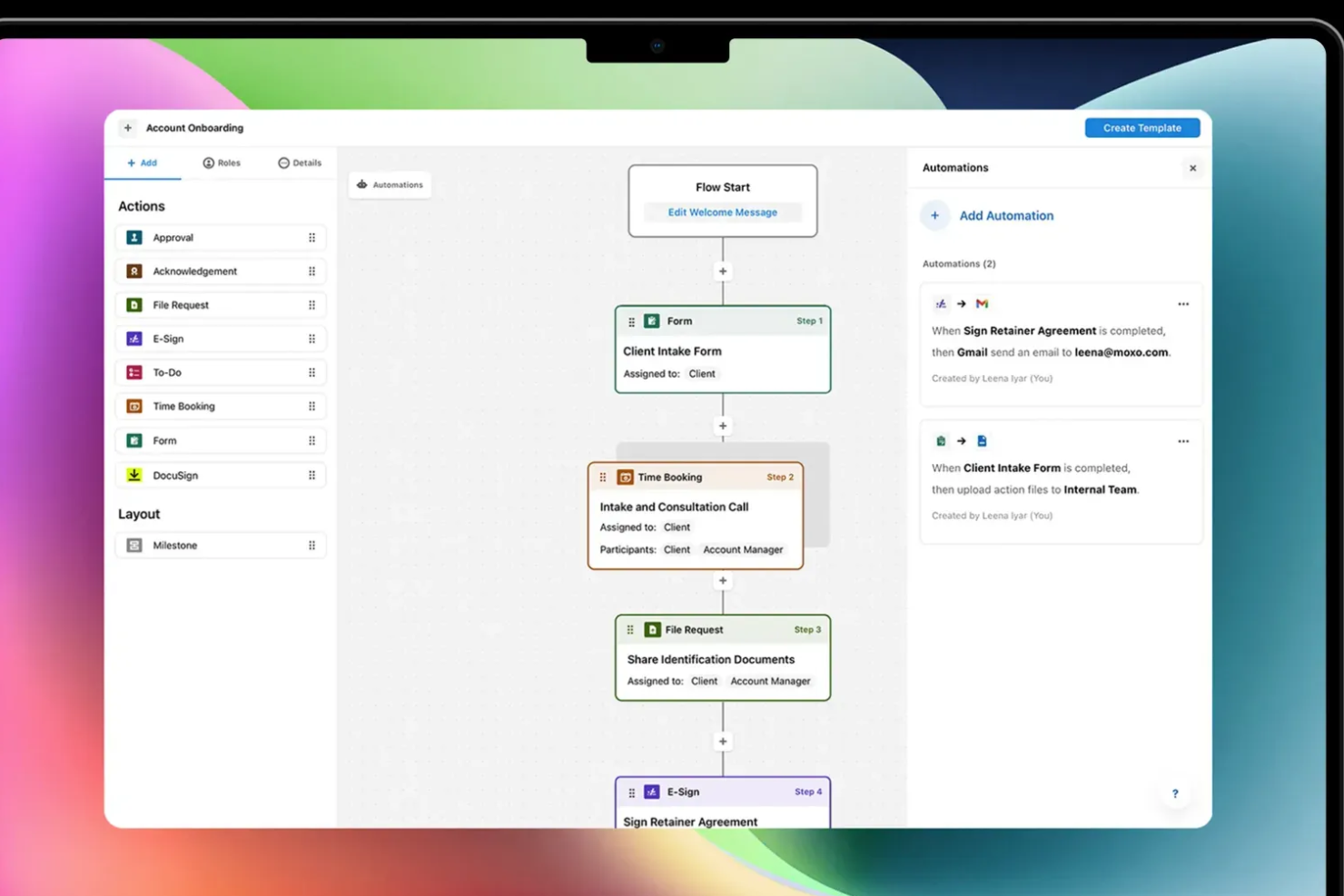
Moxo è una piattaforma BPM e di orchestrazione dei processi che consente di progettare ed eseguire flussi di lavoro composti da più fasi tra team interni, stakeholder esterni e agenti IA, coprendo processi come l'onboarding dei clienti, le approvazioni, la verifica KYC e la revisione dei contratti.
Per chi è più adatto Moxo?
Moxo è particolarmente adatto ai team dei servizi finanziari, legali e professionali che gestiscono processi complessi rivolti ai clienti e con la partecipazione di più soggetti esterni.
Perché ho scelto Moxo
Moxo entra nella mia lista ristretta perché affronta con grande serietà il livello di sicurezza dei processi rivolti ai clienti. Apprezzo il fatto che ogni interazione con il cliente avvenga all'interno di uno spazio di lavoro dedicato e con accesso regolato in base ai ruoli: i controlli granulari degli accessi e i privilegi utente personalizzabili mantengono le informazioni sensibili rigorosamente nelle mani degli utenti autorizzati, con un monitoraggio dettagliato delle attività. Il registro di audit di 7 anni è una funzionalità che non vedo altrove ed è progettato appositamente per settori regolamentati come i servizi finanziari e l'assistenza sanitaria, dove la conformità non è facoltativa.
Funzionalità principali di Moxo
- Creazione visiva dei flussi di lavoro: Progetta flussi di processo composti da più fasi utilizzando un'interfaccia senza codice con funzionalità di trascinamento e rilascio, diramazioni condizionali e percorsi paralleli.
- Agenti IA: Incorpora nei flussi di lavoro fasi basate sull'intelligenza artificiale per gestire automaticamente la convalida dei dati, la preparazione dei documenti e il coordinamento delle attività.
- Raccolta delle firme elettroniche: Richiedi e acquisisci firme legalmente vincolanti direttamente all'interno di una fase del flusso di lavoro.
- Monitoraggio degli SLA: Imposta scadenze per le singole fasi del flusso di lavoro e attiva escalation automatiche quando i tempi vengono superati.
Integrazioni di Moxo
Moxo si collega a Salesforce, HubSpot, Dynamics, Zoho, Wealthbox, Redtail, Filevine, Global Relay, Smarsh, Xero e Follow Up Boss. Integra DocuSign e Jumio nei flussi di lavoro, importa file da Google Drive, Dropbox, Box e OneDrive e sincronizza i calendari Google e Outlook. Sono supportate configurazioni personalizzate tramite API, webhook e Zapier.
Pros and Cons
Pros:
- Riunisce firme elettroniche, chat e file nei flussi di lavoro
- I partecipanti esterni operano direttamente all'interno dei flussi di lavoro
- Registri di audit integrati con conformità SOC 2
Cons:
- Nessun timer integrato per il monitoraggio del tempo
- Flessibilità limitata per i flussi di lavoro ciclici

Ideale per la personalizzazione
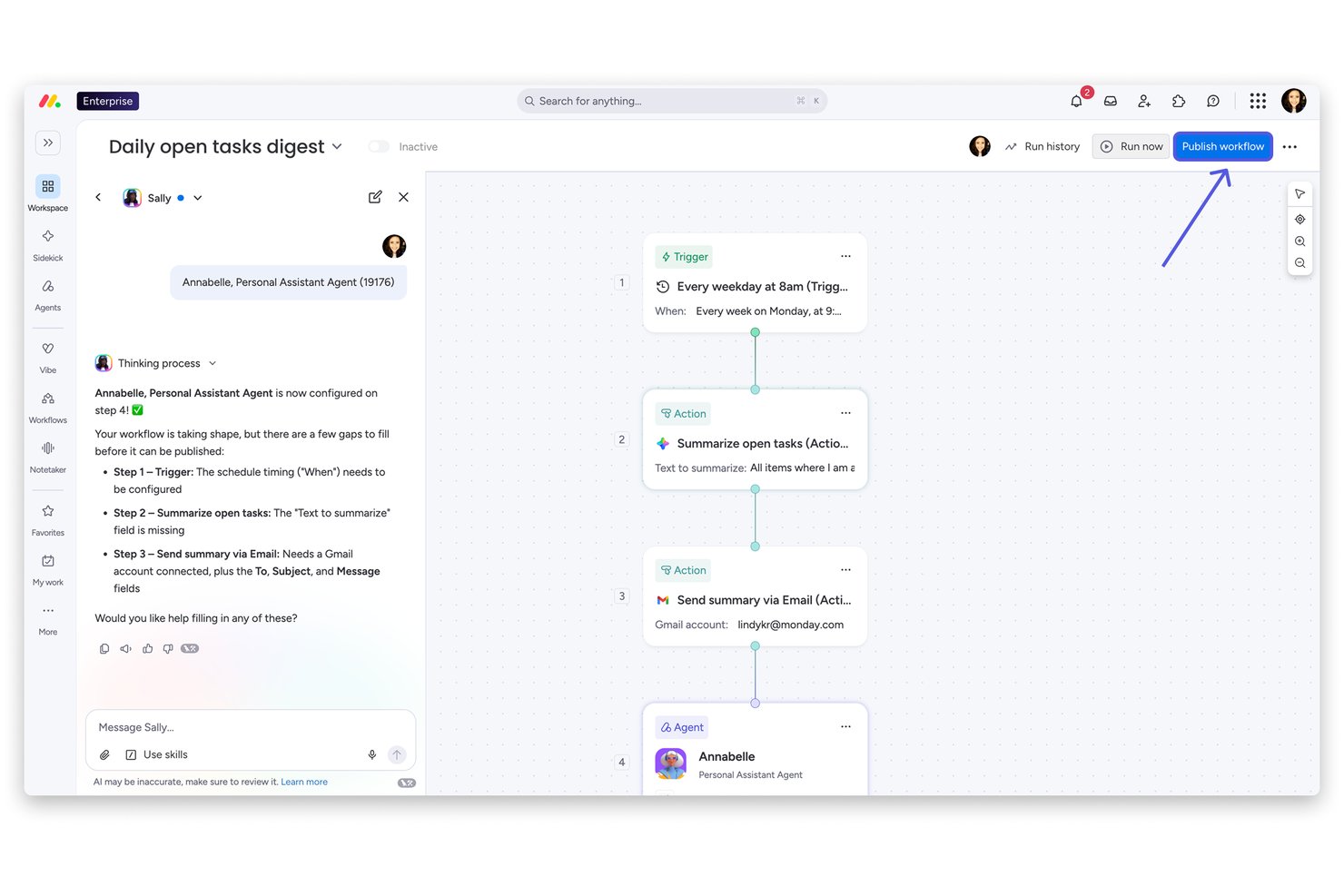
monday AI Workspace è una piattaforma di gestione del lavoro no-code che combina la creazione visiva di workflow, automazioni alimentate dall'IA, monitoraggio dei progetti e orchestrazione di processi trasversali tra team e strumenti.
Per chi è ideale monday AI Workspace?
È una soluzione adatta a team operativi e di progetto di medie dimensioni che hanno bisogno di costruire e automatizzare workflow cross-funzionali senza dipendere da sviluppatori o dall'IT.
Perché ho scelto monday AI Workspace
monday AI Workspace merita un posto nella mia shortlist perché nessun altro strumento a questo prezzo consente di modellare un ambiente di processo così completamente su misura per il modo in cui il tuo team lavora realmente. Apprezzo particolarmente il Vibe app builder, che permette di trasformare una board in un modulo di raccolta dati personalizzato, un tracker di approvazioni o una dashboard stage-gate senza scrivere nemmeno una linea di codice. Associa questo strumento al costruttore di workflow IA e a oltre 36 tipi di colonne, e puoi modellare praticamente qualsiasi processo di progetto ripetibile gestito dal tuo team.
Funzionalità principali di monday AI Workspace
- Assistente AI integrato: Fornisce raccomandazioni contestuali e aiuta ad automatizzare compiti ripetitivi direttamente nelle tue board di workflow.
- Dashboard multi-board: Aggrega dati e stati dei workflow da più board in una dashboard di analisi centralizzata e configurabile.
- Controlli avanzati dei permessi: Consente una gestione granulare dell'accesso degli utenti e della visibilità dei dati tra team, progetti e workflow sensibili.
- Oltre 200 integrazioni native: Si collega senza problemi a strumenti come Salesforce, Slack, Zendesk, GitHub e Google Workspace per unificare le informazioni attraverso il tuo stack tecnologico.
Integrazioni di monday AI Workspace
monday AI Workspace offre oltre 200 integrazioni native, tra cui Salesforce, HubSpot, Zendesk, Slack, Microsoft 365, Google Workspace, GitHub, QuickBooks, Zoom e Dropbox. Supporta anche Zapier e fornisce un'API per integrazioni personalizzate.
Pros and Cons
Pros:
- Il costruttore di workflow no-code non richiede il supporto di sviluppatori
- L'IA genera automazioni da semplici istruzioni in linguaggio naturale
- Le viste stage-gate tracciano visivamente le tappe principali dei processi
Cons:
- Non supporta la modellazione di processi BPMN 2.0 nativamente
- La gestione complessa di più processi richiede una configurazione manuale intensa
New Product Updates from monday AI Workspace
monday AI Workspace Adds Human Approval Routing
monday AI Workspace adds a human-in-the-loop approval block to AI Workflows, sending approval requests and routing workflow paths based on responses. For more information, visit monday AI Workspace's official site.

Ideale per creare applicazioni no-code per la tua azienda
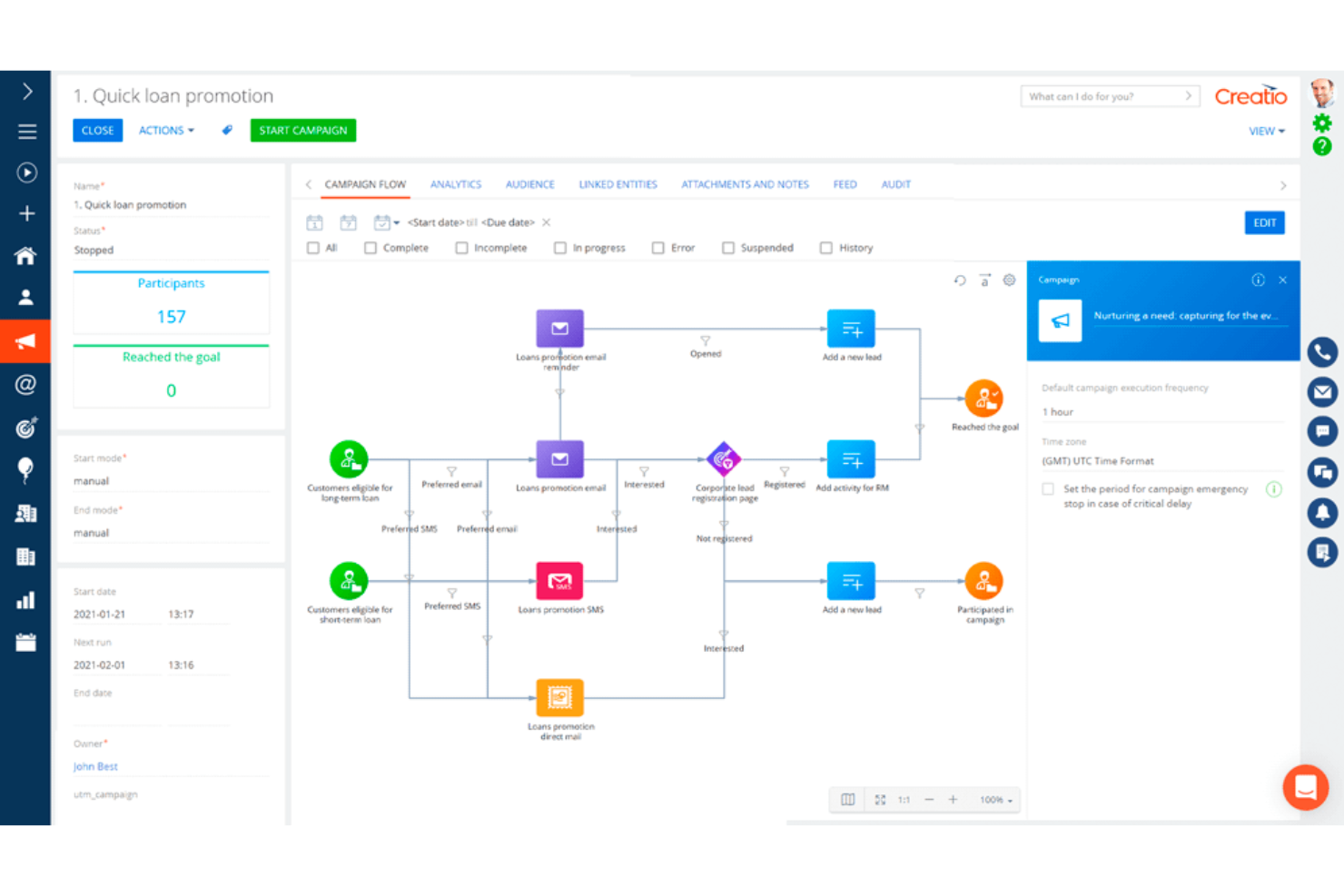
Studio Creatio è una piattaforma no-code per creare, archiviare e gestire i tuoi flussi di lavoro e processi aziendali. È altamente flessibile e può essere utilizzata per sviluppare applicazioni riguardanti vari aspetti delle operazioni della tua azienda. Puoi creare processi aziendali, modelli di dati, pagine e viste e molto altro.
Il designer dei processi consente la collaborazione in tempo reale, così i membri del team possono lavorare contemporaneamente sulla costruzione dei processi aziendali. È anche possibile importare processi esistenti nel sistema ed esportare quelli creati al suo interno. Tutte le applicazioni costruite sulla piattaforma hanno un'interfaccia utente (UI) intuitiva che sarà facile da navigare e utilizzare per i dipendenti in tutta l'organizzazione. È possibile impostare automazioni per ridurre il carico di lavoro manuale, creare coerenza e limitare gli errori umani.
Il software si integra con oltre 300 altri strumenti presenti nel marketplace di Creatio. Questi includono servizi popolari come OneDrive, WordPress, FedEx, Process First, Make It TSI, Agovo, Amdocs, Evoqia, Meritus, Onmiline, Technology Advisors, Softline, ITS, Navicon e Orange Process.
È disponibile una prova gratuita di 14 giorni e i prezzi sono disponibili su richiesta.
New Product Updates from Creatio AI Studio
Creatio Studio Expands AI App-Building Capabilities
Creatio Studio adds expanded AI coding agents, AI-generated pivot tables, and built-in analytics for generated apps. These updates let users build more UI, logic, and reporting components from natural-language prompts. For more information, visit Creatio Studio’s official site.
Ideale per la gestione dei processi aziendali di vendita
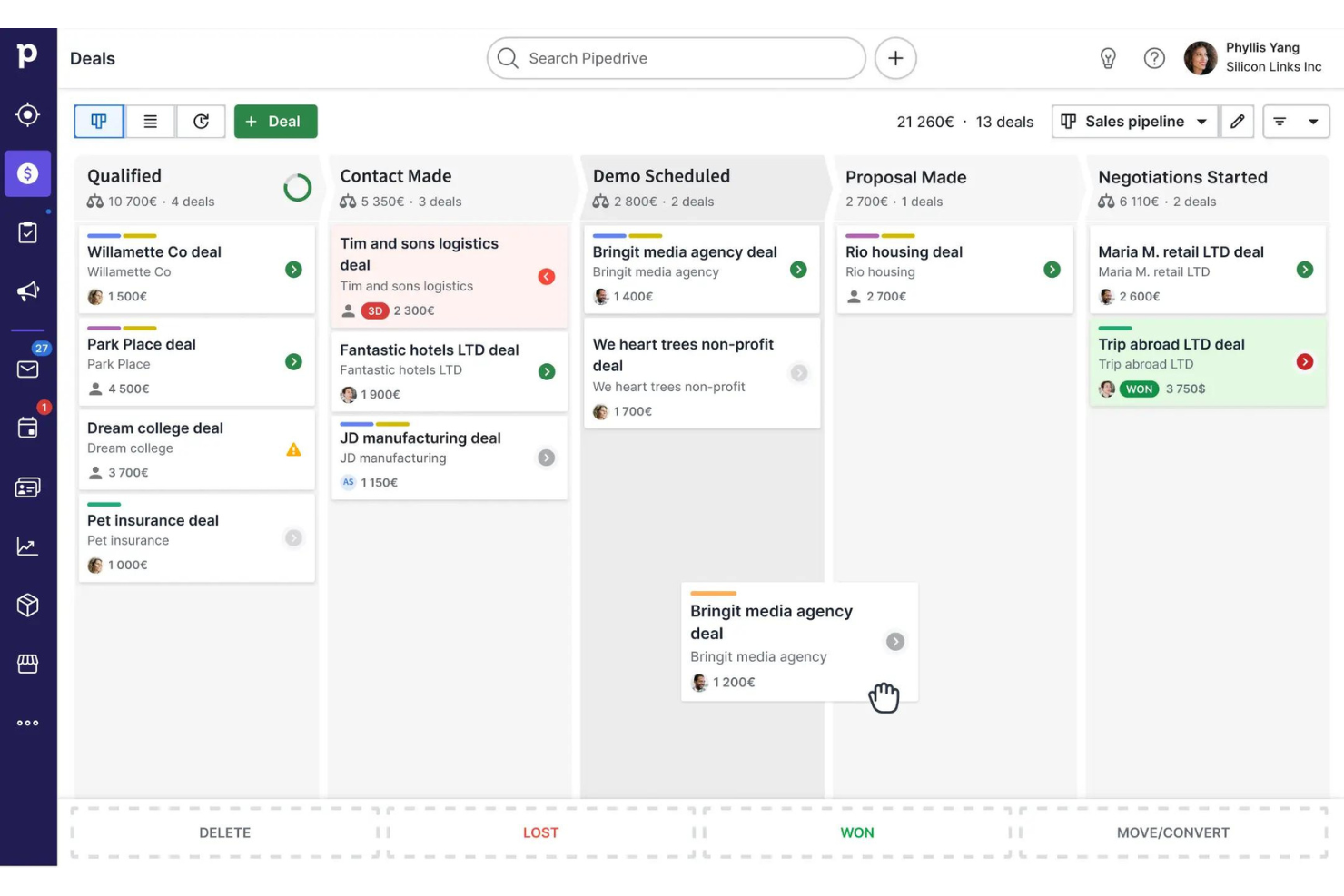
Pipedrive è una piattaforma focalizzata sui processi per team di vendita e piccole imprese, che li aiuta a organizzare, automatizzare e monitorare i loro flussi di lavoro di vendita, dalla lead alla chiusura.
Per chi è più indicato Pipedrive?
Pipedrive è particolarmente adatto per team di vendita di piccole e medie dimensioni che necessitano di un modo strutturato e visivo per gestire la propria pipeline e i processi di vendita.
Perché ho scelto Pipedrive
Pipedrive si guadagna un posto nella mia classifica grazie a come struttura e automatizza in modo efficace il processo di vendita end-to-end. Mi piace in particolare il costruttore visivo della pipeline, dove puoi personalizzare le fasi in base al ciclo di vendita specifico, impostare probabilità di successo a livello di trattativa e utilizzare segnali colorati per evidenziare le trattative che stanno diventando fredde. Il mio team utilizza gli strumenti di automazione per attivare task di follow-up e inviare email in base al cambiamento di stadio delle trattative, riducendo così il lavoro manuale che spesso viene trascurato. Il livello di analisi e reportistica collega tutto—posso monitorare le metriche della pipeline, impostare obiettivi a livello di team e individuare i colli di bottiglia prima che compromettano un trimestre.
Funzionalità principali di Pipedrive
- Lead inbox: Acquisisci e qualifica i lead in arrivo in uno spazio dedicato prima che entrino nella pipeline attiva.
- Pianificazione attività: Crea e assegna chiamate, riunioni e task direttamente alle trattative o ai contatti per mantenere i follow-up sempre sotto controllo.
- Dashboard personalizzabili: Crea dashboard con le metriche di vendita e i KPI specifici che il tuo team deve monitorare.
- Sincronizzazione email: Collega la tua casella di posta a Pipedrive per registrare automaticamente le conversazioni email sulle trattative o sui contatti pertinenti.
Integrazioni Pipedrive
Le integrazioni includono PandaDoc, Leadfeeder, JustCall, LinkPort, Outfunnel, Slack, QuickBooks, Trello, Zoom e Gmail.

Wrike
Miglior strumento BPMS per team di tutte le dimensioni
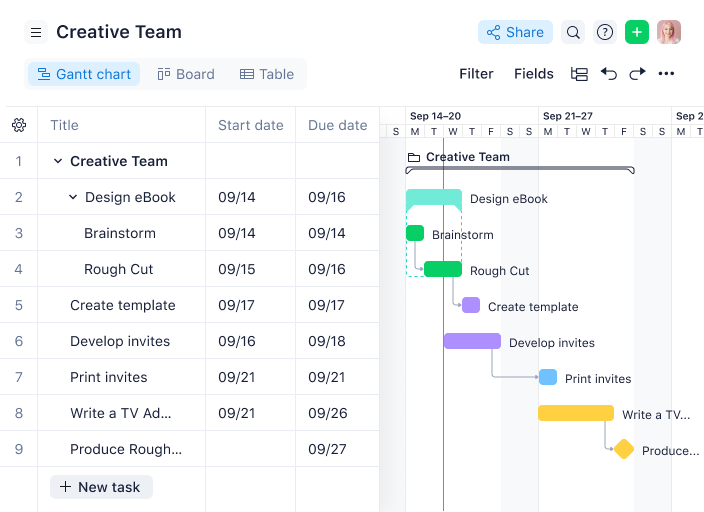
Wrike è una piattaforma di gestione dei processi aziendali progettata per i team che hanno bisogno di automatizzare i flussi di lavoro, monitorare i progetti e migliorare la collaborazione trasversale tra diverse funzioni, in settori come tecnologia, marketing e servizi professionali.
Per chi è ideale Wrike?
Wrike è adatto a team di qualsiasi dimensione—da startup a grandi aziende—che necessitano di una piattaforma scalabile per gestire flussi di lavoro complessi e progetti trasversali tra più reparti.
Perché ho scelto Wrike
Wrike si è guadagnato un posto nella mia lista perché si adatta sia a piccoli team che a grandi aziende senza costringerti a rivoluzionare l'assetto man mano che cresci. In particolare, apprezzo la funzionalità dei modelli di progetto: puoi trasformare in modello interi flussi di lavoro e avviare nuovi processi in pochi secondi, un vero vantaggio quando gestisci attività ripetitive tra più team. Utilizzo inoltre le regole di automazione senza codice di Wrike per far avanzare automaticamente le attività nelle fasi di approvazione, gestire l'escalation di elementi a rischio e attivare aggiornamenti di stato automatici. Gli strumenti per la prenotazione delle risorse e la gestione degli sforzi consentono al mio team di prevedere la capacità prima di accettare nuovo lavoro, mantenendo così la prevedibilità della consegna a qualsiasi dimensione del gruppo.
Funzionalità chiave di Wrike
- Viste di progetto personalizzate: Passa dalla visualizzazione Gantt, Kanban, Board, Calendario e Tabella per rappresentare le attività come davvero pensa il tuo team.
- Moduli di richiesta: Crea moduli di raccolta dati dinamici che generano automaticamente attività, progetti e flussi di lavoro una volta inviati.
- Dashboard in tempo reale: Crea dashboard personalizzate con metriche e KPI per monitorare l'avanzamento dei progetti e individuare eventuali rischi a colpo d'occhio.
- Bacheche Scrum: Gestisci sprint Agile con prioritizzazione dei backlog, bacheche Scrum condivise e dashboard Agile per il monitoraggio in tempo reale dell'avanzamento.
Integrazioni Wrike
Le integrazioni includono Salesforce, Microsoft Teams, Google Drive, Microsoft SharePoint, Zoom, Adobe Creative Cloud, QuickBooks, Power BI, Tableau e Miro.
New Product Updates from Wrike
Wrike Adds Klaxoon MCP Integration
Wrike’s Klaxoon MCP integration is now generally available, enabling AI agents to navigate between Wrike tasks and attached whiteboards, read task context, and manage whiteboard attachments via API. For more information, visit Wrike's official site.

Qntrl
Miglior BPMS per organizzazioni in rapida crescita che necessitano di scalare lo sviluppo dei processi
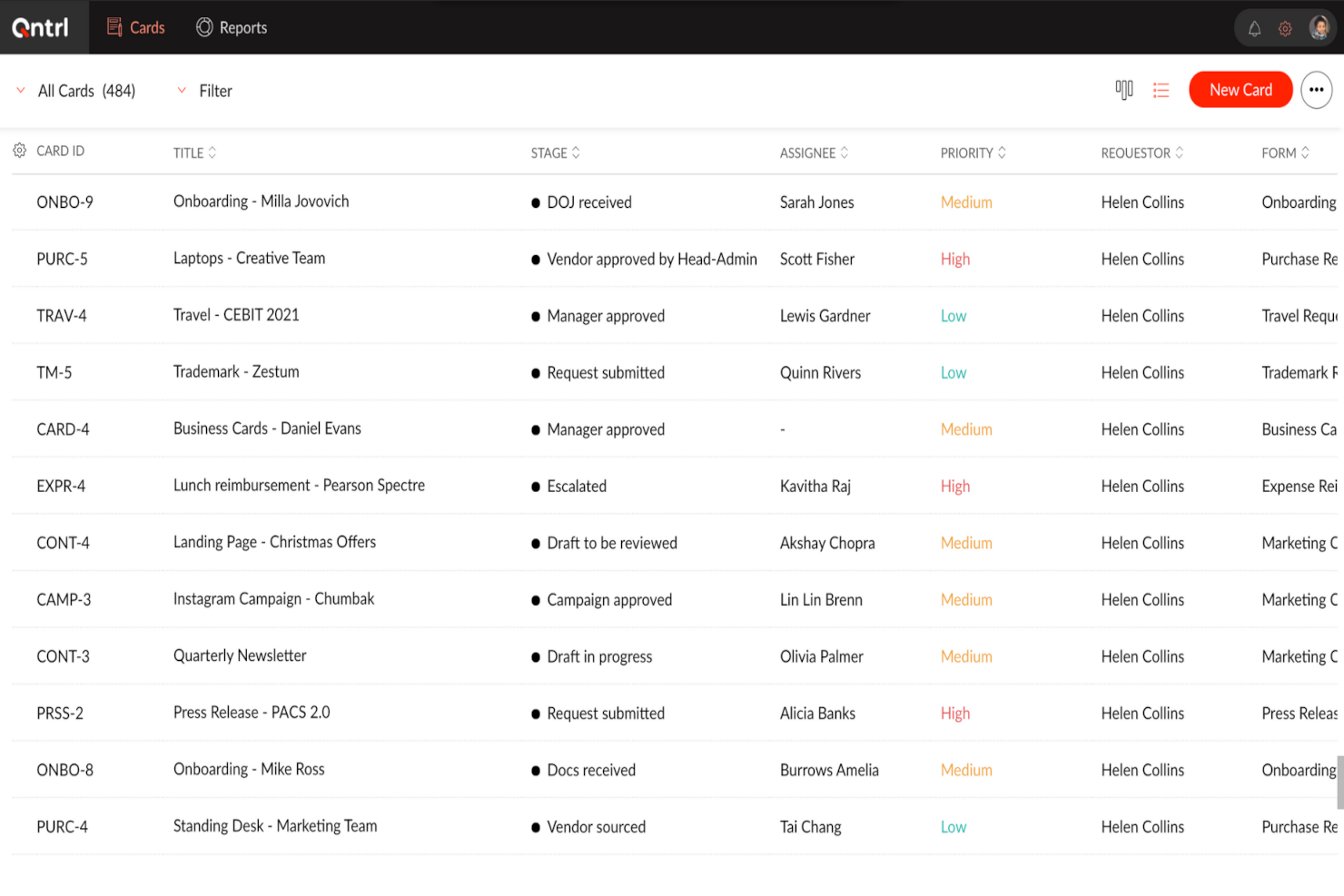
Qntrl è una piattaforma di automazione dei flussi di lavoro progettata per team e organizzazioni che necessitano di progettare, gestire e ottimizzare processi aziendali complessi con controlli personalizzabili e visibilità chiara dei processi.
Per chi è Qntrl?
Qntrl è indicato per team di medie e grandi dimensioni che hanno bisogno di una gestione strutturata e scalabile dei processi in diversi reparti o funzioni.
Perché ho scelto Qntrl
Qntrl merita un posto nella mia shortlist perché è stato creato appositamente per organizzazioni di medie e grandi dimensioni che necessitano di scalare l’automazione dei processi tra più reparti senza dover ricostruire i flussi di lavoro da zero ogni volta. Apprezzo particolarmente la libreria di modelli di flusso di lavoro: il mio team può iniziare con un processo di approvvigionamento o HR predefinito e adattarlo a esigenze specifiche, riducendo così il tempo di configurazione necessario per l’implementazione di nuovi processi. Il monitoraggio degli SLA e le regole di escalation automatica garantiscono che, se un’attività si blocca, Qntrl la reindirizza o la segnala automaticamente, evitando che i team in crescita debbano inseguire manualmente le approvazioni con l’aumento del volume. Aggiungo controlli di accesso basati sui ruoli e permessi a livello di campo, così si può estendere l’accesso a nuovi team o reparti senza compromettere la governance dei dati.
Funzionalità principali di Qntrl
- Builder visivo dei flussi di lavoro: Un builder drag-and-drop consente di progettare processi strutturati con transizioni parallele, logica condizionale e regole di automazione integrate.
- Gestione centralizzata delle richieste: Tutte le richieste in ingresso vengono inviate e monitorate in un unico punto, con viste di lavoro personalizzabili e aggiornamenti di stato in tempo reale.
- Log di controllo e tracciamento della conformità: Ogni azione è registrata con timestamp, facilitando il rispetto delle policy interne e dei requisiti normativi.
- Generazione documentale: Generazione automatica di documenti nelle fasi prestabilite del workflow, riducendo le attività manuali di output tra i reparti.
Integrazioni Qntrl
Le integrazioni includono SAP, Oracle, MySQL, Active Directory, Zoho CRM, Zoho Desk, Zoho Books, Jira, Slack e Zendesk.

Rierino
Ideale per flussi di lavoro guidati dall’IA
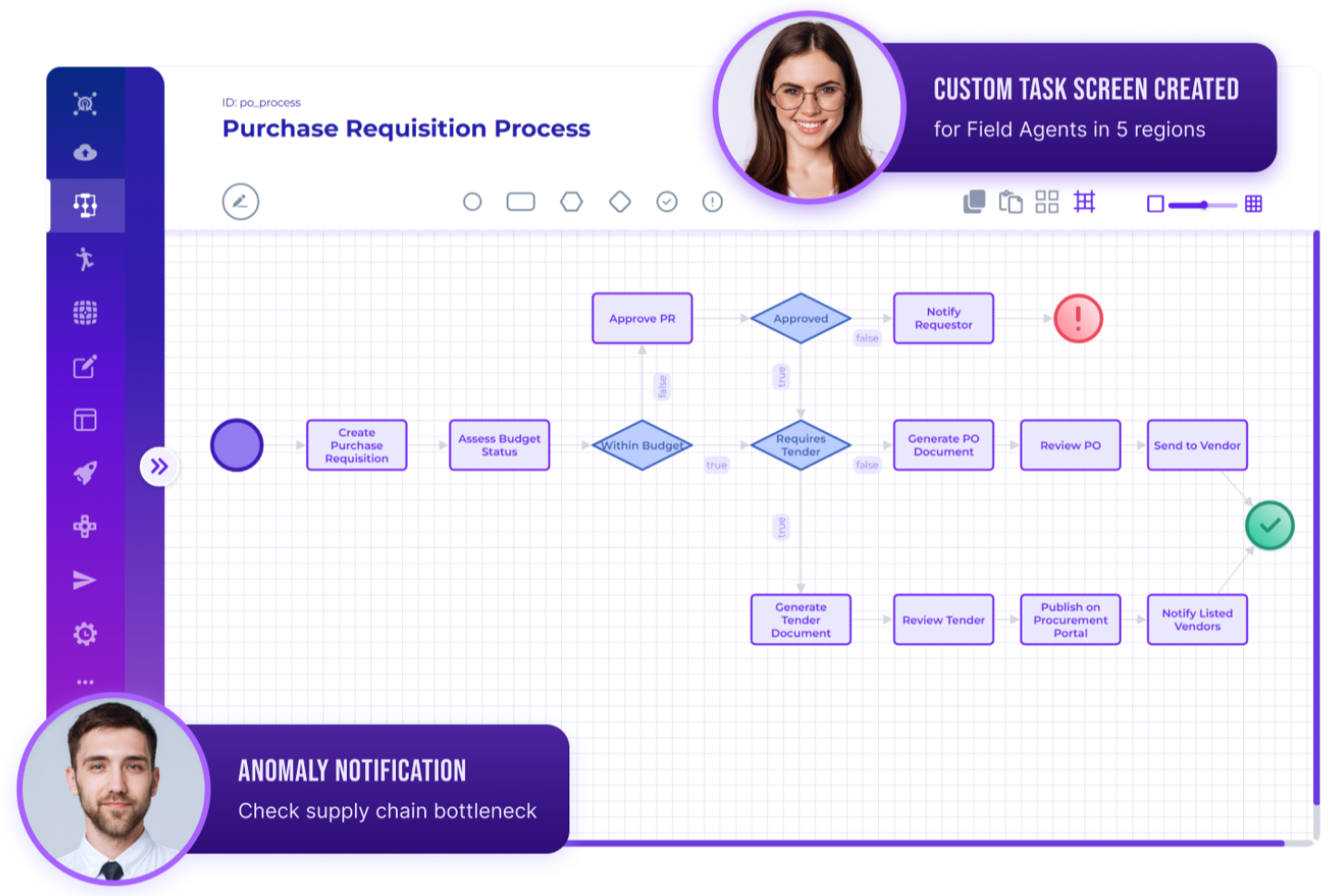
Rierino è una piattaforma di gestione dei processi aziendali low-code progettata per i team che desiderano automatizzare flussi di lavoro complessi, ottimizzare le operazioni e adattarsi alle mutevoli esigenze aziendali in settori come finanza, retail e telecomunicazioni.
Per chi è ideale Rierino?
Rierino è particolarmente adatto per medie e grandi imprese attive in settori ad alta intensità di dati come retail, finanza e telecomunicazioni, che necessitano di un'automazione dei processi flessibile e scalabile senza una pesante dipendenza dall’IT.
Perché ho scelto Rierino
Rierino si guadagna un posto nella mia selezione grazie al modo in cui gestisce l’automazione dei flussi di lavoro basata sull’intelligenza artificiale, cambiando effettivamente il modo in cui viene costruita la logica dei processi. Apprezzo in particolare i nodi decisionali assistiti dall’IA, che permettono al mio team di integrare regole basate su machine learning direttamente nei flussi di processo—quindi un’approvazione di prestito o un controllo antifrode non è più un passaggio manuale, ma un punto decisionale automatizzato. Il designer dei processi low-code di Rierino inoltre ci consente di modificare questi flussi senza dover attendere uno sviluppatore, un aspetto fondamentale quando le regole aziendali cambiano durante il trimestre.
Caratteristiche principali di Rierino
- Designer workflow drag-and-drop: Crea e aggiorna visivamente i flussi di processo con supporto per logica condizionale, ramificazioni, timer e sequenze multi-step.
- Gestione SLA ed escalation: Definisci soglie SLA e configura escalation automatiche in base a tempo, condizioni o ruoli assegnati.
- Controllo degli accessi basato sui ruoli: Imposta permessi dettagliati affinché ogni membro del team visualizzi e interagisca solo con le fasi di processo rilevanti per il proprio ruolo.
- Dashboard di processo in tempo reale: Monitora KPI e traccia le performance dei processi tramite dashboard specifiche per la missione che si aggiornano con l’andamento delle operazioni.
Integrazioni Rierino
Le integrazioni includono Adyen, Algolia, Amazon Web Services, Cloudinary, Couchbase, Elastic, Google Cloud Platform, Kafka, Microsoft e SAP.
New Product Updates from Rierino
Rierino Adds Interactive Debugging and Static API Endpoints
Rierino adds interactive debugging with
/api/test
execution tracing, AI-assisted troubleshooting, custom MDC attributes, and static content endpoints through the API Gateway. These help developers diagnose issues faster and create simple endpoints without a backend service. For more information, visit Rierino’s official site.
 .
.
TrailHQ
Ideale per l'elaborazione intelligente dei documenti
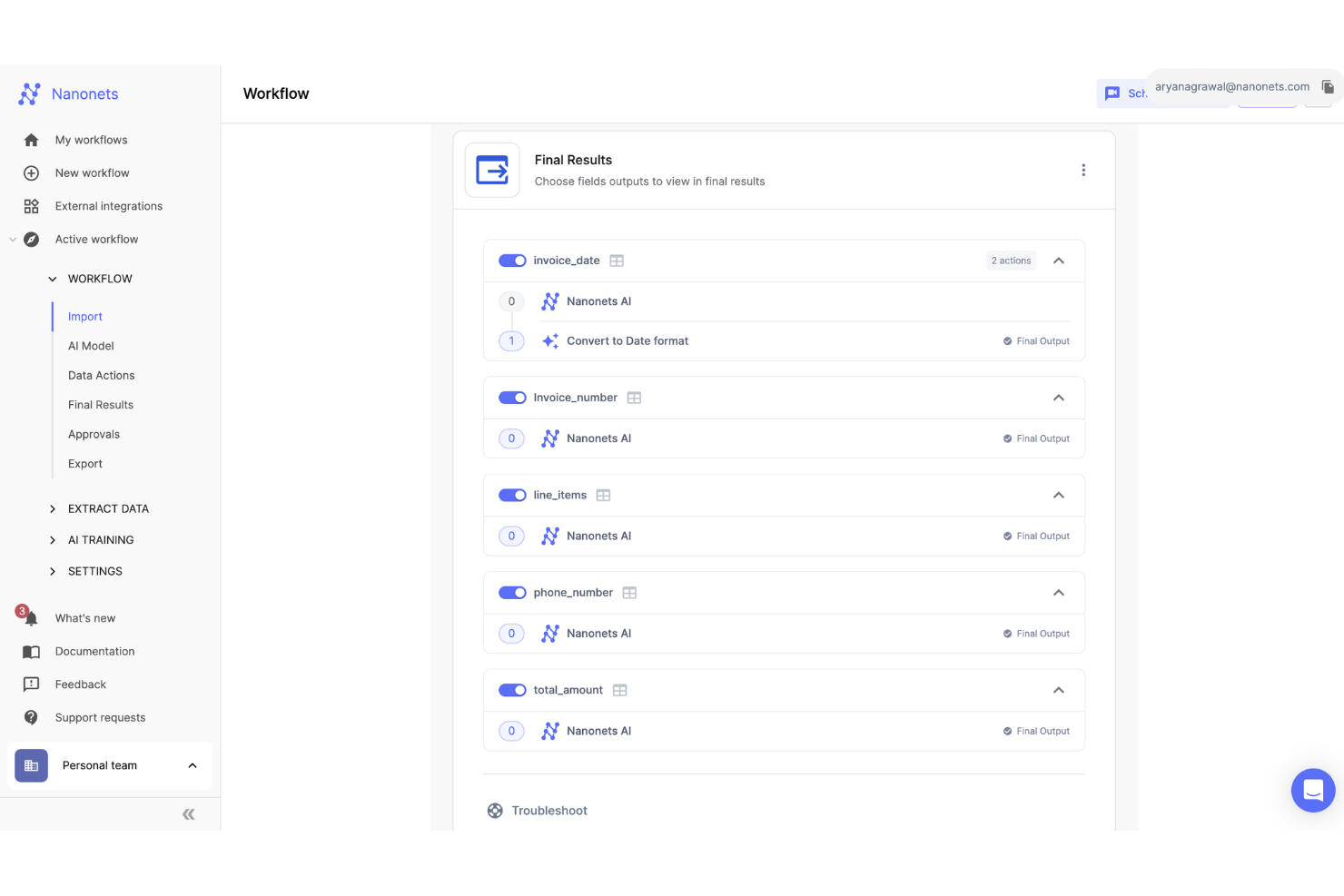
Nanonets è una piattaforma di gestione dei processi aziendali basata sull’IA, progettata per team di finanza, operazioni e conformità che hanno bisogno di automatizzare flussi di lavoro ricchi di documenti e semplificare l’estrazione dei dati attraverso diversi sistemi.
Per chi è ideale Nanonets?
Nanonets è particolarmente indicato per i team di finanza e operazioni di aziende di medie e grandi dimensioni che elaborano grandi volumi di documenti come fatture, ricevute e moduli.
Perché ho scelto Nanonets
Ho scelto Nanonets tra i migliori perché la sua capacità intelligente di elaborazione documentale va ben oltre l’OCR di base. Supporta oltre 300 tipi di documenti – dalle fatture e ordini di acquisto ai moduli di richiesta assicurativa e agli estratti conto – e utilizza l’IA per estrarre dati strutturati da ognuno senza inserimento manuale. Mi piace anche la funzione di approvazione con supervisione umana, che permette al mio team di inserire checkpoint di validazione nei flussi di lavoro automatizzati in modo che i casi limite vengano controllati prima che il processo prosegua. Questo è particolarmente utile quando si trattano documenti critici come fatture di fornitori o richieste di mutuo, dove anche un singolo errore di estrazione può avere importanti conseguenze a valle.
Caratteristiche principali di Nanonets
- Generatore di workflow senza codice: Crea e automatizza complessi processi aziendali multi-step usando un’interfaccia drag-and-drop senza scrivere una riga di codice.
- Libreria di modelli AI: Accedi a una suite di modelli IA predefiniti e pronti all’uso per classificazione dei documenti, estrazione e validazione dati nei vari passaggi del flusso di lavoro.
- Controllo accessi basato sui ruoli: Assegna permessi per ruolo per gestire chi può vedere, modificare o approvare specifici workflow e documenti all’interno del tuo team.
- Log e cronologia delle attività: Monitora ogni azione compiuta all’interno dei workflow, comprese approvazioni, modifiche ed esportazioni, per garantire totale visibilità e conformità dei processi.
Integrazioni di Nanonets
Le integrazioni includono SAP, QuickBooks, Salesforce, Xero, Microsoft Dynamics 365, Oracle NetSuite, FreshBooks, Zoho Books, Sage Intacct e Google Drive.

Quixy
Il miglior software BPM no-code
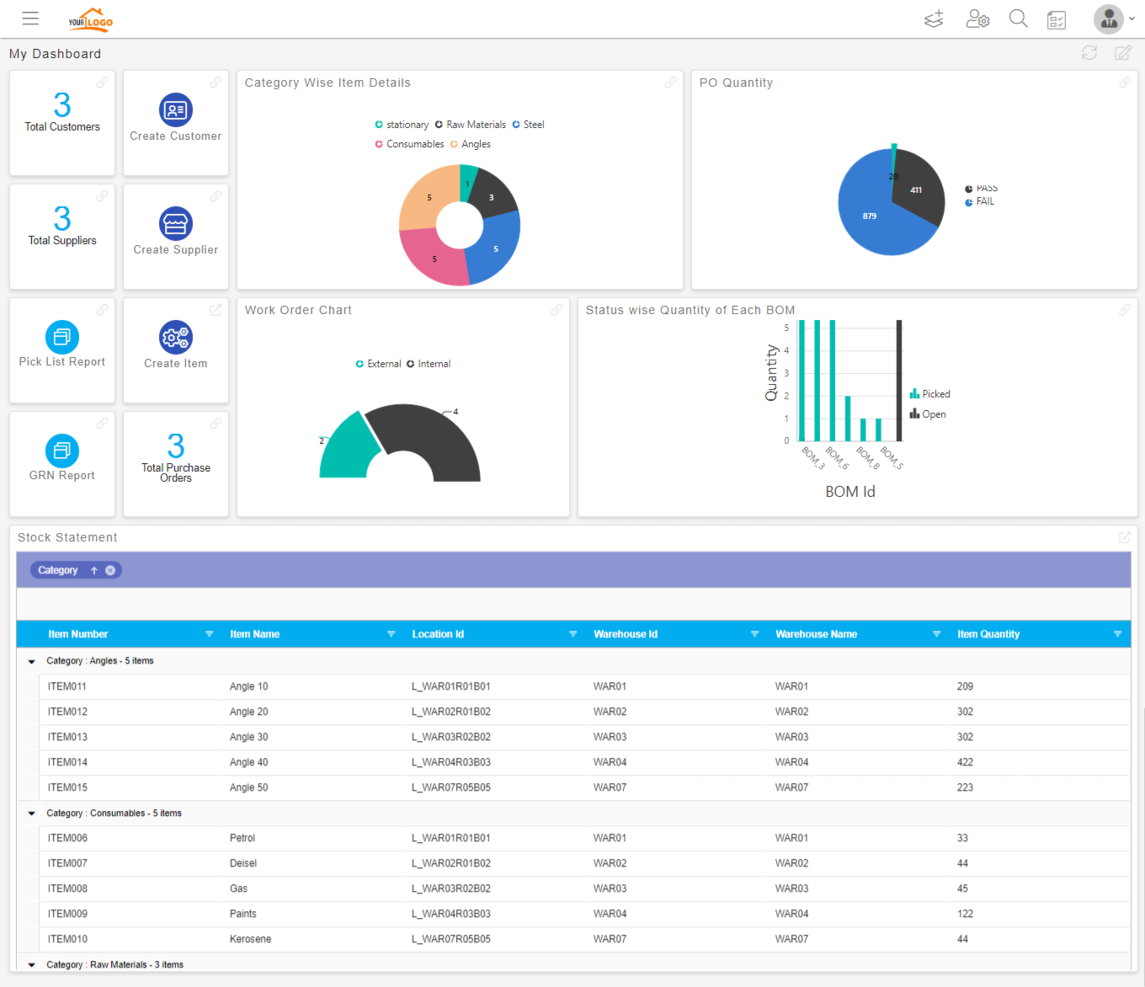
Quixy è una piattaforma di gestione dei processi aziendali basata su cloud, progettata per i team che desiderano automatizzare i flussi di lavoro e creare applicazioni aziendali personalizzate senza scrivere codice, aiutando le organizzazioni nei settori come manifatturiero, finanziario e dei servizi ad accelerare la digitalizzazione e l'ottimizzazione dei propri processi.
Per chi è più indicato Quixy?
Quixy è adatto per medie imprese e team operativi che devono automatizzare e gestire i processi aziendali senza dipendere da sviluppatori o risorse IT.
Perché ho scelto Quixy
Quixy si guadagna il suo posto tra i migliori della mia lista perché è una delle poche piattaforme BPM dove gli utenti non tecnici possono realmente gestire l'intera esperienza di costruzione dei processi. Mi piace che il designer visivo dei flussi di lavoro permetta di modellare processi di approvazione a più step—come un workflow per ordini di acquisto con instradamento condizionale e controlli di accesso a livello di campo—senza scrivere una sola riga di codice. Il motore delle regole è la parte che trovo davvero efficace: consente di configurare la logica aziendale direttamente nell'interfaccia, così un responsabile finanziario può impostare regole di escalation o checkpoint di conformità senza dover aprire un ticket IT. Quixy include anche un simulatore integrato che permette di testare ogni percorso del workflow prima della distribuzione, il che secondo me riduce le reiterazioni che di solito rallentano il lancio dei processi.
Caratteristiche principali di Quixy
- Generatore di documenti: Crea e compila automaticamente documenti come ordini di acquisto, fatture e contratti utilizzando dati in tempo reale estratti direttamente dalle applicazioni Quixy.
- Template di app pronte all'uso: Accedi ad applicazioni preimpostate per processi comuni—come onboarding dei dipendenti, gestione delle assenze e richieste di assistenza IT—che puoi implementare o personalizzare immediatamente.
- Agentic AI: Configura azioni di flusso di lavoro basate sull'intelligenza artificiale che prendono decisioni autonome, come validare controlli di conformità o gestire approvazioni, senza intervento manuale.
- Dashboard personalizzate: Ogni utente costruisce la propria dashboard con i report, i grafici e le visualizzazioni delle attività di cui ha bisogno, invece di utilizzare un layout condiviso fisso.
Integrazioni di Quixy
Le integrazioni includono Salesforce, Oracle, SAP, Microsoft Dynamics 365, Slack, Microsoft Teams, Google Workspace, Dropbox, Twilio e Zapier.

ClickUp
Bacheche Kanban che supportano i tuoi flussi di lavoro e offrono agli utenti un modo semplice per spostare un'attività tra le fasi.
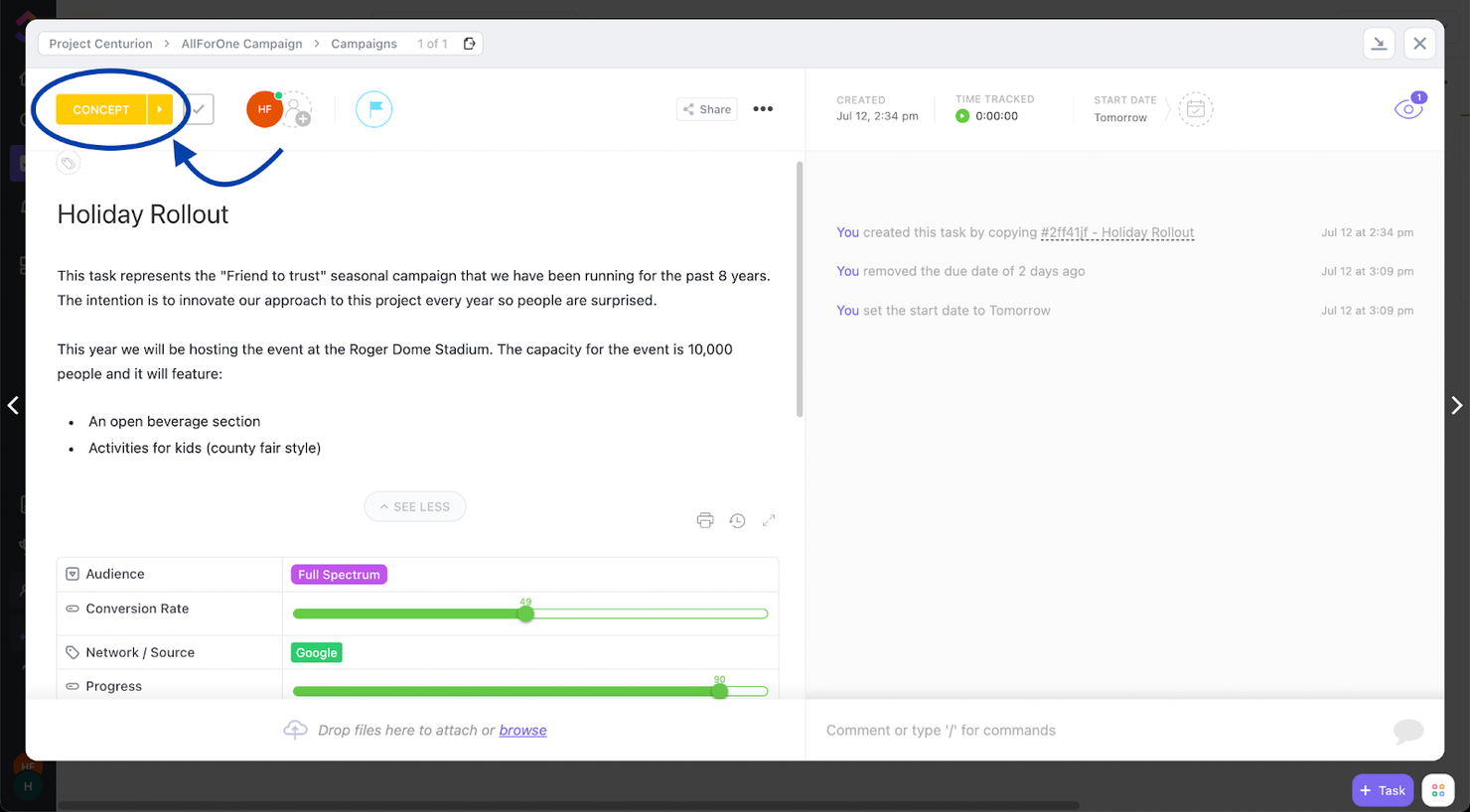
ClickUp è uno strumento di gestione dei progetti in cui puoi creare bacheche Kanban. Gli stati all'interno di questa bacheca possono guidare il tuo progetto attraverso le sue diverse fasi o stadi e offrire agli utenti una funzionalità colorata che li aiuta a spostare le attività nelle fasi successive.
Di conseguenza, il tuo team vedrà qualcosa di simile alla schermata sopra quando apre un'attività. Nell'angolo in alto a sinistra, c’è un pulsante che mostrerà la fase attuale e una freccia per inviarla alla fase successiva.
Se desideri migliorare questo aspetto, puoi impostare automazioni che notificano immediatamente gli utenti quando un'attività cambia fase.
ClickUp offre integrazioni native con Slack, G Suite, Dropbox e molti altri strumenti, oltre a oltre 1.000 integrazioni tramite Zapier.
ClickUp è gratuito con spazio di archiviazione limitato per un numero illimitato di utenti. I piani a pagamento partono da $5/utente/mese e offrono una prova gratuita.
New Product Updates from ClickUp
ClickUp Adds Meetings Hub, Super Agent Templates, and ZoomInfo Integration
ClickUp adds a searchable Meetings Hub, new ways to clone and template Super Agents, and a ZoomInfo integration through the App Center. These updates improve meeting retrieval, agent reuse, and access to sales intelligence. For more information, visit ClickUp’s official site.
Altri sistemi di gestione dei processi aziendali
Ecco alcuni altri strumenti che non sono rientrati nel confronto tra i migliori strumenti BPM. Se hai bisogno di ulteriori suggerimenti per la gestione online dei processi aziendali, dai un’occhiata a questi.
- Kintone
Ideale per creare processi aziendali personalizzati
- Process Street
Ideale per automatizzare attività programmate
- SAP Signavio Process Manager
Ideale per la validazione dei modelli e la modellazione della catena del valore
- Camunda Platform
Ideale per automatizzare i processi in modo efficiente
- Bonsai Agency Software
Ideale per gestire processi di progetto, clienti e finanze in un unico luogo
- beSlick
Ideale per la gestione collaborativa di processi e attività
- Revver
Ideale per gestione e controllo dei documenti
- Gluu
Ideale per mappare processi end-to-end
- Oracle BPM Suite
Migliore funzionalità di dashboard per analytics aziendali
- SAP Business ByDesign
Ideale per l'integrazione CRM
- Pneumatic Workflow
Migliore gestione dei flussi di lavoro di livello aziendale
- IBM Blueworks Live
Miglior strumento BPMS per usabilità
- OnBase by Hyland
Ideale per creare percorsi di processi aziendali con drag and drop
- iGrafx
Ideale per l'analisi what-if dei cambiamenti di processo
- K2 Platform
Miglior BPMS per sicurezza e governance


Recensioni correlate sui software di gestione dei progetti
Se non hai ancora trovato qui ciò che stai cercando, dai un'occhiata a questi altri strumenti correlati che abbiamo testato e valutato:
- Software di gestione dei progetti
- Software di automazione digitale dei processi
- Software di automazione intelligente dei processi
- Software di gestione delle risorse
- Software di automazione dei flussi di lavoro
- Software di gestione delle attività
- Strumenti per la produttività
- Software di monitoraggio dei progetti
Come Valuto i Software BPMS BPM
Scompongo la mia valutazione in criteri di base—come la modellazione BPMN e l'automazione dei flussi di lavoro—e elementi differenzianti che separano gli strumenti adatti agli Uffici di Gestione Progetti (PMO) da quelli pensati per gli sviluppatori non tecnici.
Funzionalità Principali (Requisiti Minimi per Questa Lista)
Quando seleziono gli strumenti per la mia lista, valuto ciascuno su una scala da 0 (funzionalità assente) a 5 (eccellente in quest'area) per ogni funzionalità principale elencata in seguito. Poi calcolo il punteggio totale dello strumento in percentuale. Ogni strumento deve raggiungere un punteggio minimo totale del 75% per essere preso in considerazione.
- Modellazione e Progettazione dei Processi: Valuto se la piattaforma supporta BPMN 2.0 o una notazione equivalente, e quanto facilmente i team possono mappare processi a più fasi come approvazioni progettuali stage-gate.
- Automazione dei Workflow: Ogni strumento dovrebbe gestire percorsi ramificati, approvazioni parallele, escalation e instradamento basato su SLA—not solo semplici sequenze lineari di attività.
- Motore di Regole Aziendali: Cerco logiche decisionali configurabili, come l'instradamento automatico delle richieste di modifica in base all'impatto sul budget o al livello di rischio, separatamente dal flusso di lavoro stesso.
- Monitoraggio dei Processi & Analisi: I dashboard dovrebbero evidenziare i tempi di ciclo, le posizioni dei colli di bottiglia e la conformità agli SLA nei processi attivi anziché solo nei registri statici di completamento delle attività.
- Moduli & Raccolta Dati: Il generatore di moduli deve prevedere campi condizionali e binding di dati affinché, ad esempio, un modulo di acquisizione progetti adatti i campi obbligatori in base alla tipologia di progetto selezionata.
- Integrazioni & API: Verifico la presenza di API REST e connettori nativi verso strumenti già utilizzati dai team di progetto—Jira, Slack, sistemi ERP—così che i processi possano estendersi a tutto l’ecosistema tecnologico.
Una volta che ho una lista di strumenti idonei ai criteri, considero cosa distingue ciascuna piattaforma dalle altre.
Fattori Differenzianti (Ciò che Distingue i Fornitori)
Ecco come confronto e distinguo i diversi fornitori:
Caratteristiche di Spicco
Il process mining si distingue perché rivela dove effettivamente si bloccano i passaggi analizzando i log di sistema—molto più utile rispetto ad affidarsi ad audit manuali dei processi. Valuto anche le funzionalità di intelligenza artificiale, in particolare se la piattaforma offre instradamento predittivo o suggerimenti sulla prossima azione migliore durante i workflow attivi. I builder low-code/no-code sono importanti per i PMO dove gli analisti di business devono poter modificare gli step di approvazione o i flussi di onboarding senza dover aprire una richiesta agli sviluppatori ogni volta che cambiano i requisiti.
Oltre le Funzionalità
Valuto attentamente il costo totale di proprietà—i modelli di licenza variano molto tra prezzi per utente, per processo o per esecuzione e la scelta sbagliata può far aumentare i costi quando il team cresce. Le certificazioni di conformità come SOC 2 Tipo II e ISO 27001 sono rilevanti quando la piattaforma BPM gestisce dati di progetto regolamentati con piena tracciabilità degli audit. Anche la velocità di implementazione è un fattore chiave; verifico la presenza di template di processo preconfigurati e programmi di onboarding strutturati che riducono il tempo tra l’acquisto e il primo workflow attivo.
Come scegliere una BPMS
Con così tante soluzioni diverse per la gestione dei processi aziendali disponibili, può essere difficile decidere quale BPMS sia più adatta alle tue esigenze.
Mentre selezioni, provi e scegli i sistemi di gestione dei processi aziendali, considera quanto segue:
- Quale problema stai cercando di risolvere - Inizia identificando la lacuna nelle funzionalità di gestione dei processi aziendali che stai cercando di colmare, per chiarire quali caratteristiche e funzionalità il BPMS deve fornire. Se identifichi, ad esempio, che stai semplicemente cercando di avere processi documentati e organizzati, potresti dover prendere in considerazione un software per la documentazione dei processi. Questa analisi è estremamente utile per identificare il problema e lo strumento specifico che ti aiuterà a risolverlo.
- Chi dovrà utilizzarlo - Per valutare costi e requisiti, considera chi utilizzerà il software e di quante licenze avrai bisogno. Dovrai valutare se l'accesso sarà necessario solo per i professionisti della gestione dei progetti oppure per l'intera organizzazione. Una volta chiarito questo aspetto, vale la pena considerare se stai dando priorità alla facilità d'uso per tutti oppure alla velocità per gli utenti esperti del tuo BPMS.
- Con quali altri strumenti deve funzionare - Chiarisci quali strumenti stai sostituendo, quali rimarranno in uso e con quali strumenti dovrai integrarlo, come software di contabilità, CRM o gestione delle risorse umane. Dovrai decidere se gli strumenti dovranno integrarsi tra loro oppure se puoi sostituire più strumenti con un unico BPMS consolidato.
- Quali risultati sono importanti - Considera il risultato che il software deve produrre per essere considerato un successo. Rifletti sulle funzionalità che vuoi acquisire o su ciò che vuoi migliorare e su come misurerai il successo. Ad esempio, un risultato potrebbe essere la possibilità di ottenere una maggiore visibilità sulle prestazioni. Potresti confrontare le funzionalità di gestione dei processi aziendali fino allo sfinimento, ma se non stai pensando ai risultati che vuoi ottenere, potresti sprecare molto tempo prezioso.
- Come funzionerebbe all'interno della tua organizzazione - Considera la scelta del software insieme ai tuoi flussi di lavoro e alla tua metodologia di gestione. Valuta cosa funziona bene e quali sono le aree che stanno causando problemi e devono essere affrontate. Ricorda che ogni azienda è diversa — non dare per scontato che uno strumento funzionerà nella tua organizzazione solo perché è popolare.
Tendenze nei sistemi di gestione dei processi aziendali per il 2026
Nel 2025, i sistemi di gestione dei processi aziendali stanno vivendo cambiamenti significativi, guidati dalla necessità di ottimizzare e automatizzare ulteriormente i processi aziendali. Inoltre, questi cambiamenti non riguardano solo miglioramenti incrementali, ma piuttosto la trasformazione fondamentale del modo in cui operano le aziende. Di seguito ho raccolto diverse tendenze che ritengo continueranno a influenzare gli strumenti BPM e la gestione dei processi aziendali in generale, sia ora sia in futuro.
Tendenze nei BPMS e nella tecnologia
- Maggiore enfasi sull'intelligenza artificiale e sull'apprendimento automatico: la funzionalità in più rapida evoluzione nei BPMS è l'integrazione dell'intelligenza artificiale (AI) e degli algoritmi di apprendimento automatico per prevedere i risultati dei processi, automatizzare il processo decisionale e ottimizzare i flussi di lavoro. Questa tendenza sottolinea il passaggio verso la gestione predittiva dei processi aziendali, in cui i sistemi possono prevedere i colli di bottiglia dei processi e suggerire proattivamente miglioramenti.
- Diffusione delle piattaforme senza codice/con poco codice: si sta verificando un forte spostamento verso le piattaforme senza codice e con poco codice, che rendono i BPMS più accessibili agli utenti non tecnici. Questa tendenza indica una democratizzazione della gestione dei processi, consentendo ai membri dei team con diversi livelli di competenza tecnica di progettare, implementare e modificare i flussi di lavoro senza una conoscenza approfondita della programmazione.
- Blockchain per una maggiore sicurezza e trasparenza: una funzionalità insolita ma in rapida diffusione nei BPMS è l'utilizzo della tecnologia blockchain. Questa caratteristica innovativa è particolarmente rilevante per i settori che richiedono elevati livelli di integrità della documentazione e tracce di audit, come quello finanziario e sanitario. L'integrazione della blockchain nelle piattaforme BPMS garantisce l'integrità dei dati, aumenta la sicurezza e fornisce una documentazione trasparente dei processi.
- Progettazione innanzitutto per i dispositivi mobili per i BPMS: con la diffusione del lavoro da remoto e la necessità di accedere ai processi aziendali da qualsiasi luogo, le piattaforme BPMS stanno dando priorità a progettazioni pensate innanzitutto per i dispositivi mobili. Questa tendenza verso una maggiore accessibilità da dispositivi mobili garantisce che gli utenti possano gestire, monitorare e partecipare in modo efficiente ai processi aziendali attraverso i propri dispositivi mobili, con conseguente aumento della produttività e del coinvolgimento.
- Funzionalità di rendicontazione e conformità in materia di sostenibilità: con la crescente attenzione alla responsabilità sociale d'impresa, le piattaforme BPMS stanno integrando funzionalità per la rendicontazione della sostenibilità e la gestione della conformità. Queste funzionalità consentono alle organizzazioni di monitorare e rendicontare il proprio impatto ambientale e di garantire il rispetto degli standard e delle normative pertinenti in materia di sostenibilità.
Queste tendenze evidenziano la risposta del settore BPM al cambiamento dell'ambiente di lavoro, con un'enfasi su mobilità, collaborazione, accessibilità, sostenibilità e sicurezza dei dati. Mentre le organizzazioni continuano ad affrontare la complessità della trasformazione digitale, questi sviluppi nella tecnologia BPMS svolgono un ruolo fondamentale nel consentire una gestione dei processi aziendali più efficiente, flessibile e sicura.
Che cos'è un BPMS?
Un sistema di gestione dei processi aziendali (BPMS) è una suite software in cui è possibile mappare i processi, automatizzare le attività di routine, applicare le regole aziendali, monitorare le prestazioni dei processi e favorire la collaborazione tra i team coinvolti nelle diverse fasi di un processo. In sintesi, è possibile progettare, modellare, eseguire, monitorare e migliorare continuamente i processi aziendali. Le funzionalità dei BPMS includono la modellazione dei processi, l'automazione dei flussi di lavoro, la gestione delle regole aziendali, l'analisi e gli strumenti di collaborazione.
Un BPMS aumenta l'efficienza operativa, migliora la visibilità dei processi e rende più agili nell'adattarsi alle mutevoli esigenze aziendali.
Funzionalità
I sistemi di gestione dei processi aziendali (BPMS) possono essere strumenti fondamentali per le organizzazioni che mirano a migliorare la propria efficienza operativa, ottimizzare i processi e automatizzare le attività ripetitive. Questi sistemi consentono alle aziende di mappare, eseguire, ottimizzare e analizzare i propri flussi di lavoro, assicurando che rimangano competitive e reattive alle esigenze del mercato. Di seguito illustro le funzionalità più importanti da considerare nella scelta di un sistema BPM, per assicurarsi che soddisfi efficacemente le esigenze aziendali e offra un buon valore al team.
- Modellazione e progettazione dei processi - Questa funzionalità consente la mappatura e la progettazione visiva dei processi aziendali. È essenziale perché aiuta a comprendere e ottimizzare i flussi di lavoro prima della loro implementazione, assicurando che siano il più efficienti possibile.
- Automazione dei flussi di lavoro - Consente di automatizzare le attività ripetitive all'interno di un processo. L'automazione di queste attività riduce la necessità di interventi manuali, diminuendo significativamente gli errori e aumentando la produttività.
- Funzionalità di integrazione - Un sistema BPM dovrebbe integrarsi perfettamente con i sistemi e i software aziendali esistenti. Questa integrazione è fondamentale per garantire la coerenza dei dati tra le piattaforme e migliorare l'automazione dei processi.
- Motore delle regole aziendali - Consente di impostare regole specifiche che governano il flusso del processo. Questa funzionalità è importante per mantenere la conformità alle politiche interne e alle normative esterne, assicurando che i processi vengano eseguiti correttamente.
- Analisi e reportistica - Fornisce informazioni in tempo reale sulle prestazioni dei processi. Avere accesso ad analisi e report dettagliati è fondamentale per identificare i colli di bottiglia, misurare l'efficienza e orientare decisioni consapevoli.
- Gestione degli accessi degli utenti - Consente di controllare chi può visualizzare o modificare processi e dati. Questa funzionalità garantisce che le informazioni sensibili rimangano protette e che i processi vengano modificati esclusivamente dal personale autorizzato.
- Simulazione dei processi - Offre la possibilità di simulare le modifiche ai processi prima della loro implementazione. La simulazione è fondamentale per prevedere l'impatto delle modifiche ai processi, consentendo un'ottimizzazione priva di rischi.
- Accessibilità da dispositivi mobili - Garantisce che il sistema BPM sia accessibile tramite dispositivi mobili. L'accesso da dispositivi mobili è sempre più importante per supportare il lavoro da remoto e assicurare che i membri del team possano rimanere connessi e informati, indipendentemente dalla loro posizione.
- Scalabilità - Il sistema dovrebbe essere in grado di crescere insieme all'azienda. La scalabilità è fondamentale per garantire che il sistema BPM possa gestire un numero crescente di processi e utenti senza un peggioramento delle prestazioni.
- Strumenti di collaborazione - Facilitano la comunicazione e la collaborazione tra i membri del team. Gli strumenti di collaborazione sono essenziali per garantire che tutte le parti interessate possano contribuire all'ottimizzazione dei processi e alla risoluzione dei problemi.
La scelta di un BPMS dotato di queste funzionalità garantisce che le aziende possano non solo ottimizzare e automatizzare efficacemente i propri processi, ma anche adattarsi rapidamente ai cambiamenti, migliorando l'efficienza operativa complessiva. Dando priorità a queste capacità, le organizzazioni possono posizionarsi meglio per raggiungere i propri obiettivi strategici, rispondere ai cambiamenti del mercato e offrire valore ai propri clienti.
Vantaggi
Nell'attuale ambiente aziendale caratterizzato da ritmi frenetici, mantenere un vantaggio competitivo richiede più di una buona strategia; implica l'ottimizzazione continua dei processi operativi. I sistemi di gestione dei processi aziendali (BPMS) sono all'avanguardia in questo ambito e offrono strumenti che semplificano, automatizzano e perfezionano i flussi di lavoro aziendali. Per le organizzazioni che stanno valutando l'acquisto di un BPMS, è essenziale comprendere i vantaggi concreti che questi sistemi possono offrire.
- Maggiore efficienza operativa - I sistemi BPM ottimizzano i processi aziendali attraverso l'automazione e flussi di lavoro semplificati. Ciò porta a una riduzione dello sforzo manuale e degli errori, aumentando così la velocità e l'efficienza complessive delle operazioni aziendali.
- Maggiore visibilità - Con un BPMS, le aziende ottengono informazioni in tempo reale sui propri processi. Questa maggiore visibilità consente ai responsabili e ai membri del team di monitorare attentamente le prestazioni dei processi, identificando rapidamente i colli di bottiglia e le aree di miglioramento.
- Migliore conformità e gestione dei rischi - I sistemi BPM facilitano il rispetto dei requisiti normativi automatizzando i processi di conformità. Ciò riduce significativamente il rischio di non conformità e delle relative sanzioni finanziarie, garantendo inoltre che le operazioni aziendali siano sempre pronte per gli audit.
- Maggiore flessibilità e scalabilità - Il software consente alle aziende di adattarsi rapidamente ai cambiamenti del mercato o dell'organizzazione stessa. Un BPMS offre la flessibilità necessaria per modificare i processi senza lunghi periodi di inattività o formazione aggiuntiva, rendendo più semplice aumentare o ridurre le attività aziendali secondo necessità.
- Maggiore soddisfazione dei clienti - Semplificando le operazioni e migliorando i tempi di consegna dei prodotti o dei servizi, un BPMS può contribuire direttamente a creare esperienze migliori per i clienti. I clienti soddisfatti sono più propensi a rimanere fedeli e a raccomandare i vostri servizi, favorendo la crescita aziendale a lungo termine.
Adottare un BPMS è una scelta strategica che può aiutare le aziende a posizionarsi per il successo. Lo strumento non dovrebbe solo semplificare i processi complessi, ma anche sbloccare nuove opportunità di crescita e innovazione. Mentre le aziende cercano di rendere le proprie operazioni a prova di futuro, investire in un BPMS può essere una decisione saggia, in grado di offrire maggiore efficienza, conformità e soddisfazione dei clienti.
Costi e prezzi
Quando si seleziona un BPMS per il proprio team, è fondamentale comprendere le varie opzioni di piani e prezzi disponibili. I fornitori di BPMS offrono generalmente una gamma di piani per soddisfare le esigenze di aziende di dimensioni diverse, dai software gratuiti per la gestione dei processi aziendali pensati per piccoli team o singoli utenti alle prime armi, fino ai pacchetti di livello enterprise dotati di funzionalità avanzate per le grandi organizzazioni.
Il piano più adatto dipenderà da diversi fattori, tra cui le dimensioni del team, la complessità dei processi e le funzionalità specifiche necessarie per gestire e automatizzare efficacemente i processi aziendali. Di seguito è riportata una panoramica dei piani, dei prezzi e delle funzionalità comuni che potreste incontrare nella ricerca del BPMS più adatto alle vostre esigenze.
Tabella comparativa dei piani per i sistemi BPM
| Tipo di piano | Prezzo medio | Funzionalità comuni |
|---|---|---|
| Gratuito | $0 | Modellazione di base dei processi, Automazione limitata, Accesso per un numero ridotto di utenti |
| Standard | $15 - $30/utente/mese | Modellazione dei processi, Automazione di base, Funzionalità di integrazione, Gestione degli accessi degli utenti |
| Professionale | $30 - $60/utente/mese | Modellazione avanzata dei processi, Funzionalità di automazione avanzate, Analisi avanzate, Maggiori opzioni di integrazione |
| Aziendale | Prezzo personalizzato | Modellazione personalizzata dei processi, Funzionalità complete di automazione, Suite completa di integrazione, Supporto premium, Funzionalità di sicurezza avanzate |
La scelta del piano BPMS più adatto richiede un'attenta valutazione delle esigenze attuali dell'azienda e delle aspettative di crescita future. Tenete presente che, sebbene i piani di livello superiore offrano più funzionalità, le opzioni gratuite o a costo inferiore potrebbero essere sufficienti se il vostro team gestisce o utilizza processi più semplici.
Domande frequenti
Trova le risposte alle domande comuni che altre persone pongono su questo argomento.
Che cosa significa BPMS?
BPMS è l’acronimo di Business Process Management Systems. In genere, si tratta di una suite di software progettata per raccogliere, organizzare, analizzare, automatizzare e migliorare i processi aziendali esistenti, compresi quelli che prevedono l’interazione tra persone e software o applicazioni. BPMS può essere utilizzato dal personale IT o non IT e spesso richiede il coordinamento tra i due gruppi.\u003c!– /wp:paragraph –\u003e \u003c!– wp:paragraph –\u003eInoltre, BPMS è ideale per il miglioramento continuo dei sistemi ed è progettato per il miglioramento costante dei processi, anziché per un aggiornamento una tantum dei processi.
Qual è la differenza tra BPM e BPMS?
BPM è l’acronimo di gestione dei processi aziendali ed è la disciplina responsabile della creazione, del miglioramento, dell’ottimizzazione, della misurazione e dell’automazione dei processi aziendali. BPMS, invece, indica i sistemi BPM che consentono di svolgere questo lavoro dal computer. Un BPMS di base dispone di un insieme essenziale di strumenti progettati principalmente per migliorare o avviare una nuova applicazione IT. Viene spesso utilizzato da aziende più piccole e da utenti non IT. BPMS è una suite di software per i processi aziendali più robusta, progettata per coordinare i gruppi IT e non IT al fine di analizzare i processi nel lungo periodo, con l’obiettivo di migliorare continuamente i sistemi.
Quali sono i vantaggi del BPM?
\u003cp class=\u0022p1\u0022\u003eLa gestione dei processi aziendali (BPM) può aiutarti a:\u003c/p\u003e
\u003col class=\u0022ol1\u0022\u003e
\t\u003cli class=\u0022li1\u0022\u003eRendere i processi aziendali più adattabili, riducendo i costi necessari\u003c/li\u003e
\t\u003cli class=\u0022li1\u0022\u003eMigliorare la \u003cspan class=\u0022s1\u0022\u003eproduttività\u003c/span\u003e identificando ed eliminando i colli di bottiglia\u003c/li\u003e
\t\u003cli class=\u0022li1\u0022\u003eAutomatizzare i flussi di lavoro per diventare più efficienti\u003c/li\u003e
\t\u003cli class=\u0022li1\u0022\u003eTenere sotto controllo gli standard di conformità e normativi del proprio settore\u003c/li\u003e
\t\u003cli class=\u0022li1\u0022\u003eMigliorare la gestione dei clienti e dei dipendenti e i relativi livelli di soddisfazione\u003c/li\u003e
\t\u003cli class=\u0022li1\u0022\u003eGarantire la coerenza e l’affidabilità dei processi tra i reparti o per la formazione dei nuovi assunti\u003c/li\u003e
\u003c/ol\u003e
Chi utilizza BPMS?
Il software BPM viene comunemente utilizzato dalle aziende di medie e grandi dimensioni per contribuire ad automatizzare i processi aziendali attraverso vari tipi di applicazioni per i flussi di lavoro.\u003c!– /wp:paragraph –\u003e \u003c!– wp:paragraph –\u003eTra i processi che possono essere raggruppati, analizzati o migliorati utilizzando quanto indicato sopra rientra l’intero ciclo di vita dei processi: inserimento dei dipendenti, rendicontazione delle spese, richieste di ferie o permessi retribuiti, gestione degli account, sistemi di \u003ca href=\u0022https://thedigitalprojectmanager.com/tools/best-online-invoicing-tools/\u0022\u003efatturazione\u003c/a\u003e, istruttoria dei prestiti, gestione della conformità, CRM, gestione dei progetti, \u003ca href=\u0022https://thedigitalprojectmanager.com/tools/best-approval-workflow-software/\u0022\u003eflussi di lavoro per le approvazioni\u003c/a\u003e e molto altro.\u003c!– /wp:paragraph –\u003e \u003c!– wp:paragraph –\u003eInoltre, gli strumenti BPMS tendono a concentrarsi sull’analisi e sul miglioramento continui e a lungo termine, anziché sul lancio una tantum di una particolare applicazione o processo.
Qual è il ROI previsto del software BPM?
BPMS si ripaga attraverso la produttività, che si traduce in una riduzione dei costi per la tua organizzazione. Ecco quattro categorie da considerare quando calcoli il ROI del tuo BPMS:
\u003cul\u003e
\t\u003cli\u003e\u003cstrong\u003eEfficienza dei processi:\u003c/strong\u003e misura il tempo e le risorse risparmiati automatizzando e ottimizzando i processi.\u003c/li\u003e
\t\u003cli\u003e\u003cstrong\u003eRiduzione dei costi:\u003c/strong\u003e calcola la riduzione dei costi operativi, inclusi manodopera e materiali.\u003c/li\u003e
\t\u003cli\u003e\u003cstrong\u003eRiduzione degli errori:\u003c/strong\u003e quantifica il denaro risparmiato riducendo al minimo gli errori e le rilavorazioni.\u003c/li\u003e
\t\u003cli\u003e\u003cstrong\u003eAumento dei ricavi:\u003c/strong\u003e determina se il software BPM ha portato a un aumento delle vendite o a una migliore esperienza dei clienti.\u003c/li\u003e
\u003c/ul\u003e
Quali altri strumenti correlati posso utilizzare?
\u003cp class=\u0022p1\u0022\u003eSe un BPMS non è adatto alle tue esigenze, esistono molti altri strumenti che potrebbero essere più indicati. Dai un’occhiata ad alcune delle nostre altre recensioni di software:\u003c/p\u003e
\u003c!– wp:list –\u003e
\u003cul\u003e
\t\u003cli style=\u0022list-style-type: none\u0022\u003e
\u003cul\u003e\u003c!– wp:list-item –\u003e
\t\u003cli\u003e\u003ca href=\u0022https://thedigitalprojectmanager.com/tools/best-workflow-diagram-software/\u0022\u003eMigliori software per diagrammi dei flussi di lavoro\u003c/a\u003e\u003c/li\u003e
\u003c/ul\u003e
\u003c/li\u003e
\u003c/ul\u003e
\u003c!– /wp:list-item –\u003e \u003c!– wp:list-item –\u003e
\u003cul\u003e
\t\u003cli style=\u0022list-style-type: none\u0022\u003e
\u003cul\u003e
\t\u003cli\u003e\u003ca href=\u0022https://thedigitalprojectmanager.com/tools/business-intelligence-tools/\u0022\u003eStrumenti di intelligence aziendale\u003c/a\u003e\u003c/li\u003e
\u003c/ul\u003e
\u003c/li\u003e
\u003c/ul\u003e
\u003c!– /wp:list-item –\u003e \u003c!– wp:list-item –\u003e
\u003cul\u003e
\t\u003cli style=\u0022list-style-type: none\u0022\u003e
\u003cul\u003e
\t\u003cli\u003e\u003ca href=\u0022https://thedigitalprojectmanager.com/tools/workflow-management-software/\u0022\u003eSoftware per la gestione dei flussi di lavoro\u003c/a\u003e\u003c/li\u003e
\u003c/ul\u003e
\u003c/li\u003e
\u003c/ul\u003e
Sicurezza e privacy dei dati all'interno di BPMS
I sistemi BPM gestiscono spesso informazioni sensibili e riservate, tra cui i dati dei clienti, i documenti finanziari e la proprietà intellettuale. Pertanto, garantire la sicurezza di questi dati è fondamentale per evitare violazioni dei dati e potenziali danni legali e alla reputazione.
Immaginate soltanto cosa accadrebbe se qualcuno ottenesse l'accesso a processi aziendali critici che rappresentano il vostro vantaggio competitivo.
Le violazioni dei dati e gli incidenti di sicurezza possono causare notevoli interruzioni operative, perdite finanziarie e danni alla reputazione di un'organizzazione. Un sistema BPM sicuro aiuta a ridurre al minimo questi rischi operativi.