

10 Best Free Business Process Management Software in 2026

Best Free Business Process Management Software Shortlist


Free business process management software lets you map, automate, and optimize workflows without paying for a license—most tools offer a free plan or trial to get started. If you’re searching for practical ways to improve team coordination, cut manual effort, and keep projects on track without eating into your budget, you’re in the right place.
I’ll break down the top no-cost BPM options, explain what each one does best, and help you quickly spot which tools fit your team’s requirements.
Why Trust Our Software Recommendations
Our team has been testing and reviewing software since 2012. As project managers ourselves, we know how difficult—and important—it is to choose the right software.
For this guide, we evaluated tools using hands-on testing and independent research, scoring tools using our selection criteria. We also draw on insights from industry thought leaders and practicing project management experts.
Our reviews reflect our human editorial judgment, not a sales pitch.
Expert reviewers:
Free Business Process Management Software Comparison Table
This comparison table summarizes pricing details for my top free business process management software selections:
| Tool | Best For | Trial Info | Price | ||
|---|---|---|---|---|---|
| 1 | Best for visual request tracking | Free plan | Pricing upon request | Website | |
| 2 | Best for low-code simplicity | 15-day free trial | From $8/user/month (billed annually) | Website | |
| 3 | Best for collaborative diagram creation online | Free plan available | Pricing upon request | Website | |
| 4 | Best for simulating process outcomes | Free demo available | Pricing upon request | Website | |
| 5 | Best for multilingual process documentation | Free plan available | Pricing upon request | Website | |
| 6 | Best for regulated industries | Free plan available | Pricing upon request | Website | |
| 7 | Best for Java-based developer environments | Free forever | Free forever | Website | |
| 8 | Best for open-source human-centric tasks | Free forever | Free forever | Website | |
| 9 | Best for advanced automation control | Free plan available | Pricing upon request | Website | |
| 10 | Best for complex systems and workflows | Free plan + free demo available | Pricing upon request | Website |
Best Free Business Process Management Software Reviews
Below are my detailed summaries of the free business process management software that made it onto my shortlist. My reviews offer a detailed look at the features, best use cases, and integrations of each platform to help you find the best one for you.

Pipefy
Best for visual request tracking
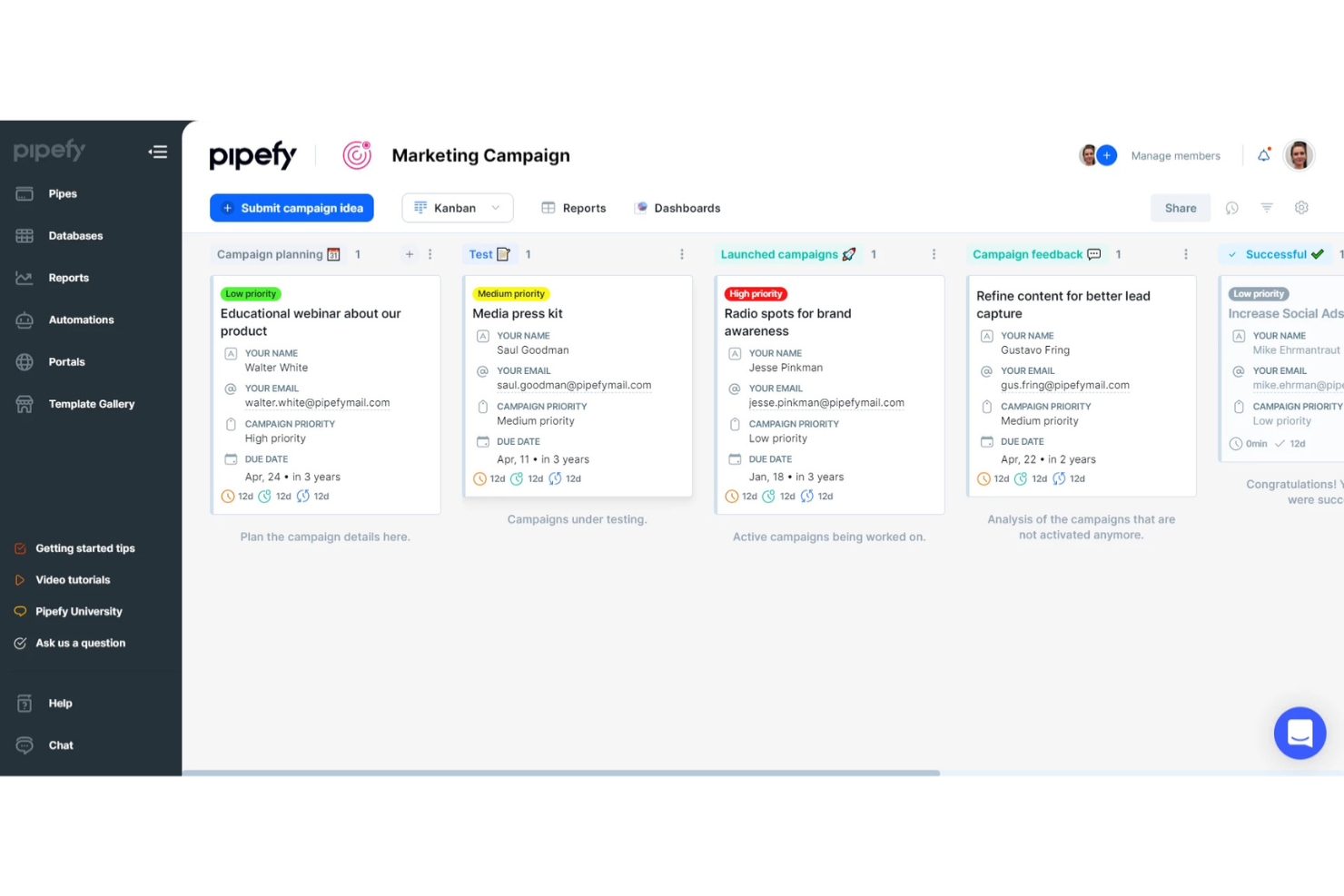
Pipefy is a no-code business process management platform that lets you design workflows, automate repetitive tasks, visualize process stages, and centralize request tracking for teams of all sizes.
Who Is Pipefy Best For?
Pipefy suits operations, finance, and HR teams who want to manage requests and processes visually without relying on IT resources.
Why I Picked Pipefy
I picked Pipefy as one of the best because its Kanban-style boards let my team visually monitor incoming requests at every stage, automate handoffs between teams, and trigger conditional workflows based on form submissions.
Pipefy Key Features
- Form designer: Build custom intake forms with drag-and-drop fields.
- Automated email templates: Send personalized emails triggered by workflow actions.
- Process analytics dashboards: Track process metrics and bottlenecks in real time.
- Role-based permission controls: Limit access to specific workflows and data by user role.
Pipefy Integrations
Pipefy offers native integrations with Slack, GitHub, and Bitbucket. An API is available for custom integrations.
What's Free?
Pipefy offers a free-forever starter plan for up to 10 users and 5 processes. The free plan has limited features, such as restricted integrations and automation options, compared to paid tiers.
Pros and Cons
Pros:
- Custom form designer for intake processes
- Conditional logic for process automation
- Built-in process analytics and dashboards
Cons:
- No built-in document storage repository
- Native integrations available only in paid version

Best for low-code simplicity
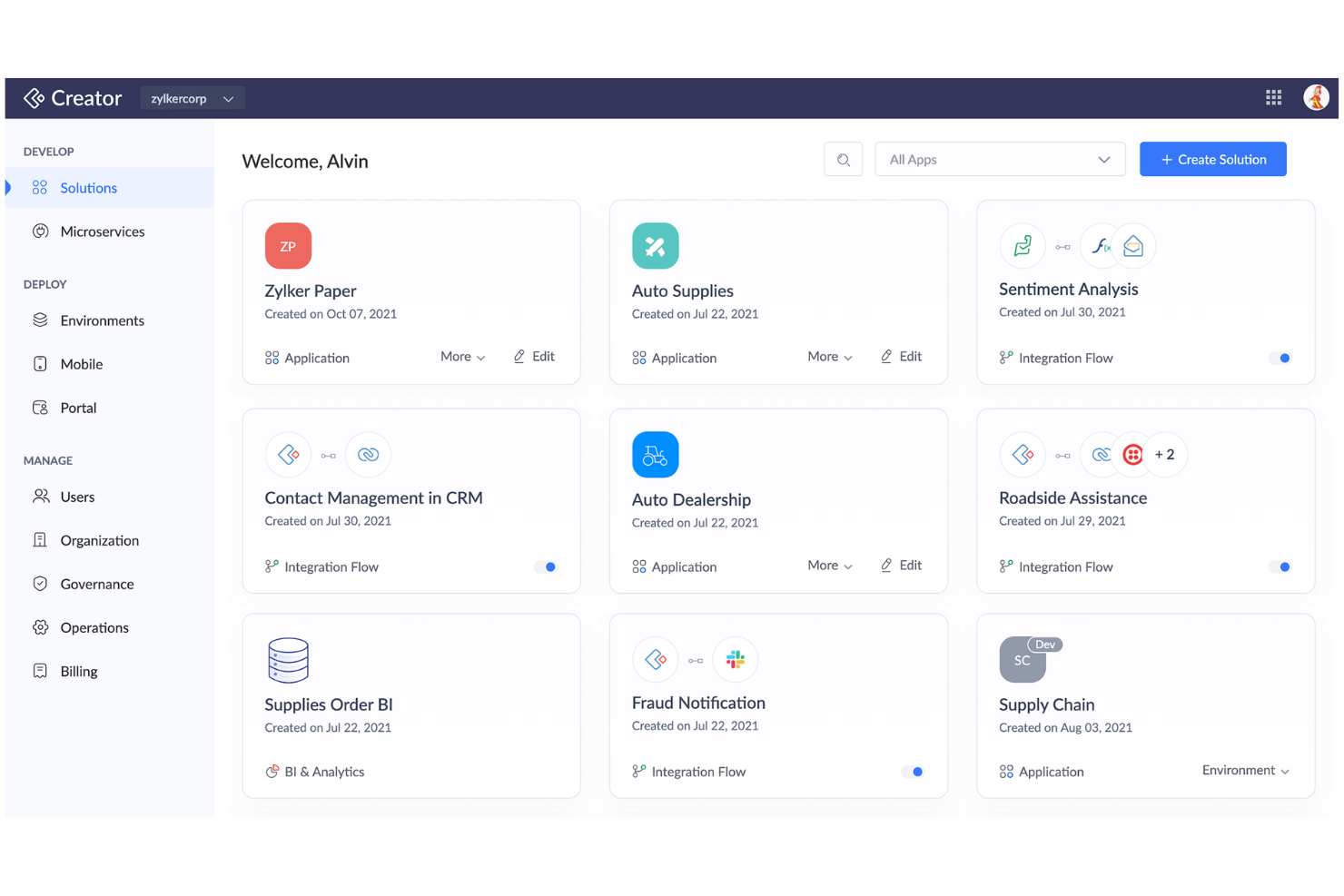
Zoho Creator is a cloud-based business process and workflow management platform where you can design custom workflows, automate routine processes, and build tailored applications using both prebuilt templates and low-code development tools.
Who Is Zoho Creator Best For?
Zoho Creator suits small to mid-sized teams who want to automate processes and quickly build custom business applications without heavy coding.
Why I Picked Zoho Creator
I picked Zoho Creator as one of the best because I can build end-to-end business processes with its drag-and-drop workflow builder, widget-rich app designer, and prebuilt process automation blueprints—making low-code simplicity a reality.
Zoho Creator Key Features
- AI field integration: Add sentiment analysis, OCR, and prediction fields directly into forms.
- Multi-platform app deployment: Launch your apps simultaneously on web, Android, and iOS.
- Role-based access controls: Assign granular permissions to manage users and data securely.
- Custom approval workflows: Configure multi-stage approval processes for tasks and requests.
Zoho Creator Integrations
Zoho Creator offers native integrations with Zoho apps like Zoho CRM, Zoho Books, Zoho Invoice, Google Workspace, Salesforce, QuickBooks, PayPal, Twilio, Razorpay, and connects with Zapier.
What's Free?
Zoho Creator offers a free-forever plan limited to one user and one application with basic features only. Access to advanced integrations, custom branding, and some automation options requires a paid upgrade.
Pros and Cons
Pros:
- Multi-platform deployment with one app build
- AI-driven fields like sentiment analysis
- Includes visual workflow and form builders
Cons:
- No offline app building capabilities
- Free plan limited to one user


Camunda is a cloud-based business process management platform that lets teams design, model, and collaborate on BPMN workflows, decision tables, and process diagrams using web-based tools.
Who Is Camunda Best For?
Camunda suits process analysts and IT teams in midsize to large organizations that need to collaboratively design and model complex business workflows.
Why I Picked Camunda
I picked Camunda because it offers instant, real-time BPMN diagram editing in the browser—my team can co-create, comment, and share process models online. I like using its drag-and-drop modeler with versioning and role-based permissions.
Camunda Key Features
- BPMN standards support: Create and export diagrams using BPMN 2.0 specifications.
- Import/export options: Import existing BPMN diagrams or export completed models as XML or image files.
- Integration with Camunda Platform: Deploy process models directly to process automation engines, including RPA.
- Decision modeling (DMN): Design, edit, and share decision tables alongside process diagrams.
Camunda Integrations
Camunda offers native integrations with the Camunda Platform workflow and decision engines. An API is available for custom integrations.
What's Free?
Camunda offers a free-forever browser-based BPMN and DMN modeler with unlimited diagrams and no user restrictions. You can design, export, and collaborate on diagrams, but automation and advanced features require the paid Camunda Platform.
Pros and Cons
Pros:
- Export diagrams as XML and image files
- Real-time multiuser diagram editing and sharing
- Free browser-based BPMN and DMN modeler
Cons:
- Requires Camunda Platform for process deployment
- No built-in automation or workflow execution


Bizagi is a business process management suite that lets you model, automate, monitor, and optimize processes with tools for process mapping, workflow automation, and process analytics.
Who Is Bizagi Best For?
Process analysts and IT teams in midsize and large organizations needing complex process simulation and automation across departments.
Why I Picked Bizagi
I picked Bizagi as one of the best because I can simulate process outcomes before launching automation and test scenarios with resource changes. It also helps with visualization of bottlenecks with built-in process mapping and analytics.
Bizagi Key Features
- Process modeler: Drag-and-drop interface for building workflow diagrams.
- Form designer: Customize task forms using graphical design tools.
- Collaboration tools: Share process models and gather feedback in real-time.
- Version control: Track changes and manage process model versions.
Bizagi Integrations
Integrations include SAP, Salesforce, SharePoint, Oracle, Microsoft Dynamics, Outlook, Dropbox, Box, and Google Drive.
What's Free?
Bizagi offers a free-forever plan with Bizagi Modeler, allowing unlimited process modeling and export. Automation, collaboration, and integration features are only available on paid plans.
Pros and Cons
Pros:
- Built-in analytics for process improvement
- Advanced workflow automation for large enterprises
- Process simulation with visual modeling tools
Cons:
- Mobile capabilities are limited on free tier
- Cloud automation features require paid plan

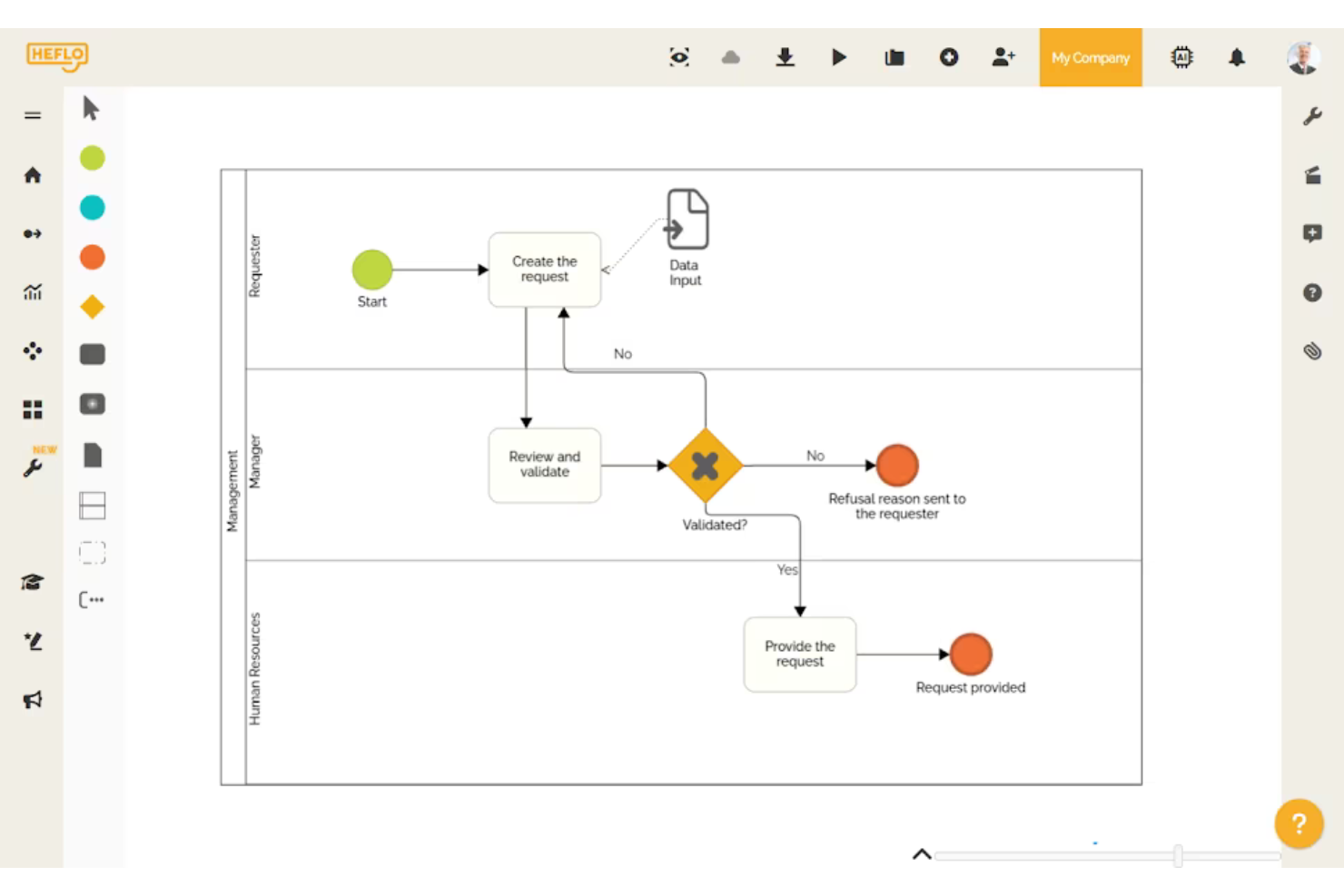
Heflo is a cloud-based business process management software that offers visual BPMN 2.0 process modeling, process documentation, workflow automation, and collaboration tools for teams managing and documenting business processes.
Who Is Heflo Best For?
Heflo is a good fit for process analysts and documentation managers in multinational organizations who need to create, share, and manage standardized process documentation.
Why I Picked Heflo
I picked Heflo as one of the best because I can automatically generate process documentation in multiple languages and publish process maps as interactive web portals. I regularly use its BPMN 2.0 modeling and multi-language documentation features.
Heflo Key Features
- Workflow automation: Design and trigger automated workflows for business processes from within the platform
- Role-based access control: Assign and manage user permissions at each step of a process
- Process version control: Track changes, manage revisions, and restore previous versions of process maps
- Cloud-based collaboration: Work with team members in real time on process modeling and edits
Heflo Integrations
Native integrations are not clearly documented.
What's Free?
Heflo offers a free-forever plan that includes BPMN process modeling, process documentation, and cloud storage. The free plan is limited to two users and does not include workflow automation or advanced automation features.
Pros and Cons
Pros:
- Multi-language interface and documentation
- Auto-generation of process documentation
- Free plan supports basic modeling needs
Cons:
- No built-in task management tools
- Limited process automation on free plan


Flowable is an open-source business process management suite that lets you model, automate, and monitor workflows, case management, and business rules with BPMN, DMN, and CMMN standards.
Who Is Flowable Best For?
Flowable is a strong fit for compliance-driven organizations in banking, insurance, government, and healthcare that require enterprise-grade workflow automation.
Why I Picked Flowable
I picked Flowable as one of the best because I can model BPMN, CMMN, and DMN flows together and leverage audit-ready tools built for regulated sectors. I've used its granular access controls and detailed audit trails to address compliance needs directly.
Flowable Key Features
- REST API support: Connects processes to other applications and services using standard web protocols.
- Embedded task forms: Lets users design and deploy interactive forms within workflow tasks.
- Process versioning: Supports management of multiple iterations of process models.
- Process monitoring dashboard: Visualizes process execution metrics with real-time dashboards and reports.
Flowable Integrations
Flowable offers native integration with Elasticsearch and provides an API for custom integrations.
What's Free?
Flowable offers a free, open-source community edition that is free forever. The free version lacks premium support and some advanced enterprise features like clustering, advanced analytics, and extended connectors.
Pros and Cons
Pros:
- Customizable task forms with UI designer
- Supports case management and advanced workflows
- Strong audit logging and compliance features
Cons:
- No built-in AI or machine learning tools
- Reporting requires paid version of Flowable

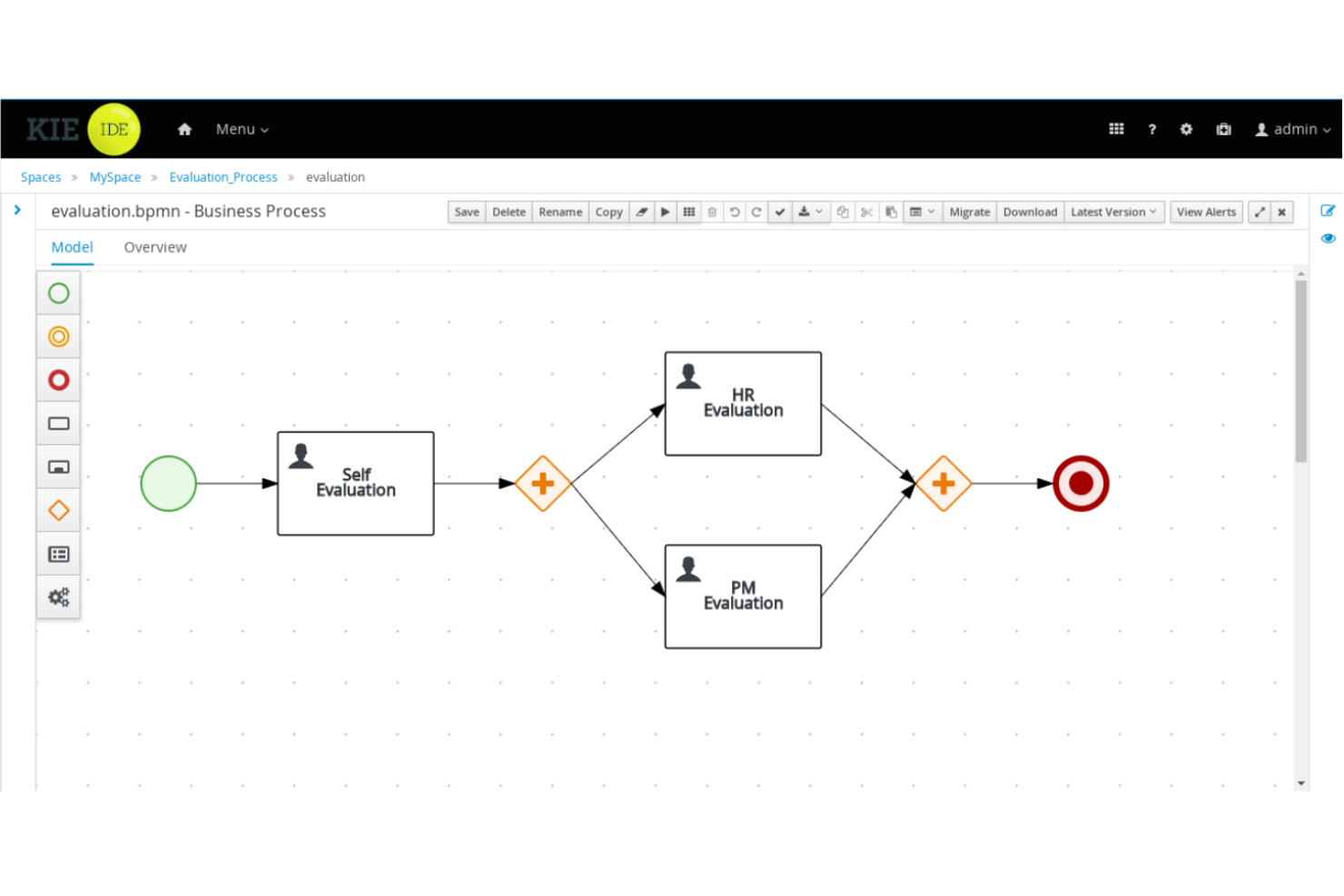
jBPM is an open-source business process management suite distributed under the Apache License 2.0. It’s for Java developers that provides process modeling, workflow automation, rules management, and event processing.
Who Is jBPM Best For?
Java development teams or enterprises that want to embed process management directly into custom software applications.
Why I Picked jBPM
I picked jBPM as one of the best because it lets my developers design, execute, and monitor business processes right inside Java apps. I use its flexible BPMN modeling, workflow automation, and embedded process engine to tightly integrate process logic with code.
jBPM Key Features
- Form modeler: Design and customize user task forms directly within the process workflow.
- Human task management: Delegate tasks to users and track progress using the integrated worklist.
- Advanced rule engine: Incorporate business rules with Drools for complex decision logic.
- REST and Java APIs: Integrate processes with external systems using robust API options.
jBPM Integrations
jBPM supports custom integrations via REST and Java APIs.
What's Free?
jBPM is offered as a free, open-source business process management suite with no user or feature limitations. You can use it indefinitely without subscription costs or trial expiration.
Pros and Cons
Pros:
- Embeddable process engine for Java apps
- Supports BPMN 2.0 and DMN standards
- Open-source and free for developers
Cons:
- Lacks built-in cloud deployment options
- Requires Java expertise to implement

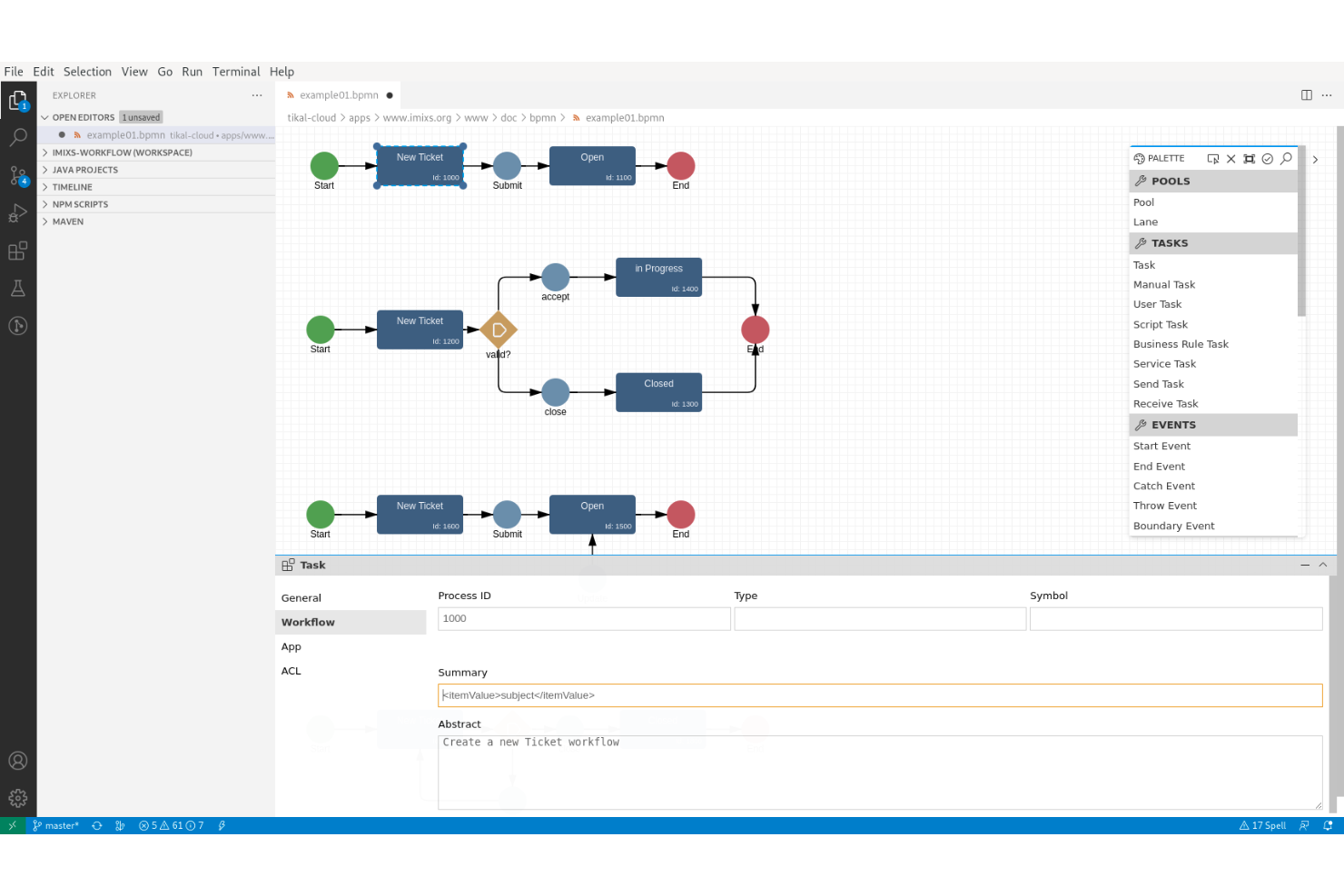
Imixs-Workflow is an open-source business process management suite focused on modeling, automating, and tracking human-centric workflows for organizations and IT teams.
Who Is Imixs-Workflow Best For?
Designed for IT teams and organizations that need to model and automate complex workflows using open-source software.
Why I Picked Imixs-Workflow
I picked Imixs-Workflow as one of the best because it's open-source and puts a clear focus on supporting human-centric task management. I like that I can model workflows, handle approvals, and incorporate complex decision points all within a fully auditable environment.
Imixs-Workflow Key Features
- BPMN 2.0 modeling: Design custom workflows using a standard process modeling language.
- RESTful API support: Integrate workflows with existing systems and applications through APIs.
- Role-based access control: Limit access and actions based on user roles and permissions.
- Document management integration: Attach and manage files directly within workflows.
Imixs-Workflow Integrations
Imixs-Workflow offers an API for custom integrations.
What's Free?
Imixs-Workflow is completely free and open-source, with no feature or user restrictions. All core workflow modeling and management components are included under the open-source license.
Pros and Cons
Pros:
- Human-centric workflow and decision management
- Runs on Java enterprise platforms
- Built-in auditing and workflow tracing
Cons:
- Limited documentation compared to larger projects
- Steeper setup process for non-developers


Activepieces is an open-source workflow automation platform designed for automating business processes with visual flow building, advanced task scheduling, and custom connector support.
Who Is Activepieces Best For?
Workflow builders, system administrators, and developers at startups or small businesses who need broad integration options and customization in business process automation.
Why I Picked Activepieces
I picked Activepieces as one of the best because I can automate advanced multi-step processes using visual workflows, scheduling, and rich variable logic. I like having control over error handling and using custom code or webhooks where needed.
Activepieces Key Features
- Drag-and-drop workflow builder: Build and edit automation flows visually without code.
- Built-in app integrations: Connect to platforms like Slack, Google Sheets, and Notion.
- On-premises deployment option: Install and run Activepieces in your own environment.
- Open-source platform: Access source code and contribute or customize components.
Activepieces Integrations
Activepieces offers native integrations with Google Sheets, Notion, Slack, Discord, Telegram, and Twilio. An API is available for custom integrations.
What's Free?
Activepieces offers a free plan with 10 free active flows and unlimited runs. The platform also has a self-hosted community edition with core features.
Pros and Cons
Pros:
- Custom code step for complex automations
- Built-in native integrations with popular tools
- Drag-and-drop workflow builder
Cons:
- Community support may be inconsistent
- Limited templates compared to competitors

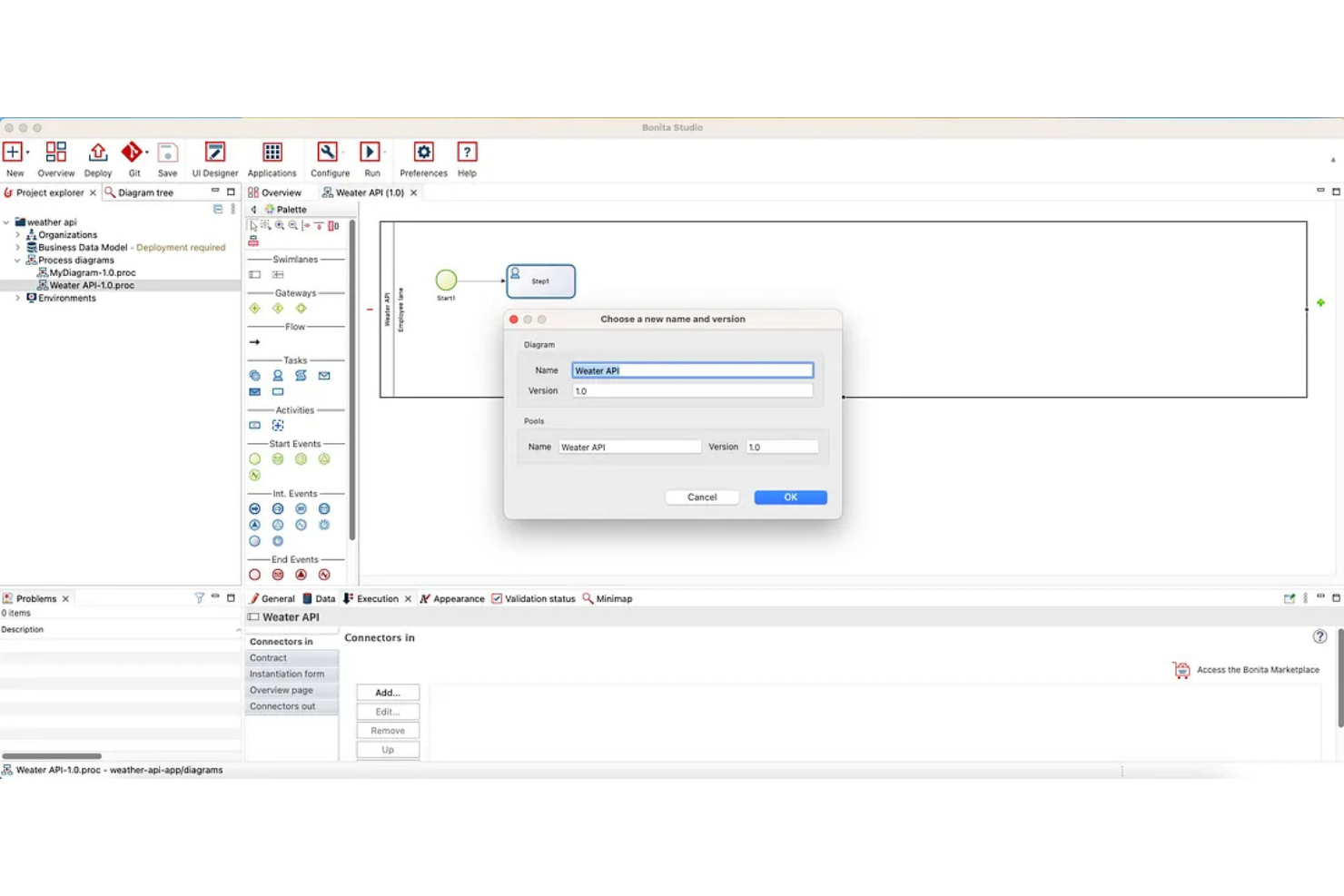
Bonita BPM (formerly Bonitasoft) is a business process management suite with an open-source version. It lets you design, automate, and optimize process workflows, integrate with external systems, and build complex application logic within a flexible development environment.
Who Is Bonita BPM Best For?
Bonita BPM suits midsize and large companies with development teams managing sophisticated, multi-system process automation projects.
Why I Picked Bonita BPM
I picked Bonita BPM as one of the best because I can model, automate, and optimize complex, multi-system workflows with its BPMN engine, extensive API access, and strong support for custom business logic.
Bonita BPM Key Features
- Visual process designer: Drag-and-drop interface for building custom workflows.
- Form builder: Create and customize user task forms within process applications.
- Process monitoring dashboard: View real-time metrics and monitor workflow execution.
- Connector library: Integrate systems out-of-the-box with built-in connectors.
Bonita BPM Integrations
An API is available for custom integrations.
What's Free?
Bonitasoft offers a free community edition with unlimited users. Some advanced features, connectors, and scalability options are only available in paid subscription plans.
Pros and Cons
Pros:
- Extensive automation tools and scripting options
- Custom connectors for external systems possible
- Visual workflow and process modeler included
Cons:
- On-premises installation requires server resources
- Initial setup can require developer support
Other Free Business Process Management Software
Here are some additional free business process management software options that didn’t make it onto my shortlist, but are still worth checking out:
- Activiti
For embedding lightweight engines
- ADONIS:Community Edition
For AI-based process modeling
- Smartsheet
For enterprise-scale integrations
- Wrike
For visual project tracking with Gantt charts
- monday AI Workspace
For building custom workflow apps without code
- ProcessMaker
For AI-powered process documentation
- Appian
For automating complex, regulated operations
- Bitrix24
For unlimited free users on one account
- Lark Base
For all-in-one collaboration workspaces
- AgilePoint
For cross-platform governance and compliance


How I Evaluate Free Business Process Management Software
I look at free BPM tools in two layers: the baseline a vendor must meet—like mapping a project intake process or automating approval routing—and the differentiators that set strong tools apart.
Core Functionality (Table Stakes For This List)
When I'm selecting tools for my list, I rank each one on a scale from 0 (does not offer the functionality) to 5 (excels in this area) for each core functionality listed below. Then, I calculate the tool's total score into a percentage. Each tool needs to achieve a minimum total score of 65% to be considered for inclusion.
- Free Tier Availability: I check whether the tool offers a genuinely usable free plan—not just a 14-day trial—that supports enough users and processes for a small project team to run real workflows.
- Process Modeling & Mapping: Visual design tools matter here, so I evaluate whether you can map a multi-step process like a project intake flow using flowcharts, swim lanes, or BPMN-style elements.
- Workflow Automation: I look for the ability to automate recurring steps like approval routing, status changes, or deadline-triggered notifications without writing custom code.
- Project Process Templates: Pre-built templates for common project workflows—like change requests, sprint retrospectives, or delivery handoffs—save significant setup time, so I check each tool's library.
- Collaboration & Task Management: Teams need to work inside these processes together, so I evaluate multi-user task assignment, role-based access, and in-context commenting on process steps.
- Process Monitoring & Reporting: Dashboards that surface where work is stuck—like an approval bottleneck delaying a release—help me gauge whether a tool offers actionable visibility into process health.
Once I have a list of tools that meet this criteria, I consider what sets each platform apart.
Differentiating Factors (What Sets Vendors Apart)
Here's how I compare and contrast different vendors:
Standout Features
Low-code form builders are a major differentiator—I look for tools that let you build custom project intake or approval forms without pulling in a developer. Version control and audit trails also carry weight, especially when a PMO needs to trace how a delivery process changed across quarters or project phases. AI-assisted process generation is newer to the space, but tools that can draft a workflow from a plain-language description save real setup time when you're standardizing dozens of processes.
Beyond Features
Free plan limits matter more than most buyers expect. I check whether caps on users, processes, or storage will block a growing team from running real workflows—like when a five-person PMO hits a user ceiling mid-sprint. Integration with project management tools is equally important; a BPM tool that connects to Jira, Asana, or Monday.com keeps process data flowing where your team already works. I also evaluate upgrade paths, because the best free tools make it easy to migrate processes to paid tiers without rebuilding everything from scratch.
How to Choose Free Business Process Management Software
It’s easy to get bogged down in long feature lists and complex pricing structures. To help you stay focused as you work through your unique software selection process, here’s a checklist of factors to keep in mind:
| Factor | What to Consider |
| Scalability | Will this tool support your process volume and user growth in six to twelve months without forcing a paid upgrade? |
| Integrations | Does it work natively with the apps your team already uses, like Slack, Google Workspace, or your CRM? |
| Customizability | Can you adapt process flows, roles, forms, and notifications without needing advanced IT support or coding skills? |
| Ease of use | Will new users—especially non-technical staff—understand how to launch and modify processes quickly and confidently? |
| Implementation and onboarding | Are training resources, templates, or in-app guidance included so your team can get started with minimal downtime? |
| Cost | What are the free plan’s hard limits (users, process complexity, or automation triggers), and when would you hit them? |
| Security safeguards | Will the platform keep your process data private? Look for encryption, SSO support, and data retention details. |
| Support availability | Can you get help when you need it on the free plan? Check hours, support channels, and user community engagement. |
What is Free Business Process Management Software?
Free business process management software (BPM software) is a digital tool that lets teams design, automate, monitor, and optimize business workflows without upfront cost. These platforms organize tasks, approvals, and data collection within repeatable processes. Free plans usually include basic workflow automation, collaboration tools, and records management, but may have limits on users, integrations, or advanced features.
Features
Let’s go over the features commonly found in business process management tools, and which ones are usually included in free vs. paid plans.
Typically Free Business Process Management Software Features
- Workflow designer: Lets you build and edit flows using drag-and-drop steps, connecting tasks, forms, and approvals in a visual editor.
- Task assignment: Enables you to delegate tasks to specific team members and monitor progress within each process.
- Form creation: Allows you to create custom intake forms to gather structured data from users, employees, or customers.
- Notifications: Send automatic alerts to users about assigned tasks, approaching deadlines, or workflow status updates.
- Basic reporting: Offers entry-level dashboards and summary views that show process completion status, task counts, or individual assignment history.
- Template library: Provides ready-to-use process templates that help teams quickly launch standard workflows with minimal setup.
- Mobile access: Gives team members the ability to view and update tasks using a mobile app or web portal.
- Commenting: Lets users add context or collaborate within individual tasks or workflow steps by posting comments.
Typically Paid Business Process Management Software Features
- Advanced automation: Supports multi-step conditional triggers, scheduled actions, and complex logic for automating processes end-to-end.
- Role-based access controls: Restrict who can view, edit, or approve specific tasks and workflows based on pre-defined user roles or permissions.
- Integration connectors: Connects with external tools like CRMs, ERPs, or email platforms using native or marketplace connectors to automate cross-platform workflows.
- Custom branding: Allows organizations to apply their own logos, colour schemes, and styling to workflow interfaces, forms, and notifications.
- Document management: Provides version-controlled storage, search, and sharing for files needed within business processes.
- Process analytics: Delivers detailed analytics for tracking workflow bottlenecks, measuring cycle times, and identifying areas for optimization.
- Audit trails: Maintains a full, exportable log of all activity within the platform, supporting compliance and process traceability.
- API access: Enables teams to develop custom integrations or automate actions by connecting directly to the platform’s API.
- Single sign-on (SSO): Centralizes user authentication and improves security by integrating with your organization’s identity provider.
- Priority customer support: Grants access to faster response times, dedicated support teams, or hands-on onboarding assistance.
Benefits
Implementing free business process management software provides several benefits for your team and your business. Here are a few you can look forward to:
- Cost savings: You can automate tasks and workflows without the expense of a paid solution, making scaling possible even with tight budgets.
- Process transparency: Everyone can see process status, assignments, and deadlines, helping teams stay aligned and accountable through shared dashboards and notifications.
- Faster onboarding: Most platforms offer templates, guided tours, and simple interfaces that help new users get started quickly, reducing setup time.
- Improved collaboration: Built-in commenting, shared forms, and real-time updates let teams work together more effectively on requests and approvals.
- Reduced manual work: Workflow automation and task assignment features eliminate repetitive emails and spreadsheets, freeing up time for higher-value tasks.
- Accessible anywhere: Cloud-based, mobile-friendly platforms let your team manage and update processes from any location, supporting flexible work.
- Test before upgrading: Free plans let you validate the software’s fit for your needs before making a commitment or rolling it out to more users.
Costs and Pricing
I realize you came to this article looking for the best business process management software options that are available for free. However, since free plans only offer limited features, there's a good chance you'll need to scale your plan up in the future.
The table below summarizes common plans, their average prices, and typical features included in business process management software:
Plan Comparison Table for Business Process Management Software
| Plan Type | Average Price | Common Features |
| Free Plan | $0 | Basic workflow designer, task assignment, notifications, limited users, and a small set of template workflows. |
| Personal Plan | $5–$15/user/month | Unlimited personal workflows, basic automation, form customization, mobile access, and entry-level reporting. |
| Business Plan | $15–$30/user/month | Full workflow automation, team management, advanced reporting, integrations, and role-based access controls. |
| Enterprise Plan | $30–$60/user/month | Custom integrations, priority support, enterprise security, process analytics, SSO, and advanced compliance tools. |
Free Business Process Management Software FAQs
Here are some answers to common questions about free business process management software:
Are free business process management software tools secure?
Yes, most free business process management software tools offer basic security features like encrypted data transmission and regular backups, but advanced security options such as SSO or detailed audit logs are usually reserved for paid plans. Always check each tool’s privacy policies before storing sensitive data.
How do free plans compare with paid business process management software?
Free plans usually cover core workflow tools such as process design and task assignment, but they often limit the number of users, automations, integrations, or advanced reporting features. Paid plans unlock more customization, scalability, project management features, and support options as your needs grow.
Can you migrate data from a free plan if you upgrade?
Yes, most BPM platforms let you migrate your data to a paid plan when you upgrade. Your workflows, tasks, methodologies used, and records typically remain intact, but it’s smart to review each tool’s migration process and data retention policies.
Do free business process management software solutions work for remote teams?
Yes, many free BPM tools are cloud-based and mobile-friendly, making them accessible to distributed teams anywhere, improving the user experience. Look for platforms that support real-time collaboration and offer mobile apps, reducing inefficiencies.
What are common limitations in free business process management software?
Most free BPM solutions limit the number of users, workflows, automations, and integrations you can set up. You might also see restricted access to support, reporting, process templates, or audit trails. Check each vendor’s plan limits before adopting a solution.