

10 Business Process Simulation Software for 2026

10 Business Process Simulation Software Shortlist


Business process simulation software lets you model, test, and analyze workflows before making real-world changes, helping your team reduce risk and improve decision-making. If you’re searching for the right tool, you’re likely facing shifting requirements, complex dependencies, and pressure to deliver predictable results. The right simulation platform can help you visualize process bottlenecks, experiment with scenarios, and align stakeholders around data-driven improvements.
In this list, you’ll find a comparison of top business process simulation software for 2026, with details on features, use cases, and what makes each option suitable for different project needs.
Why Trust Our Software Recommendations
Our team has been testing and reviewing software since 2012. As project managers ourselves, we know how difficult—and important—it is to choose the right software.
For this guide, we evaluated tools using hands-on testing and independent research, scoring tools using our selection criteria. We also draw on insights from industry thought leaders and practicing project management experts.
Our reviews reflect our human editorial judgment, not a sales pitch.
Expert reviewers:
Business Process Simulation Software Comparison Table
The table below compares pricing details for my top business process simulation software selections.
| Tool | Best For | Trial Info | Price | ||
|---|---|---|---|---|---|
| 1 | Best for process-intensive industries | Free trial available | Pricing upon request | Website | |
| 2 | Best for visual process mapping and analysis | Free demo available | Pricing upon request | Website | |
| 3 | Best for rapid scenario experimentation | Free demo available | Pricing upon request | Website | |
| 4 | Best for browser-based process modeling | Free to use | Free to use | Website | |
| 5 | Best for modeling complex, multi-method workflows | Free demo available | Pricing upon request | Website | |
| 6 | Best for real-time, interactive simulation | Not available | From $4,995 (billed annually) | Website | |
| 7 | Best for large-scale enterprise process modeling | Free demo available | Pricing upon request | Website | |
| 8 | Best for quick-start process templates | Free trial available | From $79.95/month (billed annually) | Website | |
| 9 | Best for integration with manufacturing systems | 30-day free trial available | Pricing upon request | Website | |
| 10 | Best for 3D visualization of workflows | Free plan available | Pricing upon request | Website |
Business Process Simulation Software Reviews
Below are my detailed summaries of business process simulation software that made it onto my shortlist. My reviews offer a detailed look at the features, best use cases, and integrations of each platform to help you find the best one for your team.

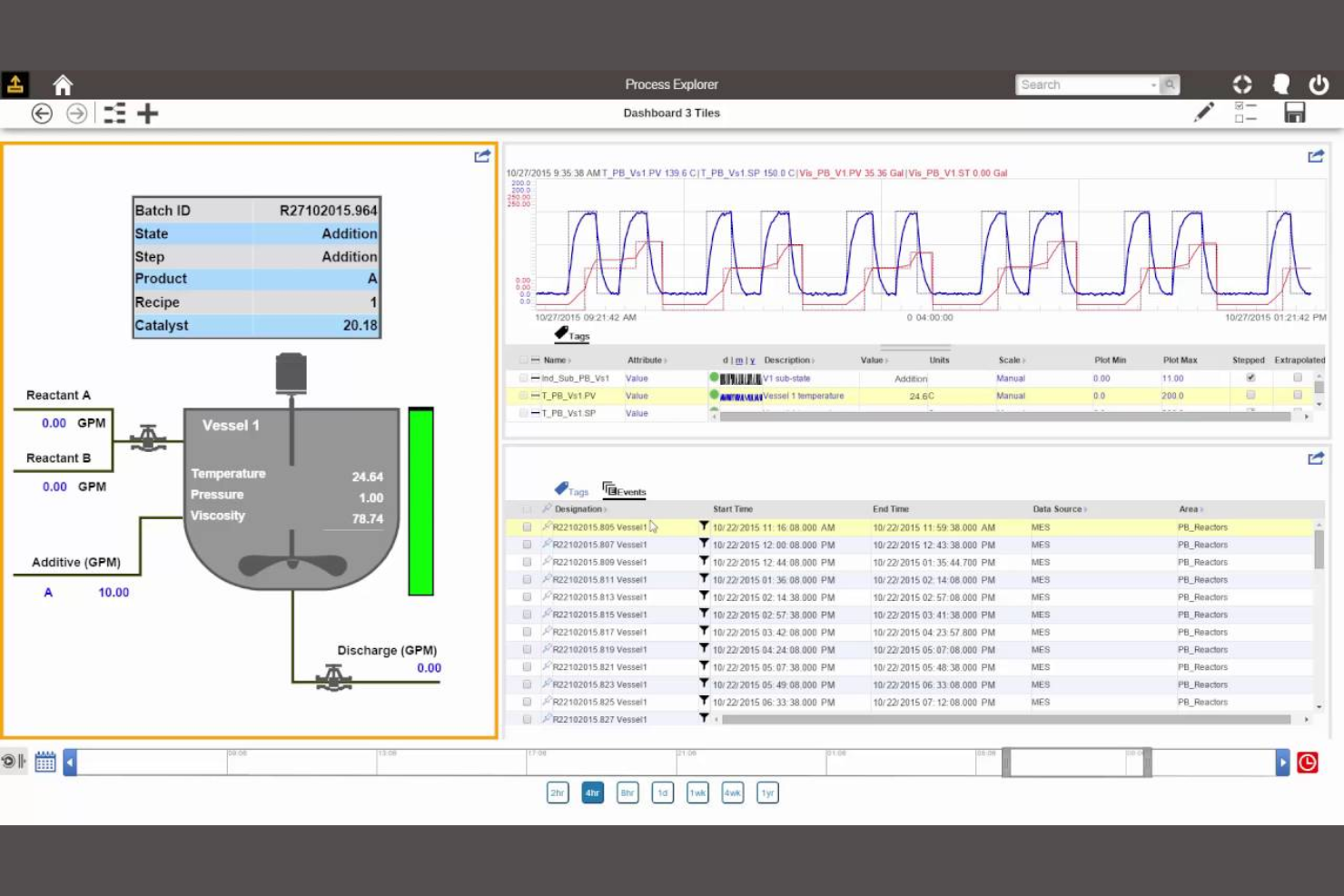
AspenTech is designed for organizations in process-intensive industries like chemicals, oil and gas, and pharmaceuticals that need advanced simulation capabilities. The platform supports complex modeling, optimization, and digital twin creation for large-scale, continuous operations. Its specialized tools help engineers and process managers analyze, predict, and improve production efficiency in highly regulated and technical environments.
Why I Picked AspenTech
AspenTech stands out for teams working in process-intensive industries that require highly specialized simulation tools. I picked AspenTech because it offers advanced modeling for continuous processes, including chemical reactions, energy balances, and equipment performance. The platform’s digital twin capabilities let you mirror real-world operations for predictive analysis and optimization. Its focus on supporting complex, large-scale industrial workflows makes it a strong fit for engineers and process managers in sectors like oil and gas, chemicals, and pharmaceuticals.
AspenTech Key Features
Some other features that make AspenTech valuable for process simulation teams include:
- Integrated Economic Analysis: Evaluate process changes with built-in cost estimation and economic impact tools.
- Extensive Equipment Libraries: Access a wide range of pre-modeled equipment for accurate process representation.
- Process Safety Analysis: Simulate and assess safety scenarios to support compliance and risk management.
- Data Connectivity Tools: Import and export process data from various sources for model calibration and validation.
AspenTech Integrations
Integrations include native OPC/OPC UA and MQTT connectivity, plant historian systems, and SAP ERP.
Pros and Cons
Pros:
- Built-in process safety and risk analysis tools
- Digital twin support for real-time optimization
- Advanced thermodynamic modeling for process industries
Cons:
- Primarily targets large-scale industrial operations
- High system requirements for full functionality

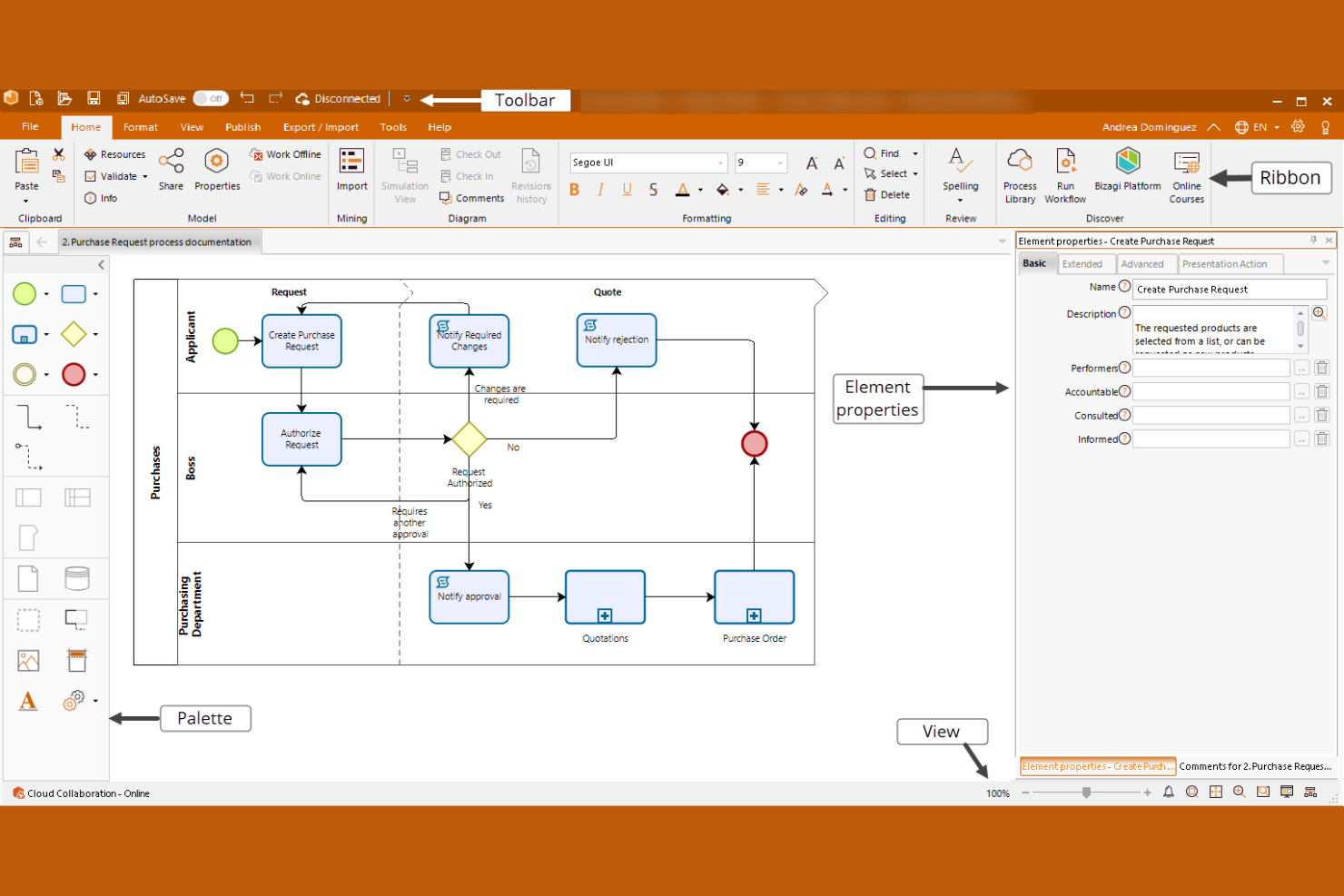
Bizagi stands out for teams that need detailed visual process mapping alongside simulation. It’s a strong fit for business analysts and process improvement specialists who want to design, analyze, and optimize workflows with clear, interactive diagrams. The platform’s visual modeling tools help you identify bottlenecks and test process changes before implementation.
Why I Picked Bizagi
What makes Bizagi a strong choice for business process simulation is its focus on visual process mapping and analysis. The platform lets you build detailed, interactive process diagrams using BPMN standards, which helps teams clearly communicate and refine workflows. I appreciate how you can simulate process changes directly within these visual models to see the impact of different variables and resource allocations. This approach is especially useful for organizations that need to analyze complex processes and present findings to both technical and non-technical stakeholders.
Bizagi Key Features
Some other features that make Bizagi appealing for process simulation teams include:
- Process Animation: Visualize process flows in motion to better understand timing and resource usage.
- Scenario Comparison: Run and compare multiple process scenarios side by side within the same model.
- Custom Reporting: Generate tailored reports on process performance and simulation outcomes.
- Collaboration Tools: Share models and gather feedback from stakeholders directly within the platform.
Bizagi Integrations
Integrations include SharePoint, Alfresco, SAP, Oracle, Microsoft Dynamics, Salesforce, DocuSign, and more. Bizagi also offers an open API for custom integrations.
Pros and Cons
Pros:
- Allows scenario comparison within a single model
- Supports process animation for simulation playback
- Exports process models to BPMN XML format
Cons:
- No built-in process mining functionality
- Simulation limited to discrete event modeling

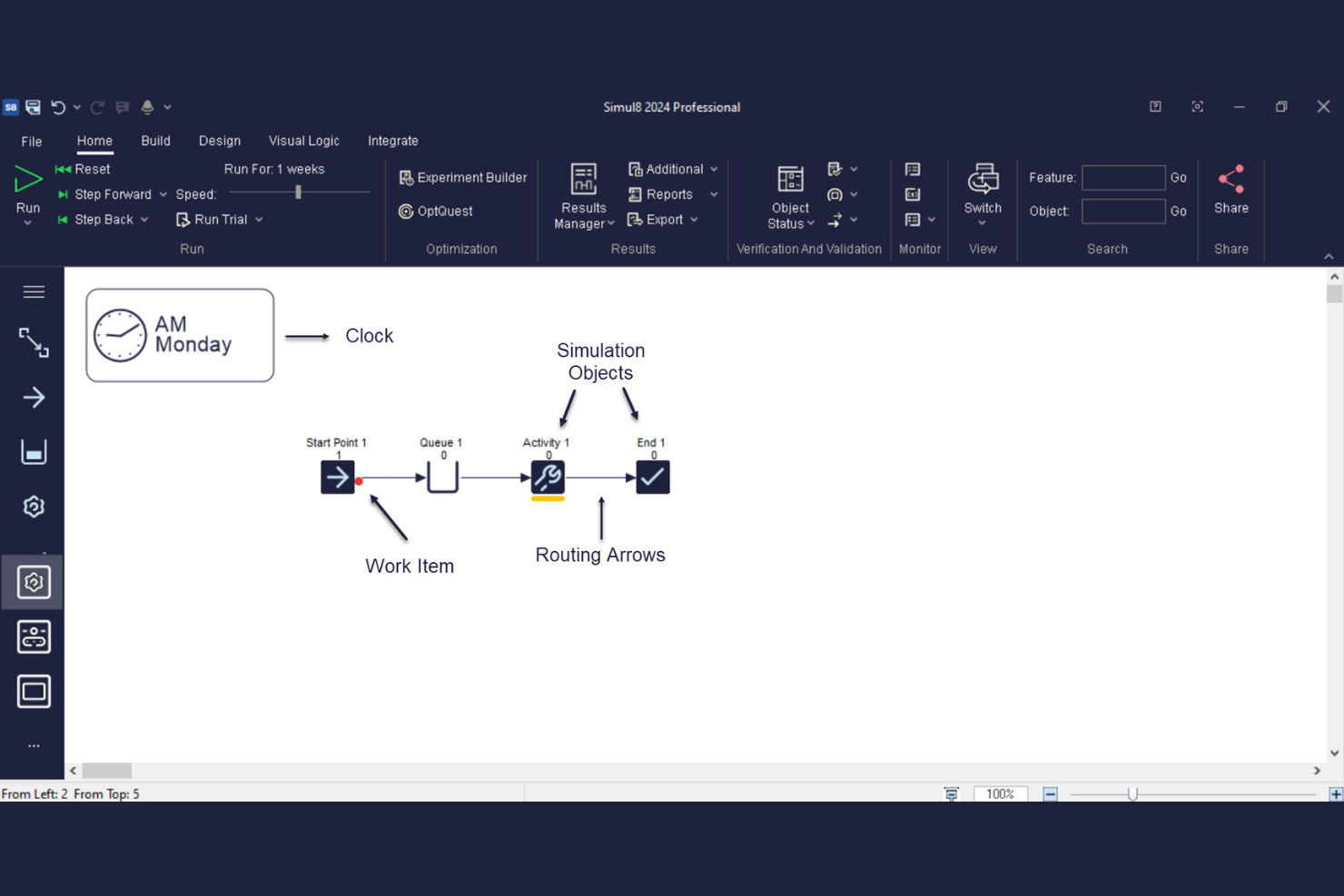
Simul8 is designed for teams that need to quickly test and compare multiple process scenarios. It’s especially useful for operations managers, analysts, and consultants who want to make fast, data-driven decisions in manufacturing, healthcare, or service environments. The platform’s rapid scenario experimentation tools help you visualize process changes and understand their impact before you commit resources.
Why I Picked Simul8
What drew me to Simul8 is how quickly you can build, modify, and run process simulations to test different scenarios. The tool’s drag-and-drop interface and instant results engine let you experiment with process changes and see outcomes in real time, which is ideal for teams that need to make fast decisions. I appreciate that you can run multiple scenarios side by side and compare results without rebuilding your model from scratch. This focus on rapid scenario experimentation makes Simul8 a strong fit for organizations that need to evaluate process options quickly and confidently.
Simul8 Key Features
In addition to its rapid scenario experimentation tools, Simul8 offers several other features worth noting:
- Excel Integration: Import and export data directly between Simul8 and Microsoft Excel for simplified data handling.
- Resource Scheduling: Assign and manage resources within simulations to reflect real-world constraints.
- Custom Visual Logic: Use built-in scripting to add custom rules and behaviors to your process models.
- Web-Based Access: Build and run simulations from any browser without installing desktop software.
Simul8 Integrations
Integrations include Microsoft Excel, Google Sheets, SQL/database connections, R scripting support, and COM/OLE automation interfaces.
Pros and Cons
Pros:
- Supports custom scripting with Visual Logic
- Imports and exports data with Excel integration
- Runs simulations directly in a web browser
Cons:
- Requires separate licenses for desktop and web
- Limits 3D visualization to basic graphics

Best for browser-based process modeling
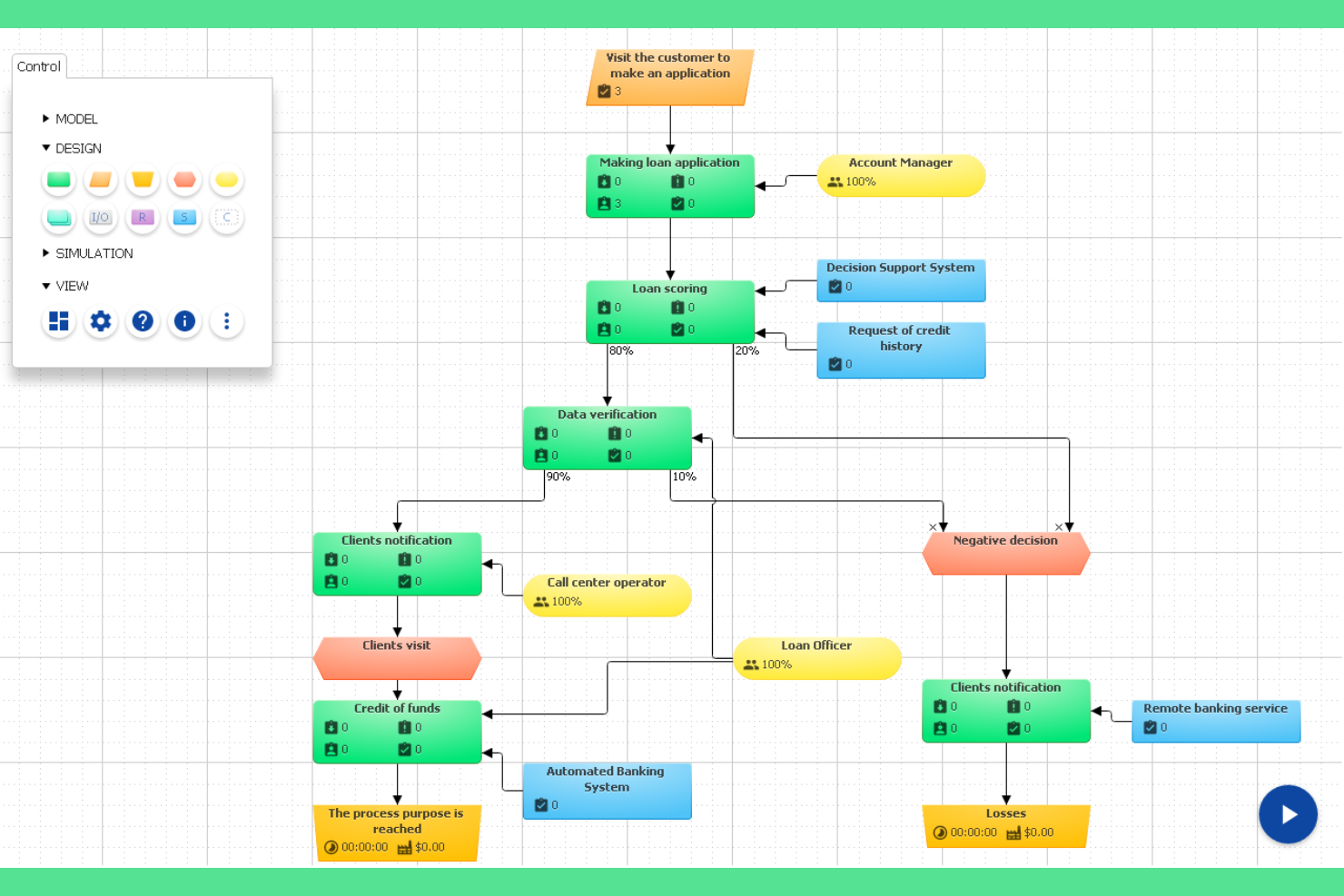
BP Simulator offers a browser-based approach to process modeling and simulation, making it accessible from any device without installation. It’s a practical choice for distributed teams, educators, or consultants who need to quickly build, test, and share process models online. The platform’s web-based design removes barriers for users who want to collaborate or experiment with process changes in real time.
Why I Picked BP Simulator
For teams that want to avoid software downloads and installations, BP Simulator’s browser-based process modeling stands out. The platform lets you create, edit, and simulate process diagrams entirely online, which is especially useful for remote teams or organizations with strict IT policies. I like that you can share models instantly with collaborators and run simulations directly in the browser to visualize process flows and outcomes. This makes BP Simulator a practical option for anyone who values accessibility and real-time collaboration in their process simulation work.
BP Simulator Key Features
In addition to its browser-based modeling, I also found these features worth noting:
- Drag-and-Drop Diagram Editor: Build and modify process diagrams using an intuitive drag-and-drop interface.
- Resource Assignment: Assign resources to specific process steps to simulate workload distribution.
- Process Metrics Dashboard: View simulation results and key performance indicators in a visual dashboard.
- Export to Image or PDF: Save and share process models by exporting diagrams as image or PDF files.
BP Simulator Integrations
Native integrations are not currently listed.
Pros and Cons
Pros:
- Supports resource assignment in simulations
- Allows exporting models as images or PDFs
- Runs entirely in a web browser
Cons:
- No version control for process models
- Simulation limited to basic process flows

AnyLogic offers a flexible simulation platform for teams that need to model complex, multi-method business processes. It’s a strong fit for organizations in logistics, manufacturing, or service industries that want to combine discrete-event, agent-based, and system dynamics modeling in one environment. Use it to experiment with intricate workflows, test scenarios, and visualize how changes impact your operations before making real-world decisions.
Why I Picked AnyLogic
I chose AnyLogic because it’s one of the few platforms that lets you combine discrete-event, agent-based, and system dynamics modeling in a single simulation. This multi-method approach is especially useful for teams dealing with complex, layered business processes that can’t be captured by one modeling style alone. I like that you can build hybrid models to reflect real-world interactions between people, equipment, and workflows. The ability to visualize and experiment with these interconnected systems makes AnyLogic a strong choice for organizations with advanced simulation needs.
AnyLogic Key Features
Some other features in AnyLogic that stand out for business process simulation teams include:
- Cloud-Based Simulation: Run and share models in the cloud to support collaboration and remote access.
- Process Animation Tools: Visualize process flows and resource movements with built-in animation capabilities.
- Scenario Comparison: Set up and compare multiple scenarios side by side to evaluate different process changes.
- Customizable Dashboards: Build interactive dashboards to monitor simulation results and key performance indicators in real time.
AnyLogic Integrations
Integrations include Excel, AnyLogic Cloud, Python, Java, and GIS map providers. AnyLogic also offers an open API for custom integrations.
Pros and Cons
Pros:
- Enables scenario comparison within a single project
- Includes advanced 3D animation for models
- Offers cloud-based simulation and sharing
Cons:
- Higher cost than some other simulation platforms
- Requires Java programming for advanced models
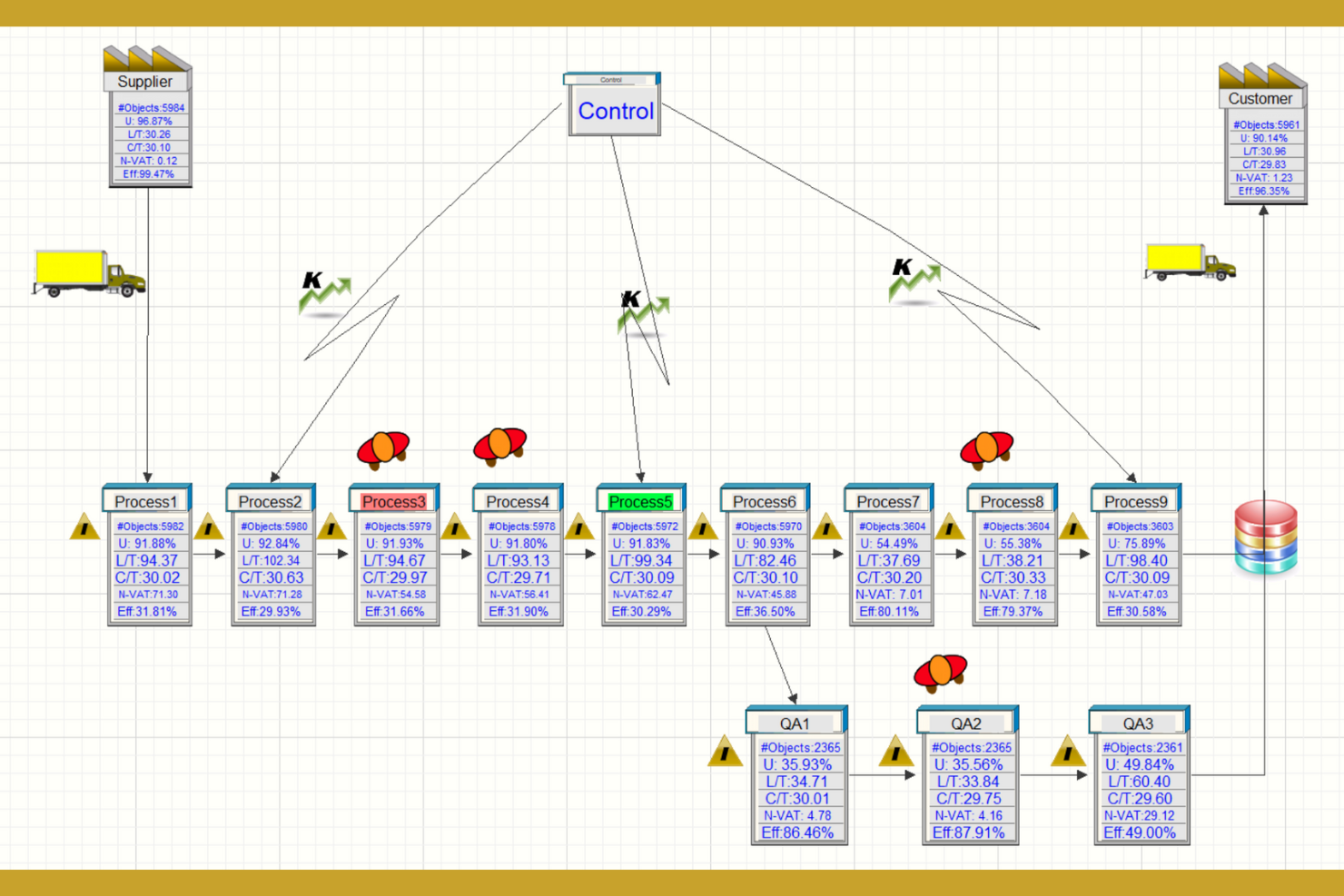
Simcad brings real-time, interactive simulation to process improvement teams that need to visualize and adjust workflows on the fly. It’s especially useful for manufacturing, logistics, and healthcare professionals who want to test process changes and see immediate impact without coding. The platform’s dynamic modeling and live data integration help users identify bottlenecks and optimize operations as scenarios unfold.
Why I Picked Simcad
What sets Simcad apart is its real-time, interactive simulation engine, which is especially valuable for teams that need to see the immediate effects of process changes. The platform lets you adjust workflows on the fly and instantly visualize the impact, making it easier to experiment with different scenarios. I appreciate that Simcad supports live data integration, so you can model processes using actual operational data for more accurate simulations. This approach is a strong fit for organizations that want to optimize processes dynamically and respond quickly to shifting business needs.
Simcad Key Features
Some other features that make Simcad stand out include:
- 3D Visualization Tools: Create and interact with detailed 3D models of your processes and facilities.
- Constraint-Based Modeling: Define and simulate process constraints to identify bottlenecks and inefficiencies.
- Automated Scenario Comparison: Run and compare multiple process scenarios side by side within the platform.
- Custom Reporting Engine: Generate tailored reports with simulation results and process analytics.
Simcad Integrations
Integrations include Microsoft Excel, Microsoft Access, database connections, and Visio file imports for value stream mapping.
Pros and Cons
Pros:
- Custom reporting engine for simulation analytics
- Automated scenario comparison within the platform
- Real-time simulation updates with live data
Cons:
- Limited online documentation for advanced features
- Windows-only desktop application required

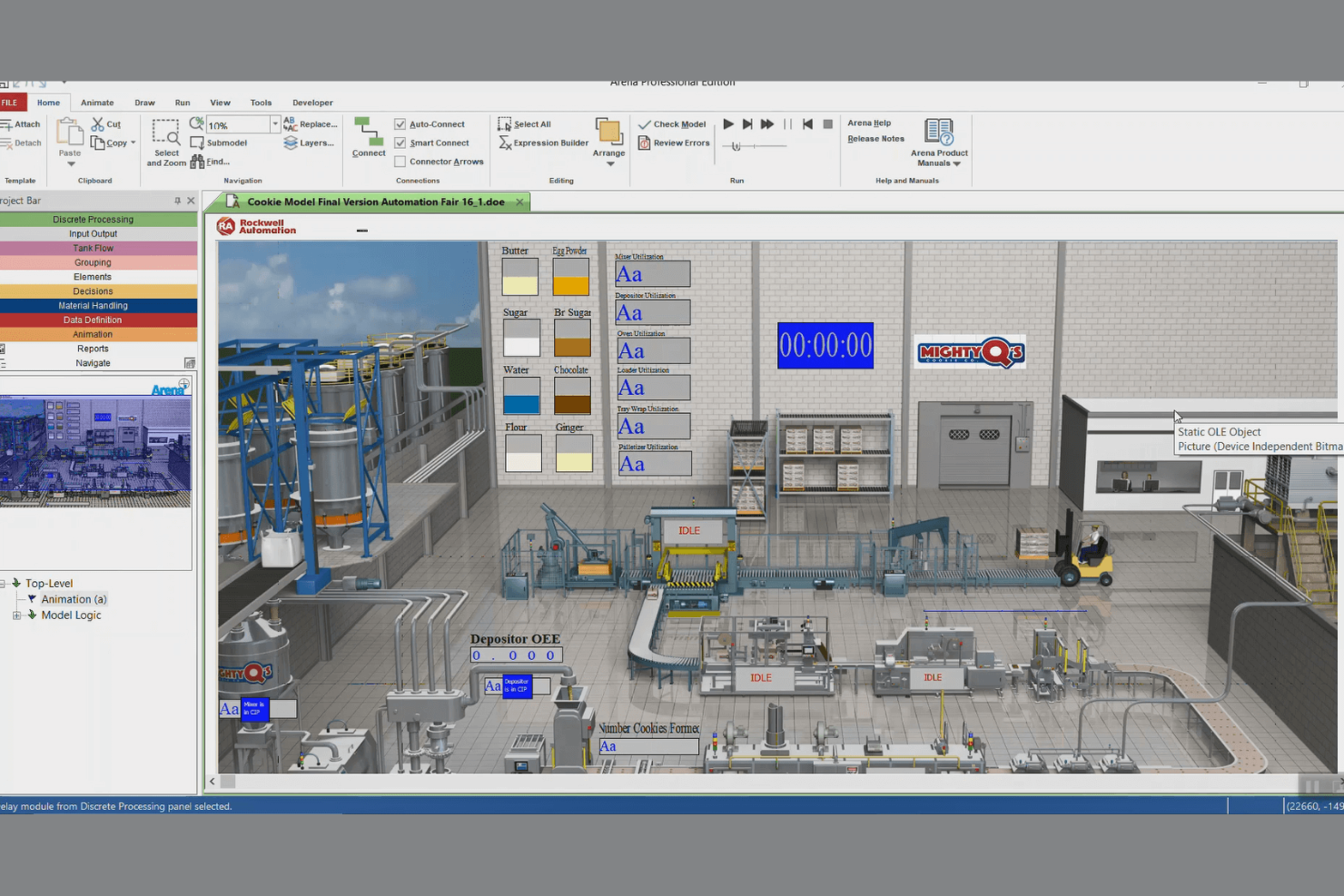
Arena Simulation Software is designed for organizations that need to model and optimize complex, large-scale business processes across multiple departments or facilities. It’s a strong fit for enterprise operations, supply chain analysts, and process engineers who need to simulate high-volume workflows and test changes before implementation. The platform’s ability to handle intricate process logic and large datasets helps teams uncover bottlenecks and forecast outcomes in demanding enterprise environments.
Why I Picked Arena Simulation Software
For teams managing enterprise-scale operations, Arena Simulation Software stands out for its ability to model highly complex and interconnected business processes. The platform supports detailed process mapping and can handle large datasets, which is essential for organizations with multiple departments or facilities. I picked Arena because it offers advanced scenario analysis tools that let you test and compare different strategies before making changes in the real world. Its flexibility in simulating intricate workflows makes it a strong choice for enterprises that need to forecast outcomes and optimize performance at scale.
Arena Simulation Software Key Features
Some other features that make Arena Simulation Software appealing include:
- Flowchart-Based Modeling Interface: Build and visualize process models using a drag-and-drop flowchart system.
- Animation and Visualization Tools: Create animated simulations to help stakeholders understand process flows.
- Extensive Library of Pre-Built Templates: Access a wide range of industry-specific templates for faster model creation.
- Customizable Data Import/Export: Import and export data from spreadsheets and databases to support detailed analysis.
Arena Simulation Software Integrations
Integrations include Microsoft Excel, Microsoft Access, Visual Basic for Applications (VBA), and ActiveX controls for extended functionality and automation.
Pros and Cons
Pros:
- Includes industry-specific templates for rapid modeling
- Supports discrete event and continuous simulation
- Handles high-volume, enterprise-scale process models
Cons:
- Limited cloud-based or web-accessible functionality
- Steep resource requirements for large simulations

ProcessModel offers a fast way for teams to start modeling and simulating business processes using a library of ready-made templates. It’s especially useful for project managers, analysts, and operations teams who need to quickly visualize, test, and improve workflows without building models from scratch. The tool’s focus on quick-start templates helps organizations accelerate process improvement and decision-making.
Why I Picked ProcessModel
What sets ProcessModel apart is its focus on helping teams get started quickly with process simulation. The platform offers a wide selection of pre-built process templates, so you can jump right into modeling without spending hours on setup. I picked ProcessModel because its template-driven approach is ideal for organizations that need to rapidly prototype, test, and refine business processes. The ability to customize these templates further supports teams that want both speed and flexibility in their process improvement efforts.
ProcessModel Key Features
In addition to its quick-start templates, I also found these features worth noting:
- Scenario Comparison Tools: Run and compare multiple process scenarios side by side to evaluate different approaches.
- Resource Utilization Analysis: Track and analyze how resources are allocated and used throughout your process models.
- Bottleneck Identification: Automatically detect and highlight bottlenecks within your simulated workflows.
- Customizable Reporting: Generate detailed, customizable reports to share simulation results with stakeholders.
ProcessModel Integrations
Integrations include Microsoft Excel for importing data and exporting simulation results.
Pros and Cons
Pros:
- Built-in bottleneck identification in process flows
- Scenario comparison tools for rapid decision-making
- Extensive library of industry-specific process templates
Cons:
- No built-in collaboration or multi-user features
- Limited support for 3D or animated visualization

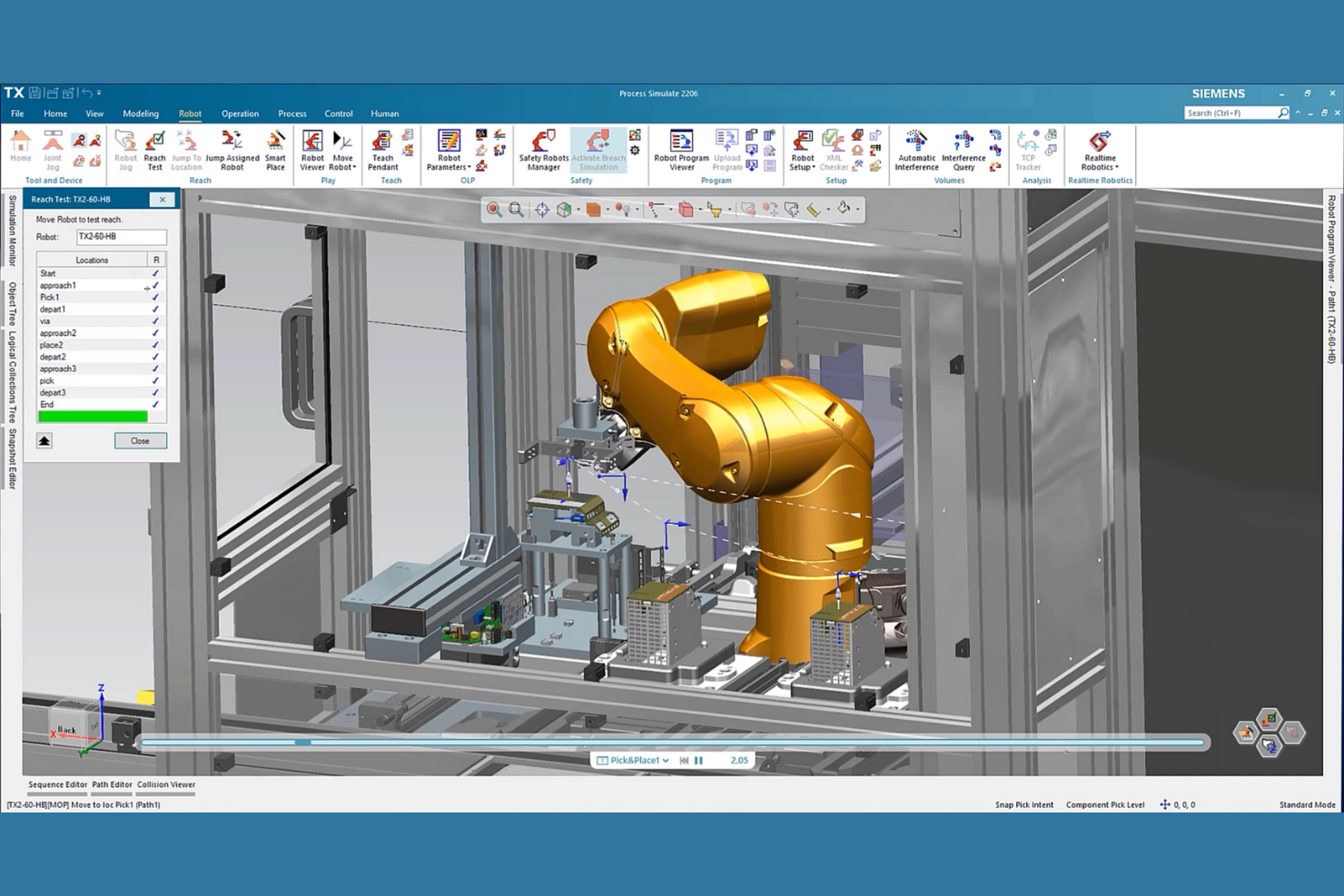
Siemens Tecnomatix offers a suite of process simulation tools built for manufacturers who need to connect digital planning with real-world production systems. The platform is especially useful for automotive, electronics, and industrial engineering teams looking to optimize workflows and validate manufacturing processes before implementation. Its integration with manufacturing execution systems and automation platforms helps teams bridge the gap between virtual models and shop floor operations.
Why I Picked Siemens Tecnomatix
What sets Siemens Tecnomatix apart is its deep integration with manufacturing systems, which is essential for teams aiming to simulate and optimize production processes in real-world environments. I picked Tecnomatix because it connects digital process models directly to manufacturing execution systems and automation platforms, allowing you to validate and refine workflows before deployment. The platform’s support for virtual commissioning lets you test automation logic and equipment behavior in a digital environment, reducing risk and downtime. Its ability to synchronize process simulation with actual shop floor data makes it a strong choice for manufacturers who need to bridge the gap between planning and execution.
Siemens Tecnomatix Key Features
Some other features that make Siemens Tecnomatix valuable for process simulation teams include:
- 3D Factory Layout Modeling: Design and visualize detailed factory layouts in a virtual environment.
- Ergonomics Analysis Tools: Assess human factors and worker safety within simulated workflows.
- Material Flow Simulation: Model and analyze the movement of materials through production lines.
- Resource Utilization Tracking: Monitor and optimize the use of machines, labor, and other resources during process planning.
Siemens Tecnomatix Integrations
Native integrations are not currently listed.
Pros and Cons
Pros:
- Offers advanced ergonomics and human simulation
- Supports 3D factory and process modeling
- Integrates natively with Teamcenter and NX
Cons:
- Focuses primarily on manufacturing sector needs
- Requires significant hardware for optimal performance

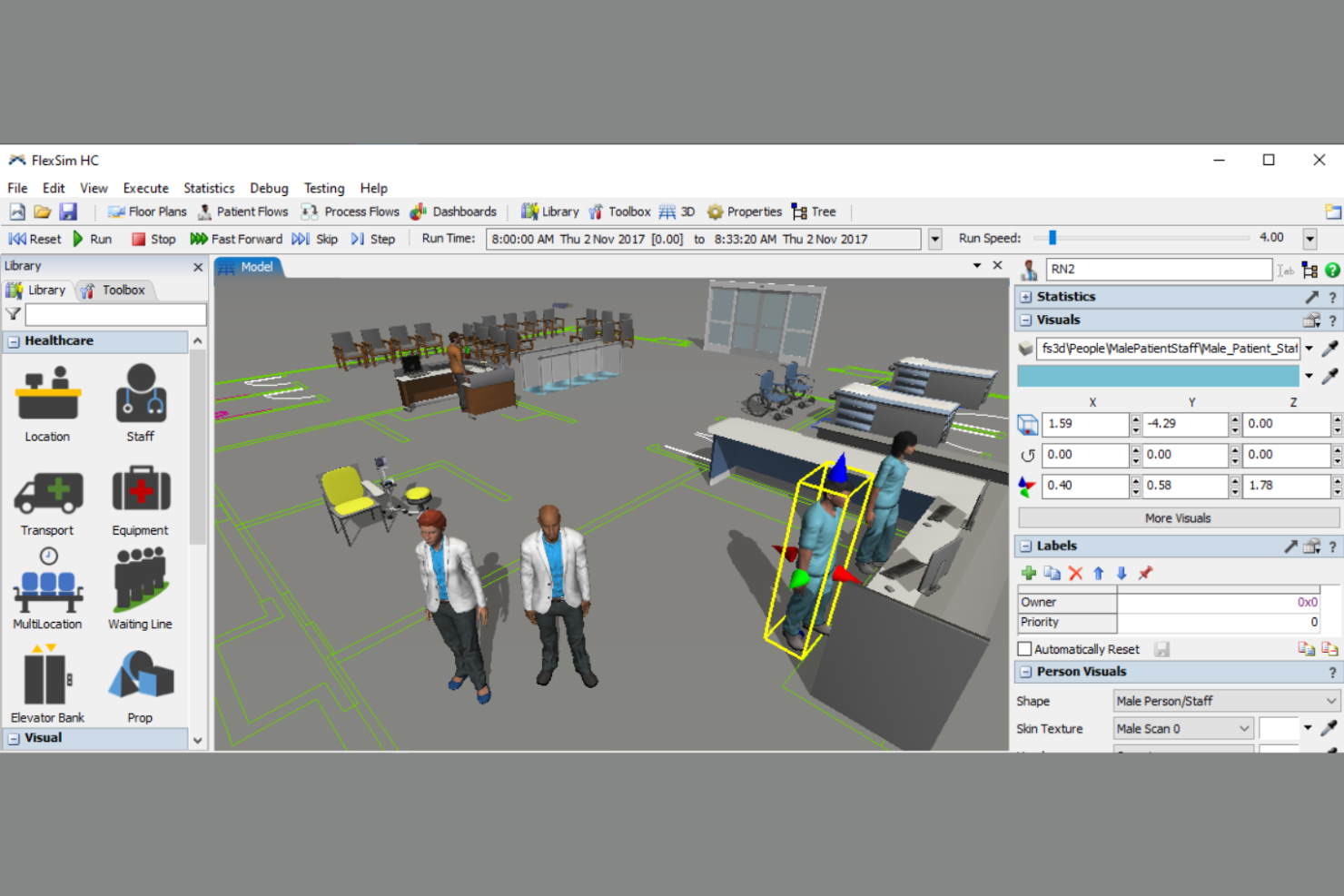
FlexSim stands out for teams that need to visualize and analyze complex workflows in a true-to-life 3D environment. It’s especially useful for manufacturing engineers, operations managers, and process improvement specialists who want to see how changes will play out before making real-world adjustments. The platform’s detailed 3D modeling and animation capabilities help users pinpoint bottlenecks and test process changes with clarity.
Why I Picked FlexSim
What makes FlexSim a strong choice for business process simulation is its advanced 3D visualization capabilities, which let you see every detail of your workflow in action. I picked FlexSim because it allows users to build highly realistic models with drag-and-drop objects and animated process flows, making it easier to spot inefficiencies and test improvements visually. The platform’s support for custom 3D objects and real-time animation helps teams communicate process changes to stakeholders who may not be familiar with technical diagrams. For anyone who needs to validate process changes before implementation, FlexSim’s visual approach offers a clear advantage.
FlexSim Key Features
In addition to its 3D visualization strengths, FlexSim offers several other features that support process simulation teams:
- Statistical Analysis Tools: Run experiments and analyze simulation results with built-in statistical reporting.
- Process Flow Module: Design and manage logic-driven workflows using a visual, drag-and-drop interface.
- Resource Scheduling: Allocate and track resources such as machines, labor, and materials within your simulation models.
- Scenario Comparison: Compare multiple process scenarios side by side to evaluate the impact of different changes.
FlexSim Integrations
Native integrations are not currently listed.
Pros and Cons
Pros:
- Scenario comparison helps validate process changes
- Built-in statistical tools support detailed analysis
- Drag-and-drop modeling speeds up scenario building
Cons:
- MacOS support is not natively available
- Limited public documentation for advanced scripting
Other Business Process Simulation Software
Here are some additional business process simulation software options that didn’t make it onto my shortlist, but are still worth checking out:
- BigBear.ai
For AI-driven process optimization
- iGrafx Process360 Live
For regulatory compliance modeling
- ProcessMaker
For multilingual process support
- Appian
For low-code process design
- Nintex
For drag-and-drop workflow creation
- Pipefy
For customizable process pipelines
- Zvolv
For rapid digital transformation projects
- IBM Business Process Manager
For enterprise-grade scalability
- Kissflow
For team collaboration features
- Camunda
For open-source workflow automation


How I Evaluate Business Process Simulation Software
I split every evaluation into two layers: the baseline a tool must clear—like discrete-event simulation and scenario comparison for resource bottlenecks—and differentiators that make a tool more suitable for some teams than others.
Core Functionality (Table Stakes For This List)
When I'm selecting tools for my list, I rank each one on a scale from 0 (does not offer the functionality) to 5 (excels in this area) for each core functionality listed below. Then, I calculate the tool's total score into a percentage. Each tool needs to achieve a minimum total score of 65% to be considered for inclusion.
- Process Modeling & Mapping: I check whether a tool supports standard notation like BPMN 2.0, swimlanes, and reusable model components for documenting workflows across teams.
- Discrete-Event Simulation Engine: The simulation engine matters most—I evaluate whether it handles probability distributions, event triggers, and time-based runs beyond static calculations.
- Scenario & What-If Analysis: I look for side-by-side scenario comparison against KPIs like cost and cycle time, not just the ability to duplicate and manually tweak a model.
- Resource & Capacity Modeling: Each tool should let you define resource pools with real constraints like shift calendars, skills, costs, and availability caps across projects.
- Performance Metrics & Analytics: Outputs need to go beyond raw logs—I evaluate whether the tool surfaces bottleneck analysis, utilization rates, and throughput in clear dashboards.
- Data Import & Integration: I look at how each tool ingests external data, whether that's CSV uploads, API connections to PM platforms, or syncs with process mining tools.
Once I have a list of tools that meet the criteria, I consider what sets each platform apart.
Differentiating Factors (What Sets Vendors Apart)
Here's how I compare and contrast different vendors:
Standout Features
Monte Carlo simulation is a big differentiator—I look for tools that run thousands of iterations so you can quantify schedule risk with real confidence intervals, not just single-point estimates. Process mining integration also matters because auto-generating models from actual event logs eliminates guesswork. Digital twin capabilities take this further by syncing live project data back into the simulation, letting PMOs continuously validate forecasts against what's happening on the ground.
Beyond Features
I evaluate each tool's integration ecosystem closely—if it doesn't connect to the PM platforms and BI tools your team already uses, simulation outputs stay siloed. Learning curve matters just as much, especially for PMOs where not everyone has a simulation background. I look for vendor-provided templates, training programs, and well-documented example models that help non-technical project managers get productive fast. Scalability is another factor I check: a tool should handle portfolio-level models with thousands of activities without choking during large Monte Carlo runs.
How to Choose Business Process Simulation Software
It’s easy to get bogged down in long feature lists and complex pricing structures. To help you stay focused as you work through your unique software selection process, here’s a checklist of factors to keep in mind:
| Factor | What to Consider |
| Scalability | Will the software handle your process volume as your organization grows? Consider user limits, process complexity, and future expansion needs. |
| Integrations | Does the tool connect natively to your existing systems (ERP, CRM, document management)? Check for direct integrations, not just API access. |
| Customizability | Can you adapt process models, dashboards, and reports to your organization’s terminology and workflows? Avoid rigid tools that limit process flexibility. |
| Ease of use | Will your team adopt the tool quickly? Look for intuitive navigation, clear documentation, and minimal training requirements. |
| Implementation and onboarding | How long will it take to get up and running? Assess the availability of migration support, onboarding resources, and pre-built templates. |
| Cost | Are pricing tiers transparent and predictable? Factor in user licenses, add-ons, and potential overage charges. |
| Security safeguards | Does the software meet your organization’s data protection standards? Look for encryption, access controls, and compliance certifications. |
| Compliance requirements | Can the tool support your industry’s regulatory needs? Confirm support for audit trails, documentation, and regulatory frameworks relevant to your sector. |
What Is Business Process Simulation Software?
Business process simulation software is a digital tool used in business process management (BPM) to model, visualize, and test workflows in a virtual environment. Teams use it for business analysis, mapping processes with standards like BPMN 2.0, and running simulations to evaluate different scenarios. These tools provide data-driven insights from real-time data, helping organizations make informed decisions, improve operational efficiency, and reduce waiting times or resource gaps like staffing. With features like advanced analytics and end-to-end process testing, teams can build a clear improvement roadmap and validate changes through methods similar to a case study approach.
Features of Business Process Simulation Software
When selecting business process simulation software, keep an eye out for the following key features:
- Process modeling: Build visual representations of workflows using drag-and-drop tools, allowing teams to map out each step and decision point in a process.
- Simulation engine: Run virtual scenarios to test how changes in resources, timing, or rules affect process outcomes before making real-world adjustments.
- Scenario analysis: Compare multiple process variations side by side to evaluate the impact of different strategies or configurations.
- BPMN support: Use Business Process Model and Notation (BPMN) standards to ensure models are clear, consistent, and easily shared across teams.
- Collaboration tools: Enable multiple users to work together on process models, leave comments, and track changes in real time.
- Reporting and analytics: Generate detailed reports and dashboards that highlight process performance metrics, bottlenecks, and improvement opportunities.
- Version control: Maintain a history of process model changes, allowing users to revert to previous versions or audit modifications over time.
- Export and documentation: Output process models and simulation results in various formats for sharing, compliance, or training purposes.
- Access controls: Set permissions for different users or groups to ensure sensitive process information is only available to authorized team members.
Benefits of Business Process Simulation Software
Implementing business process simulation software provides several benefits for your team and your business. Here are a few you can look forward to:
- Reduced operational risk: Test process changes in a virtual environment to identify and address potential issues before they impact real operations.
- Improved process efficiency: Use simulation and analytics features to pinpoint bottlenecks and optimize workflows for better performance.
- Data-driven decision making: Leverage scenario analysis and reporting tools to evaluate the impact of different strategies with concrete data.
- Improved regulatory compliance: Maintain audit trails, documentation, and compliance modeling to meet industry standards and regulatory requirements.
- Faster onboarding and collaboration: Enable teams to work together on process models and access clear documentation, speeding up training and alignment.
- Greater scalability: Adapt process models and simulations as your organization grows, ensuring your workflows remain effective at any scale.
- Cost savings: Avoid costly mistakes and unnecessary investments by validating process changes before implementation.
Costs and Pricing of Business Process Simulation Software
Selecting business process simulation software requires an understanding of the various pricing models and plans available. Costs vary based on features, team size, add-ons, and more. The table below summarizes common plans, their average prices, and typical features included in business process simulation software solutions:
Plan Comparison Table for Business Process Simulation Software
| Plan Type | Average Price | Common Features |
| Free Plan | $0 | Basic process modeling, limited simulations, single-user access, and community support. |
| Personal Plan | $10-$50/user/month | Individual process modeling, basic reporting, limited export options, and email support. |
| Business Plan | $50-$150/user/month | Team collaboration, advanced simulation tools, BPMN support, analytics dashboards, and role-based permissions. |
| Enterprise Plan | $150+/user/month | Custom integrations, regulatory compliance features, dedicated account management, advanced security, and SLA support. |
Business Process Simulation Software FAQs
Here are some answers to common questions about business process simulation software:
How does business process simulation software differ from workflow automation tools?
Business process simulation software lets you model and test processes in a virtual environment before making changes, while workflow automation tools focus on executing and automating tasks in real time. Simulation helps you predict outcomes and optimize processes without disrupting live operations.
Can business process simulation software handle complex, multi-department workflows?
Yes, most business process simulation software supports modeling and simulating workflows that span multiple departments or business units. Look for tools with advanced mapping, cross-functional collaboration, and scenario analysis features to manage complexity.
What data do I need to run accurate process simulations?
You’ll need detailed information about your current workflows, including process steps, resource allocations, timing, and decision rules. Accurate input data ensures your simulations reflect real-world conditions and produce reliable results for analysis.
Is it possible to integrate business process simulation software with other business systems?
Yes, many solutions offer integrations with ERP, CRM, and document management systems. Check for native integrations or API access to connect your simulation tool with your existing tech stack and streamline data sharing.
How long does it take to implement business process simulation software?
Implementation time varies by tool and organization size, but most teams can expect a setup period ranging from a few days to several weeks. Factors include data migration, user training, and process mapping complexity. Look for vendors that offer onboarding resources and support.