

10 beste Timely-Alternativen für die automatische Zeiterfassung im Jahr 2026

Auswahl der besten Timely-Alternativen


Projekte effizient zu verwalten, ist keine leichte Aufgabe. Vielleicht erfüllt Timely nicht all Ihre Anforderungen. Möglicherweise suchen Sie nach besseren Funktionen oder mehr Flexibilität, oder Sie möchten einfach ein Tool, das zum einzigartigen Arbeitsablauf Ihres Teams passt.
Ich kenne die Herausforderungen, vor denen Sie stehen. Meiner Erfahrung nach kann die Suche nach der richtigen Zeiterfassungssoftware einen großen Unterschied machen. Sie kann Ihnen helfen, Projekte im Zeitplan zu halten, die Zeit Ihres Teams besser zu verwalten und letztendlich die Produktivität zu steigern.
In diesem Artikel stelle ich Ihnen meine besten Timely-Alternativen vor. Ich habe jede Option getestet und bewertet, damit Sie über die bestmöglichen Informationen verfügen. Ganz gleich, ob Sie nach bestimmten Funktionen oder einer besseren Lösung für Ihr Team suchen – ich helfe Ihnen weiter. Sehen wir uns die Optionen an, die eine hervorragende Lösung für Ihre Anforderungen an das Projektmanagement sein könnten.
Was ist Timely?
Timely ist eine Zeiterfassungssoftware, die Unternehmen und Einzelpersonen dabei unterstützt, ihre Zeit effizient zu überwachen und zu verwalten. Sie wird häufig von Freiberuflern, Projektmanagern und Teams eingesetzt, die ihre Produktivität und Verantwortlichkeit verbessern möchten. Die Funktionen zur automatischen Zeiterfassung, Berichterstellung und Projektverwaltung helfen dabei, zu verstehen, wofür Zeit aufgewendet wird, und Arbeitsabläufe zu optimieren. Insgesamt liefert Timely wertvolle Einblicke, die das Zeitmanagement Ihres Teams und die Projektdurchführung verbessern können.
Vergleichstabelle der Timely-Alternativen
Diese Vergleichstabelle fasst die Preisinformationen meiner besten ausgewählten Timely-Alternativen zusammen.
| Tool | Best For | Trial Info | Price | ||
|---|---|---|---|---|---|
| 1 | Am besten für die Zeiterfassung per Browser-Erweiterung geeignet | Kostenloser Tarif + 7-tägige kostenlose Testversion verfügbar | Ab $3.99/Nutzer/Monat (jährlich abgerechnet) | Website | |
| 2 | Am besten für automatische Zeiterfassung geeignet | 14-tägige kostenlose Testversion + kostenloser Tarif + kostenlose Demo verfügbar | Ab $3.99/Nutzer/Monat (jährlich abgerechnet) | Website | |
| 3 | Beste Lösung für native Werkzeuganbindungen | Kostenloser Tarif verfügbar + 14-tägige kostenlose Testversion | Ab $5.83/Nutzer/Monat (jährlich abgerechnet) | Website | |
| 4 | Am besten für KI-gestützte Belegschaftsanalysen geeignet | 14-tägige kostenlose Testversion + kostenlose Demo verfügbar | Ab 6,67 $/Benutzer/Monat (jährliche Abrechnung) | Website | |
| 5 | Am besten für datenschutzorientierte Zeiterfassung | 14-tägige kostenlose Testversion | Ab $14/Monat (jährlich abgerechnet) | Website | |
| 6 | Am besten für kosteneffiziente Verwaltung | Kostenloser Tarif + 30-tägige kostenlose Testversion + kostenlose Demo verfügbar | Ab $6/Benutzer/Monat (jährlich abgerechnet) | Website | |
| 7 | Am besten für GPS-Zeiterfassung geeignet | 14-tägige kostenlose Testversion + kostenlose Demo verfügbar | Ab $4.99/Nutzer/Monat (jährlich abgerechnet) | Website | |
| 8 | Am besten für Remote- und Vor-Ort-Teams geeignet | 14-tägige kostenlose Testversion + kostenlose Demo verfügbar | Ab $6.42/Nutzer/Monat (jährlich abgerechnet) | Website | |
| 9 | Am besten für Datenhoheit geeignet | 15-tägige kostenlose Testversion + kostenloser Tarif + kostenlose Demo verfügbar | Ab $4/Nutzer/Monat (jährliche Abrechnung) | Website | |
| 10 | Am besten für die Selbstbuchung durch Kunden | 7-tägige kostenlose Testversion | Ab $20/Monat | Website |


Warum Sie unseren Software-Empfehlungen vertrauen können
Unser Team testet und bewertet Software seit 2012. Als Projektmanager wissen wir selbst, wie schwierig – und wichtig – es ist, die richtige Software auszuwählen.
Für diesen Leitfaden haben wir Tools mithilfe von praktischen Tests und unabhängiger Recherche bewertet und dabei unsere Bewertungskriterien angewendet. Zudem greifen wir auf Erkenntnisse von Branchenvordenkern und praktizierenden Projektmanagement-Experten zurück.
Unsere Bewertungen spiegeln unser menschliches redaktionelles Urteilsvermögen wider, keine Verkaufsstrategie.
Expertenprüfer:
Bewertungen der besten Timely-Alternativen
Nachfolgend finden Sie meine ausführlichen Zusammenfassungen der besten Timely-Alternativen, die es in meine Auswahl geschafft haben. Meine Bewertungen bieten einen detaillierten Überblick über die wichtigsten Funktionen, Vor- und Nachteile, Integrationen und idealen Anwendungsfälle jedes Tools, damit Sie die beste Lösung für sich finden.

Clockify
Am besten für die Zeiterfassung per Browser-Erweiterung geeignet

Clockify ist eine Zeiterfassungssoftware für Freiberufler, kleine Unternehmen und Großunternehmen, mit der sich Arbeitsstunden effizient erfassen und Projekte verwalten lassen. Sie hilft Nutzern dabei, abrechenbare Stunden, den Projektfortschritt und die Produktivität des Teams im Blick zu behalten.
Warum Clockify eine gute Timely-Alternative ist: Ich habe Clockify ausgewählt, weil die Browser-Erweiterung es Teammitgliedern ermöglicht, Zeiterfassungstimer direkt in bestehenden Webanwendungen zu starten, ohne den Fokus zu verlieren. Die Software umfasst mehrere Projektansichten und detaillierte Berichte, sodass Sie sehen können, wie Ihr Team arbeitet, und ist für Windows, Mac und Linux verfügbar. Dadurch ist sie eine flexible und zugängliche Option für Teams jeder Größe.
Herausragende Funktionen und Integrationen:
Zu den Funktionen gehören Zeiterfassung, Projektmanagement und detaillierte Berichte. Sie können abrechenbare Sätze für Projekte festlegen und die Teamaktivität über eine benutzerfreundliche Übersichtsseite überwachen. Die Software bietet außerdem aussagekräftige Analysen, mit denen Sie Ihr Zeitmanagement optimieren können.
Zu den Integrationen gehören Asana, Trello, Jira, QuickBooks, monday.com, Notion, Google Calendar, GitHub, Salesforce und weitere.
Pros and Cons
Pros:
- Umfassende Unterstützung für plattformübergreifende Geräte und Erweiterungen
- Detaillierte Berichtsfunktionen
- Anpassbare Projektansichten
Cons:
- Eingeschränkte erweiterte Funktionen
- Nur grundlegende Projektmanagement-Tools

TimeCamp
Am besten für automatische Zeiterfassung geeignet

TimeCamp ist ein Zeiterfassungs- und Projektmanagement-Tool für Freiberufler, kleine Unternehmen und große Konzerne. Es hilft Nutzern, abrechenbare Stunden zu erfassen, Projekte zu verwalten und ihre Produktivität durch detaillierte Berichte und Analysen zu steigern.
Warum TimeCamp eine gute Alternative zu Timely ist: TimeCamp bietet eine automatische Zeiterfassung, sodass keine manuellen Einträge erforderlich sind und Ihr Team dadurch wertvolle Zeit spart. Dank der Möglichkeit, die in Anwendungen und auf Websites verbrachte Zeit zu erfassen, erhalten Sie ein genaueres Bild Ihrer Produktivität. Das Tool bietet nützliche Berichtsfunktionen zur Analyse des Projektfortschritts und zur Unterstützung des Teammanagements. Mit den benutzerfreundlichen Dashboards können Sie mehrere Projekte verwalten.
Besondere Funktionen und Integrationen:
Zu den Funktionen gehört die Möglichkeit, die Zeit auf verschiedenen Geräten zu erfassen, unabhängig davon, ob Android oder iOS verwendet wird, was Flexibilität für Remote-Teams gewährleistet. Sie können individuelle Abrechnungssätze für Projekte festlegen, wodurch sich Budgets leichter verwalten lassen. TimeCamp bietet außerdem eine Produktivitätserfassung, um potenzielle Zeitfresser zu identifizieren und zu vermeiden.
Zu den Integrationen gehören Trello, Asana, Slack, QuickBooks, Jira, monday.com, Google Calendar, Microsoft Teams, GitHub, Salesforce und weitere.
Pros and Cons
Pros:
- Automatische Zeiterfassung
- Individuelle Abrechnungssätze
- Erfasst die Zeit auf verschiedenen Geräten
Cons:
- Die anfängliche Einrichtung kann komplex sein
- Begrenzte Anpassungsmöglichkeiten
TMetric
Beste Lösung für native Werkzeuganbindungen
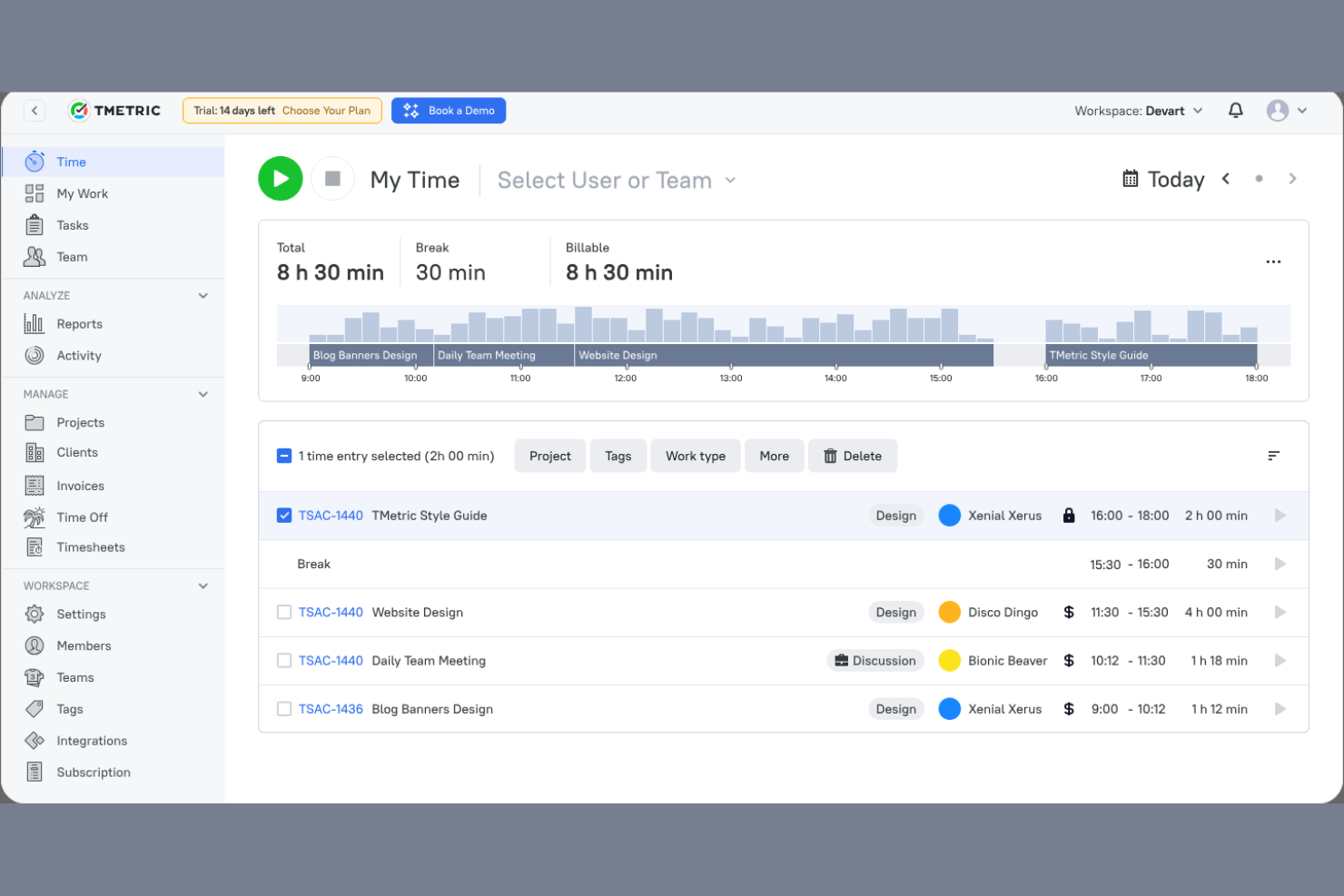
TMetric ist eine Zeiterfassungssoftware für Freiberufler, kleine Unternehmen und Großunternehmen. Sie hilft Teams dabei, Arbeitszeiten zu erfassen, Projekte zu verwalten und die Produktivität durch detaillierte Berichte und Analysen zu optimieren.
Warum TMetric eine gute Alternative zu Timely ist: TMetric bietet eine integrierte Werkzeuganbindung, mit der Sie verschiedene Plattformen für einen einheitlichen Arbeitsablauf verbinden können. Mit den Zeiterfassungsfunktionen können Sie Arbeitsstunden für mehrere Projekte problemlos protokollieren. Die Software stellt detaillierte Berichte bereit, mit denen Sie Produktivität und Abrechnung analysieren können. Außerdem können Sie abrechenbare Stunden erfassen und Budgets effektiver verwalten, wodurch TMetric eine vielseitige Lösung für unterschiedliche Geschäftsanforderungen ist.
Hervorstechende Funktionen und Integrationen:
Zu den Funktionen gehört die Möglichkeit, Stundensätze für verschiedene Projekte festzulegen und so eine flexible Abrechnung zu gewährleisten. Sie können außerdem die Teamaktivität in Echtzeit überwachen und dadurch Einblicke in Arbeitsmuster gewinnen. TMetric verfügt über eine benutzerfreundliche Oberfläche, die Zeitmanagement und Projektverfolgung vereinfacht.
Zu den Integrationen gehören Trello, Asana, Jira, GitHub, QuickBooks, Google Calendar, Todoist, Salesforce und weitere.
Pros and Cons
Pros:
- Überwachung der Teamaktivität in Echtzeit
- Flexible Abrechnung mit Stundensätzen
- Native Integration mit anderen beliebten Tools
Cons:
- Lange Ladezeiten bei der Erfassung vieler Aufgaben
- Keine integrierte Erfassung von Überstunden oder Pausenregeln

Am besten für KI-gestützte Belegschaftsanalysen geeignet
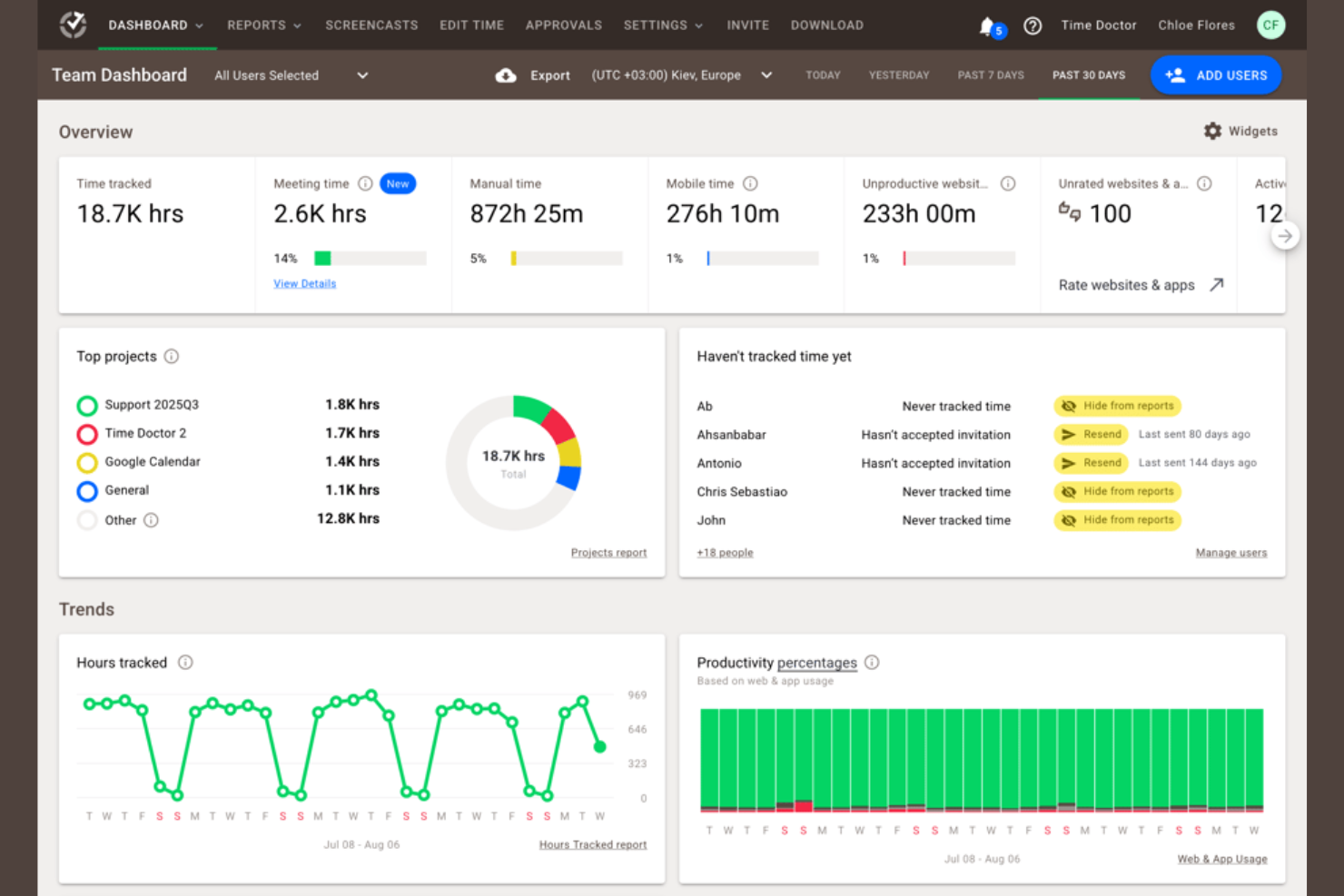
Time Doctor ist ein Zeiterfassungs- und Produktivitätsmanagement-Tool für Unternehmen jeder Größe. Es hilft Teams dabei, die für Aufgaben aufgewendete Zeit zu erfassen, die Produktivität zu überwachen und die Arbeit im Homeoffice effizient zu verwalten.
Warum Time Doctor eine gute Timely-Alternative ist: Time Doctor bietet KI-gestützte Belegschaftsanalysen, die Einblicke in die Produktivität und Leistung des Teams geben. Mit der Echtzeitüberwachung können Sie verfolgen, wie viel Zeit für Aufgaben aufgewendet wird, und Verbesserungsbereiche identifizieren. Die Funktionen zur Erstellung von Screenshots und zur Aktivitätsverfolgung des Tools tragen dazu bei, die Verantwortlichkeit des Teams sicherzustellen. Anpassbare Berichte ermöglichen es Ihnen, Produktivitätstrends zu analysieren und fundierte Entscheidungen zu treffen.
Hervorragende Funktionen und Integrationen:
Zu den Funktionen gehören Ablenkungswarnungen, damit Ihr Team auf seine Aufgaben konzentriert bleibt. Sie können Produktivitätsziele festlegen und den Fortschritt daran messen, wodurch Teams ergebnisorientiert bleiben. Time Doctor bietet außerdem eine Lohn- und Gehaltsverwaltung, die die Abwicklung von Zahlungen für abrechenbare Stunden erleichtert.
Zu den Integrationen gehören Trello, Asana, Jira, Basecamp, monday.com, GitHub, Sentry, Salesforce und mehr.
Pros and Cons
Pros:
- KI-gestützte Einblicke in die Produktivität
- Anpassbare Produktivitätsberichte
- Integrierte Lohn- und Gehaltsverwaltung
Cons:
- Die Ersteinrichtung kann zeitaufwendig sein
- Nur grundlegende Funktionen der mobilen App

Memtime
Am besten für datenschutzorientierte Zeiterfassung

memtime ist ein Zeiterfassungstool, mit dem Sie Ihre für Projekte aufgewendete Zeit sofort erfassen können. Es wurde für Fachkräfte in Branchen wie Recht, Marketing und Softwareentwicklung entwickelt und hilft ihnen dabei, ihre Arbeitszeiten zu verfolgen und die Genauigkeit der Abrechnung zu verbessern.
Warum memtime eine gute Alternative zu Timely ist: memtime bietet eine datenschutzorientierte Zeiterfassung, indem die Daten offline gespeichert werden, wodurch es sich von Timely unterscheidet. Sie können Zeiten bestimmten Projekten zuordnen, was die Verwaltung und Nachverfolgung von Arbeitsaufwänden erleichtert. Zeiteinträge können exportiert oder mit Ihrer Projektsoftware synchronisiert werden. Detaillierte Aktivitätsübersichten liefern Einblicke in die tägliche Produktivität und helfen Ihnen, die Projektplanung zu optimieren.
Hervorstechende Funktionen und Integrationen:
Zu den Funktionen gehört eine automatische Zeiterfassung, die den Zeitaufwand für Aufgaben ohne manuelle Eingabe erfasst. Sie können Zeiten ganz einfach Projekten zuordnen und so eine genaue Abrechnung unterstützen. Detaillierte Aktivitätsübersichten helfen Ihnen, tägliche Arbeitsmuster für ein besseres Projektmanagement zu analysieren.
Zu den Integrationen gehören Asana, Zoho Books, Jira, QuickBooks, Microsoft Teams, Google Kalender und mehr.
Pros and Cons
Pros:
- Datenschutzorientierte Offline-Datenspeicherung
- Automatische Zeiterfassung
- Detaillierte tägliche Aktivitätsübersichten
Cons:
- Keine mobile App zur Zeiterfassung
- Eingeschränkte Anpassungsmöglichkeiten

actiTIME
Am besten für kosteneffiziente Verwaltung

actiTIME ist ein Tool zur Zeiterfassung und Projektverwaltung für Unternehmen jeder Größe. Es unterstützt Teams bei der Verwaltung von Aufgaben, der Erfassung von Arbeitsstunden und der Optimierung von Projektabläufen.
Warum actiTIME eine gute Timely-Alternative ist: actiTIME bietet erschwingliche kostenpflichtige Tarife und ist damit eine attraktive Option für preisbewusste Teams. Mit den Zeiterfassungsfunktionen können Sie Arbeitsstunden überwachen und sicherstellen, dass Projektbudgets eingehalten werden. Mithilfe der Aufgabenverwaltungsfunktionen können Sie Aufgaben einfach zuweisen und nachverfolgen. Die Software stellt außerdem nützliche Berichte bereit, mit denen Sie die Projektleistung analysieren und fundierte Entscheidungen treffen können.
Hervorstechende Funktionen und Integrationen:
Zu den Funktionen gehört die Möglichkeit, benutzerdefinierte Arbeitsabläufe einzurichten, wodurch sich die Prozesse Ihres Teams verfeinern lassen. Sie können Projektkosten und Budgets in Echtzeit überwachen, um Mehrausgaben zu vermeiden. actiTIME bietet außerdem eine benutzerfreundliche Oberfläche, die Zeiterfassung und Aufgabenverwaltung vereinfacht.
Zu den Integrationen gehören QuickBooks, Jira, Trello, Todoist, Microsoft Outlook, Salesforce, Zapier und weitere.
Pros and Cons
Pros:
- Kosteneffizient für preisbewusste Teams
- Kostenverfolgung in Echtzeit
- Benutzerfreundliche Oberfläche
Cons:
- Eingeschränkte erweiterte Funktionen
- Grundlegende Funktionen der mobilen App
New Product Updates from actiTIME

actiTIME Visual Hour Indicator and Time-Track Report Redesign
actiTIME adds a wave-style hour indicator to the Timesheet and Calendar views and refreshes the Time-Track report for smoother navigation and clearer visuals. For more information, visit actiTIME's official site.

Hubstaff
Am besten für GPS-Zeiterfassung geeignet
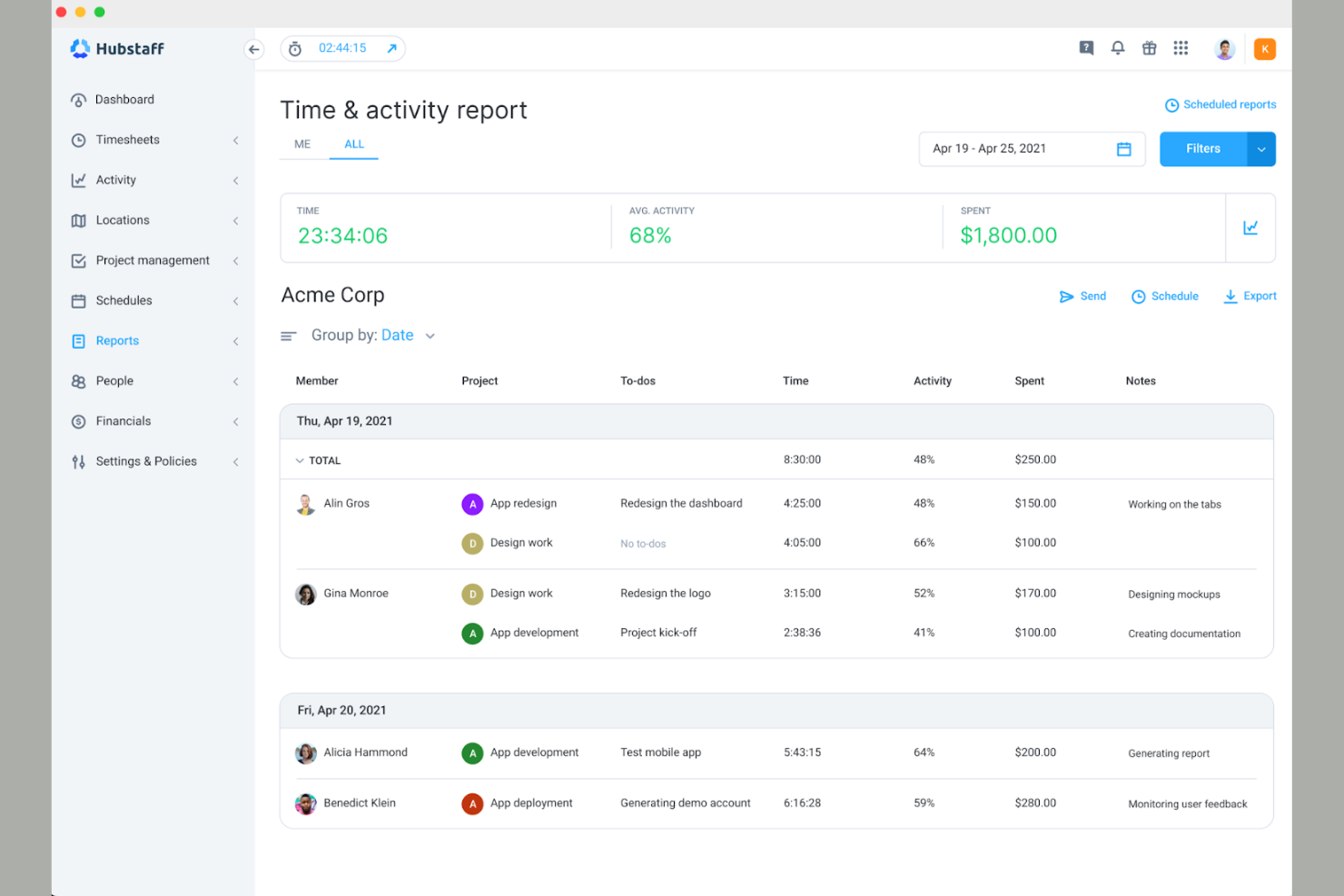
Hubstaff ist eine Zeiterfassungs- und Mitarbeiterüberwachungslösung für Remote-Teams und Unternehmen mit mobilen Arbeitskräften. Sie unterstützt Nutzer dabei, Arbeitszeiten zu erfassen, ihre Produktivität zu überwachen und Mitarbeiteraktivitäten effektiv zu verwalten.
Warum Hubstaff eine gute Alternative zu Timely ist: Hubstaff bietet GPS-Zeiterfassung und ist daher ideal für Teams, die standortbezogene Arbeit erfassen müssen und auf das Einstempeln verzichten möchten. Sie können überwachen, von wo aus Ihre Teammitglieder arbeiten, und die Rechenschaftspflicht mobiler Mitarbeiter sicherstellen. Das Tool zeigt Aktivitätsniveaus an und bietet Bildschirmaufnahmen, damit Sie nachvollziehen können, wie die Zeit genutzt wird. Außerdem können Sie detaillierte Berichte erstellen, um die Produktivität Ihres Teams zu analysieren und fundierte Entscheidungen zu treffen.
Herausragende Funktionen und Integrationen:
Zu den Funktionen gehört die automatische Lohn- und Gehaltsabrechnung, die Zahlungen auf Grundlage der erfassten Arbeitsstunden vereinfacht. Sie können Produktivitätsziele festlegen und den Fortschritt überwachen, damit Ihr Team fokussiert bleibt. Hubstaff bietet außerdem eine automatische Erstellung von Stundenzetteln, was den Zahlungsprozess vereinfacht.
Zu den Integrationen gehören QuickBooks, Asana, Trello, Salesforce, Jira, Slack, GitHub, Zendesk, PayPal und weitere.
Pros and Cons
Pros:
- GPS-Tracking für standortbezogene Arbeit
- Automatische Lohn- und Gehaltsabrechnung
- Genehmigungsprozess für Stundenzettel
Cons:
- Erfordert anfänglichen Einrichtungsaufwand
- Hohe Gesamtkosten für Zusatzmodule und erweiterte Funktionen

DeskTime
Am besten für Remote- und Vor-Ort-Teams geeignet
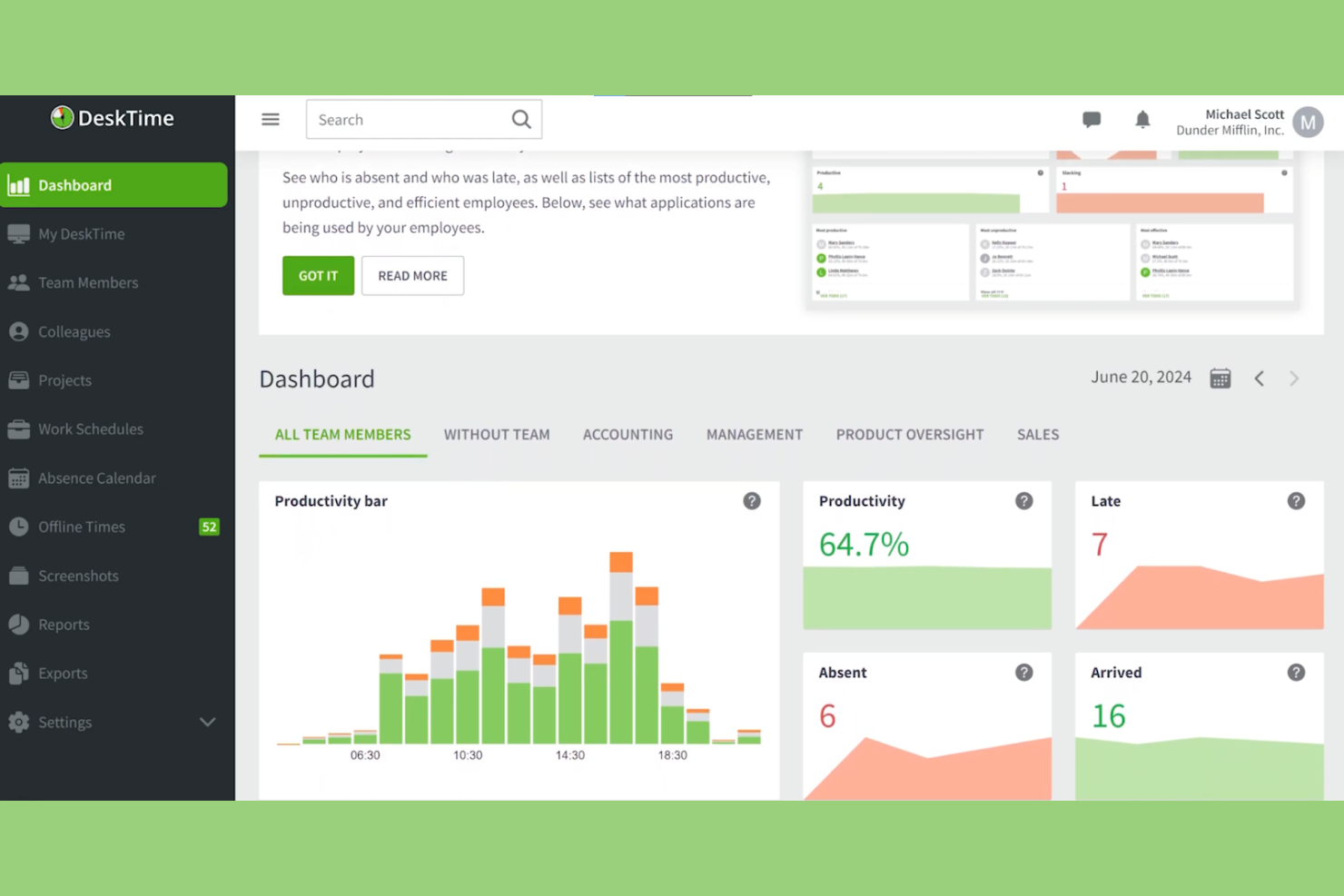
DeskTime ist eine Software zur Zeiterfassung und Produktivitätsanalyse für Remote- und Vor-Ort-Teams. Sie hilft Unternehmen dabei, die Produktivität von Mitarbeitenden zu überwachen, Projekte zu verwalten und Arbeitsprozesse zu optimieren.
Warum DeskTime eine gute Timely-Alternative ist: DeskTime bietet Funktionen, die sowohl für Remote- als auch für Vor-Ort-Teams nützlich sind, und sorgt dadurch für Flexibilität und Anpassungsfähigkeit. Die automatische Zeiterfassung läuft im Hintergrund ohne manuelle Eingaben und gewährleistet so genaue Zeiterfassungsprotokolle. Mit den Tools zur Produktivitätsanalyse erhalten Sie Einblicke darin, welche Anwendungen und Websites genutzt werden. Die Software stellt außerdem tägliche Produktivitätsbewertungen bereit, mit deren Hilfe Sie Ineffizienzen im Team erkennen und beheben können.
Hervorzuhebende Funktionen & Integrationen:
Zu den Funktionen gehört die Offline-Zeiterfassung, mit der Sie Arbeitszeiten erfassen können, wenn Sie nicht mit dem Internet verbunden sind. Außerdem können Sie Arbeitszeitpläne festlegen und überwachen, ob Ihr Team diese einhält, um die Verantwortlichkeit sicherzustellen. DeskTime stellt detaillierte Berichte bereit, die Ihnen helfen, die Teamleistung zu analysieren und fundierte Entscheidungen zu treffen.
Zu den Integrationen gehören Trello, Asana, Jira, GitLab, Google Calendar, Zapier und Outlook.
Pros and Cons
Pros:
- Automatische Zeiterfassung im Hintergrund
- Stellt tägliche Produktivitätsbewertungen bereit
- Bietet Offline-Zeiterfassung
Cons:
- Begrenzte Integrationen
- Umfangreiche Zeiterfassung kann zu Datenschutzbedenken führen

Am besten für Datenhoheit geeignet
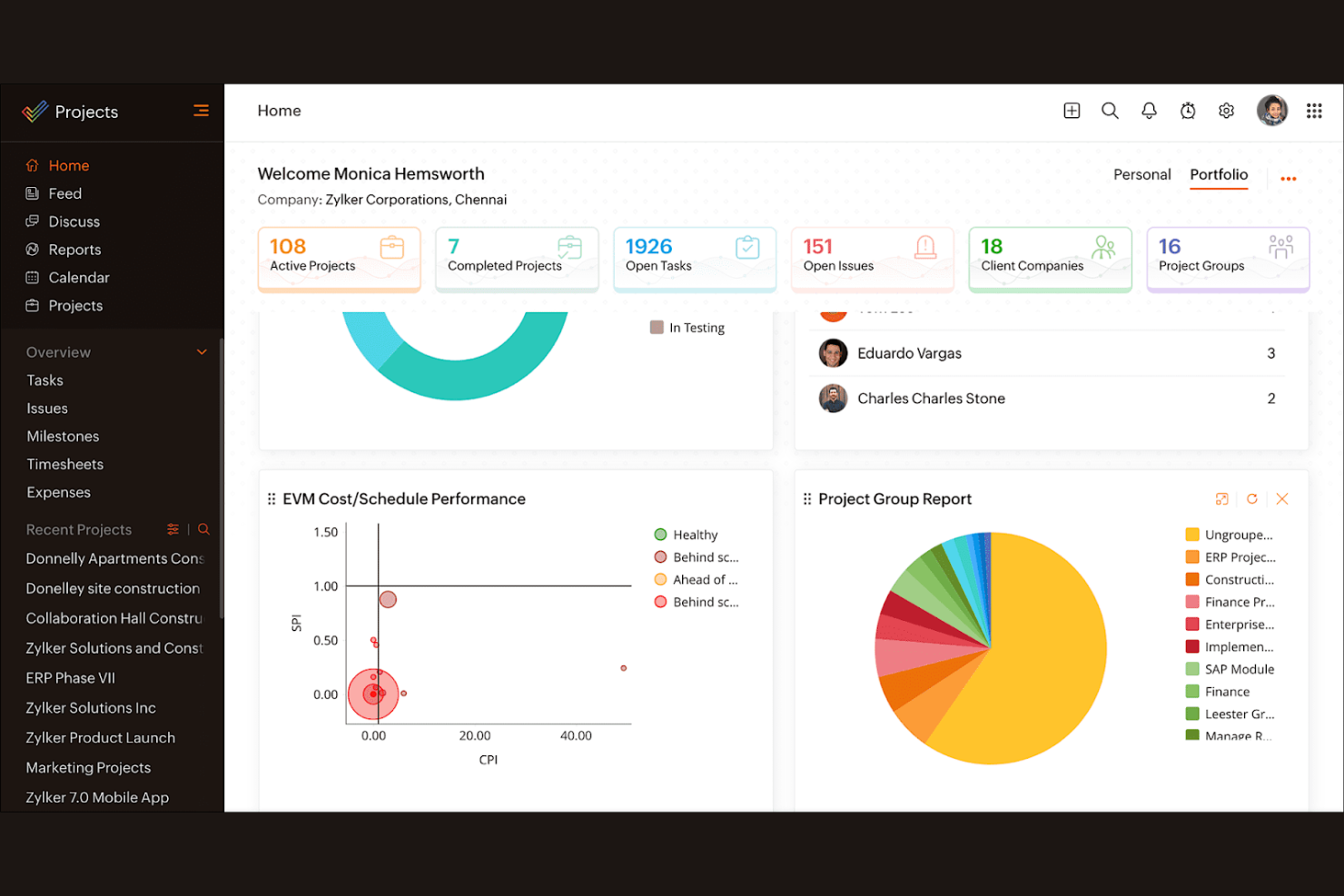
Zoho Projects ist eine Projektmanagementsoftware für Teams jeder Größe. Sie unterstützt Unternehmen bei der Planung von Projekten, der Fortschrittsverfolgung und der effektiven Zusammenarbeit.
Warum Zoho Projects eine gute Timely-Alternative ist: Zoho Projects bietet Funktionen, bei denen die Datenhoheit im Vordergrund steht, sodass die Informationen Ihres Teams sicher und zugänglich bleiben. Mit den Aufgabenverwaltungsfunktionen können Sie Projekte in überschaubare Teile aufgliedern und Aufgaben einfach zuweisen. Die Software bietet Gantt-Diagramme zur Visualisierung von Projektzeitplänen und Abhängigkeiten. Mit den Zeiterfassungsfunktionen können Sie die Projektstunden überwachen und sicherstellen, dass Sie Ihr Budget einhalten.
Hervorstechende Funktionen und Integrationen:
Zu den Funktionen gehören Projektvorlagen, die die Einrichtung wiederkehrender Aufgaben vereinfachen und Ihnen Zeit sparen. Sie können auch die Problemverfolgung nutzen, um Projektherausforderungen effizient zu verwalten und zu lösen. Zoho Projects bietet Dokumentenverwaltung, sodass Ihr Team Dateien an einem Ort speichern und teilen kann.
Zu den Integrationen gehören Dropbox, Microsoft Teams, Zapier, Slack, GitHub, Zoho CRM, Zoho Books, Zoho Invoice und weitere.
Pros and Cons
Pros:
- Stellt die Datenhoheit in den Vordergrund
- Effiziente Problemverfolgung
- Zentralisierte Dokumentenverwaltung
Cons:
- Steile Lernkurve für neue Nutzer
- Komplexe Benutzeroberfläche
New Product Updates from Zoho Projects
Zoho Projects Adds CodeX Scripts for Custom Modules
Zoho Projects now supports CodeX Scripts for custom modules, enabling conditional logic and rules for creating, updating, and deleting records. For more information, visit Zoho Projects' official site.
 .
.
Am besten für die Selbstbuchung durch Kunden



Wie ich Timely-Alternativen bewerte
Ich bewerte Tools auf zwei Ebenen – anhand der grundlegenden Anforderungen wie passiver Zeiterfassung und der Zuordnung zu abrechenbaren Projekten sowie anhand der Unterscheidungsmerkmale, die zeigen, welche Option zum tatsächlichen Arbeitsablauf Ihres Teams passt.
Kernfunktionen (Grundvoraussetzungen für diese Liste)
Bei der Auswahl der Tools für meine Liste bewerte ich jedes einzelne für jede unten aufgeführte Kernfunktion auf einer Skala von 0 (bietet die Funktion nicht) bis 5 (ist in diesem Bereich hervorragend). Anschließend rechne ich die Gesamtpunktzahl des Tools in einen Prozentsatz um. Jedes Tool muss eine Mindestgesamtpunktzahl von 65 % erreichen, um für die Aufnahme berücksichtigt zu werden.
- Automatische Zeiterfassung: Ich prüfe, ob das Tool App-, Browser- und Dokumentaktivitäten passiv erfasst, damit Nutzer nicht den ganzen Tag über ständig Zeiterfassungen starten und stoppen müssen.
- Zuordnung zu Projekten und Kunden: Erfasste Stunden müssen sich eindeutig Kunden, Projekten und Aufgaben zuordnen lassen – besonders für Agenturen, die gleichzeitig mehrere Retainer-Kunden betreuen.
- Zeiterfassungsbögen und Genehmigungen: Ich achte auf bearbeitbare Zeiterfassungsbögen mit Genehmigungsabläufen, über die Manager Einträge prüfen und sperren können, bevor diese in die Abrechnung oder Gehaltsabrechnung einfließen.
- Abrechenbare Sätze und Budgets: Tools sollten abrechenbare Sätze pro Projekt oder Nutzer sowie Budgetobergrenzen unterstützen, damit Berater ihre Margen ohne separate Tabelle überwachen können.
- Berichte und Analysen: Ich bewerte, ob Dashboards Daten zu Auslastung und Rentabilität anzeigen, die nach Teammitglied, Kunde oder Zeitraum gefiltert und für Besprechungen mit Stakeholdern exportiert werden können.
- Integrationsökosystem: Das Tool sollte sich mit den Projektmanagement-, Kalender- und Buchhaltungsplattformen verbinden lassen, die Ihr Team bereits nutzt – etwa Jira, Google Calendar, QuickBooks oder Xero.
Sobald ich eine Liste von Tools zusammengestellt habe, die diese Kriterien erfüllen, prüfe ich, wodurch sich die einzelnen Plattformen voneinander unterscheiden.
Unterscheidungsmerkmale (Wodurch sich Anbieter abheben)
So vergleiche ich die verschiedenen Anbieter miteinander:
Hervorstechende Funktionen
Der Schutz der Privatsphäre von Mitarbeitern spielt hier eine wichtige Rolle. Einige Tools ermöglichen es Einzelpersonen, ihre Rohdaten zu Aktivitäten zu überprüfen, bevor diese einen Manager erreichen, was die Einführung in Teams deutlich erleichtert. Ich prüfe außerdem, ob eine Plattform Kapazitätsplanung umfasst – die Möglichkeit, die Arbeitsauslastung des Teams im Verhältnis zu den bevorstehenden Projektstunden zu prognostizieren, hilft dabei, Überlastung und Überbuchung zu vermeiden. Eine integrierte Rechnungsstellung ist ein weiteres Unterscheidungsmerkmal, das eine Bewertung verdient. Tools, die direkt aus erfassten abrechenbaren Stunden kundenfertige Rechnungen erstellen, machen den manuellen Export in die Buchhaltung vollständig überflüssig.
Mehr als nur Funktionen
Datenschutz und Compliance verdienen besondere Aufmerksamkeit, wenn Aktivitätserfassung zum Einsatz kommt. Ich prüfe, ob Anbieter Zertifizierungen wie SOC 2 besitzen oder die DSGVO einhalten und ob sie Richtlinien ohne Screenshots anbieten. Auch die Preisstruktur spielt eine große Rolle – einige Tools bieten automatische Zeiterfassung erst in höheren Tarifen an, sodass die Anforderungen eines Freelancers ganz anders aussehen als die einer Agentur mit 50 Personen. Die Plattformabdeckung rundet meine Bewertung ab. Teams, die ihre Arbeit zwischen Desktop und Mobilgeräten aufteilen, benötigen native Apps für beide Plattformen, idealerweise mit Offline-Erfassung, die synchronisiert wird, sobald die Verbindung wieder verfügbar ist.
Warum nach einer Timely-Alternative suchen?
Obwohl Timely eine gute Wahl unter den Zeiterfassungssoftwares ist, gibt es mehrere Gründe, warum manche Nutzer nach alternativen Lösungen suchen. Vielleicht suchen Sie nach einer Timely-Alternative, weil …
- Sie fortschrittlichere Funktionen für die Berichterstellung benötigen
- Ihr Team Funktionen zur Offline-Erfassung benötigt
- Sie eine bessere Integration mit bestehenden Tools benötigen
- Ihr Team aus den Nutzerbeschränkungen von Timely herausgewachsen ist
- Sie eine kostengünstigere Option benötigen
- Sie Unterstützung für mehrere Sprachen benötigen
Wenn einer dieser Punkte auf Sie zutrifft, sind Sie hier richtig. Meine Liste enthält mehrere Zeiterfassungssoftware-Optionen, die besser für Teams geeignet sind, die mit diesen Herausforderungen bei Timely konfrontiert sind und nach alternativen Lösungen suchen.
Die wichtigsten Funktionen von Timely
Hier sind einige der wichtigsten Funktionen von Timely, damit Sie die Angebote alternativer Lösungen gegenüberstellen und vergleichen können:
- Automatische Zeiterfassung: Nutzt KI, um die für Aufgaben aufgewendete Zeit automatisch zu protokollieren und so die manuelle Eingabe für Ihr Team zu reduzieren.
- KI-Stundenzettel: Füllt Stundenzettel schnell aus, indem die KI Zeiteinträge vorschlägt und Ihnen dadurch Zeit spart.
- Projektübersichten: Bieten eine visuelle Übersicht über alle Projekte und helfen Ihnen, Fortschritte und Fristen zu überwachen.
- Abrechnungssätze: Ermöglichen es Ihnen, unterschiedliche Abrechnungssätze für Aufgaben und Projekte festzulegen, um eine korrekte Rechnungsstellung an Kunden sicherzustellen.
- Inaktivitätserkennung: Warnt Sie, wenn keine Aktivität festgestellt wird, damit die Zeiterfassungen korrekt bleiben und die tatsächlich geleistete Arbeit widerspiegeln.
- Aktivitätsaufzeichnung: Zeichnet Computeraktivitäten automatisch auf und bietet eine hohe Genauigkeit ohne manuelle Timer.
- Kapazitätsplanung: Hilft Ihnen, die verfügbare Zeit für abrechenbare Arbeiten zu verstehen und die Ressourcenverteilung zu optimieren.
- Aufgabenverwaltung: Ermöglicht es Ihnen, Aufgaben zuzuweisen und zu verfolgen, damit Ihr Team auf die Projektziele ausgerichtet bleibt.
- Detaillierte Berichte: Bieten Einblicke in die Zeitnutzung und Produktivität und unterstützen so die Leistungsanalyse.