
20 Best Agile Project Management Software Reviewed For 2026

10 Best Agile Project Management Software Shortlist
Here’s my shortlist of the best agile project management software:


The best agile project management software helps you plan, manage, and improve your agile projects. Without the right tool, you'll quickly find your projects going off the rails and lose track of sprint goals, project progress, and what's left in the backlog. This makes it harder to deliver work on time, iterate effectively, and keep clients satisfied.
I've used my 20+ years of experience as an agile project manager to evaluate and handpick the top agile project management tools so you can undertake the selection process in a simple and stress-free way.
In this guide, you’ll find software that supports planning, tracking, and communication throughout your project, no matter which agile methodology you subscribe to. I cover key features and pros and cons so you can choose the software that best aligns with your workflows and management style.
Why Trust Our Agile Project Management Software Reviews
We’ve been testing and reviewing agile project management software since 2011. As project managers ourselves, we know how critical and difficult it is to make the right decision when selecting software.
We invest in deep research to help our audience make better software purchasing decisions. We’ve tested more than 2,000 tools for different project management use cases and written over 1,000 comprehensive software reviews. Learn how we stay transparent & our agile project management software review methodology.
The Best Agile Project Management Software Comparison Chart
Directly compare my picks with this table.
| Tool | Best For | Trial Info | Price | ||
|---|---|---|---|---|---|
| 1 | Best for cross-departmental collaboration | Free plan + free demo + 14-day free trial available | From $10/user/month (billed annually) + add-on fee | Website | |
| 2 | Best for agile project collaboration | 15-day free trial | From $1/user/month (12 user minimum) | Website | |
| 3 | Best for no-code enterprise apps | 30-day free trial | From $35/user/month (billed annually) | Website | |
| 4 | Best for breaking down complex projects | 30-day free trial + free plan available | From $7.65/member/month (billed annually) | Website | |
| 5 | Best for collaborative whiteboards | Free trial + free plan available | From $8/member/month (billed annually) | Website | |
| 6 | Best for project brainstorming | Free plan available | From $3/user/month (billed annually) | Website | |
| 7 | Best for ideation and task management | Free plan available | From $13/user/month (billed annually) | Website | |
| 8 | Best for building custom agile workflows | 30-day free trial + free demo available | From $24/user/month (billed annually) | Website | |
| 9 | Best for retail and consumer companies | 14-day free trial + free demo available | Pricing upon request | Website | |
| 10 | Best for Kanban boards | Free trial + free plan available | From $5/user/month (billed annually) | Website |


-

Accelo
Visit WebsiteThis is an aggregated rating for this tool including ratings from Crozdesk users and ratings from other sites.4.4 -
Wrike
Visit WebsiteThis is an aggregated rating for this tool including ratings from Crozdesk users and ratings from other sites.4.2 -
Forecast
Visit WebsiteThis is an aggregated rating for this tool including ratings from Crozdesk users and ratings from other sites.4.6



Best Agile Project Management Software Reviews
Here’s a brief description of each of the software on my list, what it does best, and its standout features.

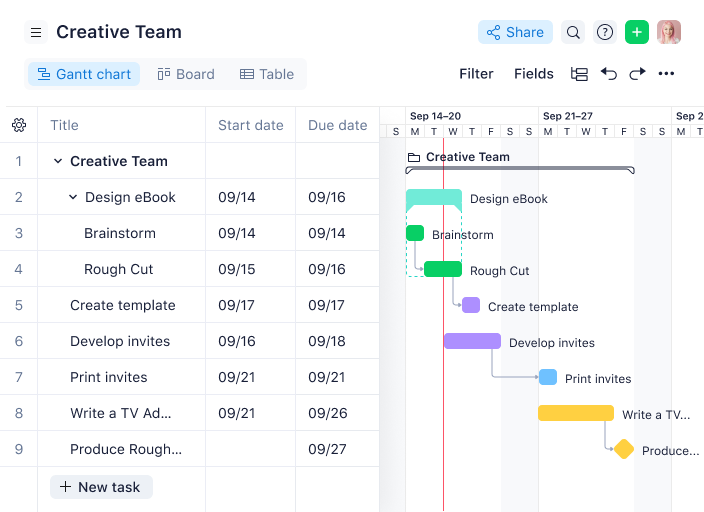
Wrike is a project management software with a collection of agile tools for managing projects, and the tool is suitable for teams of five or more. This highly configurable agile project management software allows users to customize workflows, dashboards, and reports.
Why I picked Wrike: Wrike’s simple interface enables users to switch between Kanban boards, interactive drag-and-drop Gantt charts, and workload views to visualize priorities. Wrike features a number of easy-to-use agile templates, backlog management functionalities, spaces for collaboration and feedback, and agile reporting and analytics. Other features include agile folder organization and automated task management.
Wrike’s features can be configured for each individual team’s needs, and the tool also offers a variety of specific solutions depending on the type of team or organization, including solutions for marketing teams and professional service teams.
Wrike Standout Features & Integrations
Features include resource bookings, workload charts, effort management, a board view, time tracking, budgeting, proofing, cross-tagging, and approval workflows.
Integrations include more than 400 pre-built native integrations, including popular file management software from Microsoft, Google, and Dropbox, along with sales and marketing software from Salesforce and Marketo.
Pros and Cons
Pros:
- Detailed analytics and dashboards
- Good workload management features
- Range of task automation features
Cons:
- Learning curve for new users
- No built-in chat feature
New Product Updates from Wrike

Streamlining Workspaces with New Updates
Wrike announces custom space templates, AI Agents in Wrike Labs, and a new Guage widget to improve project management. For more information, visit Wrike's official site.
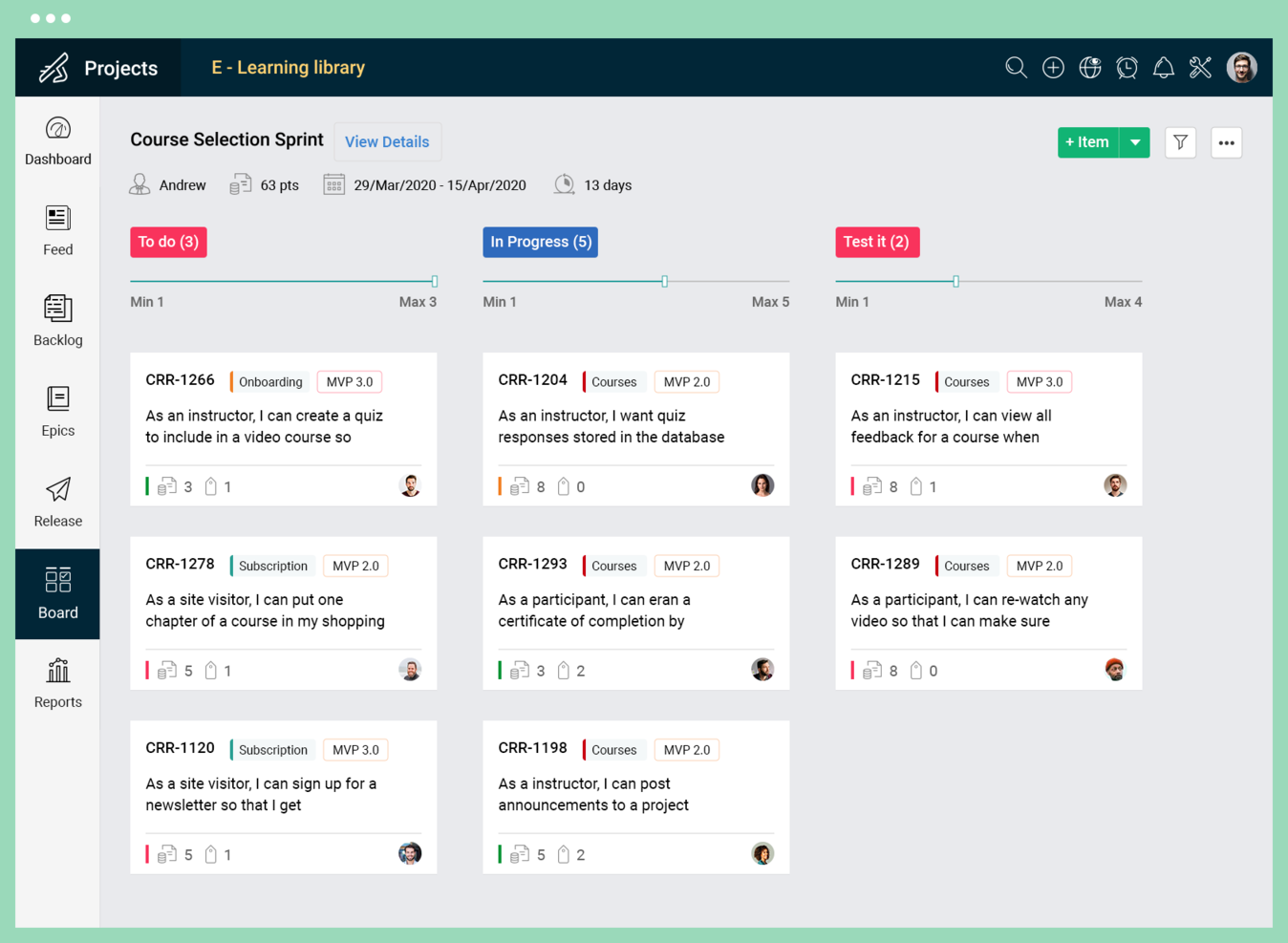
Zoho Sprints is a digital project management tool designed to support agile teams in planning and tracking their work.
Why I picked Zoho Sprints: I chose Zoho Sprints because it provides a robust set of features that cater to dynamic planning and collaboration, which are essential for agile teams. What makes it different is its focus on visualizing workflows and tracking progress, coupled with user-friendly time tracking capabilities. I believe Zoho Sprints is best suited for agile project collaboration due to its comprehensive approach to managing project ideas, tracking progress, launching increments, and automating the CI/CD pipeline, which supports a smoother agile process.
Zoho Sprints Standout Features & Integrations
Features include backlogging capabilities that let you break work down into stories, tasks, and sub-tasks, prioritize them, and add items to the sprint. The tool also includes a fully-customizable Scrum board with the ability to set up workflows and swimlanes, and get the team aligned on the sprint goal.
Integrations include Microsoft Office 365, Microsoft Teams, Google Drive, Zapier, Zendesk, and ServiceNow. Integrations via Zapier and Zoho Flow are also supported. Being part of the Zoho ecosystem allows you to connect to several of Zoho’s own services for bug tracking, CRM, accounting, customer service, and more.
Pros and Cons
Pros:
- Intuitive user interface
- Comprehensive reporting with burndown charts
- Tailored for Scrum methodologies
Cons:
- Many customization features are limited to higher-tier plans
- Limited project views
New Product Updates from Zoho Sprints

Zoho Sprints Introduces Test Management Feature
Zoho Sprints introduces Test Management capabilities within projects. This update enables teams to create, manage, and execute tests directly in their workflow. For more information, visit Zoho Sprints’ official site.
 .
.

QuickBase is a cloud-based platform that provides a no-code operational agility solution, enabling users to build custom applications for various business needs. The platform is suitable for businesses of all sizes and industries, particularly those looking for a flexible and scalable solution to manage work processes and adapt to business changes, such as those at the enterprise level.
Why I picked QuickBase: With QuickBase, teams can rapidly build, modify, and customize applications without the need for extensive coding knowledge or dependencies on IT departments, empowering users to take control of their projects. The platform's intuitive drag-and-drop interface allows for quick configuration of data fields, workflows, and automations, enabling agile teams to adapt and iterate on their applications in real-time.
Additionally, QuickBase provides robust collaboration features that facilitate agile project management. Teams can leverage its Kanban boards, task tracking, and status updates to visualize project progress, identify bottlenecks, and ensure efficient task allocation. The platform also supports seamless communication and collaboration with features like commenting, notifications, and document sharing, enabling effective teamwork and rapid decision-making.
QuickBase Standout Features & Integrations
Features include an app-builder that lets you tailor the software to your specific needs without needing to be able to code (this is particularly useful if you don't have extensive IT resources). You can select from starter apps that are ready to go, or pull together components to build your own. This is helpful for getting your projects up and running quickly.
Integrations include Salesforce, Slack, Dropbox, Microsoft Teams, Trello, OneDrive, Quickbooks, Google Drive, SurveyMonkey, Tableau, and Lucidchart.
Pros and Cons
Pros:
- Low-code customizable workflows
- Integrates with a range of external tools
- Highly scalable for both small and large teams
Cons:
- Not ideal for those who want a quick-start solution
- Limited ready-made templates


Quire is a cloud-based project management tool designed to help teams organize and track their work through a task-based system.
Why I picked Quire: Quire's nested task list allows for a more intuitive organization of tasks, breaking down complex tasks into smaller, more manageable sub-tasks. This hierarchical structure is distinct and helps in visualizing project workflows in a more detailed manner.
The platform’s clean, minimalistic interface provides multiple viewing options, including a list view for straightforward task tracking and a Kanban-style board to visualize task progress through various stages. Such flexibility caters well to teams using Agile or Scrum methodologies, enhancing adaptability to different project management methods.
Quire Standout Features & Integrations
Features include a timeline view that provides a visual representation of the project schedule, helping users track progress and deadlines. Additionally, Quire supports tagging for easy organization and filtering of tasks. Its real-time synchronization feature further ensures that team members are always updated.
Integrations include Google Calendar, Gmail, Slack, Outlook, Zoho Flow, GitHub, Apple Calendar Sync, Box, Dropbox, Google Drive, and Microsoft Teams.
Pros and Cons
Pros:
- Ability to create nested tasks and subtasks, allowing for detailed project breakdowns
- Multiple project views, including lists, boards, and timelines
- Easy to collaborate with team members
Cons:
- Potential for notification overload, especially when working with large teams
- The mobile version lacks some features available on the desktop
New Product Updates from Quire
Quire Enhances Chat Editing and Text Formatting
Quire introduces updates to its chat functionality to improve collaboration and message formatting. These enhancements make it easier for teams to edit messages and structure text within conversations. For more information, visit Quire’s official site.
 .
.

Miro is a collaborative online whiteboard and project management software with over 1,000 templates including mind maps, Kanban boards, Gantt charts, product wireframes, research boards, and flowcharts.
Why I Picked Miro: Miro’s visual platform is built for Agile project management with a wide range of features supporting iterative processes. Its two-way integration with Jira and Azure helps maintain a clear overview of project progress and task dependencies. The planner widget and dependencies app also simplify task organization and visibility, allowing teams to visualize tasks by sprint, status, or team, and how each task is interlinked. Additionally, the platform fosters collaboration and real-time feedback through features like built-in video conferencing, voting, stickies, and comments.
Miro Standout Features & Integrations
Features include AI capabilities for tasks like clustering sticky notes and fleshing out brainstorm ideas. The tool also offers an extensive library of common diagram types and other templates for specific use cases like project planning, kickoffs, and timelines.
Integrations include Confluence, monday.com, Zoom, Figma, Asana, Microsoft Teams, Jira, Slack, Google Drive, Box, Airtable, Notion, Azure, and Webex. Some integrations are limited to paid plans only.
Pros and Cons
Pros:
- Free forever plan available
- Intuitive and easy setup
- Built-in communication features for streamlined collaboration
Cons:
- Visitor/guest accounts locked to paid plans only
- Zooming can be jumpy on larger projects
New Product Updates from Miro

Miro Adds AI Prototyping, Search, and Workflow Updates
Miro introduces AI-powered prototyping, AI search, and workflow enhancements. These features help teams turn ideas into structured outputs faster and improve collaboration. For more information, visit Miro's official site.


FigJam is an online whiteboarding tool designed to facilitate team collaboration, strategic planning, and diagramming. It supports real-time brainstorming, visualization creation, AI integration, customizable templates, and smooth collaboration with Figma.
Why I Chose FigJam: I chose FigJam by Figma as an agile project management tool because it provides a centralized platform where teams can collaboratively define ideas, make decisions, and advance their work. What makes FigJam distinct is its integration of AI features that assist in creating custom templates and visuals, automating routine tasks, and maintaining team alignment. I believe FigJam is best suited for team online whiteboarding due to its support for real-time collaboration, including audio and live chat, and the ability to effortlessly share assets with Figma.
FigJam by Figma offers a comprehensive set of features designed to facilitate team collaboration. With over 300 ready-made templates, users can quickly start sessions for various purposes such as brainstorming and user flows. FigJam also supports inviting external contributors, spotlighting specific discussion points, and sharing assets with Figma for a cohesive workflow.
FigJam Standout Features & Integrations
Features include the ability to create and manage agile workflows for your project processes, as well as fun collaboration features like audio and live chat, emoji reacts, and a music player. The tool also allows you to add external collaborators with specific access and permissions, which is helpful for more hands-on clients and contractors.
Integrations include Figma, Microsoft Teams, Asana, Jira, Mixpanel, and Github.
Pros and Cons
Pros:
- Great for quick sketches and diagrams
- Offers community templates for various uses
- Collaborative features like sticky notes and emojis
Cons:
- Limited sharing access for non-Figma users
- Not ideal for non-visual project management


MeisterTask is a versatile project management tool that combines intuitive Kanban boards with powerful collaboration and customization features, making it ideal for teams of all sizes. Its seamless integration with MindMeister for brainstorming and ideation, along with robust task automation and real-time communication capabilities, streamlines workflow and enhances productivity across projects.
Why I picked MeisterTask: MeisterTask shines as an Agile project management tool by offering flexible, visual Kanban boards that adapt to the iterative nature of Agile workflows, enabling teams to manage sprints and backlogs effectively. Its strengths lie in facilitating rapid task adjustments, prioritization, and progress tracking, essential for Agile's fast-paced cycles.
The platform supports seamless team collaboration with features for task assignments, comments, and real-time updates, ensuring everyone stays in sync. Integration capabilities with tools like MindMeister for brainstorming and other popular software enhance its agility, making it easier to incorporate into diverse tech ecosystems. MeisterTask's user-friendly interface and customization options empower teams to implement Agile methodologies smoothly, fostering a productive environment that accelerates project delivery and improves outcomes.
MeisterTask Standout Features and Integrations
Features include individual agendas, which allow team members to set up and customize a personal board view with the tasks they need to accomplish per project. The tool also offers a focus timer to help team members manage their productivity by tracking focused work sessions directly within the platform.
Integrations include Slack, Dropbox, Github, Google Drive, Microsoft Teams, Outlook, Trello, Asana, MindMeister, and hundreds more through a paid plan with Zapier.
Pros and Cons
Pros:
- Provides a mobile app for on-the-go access
- Customizable project boards
- Includes time tracking and reporting features
Cons:
- Limited options for setting reminders
- Not ideal for large, complex projects

Kintone is an agile project management tool used by teams at Volvo, Japan Airlines, Shiseido, LiveWell Colorado, and over 23,000 organizations worldwide. Their unique approach to project and task management lets you build a wide variety of customizable “apps” using a flexible drag-and-drop interface so you can easily make changes and improvements to your apps as you go.
Why I picked Kintone: Apps can be built either from scratch, using templates, or from existing spreadsheets for data management, business processes, and workflow purposes. Kintone apps can be customized for project management, sales CRM, customer databases, expense reports, shared to-do lists, equipment management, product feedback, and much more.
Kintone lets you build agile project management apps by dragging and dropping elements that you want to see onto the page: rich text fields, date fields, drop-down menus, number fields with built-in calculations, spaces for attachments, user or group selection menus, related data from other apps, tables, and more. Your agile project management solution can look and work however you want it to.
What makes Kintone particularly great for agile project management is that it empowers project managers to track all facets of their project, from individual tasks and project data to workflows and communication—and then use their findings to rapidly improve their processes as they go. Because the end-users are also the app designers, feedback loops are instant, continuous, and actionable.
Kintone Standout Features & Integrations
Features include granular permission settings for managing access at the app, record, or field level. This makes sure the right team members are involved in the right conversations. The tool also supports collaborative editing, which allows multiple team members to work on the same documents and projects simultaneously.
Integrations include tools like Slack, Gmail, Google Calendar, Outlook, Tableau, Dropbox, Salesforce, HubSpot, Eventbrite, WordPress, QuickBooks, MailChimp, and many more through a paid plan with Zapier or via API integrations.
Pros and Cons
Pros:
- Designed to accommodate the needs of growing organizations
- Centralized data management
- Can create custom without programming knowledge
Cons:
- Building reports or dashboards can be challenging
- Could offer more third-party integrations


Process Street is an agile project management software used by popular retail and consumer brands like Anytime Fitness, H&M, Hitachi, and The Economist. They also service companies across industries such as technology, services, non-profit, real estate, financial & insurance, and healthcare & pharma.
Process Street has everything you would expect from an agile PM solution: project planning, resource tracking, process management, workflow automations, proofing & approvals, and templates & checklists to keep things running smoothly. Retail and consumer companies will appreciate the ability to add rich media to your documents including images, videos, and text files for a more comprehensive product database.
Process Street integrates natively with Close.io, Google Workspace, Gmail, Yammer, Salesforce, Zendesk, Typeform, Slack, Pipedrive, Asana, Wufoo, Trello, ITGlue, Zoho CRM, HelloSign, GitHub, Evernote, Watershed, Airtable, and other popular apps. You can also access 2000+ integrations using a Zapier account, which comes at an additional cost.
Pros and Cons
Pros:
- Range of customizable templates
- Powerful workflow automation
- Intuitive drag-and-drop interface
Cons:
- No offline access
- Could offer more advanced reporting features

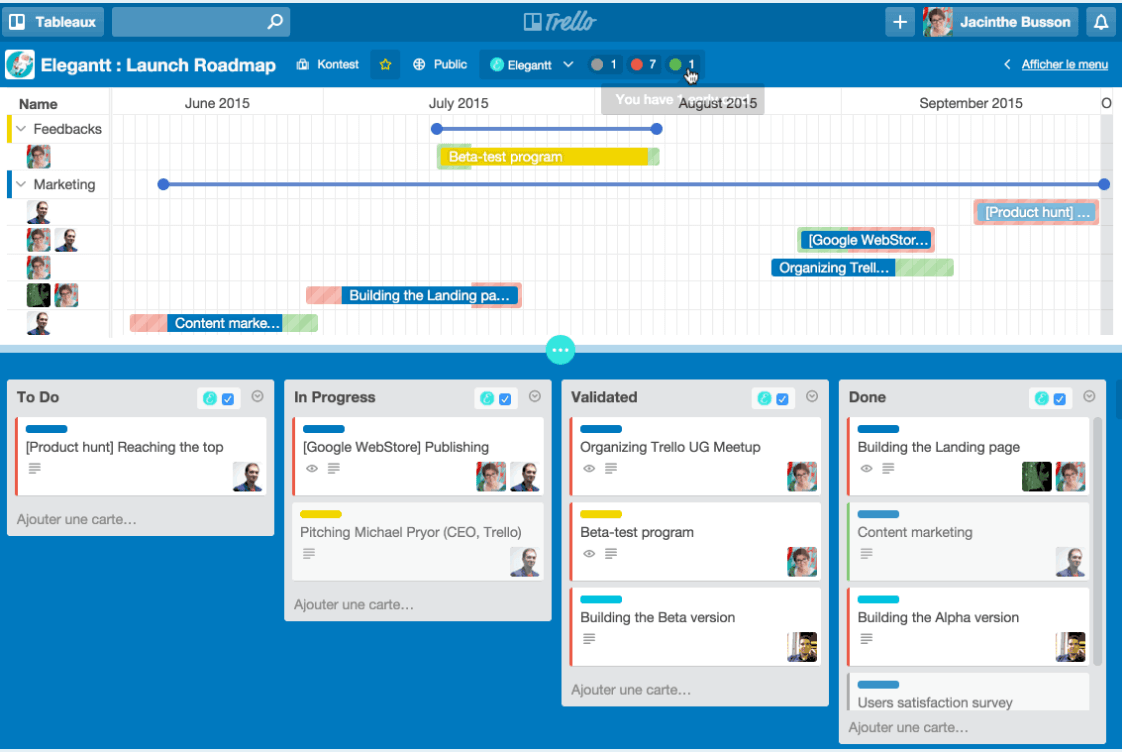
Trello is a simple but powerful agile project management tool.
Why I picked Trello: If you’re looking for an easy entry into the world of agile, Trello has one of the shortest learning curves and it’s one of the easiest to get up and running. The tool is free (or at least freemium!) and has to be considered one of the best free agile tools because it’s so intuitive and simple to use.
Being simple also means that it’s limited in features and functionality. Out of the box, Trello has task management and team collaboration, but it’s pretty limited. For richer functionality you have to start paying for it.
Trello Standout Features & Integrations
Features include power-ups, which are additional modules you can add to your boards for things like integrations, custom fields, timesheets, Gantt charts, reporting, and analytics. The tool also includes the ability to create detailed automations and rules that carry out certain tasks when a trigger is performed (e.g. adding a new task to the board).
Integrations include Slack, Jira, Miro, SupportBee, Make, OneLogin, Jell, Paperform, and Salesforce. It also has an integrations with Zapier that you can use to connect to thousands of additional apps.
Pros and Cons
Pros:
- Simple and intuitive Kanban-style boards
- Wide range of integrations
- Easy to set up and onboard team members
Cons:
- Can become cluttered with many cards
- Not ideal for complex projects
Other Agile Project Management Software
Here are a few more that didn’t make my top agile project management tools list, but which are still worth your consideration.
- Nutcache
For project budgeting
- Jira
For scrum boards
- ProjectManager
For hybrid and remote teams
- GoodDay
For its productivity tools
- PivotalTracker
For agile backlog management
- Height
For any team size
- CROOW
With integrated time tracking
- ESPMI
For tracking project-related risks
- ClickUp
For tracking sprint projects
- Smartsheet
For customizability


Related Project Management Software Reviews
If you still haven't found what you're looking for here, check out these other related tools that we've tested and evaluated:
- Project Management Software
- Agile Tracking Tools
- Resource Management Software
- Workflow Automation Software
- Time Tracking Software
- Task Management Software
- Collaboration Tools
- Creative Project Management Software
- Online Project Management Tools
- Project Management Software for Startups
Selection Criteria For Agile Project Management Tools
Here are my weighted criteria for selecting and evaluating the right agile management software.
Core Agile Project Management Software Functionality: 25% of total score
- Sprint planning and tracking to organize and monitor progress within each sprint
- Backlog management for prioritizing and refining project tasks and features
- Scalable collaboration features that allow team members to communicate and share documents seamlessly
- Integration with other tools to ensure a smooth workflow across platforms
- Reporting and analytics for tracking project performance and team productivity
Additional Standout Features: 25% of total score
- Customizable dashboards and reporting tools that provide insights beyond basic project tracking
- Advanced collaboration tools, such as real-time editing and in-app messaging
- Agile-specific features like burndown charts, cumulative flow diagrams, and velocity tracking that are not commonly found in all project management tools
- Automation features that reduce manual tasks and streamline workflows
- Mobile app availability and functionality for teams on the go
Usability: 10% of total score
- Intuitive interfaces that minimize the learning curve and allow teams to adopt the tool quickly
- Drag-and-drop scheduling tools for easy task management
- Clear, uncluttered design that enhances rather than impedes productivity
- Mobile and desktop app consistency to ensure a seamless user experience across devices
Onboarding: 10% of total score
- Comprehensive training materials such as videos, templates, and product tours
- Interactive guides and chatbots that provide immediate assistance
- Community forums or webinars for learning best practices and troubleshooting
- Easy data import and integration setup to transition from other tools smoothly
Customer Support: 10% of total score
- Availability of 24/7 support through multiple channels (e.g. chat, email, phone)
- Responsive and knowledgeable support teams that provide actionable solutions
- Access to a detailed knowledge base for self-service support
- Community forums for peer-to-peer advice and best practices
Value For Money: 10% of total score
- Transparent pricing models that align with the features and benefits offered
- Flexible plans that cater to different team sizes and requirements
- Free trials or demo versions that allow teams to test functionality before committing
- Overall cost-effectiveness when compared to similar tools in the market
Customer Reviews: 10% of total score
- Consistency in positive feedback regarding usability, support, and value
- Specific mentions of how the tool has improved project management processes
- User experiences with onboarding and adoption within their teams
- Comparison with previous tools used and the reasons for switching
How To Choose Agile Project Management Software
As you're shortlisting, trialing, and selecting agile project management software, consider the following:
- What problem are you trying to solve? Start by identifying the agile project management software feature gap you're trying to fill to clarify the features and functionality that the software needs to provide.
- Who will need to use it? To evaluate cost and requirements, consider who'll be using the software and how many licenses you'll need. Evaluate whether it will be just your project managers or the whole organization. Consider whether to prioritize ease of use for all, or speed for your power users.
- What other tools it needs to work with? Clarify what tools you're replacing, what tools are staying, and the tools you'll need to integrate with, such as accounting, CRM, or HR software. You'll need to decide if the tools will need to integrate together or whether you can replace multiple tools with one consolidated agile project management tool.
- What outcomes are important? Consider the result that the software needs to deliver to be considered a success, what capability you want to gain, what you want to improve, and how you will measure success. For example, an outcome could be the ability to get greater visibility into performance.
- How it would work within your organization? Consider the software selection alongside your workflows and delivery methodology. Evaluate what's working well and which areas need to be addressed. Every business is different—don’t assume that the popular tool will work in your org.
Trends in Agile Project Management Software
Here are several new trends that I have identified and believe will continue to shape the development of agile planning tools in the future.
- Mobile optimization and accessibility: The push for mobile optimization and improved accessibility features indicates a growing need for agile project management tools to be fully functional on-the-go. This trend is driven by the increasing prevalence of remote and hybrid work arrangements, which requires software that supports anytime, anywhere access to project information, tasks, and collaboration tools.
- Automation and AI-driven features: Tools are offering more automation and AI-driven functionalities, such as automated task assignments and AI-based risk assessment. These features aim to reduce manual effort, improve accuracy in project forecasting, and optimize resource management. This underscores the push towards leveraging technology to streamline project processes.
- No-code/low-code customization: The rise of no-code and low-code platforms within agile planning software development is a significant trend. These platforms let users customize workflows, create apps, or automate processes without extensive programming knowledge. This reflects a shift towards making agile project management tools more adaptable and accessible to a broader range of users.
- Enhanced security and compliance features: As cybersecurity threats become more sophisticated, there's a noticeable trend towards improved security features within software for agile project management. This includes advanced data encryption, access controls, and compliance with international standards and regulations.
What is Agile Project Management Software?
Agile project management software is a tool that helps you plan, track, and manage projects that are using agile methods (i.e. ways of working that focus on flexibility and adapting quickly to change). Teams like software developers, product managers, and designers use this type of software to break work into short cycles called sprints, track tasks, and stay organized.
You’ll find it useful for better teamwork, faster updates, and keeping everyone in the loop when priorities shift. It can also help you keep in contact with stakeholders and customers, which is critical in maintaining a strong feedback loop (a key principle of agile).
Features of Agile Project Management Software
Here are the most critical features to look for when selecting the best agile tools for your needs.
- Real-time collaboration: Lets team members communicate and collaborate on tasks in real time. This feature makes sure all team members are on the same page, which improves teamwork and speeds up decision-making.
- Flexible task management: Offers tools for creating, prioritizing, and updating tasks quickly. The ability to adjust tasks and priorities on the fly allows agile teams to respond to changing project requirements and customer feedback effectively.
- User stories and backlogs: Allows teams to capture product functionalities in the form of user stories and manage them in a backlog. This is important for breaking down the project into manageable units that can be prioritized and tackled iteratively, so the most valuable features are developed first.
- Sprint planning tools: Facilitates the organization of work into sprints, so teams can plan iterations effectively. Sprint planning tools are key to defining what work will be accomplished in a set timeframe, which makes it easier to manage expectations and track progress.
- Burndown charts: Provides visual representations of remaining work versus time. Burndown charts are vital for tracking the progress of sprints and releases, so teams can adjust their pace and priorities to meet deadlines.
- Kanban boards: Offers a visual workflow management system to monitor the progress of tasks through different stages. Kanban boards are instrumental in visualizing work, limiting work-in-progress, and ensuring a smooth flow of tasks, which supports continuous delivery.
- Continuous integration/continuous delivery (CI/CD) tools: Integrates with CI/CD pipelines to automate the testing and deployment processes.
- Feedback loops: Allows for quick collection of feedback from stakeholders and incorporation into the project. Fast and efficient feedback loops are essential for agile teams to adapt to changes and continuously improve the product based on user input.
- Reporting and analytics: Offers comprehensive reporting tools and analytics for monitoring project health and team performance. This feature provides insights into project progress, so teams can make data-driven decisions.
- Access controls and permissions: Allows for the management of access rights and permissions for different users. Proper access controls make sure sensitive information is protected and that team members can access the data they need to work effectively.
Benefits of Agile Project Management Software
Here are five key advantages that agile planning apps offer to users and organizations:
- Increased flexibility: The best tools for agile project management allow teams to adapt to changes quickly and efficiently. This flexibility makes sure that businesses can respond to market changes, customer feedback, and unforeseen challenges without derailing the project.
- Enhanced collaboration: These tools provide platforms for real-time communication and collaboration among team members, regardless of their location. Enhanced collaboration leads to better problem-solving, more innovative ideas, and a stronger sense of unity among team members, all of which contribute to the success of projects.
- Improved project visibility: With features like dashboards, burndown charts, and Kanban boards, stakeholders gain a clear overview of project progress. Improved project visibility helps you make informed decisions, make sure resources are allocated efficiently, and keep everyone aligned with the project goals.
- Faster time to market: By facilitating continuous integration and delivery, the top agile software lets businesses release smaller increments of their product faster. This improves customer satisfaction by delivering value more frequently and allows businesses to stay ahead of the competition by accelerating time to market.
- Higher product quality: Continuous feedback loops and regular iterations mean that issues are identified and addressed early on in the project life cycle. The improves product quality and makes sure the final product closely aligns with customer needs and undergoes thorough testing before release.
Costs & Pricing for Agile Project Management Software
Here is a breakdown of typical pricing plans you may encounter as you search for the right tool for your needs:
| Plan Type | Average Price | Common Features |
|---|---|---|
| Free | $0 | Basic project management, limited users, essential collaboration tools |
| Starter/Basic | $10-20 per user/month | Enhanced project tracking, additional users, basic integrations |
| Standard/Mid-Range | $20-50 per user/month | Advanced reporting, unlimited projects, priority support, more integrations |
| Premium/Advanced | $50-100 per user/month | Portfolio management, custom fields and workflows, advanced analytics, full integration options |
| Enterprise | Custom Pricing | Comprehensive features set, dedicated support, onboarding and training, enterprise-grade security |
Agile Project Management Software Frequently Asked Questions
Find answers to common questions other people ask about this topic.
What is an agile methodology?
Unlike waterfall, the gist of agile project management is that “every project must be aligned to clearly defined business goals and must focus on the early delivery of products that provide real added value to the business organization,” according to Henny Portman in their article on agile methodologies.
Agile development can use one of 50+ agile approaches and frameworks, including the very popular Scrum (for which Scrum teams might use a specific Scrum tool), its cousin Kanban, or other practices like Extreme Programming (XP) and Feature Driven Development (FDD).
Agile frameworks are adapted and hybridized—there’s no one right way to be agile. Whatever version you follow, you’re working with the basic agile principles laid out in the agile manifesto, which focus on communication, collaboration, self-organization, and responding quickly to new information.
How is agile useful for software development teams?
Before agile project management, the development team was often beholden to rigid, hierarchical practices with “permission gates” between phases. It was a slow, lumbering process that featured long development cycles and no way to adapt to big changes in scope, budget, or resources. Agile management is the exact opposite.
The agile development process is all about communication, collaboration, and being able to react at whiplash speed to new information and goals. Agile software development ensures that every action is taken and resource spent contributes to predefined business goals, KPIs, and/or provides some sort of ROI. That way, no money or effort feels wasted as the project team struggles to navigate an uncertain roadmap.
Running agile projects means moving quickly, being flexible, and iterating on work using feedback cycles. By prioritizing communication and collaboration, every agile team member can be sure that they are spending their time on tasks that contribute directly to a set of overarching goals.
Agile PM can be adapted to A) develop a new product from scratch, or B) perform ongoing improvement of already-finished products. Iteration and evolution are key for an agile development cycle, meaning that you can expect multiple iterations and much end-user feedback and product testing. Really, anyone can follow agile development—not just software teams. After all, who doesn’t like being fast and flexible in their work?
Is there free agile PM software?
Yes, there are plenty of free agile project management software, or freemium (an agile project management course free forever plan with limited features or users). For example:
- Scrumblr
- Trello
- iceScrum
- ScrumDo
- Yodiz
- ScrumDesk
- Kanbanchi
- Pipefy
- VivifyScrum
- KanbanTool
Even if you start using agile PM software for free, you should check out its paid plans to make sure you’re on board with them, as you might grow into those paid plans down the road.
How To Choose Agile Project Management Software
As you’re shortlisting, trialing, and selecting agile project management software, consider the following:
-
- What problem are you trying to solve? Start by identifying the agile project management software feature gap you’re trying to fill to clarify the features and functionality that the software needs to provide.
-
- Who will need to use it? To evaluate cost and requirements, consider who’ll be using the software and how many licenses you’ll need. Evaluate whether it will be just your project managers or the whole organization. Consider whether to prioritize ease of use for all, or speed for your power users.
-
- What other tools it needs to work with? Clarify what tools you’re replacing, what tools are staying, and the tools you’ll need to integrate with, such as accounting, CRM, or HR software. You’ll need to decide if the tools will need to integrate together or whether you can replace multiple tools with one consolidated agile project management tool.
-
- What outcomes are important? Consider the result that the software needs to deliver to be considered a success, what capability you want to gain, what you want to improve, and how you will measure success. For example, an outcome could be the ability to get greater visibility into performance.
-
- How it would work within your organization? Consider the software selection alongside your workflows and delivery methodology. Evaluate what’s working well and which areas need to be addressed. Every business is different—don’t assume that the popular tool will work in your org.
What's Next?
The topic of agile can be confusing, as many terms overlap and frameworks have many similarities. Therefore, I recommend you start by reading the 3 key similarities between Lean and Agile.