

2026’nın En İyi 10 Kurumsal Proje Yönetimi Panosu

10 En İyi Kurumsal Proje Yönetimi Panoları Kısa Listesi


Bu kadar çok seçenek varken doğru kurumsal proje yönetimi panosu aracını seçmek bunaltıcı olabilir. Kurumsal proje yönetimi panosu, kolay erişim ve yönetim için tüm proje verilerini merkezileştirir. Verimliliği, şeffaflığı ve karar alma süreçlerini geliştirir. Bu yazılım; düzensiz veriler, gerçek zamanlı güncellemelerin eksikliği ve verimsiz iletişim gibi yaygın sorunları ele alır.
Proje planlamanızı, takibinizi ve raporlamanızı düzenleyecek bir araca ihtiyacınız var, ancak hangisinin en uygun olduğunu belirlemek zor olabilir. Size yardımcı olacağım! Büyük ölçekli projeleri yönetme ve çeşitli proje yönetimi panolarını kullanma konusundaki kapsamlı deneyimimden yararlanarak en iyi seçenekler konusunda size rehberlik edeceğim. İşte en iyi kurumsal proje yönetimi panosu yazılımı seçimlerim.
Why Trust Our Software Recommendations
Our team has been testing and reviewing software since 2012. As project managers ourselves, we know how difficult—and important—it is to choose the right software.
For this guide, we evaluated tools using hands-on testing and independent research, scoring tools using our selection criteria. We also draw on insights from industry thought leaders and practicing project management experts.
Our reviews reflect our human editorial judgment, not a sales pitch.
Expert reviewers:
Kurumsal Proje Yönetimi Panosu Karşılaştırma Tablosu
Bu karşılaştırma tablosu, en iyi kurumsal proje yönetimi panosu seçimlerim için fiyatlandırma ayrıntılarını özetler:
| Tool | Starting Price | Website | |
|---|---|---|---|
| Best for real-time capacity planning | 4.2 out of 5 | $7/resource/month 30-day free trial available | Book Demo |
| Best for customizable dashboards | 4.3 out of 5 | $10/user/month Free plan + 14-day trial + demo available | Book Demo |
| Best for configurable workflow automation | 4.6 out of 5 | Pricing upon request Not available | Book Demo |
| Best for advanced portfolio management | 4.6 out of 5 | $9/user/month Free plan + 14-day trial available | Book Demo |
| Best for built-in time and expense tracking | 4.5 out of 5 | $10/user/month 14-day free trial | Website |
| Best for advanced project scheduling | 4.7 out of 5 | £679.99 one-time purchase Not available | Website |
| Best for user-friendly task management | 4.5 out of 5 | $5/user/month Free plan + free trial available | Website |
| Best for client service businesses | 4.4 out of 5 | $9.99/user/month Free plan + 14-day free trial + free demo available | Website |
| Best for customizable workflows | 4.4 out of 5 | $8.48/user/month Free plan + 7-day free trial available | Website |
| Best for marketing work management | 4.3 out of 5 | Pricing upon request Not available | Website |
Kurumsal Proje Yönetimi Panosu Aracı Nasıl Seçilir?
Kendinize özgü yazılım seçme sürecinizi yürütürken aşağıdaki noktaları göz önünde bulundurun:
- Entegrasyon Özellikleri: Kolay veri akışı için panonun mevcut araçlar ve sistemlerle entegre olabildiğinden emin olun. Bu entegrasyon, manuel veri girişi ihtiyacını en aza indirir ve hata riskini azaltır.
- Özelleştirme: Panoyu belirli proje ihtiyaçlarını ve kurumsal hedefleri karşılayacak şekilde uyarlamanıza olanak tanıyan seçenekleri arayın. Farklı projeler farklı ölçümler ve görselleştirmeler gerektirebilir. özelleştirilebilir bir pano aracı, ekibinizin ihtiyaçlarıyla en alakalı görünümleri ve raporları oluşturmanıza olanak tanır.
- Kullanıcı Dostu Arayüz: Basit ve sezgisel bir tasarım, kullanıcıların benimsemesini ve etkileşimini kolaylaştırır. Pano çok karmaşık veya kullanımı zor olursa ekip üyelerinin onu etkili bir şekilde kullanma olasılığı azalır. Kullanıcı dostu bir arayüz, teknik uzmanlıkları ne olursa olsun tüm ekip üyelerinin ihtiyaç duydukları verilere kolayca erişebilmesini ve bu verileri yorumlayabilmesini sağlar.
- Gerçek Zamanlı Raporlama: Gerçek zamanlı içgörüler ve analizler oluşturabilme özelliği, bilinçli karar alma açısından kritik öneme sahiptir. Gerçek zamanlı raporlama, proje yöneticilerinin periyodik güncellemeleri beklemek yerine sorunları ortaya çıktıkları anda hızlıca belirleyip çözmesine olanak tanır. Proje koşullarının hızla değişebildiği hızlı tempolu sektörlerde bu özellik özellikle önemli olabilir.
- İş Birliği Özellikleri: Ekip iş birliğini ve iletişimini geliştiren bir pano seçin. Paylaşılan çalışma alanları, yorum dizileri ve görev atamaları gibi özellikler, ekip üyelerinin uyum içinde kalmasına ve daha etkili bir şekilde birlikte çalışmasına yardımcı olabilir.

En İyi Kurumsal Proje Yönetimi Gösterge Paneli İncelemeleri
Bu bölüm, her bir kurumsal proje yönetimi gösterge panelinin derinlemesine analizini ve genel görünümünü sunar. Her aracın artılarını ve eksilerini, özelliklerini ve en uygun kullanım alanlarını inceleyeceğim.

Runn
Best for real-time capacity planning

Runn is a resource management and capacity planning platform that combines real-time scheduling, utilization tracking, financial forecasting, and portfolio-level dashboards for teams managing multiple concurrent projects.
Who Is Runn Best For?
Runn is a strong fit for portfolio program managers and delivery leads at mid-size to enterprise tech organizations running multiple projects simultaneously.
Why I Picked Runn
I picked Runn as one of the best because its capacity vs. demand charts update in real time, so I can spot overallocation before it becomes a delivery problem. I particularly like the Saved Scenarios feature, which lets me model tentative projects against confirmed work and see the impact on team capacity instantly. The Custom Private Dashboards on the Advanced plan let me surface utilization, workforce, and budget insights in a single view without building a separate report.
Runn Key Features
- Workstreams: Segment projects into parallel streams to visualize how resources are distributed across initiatives.
- Role-based permissions: Control user access levels for sensitive portfolio and financial data across different teams.
- Project financials: Track project budgets, rate cards, and planned versus actual spend in a unified dashboard.
- Native HRIS and PM integrations: Connect directly with tools like Jira, BambooHR, and Workday to centralize project and resource data.
Runn Integrations
Runn offers native integrations with Jira, BambooHR, Workday, ADP, HiBob, Harvest, and Clockify. It connects with Zapier and provides an open API for custom integrations.
Pros and Cons
Pros:
- Utilization heatmaps surface for overallocation
- Scenario modeling for tentative vs. confirmed projects
- Real-time demand visibility across projects
Cons:
- Lacks native task-level project execution features
- Dashboard customization limited on lower-tier plans
Wrike
Best for customizable dashboards

Wrike is an enterprise project management platform with real-time dashboards and analytics, multi-view portfolio visibility, AI-powered insights, and cross-functional reporting built to handle complex, large-scale workflows.
Who Is Wrike Best For?
Wrike is a strong fit for mid-to-large enterprises running multiple concurrent projects across cross-functional teams who need portfolio-level visibility in one place.
Why I Picked Wrike
Wrike earns its spot as one of the best on my shortlist because of how far you can push its dashboard customization. I love that you can build dashboards from scratch using widgets, apply filters by assignee, status, or custom field, and arrange multiple data sources side by side. The calculated custom fields feature lets me display formula-based metrics directly on a dashboard, which is something I rarely see done this well in other tools.
Wrike Key Features
- Real-time reporting: Generate live reports on task progress, team workload, and project status using pre-built or custom report templates.
- Portfolio view: Visualize all active projects in a single view with status indicators, timelines, and ownership across your entire portfolio.
- Wrike Copilot AI: Use AI to surface project risks, auto-generate task summaries, and flag overdue items directly within your workspace.
- Resource management: View team capacity and workload distribution across projects to identify bottlenecks and reassign work as needed.
Pros and Cons
Pros:
- Comprehensive project management features with high customization
- Effective time tracking and workload management
- Robust reporting and analytics capabilities
Cons:
- Learning curve for new users
- Mobile app lacks some desktop features
New Product Updates from Wrike

Wrike Redesigns Workspace Search With New Filters
Wrike introduces a redesigned Workspace Search interface with recent search shortcuts, item type and location filters, and parent-task context. These updates help users find relevant work items and navigate search results efficiently. For more information, visit Wrike’s official site.
 .

Best for configurable workflow automation
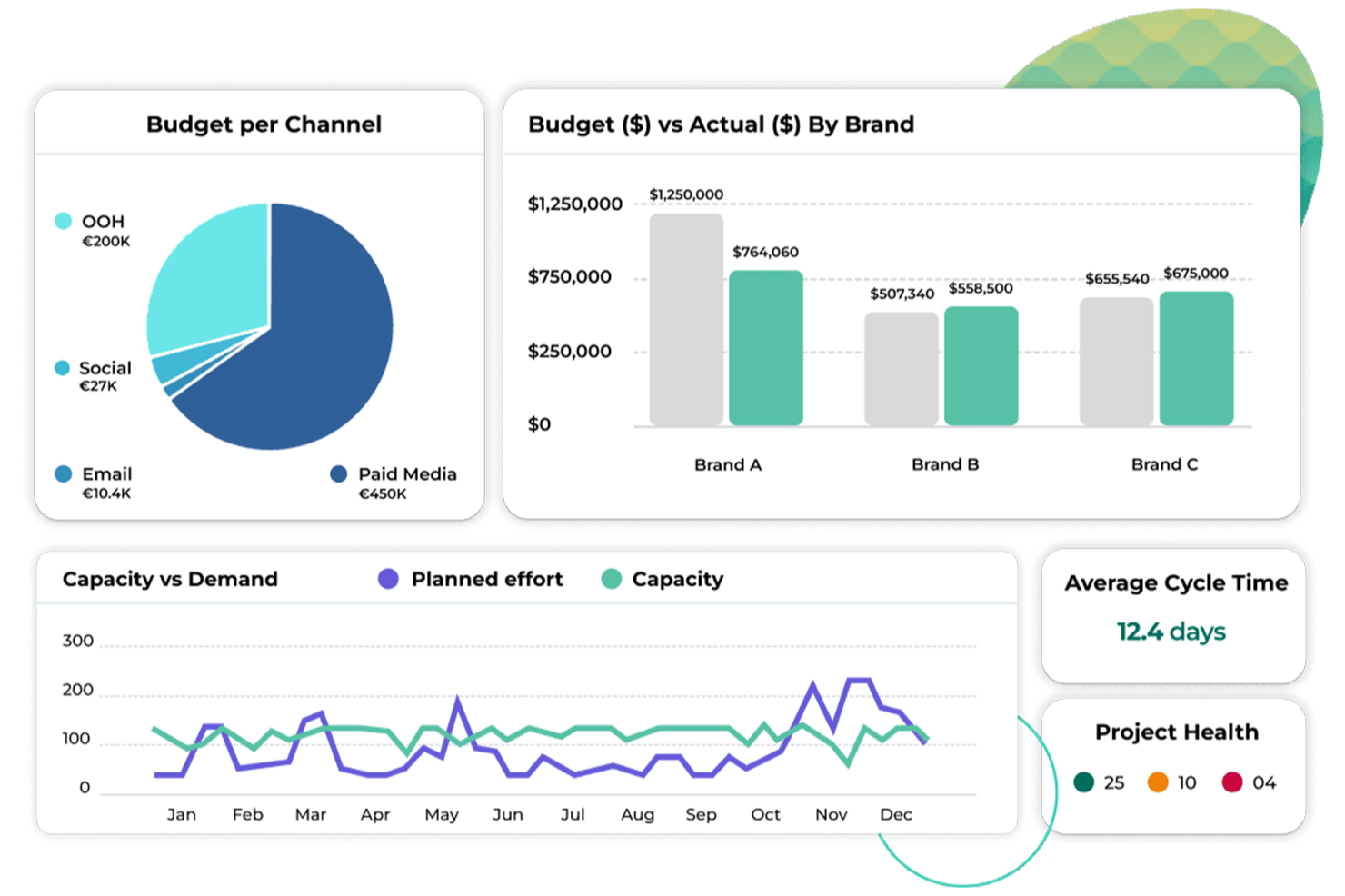
Screendragon is an enterprise workflow and project management platform built for marketing and creative operations teams, combining no-code workflow automation, configurable dashboards, digital approvals, and resource planning in one system.
Who Is Screendragon Best For?
Screendragon is a strong fit for enterprise marketing, agency, and creative operations teams managing high volumes of complex, approval-heavy projects.
Why I Picked Screendragon
I picked Screendragon as one of the best because its no-code visual workflow builder lets me design complex, multi-step processes from scratch without involving a developer. What I find genuinely useful is how dynamic custom forms connect directly to automated workflow sequences, so a brief intake form can instantly trigger routing, assignments, and approvals. The conditional logic built into the workflow engine means I can set up approval loops with different paths based on budget thresholds, region, or project type.
Screendragon Key Features
- Real-time project dashboards: View live project status, milestones, and workload data across multiple projects from a single configurable dashboard.
- Resource and capacity planning: Assign resources to tasks, track availability, and flag overallocation across your team in real time.
- Budget tracking: Monitor project spend against budgets directly within the project plan.
- Custom reporting: Build and schedule automated reports using configurable data sets across projects, teams, and timelines.
Screendragon Integrations
Screendragon offers pre-built integrations that connect with tools your teams already use, including Jira, Google Drive, Egnyte, Box, Adobe, OneDrive, NetSuite, Salesforce, Microsoft 365, and SAP. It also integrates with Aprimo, HubSpot, Microsoft Power BI, Microsoft Teams, Slack, Amazon S3, Sitecore, Ziflow, Brandfolder, Smartsheet, and Workato, and provides an API and a Connection Manager for building custom integrations with any system that has an open API.
Pros and Cons
Pros:
- Visual resource workload management
- Dynamic forms consolidate multiple inputs
- No-code admin tool for live changes
Cons:
- Reporting lacks deeper analytical drill-downs
- Occasional slow page loading times
Best for advanced portfolio management
monday.com is a work management platform with customizable dashboards, portfolio-level tracking, cross-project dependency management, AI-powered risk insights, and resource planning tools built for enterprise project teams.
Who Is monday.com Best For?
monday.com is a strong fit for enterprise teams managing multiple concurrent projects who need cross-portfolio visibility, resource tracking, and stakeholder reporting in one place.
Why I Picked monday.com
monday.com earns its spot on my shortlist because its portfolio management tools go well beyond basic project grouping. I particularly like the All Projects Dashboard, which pulls live data from every connected project board into a single view with pre-built widgets for status, workload, and timelines. AI-powered Portfolio Risk Insights scans your project boards daily and surfaces a prioritized list of risks before they become blockers.
monday.com Key Features
- Cross-project dependencies: Link tasks across multiple project boards to track how delays in one project affect timelines in another.
- Capacity Manager: View team availability and workload across projects in real time to identify over-allocation before it impacts delivery.
- Dashboard widgets: Choose from 50+ widgets, including charts, number summaries, and Gantt views, to build custom reporting layouts.
- Milestone tracking: Set and monitor key project milestones directly on your board to keep delivery schedules visible to stakeholders.
Pros and Cons
Pros:
- Strong visualization tools, including customizable dashboards
- Intuitive drag-and-drop interface for quick onboarding
- Highly customizable with extensive task management options
Cons:
- Some functionality, like time tracking, is limited to premium plans
- Higher pricing for advanced features
New Product Updates from monday AI Workspace
monday AI Workspace Adds Human Approval Routing
monday AI Workspace adds a human-in-the-loop approval block to AI Workflows, sending approval requests and routing workflow paths based on responses. For more information, visit monday AI Workspace's official site.
 .

Celoxis
Best for built-in time and expense tracking

Celoxis is an enterprise project and portfolio management platform that brings together project scheduling, resource planning, time and expense tracking, financial management, and real-time dashboards in a single system.
Who Is Celoxis Best For?
Celoxis is a strong fit for mid-to-large enterprises that manage multiple concurrent projects across cross-functional teams and need centralized visibility into portfolios, resources, and financials.
Why I Picked Celoxis
I've included Celoxis in my top picks because its time and expense tracking lives inside the same system where work actually happens. I like that timesheets connect directly to tasks and projects, so logged hours flow into project cost calculations automatically. Expense tracking supports multi-currency entries, approval workflows, and budget comparisons in real time. That means my team isn't reconciling data across separate tools at the end of a billing cycle.
Celoxis Key Features
- Portfolio dashboard: View aggregated project health, milestones, budgets, and risks across your entire portfolio in a single configurable dashboard.
- Resource capacity planning: See team availability and allocation across projects, and reassign workloads directly from the resource planner.
- Critical path analysis: Automatically identify the tasks that directly impact your project deadline so you can prioritize scheduling decisions.
- Custom report builder: Build detailed reports using filters, groupings, and calculated fields across any project data set.
Celoxis Integrations
Celoxis offers native integrations with Google Drive, Microsoft Excel, Microsoft Project, Salesforce, Jira, Zendesk, Slack, QuickBooks Online, and more. It also connects with Zapier, and an API is available for custom integrations.
Pros and Cons
Pros:
- Cloud and on-premise deployment options
- Handles complex multi-project Gantt scheduling
- Built-in budget and cost-to-completion tracking
Cons:
- Large project dashboards can load slowly
- UI feels dated and menu-dense
Best for advanced project scheduling

Microsoft Project is an enterprise project and portfolio management platform that combines Gantt chart scheduling, resource management, and real-time dashboard reporting across projects and programs.
Who Is Microsoft Project Best For?
Microsoft Project is a strong fit for enterprise project managers and PMOs running complex, multi-workstream initiatives who need structured scheduling and portfolio-level visibility.
Why I Picked Microsoft Project
I picked Microsoft Project because its scheduling engine is unmatched for complex, multi-phase work. I rely on its critical path analysis to surface which tasks control the project end date, and auto-scheduling adjusts dependent tasks when timelines shift. I also use the built-in baseline tracking to compare planned vs. actual progress directly on the Gantt chart, making schedule variance visible without a separate reporting layer.
Microsoft Project Key Features
- Portfolio dashboards: View cost, schedule, and status across all active projects in a single dashboard with built-in visual indicators.
- Resource management: Assign and monitor resource workloads across tasks, with capacity views that flag over-allocations.
- Timesheet tracking: Team members log time directly in the tool, feeding actual hours into project progress reporting.
- Agile board views: Switch between grid, board, and timeline views to support both waterfall and sprint-based delivery.
Pros and Cons
Pros:
- Scalable for large projects
- Powerful scheduling engine
- Ideal Microsoft integration
Cons:
- Limited AI-driven features
- Heavy reliance on Microsoft Dynamics 365
Trello
Best for user-friendly task management

Trello is a kanban-based project management tool built by Atlassian that lets teams organize work across boards, lists, and cards, with dashboard views, multiple project views, and automation features.
Who Is Trello Best For?
Trello is a good fit for small to mid-sized teams that need a lightweight, visual way to manage tasks without a steep learning curve.
Why I Picked Trello
Trello earns its spot on my shortlist because its kanban board interface makes task management genuinely approachable, even for teams who've never used a project management tool before. I like how Butler, Trello's built-in no-code automation, lets my team set up card-moving rules and due date triggers without writing a single line of code. The Dashboard view pulls together card counts by list, member, and label into visual charts I can scan in seconds.
Trello Key Features
- Timeline view: A Gantt-style view that maps cards across a horizontal timeline so you can track project schedules and spot overlapping tasks.
- Table view: Displays cards from across your boards in a spreadsheet-style layout, making it easy to filter and sort work by due date or assignee.
- Workspace views: See cards from multiple boards in one place, giving you a cross-project snapshot without switching between boards.
- Card templates: Pre-configured card structures that standardize how recurring tasks are created across your team.
Pros and Cons
Pros:
- Multi-board view options
- Customizable Power-Ups
- Intuitive drag-and-drop interface
Cons:
- No advanced AI-driven features
- No built-in time-tracking
Best for client service businesses

Teamwork.com is a project management platform built around client work, combining task tracking, resource planning, time tracking, budget management, and real-time reporting dashboards.
Who Is Teamwork.com Best For?
Teamwork.com is a strong fit for agencies, consultancies, and professional services teams that manage multiple client projects simultaneously.
Why I Picked Teamwork.com
Teamwork.com earns its spot on my shortlist because it's one of the few project management platforms genuinely built around client work. I love the Clients dashboard view, which surfaces aggregate metrics across every project tied to a specific client—budget health, time spent, and outstanding action items—without needing to open each project individually. The profitability reporting is equally sharp, giving you a real-time breakdown of revenue, cost, and margin at the project and client level, which matters when you're juggling multiple accounts at once.
Teamwork.com Key Features
- Portfolio dashboard: View status, health, and progress across all active projects in a single consolidated view.
- Resource utilization reporting: Track team capacity and workload allocation across projects to spot over- or under-scheduling.
- Time tracking: Log time directly against tasks and compare logged hours to estimates within project reports.
- Milestone tracking: Set and monitor key project milestones with status indicators visible across the project dashboard.
Pros and Cons
Pros:
- Client collaboration features
- Strong billing and invoicing tools
- Built-in time tracking
Cons:
- Requires some training for full functionality
- Extensive features can be overwhelming for small teams

Jira
Best for customizable workflows

Jira is an agile project management platform built by Atlassian that combines customizable dashboards, multi-view project tracking, no-code workflow automation, and AI-powered reporting across engineering, product, and business teams.
Who Is Jira Best For?
Jira is a strong fit for enterprise engineering and product teams that need to coordinate large-scale delivery across multiple squads, workstreams, or departments.
Why I Picked Jira
Jira earns its spot on my shortlist because no other tool gives you this level of control over how work moves through your system. I use the no-code workflow builder to define custom statuses, transitions, and trigger-based automation rules that match exactly how my team operates. When those workflows feed into Jira's configurable dashboards, I can surface the right project signals without manual reporting. That combination of workflow logic and visual tracking is where Jira really pulls ahead.
Jira Key Features
- Timeline view: A Gantt-style view that maps dependencies and milestones across multiple projects simultaneously.
- Cross-project reporting: Aggregate data from multiple projects into a single report to track progress at the portfolio level.
- Goals tracking: Link team work directly to business objectives so you can monitor goal progress alongside project activity.
- Multiple project views: Switch between board, list, and calendar views to match how different teams prefer to track work.
Pros and Cons
Pros:
- Extensive integration options
- Robust reporting and analytics
- Highly customizable workflows
Cons:
- Enterprise plan requires custom quote
- Slight learning curve

Best for marketing work management

Adobe Workfront is a cloud-based enterprise work management platform that combines project planning, resource management, workflow automation, customizable dashboards, and reporting to give marketing and cross-functional teams full visibility into work progress at scale.
Who Is Adobe Workfront Best For?
Adobe Workfront is a strong fit for large enterprises with complex, multi-team marketing and creative operations that need centralized visibility across campaigns and projects.
Why I Picked Adobe Workfront
I've included Adobe Workfront in my top picks because it's purpose-built as a marketing system of record, giving marketing teams a single platform to manage the full campaign lifecycle. I particularly like Workfront Planning, which links planning and execution records across the marketing ecosystem and lets you build role-specific calendar and timeline views. The native Frame.io integration also brings creative review and approval directly into the project workflow, which keeps feedback loops tight across marketing and creative teams.
Adobe Workfront Key Features
- Customizable dashboards: Build multi-widget dashboards that surface real-time project, task, and portfolio data for different roles and stakeholders.
- Data Connect: Export Workfront data directly to BI tools like Tableau and Power BI for advanced reporting and cross-platform analysis.
- Portfolio optimizer: Score, prioritize, and compare projects across a portfolio using weighted business case criteria.
- Workload balancer: View and adjust resource assignments across teams to manage capacity against active project demands.
Pros and Cons
Pros:
- Streamlined review processes
- Centralized work management
- Automated scheduling and planning tools
Cons:
- Slightly complex initial setup
- Pricing not transparent
Diğer Kurumsal Proje Yönetimi Gösterge Panelleri
Aşağıda, kısa listeme aldığım ancak en üst sıralamaya giremeyen ek kurumsal proje yönetimi gösterge panellerinin bir listesi yer alıyor. Kesinlikle göz atmaya değer.
- Aha!
For product roadmap planning
- ProjectManager
For real-time data insights
- ClickUp
For all-in-one productivity
- Asana
For visual project overviews
- Tempo Portfolio Manager
For predictive scheduling
- Smartsheet
For a spreadsheet-like interface
- GoodDay
For diverse visualization views
- TaskRay
For Salesforce-native integration
- Basecamp
For simple project collaboration
- Freedcamp
For budget-friendly teams
- Zoho Projects
For integration with Zoho suite
- Kantata
For professional services automation
- ProofHub
For all-in-one project management
- MeisterTask
For intuitive task management
- GanttPRO
For dashboard simplicity


İlgili Proje Yönetimi İncelemeleri
Burada aradığınızı hâlâ bulamadıysanız, sizin için derlediğimiz diğer proje yönetimi aracı incelemelerine göz atın:
- Gantt Şeması Oluşturucu
- Verimlilik Araçları
- Proje Takip Yazılımı
- Proje Zamanlama Yazılımı
- Proje Yönetimi Yazılımı
- Kaynak Yönetimi Yazılımı
How I Evaluate Enterprise Project Management Dashboards
I split my evaluation into baseline criteria—like real-time portfolio rollups and enterprise SSO—and differentiators that separate tools built for PMO directors from generic project trackers.
Core Functionality (Table Stakes For This List)
When I'm selecting tools for my list, I rank each one on a scale from 0 (does not offer the functionality) to 5 (excels in this area) for each core functionality listed below. Then, I calculate the tool's total score into a percentage. Each tool needs to achieve a minimum total score of 65% to be considered for inclusion.
- Multi-Project Portfolio View: I check whether a tool can aggregate dozens of active projects into a single dashboard with rollup metrics, drill-downs, and filtering by program or team.
- Customizable KPI Widgets: Each tool should let you build dashboard widgets around your own metrics, whether that's sprint velocity, milestone completion rates, or earned value.
- Real-Time Data Sync: I look for live or near-live data refresh so a PMO director opening a dashboard at 9 AM isn't looking at yesterday's project status from a batch import.
- Resource & Budget Tracking: Tools earn higher marks when they surface capacity utilization alongside budget vs. actuals, so you can spot overallocation and cost overruns in one view.
- Enterprise Security & Permissions: I evaluate SSO, SAML, role-based access controls, and audit logging—features that matter when hundreds of users across departments need tiered visibility.
- Integrations & Data Connectors: The best dashboards pull from your existing stack. I look for native connectors to tools like Jira, Azure DevOps, or ServiceNow, plus open APIs for custom data pipelines.
Once I have a list of tools that meet this criteria, I consider what sets each platform apart.
Differentiating Factors (What Sets Vendors Apart)
Here's how I compare and contrast different vendors:
Standout Features
Scenario planning is a major differentiator. I look for tools that let you model what happens to timelines and budgets when you shift resources between programs mid-quarter. AI-powered risk detection also separates the field, flagging schedule slippage or budget anomalies before they surface in your weekly status report. Executive report builders matter too, since PMO directors often need branded, stakeholder-ready outputs they can schedule for automatic delivery to leadership without rebuilding slides every cycle.
Beyond Features
Compliance certifications like SOC 2 Type II and ISO 27001 matter when your organization operates in regulated industries or handles sensitive project data across regions. I also evaluate implementation support. Enterprise dashboard rollouts can stall without dedicated customer success managers and structured onboarding programs. Pricing transparency is another factor I weigh, especially whether a vendor's licensing model scales predictably as you add users, programs, and data volume over time.
Kurumsal Proje Yönetimi Gösterge Panellerindeki Trendler
Kurumsal proje yönetimi gösterge panelleri hızla gelişiyor. Önemli trendler arasında verimliliği ve uyarlanabilirliği artırmak için gelişmiş teknolojilerin ve metodolojilerin entegrasyonu yer alıyor.
- Yapay Zekâ Entegrasyonu: Çoğu yazılım sektöründe olduğu gibi, proje yönetimi de üretken yapay zekâ özellikleriyle giderek daha fazla donatılıyor. Rapor oluşturma ve proje planlama gibi görevleri otomatikleştiren bu trend, performansı önemli ölçüde artırdığı ve yöneticilerin manuel iş akışlarını ve idari görevleri azaltmasına olanak tanıdığı için önem taşıyor.
- Gelişmiş Kaynak Yönetimi Araçları: Gelişmiş proje yönetimi araçları ortaya çıkıyor; bu araçlar gerçek zamanlı KPI'lar ve kolaylaştırılmış kaynak yönetimi sağlıyor. Bu araçlar, performansı optimize etmek ve başarılı proje sonuçları elde etmek için kritik öneme sahip.
- Önceliği Bulut Olan Yaklaşım: Ölçeklenebilir ve erişilebilir uzaktan iş birliğine duyulan ihtiyaç doğrultusunda bulut tabanlı çözümlere geçiş artık norm hâline geliyor. Bu trend, esnek çalışma ortamlarına yönelik artan talebi desteklediği için dikkat çekici.
- Hibrit Çalışma Modelleri: Hibrit çalışma ortamları, net iletişim ve iş birliği araçları gerektirerek proje yönetimi stratejilerini yeniden şekillendiriyor. Bu trend, çalışma düzenlemelerinde esnekliğe duyulan ihtiyaca yanıt verdiği için önem taşıyor.
- Duygusal Zekâya Sahip Liderlik: Yüksek duygusal zekâya sahip liderler, ekip dinamiklerini anlamak ve proje sonuçlarını iyileştirmek için kritik öneme sahip. Bu trend, proje yönetiminde sosyal becerilerin önemini vurguladığı için önemli.
Kurumsal proje yönetimi gösterge paneli yazılımları; rapor oluşturma ve planlama gibi görevleri otomatikleştiren, manuel çalışmayı azaltarak performansı artıran yapay zekâ entegrasyonu gibi önemli trendlerle gelişiyor. Gelişmiş kaynak yönetimi araçları gibi diğer yenilikler ise gerçek zamanlı KPI'lar sağlayarak kaynakları ve proje sonuçlarını optimize ediyor. Ayrıca, duygusal zekâya sahip liderliğe giderek daha fazla odaklanılıyor; bu da ekip dinamiklerini anlamanın ve proje başarısını yönlendirmek için sosyal becerilerden yararlanmanın önemini vurguluyor.
Kurumsal Proje Yönetimi Gösterge Paneli Nedir?
Kurumsal proje yönetimi panosu, bir kuruluş genelindeki proje verilerine ve ölçümlerine merkezi bir görünüm sağlayan bir araçtır. Proje yöneticileri, yöneticiler ve ekip üyeleri tarafından proje performansını izlemek, ilerlemeyi takip etmek ve bilinçli kararlar almak için kullanılır. Temel amacı, proje durumu, kaynak tahsisi ve temel performans göstergeleri hakkında gerçek zamanlı bilgiler sunmaktır.
Kurumsal proje yönetimi panosunun bileşenleri arasında proje zaman çizelgelerini, bütçe kullanımını, kaynak kullanımını ve görev tamamlama oranlarını gösteren görsel çizelgeler, grafikler ve tablolar yer alır. Ayrıca diğer proje yönetimi araçlarıyla entegre olarak verileri bir araya getirir ve birden fazla projeye tek bir yerden kapsamlı bir genel bakış sunar.
Kurumsal Proje Yönetimi Panosunun Özellikleri
Bir kurumsal proje yönetimi panosu seçerken, projeleri etkili bir şekilde yönetmeye yardımcı olacak temel özellikleri anlamak çok önemlidir. Aranması gereken en önemli özellikler şunlardır:
- Görev Yönetimi: Görevlerin oluşturulmasına, atanmasına ve izlenmesine olanak tanır. Bu özellik, tüm ekip üyelerinin sorumluluklarını ve son teslim tarihlerini bilmesini sağlar.
- Kaynak Tahsisi: Kaynakları verimli bir şekilde tahsis etmek için araçlar sunar. Ekip üyelerinin uygunluk durumunu ve iş yükünü yönetmeye yardımcı olur.
- Zaman Takibi: Çeşitli görevlerde harcanan zamanı takip eder. Bu özellik, verimliliği izlemek ve projelerin takvime uygun ilerlemesini sağlamak için gereklidir.
- Bütçe Yönetimi: Proje bütçelerini ve harcamalarını izler. Projenin mali kısıtlar içinde kalmasına yardımcı olur.
- İş Birliği Araçları: Sohbet, dosya paylaşımı ve yorumlar gibi özellikleri içerir. Bu araçlar ekip üyeleri arasındaki iletişimi ve iş birliğini kolaylaştırır.
- Raporlama ve Analiz: Raporlar oluşturur ve proje performansı hakkında analizler sunar. Bu özellik, bilinçli kararlar almak ve gelecekteki projeleri geliştirmek için önemlidir.
- Gantt Şemaları: Proje zaman çizelgelerini ve görev bağımlılıklarını görselleştirir. Proje ilerlemesinin planlanmasına ve izlenmesine yardımcı olur.
- Risk Yönetimi: Olası riskleri belirler ve yönetir. Bu özellik, projeyi sekteye uğratabilecek sorunları azaltmak için kritik öneme sahiptir.
- Entegrasyon Olanakları: Diğer yazılım araçlarıyla entegre olur. Proje yönetimi panosunun mevcut sistemlerle sorunsuz bir şekilde çalışmasını sağlar.
- Kullanıcı İzinleri: Panonun farklı bölümlerine erişimi denetler. Bu özellik, güvenliği korumak ve hassas bilgilere yalnızca yetkili personelin erişebilmesini sağlamak için önemlidir.
Bu özelliklere sahip doğru kurumsal proje yönetimi panosunu seçmek, projelerin daha etkili bir şekilde yönetilmesine ve daha iyi sonuçlar elde edilmesine yardımcı olur.
Kurumsal Proje Yönetimi Panosunun Faydaları
Kurumsal proje yönetimi panoları, kuruluşlara birden fazla kaynaktan gelen verileri bir araya getirme olanağı sunmak, gerçek zamanlı bilgiler sağlamak ve daha iyi karar almayı kolaylaştırmak üzere tasarlanmıştır. Bu sayede kuruluşlar proje yönetimi süreçlerini geliştirebilir, projelerin zamanında ve bütçe dahilinde tamamlanmasını sağlayabilir. Bu araçları kullanmanın başlıca beş faydası aşağıda verilmiştir:
- Gelişmiş Görünürlük ve Şeffaflık: Panolar, projelerin hızlı ve genel bir görsel görünümünü sunarak yöneticilerin ve ekip üyelerinin hangi projelerin planlandığı şekilde ilerlediğini kolayca doğrulamasına ve daha fazla ilgi ya da desteğe ihtiyaç duyabilecek projeleri belirlemesine olanak tanır.
- Veriye Dayalı Karar Alma Sürecinin Geliştirilmesi: Panolar, gerçek zamanlı güncellemeler ve bilgiler sunarak ekiplerin hızlı bir şekilde bilinçli kararlar almasını, proje gecikmesi riskini azaltmasını ve kaynakların verimli bir şekilde tahsis edilmesini sağlar.
- Artan Verimlilik ve Üretkenlik: Panolar, proje izleme ve raporlama süreçlerini kolaylaştırarak zamandan tasarruf sağlar ve hataları azaltır. Ekip üyelerinin yüksek öncelikli görevlere odaklanmasına olanak tanıyarak genel üretkenliği artırır.
- Daha İyi Risk Yönetimi: Panolar, olası riskler, bunların ciddiyeti ve gerçekleşme olasılığı hakkında bilgiler sunarak ekiplerin sorunları büyümeden önce proaktif bir şekilde ele almasına yardımcı olur ve böylece proje kesintilerini en aza indirir.
- Gelişmiş İletişim ve İş Birliği: İletişim ve güncelleme özellikleri sayesinde panolar, paylaşılan bilgileri ve zaman içindeki proje değişikliklerini takip etmeye olanak tanıyarak ekip çalışmasını destekler ve tüm paydaşların aynı bilgiye sahip olmasını sağlar.
Kurumsal proje yönetimi panoları, proje yönetimi süreçlerini geliştirmek isteyen kuruluşlar için büyük önem taşır. Gerçek zamanlı veriler sağlayarak, görünürlüğü artırarak ve daha iyi karar almayı kolaylaştırarak bu panolar, projelerin başarıyla tamamlanmasını sağlar. Güçlü bir proje yönetimi panosuna yatırım yapmak; verimlilikte, üretkenlikte ve genel proje sonuçlarında önemli iyileşmeler sağlayabilir.
Kurumsal Proje Yönetimi Panosunun Maliyetleri ve Fiyatlandırması
Bu bölümde, kurumsal proje yönetimi panosu planları ve maliyetlerinin ortalama bir tahmini sunulmaktadır. Fiyatlandırma; özelliklere, kullanıcı sayısına ve dağıtım yöntemlerine bağlı olarak önemli ölçüde değişir.
Kurumsal Proje Yönetimi Panoları için Plan Karşılaştırma Tablosu
| Plan Türü | Ortalama Fiyat | Yaygın Özellikler |
| Ücretsiz Plan | $0 | Temel görev yönetimi, sınırlı kullanıcı sayısı, sınırlı depolama |
| Kişisel Plan | $3.66 - $10 kullanıcı başına/aylık | Görev yönetimi, takvim entegrasyonu, temel iş birliği araçları |
| İşletme Planı | $16.88 - $25 kullanıcı başına/aylık | Gelişmiş proje takibi, kaynak yönetimi, entegrasyonlar, geliştirilmiş destek |
| Kurumsal Plan | $30 - $60 kullanıcı başına/aylık | Özelleştirilebilir özellikler, gelişmiş güvenlik, çoklu dil desteği, öncelikli destek |
Kurumsal Proje Yönetimi Panosu SSS
Kurumsal proje yönetimi panoları ve bunların nasıl çalıştığı hakkında sahip olabileceğiniz sık sorulan soruların bazı yanıtlarını burada bulabilirsiniz:
Kurumsal proje yönetimi panomu ekibimin ihtiyaçlarına daha iyi uyacak şekilde nasıl özelleştirebilirim?
Kurumsal proje yönetimi panonuzu özelleştirmek, ekibinizin özel gereksinimleriyle uyumlu olmasını sağlamak için birkaç adım içerir. Gelişmiş panoların çoğu, kullanıcıların bir seçenekler menüsü aracılığıyla panelleri düzenlemesine, silmesine veya çoğaltmasına olanak tanır. Izgara veya tam genişlik gibi görüntüleme modlarını ayarlayabilir ve panel türüne göre hangi değerlerin görüntüleneceğini seçebilirsiniz. Örneğin, Proje Dağılımı paneli proje durumlarını yan yana, yığılmış veya yüzdeler olarak gösterecek şekilde özelleştirilebilir. Ayrıca özel bütçe aralıkları belirleyebilir ve farklı ölçümleri izlemek için aynı türden birden fazla panel ekleyebilirsiniz. Filtreleme seçenekleri de mevcuttur; bunlar genel veya tek tek paneller için özel filtreler uygulamanıza olanak tanır.
Kurumsal proje yönetimi panoları risk yönetimini nasıl destekler?
Kurumsal proje yönetimi panoları, potansiyel risklerin ve bunların projeler üzerindeki etkilerinin merkezi bir görünümünü sunarak risk yönetimini destekler. Gelişmiş panolar, risk yönetimi süreçlerinin yapılandırılmasına yardımcı olan özelleştirilebilir Proje Risk Yönetimi Planı Şablonları gibi özellikler sunar. Bu panolar, proje yöneticilerinin riskleri gerçek zamanlı olarak izlemesine, önem derecelerini analiz etmesine ve azaltma stratejilerini hızlı bir şekilde uygulamasına olanak tanır. Ayrıca panolar, diğer risk yönetimi araçlarıyla entegre olabilir ve birden fazla projedeki riskleri belirleme, değerlendirme ve yönetme konusunda kapsamlı bir yaklaşım sunar.
Panolar, kurumsal bir ortamda proje portföyü yönetimini nasıl geliştirebilir?
Panolar, bir kuruluş içindeki tüm projelerin bütünsel bir görünümünü sunarak proje portföyü yönetimini geliştirir. Şu konularda yardımcı olurlar:
\u003cul\u003e
\t\u003cli\u003e\u003cstrong\u003eProjeleri Önceliklendirme:\u003c/strong\u003e Panolar, proje yöneticilerinin projeleri stratejik hedeflere ve kaynakların kullanılabilirliğine göre önceliklendirmesine olanak tanır.\u003c/li\u003e
\t\u003cli\u003e\u003cstrong\u003eKaynak Tahsisi:\u003c/strong\u003e Projeler arasındaki kaynak dağılımını görselleştirmek, kaynak tahsisini optimize etmeye ve darboğazları önlemeye yardımcı olur.\u003c/li\u003e
\t\u003cli\u003e\u003cstrong\u003ePerformans Takibi:\u003c/strong\u003e Panolar, proje performansı hakkında gerçek zamanlı içgörüler sunarak zamanında müdahalelere ve ayarlamalara olanak tanır.\u003c/li\u003e
\t\u003cli\u003e\u003cstrong\u003eİş Hedefleriyle Uyum:\u003c/strong\u003e Panolar, merkezi bir görünüm sunarak tüm projelerin kuruluşun stratejik hedefleriyle uyumlu olmasını ve genel değer sunumunun geliştirilmesini sağlar.\u003c/li\u003e
\u003c/ul\u003e
Kurumsal Proje Yönetimi Ofisi (EPMO), panoların kullanılmasında nasıl bir rol oynar?
Kurumsal Proje Yönetimi Ofisi (EPMO), proje yönetişimini ve portföy yönetimini geliştirmek amacıyla panoların kullanılmasında kritik bir rol oynar. EPMO, panoların proje performansı, kaynak kullanımı ve stratejik hedeflerle uyum hakkında görünürlük sağlayacak şekilde yapılandırılmasını güvence altına alır. Raporlamada tutarlılık ve doğruluk sağlayarak pano kullanımına ilişkin en iyi uygulamaları belirler. EPMO ayrıca proje ekipleri ve yöneticiler arasındaki iletişimi kolaylaştırmak, karar alma ve stratejik planlamayı destekleyen içgörüler sunmak için panoları kullanır.
Kurumsal proje yönetimi panolarını uygulamanın zorlukları nelerdir ve bunların üstesinden nasıl gelinebilir?
Kurumsal proje yönetimi panolarını uygulamak aşağıdakiler dahil olmak üzere çeşitli zorluklar ortaya çıkarabilir:
\u003cul\u003e
\t\u003cli\u003e\u003cstrong\u003eDeğişime Direnç:\u003c/strong\u003e Ekip üyeleri yeni araçları ve süreçleri benimsemeye direnç gösterebilir. Bunun üstesinden gelmek için panonun faydalarını gösterecek güçlü liderlik, açık iletişim ve eğitim gerekir.\u003c/li\u003e
\t\u003cli\u003e\u003cstrong\u003eMevcut Sistemlerle Entegrasyon:\u003c/strong\u003e Mevcut proje yönetimi araçları ve yazılımlarıyla kolay entegrasyon sağlamak karmaşık olabilir. Güçlü entegrasyon özelliklerine sahip bir pano seçmek ve satıcıdan destek almak bu zorluğun üstesinden gelmeye yardımcı olabilir.\u003c/li\u003e
\t\u003cli\u003e\u003cstrong\u003eVeri Doğruluğu ve Tutarlılığı:\u003c/strong\u003e Birden fazla projede doğru ve tutarlı verilerin korunması kritik önem taşır. Standartlaştırılmış veri girişi uygulamalarının hayata geçirilmesi ve düzenli denetimler, veri bütünlüğünün sağlanmasına yardımcı olabilir.\u003c/li\u003e
\t\u003cli\u003e\u003cstrong\u003eMaliyet ve Kaynak Tahsisi:\u003c/strong\u003e Panoların uygulanması ve sürdürülmesi yoğun kaynak gerektirebilir. Geliştirilmiş proje yönetiminin uzun vadeli faydalarını ve yatırım getirisini göstererek yatırımı gerekçelendirmek, gerekli kaynakların temin edilmesine yardımcı olabilir.\u003c/li\u003e
\u003c/ul\u003e