

10 Google Calendar Alternatives for Scheduling in 2026

Google Calendar Alternatives Shortlist


A strong Google Calendar alternative offers reliable scheduling, easy sharing, and integrations that fit your team’s workflow—without locking you into Google’s ecosystem. If you’re searching for Google Calendar alternatives, you’re likely dealing with privacy concerns, limited customization, or the need to coordinate across different platforms. This list will help you compare top options for 2026, so you can find a calendar tool that matches your scheduling needs, supports your team’s collaboration style, and keeps your data where you want it.
What is Google Calendar?
Google Calendar is a cloud-based scheduling tool that lets users create, manage, and share events and reminders across devices. It supports real-time collaboration, integrates with other Google Workspace apps, and offers features like recurring events, color-coded calendars, and automated notifications. Teams and individuals use Google Calendar to organize meetings, track deadlines, and coordinate schedules, making it a central hub for time management in both personal and professional settings.
Google Calendar Alternatives Comparison Table
This comparison table summarizes pricing details for my top Google Calendar alternative selections:
| Tool | Best For | Trial Info | Price | ||
|---|---|---|---|---|---|
| 1 | Best for client appointment booking | 7-day free trial | From $20/month | Website | |
| 2 | Best for team event coordination | Free plan available | Pricing upon request | Website | |
| 3 | Best for simple meeting scheduling | Free plan available | From $6.99/user/month (billed annually) | Website | |
| 4 | Best for combining notes and scheduling | Free plan available | From $10/user/month | Website | |
| 5 | Best for syncing across Apple devices | Free plan available | Pricing upon request | Website | |
| 6 | Best for natural language event creation | Free plan available | From $4.75/user/month (billed annually) | Website | |
| 7 | Best for privacy-focused scheduling | Free plan available | From $3.99/month (billed annually) | Website | |
| 8 | Best for managing multiple calendars in one view | Free trial available | From $15/month (billed annually) | Website | |
| 9 | Best for integration with Microsoft 365 apps | 30-day free trial | From $9.99/month | Website | |
| 10 | Best with open-source customization | Free plan available | Pricing upon request | Website |
Why Trust Our Software Recommendations
Our team has been testing and reviewing software since 2012. As project managers ourselves, we know how difficult—and important—it is to choose the right software.
For this guide, we evaluated tools using hands-on testing and independent research, scoring tools using our selection criteria. We also draw on insights from industry thought leaders and practicing project management experts.
Our reviews reflect our human editorial judgment, not a sales pitch.
Expert reviewers:
Google Calendar Alternatives Reviews
Below are my detailed summaries of the best Google Calendar alternatives that made it onto my shortlist. My reviews offer a detailed look at the features, integrations, and best use cases of each tool to help you find the best one for you.

Best for client appointment booking
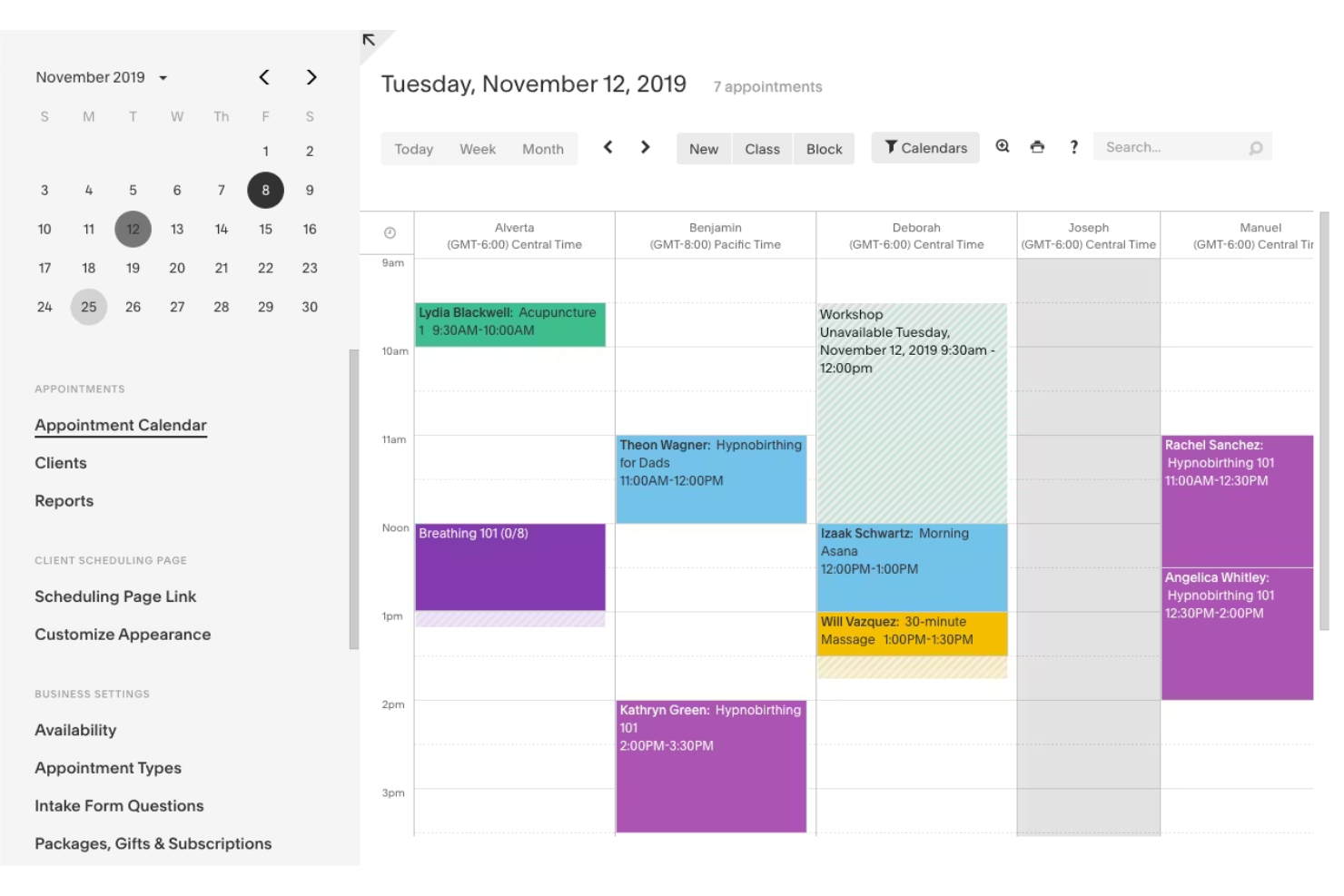
Acuity Scheduling is built for businesses and professionals who need to manage client appointments and bookings online. Unlike Google Calendar, it lets clients self-schedule, reschedule, and pay for appointments through a branded booking page. This makes it a strong fit for service providers who want to automate scheduling and reduce back-and-forth communication.
Why Acuity Scheduling Is a Good Google Calendar Alternative
For anyone who needs a calendar that handles client bookings, Acuity Scheduling offers features Google Calendar doesn’t. I picked Acuity because it gives your clients a branded booking page where they can self-schedule, reschedule, or cancel appointments without your intervention. You can also set up automated reminders and accept payments directly through the platform. This makes Acuity Scheduling especially useful for service-based businesses that want to automate appointment management and reduce manual coordination.
Acuity Scheduling Key Features
Some other features that make Acuity Scheduling appealing for appointment-based businesses include:
- Custom intake forms: Collect client information and preferences before appointments are confirmed.
- Calendar syncing: Syncs with Google Calendar, iCloud, Outlook, and Office 365 calendars to prevent double-booking.
- Group class scheduling: Lets you set up and manage group sessions or classes alongside individual appointments.
- Customizable availability: Define specific hours, blackout dates, and appointment types for more control over your schedule.
Acuity Scheduling Integrations
Integrations include Squarespace, Zoom, Google Meet, GoToMeeting, Mailchimp, QuickBooks, Stripe, Square, PayPal, and FreshBooks.
Pros and Cons
Pros:
- Deep Squarespace integration
- Auto time zone conversion
- Accepts client payments
Cons:
- Overkill for solo users
- Complex initial setup phase

Best for team event coordination
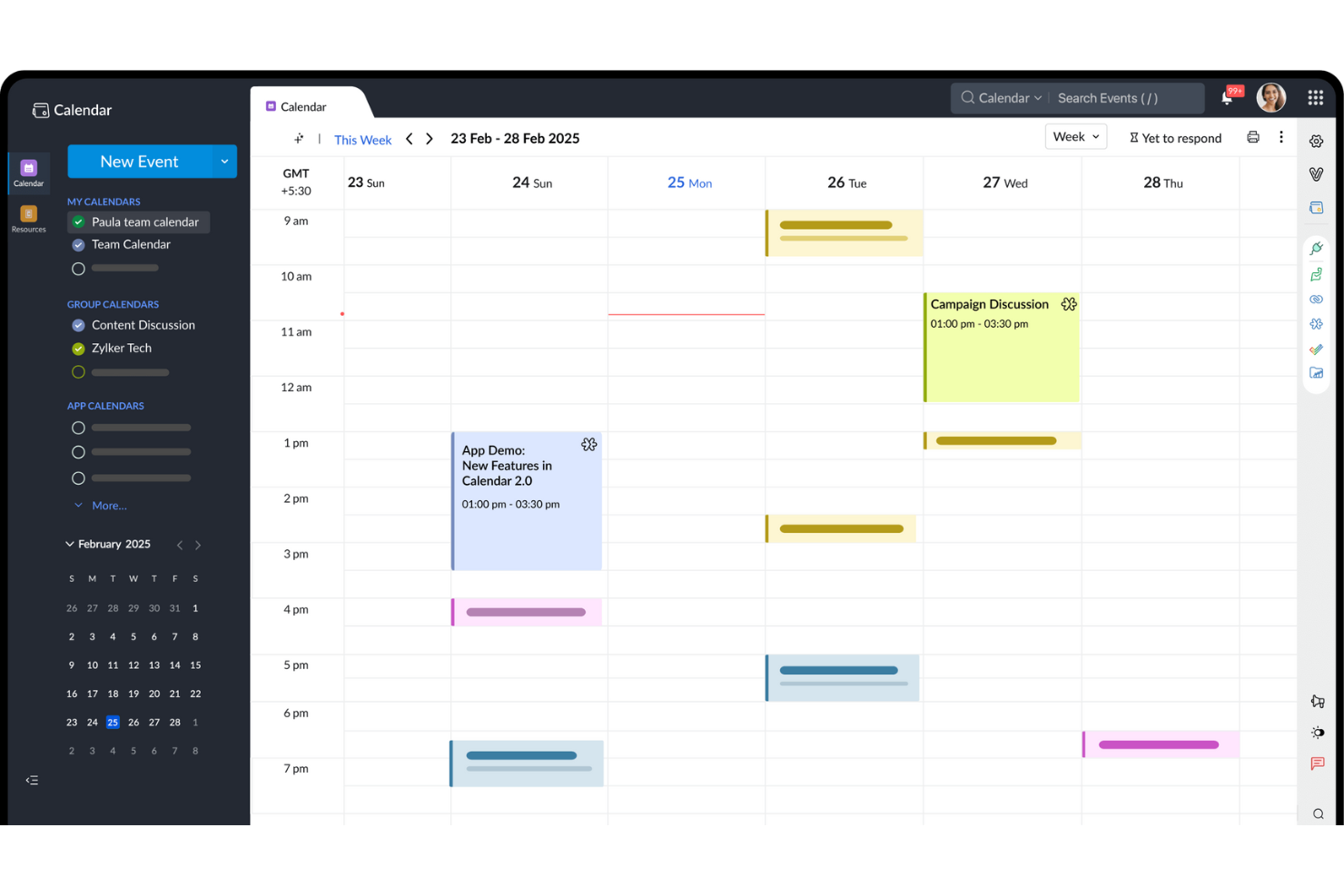
Teams looking for a calendar built around group scheduling and coordination may want to consider Zoho Calendar. It’s designed for organizations that need shared calendars, resource booking, and event management across departments or distributed teams. Unlike Google Calendar, Zoho Calendar offers granular sharing controls and integrates tightly with other Zoho apps for unified team workflows.
Why Zoho Calendar Is a Good Google Calendar Alternative
When your team needs advanced event coordination, Zoho Calendar offers features that go beyond basic scheduling. I picked Zoho Calendar because it lets you create group calendars, manage shared resources like meeting rooms, and set custom permissions for different team members. The platform also supports event invitations and RSVP tracking, making it easier to organize meetings across departments. If your priority is managing team events and resources in one place, Zoho Calendar is a strong alternative to Google Calendar.
Zoho Calendar Key Features
In addition to its team event coordination strengths, Zoho Calendar includes several other useful features:
- Multiple calendar views: Switch between day, week, month, and agenda views to see your schedule in different formats.
- Public calendar publishing: Share calendars publicly with a link or embed them on websites.
- Email reminders: Set up automatic email notifications for upcoming events and meetings.
- Calendar subscription: Subscribe to external calendars using iCal or CalDAV to view all events in one place.
Zoho Calendar Integrations
Integrations include Zoho Mail, Zoho Meeting, Zoho CRM, Zoho Bookings, Zoho Connect, Zoho Cliq, Microsoft Teams, Google Calendar, Webex, and Outlook.
Pros and Cons
Pros:
- Custom event color tags
- Highly affordable plans
- Easy website embedding
Cons:
- Poor standalone experience
- Mobile app is quite clunky

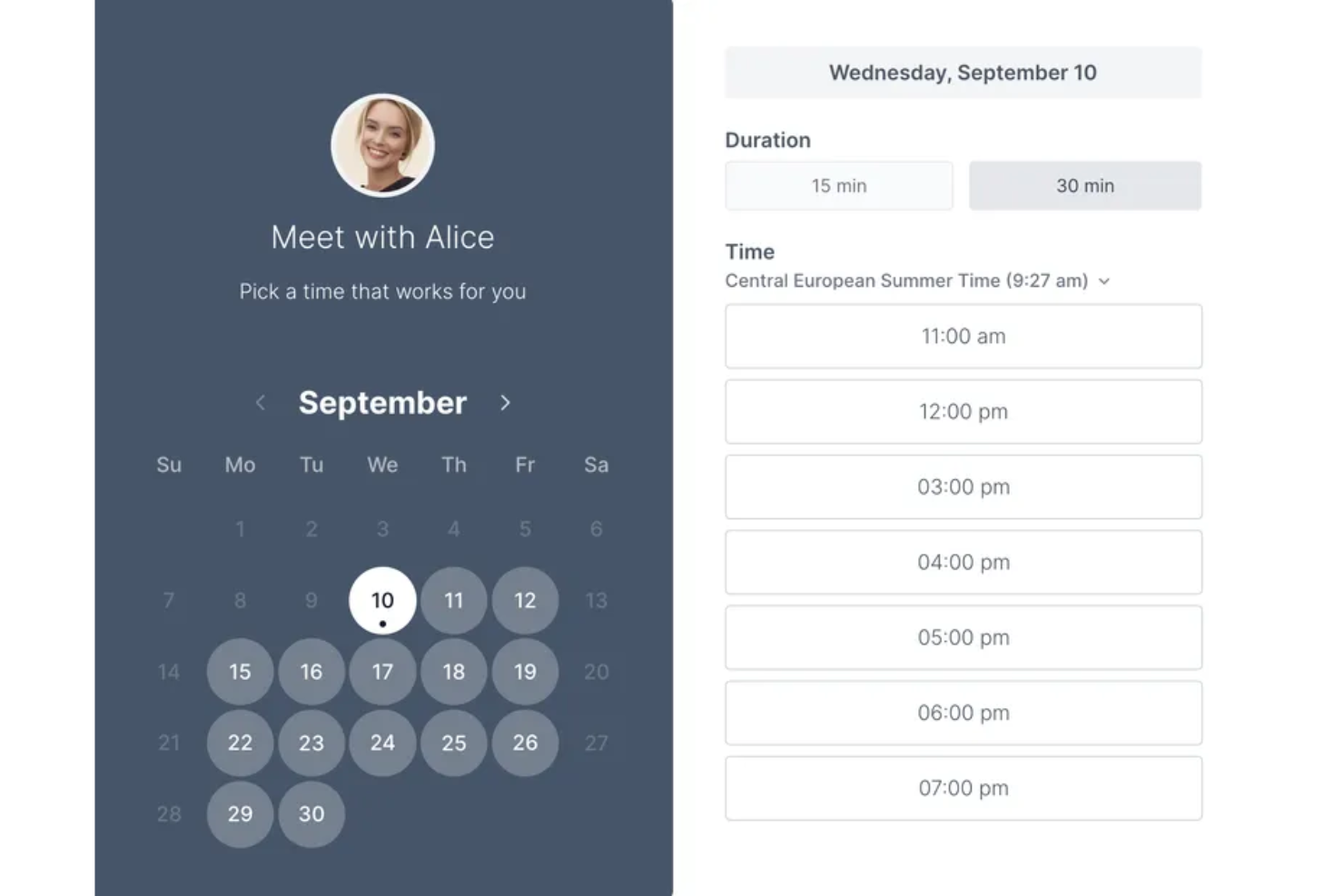
If you’re looking for a straightforward way to schedule meetings, Koalendar is designed for simplicity and speed. It’s a good fit for educators, freelancers, and small teams who want to avoid the complexity of traditional calendar tools. Koalendar stands out from Google Calendar by offering a clean booking page and instant meeting links without extra setup or clutter.
Why Koalendar Is a Good Google Calendar Alternative
Unlike more complex scheduling tools, Koalendar focuses on making meeting scheduling as simple as possible. I picked Koalendar because it lets you create a shareable booking page in seconds, so anyone can book time with you without back-and-forth emails. The tool automatically generates meeting links and syncs with your existing calendars to prevent double-booking. For anyone who wants a no-fuss way to manage meetings, Koalendar offers a streamlined alternative to Google Calendar.
Koalendar Key Features
Some other features that make Koalendar appealing for simple scheduling include:
- Multiple calendar connections: Connect several Google accounts to manage availability across calendars.
- Customizable booking forms: Add custom questions to collect information from invitees before meetings.
- Automatic time zone detection: Detects and displays booking times in each invitee’s local time zone.
- Buffer times between meetings: Set up automatic buffers to prevent back-to-back bookings.
Koalendar Integrations
Integrations include Google Calendar, Outlook Calendar, iCloud Calendar, Google Meet, Microsoft Teams, Zoom, Stripe, Gmail, Google Drive, and WordPress.
Pros and Cons
Pros:
- Clean public-facing pages
- Direct Google Meet sync
- Very generous free tier
Cons:
- Smaller integration list
- Basic customization limits

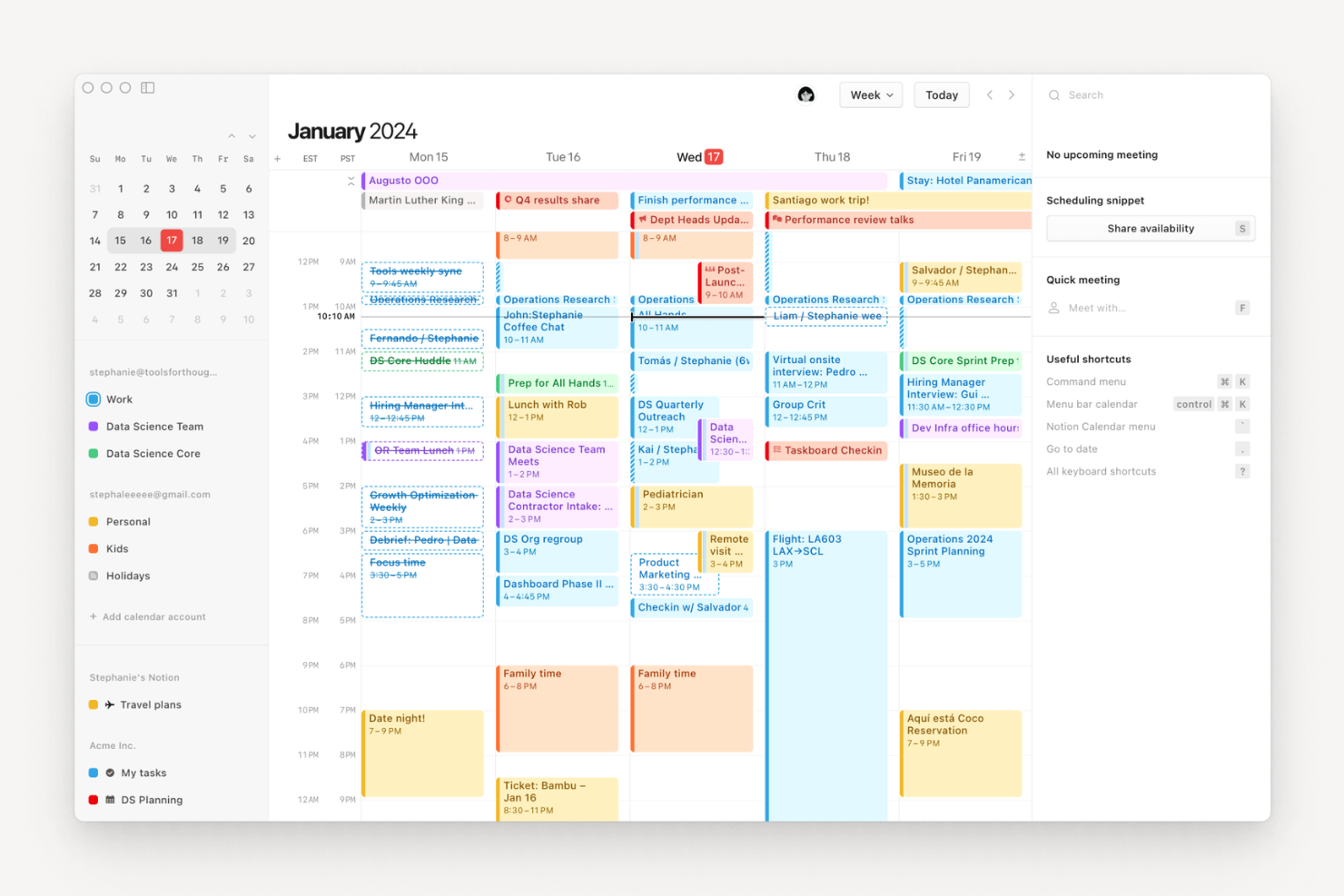
Notion Calendar brings your notes, docs, and scheduling into one unified workspace. It’s designed for teams and professionals who want to connect meeting details, project plans, and documents directly to their calendar events. Unlike Google Calendar, Notion Calendar lets you link and view Notion pages alongside your schedule, making it easier to manage context and content together.
Why Notion Calendar Is a Good Google Calendar Alternative
If you want a calendar that brings your notes and scheduling together, Notion Calendar is worth considering. I picked Notion Calendar because it lets you attach Notion pages, docs, and databases directly to your events, so all your meeting context and project details stay connected. You can view and edit linked notes right from your calendar, which is something Google Calendar doesn’t offer. This makes Notion Calendar especially useful for teams who need to manage both schedules and supporting information in one place.
Notion Calendar Key Features
Some other features that make Notion Calendar stand out for teams and professionals include:
- Multiple calendar views: Switch between daily, weekly, and monthly layouts to see your schedule from different perspectives.
- Color-coded events: Assign colors to events for quick visual organization and filtering.
- Google Calendar sync: Connect your Google Calendar to view and manage events from both platforms in one place.
- Time zone support: Schedule and view events across different time zones with automatic adjustments.
Notion Calendar Integrations
Integrations include Notion, Google Calendar, Google Meet, Zoom, and Arc.
Pros and Cons
Pros:
- Free with a Notion account
- Easy time zone math tools
- Fast keyboard shortcuts
Cons:
- Cannot work offline easily
- Lacks standalone task app
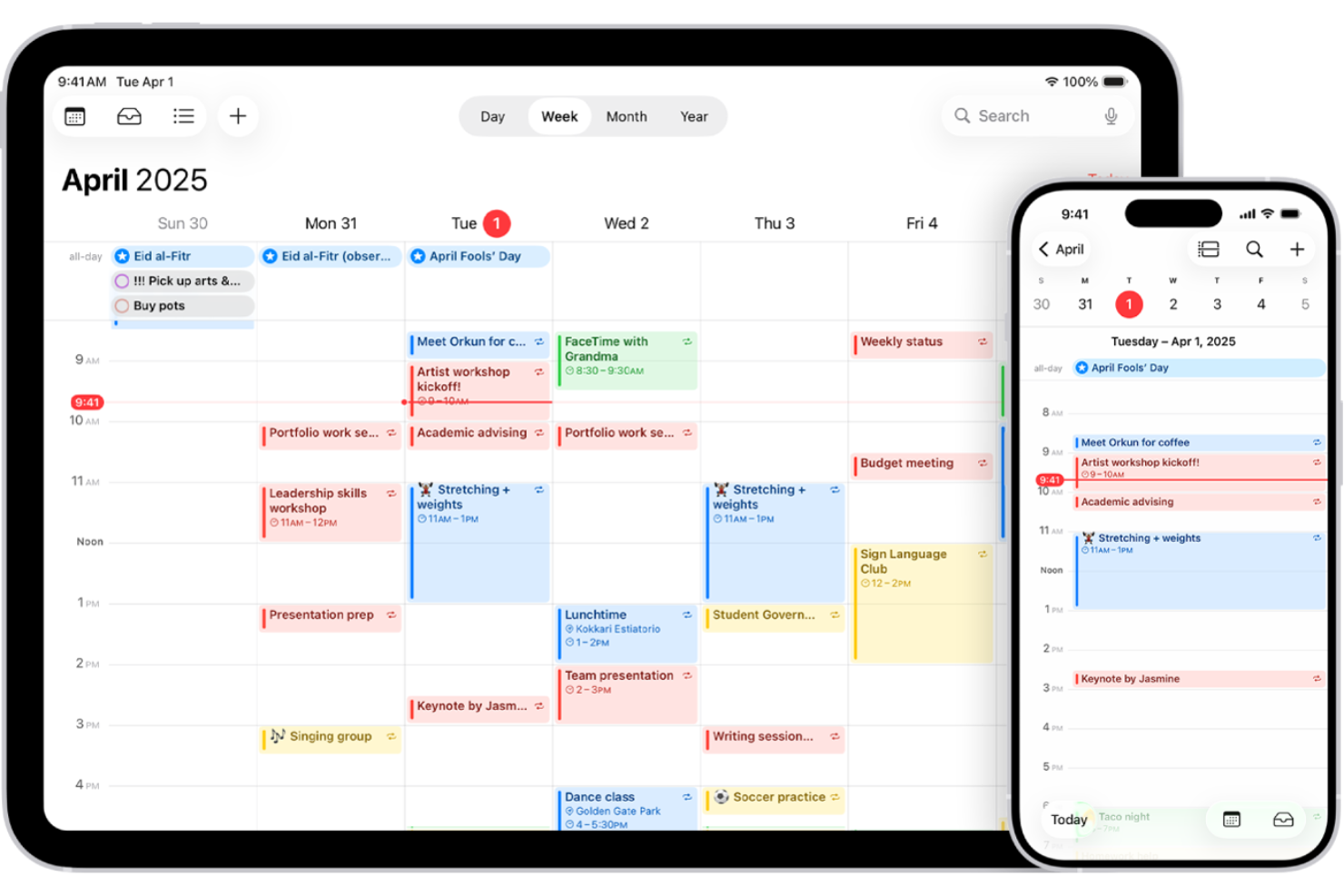
If your team relies on Apple devices, Apple Calendar offers a calendar solution that syncs instantly across iPhone, iPad, Mac, and Apple Watch. It’s a strong fit for professionals and businesses who want native integration with Apple’s ecosystem and privacy controls. Unlike Google Calendar, Apple Calendar lets you manage events, notifications, and shared calendars without leaving the Apple environment.
Why Apple Calendar Is a Good Google Calendar Alternative
For anyone deeply invested in the Apple ecosystem, Apple Calendar stands out for its instant syncing across all Apple devices. I picked Apple Calendar because you can create, edit, and view events on your iPhone, iPad, Mac, or Apple Watch, and changes appear everywhere in real time. The calendar also supports shared calendars and event notifications that work natively with Apple’s built-in apps and widgets. If you want a calendar that feels fully integrated with your Apple devices, this is a strong alternative to Google Calendar.
Apple Calendar Key Features
Some other features in Apple Calendar help it stand out as a Google Calendar alternative:
- Natural language event creation: Add events by typing phrases like “Lunch with Sam at 1pm tomorrow.”
- Multiple calendar support: Create and manage separate calendars for work, personal, or shared projects.
- Location-based alerts: Set reminders that trigger when you arrive at or leave a specific location.
- Integration with Siri: Use voice commands to schedule or check events directly from any Apple device.
Apple Calendar Integrations
Integrations include iCloud, Microsoft Exchange, Google Calendar, Yahoo, and CalDAV servers.
Pros and Cons
Pros:
- Very low battery drain
- Fast Siri voice creation
- Clean and minimal design
Cons:
- Lacks booking link features
- Web interface is basic

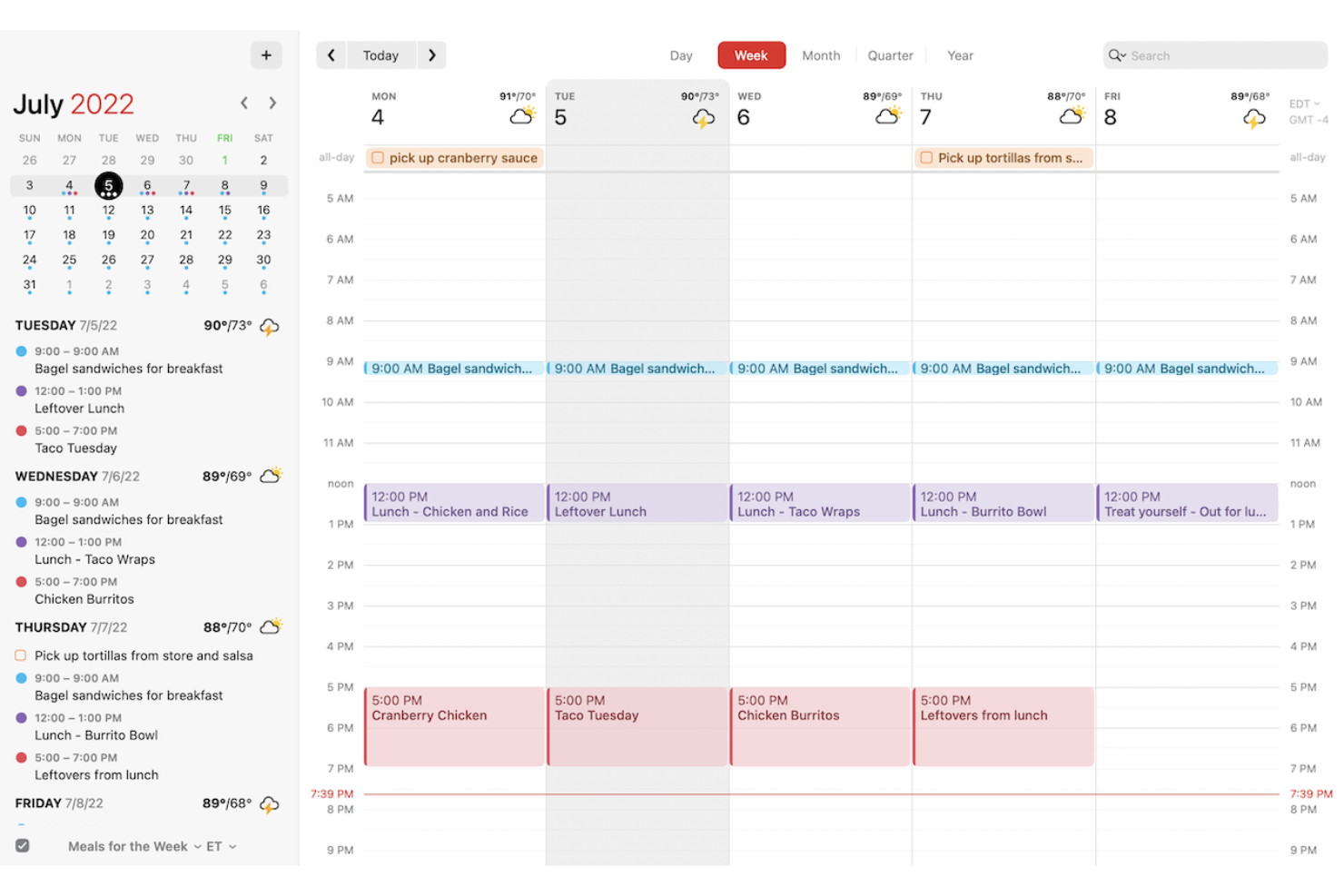
If you want a calendar that turns plain language into events instantly, Fantastical is worth a look. It’s built for professionals and teams who need fast, flexible scheduling on Apple devices without the friction of manual entry. Fantastical stands out from Google Calendar with its natural language input, advanced meeting proposals, and polished interface tailored for macOS and iOS users.
Why Fantastical Is a Good Google Calendar Alternative
Unlike most calendar apps, Fantastical lets you create events just by typing or speaking naturally, which is a huge time-saver for busy professionals. I picked Fantastical because its natural language processing turns phrases like “Lunch with Sam at 1pm tomorrow” into fully detailed calendar events. The app also supports quick actions for scheduling, such as dragging and dropping events or proposing meeting times directly within the calendar. If you want a calendar that speeds up event creation and reduces manual entry, Fantastical is a strong alternative to Google Calendar.
Fantastical Key Features
Some other features that make Fantastical appealing for teams and professionals include:
- Calendar sets: Group multiple calendars together and switch between them with one click.
- Weather forecasts: View integrated weather updates directly within your calendar.
- Conference call detection: Automatically identifies and adds join links for Zoom, Microsoft Teams, and Google Meet.
- Time zone support: Schedule events across different time zones with automatic adjustments.
Fantastical Integrations
Integrations include Google Calendar, iCloud, Microsoft 365, Exchange, Todoist, Zoom, Microsoft Teams, Webex, GoToMeeting, and Cardhop.
Pros and Cons
Pros:
- Deep Apple ecosystem sync
- Fast event creation flow
- Great weather widget sync
Cons:
- Can drain battery quickly
- No native Windows version
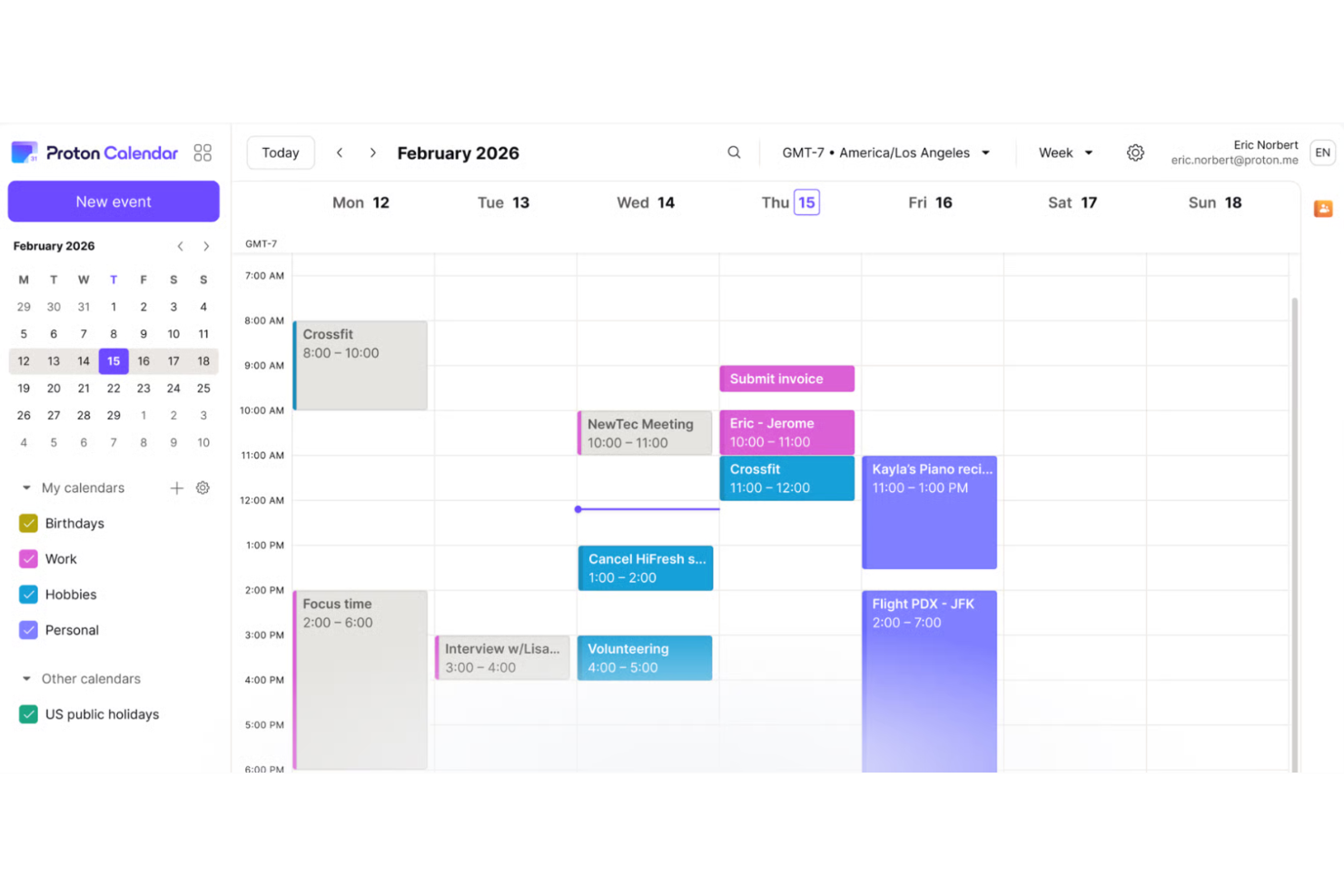
If privacy is your top concern when managing your schedule, Proton Calendar is designed with end-to-end encryption at its core. This tool is a strong fit for professionals, organizations, and anyone handling sensitive information who want more control over their data than Google Calendar provides. Proton Calendar stands out by keeping your events, invites, and personal details private—even from the service provider itself.
Why Proton Calendar Is a Good Google Calendar Alternative
For anyone who needs privacy above all else, Proton Calendar offers a level of protection that Google Calendar doesn’t match. I picked Proton Calendar because it uses end-to-end encryption for all event details, so only you and your invitees can see your schedule. The tool also keeps your event metadata and notifications private, which is especially important for users handling confidential or sensitive information. Proton Calendar’s commitment to privacy makes it a strong choice for anyone who wants to keep their scheduling data secure and out of reach from third parties.
Proton Calendar Key Features
Some other features in Proton Calendar make it a practical choice for privacy-minded users looking for Google Calendar alternatives:
- Multiple calendar support: Create and manage several separate calendars within one account for different projects or areas of your life.
- Event color coding: Assign colors to events and calendars to visually organize your schedule.
- Cross-platform access: Use Proton Calendar on the web, iOS, and Android for scheduling on any device.
- Proton ecosystem integration: Seamlessly connect with Proton Mail and Proton Drive for a unified, privacy-focused productivity suite.
Proton Calendar Integrations
Integrations include Proton Mail, Proton Drive, Proton Pass, Proton VPN, Proton Authenticator, Proton Meet, Proton Docs, and Proton Sheets.
Pros and Cons
Pros:
- Open-source code base
- Blocks spam event invites
- Swiss privacy laws apply
Cons:
- Lacks deep integrations
- Feature set is very basic

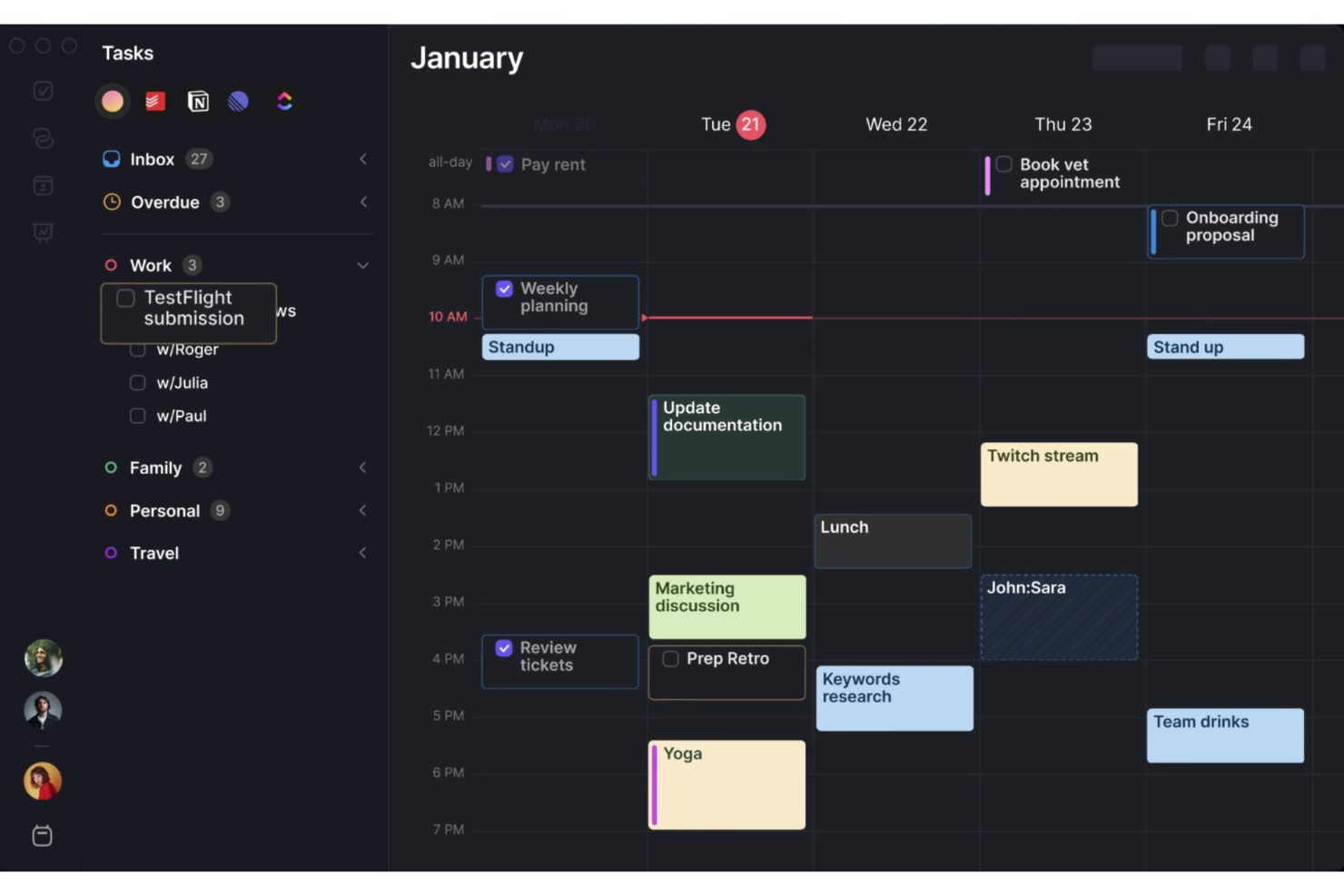
If you’re juggling multiple work and personal calendars, Morgen offers a unified view that keeps everything organized in one place. This tool is a strong fit for professionals and teams who need to coordinate across different accounts and platforms without missing a beat. Morgen stands out by letting you manage, schedule, and prioritize events from Google, Microsoft, Apple, and more—all in a single dashboard.
Why Morgen Is a Good Google Calendar Alternative
Morgen stands out for its ability to bring multiple calendars together in a single, unified view. I picked it as a Google Calendar alternative because it lets you connect and manage calendars from Google, Microsoft, Apple, and other providers without switching between apps. Morgen’s dashboard makes it easy to see all your commitments at a glance and avoid double-booking. Its built-in scheduling links also let others book time with you across all your connected calendars, which is something Google Calendar doesn’t natively offer.
Morgen Key Features
Some other features in Morgen make it a flexible option for teams and individuals looking beyond Google Calendar:
- Time blocking: Block out focused work sessions directly on your calendar to protect your time from meetings and interruptions.
- Task management: Add tasks alongside your events and manage your to-do list within the same interface.
- Cross-platform support: Use Morgen on Windows, macOS, Linux, iOS, and Android, so you can access your schedule from any device.
- Custom notifications: Set up personalized reminders for events and tasks to stay on top of your commitments.
Morgen Integrations
Integrations include Google Calendar, Outlook Calendar, iCloud, Fastmail, Notion, Obsidian, Linear, Todoist, ClickUp, and Zoom.
Pros and Cons
Pros:
- Works well across platforms
- Fast booking link creation
- Great integrated task list
Cons:
- Lacks advanced AI scheduling
- Basic mobile app experience

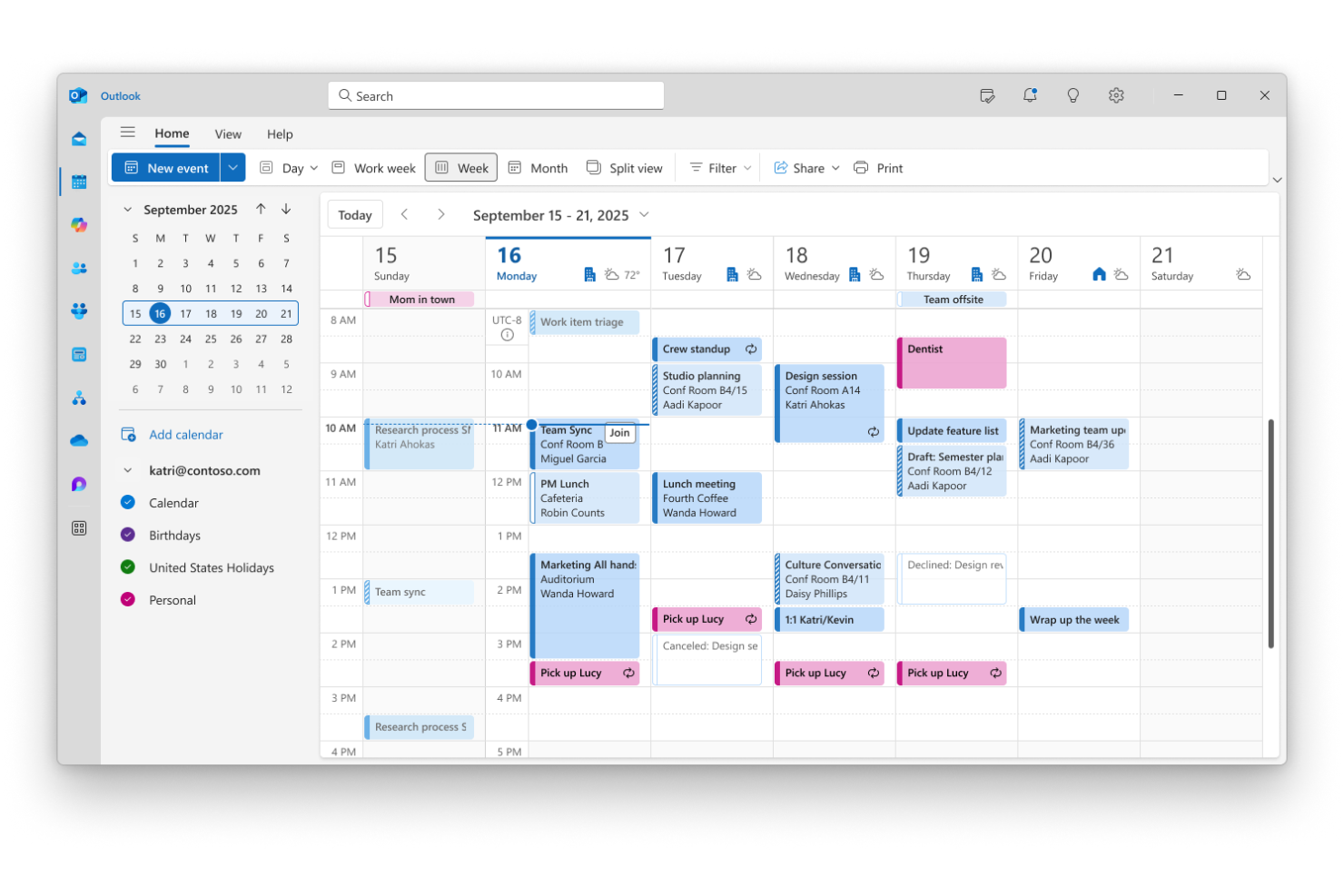
For teams already using Microsoft 365 apps, Microsoft Outlook offers a calendar solution that fits right into your existing workflows. It’s a strong choice for businesses and professionals who need deep integration between email, calendar, and productivity tools. Outlook stands apart from Google Calendar by letting you manage meetings, tasks, and files all within a single, unified platform.
Why Microsoft Outlook Is a Good Google Calendar Alternative
When your team relies on Microsoft 365 apps, Outlook’s calendar stands out for its seamless integration across the entire suite. I picked Outlook because you can schedule meetings, share calendars, and manage invites directly alongside your email, documents, and Teams chats. The calendar links with Microsoft To Do and OneNote, so you can turn events into actionable tasks or meeting notes without switching platforms. For anyone who wants their calendar to work hand-in-hand with their productivity tools, Outlook offers a level of connectivity that Google Calendar doesn’t match.
Microsoft Outlook Key Features
Some other features in Microsoft Outlook make it a versatile option for calendar management:
- Color-coded calendar categories: Assign colors to different calendars or event types for quick visual organization.
- Shared calendar publishing: Publish calendars to the web or share them with colleagues for easy collaboration.
- Automatic time zone adjustment: Schedule and view events across multiple time zones without manual conversion.
- Built-in RSVP tracking: Track attendee responses directly within event invitations.
Microsoft Outlook Integrations
Integrations include Microsoft Teams, OneDrive, SharePoint, Microsoft To Do, OneNote, Dynamics 365, Power Automate, Yammer, Skype for Business, and Excel.
Pros and Cons
Pros:
- Handles huge user volumes
- Robust email and calendar
- Perfect Teams integration
Cons:
- Overkill for simple needs
- Mac version can be buggy

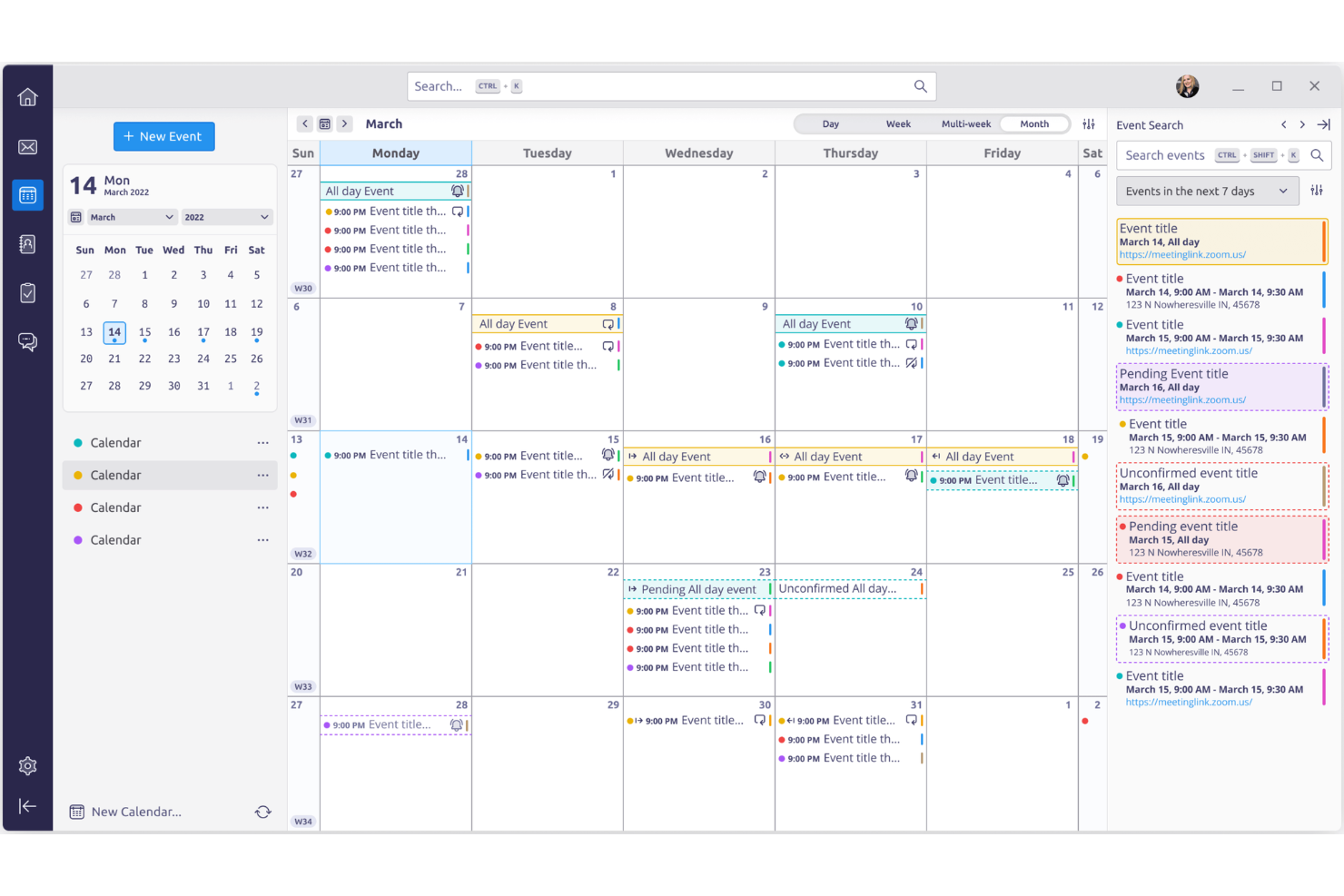
Thunderbird Calendar stands out for anyone who wants full control over their scheduling experience through open-source customization. This tool is a strong fit for tech-savvy professionals, small businesses, and organizations that need to tailor calendar features or workflows beyond what Google Calendar allows. With Thunderbird Calendar, you can modify, extend, and integrate your calendar to fit unique requirements without vendor lock-in.
Why Thunderbird Calendar Is a Good Google Calendar Alternative
If you want a calendar you can truly make your own, Thunderbird Calendar gives you that flexibility through open-source customization. I picked Thunderbird Calendar because you can modify its code, install community-built add-ons, and even create your own extensions to fit your workflow. The tool supports advanced scripting and automation, which lets you tailor scheduling, notifications, and event management in ways that closed platforms like Google Calendar can’t match. For anyone who values adaptability and control, Thunderbird Calendar offers a unique level of freedom.
Thunderbird Calendar Key Features
Some other features in Thunderbird Calendar make it a flexible choice for teams and individuals looking for Google Calendar alternatives:
- Multiple calendar management: Organize and view several calendars side by side within the same interface.
- Task and event linking: Connect tasks directly to calendar events for better workflow coordination.
- Offline access: View and edit your calendar even when you’re not connected to the internet.
- ICS and CalDAV support: Import, export, and sync calendars using widely adopted open standards.
Thunderbird Calendar Integrations
Integrations include Google Calendar, Microsoft Exchange, Nextcloud, ownCloud, Kolab, Apple iCloud, Yahoo Mail, Fastmail, Zoho Mail, and Mailfence.
Pros and Cons
Pros:
- Zero data harvesting
- Deep native email sync
- Highly customizable UI
Cons:
- Complex initial setup
- Clunky cross-device sync
Other Google Calendar Alternatives
Here are some additional google calendar alternatives options that didn’t make it onto my shortlist, but are still worth checking out:
- TimeTree
For shared family or group calendars
- GroupCal
For real-time calendar sharing
- SimplyBook.me
For service-based appointment booking
- Teamup
For managing group schedules
- Any.do
For combining tasks with calendar views
- Calendly
For automating meeting scheduling
- Motion
For AI-driven daily planning
- Akiflow
For consolidating tasks and events
- Reclaim
For smart task and calendar syncing
- Asana
For integrating project tasks with timelines
- Clockwise
For optimizing team focus time
- Sunsama
For daily planning with task integration
- DAKboard
For visual calendar displays
- Cozi
For organizing family activities
- Cupla
For coordinating couple and partner plans


How I Evaluate Google Calendar Alternatives
I split my evaluation into two layers: the baseline a tool must clear to replace Google Calendar for team scheduling, and the features that set the best options apart.
Core Functionality (Table Stakes For This List)
When I'm selecting tools for my list, I rank each one on a scale from 0 (does not offer the functionality) to 5 (excels in this area) for each core functionality listed below. Then, I calculate the tool's total score into a percentage. Each tool needs to achieve a minimum total score of 65% to be considered for inclusion.
- Calendar Event Management: I check whether each tool handles the basics well—recurring events, reminders, attendee invites, and RSVPs—since these are the building blocks of daily scheduling.
- Multi-Calendar Sync: Most project managers juggle personal and work calendars across Google, Outlook, and iCal, so I evaluate how reliably each tool syncs across providers.
- Team Scheduling & Sharing: Shared calendars and availability views matter when you're coordinating sprint reviews or standups across product, engineering, and design teams.
- Task & Project Integration: I look for a clear connection between calendar events and tasks or deadlines, whether that's built in or through integrations with tools like Jira or Asana.
- Time Zone Support: For distributed teams running daily syncs across continents, I evaluate whether the tool auto-detects zones and displays attendee times accurately.
- Cross-Platform Accessibility: A calendar that only works on desktop falls short fast, so I check for native mobile apps, real-time sync, and consistent functionality across devices.
Once I have a list of tools that meet this criteria, I consider what sets each platform apart.
Differentiating Factors (What Sets Vendors Apart)
Here's how I compare and contrast different vendors:
Standout Features
I look for AI scheduling features that can automatically find open slots across a team—useful when you're coordinating a sprint planning session with eight people across three squads. Time blocking is another differentiator I value, especially tools that let managers protect focus time on their team's calendars. Resource and workload views also matter; seeing who's overbooked alongside their calendar gives project leads the context to reassign work before deadlines slip.
Beyond Features
How well a calendar connects to your existing project management stack matters a lot. I check whether tools offer native integrations with platforms like Jira, Asana, or ClickUp—so deadlines and sprint events actually flow into your calendar without manual entry. Pricing structure is another factor I weigh, particularly whether free tiers are functional enough for a single PM to evaluate before committing a whole team. I also consider how easy it is to migrate shared calendars and onboard distributed teams with SSO and admin controls.
Why Look For a Google Calendar Alternative?
While Google Calendar is a good choice of calendar software, there are a number of reasons why some users seek out alternative solutions. You might be looking for a Google Calendar alternative because…
- You need real-time updates for shared calendars
- You want more advanced permission controls
- You require integrations with industry-specific tools
- You need offline access or a desktop app
- You want to embed calendars on your website
- You need better support for complex recurring events
If any of these sound like you, you’ve come to the right place. My list contains several google calendar alternatives options that are better suited for teams facing these challenges with Google Calendar and looking for alternative solutions.
Google Calendar Key Features
Here are some of the key features of Google Calendar, to help you contrast and compare what alternative solutions offer:
- Event creation with customizable reminders
- Shared calendars for teams or groups
- Integration with Gmail and Google Meet
- Multiple calendar views (day, week, month, agenda)
- Color coding for different calendars and events
- Mobile apps for iOS and Android
- Automatic time zone adjustment
- Public calendar sharing via unique links
- Recurring event scheduling options
- Task and appointment integration