
30 Best Professional Services Software Reviewed for 2026

10 Best Professional Services Software Shortlist
Here's my pick of the 10 best software from the 30 tools reviewed.


Managing projects can be tough. You juggle deadlines, resources, and client expectations every day. Professional services software can help ease the load by organizing tasks, tracking time, and improving team collaboration.
I’ve spent countless hours testing and reviewing these tools. I know what works and what doesn’t. My goal is to give you an unbiased look at the best options out there.
In this article, you’ll find clear insights into top software picks, their features, and how they can benefit your team. Whether you’re a small team or a large enterprise, there’s something here for you. Let’s dive in and find the right fit for your needs.
Why You Can Trust Us
Best Professional Services Software Summary
This comparison chart summarizes pricing details for my top professional services software selections to help you find the best one for your budget and business needs.
| Tool | Best For | Trial Info | Price | ||
|---|---|---|---|---|---|
| 1 | Best for real-time reporting across multiple business operations | Free 14-day trial available + free demo available | From $19.90/user/month (billed annually) | Website | |
| 2 | Best for professional services automation | Free demo available | Pricing upon request | Website | |
| 3 | Best for task, time and collaboration mamangement | Free demo available | Pricing upon request | Website | |
| 4 | Best for end-to-end PSA management | 14-day free trial available | From $10/user/month (billed annually) | Website | |
| 5 | Best client portals for project insight sharing | 14-day free trial + free demo available | From $19/team member/month (billed annually) | Website | |
| 6 | Best for generating accurate reports plus actionable insights | Free plan + free demo + 14-day free trial available | From $10/user/month (billed annually) | Website | |
| 7 | Best PSA with resource allocation, time tracking, billing, and reporting | 14-day free trial | From $49/user/month | Website | |
| 8 | Best for global services organizations | Free plan available | $14/user/month | Website | |
| 9 | Best for full lifecycle service delivery | Free demo available | Pricing upon request | Website | |
| 10 | Best for managing project finances | Free plan available (one user max) | From $10/month (billed annually, 3 users) | Website |


-

Accelo
Visit WebsiteThis is an aggregated rating for this tool including ratings from Crozdesk users and ratings from other sites.4.4 -
Forecast
Visit WebsiteThis is an aggregated rating for this tool including ratings from Crozdesk users and ratings from other sites.4.6 -
Wrike
Visit WebsiteThis is an aggregated rating for this tool including ratings from Crozdesk users and ratings from other sites.4.2


Best Professional Services Software Reviews
Below are my detailed summaries of the best professional services software that made it onto my shortlist. My reviews offer a detailed look at the key features, pros & cons, integrations, and ideal use cases of each tool to help you find the best one for you.

Scoro
Best for real-time reporting across multiple business operations
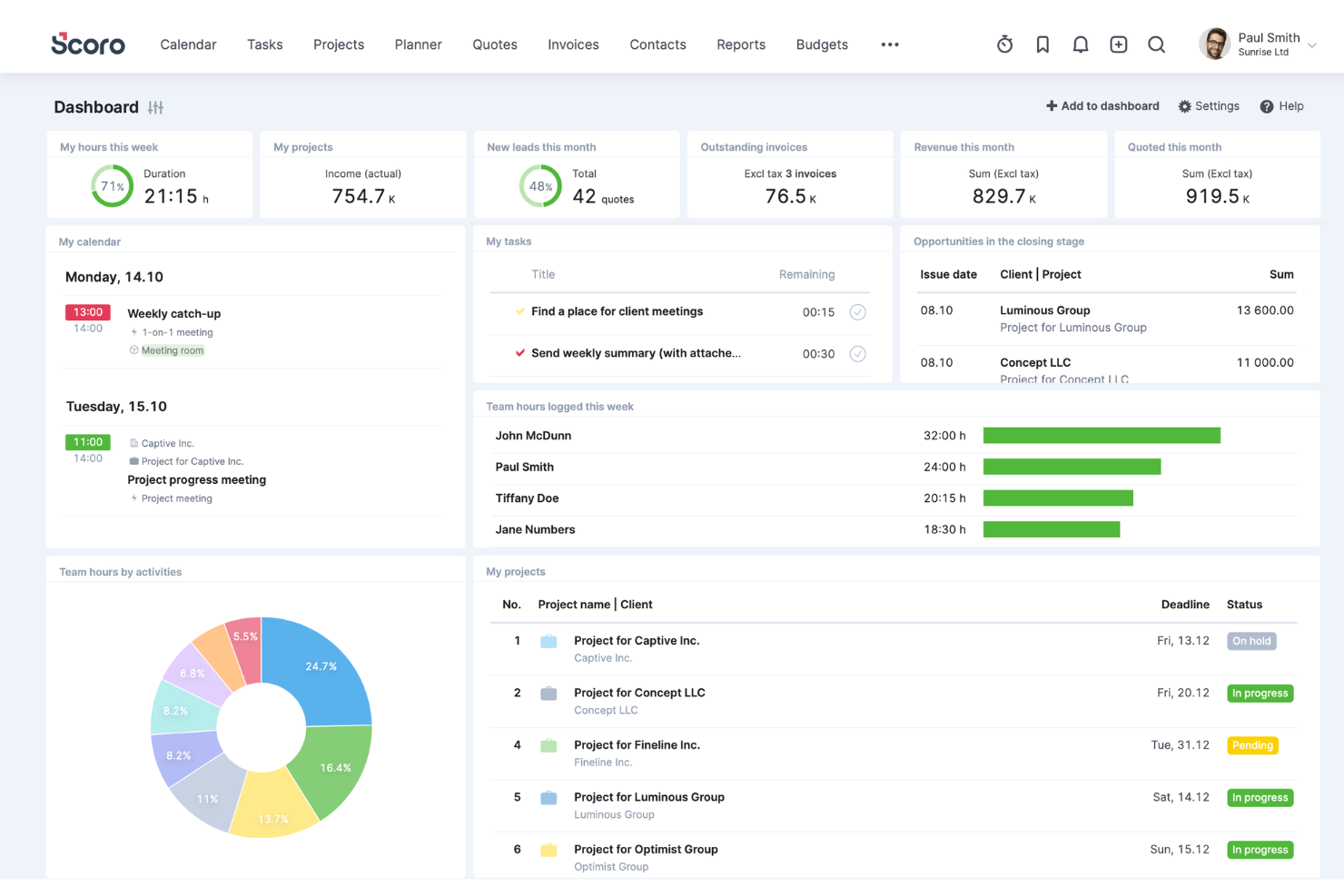
Scoro is a comprehensive work management software designed for professional services, offering a wide range of features to help boost service profitability. It caters to various industries and roles within the business, providing tools for project management, quoting and budgeting, invoicing, sales and CRM, resource planning, time tracking, and reporting.
One of Scoro's standout features is its project management tool, which can handle multiple projects simultaneously, with capabilities to assign tasks, set deadlines, track progress in real time, and manage resources effectively. Additionally, the platform's dynamic scheduling tools allow for adjustments on the fly, accommodating last-minute changes without disrupting the entire project workflow.
Furthermore, Scoro's advanced reporting and analytics features provide invaluable insights into every aspect of business operations. These reports are fully customizable and cover everything from detailed financial reports that analyze profits and losses to performance analytics that gauge project success and team productivity.
Integrations include Google Calendar, Microsoft Exchange, Xero, QuickBooks, Sage Intacct, Expensify, Stripe, Jira, Slack, Asana, Dropbox, PayPal, and more.
New Product Updates from Scoro

Scoro Introduces Subtasks for More Granular Work Planning
Scoro introduces subtasks and improved price list deletion warnings, enabling teams to break down work into smaller units for detailed planning while protecting pricing data from accidental changes. For more information, visit Scoro’s official site.


Accelo is a comprehensive professional services automation (PSA) platform designed to enhance the operations of service-based businesses. It offers a suite of tools for client relationship management (CRM), project management, time tracking, billing, invoicing, and client communication.
The platform's automation capabilities offer numerous opportunities to reduce repetitive, manual tasks, freeing up more time for billable client work. For instance, the quote-to-project conversion feature allows users to create new projects based on approved quotes in just a few clicks. Additionally, bulk client billing automates the generation of accurate client invoices into pre-made templates.
Furthermore, Accelo's project management features allow teams to collaborate, plan, manage, and deliver client projects efficiently through project templates, automated time tracking, custom workflows, and project triggers. Other features include branded invoice templates, custom payment terms, and accounting software integrations that save time and improve processes.
Integrations include Google Workspace, Microsoft 365, Microsoft Exchange & Microsoft Outlook, Xero, QuickBooks Online, HubSpot, Mailchimp, Salesforce, Zapier, Stripe, PayPal, Jira, Continuum, Zendesk, Microsoft Power BI, Expensify, Gusto, HubSpot Partner Portal, Practice Ignition, Google Analytics, and others.


Screendragon is an AI-driven professional services automation platform designed for agencies, marketing teams, and in-house creative departments. It helps you manage the entire project lifecycle—from briefing and resource allocation to execution, approval, and reporting—all within a no-code, customizable workflow engine.
I picked Screendragon because it’s one of the few PSA tools that embeds AI directly into your workflows, not just as an add-on. This helps your teams automate repetitive work, speed up approvals, and maintain governance across complex marketing or agency environments. If you manage multiple campaigns or creative deliverables simultaneously, you’ll appreciate how adaptable its workflow designer is.
Features include AI-assisted briefing, no-code workflow automation, resource and project management, and real-time analytics.
Integrations include Slack, Microsoft Teams, Power BI, and Zapier (for 1000+ connected apps).

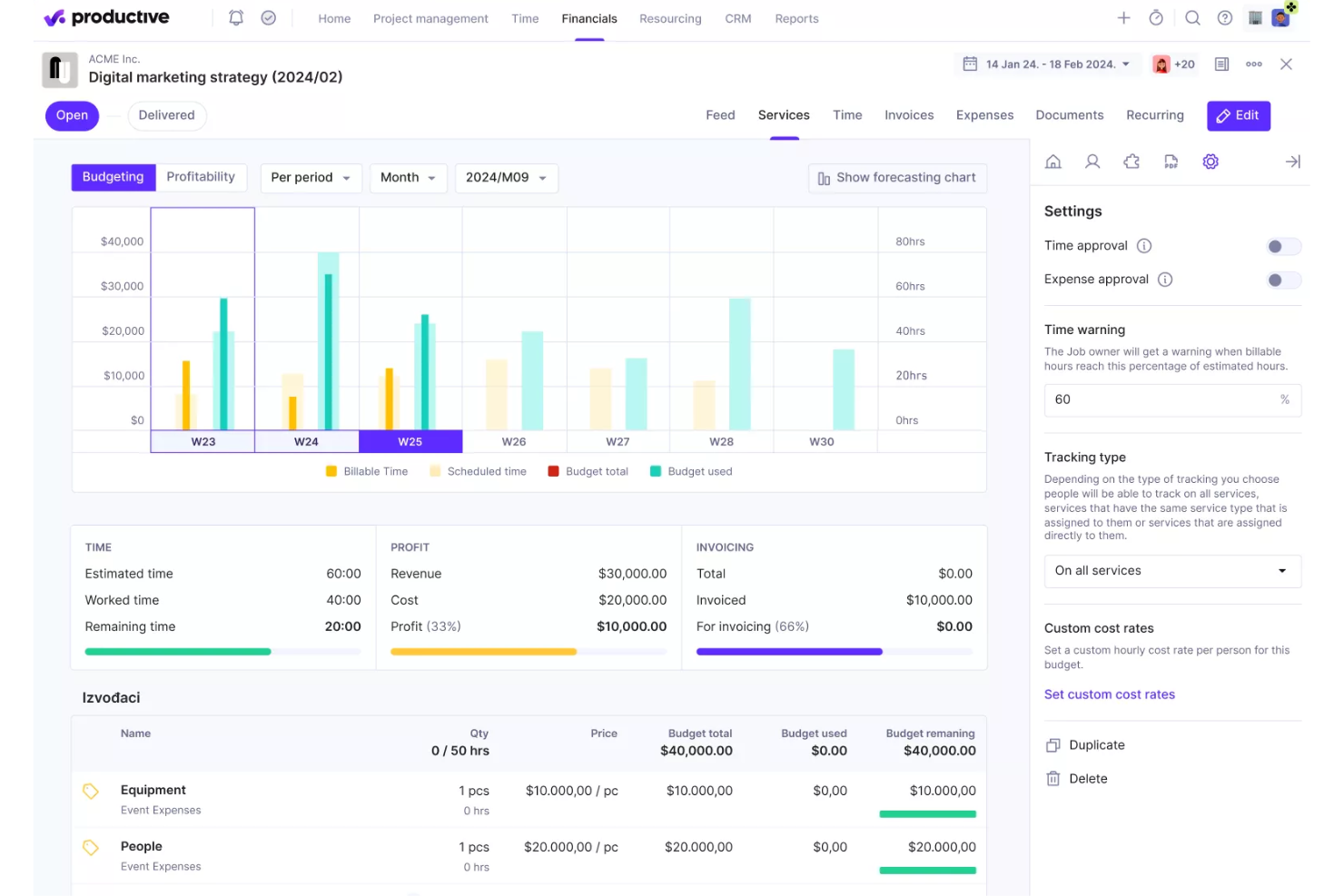
Productive is a comprehensive software solution designed to handle end-to-end processes for professional services and agencies. It integrates a wide range of tools necessary for managing projects, tracking time, allocating resources, and handling financial aspects, all within a single platform.
The platform offers advanced project management capabilities, such as Gantt charts for visualizing project timelines, task management to keep teams organized, and workload management to ensure resources are used effectively. Additionally, Productive includes tools for time tracking and billing, allowing agencies to accurately log hours, generate invoices, and manage payments.
Furthermore, the platform's CRM and sales tools help manage client relationships and streamline the sales process. Agencies can easily plan schedules, create pipelines, and track the status of projects and deals. Productive’s document management and automation features also reduce administrative overhead by automating repetitive tasks and ensuring that all team members have access to the latest project information and documentation.
Key integrations include Jira, Slack, QuickBooks, Xero, Zapier, Google Drive, Sage, BambooHR, and HubSpot.
New Product Updates from Productive

Productive Introduces Resource Request Feature
Productive introduces a resource request feature that helps teams request and allocate resources more efficiently. For more information, visit Productive's official site.

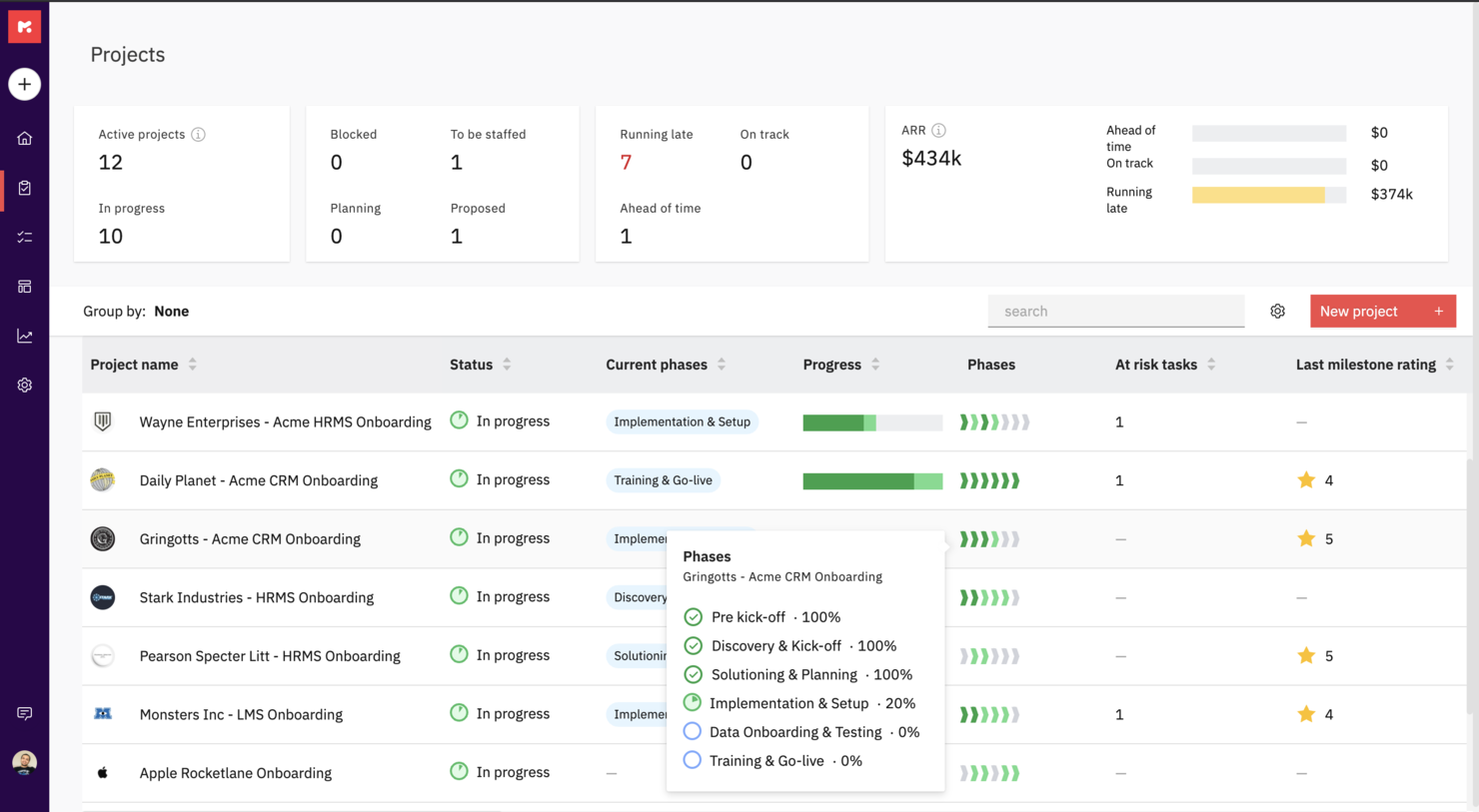
Rocketlane is a professional service software purpose-built to run customer-facing projects. It uniquely combines project management, document collaboration, and communication to help teams hit their project goals, accelerate time-to-value, and deliver a 5-star customer experience.
Rocketlane offers private and shared views for project plans and documents as well as a customer portal for stakeholder and client views. You can also codify your best practices with project and document templates to create them once and reuse them forever across projects.
With Rocketlane, you'll be able to keep your customers involved and make them accountable with reminders, notifications, and actionable emails. You can work together and create new or embed existing documents, collaborate on them synchronously and experience Slack-like chat inside Rocketlane.
Rocketlane costs from $19/user/month and offers a free 14-day trial.


Wrike is a project management software that is designed for marketing agencies, project teams, and professional service providers. Wrike offers an all-in-one collaboration solution, which simplifies the project management process as well as resource allocation and people management.
The platform enables users to collaborate on projects without having to constantly call, text, or email to communicate. Users get access to collaborative features like automated notifications, dynamic reports, live editing, and real-time comments to make sure that every team member, stakeholder, and project contributor is on the same page throughout the project development process. Apart from the ability to share information and digital assets within the team, the platform is also tailored to make it easier for project managers and professional service providers to share updates with clients as needed.
Project managers can significantly improve client collaboration by simply inviting their clients into Wrike and making them a part of the work process. This allows clients to provide direct feedback and approvals on critical project decisions. And project managers can reduce the tedious back-and-forth process of getting requirements from clients on project requests or scope changes by using customizable request forms. This will enable agencies and teams to quickly collect all the necessary information from clients in one location and trigger fully planned projects with predefined actions, task assignees, and timelines.
New Product Updates from Wrike

Streamlining Workspaces with New Updates
Wrike announces custom space templates, AI Agents in Wrike Labs, and a new Guage widget to improve project management. For more information, visit Wrike's official site.

Best PSA with resource allocation, time tracking, billing, and reporting

Polaris PSA is an advanced Professional Services Automation (PSA) software designed to elevate project management for service-based businesses. Its key features include AI-driven resource allocation and scheduling, real-time project health monitoring, predictive analytics, and comprehensive project portfolio management. With Polaris PSA, organizations can optimize resource utilization, gain valuable insights into project performance, mitigate risks, and make data-driven decisions, leading to improved project success rates, enhanced profitability, and streamlined operations.
Polaris PSA handles project portfolio management with a comprehensive and strategic approach. The platform offers a centralized dashboard that provides a holistic view of an organization's projects, resources, and financials in real-time. Through its AI-driven resource allocation and scheduling capabilities, Polaris optimizes resource utilization across multiple projects, preventing overallocation and ensuring efficient workload distribution. Additionally, the system's predictive analytics helps identify potential risks, forecast project outcomes, and propose mitigation strategies.
A pro tip for working with Polaris PSA is to leverage its customizable reporting and data visualization features to gain deeper insights into your projects and resources. Beyond the standard reports, explore the platform's capabilities to create tailored reports that align with your specific business needs and KPIs. Utilizing custom reports and visualizations can help you uncover valuable trends, identify areas for improvement, and make more informed decisions, ultimately maximizing the benefits of Polaris PSA for your organization's success.
Integrations include SAP, ADP, Salesforce, Quickbooks, Atlassian, Microsoft Dynamics, Sage, Servicenow, Zero, Zoom, Outlook Calendar, Microsoft Teams, Microsoft Azure DevOps, Google Meet, Google Calendar, and other popular business software.
For project time tracking, you're subscription fee will start at $12/month. To access the PSA components of the software, you'll need to subscribe to their PSA/PM plan at $29/month. They have a 14-day free trial for new users.


VOGSY is a unified project and resource platform that helps organizations set up new countries, track international projects, and connect local finance packages. The professional services automation (PSA) software offers end-to-end solutions built for services businesses so they can focus on what they do best—providing services—without worrying about the complexities of international expansion.
The cloud-based PSA platform also provides tools for project management, task management, resource management, performance monitoring, as well as automated billing and invoicing. It allows professional services firms to keep track of every client and deal, engage in a more efficient and sustainable quote-to-cash approach, and generate a more concise and reliable statement of work (SOW) on soft-booked services and projects.
With VOGSY’s professional service software, startups and SMEs can effectively plan their projects with great detail. They can leverage the platform’s robust work breakdown structure to design and implement a cohesive project roadmap based on key objectives and desired outcomes. The software allows them to budget the required work, resources, potential revenue, and margins accordingly, oftentimes even before the deal is finalized.
With the task management feature, users can allocate tasks and assign them to the appropriate personnel with the right skill set to finish them on time and on budget. Users can set tasks for themselves or their entire team, addressing everything from their quote-to-cash cycle, which includes the clients, the nature of the deal, the proposed projects, and the billing and invoicing.
This means that services businesses can focus on what they do best—providing services—without worrying about the complexities of international expansion.
Features include resource and project management, international project views and resource allocation, collaboration, reporting dashboards, budgeting, professional services automation, Gantt charts, notifications & alerts.
Integrations include Google Workspace, Jira, Microsoft Excel, Xero, Intuit Quickbooks Online, Copper, Hubspot, Salesforce, and Zoho.
VOGSY has a free version that is accessible through a personal Gmail account. It comes with all the features and is limited to a single user. Paid plans cost from $13/user/month. All paid plans require a minimum of 10 users and include a free trial.
New Product Updates from VOGSY
VOGSY Enhances Cost Tracking and Reporting
VOGSY introduces enhanced cost tracking for external resources and reporting improvements. These updates provide more accurate financial visibility and improved project performance insights. For more information, visit VOGSY’s official site.
 .
.

Kantata is a professional services platform purpose-built to help firms manage complex client engagements with ease. Instead of relying on disconnected tools for projects, resources, and reporting, it brings everything together so your team can plan, deliver, and analyze work in one streamlined system.
What makes Kantata stand out is how it supports the full lifecycle of service delivery—estimating, planning, executing, analyzing, and optimizing. You can forecast demand, align resources with project needs, and track budgets and profitability in real time. By connecting projects, financials, and staffing in a single view, Kantata gives you the clarity to make confident decisions and keep engagements running smoothly from start to finish.
Kantata also emphasizes collaboration and business intelligence. Activity feeds, task boards, and built-in surveys keep both teams and clients engaged throughout delivery, while customizable dashboards and 70+ prebuilt reports surface insights into utilization, portfolio health, and profitability. This combination of people-focused planning and data-driven visibility makes it easier to deliver consistently successful client outcomes.
New Product Updates from Kantata
Kantata Integrates E-Invoicing With Avalara
Kantata introduces integrated e-invoicing through its partnership with Avalara, enabling compliant, automated invoicing across regions. For more information, visit Kantata's official site.
 .
.

OnePlan is a comprehensive AI-enabled strategic portfolio management tool that helps organizations align their business strategies with execution activities.
I particularly like its powerful resource planning and professional service automation (PSA) features. OnePlan allows professional service firms to efficiently allocate resources, track billable hours, and manage project finances across the entire portfolio. Its advanced time tracking and billing capabilities ensure accurate invoicing and improved financial control. Furthermore, OnePlan's integration with popular collaboration tools fosters team collaboration and enhances project visibility.
Other key features include visual roadmaps, kanban boards, team collaboration, capacity planning, risk management, time tracking, dependency management, portfolio optimization, custom workflows, real-time dashboards, and comprehensive reporting.
OnePlan integrates with a range of third-party tools, like Microsoft Teams, Project For The Web, monday.com, Workday, Azure DevOps, Smartsheet, and Jira.
Other Professional Services Software
Here are some additional professional services software options that didn’t make it onto my shortlist, but are still worth checking out:
- HaloPSA
PSA software for MSPs
- BigTime
For managing timesheets
- Projector
PSA software for accessibility
- Kimble
For salesforce users and management consulting
- Birdview
For BI reporting
- Workamajig Platinum
For creative teams
- Ravetree
For retainer contracts
- Netsuite OpenAir
For small businesses
- Parallax
For efficient project management and streamlined business operations
- Upland
For managing large teams
- Deltek Workbook
For client transparency and communication
- Unit4PSA
For end-to-end administration
- Height
For cross-functional project and resource planning
- Changepoint
CRM-integrated PSA
- Forecast
For mid-sized agencies and consultancies
- Celoxis
PSS for enterprises
- SuperOps
For AI-driven MSP growth
- Bonsai Agency Software
For integrated project, client, and financial management
- Zoho Projects
For task prioritization
- ClickTime
For medium-sized businesses seeking to centralize their resource management processes


Professional Services Software Selection Criteria
When selecting the best professional services software to include in this list, I considered common buyer needs and pain points like integration capabilities and user-friendliness. I also used the following framework to keep my evaluation structured and fair:
Core Functionality (25% of total score)
To be considered for inclusion in this list, each solution had to fulfill these common use cases:
- Project management
- Time tracking
- Billing and invoicing
- Resource planning
- Collaboration tools
Additional Standout Features (25% of total score)
To help further narrow down the competition, I also looked for unique features, such as:
- AI-driven analytics
- Customizable dashboards
- Industry-specific templates
- Mobile app availability
- Integration with third-party apps
Usability (10% of total score)
To get a sense of the usability of each system, I considered the following:
- Intuitive interface
- Easy navigation
- Minimal learning curve
- Responsive design
- Customization options
Onboarding (10% of total score)
To evaluate the onboarding experience for each platform, I considered the following:
- Availability of training videos
- Interactive product tours
- Access to templates
- Webinars and live demos
- Onboarding support
Customer Support (10% of total score)
To assess each software provider’s customer support services, I considered the following:
- 24/7 availability
- Multichannel support
- Knowledge base access
- Response time
- Personalized assistance
Value For Money (10% of total score)
To evaluate the value for money of each platform, I considered the following:
- Pricing tiers
- Free trial availability
- Feature set vs. cost
- Discounts for annual plans
- Cost compared to competitors
Customer Reviews (10% of total score)
To get a sense of overall customer satisfaction, I considered the following when reading customer reviews:
- User satisfaction ratings
- Commonly praised features
- Reported issues
- Frequency of updates
- Recommendations by users
How to Choose Professional Services Software
It’s easy to get bogged down in long feature lists and complex pricing structures. To help you stay focused as you work through your unique software selection process, here’s a checklist of factors to keep in mind:
| Factor | What to Consider |
|---|---|
| Scalability | Can the software grow with your business? Check if it supports more users or projects as you expand. Look for flexible pricing plans to accommodate growth. |
| Integrations | Does it integrate with tools you already use? Ensure it connects with your CRM, accounting software, or other essential apps to avoid workflow disruption. |
| Customizability | Can you tailor the software to fit your needs? Ensure you can adjust workflows, fields, and dashboards to match your processes and preferences. |
| Ease of use | Is the interface intuitive for your team? Test the trial version to see if it’s user-friendly and reduces the learning curve for quick adoption. |
| Implementation and onboarding | How long will it take to get started? Ask about the onboarding process, training resources, and support to ensure a smooth transition without downtime. |
| Cost | Is it within your budget? Compare the cost against your needs and consider hidden fees or additional charges for extra features or users. |
| Security safeguards | Does it protect your data? Verify the software’s data encryption, access controls, and compliance with security standards to keep your information safe. |
| Support availability | Is help available when you need it? Check the availability of customer support, including live chat, phone support, and response times for urgent issues. |
What Is Professional Services Software?
Professional services software is a tool designed to help businesses manage client projects, track time, and handle billing and invoicing. Professionals like consultants, accountants, and legal teams typically use these tools to organize their work and improve efficiency. Project management, time tracking, and billing capabilities help with organizing tasks, meeting deadlines, and ensuring accurate client billing. Overall, these tools simplify complex processes, making it easier for teams to deliver quality services.
Features
When selecting professional services software, keep an eye out for the following key features:
- Project management: Helps you plan, execute, and monitor projects effectively, ensuring deadlines are met.
- Time tracking: Accurately records billable hours, making it easier to invoice clients and manage team productivity.
- Billing and invoicing: Automates the creation of invoices and tracks payments, reducing administrative workload.
- Resource planning: Allocates and manages resources efficiently, ensuring optimal use of team and tools.
- Collaboration tools: Facilitates communication and collaboration among team members, improving project outcomes.
- Integration capabilities: Connects with existing software like CRM and accounting tools, ensuring smooth workflows.
- Customizable dashboards: Allows you to tailor the interface to display relevant data and metrics for quick insights.
- Security safeguards: Protects sensitive data with encryption and access controls, ensuring compliance with standards.
- Mobile app availability: Provides access to essential features on-the-go, keeping you connected to projects and tasks.
- AI-driven analytics: Offers insights through data analysis, helping you make informed business decisions.
Benefits
Implementing professional services software provides several benefits for your team and your business. Here are a few you can look forward to:
- Improved efficiency: Automates time-consuming tasks like invoicing and resource planning, freeing up time for more important work.
- Better collaboration: Offers tools for communication and file sharing, keeping team members connected and informed.
- Accurate billing: Tracks billable hours and expenses, ensuring invoices are precise and reducing disputes with clients.
- Enhanced decision-making: Provides AI-driven analytics and customizable dashboards that offer insights into project performance.
- Scalability: Grows with your business, supporting more users and projects without the need for a complete system overhaul.
- Increased security: Protects client and company data with encryption and access controls, maintaining trust and compliance.
- Mobile accessibility: Allows team members to access critical information and manage tasks from anywhere, increasing flexibility.
Costs & Pricing
Selecting professional services software requires an understanding of the various pricing models and plans available. Costs vary based on features, team size, add-ons, and more. The table below summarizes common plans, their average prices, and typical features included in professional services software solutions:
Plan Comparison Table for Professional Services Software
| Plan Type | Average Price | Common Features |
|---|---|---|
| Free Plan | $0 | Basic project management, limited time tracking, and basic collaboration tools. |
| Personal Plan | $5-$25/user/month | Project management, time tracking, billing and invoicing, and basic reporting. |
| Business Plan | $30-$75/user/month | Advanced project management, resource planning, integrations, and enhanced security. |
| Enterprise Plan | $80-$150/user/month | Customizable dashboards, AI-driven analytics, premium support, and full compliance features. |
Professional Services Software FAQs
Here are some answers to common questions about professional services software:
Can professional services software integrate with other tools?
Yes, most professional services software can integrate with tools like CRM systems, accounting software, and communication platforms. This integration helps create a unified workflow, allowing your team to access all necessary information in one place. Check the software’s integration options to ensure it connects with the tools you already use.
Is data security a concern with professional services software?
Yes, data security is a key concern. Look for software that offers encryption, access controls, and compliance with industry standards. It’s important to ensure that your client data and sensitive information are protected from unauthorized access. Always inquire about the software’s security measures during your evaluation process.
How long does it take to implement professional services software?
Implementation time varies based on the software’s complexity and your team’s readiness. Some tools offer quick setup with templates and guides, while others may require detailed customization. Plan for a transition period where your team can learn the system and adjust workflows. Consider resources like training and support to ease the process.
What’s Next:
If you're in the process of researching professional services software, connect with a SoftwareSelect advisor for free recommendations.
You fill out a form and have a quick chat where they get into the specifics of your needs. Then you'll get a shortlist of software to review. They'll even support you through the entire buying process, including price negotiations.