

10 Best SEO Agency Software Reviewed in 2026

Best SEO Agency Software Shortlist


Managing SEO for your agency can be tough. Juggling keyword tracking, backlinks, and client reports can be overwhelming. That's where SEO agency software steps in. It can help you organize tasks, analyze data, and keep clients satisfied.
In my experience, the right software helps you save time and improve results. I’ve tested and reviewed several options, and I’m here to share the best SEO tools with you.
In this article, I’ll guide you through top software picks, highlighting what each one does best. Let’s find the right solution for your team’s needs.
Why Trust Our Software Recommendations
Our team has been testing and reviewing software since 2012. As project managers ourselves, we know how difficult—and important—it is to choose the right software.
For this guide, we evaluated tools using hands-on testing and independent research, scoring tools using our selection criteria. We also draw on insights from industry thought leaders and practicing project management experts.
Our reviews reflect our human editorial judgment, not a sales pitch.
Expert reviewers:
SEO Agency Software Comparison Table
This comparison table summarizes pricing details for my top SEO agency software selections.
| Tool | Best For | Trial Info | Price | ||
|---|---|---|---|---|---|
| 1 | Best for content relevance | 14-day free trial | From $129/month | Website | |
| 2 | Best for rank tracking | 14-day free trial + free demo available | From $103.20/month (billed annually) | Website | |
| 3 | Best for SERP tracking | Free plan available | From $37.70/month (billed annually) | Website | |
| 4 | Best for backlink analysis | Free plan available | From $29/month | Website | |
| 5 | Best for client reporting | 14-day free trial | From $20/month (billed annually) | Website | |
| 6 | Best for competitor analysis | Free trial available | From $125/month | Website | |
| 7 | Best for keyword research | 14-day free trial | From $139/month | Website | |
| 8 | Best for SEO metrics | 7-day free trial + free demo available | From $79/month (billed annually) | Website | |
| 9 | Best for scalable SEO | Free demo available | Pricing upon request | Website | |
| 10 | Best for low-barrier SEO entry | Free plan + 7-day free trial available | From $20/month | Website |
Best SEO Agency Software Reviews
Below are my detailed summaries of the best SEO agency software that made it onto my shortlist. My reviews offer a detailed look at the key features, pros and cons, integrations, and ideal use cases of each tool to help you find the best one for you.

Best for content relevance

Clearscope is a content optimization tool designed for content creators and SEO professionals who want to strategically target their content's relevance and search engine visibility. It provides insights into how to improve content quality and keyword usage to achieve better rankings.
Why I picked Clearscope: It offers detailed analyses and recommendations for improving your content relevance. The tool helps you identify essential terms to include, which can boost your content's SEO performance. With its Content Grade feature, you can identify areas of improvement that you can address to ensure your content meets SEO standards.
Standout features and integrations:
Features include a scoring system that evaluates your content's SEO effectiveness. The term suggestions feature identifies important keywords that you can include to enhance your content's relevance. Additionally, its competitor analysis tool provides data-driven insights into how your content compares against top-ranking pages.
Integrations include Google Docs, WordPress, and Google Search Console.
Pros and Cons
Pros:
- Strong search intent matching
- Clear keyword usage guidance
- Precise content relevance scoring
Cons:
- Requires SEO understanding
- Narrow feature focus

Best for rank tracking

SE Ranking is an all-in-one SEO solution designed for marketers and agencies, focusing on comprehensive SEO task management. It caters to users who need tools for keyword ranking, website auditing, and competitor analysis to improve online visibility.
Why I picked SE Ranking: It focuses on rank tracking, offering detailed insights into keyword positions across search engines. The software provides a keyword suggestion tool that can be used to help you identify new market opportunities. With its in-depth competitor analysis features, you can view your competitors' performance in SEO, PPC, and AI search. Additionally, the website auditing tool can help you ensure that your site is optimized for search engines.
Standout features and integrations:
Features include a grid rank tracker for tracking local rankings and performing bulk data analysis. The customizable lead generator tool can be installed on your website and improve your rates of visitor conversion.
Integrations include Zapier, Bitrix24, SEO Tools for Excel, Reportz, and more.
Pros and Cons
Pros:
- Flexible pricing plans
- Large keyword datasets
- Reliable daily rank tracking
Cons:
- Heavy setup for new users
- The interface may feel dense

Mangools
Best for SERP tracking

Mangools is an SEO toolkit that helps you research keywords, track rankings, and analyze search results in one place. It’s used by marketers and SEO teams to plan content, monitor visibility, and study competitors.
Why I picked Mangools: Mangools provides clear, daily tracking of how keywords move in search results over time. You can monitor desktop and mobile rankings across different locations without the heavy setup. The SERP tracking tool shows position changes, estimated traffic, and overall performance in simple charts, which can make it easier to quickly spot gains and drops and act before rankings shift further.
Standout features and integrations:
Features include the SERPWatcher to view past ranking changes and historical data, an interactive performance index to track overall visibility, and custom automated alerts for major position shifts. You can also review volatility across tracked keywords in one view.
Integrations are not publicly listed.
Pros and Cons
Pros:
- Lightweight tool stack
- Accurate local SERP tracking
- Clean and readable interfaces
Cons:
- Fewer API controls than those of some competitors
- Limited automation features

Ahrefs
Best for backlink analysis

Pros and Cons
Pros:
- Powerful site explorer
- Mobile and desktop tracking features
- Industry-leading backlink database
Cons:
- Steep learning curve
- Limited social tools

Best for client reporting
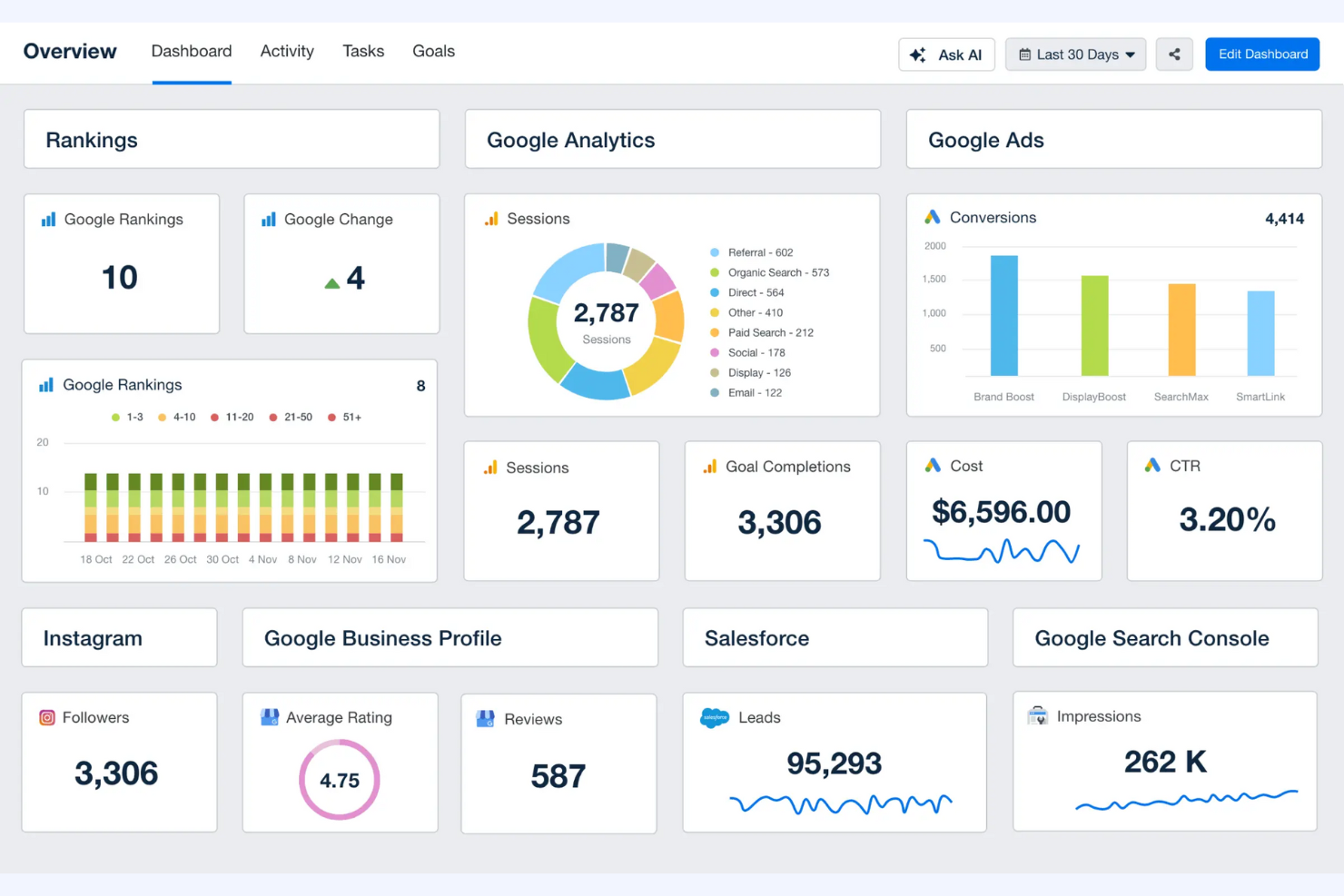
AgencyAnalytics is a reporting platform designed for digital agencies, helping them create detailed marketing reports and dashboards. It's aimed at agencies that need to track and showcase their marketing performance metrics to clients efficiently.
Why I picked AgencyAnalytics: It focuses on client reporting, offering customizable dashboards, automated report scheduling and approval, and pre-built report and dashboard templates that can save you time. You can also automate data collection and integrate data from various sources to create a unified report for your clients.
Standout features and integrations:
Features include a drag-and-drop dashboard builder that lets you customize reports according to client preferences. You can also take advantage of white-label reporting to maintain your agency's branding in all client communications.
Integrations include Google Analytics, Google Ads, Facebook Ads, Instagram, YouTube, LinkedIn Ads, and more.
Pros and Cons
Pros:
- Multi-client dashboard support
- Automated report scheduling
- Strong client reporting tools
Cons:
- Features are tailored for reporting
- Limited deep SEO analysis

Best for competitor analysis

Similarweb is a digital intelligence platform designed for marketers and business analysts looking to gain insights into online market trends and competitor performance. It helps users understand traffic sources, audience behavior, and industry benchmarks.
Why I picked Similarweb: It excels in competitor analysis, providing detailed insights into traffic sources and audience engagement. The platform offers industry benchmarks that can help you understand where your business stands in the market. With its audience behavior tools, you can tailor your strategies to meet the demands of your target audience.
Standout features and integrations:
Features include detailed traffic and market data analysis that can help you understand where your competitors get their traffic and identify areas of consumer demand. The AI SEO Strategy Agent can benchmark specific content and cluster topics to help you prioritize as you refine your SEO strategy.
Integrations include Salesforce, HubSpot, Microsoft Excel, Looker Studio, and more.
Pros and Cons
Pros:
- Useful audience behavior insights
- Strong market benchmarking
- Detailed traffic source modeling
Cons:
- Limited historical accuracy
- Expensive for small agencies

Semrush
Best for keyword research

Semrush is a digital marketing and SEO platform used to research keywords, analyze competitors, and track search performance. It helps you plan content, monitor rankings, and audit sites from one workspace.
Why I picked Semrush: Semrush offers SEO marketing tools for finding and analyzing search terms at scale. You can see keyword volume, difficulty, trends, and intent before committing to content or campaigns. The platform also shows which keywords your competitors rank for and where gaps exist, which can make it easier to plan content that targets real search demand. If your work depends on finding the right terms fast, Semrush supports that from idea development to result tracking.
Standout features and integrations:
Features include site auditing for finding technical issues, position tracking for monitoring search engine rankings over time, and topic research for building content ideas around core terms. You can also run backlink audits to check link quality to connect keyword work with overall site health.
Integrations include Google Analytics, Google Search Console, Looker Studio, WordPress, Trello, Zapier, and more.
Pros and Cons
Pros:
- Scalable for agency workflows
- Strong competitor visibility
- Large keyword dataset
Cons:
- Potential data overload for small teams
- Learning curve for beginners

Moz Pro
Best for SEO metrics

Moz Pro is an SEO software suite tailored for marketers and SEO professionals who need comprehensive tools for keyword research, link building outreach, and site audits. It helps users improve their search engine rankings and online visibility through actionable insights.
Why I picked Moz Pro: It focuses on SEO analysis, providing detailed metrics that give you a clear understanding of your site's performance. The keyword explorer tool helps you discover and prioritize the best keywords to target. With the link explorer, you can analyze your backlink profile and discover link-building opportunities. The Site Crawl feature identifies technical SEO issues so that your site remains optimized.
Standout features and integrations:
Features include rank tracking that monitors your site's local and national search engine rankings over time. The on-page optimization feature provides a prioritized list of specific recommendations for improving your site's performance. Additionally, the custom reports feature lets you create, run, and export detailed PDF or CSV reports tailored to your needs.
Integrations are not publicly listed.
Pros and Cons
Pros:
- Educational SEO ecosystem
- Clear site audit reports
- Solid backlink research
Cons:
- Restrictive free tier
- Expensive for feature depth

Best for scalable SEO

BrightEdge is an SEO platform designed for large SEO operations, helping businesses optimize their digital content and improve search engine rankings. It serves marketing teams and SEO specialists who need data-driven insights to inform their digital strategies.
Why I picked BrightEdge: It supports enterprise-level SEO with a suite of tools for large-scale data analysis and content optimization. The platform's Data Cube provides insights into search trends and opportunities. With its StoryBuilder feature, you can create visual SEO reports that showcase your local and global performance. Additionally, its ContentIQ tool identifies and displays errors in order of severity, helping you prioritize site fixes and make sure your content is optimized.
Standout features and integrations:
Features include the ability to track search performance across multiple devices and locations. The platform offers real-time analytics that can help you make informed decisions quickly. The Content Optimizer feature can be used to create competitive, SEO-friendly content that ranks well.
Integrations include Adobe Analytics, Google Analytics, Google Search Console, WordPress, and more.
Pros and Cons
Pros:
- Cross-channel reporting
- Strong content performance tracking
- Enterprise-scale SEO data
Cons:
- Requires trained specialists
- High pricing tiers

Ubersuggest
Best for low-barrier SEO entry

Ubersuggest is an SEO tool designed for marketers and small businesses that want to enhance their online visibility. It helps users with keyword research, site audits, and competitive analysis to improve their search rankings.
Why I picked Ubersuggest: It focuses on providing keyword suggestions, offering a wide array of terms to enhance your SEO strategy. The tool's site audit feature identifies SEO and code issues that need fixing to help you optimize your website. With its competitor analysis, you can gain insights into your rivals' strategies and adjust accordingly.
Standout features and integrations:
Features include a keyword overview that provides insights into search volume and competition. The content gap analysis feature can help you determine what content to create that resonates with your audience. Additionally, the backlink data feature shows you who’s linking to your competitors.
Integrations are not publicly listed.
Pros and Cons
Pros:
- Browser extension support
- Suitable for beginners
- Affordable SEO entry tool
Cons:
- Basic site audit depth
- No API or webhook support
Other SEO Agency Software
Here are some additional SEO agency software options that didn’t make it onto my shortlist but are still worth checking out:
- Google Search Console
For indexing issues
- Surfer SEO
For AI-generated writing
- Rankability
For AI-led content optimization
- Gumloop
For team collaboration
- Search Atlas
For local SEO
- AIOSEO
For WordPress SEO
- Whatagraph
For automated reporting
- TapClicks
For marketing analytics
- Screaming Frog
For technical SEO audits
- SEOTesting
For SEO experiment tracking


How I Evaluate SEO Agency Software
I split my evaluation into baseline criteria—things like multi-client workflow management and automated white-labeled reporting—and differentiators that separate tools worth recommending from the rest.
Core Functionality (Table Stakes For This List)
When I'm selecting tools for my list, I rank each one on a scale from 0 (does not offer the functionality) to 5 (excels in this area) for each core functionality listed below. Then, I calculate the tool's total score into a percentage. Each tool needs to achieve a minimum total score of 65% to be considered for inclusion.
- SEO Project Workflows: I look for templates and workflows designed around common SEO deliverables—like technical audits, keyword research sprints, or monthly on-page optimization cycles—rather than generic task boards.
- Client & Campaign Management: Managing 20+ retainer clients in one workspace gets messy fast, so I evaluate how each tool segments campaigns, organizes client accounts, and surfaces status at a glance.
- SEO Tool Integrations: A platform should connect to the tools agencies already rely on—Google Analytics, Search Console, Ahrefs, Semrush, or Moz—so data flows into project workflows without manual exports.
- Automated SEO Reporting: I check whether the tool can generate scheduled, white-labeled reports that pull in rankings, traffic, and backlink data so your team isn't rebuilding slides every month.
- Team Collaboration & Task Assignment: Agencies juggle writers, link builders, and strategists across accounts, so I evaluate task assignments, due dates, dependencies, and workload visibility across contributors.
- Client Portal & Approvals: I look for a dedicated client-facing view where stakeholders can review deliverables, leave feedback, and approve work—keeping sign-off loops out of scattered email threads.
Once I have a list of tools that meet this criteria, I consider what sets each platform apart.
Differentiating Factors (What Sets Vendors Apart)
Here's how I compare and contrast different vendors:
Standout Features
White-label branding matters when clients interact with your platform directly—I look for tools that let you apply your agency's logo, colors, and custom domain across portals and reports. Time tracking tied to specific clients and campaigns is another differentiator, since it helps you measure retainer profitability rather than just task completion. I also evaluate whether a tool offers AI-driven features like automated keyword clustering or content brief generation, which can cut hours off repetitive SEO workflows.
Beyond Features
Pricing structure is a big one—I evaluate whether a tool charges per user, per client, or at a flat rate, because the wrong model can erode margins as your agency scales. Integration depth also matters beyond just having a connector; I check whether data from tools like Semrush or Search Console syncs bidirectionally or just pulls surface-level metrics. Client confidentiality rounds out my evaluation, especially role-based access controls that keep one client's data isolated from another across your team.
How to Choose SEO Agency Software
It’s easy to get bogged down in long feature lists and complex pricing structures. To help you stay focused as you work through your unique software selection process, here’s a checklist of factors to keep in mind:
| Factor | What to Consider |
|---|---|
| Scalability | Can the software grow with your agency? Consider if it supports an increasing number of clients and larger data volumes. Look for flexible pricing plans as you scale. |
| Integrations | Does it work with your existing tools? Ensure compatibility with platforms like Google Analytics, social media channels, and CRM systems. |
| Customizability | Can you tailor the software to fit your workflows? Evaluate the ability to customize dashboards, reports, and user permissions to match your agency's needs. |
| Ease of use | Is the software intuitive for your team? Assess the learning curve and whether the interface is user-friendly for quick adoption. |
| Implementation and onboarding | How long will it take to get up and running? Consider the resources needed for setup and training, including available support and documentation. |
| Cost | Does the pricing fit your budget? Compare costs across vendors, including hidden fees, and consider long-term value versus short-term savings. |
| Security safeguards | Are client data and operations secure? Check for compliance with data protection standards and the availability of encryption and access controls. |
What Is SEO Agency Software?
SEO agency software is a set of digital tools designed to help agencies manage and improve their clients' search engine optimization efforts. Marketing professionals, SEO specialists, and digital agencies generally use these tools to enhance online visibility and track performance. Keyword tracking, backlink analysis, and site audit features help with optimizing content, improving search rankings, and understanding competition. Overall, these tools provide valuable insights that drive informed decision-making and improve client outcomes.
Features
When selecting SEO agency software, keep an eye out for the following key features:
- Keyword tracking: Monitors keyword rankings to provide insights into how your site is performing in search results.
- Backlink analysis: Evaluates the quality and quantity of backlinks to improve link-building strategies.
- Site audit: Identifies technical SEO issues and provides recommendations for improvement.
- Competitor analysis: Offers insights into competitors' SEO strategies to help you stay ahead in the market.
- Automated reporting: Generates detailed reports on SEO performance, saving time on manual data compilation.
- Content optimization: Analyzes content to suggest improvements for better search engine rankings.
- Custom dashboards: Allow you to tailor data presentation according to client needs and preferences.
- Local SEO tools: Enhance visibility for businesses in local searches by optimizing local listings.
- Real-time analytics: Provide up-to-date data to help make informed decisions quickly.
- Integration capabilities: Connect with other tools and platforms to streamline workflows and data management.
Benefits
Implementing SEO agency software provides several benefits for your team and your business. Here are a few you can look forward to:
- Improved search rankings: By using keyword tracking and content optimization, your site can achieve better visibility in search results.
- Time savings: Automated reporting and site audits reduce the time spent on manual tasks, allowing your team to focus on strategy.
- Competitive insights: Competitor analysis provides valuable data on rival strategies, helping you make informed decisions to stay ahead.
- Enhanced client reporting: Custom dashboards and automated reports offer clear, tailored insights to keep clients informed and satisfied.
- Better link-building strategies: Backlink analysis helps you identify and leverage high-quality links to boost your site's authority.
- Increased local visibility: Local SEO tools ensure your business appears prominently in local search results, attracting more local customers.
- Data-driven decisions: Real-time analytics provide up-to-date information, enabling quick and informed decision-making.
Costs and Pricing
Selecting SEO agency software requires an understanding of the various pricing models and plans available. Costs vary based on features, team size, add-ons, and more. The table below summarizes common plans, their average prices, and typical features included in SEO agency software solutions:
Plan Comparison Table for SEO Agency Software
| Plan Type | Average Price | Common Features |
|---|---|---|
| Free Plan | $0 | Basic keyword tracking, limited site audits, and restricted reporting capabilities. |
| Personal Plan | $10-$30/user/month | Keyword tracking, backlink analysis, and basic competitor insights. |
| Business Plan | $50-$150/user/month | Advanced site audits, comprehensive reporting, and local SEO tools. |
| Enterprise Plan | $200-$500/user/month | Custom dashboards, real-time analytics, and extensive integration capabilities. |
SEO Agency Software FAQs
Here are some answers to common questions about SEO agency software:
Is SEO agency software difficult to implement?
Most modern SEO agency platforms are designed for quick setup with onboarding guides and training resources. Implementation difficulty usually depends on how advanced your existing workflows are.
Can SEO agency software integrate with other tools?
Yes, most platforms integrate with analytics tools, CRMs, content platforms, and ad networks. Verifying native integrations before purchase can help you avoid manual work later.
How often do SEO agency software updates occur?
Update schedules vary by provider, but most release regular improvements for features, data accuracy, and security. Larger platforms typically update more frequently.