

10 Best Professional Services Billing Software Reviewed in 2026

Best Professional Services Billing Software Shortlist


At the heart of every successful project is the delicate art of balance—aligning ambitious timelines with precise resource management. Professional services billing software acts as your silent partner in this process, integrating expense tracking and financial oversight so you can shift your focus from managing spreadsheets to delivering exceptional results.
I've spent time testing and reviewing these tools to give you an unbiased look at the best options out there. In my experience, finding the right software can be an absolute game-changer for your team.
In this listicle, I'll dive into the top picks, highlighting what makes them stand out. Whether you're a freelancer or part of a larger team, you'll find something that fits your needs. Let's explore the options and find the right tool for you.
Why Trust Our Software Recommendations
Our team has been testing and reviewing software since 2012. As project managers ourselves, we know how difficult—and important—it is to choose the right software.
For this guide, we evaluated tools using hands-on testing and independent research, scoring tools using our selection criteria. We also draw on insights from industry thought leaders and practicing project management experts.
Our reviews reflect our human editorial judgment, not a sales pitch.
Expert reviewers:
Professional Services Billing Software Comparison Table
This comparison table summarizes pricing details for my top professional services billing software selections.
| Tool | Best For | Trial Info | Price | ||
|---|---|---|---|---|---|
| 1 | Best for freelancers | Free demo + 30-day free trial available | From $12/month (billed annually) | Website | |
| 2 | Best for small businesses | 30-day free trial | From $38/month | Website | |
| 3 | Best for integration options | 30-day free trial available | From $2.50/month | Website | |
| 4 | Best for legal billing | Free demo + 10-day free trial available | From $43/user/month (billed annually) | Website | |
| 5 | Best for international invoicing | Not available | Free forever plan | Website | |
| 6 | Best for larger enterprises | 30-day free trial | Pricing upon request | Website | |
| 7 | Best for time tracking | Free plan + 30-day free trial available | From $9/seat/month (billed annually) | Website | |
| 8 | Best for legal client management | 14-day free trial | From $49/user/month | Website | |
| 9 | Best for payment processing | Free plan available; 30-day free trial on paid tiers | From $49/month | Website | |
| 10 | Best for team collaboration | Free plan + 15-day free trial available | From $9.90/month | Website |
Best Professional Services Billing Software Review
Below are my detailed summaries of the best professional services billing software that made it onto my shortlist. My reviews offer a detailed look at the key features, pros and cons, integrations, and ideal use cases of each tool to help you find the best one for you.

Best for freelancers

FreshBooks is a cloud-based accounting software tailored for freelancers and small business owners. It handles invoicing, expense tracking, and time management, making it a go-to tool for solo entrepreneurs and small teams.
Why I picked FreshBooks: FreshBooks is ideal for freelancers due to its intuitive invoicing system that automates billing. The software is particularly useful for avoiding late payments thanks to its automated client reminders. The time tracking feature ensures you bill clients accurately for every hour worked. It also offers easy expense management, helping you keep track of your business expenditures. The mobile app adds flexibility, allowing you to manage finances on the go.
Standout Features and Integrations:
Features include customizable invoice templates that let you personalize your billing documents. The double-entry accounting feature provides a more detailed view of your financial health. You can also set up recurring invoices for clients you bill regularly, meaning less time is wasted.
Integrations include Gusto, HubSpot, Zapier, Asana, Trello, and more.
Pros and Cons
Pros:
- Strong client payment reminders
- Great for solo operators
- Clean invoices look professional
Cons:
- Weak project cost controls
- Steep cost for adding team members

Best for small businesses
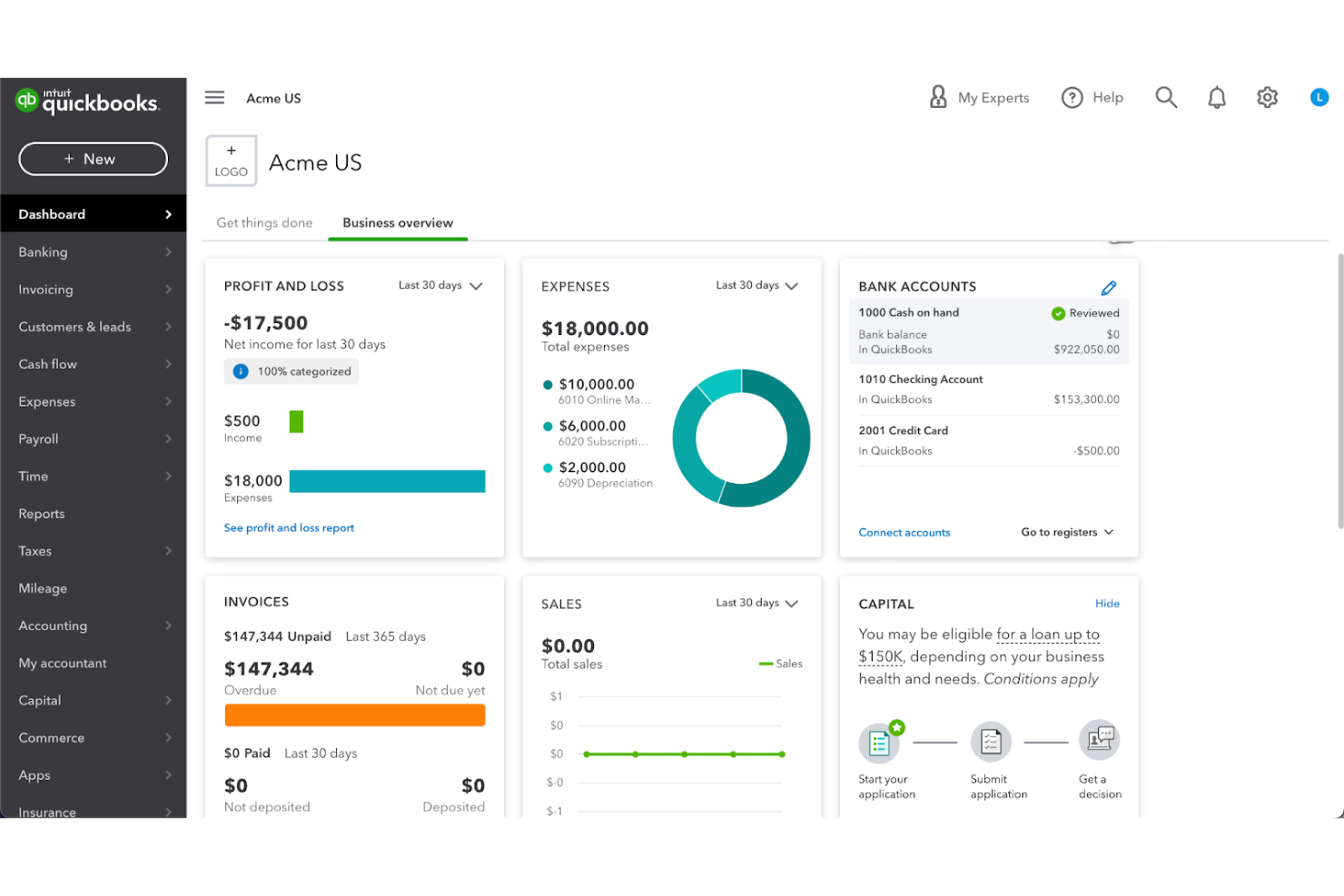
QuickBooks is a bookkeeping and accounting software solution designed for small businesses. It manages invoicing, payroll, and financial reporting.
Why I picked QuickBooks: QuickBooks is perfect for small businesses because of its straightforward invoicing and billing features. It offers an intuitive dashboard that helps you keep track of your financial health. The payroll management feature simplifies paying your team accurately and on time. With its tax preparation tools, QuickBooks ensures you stay compliant with regulations, easing the burden during tax season.
Standout Features and Integrations:
Features include expense tracking that automatically categorizes and organizes your spending. The cash flow management feature offers insights to help you make informed financial decisions. You can also use the customizable reporting feature to generate reports tailored to your business needs.
Integrations include PayPal, Shopify, Square, QuickBooks Time, HubSpot, Mailchimp, BILL, Expensify, and more.
Pros and Cons
Pros:
- Strong tax time support
- Useful cashflow snapshots
- Familiar for many teams
Cons:
- Limited permissions
- Limited scalability for larger businesses

Xero
Best for integration options
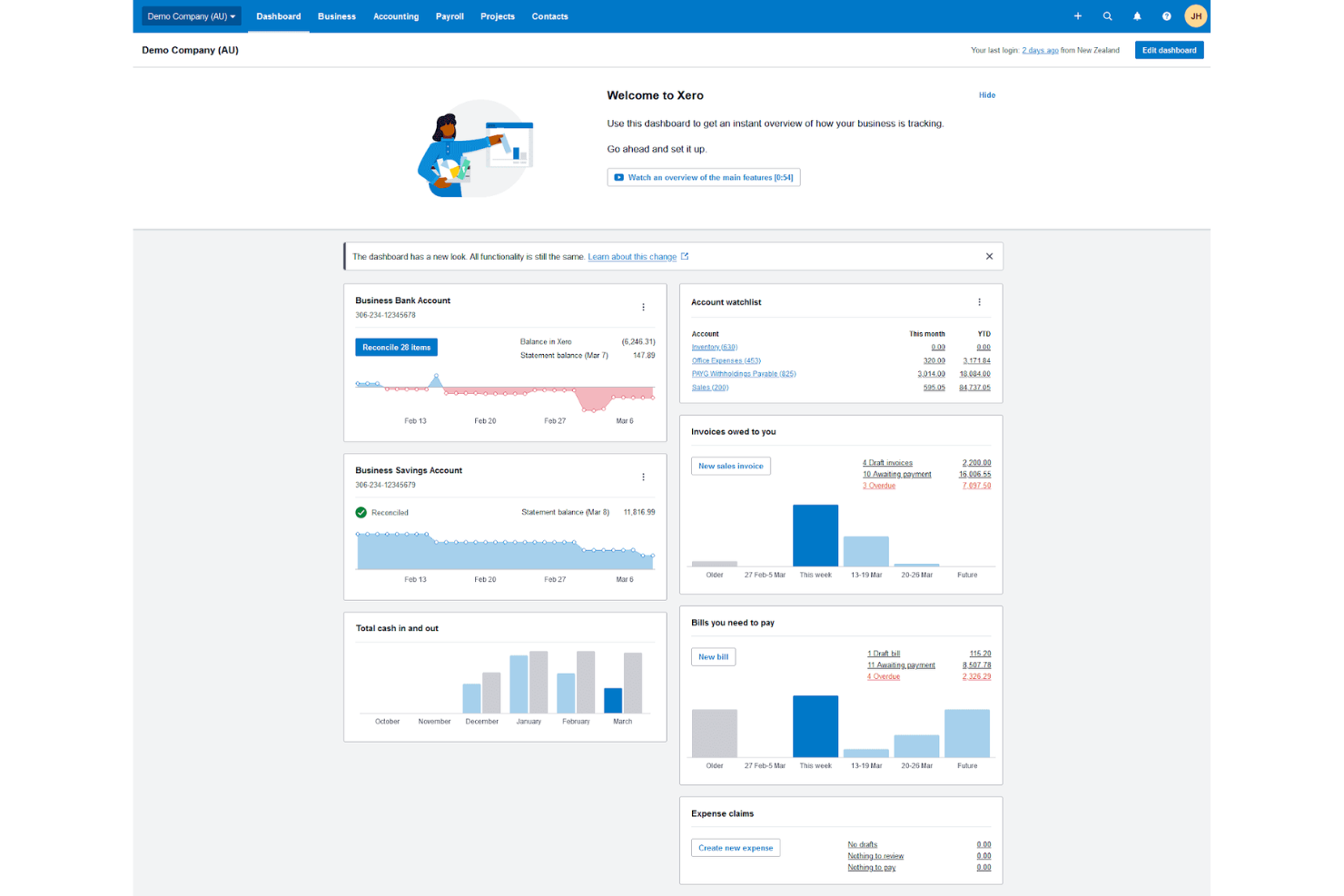
Xero is a cloud-based accounting software solution designed for small and medium-sized businesses. It offers tools for invoicing, bank reconciliation, and financial reporting, making it a versatile choice for managing business finances.
Why I picked Xero: Xero is perfect for businesses that need diverse integration options to simplify their operations. It supports a wide range of third-party apps, allowing your team to optimize the software to fit your unique needs. The invoicing feature is user-friendly, helping you create and send invoices quickly. With real-time bank reconciliation, you can keep your accounts up to date.
Standout Features and Integrations:
Features include detailed expense tracking that helps you monitor your spending effectively. The project management feature ties financials directly to your business activities, giving you a clear view of project profitability. Xero also offers detailed reporting tools, enabling you to generate financial reports with ease.
Integrations include PayPal, Stripe, Shopify, HubSpot, Expensify, and more.
Pros and Cons
Pros:
- Clean audit trail basics
- Useful invoice status tracking
- Good app ecosystem links
Cons:
- Permissions can be confusing
- Bulk invoice creation and editing options are restricted
TimeSolv
Best for legal billing

TimeSolv is a billing and time tracking software designed primarily for legal professionals and law firms. It offers tools for invoicing, time tracking, and expense management.
Why I picked TimeSolv: TimeSolv is tailored for legal billing, providing features that cater to the specific needs of law firms. Its flexible billing options allow you to manage complex client billing arrangements with ease. The software includes trust accounting, ensuring compliance with legal industry standards. With its reporting, you can gain insights into your firm's financial performance and make informed decisions.
Standout Features and Integrations:
Features include batch invoicing, which lets you generate multiple invoices at once, saving time. The time entry feature allows for detailed time tracking, ensuring accurate client billing. You can also benefit from project management tools that help you oversee legal cases and tasks efficiently.
Integrations include QuickBooks, Dropbox, NetDocuments, Xero, LawPay, Microsoft 365, Dropbox, and more.
Pros and Cons
Pros:
- Batch billing saves time
- Flexible rate arrangements
- Strong trust accounting support
Cons:
- Occasional page freezing and bugs
- Mobile app has limited functionality

Best for international invoicing
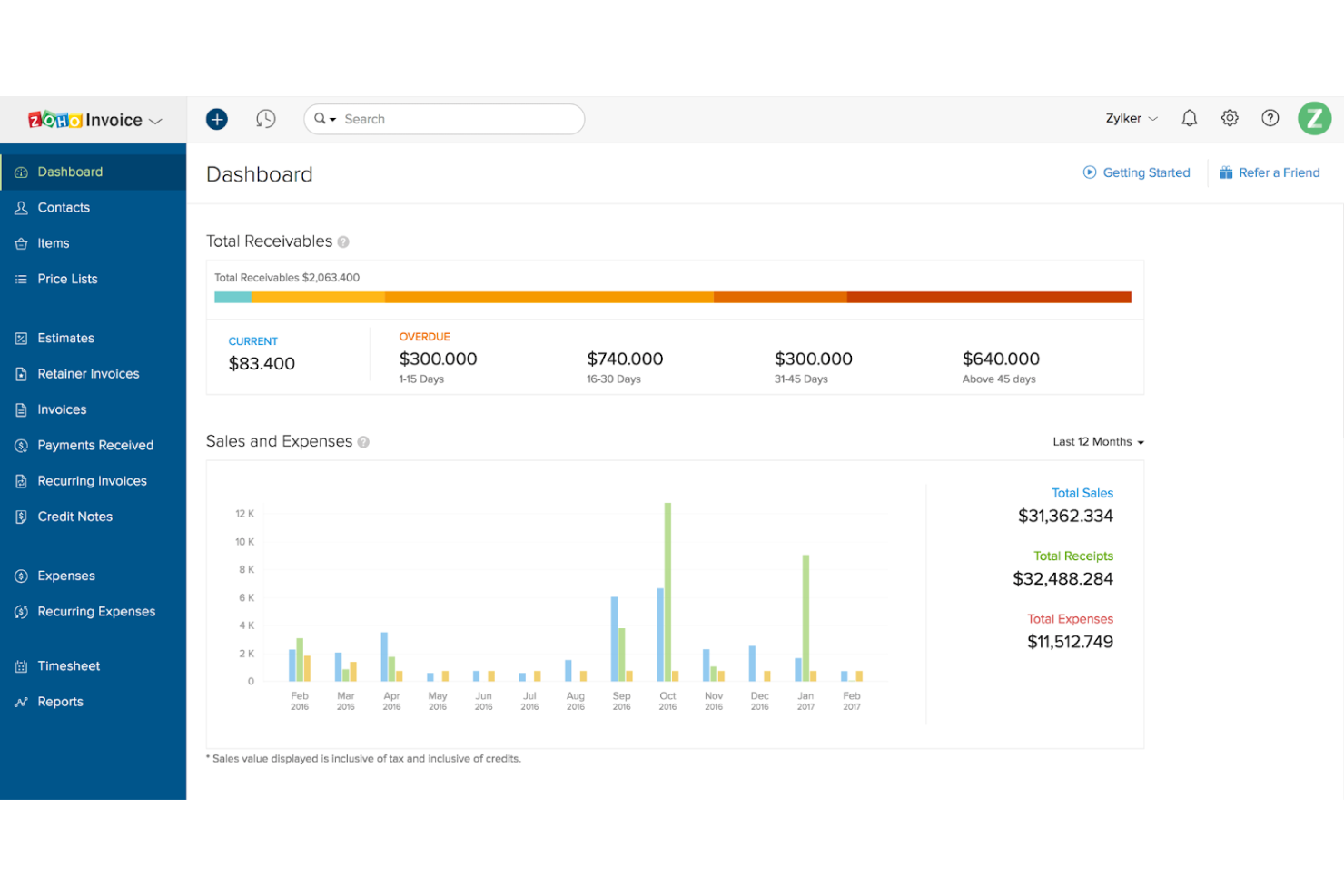
Zoho Invoice is an invoicing software solution aimed at freelancers and small businesses. It offers tools for creating invoices, managing expenses, and tracking time, making it a versatile choice for businesses with clients across the globe.
Why I picked Zoho Invoice: Zoho Invoice excels in international invoicing, providing multi-currency support for your global transactions. It allows you to customize invoices in various languages, catering to your international clientele. The software includes automated payment reminders, helping you maintain cash flow without constant manual intervention. With its detailed reporting, you can keep track of your financial health across different markets.
Standout Features and Integrations:
Features include automated workflows that reduce repetitive tasks, saving you time. The client portal feature lets your customers view and pay invoices online, improving their experience. You can also benefit from the project billing feature, which links time tracking directly to client invoices.
Integrations include PayPal, Stripe, Dropbox, Slack, Zoho CRM, and more.
Pros and Cons
Pros:
- Helpful payment follow-ups
- Smooth client portal flow
- Strong multi-currency invoicing
Cons:
- Invoice limits on free plan
- Limited advanced workflows

Sage
Best for larger enterprises

Sage is an enterprise resource planning (ERP) software designed for large businesses. It provides solutions for accounting, financial management, and payroll, catering to the complex needs of large-scale operations.
Why I picked Sage: Sage is ideal for larger enterprises due to its advanced financial management capabilities. It offers accounting features that handle complex transactions with ease. The payroll management system supports a wide range of employee needs. Sage's scalability ensures your business can grow without outgrowing the software's capabilities.
Standout Features and Integrations:
Features include detailed budgeting tools that help your team plan financially. The asset management feature lets you track and manage company assets efficiently. You can also benefit from the multi-currency support, which is essential for businesses operating in multiple countries.
Integrations include Salesforce, Microsoft Office 365, PayPal, Shopify, and more.
Pros and Cons
Pros:
- Supports multi-entity accounting
- Strong audit trail controls
- Handles complex billing rules
Cons:
- Customization can get expensive
- Needs dedicated system owners

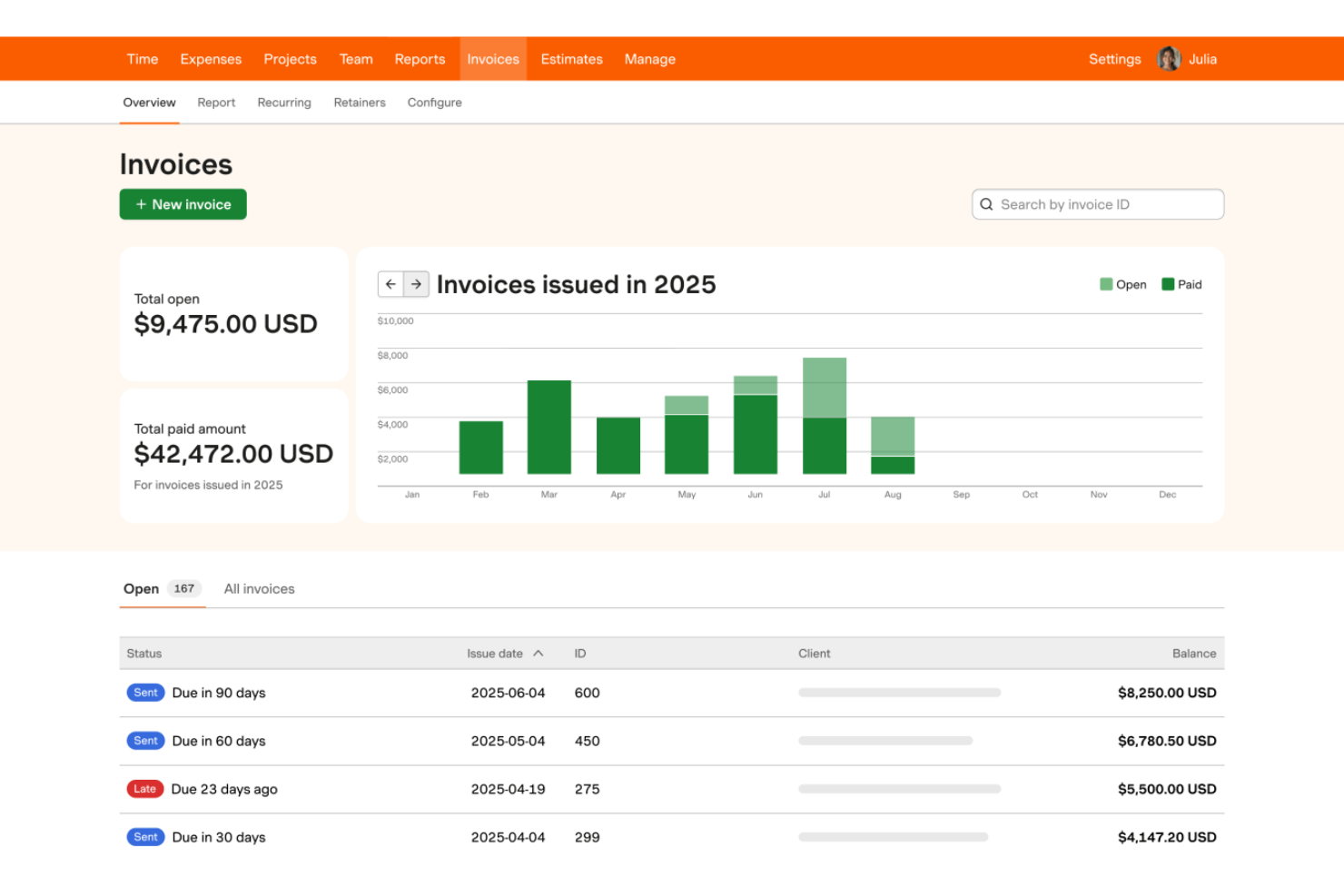
Harvest is a time tracking and invoicing software designed for freelancers and small to medium-sized businesses. It helps teams track time, manage expenses, and send invoices.
Why I picked Harvest: Harvest excels in time tracking, allowing your team to record hours spent on projects. It provides detailed timesheets and reports, giving you visibility into how time is allocated across tasks. The invoicing feature links directly to tracked time, simplifying billing processes. With its expense tracking, you can manage project costs effectively and ensure accurate client billing.
Standout Features and Integrations:
Features include project budgeting that helps you set financial limits and monitor project expenses. The reporting feature provides insights into your team's performance and project profitability. You can also benefit from the built-in reminders, which ensure your team logs time consistently.
Integrations include Asana, Trello, Slack, QuickBooks, Xero, and more.
Pros and Cons
Pros:
- Lightweight team onboarding
- Helpful project burn tracking
- Simple time entry habits
Cons:
- Limited billing rule complexity
- Lacks full project management


Bill4Time is a time tracking and billing software designed specifically for legal professionals and law firms. It offers tools for time tracking, invoicing, and client management, helping legal teams manage their billing processes.
Why I picked Bill4Time: Bill4Time is tailored for legal professionals, offering features that cater to the unique needs of law firms. The client management system helps you organize and access client information. With its detailed time tracking, you can ensure accurate billing for every minute worked. The software also includes customizable invoicing, allowing you to create invoices that fit your firm's branding and requirements.
Standout Features and Integrations:
Features include trust accounting, which helps manage and track client funds in compliance with legal standards. The reporting feature provides insights into your firm's financial performance and client billing. You can also benefit from the document management system, which organizes legal documents and files for easy access.
Integrations include QuickBooks, NetDocuments, Box, Google Calendar, and more.
Pros and Cons
Pros:
- Useful invoice customization
- Good client ledger clarity
- Strong trust accounting tools
Cons:
- Outdated interface
- Mobile performance issues

Square
Best for payment processing
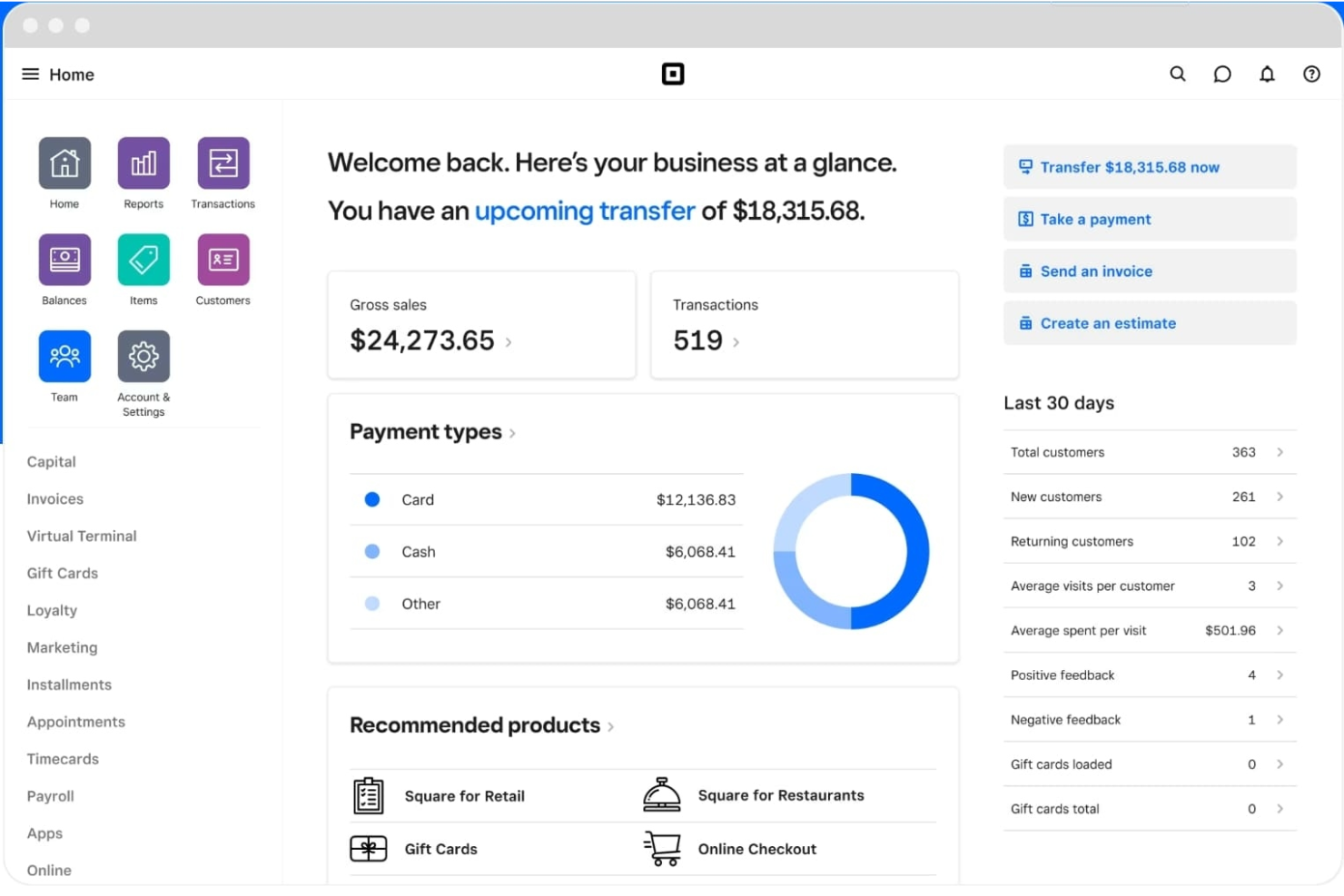
Square is a payment processing platform tailored for small to medium-sized businesses. It handles transactions, point-of-sale operations, and invoicing, offering a complete financial management solution for your business.
Why I picked Square: Square excels in payment processing, providing your team with a reliable way to handle transactions. Its easy-to-use point-of-sale system integrates smoothly with your devices, allowing you to accept credit card payments instantly. The invoicing feature is efficient, allowing you to send and track invoices with ease. Square's reporting tools give you insights into sales and customer behavior, helping you make informed business decisions.
Standout Features and Integrations:
Features include inventory management that lets you track your stock levels in real time. The customer directory helps you maintain detailed records of your clients, improving customer relationship management. You can also benefit from the employee management feature, which simplifies scheduling and time tracking.
Integrations include QuickBooks, Xero, JotForm, WooCommerce, Wix, and more.
Pros and Cons
Pros:
- Clear sales summaries
- Payments land quickly
- Fast checkout to invoice flow
Cons:
- Limited international availability
- High transaction fees
New Product Updates from Square
Square Launches AI-Powered Kiosk for Restaurants
Square launches a new self-ordering kiosk with voice and touch ordering, AI-powered upsells, and built-in payments. This gives US restaurants another way to handle orders and guide customers through menus. For more information, visit Square’s official site.
 .
.
Paymo
Best for team collaboration

Paymo is a project management and time tracking software designed for freelancers and small to medium-sized teams. It helps manage projects, track work hours, and facilitate collaboration, providing an all-in-one solution for team productivity.
Why I picked Paymo: Paymo is ideal for team collaboration, offering features that improve communication and project coordination. The task management system allows your team to assign and track tasks. Its built-in time tracking ensures accurate billing and accountability.
Standout Features and Integrations:
Features include a Kanban board that visualizes your workflow and helps manage tasks more effectively. The file-sharing feature allows your team to store and access project files in one place. You can also use the resource scheduling tool to allocate tasks and manage team workloads efficiently.
Integrations include Slack, Google Calendar, QuickBooks, Zapier, and more.
Pros and Cons
Pros:
- Clear client project spaces
- Helpful proofing for creatives
- Strong task to timer flow
Cons:
- Reporting requires manual work
- Higher cost for small teams
Other Professional Services Billing Software
Here are some additional professional services billing software options that didn’t make it onto my shortlist, but are still worth checking out:
- BigTime
For project tracking
- Accelo
For client management
- Stripe
For payment gateway integration
- Scoro
For billing across all PS contract types
- Productive
For agency management
- Ignition
For client proposal management
- Deltek
For enterprise resource planning
- Anchor
For recurring billing
- ManyRequests
For client portal services
- BILL
For automated payments


How I Evaluate Professional Services Billing Software
I evaluate each tool against two layers: the baseline criteria every billing platform must meet—like multi-model billing and project-linked invoicing—and the differentiators that set the best apart.
Core Functionality (Table Stakes For This List)
When I'm selecting tools for my list, I rank each one on a scale from 0 (does not offer the functionality) to 5 (excels in this area) for each core functionality listed below. Then, I calculate the tool's total score into a percentage. Each tool needs to achieve a minimum total score of 65% to be considered for inclusion.
- Time & Expense Tracking: I look for billable/non-billable tagging at the task and client level, plus expense capture with receipt handling—the kind of granularity that keeps a consulting team's logged hours audit-ready.
- Client Invoicing & Billing: Each tool should generate invoices directly from tracked time and expenses, with enough template control and delivery options to match how your firm actually bills clients.
- Multiple Billing Model Support: Whether your team runs retainers for an ongoing advisory client or milestones on a fixed-scope build, I check that the platform handles at least three billing models with configurable logic.
- Project Budget Management: Real-time visibility into burn rate and budget variance matters here—I evaluate how well each tool links billing data to project budgets so you can catch overruns before they hit the invoice.
- Rate & Contract Management: I look for flexible rate configuration across roles, clients, and projects, including support for effective dates and overrides—something that comes up fast when you staff mixed-seniority teams on a single engagement.
- Billing Reports & Profitability: Reporting should cover utilization, realization, and project-level margins at a minimum. I evaluate whether the tool gives you the data to answer "are we actually making money on this account?"
Once I have a list of tools that meet this criteria, I consider what sets each platform apart.
Differentiating Factors (What Sets Vendors Apart)
Here's how I compare and contrast different vendors:
Standout Features
AI-powered time capture is a big differentiator—tools that pull from calendars and work apps to suggest billable entries help reduce revenue leakage, especially on teams juggling multiple client accounts. I also evaluate revenue recognition automation, since firms billing on milestones or percent-complete need ASC 606/IFRS 15 compliance built in rather than managed through spreadsheets. A client self-service portal adds real value too, giving clients direct access to invoices and payment options without the usual email chains.
Beyond Features
Integration depth matters a lot here—I check whether a tool syncs with your PM platform and accounting system so time data flows from Jira or Asana straight through to QuickBooks or Xero without manual re-entry. Firm size and vertical fit also shape my evaluation, since a solo consultant's billing needs look nothing like a 200-person IT services firm running multi-phase engagements. Pricing transparency rounds out my assessment; I look at whether the model scales predictably as your billable headcount shifts with project demand.
How To Choose Professional Services Billing Software
It's easy to get bogged down in long feature lists and complex pricing structures. To help you stay focused as you work through your unique software selection process, here's a checklist of factors to keep in mind:
| Factor | What To Consider |
|---|---|
| Scalability | Will the software grow with your business? Consider if it can handle an increase in clients or users without performance issues. |
| Integrations | Does it connect with your existing tools? Check if it integrates with your CRM, accounting software, and other key systems. |
| Customizability | Can you tailor the software to fit your workflows? Look for options to customize reports, invoices, and user roles to match your needs. |
| Ease of use | Is the interface intuitive for your team? Consider the learning curve and whether the tool is straightforward to navigate. |
| Implementation and onboarding | How quickly can you get up and running? Assess the support for onboarding, including training videos and product tours. |
| Cost | Are the pricing plans transparent and within your budget? Compare the cost against the features offered and check for any hidden fees or long-term contracts. |
| Security safeguards | Does it protect your data? Ensure the software complies with industry standards for data protection and offers features such as encryption and access controls. |
| Support availability | Is help available when you need it? Check if there's 24/7 support, live chat, and a detailed knowledge base to assist your team. |
What Is Professional Services Billing Software?
Professional services billing software is a tool that helps businesses manage invoicing, time tracking, and payment processing. Professionals such as consultants, lawyers, and accountants use these tools to simplify billing and financial management. Time tracking, invoicing, and expense management features help with accurate billing and efficient financial operations. These tools save time and reduce errors, allowing professionals to focus on their core work.
Features of Professional Services Billing Software
When selecting professional services billing software, keep an eye out for the following key features:
- Time tracking: Logs hours worked on projects accurately, ensuring precise billing and payroll management.
- Invoicing: Generates and sends invoices to clients, simplifying the billing process and reducing manual errors.
- Expense management: Tracks and categorizes business expenses, helping you maintain accurate financial records and control costs.
- Payment processing: Facilitates the collection of payments from clients through various methods, improving cash flow and reducing delays.
- Client management: Organizes client information and communication, improving relationships and ensuring efficient service delivery.
- Customizable templates: Tailor invoices and reports to align with your brand, maintaining a professional appearance.
- Multi-currency support: Accommodates international transactions, allowing you to bill clients in their local currency.
- Project budgeting: Sets financial limits and monitors expenses, ensuring projects remain within budget.
- Reporting tools: Provide insights into financial performance and project profitability, aiding in informed decision-making.
- Integration capabilities: Connect with existing tools such as CRM and accounting software, simplifying workflows and data management.
Benefits of Professional Services Billing Software
Implementing professional services billing software provides several benefits for your team and your business. Here are a few you can look forward to:
- Increased accuracy: Automated invoicing and time tracking reduce manual errors, ensuring your financial records are precise.
- Time savings: By automating repetitive tasks such as billing and expense tracking, your team can focus more on core business activities.
- Improved cash flow: Simplified payment processing helps you get paid faster, maintaining a healthy cash flow for your business.
- Better client relationships: Effective client management tools keep communication organized, helping you provide better service.
- Financial insights: Reporting tools offer valuable insights into your business's financial health, aiding in strategic decision-making.
- Global reach: Multi-currency support allows you to manage international clients, expanding your business opportunities.
- Customization: Customizable templates let you maintain a professional appearance, aligning invoices and reports with your brand.
Costs and Pricing of Professional Services Billing Software
Selecting professional services billing software requires an understanding of the various pricing models and plans available. Costs vary based on features, team size, add-ons, and more. The table below summarizes common plans, their average prices, and typical features included in professional services billing software solutions:
Plan Comparison Table for Professional Services Billing Software
| Plan Type | Average Price | Common Features |
|---|---|---|
| Free Plan | $0 | Basic invoicing, limited time tracking, and basic reporting. |
| Personal Plan | $5-$40/user/month | Time tracking, simple invoicing, expense tracking, and basic client management. |
| Business Plan | $30-$60/user/month | Advanced invoicing, project management, multi-currency support, and integrations. |
| Enterprise Plan | $70-$100/user/month | Customizable templates, advanced reporting, dedicated support, and full automation. |
Professional Services Billing Software FAQs
Here are some answers to common questions about professional services billing software:
What is the typical implementation time for professional services billing software?
The implementation time varies depending on the complexity of the software and your team’s readiness. Typically, it can take anywhere from a few days to a few weeks. To speed up the process, make sure you have a clear plan, allocate resources, and utilize any training materials offered by the vendor. Engaging with the vendor’s support team can also help resolve any issues quickly.
Can professional services billing software integrate with accounting tools?
Yes, most professional services billing software can integrate with popular accounting tools such as QuickBooks and Xero. These integrations help you sync financial data, reducing manual entry and errors. Before purchasing, check the software’s integration capabilities to ensure it supports the accounting tools your team already uses. This can save you time and improve accuracy.
Is data migration difficult when switching to a new billing software?
Data migration can be challenging, but many vendors offer support to make the process smoother. Start by backing up your existing data and then use any import tools or services provided by the new vendor. It’s helpful to have a dedicated team member oversee the migration to ensure everything transfers correctly and to address any issues that arise.
How often should software updates occur?
Software updates should occur regularly to ensure security and performance. Most vendors release updates periodically, ranging from monthly to quarterly. Regular updates help fix bugs, introduce new features, and keep the software secure. Make sure your team is aware of update schedules and any required actions to keep the system running smoothly.