

10 Best Client Portal Software Reviewed in 2026

Best Client Portal Software Shortlist


Managing projects and client relationships can be challenging, as you may have to juggle deadlines, communication, and data security. That's where client portal software comes in—it helps simplify communication, improve collaboration, and keep everything organized.
I've tested and reviewed various client portal solutions to help you find the right fit for your business. I understand the project management landscape and focus on unbiased, well-researched reviews.
In this article, you'll discover my top picks for client portal software. I'll highlight their features, benefits, and potential drawbacks to help you make an informed decision. Let's find the best solution for your team.
Why Trust Our Software Recommendations
Our team has been testing and reviewing software since 2012. As project managers ourselves, we know how difficult—and important—it is to choose the right software.
For this guide, we evaluated tools using hands-on testing and independent research, scoring tools using our selection criteria. We also draw on insights from industry thought leaders and practicing project management experts.
Our reviews reflect our human editorial judgment, not a sales pitch.
Expert reviewers:
Comparison Table: Client Portal Software
This comparison table summarizes pricing details for my top client portal software selections.
| Tool | Best For | Trial Info | Price | ||
|---|---|---|---|---|---|
| 1 | Best for milestone-driven client approvals | 14-day free trial | From €5.50/active project/month (minimum 15 projects) | Website | |
| 2 | Best for secure file sharing | 10-day free trial | From $11/user/month | Website | |
| 3 | Best for customer onboarding | Free plan + free demo available | From $350/month (billed annually) | Website | |
| 4 | Best for all-in-one service business tools | 14-day free trial | From $19/month | Website | |
| 5 | Best for no-code solutions | Free plan + free demo available | From $19/month (billed annually) | Website | |
| 6 | Best for database management | Free 14-day trial + free demo available | From $32/month (billed annually) | Website | |
| 7 | Best for finance professionals | Free demo + free trial available | From $55/user/month (billed annually) | Website | |
| 8 | Best for WordPress integration | Free demo available | From $25 (single-site license) | Website | |
| 9 | Best for team collaboration | Free plan + free demo + free trial available | From $37/month (billed annually) | Website | |
| 10 | Best for creative agencies | Free plan + free demo + free 14-day trial available | From $29/user/month (billed annually) | Website |
Best Client Portal Software Review
Below are my detailed summaries of the best client portal software that made it onto my shortlist. My reviews offer a detailed look at the key features, pros and cons, integrations, and ideal use cases of each tool to help you find the best one for you.

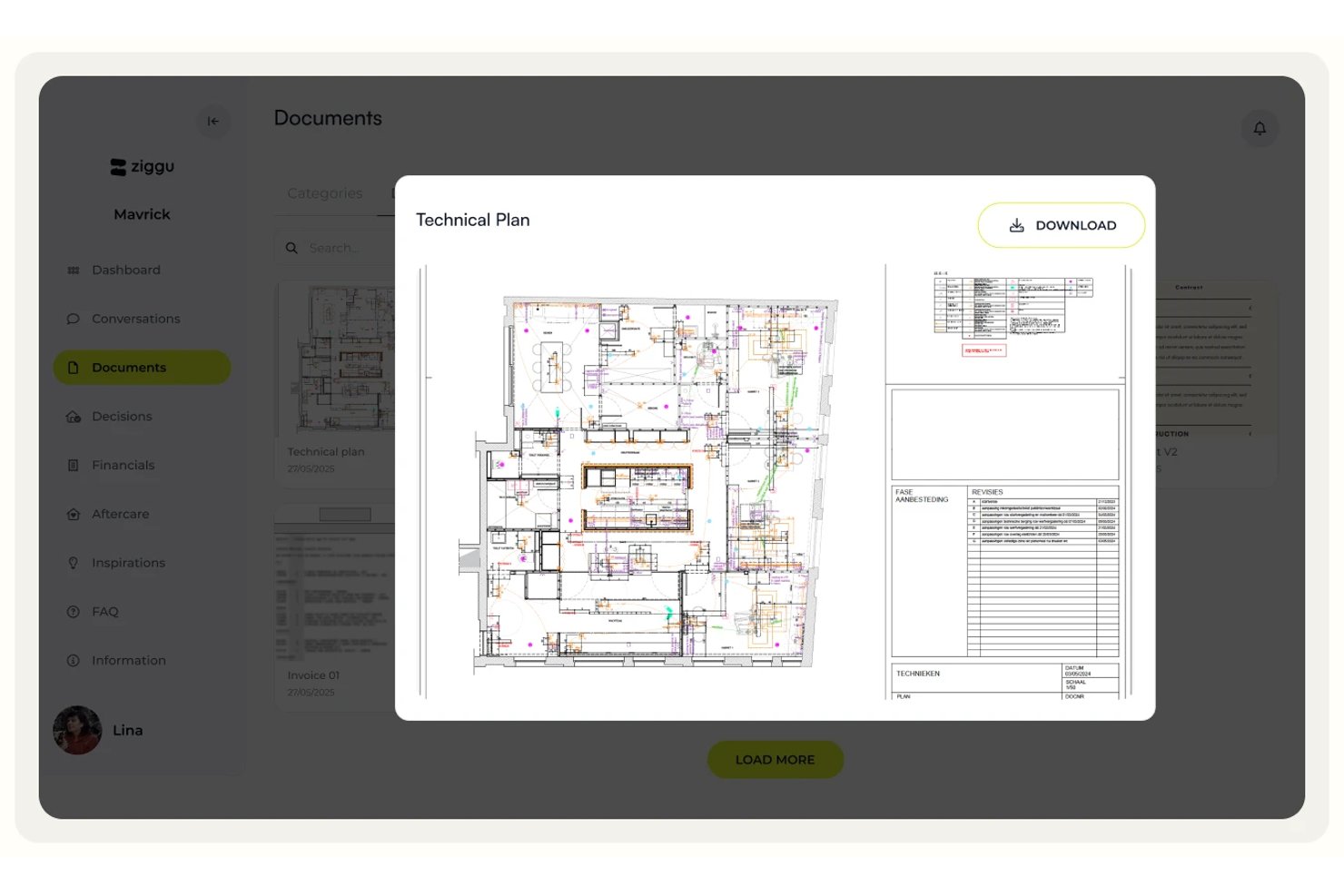
Ziggu is a client portal platform built around milestone-based project delivery, offering white-labeled client portals, structured approval workflows, centralized document sharing, and client-facing communication tools.
Who Is Ziggu Best For?
Ziggu is a strong fit for project-based businesses in construction, property development, and creative agencies that need structured milestone approvals and a branded client experience.
Why I Picked Ziggu
Ziggu earns its spot on my shortlist because of how seriously it treats client approvals as a formal, traceable process rather than an afterthought. The Decisions & Approvals feature lets clients digitally sign off on proposals directly in the portal, with every approval logged by name, date, and timestamp. That audit trail matters when a client disputes a finish choice three months into a build. Automated reminders for outstanding decisions mean my team isn't chasing sign-offs over email.
Ziggu Key Features
- White-label portal branding: Apply your logo, colors, and brand name across the client portal, notification emails, and mobile PWA app.
- Client intake forms: Collect client input, run intake questionnaires, and track satisfaction scores with automated reminders at set project stages.
- Centralized project inbox: Organize all client, partner, and team conversations by project and topic in one place, with assignable threads and internal notes.
- Self-serve FAQ library: Give clients a searchable knowledge base within the portal so they can find answers without contacting your team.
Ziggu Integrations
Ziggu offers integrations with SharePoint, Google Drive, Dropbox, Salesforce, HubSpot, Microsoft Dynamics 365, Exact Online, Power BI, and Archisnapper. Its public REST API supports custom integrations.
Pros and Cons
Pros:
- ISO 27001/27017/27018 certified data security
- White-label branding for portals and emails
- Built-in milestone approvals with audit trail
Cons:
- No Zapier or Make automation integration
- No native time tracking or billable hours

Clinked
Best for secure file sharing
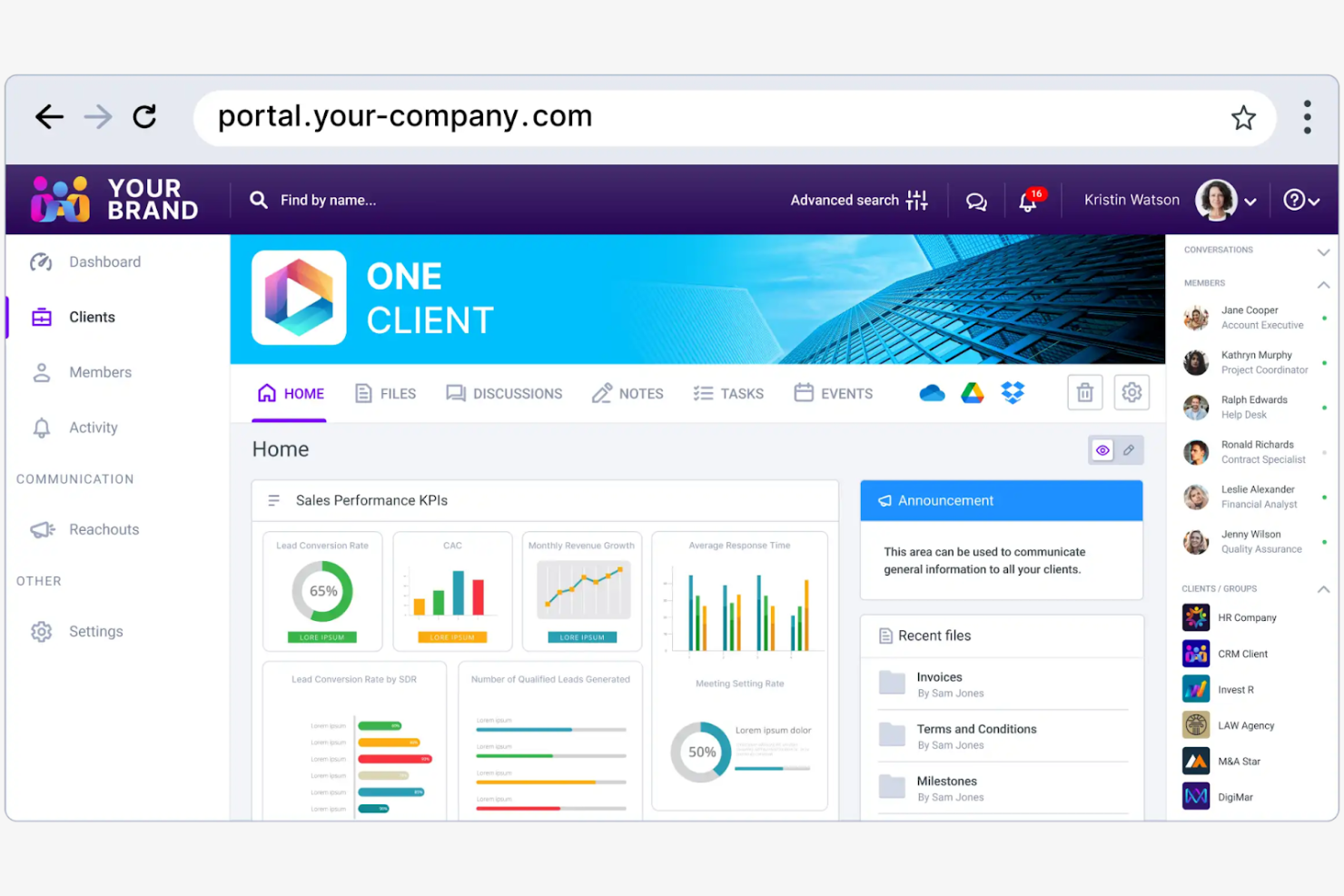
Clinked is a client portal software designed for businesses that need secure collaboration and file sharing. Its main users include teams in the finance, legal, and consulting industries who require secure communication channels and document management.
Why I picked Clinked: It provides a secure client portal environment for file sharing. You can create custom client portals to improve collaboration and maintain brand consistency. The platform's focus on security helps protect sensitive information. Clinked's ability to integrate with your existing systems makes it a flexible choice for teams with specific needs.
Standout Features and Integrations:
Features include encrypted data storage that keeps your files secure and protected. You can also use its task management features to keep your projects organized and on track.
Integrations include Google Workspace, Microsoft OneDrive, Power BI, DocuSign, and more.
Pros and Cons
Pros:
- Provides structured workspaces for each client
- Supports granular permission controls
- Offers encrypted data storage
Cons:
- Limited advanced project management features
- Limited search functionality

Dock
Best for customer onboarding
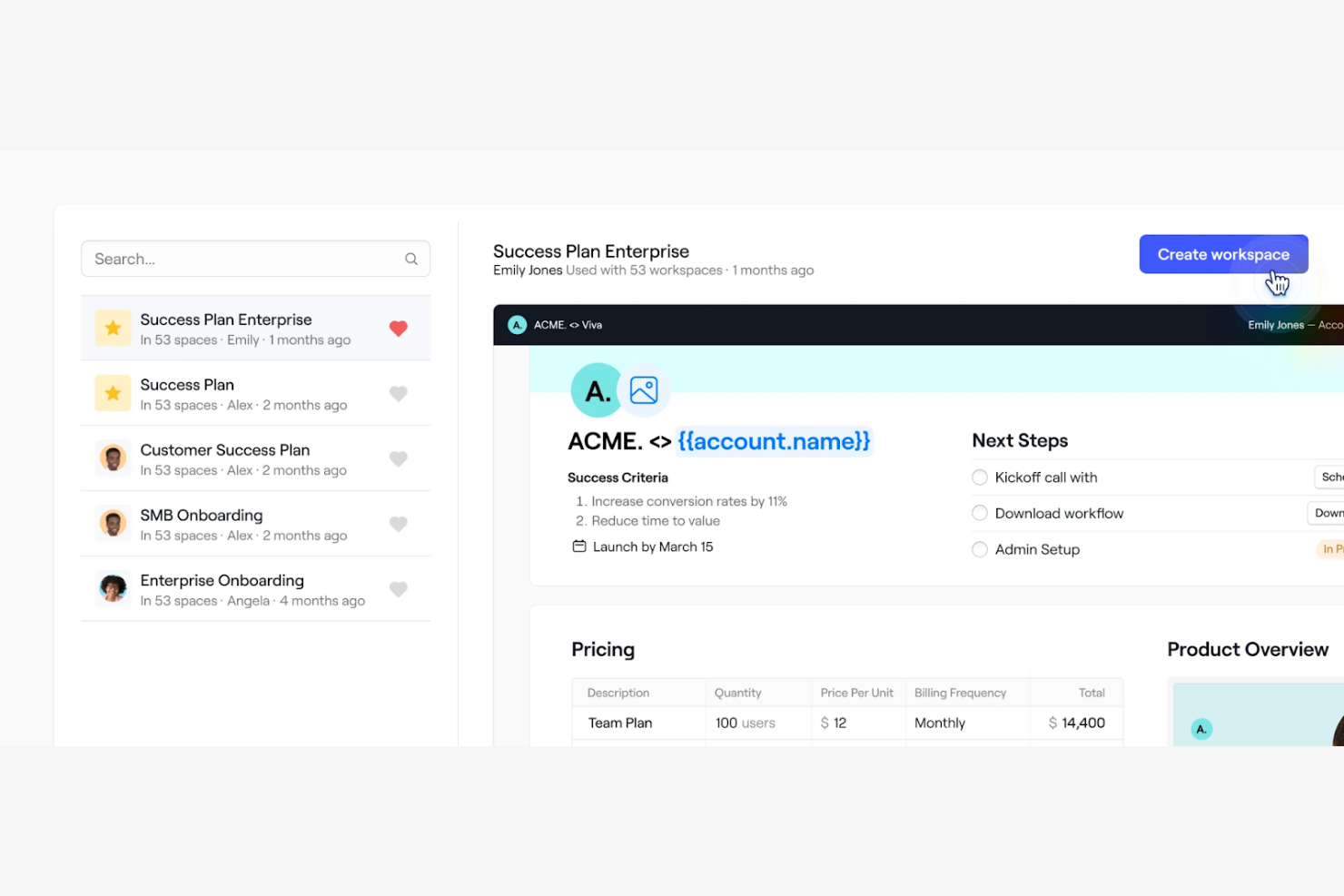
Dock is a client portal software designed for teams focused on improving customer onboarding and engagement. It offers tools for project management, client collaboration, and document sharing.
Why I picked Dock: Its focus on customer onboarding simplifies the process of bringing new clients on board. You can create personalized onboarding experiences with features such as custom client portals and automated task lists. Dock's document sharing and feedback tools support clear communication between your team and clients. The ability to tailor the onboarding process to fit specific client needs makes it a valuable tool for creating positive customer experiences.
Standout Features and Integrations:
Features include customization tools that allow you to create a unique experience for each client. The platform offers workflow automation tools that help you keep projects on track and prevent anything from falling through the cracks. You can also embed feedback systems into your workspace to gather client input and make necessary adjustments in one location.
Integrations include Slack, Google Drive, Dropbox, HubSpot, Salesforce, and more.
Pros and Cons
Pros:
- Rich content embedding support
- Customizable portal layouts
- Strong engagement analytics
Cons:
- Advanced modules may require technical expertise
- Some features are limited to higher-tier plans

Best for all-in-one service business tools

SuiteDash is an all-in-one business software designed for small to medium-sized businesses that offers tools for managing client relationships, automating workflows, and refining operations. It serves various business functions, such as CRM, project management, billing, and client communications.
Why I picked SuiteDash: It provides a unique unlimited pricing model, allowing you to add unlimited team members, clients, or projects without increasing costs. Features such as a customizable customer portal and automated CRM set it apart, offering flexibility and efficiency. SuiteDash's white-label options mean your team can maintain brand consistency while using its tool suite. The platform also includes a learning management platform, making it versatile for different industries.
Standout Features and Integrations:
Features include automated client onboarding, secure file storage and sharing, and dynamic document generation. You can also access appointment booking tools integrated with Google Calendar and project management features to organize tasks. SuiteDash's email marketing capabilities help track campaign performance, which can improve your marketing efforts.
Integrations include QuickBooks, Stripe, PayPal, Google Calendar, Zoom, and more.
Pros and Cons
Pros:
- Integrates multiple business functions
- Wide range of white-label options
- Unlimited team members and clients
Cons:
- Initial setup can be complex
- Users may feel limited to SuiteDash's ecosystem

Softr
Best for no-code solutions
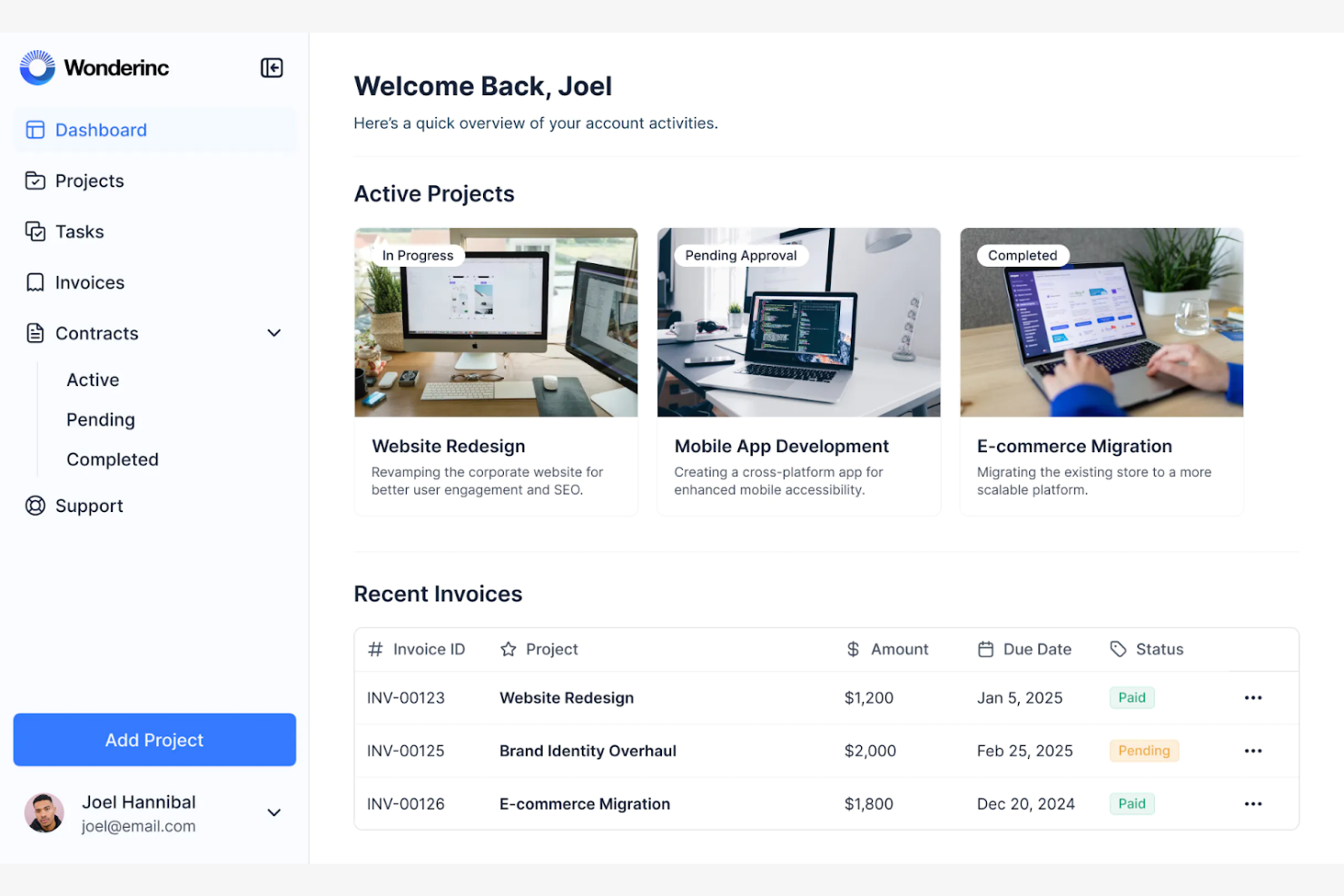
Softr is a no-code platform designed for businesses looking to create custom client portals and web applications without coding expertise. It primarily serves small to midsize companies and entrepreneurs wanting to build tailored solutions for their clients.
Why I picked Softr: It offers an intuitive drag-and-drop interface, making it simple for your team to create client portals without technical skills. You can customize layouts and features to fit your business needs, which can improve the client experience. Softr's ability to integrate with Airtable for data management adds flexibility to your projects. The platform's focus on no-code development allows you to quickly adapt to changing business requirements.
Standout Features and Integrations:
Features include pre-built templates that help you get started quickly, saving you time in the design process. You can also utilize the membership management features to control access and permissions for your clients.
Integrations include PayPal, Google Analytics, Mailchimp, and more.
Pros and Cons
Pros:
- Supports mobile-friendly portals
- Connects to multiple data sources
- Allows dynamic, personalized client views
Cons:
- Template-driven design
- Heavy reliance on external data tools

FuseBase
Best for database management
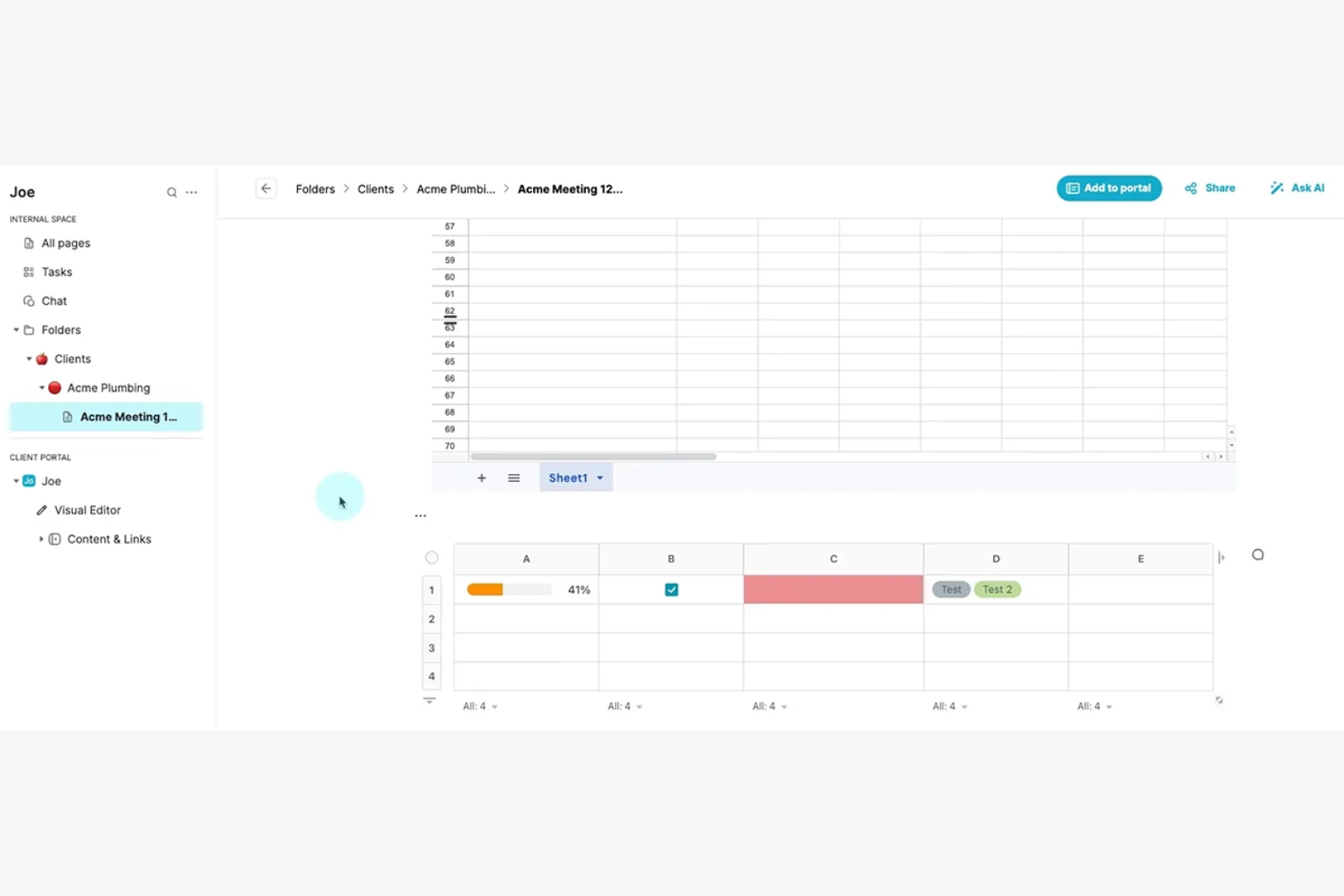
FuseBase is a client portal software designed for businesses that require efficient database management and secure data handling. It targets industries that need advanced data organization and client access control, such as finance and health care.
Why I picked FuseBase: It excels in database management, allowing you to manage large datasets and maintain data integrity with ease. The platform's focus on security and compliance makes it suitable for handling sensitive information. FuseBase also offers tools for real-time data collaboration, which can help facilitate strong teamwork and increase productivity.
Standout Features and Integrations:
Features include customizable data schemas that allow you to structure your data according to your business needs. You can also use the platform's secure access controls to protect sensitive information and maintain compliance with industry standards.
Integrations include Slack, Google Drive, Calendly, Airtable, and more.
Pros and Cons
Pros:
- Structured knowledge bases inside the portal
- Built-in CRM, eSignatures, and surveys
- Advanced database management
Cons:
- Limited for non-database tasks
- Performance may vary with larger workspaces

Best for finance professionals
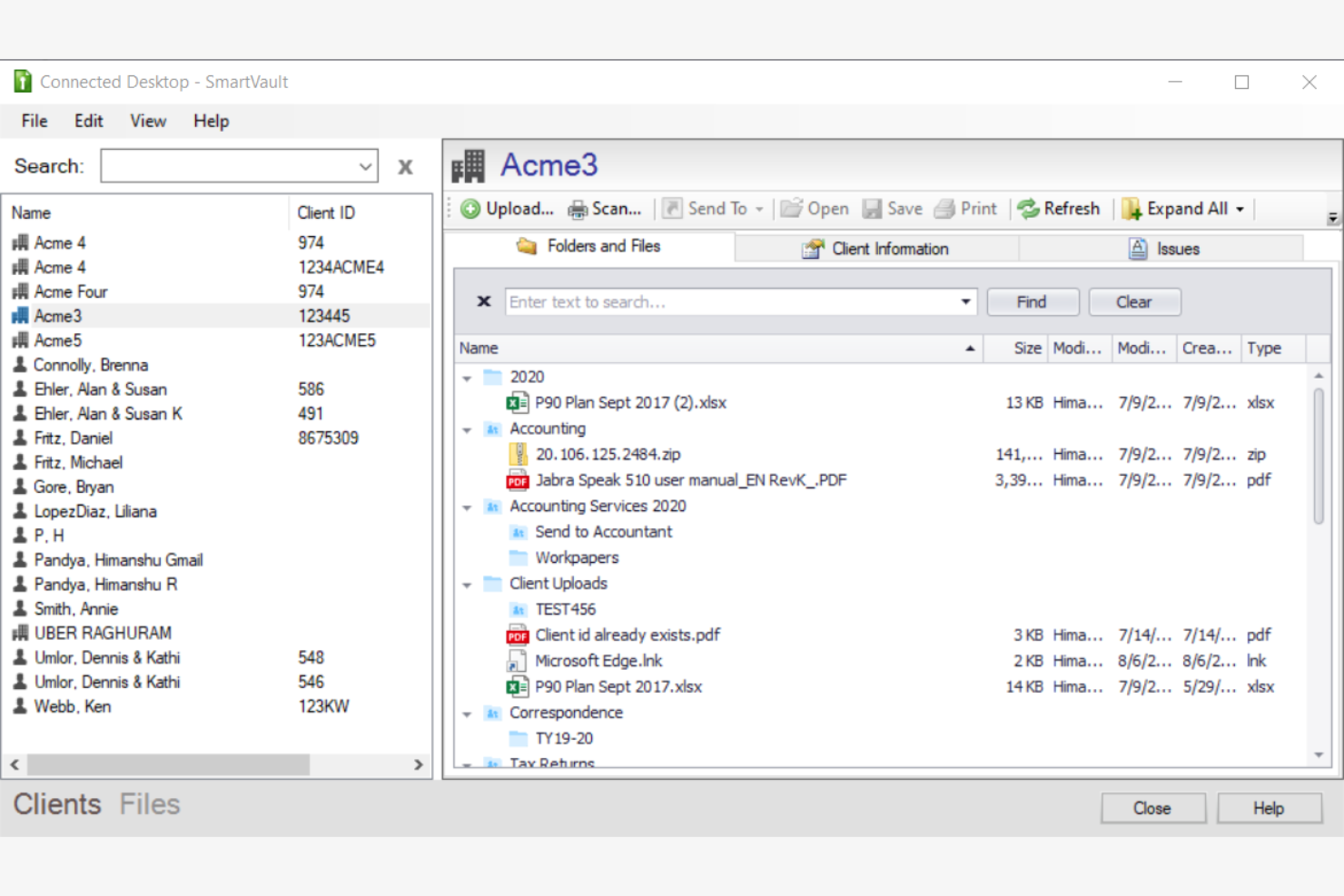
SmartVault is a client portal software focused on secure document storage and management, primarily serving accounting professionals and small businesses. It offers tools for file sharing, secure access, and compliance management.
Why I picked SmartVault: Its emphasis on document management helps keep your files organized and accessible. With bank-level encryption and audit logs, your team can maintain compliance with industry regulations. SmartVault's secure file sharing and access controls are designed to provide peace of mind when handling sensitive information. Its integration with popular accounting software makes it a valuable asset for professionals in finance.
Standout Features and Integrations:
Features include audit logs for tracking document access and maintaining compliance.
Integrations include QuickBooks, Xero, FreshBooks, Intuit ProSeries, DocuSign, and more.
Pros and Cons
Pros:
- Purpose-built for accounting and compliance-heavy firms
- Deep integrations with accounting ecosystems
- Advanced document collection tools
Cons:
- Less suitable for non-financial industries
- Document-centric design may feel restrictive
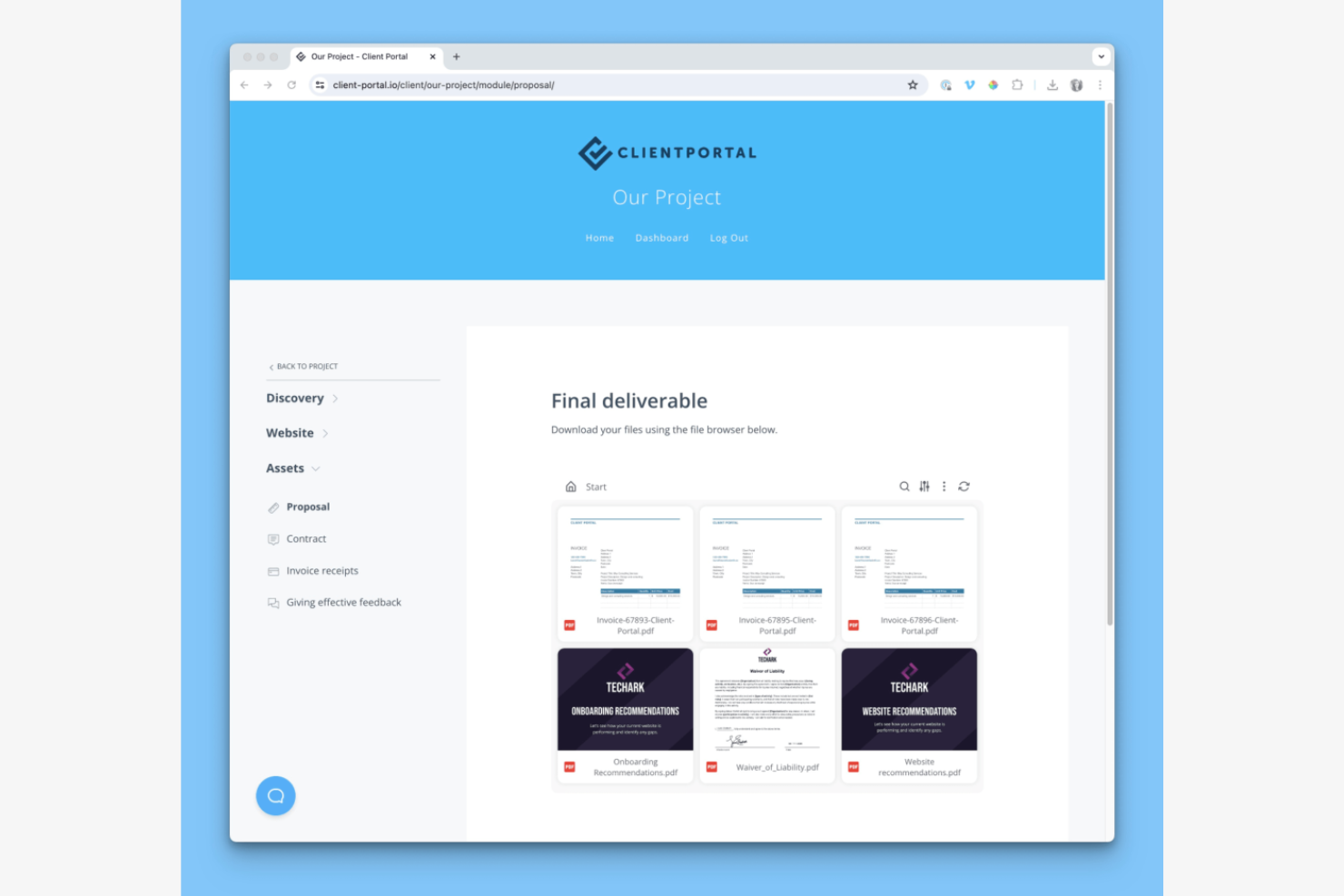
Client Portal is a WordPress plugin designed for freelancers and small agencies. It provides tools for project management and client collaboration and helps users manage projects, share files, and communicate with clients directly through their WordPress sites.
Why I picked Client Portal: It's a strong fit for WordPress users seeking a simple way to manage client interactions. The plugin integrates with existing WordPress themes and allows you to create branded client portals. Features such as project tracking and file sharing help improve the user experience, as you do not have to leave the WordPress environment. The ability to customize the portal to match your brand makes it especially appealing for small teams.
Standout Features and Integrations:
Features include project templates that help you organize tasks and deadlines. You can use its drag-and-drop interface to arrange project components and client information. The built-in file-sharing system allows your team to exchange documents and updates.
Integrations include QuickBooks, Zoho, Zapier, and more.
Pros and Cons
Pros:
- Drag-and-drop interface
- Transparent one-time pricing
- Strong WordPress integration
Cons:
- Lacks advanced project management features
- Limited to WordPress users


Zendo is an all-in-one client portal software aimed at agencies, providing tools for service selling, invoicing, and client communication. Its main users include web designers, developers, and marketers who need to manage client interactions and simplify business processes.
Why I picked Zendo: It supports team collaboration by offering real-time chat and automated payment collection, which are important for project coordination. You can create customizable service catalogs and workflows, making it flexible for various business needs. The platform's ability to impersonate clients for requests can help you improve your understanding of client needs and service delivery. With support for multiple payment methods, Zendo provides smooth transactions for your clients.
Standout Features and Integrations:
Features include real-time chat for direct communication and quick issue resolution. You can also automate payment collection, simplifying financial transactions for your team.
Integrations are not publicly listed.
Pros and Cons
Pros:
- Detailed client profiles with history and files
- Automated quoting, invoicing, and payment collection
- Real-time chat for quick communication
Cons:
- Limited enterprise-grade support
- Some features may require configuration and initial setup


Kitchen.co is a client portal software tailored for web designers and creative agencies, helping them manage client projects and communications. It offers tools for project management, invoicing, and client collaboration.
Why I picked Kitchen.co: It's designed specifically for creative professionals, with features such as customizable templates. The platform can help simplify project workflows and improve brand representation. Kitchen.co's resources are designed to empower users to create engaging online experiences, making it a good fit for those in the creative industry.
Standout Features and Integrations:
Features include project folder automation upon contract signing, a content collection system, and customizable client portals. You can also benefit from its educational resources and community support. Kitchen.co's focus on brand representation can help your internal teams manage their projects.
Integrations include Squarespace, Stripe, PayPal, Google Drive, Dropbox, and more.
Pros and Cons
Pros:
- Intuitive, low-friction interface
- Supports project folder automation
- Tailored for creative professionals
Cons:
- Its folder-based structure may feel restrictive
- Mainly focused on web design
Other Client Portal Software
Here are some additional client portal software options that didn’t make it onto my shortlist, but are still worth checking out:


How I Evaluate Client Portal Software
I evaluate these tools in two layers—what's required to give clients a real external workspace with secure access, and what separates a basic portal from one project managers actually trust.
Core Functionality (Table Stakes For This List)
When I'm selecting tools for my list, I rank each one on a scale from 0 (does not offer the functionality) to 5 (excels in this area) for each core functionality listed below. Then, I calculate the tool's total score into a percentage. Each tool needs to achieve a minimum total score of 65% to be considered for inclusion.
- Client-Facing Portal Access: I check whether clients get a dedicated login environment rather than just a shared link, and whether the portal can be branded to match your agency or firm's identity.
- Secure Document Sharing: The tool should support permission-based file exchange with version control, so clients can upload contracts or review SOWs without resorting to email attachments.
- Project Visibility & Tracking: I look for client-friendly views of milestones, timelines, and deliverable status that give clients enough context to track progress without exposing internal task-level detail.
- Client Communication Tools: Centralized messaging or threaded comments tied to specific tasks and deliverables matter here, replacing scattered email chains with in-context conversations.
- Approvals & Feedback Workflows: I evaluate whether clients can formally approve deliverables, request revisions, or sign off on milestones directly within the portal instead of through ad hoc messages.
- Granular Permissions & Access Control: Role-based permissions should let you control exactly what each client contact sees per project, folder, or document, especially when managing multiple client accounts.
Once I have a list of tools that meet this criteria, I consider what sets each platform apart.
Differentiating Factors (What Sets Vendors Apart)
Here's how I compare and contrast different vendors:
Standout Features
White-label branding matters when your clients log into a portal carrying your logo and custom domain—it builds trust and keeps your firm front and center. I also look for integrated billing and invoicing, which lets you tie payments to project milestones instead of bouncing between the portal and a separate accounting tool. Client intake forms are another separator, letting you collect project briefs and onboarding details before work begins to cut down on the back-and-forth that delays kickoff.
Beyond Features
I evaluate how well each portal connects to your existing stack—native integrations with tools like Jira, Asana, or HubSpot mean less manual syncing between your internal workflows and what clients see. Security also weighs heavily, especially when clients share contracts or sensitive deliverables; I check for SOC 2 compliance, encryption standards, and SSO support. Pricing structure matters too, since some tools charge per client portal while others charge per internal user, and the right model depends on whether you manage five clients or fifty.
How To Choose Client Portal Software
It's easy to get bogged down in long feature lists and complex pricing structures. To help you stay focused as you work through your unique software selection process, here's a checklist of factors to keep in mind:
| Factor | What To Consider |
|---|---|
| Scalability | Will the tool grow with your team? Consider user limits, data storage, and the ability to add features. Look for signs of flexibility to accommodate future growth without extra cost. |
| Integrations | Does it connect with your existing tools? Check for compatibility with your CRM, email, and project management software. Avoid tools that require manual data entry between systems. |
| Customizability | Can you tailor the tool to your processes? Confirm it allows for branding, workflow adjustments, and personalized user experiences. Look for flexibility in design and user settings. |
| Ease of use | Is the tool intuitive for all users? Seek a straightforward interface with clear navigation. Avoid complex systems that require extensive training. |
| Implementation and onboarding | How quickly can you get started? Evaluate the availability of training resources, ease of setup, and time to full adoption. Consider whether vendor support is available during onboarding. |
| Cost | Does the pricing align with your budget? Compare the total cost, including hidden fees or additional charges for extra features. Look for pricing models that fit your financial plan. |
| Security safeguards | How does the tool protect your data? Verify encryption standards, access controls, and compliance with regulations like GDPR or HIPAA. Prioritize tools with strong security measures. |
What Is Client Portal Software?
Client portal software is a digital platform that allows businesses to securely share information and collaborate with their clients online. Professionals such as project managers, accountants, and consultants use these tools to improve communication and manage client relationships. Secure file sharing, client communication, and task management features help with organizing projects and maintaining transparency. These tools can increase client satisfaction by providing a centralized and accessible hub for all interactions.
Features
When selecting client portal software, keep an eye out for the following key features:
- Secure file sharing: Allows users to share documents safely, maintaining data protection and confidentiality.
- Client communication: Facilitates direct messaging and updates, improving interaction and response times.
- Task management: Helps organize and track project tasks, keeping deadlines on schedule and responsibilities clear.
- Customizable client portals: Allow businesses to tailor the portal's appearance and functionality to match their brands and workflows.
- Automated reporting: Generates reports automatically, saving time and providing clients with timely updates.
- Integration capabilities: Connect with other tools, such as CRM and accounting software, for smooth data flow.
- Access control: Provides different levels of access to users, protecting sensitive information and maintaining privacy.
- Real-time collaboration: Enables teams and clients to work together simultaneously, improving productivity and decision-making.
- Workflow automation: Performs repetitive tasks, allowing teams to focus on more strategic activities.
- Analytics and insights: Offer data analysis to track performance and make informed decisions.
Benefits
Implementing client portal software provides several benefits for your team and your business. Here are a few you can look forward to:
- Improved communication: Direct messaging and updates support interactions between your team and clients, reducing misunderstandings.
- Time savings: Automated reporting and workflow automation cut down on manual tasks, freeing up time for more important work.
- Advanced security: Secure file sharing and access control protect sensitive information, maintaining privacy and compliance.
- Increased transparency: Clients can access real-time updates and reports, building trust and keeping them informed.
- Better organization: Task management features help keep projects on track, making sure everyone knows their responsibilities.
- Customization: Customizable portals allow you to tailor the client experience to fit your brand and business processes.
- Data-driven insights: Analytics and insights provide valuable data to help you make informed decisions and improve performance.
Costs & Pricing
Selecting client portal software requires an understanding of the various pricing models and plans available. Costs vary based on features, team size, add-ons, and more. The table below summarizes common plans, their average prices, and typical features included in client portal software solutions:
Plan Comparison Table for Client Portal Software
| Plan Type | Average Price | Common Features |
|---|---|---|
| Free Plan | $0 | Basic file sharing, limited storage, and basic communication tools. |
| Personal Plan | $6-$35/user/month | Secure file sharing, basic task management, and client communication. |
| Business Plan | $30-$200/user/month | Advanced file sharing, customizable portals, and workflow automation. |
| Enterprise Plan | $300-$2000/user/month | Strong security, custom integrations, and advanced analytics. |
Client Portal Software FAQs
Here are some answers to common questions about client portal software:
What is the primary purpose of client portal software?
The primary purpose of client portal software is to provide a secure platform for businesses to interact and collaborate with their clients. It enables file sharing, communication, and project and client management in a centralized location. Your team can use it to improve client communication, project tracking, and data security. By using a client portal, you can offer clients a personalized experience, simplify processes, and build stronger relationships.
Can client portal software integrate with other tools?
Yes, most client portal software can integrate with other tools. While integration capabilities vary, they allow you to connect with CRMs, project management tools, and accounting software. This supports smooth data flow and reduces manual data entry. Check the software’s integration options to confirm it connects with your existing systems. Integrations can save time and increase productivity, making your team’s workflow more efficient.
How secure is client portal software?
Client portal software is designed to be secure, with features such as encryption and access controls. Security measures vary, so it’s important to choose software that complies with industry standards, such as GDPR or HIPAA, if applicable. Look for features such as two-factor authentication and audit logs to keep your business and client data safe. Confirming security helps protect your clients’ sensitive information and maintains trust.
Is client portal software suitable for small businesses?
Yes, client portal software is suitable for small businesses. Many providers offer scalable plans that cater to businesses of all sizes. Small businesses can benefit from improved client communication, organization, and data management. When selecting software, consider your budget, the features you need, and how well it integrates with your current tools. Investing in client portal software can improve your business operations and client relationships.