
15 Issue and Project Tracking Software for 2026

Issue and Project Tracking Software Shortlist
Explore leading issue and project tracking tools for 2026 to help your team organize tasks, streamline collaboration, and improve project outcomes.


Issue and project tracking software acts as a robust project management tool that helps your team capture, organize, and manage tasks, bugs, and project progress in one place. If you’re searching for the best issue tracking tools to keep projects on track, handle shifting requirements, and improve team accountability, you know how much is at stake—missed deadlines, unclear ownership, and scattered updates can derail even the best teams. This list will help you compare leading SaaS solutions, understand what sets each apart, and choose the right platform to support your team’s workflow and delivery goals.
Why You Can Trust Us
Best Issue and Project Tracking Software Summary
This comparison chart summarizes pricing details for my top issue and project tracking software selections to help you find the best one for your budget and business needs.
| Tool | Best For | Trial Info | Price | ||
|---|---|---|---|---|---|
| 1 | Best for fast-paced product teams | Free plan available | From $10/user/month (billed annually) | Website | |
| 2 | Best for visual timeline management | Free plan available | From $10.99/user/month (billed annually) | Website | |
| 3 | Best for agile software development teams | 14-day free trial + free plan available | From $7.91/user/month | Website | |
| 4 | Best for advanced issue customization | Free plan available | From $3.67/user/month (billed annually) | Website | |
| 5 | Best for simple kanban board organization | Free plan available | From $5/user/month (billed annually) | Website | |
| 6 | Best for all-in-one workspace consolidation | Free 14-day trial + free plan available | From $7/user/month (billed annually) | Website | |
| 7 | Best for combining docs and task tracking | Free plan + free demo available | From $10/member/month (billed annually) | Website | |
| 8 | Best for detailed bug tracking workflows | Not available | Free to use | Website | |
| 9 | Best for open-source project environments | Free plan available | From $7.25/user/month (good for 25 users) | Website | |
| 10 | Best for spreadsheet-style project planning | Free trial + free demo available | From $9/member/month (billed annually) | Website |

-

Accelo
Visit WebsiteThis is an aggregated rating for this tool including ratings from Crozdesk users and ratings from other sites.4.4 -
Forecast
Visit WebsiteThis is an aggregated rating for this tool including ratings from Crozdesk users and ratings from other sites.4.6 -
Wrike
Visit WebsiteThis is an aggregated rating for this tool including ratings from Crozdesk users and ratings from other sites.4.2





Issue and Project Tracking Software Reviews
Below are my detailed summaries of the best issue and project tracking software that made it onto my shortlist. My reviews offer a detailed look at the features, best use cases, and integrations of each platform to help you find the best one for you.

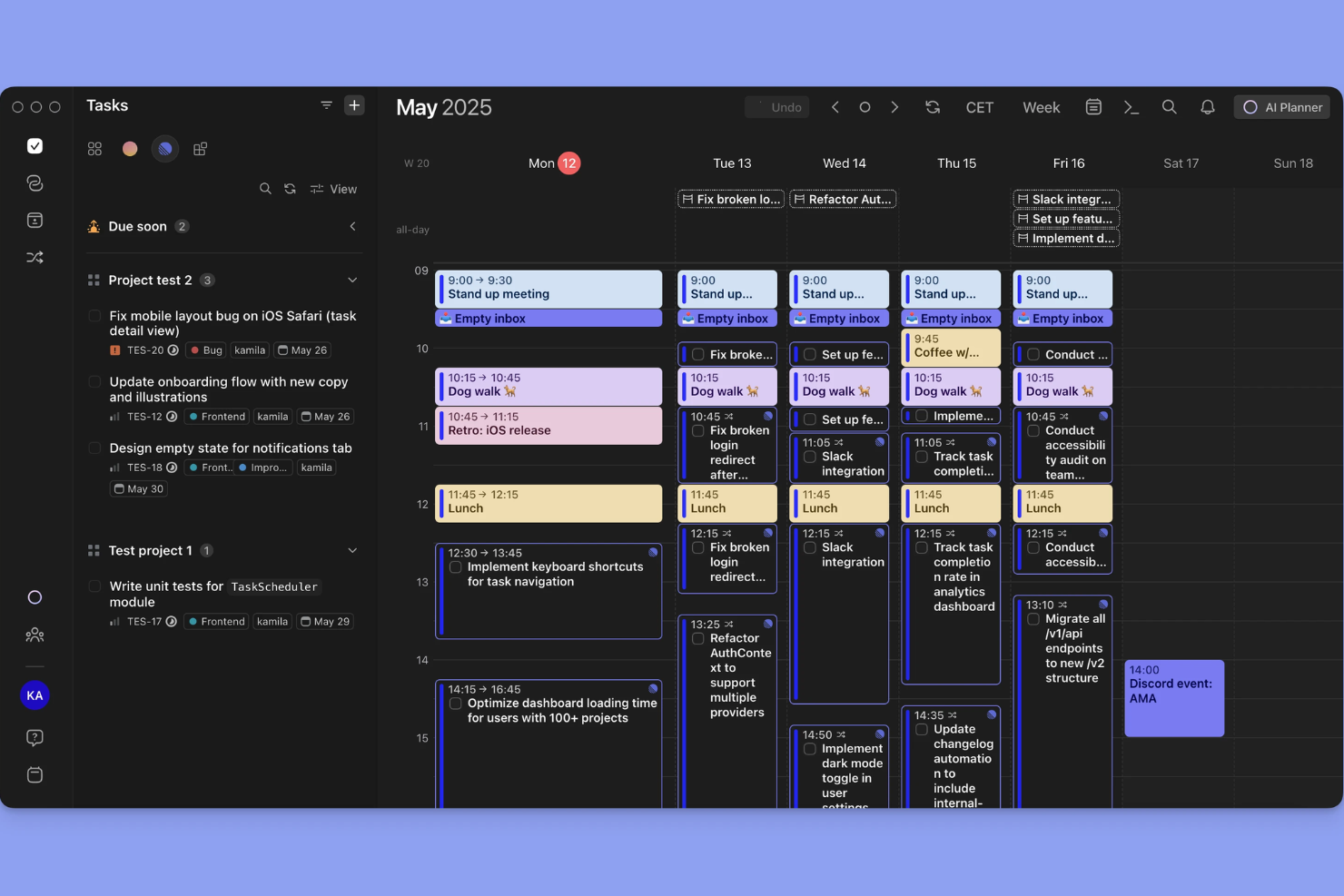
Linear is designed for product teams that need to move quickly and keep work organized without friction. It appeals to startups and tech companies that want lightning-fast issue tracking, keyboard-driven workflows, and real-time collaboration. With its focus on speed and a clean interface, Linear helps teams manage sprints, triage bugs, and ship features without getting bogged down by process.
Why I Picked Linear
When speed and responsiveness are non-negotiable, Linear stands out for fast-paced product teams that need to keep momentum high. I picked Linear because its keyboard-driven commands and instant issue updates let teams capture, assign, and resolve tasks without breaking their workflow. The tool’s real-time sync and lightning-fast search help teams stay aligned and react quickly to shifting priorities. For teams that value velocity and minimal friction in their project tracking, Linear delivers a focused, high-performance experience.
Linear Key Features
Some other features that make Linear useful for project tracking include:
- Custom Workflows: Set up unique states and transitions for issues to match your team’s process.
- Cycle Management: Organize work into cycles to help teams plan and deliver in short, focused bursts.
- Issue Templates: Create reusable templates for common tasks or bug reports to standardize submissions.
- GitHub Integration: Link pull requests and commits directly to issues for better traceability.
Linear Integrations
Integrations include GitHub, Slack, Vercel, Figma, Sentry, Intercom, GitLab, Bitbucket, Zapier, and Discord.
Pros and Cons
Pros:
- Streamlined issue triage
- Perfect for dev teams
- Keyboard shortcut focused
Cons:
- Narrow integration ecosystem
- Basic Gantt chart features

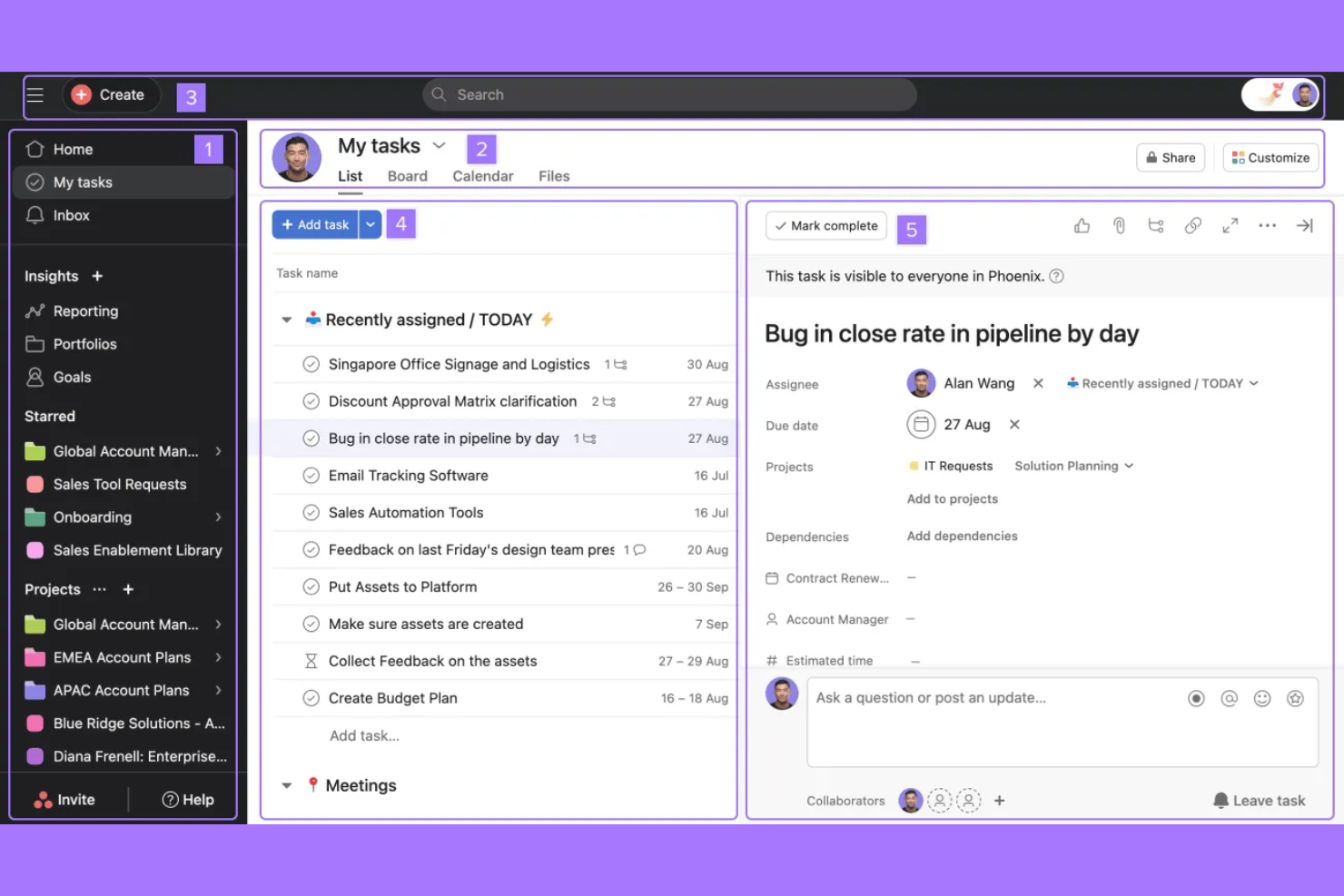
If your team needs a clear, visual way to manage project timelines, Asana offers a flexible solution. It’s especially useful for project managers and cross-functional teams who want to map dependencies and track progress with Gantt-style views. Asana helps teams coordinate complex projects, spot bottlenecks, and keep everyone aligned on deadlines.
Why I Picked Asana
For teams that need to visualize project schedules and dependencies, Asana’s timeline view offers a clear advantage. I picked Asana because its drag-and-drop Gantt-style timelines make it easy to map out tasks, adjust deadlines, and see how work connects across a project. The ability to set dependencies directly on the timeline helps teams anticipate blockers and keep projects on track. If you’re managing complex initiatives with shifting priorities, Asana’s visual timeline management stands out for keeping everyone aligned.
Asana Key Features
In addition to its timeline capabilities, Asana offers several other features that support project tracking:
- Custom Fields: Add specific data points to tasks to capture details unique to your workflow.
- Workload Management: Visualize team capacity and balance assignments to avoid overloading anyone.
- Rules Automation: Set up triggers and actions to automate routine task updates and handoffs.
- Forms: Collect and organize work requests directly into projects using customizable intake forms.
Asana Integrations
Integrations include Slack, Microsoft Teams, Google Drive, Dropbox, Zoom, Salesforce, GitHub, Trello, Zapier, and Adobe Creative Cloud.
Pros and Cons
Pros:
- Easy to track dependencies
- Strong workload management
- Clear project ownership
Cons:
- Clunky subtask navigation
- Custom fields cost extra

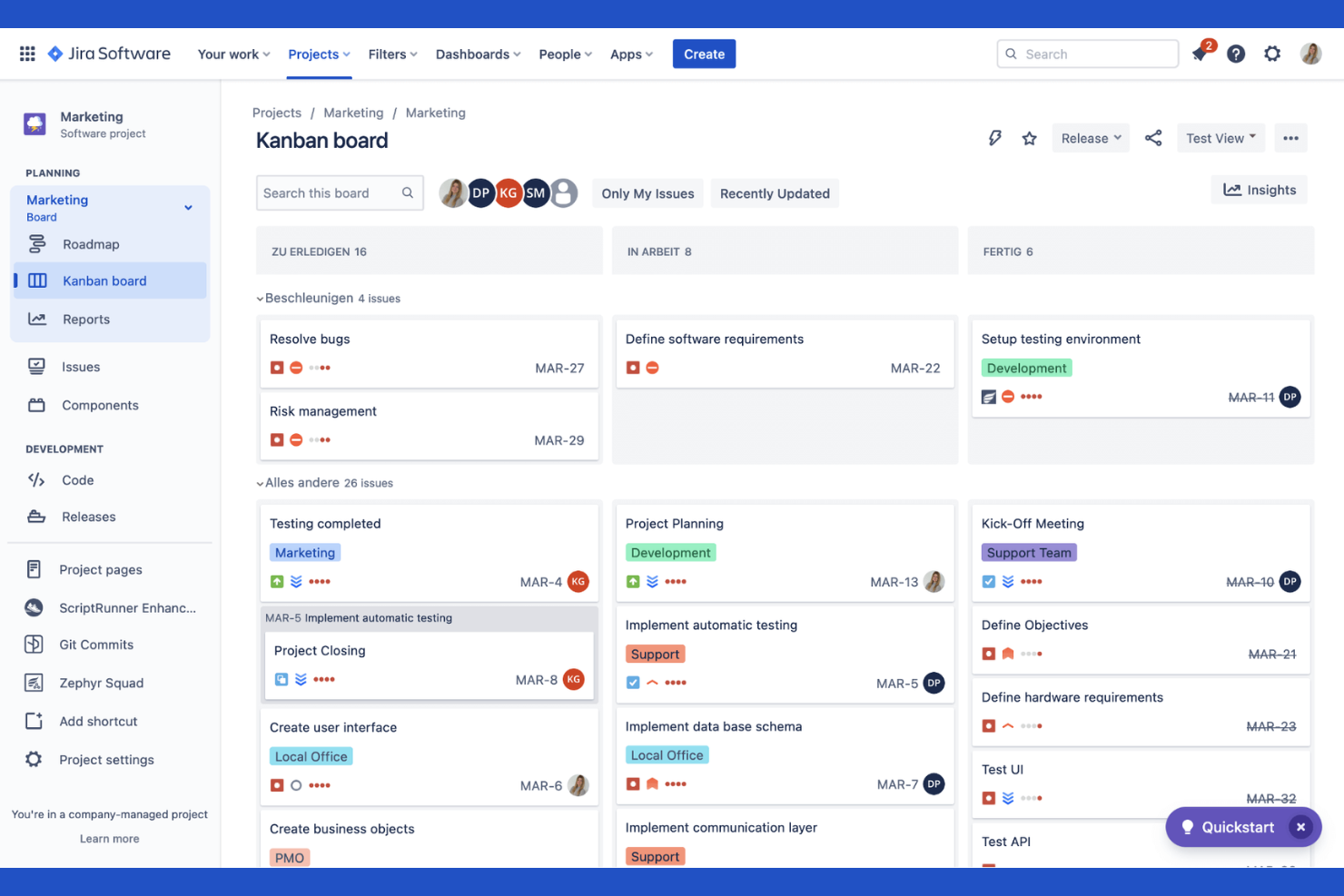
Jira is purpose-built for software development teams that need to manage agile projects and track issues at scale. It’s especially useful for product managers, scrum masters, and engineering leads who want to customize workflows, automate repetitive tasks, and visualize progress with agile boards. Jira’s deep support for sprints, epics, and backlog management makes it a go-to choice for teams practicing Scrum or Kanban.
Why I Picked Jira
For agile software development teams, Jira offers a level of workflow customization and agile board support that’s hard to match. I picked Jira because it lets you create and manage sprints, epics, and user stories with detailed tracking and reporting. The tool’s backlog management and sprint planning features help teams prioritize work and adapt quickly to changing requirements. If you need granular control over agile processes and issue tracking, Jira provides the structure and flexibility to support complex software projects.
Jira Key Features
Some other features that make Jira valuable for project and issue tracking include:
- Custom Issue Types: Create and configure unique issue types to match your team’s workflow.
- Automation Rules: Set up automated actions for repetitive tasks and notifications.
- Advanced Permissions: Control user access and project visibility with detailed permission settings.
- Roadmap Planning: Build and share visual roadmaps to align teams on project timelines.
Jira Integrations
Integrations include Slack, GitHub, Bitbucket, Confluence, Microsoft Teams, Google Drive, Dropbox, Trello, Salesforce, and Zapier.
Pros and Cons
Pros:
- Advanced developer tool sync
- Vast marketplace plugins
- Powerful sprint planning
Cons:
- Requires dedicated admins
- Interface is slow and heavy
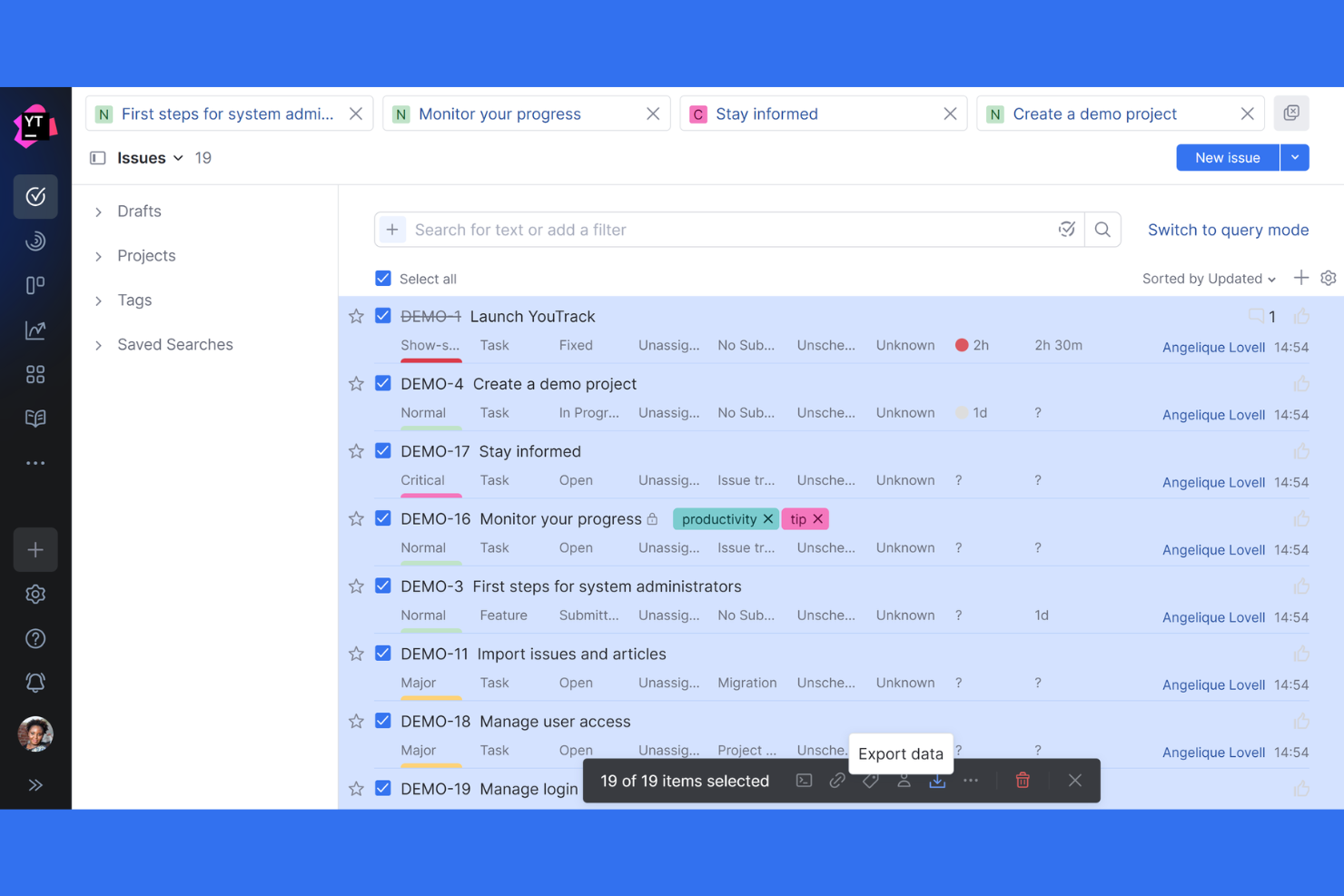
Teams that need deep control over how issues are tracked and managed often turn to YouTrack. This tool is built for software development teams and technical organizations that want to tailor workflows, fields, and automation to fit their exact processes. YouTrack helps you create custom issue types, automate repetitive actions, and adapt tracking to even the most complex project requirements.
Why I Picked YouTrack
What sets YouTrack apart is its ability to let you customize nearly every aspect of issue tracking. I picked YouTrack because it allows teams to define custom fields, workflows, and issue types that match their unique processes. The workflow editor supports advanced automation, so you can create rules and triggers tailored to your team’s needs. If you’re looking for a tool that adapts to your project structure instead of forcing you into a rigid template, YouTrack’s advanced issue customization stands out.
YouTrack Key Features
In addition to its customization options, YouTrack offers several other features that support project and issue tracking:
- Agile Boards: Visualize tasks and progress using Scrum or Kanban boards.
- Time Tracking: Log work hours directly on issues and generate time reports.
- Knowledge Base: Create and organize internal documentation alongside your projects.
- Live Updates: See real-time changes and notifications as issues are updated.
YouTrack Integrations
Integrations include GitHub, GitLab, Bitbucket, Slack, Microsoft Teams, Google Drive, Zapier, Zendesk, HubSpot, and Confluence.
Pros and Cons
Pros:
- Deep JetBrains integration
- Generous free tier for teams
- Excellent search query language
Cons:
- Geared mainly towards devs
- Hard to set up custom workflows
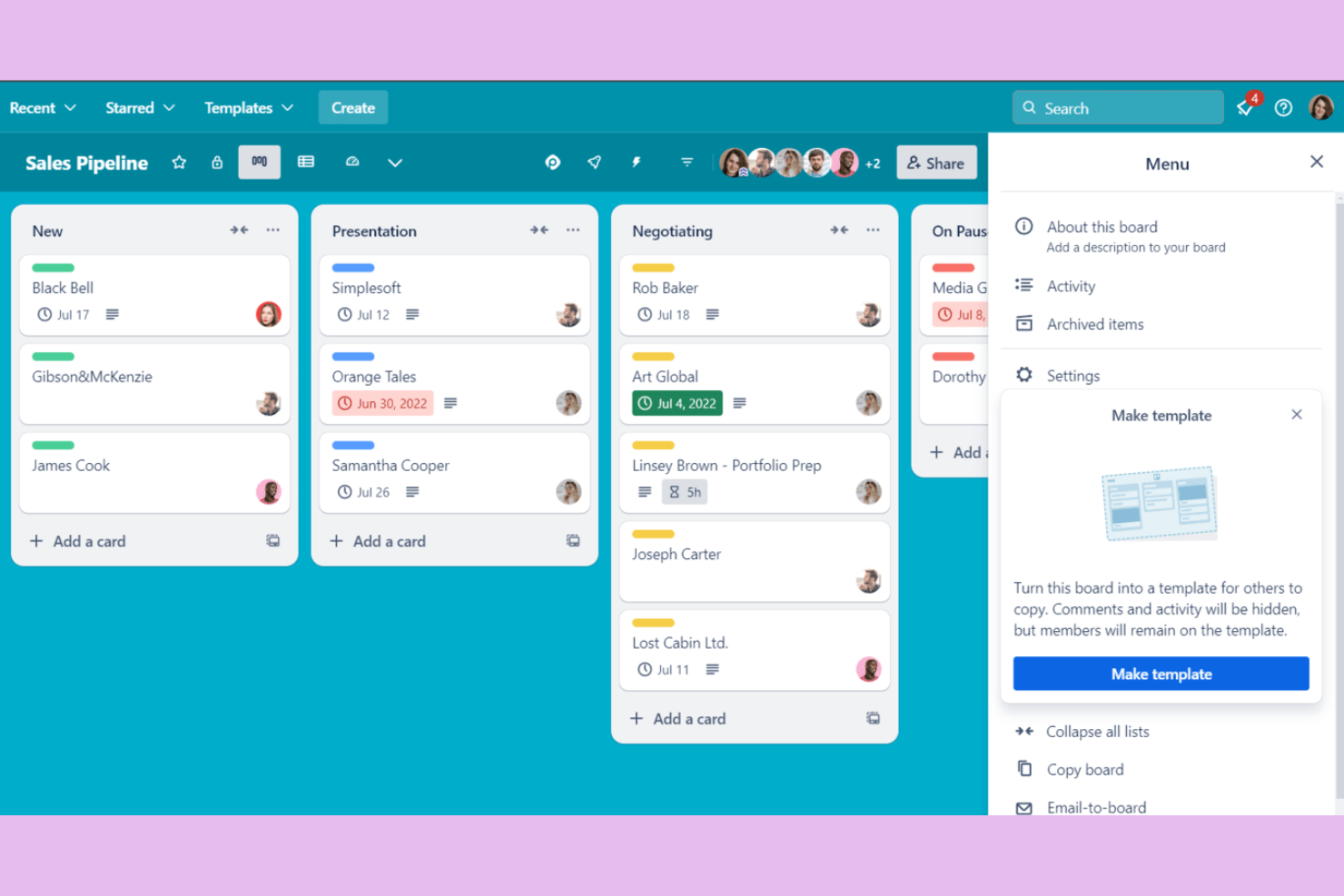
If you want a visual, drag-and-drop approach to tracking work, Trello is a top choice. Trello appeals to teams and individuals who need a straightforward way to organize tasks and projects using kanban boards. Its card-based system makes it easy to map out workflows, prioritize issues, and keep everyone on the same page without extra complexity.
Why I Picked Trello
Trello stands out for teams that want a simple, visual way to organize and track issues. I picked Trello because its kanban board layout lets you create lists for each stage of your workflow and move cards as work progresses. You can add checklists, attachments, and labels to each card, making it easy to track details without clutter. For anyone who needs a straightforward, flexible board to manage project tasks and issues, Trello’s approach keeps things clear and accessible.
Trello Key Features
Some other features that make Trello useful for issue and project tracking include:
- Power-Ups: Add extra functionality like calendar views, voting, or integrations with other tools.
- Butler Automation: Automate repetitive actions on boards with custom rules and triggers.
- Card Templates: Create reusable templates for common tasks or issue types.
- Activity Feed: Track all changes and updates on boards in a single timeline.
Trello Integrations
Integrations include Slack, Google Drive, Dropbox, Microsoft Teams, Jira, GitHub, Evernote, Salesforce, Zapier, and Confluence.
Pros and Cons
Pros:
- Free tier is very capable
- Fast drag and drop sorting
- Great power up ecosystem
Cons:
- No native issue hierarchy
- Weak reporting features

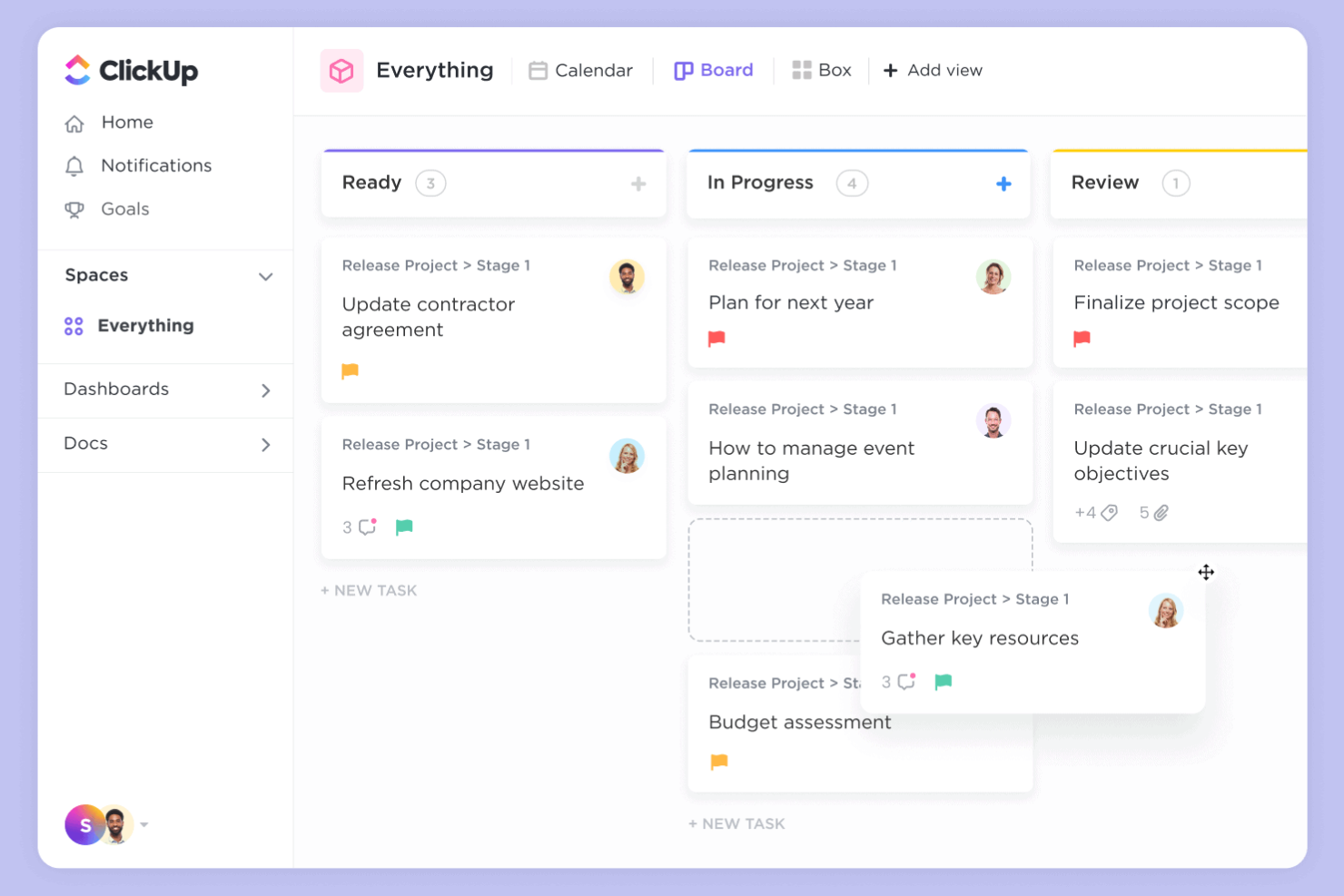
ClickUp brings together tasks, docs, goals, and chat in one unified workspace, making it a strong choice for teams tired of juggling multiple tools. It’s especially useful for tech companies, agencies, and distributed teams that want to centralize project tracking, issue management, and collaboration. ClickUp helps you manage everything from bug tracking to sprint planning without switching platforms.
Why I Picked ClickUp
What sets ClickUp apart is its ability to bring all your project and issue tracking needs into a single, consolidated workspace. I picked ClickUp because it lets you manage tasks, documents, wikis, and even chat without leaving the platform. Its customizable views—like lists, boards, and timelines—help teams track issues and projects in the way that fits their workflow best. For teams looking to reduce tool sprawl and keep everything in one place, ClickUp offers a unified approach that’s hard to match.
ClickUp Key Features
Some other features that make ClickUp valuable for project and issue tracking include:
- Custom Statuses: Create and manage unique status labels for tasks and issues to match your team’s workflow.
- Automations: Set up rule-based automations to handle repetitive actions like assigning tasks or updating statuses.
- Native Time Tracking: Track time spent on tasks directly within the platform for better visibility and reporting.
- Goal Tracking: Set, monitor, and update progress on project goals alongside your tasks and issues.
Clickup Integrations
Integrations include Slack, Google Workspace, GitHub, GitLab, Zoom, HubSpot, Zendesk, and Salesforce.
Pros and Cons
Pros:
- Good native time tracking
- Excellent free tier limits
- Multiple project view options
Cons:
- Complex permissions setup
- Occasional slow load times

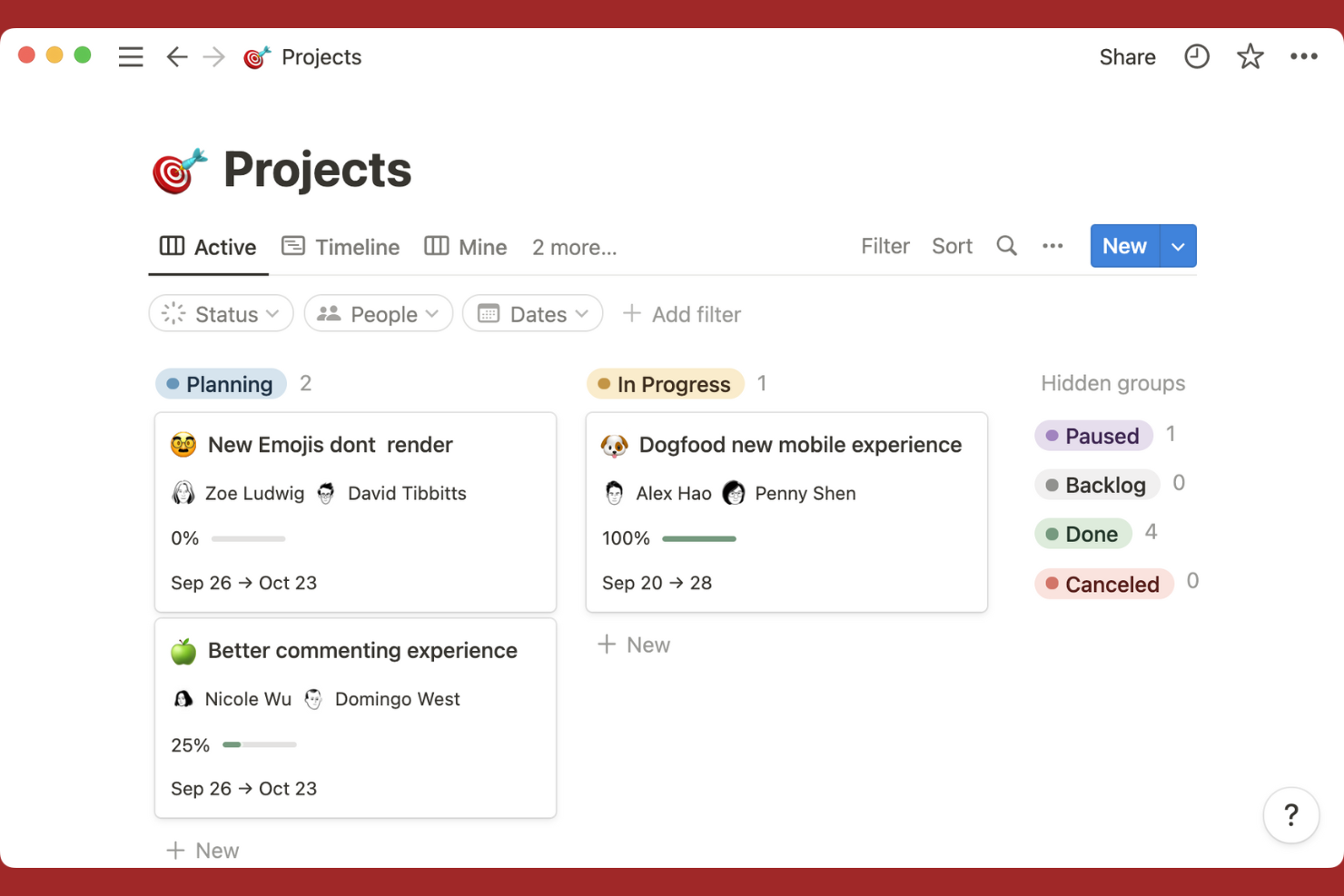
If you’re looking for a tool that merges documentation and task tracking in one place, Notion is worth considering. It’s especially useful for teams that want to link project plans, meeting notes, and issue lists without switching between apps. Notion’s flexible workspace lets you build custom workflows that connect docs, tasks, and databases for a unified project view.
Why I Picked Notion
Notion brings together documentation and task tracking in a way that’s hard to find elsewhere. I picked Notion because it lets you create linked databases, so you can connect tasks, issues, and project docs in a single workspace. The ability to embed checklists, tables, and kanban boards directly within project pages means you can manage issues and reference related documentation side by side. For teams that want to keep all project context, notes, and action items in one place, Notion’s flexible structure is a strong fit.
Notion Key Features
Some other features that make Notion useful for project and issue tracking include:
- Template Gallery: Access a library of pre-built templates for project management, meeting notes, and issue tracking.
- Permissions and Sharing Controls: Set granular access levels for pages, databases, and workspaces.
- Version History: Review and restore previous versions of any page or database.
- Calendar View: Visualize tasks, deadlines, and project milestones on a drag-and-drop calendar.
Notion Integration
Integrations include Slack, Google Drive, Trello, Asana, GitHub, Figma, InVision, Typeform, Jira, and Microsoft Teams.
Pros and Cons
Pros:
- Strong custom template library
- Great for agile note taking
- Clean minimalist interface
Cons:
- Offline mode is unreliable
- Clunky for large issue backlogs

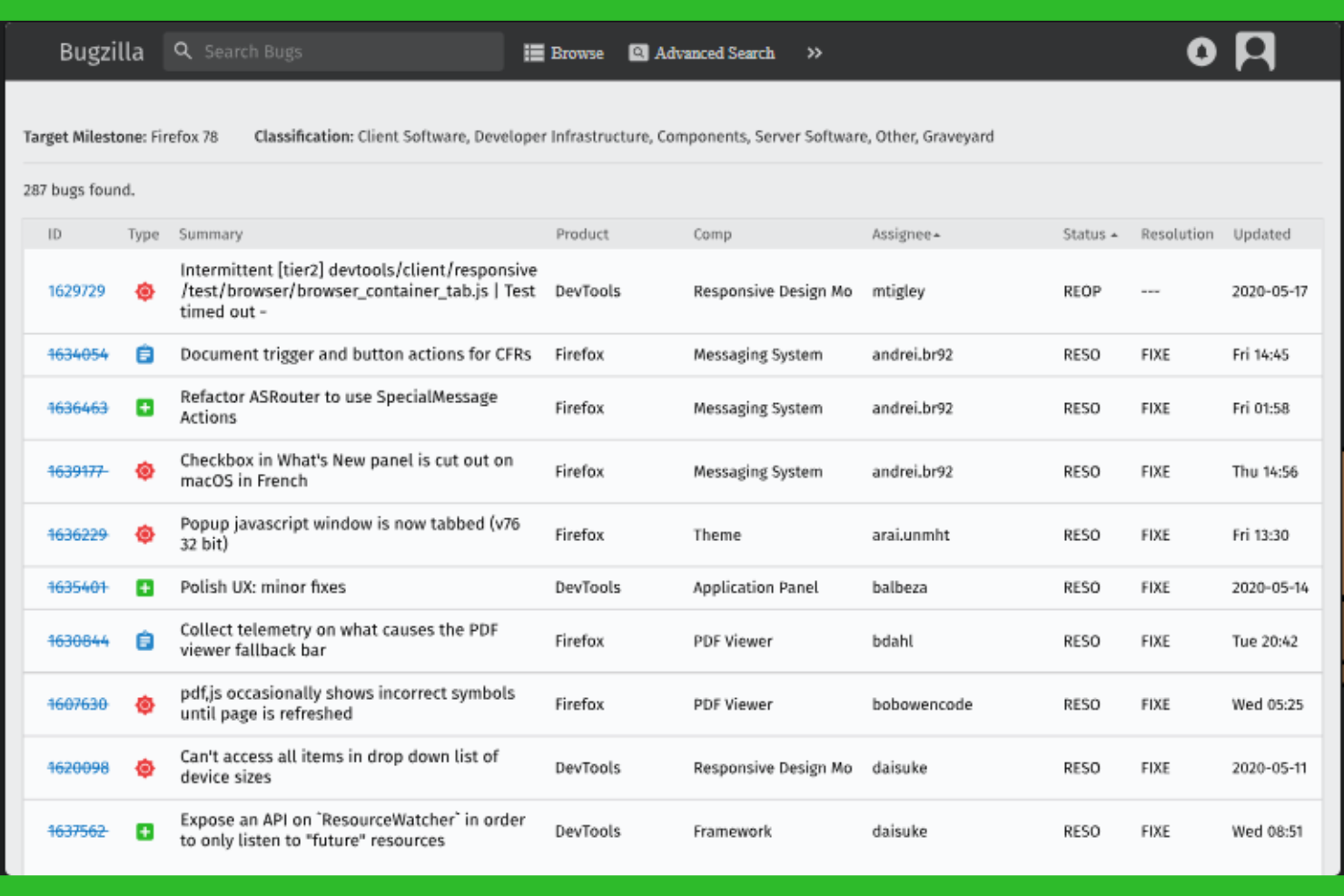
Bugzilla is purpose-built for teams that need granular control over bug tracking and resolution. It’s especially useful for software development groups that manage complex products with layered workflows and detailed reporting needs. If your team requires advanced issue categorization, custom fields, and powerful search capabilities, Bugzilla is designed to support those demands.
Why I Picked Bugzilla
What sets Bugzilla apart is its focus on supporting detailed bug tracking workflows for technical teams. I picked Bugzilla because it lets you define custom fields, statuses, and workflows, so you can mirror even the most complex QA processes. Its advanced search and filtering tools help teams quickly pinpoint, assign, and prioritize issues across large codebases. If your projects demand rigorous bug lifecycle management and traceability, Bugzilla is built to handle those requirements.
Bugzilla Key Features
Some other features that make Bugzilla a strong choice for issue and project tracking include:
- Email Notifications: Automatically send updates to users when bugs are created, updated, or resolved.
- Attachment Handling: Upload and manage files, screenshots, and logs directly within bug reports.
- User Group Management: Control access and permissions by organizing users into groups.
- Dependency Tracking: Link bugs to show relationships and manage resolution order.
Bugzilla Integrations
Integrations include GitHub, Jira, CVS, Subversion, Perforce, Eclipse, Testopia, LDAP, XML-RPC, and WebServices.
Pros and Cons
Pros:
- Deep custom field support
- Very lightweight on servers
- Completely free to use
Cons:
- Complex installation process
- No native mobile application

Open Project gives teams full control over their project tracking with an open-source platform. It’s a strong fit for organizations that need on-premises deployment, strict data privacy, or the ability to customize workflows and features. If you’re looking for a solution that supports agile, classic, or hybrid project management in a transparent and flexible way, Open Project stands out.
Why I Picked Open Project
For teams that prioritize transparency and control, Open Project offers a unique open-source approach to issue and project tracking. I picked Open Project because it lets you host your own instance, giving you full ownership of your data and the flexibility to adapt the platform to your organization’s needs. Its modular design supports agile boards, Gantt charts, and detailed work package tracking, which are especially valuable for teams with complex or evolving workflows. If you need a solution that can be deeply customized and self-managed, Open Project is a strong fit.
Open Project Key Features
Some other features that make Open Project valuable for project and issue tracking include:
- Time Tracking: Log hours directly on tasks and issues for accurate project accounting.
- Wiki Pages: Create and maintain project documentation within the platform.
- Role-Based Permissions: Assign granular access levels to users and groups.
- Custom Fields: Add organization-specific data points to issues and tasks.
Open Project Integrations
Integrations include GitHub, GitLab, Bitbucket, Slack, Jenkins, Redmine, Excel, CSV, LDAP, and REST API.
Pros and Cons
Pros:
- Built in agile boards
- Strong traditional PM tools
- Great self hosting option
Cons:
- Support is community based
- Mobile experience is poor

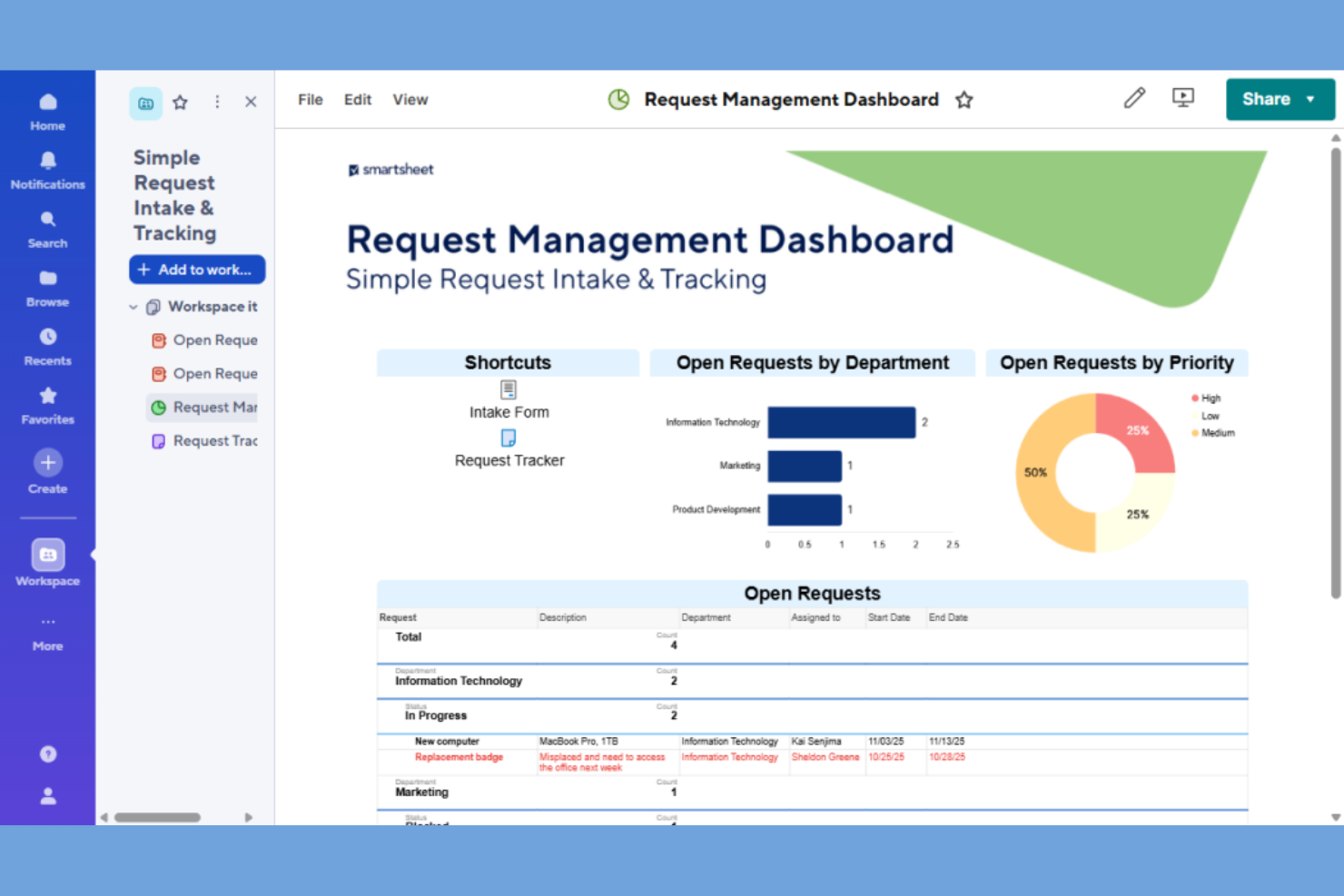
For teams that prefer a familiar spreadsheet interface, Smartsheet offers a project tracking solution that feels instantly accessible. It’s a strong fit for project managers who want to organize issues, tasks, and dependencies in a grid format while layering on automation and reporting. Smartsheet stands out for its ability to blend spreadsheet flexibility with project management structure, making it easy to manage complex workflows and timelines.
Why I Picked Smartsheet
Smartsheet stands out for teams that want the familiarity of spreadsheets combined with project management capabilities. I picked Smartsheet because it lets you track issues, assign tasks, and manage dependencies directly within a grid layout that mirrors traditional spreadsheets. Features like conditional formatting and automated workflows help you highlight priorities and automate repetitive project tasks. For project managers who need to visualize and update project data in a spreadsheet-style view, Smartsheet offers a flexible and structured approach.
Smartsheet Key Features
Some other features that make Smartsheet useful for project and issue tracking include:
- Gantt Chart View: Visualize project timelines and dependencies with interactive Gantt charts.
- Resource Management: Allocate team members and track workload across multiple projects.
- Request Forms: Collect project requests or issue submissions through customizable forms.
- Activity Log: Monitor changes and user actions with a detailed activity history.
Smartsheet Integrations
Integrations include Microsoft Teams, Slack, Google Drive, Dropbox, Salesforce, Jira, DocuSign, Box, Tableau, and Zapier.
Pros and Cons
Pros:
- Deep enterprise security
- Excellent automated alerts
- Strong resource allocation
Cons:
- Expensive add-ons required
- Real time collab can lag
New Product Updates from Smartsheet

Smartsheet Adds Direct Data Import to Existing Sheets
Smartsheet introduces direct data import to existing sheets in table view. This update lets you import CSV, XLS, and XLSX files directly into sheets, reducing manual work and speeding up data setup. For more information, visit Smartsheet's official site.
Other Issue and Project Tracking Software
Here are some additional issue and project tracking software options that didn’t make it onto my shortlist, but are still worth checking out:
- Wrike
For cross-departmental collaboration
- monday.com
For customizable workflow automation
- Lark
For built-in team chat and collaboration
- Azure DevOps
For integrated CI/CD pipelines


Issue and Project Tracking Software Selection Criteria
When selecting the best issue and project tracking software to include in this list, I considered common buyer needs and pain points like managing complex bug lifecycles and ensuring clear cross-team visibility. I also used the following framework to keep my evaluation structured and fair:
Core Functionality (25% of total score)
To be considered for inclusion in this list, each solution had to fulfill these common use cases:
- Create and assign issues or tickets
- Track issue status and progress
- Add comments and attachments to issues
- Set priorities and deadlines
- Generate basic reports on issues
Additional Standout Features (25% of total score)
To help further narrow down the competition, I also looked for unique features, such as:
- Customizable workflows for different teams
- Advanced search and filtering options
- Built-in automation for repetitive tasks
- Integration with version control systems
- Support for complex dependency tracking
Usability (10% of total score)
To get a sense of the usability of each system, I considered the following:
- Clean and intuitive user interface
- Logical navigation between modules
- Minimal clicks to complete common actions
- Responsive design for different devices
- Clear labeling and helpful tooltips
Onboarding (10% of total score)
To evaluate the onboarding experience for each platform, I considered the following:
- Availability of step-by-step product tours
- Access to training videos and documentation
- Pre-built templates for common workflows
- In-app chatbots or guided setup
- Live or recorded onboarding webinars
Customer Support (10% of total score)
To assess each software provider’s customer support services, I considered the following:
- Multiple support channels like chat and email
- Fast response times to inquiries
- Access to a searchable knowledge base
- Community forums for peer support
- Availability of dedicated account managers
Value For Money (10% of total score)
To evaluate the value for money of each platform, I considered the following:
- Transparent and flexible pricing plans
- Features included at each pricing tier
- Free trial or free plan availability
- No hidden fees or surprise charges
- Discounts for annual or volume commitments
Customer Reviews (10% of total score)
To get a sense of overall customer satisfaction, I considered the following when reading customer reviews:
- Consistent praise or complaints about features
- Reported reliability and uptime
- Feedback on customer support experiences
- Comments on ease of adoption and use
- Insights on integration and customization options
How to Choose Issue and Project Tracking Software
It’s easy to get bogged down in long feature lists and complex pricing structures. To help you stay focused as you work through your unique software selection process, here’s a checklist of factors to keep in mind:
| Factor | What to Consider |
|---|---|
| Scalability | Will the software handle your team’s growth, more projects, or higher ticket volumes over time? Check for user limits, project caps, and performance at scale. |
| Integrations | Does it connect natively with your existing tools (like GitHub, Slack, or Jira)? Consider how integration gaps could impact your workflows or require workarounds. |
| Customizability | Can you tailor workflows, fields, and permissions to match your team’s processes? Rigid systems may force you to adapt your methods or create manual workarounds. |
| Ease of use | Will your team adopt it quickly, or will the interface slow them down? Test for clear navigation, logical layouts, and minimal training requirements. |
| Implementation and onboarding | How long will it take to get up and running? Look for migration tools, onboarding support, and resources that match your team’s technical comfort level. |
| Cost | Are pricing tiers aligned with your needs and budget? Watch for hidden fees, required add-ons, or user minimums that could inflate costs as you scale. |
| Security safeguards | Does the tool offer role-based access, audit logs, and data encryption? Make sure it meets your organization’s security and compliance standards. |
| Support availability | What support channels are offered, and during what hours? Consider if you’ll need 24/7 help, dedicated account management, or self-service resources. |
What Is Issue and Project Tracking Software?
Issue and project tracking software is a digital tool that helps teams log, organize, and monitor tasks, bugs, or requests throughout a project’s lifecycle. These platforms centralize updates, assignments, and status changes, making it easier to coordinate teamwork, prioritize issues, and maintain accountability. Project managers, developers, and cross-functional teams use these systems (like those from Atlassian) for streamlined task management to ensure nothing falls through the cracks and to keep projects moving forward.
Features
When selecting issue and project tracking software, keep an eye out for the following key features:
- Issue creation and assignment: Create new issues or tickets and assign them to specific team members, ensuring clear ownership and accountability for each task or bug.
- Customizable workflows: Adapt the stages and statuses of issues to match your team’s unique processes, so you can track progress in a way that fits your project needs.
- Priority and severity settings: Mark issues by urgency or impact, helping teams focus on the most critical tasks and allocate resources effectively.
- Commenting and collaboration: Allow team members to discuss issues directly within the platform, keeping all communication and context in one place.
- Attachment support: Upload files, screenshots, or logs to issues, making it easier to provide evidence, reproduce bugs, or share relevant documentation.
- Search and filtering: Quickly locate specific issues or tickets using advanced search tools and filters, so you can manage large backlogs without losing track.
- Reporting and analytics: Generate reports on issue status, resolution times, and team performance to support data-driven decision-making and continuous improvement.
- Role-based permissions: Control who can view, edit, or close issues by setting user roles and permissions, protecting sensitive information and maintaining process integrity.
- Audit trails: Track all changes made to issues, including edits, status updates, and comments, to maintain transparency and support compliance needs.
Benefits
Implementing issue and project tracking software provides several benefits for your team and your business. Here are a few you can look forward to:
- Centralized visibility: Keep all issues, updates, and project details in one place, making it easier for everyone to stay informed and aligned.
- Improved accountability: Assign tasks and track ownership, so team members know exactly what they’re responsible for and when it’s due.
- Faster problem resolution: Use features like priority settings, commenting, and attachments to quickly identify, discuss, and resolve issues as they arise.
- Data-driven decision-making: Leverage reporting and analytics tools to monitor progress, identify bottlenecks, and make informed adjustments to your workflow.
- Customizable processes: Adapt workflows, fields, and permissions to fit your team’s unique needs, supporting a wide range of project types and methodologies.
- Enhanced compliance and transparency: Maintain audit trails and role-based permissions to ensure process integrity and meet regulatory or organizational requirements.
- Streamlined collaboration: Enable real-time communication and file sharing within issues, reducing the need for scattered emails or external chat threads.
Costs & Pricing
Selecting issue and project tracking software requires an understanding of the various pricing models and plans available. Costs vary based on features, team size, add-ons, and more. The table below summarizes common plans, their average prices, and typical features included in issue and project tracking software solutions:
Plan Comparison Table for Issue and Project Tracking Software
| Plan Type | Average Price | Common Features |
|---|---|---|
| Free Plan | $0 | Basic issue tracking, limited users, core workflow management, and community support. |
| Personal Plan | $5–$12/user/month | Single user access, basic reporting, file attachments, and email notifications. |
| Business Plan | $10–$30/user/month | Multi-user support, advanced workflows, integrations, reporting and analytics, and role-based permissions. |
| Enterprise Plan | $20–$50/user/month | Custom workflows, enhanced security, audit logs, dedicated support, and compliance features. |
Issue and Project Tracking Software FAQs
Here are some answers to common questions about issue and project tracking software:
How do I know if my team needs issue and project tracking software?
If your team struggles to keep track of tasks, bugs, or requests across email, spreadsheets, or chat, you likely need issue and project tracking software. These tools help centralize work, clarify ownership, and reduce confusion as projects grow more complex.
Can issue and project tracking software integrate with my existing tools?
Yes, most issue and project tracking software offers integrations with tools like Slack, GitHub, and project management platforms. Check each vendor’s integration list to ensure compatibility with your current workflows and avoid manual data entry.
What’s the difference between issue tracking and project tracking?
Issue tracking focuses on logging and resolving specific bugs or requests, while project tracking covers broader planning, progress, and resource management. Many platforms combine both, letting you manage tasks and issues within the context of larger projects.
How secure is my data in issue and project tracking software?
Most reputable vendors provide security features like data encryption, role-based access, and audit logs. Always review a tool’s security documentation and confirm it meets your organization’s compliance and privacy requirements before adoption.
Is it difficult to migrate from spreadsheets or another tool?
No, most modern platforms offer import tools, templates, or onboarding support to help you migrate data from spreadsheets or legacy systems. Plan for some setup time to map fields and test your new workflows before going live.