

19 Best Akiflow Alternatives in 2026

Akiflow Alternatives Shortlist


A strong Akiflow alternative combines time-blocking, task management, and calendar integration in a single all-in-one digital platform. If you’re searching for productivity apps that match or exceed Akiflow’s approach to planning your day, you likely need more flexibility, better integrations, or features tailored to your workflow.
With so many options available, it’s tough to know which platforms actually deliver on smart scheduling, cross-platform syncing, and guided daily planning. Some users prefer planner apps like Amie for their joyful, integrated experience, while others look for AI-powered tools to automate the heavy lifting. This list will help you compare the top Akiflow alternatives for 2026, so you can find the right fit for your team’s productivity and planning needs.
What Is Akiflow?
Akiflow is a digital time-blocking planner that combines task management and calendar scheduling in one platform. It lets you organize tasks, block time on your calendar, and sync with other productivity tools. Akiflow is designed for users who want to plan their days with precision, manage multiple priorities, and keep all their scheduling and to-dos in a single, unified workspace.
Best Akiflow Alternatives Summary
This comparison chart summarizes pricing details for my top Akiflow alternative selections to help you find the best one for your budget and business needs.
| Tool | Best For | Trial Info | Price | ||
|---|---|---|---|---|---|
| 1 | Best for cross-platform task syncing | Free plan available | From $5/user/month (billed annually) | Website | |
| 2 | Best for built-in habit tracking | Free plan available | From $35.99/year | Website | |
| 3 | Best with Google Workspace connectivity | 14-day free trial | $7.56/month | Website | |
| 4 | Best for voice-powered task entry | Free plan available | From $4.99/month (billed annually) | Website | |
| 5 | Best for automatic task prioritization | Free trial available | From $19/seat/month (billed annually) | Website | |
| 6 | Best for smart scheduling with AI-driven time blocking | Free plan available | From $10/seat/month | Website | |
| 7 | Best for Apple ecosystem compatibility | Not available | Pricing upon request | Website | |
| 8 | Best for combining notes and tasks in one place | Free plan available | From $10/month (billed annually) | Website | |
| 9 | Best for collaborative team task management | Free plan available | From $5/person/month | Website | |
| 10 | Best for daily planning with guided workflows | 14-day free trial available | From $20/month (billed annually) | Website |
Why You Can Trust Us
We’ve been testing and reviewing project management software since 2012. As project managers ourselves, we know how critical and difficult it is to make the right decision when selecting software.
We invest in deep research to help our audience make better software purchasing decisions. We’ve tested more than 2,000 tools for different project management use cases and written over 1,000 comprehensive software reviews. Learn how we stay transparent & our software review methodology.
-

Accelo
Visit WebsiteThis is an aggregated rating for this tool including ratings from Crozdesk users and ratings from other sites.4.4 -
Wrike
Visit WebsiteThis is an aggregated rating for this tool including ratings from Crozdesk users and ratings from other sites.4.3 -
monday.com
Visit WebsiteThis is an aggregated rating for this tool including ratings from Crozdesk users and ratings from other sites.4.6





Akiflow Alternatives Reviews
Below are my detailed summaries of the Akiflow alternatives that made it onto my shortlist. My reviews offer a detailed look at the features, integrations, and best use cases of each platform to help you find the best one for you.


If you need a task manager that works across every device and platform, Todoist is built for you. Teams and individuals who want to sync tasks between desktop, mobile, and web without friction will find its cross-platform support reliable. Unlike Akiflow, Todoist’s native apps and browser extensions keep your to-dos accessible and up to date wherever you work.
Why Todoist Is a Good Akiflow Alternative
Todoist stands out for anyone who needs their tasks to sync instantly across multiple devices and platforms. I picked Todoist because its native apps for Windows, macOS, iOS, Android, and browser extensions make it easy to manage your schedule from anywhere. The real-time sync ensures that updates on one device appear everywhere else, which is essential for time-blocking and planning on the go. This makes Todoist a strong choice if you want a digital planner that keeps your workflow unified across all your tools.
Todoist Key Features
Some other features in Todoist help you organize and manage your time-blocking workflow:
- Task Labels and Filters: Create custom labels and filters to sort and view tasks by context, priority, or project.
- Recurring Due Dates: Set tasks to repeat on custom schedules for ongoing routines or deadlines.
- Project Sections and Subtasks: Break projects into sections and add subtasks for detailed planning and tracking.
- Productivity Tracking: Use built-in productivity visualizations like streaks and completed task counts to monitor progress.
Todoist Integrations
Integrations include Google Calendar, Outlook Mail, Trello, Jira, Slack, Microsoft Teams, Task Assist, Apple Calendar, Zapier, and Twist.
Pros and Cons
Pros:
- Highly affordable premium
- Huge integration library
- Great custom filter views
Cons:
- Subtasks can be clunky
- Cannot pull external tasks
New Product Updates from Todoist

Todoist Launches Ramble for Voice-Based Task Capture
Todoist introduces Ramble with voice-to-task creation and real-time task editing. This update helps users quickly capture ideas and turn spoken thoughts into structured to-do items. For more information, visit Todoist's official site.
 .
.
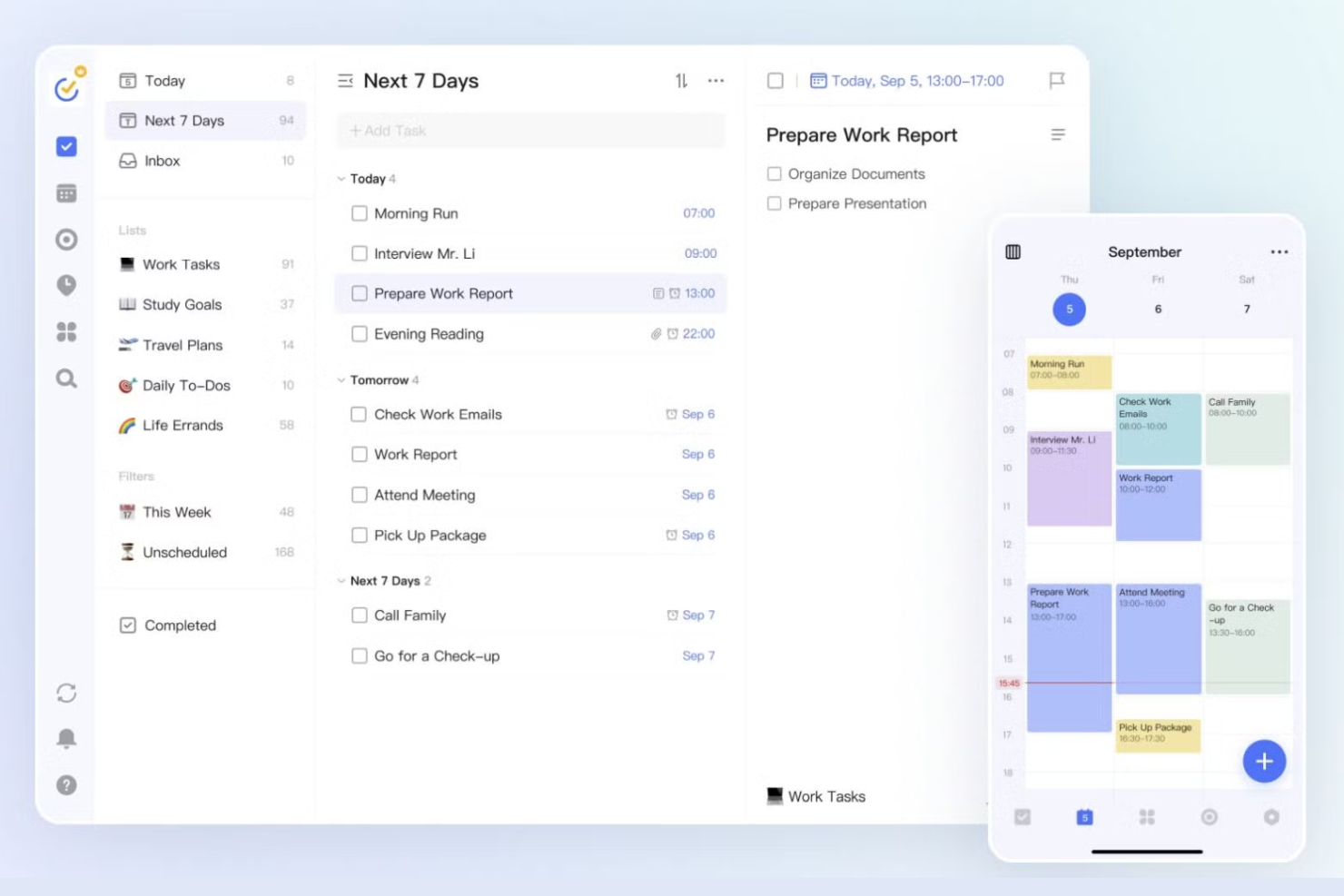
For anyone who wants to combine task management with habit tracking, TickTick offers a unique approach. Professionals and teams who need to build routines alongside their daily planning will appreciate its built-in habit tracker. Unlike Akiflow, TickTick lets you manage tasks and track personal or work habits in one place.
Why TickTick Is a Good Akiflow Alternative
What sets TickTick apart is its built-in habit tracking, which goes beyond standard task management. I picked TickTick for anyone who wants to track daily routines and habits alongside their work tasks in a single platform. The habit tracker lets you set recurring habits, visualize your progress, and receive reminders to help you stay consistent. This makes TickTick a strong choice if you want a digital planner that supports both productivity and personal growth.
TickTick Key Features
In addition to its habit tracking capabilities, TickTick offers several other features for managing your schedule and tasks:
- Calendar View: See your tasks and events in a daily, weekly, or monthly calendar layout for better time-blocking.
- Pomodoro Timer: Use a built-in Pomodoro timer to break work into focused intervals with scheduled breaks.
- Task Prioritization: Assign priority levels to tasks to help you focus on what matters most each day.
- List Sharing: Share task lists with others for collaborative planning and project management.
TickTick Integrations
Integrations include Gmail, Spark, Amazon Alexa, Apple Shortcuts, Outlook, Slack, Chatmind, Zapier, and IFTTT.
Pros and Cons
Pros:
- Very affordable pricing
- Voice input works well
- Solid calendar view option
Cons:
- Calendar needs premium
- Lacks external task sync

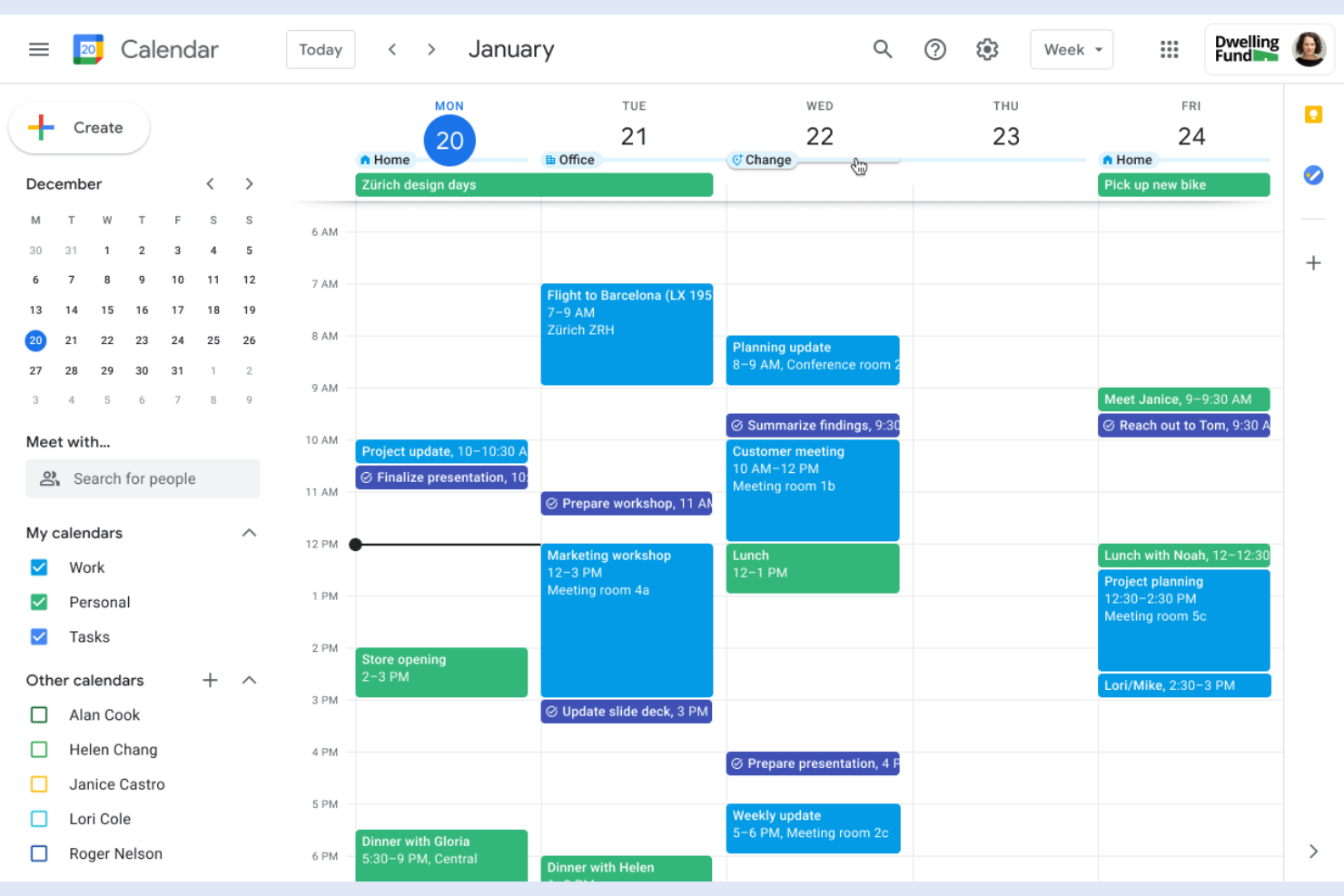
Teams that rely on Google Workspace for collaboration will find Google Calendar tightly woven into their daily workflow. Project managers and digital teams can use it to coordinate meetings, block focused work time, and manage shared calendars without leaving the Google ecosystem. Unlike Akiflow, Google Calendar offers direct integration with Gmail, Google Meet, and Drive, making it easy to connect scheduling with communication and file sharing.
Why Google Calendar Is a Good Akiflow Alternative
For anyone already using Google Workspace, Google Calendar offers unmatched connectivity with the rest of Google’s productivity tools. I picked Google Calendar because it lets you schedule events, set reminders, and manage multiple calendars that sync instantly with Gmail, Google Meet, and Drive. Its time-blocking features allow you to visually organize your day and coordinate with team members in real time. If your workflow depends on Google’s ecosystem, Google Calendar is a natural fit as an Akiflow alternative.
Google Calendar Key Features
Some other features that make Google Calendar useful for digital planning include:
- Color-Coded Calendars: Assign different colors to calendars or events for quick visual organization.
- Event Attachments: Add files and documents directly to calendar events for easy access during meetings.
- Out of Office Scheduling: Automatically decline meeting requests during set out-of-office periods.
- Public Calendar Sharing: Share calendars publicly or with specific people to coordinate schedules across teams.
Google Calendar Integrations
Integrations include Gmail, Google Meet, Google Drive, Google Tasks, Google Keep, Google Contacts, Google Maps, Apple Calendar, Microsoft Outlook, and Slack.
Pros and Cons
Pros:
- Highly reliable uptime
- Easy shared team calendars
- Native Google Tasks sync
Cons:
- UI has not changed in years
- Lacks AI auto scheduling


If you want to add tasks hands-free, Any.do is designed with voice-powered entry at its core. Busy professionals and teams who need to capture ideas or to-dos on the go will find its voice assistant especially useful. Unlike Akiflow, Any.do lets you quickly add, manage, and organize tasks using natural language voice commands across devices.
Why Any.do Is a Good Akiflow Alternative
Any.do stands out for its voice-powered task entry, which is ideal if you want to capture tasks without typing. I picked Any.do because its voice assistant lets you add, reschedule, or complete tasks using natural language commands on mobile and desktop. The tool also supports voice reminders, so you can set up notifications hands-free. This makes Any.do a strong choice for anyone who needs a digital planner that fits into a fast-paced, multitasking workflow.
Any.do Key Features
Some other features that make Any.do useful for digital planning and time management include:
- Calendar Integration: Sync your tasks and events with Google Calendar, Outlook, and Apple Calendar for unified scheduling.
- Task Collaboration: Assign tasks, share lists, and comment with team members directly in the app.
- Recurring Tasks: Set up daily, weekly, or custom recurring tasks to automate routine planning.
- Location-Based Reminders: Trigger reminders based on your geographic location for context-aware task management.
Any.do Integrations
Integrations include Slack, Microsoft Teams, Zoom, Google Meet, WhatsApp, Gmail, Google Calendar, Trello, Asana, and Monday.com.
Pros and Cons
Pros:
- Easy grocery list sorting
- Good WhatsApp integration
- Clean and simple design
Cons:
- No external app aggregator
- Lacks complex task routing

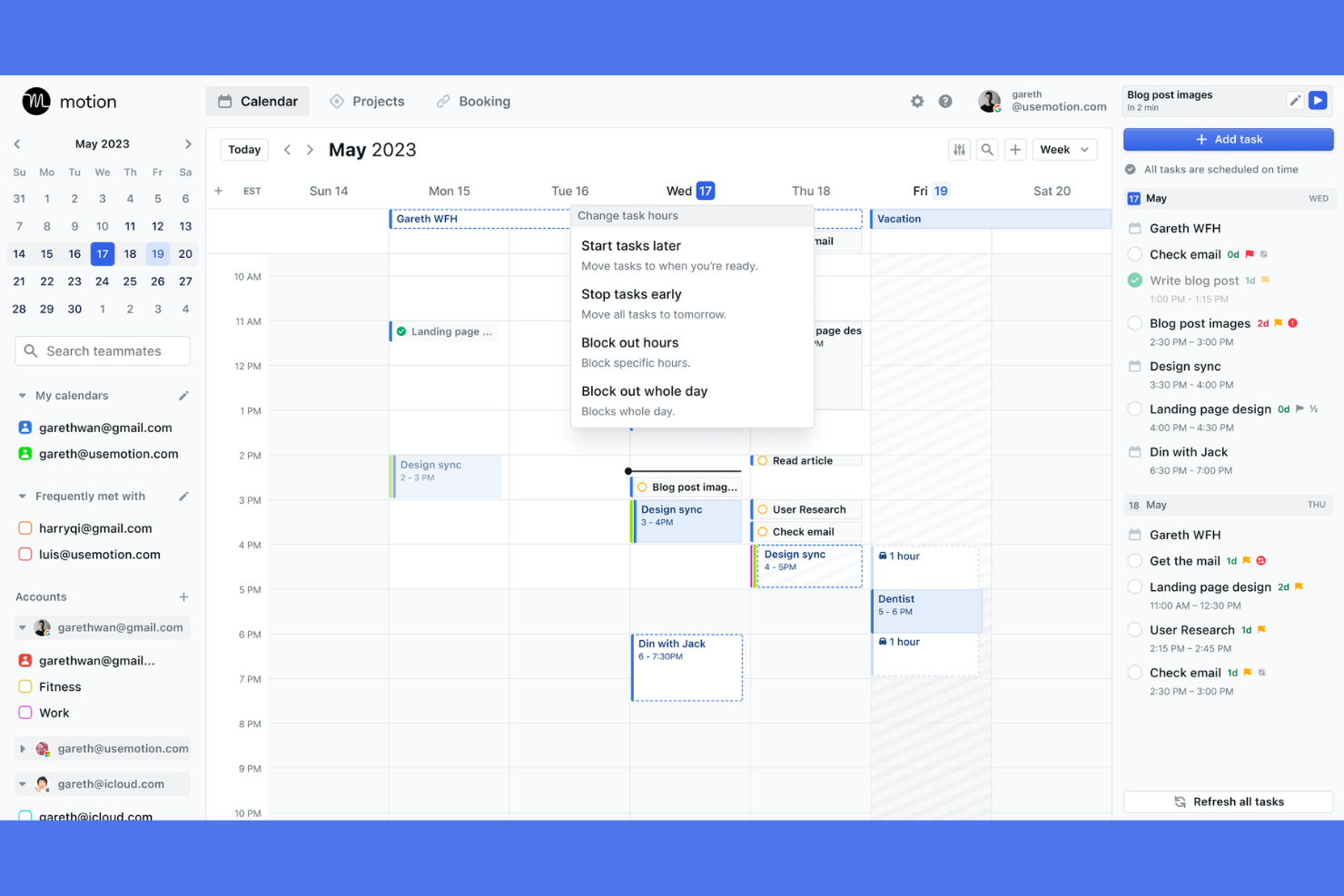
Motion takes a unique approach by automatically prioritizing and scheduling your tasks based on urgency and deadlines. This platform is a strong fit for project managers, founders, and busy teams who need their calendars to adapt as priorities shift. Unlike Akiflow, Motion’s AI-driven engine continuously reorders your day to help you focus on what matters most.
Why Motion Is a Good Akiflow Alternative
What sets Motion apart is its ability to automatically prioritize tasks and fit them into your calendar without manual effort. I picked Motion because its AI engine constantly evaluates your deadlines, meetings, and workload to reorder your schedule in real time. You can add tasks with due dates, and Motion will automatically block time for them, shifting events as priorities change. This makes it a strong choice for anyone who wants a planner that actively manages shifting priorities for you.
Motion Key Features
Some other features in Motion help teams and individuals manage their workday more efficiently:
- Meeting Scheduler: Share booking links that automatically respect your existing calendar events and task blocks.
- Team Workspace: Assign tasks, track progress, and view team schedules in a shared environment.
- Recurring Task Support: Set up tasks that repeat on custom intervals and have them automatically scheduled.
- Calendar Sync: Connect Google and Outlook calendars to keep all commitments visible in one place.
Motion Integrations
Integrations include Google Calendar, Microsoft Outlook, iCloud Calendar, Zoom, Google Meet, and Microsoft Teams.
Pros and Cons
Pros:
- High priority task focus
- Built in meeting scheduler
- Great for complex projects
Cons:
- AI is rigid and bossy
- UI is incredibly dense


Reclaim uses AI to automatically schedule tasks, habits, and meetings around your existing calendar events. This makes it especially useful for busy professionals and teams who need to protect focus time while adapting to shifting priorities. Unlike Akiflow, Reclaim stands out for its smart, dynamic time blocking that continuously optimizes your schedule as new commitments arise.
Why Reclaim Is a Good Akiflow Alternative
For anyone who wants their calendar to adapt automatically, Reclaim offers AI-driven time blocking that goes beyond manual scheduling. I picked Reclaim because it can automatically find the best times for tasks, habits, and meetings, even as your calendar changes throughout the day. Its smart routines let you set up recurring habits that flex around your priorities, and its dynamic task scheduling helps you protect focus time without constant adjustments. This makes Reclaim a strong choice if you want a planner that actively manages your time for you.
Reclaim Key Features
Some other features in Reclaim help teams and individuals manage their schedules more precisely:
- Calendar Sync: Connect multiple Google Calendars to keep all events and commitments in one view.
- Smart 1:1 Scheduling: Automatically finds the best time for recurring meetings between two people.
- Buffer Time Settings: Add automatic buffers before and after meetings to prevent back-to-back scheduling.
- Analytics Dashboard: View reports on how your time is allocated across meetings, tasks, and habits.
Reclaim Integrations
Integrations include Google Calendar, Google Tasks, Todoist, Asana, Jira, ClickUp, Linear, and Slack.
Pros and Cons
Pros:
- Great Google Task sync
- Adapts to calendar changes
- Syncs personal and work cals
Cons:
- UI can get very cluttered
- AI can feel unpredictable


For anyone deeply invested in Apple devices, Things 3 offers a planner built specifically for macOS, iOS, and iPadOS. Creative professionals and teams who rely on Apple’s ecosystem will appreciate its native design, fast sync, and deep integration with system features like widgets and Siri Shortcuts. Unlike Akiflow, Things 3 delivers a seamless experience across all Apple platforms, making it easy to organize tasks and schedules without leaving the Apple environment.
Why Things 3 Is a Good Akiflow Alternative
If you’re looking for a planner that feels truly native on Apple devices, Things 3 is purpose-built for the Apple ecosystem. I picked Things 3 because it offers deep integration with macOS, iOS, and iPadOS features like widgets, Siri Shortcuts, and system-wide quick entry. Its fast sync across devices and support for Apple Calendar make it easy to manage tasks and schedules in one place. For anyone who wants a digital platform that works seamlessly within Apple’s environment, Things 3 is a strong Akiflow alternative.
Things 3 Key Features
Some other features that make Things 3 a strong option for digital planning include:
- Project Organization: Group related tasks into projects with headings and checklists for structured planning.
- Today and Upcoming Views: See tasks scheduled for today and the days ahead in dedicated, automatically updating views.
- Tags and Filters: Add tags to tasks and use filters to quickly find and organize items across projects.
- Mail to Things: Forward emails directly into your task list using a unique Things Cloud email address.
Things 3 Integrations
Integrations include Apple Calendar, Apple Reminders, Apple Shortcuts, Siri, Mail to Things, and Apple Watch.
Pros and Cons
Pros:
- Sleek calendar integration
- Great project structuring
- Fast keyboard shortcuts
Cons:
- Lacks API for integrations
- No native team sharing

Routine brings together note-taking and task management in a single workspace, making it easy to capture ideas and plan your day without switching tools. This platform is especially useful for product managers, founders, and anyone who wants to keep meeting notes, tasks, and schedules tightly connected. Unlike Akiflow, Routine’s unified approach helps you link actionable items directly to your notes and calendar events.
Why Routine Is a Good Akiflow Alternative
Routine stands out for anyone who wants to manage both notes and tasks in one place. I picked Routine because it lets you capture meeting notes, ideas, and to-dos in a single workspace, so you don’t have to juggle multiple apps. You can link tasks directly to notes or calendar events, making it easy to turn ideas into actionable steps. This approach is especially helpful if you want your time-blocking planner to double as a digital notebook.
Routine Key Features
Some other features in Routine help you organize your day and information more effectively:
- Daily Planner View: See your tasks, events, and notes for the day in a single dashboard.
- Quick Capture Shortcut: Instantly add tasks or notes from anywhere using a keyboard shortcut.
- Calendar Integration: Sync with Google Calendar to keep your schedule and tasks aligned.
- Task Prioritization: Drag and drop tasks to reorder and set priorities for your workflow.
Routine Integrations
Integrations include Google Calendar, Microsoft Outlook, Apple iCloud Calendar, Google Meet, Zoom, Microsoft Teams, Slack, Discord, Intercom, and Segment.
Pros and Cons
Pros:
- Easy daily habit tracking
- Great natural language input
- Clean minimalist design
Cons:
- Development can feel slow
- No auto scheduling AI

If your team needs a digital platform that blends task management with real-time collaboration, Superlist is worth a look. It’s designed for project managers and cross-functional teams who want to organize tasks, share notes, and keep conversations connected to their work. Unlike Akiflow, Superlist puts shared lists, comments, and document-style notes at the center of team planning.
Why Superlist Is a Good Akiflow Alternative
Superlist stands out for teams that need more than just personal task management. I picked Superlist because it lets you create shared lists, assign tasks, and collaborate directly within each project space. Its document-style notes and threaded comments keep all project communication and planning in one place. If your team values collaborative task management alongside time-blocking, Superlist offers a flexible alternative to Akiflow.
Superlist Key Features
Some other features that make Superlist useful for digital planning include:
- Smart Reminders: Set reminders for tasks and deadlines to keep your team on track.
- Calendar Integration: Sync tasks and deadlines with your external calendar for better visibility.
- Customizable Templates: Use or create templates for recurring projects and workflows.
- Mobile App: Access and update your lists and tasks from anywhere using the Superlist mobile app.
Superlist Integrations
Integrations include Microsoft Teams, Slack, Google Calendar, Outlook Calendar, Zoom, Dropbox, OneDrive, GitHub, and Figma.
Pros and Cons
Pros:
- Good personal and work split
- Mixes tasks and rich notes
- Sleek modern interface
Cons:
- Fewer external app syncs
- New platform with bugs

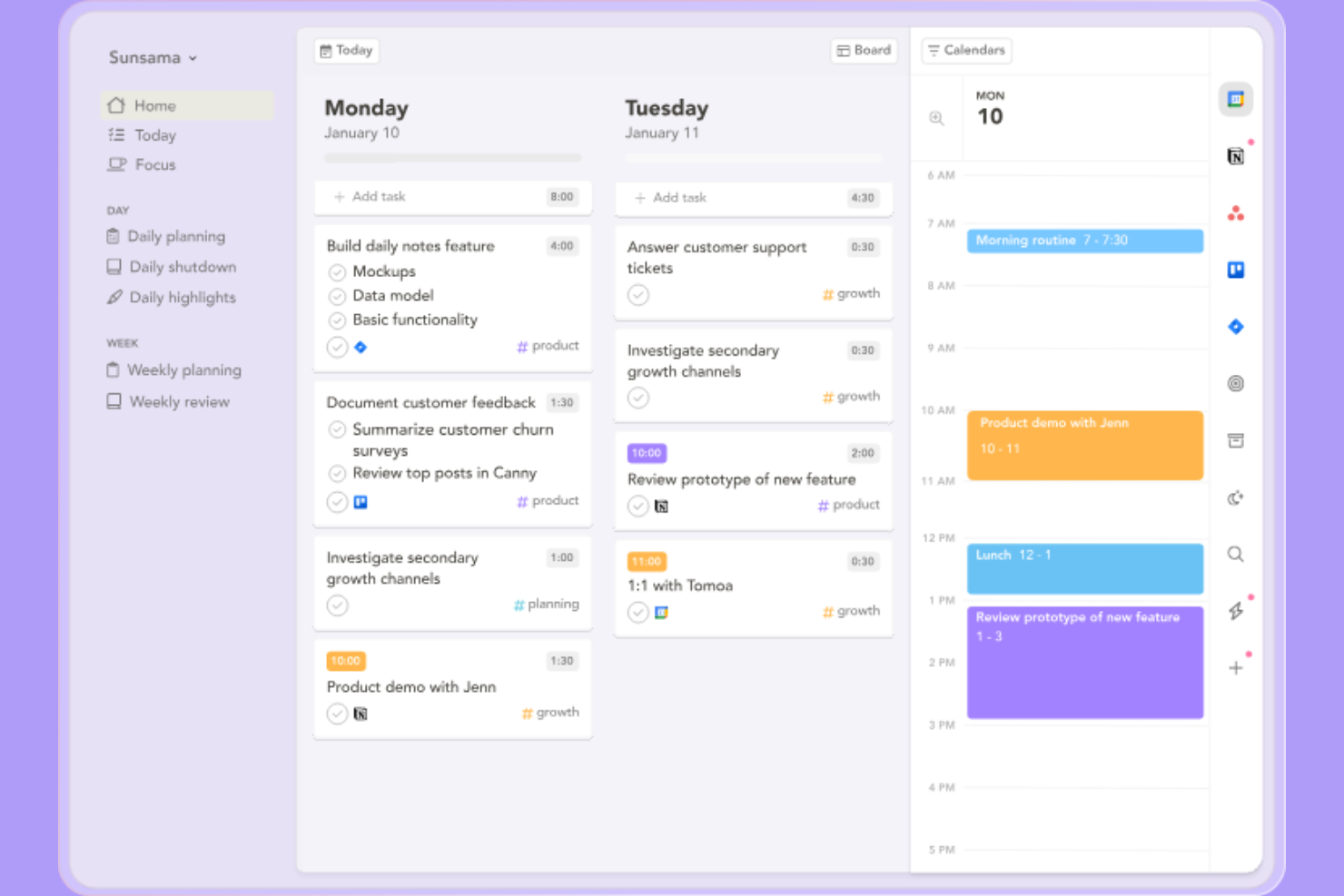
Sunsama guides you through a structured daily planning process, making it a strong fit for professionals who want more intention and reflection in their workday. If you’re looking for a tool that helps you set realistic goals and prioritize tasks with a mindful approach, Sunsama stands out from Akiflow by offering built-in guided workflows. This makes it especially appealing for those who value daily review and planning rituals as part of their productivity routine.
Why Sunsama Is a Good Akiflow Alternative
Unlike most digital planners, Sunsama guides you through a daily workflow that encourages thoughtful planning and reflection. I picked Sunsama as an Akiflow alternative because it prompts you to set intentions, review your workload, and time-block tasks each day. Its daily planning assistant helps you break down goals into actionable steps and ensures you don’t overcommit. This approach is especially useful if you want a planner that supports mindful productivity and sustainable work habits.
Sunsama Key Features
Some other features in Sunsama help round out its daily planning toolkit:
- Drag-and-Drop Task Scheduling: Move tasks directly onto your calendar to allocate time blocks.
- Email Task Import: Turn emails from Gmail or Outlook into actionable tasks within your daily plan.
- Focus Mode: Minimize distractions by viewing only the current task and time block.
- Daily Shutdown Ritual: Review completed work and unfinished tasks at the end of each day.
Sunsama Integrations
Integrations include Google Calendar, Microsoft Outlook, Todoist, Asana, Trello, Jira, GitHub, Notion, and Linear.
Pros and Cons
Pros:
- Drag and drop time blocking
- Deep Slack integration
- Promotes healthy work limits
Cons:
- No AI auto scheduling
- Takes time to plan each day
Other Akiflow Alternatives
Here are some additional Akiflow alternatives options that didn’t make it onto my shortlist, but are still worth checking out:
- Morgen
For managing multiple calendars in one view
- Notion Calendar
With Notion workspace integration
- Wrike
For advanced reporting dashboards
- Smartsheet
For spreadsheet-style task management
- Microsoft To Do
With Microsoft 365 integration
- ClickUp
For customizable workflow templates
- Asana
For visual project timeline tracking
- Lunatask
For privacy-focused productivity tools
- FlowSavvy
For automatic schedule optimization


Akiflow Alternatives Selection Criteria
When selecting the best Akiflow alternatives to include in this list, I considered common buyer needs and pain points related to time-blocking planner and digital platform products, like coordinating team schedules and integrating with existing calendars. I also used the following framework to keep my evaluation structured and fair:
Core Functionality (25% of total score) To be considered for inclusion in this list, each solution had to fulfill these common use cases:
- Create and manage tasks
- Organize tasks by project or list
- Set deadlines and reminders
- View tasks in a calendar format
- Assign tasks to team members
Additional Standout Features (25% of total score) To help further narrow down the competition, I also looked for unique features, such as:
- Automated time-blocking suggestions
- Real-time team collaboration tools
- Customizable workflow templates
- Integration with multiple calendar providers
- Built-in analytics or reporting dashboards
Usability (10% of total score) To get a sense of the usability of each system, I considered the following:
- Clean and intuitive interface design
- Minimal clicks to complete core actions
- Responsive performance on web and mobile
- Clear navigation and labeling
- Accessibility for all user types
Onboarding (10% of total score) To evaluate the onboarding experience for each platform, I considered the following:
- Availability of step-by-step product tours
- Access to training videos and documentation
- Pre-built templates for quick setup
- In-app chatbots or guided help
- Webinars or live onboarding sessions
Customer Support (10% of total score) To assess each software provider’s customer support services, I considered the following:
- Multiple support channels like chat and email
- Fast response times to inquiries
- Helpful and knowledgeable support staff
- Access to a searchable help center
- Community forums or user groups
Value For Money (10% of total score) To evaluate the value for money of each platform, I considered the following:
- Transparent and flexible pricing plans
- Features included at each pricing tier
- Free plan or trial availability
- Discounts for annual billing or teams
- No hidden fees or surprise charges
Customer Reviews (10% of total score) To get a sense of overall customer satisfaction, I considered the following when reading customer reviews:
- Positive feedback on core features
- Reports of reliable performance
- Comments on customer support quality
- User sentiment about pricing fairness
- Suggestions for product improvements
Why Look For an Akiflow Alternative?
While Akiflow is a good choice of time-blocking planner and digital platform, there are a number of reasons why some users seek out alternative solutions. You might be looking for an Akiflow alternative because…
- You need more advanced team collaboration features
- You want native integrations with your existing tools
- You require a built-in calendar or timeline view
- You need better support for recurring tasks
- You prefer a solution with more flexible pricing options
If any of these sound like you, you’ve come to the right place. My list contains several time-blocking planner and digital platform options that are better suited for teams facing these challenges with Akiflow and looking for alternative solutions.
Akiflow Key Features
Here are some of the key features of Akiflow, to help you contrast and compare what alternative solutions offer:
- Time-blocking for daily and weekly planning
- Unified inbox for capturing tasks from multiple sources
- Two-way calendar sync with Google and Outlook
- Quick task capture with keyboard shortcuts
- Drag-and-drop scheduling for tasks and events
- Focus mode to minimize distractions
- Recurring tasks and reminders
- Command bar for fast navigation and actions
- Integration with popular productivity tools
- Customizable notifications and alerts