

10 Best AI Requirements Management Tools Reviewed in 2026

Best AI Requirements Management Tools Shortlist


Managing project requirements can be a daunting task, especially when details change frequently. You might find it challenging to keep track of everything, leading to missed deadlines and frustrated teams. AI requirements management tools are designed to help you tackle these challenges by offering smart features that adapt to your project’s needs.
These AI tools automate tedious tasks, provide insights into your requirements, and ensure nothing falls through the cracks. In my experience, these capabilities make a real difference in how efficiently you can manage projects.
In this article, I'll review the best AI requirements management tools available, focusing on their AI features and how they can benefit your team.
Why Trust Our Software Recommendations
Our team has been testing and reviewing software since 2012. As project managers ourselves, we know how difficult—and important—it is to choose the right software.
For this guide, we evaluated tools using hands-on testing and independent research, scoring tools using our selection criteria. We also draw on insights from industry thought leaders and practicing project management experts.
Our reviews reflect our human editorial judgment, not a sales pitch.
Expert reviewers:
AI Requirements Management Tools Comparison Table
This comparison table summarizes pricing details for my top AI requirements management tools selections.
| Tool | Best For | Trial Info | Price | ||
|---|---|---|---|---|---|
| 1 | Best for digital compliance in medical fields | Free demo available | Pricing upon request | Website | |
| 2 | Best with AI-powered requirements analysis | Free plan available | From $1,990/year | Website | |
| 3 | Best for Microsoft integration | Free 30 days trial available | Pricing upon request | Website | |
| 4 | Best for AI-driven multi-industry adaptability | Free plan + 14-day free trial available | From $9/user/month (billed annually) | Website | |
| 5 | Best for real-time collaboration tools | Free plan + 14-day free trial + free demo available | From $10/user/month (billed annually) | Website | |
| 6 | Best for regulated-industry traceability | 30-day free trial + free demo available | Pricing upon request | Website | |
| 7 | Best for large enterprises | Free demo available | Pricing upon request | Website | |
| 8 | Best for customizable workflows | Free plan + 14-day free trial available | From $7.91/user/month (billed annually) | Website | |
| 9 | Best for test management integration | Free 30-day trial available | From $5/month (billed annually) | Website | |
| 10 | Best for DevOps integration | Free plan and 15-day free trial available | From $20/month (billed annually) | Website |


Best AI Requirements Management Tool Reviews
Below are my detailed summaries of the best AI requirements management tools that made it onto my shortlist. My reviews offer a detailed look at the key features, pros & cons, integrations, and ideal use cases of each tool to help you find the best one for you.
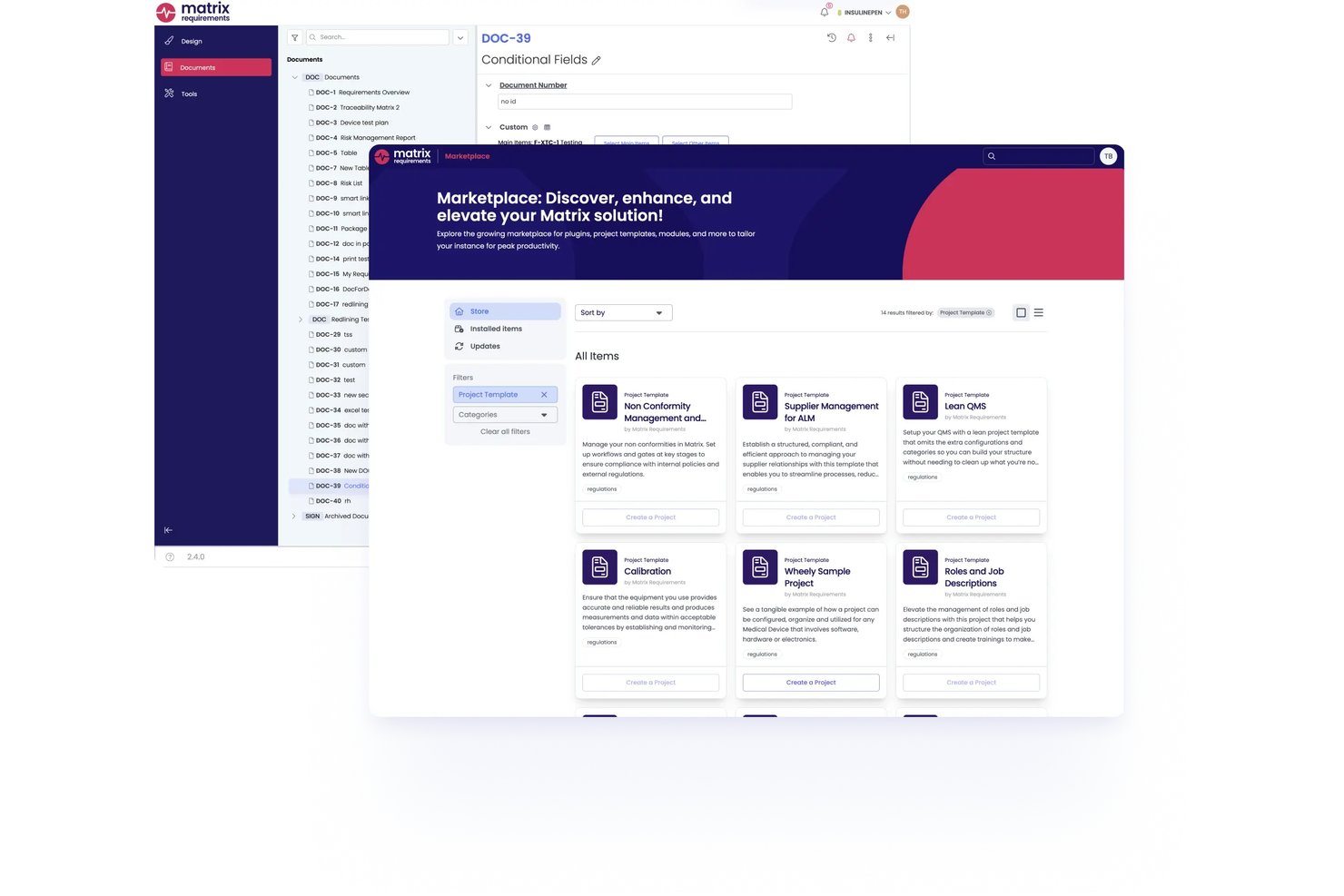
Matrix Req is an AI-powered requirements management and design control platform built specifically for medical device companies, combining requirements authoring, risk management, test case management, and compliance documentation in one regulated environment.
Who Is Matrix Req Best For?
Matrix Req is a strong fit for medtech and software-as-a-medical-device teams navigating FDA or EU MDR regulatory submissions who need built-in design control from day one.
Why I Picked Matrix Req
Matrix Req earns its spot on my shortlist because it's the only AI requirements management tool I've found built entirely around regulated medical device development rather than retrofitted for it. I particularly like the Compliance Checker, which maps requirements directly against standards like ISO 14971 or IEC 62304 and flags gaps automatically. The Matrix Mind AI assistant generates requirements and test cases within a zero data retention environment, keeping your design files isolated from LLM training.
Matrix Req Key Features
- Compose module: Shared requirements library enables centralized updates and reuse across multiple medical device projects.
- Risk management templates: Configurable hazard analysis and risk matrices aligned with ISO 14971 and FMEA standards.
- Configurable traceability: Customizable trace rules and automated detection of missing or outdated traces between requirements, risks, and tests.
- Native Jira and Azure DevOps integration: Bidirectional syncing connects requirements, issues, and dev workflows across popular ALM tools.
Matrix Req Integrations
Matrix Req offers native integrations with Jira, Azure DevOps, GitHub, GitLab, Confluence, YouTrack, and Slack, with an API available for custom integrations.
Pros and Cons
Pros:
- Robust traceability for design control artifacts
- AI assistant generates compliant requirements and tests
- Built for FDA and EU MDR compliance
Cons:
- Not suitable for non-medical device industries
- Lacks ReqIF import and export support

Best with AI-powered requirements analysis
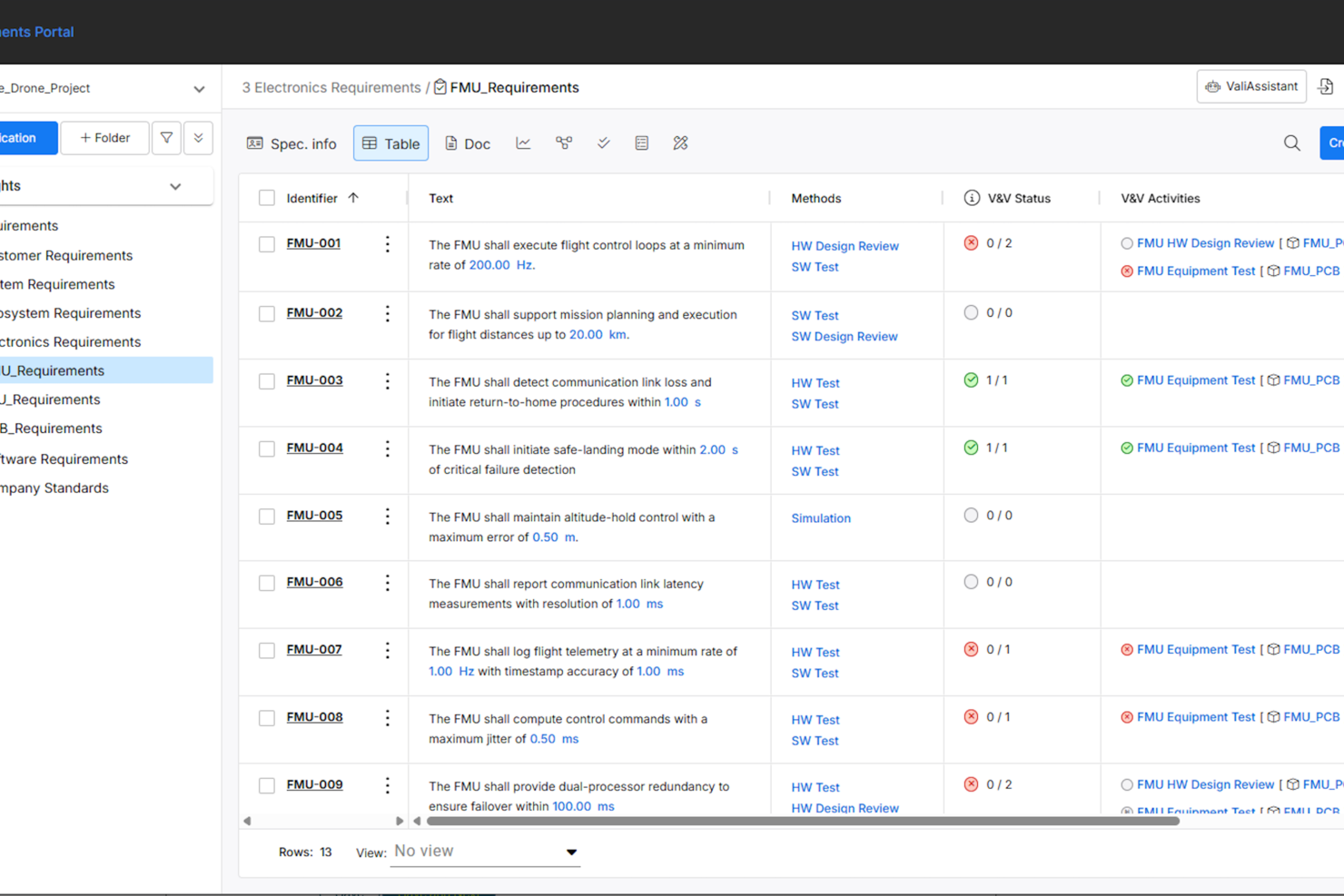
Requirements Portal is built for engineering and product teams who need to manage complex requirements, offering AI-driven analysis and traceability to help teams in electronics and high-tech industries keep projects aligned and compliant.
Who Is Requirements Portal Best For?
Engineering teams in electronics, aerospace, or high-tech industries who need advanced requirements management and collaboration.
Why I Picked Requirements Portal
I picked Requirements Portal as one of the best because its AI-powered requirements analysis helps my team quickly identify gaps, inconsistencies, and dependencies in complex specs. I like how the platform uses AI to flag ambiguous language and suggest improvements right in the requirements documentation. In practice, that means my team can catch issues early and keep our project documentation clear and actionable.
Requirements Portal Key Features
- Requirements traceability matrix: Track relationships between requirements, design elements, and test cases in a single view.
- Version control: Maintain a full history of changes to requirements and easily revert to previous versions.
- Role-based access control: Assign permissions and visibility to different team members based on their roles.
- Custom workflow automation: Set up approval processes and notifications tailored to your team’s requirements management process.
Requirements Portal Integrations
Integrations include Altium Designer, Altium 365, and an API is available for custom integrations.
Pros and Cons
Pros:
- Automated document generation for audits and reviews
- Built-in change impact analysis visualization
- Hierarchical requirements structuring for complex projects
Cons:
- Lacks mobile app for on-the-go access
- AI-powered analysis features are limited in scope

Best for Microsoft integration
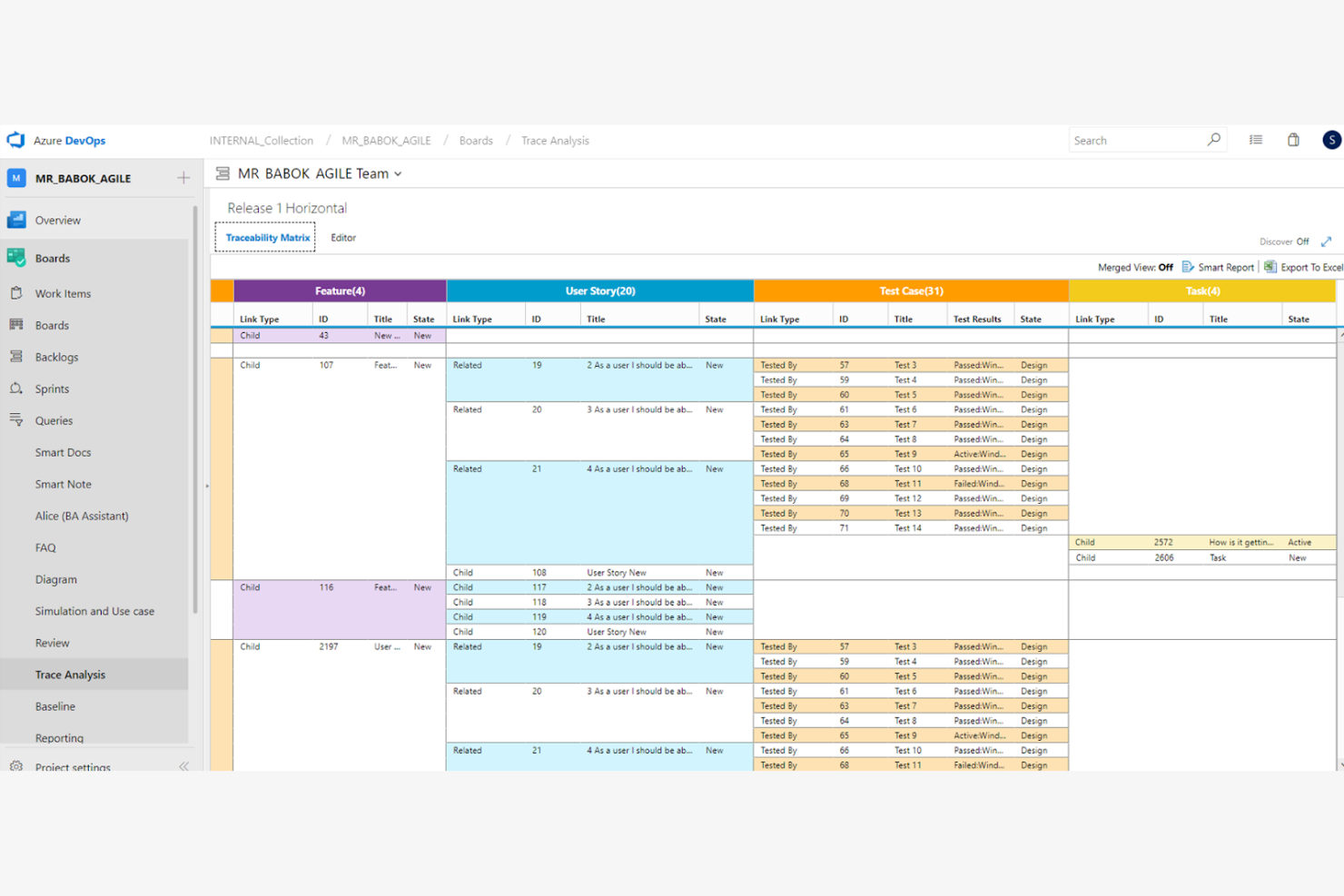
Modern Requirements is a requirements management tool designed for teams using Microsoft tools, primarily serving industries like IT and software development. It supports end-to-end traceability and requirements visualization, leveraging AI to enhance accuracy and collaboration.
Why I picked Modern Requirements: Its integration with Microsoft tools is a key differentiator, making it ideal for teams already using Microsoft ecosystems. AI functionalities such as automated requirement elicitation and analysis enhance productivity.
The tool helps your team align requirements data with project goals. Its modern requirements ensure integration with Microsoft, providing a cohesive user experience.
Standout features & integrations:
Features include drag-and-drop diagramming, automated trace analysis, and customizable dashboards. These features provide your team with flexibility and control over project requirements. The platform's visual modeling capabilities enhance understanding and communication.
Integrations include Microsoft Azure DevOps, Jira, Microsoft Teams, SharePoint, Office 365, Slack, GitHub, GitLab, Trello, and Salesforce.
Pros and Cons
Pros:
- Visual modeling enhances team communication
- AI-driven requirement analysis improves accuracy
- Built directly into Azure DevOps Server
Cons:
- Requires training for full feature utilization
- May be complex for non-Microsoft users

Best for AI-driven multi-industry adaptability
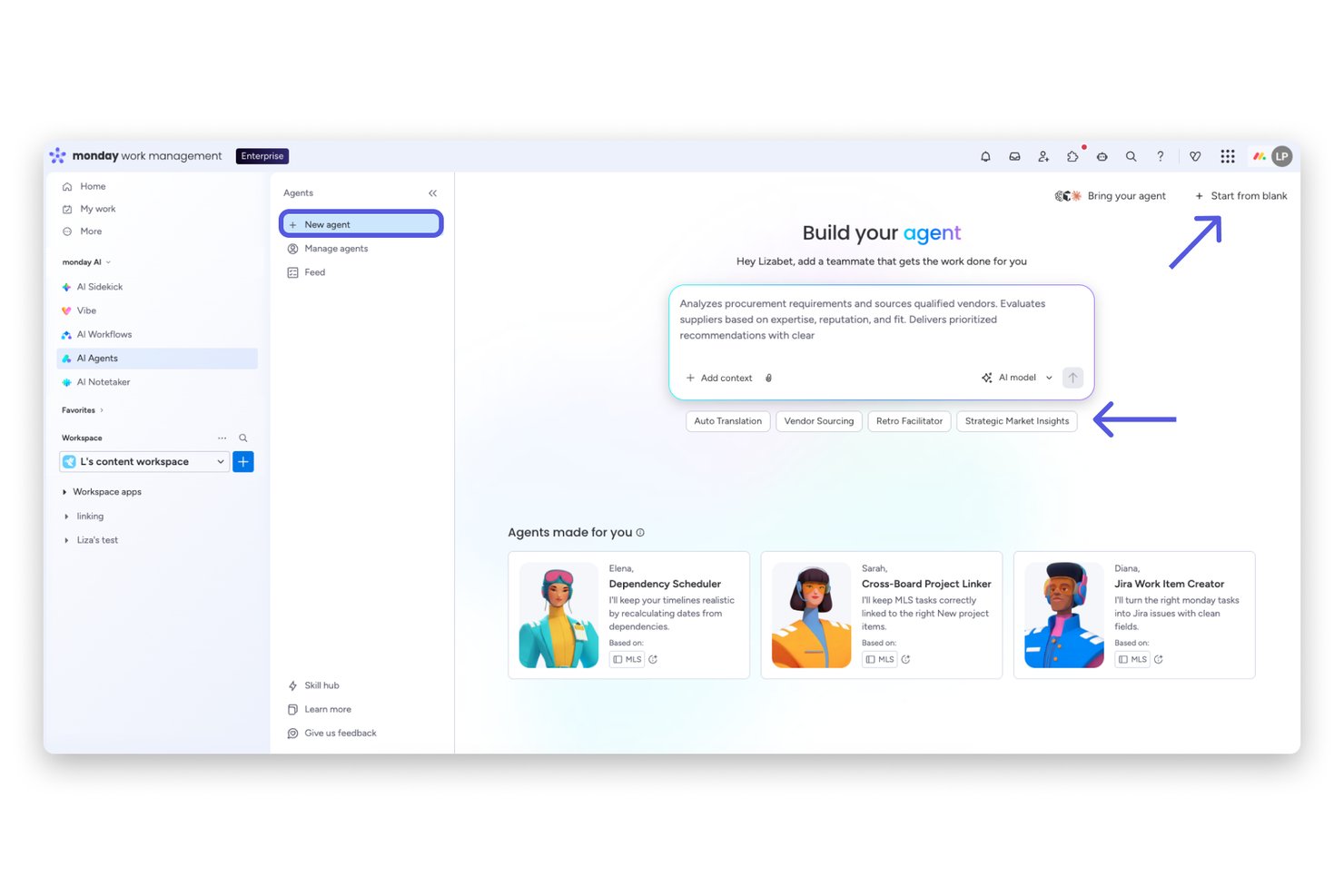
monday AI Workspace is a flexible, AI-powered work management platform that combines requirement gathering, task tracking, workflow automation, and cross-functional collaboration across a wide range of industries and team structures.
Who Is monday AI Workspace Best For?
It's a strong fit for product managers and program managers at mid-to-large organizations running cross-functional workflows across multiple departments or industries.
Why I Picked monday AI Workspace
monday AI Workspace earns its spot on my shortlist because its AI layer adapts to how different teams define and track requirements, regardless of industry. I use AI Agents to automate intake workflows, triage incoming requests, and route items across product, IT, and operations from one platform. The Vibe app builder also lets me create custom requirement-tracking workflows in plain English, with no developer support needed.
monday AI Workspace Key Features
- AI columns: Add dynamic, AI-driven columns to boards for automated insights, summarization, and content generation.
- Item version history: Track changes to requirements and other items with detailed version history and restore points.
- Board-level permissions: Set role-based access at the board level to control which team members can view or edit specific boards.
- Native Jira integration: Connect requirements and tasks to Jira for cross-platform traceability and live sync with engineering backlogs.
monday AI Workspace Integrations
monday AI Workspace provides native integrations with Jira, GitHub, Salesforce, HubSpot, Slack, Microsoft Teams, Google Workspace, Dropbox, Excel, and Outlook. It also supports Zapier and offers an API for custom integrations.
Pros and Cons
Pros:
- Strong multi-user collaboration and permissions
- Highly customizable boards for requirements tracking
- AI-driven automations support requirements intake workflows
Cons:
- Lacks formal traceability and compliance tools
- No requirement quality analysis features
New Product Updates from monday AI Workspace
monday AI Workspace Adds Human Approval Routing
monday AI Workspace adds a human-in-the-loop approval block to AI Workflows, sending approval requests and routing workflow paths based on responses. For more information, visit monday AI Workspace's official site.

Wrike
Best for real-time collaboration tools

For teams seeking an AI-driven solution to manage project requirements, Wrike offers a compelling package that blends automation with collaboration. It appeals to industries ranging from creative agencies to large enterprises, providing tools that streamline processes and reduce routine tasks. By enhancing productivity and offering a centralized platform for project management, Wrike addresses the challenge of managing complex workflows and requirements efficiently.
Why I Picked Wrike
I picked Wrike for its standout AI capabilities that directly enhance requirements management. The platform's generative AI allows your team to automatically generate project plans and summarize meeting notes, making it easier to keep track of evolving requirements. Additionally, Wrike's no-code automation feature ensures that routine tasks are handled seamlessly, freeing up your team to focus on critical, strategic work. These features make Wrike an ideal choice for those looking to enhance efficiency and accuracy in managing project requirements.
Wrike Key Features
In addition to its AI-driven functionalities, here are some other features beneficial for requirements management:
- Customizable Dashboards: Tailor your workspace to display the most relevant information for your team’s specific needs.
- Real-Time Collaboration: Enable team members to work together effectively with tools that support instant communication and updates.
- Advanced Reporting: Gain insights into project progress and performance with customizable reports and data visualization.
- Mind Mapping for Ideation: Facilitate brainstorming sessions and capture ideas effectively with integrated mind mapping tools.
Wrike Integrations
Integrations include Google Workspace, Microsoft Teams, Salesforce, Slack, Dropbox, Box, GitHub, Jira, Adobe Creative Cloud, and Okta. Wrike also offers an API for custom integrations.
Pros and Cons
Pros:
- Strong collaboration across cross functional teams
- Customizable workflows support complex requirements
- AI automation reduces manual requirements work
Cons:
- AI value depends on plan tier
- Advanced features create learning curve
New Product Updates from Wrike

Wrike Adds Quick Search to Table View
Wrike adds Quick Search to Table View with full-table search across titles, descriptions, and fields, plus highlighted matches. This helps users find tasks faster in large tables. For more information, visit Wrike’s official site.

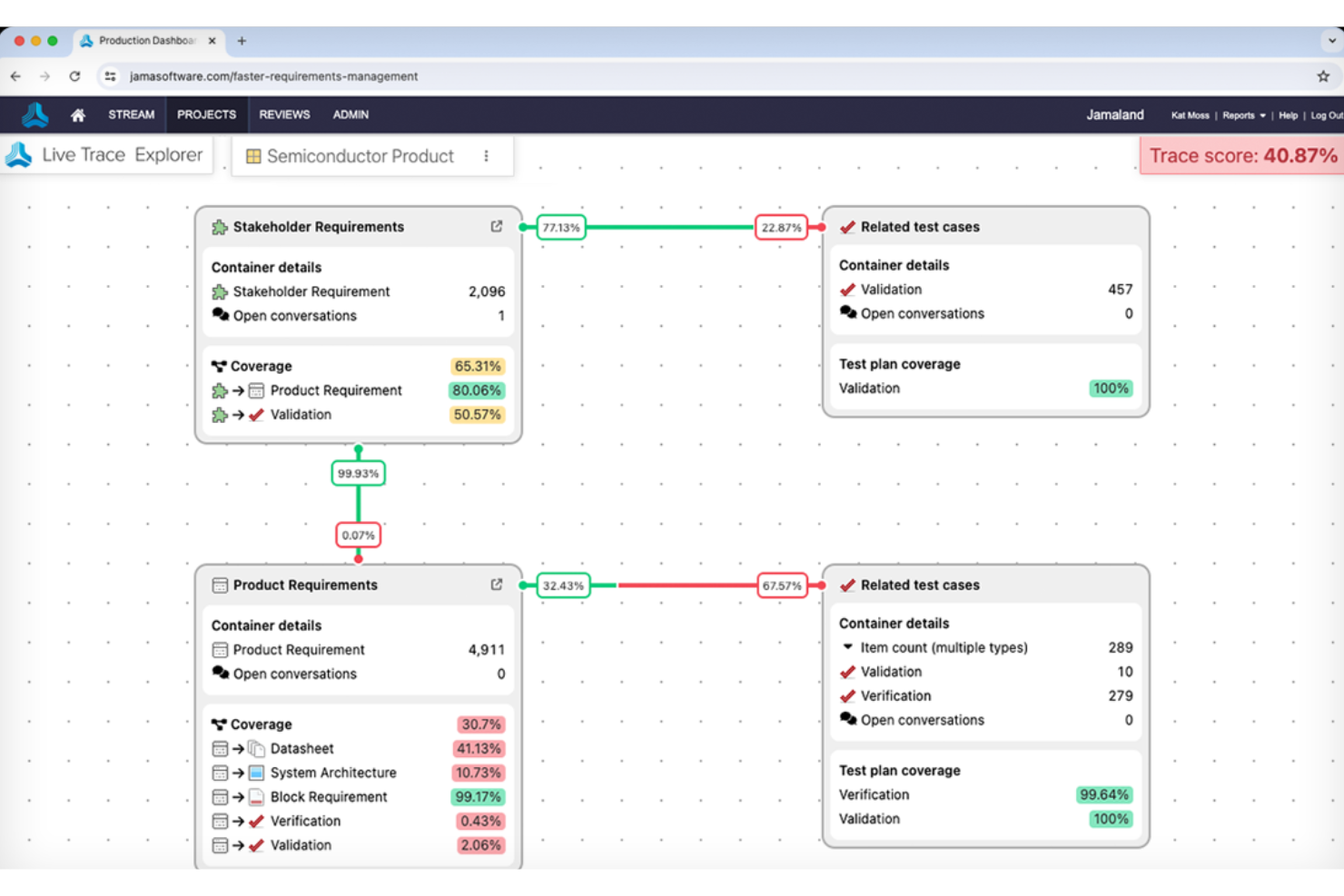
Jama Software is an AI-powered requirements management platform built for engineering teams, combining requirements authoring, traceability, test management, risk analysis, and formal review workflows in a single environment.
Who Is Jama Software Best For?
Jama Software is a strong fit for systems and requirements engineers working in regulated industries like aerospace, medical devices, and automotive, where traceability and compliance documentation aren't optional.
Why I Picked Jama Software
Jama Software earns its spot on my shortlist because no other tool I've reviewed handles regulated-industry traceability with this depth. I love how Live Traceability links requirements directly to test cases, risk analyses, and code, giving you a complete audit trail that holds up under FDA or DO-178C scrutiny. Jama Software Advisor layers on top with INCOSE and EARS-aligned quality scoring, flagging weak language like "should try to ensure" before it reaches a formal review.
Jama Software Key Features
- AI Relationship Discovery: Suggests missing trace links from a single requirement, each with a confidence rating you accept or reject.
- AI-generated test cases: Generates test cases with steps linked back to the source requirement, based on your chosen test type and industry vertical.
- Review Center: A formal review and approval workflow with e-signatures, discussion threads, and a full audit trail.
- Reuse and synchronization: Detects differences between reused requirements across projects and flags how those differences affect releases.
Jama Software Integrations
Jama Software offers native integrations with Jira and Microsoft Excel, plus ReqIF imports from tools including IBM DOORS, IBM DOORS Next, and Polarion. It also provides an open REST API and an MCP Server for custom connectivity and AI development workflows.
Pros and Cons
Pros:
- Formal approvals preserve review accountability
- AI flags ambiguous requirements before reviews
- Traceability supports safety-case audits
Cons:
- Large projects can slow trace views
- Exports often require manual formatting


IBM Engineering Requirements Management DOORS is a scalable requirements management solution tailored for large enterprises, focusing on sectors like aerospace and defense. It enhances project efficiency and reduces development costs by leveraging AI to improve the quality of requirements and facilitate better team communication.
Why I picked IBM DOORS: IBM DOORS' suitability for large enterprises is evident through its compliance management and real-time project tracking. Its automated requirement quality checks and enhanced collaboration tools set it apart.
These help your team manage complex product requirements. With IBM DOORS, you can ensure compliance and maintain control over large-scale projects.
Standout features & integrations:
Features include concurrent editing, customizable dashboards, and task management. These features allow your team to track project status and collaborate. The platform supports various engineering domains, enhancing its versatility for different projects.
Integrations include Jira, GitHub, GitLab, Azure DevOps, Confluence, and MATLAB.
Pros and Cons
Pros:
- Supports various engineering domains
- AI-enhanced collaboration boosts team productivity
- Scalable for large and complex projects
Cons:
- Generating highly customized reports can require specialized knowledge
- Cost may be prohibitive for small and medium-sized businesses

Jira
Best for customizable workflows

Jira is a project management tool widely used by software development teams to plan, track, and release software. It offers AI capabilities that help automate repetitive tasks and provide insights into project progress, enhancing team productivity.
Why I picked Jira: Jira’s customizable workflows make it ideal for teams needing flexibility in project management. Its AI-powered automation rules and predictive analytics allow your team to simplify processes and anticipate project needs.
Jira enables you to adapt workflows to match your team's unique processes. Its flexibility ensures your team stays organized and efficient, meeting project goals.
Standout features & integrations:
Features include Agile reporting, backlog prioritization, and real-time collaboration boards. These features help your team track progress and make informed decisions. The tool's ability to handle complex project structures enhances your team's clarity and focus.
Integrations include Slack, GitHub, GitLab, Microsoft Teams, Confluence, Trello, Bitbucket, Zoom, Salesforce, and Zendesk.
Pros and Cons
Pros:
- AI-driven automation boosts efficiency
- Strong support for Agile methodologies
- Highly customizable to fit various workflows
Cons:
- Performance may slow with large datasets
- Complexity can lead to a steep learning curve


aqua cloud is an AI-enhanced test management software designed for QA teams seeking efficiency and productivity in testing processes. It serves industries like banking, insurance, and healthcare, offering automated test generation and reporting to improve quality assurance.
Why I picked aqua cloud: aqua cloud excels in test management integration, making it ideal for teams using various testing tools. Its AI Copilot automates test case creation, reducing manual effort and errors.
The software’s integration capability allows your team to work smoothly across different platforms. Aqua Cloud's focus on test management ensures you can maintain high standards throughout your QA processes.
Standout features & integrations:
Features include AI-assisted test case creation, unified workflows for team collaboration, and project hierarchies. These features ensure you can manage both manual and automated tests. The intuitive interface helps your team adapt quickly to new testing requirements.
Integrations include Jira, Jenkins, Confluence, Azure DevOps, Oracle Database, and UFT.
Pros and Cons
Pros:
- API and custom integrations
- Broad feature set supports diverse testing needs
- AI capabilities enhance testing speed and accuracy
Cons:
- AI features are still maturing
- Maintaining data synchronization between disparate tools can be challenging


Copilot4DevOps is a requirements management tool tailored for DevOps teams, facilitating enhanced planning and testing phases. It automates various DevOps tasks, using AI to optimize workflows and enhance collaboration across development cycles.
Why I picked Copilot4DevOps: Copilot4DevOps’ integration with DevOps processes makes it perfect for teams seeking to automate and refine their operations. Its predictive analytics and automated testing ensure your team can anticipate issues and maintain quality.
The platform’s capabilities help optimize your development lifecycle and improve release management. Copilot4DevOps provides valuable insights that keep your team aligned and efficient.
Standout features & integrations:
Features include automated test case generation, quality analysis, and UI mockups. These features allow your team to enhance communication and maintain control over development processes. The tool's ability to adapt to changing project needs enhances its value in dynamic environments.
Integrations include Jenkins, GitHub, GitLab, Azure DevOps, Jira, Slack, Docker, Kubernetes, AWS, and Microsoft Teams.
Pros and Cons
Pros:
- Reported 80% faster requirements authoring
- Automated testing reduces manual effort
- AI-driven predictive analytics for proactive management
Cons:
- Limited customization for non-standard workflows
- Complexity may require dedicated setup time
Other AI Requirements Management Tools
Here are some additional AI requirements management tools options that didn’t make it onto my shortlist, but are still worth checking out:
- Requiment
For Agile teams
- ReqSuite RM
For the German market
- MindyGem
For documentation support
- Visure
For traceability features
- Perforce Helix ALM
For version control integration
- ClickUp
For team collaboration features
- ReqView
For offline access
- Reqi
For intuitive user interface
- DocSheets
For document-centric projects


How I Evaluate AI Requirements Management Tools
Every tool on this list needs to go beyond AI branding—I look for platforms where AI actually saves time drafting, analyzing, or tracing requirements across complex programs. I split my evaluation into core functionality every tool must have to qualify and differentiating factors that separate one vendor from the next.
Core Functionality (Table Stakes For This List)
When I'm selecting tools for my list, I rank each one on a scale from 0 (does not offer the functionality) to 5 (excels in this area) for each core functionality listed below. Then, I calculate the tool's total score into a percentage. Each tool needs to achieve a minimum total score of 65% to be considered for inclusion.
- AI-Powered Requirement Generation: I evaluate whether the tool can draft structured requirements from natural language inputs like meeting notes, stakeholder emails, or uploaded spec documents.
- AI Quality & Consistency Analysis: Each tool should flag vague language, duplicates, and conflicts—like catching passive voice or missing acceptance criteria in user stories.
- Centralized Requirements Repository: I look for a structured database where teams can author, organize, and version requirements with custom attributes rather than just flat documents.
- End-to-End Traceability: Linking requirements upstream to business needs and downstream to test cases and design artifacts is key. I check for trace matrices and impact analysis views.
- Collaboration & Review Workflows: Teams need commenting, formal review cycles, and approval gates. I evaluate how the tool handles multi-stakeholder sign-off across distributed groups.
- Integrations & Standard Exports: I check for native connections to tools like Jira, Azure DevOps, or Polarion, plus support for formats like ReqIF, CSV, and Word for handoffs.
Once I have a list of tools that meet this criteria, I consider what sets each platform apart.
Differentiating Factors (What Sets Vendors Apart)
Here's how I compare and contrast different vendors:
Standout Features
I pay close attention to whether a tool can auto-generate test cases or acceptance criteria directly from approved requirements, which saves QA teams hours of manual derivation. AI-driven compliance mapping also stands out—especially for teams delivering into regulated spaces where tracing requirements to FDA or ISO 26262 frameworks is routine. Reuse and variant intelligence matters too. I look for AI that surfaces similar requirements across projects so teams can standardize instead of rewriting from scratch.
Beyond Features
AI transparency is something I evaluate closely—I check whether vendors disclose which LLMs power their features and confirm that customer data isn't used to train external models. Deployment options matter just as much, since teams working on defense or medical device programs often need on-premise or air-gapped hosting alongside certifications like SOC 2 or ISO 27001. I also consider migration support, particularly how well a vendor handles imports from legacy tools like DOORS or Excel-based requirement sets.
How to Choose AI Requirements Management Tools
It’s easy to get bogged down in long feature lists and complex pricing structures. To help you stay focused as you work through your unique software selection process, here’s a checklist of factors to keep in mind:
| Factor | What to Consider |
|---|---|
| Scalability | Consider whether the tool can grow with your team. Will it handle increasing project complexity and user numbers? Look for flexible pricing tiers that accommodate growth without a full platform overhaul. |
| Integrations | Check if the tool integrates with your existing software stack. Does it work with your project management, communication, and development tools? Integrations can save time and reduce errors. |
| Customizability | Reflect on how much you can tailor the tool to fit your workflows. Can you adjust dashboards, reports, and processes? Customizability ensures the tool meets your specific project needs. |
| Ease of use | Evaluate how intuitive the tool is for new users. Can team members quickly learn and navigate it? A user-friendly interface minimizes training time and boosts productivity. |
| Implementation and onboarding | Consider the time and resources needed to implement the tool. Are there setup guides, tutorials, and support during the onboarding phase? Efficient onboarding ensures a smooth transition for your team. |
| Cost | Analyze if the pricing fits your budget. Are there hidden fees, or is everything upfront? Compare costs against competitors to ensure you're getting value for your investment. |
| Security safeguards | Assess the tool's security measures. Does it offer data encryption, user authentication, and regular audits? Updated security protects sensitive project information and complies with industry standards. |
| Support availability | Check the level of support provided. Is there 24/7 access to support teams through chat, email, or phone? Reliable support can be vital when you encounter issues. |
What Are AI Requirements Management Tools?
AI requirements management tools are software solutions that use artificial intelligence to help teams manage project requirements more efficiently. They're typically used by project managers, business analysts, and developers who need to ensure that project specifications are met accurately. Automated requirement extraction, predictive analytics, and natural language processing help with identifying requirement gaps, optimizing workflows, and ensuring compliance. These tools offer significant value by enhancing decision-making and reducing errors in complex projects.
Features
When selecting AI requirements management tools, keep an eye out for the following key features:
- Automated requirement extraction: Uses AI to gather and document requirements from various sources, saving time and reducing manual errors.
- Predictive analytics: Provide insights into potential project risks and requirements changes, helping teams plan more effectively.
- Natural language processing: Analyzes text to ensure requirements are clear and complete, reducing misunderstandings and rework.
- Traceability matrix generation: Automatically creates links between requirements and other project elements, ensuring alignment and compliance.
- Impact analysis: Evaluates the effects of requirement changes on the project, helping teams anticipate and mitigate risks.
- AI-driven insights: Offer data-driven recommendations to optimize project workflows and decision-making.
- Customizable workflows: Allow teams to tailor processes to fit their specific project needs, enhancing flexibility and efficiency.
- Real-time collaboration: Facilitates team communication and updates, ensuring everyone stays informed and aligned.
- Automated testing: Integrates with testing tools to ensure requirements are met through continuous validation and verification.
- Compliance management: Ensures that projects adhere to industry standards and regulations, reducing the risk of non-compliance.
Benefits
Implementing AI requirements management tools provides several benefits for your team and your business. Here are a few you can look forward to:
- Improved accuracy: Automated requirement extraction and natural language processing reduce manual errors and ensure clarity.
- Enhanced decision-making: Predictive analytics and AI-driven insights help you anticipate risks and make informed project decisions.
- Time savings: Features like automated testing and impact analysis speed up processes and reduce time spent on manual tasks.
- Better collaboration: Real-time collaboration tools keep your team aligned and informed, improving communication and project outcomes.
- Increased compliance: Compliance management features ensure adherence to industry standards, reducing the risk of non-compliance.
- Adaptability: Customizable workflows let you tailor processes to your needs, providing flexibility in managing diverse projects.
- Risk reduction: Impact analysis and traceability matrix generation help identify and mitigate potential project risks.
Costs & Pricing
Selecting AI requirements management tools requires an understanding of the various pricing models and plans available. Costs vary based on features, team size, add-ons, and more. The table below summarizes common plans, their average prices, and typical features included in AI requirements management tools solutions:
Plan Comparison Table for AI Requirements Management Tools
| Plan Type | Average Price | Common Features |
|---|---|---|
| Free Plan | $0 | Basic requirement tracking, limited user access, and minimal storage. |
| Basic Plan | $5-$30/user/month | Requirement tracking, basic analytics, limited integrations, and basic collaboration tools. |
| Business Plan | $30-$60/user/month | Advanced analytics, multiple integrations, enhanced collaboration features, and customizable dashboards. |
| Enterprise Plan | +$60/user/month - Custom pricing | Full AI capabilities, compliance management, unlimited integrations, priority support, and advanced security features. |
AI Requirements Management Tools FAQs
Here are some answers to common questions about AI requirements management tools:
Can AI requirements management tools integrate with existing software?
Yes, most AI requirements management tools offer integrations with popular software like Jira, Slack, and GitHub. These integrations help your team maintain a smooth workflow by allowing data to flow between different platforms. Before choosing a tool, check its compatibility with your current software stack to ensure it meets your integration needs.
How do AI requirements management tools handle security?
AI requirements management tools typically employ encryption, user authentication, and regular security audits to protect your data. When selecting a tool, verify its security features align with your company’s standards and industry regulations. Look for tools that offer customizable security settings to match your specific requirements.
How can AI requirements management tools improve project outcomes?
AI requirements management tools enhance project outcomes by automating tedious tasks, providing data-driven insights, and ensuring compliance. They help your team identify potential issues early, optimize workflows, and make informed decisions. These improvements lead to fewer errors, better resource allocation, and successful project deliveries.
Are there industry-specific AI requirements management tools available?
Yes, some AI requirements management tools cater to specific industries like healthcare, aerospace, or finance. These tools often include industry-specific compliance features and templates, helping your team meet regulatory requirements. When selecting a tool, consider your industry’s unique needs and choose a solution that addresses them effectively.