

10 Best AI Invoice Generator in 2026

Best AI Invoice Generator Shortlist


An AI invoice generator is software that uses artificial intelligence to automate creating, personalizing, and managing invoices for your business. If you’re searching for the best AI invoice generator, you’re probably looking to speed up billing, reduce manual entry, and cut down on errors when handling recurring or complex invoices. With so many options, finding one that matches your workflow and budget can feel overwhelming. This guide breaks down the leading tools, highlights what makes each unique, and helps you pinpoint the right solution for your team’s needs and goals.
Why Trust Our Software Recommendations
Our team has been testing and reviewing software since 2012. As project managers ourselves, we know how difficult—and important—it is to choose the right software.
For this guide, we evaluated tools using hands-on testing and independent research, scoring tools using our selection criteria. We also draw on insights from industry thought leaders and practicing project management experts.
Our reviews reflect our human editorial judgment, not a sales pitch.
Expert reviewers:
AI Invoice Generator Comparison Table
This comparison table summarizes pricing details for my top AI invoice generator selections.
| Tool | Best For | Trial Info | Price | ||
|---|---|---|---|---|---|
| 1 | Best for contract and payment integration | Free demo + 7-day free trial | From $9/user/month (billed annually) | Website | |
| 2 | Best for multi-user team permission controls | Free plan + free demo available | From $8/month (billed annually) | Website | |
| 3 | Best for client portal and feedback features | 7-day free trial | From $19/month | Website | |
| 4 | Best for agency-centric invoice tools | 14-day free trial + free demo available | From $10/month (billed annually) | Website | |
| 5 | Best for end-to-end business management | 14-day free trial | From $19.90/user/month (billed annually) | Website | |
| 6 | Best for time tracking and billing integration | Free plan + 30-day free trial available | From $9/seat/month (billed annually) | Website | |
| 7 | Best for multi-currency invoice generation | Free plan available | From $14/month (billed annually) | Website | |
| 8 | Best for fast invoice creation from email data | 7-day free trial | From $29.99/user/month | Website | |
| 9 | Best for one-click invoice automation | Free plan available | Pricing upon request | Website | |
| 10 | Best for freelancers needing flexible templates | Free plan available | From $6/month (billed annually) | Website |


Best AI Invoice Generator Reviews
Below are my detailed summaries of the best AI invoice generators that made it onto my shortlist. My reviews offer a detailed look at the features, best use cases, and integrations of each tool to help you find the best one for you.

Bonsai
Best for contract and payment integration
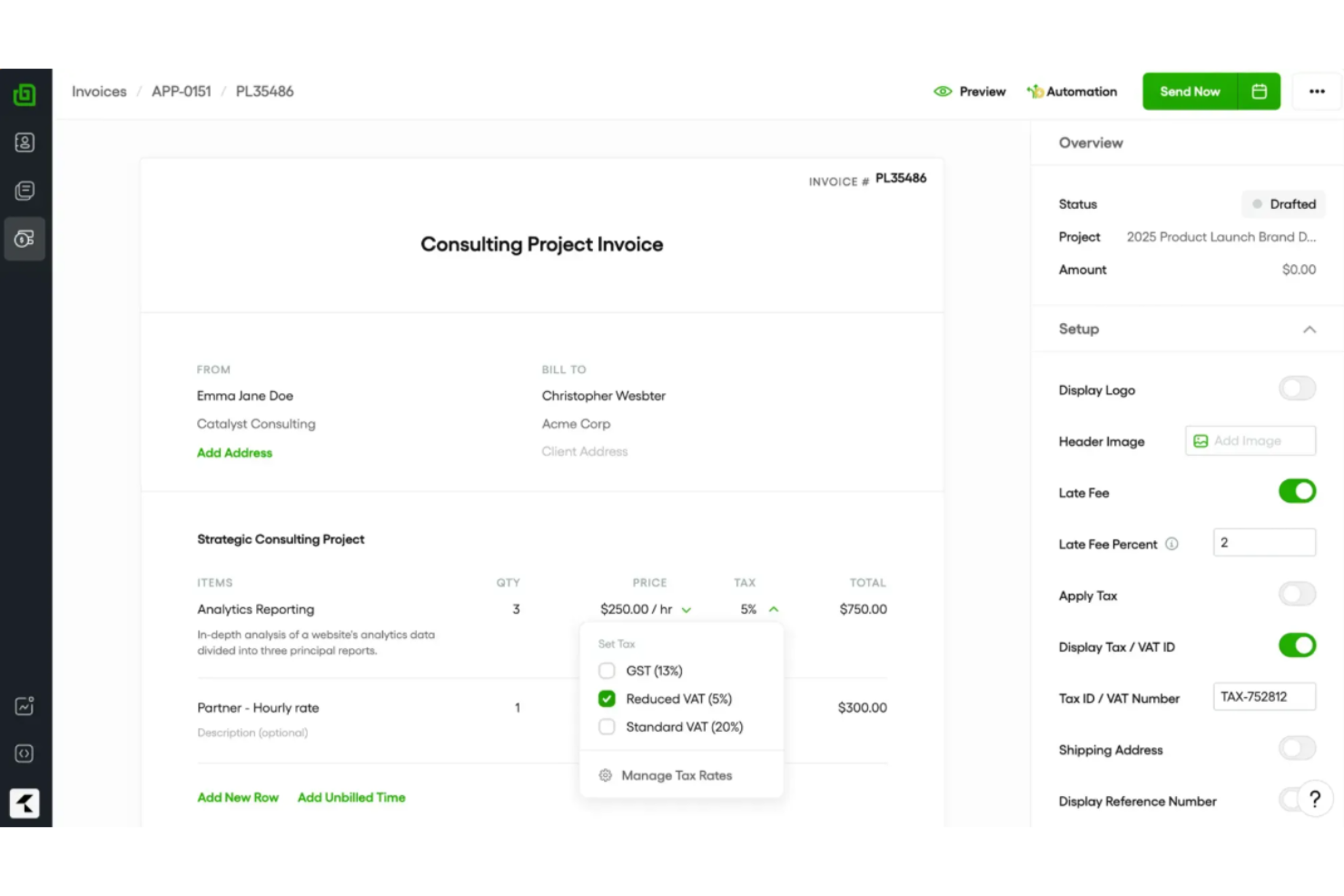
Bonsai is a client management platform for freelancers and small businesses that offers AI-powered invoice generation, contract creation, payments, proposals, and workflow automation in one place.
Who Is Bonsai Best For?
Bonsai is ideal for freelancers and small business owners who need integrated tools for contracts, invoicing, and payment management in one platform.
Why I Picked Bonsai
I picked Bonsai as one of the best because I can generate AI-powered invoices directly tied to contracts, get clients to e-sign documents, and then trigger payment requests from a single workspace. I like having proposals, contracts, and invoicing so tightly connected.
Bonsai Key Features
- AI-powered invoice creation: Generate invoices automatically from tracked hours and billable tasks.
- Recurring payment scheduling: Set up and manage automated recurring invoices for repeat clients.
- Expense tracking: Categorize and monitor project-related expenses within the same workspace.
- Tax reports dashboard: Access downloadable tax summaries and financial reports for every client and project.
Bonsai Integrations
Bonsai offers native integrations with QuickBooks, PayPal, Stripe, and Zapier. An API is also available for custom integrations.
Pros and Cons
Pros:
- Contracts, proposals, and invoicing in one system
- AI reads tracked hours for invoice creation
- Generates invoices directly from contracts
Cons:
- Few workflow automation capabilities
- No built-in file or asset proofing mechanisms


Refrens is an online invoicing platform for teams that offers invoicing, estimate management, purchase orders, expense tracking, and payment collection in one system.
Who Is Refrens Best For?
Refrens is a strong fit for small to midsize businesses that need multi-user invoicing, approval processes, and expense management for distributed teams.
Why I Picked Refrens
I picked Refrens because I can set detailed user permissions for billing, finance, and sales roles—controlling who can create, approve, or edit invoices. I like having dedicated approval flows and audit logs for every edit or action on invoices.
Refrens Key Features
- Invoice generator: Quickly create GST-compliant invoices with customizable fields.
- Expense tracking: Log and categorize expenses directly within the platform.
- Quotation and estimate tools: Build and send sales quotes or estimates to clients.
- Recurring billing: Automate invoice generation for repeat clients or subscriptions.
Refrens Integrations
Refrens offers native integrations with Razorpay, PayPal, and Google Sheets. An API is available for custom integrations.
Pros and Cons
Pros:
- Built-in client portal for invoice sharing
- Approval workflows for invoice edits
- Multi-level team and role permissions
Cons:
- No built-in OCR for document scanning
- Limited third-party software connections


Plutio is an all-in-one business management platform with invoicing, proposals, contracts, time tracking, and task management for teams and freelancers.
Who Is Plutio Best For?
Freelancers, agencies, and small creative teams who need an integrated system for handling client work, invoicing, and communication.
Why I Picked Plutio
I picked Plutio because I can invite clients into a secure, branded portal, collect invoice feedback, and enable clients to approve or reject line items. I also like managing project conversations and payment tracking all in one place.
Plutio Key Features
- Custom invoice templates: Create branded invoices with adjustable fields and layouts.
- Multi-currency support: Issue invoices and accept payments in multiple currencies.
- Automated payment reminders: Send scheduled follow-ups when invoices remain unpaid.
- Partial payments: Allow clients to pay invoices in multiple installments.
Plutio Integrations
Plutio offers native integrations with Stripe, PayPal, and Zapier. An API is available for custom integrations.
Pros and Cons
Pros:
- Built-in commenting and feedback for each invoice
- Supports partial payments and installment scheduling
- Invoices and payment status visible in client portal
Cons:
- Invoice templates have few customization options
- Automations for invoices are limited

Best for agency-centric invoice tools
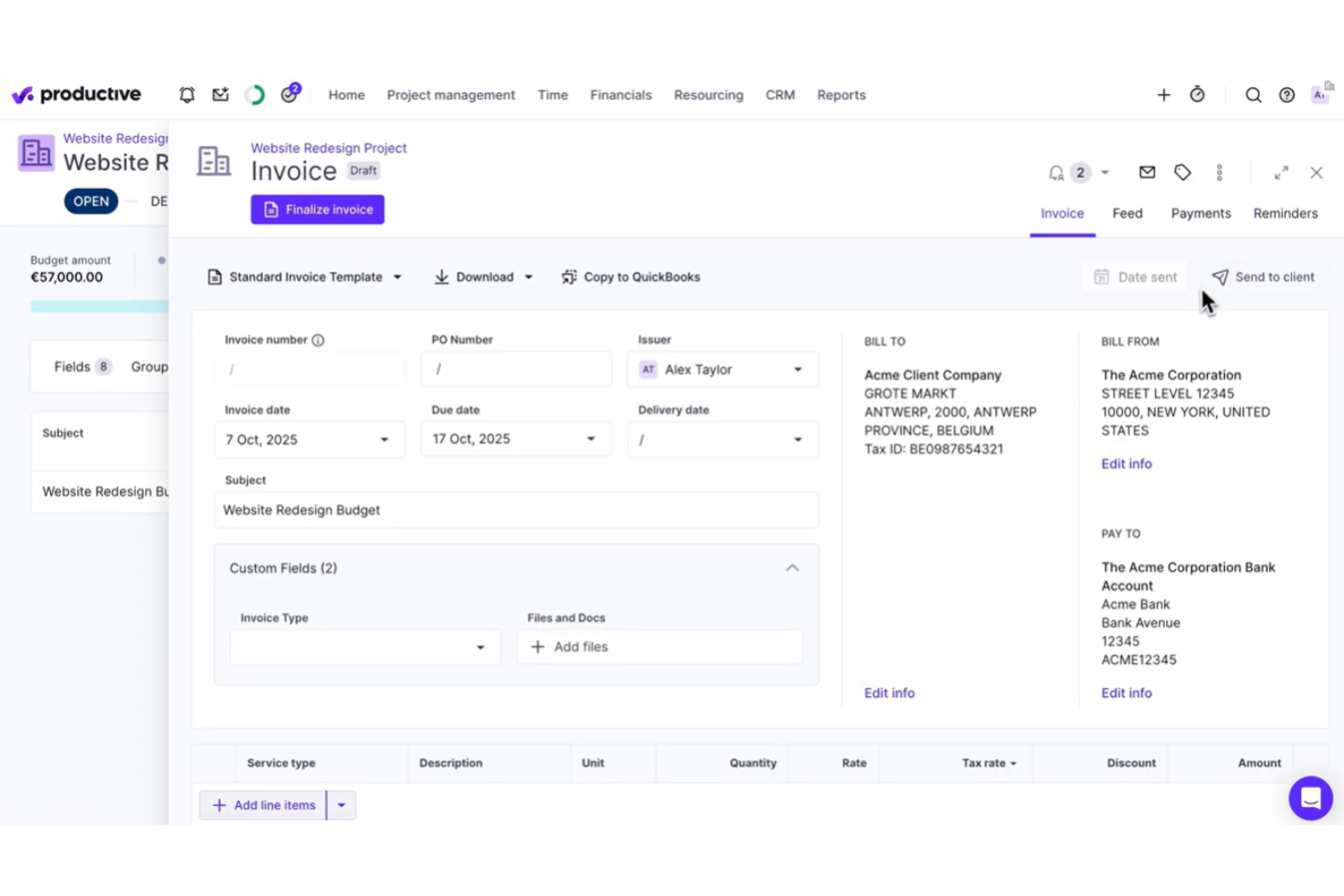
Productive is a work management and invoicing platform designed for agencies that need project budgeting, time tracking, real-time reporting, and automated invoice generation in one system.
Who Is Productive Best For?
Productive suits digital agencies and consultancies that need project-based invoicing, resource planning, and integrated time tracking in one platform.
Why I Picked Productive
I picked Productive as one of the best because I create invoices directly from tracked time, budgets, or project milestones, which is ideal for agencies with complex billing models. I also like using custom templates to match client expectations.
Productive Key Features
- Automated invoice notifications: Send automated reminders and updates to clients for outstanding invoices.
- Multi-currency support: Generate invoices and handle payments in multiple currencies for international clients.
- Integrated expense management: Attach billable expenses to invoices directly from tracked project costs.
- Batch invoice creation: Create and send multiple invoices at once for recurring or repeat work.
Productive Integrations
Productive offers native integrations with Xero, QuickBooks Online, Slack, Google Calendar, and Jira, and provides an API for custom integrations.
Pros and Cons
Pros:
- Supports multi-currency invoicing and client portals
- Links projects, budgets, and invoices automatically
- Built for agency workflows and billing models
Cons:
- Invoicing features require time tracking setup
- Invoice customization is somewhat limited
New Product Updates from Productive
Productive Adds Voice Dictation, Slack Connector, Proposals, and Overtime
Productive adds voice dictation, a Slack Connector, proposal controls, and overtime tracking. These updates support faster AI interactions, client proposals, and time management. For more information, visit Productive’s official site.

Scoro
Best for end-to-end business management
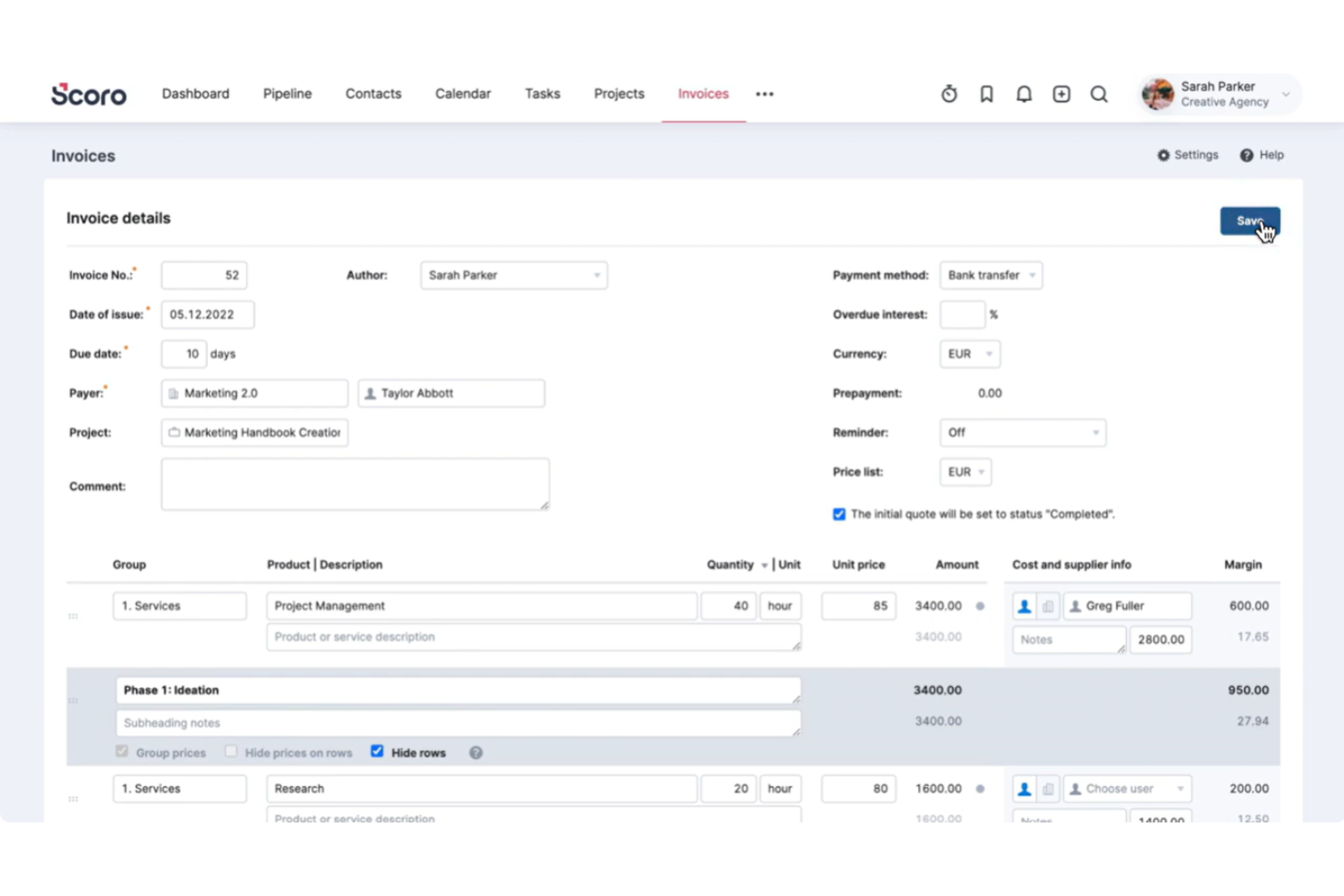
Scoro is a unified business management platform for invoicing, quoting, billing, and automation that combines financial management with project tracking and workflow automation tools.
Who Is Scoro Best For?
Scoro is a good fit for mid-sized agencies and consultancies that need integrated invoicing, project management, and workflow tools in one platform.
Why I Picked Scoro
I picked Scoro as one of the best because I can issue invoices, manage recurring payments, and track overdue accounts, all while tying them directly to projects and quotes. I like viewing business performance and invoicing data from a single dashboard.
Scoro Key Features
- Customizable invoice templates: Create and save branded templates with pre-configured fields.
- Product and service catalogue: Add items directly to invoices from a searchable catalogue.
- Multi-currency support: Generate invoices in multiple currencies for global clients.
- Automated tax calculations: Apply regional taxes automatically during invoice creation.
Scoro Integrations
Scoro offers native integrations with Xero, QuickBooks, Mailchimp, Google Calendar, Outlook, and Dropbox, and it provides an API for custom integrations.
Pros and Cons
Pros:
- Offers built-in approval workflows for invoices
- Handles recurring billing and subscription invoicing
- Connects invoices directly to tracked projects
Cons:
- Custom invoice fields are only partly configurable
- Time tracking must be enabled for invoicing
New Product Updates from Scoro

Scoro Adds Time Mobile App and ELI Improvements
Scoro adds the Scoro Time mobile app for iOS/Android to track time anywhere and expands ELI with attachments, smarter filtering, and trigger-based actions. For more information, visit Scoro's official site.

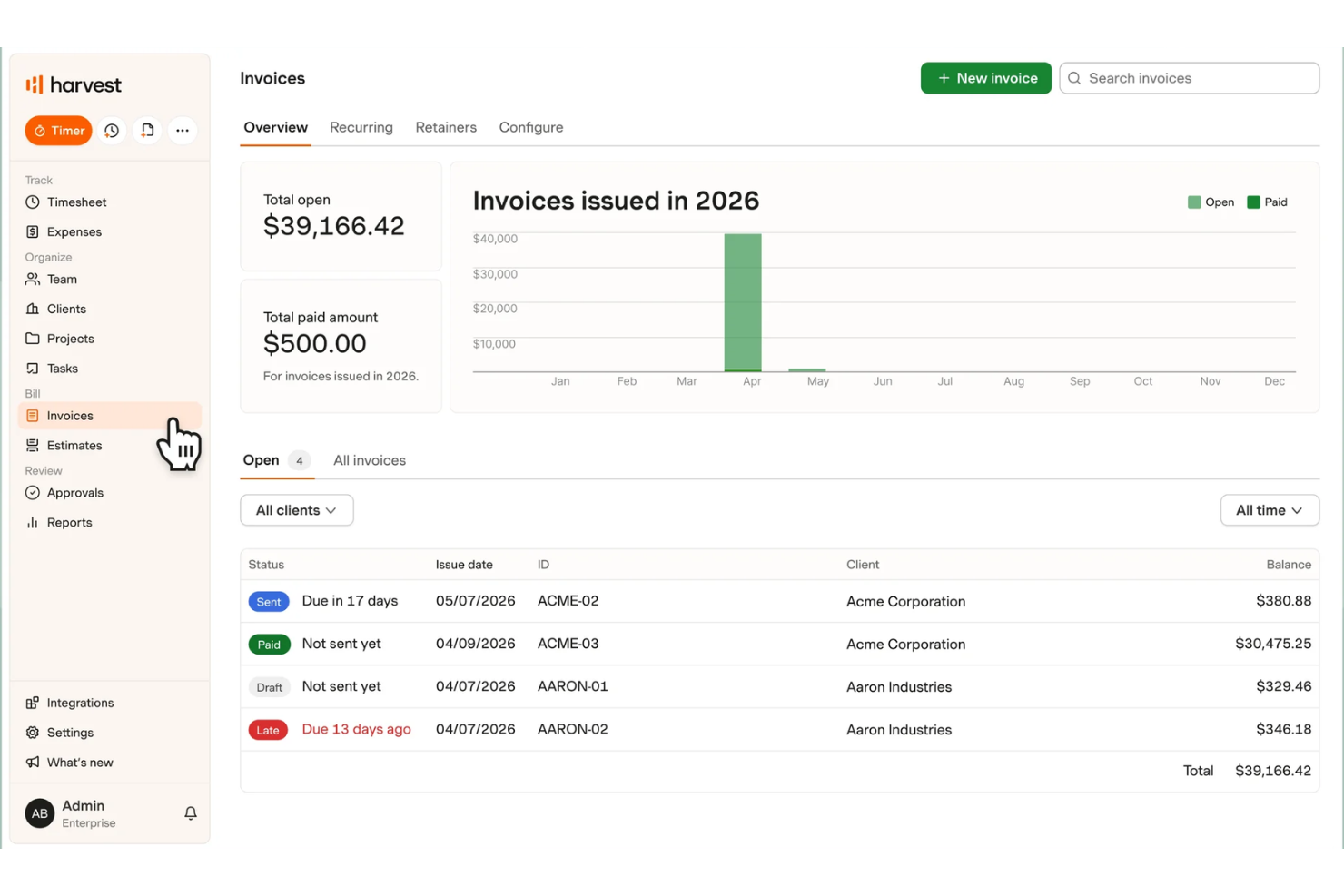
Harvest is a time tracking and invoicing platform that brings together project timesheets, AI-powered invoice generation, expenses management, and billing workflows for teams and freelancers.
Who Is Harvest Best For?
Harvest is a strong fit for agencies and service-based businesses that need combined time tracking and invoicing in one platform.
Why I Picked Harvest
I picked Harvest because I can turn tracked billable hours into AI-powered invoices, all linked within ongoing projects. I like how the tool pulls accurate time, expense, and rate data from timesheets into professional invoice templates with almost no manual entry.
Harvest Key Features
- Multiple currency support: Send invoices in over 160 currencies for global clients.
- Custom invoice fields: Add custom notes, tax rates, and payment terms to each invoice.
- Invoice status tracking: Monitor which invoices are sent, viewed, and paid in real time.
- Payment integration: Accept online payments directly through PayPal and Stripe.
Harvest Integrations
Harvest offers native integrations with QuickBooks Online, Xero, Stripe, PayPal, Asana, Trello, Google Workspace, Slack, and Jira. An API is available for custom integrations.
Pros and Cons
Pros:
- Supports multiple currencies in invoices
- Tracks time, expenses, and projects together
- AI-generated invoices from tracked billable hours
Cons:
- Does not automate recurring payment reminders
- AI suggestions limited to invoice creation

Eonebill
Best for multi-currency invoice generation
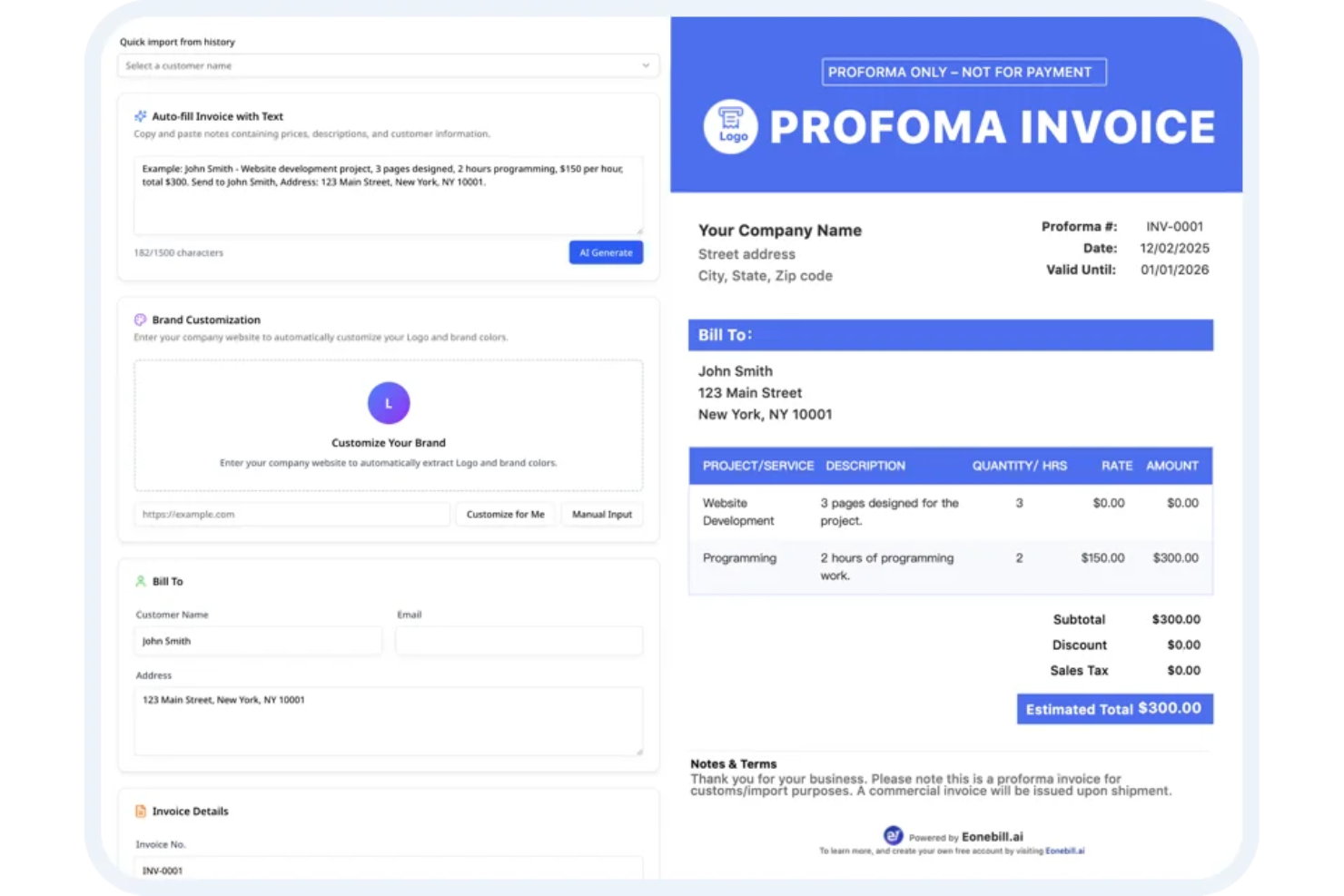
Eonebill is an AI invoice generator platform for businesses that supports invoice creation, automated payment collection, GST and tax compliance, expense tracking, and global client management.
Who Is Eonebill Best For?
Eonebill is a good fit for finance teams or small businesses managing international clients and needing built-in multi-currency invoicing functionality.
Why I Picked Eonebill
I picked Eonebill because I can create invoices in multiple currencies with real-time exchange rates and auto-convert totals. I like being able to send AI-powered invoices to international clients and track GST, VAT, and other taxes automatically.
Eonebill Key Features
- Automated payment reminders: Schedule and send payment follow-up messages to clients automatically.
- Expense tracking: Log and categorize business expenses inside the platform for financial oversight.
- GST and tax compliance tools: Generate GST, VAT, and other compliance reports directly from invoices.
- Multi-user access: Allow team members to collaborate and manage invoices under one account.
Eonebill Integrations
It provides an API for custom integrations.
Pros and Cons
Pros:
- AI-assisted invoice creation from tracked hours
- Automated GST and VAT compliance features
- Multi-currency invoice generation with real-time conversion
Cons:
- Invoice template customization options are basic
- Limited native integrations for workflow automation

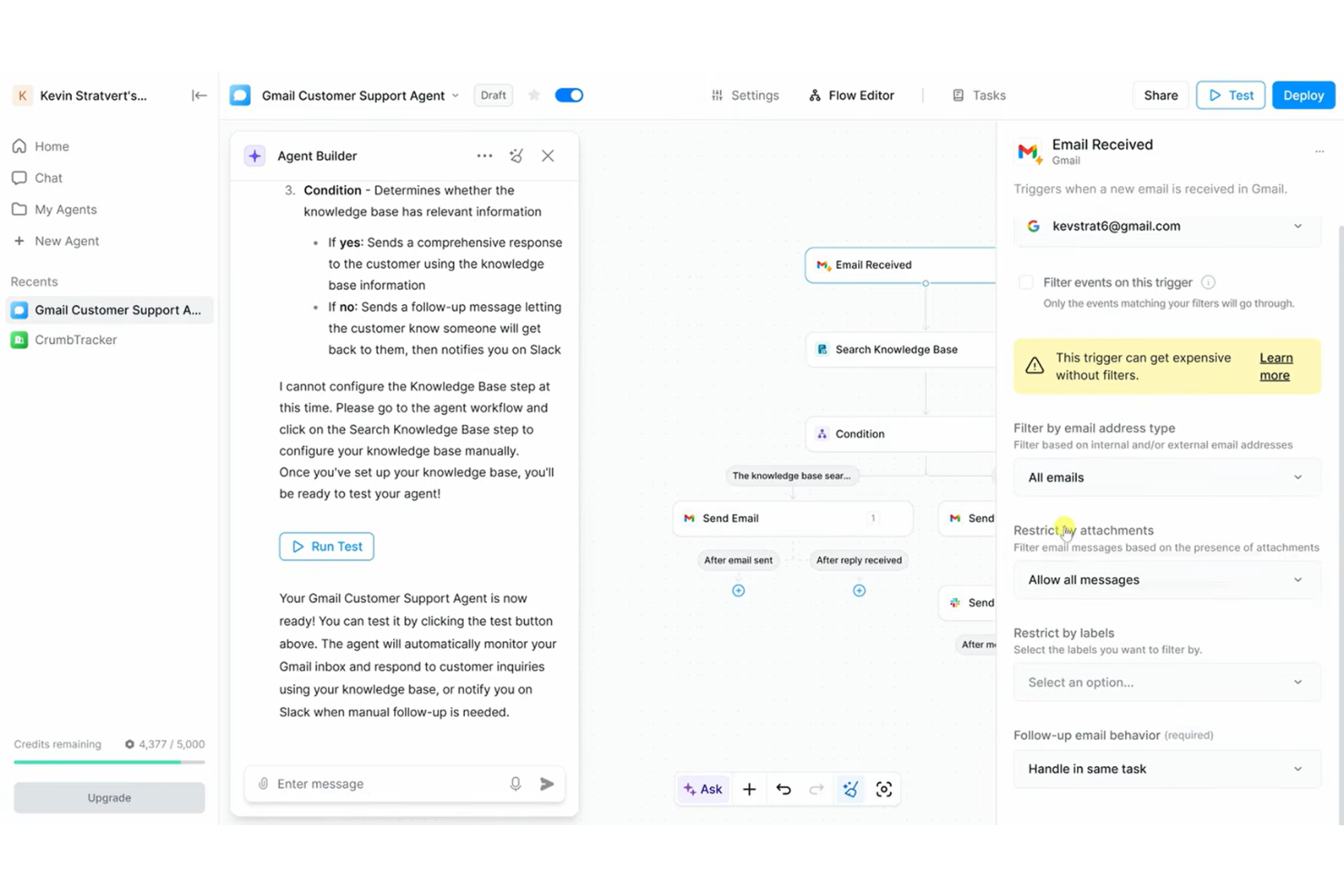
Lindy is an AI invoice generator platform that uses automation and email parsing to help teams create, manage, and customize invoices directly from communication data.
Who Is Lindy Best For?
Small businesses and finance teams that manage high volumes of invoice requests by email.
Why I Picked Lindy
I picked Lindy as one of the best because I can extract invoice details straight from email threads, automatically generate draft invoices, and handle frequent, ad hoc billing requests without switching between tools.
Lindy Key Features
- Custom invoice templates: Create and save templates to match your branding and client needs.
- Automated data extraction: Pull line item details from attached files and forms.
- Batch invoice processing: Generate and send multiple invoices in bulk with a single action.
- Real-time invoice tracking: Monitor invoice status updates within the dashboard.
Lindy Integrations
Integrations include Google Sheets, Gmail, Slack, Google Drive, HubSpot, Calendly, Airtable, Salesforce, Amazon, and Adobe Photoshop.
Pros and Cons
Pros:
- Scales high-volume billing capacity
- Handles high volumes of billing requests quickly
- Captures invoice details directly from email content
Cons:
- Advanced customization options are limited
- Base tier limits number of connected mailboxes
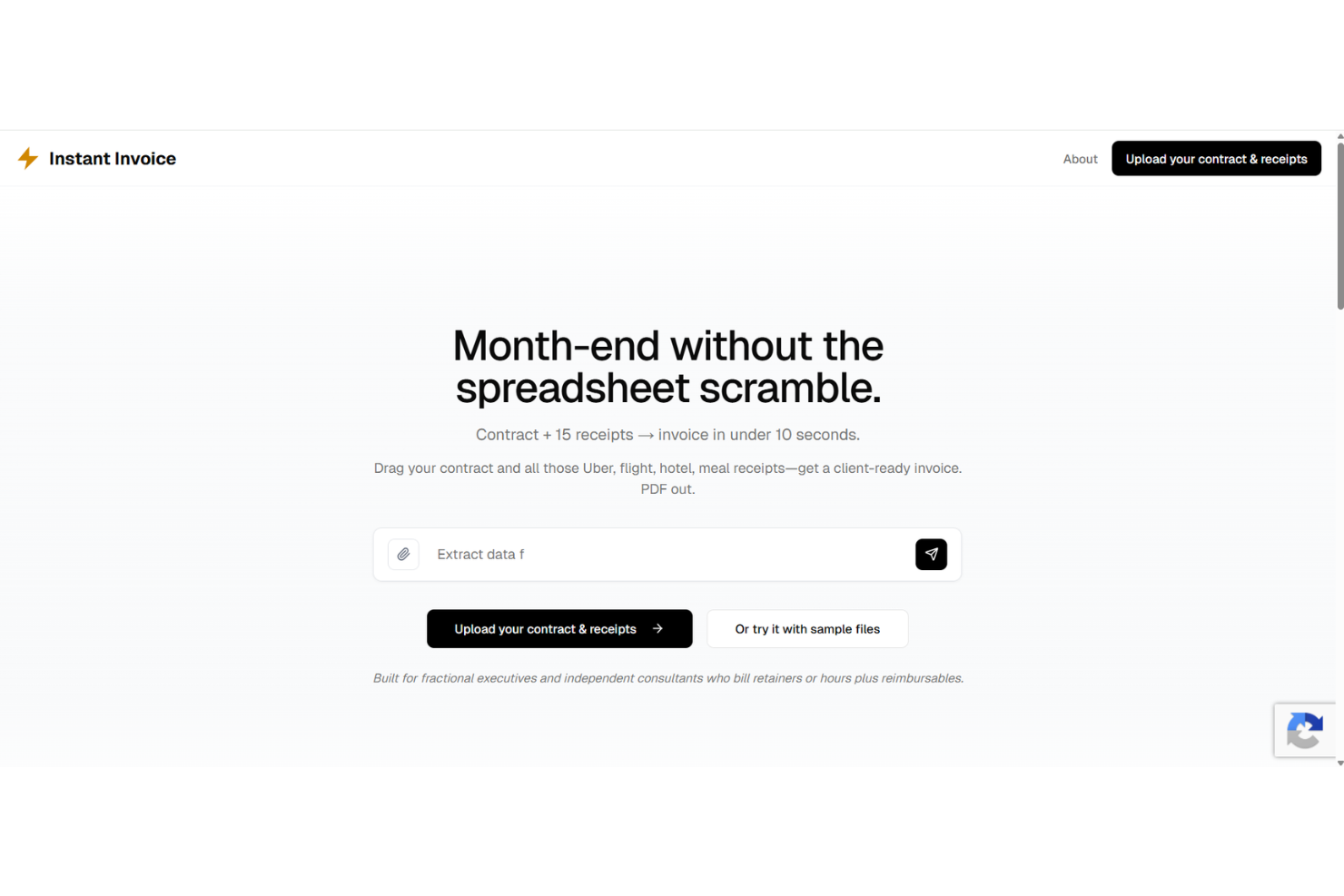
Instant Invoice is an AI invoice generator that uses automation and smart template matching to let you create, customize, and send invoices with minimal manual steps.
Who Is Instant Invoice Best For?
Freelancers and small business owners who need to automate invoice creation and delivery with minimal manual work.
Why I Picked Instant Invoice
I included Instant Invoice in my shortlist because I can auto-populate invoice fields from client data and trigger invoice creation with one click. I like being able to set up recurring invoice workflows and manage drafts in a centralized dashboard.
Instant Invoice Key Features
- Custom invoice templates: Choose from pre-built designs or create your own styles.
- Smart data extraction: Automatically recognize and input details from uploaded files.
- Multi-currency support: Issue invoices in different currencies for global clients.
- Audit trail tracking: Keep a record of invoice edits and user actions.
Instant Invoice Integrations
An API is available for custom integrations.
Pros and Cons
Pros:
- Extracts invoice details using AI parsing
- Handles batch invoice creation requests
- One-click invoice generation from email content
Cons:
- Relies on preset format structures
- No mobile app available for iOS or Android
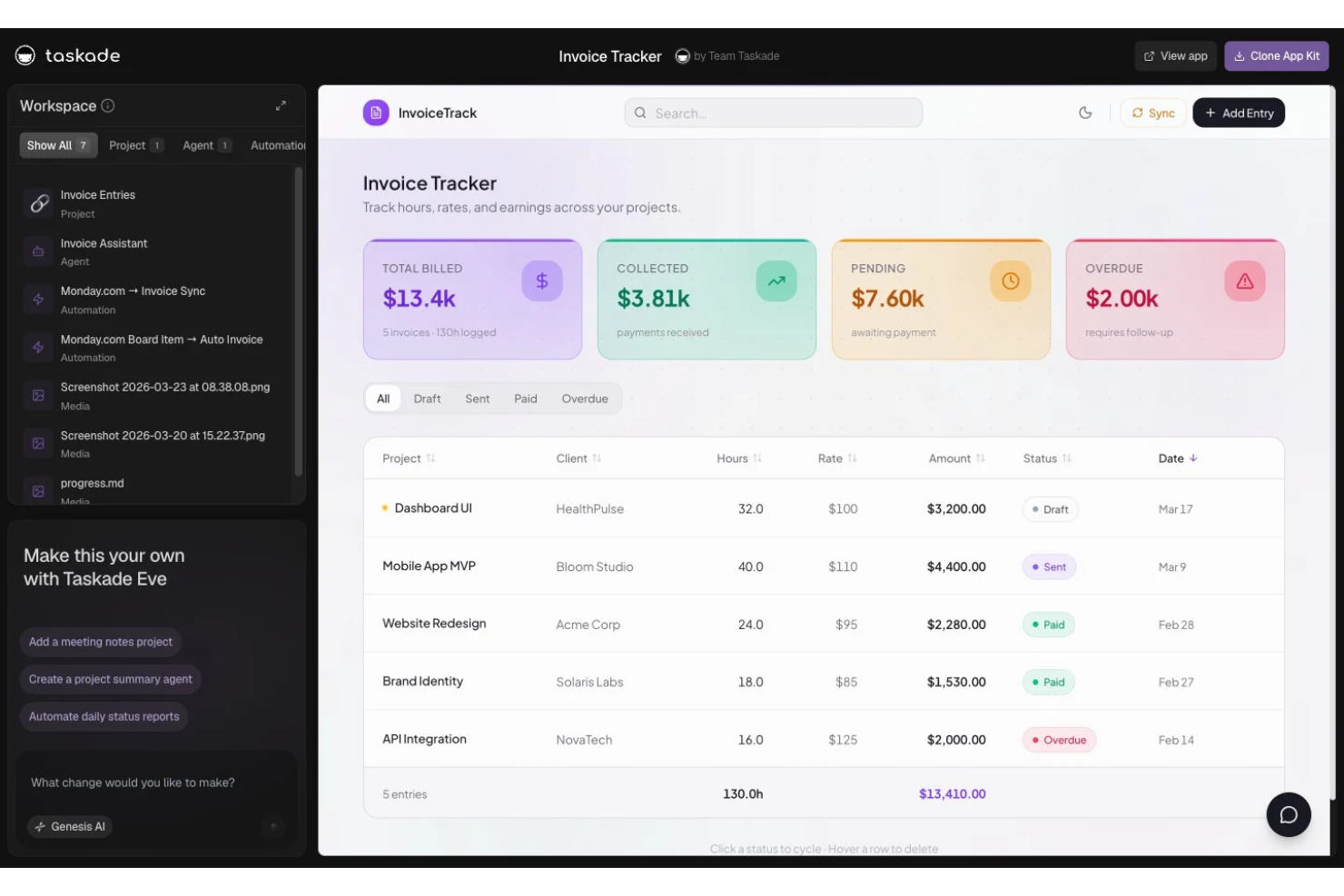
Taskade Genesis is an AI-powered invoice generator that offers customizable invoice templates, automated field population, and document creation tools designed for freelancers and small business owners.
Who Is Taskade Genesis Best For?
Freelancers and solo professionals who need to generate invoices from flexible AI-powered templates for a variety of projects or client types.
Why I Picked Taskade Genesis
I picked Taskade Genesis as one of the best because I can instantly generate AI-powered invoices using a wide range of customizable templates. I like being able to edit fields for each project and save reusable formats tailored to my freelancing work.
Taskade Genesis Key Features
- AI content generation: Automatically fills invoice fields based on prompts or project data.
- Template gallery: Access a library of invoice templates for different freelancing needs.
- Collaborative editing: Multiple users can edit and update invoices in real time.
- Multi-format export: Export completed invoices as PDF, DOCX, or markdown files.
Taskade Genesis Integrations
Integrations include Slack, Gmail, Stripe, GitHub, Shopify, HubSpot, Salesforce, Pipedrive, Discord, and Microsoft Teams.
Pros and Cons
Pros:
- Unlimited invoice generation for freelancers
- Large selection of editable invoice templates
- Supports AI-driven invoice text suggestions
Cons:
- Cannot schedule recurring invoices
- No automated payment tracking features
Other AI Invoice Generator
Here are some additional AI invoice generator options that didn’t make it onto my shortlist, but are still worth checking out:
- Kantata
For project-based financial workflows
- FreshBooks
For expense tracking integration
- Invoice Ninja
For open-source customization
- Zoho Invoice
For automated payment reminders
- Hiveage
For team collaboration features
- Invoice Quickly
With integrated service library storage
- Bookipi
For mobile-first invoicing solutions


How I Evaluate AI Invoice Generators
Every tool on this list needs to do more than slap an AI label on a standard invoicing form—I look for platforms that actually turn project data, time logs, or SOWs into ready-to-send invoices. I split my evaluation into core functionality every tool must deliver and differentiating factors that separate the best fits from the rest.
Core Functionality (Table Stakes For This List)
When I'm selecting tools for my list, I rank each one on a scale from 0 (does not offer the functionality) to 5 (excels in this area) for each core functionality listed below. Then, I calculate the tool's total score into a percentage. Each tool needs to achieve a minimum total score of 55% to be considered for inclusion.
- AI-Driven Invoice Generation: I look for tools that draft invoices from real inputs—like a prompt describing a completed sprint or uploaded time logs—rather than just auto-filling a blank form.
- Project & Time Data Integration: The tool should pull billable hours, tasks, or milestones from PM and time-tracking tools so a completed project phase flows into an invoice draft.
- Line Item Extraction & Structuring: I evaluate whether the AI can parse an uploaded SOW or contract into structured line items with descriptions, quantities, and rates intact.
- Client & Rate Management: Each tool should store client profiles with per-project rates, currencies, and tax rules so a multi-client agency doesn't re-enter billing details every cycle.
- Customizable Invoice Templates: I check whether AI-populated invoices land in branded, editable templates that stay consistent whether you're billing a retainer client or a one-off engagement.
- Invoice Delivery & Export: Tools should let you send, export to PDF, or sync finalized invoices to accounting platforms like QuickBooks or Xero without leaving the interface.
Once I have a list of tools that meet this criteria, I consider what sets each platform apart.
Differentiating Factors (What Sets Vendors Apart)
Here's how I compare and contrast different vendors:
Standout Features
Smart data extraction is a major differentiator. I look for AI that pulls line items from uploaded contracts or timesheets via OCR and NLP, skipping manual re-entry. Recurring invoice intelligence also matters—tools that detect billing patterns and flag anomalies like a missing line item before a retainer invoice ships save real headaches. Automated payment follow-ups round things out, where AI personalizes reminder timing and tone based on each client's payment history to reduce DSO.
Beyond Features
I evaluate how well each tool connects to the accounting and payment stack your team already uses—syncing invoices to QuickBooks or Xero and collecting payments through Stripe or PayPal without a manual export step. The client-facing experience matters too, especially for agencies: branded portals and mobile-friendly views make it easier for clients to review and pay. I also consider onboarding speed. A project manager should be able to generate a first invoice within minutes, not after a week-long setup.
How to Choose AI Invoice Generator
It’s easy to get bogged down in long feature lists and complex pricing structures. To help you stay focused as you work through your unique software selection process, here’s a checklist of factors to keep in mind:
| Factor | What to Consider |
| Scalability | Can the platform handle your business growth, more users, and higher invoice volumes without disruptions or major upgrades? |
| Integrations | Does the tool connect to your accounting, CRM, or payment gateway systems? Check for out-of-the-box or API connections. |
| Customizability | Are you able to adapt invoice templates, workflows, and automation rules to your unique billing needs and branding? |
| Ease of use | Will users across finance, sales, and operations be able to quickly generate invoices and troubleshoot issues with minimal training? |
| Implementation and onboarding | How easily can your team get started, migrate existing data, and access training resources or support during the transition? |
| Cost | Review the total cost for expected usage, including users, and any charges for extra features or higher-tier support. |
| Security safeguards | Is sensitive financial and client data encrypted at rest and in transit? Are user permissions and access controls granular enough for your compliance needs? |
| International capabilities | Does the system support your required currencies, tax rules, regional formats, and languages for cross-border invoicing? |
What is an AI Invoice Generator?
An AI invoice generator is a specialized type of invoicing software that uses artificial intelligence to automate the creation of invoices. It extracts billing data, formats invoices, and often handles tasks like calculations, tax rules, or error checking. These platforms can save time by reducing manual entry, minimizing errors, and speeding up recurring or high-volume invoicing tasks.
Features of AI Invoice Generator
When selecting an AI invoice generator, keep an eye out for the following key features:
- Automated invoice creation: Instantly generates invoices by pulling data from quotes, project logs, or receipts without manual typing.
- Customizable templates: Let you tailor the invoice format, branding, line items, currency, and tax fields to match your business requirements.
- AI-powered data extraction: Reads and converts information from uploaded documents or emails into invoice-ready fields with minimal input so you can use AI to fill out details.
- Multi-currency support: Handles invoicing for clients in different countries with automatic currency selection and exchange rate handling.
- Automated payment reminders: Send scheduled email or SMS nudges to clients for pending or overdue payments before the due date passes.
- Tax calculation engine: Applies the correct taxes based on geographic location, tax rules, or item categories without manual mapping.
- Recurring invoicing: Automatically schedules and sends invoices to clients with regular, repeat billing cycles.
- Payment tracking dashboard: Monitors invoice status, logs received payments like a credit card transaction or bank transfer, and flags late balances in a single view.
- Role-based user access: Assigns specific permissions for creating, approving, or editing invoices to different members of your team.
- Audit trail logging: Keeps a detailed record of who created, edited, or approved each invoice for internal checks or compliance needs.
Benefits of the Invoice Generator
Implementing an AI invoice generator provides several benefits for your team and your business. Here are a few you can look forward to:
- Faster invoicing cycles: Automated workflows and AI data extraction reduce manual entry and speed up invoice creation for quicker billing.
- Reduced human errors: Built-in validation checks and free invoice templates help minimize mistakes in calculations, tax rules, and client details.
- Improved payment collection: Automated reminders and payment tracking features make it easier to follow up, reduce overdue invoices, and allow clients to download invoices instantly.
- Stronger regulatory compliance: Audit trails, tax calculations, and secure record keeping simplify compliance with local laws and internal policies.
- Enhanced collaboration: Role-based access controls allow teams of any size to delegate tasks, approve edits, and maintain oversight without confusion.
- Scalable for growth: Support for multiple currencies, recurring billing, and data imports lets the system grow with your business needs.
- Better insights: Real-time dashboards and payment status tracking provide a clear overview of cash flow and outstanding receivables.
Costs and Pricing of the AI Invoice Generator
Selecting an AI invoice generator requires an understanding of the various pricing models and plans available. Costs vary based on features, team size, add-ons, and more. The table below summarizes common plans, their average prices, and typical features included in AI invoice generator solutions:
Plan Comparison Table for AI Invoice Generator
| Plan Type | Average Price | Common Features |
| Free Plan | $0 | Basic invoice creation, limited templates, basic reporting, and single-user access. |
| Personal Plan | $5-$15/user/month | Custom template options, basic automation, limited integrations, multi-currency support, and priority email support. |
| Business Plan | $20-$40/user/month | Advanced automation, team permissions, payment reminders, advanced analytics, multiple integrations, and recurring invoice capability. |
| Enterprise Plan | $50-$100/user/month | Custom branding, role-based access, API access, single sign-on, audit logs, advanced security, and dedicated account management. |
AI Invoice Generator FAQs
Here are some frequently asked questions about choosing an AI invoice maker or invoicing software:
Can AI invoice generators integrate with my existing accounting software?
Yes, many AI invoice generators offer integrations with popular accounting platforms. This helps you automate data transfer, reduce duplicate entries, and keep your financial records consistent across systems. If you currently track bills in Excel, you can often export that data directly. Always confirm supported integrations before choosing a tool.
How secure is my financial data with an AI invoice generator?
Most solutions use encryption and access controls to keep your data safe. Look for platforms that offer data protection practices like encryption at rest and in transit, permission-based user roles, and regular security audits or certifications. Your sensitive business details and client contact information remain protected behind these security layers.
Do AI invoice generators work for freelancers and large teams?
Yes, these tools are built for both solo users and growing teams. Many platforms have flexible pricing that adapts to your business size, team permissions for collaboration, and tiered features for different needs. Whether you are sending a single service invoice or managing hundreds, the system scales with you.
What AI features actually help with the invoicing process?
AI powers features like automatic data extraction from receipts, suggested invoice line items, tax calculations, and smart payment reminders. Advanced AI tools can auto-fill recurring fields such as your company name, the invoice number, and the client’s billing address. These can save you time, reduce errors, and speed up billing cycles.
How hard is it to set up an AI invoice generator for my team?
Setup usually involves importing client lists, selecting templates, and connecting accounts. You can customize the invoice format to match your brand colours so it fits your company identity. Many tools offer interactive onboarding, help articles, and migration wizards to get you up and running in a day or two.
Can I issue invoices in different currencies and languages?
Yes, most AI invoice generators support multi-currency invoicing and offer language options. The system automatically calculates the subtotal, the total amount, and the final amount due based on local tax laws. This is especially useful for teams with international clients or cross-border billing needs. Always check for coverage before committing to a solution.