

10 Best Invoicing Software in 2026

Best Invoicing Software Shortlist


Invoicing software lets you create, send, and track invoices so you can get paid faster and keep your billing organized. If you’re searching for the best invoicing software, you’re probably tired of chasing payments, juggling spreadsheets, or dealing with clunky manual processes.
The right tool can help you manage clients, automate reminders, and handle payments—all while giving you a clear view of your cash flow. In this guide, you’ll find the top invoicing platforms for 2026, so you can pick the one that fits your workflow and finally take control of your billing.
Why Trust Our Software Recommendations
Our team has been testing and reviewing software since 2012. As project managers ourselves, we know how difficult—and important—it is to choose the right software.
For this guide, we evaluated tools using hands-on testing and independent research, scoring tools using our selection criteria. We also draw on insights from industry thought leaders and practicing project management experts.
Our reviews reflect our human editorial judgment, not a sales pitch.
Expert reviewers:
Best Invoicing Software Summary
This comparison chart summarizes pricing details for my top invoicing software selections to help you find the best one for your budget and business needs.
| Tool | Best For | Trial Info | Price | ||
|---|---|---|---|---|---|
| 1 | Best for customizable invoice templates | Free plan available | From $11.67/month (billed annually) | Website | |
| 2 | Best for flexible payment options for clients | Free plan + free demo available | From $0.30/transaction | Website | |
| 3 | Best for tracking time and expenses | Free plan available | From $9.99/month | Website | |
| 4 | Best for automating recurring billing | Free demo + 7-day free trial | From $9/user/month (billed annually) | Website | |
| 5 | Best for billable time integration | Free trial + free plan available | From $9/user/month (billed annually) | Website | |
| 6 | Best for mobile invoicing on iOS and Android | Free plan available | From $19/month | Website | |
| 7 | Best for client self-service portals | Not available | Free forever plan | Website | |
| 8 | Best for global payment method support | Not available | From 2.9% + 30¢ per transaction | Website | |
| 9 | Best for WhatsApp invoice sharing | Free plan + free demo available | From $8/month (billed annually) | Website | |
| 10 | Best for instant invoice status notifications | Free plan available | From $7.60/month (billed annually) | Website |
Best Invoicing Software Reviews
Below are my detailed summaries of the invoicing software that made it onto my shortlist. My reviews offer a detailed look at the features, best use cases, and integrations of each platform to help you find the best one for you.

Best for customizable invoice templates
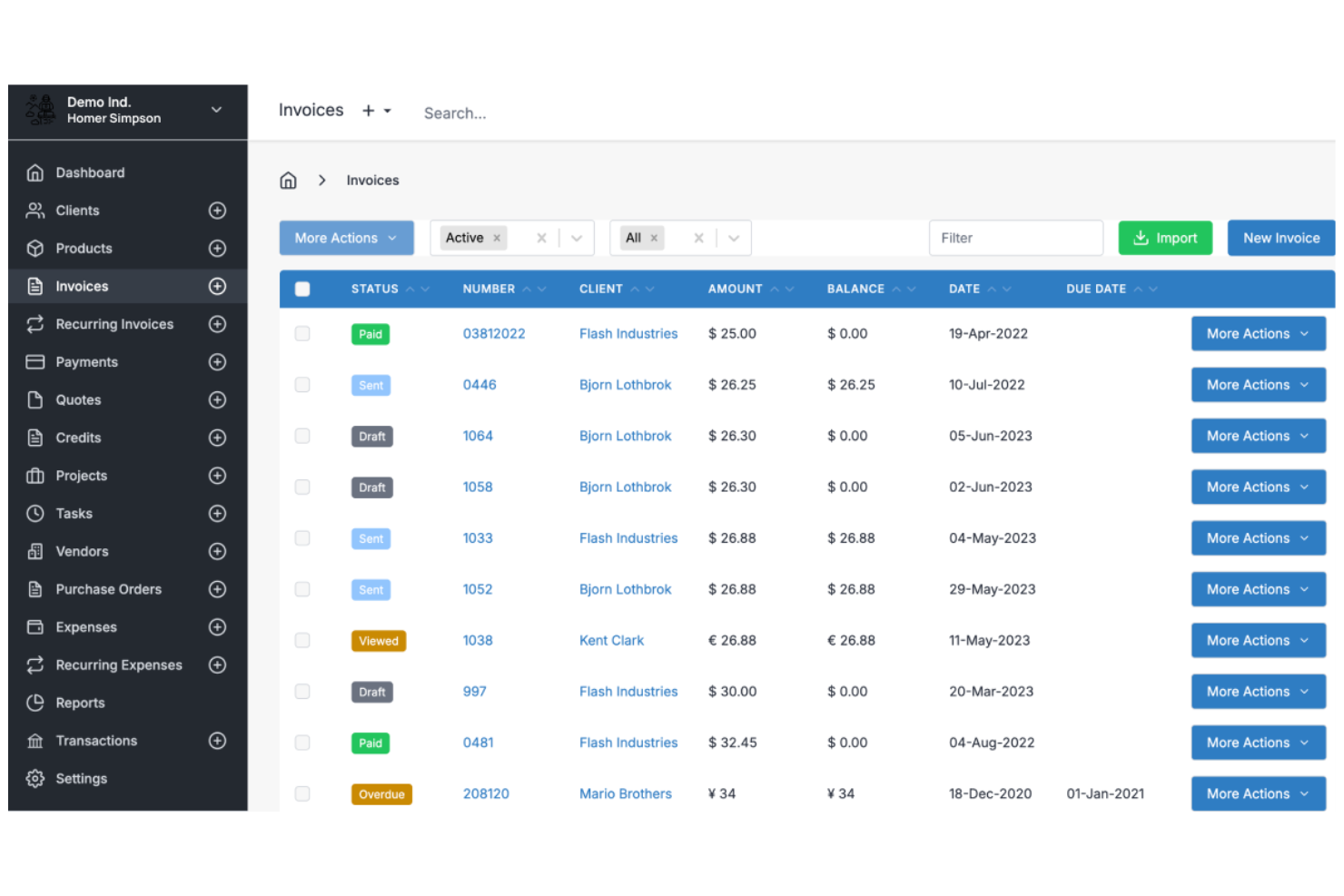
Invoice Ninja is a cloud-based invoicing software platform for freelancers and small businesses that offers invoice creation, time tracking, expense management, and client management features.
Who Is Invoice Ninja Best For?
Freelancers, agencies, and small businesses that want flexible invoice design and client billing tools.
Why I Picked Invoice Ninja
I picked Invoice Ninja as one of the best because I can fully customize invoice templates using its drag-and-drop editor and custom fields. I like that my team can add company branding, adjust layouts, and include dynamic variables for each client. In practice, that means we can create invoices that match our brand and client requirements without workarounds.
Invoice Ninja Key Features
- Time tracking: Track billable hours directly within the platform.
- Expense management: Record and categorize expenses for each client or project.
- Client portal: Give clients access to view invoices, quotes, and payment history.
- Multi-currency support: Send invoices and accept payments in multiple currencies.
Invoice Ninja Integrations
Invoice Ninja offers native integrations with PayPal, Stripe, WePay, and GoCardless for payment processing, and connects with Zapier. An API is available for custom integrations.
Pros and Cons
Pros:
- Live PDF preview during editing
- Extensive custom CSS styling options
- Open source for self-hosted control
Cons:
- Quote-to-invoice conversion requires paid plan
- Technical setup for self-hosted users

PayPal
Best for flexible payment options for clients

PayPal is an online invoicing software that lets you create, send, and manage invoices while offering built-in payment processing for credit cards, debit cards, PayPal, and Venmo.
Who Is PayPal Best For?
Freelancers and small businesses who want to offer clients a wide range of payment options.
Why I Picked PayPal
I picked PayPal as one of the best because I can let clients pay invoices using credit cards, debit cards, PayPal, or even Venmo. I like that I can add partial payments or tips directly to invoices, which is something my clients often request. My team uses PayPal to send invoices to clients in different countries and get paid in multiple currencies without extra setup.
PayPal Key Features
- Invoice tracking dashboard: Monitor sent, viewed, and paid invoices in real time.
- Customizable invoice templates: Add your logo, business details, and itemized charges.
- Automated payment reminders: Schedule reminders to prompt clients for outstanding payments.
- Multi-currency invoicing: Create and send invoices in over 25 currencies.
PayPal Integrations
PayPal offers native integrations with QuickBooks, Xero, WooCommerce, Shopify, BigCommerce, Salesforce, and FreshBooks. An API is available for custom integrations.
Pros and Cons
Pros:
- Offers partial payments and tipping options
- Instant brand recognition for client trust
- Accepts payments via PayPal, Venmo, and cards
Cons:
- Frequent account holds for high amounts
- Transaction fees are higher than competitors
Best for tracking time and expenses
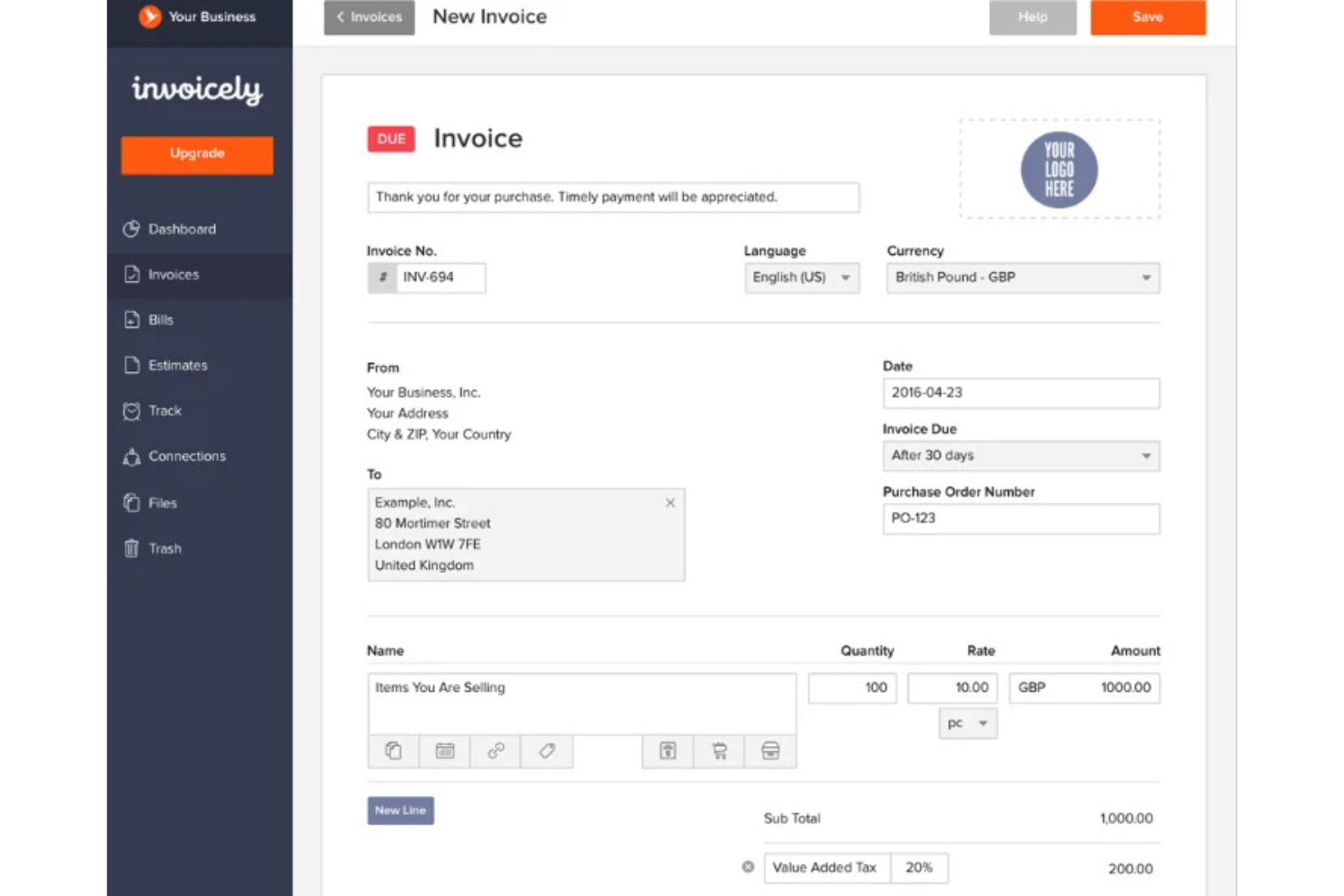
invoicely is a cloud-based invoicing software platform that lets you create invoices, track billable hours, manage expenses, and handle multiple currencies for small businesses and freelancers.
Who Is invoicely Best For?
Freelancers and small businesses that need to track time and expenses alongside invoicing.
Why I Picked invoicely
I picked invoicely as one of the best because it lets me track billable hours and expenses directly within each invoice. I like that I can log time for multiple projects and automatically convert those hours into line items. My team is able to manage mileage, expenses, and recurring invoices all in one place.
invoicely Key Features
- Multi-currency support: Create and send invoices in over 160 currencies.
- Custom branding: Add your logo, colors, and business details to every invoice.
- Online payment integration: Accept payments via PayPal, Stripe, and other gateways.
- Client management: Store client contact details and view invoice history for each client.
invoicely Integrations
invoicely offers native integrations with PayPal and Stripe for payment processing. An API is available for custom integrations.
Pros and Cons
Pros:
- Automated tax and discount calculations
- Log billable hours per project
- Track expenses in multiple currencies
Cons:
- Five client limit on entry plan
- Limited branding on free tier

Bonsai
Best for automating recurring billing
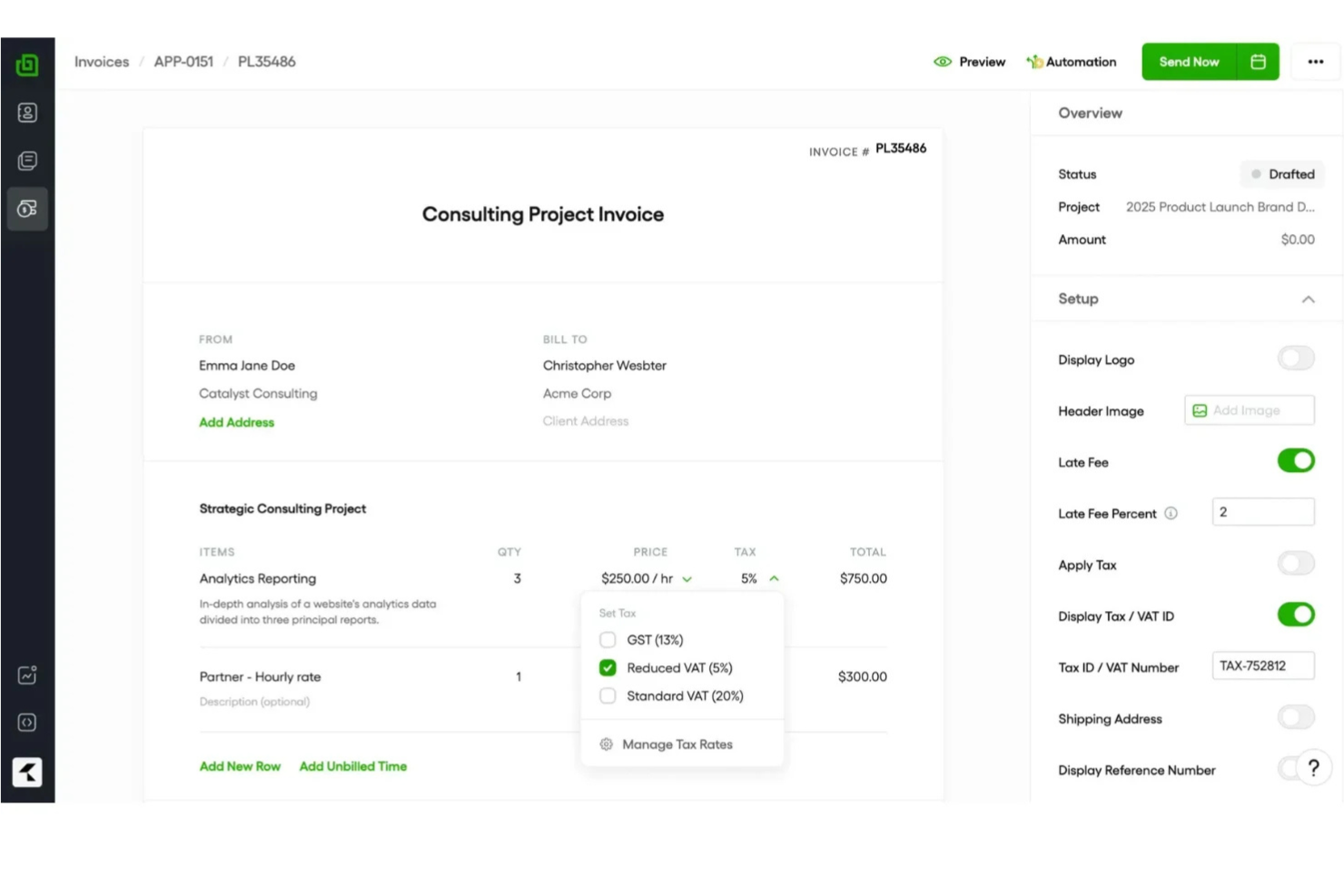
Bonsai is an invoicing software platform for freelancers and small businesses that offers invoicing, contract management, client CRM, time tracking, and automated payment collection in one system.
Who Is Bonsai Best For?
Freelancers and small business owners who need to automate recurring invoices and manage client billing in one place.
Why I Picked Bonsai
I picked Bonsai as one of the best because I can set up automated recurring invoices for clients, so billing happens on schedule without manual work. I like that Bonsai lets me link contracts and proposals directly to invoices, keeping everything organized in one place. My team uses its payment scheduling and auto-reminders to reduce missed payments and keep cash flow predictable.
Bonsai Key Features
- Client portal: Clients can view and pay invoices online.
- Multi-currency support: Issue invoices in different currencies for global clients.
- Expense tracking: Track and categorize expenses alongside invoices.
- Tax calculation tools: Automatically calculate and add taxes to invoices.
Bonsai Integrations
Bonsai offers native integrations with QuickBooks, Zapier, and Calendly, and provides an API for custom integrations.
Pros and Cons
Pros:
- Automated late fee application settings
- Auto-generated invoices from signed proposals
- Smart contracts with integrated e-signatures
Cons:
- Manual project creation from proposals
- No white-labeling on basic plans

Harvest
Best for billable time integration
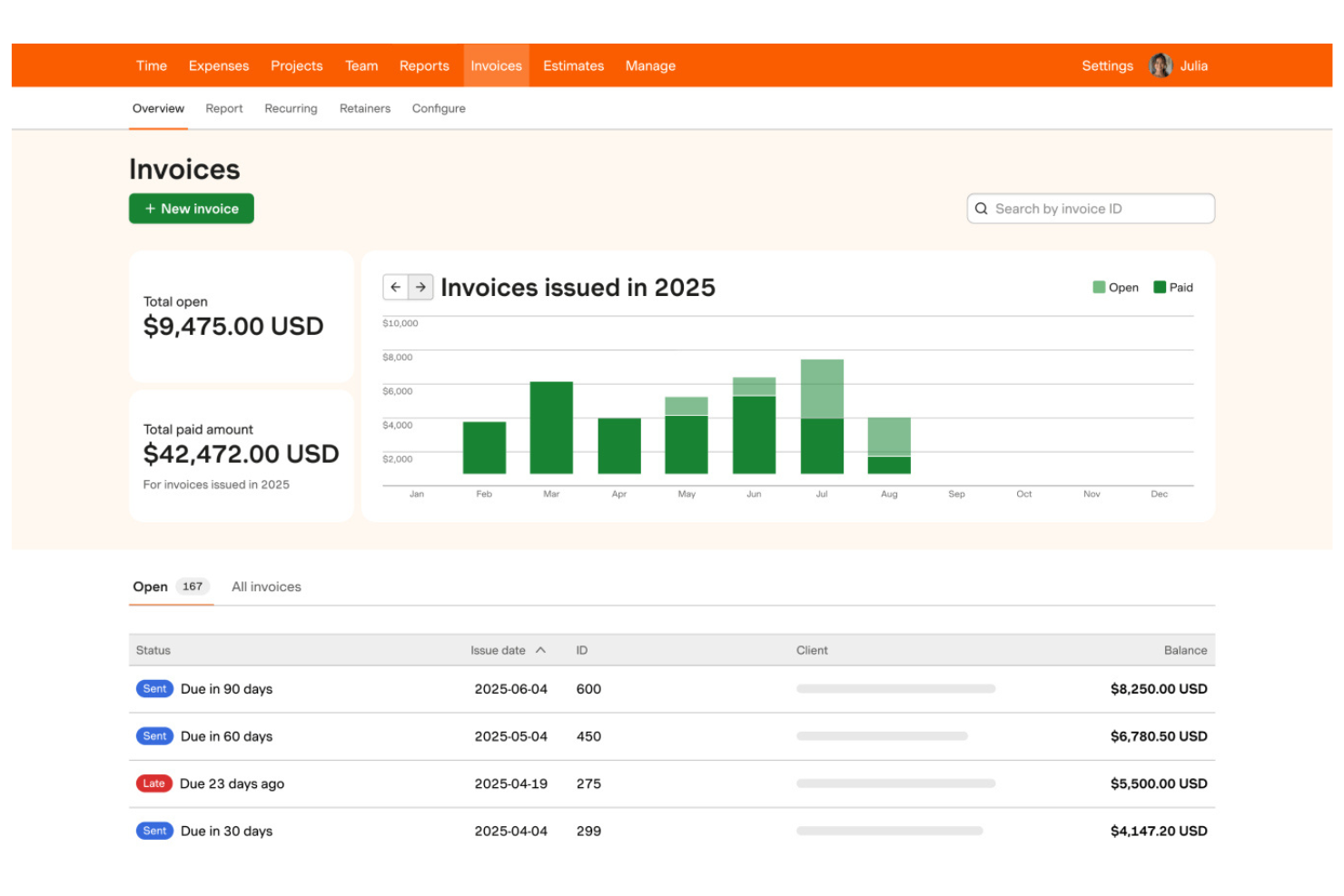
Harvest is a time tracking and invoicing software that lets teams track billable hours, generate invoices from timesheets, manage expenses, and monitor project budgets in one platform.
Who Is Harvest Best For?
Freelancers and small agencies who need to track billable hours and invoice clients based on time worked.
Why I Picked Harvest
I picked Harvest as one of the best because I can turn tracked billable hours into invoices with just a few clicks, making it easy to bill clients accurately. My team uses its built-in expense tracking to add reimbursable costs directly to invoices. I also like that Harvest lets me monitor project budgets alongside invoicing, so I always know where we stand financially.
Harvest Key Features
- Automated payment reminders: Send scheduled reminders to clients for unpaid invoices.
- Multi-currency invoicing: Create and send invoices in different currencies.
- Custom invoice branding: Add your logo and adjust invoice colors and layout.
- Detailed invoice history: View a timeline of invoice creation, edits, and payments.
Harvest Integrations
Harvest offers native integrations with QuickBooks Online, Xero, Stripe, PayPal, Asana, Trello, Basecamp, Slack, and Google Workspace. It also connects with Zapier and provides an API for custom integrations.
Pros and Cons
Pros:
- Direct integration with major project tools
- One-click time entry to invoice conversion
- Visual project budget progress bars
Cons:
- No built-in client portal for payments
- No native payment processing system

Wave
Best for mobile invoicing on iOS and Android
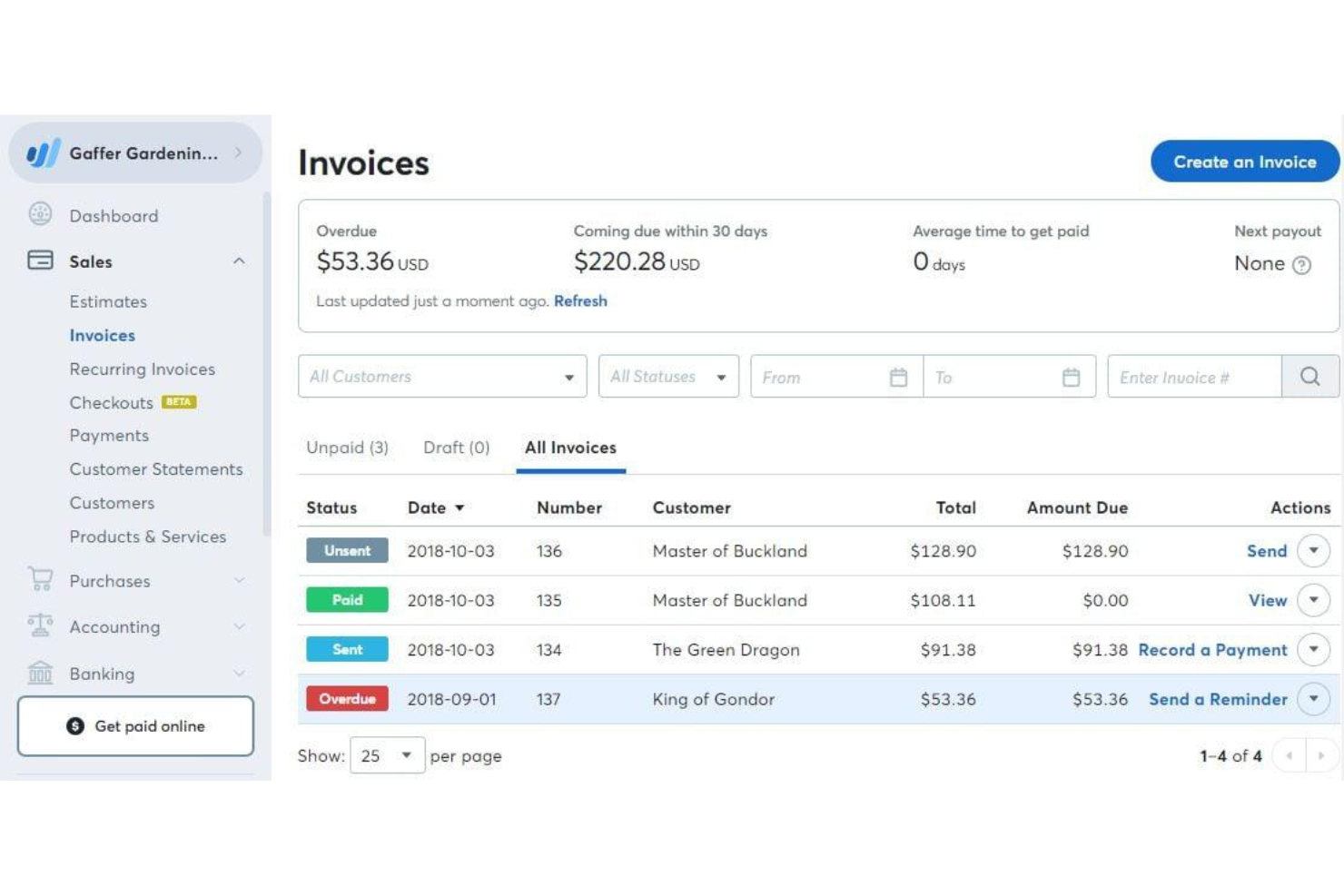
Wave is a cloud-based invoicing software that lets you create, customize, and send invoices, manage client contacts, accept online payments, and track income from a web dashboard or mobile app.
Who Is Wave Best For?
Freelancers and small business owners who want to manage invoicing and payments from their mobile devices.
Why I Picked Wave
I picked Wave as one of the best because I can invoice clients, send payment reminders, and accept payments right from my phone—whether I’m on iOS or Android. I like that the mobile app lets me create and send invoices on the go, track payment status, and even scan receipts for expense tracking. My team uses Wave’s mobile notifications to stay updated on invoice activity without needing to log in on a desktop.
Wave Key Features
- Customizable invoice templates: Choose and personalize invoice designs to match your brand.
- Automatic tax calculations: Apply and track sales tax on invoices automatically.
- Multi-currency invoicing: Send invoices and accept payments in different currencies.
- Customer management: Store and organize client contact details within the platform.
Wave Integrations
Native integrations are not publicly listed.
Pros and Cons
Pros:
- Built-in payment processing for credit cards
- Mobile app supports invoicing and payments
- Unlimited invoicing with no monthly fee
Cons:
- No automated time tracking features
- High fees for instant payouts

Best for client self-service portals
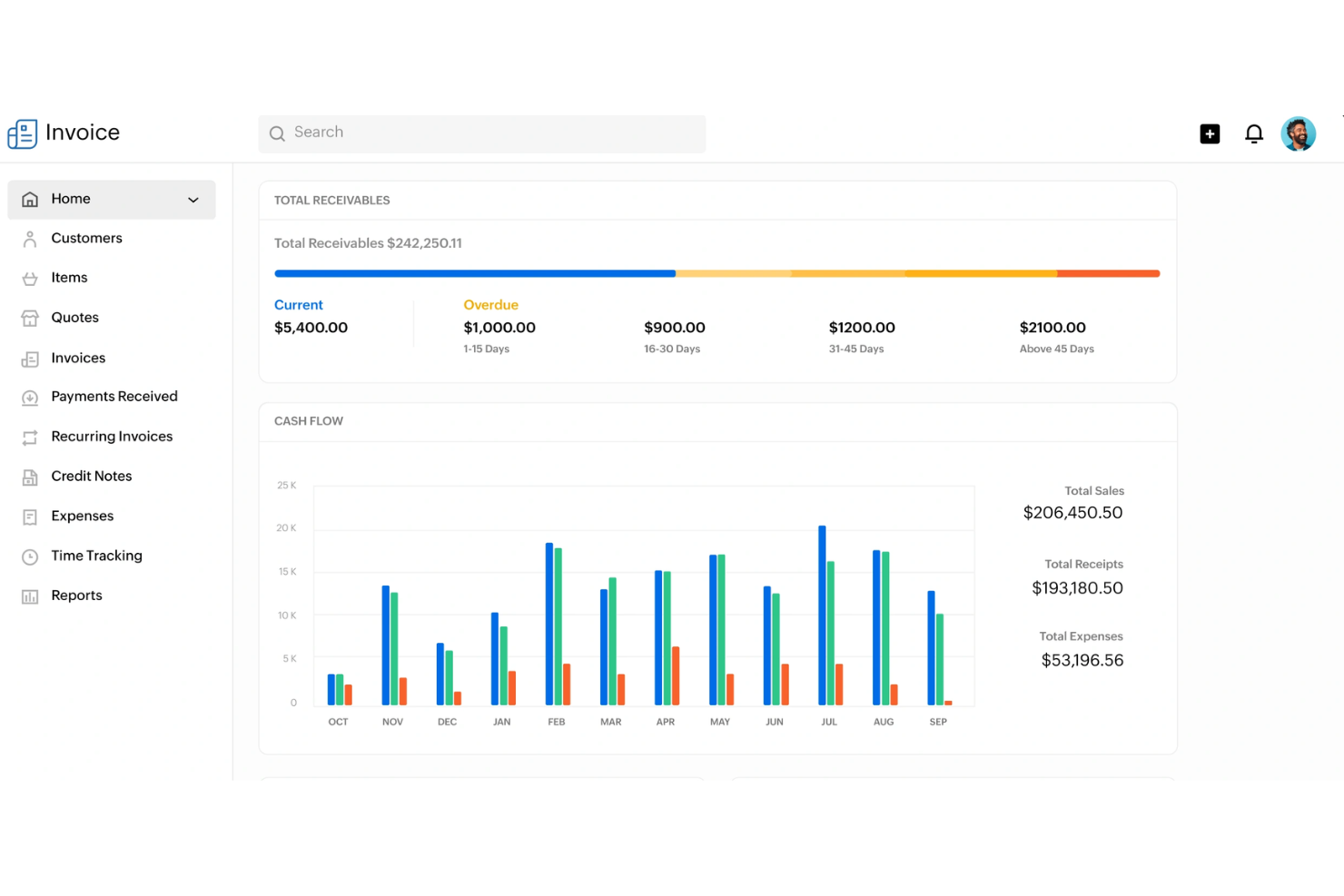
Zoho Invoice is a cloud-based invoicing software that lets you create and send invoices, automate payment reminders, manage expenses, and offer client-facing portals for self-service account management.
Who Is Zoho Invoice Best For?
Freelancers and small businesses that want to offer clients a self-service portal for managing invoices and payments.
Why I Picked Zoho Invoice
I picked Zoho Invoice as one of the best because I can give clients their own portal to view, download, and pay invoices directly. I like that my team can automate payment reminders and let clients track their payment history without emailing us. The portal also lets clients update their contact details and view past transactions, which saves us time on back-and-forth communication.
Zoho Invoice Key Features
- Time tracking: Track billable hours and convert them into invoices.
- Expense management: Record, categorize, and attach receipts to expenses.
- Multi-currency invoicing: Create and send invoices in multiple currencies.
- Custom invoice templates: Design and personalize invoice layouts to match your brand.
Zoho Invoice Integrations
Zoho Invoice offers native integrations with Zoho Books, Zoho CRM, Stripe, PayPal, Square, Razorpay, and Slack. An API is available for custom integrations.
Pros and Cons
Pros:
- Deep integration with Zoho ecosystem apps
- Automated snail mail invoice delivery option
- Complete client self-service payment portal
Cons:
- Limited custom domain mapping options
- Yearly revenue cap on free plan


Stripe Invoicing is an online invoicing platform that lets you create, send, and manage invoices while supporting a wide range of payment methods and automated billing workflows.
Who Is Stripe Invoicing Best For?
Global businesses and online sellers who need to accept payments in multiple currencies and payment methods.
Why I Picked Stripe Invoicing
I picked Stripe Invoicing as one of the best because I can send invoices that support dozens of global payment methods, including cards, bank transfers, and local wallets. My team uses its built-in tax calculation and automatic currency conversion to invoice clients in different countries. I also like that we can automate payment reminders and reconciliation for international transactions.
Stripe Invoicing Key Features
- Custom invoice templates: Create and personalize invoice layouts to match your brand.
- One-click payment links: Add secure payment links directly to invoices for fast online payments.
- Invoice status tracking: Monitor when invoices are viewed, paid, or overdue in real time.
- Bulk invoice creation: Generate and send multiple invoices at once using CSV uploads or the API.
Stripe Invoicing Integrations
Stripe Invoicing offers native integrations with QuickBooks, Xero, NetSuite, FreshBooks, and Salesforce. An API is available for custom integrations.
Pros and Cons
Pros:
- Smart retries for failed card payments
- Accepts ACH, SEPA, cards, and local wallets
- Supports over 135 currencies for invoicing
Cons:
- Limited invoice template customization options
- Higher transaction fees than bank transfers


Refrens is an invoicing software platform that lets you create, customize, and send invoices, manage client records, track payments, and handle quotations and purchase orders.
Who Is Refrens Best For?
Freelancers and small businesses in India who need to send invoices and payment reminders directly through WhatsApp.
Why I Picked Refrens
I picked Refrens as one of the best because I can send invoices directly to clients on WhatsApp, which speeds up communication and payment cycles. I like that Refrens lets me track invoice delivery and read status right from the dashboard. My team uses its built-in payment links and GST-ready invoice templates to handle compliance and collections for clients in India.
Refrens Key Features
- Quotation management: Create, send, and track quotations alongside invoices.
- Purchase order creation: Generate and manage purchase orders for clients and vendors.
- Multi-currency support: Issue invoices in different currencies for international clients.
- Expense tracking: Record and categorize business expenses within the platform.
Refrens Integrations
Native integrations are not publicly listed.
Pros and Cons
Pros:
- Free plan includes unlimited invoices
- Built-in quotation and purchase order tools
- Send invoices directly via WhatsApp
Cons:
- Fewer third-party app ecosystem connections
- Basic reporting compared to accounting suites


Bookipi is a mobile-first invoicing software that lets you create, send, and manage invoices, quotes, and receipts while tracking payments and client activity in real time.
Who Is Bookipi Best For?
Freelancers and small business owners who need mobile invoicing and real-time payment tracking.
Why I Picked Bookipi
I picked Bookipi as one of the best because I get instant push notifications when clients view, pay, or interact with my invoices. I like being able to track invoice status changes in real time from my phone, which helps me stay on top of payments. My team uses Bookipi to send invoices and receive immediate updates, so we never miss a payment event.
Bookipi Key Features
- Multi-currency support: Create and send invoices in multiple currencies.
- Quote to invoice conversion: Turn approved quotes directly into invoices.
- Payment tracking dashboard: Monitor outstanding, paid, and overdue invoices in one place.
- PDF invoice generation: Download and share invoices as professional PDF documents.
Bookipi Integrations
Native integrations are not clearly documented. Bookipi offers an API for custom integrations.
Pros and Cons
Pros:
- Signature capture on mobile device screen
- Mobile-first interface for on-site billing
- Instant read receipts for sent invoices
Cons:
- Limited data export for tax software
- Rolling 30-day document limit free plan
Other Invoicing Software
Here are some additional invoicing software options that didn’t make it onto my shortlist, but are still worth checking out:
- Paymo
For multi-language invoicing
- Scoro
For billing across multiple project types
- Wrike
For invoice sign-off automation
- FreshBooks
For client retainer tracking
- Xero
For accountant collaboration
- Productive
For agency profitability tracking
- QuickBooks
For automated payment reminders
- Sage
With built-in tax calculation
- Hiveage
With multi-business account management
- Square
For instant payment links


How I Evaluate DPM Invoicing Software
I split my evaluation into two layers: the baseline criteria every tool must clear—like project-tied billing and time-to-invoice tracking—and the differentiators that determine the best fit.
Core Functionality (Table Stakes For This List)
When I'm selecting tools for my list, I rank each one on a scale from 0 (does not offer the functionality) to 5 (excels in this area) for each core functionality listed below. Then, I calculate the tool's total score into a percentage. Each tool needs to achieve a minimum total score of 65% to be considered for inclusion.
- Project-Based Invoicing: I check whether invoices can be tied to specific projects, milestones, or deliverables—not just generated as standalone documents disconnected from the work.
- Time & Expense Billing: Tracked hours and project expenses should flow into invoice line items, ideally with configurable billable rates per team member or role.
- Project Management Integration: Whether native or through connectors to tools like Asana or Jira, I evaluate how tightly PM data links to billing workflows.
- Retainers & Recurring Billing: Agencies running monthly retainers need drawdown tracking and auto-generated invoices, so I look for flexible recurring billing setups.
- Client & Payment Management: I look at how clients receive and pay invoices—portal access, supported payment gateways, automated reminders, and multi-currency support all factor in.
- Financial Reporting & Accounting Sync: Project profitability reports and two-way sync with platforms like QuickBooks or Xero help keep invoicing and bookkeeping aligned.
Once I have a list of tools that meet the criteria, I consider what sets each platform apart.
Differentiating Factors (What Sets Vendors Apart)
Here's how I compare and contrast different vendors:
Standout Features
Budget burn alerts matter when you're running multiple client projects at once—I look for tools that flag when a project trends toward a write-off before it's too late. Resource utilization analytics add another layer, showing billable vs. non-billable hours per team member so you can adjust staffing mid-sprint. I also evaluate approval workflows for timesheets and draft invoices, since agencies with multiple PMs need a review step before anything reaches the client.
Beyond Features
Integration ecosystem is one of the first things I check—tools like Harvest and Scoro connect differently with QuickBooks, Xero, and PM platforms, and gaps here create manual data entry that defeats the purpose. Pricing structure also matters a lot for agencies, especially whether contractor seats are available at a lower cost than full-user licenses. I evaluate onboarding support too, since migrating from spreadsheets or a legacy tool mid-project cycle can stall billing if the transition isn't well-supported.
How to Choose Invoicing Software
It’s easy to get bogged down in long feature lists and complex pricing structures. To help you stay focused as you work through your unique software selection process, here’s a checklist of factors to keep in mind:
| Factor | What to Consider |
|---|---|
| Scalability | Will the software handle more clients, invoices, and users as your business grows? Look for user or invoice limits. |
| Integrations | Does it connect natively to your accounting, CRM, or payment tools? Check for compatibility with your existing stack. |
| Customizability | Can you tailor invoice templates, workflows, and branding to fit your business needs? Avoid tools with rigid formats. |
| Ease of use | Will your team and clients find the interface intuitive? Test with real users before committing. |
| Implementation and onboarding | How long will it take to get up and running? Consider data migration, training, and available onboarding resources. |
| Cost | Are pricing tiers clear and predictable as you scale? Watch for hidden fees or charges for extra users or invoices. |
| Security safeguards | Does the software offer encryption, access controls, and compliance with data privacy standards? Ask about audit trails and certifications. |
| Support availability | What support channels are offered and during what hours? Consider if you need 24/7 help or dedicated account management. |
What Is Invoicing Software?
Invoicing software is a digital tool that helps businesses create, send, and manage invoices for goods or services. It automates billing processes, tracks payments, and organizes client information in one place.
Teams use invoicing software to reduce manual work, improve accuracy, and maintain clear records for accounting and compliance purposes.
Features
When selecting invoicing software, keep an eye out for the following key features:
- Invoice creation: Build and customize invoices with your branding, itemized charges, and payment terms, then send them directly to clients.
- Recurring billing: Set up automatic invoices for repeat customers or subscription services, reducing manual entry and missed payments.
- Payment tracking: Monitor which invoices are paid, overdue, or outstanding, and get real-time updates on payment status.
- Online payment processing: Allow clients to pay invoices through integrated payment gateways like credit cards or bank transfers.
- Client management: Store and organize client contact details, billing history, and communication records in one place.
- Expense tracking: Record and categorize business expenses, then link them to invoices or projects for accurate billing.
- Multi-currency support: Issue invoices and accept payments in different currencies to serve international clients.
- Tax calculation: Automatically apply the correct tax rates to invoices based on location or product type.
- Customizable templates: Personalize invoice layouts, colors, and logos to match your brand identity.
- Reporting and analytics: Generate financial reports on revenue, outstanding invoices, and payment trends to support business decisions.
Common Invoicing Software AI Features
Beyond the standard invoicing software features listed above, many of these solutions are incorporating AI with features like:
- Automated data extraction: AI scans receipts, bills, or emails to pull out relevant invoice details, reducing manual data entry and errors.
- Smart payment prediction: AI analyzes client payment histories to forecast when invoices are likely to be paid, helping with cash flow planning.
- Anomaly detection: AI flags unusual billing patterns or potential fraud by monitoring invoice data for inconsistencies or outliers.
- Natural language processing for queries: AI-powered chat or search lets users ask questions about invoices or payments in plain language and get instant answers.
- Automated invoice categorization: AI classifies invoices by type, client, or project, managing organization and reporting.
- Personalized reminder scheduling: AI determines the optimal time and frequency to send payment reminders based on client behavior and past responses.
Benefits
Implementing invoicing software provides several benefits for your team and your business. Here are a few you can look forward to:
- Faster billing cycles: Automated invoice creation and delivery help you get paid sooner by reducing manual steps.
- Improved payment tracking: Real-time status updates and reminders make it easier to monitor outstanding and overdue invoices.
- Reduced manual errors: Built-in calculations, templates, and AI-powered data extraction minimize mistakes in billing and reporting.
- Better client experience: Client portals and online payment options give customers more flexibility and transparency.
- Simplified compliance: Automated tax calculations and audit trails help you stay organized and meet regulatory requirements.
- Scalable processes: Multi-user access and workflow automation support your business as it grows without adding administrative burden.
- Actionable financial insights: Reporting and analytics features provide a clear view of revenue, cash flow, and payment trends.
Costs and Pricing
Selecting invoicing software requires an understanding of the various pricing models and plans available. Costs vary based on features, team size, add-ons, and more. The table below summarizes common plans, their average prices, and typical features included in invoicing software solutions:
Plan Comparison Table for Invoicing Software
| Plan Type | Average Price | Common Features |
|---|---|---|
| Free Plan | $0 | Basic invoice creation, limited client management, simple reporting, and email support. |
| Personal Plan | $5-$15/user/month | Unlimited invoices, payment tracking, basic templates, online payments, and basic expense tracking. |
| Business Plan | $20-$40/user/month | Multi-user access, advanced reporting, recurring billing, integrations, and customizable templates. |
| Enterprise Plan | $50-$100/user/month | Advanced security, dedicated support, workflow automation, custom integrations, and API access. |
Invoicing Software FAQs
Here are some answers to common questions about invoicing software:
Can invoicing software handle multiple currencies and languages?
Yes, many invoicing solutions support multi-currency and multi-language features. This is especially useful for entrepreneurs who work with international clients or operate in different regions, as it helps ensure professional invoices are accurate and easy for clients to understand.
How secure is invoicing software for storing financial data?
Most billing software uses encryption, access controls, and regular security audits to protect your financial data and bank account information. Always check for compliance with standards like GDPR or SOC 2, and ask about features like audit trails and user permissions to keep sensitive information safe.
Is it possible to automate recurring invoices and payment reminders?
Yes, most modern invoice app platforms let you schedule recurring invoices and set up automated payment reminders for a missed due date. This reduces manual follow-up work, helps you avoid missed payments, and keeps your cash flow predictable.
What integrations should I look for in invoicing software?
Look for integrations with your bookkeeping software, CRM, and project management tools. You should also ensure it connects to payment gateways like Apple Pay and Google Pay, or even a POS system if you handle transactions in-person. These connections help you avoid duplicate data entry and keep your financial processes connected across your business.
How easy is it to migrate from spreadsheets or another invoicing tool?
Most providers offer a user-friendly transition via import tools, templates, or onboarding support to help you migrate data. Whether you are moving from a manual spreadsheet or a free invoicing tool, check for step-by-step guides or migration services to make the transition smoother and manage your entire invoicing process.