

10 Best AI DAM Tools Reviewed in 2026

Best AI DAM Tools Shortlist


Managing digital assets can be a headache. You’re juggling countless files, ensuring everyone on your team has access, and trying to keep everything organized. It’s easy to feel overwhelmed.
That’s where AI DAM tools come in. They help you manage your digital assets efficiently, saving you time and helping you categorize and search content at scale. In my experience, these tools can transform the way your team works.
I’ve tested and reviewed many software solutions, and I’m here to share my top picks. You’ll get an unbiased, well-researched review of the best AI DAM tools on the market. Let’s dive into the features, benefits, and unique offerings of each, so you can find the right fit for your team.
Why Trust Our Software Recommendations
Our team has been testing and reviewing software since 2012. As project managers ourselves, we know how difficult—and important—it is to choose the right software.
For this guide, we evaluated tools using hands-on testing and independent research, scoring tools using our selection criteria. We also draw on insights from industry thought leaders and practicing project management experts.
Our reviews reflect our human editorial judgment, not a sales pitch.
Expert reviewers:
AI DAM Tools Comparison Table
This comparison table summarizes pricing details for my top AI DAM tools selections:
| Tool | Best For | Trial Info | Price | ||
|---|---|---|---|---|---|
| 1 | Best for AI-powered DAM workflows | Free demo available | Pricing upon request | Website | |
| 2 | Best for templated content creation | Free demo available | Pricing upon request | Website | |
| 3 | Best for custom AI tagging | 30-day free trial available | From $250/month (billed annually) | Website | |
| 4 | Best for AI-driven asset tagging | Free plan available | From $99/month | Website | |
| 5 | Best for AI-powered tagging and review | 30-day free trial | From $29/month | Website | |
| 6 | Best for AI-powered content search | Free plan available | From $10/month (billed annually) | Website | |
| 7 | Best for small businesses | Free demo available | Pricing upon request | Website | |
| 8 | Best for marketing teams | Free demo available | Pricing upon request | Website | |
| 9 | Best for cloud-native solutions | Free demo available | Pricing upon request | Website | |
| 10 | Best for brand consistency | Free demo available | Pricing upon request | Website |

Best AI DAM Tool Reviews
Below are my detailed summaries of the best AI DAM tools that made it onto my shortlist. My reviews offer a detailed look at the key features, pros & cons, integrations, and ideal use cases of each tool to help you find the best one for you.
Best for AI-powered DAM workflows
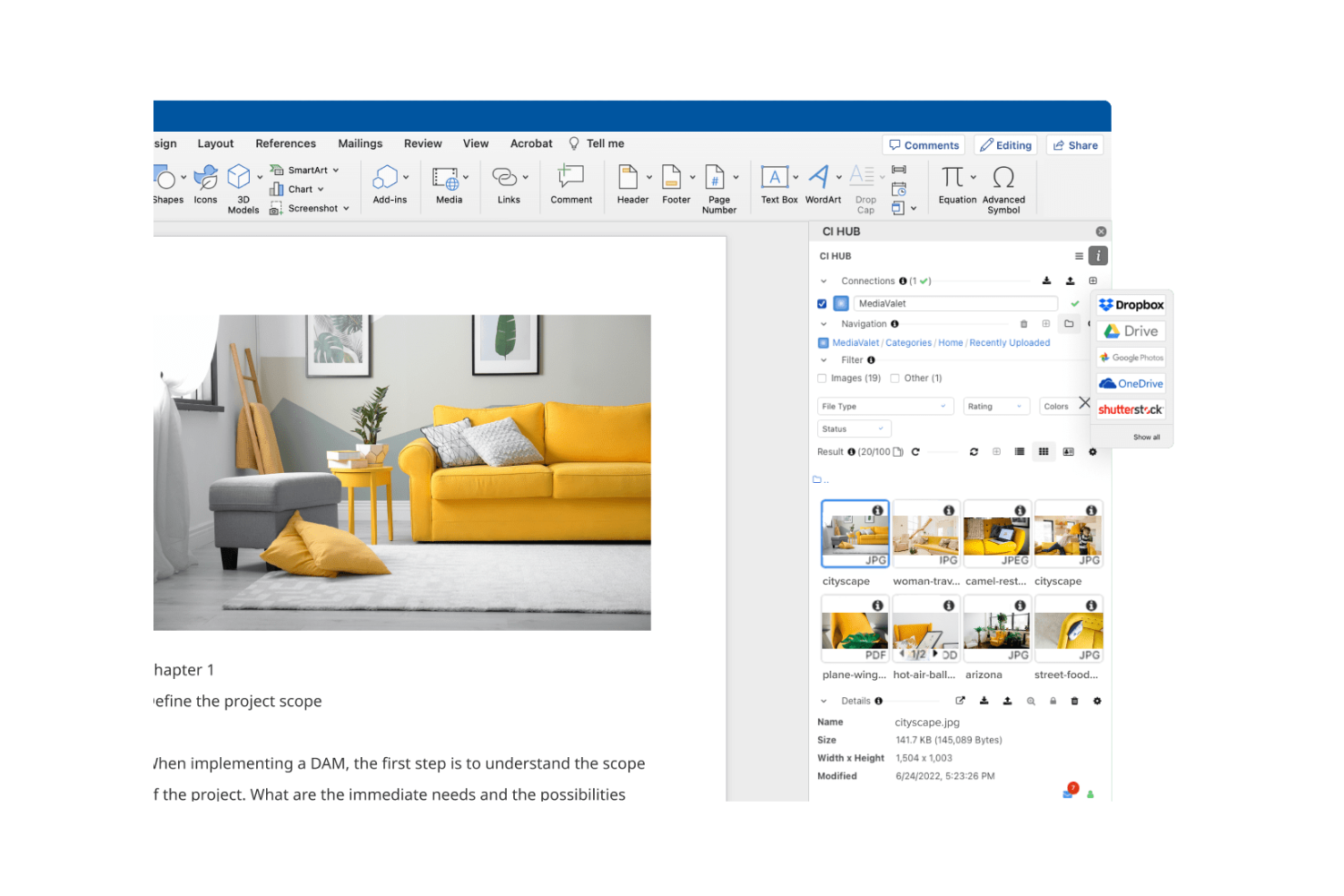
MediaValet is a Digital Asset Management (DAM) solution that caters to organizations looking for seamless Microsoft integration. It focuses on asset organization and distribution, making it ideal for teams that rely heavily on Microsoft tools.
Why I picked MediaValet: MediaValet is built for teams that rely heavily on Microsoft tools. You get direct integration with Office 365 and SharePoint, making your workflows smoother. Since it’s cloud-based, your team can access and collaborate on assets from anywhere. With strong security and data protection, it fits well if your company needs to keep information safe.
Standout Features & Integrations
Features include advanced search capabilities that help your team find assets quickly with metadata and keywords. Automated workflows streamline repetitive tasks, saving your team time and effort. The platform's scalability ensures that it grows with your organization, adapting to increasing demands.
Integrations include Microsoft Office 365, SharePoint, Adobe Creative Cloud, Slack, Box, Dropbox, Salesforce, Hootsuite, WordPress, and Google Analytics.
Pros and Cons
Pros:
- Focus on security and protection
- Automated workflow features
- Strong Microsoft integration
Cons:
- Dependence on the Microsoft ecosystem
- Requires training for new users

Papirfly
Best for templated content creation

Papirfly is an AI-driven DAM tool best known for its templated content creation, helping teams produce brand-ready assets quickly and consistently. It works well for industries like automotive, pharma, and retail that require strict brand consistency across multiple markets. With automated features like asset tagging and content translation, Papirfly reduces manual work, shortens time-to-market, and helps teams stay aligned with global brand standards.
Why I Picked Papirfly
I picked Papirfly for its templated content creation, which helps teams produce consistent, on-brand materials without relying heavily on design resources. Its AI-driven metadata tagging also streamlines the organization and retrieval of digital assets, reducing manual effort. Together, these features allow teams to maintain brand accuracy while improving the speed and efficiency of their creative workflows.
Papirfly Key Features
In addition to templated content creation, Papirfly offers:
- Campaign Management: This feature allows your team to plan, execute, and analyze marketing campaigns within a unified platform.
- Brand Portal: It provides a centralized space for storing and accessing brand guidelines and assets, ensuring consistency across all materials.
- GDPR Compliance: Papirfly ensures that all data handling processes meet regulatory standards, crucial for maintaining trust and legality.
- Data Analytics: This tool offers insights into asset usage and campaign performance, helping refine marketing strategies.
Papirfly Integrations
Papirfly integrates with Adobe Creative Cloud, Microsoft Office 365, Google Workspace, Salesforce, HubSpot, Marketo, Sitecore, WordPress, Drupal, and an API is available for custom integrations.
Pros and Cons
Pros:
- Supports multiple languages for global reach
- Auto-tags assets to speed up organization
- Easy to manage large libraries of assets
Cons:
- Some users experience slow loading at times
- Templates can be limiting or require adjustments
New Product Updates from Papirfly

Papirfly Point Adds Brand Assistant Admin Controls
Papirfly now lets admins configure Brand Assistant directly in Point, including enabling the assistant, accepting AI terms, tuning conversation style, and managing knowledge sources and documents. For more information, visit Papirfly's official site.
 .
.
Best for custom AI tagging

Tagbox is an AI-powered digital asset management platform built for teams in retail, events, nonprofits, and creative agencies. It helps businesses organize large media libraries using features like semantic search, face recognition, and automated tagging. By turning scattered assets into searchable libraries, Tagbox improves collaboration and long-term media management.
Why I Picked Tagbox
I picked Tagbox for its practical use of AI in media organization. Its semantic search makes it easy to find visuals based on people, objects, or context, saving teams time. Automated tagging further reduces manual work, making Tagbox a strong choice for teams managing growing asset libraries.
Tagbox Key Features
In addition to its core functionalities, Tagbox offers several other features that enhance its utility for digital asset management:
- Face Recognition: This feature allows your team to identify and categorize images based on facial data, improving organization.
- Custom AI Tagging: You can train an AI to detect your specific products, locations or other visual elements.
- Collaborative Tools: Facilitate teamwork and client interaction through media sharing and management.
- User-Friendly Interface: The intuitive design ensures that your team can easily navigate and utilize the tool without extensive training.
Tagbox Integrations
Connect Tagbox.io through Tagbox Desktop (drag-and-drop into any app), Zapier, Make, and a REST API. Custom workflows are available for Enterprise.
Pros and Cons
Pros:
- Custom tagging for video libraries
- Face recognition improves asset discovery
- AI-powered video asset organization
Cons:
- Limited offline access options
- No built-in video editing

Best for AI-driven asset tagging
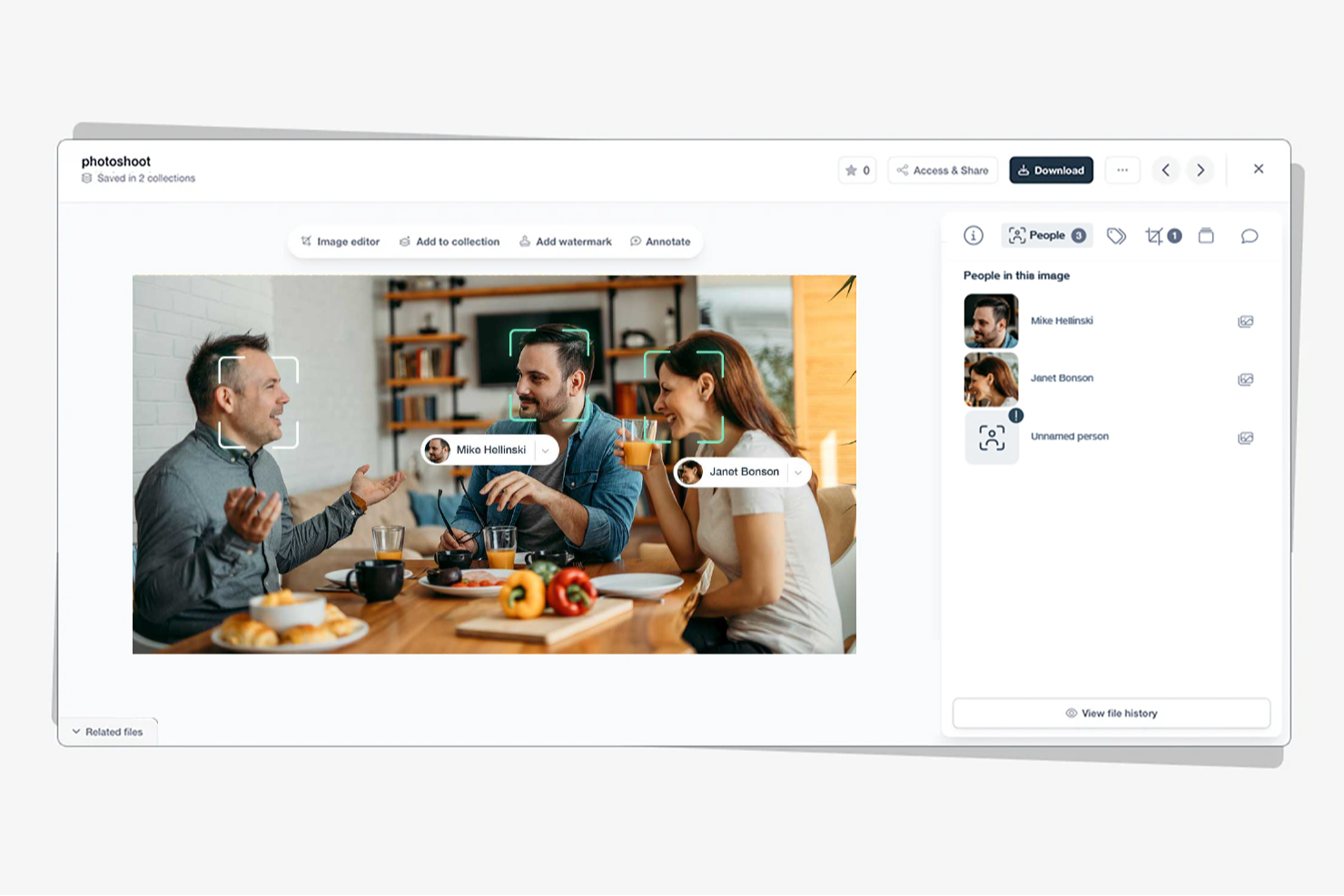
Stockpress is a digital asset management (DAM) tool that uses artificial intelligence to help teams organize, find, and share files more efficiently. It’s designed for companies of all sizes that want to simplify asset management without limiting user access or paying per seat.
Why I picked Stockpress: I picked Stockpress because its AI tagging and search capabilities make it incredibly easy for you to locate the right asset fast. The platform automatically applies intelligent metadata to your files, saving your team time on manual tagging and organization. You also get version control and duplicate detection tools, helping your team maintain clean, up-to-date asset libraries without confusion. What really stands out is how Stockpress combines collaboration and control—you can annotate, comment, and securely share files, all within an intuitive dashboard.
Stockpress standout features & integrations
Features include AI-driven tagging and visual search to improve asset discoverability, version control with duplicate detection to maintain file integrity, and customizable share links with user permissions for secure collaboration.
Integrations include Figma, Photoshop, Mailchimp, Slack, Dropbox, Google Drive, Okta, WordPress, Azure, Webflow, and Klaviyo.
Pros and Cons
Pros:
- Secure file access control
- Advanced tagging customization
- User-friendly interface
Cons:
- Few analytics tools
- Limited mobile support

Filecamp
Best for AI-powered tagging and review

Filecamp is a versatile digital asset management (DAM) tool designed to meet the needs of marketing teams and professionals across various industries, including media, non-profits, and web agencies. It offers a user-friendly platform that enhances workflow efficiency and brand consistency, making it an ideal choice for those looking to streamline asset management processes. With features like online proofing, customizable branding, and version control, Filecamp addresses the challenges of organizing and managing digital assets effectively.
Why I Picked Filecamp
I picked Filecamp for its robust online proofing tools and version control capabilities that are essential for managing digital assets in today's fast-paced environment. These features allow you to review and approve files seamlessly, ensuring that your team stays on the same page and maintains brand consistency. Additionally, the platform's secure file sharing ensures that sensitive information is protected while facilitating collaboration among remote teams. These functionalities make Filecamp a reliable choice for businesses looking to optimize their digital asset management processes.
Filecamp Key Features
In addition to its standout online proofing and version control, Filecamp offers several other features that enhance its usability as an AI DAM tool.
- Customizable Branding: Tailor the platform to match your brand’s identity, ensuring consistency across all digital assets.
- Secure File Sharing: Share files securely within your team or with external partners, maintaining control over access and permissions.
- Google Cloud Hosting: Benefit from data security and compliance with a platform hosted on Google Cloud, protecting your assets.
- Unlimited Users and Bandwidth: Manage your digital assets without worrying about user or bandwidth limitations, making it scalable for growing teams.
Filecamp Integrations
Native integrations are not currently listed by Filecamp.
Pros and Cons
Pros:
- Strong version control capabilities
- Unlimited users on all plans
- Built-in online proofing workflows
Cons:
- AI search is less advanced
- No native integrations available
New Product Updates from Filecamp
Filecamp Adds Analytics, AI Thumbnails, and CDN Embed Links
Filecamp adds Analytics, AI-powered thumbnails, and CDN-backed Embed links. These updates give teams more visibility into asset usage, improve thumbnail presentation, and make embedded images easier to manage. For more information, visit Filecamp’s official site.
 .
.
Air
Best for AI-powered content search

Air is a platform designed to manage and scale creative operations, providing a central hub for all your digital assets. It allows you to combine feedback, approvals, formatting, and licensing in one place, eliminating the need to jump between multiple tools.
Why I picked Air: I picked Air because its AI-powered search helps you find digital assets the way you think, recognizing colors, objects, faces, and dialogue. This capability means your creative team can focus more on producing content instead of manually tagging and sorting assets. I also like its facial recognition tool, which automatically detects and tags people in photos, making visual asset organization much faster. Air’s visual interface and collaboration tools make it especially effective for teams managing large volumes of creative content.
Air standout features & integrations
Features include AI-powered search and tagging that make it easy to locate assets based on visual or contextual cues, visual scrubbable previews that let you see inside design files and videos without opening them, and automatic video and audio transcription to make media content searchable. Its desktop sync feature gives you instant access to assets directly from your desktop.
Integrations include Slack, Salesforce, Canva, Zapier, Figma, Adobe Premiere Pro, NetSuite, HubSpot, Google Sheets, ClickUp, Shopify, and ChatGPT (OpenAI).
Pros and Cons
Pros:
- Convenient desktop sync
- Facial recognition tagging
- AI-powered visual search
Cons:
- May experience delays with large files
- Limited customization options
New Product Updates from Air

Air Showcases Introduces Custom Branding, Content Blocks, and Sub-Pages
Air Showcases now support custom branding, content blocks, sub-pages, and saved default layout settings, plus more control over removing items and branding options for Enterprise. For more information, visit Air's official site.
Canto
Best for small businesses

Canto is a Digital Asset Management (DAM) software designed for small businesses, focusing on simplifying asset organization and sharing. It offers features that help teams manage their digital content efficiently, making it a valuable tool for businesses with limited resources.
Why I picked Canto: Canto is built for small teams that want a simple way to manage digital assets. You get tools like visual search and smart albums, so your team can quickly find and organize files. The setup is fast and easy, which makes it practical if you don’t have extra time or resources. With a central space for sharing, your team can collaborate without digging through scattered folders.
Standout Features & Integrations
Features include a visual search that helps your team locate assets quickly using image recognition. Smart albums automatically organize assets based on metadata, saving time and effort. The customizable branding feature lets you personalize the platform to match your company's identity.
Integrations include Adobe Creative Cloud, Microsoft Office, Slack, Dropbox, Box, Google Drive, Salesforce, WordPress, Zapier, and Shopify.
Pros and Cons
Pros:
- Customizable branding options
- Visual search capabilities
- Quick setup process
Cons:
- May require initial training
- Pricing transparency issues

Aprimo
Best for marketing teams

Aprimo is a Digital Asset Management (DAM) platform designed for marketing teams, focusing on content management and campaign coordination. It helps teams organize, distribute, and optimize their marketing assets efficiently.
Why I picked Aprimo: Aprimo is built for marketing teams that need better control over campaigns and content distribution. You can set up workflows that match how your team operates instead of sticking to rigid processes. Its analytics tools give you clear insight into how content performs, so you can shape strategies around real data. With strong collaboration features, your team can stay connected and work together no matter where they’re located.
Standout Features & Integrations
Features include a content calendar that helps your team plan and track marketing campaigns. The version control feature ensures that your team always works with the most up-to-date assets. Collaboration tools support communication and coordination among team members, making it easier to manage projects.
Integrations include Adobe Creative Cloud, Salesforce, SAP, Microsoft Dynamics 365, Workfront, Sitecore, Marketo, Hootsuite, Drupal, and Optimizely.
Pros and Cons
Pros:
- Effective version control
- Strong analytics capabilities
- Tailored for marketing workflows
Cons:
- Requires training for full use
- Pricing transparency issues


Acquia is a Digital Asset Management (DAM) platform designed for businesses seeking cloud-native solutions, offering tools for content management and collaboration. It helps teams manage and distribute digital assets efficiently in a cloud environment.
Why I picked Acquia: Acquia is designed for cloud-native teams that need scalability and flexibility as they grow. Your team gets a central asset repository that keeps everything in one place and easy to access. You can set up customizable workflows that match how your team works instead of forcing a fixed process. With a strong focus on security and compliance, it’s a solid option if you’re in an industry with strict data rules.
Standout Features & Integrations
Features include a centralized asset repository that ensures your team can access files from anywhere. Customizable workflows allow you to design processes that suit your team's needs. Enhanced security features protect your assets and ensure compliance with industry standards.
Integrations include Adobe Creative Cloud, Drupal, Salesforce, Marketo, Sitecore, WordPress, Optimizely, Google Drive, Microsoft Teams, and Slack.
Pros and Cons
Pros:
- Suitable for compliance-focused industries
- Customizable workflows
- Strong security features
Cons:
- Learning curve for new users
- Complex initial setup


Frontify is a Digital Asset Management (DAM) platform designed for businesses focused on maintaining brand consistency. It serves marketing and branding teams, helping them manage brand assets and guidelines effectively to ensure uniform brand messaging.
Why I picked Frontify: Frontify excels at maintaining brand consistency with its brand guidelines feature, which keeps your team's messaging aligned. It offers a centralized hub for all brand assets, making it easy for your team to access and use the latest materials. The platform's collaboration tools enable effective teamwork on brand projects. Its focus on brand management ensures that your brand's identity remains consistent across all channels.
Standout Features & Integrations
Features include a brand guidelines feature that helps your team maintain consistent messaging. The centralized hub for brand assets ensures easy access to the latest materials. Collaboration tools support teamwork and communication, making it easier to manage brand-related projects.
Integrations include Adobe Creative Cloud, Sketch, Microsoft Teams, Slack, Figma, Trello, Jira, Dropbox, Google Drive, and Asana.
Pros and Cons
Pros:
- Efficient version control
- Centralized brand asset hub
- Strong brand consistency focus
Cons:
- Basic customization options
- Pricing transparency issues
Other AI DAM Tools
Here are some additional AI DAM tools options that didn’t make it onto my shortlist, but are still worth checking out:
- Brandkit
For brand management
- Orange Logic
For large enterprises
- Storyteq
For dynamic content
- Pics.io
For Google Drive users
- Bynder
For creative teams
- 4ALLPORTAL
For centralized product data management
- Connecter Suite
For instant access to local files
- Brandfolder
For visual asset management
- OpenAsset
For architecture and engineering
- Iconik
For cloud-based content collaboration


How I Evaluate AI DAM Tools
I look for AI that actually saves project teams time—auto-tagging thousands of assets on upload or surfacing the right file from a natural language query, not just a rebranded keyword search. From there, I split my evaluation into core functionality every AI DAM tool needs to qualify and differentiating factors that separate good options from great ones.
Core Functionality (Table Stakes For This List)
When I'm selecting tools for my list, I rank each one on a scale from 0 (does not offer the functionality) to 5 (excels in this area) for each core functionality listed below. Then, I calculate the tool's total score into a percentage. Each tool needs to achieve a minimum total score of 65% to be considered for inclusion.
- AI-Driven Auto-Tagging: I check whether the tool generates accurate metadata on upload across file types—think tagging a batch of 500 campaign images with usable keywords instead of dumping them into a folder.
- AI-Powered Asset Search: Search should go beyond filenames. I evaluate whether teams can run natural language or visual queries to find assets, like searching "person on a rooftop at sunset" and getting relevant results.
- Centralized Asset Repository: The platform needs to house all major file types—images, video, PDFs, design files—in a structured library with custom metadata schemas and scalable taxonomy.
- Version Control & Approval Workflows: I look for clear version histories and configurable approval routing, so a designer can push a revised banner ad through a multi-stage review without losing the original.
- Permissions & Rights Management: Role-based access and license tracking matter here. I evaluate how well a tool handles asset expiration dates, usage restrictions, and access scoping across internal and external users.
- PM & Creative Tool Integrations: The DAM should connect to the tools project teams already use. I look for native integrations with platforms like Asana, Monday, Adobe Creative Cloud, or Figma.
Once I have a list of tools that meet the criteria, I consider what sets each platform apart.
Differentiating Factors (What Sets Vendors Apart)
Here's how I compare and contrast different vendors:
Standout Features
AI brand compliance is a major differentiator—I look for tools that flag off-brand assets before they reach a client, saving project managers from catching those issues manually during review. Automated workflow triggers also add real value, especially when an asset approval can kick off downstream tasks like notifying stakeholders or updating project status. Generative AI capabilities matter too. Auto-resizing a hero image across multiple deliverable formats helps teams handling high-volume creative output move faster.
Beyond Features
I evaluate how well each platform handles external collaboration—agency partners and clients need guest access with expiring links and rights-aware sharing, not workarounds. Security and compliance also weigh heavily. I check for SOC 2 Type II certification, SSO support, and clear policies on how the vendor handles data used to train its AI models. Implementation timelines matter for project-driven teams too. A tool that offers migration support and taxonomy consulting gets teams to value faster than one that leaves you building metadata schemas from scratch.
How to Choose AI DAM Tools
It’s easy to get bogged down in long feature lists and complex pricing structures. To help you stay focused as you work through your unique software selection process, here’s a checklist of factors to keep in mind:
| Factor | What to Consider |
|---|---|
| Scalability | Consider if the tool can grow with your team. Ask about user limits and storage capacity. Ensure it can handle increased data volume as your organization expands. |
| Integrations | Check if the tool integrates with your existing software. Look for native integrations with tools like Adobe Creative Cloud, Slack, and Google Drive to avoid workflow gaps. |
| Customizability | Assess if the tool can be tailored to fit your specific needs. Look for customizable templates and workflows to match your team's processes. |
| Ease of use | Test the user interface for intuitiveness. Ensure team members can navigate without extensive training. Look for a clean, simple layout that matches your team's tech proficiency. |
| Implementation and onboarding | Evaluate the ease of getting started. Ask about available training resources like videos or tutorials. Ensure a smooth transition with minimal disruption to daily operations. |
| Cost | Compare pricing plans to your budget. Look for transparency in pricing and any hidden fees. Consider long-term costs, including any charges for additional users or features. |
| Security safeguards | Check if the tool meets your security standards. Look for data encryption, user permissions, and regular security updates to protect your assets. |
| Support availability | Ensure the vendor offers reliable support. Look for multiple support channels and quick response times. Consider the availability of self-service resources for quick fixes. |
What Are AI DAM Tools?
AI DAM tools are digital asset management systems enhanced with artificial intelligence to organize, store, and retrieve digital assets efficiently. Professionals like marketers, designers, and content creators use these tools to manage their digital media, ensuring quick access and collaboration.
Features like metadata tagging, intelligent search, and automated workflows help with organizing assets, improving productivity, and maintaining brand consistency. Overall, these tools provide users with efficient asset management and streamlined collaboration.
Features of AI DAM Tools
When selecting AI DAM tools, keep an eye out for the following key features:
- Metadata tagging: Automatically tags assets with relevant metadata, making it easier to search and organize digital files.
- Intelligent search: Uses AI to quickly locate files based on keywords or tags, saving time and enhancing productivity.
- Version control: Manages different versions of assets to ensure teams work with the most up-to-date files.
- Customizable workflows: Allows teams to tailor processes to fit their specific needs, improving efficiency and collaboration.
- Collaboration tools: Enables team members to share, review, and provide feedback on assets, enhancing teamwork.
- Centralized asset library: Provides a single location for storing and accessing all digital assets, ensuring consistency and easy access.
- Security safeguards: Protects digital assets with features like encryption and user permissions, ensuring data safety.
- Automated workflows: Streamlines repetitive tasks, freeing up time for more strategic work.
- Analytics and reporting: Offers insights into asset usage and performance, helping teams make data-driven decisions.
- Multi-channel distribution: Facilitates the sharing of content across various platforms, ensuring broad reach and consistency.
Benefits of AI DAM Tools
Implementing AI DAM tools provides several benefits for your team and your business. Here are a few you can look forward to:
- Improved organization: AI-driven metadata tagging and intelligent search help keep digital assets well-organized and easy to find.
- Enhanced collaboration: Features like centralized asset libraries and collaboration tools make it easier for teams to work together and share feedback.
- Time savings: Automated workflows and intelligent search reduce the time spent on repetitive tasks and locating files.
- Consistency: Version control and centralized asset management ensure that all team members use the most current and consistent brand assets.
- Data security: Security safeguards protect your digital assets from unauthorized access and potential data breaches.
- Informed decisions: Analytics and reporting provide insights into asset performance, helping teams make data-driven decisions.
- Broader reach: Multi-channel distribution capabilities ensure your content is shared consistently across various platforms.
Costs and Pricing of AI DAM Tools
Selecting AI DAM tools requires an understanding of the various pricing models and plans available. Costs vary based on features, team size, add-ons, and more. The table below summarizes common plans, their average prices, and typical features included in AI DAM tools solutions:
Plan Comparison Table for AI DAM Tools
| Plan Type | Average Price | Common Features |
|---|---|---|
| Free Plan | $0 | Basic storage, limited user access, and essential metadata tagging. |
| Personal Plan | $5-$25/user/month | Expanded storage, basic collaboration tools, and standard search capabilities. |
| Business Plan | $30-$75/user/month | Advanced collaboration, customizable workflows, and enhanced security features. |
| Enterprise Plan | $100+/user/month | Unlimited storage, full integration support, and comprehensive analytics. |
AI DAM Tools FAQs
Here are some answers to common questions about AI DAM tools:
How does DAM improve team collaboration?
DAM tools enhance team collaboration by streamlining communication among members. Your team can access necessary assets, comment, and approve final versions directly within the system. This unified access and ability to provide feedback in real-time helps your team work together more efficiently.
How does DAM improve brand consistency?
A cloud-based DAM ensures brand consistency by providing everyone access to the latest brand assets. Your brand team can easily manage and update assets, eliminating outdated materials. This control helps maintain a consistent brand image across all channels and materials.
What should I consider when choosing AI DAM tools?
When choosing AI DAM tools, consider factors like scalability and integration with existing systems. Evaluate how customizable the platform is to fit your team’s needs. Also, assess the ease of use and the quality of customer support to ensure a smooth implementation.
Can AI DAM tools handle large volumes of data?
Yes, AI DAM tools are designed to handle large volumes of data efficiently. They use intelligent search and metadata tagging to organize and retrieve assets quickly. When evaluating, check if the tool can scale with your growing data needs to avoid any future limitations.
Are AI DAM tools secure?
AI DAM tools prioritize security by offering features like data encryption and user permissions. When selecting a tool, ensure it meets your organization’s security standards and regularly updates its security protocols to protect your digital assets from unauthorized access.
How do AI DAM tools integrate with other software?
AI DAM tools often offer integrations with popular software like Adobe Creative Cloud, Slack, and Google Drive. These integrations help maintain a smooth workflow across different platforms. Check the tool’s integration capabilities to ensure compatibility with your existing systems.