

Os 10 melhores softwares de gestão de trabalho empresarial para 2026

10 Lista de software de gestão do trabalho empresarial


Gerir projetos empresariais significa conciliar inúmeras tarefas, partes interessadas e prioridades — muitas vezes à custa da eficiência e da clareza. O software de gestão do trabalho empresarial oferece uma solução, permitindo-lhe simplificar os fluxos de trabalho, melhorar a colaboração e manter a supervisão de projetos complexos. No entanto, com tantas opções disponíveis no mercado, escolher a ferramenta certa pode ser complicado.
Neste artigo, vou ajudá-lo a tornar a sua escolha mais fácil, partilhando a minha experiência pessoal com dezenas de ferramentas diferentes de gestão do trabalho, utilizadas por grandes equipas e em projetos de grande dimensão, bem como as minhas escolhas para o melhor software de gestão do trabalho empresarial.
Why Trust Our Software Recommendations
Our team has been testing and reviewing software since 2012. As project managers ourselves, we know how difficult—and important—it is to choose the right software.
For this guide, we evaluated tools using hands-on testing and independent research, scoring tools using our selection criteria. We also draw on insights from industry thought leaders and practicing project management experts.
Our reviews reflect our human editorial judgment, not a sales pitch.
Expert reviewers:
Tabela de comparação de software de gestão do trabalho empresarial
Eis uma tabela que pode utilizar para comparar as ferramentas que acabámos de abordar nas sínteses.
| Tool | Best For | Trial Info | Price | ||
|---|---|---|---|---|---|
| 1 | Best enterprise work management software for its reliable security features to protect your data | Free plan + 14-day trial + demo available | From $10/user/month (billed annually) | Website | |
| 2 | Best for publicly listed companies | Free plan + 14-day free trial + free demo available | From $9/user/month (billed annually) | Website | |
| 3 | Best for its user-friendly interface with on-premise licensing | 14-day free trial | From $10/user/month (billed annually) | Website | |
| 4 | Best for nested task hierarchies across teams | Free plan + 30-day free trial available | From $7.65/user/month (billed annually) | Website | |
| 5 | Best for AI-powered enterprise work management | Free demo available | Pricing upon request | Website | |
| 6 | Best for full lifecycle service delivery | Not available | Pricing upon request | Website | |
| 7 | Best for scaling businesses that can’t afford an enterprise-tier plan | Free plan available | From $9/user/month | Website | |
| 8 | Best enterprise work management software with 99.99% uptime | Free plan + free trial available | From $5/user/month (billed annually) | Website | |
| 9 | Best for pre-built reports | 2-week free trial + free demo available | From $8/user/month (billed annually) | Website | |
| 10 | Best for its seamless integration with Adobe products | Not available | Pricing upon request | Website |


Visão geral dos 10 softwares de gestão do trabalho empresarial
Eis uma breve descrição de cada ferramenta relativamente aos critérios de avaliação que descrevi acima.

Wrike
Best enterprise work management software for its reliable security features to protect your data

User interface: Wrike has a minimalistic multi-pane UI with a simple navigation menu on the tool's left side. Their hierarchy is similar to other tools on this list, starting with a workspace, spaces, folders, projects, tasks, and subtasks. Although the number of available views is limited compared to other enterprise project management software, it is functional and easy to learn.
Time in the market: The company was founded in 2006. They released their enterprise platform in 2013 after a $10 million investment by Bain Company. After a couple more successful investment rounds, Citrix Systems declared its interest in the company. Wrike was acquired in March 2021 for $2.25 billion.
Security features: Wrike complies with SOC 2 Type II, ISO 27001, 27018, GDPR, and CCPA. Additionally, they guarantee an uptime of 99.9%, allow you to create role-based access, use SSO, and keep your keys to their AES-256 bit encryption using Wrike Lock.
Integrations: Wrike offers 400+ pre-built native integrations, including Microsoft Office, integrations with the most popular file management software from Microsoft, Google, and Dropbox, along with sales and marketing software from Salesforce and Marketo.
New Product Updates from Wrike
Wrike Expands Gantt Planning, Approvals, and AI Work Intake
Wrike adds cross-project Gantt dependencies, flexible approval routing, and AI work intake through Wrike MCP. These updates give teams more control over planning, decision-making, and incoming work. For more information, visit Wrike’s official site.

Best for publicly listed companies
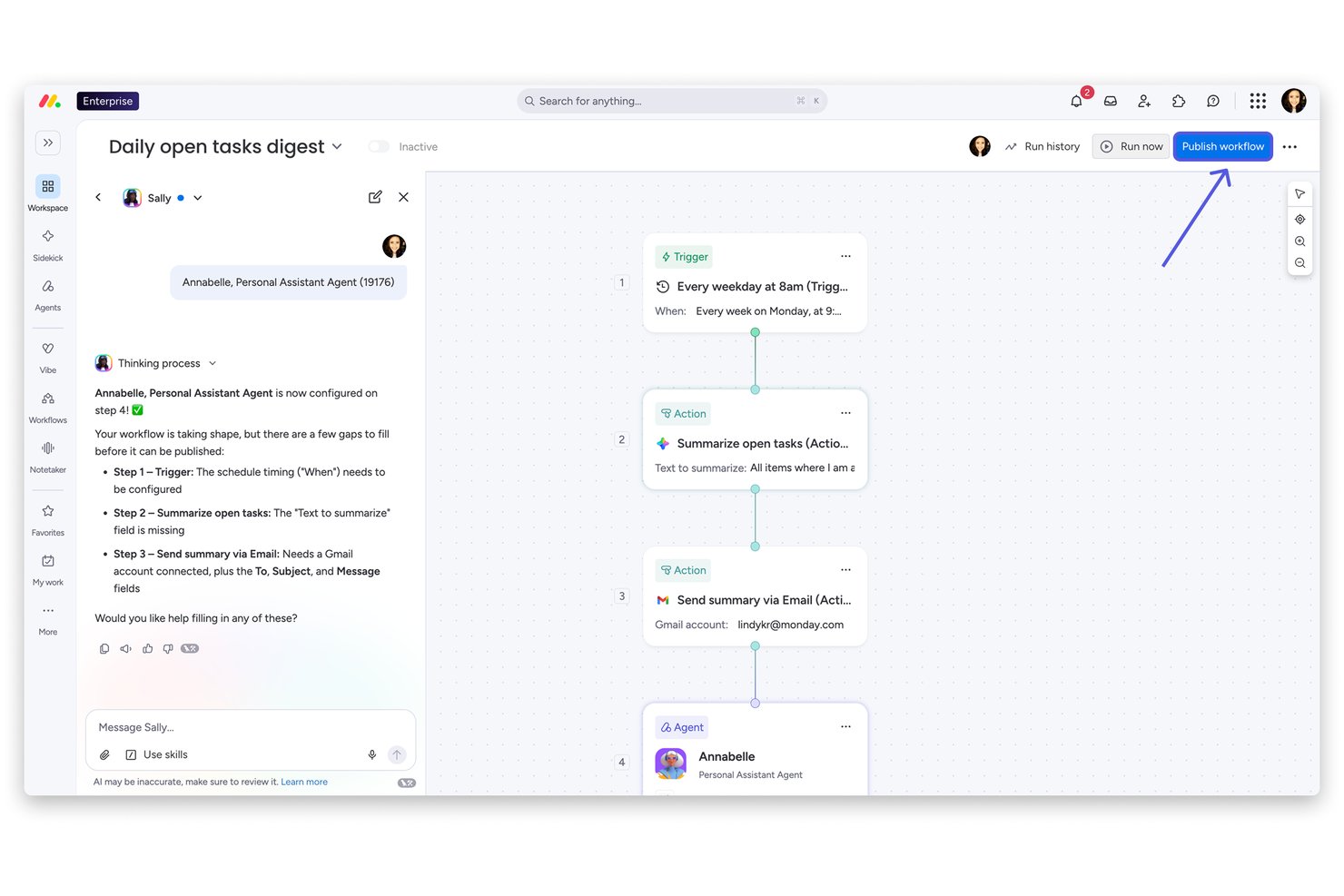
monday AI Workspace is a Work OS platform that unifies portfolio management, cross-functional project tracking, resource planning, and AI-powered workflow automation across enterprise teams and business units.
Who Is monday AI Workspace Best For?
It's a strong fit for enterprise PMO teams and operations leaders at large, compliance-conscious organizations managing work across multiple departments and business units.
Why I Picked monday AI Workspace
I've included monday AI Workspace in my top picks because its Enterprise governance stack is built for the scrutiny public companies face. I particularly like the AI-powered risk insights, which automatically scan every project board daily and surface portfolio-level risks before they escalate. Add BYOK encryption, SOC 2 Type II, ISO 27001, and HIPAA compliance to that, and it's a platform I trust to hold up under a formal audit.
monday AI Workspace Key Features
- Portfolio hierarchy and dashboards: Organize projects in nested portfolios and build executive dashboards pulling live data across teams.
- Resource management module: Allocate and balance workloads, track utilization, and view real-time capacity across distributed teams.
- Configurable workflow automations: Create no-code automation rules to connect work across departments and enforce process discipline.
- Enterprise compliance controls: Set granular permissions, leverage SSO/SAML, and maintain audit trails for SOC 2, ISO 27001, and GDPR compliance.
monday AI Workspace Integrations
monday AI Workspace offers hundreds of native integrations and marketplace apps, including Slack, Salesforce, HubSpot, Google Workspace, Microsoft 365, Jira, GitHub, Zendesk, Adobe Creative Cloud, and Zoom. It supports Zapier and provides an API for custom integrations.
Pros and Cons
Pros:
- Granular permissions meet enterprise audit requirements
- Native OKR tracking links projects to strategy
- AI-powered risk insights surface portfolio issues early
Cons:
- Portfolio hierarchy can feel rigid at scale
- Reporting customization requires significant setup time
New Product Updates from monday AI Workspace
monday AI Workspace Adds Human Approval Routing
monday AI Workspace adds a human-in-the-loop approval block to AI Workflows, sending approval requests and routing workflow paths based on responses. For more information, visit monday AI Workspace's official site.

Celoxis
Best for its user-friendly interface with on-premise licensing
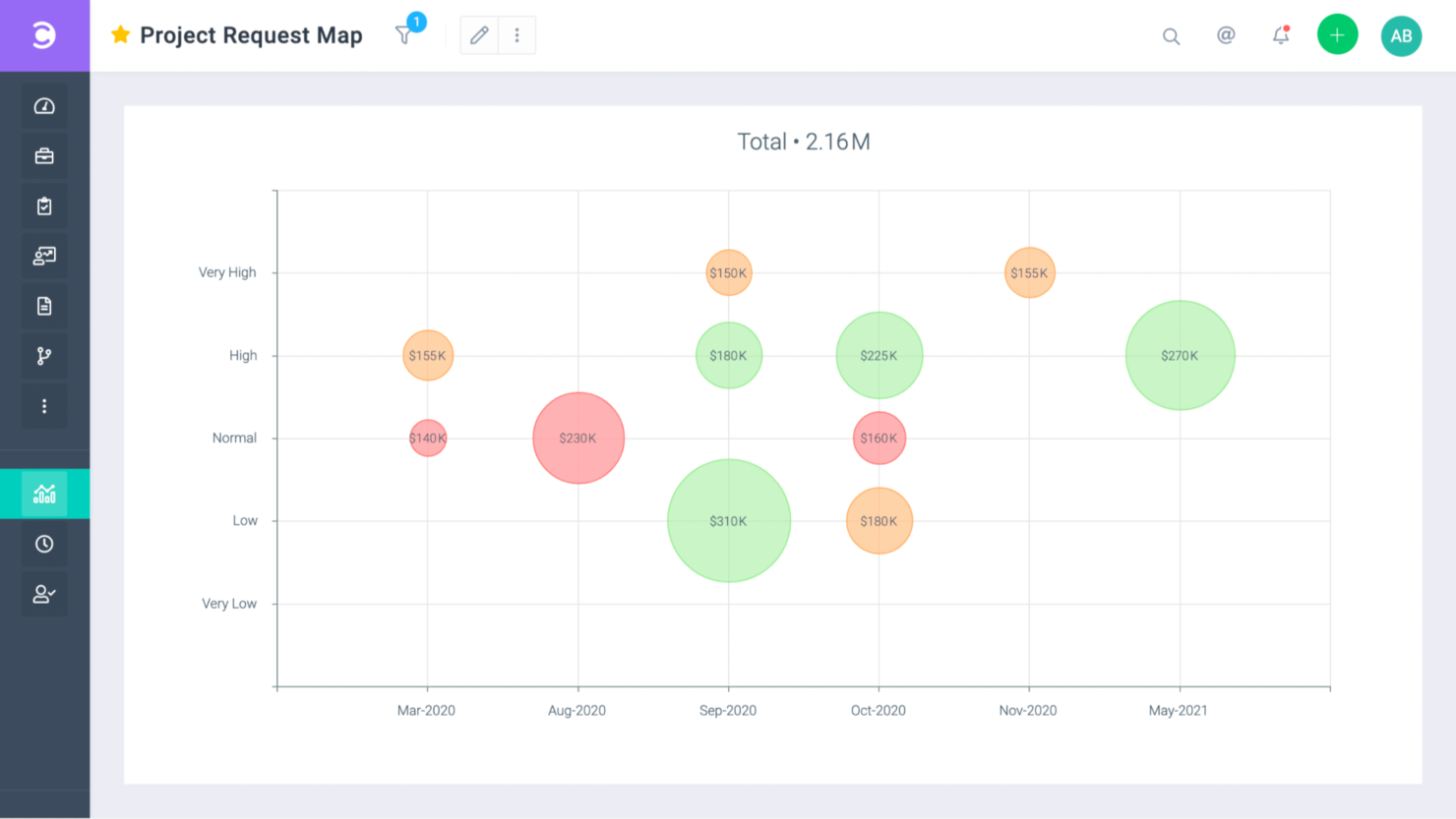
User interface: Full of color and RAG indicators to help you identify what needs to be prioritized, Celoxis is a user-friendly tool. They have comprehensive documentation that will enhance the experience of an already easy-to-learn tool.
Time in the market: Celoxis started in 2001. Headquarters: Pune, India.
Security features: SSL 256-bit encryption, SAML v2 for SSO, and 99.9% uptime.
Integrations: Celoxis has out-of-the-box integrations with Excel, Microsoft Project, Google Drive, Salesforce, Outlook, and hundreds of other tools like Slack and Trello.
Celoxis is available for $25/user/month
Quire
Best for nested task hierarchies across teams
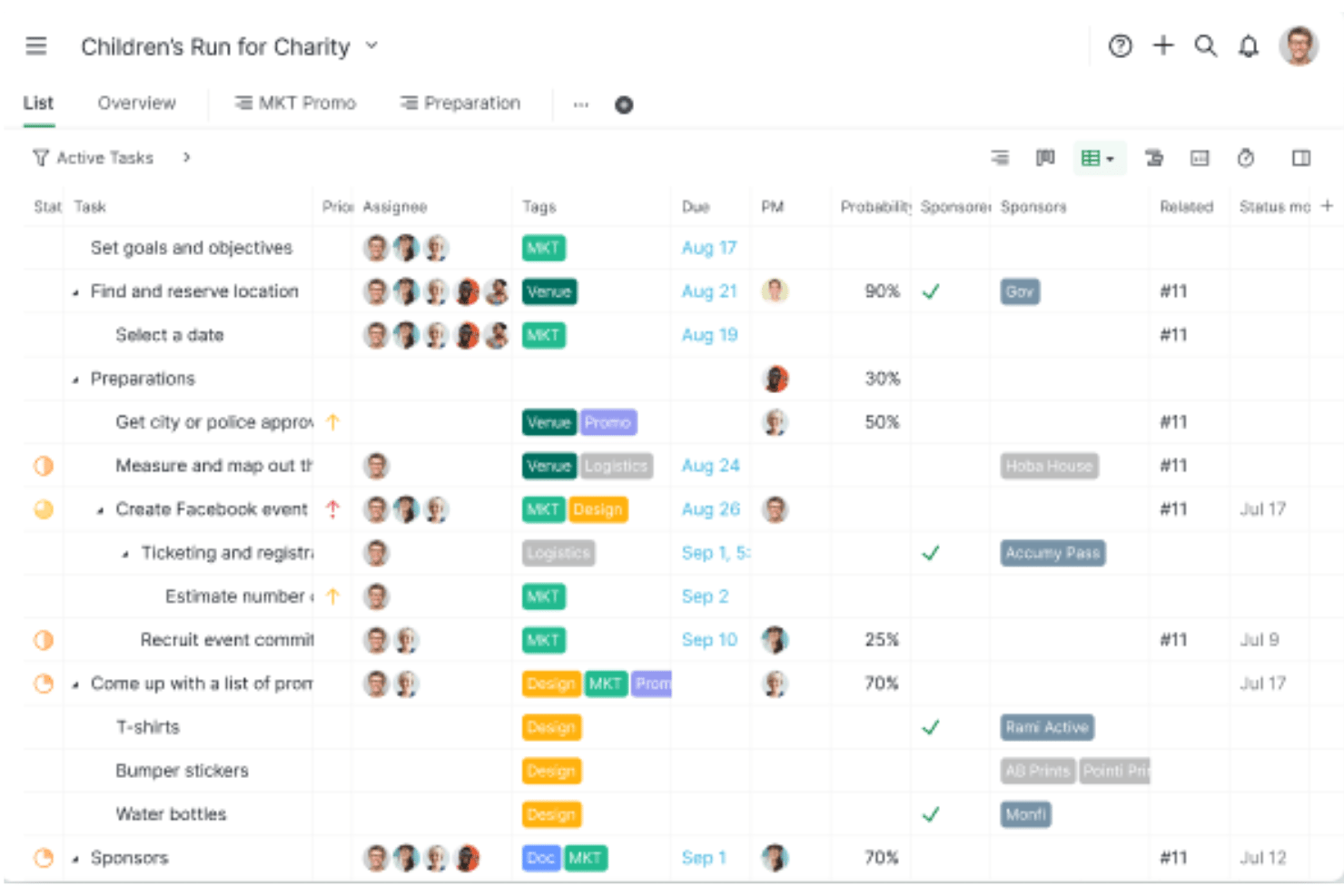
Quire is a project and work management platform built around unlimited nested task hierarchies, multiple synchronized work views, and cross-project visibility through Smart Folders.
Who Is Quire Best For?
Quire suits small to mid-sized teams that need to break down complex projects into deeply nested task structures across multiple workstreams.
Why I Picked Quire
I've included Quire in my top picks because its unlimited nested task hierarchy is genuinely unlike most work management tools I've tested. When a project spans multiple teams and workstreams, I can break work down across as many levels as needed, then use Smart Folders to pull tasks from separate projects into one aggregated view without duplicating data. I also like that all five work views, including Timeline with task dependencies and the Kanban board, stay in sync on the same underlying data.
Quire Key Features
- Approval workflows: Set named approvers on tasks with timestamps and audit trails to keep sign-off processes traceable across teams.
- SAML 2.0 single sign-on: Connect Quire to identity providers like Okta, Azure AD, and JumpCloud for centralized access control on the Enterprise plan.
- Power BI integration: Pull Quire project and task data directly into Microsoft Power BI to build custom executive dashboards and visual reports.
- Custom fields: Add configurable data fields to projects—up to unlimited on Enterprise—to capture the metadata your team actually tracks.
Quire Integrations
Quire offers native integrations with Google Drive, Microsoft Teams, Slack, GitHub, Google Calendar, and Power BI. It also provides REST API access, webhooks, MCP Server, and Zapier connectivity.
Pros and Cons
Pros:
- Smart Folders enable cross-project task aggregation
- Synchronized views reduce duplicate data management
- Unlimited nested task hierarchy for complex projects
Cons:
- Lacks dedicated portfolio financial management features
- No resource capacity planning or workload balancing
New Product Updates from Quire
Quire Adds Custom Field Locking and Comment Reaction API Support
Quire adds custom field locking and API support for reading and setting emoji reactions on comments. These updates give teams more control over field data and expand comment interaction options for developers. For more information, visit Quire’s official site.
 .
Best for AI-powered enterprise work management

Screendragon is built for marketing teams, creative agencies, and global brands that need better control over complex projects. With AI resource forecasting, the platform helps teams plan workloads and staffing needs more accurately, while its no-code interface makes it easier to manage workflows without extra technical setup. Screendragon also connects with your existing tools, so your team can coordinate work more smoothly and stay aligned across projects.
Why I Picked Screendragon
I picked Screendragon for its AI resource forecasting, which helps teams plan workloads and staffing needs more accurately across large projects. This makes it easier to avoid overloading teams and spot capacity gaps early. On top of that, its no-code setup supports custom workflows and approval tracking, so teams can adapt processes without heavy technical work. Together, these features help enterprises manage resources and coordination more effectively.
Screendragon Key Features
In addition to AI resource forecasting, Screendragon offers:
- Customizable Dashboards: Tailor the interface to display the most relevant project information, making it easier to track progress and performance.
- Role-Based Access: Ensure that each team member has appropriate access to project data, improving security and focus.
- Custom Routing: Direct tasks and approvals through personalized paths to optimize workflow efficiency and reduce bottlenecks.
Screendragon Integrations
Integrations include Microsoft Power BI, Slack, Microsoft Teams, HubSpot, Okta, Aprimo, SugarCRM, Adobe, Jira, and Google Drive.
Pros and Cons
Pros:
- Flexible customization lets teams tailor workflows and project structures
- Automation features streamline processes and improve efficiency
- Project and resource management features help centralize work details
Cons:
- Reporting and manual report creation can feel limited or complex
- The admin console and settings may be confusing for new users
New Product Updates from Screendragon
Screendragon Unveils New AI Hub
Screendragon introduced AI Hub, a new capability that lets teams build and manage AI agents directly within workflows. The update helps marketing teams automate tasks, maintain governance controls, and scale AI-driven operations more efficiently. For more information, visit Screendragon's official site.

Kantata
Best for full lifecycle service delivery

User interface: Kantata delivers a modern, intuitive experience built for enterprise-scale service delivery. From centralized dashboards to customizable views like task lists and Gantt charts, you can track work across the entire lifecycle of projects in one place. The platform supports collaboration with commenting, document sharing, and activity feeds, helping your teams stay aligned and productive even across complex portfolios.
Time in the market: Originally launched as Mavenlink in 2008, Kantata has over a decade of experience serving professional services organizations. Its merger with Kimble Applications in 2021 strengthened its ability to deliver full lifecycle service management, combining project delivery, resource planning, and financial oversight in one enterprise platform.
Security features: Kantata is enterprise-ready with compliance standards including SSAE 18 (SOC1 Type II), AICPA SOC2 Type II, and GDPR. It employs data encryption (TLS and AES), intrusion detection systems, secure VPN connections with two-factor authentication, and regular patching to safeguard sensitive client and project data—critical for large organizations handling high-value engagements.
Integrations: Kantata offers many integrations, including Slack, Expensify, Sage Intacct, Xero, NetSuite ERP, Google Workspace, Microsoft Dynamics 365, Jira Software, Salesforce Sales Cloud, SAP Concur, QuickBooks Online, and HubSpot CRM.
New Product Updates from Kantata

Kantata Adds Access Group Change History
Kantata adds Access Groups History, letting account administrators track changes to group details, membership, and permissions in Recent History. The update also makes these events available through the Subscribed Events API for broader monitoring. For more information, visit Kantata’s official site.
 .
Best for scaling businesses that can’t afford an enterprise-tier plan

User interface: Toggl Plan is a friendly-looking tool with lots of colors that is perfect for timelines and roadmaps. Online reviews give this tool a top rating for its visual attractiveness and how easy that makes it to find your way around your work.
Time in the market: The company was founded in 2006. With 3 distinctive products, they decided to split them into different companies only to bring them back together years later when they realized they were stronger that way. Pretty much like the Backstreet Boys. Headquarters: Tallinn, Estonia.
Security features: The business tier, their top tier, offers SSO, AES256 encryption and SHA2 signatures and is GDPR compliant. No uptime guarantee.
Integrations: Toggl Plan makes its API available to developers for specific integrations. The app currently integrates with Slack, a couple of calendar apps, and has a browser extension that can connect with Asana, JIRA, Podio, Gitlab and Github.
Trello
Best enterprise work management software with 99.99% uptime

User interface: As one of the main players in the space, Trello offers a beautiful visual experience through its customizable boards. It is very easy to get started with the tool, set up and start sharing projects to collaborate with your team. User reviews on this product mention there’s no need for onboarding because of how intuitive it is.
Time in the market: Trello was first introduced to the market under the codename Trellis in 2011. Following a spin-off from Fog Creek, Trello Inc was born in 2014. Later that year, it raised over $10 million from investors. Finally, Atlassian acquired Trello in January 2017 for $425 million. Headquarters: New York City, NY.
Security features: The enterprise tier lets you set granular permissions and access to power-ups. Also, SAML SSO for your logins, 99.99% uptime, SOC 2, 3 and ISO 27000 certifications, and GDPR compliance.
Integrations: Trello offers you unlimited integrations in their enterprise plan. These integrations include popular apps like Slack, Weebly, Evernote, Miro, and over 200 others. Additionally, there’s a power-up store where you can shop for extensions that will make your product even easier to use.
Pricing is available upon request.

Workzone
Best for pre-built reports
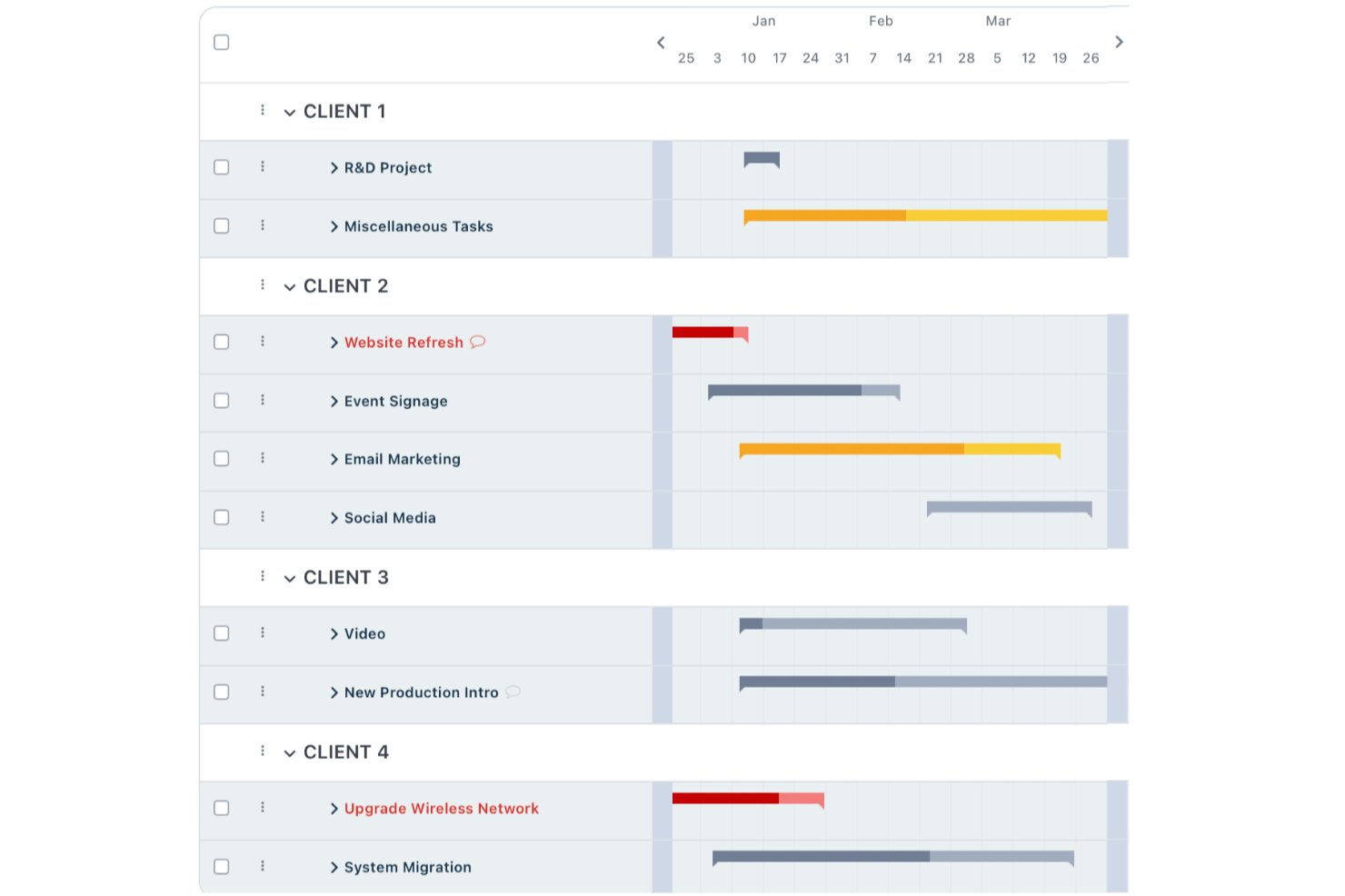
For enterprise teams seeking a reliable work management solution, Workzone offers a blend of intuitive project oversight and collaboration tools tailored to industries like marketing, operations, and IT. Its streamlined features cater to organizations managing time-sensitive projects, providing a centralized platform for project visibility and stakeholder communication. By addressing the complexities of project management with simplicity, Workzone helps your team maintain control and efficiency without the burden of tool overload.
Why I Picked Workzone
I picked Workzone for its unique ability to balance simplicity with powerful features that are crucial for enterprise work management. Its real-time project visibility ensures that your team always knows the status of tasks and deadlines, reducing the risk of project delays. Additionally, Workzone’s collaboration tools enable feedback and communication among team members, making it easier to manage projects with multiple stakeholders. These features align well with the needs of enterprises that require a reliable yet straightforward project management solution.
Workzone Key Features
In addition to its real-time visibility and collaboration tools, I also found other valuable features:
- Customizable Templates: Workzone offers over 1,000 templates to help your team quickly launch and manage projects tailored to your specific workflow.
- Pre-Built Reports: These reports provide insights into workload management, budget tracking, and resource allocation, helping your team make informed decisions.
- Centralized Communication: This feature ensures that all project-related communications are organized in one place, reducing the need for multiple tools.
- Strong Customer Support: Workzone provides unlimited training and support to ensure your team can effectively use the platform and address any issues promptly.
Workzone Integrations
Integrations include Slack, Microsoft Teams, Google Drive, Salesforce, Dropbox, Box, OneDrive, Outlook, SharePoint, and JIRA.
Pros and Cons
Pros:
- Structured request and workload management
- Built-in document proofing and approvals
- Strong project visibility and tracking
Cons:
- Mobile experience weaker than desktop
- Smaller integration ecosystem than competitors
New Product Updates from Workzone

Workzone Enterprise Adds Multi-Stage Approval Workflows
Workzone Enterprise now includes Approval Workflows, enabling multi-stage document approvals to standardize complex processes and reduce manual effort. For more information, visit Workzone's official site.
 .
Best for its seamless integration with Adobe products

User interface: Adobe Workfront recently underwent a UI redesign. Now, it is a minimalistic, clean, and customizable interface that has user navigation at its center. I find this new version easy to navigate, plus it mixes features that I love from other tools. For example, the top of the screen shows a folder pathway similar to that of Dropbox or Sharepoint. To navigate through it, you just need to click on the destination folder you wish to visit.
Time in the market: Workfront was founded in 2001. After raising over $95 million from venture capital, Adobe Inc acquired them in November 2020 for $1.5 billion. The tool has been upgraded since then to work seamlessly with the Adobe Creative Cloud and Adobe Experience suite.
Security features: Adobe has an entire PDF addressing security. Here are the highlights.
- Documents and assets have AES-256 bit encryption + HTTPS TLS for transmission.
- 99.9% guaranteed uptime.
- Limit data visibility through user-based role permissions.
- 10+ standards compliance, including HIPAA, GDPR, SOC2, and GLBA.
Integrations: Adobe Workfront has integrations with tools like Slack, Jira software, Salesforce, Dropbox, Google Drive, Microsoft Teams, and more. Additionally, it integrates with Adobe Creative Suite and Experience Manager to let your team work without leaving their design tools. Their Rest API allows developers to connect other tools and uses Adobe’s Application Security Stack to minimize security mistakes while coding.
Pricing is available upon request.
Outras opções de software de gestão do trabalho empresarial
Eis mais algumas opções que não entraram na lista principal, mas que vale a pena considerar.
- Kissflow Workflow
For boosting efficiency and streamlining workflows
- Planview AdaptiveWork
Roadmap views and dashboards to support your enterprise strategy
- ProjectManager
Alternative to Microsoft Project with 99.999% uptime
- Ravetree
For project, resource, and client management in one
- Pneumatic Workflow
For streamlining workflows
- Stackfield
For EU data sovereignty
- Miro
For visual collaboration in real-time and GDPR compliance
- ClickUp
For ensuring data protection through automated penetration tests
- Smartsheet
Project management software you can use as an upgrade to Excel.
- Hive
Enterprise work management software for its ease of use


How I Evaluate Enterprise Work Management Software
When a PMO needs to manage dozens of programs across business units, I look for two things: baseline capabilities that qualify a tool and differentiators that separate the best from the rest.
Core Functionality (Table Stakes For This List)
When I'm selecting tools for my list, I rank each one on a scale from 0 (does not offer the functionality) to 5 (excels in this area) for each core functionality listed below. Then, I calculate the tool's total score into a percentage. Each tool needs to achieve a minimum total score of 65% to be considered for inclusion.
- Portfolio & Program Management: I look for a true hierarchy—portfolios containing programs containing projects—with roll-up views that let a PMO director see status, spend, and risk across dozens of initiatives at once.
- Enterprise Resource Management: Capacity planning and workload balancing matter here, especially when you're allocating the same engineers across five concurrent programs and need to spot overallocation early.
- Cross-Functional Work Orchestration: I evaluate the range of work views (Gantt, Kanban, timeline, table) and whether workflows support cross-project dependencies that reflect how product, engineering, and design actually collaborate.
- Governance & Security Controls: SSO, SAML, role-based permissions, and audit logs are what I check first, along with certifications like SOC 2, ISO 27001, and GDPR compliance.
- Reporting & Analytics: The platform should offer customizable dashboards and executive-ready reports—things like portfolio health scorecards or budget burn-down charts that leadership can consume without a walkthrough.
- Integrations & Extensibility: I evaluate API depth and prebuilt connectors to the systems enterprise teams already rely on, such as Salesforce, SAP, ServiceNow, Jira, and Microsoft 365.
Once I have a list of tools that meet the criteria, I consider what sets each platform apart.
Differentiating Factors (What Sets Vendors Apart)
Here's how I compare and contrast different vendors:
Standout Features
I look for AI-driven automation that handles recurring PMO tasks like status rollups and risk flagging without manual effort. Strategic goal alignment is another differentiator—I want to see OKR or objective-tracking modules that connect individual workstreams to enterprise priorities. Scenario planning tools also stand out, especially when a portfolio manager needs to model what happens if a key initiative gets delayed or a team is reassigned mid-quarter.
Beyond Features
Licensing flexibility matters when your org has thousands of stakeholders but only hundreds of active project managers. I check whether vendors offer tiered user types so you're not paying full-seat prices for executives who only view dashboards. Implementation support is equally important—rolling out a platform across a 5,000-person org requires dedicated success managers and certified partners, not just a help center. I also evaluate vendor viability through analyst recognition, product roadmap transparency, and community strength.
Como escolher uma solução de gestão do trabalho empresarial
É fácil perder-se em listas extensas de funcionalidades e estruturas de preços complexas. Para o ajudar a manter o foco enquanto percorre o seu processo específico de seleção de software, eis uma lista de fatores a ter em conta:
| Fator | O que considerar |
|---|---|
| Escalabilidade | Certifique-se de que a solução consegue acompanhar o crescimento da sua equipa, suportando mais utilizadores e dados sem problemas de desempenho. |
| Integrações | Verifique se se integra com ferramentas existentes, como CRM, ERP e plataformas de comunicação, para simplificar os fluxos de trabalho. |
| Personalização | Procure opções que permitam à sua equipa adaptar os fluxos de trabalho e os painéis de controlo às necessidades específicas da empresa. |
| Facilidade de utilização | Escolha uma interface intuitiva que reduza o tempo de aprendizagem e aumente a produtividade. |
| Orçamento | Avalie o custo total de propriedade, incluindo os custos iniciais, as taxas de subscrição e eventuais custos ocultos. |
| Medidas de segurança | Dê prioridade a soluções com medidas de segurança robustas, como encriptação e autenticação multifator, para proteger os seus dados. |
Sinceramente, há muito para assimilar — e existe muita pressão para tomar a decisão certa. Por isso, sugiro que utilize o nosso serviço de aconselhamento sobre software de gestão de projetos para o ajudar a selecionar ferramentas de gestão de projetos que se adequem às suas necessidades específicas e às da sua organização.
O que é o software de gestão do trabalho empresarial?
O software de gestão do trabalho empresarial é uma ferramenta utilizada por grandes organizações para gerir e coordenar processos de trabalho e projetos. Integra várias funções, como a gestão de projetos, a atribuição de recursos, a colaboração e os relatórios, numa única plataforma. Este software foi concebido para lidar com a complexidade e a escala das tarefas, dos recursos e das necessidades de comunicação das operações de grande dimensão.
Os benefícios das ferramentas empresariais de gestão do trabalho (e de outro software empresarial de gestão de projetos) incluem uma maior eficiência nos fluxos de trabalho, uma colaboração reforçada entre departamentos e uma melhor gestão de recursos.
Estas ferramentas proporcionam um controlo centralizado sobre diversas atividades de trabalho, oferecendo uma visão unificada para monitorização e análise. O software facilita a tomada de decisões baseada em dados, adapta-se às necessidades empresariais em constante mudança e aumenta a transparência relativamente ao estado e ao desempenho dos projetos. Isto conduz a estratégias mais informadas e a uma gestão mais eficiente de projetos e operações de grande escala empresarial.
Dependendo do seu caso de utilização específico, poderá também considerar um software empresarial de gestão de recursos ou um software empresarial de gestão de fluxos de trabalho.
Principais funcionalidades na comparação da gestão empresarial do trabalho
Nesta secção, quero abordar as funcionalidades gerais que o software deverá ter.
- Gestão de tarefas: Uma funcionalidade básica que permite gerir as suas tarefas, acompanhar o progresso das tarefas, atribuir tarefas e muito mais. As vistas que apresentam tarefas podem incluir listas de tarefas, gráficos de Gantt, quadros kanban e vistas de tabela.
- Gestão de ativos: Um local dentro do software onde pode armazenar os ficheiros relacionados com o seu projeto. Este repositório pode existir dentro da aplicação como um módulo autónomo ou como uma vista dentro da pasta do seu projeto. A gestão de ativos é particularmente útil para agências digitais que trabalham em campanhas de marketing ou projetos de desenvolvimento de websites.
- Gestão de documentos: Esta funcionalidade permite-lhe ver uma lista ou grelha de documentos dentro do seu projeto. Normalmente, os documentos estão anexados a tarefas específicas e podem perder-se no meio do caos quando tem demasiados projetos. A gestão de documentos resolve esse problema ao centralizar a documentação.
- Gestão de portefólios: Uma funcionalidade do software que permite acompanhar o progresso dos projetos e as equipas de projeto em toda a organização. É uma visão panorâmica dos seus projetos, da forma como se relacionam com os objetivos organizacionais e das interdependências entre projetos.
- Gestão de recursos: A gestão de recursos pode fornecer-lhe uma visão geral das suas equipas de projeto em vários projetos, das respetivas listas de tarefas e da carga de trabalho. Esta funcionalidade permite-lhe planear novas contratações, atribuir pessoas existentes a projetos e tomar outras decisões relacionadas com os recursos humanos.
- Automatização de fluxos de trabalho: Por último, mas não menos importante. A automatização de fluxos de trabalho permite automatizar tarefas repetitivas. É uma parte do software onde pode definir regras comportamentais com base em acionadores dentro das suas tarefas.
Perguntas frequentes sobre a gestão empresarial do trabalho
Eis algumas respostas a perguntas comuns sobre software empresarial de gestão do trabalho:
Como decidir qual é a melhor ferramenta empresarial de gestão do trabalho para a sua equipa?
Para escolher a ferramenta empresarial de gestão do trabalho adequada, tenha em consideração as necessidades específicas da sua empresa, como a complexidade dos projetos, a dimensão da equipa e os requisitos de colaboração. Avalie as capacidades de integração com as ferramentas e os sistemas existentes utilizados pela sua equipa. Considere também a curva de aprendizagem e o suporte disponibilizado pelo fornecedor. Deverá testar algumas opções para perceber qual se adapta melhor ao seu fluxo de trabalho.
O software empresarial de gestão do trabalho pode integrar-se com sistemas existentes?
Sim, a maioria dos softwares empresariais de gestão do trabalho pode integrar-se com sistemas existentes, como CRM, ERP ou ferramentas de comunicação. Isto é especialmente verdade no caso do software empresarial de gestão de tarefas, que depende de integrações para acionar atualizações de tarefas, partilhar dados entre sistemas e automatizar fluxos de trabalho entre plataformas, como acontece em plataformas como a Scoro, que privilegiam uma conectividade integrada.
Que métricas deve acompanhar ao utilizar ferramentas empresariais de gestão do trabalho?
As principais métricas a acompanhar incluem as taxas de conclusão dos projetos, a alocação de recursos, o registo do tempo e o cumprimento do orçamento. Estas métricas ajudam a compreender a eficiência com que os projetos são geridos e onde são necessárias melhorias. A análise regular destas métricas pode ajudar a tomar decisões fundamentadas e a melhorar o desempenho geral da equipa.
Como lidam as ferramentas empresariais de gestão do trabalho com a segurança dos dados?
As ferramentas empresariais de gestão do trabalho asseguram a segurança dos dados através de encriptação, atualizações regulares e conformidade com normas do setor, como o GDPR ou a HIPAA. É crucial garantir que a ferramenta escolhida dispõe de medidas de segurança robustas, especialmente se lidar com informações sensíveis. Reveja sempre as políticas e práticas de segurança do fornecedor.
É possível personalizar soluções empresariais de gestão do trabalho para responder a necessidades específicas?
Muitas soluções empresariais de gestão do trabalho oferecem opções de personalização para responder a necessidades organizacionais específicas. Estas podem incluir fluxos de trabalho personalizados, painéis de controlo e funcionalidades de elaboração de relatórios. A personalização permite adaptar melhor a ferramenta aos seus processos e melhorar a eficiência.
Como se mede o ROI de uma ferramenta empresarial de gestão do trabalho?
Para medir o ROI, compare os custos de implementação e manutenção da ferramenta com benefícios como o aumento da produtividade, a redução dos atrasos nos projetos e uma melhor gestão dos recursos. Considere tanto métricas quantitativas como o retorno qualitativo dos membros da equipa. As avaliações regulares podem ajudar a garantir que a ferramenta continua a proporcionar valor à sua organização.