

As 10 melhores ferramentas de software de agendamento de recursos para 2026

10 Melhor lista restrita de software de agendamento de recursos


O melhor software de agendamento de recursos ajuda-o a atribuir as pessoas certas ao trabalho certo, a gerir a disponibilidade da equipa e a resolver conflitos antes de estes afetarem a entrega do projeto. Sem esta ferramenta, tem de equilibrar manualmente calendários, folhas de cálculo e e-mails para manter os projetos no caminho certo, o que torna especialmente difícil perceber quem tem trabalho a mais ou está a ser pouco utilizado.
Com mais de 20 anos de experiência na gestão de projetos complexos para marcas globais e 10 anos como avaliador de software, explorei exaustivamente o mercado de software de gestão de projetos. Depois de testar mais de 30 ferramentas de agendamento de recursos, identifiquei aquelas que reduzem eficazmente os obstáculos ao agendamento, revelam a disponibilidade em tempo real e se adaptam às exigências variáveis dos projetos.
Neste guia, encontrará software que melhora a visibilidade, equilibra as cargas de trabalho e o ajuda a tomar decisões fundamentadas sobre a afetação de recursos. Cada recomendação inclui uma visão geral abrangente das funcionalidades, dos preços e das vantagens únicas da ferramenta, para garantir que encontra a solução mais adequada às suas necessidades e orçamento.
Porque pode confiar nas nossas recomendações de software
A nossa equipa testa e analisa software desde 2012. Como gestores de projetos, sabemos o quão difícil — e importante — é escolher o software certo.
Para este guia, avaliámos as ferramentas através de testes práticos e pesquisa independente, pontuando-as de acordo com os nossos critérios de seleção. Recorremos também a contributos de líderes de opinião do setor e de especialistas em gestão de projetos no ativo.
As nossas análises refletem o juízo da nossa equipa editorial, e não um discurso de vendas.
Revisores especialistas:
Tabela de comparação de software de agendamento de recursos
Esta tabela resume algumas das principais funcionalidades para o ajudar a tomar uma decisão.
Score legend (out of 5)
- Excellent 4.5–5
- Good 4–4.4
- Average 3–3.9
- Below average 2–2.9
- Poor 1–1.9
| Tool | Starting Price | Website | |||||||
|---|---|---|---|---|---|---|---|---|---|
| Best for real-time workload visibility | 3.5 out of 5 | 4 | 4 | 2 | 4 | 4 | 3 | $17/user/month 14-day free trial + free demo available | Book Demo |
| Best for profitable resource scheduling | 3.8 out of 5 | 4 | 4 | 4 | 4 | 4 | 3 | $7/user/month Free trial available | Book Demo |
| Best for agencies and professional services | 3.3 out of 5 | 4 | 4 | 3 | 3 | 4 | 2 | $10/user/month 14-day free trial + demo available | Book Demo |
| Best for multi-departmental complex organizations | 4.2 out of 5 | 5 | 4 | 5 | 4 | 4 | 3 | Pricing upon request Free demo available | Website |
| Best for automated and interactive resourcing | 4.0 out of 5 | 5 | 4 | 4 | 4 | 4 | 3 | Pricing upon request Free demo available | Book Demo |
| Best for staffing around client delivery | 3.8 out of 5 | 4 | 4 | 4 | 4 | 4 | 3 | $49/user/month 14-day free trial + free demo available | Website |
| Best for complex projects | 3.7 out of 5 | 4 | 4 | 3 | 4 | 4 | 3 | $10/user/month Free plan + 14-day free trial + free demo available | Book Demo |
| Best for manufacturer resource planning | — | 2 | — | 1 | 1 | 2 | 2 | $49/user/month 15 + 15-day free trial available | Website |
| Best for people-centric resource scheduling | 3.7 out of 5 | 4 | 4 | 4 | 4 | 4 | 2 | Pricing upon request Trial not available | Website |
| Best for real-time planning | 4.0 out of 5 | 5 | 5 | 4 | 4 | 4 | 2 | $7/user/month 30-day free trial available | Book Demo |


Avaliações do melhor software de agendamento de recursos
Apresentamos cada ferramenta e as suas funcionalidades de destaque, juntamente com informações sobre o que a torna excelente para o agendamento de recursos.

Scoro
Best for real-time workload visibility

Scoro gives project managers and operations leads a real-time view of team workloads and project timelines. Agencies and consultancies use Scoro to spot bottlenecks, balance assignments, and adjust plans as priorities shift. Its live dashboards and visual planners help you make fast, informed decisions about resource allocation.
Who Is Scoro Best For?
Services businesses that need real-time insight into workloads, utilization, and business performance across projects and teams.
Why I Picked Scoro
Scoro stands out for its ability to give you instant visibility into team workloads and project progress. The real-time dashboards and interactive Gantt charts let you see who’s overloaded, who’s available, and where deadlines might slip. I appreciate how Scoro’s workload planner updates automatically as tasks shift, so you always have an up-to-date picture of resource allocation. This level of transparency is especially useful for agencies and consultancies managing multiple projects at once.
Scoro Key Features
In addition to its real-time workload visibility, Scoro offers several other features that support resource scheduling:
- Calendar Sync: Connects with Google Calendar and Outlook for unified scheduling across platforms.
- Task Dependencies: Lets you set and manage dependencies between tasks to control project flow.
- Billable and Non-Billable Time Tracking: Tracks both billable and internal hours for accurate reporting.
- Customizable Dashboards: Allows you to tailor dashboard widgets to display the metrics and data most relevant to your team.
Scoro Integrations
Integrations include Google Calendar, Xero, QuickBooks, Sage Intacct, Exact Online, Expensify, Stripe, Jira, HubSpot, Salesforce, Google Drive, Dropbox, Okta, Azure AD, and Zapier.
Pros and Cons
Pros:
- Real-time project tracking
- Robust utilization reports
- Good invoicing and financial management features
Cons:
- Mobile app is less robust than web version
- Its many customization options can feel overwhelming
New Product Updates from Scoro

Scoro Adds Time Mobile App and ELI Improvements
Scoro adds the Scoro Time mobile app for iOS/Android to track time anywhere and expands ELI with attachments, smarter filtering, and trigger-based actions. For more information, visit Scoro's official site.

Best for profitable resource scheduling

Float.com offers a tailored approach to resource scheduling. By bringing together resource scheduling, capacity planning, time tracking, and delivery reporting, it helps teams make informed decisions and improve project delivery. With features like real-time tracking of roles and skills, along with finance and estimation capabilities, Float provides a comprehensive solution for organizations looking to forecast revenue and enhance operational efficiency.
Who Is Float.com Best For?
For creative and professional services teams, agencies, and consultancies that need a live view of team capacity, billable utilization, and profitability across projects.
Why I Picked Float.com
Float earns its spot on my shortlist because it excels in profitable resource scheduling, making it a strong choice for organizations looking to optimize project margins and resource allocation. The software's visual scheduling interface provides a clear overview of team workloads, allowing you to efficiently allocate and adjust resources in real time. Its capacity planning tools help you forecast revenue and manage project costs, ensuring that your team is working on the most profitable projects. Time tracking feeds directly from scheduled allocations, helping keep actuals accurate while reducing manual timesheet administration.
Float.com Key Features
In addition to its capacity planning and financial insights, Float offers several other features that enhance its appeal as a resource scheduling software.
- Visual Resource Schedule: Provides a live drag-and-drop view of team workloads with real-time capacity indicators and conflict flagging.
- Built-in Time Tracking: Log hours directly in the platform, with timesheets pre-populated from scheduled allocations to improve accuracy and reduce manual entry.
- Skill-Based Assignment: Match tasks to team members based on skills, helping optimize resource utilization and improve project outcomes.
Float.com Integrations
Integrations include Asana, Basecamp, ClickUp, Jira, Google Calendar, Aprimo, Hubspot, Karbon, monday.com, and Salesforce.
Pros and Cons
Pros:
- Built-in time tracking enhances project accuracy and timelines.
- Strong forecasting tools improve resource allocation decisions.
- Flexible dashboards help organize complex project management.
Cons:
- Interface complexity may overwhelm users with simple projects.
- Time tracking features require a higher plan.
New Product Updates from Float.com

Float Adds Rate Cards and Multi-Currency Billing
Float introduced centralized rate cards to standardize bill rates across projects and added multi-currency support to bill clients consistently across regions. For more information, visit Float's official site.

Best for agencies and professional services

Productive is purpose-built for agencies and professional services teams that need to manage people, projects, and profitability in one place. It’s especially useful for operations leads and resource managers who want to balance workloads, track billable hours, and forecast capacity across multiple clients. The platform’s focus on agency workflows and integrated financial tracking sets it apart from more generic resource scheduling tools.
Who Is Productive Best For?
Agencies and professional services firms that want integrated resource planning, budgeting, time tracking, and financial visibility.
Why I Picked Productive
Agencies and professional services teams have unique needs when it comes to resource scheduling, and Productive is built with those workflows in mind. The platform’s resource planning module lets you assign people to projects based on skills, availability, and billable rates, which is essential for managing client work. I appreciate how Productive connects scheduling with time tracking and project budgets, so you can see the impact of resource allocation on profitability in real time. This focus on agency-specific resource management makes it a strong fit for teams juggling multiple clients and shifting priorities.
Productive Key Features
Some other features that make Productive useful for agencies and professional services include:
- Customizable Project Templates: Let you create and reuse templates for common project types and workflows.
- Utilization Reporting: Tracks team member workload and utilization rates across projects.
- Integrated Document Management: Stores project files and documents directly within the platform.
- Client Portal: Provides clients with access to project updates, deliverables, and communication threads.
Productive Integrations
Integrations include Jira, Xero, Exact, Slack, QuickBooks, Microsoft Outlook, Fortnox, Personio, and Zapier. It also has an open API available for custom integrations.
Pros and Cons
Pros:
- Quite easy to set up collaborative tasks
- Plenty of custom tags to choose from
- Built-in time management can bill multiple business entities
Cons:
- Roles/user rights are not as granular
- Invoicing and quotation features are limited
New Product Updates from Productive
Productive Adds Email and Calendar Integrations for Agents
Productive adds Gmail, Outlook, Google Calendar, and Outlook Calendar connectors for its AI agents. These integrations let agents manage emails and create calendar events directly within Productive. For more information, visit Productive’s official site.
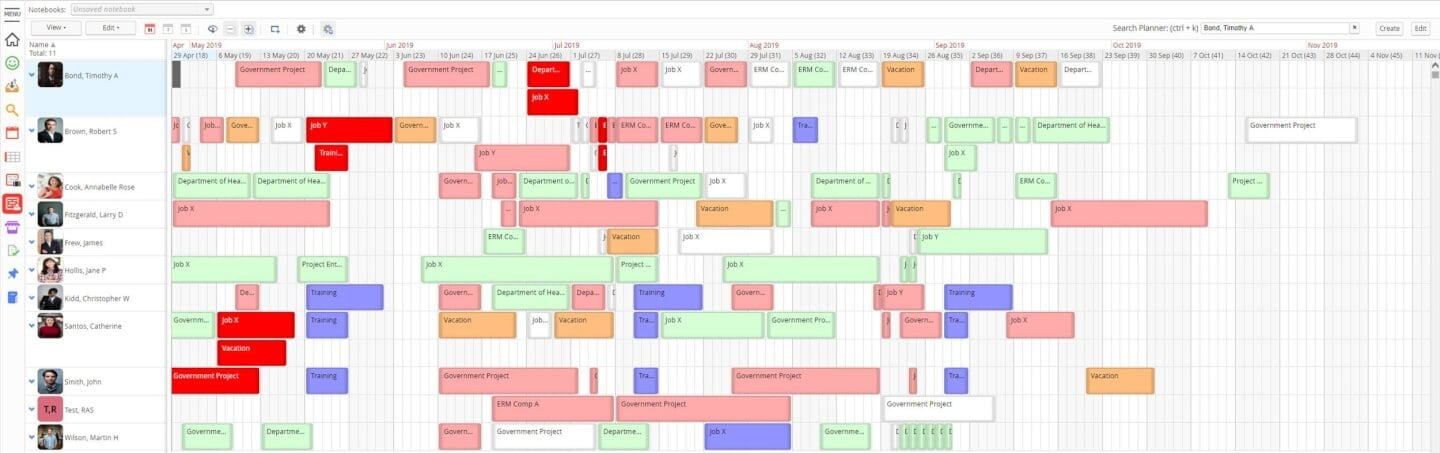
If your team needs resource scheduling with a focus on analytics, Retain is worth a look. It’s designed for organizations that want to dig into utilization, demand, and allocation trends across projects. Retain is especially useful for professional services and enterprise teams that rely on detailed reporting to guide resource planning decisions.
Who Is Retain Best For?
Enterprises that require detailed reporting and analytics to manage resource utilization and business performance.
Why I Picked Retain
What sets Retain apart for resource scheduling is its focus on comprehensive reporting and analytics. I picked Retain because it gives you detailed visibility into resource utilization, capacity, and future demand, which is essential for teams managing complex projects. The platform’s customizable dashboards and exportable reports help you analyze trends and make informed allocation decisions. For organizations that need more than just scheduling, Retain’s reporting depth is a clear advantage.
Retain Key Features
In addition to its reporting strengths, Retain offers several features that support resource scheduling:
- Drag-and-Drop Assignment: Quickly move resources between projects or tasks using a visual interface.
- Multi-Project Calendar: View and manage resource bookings across multiple projects in one place
- Absence and Leave Tracking: Monitor team availability by logging vacations, sick days, and other absences.
- Role-Based Permissions: Control access to sensitive scheduling data by assigning user roles and permissions.
Retain Integrations
Integrations include Microsoft Excel, Microsoft Power BI, Salesforce, SAP, Oracle, Workday, and Microsoft Dynamics.
Pros and Cons
Pros:
- Drag-and-drop organization
- Supports multiple currencies
- Data-rich dashboards
- Easy to duplicate bookings
Cons:
- Displays can get pretty busy
- Search functionality could use improvement

Best for automated and interactive resourcing
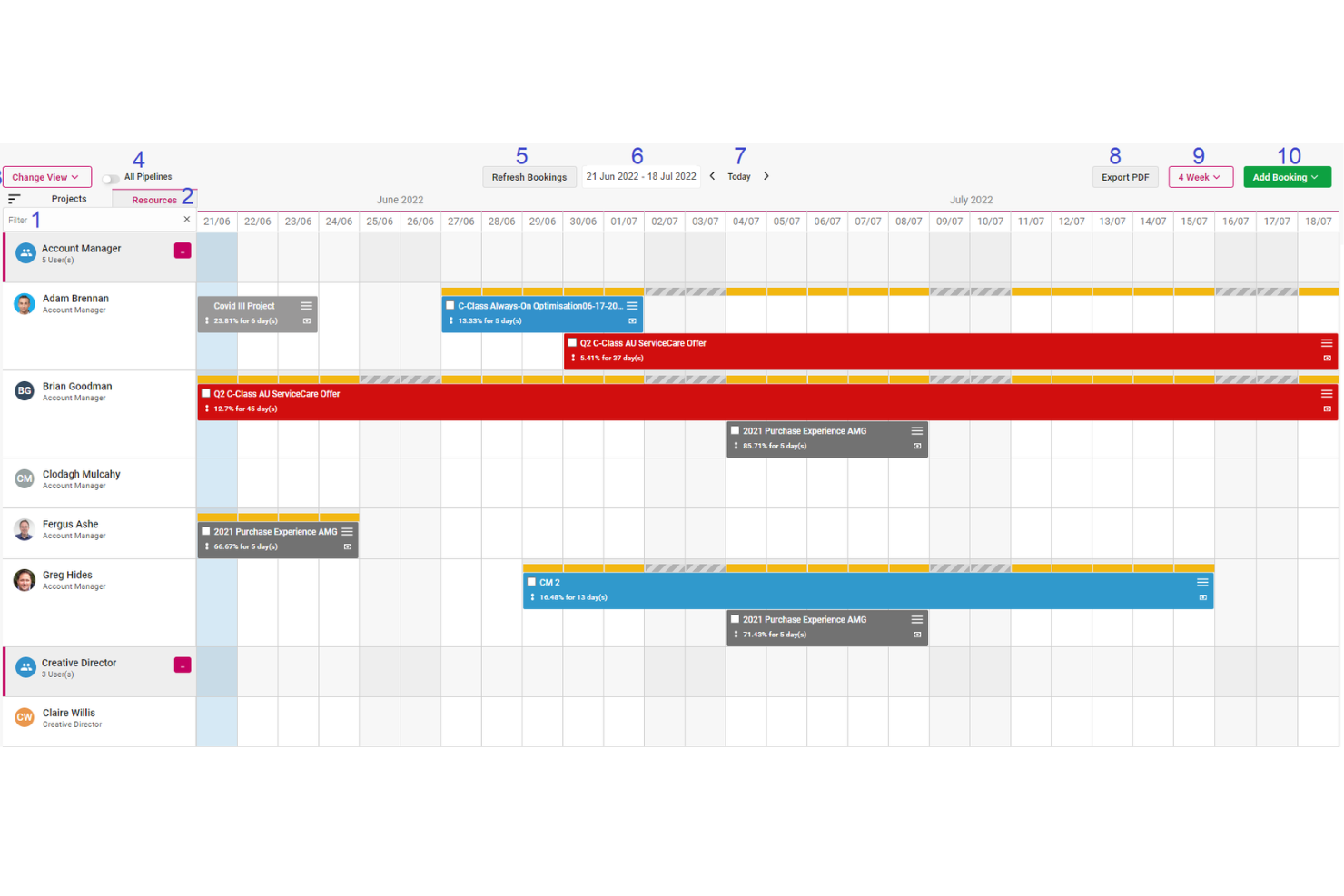
Screendragon is a work management platform designed for marketing, agency, and professional services teams. It combines project management, workflow automation, resource scheduling, financial tracking, and proofing tools to help teams improve operational efficiency and maintain visibility across complex campaigns and client work.
Who Screendragon Is Best For?
Marketing operations teams, in-house creative departments, agencies, and professional services organizations that need structured resource planning, budget oversight, and workflow control across multiple concurrent projects.
Why I Picked Screendragon
One of the main reasons Screendragon stands out is its automated and interactive resource scheduling. The platform can auto-populate schedules directly from scoped staff plans, reducing manual setup and aligning resources with approved budgets from the start. Teams can then adjust allocations using a drag-and-drop interface, with changes reflected in real time. This keeps budgets current and gives leadership immediate insight into resource allocation and financial performance.
Screendragon also offers capacity planning heatmaps that display utilization at both role and individual levels. These visual tools help management spot overbooking or underutilization early, preventing bottlenecks before they disrupt delivery timelines. By clearly showing who is assigned to what and when, teams can forecast more accurately and plan upcoming projects with greater confidence.
Screendragon Features
Features include AI-driven agentic workflows that automate repetitive tasks and support better operational decision-making. Smart forms with conditional logic guide users through required inputs and automatically route information to the appropriate stakeholders. The platform also provides online proofing tools that support markup across multiple media types, version control, and real-time collaboration between internal teams and clients.
Integrations
Integrations include MS Power BI, Slack, MS Teams, Zapier, Google Drive, Trello, Microsoft 365, Box, Jira, Microsoft OneDrive, and PeopleSoft.
Pros and Cons
Pros:
- Integrates various tools like project management and budget tracking
- Good resource planning features
- Can tailor the platform to your specific needs
Cons:
- The platform's depth can lead to complexity
- Time-consuming setup

Best for staffing around client delivery
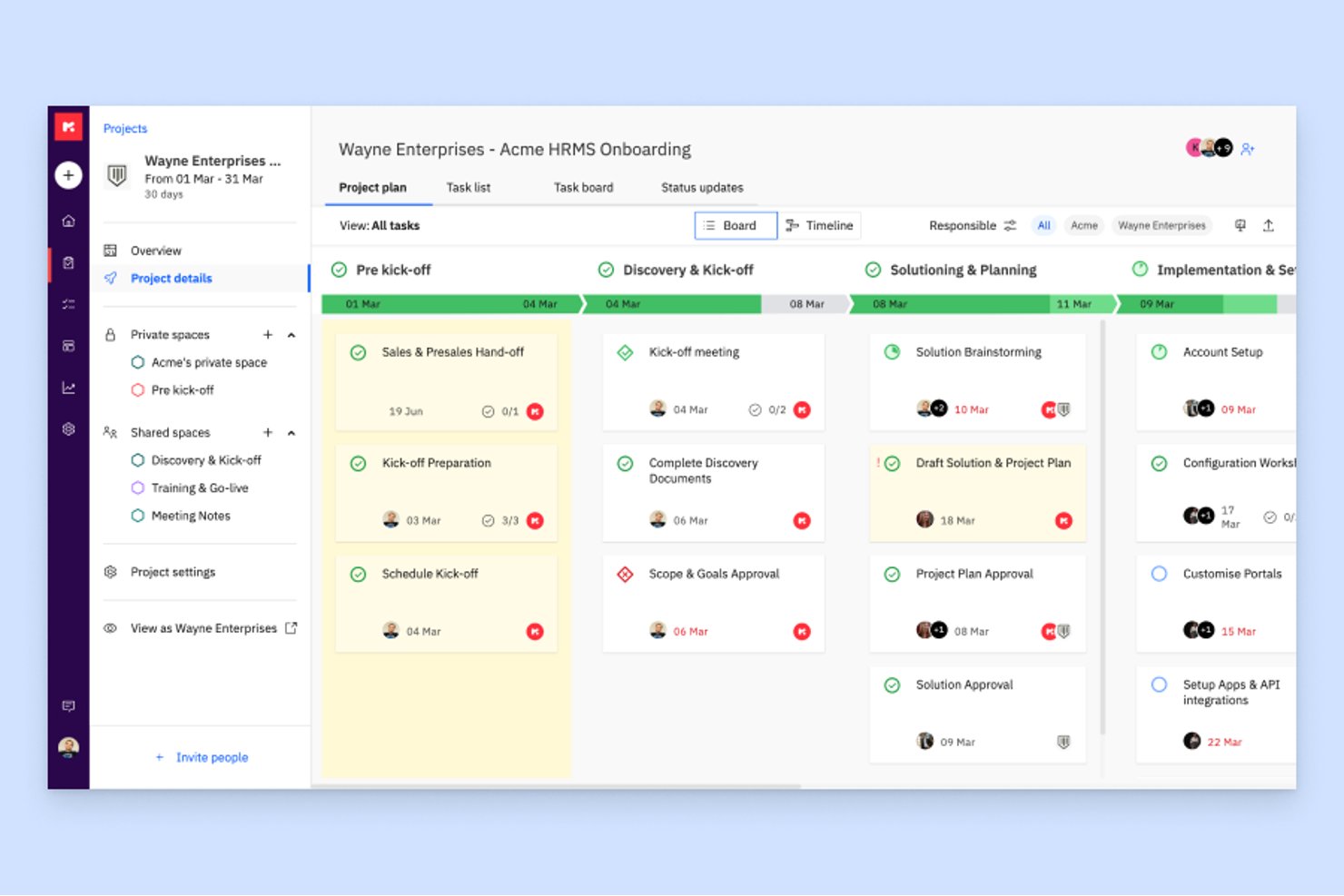
Rocketlane is a professional services automation platform that pairs resource planning, capacity forecasting, skills matching, and utilization tracking with project delivery, time tracking, and financial management.
Who Is Rocketlane Best For?
Rocketlane fits professional services and implementation teams that need to staff projects, track utilization, and manage client delivery in one platform.
Why I Picked Rocketlane
Rocketlane earns its spot on my shortlist because staffing decisions sit right next to the client project they serve. When a sales deal is still pre-Closed-Won, I can soft-book placeholder roles and convert them to hard allocations as it firms up. Resource requests show forecasted utilization and flag over-allocation before I approve anyone. Resource AI's Maximize Margins option then picks the lowest-cost available person using the project's rate card.
Rocketlane Key Features
- Skills matrix: Filter people by skill, proficiency level, region, and role alongside availability searches (Enterprise tier).
- Capacity planning report: Compare allocation demand against available FTE capacity by role, team, or project for up to a year.
- Utilization reporting: Track billable and overall utilization by person, role, and team, with planned-versus-actual hours.
- Resource requests: Raise and approve requests to add people or hours, swap placeholders, or shift allocations.
Rocketlane Integrations
Rocketlane offers documented integrations with Jira, Salesforce, HubSpot, Slack, Google Calendar, Outlook Calendar, NetSuite, Sage, QuickBooks, Xero, Workato, and Zapier. It also provides a REST API and webhooks.
Pros and Cons
Pros:
- Skills filters pair with availability searches
- Placeholder bookings support pipeline forecasting
- Reviewers value cross-project bandwidth visibility
Cons:
- Time-off notices don’t block assignments
- Capacity planning is capped at one year

Wrike
Best for complex projects

Wrike brings advanced resource management to teams handling complex, multi-phase projects with shifting priorities. Project managers in IT, marketing, and professional services use Wrike to coordinate cross-functional work, manage dependencies, and balance workloads across large teams. Its customizable workflows and real-time visibility help you keep projects on track, even as requirements change.
Who Is Wrike Best For?
Organizations managing complex, cross-functional projects that require structured workflows, detailed tracking, and enterprise-grade collaboration.
Why I Picked Wrike
When projects involve multiple teams, shifting deadlines, and complex dependencies, Wrike stands out for its ability to handle that level of complexity. Its workload charts and resource allocation tools let you visualize team capacity and adjust assignments as priorities change. I appreciate how Wrike’s dynamic Gantt charts and task dependencies help you manage overlapping schedules and avoid bottlenecks. These features make Wrike a strong fit for organizations that need to coordinate large, multifaceted projects with many moving parts.
Wrike Key Features
Some other features in Wrike help teams manage resources and projects more efficiently:
- Custom Request Forms: Collect project and resource requests with tailored forms that route work to the right teams.
- Time Tracking: Log hours directly on tasks to monitor effort and compare planned versus actual time spent.
- Document Sharing and Proofing: Upload, share, and review files within tasks, with markup and approval tools built in.
- Automated Workflows: Set up rules to automate task assignments, status updates, and notifications based on project triggers.
Wrike Integrations
Integrations include Salesforce, Microsoft Teams, Google Drive, QuickBooks, Tableau, Power BI, Miro, Adobe Creative Cloud, Google Sheets, and Microsoft SharePoint.
Pros and Cons
Pros:
- Resource request and approvals are easy and well organized
- Good variety of dashboard views to accommodate different user needs
- Building custom dashboards is great for highly specific resource tracking
Cons:
- Best resource tools are limited to the higher level paid plans
- May require additional training for an understanding of the full functionality
New Product Updates from Wrike

Wrike Adds Advanced Filters to Chart View
Wrike introduces new default filters in Chart view, including relative dates, exclusion conditions, multiple filters per field, and status group filtering. These updates help teams refine project data and reporting. For more information, visit Wrike’s official site.
MRPeasy
Best for manufacturer resource planning
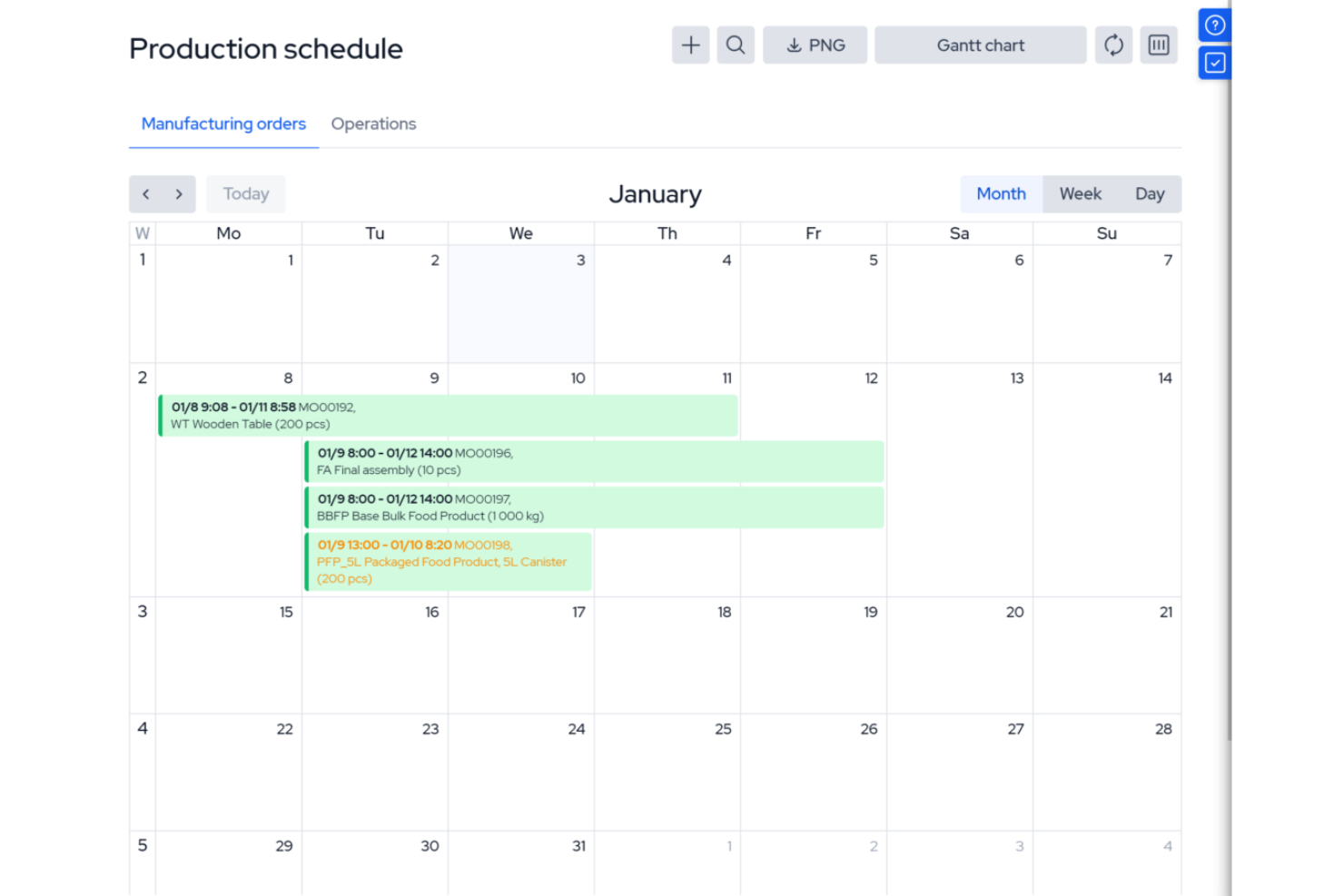
MRPeasy is a manufacturing resource planning (MRP) software, specifically tailored for the manufacturing sector. It integrates with industry processes, offering real-time visibility into production scheduling, inventory management, and operational efficiency. It’s especially useful for operations managers and production planners who want to automate job routing, track materials, and manage shop floor workloads. The platform’s focus on manufacturing resource planning sets it apart from general project scheduling tools.
Who Is MRPeasy For?
Small to mid-sized manufacturers that need integrated production scheduling and resource planning tied to inventory and operations.
Why I Picked MRPeasy
For manufacturers who need more than basic scheduling, MRPeasy offers resource planning tools built specifically for production environments. The platform’s visual production calendar and drag-and-drop job scheduling help you allocate machines, workstations, and labor with precision. I like that MRPeasy automatically factors in material availability and lead times when generating production schedules. This level of manufacturing-specific detail makes it a strong fit for teams managing complex shop floor operations.
MRPeasy Key Features
Some other features that stand out for manufacturers using MRPeasy include:
- BOM (Bill of Materials) Management: Lets you create, edit, and track multi-level BOMs for accurate production planning.
- Shop Floor Reporting: Provides real-time updates from the shop floor on job status and worker activity.
- Inventory Tracking: Monitors raw materials and finished goods across multiple locations.
- Purchase Order Management: Automates the creation and tracking of purchase orders for materials and components.
MRPeasy Integrations
Integrations include Amazon, Xero, WooCommerce, BigCommerce, Crossfire, Dropbox, Google Drive, OneDrive, HubSpot, QuickBooks, ShipStation, Salesforce, Shopify, Zapier, and more.
Pros and Cons
Pros:
- Comprehensive view of resource scheduling
- Automated production planning
- Simple, easy-to-use interface
Cons:
- Limited customizations
- Lack of advanced features due to a simple platform
New Product Updates from MRPeasy
MRPeasy Adds Stocktake for Physical Inventory Counts
MRPeasy adds Stocktake for planning, conducting, and documenting physical inventory counts. This supports both full warehouse counts and cycle counts for selected items. For more information, visit MRPeasy’s official site.
 .

Kantata
Best for people-centric resource scheduling

Kantata is designed for organizations that need to match the right people to the right projects based on skills, availability, and preferences. Professional services teams and consultancies use Kantata to manage resource allocation with a focus on individual strengths and workload balance. Its people-centric approach helps you optimize project outcomes while supporting employee satisfaction and retention.
Who Is Kantata Best For?
People-focused professional services organizations that need to balance resource planning with skills, availability, and project demand.
Why I Picked Kantata
What sets Kantata apart is its focus on aligning people’s skills and interests with project needs. The resource management dashboard lets you see individual availability, skill sets, and utilization rates, making it easier to assign the right person to each task. I like how Kantata’s talent profiles and forecasting tools help you plan for future project demands while considering employee preferences. This people-centric approach supports both project delivery and team satisfaction, which is especially valuable for professional services organizations.
Kantata Key Features
Some other features in Kantata help teams manage resources and projects more effectively:
- Project Portfolio Management: Track multiple projects and their resource needs in one centralized view.
- Role-Based Permissions: Control access to sensitive resource and project data based on user roles.
- Time and Expense Tracking: Capture billable hours and expenses directly within the platform.
- Scenario Planning: Model different resource allocation scenarios to see potential impacts before making changes.
Kantata Integrations
Integrations include Salesforce, SAP, Jira, Xero, BambooHR, Slack, Worday, QuickBooks, HubSpot, and NetSuite.
Pros and Cons
Pros:
- Distinguishes between soft and firm allocation
- Easy capacity management
- Good reporting functionality for resource data
- Resourcing fully integrated with master planning
Cons:
- Custom reports can be difficult to create without training
- Proofing solution is an add-on
New Product Updates from Kantata
Kantata Adds Monthly Fee Tracking and Revenue Recognition Methods
Kantata introduces the Fees per Month tab and two revenue recognition methods based on task estimated hours and task costs. These updates improve financial visibility and revenue calculation flexibility. For more information, visit Kantata’s official site.
 .

Runn
Best for real-time planning
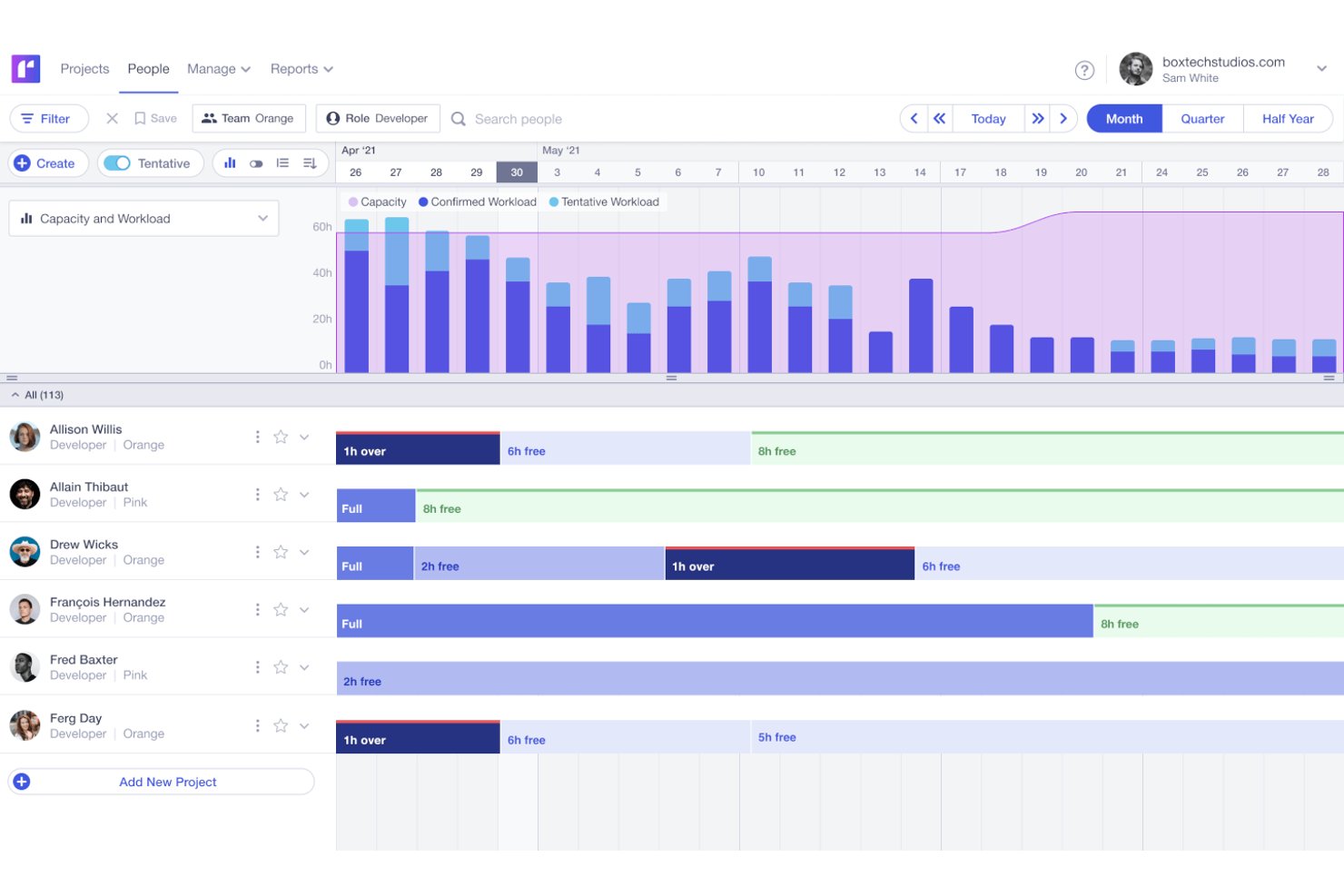
If your team needs to adjust project plans on the fly, Runn gives you real-time visibility into resource availability and workload. This tool is built for agencies, consultancies, and digital teams that juggle shifting priorities and need instant updates when schedules change. Its live planner and forecasting tools help you spot conflicts and make quick decisions as new work comes in.
Who Is Runn Best For?
Project-based teams that need real-time forecasting, scenario planning, and visibility into team capacity.
Why I Picked Runn
What sets Runn apart is its focus on real-time planning, which is essential for teams that need to respond quickly to changing project demands. I picked Runn because its live planner updates instantly as you move bookings or adjust allocations, so you always see the latest resource picture. The tool’s dynamic forecasting lets you model different scenarios and immediately see the impact on capacity and workload. This makes Runn a strong fit for agencies and consultancies that need to keep pace with shifting priorities and client requests.
Runn Key Features
Some other features in Runn that support resource scheduling include:
- Timesheet entry: Team members can log actual hours worked directly in the platform for accurate tracking.
- Public holidays management: Automatically accounts for regional holidays in resource availability calculations.
- Skills tracking: Lets you assign and filter resources based on specific skills or roles.
- API access: Enables you to connect Runn with other tools and automate data flows.
Runn Integrations
Integrations include Harvest, WorkflowMax, and Clockify for importing project, client, and people data and syncing time entries. With Runn’s API, you can build your own integration to send data across your favorite tools.
Pros and Cons
Pros:
- Clean UI that’s easy to use & navigate
- Free version available for 5 users
- Native integrations & API available
Cons:
- Colors are not customisable
- Time tracking requires a Google Chrome extension
Outro software de agendamento de recursos
Segue-se uma lista de ferramentas adicionais para o agendamento de recursos que não entraram na lista principal:
- Resource Guru
For scheduling people and shared assets
- Connecteam
For multi-location shift scheduling
- Mosaic
For proposal-stage staffing forecasts
- Saviom
For multi-dimensional resource scheduling
- Dayshape
For conflict-aware staffing
- monday AI Workspace
For role-based project staffing
- Projectworks
For staffing from won proposals
- eResource Scheduler
For teams needing self-hosted deployment
- Silverbucket
For staffing before projects are won
- Primetric
For staffing around synced employee leave


Avaliações relacionadas de software de agendamento de recursos
Se ainda não encontrou aqui o que procura, consulte estas outras ferramentas relacionadas que testámos e avaliámos:
- Software de gestão de projetos
- Software de agendamento de recursos baseado na Web
- Software de gestão de recursos
- Software de automatização de fluxos de trabalho
- Software de controlo de tempo
- Ferramentas de produtividade
- Software de agendamento de projetos
- Software de gestão de recursos de código aberto
How I Evaluate Resource Scheduling Software
I split my evaluation into three parts, weighting core functionality most: assign people and equipment, view cross-project capacity, and flag overloads. Next, I consider PTO sync or portfolio heatmaps. Finally, I weigh onboarding, support, and pricing value beyond features.
Core Functionality (Table Stakes For This List)
When I'm selecting tools for my list, I score each one on a scale from 0 (does not offer the functionality) to 5 (excels in this area) for each core functionality listed below. I then convert the total into a percentage to help assess each tool's overall fit, with extra weight on any functionalities I’ve deemed essential.
- Resource Assignment (Essential): I look for flexible assignments of people or equipment, with adjustable effort or hours as project needs change.
- Capacity Visualization (Essential): I check whether timeline, calendar, or heatmap views make team availability and workload easy to compare across projects.
- Utilization Tracking: I assess whether usage can be reviewed by person, team, project, and period to spot spare or stretched capacity.
- Conflict Detection: I look for clear warnings when a shared resource is double-booked, ideally before a schedule change is confirmed.
- Multi-Project Scheduling: I evaluate whether managers can view and reallocate shared resources across concurrent projects in one place.
- Skill-Based Matching: I check whether teams can filter available people by skills or roles when staffing upcoming work.
Once I have a list of tools that meet the criteria, I consider what sets each platform apart.
Differentiating Factors (What Sets Vendors Apart)
Here's how I compare and contrast different vendors:
Standout Features
I look for what-if scenario modeling that lets you simulate adding a project or shifting staff before locking in changes—essential when your PMO is weighing competing proposals. Cross-portfolio heatmaps matter just as much; I check whether utilization trends surface across the full book of work, not just one project. I also evaluate how well each tool syncs PTO and leave data into capacity views, since a forecast that ignores approved holidays is wrong on day one.
Beyond Features
I check whether each tool connects to existing project management and finance platforms. A resource plan that doesn't sync with Jira, Asana, or your ERP means someone is manually reconciling allocations and billing data. I also evaluate role-based access controls, since capacity views often expose pay rates, PTO balances, and utilization figures that not every stakeholder should see. Reporting flexibility matters too—I look for dashboards that serve both day-to-day scheduling and long-range capacity conversations with leadership.
Como escolher software de agendamento de recursos
É fácil ficar atolado em listas extensas de funcionalidades e estruturas de preços complexas. Para o ajudar a manter o foco enquanto percorre o seu processo único de seleção de software, apresentamos uma lista de verificação dos fatores a ter em conta:
| Fator | O que considerar |
| Escalabilidade | Esta ferramenta continuará a funcionar para o tamanho da sua equipa daqui a seis meses? Procure soluções que consigam suportar mais utilizadores, projetos e recursos sem configuração adicional. |
| Integrações | A ferramenta sincroniza com as suas ferramentas de gestão de projetos ou registo de tempo? Certifique-se de que se liga ao seu fluxo de trabalho atual para evitar trabalho duplicado. |
| Personalização | Pode ajustar vistas, permissões e etiquetas para se adaptarem ao processo da sua equipa? Evite sistemas rígidos que o obriguem a alterar a forma como já trabalha. |
| Facilidade de utilização | Os membros da equipa conseguem aprender a utilizar o software sem formação intensiva? Uma interface simples e o agendamento através de arrastar e largar ajudam a reduzir os pedidos de suporte. |
| Implementação e integração inicial | Com que rapidez é que a sua equipa pode começar efetivamente a utilizar a ferramenta? Informe-se sobre modelos, orientações ou apoio de integração inicial em direto para evitar longos atrasos na implementação. |
| Custo | O preço corresponde ao seu caso de utilização? Esteja atento a limites relativos a utilizadores, projetos ou vistas de agendamento que possam obrigá-lo a mudar para um nível superior demasiado cedo. |
| Medidas de segurança | Que proteções existem para os dados da sua equipa? Informe-se sobre o acesso baseado em funções, a encriptação de dados e o local onde os dados são alojados. |
| Necessidades de recursos internos | Quem, na sua equipa, será responsável pela configuração e manutenção? Se tiver poucos recursos, escolha uma ferramenta que exija pouca manutenção e tenha um suporte fiável por parte do fornecedor. |
Tendências no software de agendamento de recursos para 2025
Na minha investigação, consultei inúmeras atualizações de produtos, comunicados de imprensa e registos de lançamentos de diferentes fornecedores de software de agendamento de recursos. Eis algumas das tendências emergentes que estou a acompanhar:
- Previsão da carga de trabalho baseada em IA: As ferramentas estão a começar a utilizar IA para prever desequilíbrios na carga de trabalho e recomendar a distribuição de recursos. Isto ajuda os gestores a agir antes de surgirem estrangulamentos.
- Sincronização da disponibilidade em tempo real: Cada vez mais ferramentas sincronizam os calendários das equipas e os horários de ausência em tempo real para apresentar a disponibilidade atualizada. Isto reduz a probabilidade de sobreposição de reservas e ajuda a reagendar rapidamente — especialmente quando associadas a um assistente de agendamento com IA que possa sugerir automaticamente os ajustes ideais.
- Planeamento de cenários para a distribuição de recursos: Algumas ferramentas permitem às equipas criar cenários de recursos do tipo “e se” para testar de que forma as alterações afetam os prazos de entrega. Isto ajuda no planeamento de contingência e nas decisões de contratação.
- Etiquetagem e correspondência detalhadas de competências: Em vez de corresponderem simplesmente pessoas a tarefas com base na função, as ferramentas mais recentes permitem etiquetar os níveis de competências para atribuições precisas. Isto proporciona uma melhor adequação ao projeto e ajuda os colaboradores juniores a desenvolverem-se.
- Despriorização da atribuição manual de tempo: A atribuição manual de horas por dia a cada membro da equipa está a tornar-se menos relevante. Atualmente, as ferramentas privilegiam o agendamento baseado no esforço ou nos resultados, com mecanismos de proteção integrados para evitar o esgotamento.
O que é o software de agendamento de recursos?
O software de agendamento de recursos é uma ferramenta que ajuda as organizações a planear, atribuir e gerir recursos, como pessoal, equipamento ou tempo, em vários projetos.
Garante que os recursos certos estão disponíveis para as tarefas certas no momento certo, reduzindo conflitos e melhorando a eficiência da equipa. As principais funcionalidades incluem frequentemente vistas de calendário, gestão da carga de trabalho e acompanhamento da disponibilidade em tempo real para apoiar um planeamento eficaz dos recursos e a execução dos projetos.
Funcionalidades do software de agendamento de recursos
Ao escolher um software de agendamento de recursos, esteja atento às seguintes funcionalidades principais:
- Agendamento através de arrastar e largar: Permite aos utilizadores atribuir e mover facilmente tarefas numa linha cronológica visual para efetuar atualizações e ajustes rápidos.
- Acompanhamento da disponibilidade em tempo real: Apresenta a disponibilidade atualizada dos recursos através da sincronização dos calendários dos colaboradores e dos horários de ausência.
- Equilíbrio da carga de trabalho: Ajuda a distribuir as tarefas uniformemente pelos membros da equipa para evitar a sobrecarga ou a subutilização.
- Atribuição baseada em competências: Faz corresponder as tarefas aos membros da equipa com base em competências específicas para melhorar os resultados do projeto.
- Previsão e planeamento da capacidade: Prevê as necessidades futuras de recursos com base nos projetos atuais e futuros.
- Planeamento de cenários: Permite aos utilizadores testar diferentes resultados de agendamento sem afetar os planos em vigor.
- Registo de tempo integrado: Regista as horas trabalhadas diretamente na ferramenta para comparar as estimativas com os valores reais.
- Controlo de acesso baseado em funções: Permite aos gestores limitar o que os diferentes utilizadores podem ver e fazer com base nas respetivas funções.
- Relatórios e análises: Fornece dados sobre a utilização dos recursos, os prazos dos projetos e o desempenho da equipa.
- Acesso móvel: Permite aos utilizadores consultar e ajustar os agendamentos em qualquer lugar através de uma aplicação móvel ou de um navegador.
Benefícios do software de agendamento de recursos
A implementação de software de agendamento de recursos pode proporcionar vários benefícios à sua equipa e à sua empresa. Eis alguns que pode esperar:
- Menos conflitos de agendamento: A disponibilidade em tempo real e a sincronização de calendários ajudam a evitar a dupla marcação de pessoas ou o incumprimento de prazos.
- Melhor utilização da capacidade da equipa: O equilíbrio da carga de trabalho e as previsões mostram onde as pessoas estão sobrecarregadas ou têm disponibilidade para mais tarefas.
- Planeamento de projetos mais rápido: As linhas cronológicas de arrastar e largar e a correspondência de competências aceleram a atribuição de tarefas e o planeamento de quem faz o quê.
- Previsões mais precisas: As ferramentas de planeamento da capacidade e de elaboração de relatórios facilitam a previsão das necessidades de recursos e dos prazos de entrega.
- Gestão da mudança mais fácil: O planeamento de cenários permite testar diferentes opções antes de ajustar os agendamentos em vigor.
- Maior visibilidade para os gestores: Os painéis e relatórios mostram como os recursos são utilizados e onde podem surgir problemas.
- Menos trabalho manual: As atualizações automatizadas e o registo de tempo integrado reduzem a necessidade de verificar constantemente o estado das tarefas ou atualizar folhas de cálculo.
Custos & preços do software de agendamento de recursos
A seleção de software de agendamento de recursos exige uma compreensão dos vários modelos de preços e planos disponíveis. Os custos variam consoante as funcionalidades, a dimensão da equipa, os complementos, entre outros fatores. A tabela abaixo resume os planos comuns, os respetivos preços médios e as funcionalidades normalmente incluídas nas soluções de software de agendamento de recursos:
Tabela de comparação de planos de software de agendamento de recursos
| Tipo de plano | Preço médio | Funcionalidades comuns |
|---|---|---|
| Gratuito | $0 | Agendamento básico, recursos limitados, relatórios padrão, apoio da comunidade |
| Básico | $10-20/utilizador/mês | Capacidades de agendamento melhoradas, recursos adicionais, integrações básicas, apoio por e-mail |
| Profissional | $20-40/utilizador/mês | Opções avançadas de agendamento, recursos ilimitados, conjunto completo de relatórios, apoio prioritário por e-mail |
| Empresarial | $40+/utilizador/mês | Integrações personalizadas, opções avançadas de segurança, apoio dedicado, serviços de integração e formação |
Ao escolher um plano, avalie as suas necessidades atuais e pense no crescimento futuro. Um bom plano deve enquadrar-se no seu orçamento e acompanhar o crescimento da sua organização, oferecendo a flexibilidade e as ferramentas necessárias para uma gestão eficiente dos recursos.
Os momentos mais comuns em que uma empresa pode atualizar o seu plano de preços incluem:
- Crescimento da equipa: Mais colaboradores ou departamentos podem precisar de melhores ferramentas de agendamento para gerir uma força de trabalho maior.
- Expansão dos projetos: Mais projetos ou projetos de maior dimensão exigem funcionalidades de agendamento mais avançadas.
- Mais clientes: Uma base de clientes maior precisa de um melhor agendamento, mais personalização e ferramentas de gestão de clientes mais robustas.
- Necessidade de funcionalidades avançadas: Com o tempo, as empresas podem querer funcionalidades como colaboração em tempo real, análise de dados, automatização e integrações de sistemas.
- Expansão geográfica: A gestão de recursos entre regiões ou fusos horários exige frequentemente ferramentas que suportem o agendamento em várias localizações.
Perguntas frequentes sobre software de agendamento de recursos
Encontre respostas às perguntas mais comuns sobre este tema.
Como escolher o software de agendamento de recursos adequado para a minha equipa?
Comece por enumerar as funcionalidades indispensáveis para a sua equipa, como opções de integração, relatórios ou facilidade de utilização. Compare as ferramentas com base nessas necessidades, leia avaliações de utilizadores reais e aproveite os testes gratuitos. Antes de tomar uma decisão, certifique-se de que o software é adequado à dimensão do seu projeto e ao seu fluxo de trabalho.
As ferramentas de agendamento de recursos podem integrar-se com o meu software atual de gestão de projetos?
Sim, a maioria das ferramentas de agendamento de recursos funciona com software popular de gestão de projetos, como o Asana, o Jira ou o Trello. Consulte os detalhes das integrações no site do software ou na documentação de ajuda para confirmar se é compatível com o seu conjunto tecnológico. As integrações permitem poupar tempo, mantendo os dados e os cronogramas sincronizados automaticamente.
Como é que estas ferramentas ajudam a evitar a sobrealocação de recursos ou o esgotamento?
O software de agendamento de recursos avisa quando alguém tem tarefas a mais. Terá acesso a painéis ou gráficos de carga de trabalho que facilitam a identificação de problemas. Algumas ferramentas enviam até lembretes ou alertas, para que possa redistribuir as tarefas e manter cargas de trabalho realistas.
Qual é a melhor forma de passar de folhas de cálculo para um software de agendamento dedicado?
Exporte os dados da sua folha de cálculo e, em seguida, utilize as ferramentas de importação ou configuração disponibilizadas pelo novo software. Organize uma sessão de formação rápida para a sua equipa e comece com um projeto de teste para facilitar a adaptação. Deixe de utilizar gradualmente as folhas de cálculo antigas à medida que todos se adaptam ao novo sistema.
Preciso de um gestor de recursos dedicado para utilizar eficazmente um software de agendamento de recursos?
Não, não precisa de um gestor de recursos dedicado. Os gestores de projeto podem tratar do planeamento de recursos por si próprios, especialmente com ferramentas fáceis de utilizar. Algumas equipas maiores acabam por adicionar um gestor dedicado, mas a maioria dos softwares foi concebida para ser simples de utilizar por qualquer pessoa.