As 10 melhores ferramentas ágeis online para gestão de projetos em 2026

10 Lista das melhores ferramentas Ágeis


As melhores ferramentas Ágeis ajudam-no a planear, agendar e executar sprints sem problemas, mantendo a sua equipa focada e produtiva com menos complicações. Sem a ferramenta certa, terá dificuldades em monitorizar a velocidade da equipa, identificar potenciais estrangulamentos e comunicar com as partes interessadas.
Utilizei os meus 15 anos de experiência em gestão de projetos para avaliar mais de 35 ferramentas Ágeis. Leia abaixo a minha análise de cada ferramenta, das principais funcionalidades e dos casos de utilização. Ajudá-lo-ei a encontrar a ferramenta certa que lhe permite remover facilmente os bloqueios da sua equipa, melhorar a visibilidade e a colaboração nos seus projetos de desenvolvimento de software e acompanhar as cargas de trabalho da equipa.
Why Trust Our Software Recommendations
Our team has been testing and reviewing software since 2012. As project managers ourselves, we know how difficult—and important—it is to choose the right software.
For this guide, we evaluated tools using hands-on testing and independent research, scoring tools using our selection criteria. We also draw on insights from industry thought leaders and practicing project management experts.
Our reviews reflect our human editorial judgment, not a sales pitch.
Expert reviewers:
Tabela de comparação de ferramentas Ágeis
Esta tabela de comparação resume os detalhes de preços das minhas principais escolhas de ferramentas Ágeis:
| Tool | Best For | Trial Info | Price | ||
|---|---|---|---|---|---|
| 1 | Best with customizable AI-powered workflows | Free plan + 14-day free trial + free demo available | From $9/user/month (billed annually) | Website | |
| 2 | Best for backlog prioritization & release management | Free plan available | From $1/user/month (billed annually) | Website | |
| 3 | Best for scaling organizations | Free plan + 14-day trial + demo available | From $10/user/month (billed annually) | Website | |
| 4 | Best for advanced resource management | 14-day free trial | From $10/user/month (billed annually) | Website | |
| 5 | Best agile tool with Kanban boards | Free plan + 14-day free trial available | From €17.50/user/month | Website | |
| 6 | Best for building custom agile workflows | 30-day free trial + free demo available | From $24/user/month | Website | |
| 7 | Best for card-based task lists | Free plan + free trial available | From $5/user/month (billed annually) | Website | |
| 8 | Best for story, epic, and milestone organization | Free plan available | From $8.50/user/month (billed annually) | Website | |
| 9 | Best for software development for agile teams | Free plan + 7-day free trial available | From $8.48/user/month | Website | |
| 10 | Best for flexibility to various agile methodologies | Free plan available (request via email) | From $12.49 project-planning/user/month (billed annually) | Website |


Visão geral das melhores ferramentas Ágeis
Embora existam dezenas de excelentes ferramentas de gestão de projetos Ágeis, apresento aqui uma análise detalhada de cada ferramenta de gestão de projetos Ágeis que entrou na minha lista:

Best with customizable AI-powered workflows
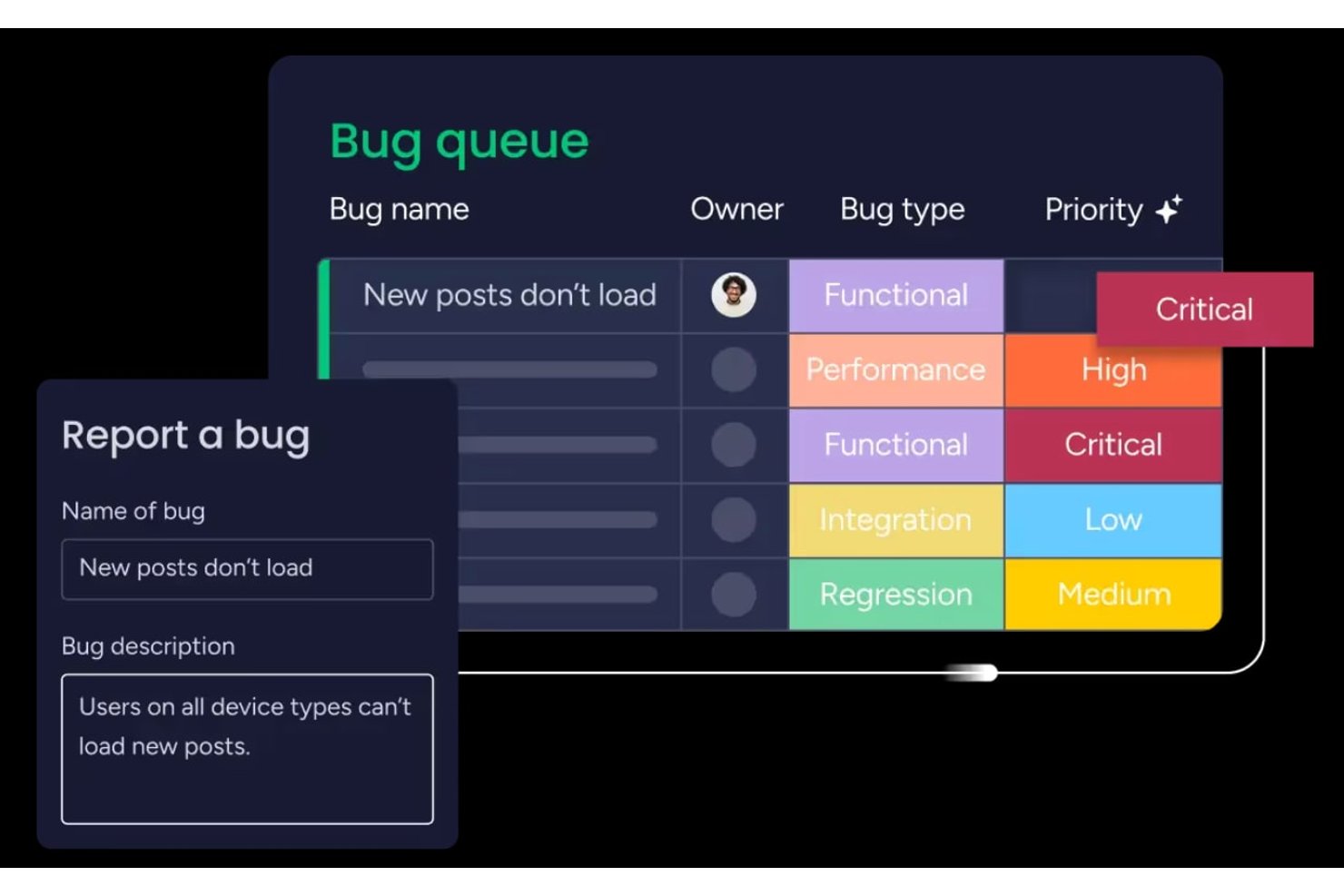
monday AI Workspace is a highly configurable work management platform that combines agile boards, sprint planning, backlog management, and AI-powered workflow automation across development and cross-functional teams.
Who Is monday AI Workspace Best For?
It's a strong fit for mid-sized to enterprise product and development teams that need agile project management alongside cross-functional visibility in a single platform.
Why I Picked monday AI Workspace
monday AI Workspace earns its spot on my shortlist because the AI workflow builder genuinely changes how sprint cycles run. I use it to trigger automations based on task status changes, which keeps board updates from falling on individual team members. The AI sprint summary is another feature I rely on, pulling auto-generated recaps directly from sprint activity so retrospectives start with real data, not manual notes.
monday AI Workspace Key Features
- Sprint management boards: Teams can run iterative sprints, track commitments, and set sprint goals using configurable workflows.
- Hierarchy support for epics and stories: Organize work with nested epics, user stories, tasks, and subtasks, linking dependencies as needed.
- Agile performance dashboards: Visualize burndown charts, velocity metrics, and cumulative flow diagrams in real time.
- Portfolio and roadmap views: Plan releases, manage multiple teams, and visualize project timelines across portfolios.
monday AI Workspace Integrations
monday AI Workspace offers 200+ native integrations, including Jira, GitHub, Slack, Google Workspace, Microsoft Teams, Salesforce, Zendesk, GitLab, Bitbucket, and Gmail. An API is available for custom integrations.
Pros and Cons
Pros:
- Built-in agile dashboards with burndown charts
- Multi-level hierarchy for epics and stories
- Automated sprint boards with AI recommendations
Cons:
- Limitation on custom board views per user
- Lacks advanced SAFe or LeSS modules
New Product Updates from monday AI Workspace
monday AI Workspace Adds Human Approval Routing
monday AI Workspace adds a human-in-the-loop approval block to AI Workflows, sending approval requests and routing workflow paths based on responses. For more information, visit monday AI Workspace's official site.
Best for backlog prioritization & release management
Uncertainty is one of the few certainties in business. Zoho recognized the need for a tool that helps teams embrace change. Zoho Sprints is a product management tool that empowers agile teams to plan, track, and ship the best products to their customers. Whether you are a seasoned agile practitioner or just starting out, Zoho Sprints can fit your needs.
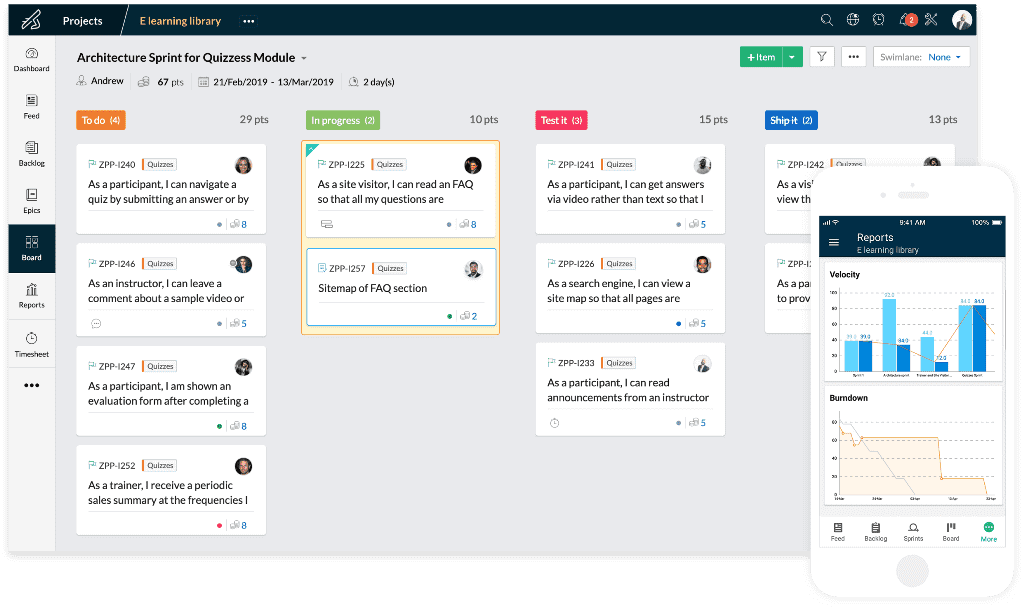
Zoho Sprints helps product teams maintain an organized product backlog and simplifies sprint planning. The drag and drop planning interface allows scrum teams to move work items from the product backlog to the sprint backlog with ease. In keeping with the pioneering spirit of agile, their Scrum Board is highly customizable.
With Zoho Sprints, teams can stay release-ready at all times. From planning to deployment, the tool helps teams navigate the interdependencies of their release cycles. Product managers can track the progress of their epics, sprints, and releases through customizable reports and dashboards. Actionable insights from velocity charts, burnup and burndown reports, and cumulative flow diagrams help teams iterate sprint planning.
Communication and collaboration are crucial in every aspect of life, and they're especially critical when you're working with cross-functional teams. With Zoho Sprints, product teams can collaborate within the context of their work through features like built-in chat, virtual meetings, and an interactive project feed.
Zoho Sprints integrates well with popular code repository management tools like GitHub, GitLab, Bitbucket. DevOps teams can also automate their CI/CD pipelines by integrating with developer tools like Jenkins and Azure DevOps. Teams can leverage webhooks and APIs to build their integrations or browse through a growing library of apps listed on Zoho's marketplace.
The pricing for Zoho Sprints starts at $6 per user (billed monthly). They also offer a free trial and a free forever plan for up to 3 users.
Pros and Cons
Pros:
- Easily turn feed messages into a work item
- Easily schedule meetings for sprint reviews and daily stand-ups
- Robust customization options
Cons:
- WIP settings in Premier plan only
- Doesn’t integrate well with other Zoho apps
- No cumulative by-project timesheets for a user
New Product Updates from Zoho Sprints
Zoho Sprints Expands Forms With Location Tracking and Custom Modules
Zoho Sprints adds location tracking to creation forms and extends public forms to custom modules. These updates give teams more ways to capture context and create records through forms. For more information, visit Zoho Sprints’ official site.
 .

Wrike
Best for scaling organizations

Wrike is an award-winning collection of agile tools for project management suitable for teams of five or more. This highly configurable agile project management software allows users to customize workflows, dashboards, and reports.
Wrike’s simple interface enables users to switch between Kanban boards, interactive drag-and-drop Gantt charts, and workload views to visualize priorities. Wrike features a number of easy-to-use agile templates, backlog management functionalities, spaces for collaboration and feedback, and agile reporting and analytics. Other features include agile folder organization and automated task management.
Wrike’s features can be configured for each individual team’s needs, and the tool also offers a variety of different yet specific solutions depending on the type of team or organization, including solutions for marketing teams and professional service teams.
The software offers more than 400 pre-built native integrations, including popular file management software from Microsoft, Google, and Dropbox, along with sales and marketing software from Salesforce and Marketo.
Pros and Cons
Pros:
- Community feedback voting for roadmap features
- Loads of configurable features
- Holistic, comprehensive task modeling
Cons:
- Commenting system could be better
- Not tailored for small organizations
New Product Updates from Wrike
Wrike Expands Gantt Planning, Approvals, and AI Work Intake
Wrike adds cross-project Gantt dependencies, flexible approval routing, and AI work intake through Wrike MCP. These updates give teams more control over planning, decision-making, and incoming work. For more information, visit Wrike’s official site.

Celoxis
Best for advanced resource management

Celoxis is an enterprise project portfolio management (PPM) platform that supports agile and hybrid project delivery with sprint planning, Kanban boards, Gantt scheduling, resource capacity planning, risk tracking, and real-time dashboards.
Celoxis is a strong fit for mid-size to enterprise teams managing multiple projects across departments that require portfolio visibility along with agile delivery.
Why I Picked Celoxis
I picked Celoxis as one of the best agile tools because its resource management goes well beyond basic assignment. The interactive workload chart lets my team see allocation across every active project simultaneously, so we can catch overloads before they derail a sprint. What I find especially useful is the skill-based allocation combined with capacity planning that compares planned vs. actual effort in real time. Celoxis also accounts for exceptions like vacations and part-time schedules automatically, which means sprint resourcing stays accurate without manual recalculation every cycle.
Celoxis Key Features
- Kanban boards: Visualize and manage sprint tasks across customizable columns with drag-and-drop card movement.
- Interactive Gantt chart: Adjust task timelines and dependencies in real time, with automatic schedule updates when changes are made.
- Inter-project dependency tracking: Link tasks across multiple projects and update schedules automatically when timelines shift.
- Integrated time tracking: Log hours directly against tasks and sprints using built-in timesheets with approval workflows.
Celoxis Integrations
Celoxis offers native integrations with Jira, Salesforce, Trello, Zendesk, Okta, Microsoft Project, Slack, Outlook, Google Drive, and more, with an API available for custom integrations.
Pros and Cons
Pros:
- Supports waterfall, hybrid, and agile workflows
- Offers both cloud and on-premise deployment
- Built-in what-if scenario and trend analysis
Cons:
- Steep learning curve for teams
- Mobile app lacks full desktop feature parity
Best agile tool with Kanban boards
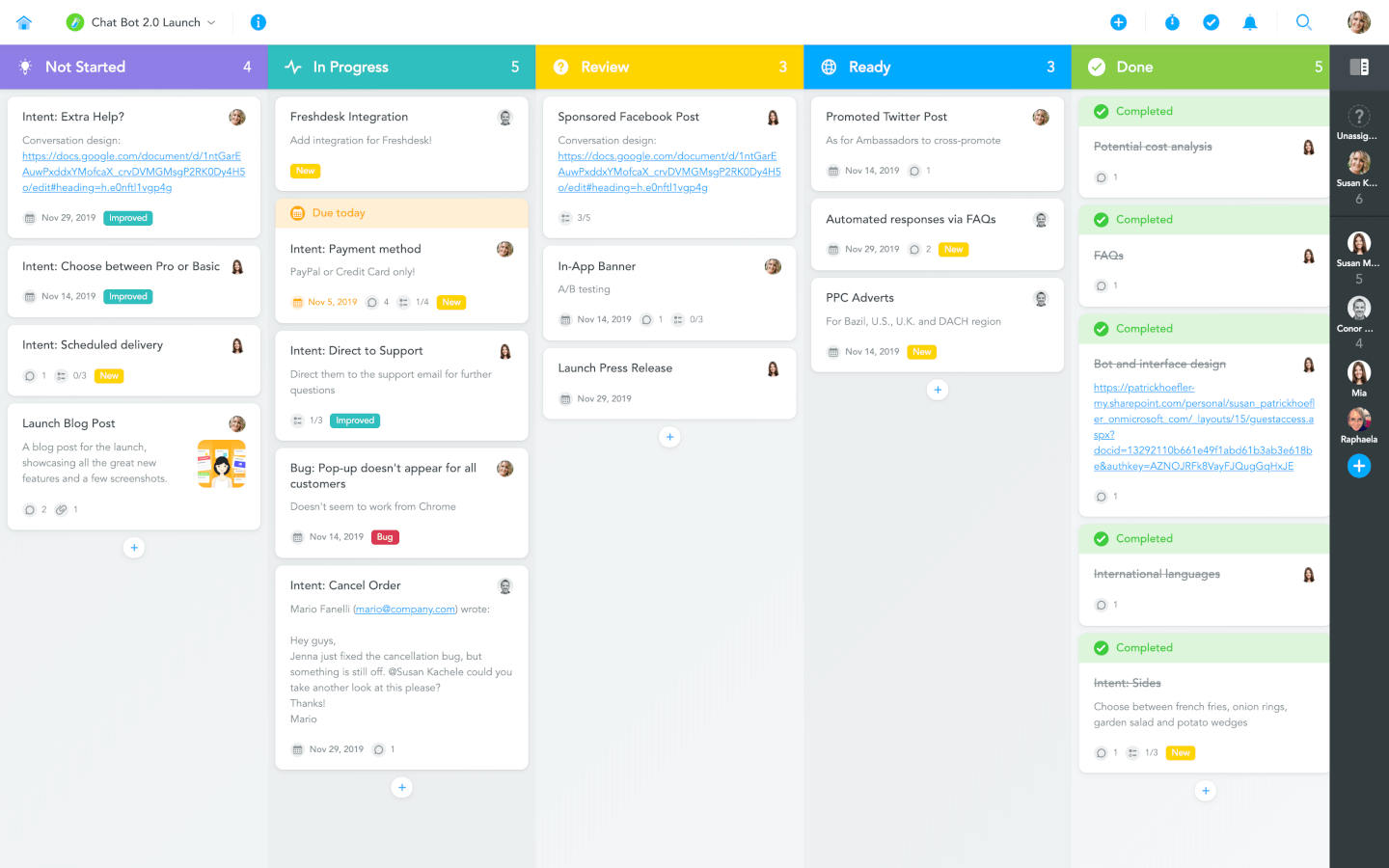
MeisterTask is a beautifully designed and incredibly intuitive Kanban tool. Its Kanban boards can be customized to fit any workflow, from software sprints to sales funnels, and from editorial calendars to your company’s onboarding process. Teams can collaborate on one simple platform, where they can communicate, work together on tasks, and easily track the time they spend on them.
With MeisterTask, you can not only visualize processes but also automate them in various ways. Creating recurring tasks, adding predefined checklists, notifying stakeholders when a task is completed, or ensuring that tasks are assigned and tagged correctly when they are moved to a specific section — all of this can be done automatically. Larger teams will find MeisterTask’s sophisticated roles and permissions management as well as the insights gained through various statistics and reports particularly useful.
MeisterTask offers an extensive online help center, free webinars for new users, and fast email support in case you need to talk to a real person. However, thanks to MeisterTask’s focus on simplicity, even companies who are just getting started on their journey to digital organization are usually able to get productive within minutes after signing up.
MeisterTask integrates with the mind mapping app MindMeister where you can brainstorm and plan with a mind map and then export it onto a Kanban board. MeisterTask comes readily integrated with popular tools such as Slack, Microsoft Teams, GitHub, Zendesk, Harvest, and various email apps. In addition to these native integrations, you can use Zapier or IFTTT to connect your projects with hundreds of other tools.
MeisterTask costs from $8.25/user/month. They also offer a free plan with limited functionality.
Pros and Cons
Pros:
- Easy to create and assign tasks
- Useful, user-friendly dashboard
- Great mobile app
Cons:
- Does not interface with Gmail
- Lack of internal calendar
Kintone
Best for building custom agile workflows

Kintone is an agile project management tool used by teams at Volvo, Japan Airlines, Shiseido, LiveWell Colorado, and over 23,000 organizations worldwide. Their unique approach to project and task management lets you build a wide variety of customizable “apps” using a flexible drag-and-drop interface that lets you easily make changes and improvements to your apps as you go.
Apps can be built either from scratch, using templates, or from existing spreadsheets for data management, business processes, and workflow purposes. Kintone apps can be customized for project management, sales CRM, customer databases, expense reports, shared to-do lists, equipment management, product feedback, and much more.
Kintone lets you build agile project management apps by dragging and dropping elements that you want to see onto the page: rich text fields, date fields, drop-down menus, number fields with built-in calculations, spaces for attachments, user or group selection menus, related data from other apps, tables, and more. Your agile project management solution can look and work however you want it to.
What makes Kintone particularly great for agile project management is that it empowers project managers to track all facets of their project, from individual tasks and project data to workflows and communication—and then use their findings to rapidly improve their processes as they go. Because the end-users are also the app designers, feedback loops are instant, continuous, and actionable.
Kintone lets you expand its capabilities with both free native plugins built by the Kintone team as well as integrations with other tools like Slack, Gmail, Google Calendar, Outlook, Tableau, Dropbox, Salesforce, HubSpot, Eventbrite, WordPress, QuickBooks, MailChimp, and many more through a paid plan with Zapier or via API integrations.
Kintone costs $24/user/month with a minimum requirement of 5 users. They offer a 30-day free trial (no credit card required) and discounted prices for nonprofits and educators. Kintone’s team also offers a free custom app build as part of the free trial process.
Pros and Cons
Pros:
- Data is easy to pull and manipulate into good looking reports
- Admin accounts have access to tons of customization tools
- Flexible pricing that includes special deals for schools and NPOs
Cons:
- No native templates for common project types or documents
- Limited to 5GB/user storage on every pricing tier
- No single-user plan available (minimum 5 users)
Trello
Best for card-based task lists
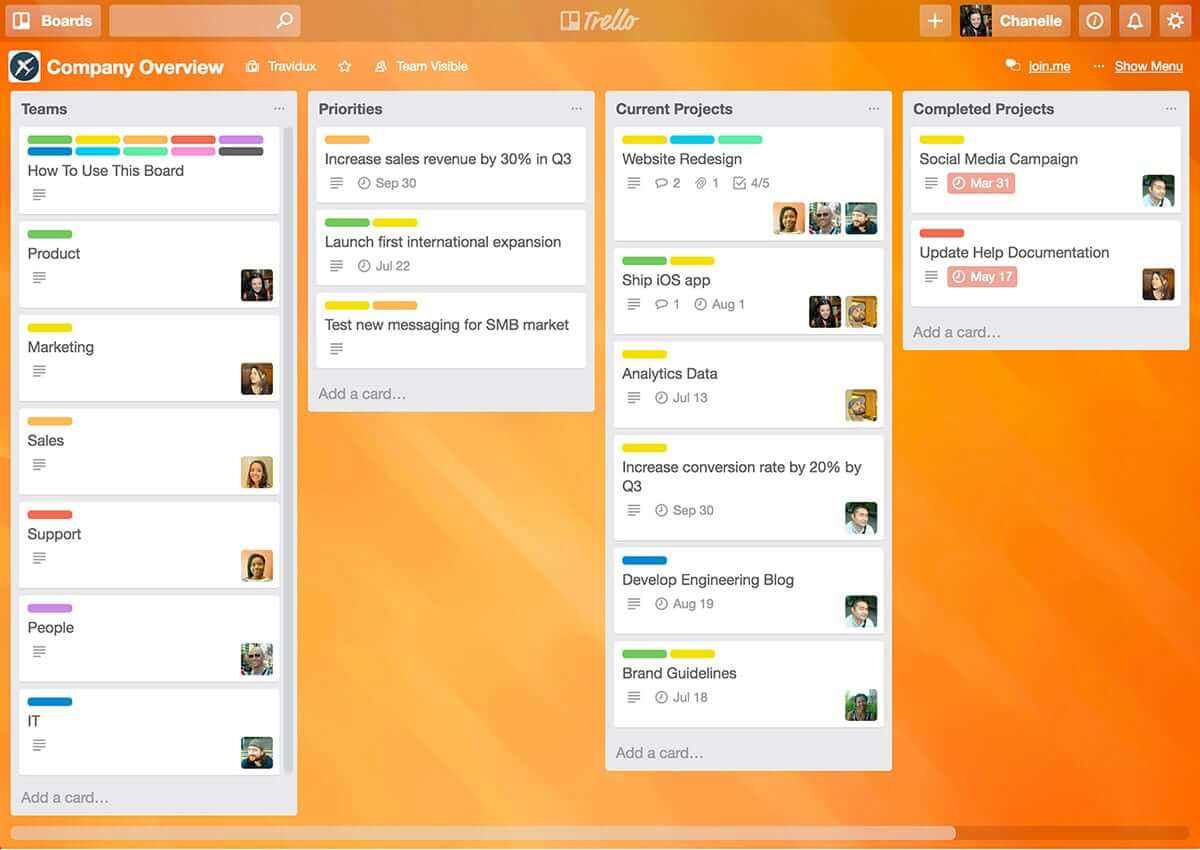
Trello is a simple but powerful agile Kanban tool. If you’re looking for an easy entry into the world of agile tools, Trello is a great option as it’s one of the easiest agile tools to learn and it’s free (or at least it’s freemium!) and has to be considered one of the best free agile tools because it’s so intuitive and simple to use.
Being simple also means that it’s also limited in features and functionality. Out of the box, with the free version, Trello has task management and team collaboration, but it’s pretty limited.
For richer functionality you have to start paying for it – The Business class version gives you app integrations or “Power-Ups" which enable you to bolt on additional functionality such as Github integration, SalesForce, Slack, Gantt charts, timesheets, reporting, and analytics.
Trello is a free agile tool but paid versions cost $9.99/user/month.
Pros and Cons
Pros:
- Color coding of cards according to priority
- Vast capability to customize each card
- Excellent communication and collaboration tracking
Cons:
- No native support for calendar integrations
- Not well suited for large or overly complicated projects
- Board management customization could be improved

Shortcut
Best for story, epic, and milestone organization

Shortcut is an online project management tool designed with software teams in mind. It helps you manage tasks, track progress, and collaborate more effectively. With its roots in agile methodologies, Shortcut focuses on flexibility and efficiency, making it easier for your team to manage projects, sprints, and releases.
One of the key features of Shortcut is its support for agile workflows through its stories, epics, and milestones features. Stories allow your team to break down tasks into manageable pieces, while epics help group related stories together for bigger goals. Milestones give you an easy way to track project phases and major deadlines. This structure gives your team clear visibility into progress and priorities at every level of the project.
Shortcut also provides burndown charts and iteration planning tools, which are vital for teams working in sprints. With burndown charts, you can monitor how much work remains in your sprint and make adjustments as needed. The iteration planning tools let you organize and adjust work on the go, ensuring your team is always ready for the next sprint.
Integrations include Slack, GitHub, GitLab, Figma, Codestream, Bitbucket, Notion, Loom, Dailybot, Plecto, LinearB, Lambda Test, Testlodge, Google Calendar, Sentry, FireHydrant, and Vanta.
Pros and Cons
Pros:
- Automates and manages workflows
- Provides clear visualization of project progress
- Supports real-time collaboration
Cons:
- Fewer options for teams not using Agile, Scrum, or Kanban methodologies
- May be too feature-rich for less complex projects
Jira
Best for software development for agile teams

Jira is a household name, and arguably the big daddy in the world of agile tools. What started out as a bug and issue tracking system is now complete with features to make Jira a fully-fledged agile tool offering fully-featured task management with agile task boards, team collaboration, and reporting.
With Jira you can manage a variety of different projects (e.g. Scrum, Kanban, Traditional project management for non-development projects), and Jira is flexible in how it can be configured allowing for unique workflows and processes so you’re able to use an out-of-the-box workflow or create one to match the way your team works.
The power of Jira is its flexibility and integrations. With the suite of other Atlassian tools, including Confluence and HipChat you can connect Jira to Bitbucket or GitHub and provide your team with end-to-end traceability, from backlog to deployment. With more than 2,000 add-ons in the Atlassian Marketplace, you can find just about any customization and extension for Jira to fit just about any use case.
Pros and Cons
Pros:
- Houses all historical works for future reference
- Can create tasks, sub-tasks, spikes, and epics
- Single view for all user stories
Cons:
- No mass-editing and scripting (rename a whole set of labels, etc.)
- Needs better linking within stories and tasks
- Limited collaboration features
Nutcache
Best for flexibility to various agile methodologies
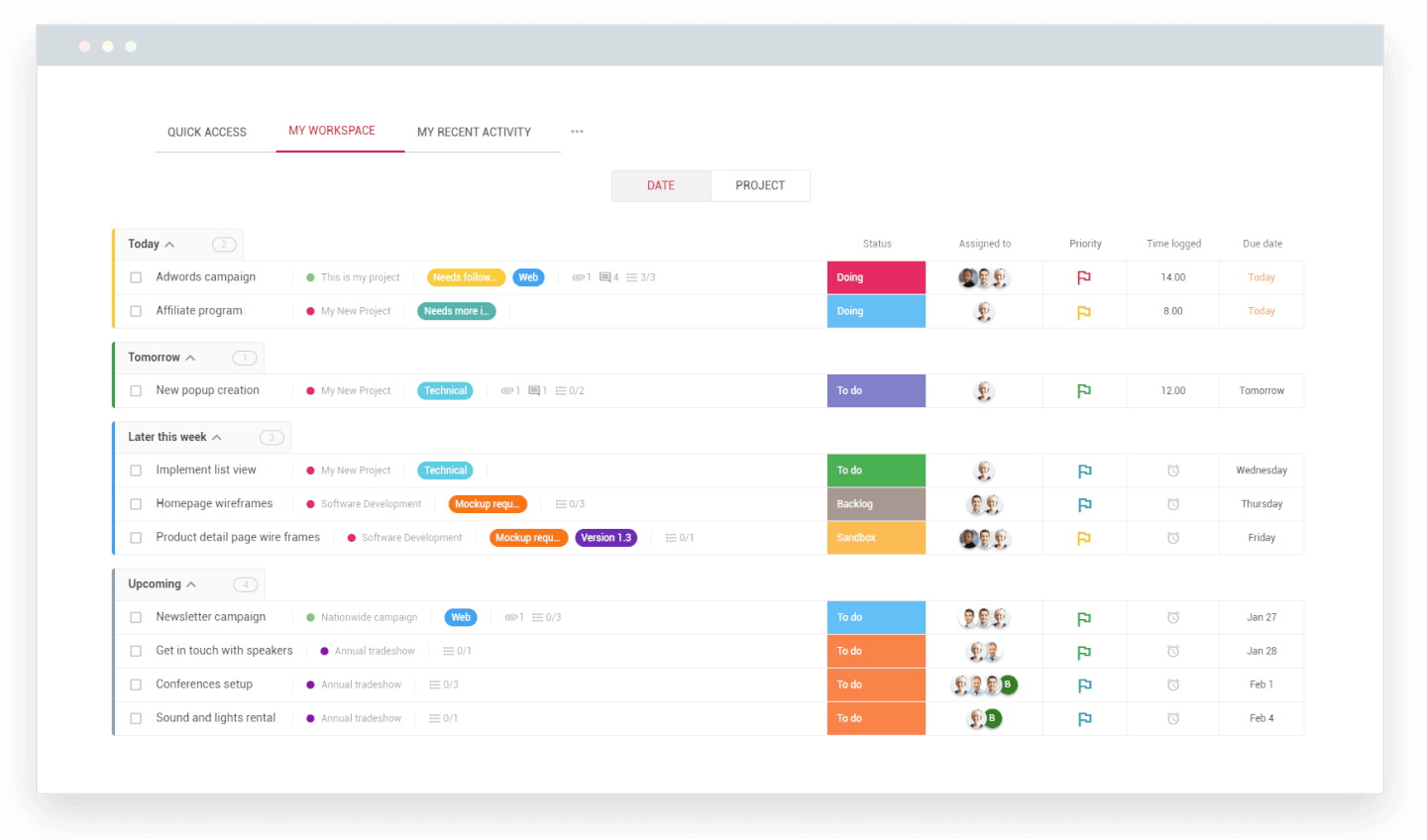
Nutcache is a project management tool designed to plan, track, and manage all aspects of your project using a sophisticated toolbox of color-coded schedules, task organization queues, and data reporting. Users can organize with Agile or Scrum project management, depending on your preferences.
Use the Gantt chart to plan, track, and visually organize your tasks with easy drag-drop-and-click editing techniques. Nutcache offers tools to prioritize and focus on critical tasks: build custom workflows and attach multiple assignees to a task, break down each phase of your project, make adjustments to reschedule your tasks, and visualize project deadlines.
Integrations include Dynacom Accounting, PayPal, 2Checkout, Stripe, Authorized.Net, QuickBooks Online, Google Sign In, Google Drive, GitHub, Slack, and hundreds of other apps through Zapier.
Nutcache costs from $6/user/month with a “Pro” plan that requires 5 users.
Pros and Cons
Pros:
- Easy to integrate new employees
- Great time tracking functionality
- Easy to use
Cons:
- Need more third party integrations
- Complicated security levels for employees
Outras ferramentas Ágeis
Eis algumas outras ferramentas que não chegaram ao topo, mas que continuam a merecer a sua consideração.
- Taiga.io
Agile tool for user experience and interface
- Planview AdaptiveWork
For hybrid methodologies
- Easy8
For built-in financial management features
- ProjectManager
Agile reporting tool
- Favro
For team collaboration
- Businessmap
For project portfolio software
- Ravetree
For enterprises
- SAM9000
For AI-powered agile features
- Miro
For a highly flexible whiteboard platform
- ClickUp
For visual sprint planning
- Smartsheet
For managing agile workflows
- Hubstaff
For project tracking
- Hive
For flexible views
- Lucidspark
For agile planning on an infinite canvas
- airfocus
For prioritizing agile projects
- GoodDay
For blending flexibility with structure
- Yanado
For team productivity
- Forecast
For Scrum methodologies
- Scoro
For general business management software
- Hygger
For making product roadmaps
- Zenhub
For integration with GitHub
- OpenProject
For open source agile project management software
- Kanbanchi
For integration with Google Drive
- Conceptboard
For keeping teams in sync across time zones and departments
- GoodDay
For tracking work in progress
- AgileCRM
One of the few agile tools not designed for software dev teams—this is a CRM, project management, marketing, and customer support tool combined into one and designed to support agile practices across a variety of industries
- GitScrum
A simple low-cost agile management software for growing businesses
- Hansoft
For portfolio and product backlog management tools
- Phabricator
For code reviews and testing


How I Evaluate Agile Tools
I look at every agile tool in two passes: first, whether it can actually run a sprint—backlog, boards, burndowns—then what sets it apart for scaled teams or engineering-heavy workflows.
Core Functionality (Table Stakes For This List)
When I'm selecting tools for my list, I rank each one on a scale from 0 (does not offer the functionality) to 5 (excels in this area) for each core functionality listed below. Then, I calculate the tool's total score into a percentage. Each tool needs to achieve a minimum total score of 65% to be considered for inclusion.
- Backlog Management: I evaluate how each tool handles backlog creation, ranking, and grooming—like dragging stories into priority order before sprint planning or bulk-editing story points across an epic.
- Sprint Planning & Execution: Each tool should let teams define sprint goals, set capacity, and commit to a scope of work, similar to how Jira and Azure DevOps structure their sprint workflows.
- Agile Boards (Scrum/Kanban): I look for configurable boards with custom columns, WIP limits, and swimlanes—the kind of setup a team needs to run Kanban for ops work and Scrum for product delivery side by side.
- Agile Reporting & Metrics: The tool should offer burndown charts, velocity tracking, and cumulative flow diagrams so a Scrum Master can spot scope creep mid-sprint or a PMO director can compare velocity across squads.
- User Story & Epic Hierarchy: I check whether work items support multi-level structures—epics containing features containing stories—with dependency links that surface blockers across teams.
- Release & Roadmap Planning: Teams need to map sprints to releases and visualize delivery timelines, so I look for version management and roadmap views that connect daily sprint work to quarterly goals.
Once I have a list of tools that meet this criteria, I consider what sets each platform apart.
Differentiating Factors (What Sets Vendors Apart)
Here's how I compare and contrast different vendors:
Standout Features
Developer tool integrations matter a lot here. A two-way sync between your board and GitHub or GitLab means commits and pull requests automatically update story status—no manual tab-switching. Workflow automation is another area I evaluate closely, since rules that auto-assign stories or transition cards on merge save Scrum Masters hours of housekeeping each sprint. For larger organizations, I also check whether the tool natively supports scaled frameworks like SAFe, where teams need shared backlogs and program increment planning across multiple squads.
Beyond Features
Scalability is one of the first things I evaluate. A tool that works for a single Scrum team of eight may fall apart when you're coordinating 20 squads across a portfolio. Pricing structure matters just as much—some vendors lock sprint reporting or advanced boards behind enterprise tiers, which changes the math for mid-size teams. I also consider security and compliance posture, especially SSO support, role-based permissions, and audit logging, since PMO directors in regulated industries need those controls before they'll even run a pilot.
Como escolher ferramentas Ágeis
É fácil ficar sobrecarregado com listas extensas de funcionalidades e estruturas de preços complexas. Para o ajudar a manter-se focado enquanto percorre o seu processo específico de seleção de software, apresentamos uma lista de fatores a ter em conta:
| Fator | O que considerar |
|---|---|
| Escalabilidade | Certifique-se de que a ferramenta cresce de acordo com as necessidades da sua equipa. Procure funcionalidades como capacidade de projetos, relatórios avançados e suporte para equipas grandes à medida que os seus fluxos de trabalho se expandem. |
| Integrações | Verifique se a ferramenta se liga facilmente às plataformas que já utiliza, como Jira, Slack ou Trello, para simplificar o seu fluxo de trabalho. |
| Personalização | Escolha ferramentas que lhe permitam adaptar fluxos de trabalho, painéis e relatórios aos processos e objetivos específicos da sua equipa. |
| Facilidade de utilização | A interface deve ser intuitiva para que a sua equipa possa adotar rapidamente a ferramenta, sem curvas de aprendizagem acentuadas ou formação extensa. |
| Orçamento | Procure preços transparentes que se enquadrem nas suas limitações financeiras, seja através de uma tarifa fixa, de um custo por utilizador ou de planos escalonados flexíveis. |
| Medidas de segurança | Dê prioridade a ferramentas com funcionalidades como encriptação de dados, acesso baseado em funções e conformidade com normas como a ISO ou o RGPD, para proteger informações sensíveis. |
| Funcionalidades de colaboração | Certifique-se de que a ferramenta oferece funcionalidades de colaboração em tempo real, como quadros de equipa, vistas partilhadas de tarefas e comentários, para manter todos alinhados. |
| Capacidades de elaboração de relatórios | Procure funcionalidades integradas de análise ou elaboração de relatórios para acompanhar eficazmente o desempenho da equipa, o progresso das tarefas e os prazos. |
Tendências nas ferramentas Ágeis
Na minha investigação, recolhi inúmeras atualizações de produtos, comunicados de imprensa e registos de lançamentos de diferentes fornecedores de ferramentas ágeis. Eis algumas das tendências emergentes que estou a acompanhar:
- Informações baseadas em IA: As ferramentas estão a utilizar IA para analisar o desempenho das equipas, prever estrangulamentos e oferecer sugestões para melhorar os fluxos de trabalho. Por exemplo, algumas plataformas fornecem recomendações para o planeamento de sprints com base em dados históricos.
- Retrospectivas de sprints avançadas: As ferramentas de retrospectiva estão a tornar-se mais interativas, oferecendo análises e informações visuais para ajudar as equipas a identificar padrões e a melhorar sprints futuros. Os fornecedores estão a adicionar modelos, sondagens e acompanhamento do sentimento para tornar as retrospectivas mais eficazes.
- Foco nos fluxos de trabalho híbridos: As ferramentas estão a adaptar-se tanto a equipas ágeis como não ágeis, através do suporte a fluxos de trabalho híbridos. Por exemplo, as plataformas permitem agora que os utilizadores alternem entre as vistas Kanban, Gantt e de lista, de modo a acomodar diferentes necessidades dos projetos.
- Funcionalidades de colaboração em tempo real: As ferramentas de colaboração ágil estão a apostar cada vez mais na colaboração em direto, com funcionalidades como quadros brancos na aplicação, edição de tarefas em tempo real e comentários em direto, para manter as equipas alinhadas sem terem de mudar de ferramenta.
- Acompanhamento da sustentabilidade: Alguns fornecedores estão agora a incorporar funcionalidades para acompanhar métricas de sustentabilidade nos projetos, como o consumo de energia, os resíduos ou o consumo de recursos, alinhando as práticas ágeis com os objetivos de sustentabilidade da organização.
O que são ferramentas ágeis?
As ferramentas ágeis são um tipo de software de gestão de projetos que ajuda as equipas a gerir projetos utilizando métodos ágeis, como Scrum ou Kanban. Estas ferramentas disponibilizam funcionalidades como quadros de tarefas, acompanhamento do backlog, planeamento de sprints e atualizações sobre o progresso. Os gestores de projeto, os programadores e as equipas de produto utilizam ferramentas ágeis (ou ferramentas Scrum específicas) para manter o trabalho organizado, adaptar-se rapidamente às alterações e comunicar melhor.
Se precisa de manter os projetos a avançar sem problemas e de responder rapidamente quando as coisas mudam, o software de gestão ágil de projetos torna tudo isso muito mais fácil.
Funcionalidades das ferramentas ágeis
Ao selecionar ferramentas ágeis, procure as seguintes funcionalidades essenciais:
- Planeamento de sprints: Permite às equipas planear, dar prioridade e atribuir tarefas para cada sprint, garantindo que os objetivos são claros e alcançáveis.
- Quadros Kanban: Permitem visualizar os fluxos de trabalho e o progresso das tarefas, ajudando as equipas a gerir o trabalho em curso e a identificar estrangulamentos. Encontre mais software Kanban e alternativas ao Trello aqui.
- Gráficos de burndown: Acompanham o trabalho restante em relação ao tempo, ajudando as equipas a medir o progresso e a prever a conclusão do sprint.
- Gestão do backlog: Organiza e estabelece prioridades para tarefas, histórias de utilizador e problemas, mantendo o projeto alinhado com os objetivos.
- Acompanhamento da velocidade: Analisa o desempenho da equipa ao longo dos sprints, ajudando a planear as cargas de trabalho e a definir expectativas realistas. Utilize ferramentas de acompanhamento ágil para calcular e acompanhar a velocidade.
- Colaboração em tempo real: Permite que os membros da equipa trabalhem em conjunto através de atualizações em direto, edições de tarefas e comentários.
- Fluxos de trabalho personalizados: Permite às equipas adaptar as etapas e os processos das tarefas às necessidades específicas dos seus projetos.
- Mapeamento de dependências: Destaca as relações entre tarefas para garantir que as dependências críticas são geridas de forma eficaz.
- Ferramentas de retrospectiva: Fornecem formas estruturadas de avaliar sprints concluídos e identificar áreas de melhoria.
- Afetação de recursos: Ajuda a atribuir membros da equipa a tarefas, equilibrando as cargas de trabalho e evitando compromissos excessivos.
Benefícios das ferramentas ágeis
A implementação de ferramentas ágeis proporciona vários benefícios à sua equipa e à sua empresa. Eis alguns dos benefícios que pode esperar:
- Melhor colaboração da equipa: Permite a comunicação em tempo real e a partilha de tarefas, para que todos se mantenham alinhados com os objetivos do projeto.
- Entrega mais rápida dos projetos: Ajuda as equipas a dividir o trabalho em iterações e a acompanhar o progresso para cumprir os prazos de forma eficiente.
- Melhor definição de prioridades das tarefas: Funcionalidades como a gestão da lista de pendências permitem às equipas concentrarem-se em tarefas de elevado valor e reduzirem o esforço desperdiçado.
- Maior visibilidade: Ferramentas como os quadros Kanban e os gráficos de trabalho restante fornecem informações claras sobre o progresso das tarefas e os estrangulamentos.
- Maior flexibilidade: Os fluxos de trabalho personalizáveis permitem às equipas ajustar os processos de acordo com os requisitos e as alterações do projeto.
- Decisões baseadas em dados: As funcionalidades de análise e elaboração de relatórios ajudam as equipas a acompanhar o desempenho e a identificar áreas de melhoria.
- Cargas de trabalho equilibradas: As ferramentas de alocação de recursos garantem que os membros da equipa não ficam sobrecarregados, melhorando a produtividade e a motivação.
Custos e preços das ferramentas ágeis
A seleção de ferramentas ágeis exige uma compreensão dos vários modelos de preços e planos disponíveis. Os custos variam consoante as funcionalidades, a dimensão da equipa, os complementos e outros fatores. A tabela abaixo resume os planos mais comuns, os seus preços médios e as funcionalidades normalmente incluídas nas soluções de ferramentas ágeis:
Tabela de comparação de planos para ferramentas ágeis
| Tipo de plano | Preço médio | Funcionalidades comuns |
|---|---|---|
| Plano gratuito | $0/utilizador/mês | Acompanhamento básico de tarefas, quadros Kanban, integrações limitadas e ferramentas de colaboração da equipa |
| Plano pessoal | $5-$15/utilizador/mês | Gestão de tarefas, fluxos de trabalho personalizados, organização da lista de pendências, relatórios limitados e suporte prioritário |
| Plano empresarial | $15-$35/utilizador/mês | Planeamento de iterações, relatórios avançados, alocação de recursos, mapeamento de dependências e integrações com ferramentas de terceiros |
| Plano empresarial avançado | $35+/utilizador/mês | Funcionalidades de segurança avançadas, permissões baseadas em funções, escalabilidade para equipas de grandes dimensões, análise personalizável e suporte dedicado |
Perguntas frequentes sobre ferramentas ágeis
Encontre respostas para perguntas comuns que outras pessoas fazem sobre este tópico.
A metodologia ágil é melhor do que a metodologia em cascata?
Não seria a primeira pessoa a fazer esta pergunta, uma vez que este é um dos grandes debates na comunidade de gestão de projetos. E, em vez de dizer que uma é melhor do que a outra, ambas têm tipos de projetos para os quais são mais adequadas.
Uma metodologia em cascata exige que defina os requisitos no início do projeto e, depois, execute o projeto do princípio ao fim. Uma metodologia ágil centra-se mais em partes menores do trabalho e numa iteração que recebe constantemente feedback do cliente.
Por isso, deve analisar o tipo de projeto que está a executar e decidir qual é a metodologia mais adequada. Se estiver a gerir um projeto de desenvolvimento, provavelmente irá optar pela metodologia ágil. Uma campanha de marketing nas redes sociais beneficiará provavelmente de uma abordagem em cascata.
O que é uma metodologia ágil?
Ágil não é, na realidade, uma metodologia, mas sim um conjunto de princípios para o desenvolvimento de software. Os princípios da metodologia ágil são:
- Indivíduos e interações acima de processos e ferramentas
- Software funcional acima de documentação abrangente
- Colaboração com o cliente acima da negociação de contratos
- Resposta à mudança acima do cumprimento de um plano
Exemplos de metodologias ágeis são Scrum, Kanban, Scrumban e enxuta. Embora todas sigam estes princípios, oferecem uma abordagem própria à forma de realizar o trabalho.
O que é a metodologia Scrum?
As ferramentas ágeis são um tipo de software de gestão de projetos que ajuda as equipas a gerir projetos utilizando métodos ágeis como Scrum ou Kanban.Scrum é uma metodologia com um conjunto de princípios e um processo para melhorar a entrega. No desenvolvimento de software, o Scrum é uma das estruturas mais populares para aplicar os princípios da metodologia ágil. Inclui um conjunto de cerimónias e funções do Scrum para apoiar o processo. O objetivo é melhorar a comunicação, o trabalho em equipa e a velocidade de desenvolvimento. Sprints, Scrums (ou reuniões rápidas), retrospeções, listas de pendências e gráficos de trabalho restante são todos elementos do Scrum.
O que é a estrutura SAFe?
Introduzida formalmente em 2007, a Estrutura Ágil à Escala (SAFe) é um sistema para implementar práticas ágeis, enxutas e de DevOps em grande escala. Pode ser utilizada por organizações que utilizam estruturas ágeis como Scrum ou enxuta, ou por organizações que procuram uma forma de expandir os seus processos de DevOps para apoiar a organização.
Quais são as ferramentas utilizadas nas metodologias ágeis?
As ferramentas para metodologias ágeis podem ser utilizadas de várias formas, dependendo da maneira como está a aplicar a sua abordagem orientada para a metodologia ágil. As suas ferramentas podem incluir:
- Listas de pendências: Dê prioridade e redefina a prioridade de histórias de utilizador e erros com cartões de pendências de arrastar e largar.
- Quadros Kanban ou Scrum: Visualize todas as histórias de utilizador com cartões que apresentam as tarefas, os responsáveis e os estados numa sprint.
- Faixas ou colunas de tarefas: Separe épicos, responsáveis, projetos e muito mais, movendo cartões de arrastar e largar entre faixas.
- Fluxos de trabalho: Crie fluxos de trabalho personalizados que atualizam automaticamente os problemas com base em eventos específicos. Consulte o software de diagramas de fluxos de trabalho.
- Sprints: Utilize a lista de pendências para estimar histórias e definir tarefas e prioridades para as sprints.
- Scrums diários ou reuniões rápidas: Utilize o painel para obter uma visão geral do progresso e preparar-se para os Scrums ou reuniões rápidas.
- Gráfico de trabalho restante: Gira o progresso do projeto acompanhando o trabalho total restante na sprint ou no épico.
- Gráfico de velocidade: Acompanhe a velocidade da sua equipa e faça previsões precisas monitorizando a quantidade de trabalho concluída em cada sprint.
- Ferramentas de desenvolvimento de software ágil: Plataformas de desenvolvimento como Jira, GitHub e Linx.
O Jira é a melhor ferramenta ágil?
Não. Penso que o Jira (parte da empresa dropdown#toggle” data-dropdown-placement-param=”top” data-term-id=”287933594″>Atlassian) é a ferramenta mais popular, mas não a melhor. Principalmente porque a ferramenta não foi concebida para a metodologia ágil. Foi originalmente criada como uma ferramenta de acompanhamento de problemas para programadores de software e, mais tarde, tornou-se uma ferramenta de gestão de projetos.
Infelizmente, não existe uma resposta definitiva para esta pergunta, uma vez que as necessidades de cada pessoa são diferentes. Por isso, a melhor ferramenta ágil será aquela que tem as funcionalidades de que necessita.