

10 ferramentas de software de gestão de projetos mais fáceis de utilizar em 2026

10 Lista restrita do software de gestão de projetos mais fácil de utilizar


O software de gestão de projetos mais fácil de utilizar permite planear, acompanhar e concluir projetos com um nível mínimo de complexidade. Isto permite que as equipas se concentrem no trabalho real, em vez de terem de lidar com a ferramenta.
Após 13 anos como avaliador de software, observei que os utilizadores enfrentam frequentemente dificuldades devido a funcionalidades escondidas em menus aninhados, processos de configuração demorados ou fluxos de trabalho rígidos. Estes problemas podem resultar em prazos falhados, confusão relativamente à responsabilidade pelas tarefas e mudanças frequentes de contexto. Para responder a estes desafios, dediquei-me a descobrir ferramentas intuitivas que reduzem os obstáculos.
Concentro-me em soluções que oferecem quadros de arrastar e largar, automatizações inteligentes e cronogramas visuais que facilitam a definição de prioridades, a delegação e o acompanhamento do progresso. Depois de testar dezenas de ferramentas ao longo dos anos, confio nestas plataformas para reduzir as curvas de aprendizagem, melhorar a adoção e manter os projetos a avançar sem problemas.
Why Trust Our Software Recommendations
Our team has been testing and reviewing software since 2012. As project managers ourselves, we know how difficult—and important—it is to choose the right software.
For this guide, we evaluated tools using hands-on testing and independent research, scoring tools using our selection criteria. We also draw on insights from industry thought leaders and practicing project management experts.
Our reviews reflect our human editorial judgment, not a sales pitch.
Expert reviewers:
Tabela comparativa do software de gestão de projetos mais fácil de utilizar
| Tool | Best For | Trial Info | Price | ||
|---|---|---|---|---|---|
| 1 | Best for DPMs with multiple concurrent projects | Free plan + 14-day trial + demo available | From $10/user/month (billed annually) | Website | |
| 2 | Packed with features and best for experienced DPMs | Free plan + 14-day free trial + free demo available | From $9/user/month (billed annually) | Website | |
| 3 | Best for scalability & flexibility | Free plan + 15-day trial + demo available | From $4/user/month (billed annually) | Website | |
| 4 | Best complete project portfolio management software | 14-day free trial | From $10/user/month (billed annually) | Website | |
| 5 | Best for flexible drag-and-drop scheduling | 30-day free trial | From $4.16/user/month (billed annually) | Website | |
| 6 | Best for no-code app development | 30-day free trial | From $35/user/month (billed annually) | Website | |
| 7 | Best for time tracking built into project tasks | Free plan available; 30-day free trial; Free demo available | From $9/user/month | Website | |
| 8 | Best for breaking down complex projects | Free plan + 30-day free trial available | From $7.65/user/month (billed annually) | Website | |
| 9 | Best for visual collaboration & innovation | Free plan + 14-day free trial + free demo available | From $8/user/month (billed annually) | Website | |
| 10 | Best for spreadsheet imports with multiple views | Free plan + free trial + free demo available | From $20/user/month (billed annually) | Website |


Avaliações do software de gestão de projetos mais fácil de utilizar
Eis uma breve descrição de cada ferramenta de gestão de projetos, para lhe contar a minha experiência de utilização, apresentar algumas funcionalidades dignas de nota e mostrar capturas de ecrã que oferecem uma visão geral da interface do utilizador.

Wrike
Best for DPMs with multiple concurrent projects
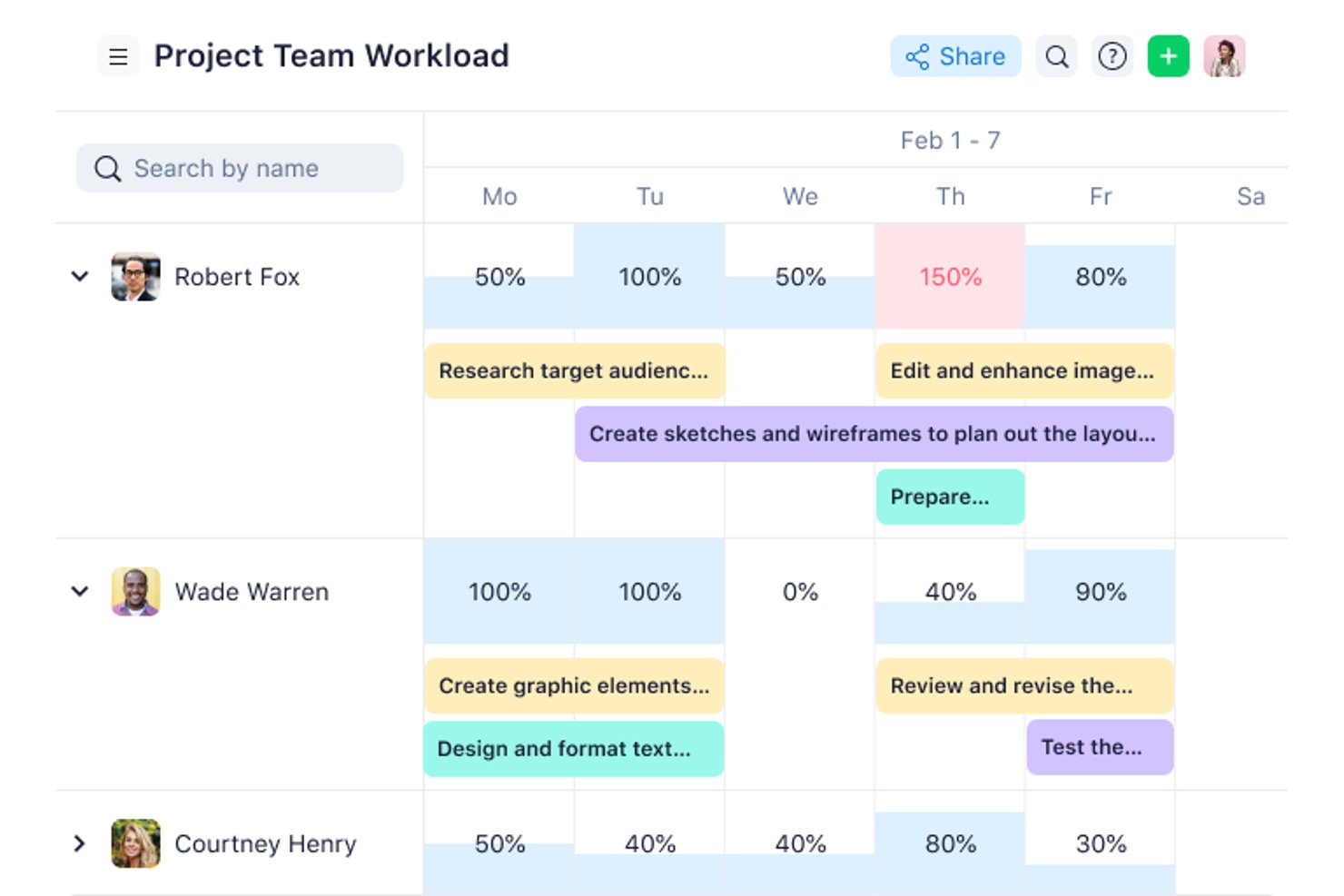
Wrike is a work management platform that brings task tracking, Gantt charts, workload visualization, automation, and cross-project reporting into a single configurable workspace.
Who Is Wrike Best For?
Wrike fits project managers and team leads who are running several concurrent projects and need cross-project visibility, workload tracking, and structured collaboration in one place.
Why I Picked Wrike
I picked Wrike as one of the best because it's built for the reality of running several projects at once without losing track of what's moving and what's stalled. I find the cross-project workload charts especially useful—they show each team member's allocated effort by day or week, so I can spot overload and shift assignments before something slips. Switching between Gantt, board, and table views on the same project data means I'm never locked into one way of seeing the work.
Wrike Key Features
- No-code automation builder: Create WHEN–IF–THEN automation rules for tasks and projects without writing any code.
- Interactive Gantt charts: Visualize task schedules, dependencies, and milestones on a draggable timeline view.
- Custom request forms: Collect incoming work requests and route them directly to the right space or project.
- Real-time dashboards: Build custom dashboards with widgets to monitor project status and team activity across workstreams.
Wrike Integrations
Wrike integrates with 400+ applications, including Slack, Microsoft Teams, Google Sheets, Jira, Google Drive, and Zoom. It offers a RESTful API for custom integrations and supports Zapier.
Pros and Cons
Pros:
- Keep files and approvals beside tasks
- Switch views without duplicating project data
- Clear task ownership, deadlines, and dependencies
Cons:
- Crowded menus can slow down new users
- Workspace setup takes planning before team rollout
New Product Updates from Wrike
Wrike Expands Gantt Planning, Approvals, and AI Work Intake
Wrike adds cross-project Gantt dependencies, flexible approval routing, and AI work intake through Wrike MCP. These updates give teams more control over planning, decision-making, and incoming work. For more information, visit Wrike’s official site.

Packed with features and best for experienced DPMs
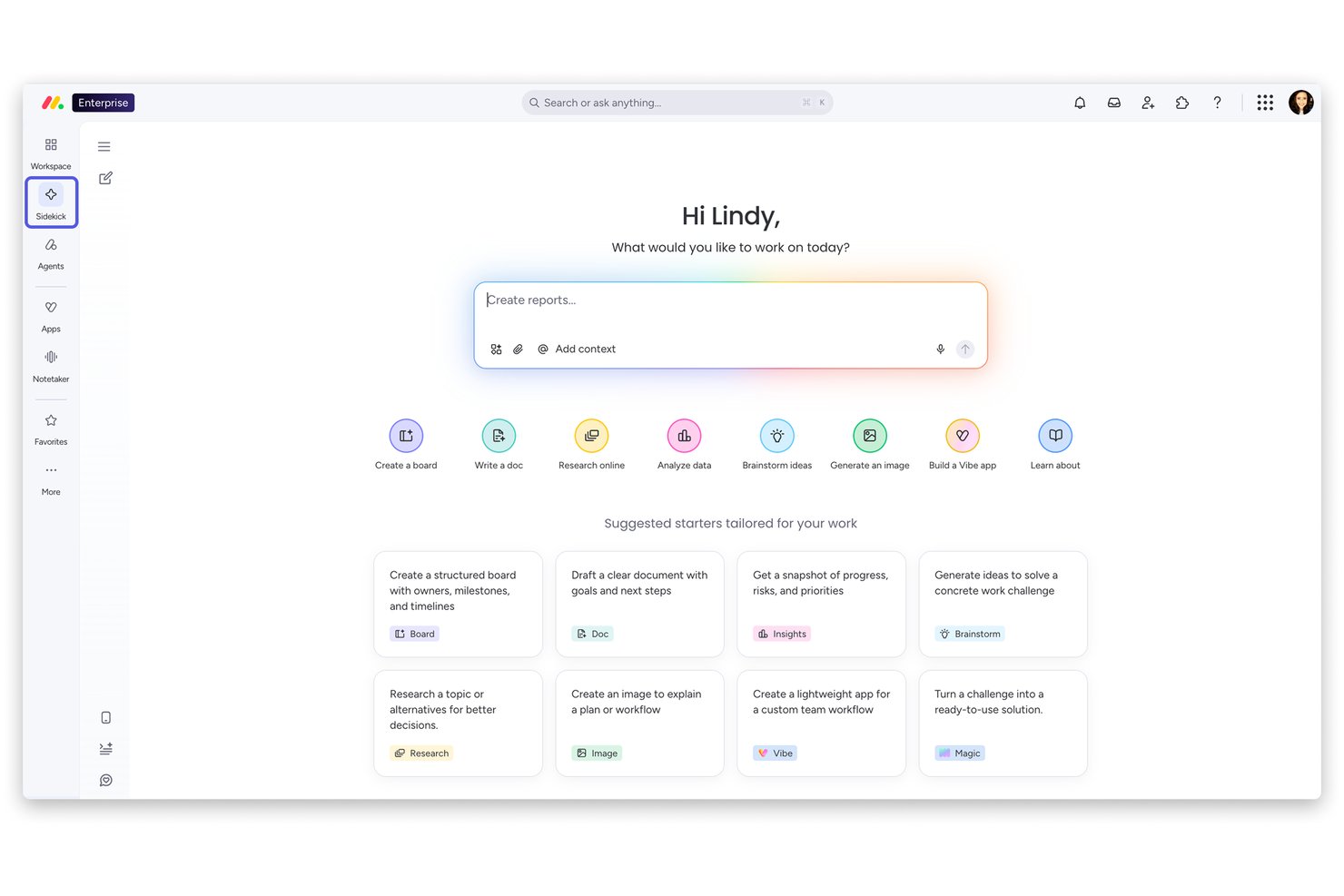
monday work management is a project management platform that brings together visual boards, Gantt charts, Kanban views, automations, and AI-powered planning tools across a highly customizable workspace.
Who Is monday AI Workspace Best For?
monday work management is a strong fit for team leads and managers at growing companies who need deep visibility across multiple projects and workstreams.
Why I Picked monday AI Workspace
I've included monday AI Workspace in my top picks because it's one of the most feature-dense project management platforms I've used, and experienced DPMs will find a lot to work with. I particularly like the AI-generated project plans that produce structured task lists, assigned owners, milestones, and dependency-linked Gantt views from a plain-language description. The Workload widget gives you a clear picture of how effort is distributed across your team, and the Portfolio Risk Insights tool actively scans timelines and dependencies to surface at-risk tasks before they become problems.
monday AI Workspace Key Features
- Kanban boards: Drag-and-drop boards let you move tasks between stages and reorder priorities in real time.
- Guest access: Invite external collaborators—clients, vendors, or freelancers—to specific boards without opening up your full account.
- Automation recipes: Set trigger-based rules to auto-assign tasks, update statuses, or send notifications without writing any code.
- Workdocs: Co-edit living documents directly inside monday.com, with live board data embedded and updating automatically.
monday AI Workspace Integrations
monday.com lists 850+ integrations and apps, including Slack, Google Calendar, Microsoft Teams, Google Drive, Jira, and Zoom. It also supports Zapier plus GraphQL and SDK APIs for custom integrations.
Pros and Cons
Pros:
- Task updates keep discussion beside work
- Templates give teams ready-made project structures
- Color-coded boards make status easy to scan
Cons:
- Mobile omits Gantt and workload views
- Complex automations require configuration and trial-and-error
New Product Updates from monday AI Workspace
monday AI Workspace Adds Human Approval Routing
monday AI Workspace adds a human-in-the-loop approval block to AI Workflows, sending approval requests and routing workflow paths based on responses. For more information, visit monday AI Workspace's official site.

Best for scalability & flexibility
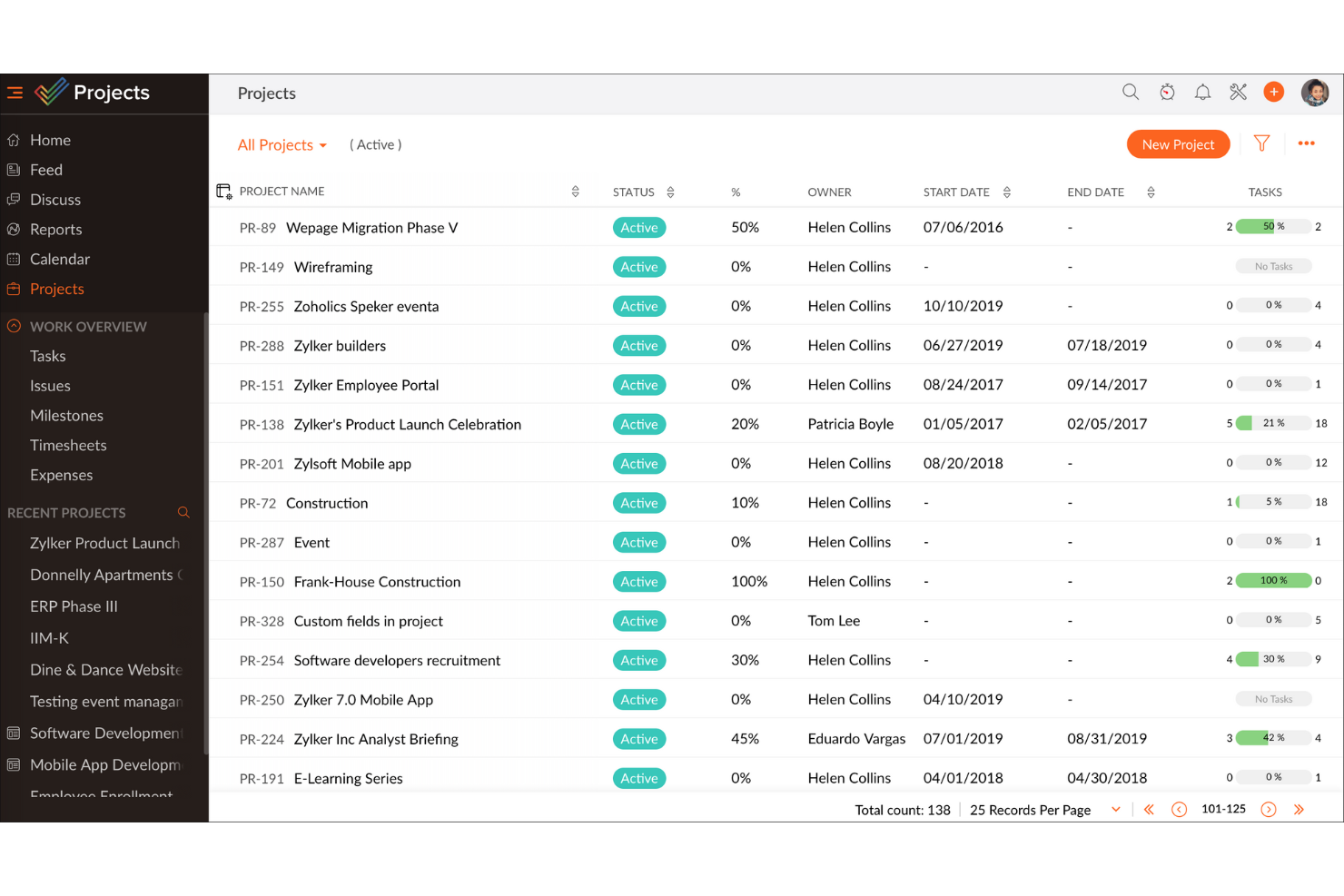
Zoho Projects is a cloud-based project management platform that combines task management, Gantt charts, time tracking, issue tracking, and team collaboration tools across unlimited projects.
Who Is Zoho Projects Best For?
Zoho Projects suits growing teams that need a project management tool that can scale from a small operation to an enterprise-level workflow without switching platforms.
Why I Picked Zoho Projects
Zoho Projects earns its spot on my shortlist because it scales with your team in ways most tools simply can't. I've watched it flex from a five-person startup setup to a multi-team enterprise workflow without a platform switch. Features like customizable workflows and role-based access let you reshape how work is structured as your team evolves, and the built-in Gantt chart keeps complex, shifting timelines visible across every project.
Zoho Projects Key Features
- Issue tracker: A built-in module lets you log, assign, and prioritize bugs or blockers directly within your project.
- Time tracking: Team members can log hours against specific tasks using timers or manual entries tied to project milestones.
- Resource utilization chart: A visual dashboard shows each team member's workload so you can spot over-allocation before it becomes a problem.
- Blueprint: An automated workflow tool that maps out your process steps and enforces transitions between task stages.
Zoho Projects Integrations
Zoho Projects offers native integrations with Zoho CRM, Zoho Desk, Google Calendar, Microsoft Teams, Slack, GitHub, GitLab, Jira Cloud, and Zendesk. It also supports workflow automation through Zapier.
Pros and Cons
Pros:
- Built-in issue tracking keeps blockers contextual
- Gantt charts clarify shifting timelines
- Workflow blueprints guide repeatable task handoffs
Cons:
- Extensive configuration adds setup decisions
- Dense screens can slow first-time setup
New Product Updates from Zoho Projects
Zoho Projects Adds CodeX Scripts for Custom Modules
Zoho Projects now supports CodeX Scripts for custom modules, enabling conditional logic and rules for creating, updating, and deleting records. For more information, visit Zoho Projects' official site.
 .

Celoxis
Best complete project portfolio management software
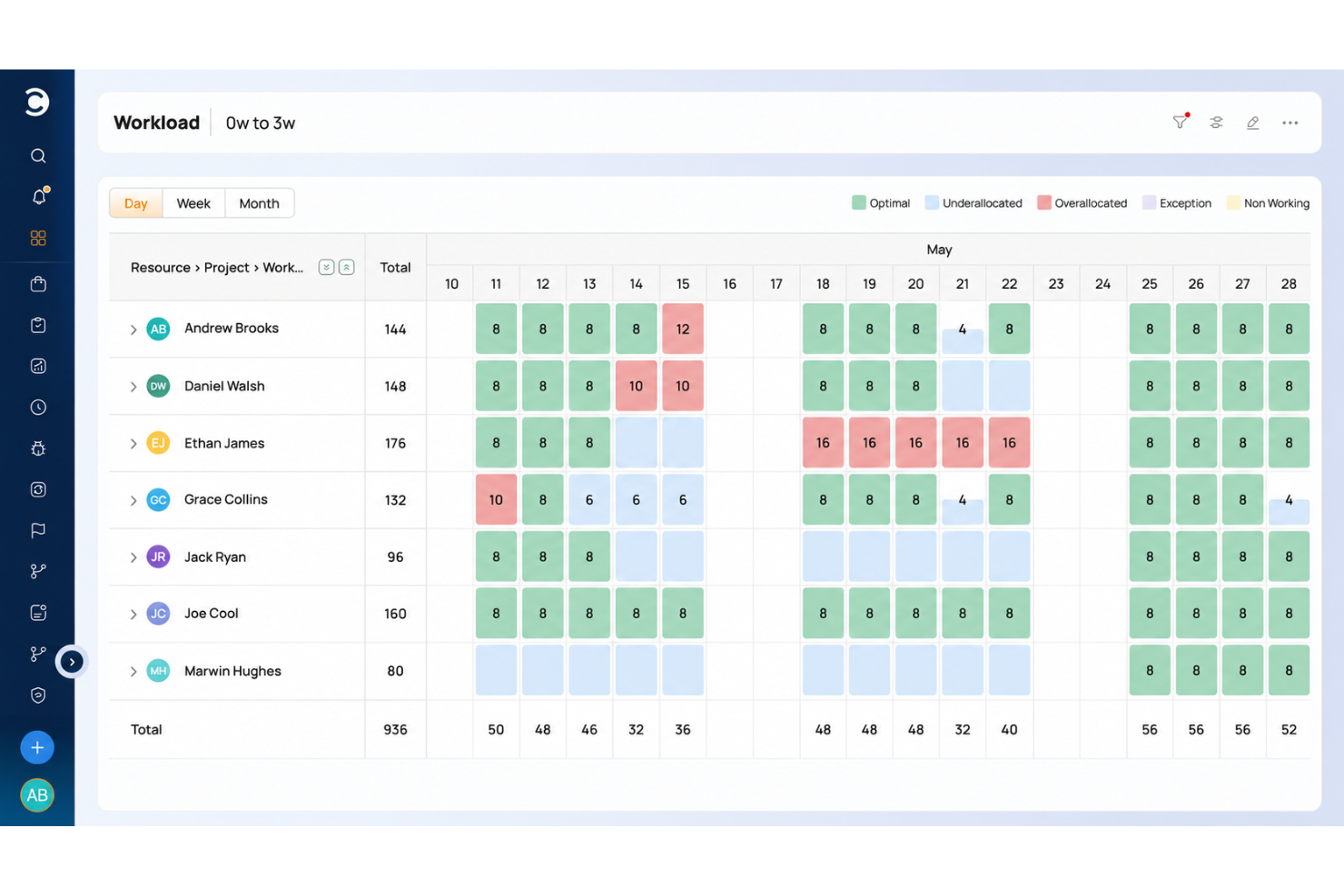
Celoxis is a project and portfolio management platform that covers project scheduling, resource capacity planning, workload visualization, financial tracking, and cross-project reporting in one place.
Who Is Celoxis Best For?
Celoxis is a strong fit for project managers and PMO teams who need to track multiple projects, resources, and budgets across a portfolio from a single platform.
Why I Picked Celoxis
I picked Celoxis as one of the best because it's the only tool on this list that covers the full project portfolio management lifecycle in a single platform. I'm particularly impressed by its cross-project resource capacity planning, which lets you see exactly where team members are overloaded before it becomes a delivery problem. The portfolio-wide Gantt and customizable dashboards also give you a live view of schedules, health indicators, and financials without stitching together separate reports.
Celoxis Key Features
- Built-in time tracking: Log time using in-app timers or a weekly timesheet grid, with approval flows and reminders for missing entries.
- Risk and issue tracking: Track project risks, issues, and change requests using built-in apps included from the Professional plan up.
- Client portal: Give clients a branded, permission-controlled space to view and collaborate on permitted projects and tasks.
- Workload and conflict alerts: Receive automatic alerts when a team member is overloaded or a schedule threshold is crossed.
Celoxis Integrations
Celoxis offers 21 native integrations, including Microsoft Excel, Google Drive, Jira, Microsoft 365, Outlook, and Google Sheets. It connects with 400+ apps through Zapier or its REST API, including Slack and Trello.
Pros and Cons
Pros:
- Centralized task updates reduce scattered tracking
- Gantt charts clarify dependencies and schedules
- Cross-project workload visibility prevents resource overloads
Cons:
- Mobile tools are weaker for project management
- Dense menus slow initial project setup

Best for flexible drag-and-drop scheduling
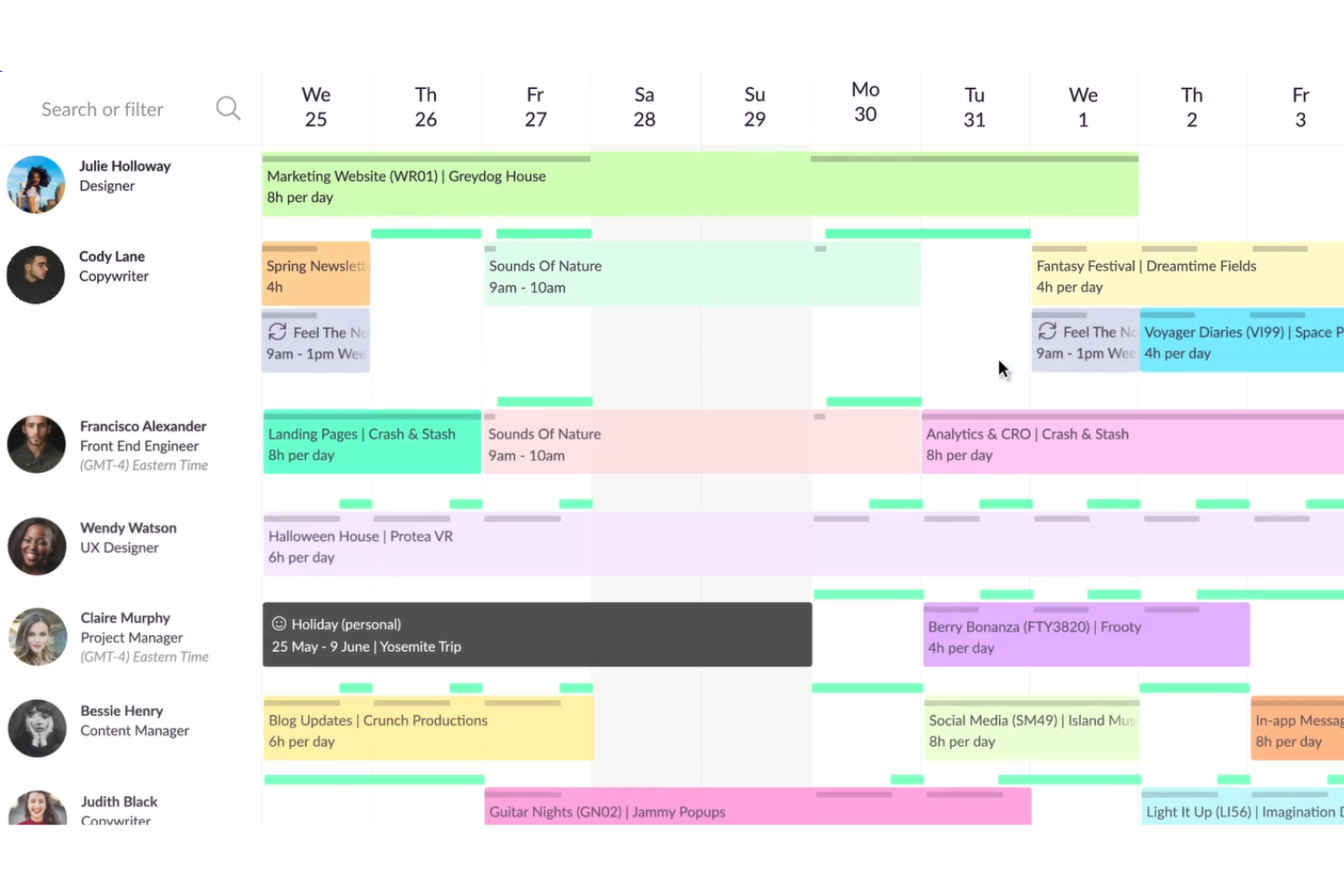
Resource Guru is a resource scheduling and capacity planning tool that lets teams manage people, equipment, and project bookings through visual schedule views, Gantt charts, and workload heatmaps.
Who Is Resource Guru Best For?
Resource Guru is a strong fit for team leads and managers at agencies or consultancies who need to schedule people and resources across client projects without complex setup.
Why I Picked Resource Guru
Resource Guru earns its spot on my shortlist because drag-and-drop scheduling is where it genuinely shines: you can grab a booking, move it to a different person or day, and the schedule updates instantly. I also like how the workload heatmap sits directly on top of the schedule, so you can see at a glance who's over-allocated before you commit to a booking. For managers coordinating people across multiple client projects, that combination of visual scheduling and capacity visibility replaces a lot of manual spreadsheet work.
Resource Guru Key Features
- Capacity heatmap: Color-coded utilization overlay on the schedule shows over- and under-allocation across your team at a glance.
- Gantt chart with task dependencies: Build project plans with phases, tasks, assignees, and finish-to-start dependencies in a drag-and-drop Gantt view.
- Schedule-based timesheets: Automatically populate weekly timesheets from existing bookings so team members spend less time logging hours manually.
- Leave and absence tracking: Record vacations, sick days, and parental leave directly on the shared schedule so availability stays accurate when you're planning work.
Resource Guru Integrations
Resource Guru lists 1,500+ integrations, including native connections with Google Calendar, Jira, Asana, Slack, Google Sheets, and Microsoft Teams. It also offers REST-style API access, webhooks, an MCP server, and Zapier.
Pros and Cons
Pros:
- Reviewers praise clear, easy-to-navigate schedules
- Heatmaps reveal overloaded teammates at a glance
- Drag-and-drop bookings replace spreadsheet scheduling
Cons:
- Mobile access omits native app and Gantt
- Task tracking lacks completion states and priorities
New Product Updates from Resource Guru

Resource Guru Adds More Control Over Calendar Sync
Resource Guru adds more control over Google and Outlook Calendar sync, including source calendar selection and destination calendar options. These updates help users manage external events and Resource Guru bookings with less clutter. For more information, visit Resource Guru’s official site.
 .

Best for no-code app development
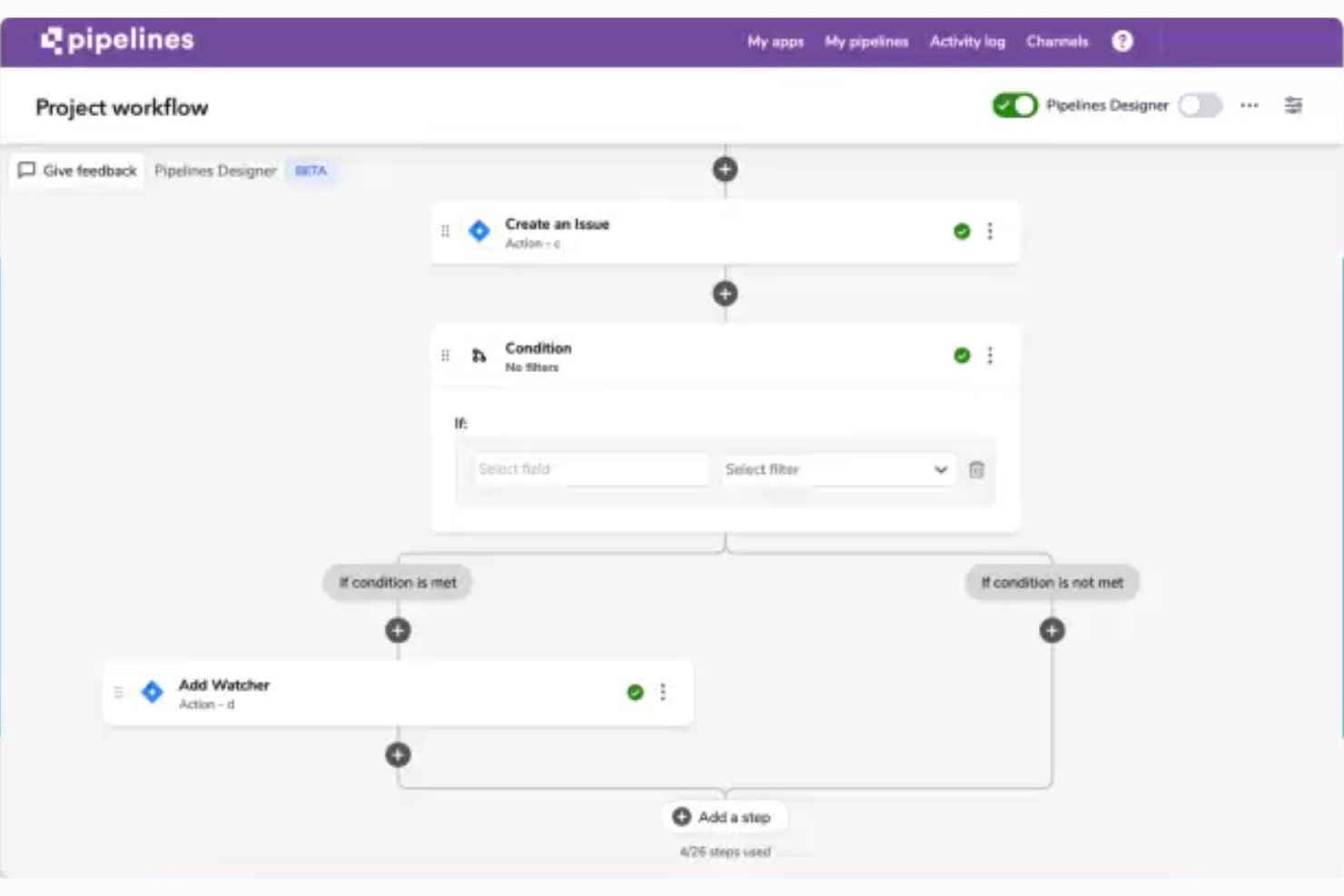
Quickbase is a no-code project management platform that lets teams build custom apps, automate workflows, track tasks and deadlines, and visualize project data across Kanban, Gantt, and calendar views.
Who Is Quickbase Best For?
Quickbase suits team leads and managers in operations-heavy environments who need to build custom tracking apps without writing code.
Why I Picked Quickbase
I picked Quickbase as one of the best because it's the strongest no-code app builder on this list. Instead of squeezing your work into a fixed template, you can describe your process and let Quickbase AI generate a custom project app, or import an existing spreadsheet and have it structure your data into a relational database automatically. The Gantt plugin template ships with tables for tasks, dependencies, baselines, and resource assignments already wired together, so you're building on top of real project logic from day one.
Quickbase Key Features
- Role-personalized dashboards: Each user sees a dashboard tailored to their role, pulling in the reports and project data most relevant to them.
- Quickbase Pipelines: A visual workflow builder that connects third-party tools and defines automated multi-step workflows across systems without writing code.
- Budget tracking with cost-variance alerts: Teams can monitor budget versus actuals and committed spend, with automated alerts when costs drift from plan.
- Spreadsheet import: Upload an Excel file and Quickbase structures your data into a relational database, letting you map field types and labels before the app is created.
Quickbase Integrations
Quickbase claims 40+ pre-built integrations, including native connections to Salesforce, SAP, Oracle, and Microsoft Teams, plus SharePoint and Google Drive. It also supports RESTful APIs and Zapier for custom connectivity.
Pros and Cons
Pros:
- Automations handle task handoffs and alerts
- Spreadsheet imports become structured project apps
- Dashboards consolidate project status and risks
Cons:
- Formula-based app building takes practice
- Advanced workflows need extra setup
Toggl
Best for time tracking built into project tasks
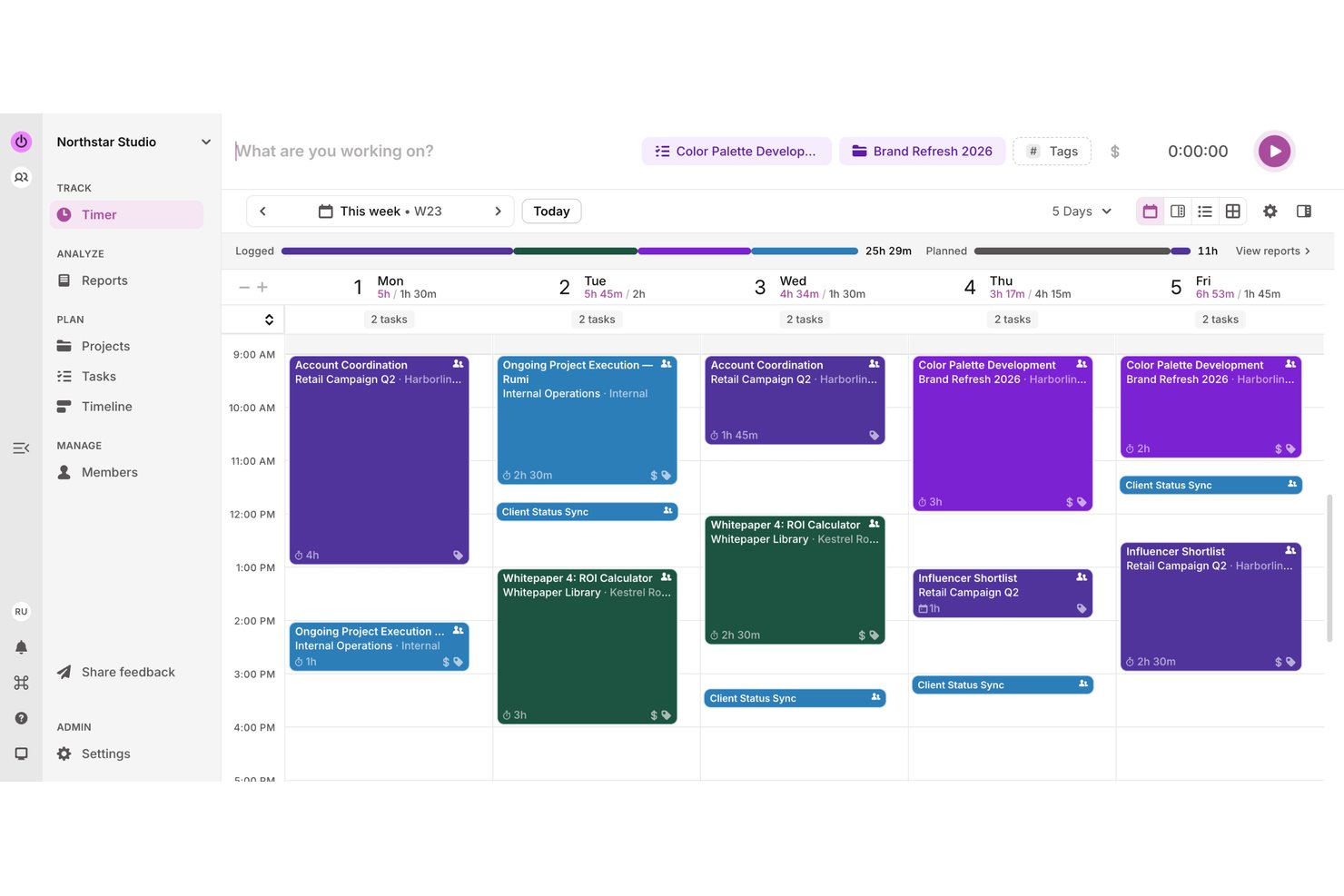
Toggl is a time tracking and project management tool that combines real-time timers, task boards, capacity planning, and workload visualization in a single workspace.
Who Is Toggl Best For?
Toggl is a strong fit for small teams and freelancers who need to track billable hours alongside their project tasks without juggling separate tools.
Why I Picked Toggl
I picked Toggl as one of the best because it's the only tool on this list that builds time tracking directly into project tasks rather than treating it as a separate workflow. I love that you can start a timer from inside a task, so billable hours attach to the right project automatically. The AI Task Creator also lets you photograph a handwritten to-do list and turn it into structured tasks instantly, which I've found genuinely cuts setup time.
Toggl Key Features
- Workload and capacity planning: View each team member's capacity against planned work to spot who's over- or under-allocated before it becomes a problem.
- Multiple project views: Switch between Board, Task list, Calendar, and Timeline views, all pulling from the same underlying task data.
- Project dashboards: Track actual time against estimates and see progress broken down by task and team member in one place.
- Billable rate settings: Set rates at the workspace, member, or project level to keep billing accurate without manual reconciliation.
Toggl Integrations
Toggl offers native integrations with Asana, Google Calendar, Outlook Email & Calendar, Jira, and Slack, plus browser-extension integrations with GitHub, Todoist, and Trello. It also supports Zapier and a REST API, webhooks, MCP server, and CLI for custom connectivity.
Pros and Cons
Pros:
- Reviewers praise intuitive daily time tracking
- Board, list, calendar, and timeline views
- Quick timers keep task-time records together
Cons:
- Task assignments don’t trigger user notifications
- No documented task due dates or dependencies

Quire
Best for breaking down complex projects
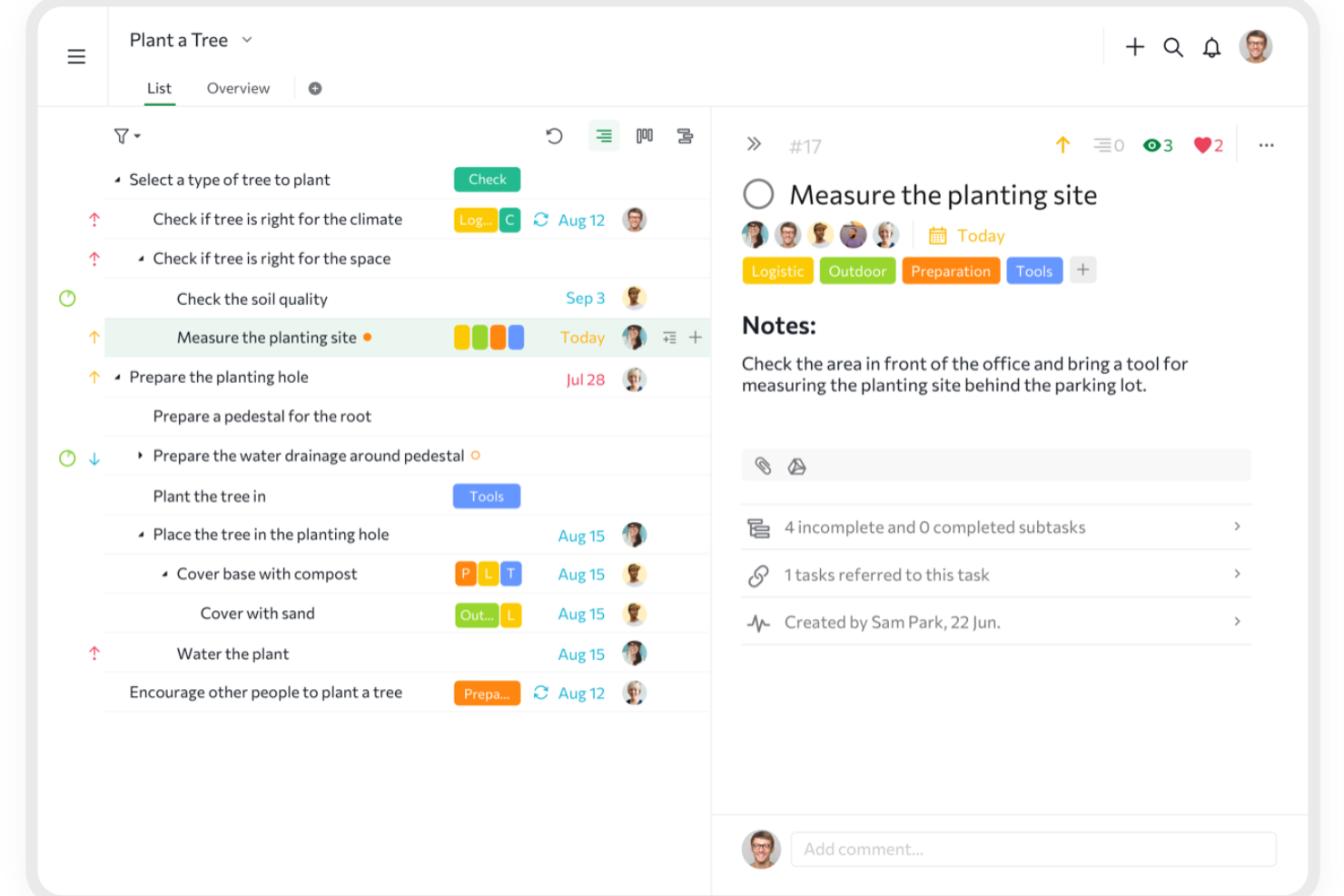
Quire is a project and task management tool built around a nested list structure, with Kanban boards, timeline, calendar, and table views alongside built-in time tracking and cross-project visibility.
Who Is Quire Best For?
Quire is a strong fit for team leads managing layered, multi-part projects who need to break complex work into subtasks without switching to a heavier tool.
Why I Picked Quire
I picked Quire as one of the best because it handles complex project breakdown better than almost any tool I've used. Its nested task structure lets you drill down into unlimited subtask levels, so a single deliverable can become a fully organized hierarchy without ever leaving the project view. I also rely on the Panorama view to track tasks across multiple projects at once, which keeps everything visible when work spans several workstreams.
Quire Key Features
- Kanban board: Arrange tasks visually across custom workflow statuses to track progress from start to completion.
- Built-in time tracking: Log time on tasks using a stopwatch or Pomodoro timer, with billable indicators and manager-facing reports.
- External teams access: Share specific tasks with clients or third-party collaborators without exposing the rest of your project.
- Dashboard view: Monitor task status, deadlines, workload, and project health from a single configurable dashboard.
Quire Integrations
Quire offers native integrations with Google Drive, Dropbox, Box, Slack, Microsoft Teams, GitHub, and Google Calendar. It also supports n8n marketplace integrations, REST API, webhooks, OAuth 2.0, MCP, and Zapier.
Pros and Cons
Pros:
- Kanban and timeline views clarify task progress
- Templates and simple setup help teams start
- Nested subtasks keep complex work legible
Cons:
- Nested lists take adjustment from flat workflows
- Mobile app omits some desktop capabilities
New Product Updates from Quire
Quire Adds Custom Field Locking and Comment Reaction API Support
Quire adds custom field locking and API support for reading and setting emoji reactions on comments. These updates give teams more control over field data and expand comment interaction options for developers. For more information, visit Quire’s official site.
 .

Miro
Best for visual collaboration & innovation
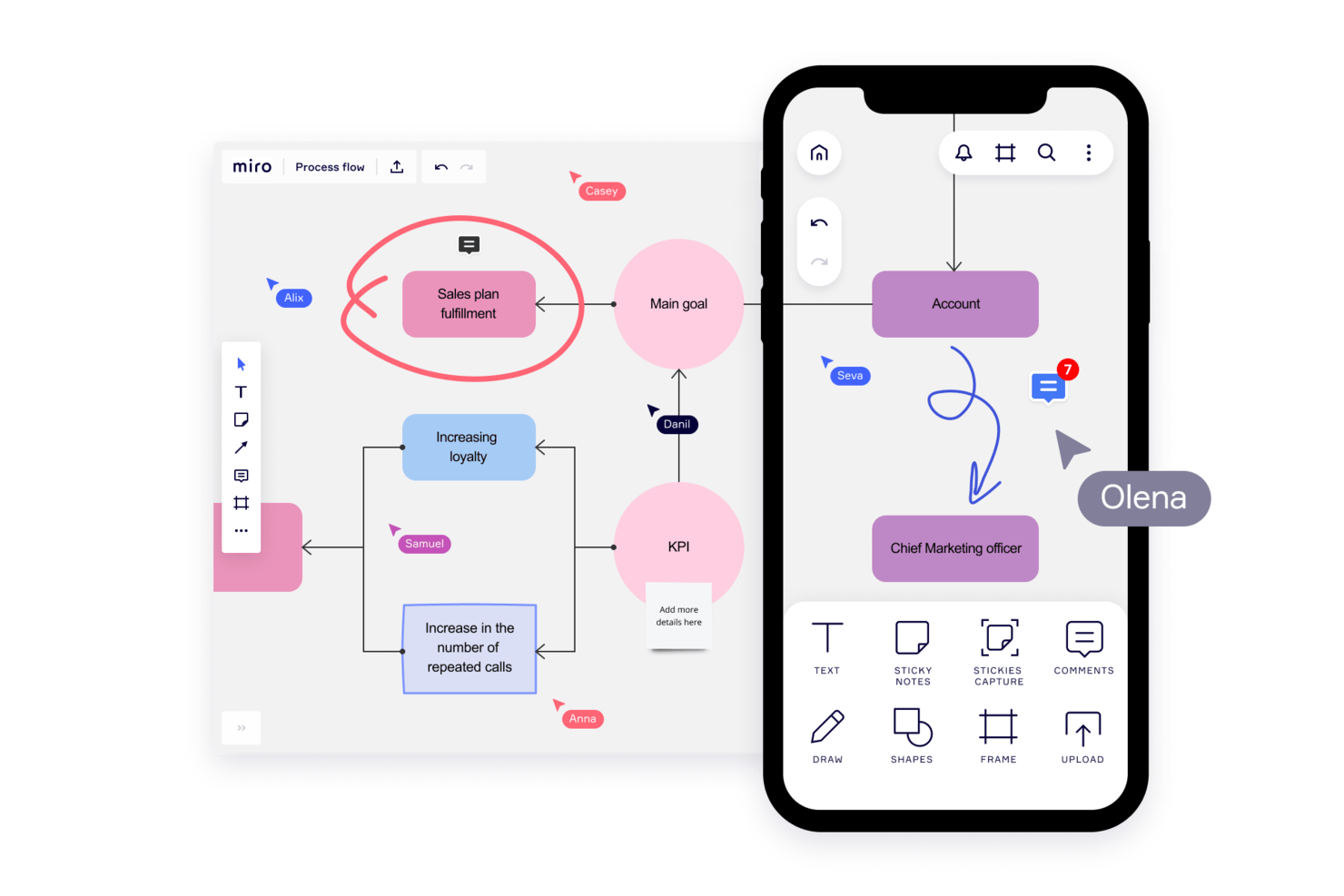
Miro is a visual collaboration platform that combines an infinite canvas with project tracking, Kanban boards, timelines, templates, and real-time team collaboration tools.
Who Is Miro Best For?
Miro works best for cross-functional teams that prioritize visual thinking—especially product, design, and innovation teams who need a shared space to brainstorm, plan, and align before moving into execution.
Why I Picked Miro
Miro earns its spot on my shortlist because it's the only tool here that treats the canvas itself as the project. I love how Blueprints let my team launch a fully structured workspace—complete with a roadmap, Kanban board, and dependencies—in minutes, without building anything from scratch. In practice, that means my team can run a sprint planning session and immediately convert sticky notes into tracked Table records with assignees and due dates on the same board.
Miro Key Features
- Real-time co-editing: Multiple team members can work on the same board simultaneously, with changes visible to everyone instantly.
- Excel import for tables: Teams can import
.xlsxfiles directly into Miro Tables to migrate existing spreadsheet data without manual re-entry. - Talktrack video walkthroughs: Users can record narrated, interactive video tours of a board so teammates can review updates asynchronously.
- AI-powered board summaries: Miro AI reviews board content and surfaces key themes, decisions, and suggested next steps in a digestible summary.
Miro Integrations
Miro supports 250+ integrations, including Microsoft 365, Google Workspace, Jira, Asana, Slack, Microsoft Teams, and Figma. It also offers REST APIs, Web SDKs, Enterprise APIs, an MCP server, and Zapier.
Pros and Cons
Pros:
- Sticky-note conversion creates trackable tasks
- Live edits keep distributed teams aligned
- Template boards launch projects quickly
Cons:
- Linear task allocation feels less natural
- Large boards become cluttered and sluggish
New Product Updates from Miro
Miro Adds Japan Data Residency for Enterprise Customers
Miro has introduced Japan data residency for enterprise customers, offering in-region storage for production data, backups, and metadata, plus in-region compute infrastructure. For more information, visit Miro's official site.
Airtable
Best for spreadsheet imports with multiple views
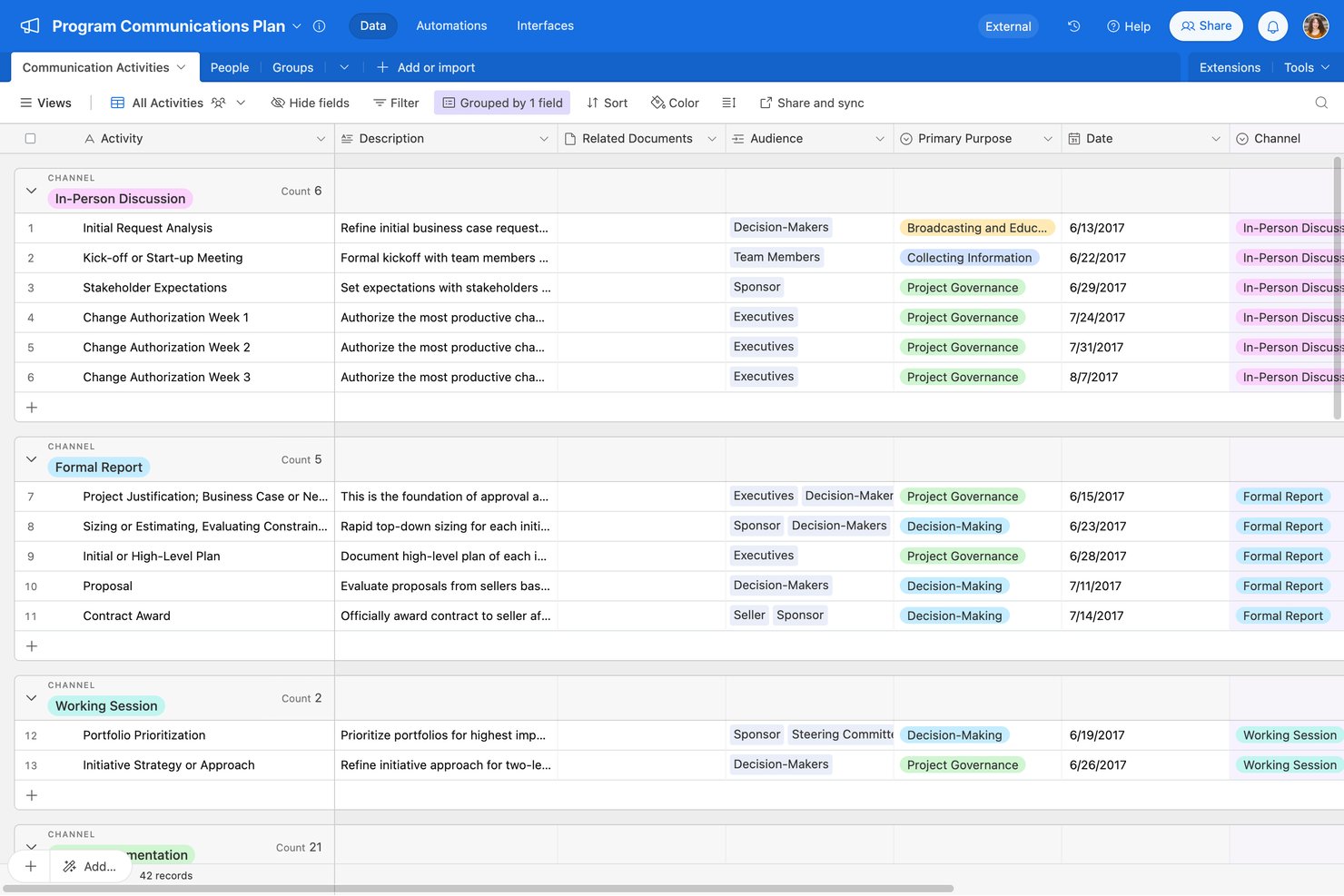
Airtable is a no-code project management platform that combines a relational database foundation with spreadsheet-style grids, multiple visual views, automation workflows, and AI-assisted app building.
Who Is Airtable Best For?
Airtable is a strong fit for small teams and team leads who want to move their spreadsheet-based project tracking into a more structured, multi-view workspace.
Why I Picked Airtable
I picked Airtable as one of the best because it's the cleanest path I've seen for moving spreadsheet data into a structured project workspace. You import from CSV, Excel, or Google Sheets and immediately get access to seven view types, including Kanban, Gantt, and timeline, all pulling from the same underlying data. I especially like the task-tracking template, which comes preloaded with assignees, date dependencies, subtasks, and a notify-assignee automation already wired up.
Airtable Key Features
- Capacity planning template: A prebuilt workload dashboard that tracks each team member's allocated hours, utilization percentage, and over-capacity status across projects.
- Trigger-and-action automations: A no-code automation builder that connects triggers and multi-step actions across Airtable and external tools like Slack, Gmail, and Salesforce.
- Interface Designer: A drag-and-drop tool for building custom, role-specific views of your base data without writing any code.
- Date dependency cascading: A scheduling feature that automatically updates dependent task dates when an upstream date changes, keeping timelines aligned across linked records.
Airtable Integrations
Airtable offers integrations with Google Sheets, Excel, Jira, Slack, Google Drive, Salesforce, and Box. It also provides an API for custom integrations and supports Zapier.
Pros and Cons
Pros:
- Shared dashboards keep project status visible
- Templates prebuild task assignments and notifications
- Spreadsheet imports populate multiple visual views
Cons:
- Mobile omits Gantt, timeline, and automation tools
- Advanced bases need deliberate design and upkeep
Outro software de gestão de projetos fácil de utilizar
Eis mais algumas opções que não entraram na lista principal, mas que vale a pena considerar.
- Nifty
For AI-generated project setup from a prompt
- Asana
For transforming complex management
- ProofHub
For flat-rate team task and deadline tracking
- Paymo
For billing clients from tracked project time
- Smartsheet
For spreadsheet-style work with multiple views
- Trello
For projects with little to no dependencies
- ClickUp
For intuitive, easy to navigate, and interactive
- GanttPRO
For Gantt charts built in minutes
- awork
For AI-driven agency scheduling
- Productive
For all-in-one agency project and billing
- Notion
For all-in-one docs, tasks, and wikis


How I Evaluate Easiest Project Management Software
I split my evaluation into three parts, with core functionality carrying the most weight: assign tasks, track deadlines, and see project status. Next, I look for standout features like built-in time tracking. Finally, I consider onboarding, support, and clear pricing.
Core Functionality (Table Stakes For This List)
When I'm selecting tools for my list, I score each one on a scale from 0 (does not offer the functionality) to 5 (excels in this area) for each core functionality listed below. I then convert the total into a percentage to help assess each tool's overall fit, with extra weight on any functionalities I’ve deemed essential.
- Task & Project Tracking (Essential): I look for task assignment, due dates, statuses, and progress across projects, including dependencies when teams coordinate workstreams.
- Minimal Setup (Essential): I consider how quickly a new team can create a project, assign work, and track progress without configuring custom workflows first.
- Visual Workflow Views: I check for useful views such as boards, lists, and calendars to spot overdue tasks or shifting deadlines.
- Team Collaboration Tools: I look for task-level comments, file attachments, and notifications that keep decisions and updates with the work.
- Guided Project Templates: I assess whether ready-made templates cover common work, such as a launch plan, and can be adapted for reuse.
- Mobile Access: I check whether team members can create and update tasks from a mobile app while away from their desks.
Once I have a list of tools that meet the criteria, I consider what sets each platform apart.
Differentiating Factors (What Sets Vendors Apart)
Here's how I compare and contrast different vendors:
Standout Features
I look for built-in time tracking because it removes the need for a separate app when teams log hours against tasks. Automation recipes matter just as much—I check whether a tool lets you create no-code rules that update statuses or send reminders when a deadline shifts. I also evaluate workload views, since spotting an overloaded team member before a sprint starts beats discovering it after a missed deadline.
Beyond Features
I check whether a tool publishes clear per-user pricing and offers a usable free tier, since freelancers and small teams need to validate ease-of-use claims before spending. Onboarding matters just as much—I look for in-app tooltips, short videos, and responsive chat support that let non-technical users get started without formal training. I also evaluate whether adding people or projects forces you to rebuild existing workflows, because the easiest tool at five users should still feel manageable at twenty.
Como escolher o software de gestão de projetos mais fácil de utilizar
É fácil sentir-se assoberbado por listas extensas de funcionalidades e preços complexos. Para o ajudar a manter-se concentrado durante o processo de seleção do software, eis uma lista de verificação dos principais fatores a ter em conta:
| Fator | O que considerar |
| Escalabilidade | Certifique-se de que o software consegue acompanhar o crescimento da sua equipa, disponibilizando funcionalidades como armazenamento expandido ou mais lugares de utilizador sem uma curva de aprendizagem acentuada. |
| Integrações | Certifique-se de que o software se liga às ferramentas que já utiliza, como o Slack, o Google Workspace ou sistemas de CRM, para simplificar os fluxos de trabalho da equipa. |
| Capacidade de personalização | Procure opções para personalizar fluxos de trabalho, painéis e etiquetas de tarefas de acordo com as necessidades da sua equipa, sem exigir conhecimentos técnicos avançados. |
| Facilidade de utilização | Dê prioridade a software com uma interface intuitiva, simples de utilizar por todos os membros da equipa, mesmo sem formação prévia. |
| Orçamento | Escolha uma ferramenta com preços transparentes que se enquadre no seu orçamento. Procure planos acessíveis sem custos ocultos. |
| Medidas de segurança | Garanta a proteção dos dados através de encriptação, acesso baseado em funções e conformidade com normas como o RGPD ou a ISO 27001. |
| Opções de suporte | Verifique a disponibilidade do apoio ao cliente, incluindo chat em direto, e-mail e uma base de conhecimento, para resolver problemas rapidamente. |
| Acessibilidade móvel | Confirme se o software dispõe de uma aplicação móvel robusta para que a sua equipa possa gerir tarefas e colaborar em mobilidade. |
Apesar disso, lembre-se de que o software de gestão de projetos mais fácil de utilizar pode ser aquele que melhor se adequa ao seu setor. Neste caso, o software de gestão de projetos para educação, engenharia, negócios ou outras áreas pode ser o mais adequado para a sua organização.
Tendências no software de gestão de projetos
Na minha pesquisa, recolhi inúmeras atualizações de produtos, comunicados de imprensa e registos de lançamento de vários fornecedores de software de gestão de projetos fácil de utilizar. Eis as principais tendências que estou a acompanhar:
- Simplificação com IA: as ferramentas de gestão de projetos com IA criam listas de tarefas a partir de descrições breves, poupando tempo e facilitando a integração.
- Mapeamento visual de fluxos de trabalho: os painéis de arrastar e largar, as linhas cronológicas e as tarefas identificadas por cores facilitam a visualização do progresso sem necessidade de relatórios.
- Integração orientada pelo utilizador: os tutoriais interativos e os assistentes ajudam as equipas a começar rapidamente, sem necessidade de formação externa.
- Ferramentas de feedback instantâneo: os comentários integrados e as atualizações de estado reduzem o número de e-mails e centralizam a comunicação.
- Partilha simplificada de dados: as exportações com um só clique e as ligações partilháveis mantêm as partes interessadas informadas sem exigir inícios de sessão adicionais.
O que é um software de gestão de projetos fácil de utilizar?
O software de gestão de projetos fácil de utilizar é uma ferramenta concebida para simplificar o planeamento, a organização e o acompanhamento de tarefas para equipas com experiência técnica reduzida.
Ajuda os utilizadores a gerir projetos através de funcionalidades simples, como listas de tarefas, calendários e ferramentas básicas de colaboração. Os gestores de projetos, as equipas pequenas e os utilizadores sem conhecimentos técnicos utilizam frequentemente software de gestão de projetos fácil de utilizar para coordenar o trabalho, acompanhar o progresso e cumprir prazos sem o incómodo de navegar por sistemas complexos.
Funcionalidades do software de gestão de projetos fácil de utilizar
Ao selecionar um software de gestão de projetos fácil de utilizar, esteja atento às seguintes funcionalidades principais:
- Interface de utilizador intuitiva: Uma interface fácil de navegar, mesmo que seja novo na gestão de projetos. Pode começar diretamente a planear e acompanhar projetos sem horas de formação ou dificuldades de configuração.
- Gestão simples de tarefas: Uma forma direta de criar, atribuir e definir prioridades para tarefas. Isto permite-lhe ver claramente quem é responsável por cada tarefa, ajudando-o a manter os projetos no caminho certo sem uma troca interminável de e-mails.
- Funcionalidade de arrastar e largar: Mova facilmente tarefas ou projetos com apenas um clique do rato. Esta funcionalidade ajuda-o a atualizar rapidamente cronogramas ou responsabilidades, fazendo com que a alteração de prioridades pareça menos um número de circo.
- Modelos integrados: Escolha entre modelos de projetos prontos a utilizar para configurar o seu fluxo de trabalho em poucos minutos. Os modelos evitam que tenha de reinventar a roda e facilitam um bom começo para todos.
- Ferramentas de colaboração: Funcionalidades de comentários em tempo real, partilha de ficheiros e conversação de equipa. Estas ferramentas facilitam a partilha de informação entre todos, reduzem os problemas de comunicação e ajudam a equipa a avançar em conjunto.
- Painéis de relatórios claros: Os painéis visuais apresentam, de relance, o progresso dos projetos, os prazos e a carga de trabalho. Isto mantém-no informado e permite-lhe identificar problemas antes de se transformarem em verdadeiros desastres.
- Acessibilidade móvel: Utilize o software no seu telemóvel ou tablet para consultar atualizações dos projetos ou efetuar alterações em movimento. Uma flexibilidade deste tipo significa que raramente fica preso à sua secretária.
- Opções de integração simples: Ligue as suas aplicações favoritas de calendário, e-mail ou armazenamento de ficheiros para que as suas ferramentas funcionem em conjunto de forma integrada. Não perderá tempo a alternar entre plataformas para concluir pequenas tarefas.
- Lembretes automatizados: O software envia lembretes amigáveis sobre os próximos prazos. Isto ajuda-o a si e à sua equipa a lembrarem-se do que tem de ser entregue — acabaram-se os momentos de «Esqueci-me!».
- Controlos de permissões: Decida quem pode ver ou editar projetos e informações sensíveis. Isto garante que as pessoas certas têm o acesso adequado, sem causar confusão ou preocupações de segurança.
Funcionalidades de IA em software simples de gestão de projetos
Muitas opções de software simples de gestão de projetos incluem agora funcionalidades de IA integradas que tornam o seu trabalho ainda mais fluido. As funcionalidades comuns em software de gestão de projetos com IA incluem:
- Sugestões inteligentes de tarefas: A IA pode recomendar os próximos passos ou ajudá-lo a dividir projetos de grandes dimensões em tarefas geríveis, para que nunca fique sem saber o que fazer a seguir.
- Agendamento automatizado: A IA analisa as cargas de trabalho e os prazos para sugerir os melhores cronogramas para os seus projetos, ajudando-o a equilibrar a capacidade da sua equipa sem sobrecarregar ninguém.
- Análise preditiva: Receba alertas antecipados sobre possíveis estrangulamentos ou atrasos antes de acontecerem, graças a informações baseadas em IA e nos dados do seu projeto.
- Chatbots com IA: Precisa de ajuda rápida ou quer atualizar uma tarefa? Os chatbots podem responder a perguntas, obter informações ou efetuar alterações por si, poupando-lhe tempo e cliques.
- Gestão inteligente de documentos: A IA pode organizar ficheiros automaticamente, atribuir etiquetas a documentos ou até resumir notas de reuniões, para que passe menos tempo à procura e mais tempo a trabalhar.
Benefícios do software simples de gestão de projetos
A implementação de software simples de gestão de projetos pode proporcionar vários benefícios à sua equipa e à sua empresa. Eis algumas das principais vantagens:
- Integração mais rápida: As interfaces simples ajudam os novos membros a começar rapidamente, sem longas sessões de formação.
- Melhor visibilidade das tarefas: Os painéis e quadros de tarefas mostram quem está a fazer o quê e o que se segue.
- Melhor gestão do tempo: Os lembretes e os prazos mantêm as tarefas dentro do calendário e evitam atrasos.
- Colaboração melhorada: Os comentários e a partilha de ficheiros integrados reduzem a troca de e-mails e centralizam a comunicação.
- Relatórios simplificados: As ferramentas básicas de elaboração de relatórios permitem criar e partilhar atualizações facilmente com as partes interessadas.
- Menos stress: Os esquemas e fluxos de trabalho claros minimizam a confusão, permitindo que as equipas se concentrem no trabalho.
- Maior produtividade: As ferramentas simples reduzem o tempo de configuração, permitindo que as equipas se concentrem na conclusão dos projetos.
Custos e preços do software simples de gestão de projetos
A seleção de software simples de gestão de projetos exige uma compreensão dos vários modelos de preços e planos disponíveis. Os custos variam consoante as funcionalidades, a dimensão da equipa e os complementos. A tabela abaixo apresenta planos comuns, preços médios e funcionalidades típicas encontradas em software simples de gestão de projetos:
Tabela de comparação de planos para software de gestão de projetos fácil de utilizar
| Tipo de plano | Preço médio | Funcionalidades comuns |
| Plano gratuito | $0/user/month | Gestão básica de tarefas, armazenamento limitado e colaboração para equipas pequenas. |
| Plano pessoal | $5–$15/user/month | Acompanhamento de tarefas, partilha de ficheiros, integração com o calendário e ferramentas de elaboração de relatórios limitadas. |
| Plano empresarial | $20–$50/user/month | Relatórios avançados, ferramentas de colaboração de equipa, personalização de fluxos de trabalho e maior capacidade de armazenamento. |
| Plano empresarial de grande escala | $60–$100/user/month | Segurança de nível empresarial, suporte prioritário, utilizadores ilimitados e opções de integração inicial personalizáveis. |
Perguntas frequentes sobre software de gestão de projetos fácil de utilizar
Eis algumas respostas a perguntas frequentes sobre o software de gestão de projetos mais fácil de utilizar: