

What Is Project Dependency Mapping & How to Do it in 5 Steps


Dependency mapping (alongside the right project management software) helps spot task conflicts, bottlenecks, and sequencing risks before they slow delivery or your timeline. I’ll cover how to build a dependency map, identify relationships, choose the right tools, and keep projects moving when priorities, approvals, or resourcing shift.
What Is Project Dependency Mapping?
Project dependency mapping is the process of identifying dependencies between project tasks and creating a visual representation of how they are related to each other.
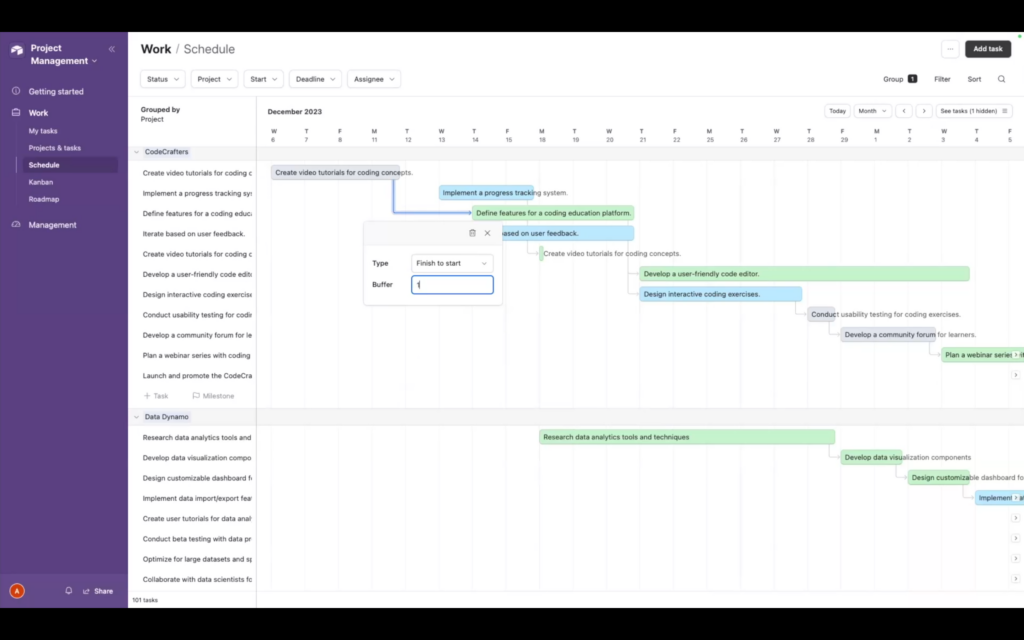
Your dependency map shows the relationship between tasks so stakeholders can understand them and you can see where project bottlenecks are most likely to occur.

Here’s an example of a project dependency: if you are setting up a new design studio, you need to order computers before you can set them up. You also need to order any required software before you install it on the new machines. You can’t do these tasks out of order—having the computers is a dependency for installing the software.
What To Include In A Project Dependency Map
Here is what you need to include in your dependency map:
Nodes & Arrows
Each node (sometimes called an element) corresponds to a single task in your project. For a website project, for example, the nodes are the steps: designing each page template, adding content, and installing each plugin. For a larger project, you might have hundreds of nodes.
You’ll use arrows to show the relationship between nodes. The arrows directionally show the order of tasks that need to be completed.
Dependency Types
Arrows in a dependency map are used to show different types of project dependencies. These include:
- Finish-to-start: In a finish-to-start dependency, the dependent task cannot begin until the task that it depends on has been completed. In our earlier example, the computers need to be delivered before they can be set up.
- Start-to-start: The dependent task can start at the same time as the task it depends on. To continue our example project of setting up new computers, you can start installing software at the same time you start setting up computers.
- Finish-to-finish: The task in question can only be considered complete when the task it is dependent on is also finished. For example, in a website project, the content can only be marked complete when it is approved.
- Start-to-finish: The dependent task can finish when the task it depends on starts. For example, if a support team is required to be available at all times, a developer can’t clock out before the next developer arrives and clocks in.

Weight
Your dependency map should contain information on the relative strength or weight of each dependency (i.e. how strong the impact of each dependency is).
Timeline
A dependency map should also contain a timeline to orient the reader, so they understand how long the project and each step will take.
Descriptions
You can add descriptions to the dependency map to provide additional information or context so the reader can better understand the process or relationships between the dependencies.
Benefits of Project Dependency Mapping
I’ve found project dependency mapping helps teams avoid preventable delays and make better decisions when priorities shift:
- Earlier Risk Detection: Dependency maps reveal blockers before they impact delivery. You can spot overloaded teams, approval gaps, or sequencing problems while there’s still time to adjust.
- Better Resource Planning: You can see where key people or tools are stretched too thin. This makes it easier to rebalance workloads before deadlines start slipping.
- Clearer Team Alignment: Teams understand how their work affects others. That visibility reduces confusion, duplicate work, and missed handoffs between departments.
- Fewer Timeline Surprises: Dependency mapping highlights tasks that could delay the entire project. I use it to protect launch dates and avoid last-minute firefighting.
- Faster Decision-Making: When priorities change, you can assess downstream impact. Stakeholders spend less time debating and more time resolving issues.
- Stronger Stakeholder Communication: Dependency maps give leadership and clients a shared view of project progress. That transparency helps build trust during high-pressure phases.
- More Accurate Project Forecasting: Mapping dependencies improves estimates because you account for reviews, approvals, and external constraints upfront.
How To Do Project Dependency Mapping
Here is a step-by-step guide to creating a project dependency map.
1. Identify Project Tasks & Resources
Identify all the tasks your team will need to complete and all the available resources you’ll have. At this point, you’re just determining what needs to be done. You don’t need to think too much about the order of operations or dependencies just yet.
2. Assign Tasks To Team Members
Determine who on the project team can tackle which tasks. This type of decision-making is more straightforward if you have clear roles within the team.
On a website project, for example, your UX designer might be responsible for creating wireframes and the site navigation, and a content strategist will advise on the content. The strategist can work with a copywriter to ultimately create the copy.
3. Identify Dependencies
Now that you’re clear on who needs to do what, identify your dependencies (and any interdependencies). What order do the tasks need to happen in? Are there reviews or approvals that might block your team from moving to the next phase of work?
Some common examples of task dependencies include:
- Designs need to be completed and approved before beginning development
- Images need to be selected and approved before they are uploaded to the CMS
- Clients need to sign off before a website can be launched
4. Account For Constraints
There are many types of constraints you’ll need to account for on your dependency map (this will also help with risk management and mitigation).
The most common constraints in digital project management include:
- Budget: How much budget do you have (including labor) to complete the project?
- Time: How much time has been allotted to complete the work?
- Resources: What resources do you have access to? Resource constraints could be based on budget, team member availability, and geographic location, among other things.
5. Adjust Schedule & Resource Assignments
Next, adjust the resource schedule and load balance resourcing assignments. Some project management software tools have dependency mapping functionality or automation that can help with this. Otherwise, you can revise your map by hand.
What does this look like? It might involve extending a content planning phase because your only content strategist is already booked on another project, or bringing on a third developer so that you have enough development hours in the timeframe before your project is required to launch.
Tools For Dependency Mapping
While you can use a flowchart as a crude type of dependency map, resource management software and project management software are best for dependency mapping, project planning, and resource allocation. These tools help visualize how changes to the project timeline impact dependencies in real time.
By using a specific tool for dependency mapping, you eliminate the risk of missing a step or overbooking a resource. Here is a list of the best resource management software for this purpose on the market:
Clicks on the links below may earn a commission, which supports our independent testing and review of software and services. Learn more about how we stay transparent.


Dependency Mapping Best Practices
Here are some additional best practices to help create dependency maps that show timelines, milestones, and any potential bottlenecks in your project plan.
1. Treat Your Dependency Map as a Project Roadmap
Your dependency map should help you and your project team members understand how to get from the beginning of your project to the end of your project. The map can help account for both internal dependencies and external dependencies that need to be resolved for smooth project execution.
Make sure all the necessary workflows for each task or deliverable (and who will do each step) are represented in your map. This will help you avoid surprises later.
For example, if you have a project team member scheduled for a two-week vacation during your project, make sure this is reflected in the dependency map. Plan coverage or make a schedule adjustment so there aren’t any unanticipated delays.
2. Review the Dependency Map Regularly
There will always be disruptions to the project plan. Your dependency map is not a set-it-and-forget-it activity. Make sure the full team and any relevant stakeholders review the map at regular intervals and that you make any updates accordingly.
If you plan to use a dependency map for an agile project, the agile team should review the dependency map at the end of each sprint.
3. Review During the Project Retrospective
Your dependency map can help you improve your processes even when it’s complete. As part of your project retrospective, bring in your dependency map and any relevant insights from it.
For example, if you ran a software development project that included a lot of rework over its life cycle, your dependency map might show some of the reasons this happened. Maybe you didn’t have enough review cycles or you missed requirements due to a lack of input from the client early in the project.
Join For More Project Management Insights
If you want to connect with other digital project managers to share resources and best practices, join our membership community. Here, you’ll find 100+ templates, samples, and examples and have the opportunity to connect with other digital project managers in Slack.


